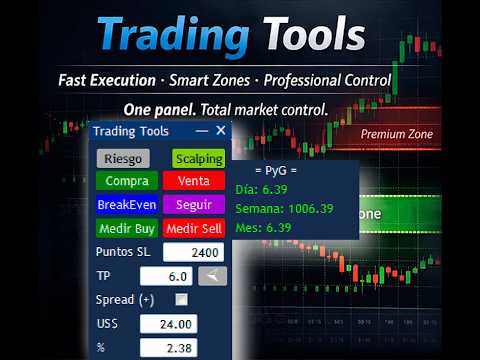
Trading Tool MT5 Scalping Intraday Trading

Trading Tool Panel MT5 – Risk Management Utility for Scalping and Day Trading ________________________________________

🔹 Description

Trading Tool is a minimalist and easy-to-use trading utility for MetaTrader 5 (MT5), designed to simplify manual trading with a compact visual trading panel. It offers the minimum controls necessary to execute trades quickly and accurately.


This MT5 trading tool is ideal for traders focused on scalping and day trading, combining instant and pending orders, risk management, a lot size calculator, compound interest calculation, and visual support for Deep Discount Zones.

Trading Tool is a manual trading assistance utility.

It does not operate automatically or generate signals.

All trades are executed manually by the trader with the support of the panel.


________________________________________

🔹 Main Features

• Clean, lightweight, and non-intrusive visual trading panel

• Automatic risk calculation for MT5:

o Risk in USD

o Percentage risk

o Recommended lot size (Lot Size Calculator)

• Scalping mode for fast execution

• Instant orders: Buy / Sell

• Pending orders: Buy Limit / Sell Limit

• Break Even function

• One-click trailing stop

• Tool for drawing deep discount zones

• Equity management system with compound interest

• Real-time risk visualization

________________________________________

🔹 Platform Requirements

• Platform: MetaTrader 5 (MT5)

• Product type: Utility

• Account type: Any

• Symbols: Any

• Timeframes: Any

• AutoTrading enabled

________________________________________

🔹 Installation

1. Download the product from the MQL5 Market

2. Open MetaTrader 5 and copy it to the MQL5 Experts folder

3. Attach the utility to any chart

4. Activate AutoTrading

5. The Trading Tool panel will appear on the chart

📌 This MT5 utility must be run on only one chart.


________________________________________

🔹 Trading Panel Description

The MT5 Trading Tool interface is organized into different menus to maintain a simple, fast, and intuitive operation, optimized for manual traders.


________________________________________

🔸 Risk Menu (Main Panel)

This menu is used for risk management in MT5 and the use of compound interest applied to trading. It displays in real time:

• Current risk in USD

• Risk as a percentage

• Recommended lot size

Compound Interest Module

• Initial Amount (USD)

• Initial Risk

• Recommended Risk based on the configured growth rate

This panel allows you to define how much capital to invest in each trade in an objective and controlled manner.


________________________________________

🔸 Scalping Menu

Designed for quick manual execution in MT5, ideal for scalping strategies.


Functions:

• Instant Buy/Sell Orders

• Measured Buy/Measured Sell

• Break Even

• Stop Loss Definition in Points

• Trailing Stop

• Option to Include the Spread in the Calculation

________________________________________

🔸 Zone Menu – Deep Discount Zones

Allows you to draw and manage Deep Discount Zones directly on the MetaTrader 5 chart.

Functions:

• Buy Limit/Sell Limit

• Break Even

• Pending Order Management

• Show/Hide Chart Lines

• Draw and Delete Zones

• Real-Time Risk Visualization

________________________________________

🔹 Recommended Trading Flow

1. Select the corresponding menu (Risk, Scalping, Zone)

2. Define the Stop Loss or the trading zone

3. Verify the calculated risk and the recommended lot size

4. Adjust the risk if necessary

5. Execute the trade using the panel buttons

6. Manage the position using Break Even if necessary Applies

________________________________________

🔹 Usage Recommendations

• Test the utility first on a demo account

• Do not exceed a risk of 1%–2% per trade

• Do not modify parameters during active trades

• Use instruments with low spreads for scalping

• Maintain disciplined money management

________________________________________

Risk Warning

Trading in financial markets involves a high level of risk and may not be suitable for all investors.

This MT5 utility is a trading support tool and does not guarantee profits.

The user is solely responsible for their investment decisions.

________________________________________

🔹 Additional Information

• Product Type: Utility

• Trading Style: Manual Trading Support

• Focused on scalping and intraday trading

• Compatible with any strategy

Önerilen ürünler
Elite Telegram Trade Copier & Community Manager (v3.94) Welcome to the ultimate solution for professional Telegram signal copying and community management. This Expert Advisor is not just a standard copier – it is a fully automated Trade Management Engine , a Signal Analytics Tool , and a Marketing Funnel for your own Telegram channels. Whether you want to automate trades from your favorite signal providers or manage your own VIP and Follower channels simultaneously, this EA handles everything:
FREE
Local Account Monitor MT5 is a read-only local monitoring utility for traders who run multiple MetaTrader terminals on the same PC or the same Windows VPS . It combines Agent mode and Dashboard mode so you can monitor local accounts from one place, spot stale terminals quickly, review account health states, and inspect risk details without switching between many terminals. Public channel:   CLICK HERE What it is for Monitoring multiple local MT5 terminals from one dashboard Quickly identifying
FREE
CopyTrader Pro Fast MT5 – Ultra Hızlı Yerel İşlem Kopyalayıcı CopyTrader Pro Fast MT5 , MetaTrader 5 için tasarlanmış, yüksek performanslı ve dosya tabanlı (file-based) bir yerel işlem kopyalama panelidir. Birden fazla hesabı aynı anda yönetmek, Prop Firm (fon) hesaplarınızı senkronize etmek veya ana hesabınızdaki işlemleri diğer hesaplara anında aktarmak için mükemmel bir çözümdür. Öne Çıkan Özellikler Ultra Hızlı Gecikme Süresi:   Optimize edilmiş dosya tabanlı altyapısı ve 50ms'ye kadar dü
FREE
Copy your MT5 trades to accounts anywhere in the world with the   MetaToolsLab Master EA . Unlike local copiers that only work between terminals on the   same   PC or VPS, MetaToolsLab uses a secure cloud relay — so you can broadcast your trades to followers across   different computers, VPS providers, brokers, and continents , with   sub-second delivery   and   no broker passwords . Whether you're a signal provider, a multi-account trader, or an account manager, the Master EA installs in about
FREE
Copyist MS MT5
Aleksei Moshkin
3.5 (4)
Copyist MS — это простой и удобный в использовании торговый копир. Работает как однофайловый советник с переключаемыми режимами работы Master и Slave. Ордера можно копировать из МТ5 в МТ5, из МТ5 в МТ4, из МТ4 в МТ5. Для копирования ордеров в MetaTrader 4 требуется версия советника для MetaTrader 4. Текущая версия советника работает только на ХЕДЖИНГОВЫХ счетах. Параметры Тип работы - выбор режима работы: Master или Slave; Копировать по магическому номеру - копирование торговых ордеров по магич
Copier Master RAlabs (receiver) and Copier Provider RAlabs (signal source) — a system for local copying of trades between MetaTrader terminals on a single PC/VPS. It consists of two products: Provider (signal source) and Master (receiver/copier with a control panel). Provider is installed on the donor account (the account whose trades are being copied) — it publishes the trades. Master is installed on the recipient account — it reads the donors and opens copies; it hosts the entire copy setting
Free Slave Version – Remote Trade Receiver MT5. This is the FREE Slave version of our professional Remote Trade Copier system. It allows you to receive trades from a Master account running our full Copy Trade solution. Designed for simplicity and reliability, this version is read-only and cannot send trades or operate independently. Key Features: One-click setup – simply connect to the Master. Fast and accurate order copying. Supports all symbols, order types, and brokers. Minimal resource us
FREE
Just Copier MT5
Agung Imaduddin
4.75 (4)
"Just copier" is designed to copy trading without any complicated settings. The copy can be done in one PC. One EA can be set as master (provider) or slave (receiver). The receiver lot can be set to multiple providers lots. Please also check this product at fxina.hostingerapp.com.  Any type of copy is available. MT4 -> MT5 MT4 -> MT4 MT5 -> MT5 MT5 -> MT4 If you want to copy MT4 -> MT5 or MT5 -> MT4, please purchase "Just copier" for MT4 and "Just copier" for MT5 separately. Just Copier can copy
SonicTradeCopier: (Best for scalping) Easy Fast Reliable trade copier. Copy trades from one terminal to an other (internet copy feature coming soon.) MT4 to MT4. MT4 to MT5. MT5 to MT5. MT5 to MT4. MT4/MT5 to any other platform copy possibility for custom made solutions. Reverse trading. Advance filters for traders. Features: (Setting up copying policies) Sender only has to setup  signal name and start sending signals [ You must start signal sender first always ]. Receiver sets up  signal nam
Make Trades in MetaTrader 5 with Profit Panel! If you are a MetaTrader 5 trader, you know how important it is to act quickly and accurately. With this in mind, we created the Profit Panel – an essential tool for negotiations What is the Profit Panel? Designed to make your daily trading easier. It offers a simplified and intuitive interface where you can open, manage and close transactions with just a few clicks. How does it work? The MT5 Trading Dashboard puts all the most important trading func
"Quick Copier" is designed to copy trading without any complicated settings. It copies master orders faster than "Just Copier" (https://www.mql5.com/en/market/product/20920). Please also check this product at fxina.hostingerapp.com.  The copy can be done in one PC. One EA can be set as master (provider) or slave (receiver). The receiver lot can be set to multiple providers lots. Any type of copy is available. MT4 -> MT5 MT4 -> MT4 MT5 -> MT5 MT5 -> MT4 If you want to copy MT4 -> MT5 or MT5 -> MT
Trade Manager MT5 Visual Position Sizer Position Sizing & Order Management Tool — No manual calculations.  Just drag your Entry, Stop Loss, and Take Profit lines on the chart. Everything is automatically calculated and displayed in real time. Watch all calculations update live — instantly on both the panel and the lines. Enter trades with minimal risk, without hesitation. How to use: 1. Attach Trade Manager MT5 to any chart. 2. Write Lot size or the Margin Amount on the Panel. 3. Click on SL/T
The program is use to copy trading from MT5 to MT4 and MT5 on local PC or copy  over the Internet .  Now you can easy copy trades to any where or share to friends. Only run one Flash Server on VPS, also need allow the apps if you turn on Windows Firewall. Can not add more than 20 account copier to server at same time,  include both  MT4 and MT5 Get free Copier EA  for MT4 and MT5 (only  receive signal), download here Instants copy, speed smaller 0.1 seconds, easy to setup How to setup and guide
TradeCopy MT5 Demo is an efficient MT4, MT5 single system only used on MT5 demo account. Features: 1, can achieve cross-MT4 and MT5 each other. 2. The transmitting end and the receiving end are in the same file, which is convenient to use. 3, can achieve cross-platform follow-up. 4, more ways to follow the order, you can follow the balance, net worth, lot ratio or fixed lot. 5, can enlarge or reduce the amount of the single. 6, the currency has a different name, you can convert. Use the wizard:
FREE
Fast Copy cp
Alireza Kalamati
4.8 (10)
FastCopy cp : Professional Offline Local Trade Copier This tool is a 100% Offline-Capable (Local Mode) copier, designed to communicate directly between terminals on your PC/VPS for near-instant execution. [Why FastCopy cp ? v3.0 Update] Instant Execution: Uses "Dirty Flag" logic to detect trades the millisecond they happen. Simple Setup: No complicated URL lists or DLL imports required. [Key Features] Ultra-Low Latency: Direct file exchange ensures copying speeds under 50ms locally. Smart Symbol
FREE
**Forex Trade Manager Pro MT5** **Trade Manager MT5** , MetaTrader 5 için kapsamlı bir işlem yönetim yardımcı programıdır ve bir işlemi planladığınız andan kapattığınız ana kadar pozisyonunuzun her yönü üzerinde size tam kontrol sağlar. Riski ciddiye alan yatırımcılar için tasarlanmıştır; disiplin oluşturan acemiden, birden çok pozisyonda anında işlem yapması gereken profesyonel skalpera kadar herkes için uygundur. Araç herhangi bir grafiğe eklenir ve temiz, kompakt bir panel sunar. Grafik üz
Copy your MT5 trades to accounts anywhere in the world with the   MetaToolsLab Slave EA . Unlike local copiers that only work between terminals on the   same   PC or VPS, MetaToolsLab uses a secure cloud relay — so you can broadcast your trades to followers across   different computers, VPS providers, brokers, and continents , with   sub-second delivery   and   no broker passwords . Whether you're a signal provider, a multi-account trader, or an account manager, the Slave EA installs in about a
FREE
MT5 to Telegram Copier Pro is a powerful Expert Advisor built to solve one of the biggest challenges faced by signal providers and active traders: fast, reliable, and professional trade broadcasting . Many traders lose subscribers, miss opportunities, or create confusion because they manually type signals, delay trade updates, or send incomplete trade details. Others open trades from their phone and struggle to instantly share them with their Telegram audience. This tool eliminates those problem
LT Trade Copy MT5 - Yüksek Performanslı ve Minimum Gecikmeli Hesaplar Arası İşlem Kopyalayıcı LT Trade Copy MT5, aynı bilgisayardaki veya yerel ağdaki (LAN) MetaTrader 5 (ve MetaTrader 4) terminalleri arasında işlemlerini minimum gecikme (latenzi) ve mutlak hassasiyetle çoğaltması/kopyalaması gereken yatırımcılar için geliştirilmiş yüksek performanslı bir araçtır. Hesap yöneticisi, sinyal sağlayıcı veya aynı anda birden fazla aracı kurumda işlem yapan bir trader olun, bu yazılım ihtiyacınız olan
Smart Trade Manager Pro is the ultimate all-in-one trading panel designed to give you complete control over your manual trading. Built for both professional traders and prop-firm challenges (like FTMO), it brings TradingView-style visual planning directly into your MetaTrader 5 charts. KEY FEATURES: 1. Visual Chart Planning (TradingView Style) Plan your trades visually before execution! The EA draws interactive Profit/Loss boxes directly on the chart. Drag the edges of the boxes to seamlessly
This utility copies Market orders, Limit orders, and Stop orders with a focus on high speed and easy setup. The utility works by setting up a Master and one or more Slaves. The setup is quite simple: you just need to define which account is the Master and which account is the Slave, and then set up the same Copy Trade Id for both. For the Slave to recognize the Master's orders, the Copy Trade Id parameter must be the same. Do not use numbers or special characters when setting the Copy Trade Id
Demo copier of deals from MetaTrader 5 to MetaTrader 5 ( MetaTrader 4<->MetaTrader 4 version is available ; with both versions, you can copy MetaTrader 5<->MetaTrader 4, MetaTrader 4<->MetaTrader 5, MetaTrader 5<->MetaTrader 5, MetaTrader 4<->MetaTrader 4). Works only in the mode of hedging. Spread filter. Select the best price (start copying positions with a profit or loss). Configure the lot size, fixed or ratio-based (provider signals can be copied with an increased lot). Configure order copy
FREE
Fast CopyTrade LAN — Local Trade Copier for MetaTrader 5 Overview Fast CopyTrade LAN is a fast, DLL-free local trade copier for MetaTrader 5. It instantly copies trades between MT5 accounts on the same PC — copying OPEN, PARTIAL, MOD (SL/TP) and CLOSE from a Provider to one or more Receivers. This copy trader uses the MT5 Files folder for secure local messaging, requires no external files, no DLLs, and is fully Market-compliant. Advantages Fastest local copy trading with very low latency Market
FREE
Product Name:   QuickStep Trader – Customizable Manual Trading Panel Version:   2.0 Compatibility:   MetaTrader 5 Product Type:   Utility Description: QuickStep Trader is a powerful yet intuitive manual trading panel designed for traders who prefer hands‑on execution. With a clean, fully customizable interface, it streamlines the process of opening and closing positions, letting you focus on your trading decisions. Key Features: One‑Click Lot Presets:   Three preset lot buttons (user‑configu
FREE
ProBridger
Marius Ovidiu Sunzuiana
How Traders and Analysts Can Use the Data Export Bridge to Improve Their Analytics The MQL Data Export Bridge unlocks a new level of analytical power by transforming MetaTrader into a real‑time data provider for any external research environment. Here are the most impactful ways different users can apply the bridge to enhance their trading performance. Build Predictive Models with Machine Learning Who benefits: Quantitative traders, data scientists, algorithm developers How it helps: Export t
It is a utility that posts customized messages on Telegram based on account trading activity. Once the utility is on the chart, with each new position opened from the same chart symbol the utility is added, a customized message will be sent to the Telegram group defined in the input parameters. The utility will post to the Telegram group if a new position is opened and if it is the same symbol as the chart the utility is running on. If you are using an Expert Advisor for Buy and Sell and want to
Copier of deals from MetaTrader 5 to MetaTrader 5 ( MetaTrader 4<->MetaTrader 4 version is available ; with both versions, you can copy MetaTrader 5<->MetaTrader 4, MetaTrader 4<->MetaTrader 5, MetaTrader 5<->MetaTrader 5, MetaTrader 4<->MetaTrader 4). There is a demo version (restricting by grades and by lots) Works only in the mode of hedging Spread filter. Select the best price (start copying positions with a profit or loss). Configure the lot size, fixed or ratio-based (provider signals can
Binance Spot(   Binance Spot )  da  listelenen sembolleri Metatrader5 piyasa gözlemine ekler. Ücretsiz bu dosya ile tüm liste saliseler içinde listeleyebilirsiniz. Demo hesabınıza kolayca kurabilirsiniz Binance Spot Tick için yüklenmesi gereken ilk dosyadır ve ücretsiz sunulmaktadır. Araçlar menüsü / Seçenekler / Uzman Danışmanlar / Listelenen URL'ler için  WebRequest kullan seçeneğini seçmeniz gerekli Metatrader'a eklemek için videoları izleyebilirsiniz.
FREE
DCA Buddy: Advanced Price Visualiser Take control of your multi-position trading with DCA Buddy , an advanced indicator for MetaTrader 5. It provides a clear and accurate visualisation of the average break-even price for all your open trades on the current chart symbol. This powerful tool goes beyond simple averages, correctly handling both one-sided and complex hedged scenarios, and features a sophisticated alert system to notify you precisely when your net position achieves its goals. Core Fun
Bu ürünün alıcıları ayrıca şunları da satın alıyor
Trade Assistant MT5
Evgeniy Kravchenko
4.43 (214)
It helps to calculate the risk per trade, the easy installation of a new order, order management with partial closing functions, trailing stop of 7 types and other useful functions. Additional materials and instructions Installation instructions - Application instructions - Trial version of the application for a demo account Line function -   shows on the chart the Opening line, Stop Loss, Take Profit. With this function it is easy to set a new order and see its additional characteristics bef
Trade Manager EA’ye hoş geldiniz! Ticaretin daha sezgisel, hassas ve verimli hale gelmesi için tasarlanmış nihai risk yönetim aracı ile tanışın. Bu sadece bir emir verme aracı değil; ticaret planlaması, pozisyon yönetimi ve risk kontrolü için kapsamlı bir çözüm. İster yeni başlayan bir yatırımcı olun, ister deneyimli bir trader ya da hızlı emir gerektiren bir scalper, Trade Manager EA ihtiyaçlarınıza uyum sağlar ve forex, endeksler, emtialar ve kripto paralar dahil tüm piyasalarda esneklik sunar
Local Trade Copier EA MT5
Juvenille Emperor Limited
4.97 (143)
Local Trade Copier EA MT5   ile olağanüstü hızlı işlem kopyalama deneyimi yaşayın. Kolay 1 dakikalık kurulumuyla bu işlem kopyalayıcısı, aynı Windows bilgisayarda veya Windows VPS'te birden fazla MetaTrader terminali arasında işlemleri kopyalamanıza olanak tanır ve 0.5 saniyenin altındaki şimşek hızında kopyalama hızları sunar. Başlangıç seviyesinde veya profesyonel bir tüccar olsanız da,   Local Trade Copier EA MT5 , spesifik ihtiyaçlarınıza göre özelleştirmek için geniş bir seçenek yelpazesi s
TradePanel MT5
Alfiya Fazylova
4.88 (162)
Trade Panel, çok işlevli bir ticaret asistanıdır. Uygulama, manuel ticaret için 50'den fazla ticaret fonksiyonu içerir ve çoğu ticaret görevini otomatikleştirmeyi mümkün kılar. Satın almadan önce demo hesapta demo sürümü test edebilirsiniz. Demo hesap için uygulamanın deneme sürümünü indirin: https://www.mql5.com/en/blogs/post/750865 . Talimatların tamamı buraya . Ticaret. Tek tıklamayla ticaret işlemleri yapmayı sağlar: Risk otomatik hesaplaması ile bekleyen emirleri ve pozisyonları açmak. Bird
Beta Sürümü Telegram to MT5 Signal Trader resmi alfa sürümüne neredeyse hazır. Bazı özellikler hâlâ geliştirilmekte olup küçük hatalarla karşılaşabilirsiniz. Sorun yaşarsanız lütfen bildirin, geri bildiriminiz yazılımın herkes için gelişmesine yardımcı olur. Telegram to MT5 Signal Trader , Telegram kanallarından veya gruplarından gelen işlem sinyallerini otomatik olarak MetaTrader 5 hesabınıza kopyalayan güçlü bir araçtır. Herkese açık ve özel kanalları destekler ve birden fazla sinyal sağlayıc
Telegram to MT5 Multi-Channel Copier , Telegram kanallarınızdaki trading sinyallerini otomatik olarak doğrudan MetaTrader 5'e kopyalar. Bot yok, tarayıcı uzantısı yok, manuel kopyalama yok. Telegram'da bir sinyal alırsınız ve EA birkaç saniye içinde terminalinizde işlem açar. Ürün iki bileşen içerir: Telegram kanallarınızı dinleyen bir Windows uygulaması ve sinyalleri MT5 terminalinizde yürüten bu Expert Advisor. Bir MT4 sürümü de mevcuttur. Kurulum kılavuzu ve uygulama indirme: https://www.mql5
Riskinizi otomatik olarak hesaplarken işlemlere hızlı bir şekilde girip çıkmanıza yardımcı olacak Ticaret Yöneticisi. Aşırı Ticaret, İntikam Ticareti ve Duygusal Ticaretten korunmanıza yardımcı olacak özellikler içerir. İşlemler otomatik olarak yönetilebilir ve hesap performans ölçümleri bir grafikte görselleştirilebilir. Bu özellikler, bu paneli tüm manuel yatırımcılar için ideal kılar ve MetaTrader 5 platformunun geliştirilmesine yardımcı olur. Çoklu Dil desteği. MT4 Sürümü  |  Kullanım Kılavu
Exp COPYLOT CLIENT for MT5
Vladislav Andruschenko
3.97 (35)
MetaTrader 5 için profesyonel işlem kopyalayıcı MetaTrader için hızlı, profesyonel ve güvenilir bir işlem kopyalayıcı . COPYLOT , MT4 ve MT5 terminalleri arasında Forex işlemlerini kopyalamanıza olanak tanır ve Hedge ile Netting hesaplarını destekler. COPYLOT MT5 sürümü şunları destekler: - MT5 Hedge → MT5 Hedge - MT5 Hedge → MT5 Netting - MT5 Netting → MT5 Hedge - MT5 Netting → MT5 Netting - MT4 → MT5 Hedge - MT4 → MT5 Netting MT4 sürümü Tam açıklama + DEMO + PDF Nasıl satın alınır Nasıl kurul
Power Candles Strateji Tarayıcısı - Kendi Kendini Optimize Eden Çoklu Sembol Kurulum Bulucu Power Candles Strateji Tarayıcısı , Power Candles göstergesini çalıştıran aynı kendinden optimize edici motoru, Piyasa İzleyicinizdeki her sembol üzerinde yan yana çalıştırır. Tek bir panel, şu anda istatistiksel olarak hangi sembollerin işlem yapılabilir olduğunu, her birinde hangi stratejinin kazandığını, en uygun Stop Loss / Take Profit çiftini gösterir ve yeni bir sinyal geldiği anda size bildirim gön
Farmed Hedge Yield Farming | All Markets (Manual - Hybrid - Semi/Automated EA) MULTI-ASSET SUPPORT Trade any asset available on your broker - Forex: Major, Minor, Exotic pairs - Crypto: BTC, ETH, XRP, SOL, BNB - Stocks: Apple, Tesla, Amazon, Google, etc. - Commodities: Gold, Silver, Oil, Gas - Indices: US30, NAS100, SPX500, DAX40 - Any CFD your broker offers VERIFIED TRADING RESULTS - Farmed Hedge Yield Axi Copy:  https://www.mql5.com/en/signals/2356376 - Farmed Hedge Yield Exn Copy:   https:/
Trade copier MT5
Alfiya Fazylova
4.56 (50)
Trade Copier, ticaret hesapları arasındaki işlemleri kopyalamak ve senkronize etmek için tasarlanmış profesyonel bir yardımcı programdır. Kopyalama, tedarikçinin hesabından/terminalinden alıcının aynı bilgisayarda veya vps'de kurulu olan hesabına/terminaline gerçekleşir. KAMPANYA - Eğer zaten "Trade copier MT5" aldıysanız, "Trade copier MT4"ü ücretsiz olarak alabilirsiniz (MT4 > MT5 ve MT4 < MT5 kopyalamalar için). Koşullar hakkında daha fazla bilgi almak için lütfen bizimle özel mesaj yoluyla i
================================================================================ POC BREAKOUT - V20.72. Full Professional Grade Toolkit ================================================================================ POC Breakout is a full MetaTrader 5 trading dashboard for discretionary traders who want breakout signals, Point of Control (POC) context, volume profiles, order flow, market structure, news, alerts, and advanced trade planning in one professional workspace. Attached directly to you
Anchor: The EA Manager Run your full EA portfolio without conflicts, without stacked risk, and without watching every chart yourself. Anchor coordinates up to 64 Expert Advisors on a single account, including daily loss protection built for prop firm rules. Attach Anchor to any chart. Type your EA names and magic numbers in one line. Click OK. Anchor begins coordinating immediately. Built for portfolios. Built for prop firms. Built for discipline. The Problem Running multiple EAs on the same acc
Timeless Charts
Samuel Manoel De Souza
5 (7)
Timeless Charts, profesyonel yatırımcılar için hepsi bir arada bir trading aracıdır. Saniye Grafikleri ve Renko gibi özel grafik türlerini, Footprints , Clusters , Hacim Profilleri , VWAP çalışmaları ve gelişmiş piyasa analizi sağlayan sabitlenmiş analiz araçlarıyla gelişmiş emir akışı analiziyle birleştirir. İşlem ve pozisyon yönetimi, entegre işlem yönetim paneli aracılığıyla doğrudan grafik üzerinden gerçekleştirilirken, Market Replay ve Sanal Hesaplar trading becerileri ve stratejileri üzeri
VirtualTradePad PRO SE MT5 — MetaTrader 5 için profesyonel işlem kontrol merkezi VirtualTradePad PRO SE , MetaTrader 5 için grafik tabanlı premium bir işlem paneli ve trade yönetim çalışma alanıdır. Daha hızlı emir yürütme, daha net pozisyon kontrolü, yapılandırılmış trade yönetimi, görsel seviye planlama ve doğrudan grafik üzerinden profesyonel bir çalışma akışı isteyen traderlar için tasarlanmıştır. Bu yalnızca basit bir BUY / SELL paneli değildir. PRO SE; manuel işlem, bekleyen emirler, pozis
Footprint Chart Pro — Professional OrderFlow EA for MetaTrader 5 Version 6.34 | Professional tool for real traders | Institutional-Grade Visualization DEMO USERS - PLEASE SELECT EVERY TICK / REAL TICK WHEN TESTING AND YOU HAVE DOWNLOADED HISTORICAL DATA. IF YOU SEE A WAITING SCREEN AND IT IS NOT DOWNLOADING, IT MEANS YOU HAVE LOW HISTORICAL DATA. TRY 1 MIN AND 5 MIN FIRST ON 1 DAY DATA. ONE DAY DATA SHOULD BE THE NEWEST AND MOST CURRENT DATE. PLEASE WAIT UNTIL THE MARKET HAS ROLLED OVER PERIOD.
Premium Trade Manager - İçine Koç Yerleştirilmiş İşlem Paneli Premium Trade Manager , grafiğinizin içine bir trading koçu yerleştirir; altında tam bir yürütme motoru çalışır. İşlemi her zamanki gibi kurun, ardından yapay zeka trading koçunuz Max, o kurulumu tam olarak okusun ve canlı hesabınıza göre taahhüt etmeden önce size net bir değerlendirme sunsun: stop disiplinli bir yaklaşıma uyuyor mu, risk büyüklüğü makul mü, yüksek etkili bir haber dakikalar sonra mı geliyor, prop firm limitinize yakl
Unlimited Trade Copier Pro MT5 is a tool to copy trade remotely to multiple MT4, MT5 and cTrader accounts at different computers/locations over internet. This is an ideal solution for you if you are a signal provider and want to copy your trades to other receivers globally on your own rules. One provider can copy trades to multiple receivers and one receiver can get trade from multiple providers as well. The provider can even set the subscription expiry for each receiver, so that receiver will n
LIMITED SUMMER SALE -40% ! ONLY $470 insead of $790!  Maximum real discount! ONLY UNTIL 08/22 The core idea: using the user interface, you configure the parameters the chart must meet before entering a position (or positions), choose which entry models to use, and set the rules for when trading and planning should end. Lazy Trader  handles the rest: it  takes over all the routine chart watching and execution! full description  :: 3 key videos [1] ->  [2]   ->  [3] What can it do? - Understand
Çalışan Demo İndir Copy Cat More (Taklitçi Kedi) — İşlem Kopyalayıcı (Trade Copier) MT5 , yerel bir işlem kopyalayıcı ve bugünün ticaret zorlukları için tasarlanmış eksiksiz bir risk yönetimi ve yürütme çerçevesidir. Prop firm challenge'larından kişisel portföy yönetimine kadar, sağlam yürütme, sermaye koruması, esnek yapılandırma ve gelişmiş işlem yönetimi karışımıyla her duruma uyum sağlar. Kopyalayıcı hem Master (Master, gönderen) hem de Slave (Slave, alıcı) modlarında çalışır; piyasa ve be
Trade Dashboard simplifies how you open, manage, and control your trades, with built-in lot size calculation. It allows you to execute trades, manage risk, and control positions directly on the chart, with tools such as partial close, breakeven, and trailing stop. Designed to reduce manual work and help you stay focused on your trading decisions. A demo version is available for testing. Detailed explanations of features are provided within the MQL5 platform. Installation instructions are include
EA Auditor
Stephen J Martret
5 (4)
EA Auditor is an independent analysis tool for traders evaluating Expert Advisors and trading signals on MetaTrader 5. It audits backtest reports, reviews posted developer signals, and cross-verifies the two against each other to help traders assess strategies before committing capital. The MQL5 market offers a wide range of Expert Advisors from many developers, with varying approaches, quality, and transparency. EA Auditor provides a consistent, data-driven framework for reviewing them, answer
EASY Insight AIO – Akıllı ve zahmetsiz yatırım için hepsi bir arada çözüm Genel Bakış Tüm piyasayı — Forex, Altın, Kripto, Endeksler ve hatta Hisseler — saniyeler içinde, manuel grafik incelemesi, gösterge kurulumu ya da karmaşık ayarlar olmadan analiz edebildiğinizi hayal edin. EASY Insight AIO , yapay zekâ destekli yatırım için nihai, kullanıma hazır dışa aktarma aracınızdır. Tüm piyasanın kapsamlı bir anlık görüntüsünü tek bir temiz CSV dosyasında sunar; bu dosya ChatGPT, Claude, Gemini, Pe
MetaTrader 5 için Trading Panel — grafik ve klavyeden profesyonel tek tıkla işlem kontrolü Aktif traderlar için geliştirilmiş güçlü bir Trading Panel; işlemleri standart MetaTrader arayüzüne göre çok daha hızlı açmanıza, yönetmenize ve kapatmanıza yardımcı olur. Bu çözüm; pozisyonları, bekleyen emirleri, toplam kârı ve işlem yürütmesini tek bir profesyonel çalışma alanında kontrol etmek isteyen kullanıcılar için tasarlanmıştır. Bu sadece sıradan bir yardımcı araç değildir. MetaTrader 5 için ger
ManHedger MT5
Peter Mueller
4.83 (6)
THIS EA IS A SEMI-AUTO EA, IT NEEDS USER INPUT. Manual & Test Version Please TEST this product before BUYING  and watch my video about it. The price of the ManHedger will increase to 250$ after 20 copies sold. Contact me for user support or bug reports or if you want the MT4 version! MT4 Version  I do not guarantee any profits or financial success using this EA. With this Expert Advisor, you can: Implement your own Zone Recovery strategy to capitalize on trending markets. Create Grid trading s
Telegram To MT5 — Sinyal Kopyalayıcı Telegram kanallarınızdaki işlem çağrılarını gerçek MT5 emirlerine dönüştürün — otomatik olarak, istediğiniz kadar hesapta ve risk ile kurallar tamamen sizin kontrolünüzde. Telegram To MT5, Telegram'da zaten takip ettiğiniz VIP / sinyal kanallarını MetaTrader 5 terminalinize bağlar. Ücretsiz bir eşlik eden masaüstü uygulaması mesajları okur (botlara izin vermeyen kanallardan bile), ve bu Expert Advisor bunları hesabınızda yürütür — kendi risk ayarlarınızı, sem
The product will copy all telegram signal to MT5 ( which you are member) , also it can work as remote copier.  Easy to set up, copy order instant, can work with almost signal formats, image signal,  s upport to translate other language to English Work with all type of channel or group, even channel have "Restrict Saving Content", work with  multi channel, multi MT5 Work as remote copier: with signal have ticket number, it will copy exactly via ticket number. Support to backtest signal. How to s
Welcome to ENTRY IN THE ZONE WITH SMC MULTI TIMEFRAME Entry In The Zone with  SMC Multi Timeframe  is a professional trading indicator built on Smart Money Concepts (SMC), combining market structure analysis with a No Repaint BUY / SELL signal system in a single indicator. It helps traders understand market structure more clearly, identify key price zones, and focus on higher-quality trading opportunities. By combining Multi-Timeframe Analysis, Points of Interest (POIs), and real-time signals, t
Quant AI Agents are independent trading Expert Advisors. Instead of trading using a fixed strategy like other conventional EAs, Quant AI Agents   is a   multi-agent AI trading framework   that turns natural-language strategy prompts into live.  WANT THE SAME RESULTS AS MY LIVE SIGNAL?   Use the exact same brokers I do:   IC MARKETS , IC TRADING   .  Unlike the centralized stock market, Forex has no single, unified price feed.  Every broker sources liquidity from different providers, creating un
MT5 to Telegram Signal Provider , hesabınızı bir sinyal sağlayıcı haline getirerek belirtilen sinyalleri Telegram'ın sohbetine, kanalına veya grubuna göndermeyi sağlayan kullanımı kolay, tamamen özelleştirilebilir bir araçtır. Rakip ürünlerin çoğunun aksine, DLL içe aktarması yapmaz. [ Demo ] [ Kılavuz ] [ MT4 Versiyonu ] [ Discord Versiyonu ] [ Telegram Kanalı ]  New: [ Telegram To MT5 ] Kurulum Adım adım bir kullanıcı kılavuzu mevcuttur. Telegram API'si hakkında bilgi gerekmemektedir; ihtiyac
Filtrele:
Değerlendirme yok
Değerlendirmeye yanıt