Trading Tool MT5 Scalping Intraday Trading

Trading Tool Panel MT5 – Risk Management Utility for Scalping and Day Trading ________________________________________

🔹 Description

Trading Tool is a minimalist and easy-to-use trading utility for MetaTrader 5 (MT5), designed to simplify manual trading with a compact visual trading panel. It offers the minimum controls necessary to execute trades quickly and accurately.


This MT5 trading tool is ideal for traders focused on scalping and day trading, combining instant and pending orders, risk management, a lot size calculator, compound interest calculation, and visual support for Deep Discount Zones.

Trading Tool is a manual trading assistance utility.

It does not operate automatically or generate signals.

All trades are executed manually by the trader with the support of the panel.


________________________________________

🔹 Main Features

• Clean, lightweight, and non-intrusive visual trading panel

• Automatic risk calculation for MT5:

o Risk in USD

o Percentage risk

o Recommended lot size (Lot Size Calculator)

• Scalping mode for fast execution

• Instant orders: Buy / Sell

• Pending orders: Buy Limit / Sell Limit

• Break Even function

• One-click trailing stop

• Tool for drawing deep discount zones

• Equity management system with compound interest

• Real-time risk visualization

________________________________________

🔹 Platform Requirements

• Platform: MetaTrader 5 (MT5)

• Product type: Utility

• Account type: Any

• Symbols: Any

• Timeframes: Any

• AutoTrading enabled

________________________________________

🔹 Installation

1. Download the product from the MQL5 Market

2. Open MetaTrader 5 and copy it to the MQL5 Experts folder

3. Attach the utility to any chart

4. Activate AutoTrading

5. The Trading Tool panel will appear on the chart

📌 This MT5 utility must be run on only one chart.


________________________________________

🔹 Trading Panel Description

The MT5 Trading Tool interface is organized into different menus to maintain a simple, fast, and intuitive operation, optimized for manual traders.


________________________________________

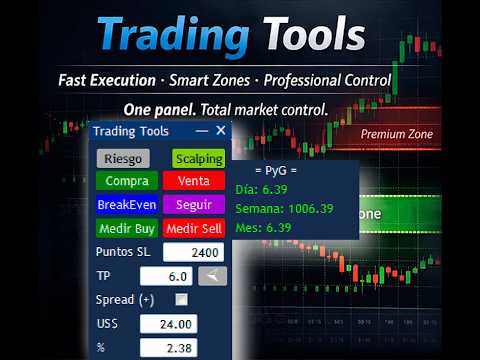
🔸 Risk Menu (Main Panel)

This menu is used for risk management in MT5 and the use of compound interest applied to trading. It displays in real time:

• Current risk in USD

• Risk as a percentage

• Recommended lot size

Compound Interest Module

• Initial Amount (USD)

• Initial Risk

• Recommended Risk based on the configured growth rate

This panel allows you to define how much capital to invest in each trade in an objective and controlled manner.


________________________________________

🔸 Scalping Menu

Designed for quick manual execution in MT5, ideal for scalping strategies.


Functions:

• Instant Buy/Sell Orders

• Measured Buy/Measured Sell

• Break Even

• Stop Loss Definition in Points

• Trailing Stop

• Option to Include the Spread in the Calculation

________________________________________

🔸 Zone Menu – Deep Discount Zones

Allows you to draw and manage Deep Discount Zones directly on the MetaTrader 5 chart.

Functions:

• Buy Limit/Sell Limit

• Break Even

• Pending Order Management

• Show/Hide Chart Lines

• Draw and Delete Zones

• Real-Time Risk Visualization

________________________________________

🔹 Recommended Trading Flow

1. Select the corresponding menu (Risk, Scalping, Zone)

2. Define the Stop Loss or the trading zone

3. Verify the calculated risk and the recommended lot size

4. Adjust the risk if necessary

5. Execute the trade using the panel buttons

6. Manage the position using Break Even if necessary Applies

________________________________________

🔹 Usage Recommendations

• Test the utility first on a demo account

• Do not exceed a risk of 1%–2% per trade

• Do not modify parameters during active trades

• Use instruments with low spreads for scalping

• Maintain disciplined money management

________________________________________

Risk Warning

Trading in financial markets involves a high level of risk and may not be suitable for all investors.

This MT5 utility is a trading support tool and does not guarantee profits.

The user is solely responsible for their investment decisions.

________________________________________

🔹 Additional Information

• Product Type: Utility

• Trading Style: Manual Trading Support

• Focused on scalping and intraday trading

• Compatible with any strategy

Prodotti consigliati
Elite Telegram Trade Copier & Community Manager (v3.94) Welcome to the ultimate solution for professional Telegram signal copying and community management. This Expert Advisor is not just a standard copier – it is a fully automated Trade Management Engine , a Signal Analytics Tool , and a Marketing Funnel for your own Telegram channels. Whether you want to automate trades from your favorite signal providers or manage your own VIP and Follower channels simultaneously, this EA handles everything:
FREE
Local Account Monitor MT5 is a read-only local monitoring utility for traders who run multiple MetaTrader terminals on the same PC or the same Windows VPS . It combines Agent mode and Dashboard mode so you can monitor local accounts from one place, spot stale terminals quickly, review account health states, and inspect risk details without switching between many terminals. Public channel:   CLICK HERE What it is for Monitoring multiple local MT5 terminals from one dashboard Quickly identifying
FREE
CopyTrader Pro FAST MT5 — FREE Real-Time Trade Copier | MT4 ↔ MT5 Cross-Platform | 20ms Latency CopyTrader Pro FAST is a professional trade copier Expert Advisor that copies trades between MetaTrader terminals in real time using a high-speed file-based communication system. No VPS, no network setup, no DLL — just attach and copy. FREE VERSION : Copies up to 1 trade at a time. Upgrade to Full version for unlimited copying. Key Features 20ms refresh rate — independent of tick arrival, uses
FREE
Copy your MT5 trades to accounts anywhere in the world with the   MetaToolsLab Master EA . Unlike local copiers that only work between terminals on the   same   PC or VPS, MetaToolsLab uses a secure cloud relay — so you can broadcast your trades to followers across   different computers, VPS providers, brokers, and continents , with   sub-second delivery   and   no broker passwords . Whether you're a signal provider, a multi-account trader, or an account manager, the Master EA installs in about
FREE
Copyist MS MT5
Aleksei Moshkin
3.5 (4)
Copyist MS — это простой и удобный в использовании торговый копир. Работает как однофайловый советник с переключаемыми режимами работы Master и Slave. Ордера можно копировать из МТ5 в МТ5, из МТ5 в МТ4, из МТ4 в МТ5. Для копирования ордеров в MetaTrader 4 требуется версия советника для MetaTrader 4. Текущая версия советника работает только на ХЕДЖИНГОВЫХ счетах. Параметры Тип работы - выбор режима работы: Master или Slave; Копировать по магическому номеру - копирование торговых ордеров по магич
Copier Master RAlabs (receiver) and Copier Provider RAlabs (signal source) — a system for local copying of trades between MetaTrader terminals on a single PC/VPS. It consists of two products: Provider (signal source) and Master (receiver/copier with a control panel). Provider is installed on the donor account (the account whose trades are being copied) — it publishes the trades. Master is installed on the recipient account — it reads the donors and opens copies; it hosts the entire copy setting
Free Slave Version – Remote Trade Receiver MT5. This is the FREE Slave version of our professional Remote Trade Copier system. It allows you to receive trades from a Master account running our full Copy Trade solution. Designed for simplicity and reliability, this version is read-only and cannot send trades or operate independently. Key Features: One-click setup – simply connect to the Master. Fast and accurate order copying. Supports all symbols, order types, and brokers. Minimal resource us
FREE
Just Copier MT5
Agung Imaduddin
4.75 (4)
"Just copier" is designed to copy trading without any complicated settings. The copy can be done in one PC. One EA can be set as master (provider) or slave (receiver). The receiver lot can be set to multiple providers lots. Please also check this product at fxina.hostingerapp.com.  Any type of copy is available. MT4 -> MT5 MT4 -> MT4 MT5 -> MT5 MT5 -> MT4 If you want to copy MT4 -> MT5 or MT5 -> MT4, please purchase "Just copier" for MT4 and "Just copier" for MT5 separately. Just Copier can copy
SonicTradeCopier MT5
Farrukh Aleem
5 (1)
SonicTradeCopier: (Best for scalping) Easy Fast Reliable trade copier. Copy trades from one terminal to an other (internet copy feature coming soon.) MT4 to MT4. MT4 to MT5. MT5 to MT5. MT5 to MT4. MT4/MT5 to any other platform copy possibility for custom made solutions. Reverse trading. Advance filters for traders. Features: (Setting up copying policies) Sender only has to setup  signal name and start sending signals [ You must start signal sender first always ]. Receiver sets up  signal nam
Smart Panel Trade
Nereu Ferreira Junior
Make Trades in MetaTrader 5 with Profit Panel! If you are a MetaTrader 5 trader, you know how important it is to act quickly and accurately. With this in mind, we created the Profit Panel – an essential tool for negotiations What is the Profit Panel? Designed to make your daily trading easier. It offers a simplified and intuitive interface where you can open, manage and close transactions with just a few clicks. How does it work? The MT5 Trading Dashboard puts all the most important trading func
"Quick Copier" is designed to copy trading without any complicated settings. It copies master orders faster than "Just Copier" (https://www.mql5.com/en/market/product/20920). Please also check this product at fxina.hostingerapp.com.  The copy can be done in one PC. One EA can be set as master (provider) or slave (receiver). The receiver lot can be set to multiple providers lots. Any type of copy is available. MT4 -> MT5 MT4 -> MT4 MT5 -> MT5 MT5 -> MT4 If you want to copy MT4 -> MT5 or MT5 -> MT
Trade Manager MT5 Visual Position Sizer Position Sizing & Order Management Tool — No manual calculations.  Just drag your Entry, Stop Loss, and Take Profit lines on the chart. Everything is automatically calculated and displayed in real time. Watch all calculations update live — instantly on both the panel and the lines. Enter trades with minimal risk, without hesitation. How to use: 1. Attach Trade Manager MT5 to any chart. 2. Write Lot size or the Margin Amount on the Panel. 3. Click on SL/T
Flash Copy MT5
Trinh Dat
5 (1)
The program is use to copy trading from MT5 to MT4 and MT5 on local PC or copy  over the Internet .  Now you can easy copy trades to any where or share to friends. Only run one Flash Server on VPS, also need allow the apps if you turn on Windows Firewall. Can not add more than 20 account copier to server at same time,  include both  MT4 and MT5 Get free Copier EA  for MT4 and MT5 (only  receive signal), download here Instants copy, speed smaller 0.1 seconds, easy to setup How to setup and guide
XBOOT BOLETA PRO Professional Manual Trading Panel for MetaTrader 5 XBOOT Boleta Pro is a complete trading panel designed for traders who execute manual trades and want greater speed, organization, and control during every trading session. More than a standard Buy and Sell panel, XBOOT Boleta Pro combines powerful trading tools into a single interface, helping traders analyze the market, manage risk, execute orders, and monitor trading performance without leaving the chart. Its purpose is to sim
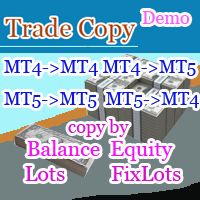
TradeCopy MT5 Demo is an efficient MT4, MT5 single system only used on MT5 demo account. Features: 1, can achieve cross-MT4 and MT5 each other. 2. The transmitting end and the receiving end are in the same file, which is convenient to use. 3, can achieve cross-platform follow-up. 4, more ways to follow the order, you can follow the balance, net worth, lot ratio or fixed lot. 5, can enlarge or reduce the amount of the single. 6, the currency has a different name, you can convert. Use the wizard:
FREE
Fast Copy cp
Alireza Kalamati
4.8 (10)
FastCopy cp : Professional Offline Local Trade Copier This tool is a 100% Offline-Capable (Local Mode) copier, designed to communicate directly between terminals on your PC/VPS for near-instant execution. [Why FastCopy cp ? v3.0 Update] Instant Execution: Uses "Dirty Flag" logic to detect trades the millisecond they happen. Simple Setup: No complicated URL lists or DLL imports required. [Key Features] Ultra-Low Latency: Direct file exchange ensures copying speeds under 50ms locally. Smart Symbol
FREE
**Forex Trade Manager Pro MT5** **Trade Manager MT5** è un utility completa per la gestione delle operazioni di trading per MetaTrader 5 che ti offre il controllo totale su ogni aspetto della tua posizione, dal momento in cui pianifichi un'operazione al momento in cui la chiudi. È progettato per i trader che prendono sul serio il rischio, dal principiante che costruisce disciplina allo scalper professionista che necessita di esecuzione immediata su più posizioni. Lo strumento si aggancia a qu
Copy your MT5 trades to accounts anywhere in the world with the   MetaToolsLab Slave EA . Unlike local copiers that only work between terminals on the   same   PC or VPS, MetaToolsLab uses a secure cloud relay — so you can broadcast your trades to followers across   different computers, VPS providers, brokers, and continents , with   sub-second delivery   and   no broker passwords . Whether you're a signal provider, a multi-account trader, or an account manager, the Slave EA installs in about a
FREE
Metatrader to telegram copier
Lawrence Chilambe Mkandawire
MT5 to Telegram Copier Pro is a powerful Expert Advisor built to solve one of the biggest challenges faced by signal providers and active traders: fast, reliable, and professional trade broadcasting . Many traders lose subscribers, miss opportunities, or create confusion because they manually type signals, delay trade updates, or send incomplete trade details. Others open trades from their phone and struggle to instantly share them with their Telegram audience. This tool eliminates those problem
LT Trade Copy MT5 - Copiatore di Trade ad Alte Prestazioni e Precisione Assoluta LT Trade Copy MT5 è uno strumento ad alte prestazioni sviluppato per i trader che hanno la necessità di replicare le proprie operazioni tra terminali MetaTrader 5 (e MetaTrader 4) sullo stesso computer o all'interno della rete locale (LAN), con una latenza minima e una precisione assoluta. Che tu sia un gestore di conti, un fornitore di segnali o un trader che opera su più broker contemporaneamente, questo software
Smart Trade Manager Pro is the ultimate all-in-one trading panel designed to give you complete control over your manual trading. Built for both professional traders and prop-firm challenges (like FTMO), it brings TradingView-style visual planning directly into your MetaTrader 5 charts. KEY FEATURES: 1. Visual Chart Planning (TradingView Style) Plan your trades visually before execution! The EA draws interactive Profit/Loss boxes directly on the chart. Drag the edges of the boxes to seamlessly
High Frequency Ct
Elidio Xavier Guimaraes
This utility copies Market orders, Limit orders, and Stop orders with a focus on high speed and easy setup. The utility works by setting up a Master and one or more Slaves. The setup is quite simple: you just need to define which account is the Master and which account is the Slave, and then set up the same Copy Trade Id for both. For the Slave to recognize the Master's orders, the Copy Trade Id parameter must be the same. Do not use numbers or special characters when setting the Copy Trade Id
Telegram to mt5 signal copier
Chukwuemeka Kingsley Anyanwu
5 (2)
**COPIA I SEGNALI DA QUALSIASI CANALE TELEGRAM ED ESEGUE IMMEDIATAMENTE L'OPERAZIONE SU MT5 SENZA DIRITTI DI AMMINISTRATORE!** Ricevi segnali di trading su Telegram e desideri che vengano eseguiti istantaneamente su MetaTrader 5? **Telegram to MT5 Signal Copier** è un potente ponte tra i tuoi canali di segnali Telegram e MetaTrader 5. Ascolta i messaggi da un canale Telegram specifico ed estrae automaticamente i segnali di trading — inclusi simbolo, direzione, prezzo di entrata, stop loss e t
Demo copier of deals from MetaTrader 5 to MetaTrader 5 ( MetaTrader 4<->MetaTrader 4 version is available ; with both versions, you can copy MetaTrader 5<->MetaTrader 4, MetaTrader 4<->MetaTrader 5, MetaTrader 5<->MetaTrader 5, MetaTrader 4<->MetaTrader 4). Works only in the mode of hedging. Spread filter. Select the best price (start copying positions with a profit or loss). Configure the lot size, fixed or ratio-based (provider signals can be copied with an increased lot). Configure order copy
FREE
Fast CopyTrade LAN
Achraf Mouine
5 (6)
Fast CopyTrade LAN — Local Trade Copier for MetaTrader 5 Overview Fast CopyTrade LAN is a fast, DLL-free local trade copier for MetaTrader 5. It instantly copies trades between MT5 accounts on the same PC — copying OPEN, PARTIAL, MOD (SL/TP) and CLOSE from a Provider to one or more Receivers. This copy trader uses the MT5 Files folder for secure local messaging, requires no external files, no DLLs, and is fully Market-compliant. Advantages Fastest local copy trading with very low latency Market
FREE
Product Name:   QuickStep Trader – Customizable Manual Trading Panel Version:   2.0 Compatibility:   MetaTrader 5 Product Type:   Utility Description: QuickStep Trader is a powerful yet intuitive manual trading panel designed for traders who prefer hands‑on execution. With a clean, fully customizable interface, it streamlines the process of opening and closing positions, letting you focus on your trading decisions. Key Features: One‑Click Lot Presets:   Three preset lot buttons (user‑configu
FREE
ProBridger
Marius Ovidiu Sunzuiana
How Traders and Analysts Can Use the Data Export Bridge to Improve Their Analytics The MQL Data Export Bridge unlocks a new level of analytical power by transforming MetaTrader into a real‑time data provider for any external research environment. Here are the most impactful ways different users can apply the bridge to enhance their trading performance. Build Predictive Models with Machine Learning Who benefits: Quantitative traders, data scientists, algorithm developers How it helps: Export t
Signals for Telegram
Elidio Xavier Guimaraes
It is a utility that posts customized messages on Telegram based on account trading activity. Once the utility is on the chart, with each new position opened from the same chart symbol the utility is added, a customized message will be sent to the Telegram group defined in the input parameters. The utility will post to the Telegram group if a new position is opened and if it is the same symbol as the chart the utility is running on. If you are using an Expert Advisor for Buy and Sell and want to
Copy MT5 MT5
Andriy Motuzka
Copier of deals from MetaTrader 5 to MetaTrader 5 ( MetaTrader 4<->MetaTrader 4 version is available ; with both versions, you can copy MetaTrader 5<->MetaTrader 4, MetaTrader 4<->MetaTrader 5, MetaTrader 5<->MetaTrader 5, MetaTrader 4<->MetaTrader 4). There is a demo version (restricting by grades and by lots) Works only in the mode of hedging Spread filter. Select the best price (start copying positions with a profit or loss). Configure the lot size, fixed or ratio-based (provider signals can
It adds the symbols listed on Binance Spot to the Metatrader5 market clock. With this free file you can list the entire list in seconds. You can easily upload it to your demo account. It is the first file uploaded for Binance Spot Tick and is available for free. Tools menu / Options / Expert Advisors / You need to select Use WebRequest for listed URL You can watch videos to add Metatrader.
FREE
Gli utenti di questo prodotto hanno anche acquistato
Trade Assistant MT5
Evgeniy Kravchenko
4.41 (215)
It helps to calculate the risk per trade, the easy installation of a new order, order management with partial closing functions, trailing stop of 7 types and other useful functions. Additional materials and instructions Installation instructions - Application instructions - Trial version of the application for a demo account Line function -   shows on the chart the Opening line, Stop Loss, Take Profit. With this function it is easy to set a new order and see its additional characteristics bef
Forex Trade Manager MT5
InvestSoft
4.98 (668)
Benvenuto a Trade Manager EA, lo strumento definitivo per la gestione del rischio , progettato per rendere il trading più intuitivo, preciso ed efficiente. Non è solo uno strumento per l'esecuzione degli ordini, ma una soluzione completa per la pianificazione delle operazioni, la gestione delle posizioni e il controllo del rischio. Che tu sia un principiante, un trader avanzato o uno scalper che necessita di esecuzioni rapide, Trade Manager EA si adatta alle tue esigenze, offrendo flessibilità s
Local Trade Copier EA MT5
Juvenille Emperor Limited
4.97 (144)
Sperimenta una copia di trading eccezionalmente veloce con il   Local Trade Copier EA MT5 . Con la sua facile configurazione in 1 minuto, questo copiatore di trading ti consente di copiare i trades tra diversi terminali di MetaTrader sullo stesso computer Windows o su Windows VPS con velocità di copia ultra veloci inferiori a 0.5 secondi. Che tu sia un trader principiante o professionista,   Local Trade Copier EA MT5   offre una vasta gamma di opzioni per personalizzarlo alle tue esigenze speci
================================================================================ POC BREAKOUT - V20.72. Full Professional Grade Toolkit ================================================================================ POC Breakout is a full MetaTrader 5 trading dashboard for discretionary traders who want breakout signals, Point of Control (POC) context, volume profiles, order flow, market structure, news, alerts, and advanced trade planning in one professional workspace. Attached directly to you
TradePanel MT5
Alfiya Fazylova
4.88 (166)
Trade Panel è un assistente commerciale multifunzionale. L'applicazione contiene più di 50 funzioni di trading per il trading manuale e permette di automatizzare la maggior parte delle attività commerciali. Prima dell'acquisto, è possibile testare la versione dimostrativa su un conto demo. Scaricare la versione di prova dell'applicazione per un account dimostrativo: https://www.mql5.com/it/blogs/post/762419 . Istruzioni complete qui . Commercio. Consente di effettuare operazioni di trading con u
Versione Beta Telegram to MT5 Signal Trader è quasi pronto per il rilascio ufficiale in versione alpha. Alcune funzionalità sono ancora in fase di sviluppo e potresti riscontrare piccoli bug. Se riscontri problemi, ti preghiamo di segnalarli, il tuo feedback aiuta a migliorare il software per tutti. Telegram to MT5 Signal Trader è uno strumento potente che copia automaticamente segnali di trading da canali o gruppi Telegram al tuo account MetaTrader 5 . Supporta canali pubblici e privati e cons
FarmedHedge Pair Trading Dashboard
Tanapisit Tepawarapruek
5 (3)
Farmed Hedge Yield Farming | All Markets (Manual - Hybrid - Semi/Automated EA) MULTI-ASSET SUPPORT Trade any asset available on your broker - Forex: Major, Minor, Exotic pairs - Crypto: BTC, ETH, XRP, SOL, BNB - Stocks: Apple, Tesla, Amazon, Google, etc. - Commodities: Gold, Silver, Oil, Gas - Indices: US30, NAS100, SPX500, DAX40 - Any CFD your broker offers VERIFIED TRADING RESULTS - Farmed Hedge Yield Axi Copy:  https://www.mql5.com/en/signals/2356376 - Farmed Hedge Yield Exn Copy:   https:/
Telegram to MT5 Multi-Channel Copier copia automaticamente i segnali di trading dai tuoi canali Telegram direttamente in MetaTrader 5. Nessun bot, nessuna estensione del browser, nessuna copia manuale. Ricevi un segnale su Telegram e l'EA apre l'operazione sul tuo terminale in pochi secondi. Il prodotto include due componenti: un'applicazione Windows che ascolta i tuoi canali Telegram, e questo Expert Advisor che esegue i segnali sul tuo terminale MT5. È disponibile anche una versione per MT4. G
Exp COPYLOT CLIENT for MT5
Vladislav Andruschenko
3.97 (35)
Copiatore professionale di trade per MetaTrader 5 Un copiatore di trade veloce, professionale e affidabile per MetaTrader . COPYLOT consente di copiare operazioni Forex tra terminali MT4 e MT5 con supporto per conti Hedge e Netting . La versione MT5 di COPYLOT supporta: - MT5 Hedge → MT5 Hedge - MT5 Hedge → MT5 Netting - MT5 Netting → MT5 Hedge - MT5 Netting → MT5 Netting - MT4 → MT5 Hedge - MT4 → MT5 Netting Versione MT4 Descrizione completa + DEMO + PDF Come acquistare Come installare Come ot
Premium Trade Manager - Il pannello di trading con un coach integrato Premium Trade Manager porta un coach di trading direttamente nel tuo grafico, con un motore di esecuzione completo al di sotto. Imposta il trade come fai sempre, poi lascia che Max, il tuo coach di trading IA, legga esattamente quel setup rispetto al tuo conto live e ti dia un verdetto chiaro prima che tu confermi: lo stop rispetta un approccio disciplinato, il rischio è ragionevole, c'è un evento ad alto impatto tra pochi min
Footprint Chart Pro — Professional OrderFlow EA for MetaTrader 5 Version 6.34 | Professional tool for real traders | Institutional-Grade Visualization DEMO USERS - PLEASE SELECT EVERY TICK / REAL TICK WHEN TESTING AND YOU HAVE DOWNLOADED HISTORICAL DATA. IF YOU SEE A WAITING SCREEN AND IT IS NOT DOWNLOADING, IT MEANS YOU HAVE LOW HISTORICAL DATA. TRY 1 MIN AND 5 MIN FIRST ON 1 DAY DATA. ONE DAY DATA SHOULD BE THE NEWEST AND MOST CURRENT DATE. PLEASE WAIT UNTIL THE MARKET HAS ROLLED OVER PERIOD.
Anchor Trade Manager
Kalinskie Gilliam
5 (6)
Anchor: The EA Manager Your EAs manage their own trades. Anchor manages the account around them. Anchor gives you one place to control your EAs, manage risk and decide when trading is allowed. Any EA, any vendor, any broker or symbol. No source-code changes required. The Problem Most EAs only know what they are doing. They cannot see when another EA is already trading, when several EAs open and are stacking risk or when the account has reached your loss limit. Even using just one EA, it may not
Trade copier MT5
Alfiya Fazylova
4.57 (51)
Trade Copier è un'utilità professionale progettata per copiare e sincronizzare le transazioni tra conti di trading. La copiatura avviene dal conto/terminale del fornitore al conto/terminale del destinatario, che sono installati sullo stesso computer o vps. PROMOZIONE - Se avete già acquistato il "Trade copier MT5", potete ottenere gratuitamente il "Trade copier MT4" (per la copia MT4 > MT5 e MT4 < MT5). Per maggiori informazioni sulle condizioni, vi preghiamo di contattarci tramite messaggi priv
Telegram To MT5 Ultra
Mirel Daniel Gheonu
5 (3)
Telegram To MT5 — Copiatore di segnali Trasforma le indicazioni di trading dei tuoi canali Telegram in veri ordini MT5 — automaticamente, su quanti account vuoi, con rischio e regole totalmente sotto il tuo controllo. Telegram To MT5 collega i canali VIP / di segnali che già segui su Telegram al tuo terminale MetaTrader 5. Un'app desktop companion gratuita legge i messaggi (anche dai canali che bloccano i bot), e questo Expert Advisor li esegue sul tuo conto — applicando le tue impostazioni di r
Trade Dashboard MT5
Fatemeh Ameri
4.95 (132)
Trade Dashboard simplifies how you open, manage, and control your trades, with built-in lot size calculation. It allows you to execute trades, manage risk, and control positions directly on the chart, with tools such as partial close, breakeven, and trailing stop. Designed to reduce manual work and help you stay focused on your trading decisions. A demo version is available for testing. Detailed explanations of features are provided within the MQL5 platform. Installation instructions are include
Adam FTMO MT5
Vyacheslav Izvarin
5 (2)
ADAM EA Special Version for FTMO Please use ShowInfo= false for backtesting ! Our 1st EA created using ChatGPT technology Trade only GOOD and checked PROP FIRMS  Default parameters for Challenge $100,000 Tested on EURUSD and GBPUSD only  Use 15MIN Time Frame Close all deals and Auto-trading  before Weekend at 12:00 GMT+3  Friday For Prop Firms MUST use special Protector  https://www.mql5.com/en/market/product/94362 --------------------------------------------------------------------------------
YuClusters
Yury Kulikov
4.93 (43)
Attention: You can view the program operation in the free version  YuClusters DEMO .  YuClusters is a professional market analysis system. The trader has unique opportunities to analyze the flow of orders, trade volumes, price movements using various charts, profiles, indicators, and graphical objects. YuClusters operates on data based on Time&Sales or ticks information, depending on what is available in the quotes of a financial instrument. YuClusters allows you to build graphs by combining da
Power Candles Strategy Scanner - Strumento di ricerca configurazioni multi-simbolo con ottimizzazione automatica Power Candles Strategy Scanner utilizza lo stesso motore di auto-ottimizzazione che alimenta l'indicatore Power Candles, applicandolo a tutti i simboli presenti nel tuo Market Watch, uno accanto all'altro. Un unico pannello ti indica quali simboli sono statisticamente negoziabili in questo momento, quale strategia è vincente su ciascuno di essi, la coppia ottimale di Stop Loss / Take
The product will copy all telegram signal to MT5 ( which you are member) , also it can work as remote copier.  Easy to set up, copy order instant, can work with almost signal formats, image signal,  s upport to translate other language to English Work with all type of channel or group, even channel have "Restrict Saving Content", work with  multi channel, multi MT5 Work as remote copier: with signal have ticket number, it will copy exactly via ticket number. Support to backtest signal. How to s
Welcome to ENTRY IN THE ZONE WITH SMC MULTI TIMEFRAME Entry In The Zone and SMC Multi Timeframe is a real-time market analysis tool based on Smart Money Concepts (SMC), designed to analyze market structure, price direction, and key trading zones. It supports both Single-Timeframe Analysis and Multi-Timeframe Analysis, providing a clearer view of the overall market structure across multiple timeframes, with real-time BUY / SELL signals that do not repaint. It is designed to help filter trading op
VirtualTradePad One Click Trading Panel
Vladislav Andruschenko
4.59 (74)
Pannello di trading per MetaTrader 5 — controllo professionale del trading in un clic dal grafico e dalla tastiera Un pannello di trading avanzato progettato per trader attivi, pensato per aprire, gestire e chiudere operazioni molto più velocemente rispetto all’interfaccia standard di MetaTrader. Questa soluzione è dedicata a chi desidera controllare posizioni, ordini pendenti, profitto totale ed esecuzione da un unico spazio di lavoro professionale. Non si tratta di un semplice utilitario. È u
EA Auditor
Stephen J Martret
5 (4)
EA Auditor is an independent analysis tool for traders evaluating Expert Advisors and trading signals on MetaTrader 5. It audits backtest reports, reviews posted developer signals, and cross-verifies the two against each other to help traders assess strategies before committing capital. The MQL5 market offers a wide range of Expert Advisors from many developers, with varying approaches, quality, and transparency. EA Auditor provides a consistent, data-driven framework for reviewing them, answer
Scarica la demo funzionante Copy Cat More (Gatto Copione) — Copiatore di Trade (Trade Copier) MT5 è un copiatore locale di trade e un framework completo di gestione del rischio e di esecuzione, progettato per le sfide di trading di oggi. Dalle challenge delle prop firm alla gestione di portafogli personali, si adatta a ogni situazione con una combinazione di esecuzione robusta, protezione del capitale, configurazione flessibile e gestione avanzata dei trade. Il copiatore funziona in entrambe l
Timeless Charts
Samuel Manoel De Souza
5 (7)
Timeless Charts è un'utilità di trading completa progettata per trader professionisti. Combina tipi di grafici personalizzati come Grafici a Secondi e Renko con analisi avanzata del flusso ordini tramite Footprints , Clusters , Profili di Volume , studi VWAP e strumenti di analisi ancorata per una visione più approfondita del mercato. Il trading e la gestione delle posizioni vengono eseguiti direttamente dal grafico tramite un pannello integrato di gestione delle operazioni , mentre Market Repla
Trade Manager DaneTrades
Levi Dane Benjamin
4.23 (30)
Trade Manager per aiutarti a entrare e uscire rapidamente dalle operazioni calcolando automaticamente il tuo rischio. Incluse funzionalità che ti aiutano a prevenire l'eccessivo trading, il vendetta trading e il trading emotivo. Le operazioni possono essere gestite automaticamente e i parametri di performance del conto possono essere visualizzati in un grafico. Queste caratteristiche rendono questo pannello ideale per tutti i trader manuali e aiuta a migliorare la piattaforma MetaTrader 5. Suppo
The News Filter MT5
Leolouiski Gan
4.78 (23)
Questo prodotto filtra tutti gli esperti consulenti e i grafici manuali durante il periodo delle notizie, così non dovrai preoccuparti di improvvisi picchi di prezzo che potrebbero distruggere le tue impostazioni di trading manuali o le negoziazioni effettuate da altri esperti consulenti. Questo prodotto viene fornito anche con un sistema completo di gestione degli ordini che può gestire le tue posizioni aperte e gli ordini in sospeso prima della pubblicazione di qualsiasi notizia. Una volta che
Seconds Chart MT5
Boris Sedov
4.61 (18)
Seconds Chart - uno strumento unico per creare grafici in secondi su MetaTrader 5 . Con Seconds Chart , puoi generare grafici con timeframe definiti in secondi, ottenendo una flessibilità e una precisione d'analisi ideali, non disponibili nei grafici standard in minuti o ore. Ad esempio, il timeframe S15 indica un grafico con candele di 15 secondi. Puoi utilizzare qualsiasi indicatore e Expert Advisor con supporto per simboli personalizzati. Lavorare con loro è comodo quanto operare sui grafici
Potenzia i tuoi segnali di trading con il nostro avanzato Telegram Bridge EA È il momento di conquistare il tuo pubblico con aggiornamenti di trading in tempo reale che siano professionali e visivamente accattivanti. Contattami per vedere la demo e ottenere una versione di prova Abbiamo investito significativamente in funzionalità intuitive che creano un'esperienza unica per clienti e fornitori.  SIGNAL BRIDGE è in grado di inviare SEGNALI 100% COMPATIBILI CON I COPIER per tutti i casi d'uso, a
Quant AI Agents
Ho Tuan Thang
5 (1)
Quant AI Agents are independent trading Expert Advisors. Instead of trading using a fixed strategy like other conventional EAs, Quant AI Agents   is a   multi-agent AI trading framework   that turns natural-language strategy prompts into live.  WANT THE SAME RESULTS AS MY LIVE SIGNAL?   Use the exact same brokers I do:   IC MARKETS , IC TRADING   .  Unlike the centralized stock market, Forex has no single, unified price feed.  Every broker sources liquidity from different providers, creating un
VirtualTradePad PRO SE MT5 — centro di controllo professionale per il trading su MetaTrader 5 VirtualTradePad PRO SE è un pannello di trading premium basato sul grafico e un ambiente di gestione delle operazioni per MetaTrader 5 . È progettato per i trader che desiderano esecuzione più rapida, controllo più chiaro delle posizioni, gestione strutturata delle operazioni, pianificazione visiva dei livelli e un workflow professionale direttamente dal grafico. Non è soltanto un semplice pannello BUY
Filtro:
Nessuna recensione
Rispondi alla recensione