Partial Close Expert

5

Kısmi Kapanış Uzmanı, birçok işlevi tek bir otomatik sistemde birleştiren bir araçtır. Bu EA, risk yönetimi ve potansiyel kazançları en üst düzeye çıkarmak için birden fazla seçenek sunarak yatırımcıların pozisyonlarını daha etkili bir şekilde yönetmelerine yardımcı olabilir.

Kısmi Kapanış Uzmanı ile yatırımcılar bir   kısmi kapanış   karı kilitlemek için bir seviye   takip eden durdurma   karları korumak ve kayıpları sınırlamak için bir seviye   başa baş   Fiyatın kendilerine karşı hareket etmesi durumunda bile işlemin dengelenmesini sağlayacak seviye ve diğer çeşitli işlevler.

Yatırımcılar, bu hepsi bir arada Uzman Danışmanı kullanarak, işlemlerini sürekli olarak takip etmek zorunda kalmadıkları için zamandan ve emekten tasarruf edebilirler. Bunun yerine, Uzman Danışman, piyasa koşullarına göre önceden belirlenmiş talimatları uygulayarak yatırımcılara işlemleri üzerinde daha fazla esneklik ve kontrol sağlar.

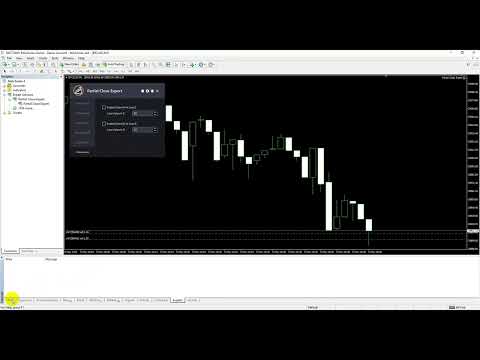
Kısmi Kapatma Uzmanını Ekleyin,   Klavyenizdeki "p" tuşuna basın , ayarları değiştirin ve hazırsınız.

Kısmi Kapatma Uzmanı   Kurulum ve Giriş Kılavuzu

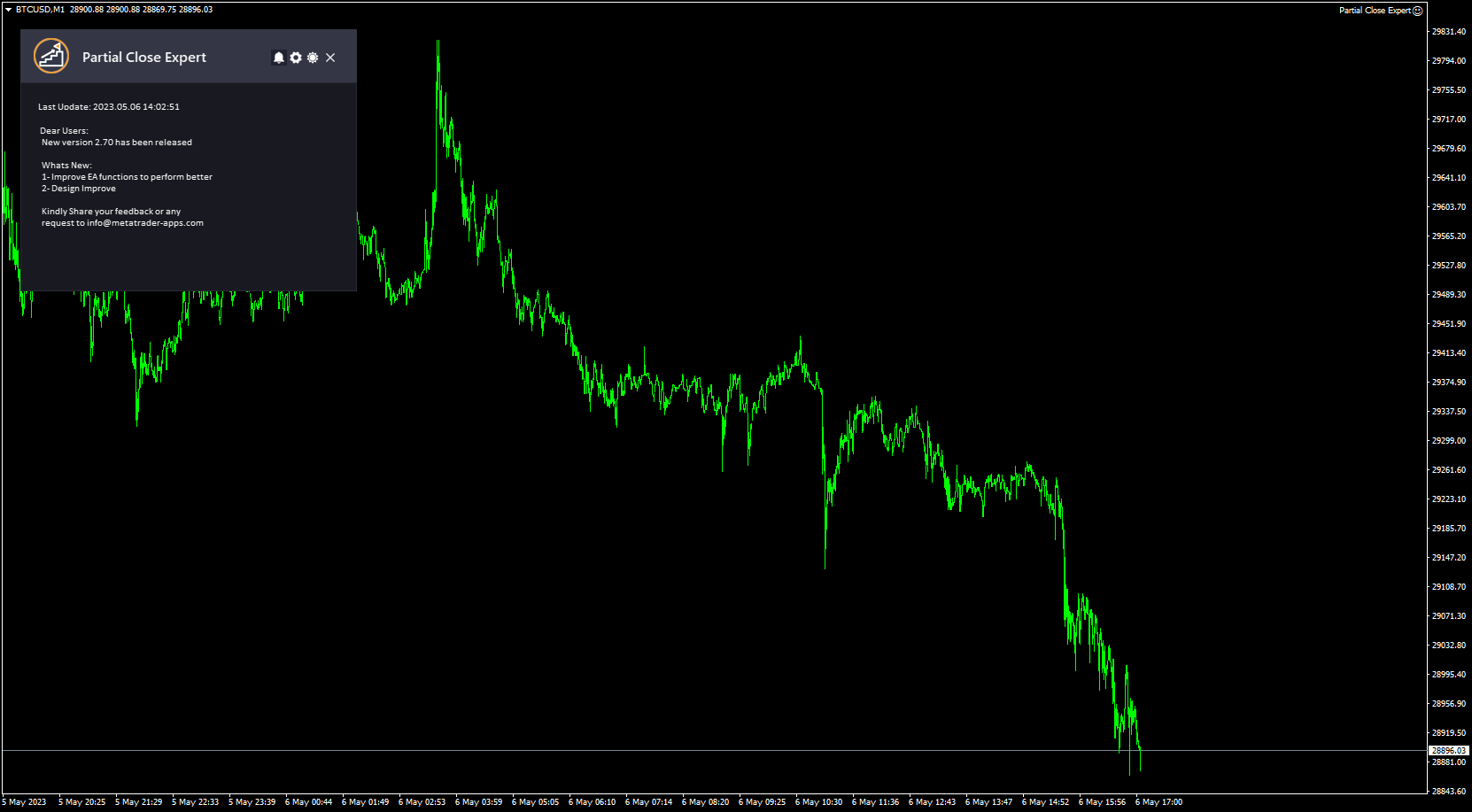
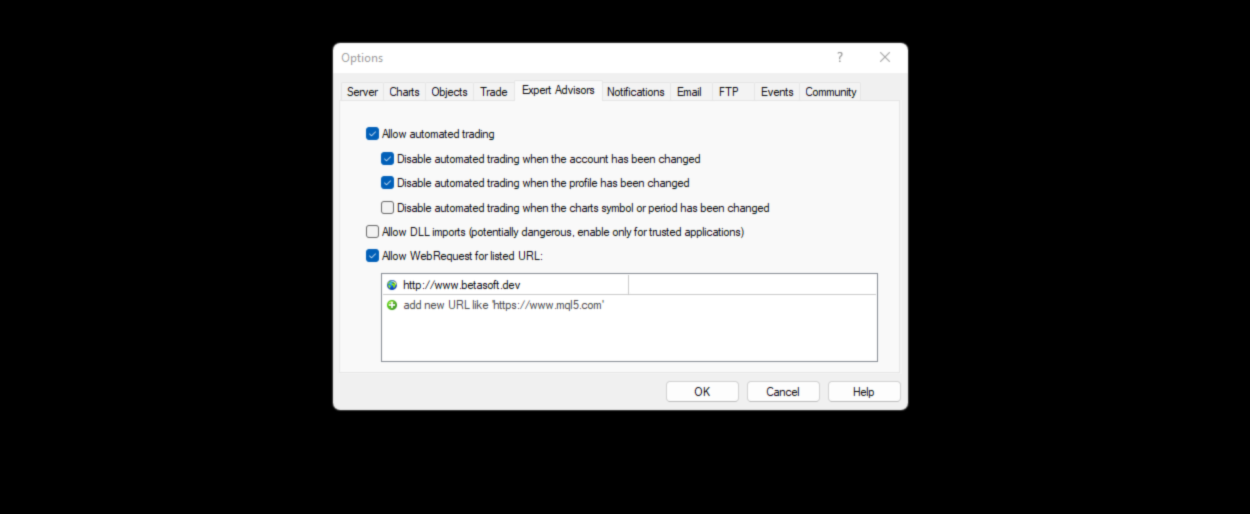
EA ile ilgili bildirimleri almak istiyorsanız URL'yi ( http://www.betasoft.dev ) MT4/MT5 terminaline ekleyin (ekran görüntüsüne bakın).

MT4 Sürümü https://www.mql5.com/tr/market/product/14965

MT5 Sürümü https://www.mql5.com/tr/market/product/15737


Başlıca Özellikler:

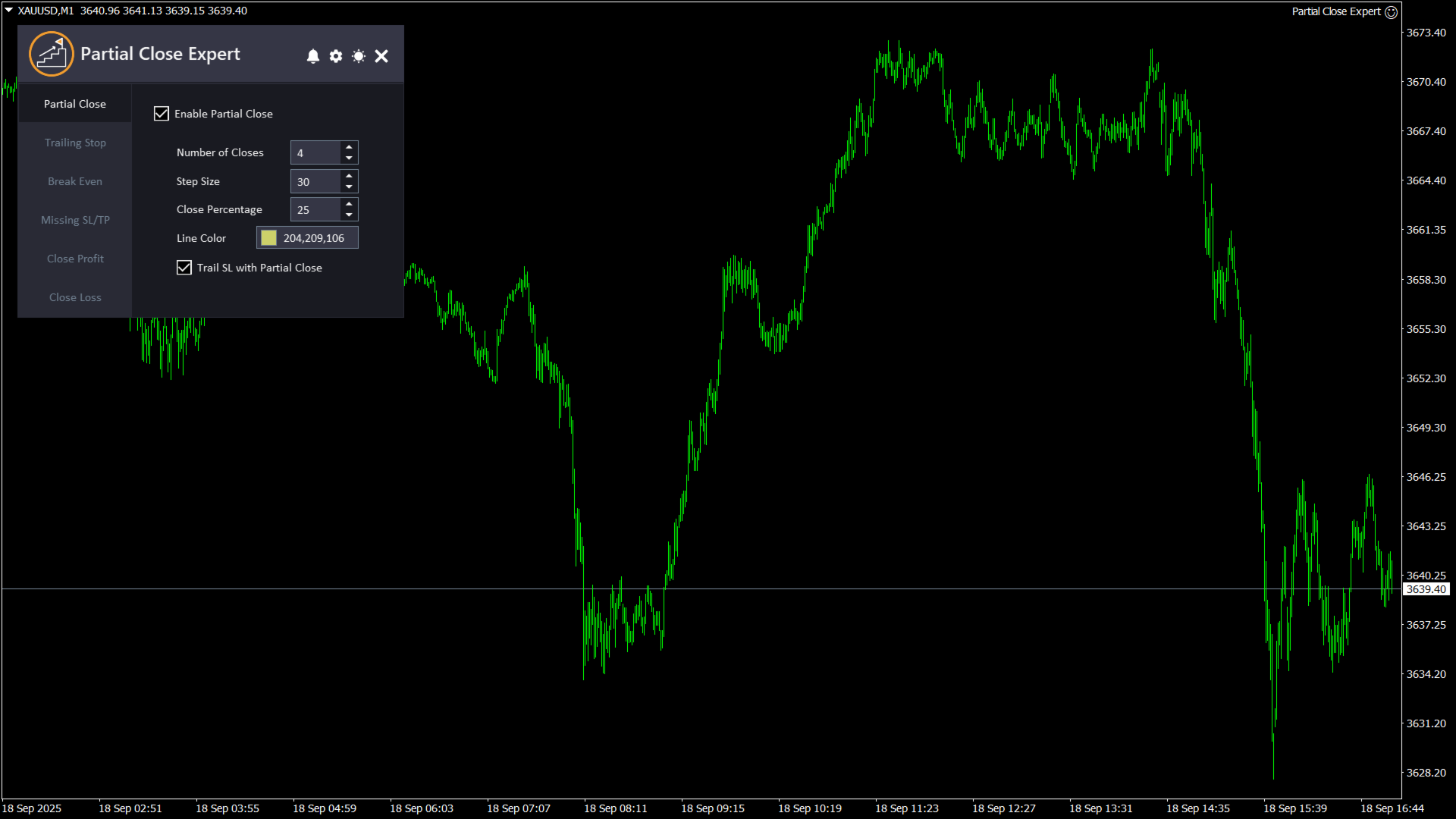
  1. Kısmi Kapanış:   Yatırımcıların, önceden ayarlanmış ayarlara göre bir işlemin bir kısmını kapatmalarına, kalan kısmını ise açık bırakmalarına olanak tanır. Bu özellik için girişler arasında "Kısmi Kapatmayı Etkinleştir" (bu özelliği etkinleştirir veya devre dışı bırakır), "Kapanış Sayısı" (kullanılacak kısmi kapanış seviyelerinin sayısını belirtir), "Kapanış Adımı" (işlemin bir kısmı önceden ayarlanmış her seviyede kapatıldığında işlemin açılış fiyatından uzaklığı belirler), "Kapanış Yüzdesi" (önceden ayarlanmış her seviyede kapatılacak pozisyonun yüzdesini belirtir) ve "Kapanış Çizgisi Rengi" (grafikte kısmi kapanış seviyelerini temsil etmek üzere görüntülenecek çizginin rengini belirler) bulunur. Ayrıca, her kısmi kapanışta Stop Loss'un (zarar durdurma) izleme yapmasını da etkinleştirebilirsiniz; bu, en son kısmi kapanış pozisyonuna geçeceği anlamına gelir.
  2. Trailing Stop:   Yatırımcıların, piyasa kendi lehlerine hareket ettikçe bir işlemin stop loss seviyesini otomatik olarak ayarlamalarına olanak tanıyan bir özelliktir. Bu özelliğin girdileri arasında "Trailing Stop'u Etkinleştir" (bu özelliği etkinleştirir veya devre dışı bırakır), "Trailing Stop" (mevcut piyasa fiyatı ile takip eden stop loss seviyesi arasındaki mesafeyi pip cinsinden belirler) ve "Trailing Step" (takip eden stop loss seviyesi ayarlanmadan önce piyasa fiyatının işlem lehine hareket etmesi gereken pip sayısını belirtir) bulunur.
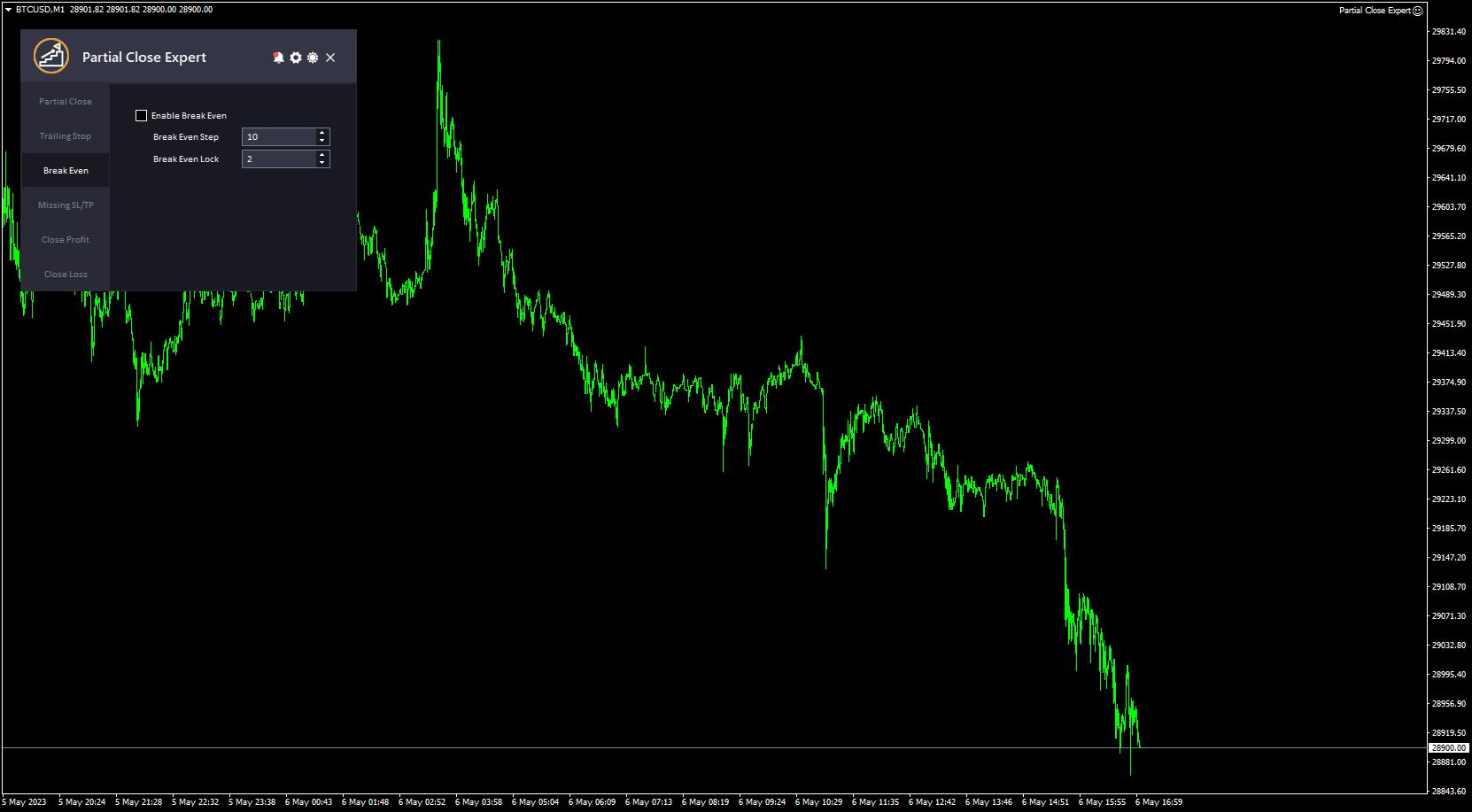
  3. Başa baş:   Yatırımcıların, işlem belirli bir kâr seviyesine ulaştığında stop loss seviyesini giriş fiyatına taşımalarına olanak tanıyan ve işlemi etkin bir şekilde bir başabaş noktasına getiren bir özelliktir. Bu özelliğin girdileri arasında "Başabaş Noktasını Etkinleştir" (bu özelliği etkinleştirir veya devre dışı bırakır), "Başabaş Adımı" (durdur loss seviyesinin giriş fiyatına taşınacağı mevcut piyasa fiyatı ile işlemin orijinal giriş fiyatı arasındaki mesafeyi pip cinsinden belirler) ve "Başabaş Kilidi" (piyasa işlemin lehine hareket ettiğinde stop loss seviyesinin giriş fiyatının üzerinde kilitleneceği pip sayısını ifade eder) bulunur.
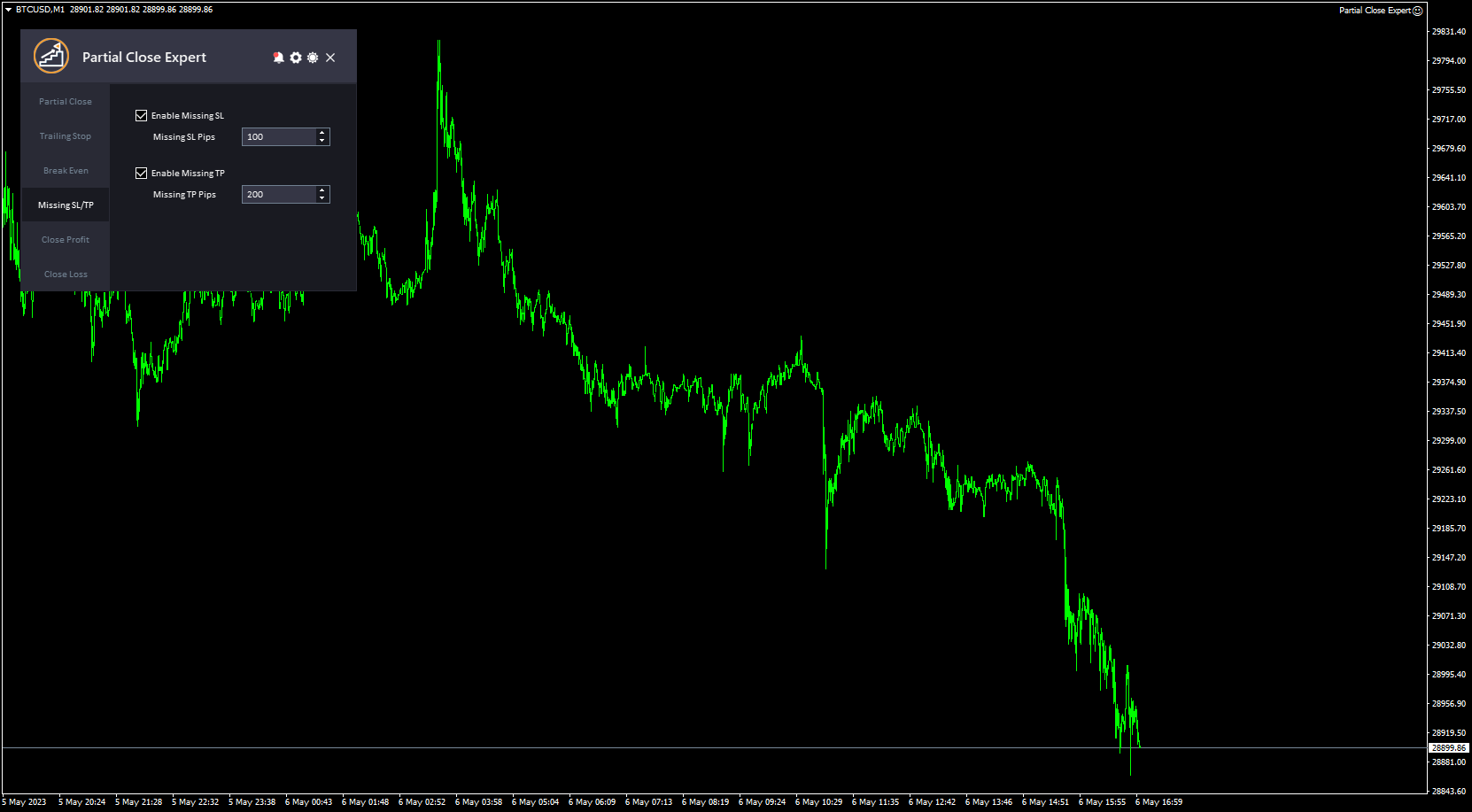
  4. Eksik SL/TP:   Yatırımcıların manuel olarak bir zarar durdurma veya kâr alma emri vermeyi unutmaları durumunda otomatik olarak bir zarar durdurma veya kâr alma emri vermelerini sağlayan bir özelliktir. Bu özelliğin girdileri arasında "Eksik SL/TP'yi Etkinleştir" (bu özelliği etkinleştirir veya devre dışı bırakır), "Eksik SL Pipleri" (eksik zarar durdurma emrinin verileceği mevcut piyasa fiyatından pip cinsinden uzaklığı belirler) ve "Eksik TP Pipleri" (eksik kâr alma emrinin verileceği mevcut piyasa fiyatından pip cinsinden uzaklığı belirler) bulunur.
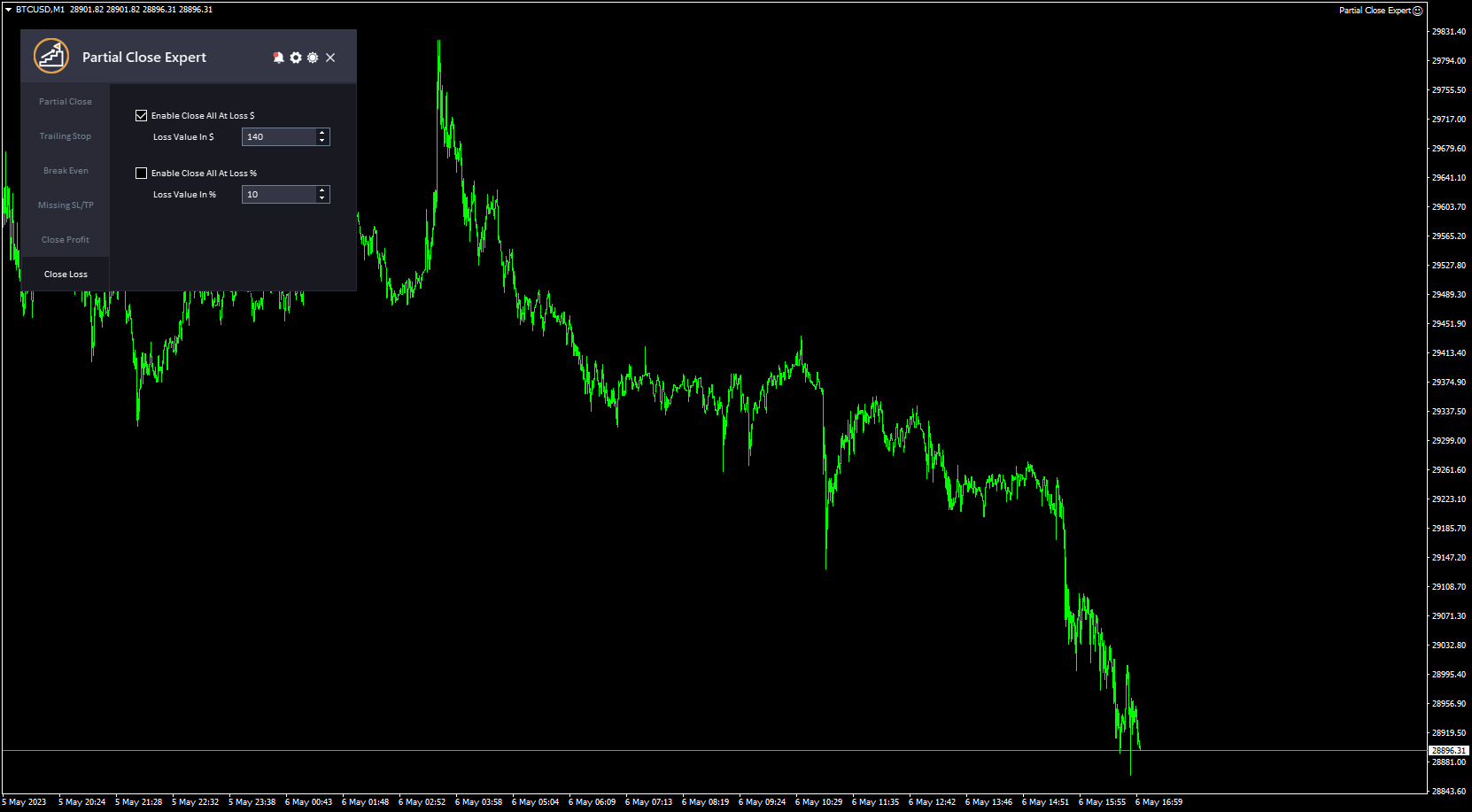
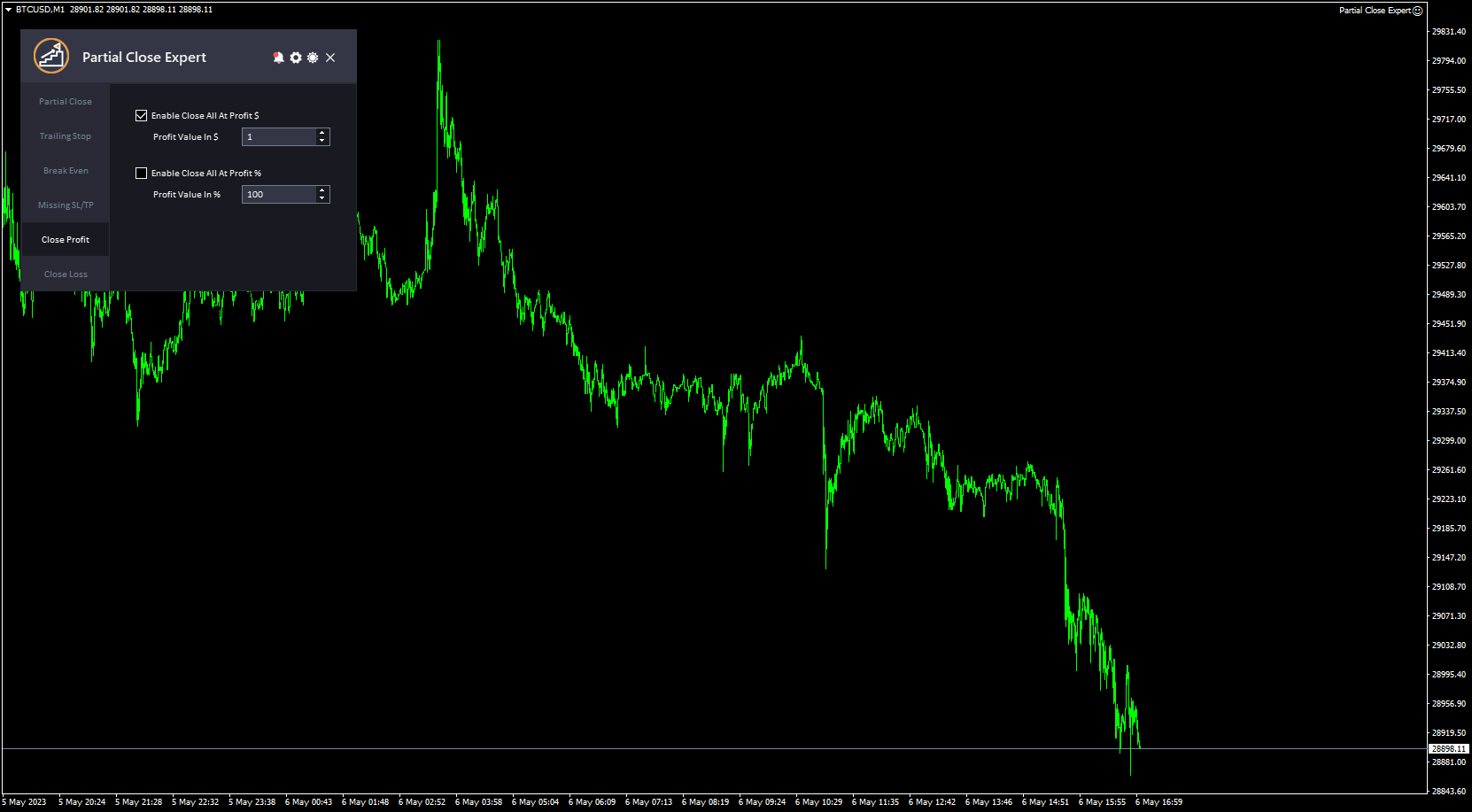
  5. Kapanış Kârı ve Kapanış Zararı:   Yatırımcıların, hesap belirli bir kâr veya zarar seviyesine ulaştığında tüm açık pozisyonları otomatik olarak kapatmalarına olanak tanır. Bu özelliklerin girdileri arasında "Kârda Tümünü Kapatmayı Etkinleştir$" (tüm işlemleri kapatmak için sabit bir değer kullanılmasını sağlar), "Kâr Değeri$" (gerçek tutarı belirtir), "Kârda Tümünü Kapatmayı Etkinleştir%" (tüm işlemleri kapatmak için kârın bir yüzdesinin kullanılmasını sağlar), "Kâr Değeri%" (yüzdeyi belirtir), "Zararda Tümünü Kapatmayı Etkinleştir$" (tüm işlemleri kapatmak için sabit bir değer kullanılmasını sağlar) ve "Zarar Değeri$" (gerçek tutarı belirtir) bulunur.
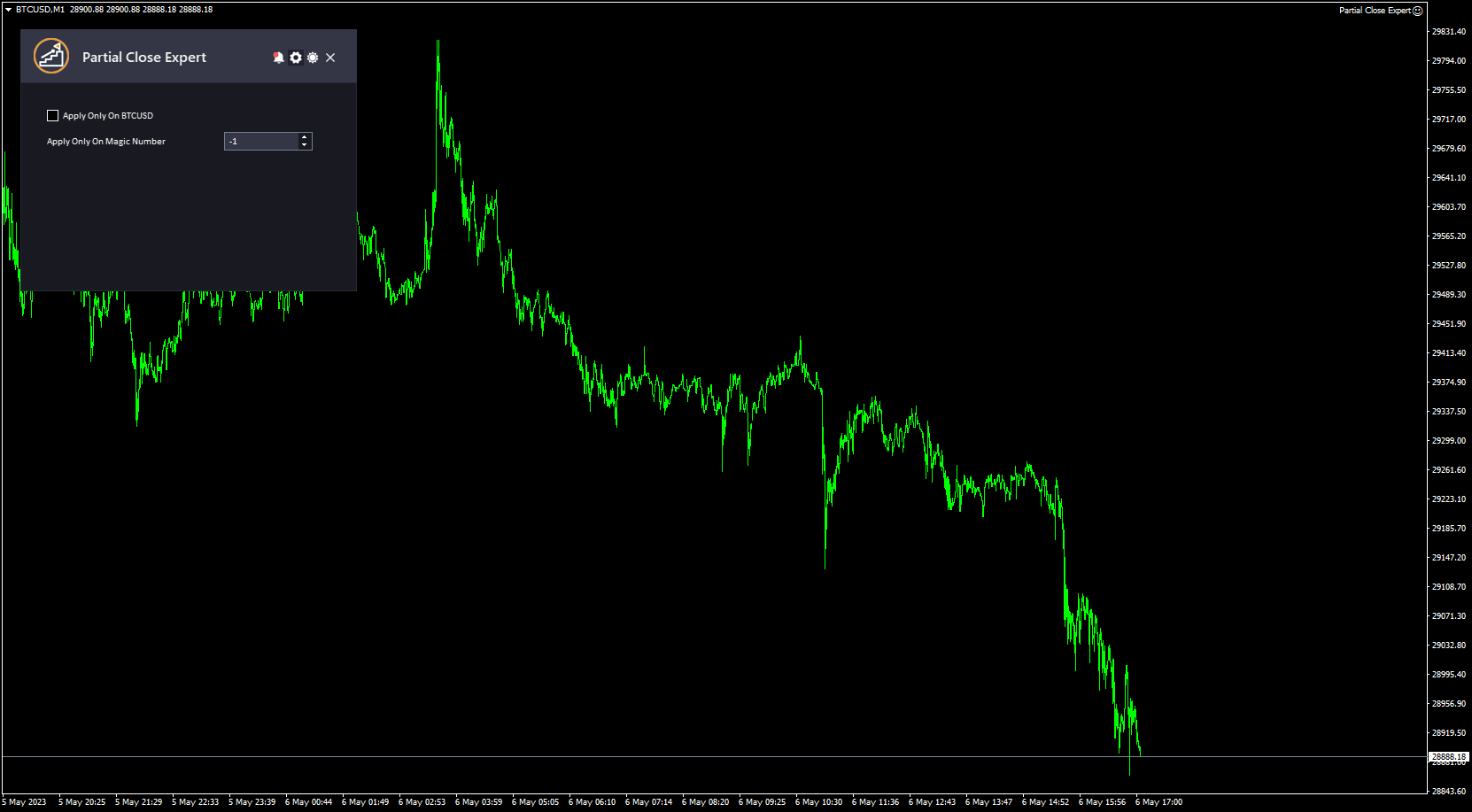
  6. Sadece bu sembole uygula : Bu, EA'ya tüm ayarları sadece geçerli sembolün emirlerine uygulamasını söyler, ayarların tüm emirlere ve sembollere uygulanmasını devre dışı bırakır.
  7. Sihirli Sayı : Bu, EA'ya kısmi kapatmayı yalnızca seçtiğiniz belirli sihirli sayıya sahip emirlere uygulamasını söyler. Bu değer sıfıra ayarlanırsa, EA yalnızca manuel olarak açılan emirleri yönetir. Bu değeri -1 (eksi bir) olarak ayarlarsanız, EA hesapta çalışan tüm emirleri yönetir (varsayılan değer).
  8. Bu araç basit ve profesyonel arayüzü ile öne çıkıyor ve Koyu ve Açık Tema arasında geçiş yapma özelliğine sahip.

Araç hakkında ne düşündüğünüzü duymayı çok isteriz! 😊 Lütfen geri bildirimlerinizi paylaşmaktan çekinmeyin ve görmek istediğiniz herhangi bir iyileştirme varsa bize bildirin.

Lütfen   bana ulaşın   Herhangi bir soru veya yardım için buraya tıklayın.

#etiketler Kısmi Kapatma Trailing Stop Denge Risk Yönetimi Kısmi Kapatma Yardımcı Programı GUI Grafik Teması


Değerlendirmeler 3
Osman Osman
926
Osman Osman 2018.09.22 23:35 
 

EA working great

Önerilen ürünler
The utility is designed to send signals from MT4 to Telegram. It has several unique features, allowing not only the sending of trade signals but also the following functionalities: Send messages directly from the terminal to Telegram Send emojis along with custom text Send text and images from Telegram All of these features enable users to manage a signal channel while focusing on trading and finding quality signals. Customizable Signal Messages You can fully customize the signal message: Specif
Tek grafik. Tam kontrol. Her grafikteki nesneleri, renkleri ve ayarları ayrı ayrı yönetmek için zaman kaybetmeyi bırakın.       Grafik Senkronizasyon Yöneticisi ile   şunları yapabilirsiniz:       tüm MetaTrader grafiklerinizi senkronize edin, kopyalayın ve kontrol edin       anında—sadece bir panel ve birkaç kısayol kullanarak. Bir kez çizin, her yerde güncelleyin. Grafikleri tek bir tıklamayla açıp kapatın. Çalışma alanınızı temiz tutun.       sembol tabanlı nesne yönetimi   . Ve önemli ayrınt
MQL4 Expert parsing signals from Telegram bot and executing the orders. Install EA, Telegram. Create a telegram bot which will distribute signal and specify it's token in EA input settings as well as key words which will be used to parse a signal. You can change or add key words by your own. Default values (lot, stops) are used in case the incoming signal don't include them. Specify "Allow DLL imports" in EA Settings.
IMPORTANT: After purchasing this product, please send me a private message to receive the installation guide, setup instructions, and direct product support. ZyloFx Prop Guard Manager MT4 is a professional account protection utility for MetaTrader 4, designed for traders who need disciplined control over daily and overall drawdown. This Expert Advisor does not open trades, does not provide entry signals, and does not use any trading strategy. Its purpose is to work as a protective layer on you
This Expert Advisor is designed to control drawdown by the symbol it is set to. The Expert Advisor does not carry out trading operations on opening positions, only closing open positions on the symbol on which it is set under certain conditions! There are three drawdown levels implemented in the Expert Advisor. The drawdown size for each level is set in the input parameters and the profit size is assigned (it can be either positive or negative), upon reaching which the ADVISER will close all po
================================ ENGLISH MANUAL ================================ Product Name: One-Click Close Utility v9.4 Developer: Gemini Partner Version: 9.40 Platform: MetaTrader 4 Type: Expert Advisor I. PRODUCT OVERVIEW --------------- One-Click Close is a professional order management utility designed for  MetaTrader 4 platform. It provides rapid batch closing operations through  intuitive button interface, integrated with intelligent risk management  system. Suitable for both manual
This Expert provides a panel to manage all positions you have on different pairs or any instruments. not only you can close your positions just by clicking the amount of profit or loss shown on the related cell, but also you can customize whatever you see on the panel from font size  to lines and background colors. Remember ,  auto trading on MT4 panel must be active, but in our Expert we have provided a key on the panel to activate or deactivate the panel to avoid closing by accident. Any qu
A simple tool for trading on trend and horizontal lines. A small panel of buttons on the chart allows you to set trigger lines in one click and track their status. Market orders open automatically when the price touches the lines. The order direction (Buy or Sell) is set by the line color when it is installed. Allows you to apply an unlimited number of lines, they will work as the price touches. You can create any graphic patterns: levels, channels, triangles, flags, grids, etc. The principle
SMT Trade Planner, MetaTrader grafigi uzerinde profesyonel bir risk hesaplayici ve islem yurutme panelidir. Risk ayarlariniza gore lot buyuklugunu hesaplar, grafikte suruklenebilir Giris, Stop Loss ve Take Profit cizgileri gosterir, yapilandiriabilir risk kurallarina gore islemi dogrular ve tek tikla islem yurutmenizi saglar.   Nasil calisir Trade Planner'i herhangi bir grafige ekleyin. Panel hesap bilgilerini ve hizli risk secim dugmelerini gosterir. Grafikte uc yatay cizgi belirir: Giris (mavi
Easy mt4 to telegram
Medilane Bernard Philippe Couratier
Jarfac Mt4ToTelegram Introduction Jarfac Mt4ToTelegram   is an MT4 system designed to facilitate real-time communication between the MetaTrader 4 platform and Telegram.   This script allows traders to receive customizable instant notifications based on different trade types, ensuring optimal responsiveness without having to constantly monitor the trading platform. main Features Real-time notifications   : Receive notifications directly on Telegram as soon as an action occurs on MT4. Emoji suppor
Send periodic (Health Check) notification from your MT4 terminal to your mobile phone to be sure that your MT4 terminal is still running. When you did not receive the notification, it means that your terminal is unavailable. Optional information like Account Equity and Trading Pairs are also available. Notification Period - 1 Hour, 2 Hours, 4 Hours, 8 Hours, 12 Hours, 24 Hours Attach EA to any H1 chart
One Click Trader is a tool designed for MetaTrader 4 platform, which enables you to take your trading to the next level. It enables you to open, manage and close your trades in simple an efficient way by just one click of your mouse button. Up arrow minimizes the OCT panel Down arrow maximizes the OCT panel Right arrow displays the next panel with additional features Left arrow hides the panel with additional features Red SELL button enables you to open short market orders Red SELL STOP button e
Pending Orders Grid Complete System opens any combination of Buy Stop, Sell Stop, Buy Limit and Sell Limit pending orders and closes all existing pending orders. You will be able to Drag-and-Drop the Script on the chart and it will pick up the start price for the first position in the grid from the "Drop" point. Usually it should be in the area of Support/Resistance lines. Input Parameters Before placing all pending orders, the input window is opened allowing you to modify all input parameters:
The Trading Panel is designed for easy, convenient, and intuitive use. It is built for both scalping and day trading. The Trading Panel is designed to recognize every instrument it is applied to, without the need to calculate pips or points. The Trading Panel includes Breakeven and Trailing functions, as well as the ability to open and close multiple orders simultaneously. The Breakeven and Trailing functions can be activated either together or separately. The number of trades opened at the same
Ultimate MT4 to Telegram (UMT) sends controlled trades (via symbol, magic, comment) to your telegram channel. It sends open and closed trades, including pending orders and TP/SL modifications, along with chart screenshots, to any telegram channel. Additionally, you can send trade reports of open trades and summary profit/pip reports for day, week, or month. You can customize the design of the trade actions or reports with variables and emoticons.  A beautiful panel allows you to visualize all t
Yet another signal copier. Nothing special. Demo version can be downloaded here . Key Features The utility copies trades between terminals: by market, pending orders (optional), as well as their stop loss and take profit levels (optional as well). You can copy from one Master account to several Slave accounts, as well as from several Master accounts to one Slave account. Volume calculation At the moment, there are two options for calculating the volume: The trade volume is taken 1 to 1 from th
The script allows you to quickly and easily open trades (place orders) on the market. Features Buy and sell at a market price; Place pending orders: Buy/Sell Limit and Buy/Sell Stop; Open a trade with a custom volume; Calculate and set TakeProfit; Calculate and set StopLoss; Auto defining the number of decimal places; Auto defining a symbol the script has been applied to. What you get with the script Ability to calculate each trade instantly; Ability not to enter all calculated values manually
Hola Traders. Lot - lot size for pending orders. Martingale - double lot size of pending orders. *(No Martingale = 1.00) TotalGridEachSide - unit each side of pending orders. SpaceOfFirstOrder - distance for the first order in points. Take Profit - profit in points. Stop Loss - loss in points. The entire positioning uses POINTS only. (10 point = 1 pip) and you can open order BUYSTOP, SELLSTOP, ALLBUYANDSELL you can Close Pending, Close orders Profit and Loss and Close All ***  ideas for using
Complete Pending Orders Grid System opens any combinations of Buy Stop, Sell Stop, Buy Limit and Sell Limit pending orders and closes all existing pending orders. You just need to drop this script on the chart of a desired currency pair. Before placing all pending orders, the input window is opened allowing you to modify all input parameters: DeleteAllPendings – if true , then all pending orders (for current currency) will be deleted. BuyStop – if true , BuyStop order is opened. SellStop – if tr
The utility is designed to send signals from MT4 to Telegram. It has several unique features, allowing not only the sending of trade signals but also the following functionalities: Send messages directly from the terminal to Telegram All of these features enable users to manage a signal channel while focusing on trading and finding quality signals. User-Friendly Interface Installation Telegram bot Create a Telegram bot that sends messages from the MT4 to the chat, channel or group. Set Up Tele
This utility device opens an opposite position a specified distance away from an original order (opened by another EA or just by manual trading) which it automatically detects. It can be used to gain back losses on false breakouts for example. Positions opened by the device can have a fixed SL and TP or/and can be protected by a trailing stop . In addition, it has a partial close function and a separate function to set a TP for secondary targets . It also uses a Magic number system , so it can b
BreakEven ProSync EA – Trade Management & Risk Control Tool Overview BreakEven ProSync EA is an expert advisor for   MetaTrader 4  that helps traders manage open positions efficiently by   automating stop-loss adjustments   and ensuring position synchronization. This tool is designed for traders who want to standardize their stop-loss and take-profit levels across multiple trades while integrating a break-even function. The EA works by calculating the  average price   of all open positions and
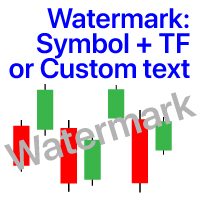
Grafikte filigran: Sembol + Zaman Dilimi / veya kendi metniniz # 1 Yardımcı Programım:   66'den fazla özellik içerir |   Herhangi   bir sorunuz varsa bana ulaşın Göstergenin ayarlarında şunları yapılandırabilirsiniz: Punto; Metin rengi; Yazı Tipi Adı; Pozisyon: 1 = Sol Üst; 2 = Sağ Üst; 3 = Sol Alt; 4 = Sağ Alt; 5 = Merkez; Geçerli Zaman dilimini göster: açık / kapalı; Kaldırılacak Sembolün öneki ( n_AUDCAD --> AUDCAD ); Kaldırılacak Sembolün soneki (USD CAD pro -> USD CAD); Özel metni göster:
Compas
Sergey Lisnyak
4.45 (11)
Compas -   is a fully automatic intraday trading robot, that trades mainly in the Pacific session. The EA Compas is safe and trades one order with a fixed Stop Loss. EA Compas is suitable for investment accounts that require reduced risks. The performance of EA Compas should be evaluated over long distances. The default settings are for GBPCAD M1 Setting For the operation to be correct, follow the instructions: To download the news list, it is necessary to add http://ec.forexprostools.com to th
Hello This EA for send Orders Signals when you open or close order and send statics to your channel in Telegram with sum of profit or Loss Pips you can share your orders with your clients in your telegram please watch our video  to see how it is fast. https://www.youtube.com/watch?v=u_7twtYZhyI you must have Telegram channel then make bot and give it Permission and get token (watch this video to know how do it) https://www.youtube.com/watch?v=x1bKWFOjSBE and you must download this files https
Telegram ChartSnap is an utility tool to bridge your MetaTrader 4 activities to your Telegram chat/group/channel. It will screen shot your MetaTrader 4 chart and send it to your dedicated Telegram chat/group/channel through a Telegram bot. The whole process will keep repeating based on a time cycle that predetermined by the user. It is a convenient tool for those who like to get access to their favorite system/dashboard that only available at MetaTrader Desktop. Beside that, trader can easily s
️ UMNi-CMND  UMNi-Cmnd — MT4 Remote Trade Command and Control UMNi-Cmnd turns Telegram into a full remote control panel for your MetaTrader 4 terminal. Send commands from your phone to open trades, manage positions, query account status, and receive complete trade telemetry — all without touching the platform. KEY FEATURES • Full remote trade execution via Telegram • Open, close, and manage positions by command • Move SL/TP, set breakeven • Live status, account, and posit
Açık pozisyonları ve bekleyen emirleri yönetmek için yardımcı program. Yerleşik trailing stop beş moda ve yedi seçeneğe sahiptir. Grafikte serbestçe hareket ettirilebilen bir sanal zararı durdur ve sanal bir kar al vardır. Yerleşik ticaret simülatörünün yardımıyla, strateji test cihazında EA'nın nasıl çalıştığını kontrol edebilirsiniz. UTralVirtual için bir kılavuz "Yorumlar" bölümünde bulunabilir. Faydalar 5 trailing stop modu: sanal, normal, toplam, yüzde ve mobil durdurma kaybı; 7 trailing s
Overview The Expert Advisor sends notifications to a mobile phone, via e-mail or plays a sound in case any changes are detected on the trading account: opening/closing positions, changing order parameters, balance or leverage. Also, the Expert Advisor can inform that Equity on the trading account has dropped below a specified value or Free Margin is small compared to Margin. The Expert does not trade, it only monitors your account. Launching the Expert Advisor For the Expert Advisor to work, pl
Grid Trading Manager EA
Ibrahim Mohamed Ibrahim Mohamed Elsahafy
Professional grid management EA with 3-tab GUI, progressive placement, 5 take profit levels (TP1-TP5), basket breakeven protection, and advanced trailing stop. Automatically manages manual trades with intelligent limit order distribution. --- ### KEY FEATURES **3-Tab Interactive GUI** - STATUS: Real-time monitoring, profit tracking, trailing targets - SETTINGS: Runtime configuration without EA restart - TAKE PROFIT: Configure 5 sequential TP levels **Progressive Order Placement** - Wave-
FREE
Bu ürünün alıcıları ayrıca şunları da satın alıyor
Unlimited Trade Copier Pro is a tool to copy trade remotely to multiple MT4, MT5 and cTrader accounts at different computers/locations over internet. This is an ideal solution for you if you are a signal provider and want to copy your trades to other receivers globally on your own rules. One provider can copy trades to multiple receivers and one receiver can get trade from multiple providers as well. The provider can even set the subscription expiry for each receiver, so that receiver will not b
Strategy Builder offers an incredible amount of functionality. It combines a trade panel with configurable automation (covert indicators into an EA), real-time statistics (profit & draw down) plus automatic optimization of SL, TP/exit, trading hours, indicator inputs. Multiple indicators can be combined into an single alert/trade signal and can include custom indicators, even if just have ex4 file or purchased from Market. The system is easily configured via a CONFIG button and associated pop-up
THIS EA IS A SEMI-AUTO EA, IT NEEDS USER INPUT. Manual & Test Version Please TEST this product before   BUYING  and watch my video about it. Contact me for user support or bug reports, or if you want the MT5 version! MT5 Version I do not guarantee any profits or financial success using this EA. With this Expert Advisor, you can: Implement your own   Zone Recovery   strategy to capitalize on trending markets. Create   Grid   trading strategies, to profit from ranging markets. Place orders easil
EASY Insight AIO – Akıllı ve zahmetsiz yatırım için hepsi bir arada çözüm Genel Bakış Tüm piyasayı — Forex, Altın, Kripto, Endeksler ve hatta Hisseler — saniyeler içinde, manuel grafik incelemesi, gösterge kurulumu ya da karmaşık ayarlar olmadan analiz edebildiğinizi hayal edin. EASY Insight AIO , yapay zekâ destekli yatırım için nihai, kullanıma hazır dışa aktarma aracınızdır. Tüm piyasanın kapsamlı bir anlık görüntüsünü tek bir temiz CSV dosyasında sunar; bu dosya ChatGPT, Claude, Gemini, Pe
The FFx Hidden Manager panel will help you to manage easily your orders directly on the chart. Below all features described: TP, SL and TrailingStop are hidden Each order has its own lines on chart Drag & Drop any line to change the TP/SL as per your need Option to move automatically the SL line at breakeven when TP #1 is reached Option to choose the TP/SL type (by pips or price) Option to choose the TrailingStop type (by pips, MA, Fractals, PSAR or ATR) Define which order(s) you want to manage
FFx Risk Calculator panel will help you to calculate very easily your trades size, SL or the risk directly on the chart. All features are described below: Option to select which parameter to calculate: Risk, Stop Loss or Lot Size The panel will show if the lot size is allowed according to the current account free margin Button to maximize/minimize the panel Drag and Drop the panel anywhere on the chart How to use it? Select the parameter you want to be calculated. It will be based on the 2 other
News Trader Pro is a unique robot that allows you to trade the news by your predefined strategy. It loads every piece of news from several popular Forex websites. You can choose any news and preset the strategy to trade it, and then News Trader Pro will trade that news by selected strategy automatically when the news comes. News release gives opportunity to have pips since the price usually has big move at that time. Now, with this tool, trading news becomes easier, more flexible and more exciti
The FFx Watcher PRO is a dashboard displaying on a single chart the current direction of up to 15 standard indicators and up to 9 timeframes. It has 2 different modes: 1. Watcher mode: Multi Indicators User is able to select up to 15 indicators to be displayed User is able to select up to 9 timeframes to be displayed 2. Watcher mode: Multi Pairs User is able to select any number of pairs/symbols User is able to select up to 9 timeframes to be displayed This mode uses one of the standard indicat
The product combines a manual trade panel with the ability to perform actions automatically in a highly configurable way. Actions include capturing indicator values and then based on those values raising alerts, open/close or partially close trades, scale-in, setting up pending orders, adjusting stop loss, take profit and more. On-chart controls can be configured, such as tick boxes and buttons, so can be fully interactive. The EA also handles money management, news events, hidden stop loss, tak
Elliott Wave Counter, Elliott dalgalarının hızlı ve kullanıcı dostu manuel olarak işaretlenmesine yönelik bir paneldir. Bir renk ve işaret seviyesi seçilebilir. Son işaretlemeyi ve araç tarafından yapılan tüm işaretlemeyi kaldırma işlevleri de vardır. İşaretleme tek bir tıklamayla yapılır. Beş kez tıklayın - beş dalganız olsun! Elliott Dalga Sayacı, Elliott dalgalarının hem yeni başlayanlar hem de profesyonel analistleri için harika bir araç olacaktır. Elliott Wave Sayacı Kurulum ve Giriş Kılavu
If you wish to draw Support and Resistance lines, view: daily market opening, classical pivot levels, Fibonacci pivot levels, trend lines, Fibonacci levels, the remaining time to candle closing, and current spread. If you seek to place your orders with the exact lot that meets your desired stop loss risk. If you wish to do all this and more with just one click, then this is the perfect tool to use. This tool will allow you to feel more relaxed when deciding to open orders, as well as predicting
Unlimited Binary Options Copier Remote is a powerful tool to copy binary options trades remotely between multiple accounts at different locations over internet. This is an ideal solution for signal provider, who want to share his binary options trades with the others globally on his own rules. One provider can copy trades to unlimited receivers and one receiver can get trade from unlimited providers as well. The provider can set the subscription expiry for each receiver, so that receiver will no
This is an Expert Adviser use for manual trading as a background EA or combine with external EA to open orders. Loss Recovery Trading is one of your options to handle the lose positions instead of using stop loss by setting a zone recovery area and target to exit the turn rounds sequence. How It Work? If the market goes against your first positions direction at the specific of losing points, the EA will open an opposite direction position with calculated larger lot size and also keep the first
Telegram Publisher Agent,   tüccarların Telegram kanallarına ve gruplarına gerçek zamanlı olarak sinyaller göndermelerine olanak tanıyan bir eklentidir. Özelleştirilebilir mesajlar, grafik ekran görüntüleri ve diğer özelliklerle araç, yatırımcıların alım satım içgörülerini ve stratejilerini takipçileriyle paylaşmalarına yardımcı olur. Araç ayrıca, kullanıcılara estetik ve işlevsel bir ticaret deneyimi sağlayan açık ve koyu tema anahtarıyla güzel bir tasarıma sahiptir. Telegram Yayıncı Temsilcisi
如果产品有任何问题或者您需要在此产品上添加功能,请联系我 Contact/message me if you encounter any issue using the product or need extra feature to add on the base version. There is Demo version of this panel Dashboard Babon Scalping System Demo in my product list, please try it out to get familiar with all functionalities for free, LINK . This system basically utilizes TDI, Heiken Ashi Trend, Price Trend on H1 time-frame and TMA on H1&H4 time-frame to generate the trend (big picture). Then the system will zoom in to genera
The Pairs Trade indicator is a utility for semi-automatic pair trading. It allows combining the charts of two arbitrary instruments, even if the schedules of their trading sessions are different. It displays a spread chart in the form of a histogram with an overlaying moving average. It calculates the swap that will be charged for the synthetic position (in the deposit currency). It is possible to set a level for automatic opening of a synthetic position on the spread chart (analogous to the 'se
The script displays info about the share's corporate reports and dividends. The data is downloaded from   investing.com : Report date Profit per share (EPS) Revenue Market capitalization Amount of dividends Date of payment of dividends Dividend income The product cannot be tested in the tester (since it is not possible to receive data from the Internet). Before launching:  Add 2   URL   https://ru.investing.com/earnings-calendar/Service/getCalendarFilteredData  and   https://ru.investing.com/di
This Stacker EA will: Automatically set Stop loss on a new order Automatically set Take profit on a new order Stack (or open up to 4 additional orders at the same time) when a new order is placed, the SL/TP can be preset individually for each order. Provides a transparent replacement for the standard 1-click trading buttons in MetaTrader 4 (1 click still works and SL/TP will automatically be set as well as Stacking). Automatically calculate lot order size according to preset risk management perc
This small tool takes over the manually opened positions and treats them according to the predefined settings with the dynamic stop loss and Money Management, which predicts which position size should be used for the trade. The program dynamically tracks the stop loss as soon as the position comes into the plus. Possible commissions and swaps are taken into calculation. It should only be installed on one chart window per symbol. Settings LotRiskPercent = 25 - Percentage of the item size. Calcul
Currencies Cleaner panel will give you an overview of all the most traded market's currencies in a single click. First of all the panel will refresh all your charts, opening them four times in all timeframes needed. 1 - CURRENCIES It uses a complex algorithm to study the movement of 17 different indicators. It means that the algorithm not only "reads" the actual value of an indicator, but also creates a probability of success using the position of this value on the indicator and the last moveme
Buy or rent it and request a copy of the Antimartingale EA for free  Trendline based utility, you design your trendlines or horizontal lines, the EA opens trades for you Possibility to trade on break and/or bounce events Indipendent break and bounce settings Configurable market, stop and limit orders T1T2 Logic to lock profits and minimize losses Trailing Stop Loss Max Spread check Notifies you when your trendlines are crossed No strange trendline name or syntax, you decide the color of tr
FXFledgling Exit Tool is a complete risk management tool that analyzes both the open trades and the direction of the pair of open trades. As long as the suggested entry and lotsizing management presented here is followed strictly, you will have a high chance (but no guarantee) of surviving the trade. What It Does It is used as an exit tool. It helps the trader to manage any manual trade that he transacted. It does the following: Trail Stop Dynamic Stop Loss - a calculated stop-loss that changes
This utility records the swap, which allows you to monitor and analyze the changes in the swap. The program writes a file with the swap data for every pair selected in the Market Watch. The data are recorded to a csv file at the specified time, the file is located in <terminal root directory>/MQL4/Files. File format: Date Day Time Currency pair Long-swap Short-swap 16.01.2018 Mon 23:30 EURNOK -34.81 27.14 16.01.2018 Mon 23:30 EURDKK -0.022 -0.032 16.01.2018 Mon 23:30 EURGBP -2.38 0.15 To start r
New opportunities for analyzing cryptocurrency in the usual MetaTrader 4. For example : We select the symbol of the cryptocurrency and attach any indicators, Expert Advisors or scripts. Startup Mode View cryptocurrency; Data collection. Capabilities Work as with a standard currency chart; Automatic update of open charts; Selection of individual cryptocurrency for updating; Selection of individual timeframes for updating; Work on the desired timeframes; Open charts do not affect the work of Cry
Notify Telegram is a utility that bridge your MetaTrader4 trading activities to your Telegram chat/channel. It will help you to monitor your MetaTrader4 actions such as placing trade, modifying order's TP/SL, closing trades etc and send a notification message to your dedicated Telegram chat/channel. It does not execute any trade on your MetaTrader4 account. It can be useful for monitoring EA performance or providing signal to your Telegram channel/group subscribed. Parameters Token ="" - enter
The  Easy Strategy Builder (ESB)  is a " Do It Yourself " solution that allows you to create a wide range of the automated trading strategies without any line of codes. This is the world’s easiest method to automate your strategies that can be used in STP, ECN and FIFO brokers. No drag and drop is needed. Just by set conditions of your trading strategy and change settings on desired values and let it work in your account. ESB has hundreds of modules to define unlimited possibilities of strategi
Fibonacci Expansion and Retracement Analysis Fibonacci retracing and extended line tools for the MT4 platform, ideal for traders who use the DiNapoli point trading method and the Golden Section trading The main function: 1. You can draw multiple sets of Fibonacci retracements directly, and the relationship between important return points is clear at a glance. 2. Can draw Fibonacci extensions 3. The Fibonacci foldback and extension of the line can be moved left and right for easy observation
Советник риск-менеджер с огромным арсеналом возможностей защиты вашего депозита. Для инвесторов, которые решили передать капитал в доверительное управление. Когда у трейдера нет доступа к настройкам - нивелирует торговые риски. А также для трейдеров, которые осознали необходимость стороннего контроля за их торговлей для улучшения торговых результатов.  Для максимальных результатов - должен стоять на отдельном VPS сервере и у трейдера не должно быть возможности менять настройки в торговый период.
Grid Hero War Pad is a  GRAPHICAL MANUAL TRADER version of the original Grid Hero EA, designed and created for ADVANCED TRADERS who are experienced in plotting their own market entries. It is coded using ADVANCED GRAPHICAL INTERFACE programming, that combines the power of discretionary trading with Grid Hero algorithm in the form of a graphical console with button-click easy execution. It allows you to execute trades manually using Market Orders and Pending Orders, and then automatically uses th
The advantage of using this EA This EA directly updates takeprofit and stop losses that are still empty in a manual order Parameters Multiplier: Multiplier value of the previous transaction Distance: Distance hedging from the previous order Takeprofit: take profit taken from the last price + the value of this column We recommend that you do not add more than one manual transaction in the same pair martingale hedging | manual hedging | hedging manual | hedging lot | best robot | best ea
Yazarın diğer ürünleri
Risk-Ödül Oranı Yöneticisi, disiplinli alım satım ve profesyonel risk yönetimini desteklemek üzere tasarlanmış görsel bir emir yönetim aracı ve pozisyon boyutu hesaplayıcısıdır. Yatırımcıların giriş, zarar durdurma ve kâr alma seviyelerini doğrudan grafik üzerinde görsel olarak ayarlamalarına olanak tanırken, emir göndermeden önce lot boyutunu ve risk-ödül oranını otomatik olarak hesaplar. Araç, işlem hazırlığını standartlaştırmaya yardımcı olur ve her pozisyonun önceden tanımlanmış ve kontrollü
Elliott Wave Counter, Elliott dalgalarının hızlı ve kullanıcı dostu manuel olarak işaretlenmesine yönelik bir paneldir. Bir renk ve işaret seviyesi seçilebilir. Son işaretlemeyi ve araç tarafından yapılan tüm işaretlemeyi kaldırma işlevleri de vardır. İşaretleme tek bir tıklamayla yapılır. Beş kez tıklayın - beş dalganız olsun! Elliott Dalga Sayacı, Elliott dalgalarının hem yeni başlayanlar hem de profesyonel analistleri için harika bir araç olacaktır. Elliott Wave Sayacı Kurulum ve Giriş Kılavu
If you wish to draw Support and Resistance lines, view: daily market opening, classical pivot levels, Fibonacci pivot levels, trend lines, Fibonacci levels, the remaining time to candle closing, and current spread. If you seek to place your orders with the exact lot that meets your desired stop loss risk. If you wish to do all this and more with just one click, then this is the perfect tool to use. This tool will allow you to feel more relaxed when deciding to open orders, as well as predicting
Tek Tıkla Analiz Aracı,       klavye kısayolu tabanlı nesne oluşturma       ve MetaTrader için kopyalama aracı. MetaTrader'daki analiz araçlarını tek tıklamayla kullanmayı kolaylaştırır. Aracımızla, grafiğinizdeki destek ve direnç seviyelerini, Fibonacci seviyelerini, şekilleri, kanalları, trend çizgilerini ve diğer tüm nesneleri hızlı bir şekilde çizebilirsiniz. Düğmeye tıklayın, fareyi hareket ettirin ve Tek Tıklamayla Analiz Aracı gerisini sizin için halleder. Bu size zaman kazandırabilir ve
Draw Agent, tüm grafik analizlerinizi, karalamalarınızı, notlarınızı ve daha fazlasını oluşturmanız ve yönetmeniz için güzel ve yenilikçi bir yol olarak tasarlanmıştır. Bu araç, grafik alanını bir kara tahta olarak ele almak ve elle çizmek için serbest çizim yöntemi sağlar. Bu Serbest Çizim aracı, tablodaki olayları işaretlemek veya vurgulamak için MT4/MT5 tablolarına çizim yapmanızı sağlar. Elliott dalgalarını elle çizmek, çizelgede çizgiler çizmek veya çizelgenizdeki fikirleri göstermek istiy
Trade Copier Agent, çoklu MetaTrader(4/5) hesapları/terminalleri arasındaki işlemleri kopyalamak için tasarlanmıştır. Bu araçla, bir sağlayıcı (kaynak) veya bir alıcı (hedef) olarak hareket edebilirsiniz. Tüm ticaret işlemleri, sağlayıcıdan alıcıya gecikme olmaksızın kopyalanacaktır. Bu araç, 0,5 saniyenin altındaki ışık hızında kopyalama hızlarıyla aynı bilgisayardaki birden fazla MetaTrader terminali arasında alım satımları kopyalamanıza olanak tanır. Ticari Fotokopi Aracısı Yükleme ve Girdil
The library is dedicated to help manage your trades, calculate lot, trailing, partial close and other functions Orders CloseallSell CloseallBuy CloseallOpen DeletePending DeleteAll: Close All Market Orders and delete all pending orders. CheckOpenBuyOrders: return the count of buy orders. CheckOpenSellOrders: return the count of sell orders. CheckOpenOrders: return the count of market orders. ModifyOrder DeleteOrder CloseOrder OpenOrder Lot Calculation Mode 0: Fixed Lot. Mode 1: Martingale Lot
Telegram Publisher Agent,   tüccarların Telegram kanallarına ve gruplarına gerçek zamanlı olarak sinyaller göndermelerine olanak tanıyan bir eklentidir. Özelleştirilebilir mesajlar, grafik ekran görüntüleri ve diğer özelliklerle araç, yatırımcıların alım satım içgörülerini ve stratejilerini takipçileriyle paylaşmalarına yardımcı olur. Araç ayrıca, kullanıcılara estetik ve işlevsel bir ticaret deneyimi sağlayan açık ve koyu tema anahtarıyla güzel bir tasarıma sahiptir. Telegram Yayıncı Temsilcisi
Harika bir sinyal buldunuz, ancak bir sağlayıcının lotu çok mu küçük? Daha büyük konum hacmine ihtiyacınız var, ancak terminal ayarları çok mu zayıf? Signal Lot Manager, sağlayıcının pozisyon hacmini, ihtiyaç duyulan hacmin mükerrer sırası aracılığıyla artıracaktır. Sadece siparişleri kopyalamak için bir lot boyutu ve bir sinyal adı belirleyin. Signal Lot Manager, terminalinizde siparişleri çoğaltmak için bir lot çarpanı yardımcı programıdır. Kaynak herhangi bir danışman, manuel ticaret, ayrı bi
İkili Ticaret Paneli, MT4/MT5 platformunda ikili opsiyon ticareti yapmak için çok kullanışlı bir araçtır. Artık eklentileri MT4/MT5 dışında kurmaya gerek yok. Bu, doğrudan MT4/MT5 grafiği üzerinde basit ve kullanışlı bir paneldir. İkili Ticaret Paneli, ikili opsiyon ticareti yapmak için MT4/MT5 platformunu kullanan tüccarlar için faydalı bir araçtır. Bu, tüccarların harici eklentiler kurmaya veya birden çok ekran ve menüde gezinmeye gerek kalmadan doğrudan MT4/MT5 tablosundan ikili opsiyon işle
MetaTrader için Haber Paneli, MetaTrader ticaret platformunda ekonomik takvim verilerini görüntüleyen bir araçtır. Araç, finansal haber siteleri veya veri sağlayıcılar gibi dış kaynaklardan ekonomik haberleri ve veri yayınlarını çeker ve bunları okunması kolay bir biçimde görüntüler. Araç, tüccarların haber bültenlerini kaynağa, saat dilimine, etki düzeyine, para birimine ve bildirim yöntemine göre filtrelemesine olanak tanır. Ayrıca, kullanıcının verileri manuel olarak güncellemesini ve mevcut
Devrim niteliğindeki İşlemler Zaman Yöneticisi ile işlem rutininizin kontrolünü zahmetsizce elinize alın. Bu güçlü araç, belirlenen zamanlarda emir gerçekleştirmeyi otomatikleştirerek alım satım yaklaşımınızı dönüştürür. Satın alma işleminden emir belirlemeye kadar çeşitli ticaret eylemleri için manuel müdahale olmadan kişiselleştirilmiş görev listeleri oluşturun. Trades Time Manager Kurulum ve Girdiler Kılavuzu EA hakkında bildirim almak istiyorsanız, URL'mizi MT4/MT5 terminaline ekleyin (ekran
Tek grafik. Tam kontrol. Her grafikteki nesneleri, renkleri ve ayarları ayrı ayrı yönetmek için zaman kaybetmeyi bırakın.       Grafik Senkronizasyon Yöneticisi ile   şunları yapabilirsiniz:       tüm MetaTrader grafiklerinizi senkronize edin, kopyalayın ve kontrol edin       anında—sadece bir panel ve birkaç kısayol kullanarak. Bir kez çizin, her yerde güncelleyin. Grafikleri tek bir tıklamayla açıp kapatın. Çalışma alanınızı temiz tutun.       sembol tabanlı nesne yönetimi   . Ve önemli ayrınt
Draw Agent, tüm grafik analizlerinizi, karalamalarınızı, notlarınızı ve daha fazlasını oluşturmanız ve yönetmeniz için güzel ve yenilikçi bir yol olarak tasarlanmıştır. Bu araç, grafik alanını bir kara tahta olarak ele almak ve elle çizmek için serbest çizim yöntemi sağlar. Bu Serbest Çizim aracı, tablodaki olayları işaretlemek veya vurgulamak için MT4/MT5 tablolarına çizim yapmanızı sağlar. Elliott dalgalarını elle çizmek, çizelgede çizgiler çizmek veya çizelgenizdeki fikirleri göstermek istiy
Tek Tıkla Analiz Aracı,       klavye kısayolu tabanlı nesne oluşturma       ve MetaTrader için kopyalama aracı. MetaTrader'daki analiz araçlarını tek tıklamayla kullanmayı kolaylaştırır. Aracımızla, grafiğinizdeki destek ve direnç seviyelerini, Fibonacci seviyelerini, şekilleri, kanalları, trend çizgilerini ve diğer tüm nesneleri hızlı bir şekilde çizebilirsiniz. Düğmeye tıklayın, fareyi hareket ettirin ve Tek Tıklamayla Analiz Aracı gerisini sizin için halleder. Bu size zaman kazandırabilir ve
Elliott Wave Counter, Elliott dalgalarının hızlı ve kullanıcı dostu manuel olarak işaretlenmesine yönelik bir paneldir. Bir renk ve işaret seviyesi seçilebilir. Son işaretlemeyi ve araç tarafından yapılan tüm işaretlemeyi kaldırma işlevleri de vardır. İşaretleme tek bir tıklamayla yapılır. Beş kez tıklayın - beş dalganız olsun! Elliott Dalga Sayacı, Elliott dalgalarının hem yeni başlayanlar hem de profesyonel analistleri için harika bir araç olacaktır. Elliott Wave Sayacı Kurulum ve Giriş Kılavu
Kısmi Kapanış Uzmanı,   birçok işlevi tek bir otomatik sistemde birleştiren bir araçtır. Bu EA, risk yönetimi ve potansiyel kazançları en üst düzeye çıkarmak için birden fazla seçenek sunarak yatırımcıların pozisyonlarını daha etkili bir şekilde yönetmelerine yardımcı olabilir. Kısmi Kapanış Uzmanı ile yatırımcılar bir       kısmi kapanış       karı kilitlemek için bir seviye       takip eden durdurma       karları korumak ve kayıpları sınırlamak için bir seviye       başa baş       Fiyatın ken
If you wish to draw Support and Resistance lines, view: daily market opening, classical pivot levels, Fibonacci pivot levels, trend lines, Fibonacci levels, the remaining time to candle closing, and current spread. If you seek to place your orders with the exact lot that meets your desired stop loss risk. If you wish to do all this and more with just one click, then this is the perfect tool to use. This tool will allow you to feel more relaxed when deciding to open orders, as well as predicting
The library is dedicated to help manage your trades, calculate lot, trailing, partial close and other functions. Lot Calculation Mode 0: Fixed Lot. Mode 1: Martingale Lot (1,3,5,8,13) you can use it in different way calculate when loss=1 ,when profit=0. Mode 2: Multiplier Lot (1,2,4,8,16) you can use it in different way calculate when loss=1 ,when profit=0. Mode 3: Plus Lot (1,2,3,4,5) you can use it in different way calculate when loss=1 ,when profit=0. Mode 4: SL/Risk Lot calculate based on s
Telegram Publisher Agent,   tüccarların Telegram kanallarına ve gruplarına gerçek zamanlı olarak sinyaller göndermelerine olanak tanıyan bir eklentidir. Özelleştirilebilir mesajlar, grafik ekran görüntüleri ve diğer özelliklerle araç, yatırımcıların alım satım içgörülerini ve stratejilerini takipçileriyle paylaşmalarına yardımcı olur. Araç ayrıca, kullanıcılara estetik ve işlevsel bir ticaret deneyimi sağlayan açık ve koyu tema anahtarıyla güzel bir tasarıma sahiptir. Telegram Yayıncı Temsilcis
Harika bir sinyal buldunuz, ancak bir sağlayıcının lotu çok mu küçük? Daha büyük konum hacmine ihtiyacınız var, ancak terminal ayarları çok mu zayıf? Signal Lot Manager, sağlayıcının pozisyon hacmini, ihtiyaç duyulan hacmin mükerrer sırası aracılığıyla artıracaktır. Sadece siparişleri kopyalamak için bir lot boyutu ve bir sinyal adı belirleyin. Signal Lot Manager, terminalinizde siparişleri çoğaltmak için bir lot çarpanı yardımcı programıdır. Kaynak herhangi bir danışman, manuel ticaret, ayrı bi
Trade Copier Agent, çoklu MetaTrader(4/5) hesapları/terminalleri arasındaki işlemleri kopyalamak için tasarlanmıştır. Bu araçla, bir sağlayıcı (kaynak) veya bir alıcı (hedef) olarak hareket edebilirsiniz. Tüm ticaret işlemleri, sağlayıcıdan alıcıya gecikme olmaksızın kopyalanacaktır. Bu araç, 0,5 saniyenin altındaki ışık hızında kopyalama hızlarıyla aynı bilgisayardaki birden fazla MetaTrader terminali arasında alım satımları kopyalamanıza olanak tanır. Ticari Fotokopi Aracısı Yükleme ve Girdil

MetaTrader için Haber Paneli, MetaTrader ticaret platformunda ekonomik takvim verilerini görüntüleyen bir araçtır. Araç, finansal haber siteleri veya veri sağlayıcılar gibi dış kaynaklardan ekonomik haberleri ve veri yayınlarını çeker ve bunları okunması kolay bir biçimde görüntüler. Araç, tüccarların haber bültenlerini kaynağa, saat dilimine, etki düzeyine, para birimine ve bildirim yöntemine göre filtrelemesine olanak tanır. Ayrıca, kullanıcının verileri manuel olarak güncellemesini ve mevcut
İkili Ticaret Paneli, MT4/MT5 platformunda ikili opsiyon ticareti yapmak için çok kullanışlı bir araçtır. Artık eklentileri MT4/MT5 dışında kurmaya gerek yok. Bu, doğrudan MT4/MT5 grafiği üzerinde basit ve kullanışlı bir paneldir. İkili Ticaret Paneli, ikili opsiyon ticareti yapmak için MT4/MT5 platformunu kullanan tüccarlar için faydalı bir araçtır. Bu, tüccarların harici eklentiler kurmaya veya birden çok ekran ve menüde gezinmeye gerek kalmadan doğrudan MT4/MT5 tablosundan ikili opsiyon işle
Devrim niteliğindeki İşlemler Zaman Yöneticisi ile işlem rutininizin kontrolünü zahmetsizce elinize alın. Bu güçlü araç, belirlenen zamanlarda emir gerçekleştirmeyi otomatikleştirerek alım satım yaklaşımınızı dönüştürür. Satın alma işleminden emir belirlemeye kadar çeşitli ticaret eylemleri için manuel müdahale olmadan kişiselleştirilmiş görev listeleri oluşturun. Trades Time Manager Kurulum ve Girdiler Kılavuzu EA hakkında bildirim almak istiyorsanız, URL'mizi MT4/MT5 terminaline ekleyin (ekran
Risk-Ödül Oranı Yöneticisi, disiplinli alım satım ve profesyonel risk yönetimini desteklemek üzere tasarlanmış görsel bir emir yönetim aracı ve pozisyon boyutu hesaplayıcısıdır. Yatırımcıların giriş, zarar durdurma ve kâr alma seviyelerini doğrudan grafik üzerinde görsel olarak ayarlamalarına olanak tanırken, emir göndermeden önce lot boyutunu ve risk-ödül oranını otomatik olarak hesaplar. Araç, işlem hazırlığını standartlaştırmaya yardımcı olur ve her pozisyonun önceden tanımlanmış ve kontrollü
Tek grafik. Tam kontrol. Her grafikteki nesneleri, renkleri ve ayarları ayrı ayrı yönetmek için zaman kaybetmeyi bırakın.       Grafik Senkronizasyon Yöneticisi ile   şunları yapabilirsiniz:       tüm MetaTrader grafiklerinizi senkronize edin, kopyalayın ve kontrol edin       anında—sadece bir panel ve birkaç kısayol kullanarak. Bir kez çizin, her yerde güncelleyin. Grafikleri tek bir tıklamayla açıp kapatın. Çalışma alanınızı temiz tutun.       sembol tabanlı nesne yönetimi   . Ve önemli ayrınt
Filtrele:
[Silindi] 2019.01.14 18:49 
 

Kullanıcı değerlendirmeye herhangi bir yorum bırakmadı

Osman Osman
926
Osman Osman 2018.09.22 23:35 
 

EA working great

rudy10
292
rudy10 2016.10.19 15:11 
 

i have the partialclose ,a very good tool.

i like it.

good for swing trade,scalping,for every trade.

Değerlendirmeye yanıt