More BackTest Results

1. What is this

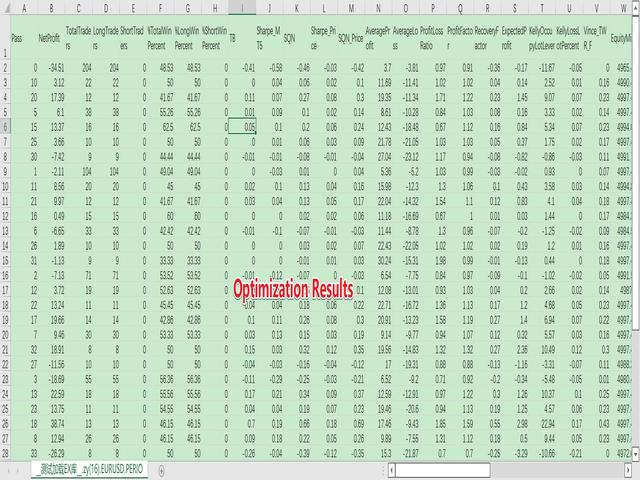
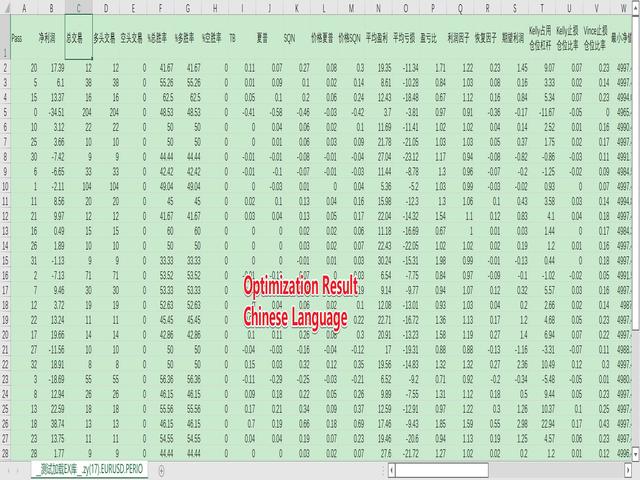
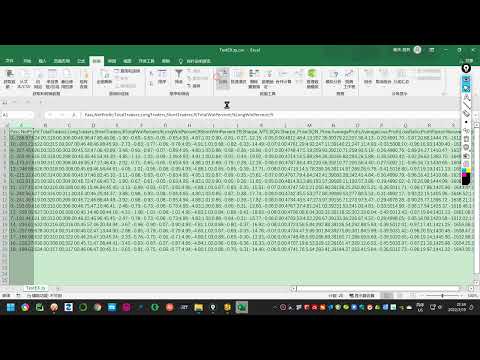
The MT5 system comes with very few optimization results. Sometimes we need to study more results. This library allows you to output more results during backtest optimization. It also supports printing more strategy results in a single backtest.

2. Product Features

  • The results of the optimized output are quite numerous.
  • CustomMax can be customized.
  • The output is in the Common folder.
  • It is automatically named according to the name of the EA, and the name of the same EA will be automatically updated for multiple backtests without overwriting the previous results.
  • The function is so simple that you can understand it at a glance.
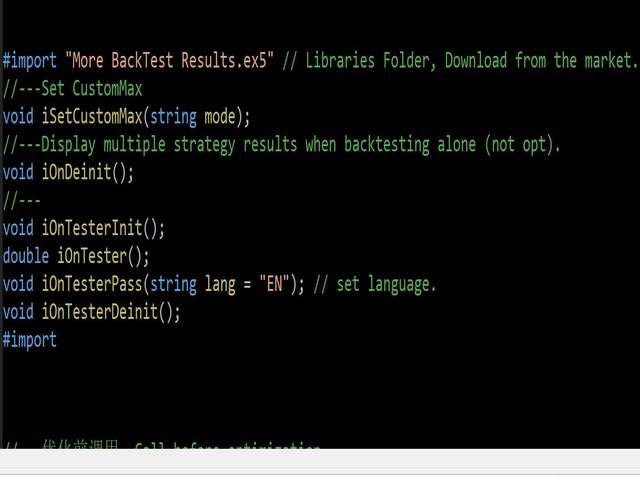
    #import "More BackTest Results.ex5" // Libraries Folder, Download from the market.
    //---Set CustomMax
    void iSetCustomMax(string mode); 
    //---Display multiple strategy results when backtesting alone (not opt).
    void iOnDeinit(); 
    //---
    void iOnTesterInit();
    double iOnTester();
    void iOnTesterPass(string lang = "EN"); // set language.
    void iOnTesterDeinit();
    #import

3. How to use

  • Download the .ex5 library, normally it is under the \Scripts\Market folder. Then move it to the \Libraries folder.
  • Download the More_BackTest_Result.mqh file from this link and place the More_BackTest_Result.mqh file in the Include folder.
  • You can refer to the usage method in More_BackTest_Result.mqh, I designed it very simple, so that you can understand it at a glance.
  • Usually, you just need to load a code in the EA and you're done. 
    #include <More_BackTest_Result.mqh>
  • If you need to modify the language, it is not necessary, you need to modify an affix in mqh. Refer to 4 for details.
  • If you need to set CustomMax, you need to set it in EA, it is not necessary, the default is TB value. Refer to 5 for details.

4. Change the language

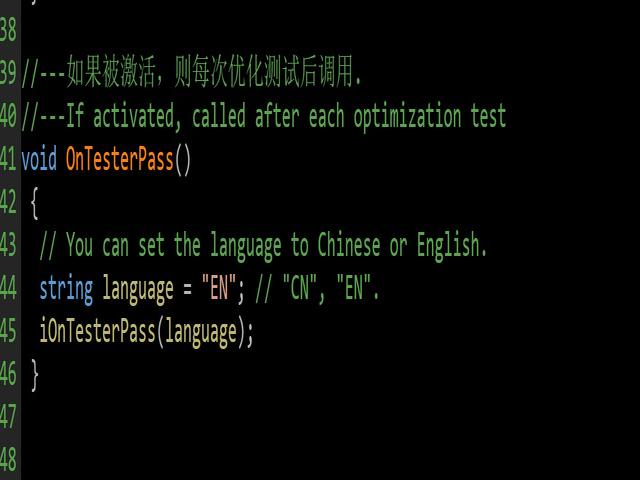
Support English (EN) and Chinese (CN), it is not necessary, if you do not set it, the default is English, you can also set the output to Chinese.

Just modify an affix in More_BackTest_Result.mqh:

void OnTesterPass()
 {
  // You can set the language to Chinese or English.
  string language = "EN"; // "EN","CN"
  iOnTesterPass(language);
 }

5. Set CustomMax

All policy results are supported as CustomMax. It is not required. If you do not set it, it defaults to the TB value. You can also set it according to your own needs.

You just need to type the following code in your EA:

int OnInit()
 {
//---Set CustomMax
  iSetCustomMax("CUSTOM_SQN"); 
//---
  return(INIT_SUCCEEDED);
 }

6. Function iSetCustomMax(string mode) parameter analysis

Please refer to the Chinese and English versions: https://www.mql5.com/en/blogs/post/748011

7. EA uses samples

//+------------------------------------------------------------------+
//|                                                  __TEST_EX__.mq5 |
//|                                      Copyright 2022, i201102053. |
//|                         https://www.mql5.com/en/users/i201102053 |
//+------------------------------------------------------------------+
#property copyright "Copyright 2022, i201102053."
#property link      "https://www.mql5.com/en/users/i201102053"
#property version   "1.00"
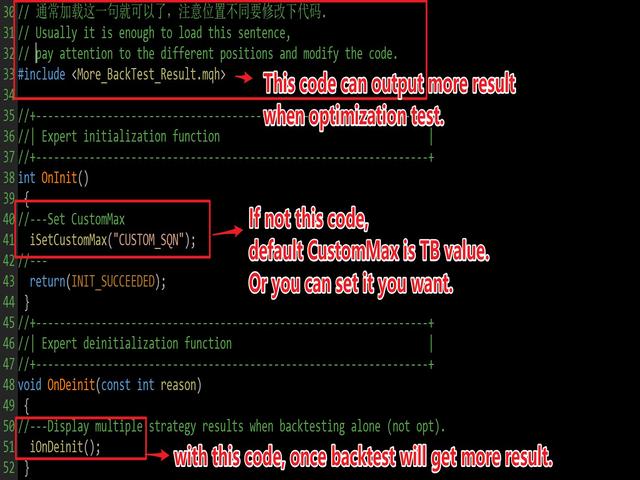
#include <More_BackTest_Result.mqh>  // Usually it is enough to load this sentence.

//+------------------------------------------------------------------+
//| Expert initialization function                                   |
//+------------------------------------------------------------------+
int OnInit()
 {
//---Set CustomMax, unnecessary.
  iSetCustomMax("CUSTOM_SQN"); 
  return(INIT_SUCCEEDED);
 }
//+------------------------------------------------------------------+
//| Expert deinitialization function                                 |
//+------------------------------------------------------------------+
void OnDeinit(const int reason)
 {
//---Display multiple strategy results when backtesting alone (not opt). unnecessary
  iOnDeinit();
 }
//+------------------------------------------------------------------+
//| Expert tick function                                             |
//+------------------------------------------------------------------+
void OnTick()
 {

 }


Рекомендуем также
MT4/5通用交易库(  一份代码通用4和5 ) #ifdef __MQL5__      #define KOD_TICKET ulong      #define KOD_MAGIC   long #else        #define KOD_TICKET long      #define KOD_MAGIC   int #endif class ODLIST; #import "K Trade Lib Pro 5.ex5"       //祝有个美好开始,运行首行加入    void StartGood() ;    //简单开单    long OrderOpen( int type, double volume, int magic, string symbol= "" , string comment= "" , double opprice= 0 , double sl= 0 , double tp= 0 , int expiration= 0 , bool slsetmode= false , bool tpsetmode= false );    //复杂开单
Introducing "TG Trade Service Manager" — your all-in-one solution for seamless trade management in both MQL4 and MQL5 environments. With a focus on speed, reliability, and convenience, this powerful library simplifies the complexities of trade execution and management, empowering developers with a single interface for enhanced efficiency. Metatrader4 Version   |   All Products   |   Contact   Key Features: Unified Interface : TG Trade Service Manager" provides a unified interface for   MQL4   an
Scan a fixed list of assets (Ibovespa) in the chosen timeframe (TimeFrame). For each pair and for various periods. Calculate a regression model between the two assets (and, if desired, using the bova11 index as a normalizer). Generate the spread of this relationship, its mean, standard deviation, speculative deviation, and betas (B1 and B2). Apply an ADF test without exclusion (cointegration/stationarity). Calculate the Z-score of the current exclusion (how many standard deviations are away from
Утилита для автоматического управления ордерами и рисками.   Позволяет взять максимум с прибыли и ограничить свои убытки.   Создан практикующим трейдером для трейдеров.   Утилита  проста в использовании,  работает с любыми рыночными ордерами, открытыми трейдером вручную или при помощи советников. Может фильтровать сделки по магическому номеру. Одновременно утилита может работать с любым количеством ордеров.  Имеет такие функции: 1. В ыставление уровней стоплосс и тейкпрофит; 2. З акрытие сделок
* * * * * Основные транзакции XAUUSD, если во время тестирования рекомендуется настроить на XAUUSD, другие торговые объекты не могут гарантировать рентабельность * * * * * * * * * * * * * * * * Оставьте сообщение, которое нужно протестировать (вы ответите в первый раз после просмотра), чтобы защитить результаты работы, необходимо ввести определенные параметры, параметры по умолчанию системы не могут достичь эффекта, показанного в отзыве скриншота! Оставьте сообщение, которое нужно протестиров
Gold plucking machine   Золотая выщипывание машины является советником разработан специально для торговли золотом. Операция основана на открытии ордеров с использованием индикатора быстрых и медленных линий, поэтому советник работает в соответствии со стратегией «Trend Follow», что означает следовать тренду. Заказать с помощью политики сетки без операции стоп - лосса, поэтому убедитесь, что счет достаточен. magic number      -  is a special number that the EA assigns to its orders. Lot Multipli
Привет, друзья. Эту утилиту я написал специально для использования в своем профиле с большим количеством экспертов и сетов ("Joint_profiles_from_grid_sets"   https://www.mql5.com/en/blogs/post/747929 ).  Теперь, чтобы ограничить убытки на счёте, нет необходимости менять параметр "Close_positions_at_percentage_of_loss" на каждом чарте. Просто откройте   один   дополнительный чарт, прикрепите данную утилиту и настройте желаемый процент по закрытию всех сделок на счёте. Утилита имеет следующий фун
Order Book, известный также как Market Book, глубина рынка, стакан цен, Level 2, - это предоставляемая брокером динамически обновляемая таблица с данными по текущим объемам торговых заявок на покупку и продажу для различных уровней цен вблизи Bid и Ask конкретного финансового инструмента. MetaTrader 5 предоставляет возможность трансляции стакана цен , но только в реальном времени. Данная библиотека OrderBook History Library позволяет считывать состояния стакана в прошлом из архивов, создаваемых
The Techno Deity — Цифровое Доминирование на XAUUSD Промо-акция: Вы можете получить в подарок советник Cryon X-9000. Для уточнения условий и получения доступа свяжитесь со мной напрямую. The Techno Deity — это высокотехнологичная торговая экосистема, созданная для тех, кто ценит структурный порядок в хаосе золотого рынка. В основе системы лежит алгоритм цифровой интуиции, который не просто следует за ценой, а идентифицирует зоны институционального интереса и моменты рыночного дисбаланса. Вместо
The Hybrid Metaheuristic Algorithm (HMA) is a cutting-edge optimization approach that combines the strengths of genetic algorithms with the best features of population-based algorithms. Its high-speed computation ensures unparalleled accuracy and efficient search capabilities, significantly reducing the total time required for optimization while identifying optimal solutions in fewer iterations. HMA outperforms all known population optimization algorithms in both speed and accuracy. Use Cases AO
Bober Real MT5
Arnold Bobrinskii
4.76 (17)
Bober Real MT5 — полностью автоматический советник для торговли на рынке Forex. Робот создан в 2014 году и за этот период сделал множество прибыльных сделок, показав более 7000% прироста депозита на моем личном счете. Было выпущено много обновлений, но версия 2019 года считается самой стабильной и прибыльной. Робот можно запускать на любых инструментах, но лучшие результаты достигаются на EURGBP , GBPUSD , таймфрейм M5 . Робот не покажет хорошие результаты в тестере или на реальном счете, если
MT5 To Telegram Copier
Levi Dane Benjamin
3 (2)
Отправляйте полностью настраиваемые сигналы из MT5 в Telegram и станьте поставщиком сигналов! Этот продукт представлен в простом в использовании и визуально привлекательном графическом интерфейсе. Настройте свои параметры и начните использовать продукт в течение нескольких минут! Руководство пользователя + Демо  | Версия для МТ4 | Дискорд-версия Если вы хотите попробовать демо-версию, перейдите к Руководству пользователя. Отправитель MT5 To Telegram НЕ работает в тестере стратегий. Возможности
Premium level - это уникальный индикатор с точностью правильных прогнозов  более 80%!  Данный индикатор тестировался более двух месяцев лучшими Специалистами в области Трейдинга!  Индикатор авторский такого вы больше не где не найдете!  По скриншотах можете сами увидеть точностью данного инструмента!  1 отлично подходит для торговли бинарными опционами со временем экспирации на 1 свечу. 2 работает на всех валютных парах, акциях, сырье, криптовалютах Инструкция: Как только появляется красная стре
# Equity Monitor Pro  ## Short Description Equity Monitor Pro is a professional equity p**Equity Monitor Pro** is a powerful risk management tool that automatically protects your trading account by monitoring equity levels and enforcing prop firm style rules. Whether you're taking an FTMO challenge, trading a funded account, or just want to protect your capital, this EA runs silently alongside your trading strategy and takes action when it matters most. Protection tool designed for prop firm
Pipfinite creates unique, high quality and affordable trading tools. Our tools may or may not work for you, so we strongly suggest to try the Demo Version for MT4 first. Please test the indicator prior to purchasing to determine if it works for you. We want your good reviews, so hurry up and test it for free...we hope you will find it useful. Combo Razor Scalper with Trend Laser Strategy: Scalp in the direction of the trend Watch Video: (Click Here) Features Scalping indicator using a confirme
Trade Command Center
Nguyen Thanh Trieu
5 (2)
Trade Command Center Funded account. One miscalculated lot size. Drawdown limit exceeded. Account closed. Not because the strategy failed. Because risk was not enforced at the moment of execution. Manual trading requires exact position sizing, consistent stop placement, and real-time drawdown monitoring. Missing any one of these during live execution changes your actual risk from what you intended. Trade Command Center is a visual trade execution and risk management panel. It calculates lot size
Простая в использовании, быстрая, асинхронная библиотека WebSocket для MQL5. Он поддерживает: ws:// и wss:// (защищенный веб-сокет "TLS") текстовые и бинарные данные Он обрабатывает: фрагментированное сообщение автоматически (передача больших объемов данных) кадры пинг-понга автоматически (подтверждение активности) Преимущества: DLL не требуется. Установка OpenSSL не требуется. До 128 соединений Web Socket из одной программы Различные уровни журнала для отслеживания ошибок Возможна синхронизац
##   ONLY GOLD ##   Тiльки Золото ## **Mercaria Professional Trading Zones - Complete Guide** ## **Mercaria Professional Trading Zones - Повний посібник** ### **How Mercaria Zones Work / Як працюють зони Mercaria** **English:** Mercaria Zones is an advanced trading indicator that identifies high-probability support and resistance areas using ZigZag extremes combined with mathematical zone calculations. The indicator works on multiple timeframes simultaneously, providing a comprehensive view
TradePilotmt5
Hossein Khalil Alishir
TradePilot Expert Advisor (EA) for MetaTrader 5 TradePilot is a professional and user-friendly Expert Advisor (EA) for MetaTrader 5 (MT5) . It simplifies automated trading , risk management , and trade execution with a smart trading panel . Perfect for beginners and experienced traders looking for a reliable trade manager EA with automated lot size calculation and smart position management. Key Advantages User-Friendly Trading Panel: Customizable panel with buttons and hotkeys for fast ex
Noize Absorption Index - is the manual trading system that measures the difference of pressure between bears forces and bulls forces. Green line - is a noize free index that showing curent situation. Zero value of index shows totally choppy/flat market.Values above zero level shows how powerfull bullish wave is and values below zero measures bearish forces.Up arrow appears on bearish market when it's ready to reverse, dn arrow appears on weak bullish market, as a result of reverse expectation.
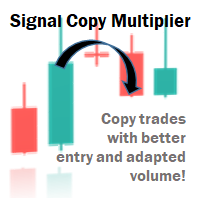
Signal Copy Multiplier automatically copies trades on the same account, for example, to get a better entry and adjusted volume on a subscribed signal. MT4-Version:  https://www.mql5.com/de/market/product/67412 MT5-Version:  https://www.mql5.com/de/market/product/67415 You have found a good signal, but the volume of the provider's trades is too small?  With Signal Copy Multiplier you have the possibility to copy trades from any source (Expert Advisor, Signal, manual trades) and change the volume
Trade History By Magic Indicator Unlock Your Trading Insights with Trade History By Magic! Enhance your MetaTrader 5 experience with this powerful indicator designed for traders who demand precision and clarity. Trade History By Magic provides a clear, real-time display of your trading history, organized by magic numbers, directly on your chart. Perfect for both automated and manual traders, this tool helps you track performance effortlessly. Key Features: Organized Trade Tracking : Displays tra
Volume Profile V6
Andrey Kolesnik
4.67 (3)
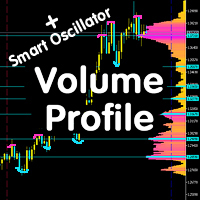
Индикатор объемного профиля рынка + умный осциллятор. Работает практически на всех инструментах-валютные пары, акции, фьючерсы, криптовалюта, на реальных объемах и на тиковых. Можно задавать как автоматическое определение диапазона построения профиля, например, за неделю или месяц и т.д. так и устанавливать диапазон вручную передвигая границы (две вертикальные линии красная и синяя). Показывается в виде гистограммы. Ширина гистограммы на данном уровне означает, условно, количество сделок, пр
Версия MT4   |   FAQ Индикатор Owl Smart Levels – это полноценная торговая система внутри одного индикатора, которая включает в себя такие популярные инструменты анализа рынка как усовершенствованные фракталы Билла Вильямса , Valable ZigZag, который строит правильную волновую структуру рынка, а также  уровни Фибоначчи, которые   отмечают точные уровни входа в рынок и места взятия прибыли. Подробное описание стратегии Инструкция по работе с индикатором Советник-помошник в торговле Owl Helper При
Описание   Simo : инновационный робот с уникальной торговой системой Simo представляет собой революционного торгового робота, который меняет правила игры благодаря своей уникальной торговой системе. Используя анализ настроений и машинное обучение, Simo обеспечивает совершение сделок на новом уровне. Этот робот может работать на любом часовом периоде, с любой валютной парой и на сервере любого брокера. Simo использует собственный алгоритм для принятия торговых решений. Разнообразные подходы к а
Account Protector Metatrader 5
Emmanuel Lovski Ijeawele Maduagwuna
Account Protector Meta Trader 5 This utility prevents risk of ruin per trading cycle.  Retail forex trading accounts are designed with stop-out levels that make it nearly impossible to restore lost capital after a trader — human or algorithmic —   blows an account . This is especially frustrating for traders who have grown their account to multiples of its starting value, only to suffer irreparable losses from a series of bad trade entries. The Account Protector solves this by enforcing a specif
The Trendline Trade Panel was created to make it easier to train forex trading skills in backtester and at the same time make it easier to live trade using trendlines with the push of a button. This ea is perfect for beginners who want to learn to trade manually because all of its features are equipped with basic tools for trading forex. Other uses for Trendline Trade Panel: + Can be used to perform recovering loss positions made by other EA or positions that open manually. Fill in magic number
Visual CrossPulse Dynamics: Trade with the Market's True Rhythm Unlock a new level of market insight with Visual CrossPulse Dynamics, a sophisticated trading indicator designed to adapt to ever-changing volatility and reveal the true direction of the trend. Are you tired of indicators that lag in fast-moving markets or give false signals during consolidation? The Visual CrossPulse Dynamics indicator solves this problem by using an advanced, adaptive algorithm that intelligently adjusts to the m
Inverted_Chart_EA Utility Expert Advisor Inverted_Chart_EA creates and maintains a mirror-inverted chart of any symbol and timeframe. It automatically generates a custom instrument (e.g. US30_INV ) and keeps its price history updated in real time, with bars mirrored around a chosen pivot. This utility gives traders a new way to analyze the market from a different perspective by flipping the chart upside down. Why use an inverted chart? Highlight hidden patterns – price formations that look ordin
Net Exposure & Net Average Price is a lightweight utility Expert Advisor for MetaTrader 5 hedge accounts . This tool helps traders instantly understand their true market exposure when multiple Buy and Sell positions are open on the same symbol. What the EA Does The EA displays a clear on-chart panel showing: Total Buy Trades Total Buy Lots Total Sell Trades Total Sell Lots Net Lots (Net Exposure) Net Average Price (hedge-adjusted breakeven) The Net Average Price represents the true breakeven
С этим продуктом покупают
Библиотека WalkForwardOptimizer позволяет выполнить пошаговую и кластерную форвард-оптимизацию ( walk-forward optimization ) советника в МетаТрейдер 5. Для использования необходимо включить заголовочный файл WalkForwardOptimizer.mqh в код советника и добавить необходимые вызовы функций. Когда библиотека встроена в советник, можно запускать оптимизацию в соответствии с процедурой, описанной в Руководстве пользователя . По окончанию оптимизации промежуточные результаты сохраняются в CSV-файл и наб
Эта библиотека позволит вам управлять сделками с использованием любого вашего советника, и ее очень легко интегрировать в любой советник, что вы можете сделать самостоятельно с помощью кода сценария, упомянутого в описании, а также демонстрационных примеров на видео - Размещайте лимитные ордера, SL-лимитные и тейк-профитные лимитные ордера. - Размещайте ордера Market, SL-Market, TP-Market - Изменить лимитный ордер - Отменить заказ - Запрос заказов - Изменение кредитного плеча, маржи - По
突破交易策略:智能风控系统升级版‌ 当价格突破关键阻力位时,往往意味着趋势的质变时刻。我们的突破交易策略通过三重智能系统——‌动态阈值识别‌、‌量能验证机制‌和‌自适应止损算法‌,帮助交易者精准捕捉这些跃迁机会。 ‌核心优势‌: ‌智能预警‌:实时监测200+技术指标,自动标记潜在突破位 ‌风险对冲‌:突破失败时自动触发0.5秒内止损,保护本金安全 ‌多周期验证‌:结合日线/4小时/1小时数据过滤假信号 ‌实战案例‌: 2025年第二季度,该策略在现货黄金市场实现连续23次有效突破,平均持仓周期缩短至4.7小时,收益率达传统趋势策略的3.2倍。 ‌智能风控系统‌: ‌动态止盈‌:根据ATR指标自动调整止盈位,锁定利润的同时保留上行空间 ‌分级止损‌:首次突破失败后自动切换至1:1盈亏比保护模式,二次突破确认后恢复原策略 本EA依下图设置做黄金1小时图线,经长时期实盘验证年利润达到30多倍,修改参数可以用作比特币和纳斯达克指数都有很好的收益。
Binance Library MetaTrader 5 позволяет использовать его в советниках для торговли и индикаторах для бирж Binance.com и Binance.us напрямую из терминала. Библиотека поддерживает все классы активов на бирже: Spot, USD-M и COIN-M фьючерсы. Доступны все необходимые функции для торговой деятельности: Добавление инструментов с Binance в список символов MetaTrader 5 Получение информации о парах и спецификациях Получение Ask, Bid и времени последней сделки по всем парам Загрузка исторических данных для
Эта библиотека предназначена для помощи в управлении сделками, расчета лота, трейлинга, частичного закрытия и других функций. Расчет лота Mode 0: фиксированный лот. Mode 1: Лот по Мартингейлу (1,3,5,8,13) может по-разному использоваться для расчета при убытке=1, при прибыли=0. Mode 2: Лот по Множителю (1,2,4,8,16) может по-разному использоваться для расчета при убытке=1, при прибыли=0. Mode 3: Лот по Инкременту (1,2,3,4,5) может по-разному использоваться для расчета при убытке=1, при прибыли=0.
MetaCOT 2 CFTC ToolBox - это специальная библиотека, предоставляющая доступ к отчетам CFTC (U.S. Commodity Futures Trading Commission) прямо в терминале MetaTrader. Она включает все индикаторы, построенные на основе этих отчетов. Имея эту библиотеку Вам нет необходимости приобретать каждый индикатор MetaCOT в отдельности. Вместо этого, Вы получаете набор сразу из всех 34 индикаторов, в который входят также индикаторы недоступные в виде отдельной версии. Библиотека поддерживает все типы отчетов,
Это упрощенная и эффективная версия библиотеки для walk-forward анализа торговых экспертов. Она собирает данные о торговле эксперта во время процесса его оптимизации в тестере MetaTrader и сохраняет их в промежуточные файлы в каталоге MQL5\Files. Затем на основе этих файлов автоматически строится кластерный walk-forward отчет и уточняющие его rolling walk-forward отчеты (все они - в одном HTML-файле). С помощью вспомогательного скрипта WalkForwardBuilder MT5 можно на тех же промежуточных файлах
Cryptocurrency analysis has never been easier with Crypto Charts for MetaTrader 5. Now, trading on BitMEX has never been easier with BitMEX Trading API for MetaTrader 5. BitMEX Trading API library was built to be as easy to use as possible. Just include the library into your Expert Advisor or Script, call the corresponding methods and start trading! Features Trade on BitMEX and BitMEX Testnet. Build and automate your strategies. Concern more with the trading strategy logic and less with the co
Goliath Mt5
Nicolokondwani Biscaldi
Goliath MT5 - scalper fully automated Expert Advisor for medium-volatile forex markets P roperties: The Library trades 10 currency pairs (USDCHF, EURCHF, EURGBP, AUDUSD, USDCAD, GBPUSD, EURUSD, NZDUSD, CADCHF, EURAUD, EURCAD, AUDJPY) The Library does not use martingale The Library sets a fixed stop loss and take profit for all orders The Library only trades a user input volume The Library can be installed on any currency pair and any timeframe Recommendations: Before using on a real account, t
The library is used to develop automatic trading on Binance Spot Market from MT5 platform. Support all order types: Limit, Market, StopLimit and StopMarket Support Testnet mode Automatically display the chart on the screen Usage: 1. Open MQL5 demo account 2. Download Header   file and EA sample   https://drive.google.com/uc?export=download&id=1kjUX7Hyy02EiwTLgVi8qdaCNvNzazjln Copy Binance.mqh to folder \MQL5\Include Copy  BinanceEA-Sample.mq5 to folder \MQL5\Experts 3. Allow WebRequest from MT5
The library is used to develop automatic trading on Binance Futures Market from MT5 platform. Support Binance Futures USD-M and COIN-M Support Testnet mode Support all order types: Limit, Market, StopLimit, StopMarket, StopLoss and TakeProfit Automatically display the chart on the screen Usage: 1. Open MQL5 demo account 2. Download Header file and EA sample https://drive.google.com/uc?export=download&id=17fWrZFeMZoSvH9-2iv4WDJhcyxG2eW17 Copy BinanceFutures.mqh to folder \MQL5\Include Copy  Bina
AO Core
Andrey Dik
3.67 (3)
AO Core - ядро алгоритма оптимизации, это библиотека, построенная на авторском алгоритме HMA (hybrid metaheuristic algorithm). Обратите внимание на продукт  MT5 Optimization Booster , который позволяет очень просто управлять штатным оптимизатором МТ5. Пример применения AO Core описан в статье: https://www.mql5.com/ru/articles/14183 https://www.mql5.com/ru/blogs/post/756509 Данный гибридный алгоритм основан на генетическом алгоритме и содержит лучшие качества и свойства популяционных алгоритмов
EA Toolkit   is a library that allows any developer to quickly and easily program Advisor experts. It includes many functions and enumerations such as trailing stop, lot, stop loss management, market trading authorisations, price table updates, trading conditions and many more. Installation + Documentation : You will find all the information to install this library and the documentation of its functions on this GitHub : https://github.com/Venon282/Expert-Advisor-Toolkit WARNING : The installat
Hello everyone! I am a professional MQL programmer , Making EAs, Indicators and Trading Tools for my clients all over the world. I build 3-7 programs every week but I seldomly sell any ready-made Robots. Because I am fastidious and good strategy is so few...  this EA is the only one so far I think its good enough to be published here.  As we all know, the Ichimoku indicator has become world popular for decades, but still, only few people knows the right way of using it, and if we check the clo
Применяя эти методы, мне удалось прийти к тонкому выводу, который имеет решающее значение для понимания важности уникальных стратегий в современной торговле. Хотя нейросетевой советник показал впечатляющую эффективность на начальных этапах, в долгосрочной перспективе он оказался крайне нестабильным. Различные факторы, такие как колебания рынка, изменения тенденций, внешние события и т. д., приводят к хаотичности его работы и в конечном итоге приводят к нестабильности. Получив этот опыт, я принял
Данная библиотека предлагается как средство для использования API OpenAI напрямую в MetaTrader максимально простым способом. Для получения дополнительной информации о возможностях библиотеки прочитайте следующую статью: https://www.mql5.com/en/blogs/post/756106 The files needed to use the library can be found here: Manual ВАЖНО: Для использования EA необходимо добавить следующий URL для доступа к API OpenAI  как показано на приложенных изображениях Для использования библиотеки необходимо включит
Here   is   the   English translation   of   your   description   for   the EA   (Expert   Advisor): --- This   is a   time -based   automatic trading   EA . It allows   you   to   set the   exact   time   for trading , down   to   the   second , and   specify the   maximum number   of   orders . You   can choose   to   place   either   buy   or   sell   orders . It   is possible to   set take   profit and   stop   loss   points . Additionally , you can   specify   how   long after   placing  
Molo kumalo
James Ngunyi Githemo
Trading Forex with our platform offers several key advantages and features: Real-time Data : Stay updated with live market data to make informed decisions. User-Friendly Interface : Easy-to-navigate design for both beginners and experienced traders. Advanced Charting Tools : Visualize trends with interactive charts and technical indicators. Risk Management : Set stop-loss and take-profit levels to manage your risk. Multiple Currency Pairs : Access a wide range of forex pairs to diversify your tr
Этот продукт разрабатывался в течение последних 3 лет. Это самая продвинутая кодовая база для работы со всеми видами кода искусственного интеллекта и машинного обучения на языке программирования MQL5. Он использовался для создания множества торговых роботов и индикаторов на основе ИИ в MetaTrader 5. Это премиум-версия бесплатного и открытого проекта по машинному обучению для MQL5, ссылка здесь:  https://github.com/MegaJoctan/MALE5 . Бесплатная версия имеет меньше функций, менее документирована и
This Pine Script implements a Gaussian Channel + Stochastic RSI Strategy for TradingView . It calculates a Gaussian Weighted Moving Average (GWMA) and its standard deviation to form an upper and lower channel. A Stochastic RSI is also computed to determine momentum. A long position is entered when the price closes above the upper Gaussian band and the Stoch RSI K-line crosses above D-line . The position is exited when the price falls back below the upper band. The script includes commission, cap
Pionex API EA Connector для MT5 – Бесшовная интеграция с MT5 Обзор Pionex API EA Connector для MT5 позволяет бесшовно интегрировать MetaTrader 5 (MT5) с Pionex API . Этот мощный инструмент дает возможность трейдерам выполнять и управлять сделками, получать информацию о балансе и отслеживать историю ордеров — всё прямо из MT5 . Основные функции Управление аккаунтом и балансом Get_Balance(); – Получение текущего баланса аккаунта на Pionex . Исполнение и управление ордерами orderLimit(string
Bookeepr
Marvellous Peace Kiragu
Bookeepr is an advanced MQL5 trading bookkeeping software that automates trade logging, tracks real-time P&L, and integrates a ledger-style financial system for deposits, withdrawals, and expenses. It supports multi-currency assets , generates detailed performance reports , and provides risk management tools to help traders optimize their strategies. With secure cloud storage, exportable reports, and seamless MetaTrader 5 integration , Bookeepr ensures accurate, transparent, and hassle-free fina
A free indicator for those who purchase the full version This indicator is created by this Ai, with your desired settings Artificial Intelligence at your service Have a complete artificial intelligence and use it in your codes This artificial intelligence is trained to tell you on each candle whether the market is moving up or down. In general, artificial intelligence can be used in all markets, all timeframes and all symbols However, due to the increasing complexity and decreasing accuracy of
快速关仓,无需任何操作。 当前版本的一键关仓主要针对的是来不及手动关仓的情况,目前是不分交易标的类别,是对所有的持仓进行关仓。 未来可能升级的方向: 1、分类别、分标的关仓。 适用场景:开了多个标的的仓位,并且波动不一,快速频繁的波动影响了整体的判断。 2、增加只关闭盈利仓位、只关闭亏损仓位。 适用场景:持仓较多,趋势发生变化。 个人建议:一般建议选择一键全部关仓,因为如果行情与持仓方向一致,只关闭盈利仓位无形就是扩大了亏损。如果行情方向与持仓方向相反,只关闭亏损仓位,当前已盈利的后面又会变为亏损,盈利无法变现。 3、按照仓位顺序由大到小关仓、按照仓位顺序由小到大关仓。 适用 场景:行情发生波动,对于未来行情判断把握不确定的,可根据自己需求选择仓位关仓顺序,由大到小关仓的话,可以避免亏损的进一步扩大。 4、减小仓位量,保持绝对的安全距离。 适用 场景:对未来趋势相对确定,不想错过当前行情,但是认为当前持仓体量又有点大,想降低仓位。
BlitzGeist Telegram Notifier – Stay Connected to Your Trades Anywhere! BlitzGeist Telegram Notifier is a powerful tool that instantly connects your MetaTrader 5 account with Telegram . No matter where you are – you will always receive real-time notifications about your trading activity directly on your phone, PC, or any device with Telegram installed. Perfect for traders who want professional trade reporting, transparency, and risk management monitoring . ️ Key Features Easy Configuratio
[Gold Intelligent Trading EA | Risk Control is Steady, Profit Breakthrough] The intelligent trading EA, which is customized for the fluctuation characteristics of gold, takes the hard-core trading system as the core, and each order is derived from the accurate judgment of market trends and supporting pressures by quantitative models, so as to eliminate subjective interference and make trading decisions more objective and efficient. Equipped with multi-dimensional risk control system, dynamic s
Questo Expert Advisor (EA) è stato progettato per offrire un'esperienza di trading automatizzata di alto livello, adatta sia ai trader principianti che a quelli esperti. Utilizzando algoritmi avanzati e tecniche di analisi del mercato, l'EA è in grado di identificare opportunità di trading redditizie con precisione e velocità. L'EA è configurabile per operare su vari strumenti finanziari, tra cui forex, indici e materie prime, garantendo una flessibilità senza pari. Le caratteristiche princip
First contact Telegram - @BerlinOG for more files and installation The   Telegram Signal EA   is a powerful tool designed to bridge your Telegram communications with your MetaTrader 5 (MT5) charts. It enables you to display messages from your Telegram channels, groups, and private chats directly on your MT5 charts as comments. This integration simplifies the process of monitoring trading signals and important messages while you're actively trading. Features Real-time Message Display : View mes
LSTM Library
Thalles Nascimento De Carvalho
LSTM Library - Продвинутые нейронные сети для MetaTrader 5 Профессиональная библиотека нейронных сетей для алгоритмической торговли LSTM Library предоставляет мощность рекуррентных нейронных сетей для ваших торговых стратегий в MQL5. Эта профессиональная реализация включает сети LSTM, BiLSTM и GRU с продвинутыми функциями, обычно доступными только в специализированных фреймворках машинного обучения. "Секрет успеха в машинном обучении для трейдинга заключается в правильной обработке данных. Garba
Automatic Replenishment Trading Within a Defined Range The EA operates only within the predefined price range . When an order is closed, filled, or cancelled (reducing the total number of orders), the EA will automatically place new orders to maintain the continuous operation of the trading strategy. This EA is designed for ranging / sideways market conditions . You can control the total number of orders using Max Orders . Example: Max Orders: 8 Active trades: 2 Pending Buy Limit orders: 6 In t
Другие продукты этого автора
This product can be used to synchronize multiple Charts, and each Chart can be set to a different sync mode. With this product you can better view and manipulate charts: different time frames for a single Symbol, the same time frame for multiple Symbols, system indicators for single/multiple Symbols... and more. Feature: Chart settings can be synchronized, including : background, indentation, size, etc. Multiple Chart window start times  or end times can be synchronized. Multiple Chart time fr
Have you ever take a long time to watch a Symbol when the network link is not good ? Have you ever wait for a long time when you switch chart between different Symbols or different TimeFrames ? If you do long-term backtesting , Have you ever to be downloaded datas for a long time ? Yes, If there is no data in the system, those will happen.  1. What is this: Download all the Symbol data in Market Watch to the system. PS: This is not outputting data to Files. This Link go to Demo version: https:/
This product can be used to synchronize multiple Charts, and each Chart can be set to a different sync mode. With this product you can better view and manipulate charts: different time frames for a single Symbol, the same time frame for multiple Symbols... and more. PS: The link below is the FreeDemo product, you can use it on EURUSD/XUAUSD/USDCNH symbol: https://www.mql5.com/en/market/product/38557 Feature: Chart settings  can be synchronized, including : background, indentation, size, etc. M
Do you think it's a bit cumbersome when you need to switch symbols or timeframes with mouse click? 1. What is this? This is a program that can switch symbols and timeframes with direction keys. Fast switching, very convenient, no mouse click required. For traders, one symbol with multi-timeframe charts are usually added,  you can change symbol on those charts easily. For multi-currency traders, different symbol charts are usually added, you can also change those timeframes easily. I wrote this p
1. What is this         Rising volatility and falling volatility are not the same, whether it is academic research or actual testing has shown this point.         The original ATR indicator is calculated by putting up and down fluctuations together. This indicator is to calculate separately the upward volatility and the downward volatility, which can better help you study the market. 2. Indicator description          There are two modes for the calculation of this indicator, as shown in the fo
I see that many tools in the market deal with Position and Order in the form of operation panels. Which is loaded into a Chart in the form of an EA. However, once the operator panel EA is loaded, no other EAs can be loaded. So, I wrote the one-click operation of Position and Order as a script, so you can load other EAs and easily complete one-click operation of Trade. 1. What is this: This is a one-click script to close position order. Now you can close position tickets at high speed, for examp
I see that many tools in the market deal with Position and Order in the form of operation panels. Which is loaded into a Chart in the form of an EA. However, once the operator panel EA is loaded, no other EAs can be loaded. So, I wrote the one-click operation of Position and Order as a script, so you can load other EAs and easily complete one-click operation of Trade. 1. What is this: This is a one-click script to delete the pending order . Now you can delete pending tickets at high speed, for
Do you think it's a bit cumbersome when you need to switch symbols or timeframes with mouse click? 1. What is this? This is a program that can switch symbols and timeframes with direction keys. Fast switching, very convenient, no mouse click required. For traders, one symbol with multi-timeframe charts are usually added,  you can change symbol on those charts  easily . For multi-currency traders, different symbol charts are usually added, you can also change those timeframes easily. I wrote thi
According to trading experience: Some symbols are easy to reverse on certain days, such as Monday, or afternoon, and so on. So comparing the current price with the corresponding historical moment price is valuable. If the price coordinate system uses a logarithmic price, you will get a lot of valuable information. 1. What is this? This program can convert the symbol price and add it to your Chart. You can compare it with your major chart. The DEMO version Link: https://www.mql5.com/en/market/pr
What is this: Violent trading: means sending a large number of orders to your brokerage server,  it can conduct a stress test of the trading. In this program you can run a variety of trading tests.  Now you can trade at high speed, For example 1000 orders in an instant. The Demo version's link:  https://www.mql5.com/en/market/product/38431/ Why to use: Whether manual trading or EA trading,  the status of the broker server is very important. So it is beneficial to conduct a trading stress test on
1. Why did I develop this series of indicators I found that most traders need to use multiple time frame indicators. They usually switch time frame to see indicators. However, once the timeframe is switched, you cannot see the  corresponding relationship  between  the price in the smaller timeframe  and  the indicator in the larger timeframe . For example: if your price chart is in H1 timeframe, you can see H4, D1 and W1 indicators in H1 timeframe Chart. This is more helpful for you to find th
Фильтр:
Нет отзывов
Ответ на отзыв