Ofir Notify for Telegram

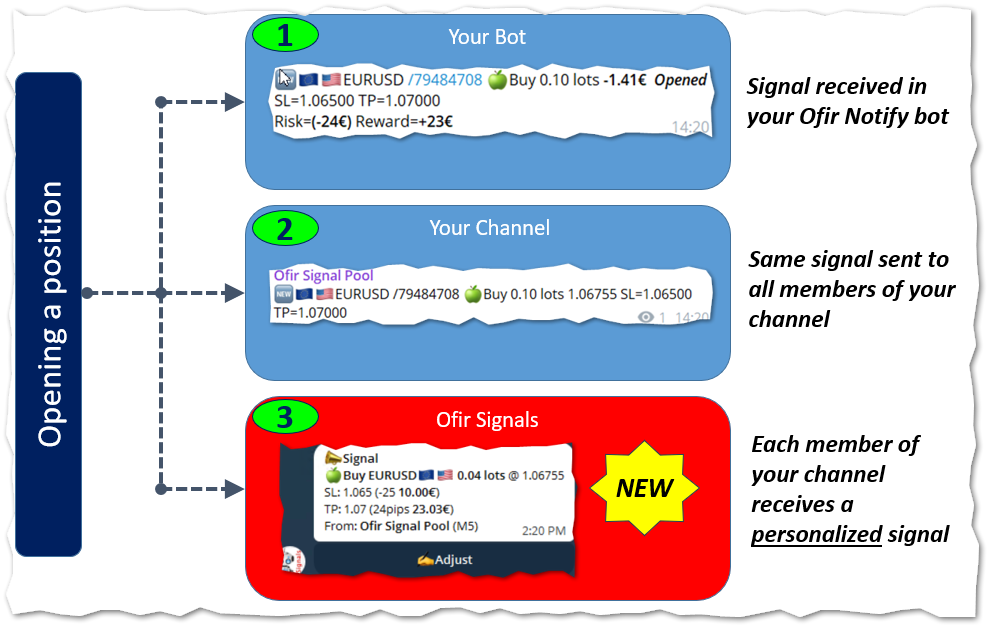
NEW :  integration with Ofir Signals to send personalized alerts

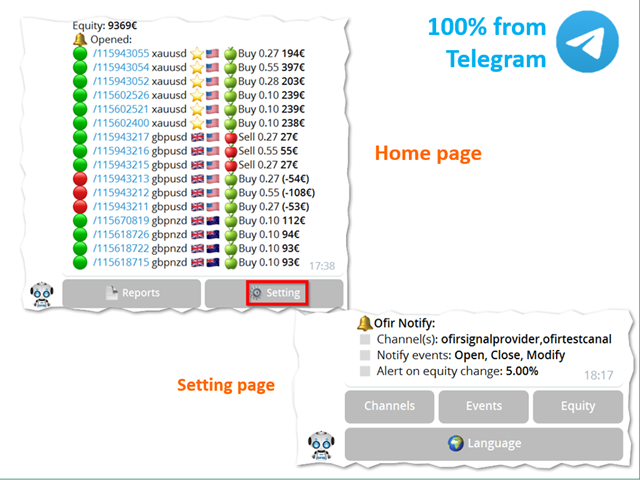
Ofir Notify is a tool which send alerts on trades to Telegram

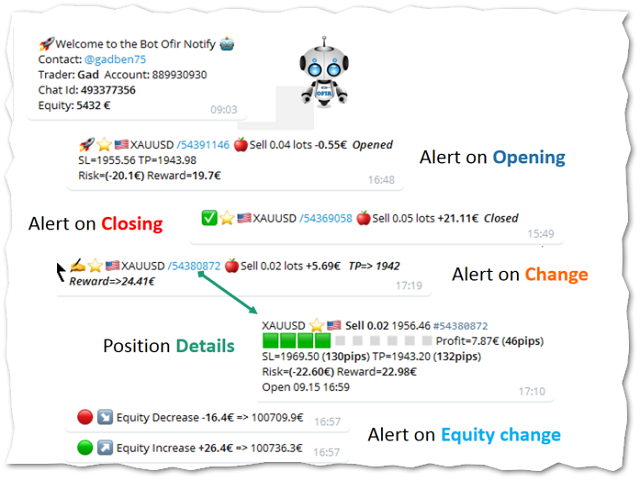
  1. Alert on any event concerning a position : Opening, Closing, modification (SL, TP)
  2. Send alerts to Chats, Groups and Channel
  3. Alert on Equity change
  4. Display Risk, Reward and progress of profit/lost for each position
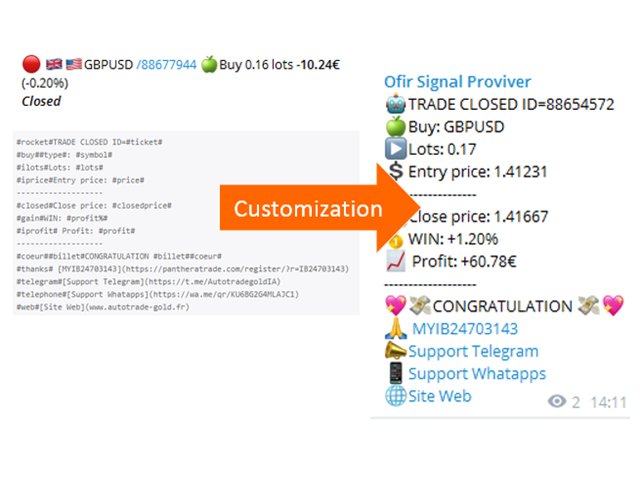
  5. Customization of alerts
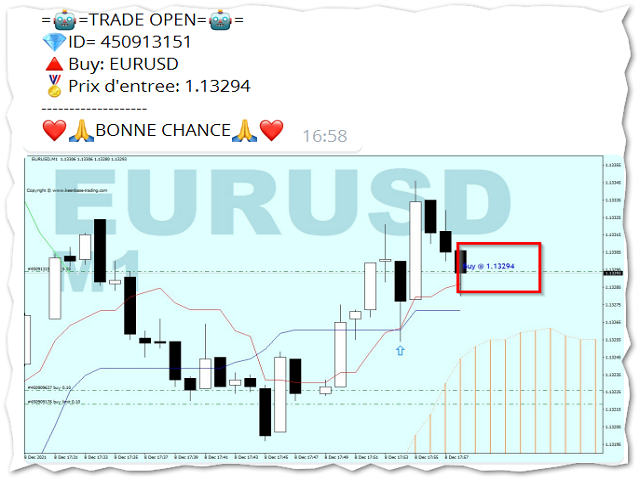
  6. Sending charts screenshots with alerts
  7. Send signals from your indicators or experts
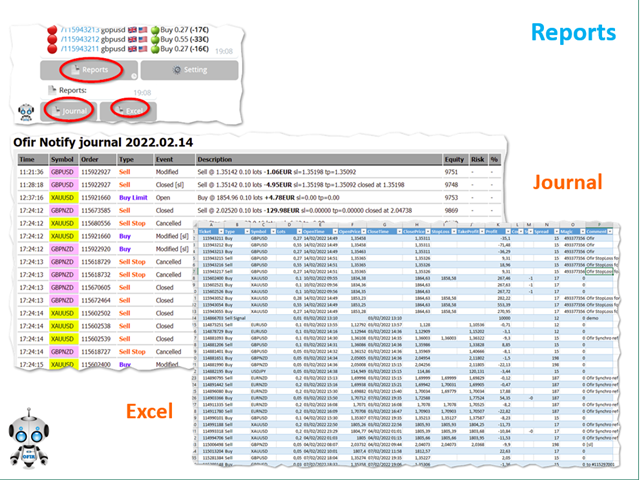
  8. Daily, weekly and monthly summaries
  9. Reply mode: send modification and closing alert as reply of the main alert (opening)
  10. Multi-lingual
  11. NEW : version 2 brings integration with Ofir Signals to send personalized alerts to your channel subscribers. Position sizes are calculated for each user, taking into account its level of risk. read more

More info in my Blog


Ofir Notify Setup instruction

  1. Open Telegram and search for "BotFather"
  2. Type /start and click/type /newbot to create a new bot
  3. Give your bot a nickname and username (e.g., nickname: MyNameAlerts and username: MyNameAlertsBot <-- username has to be ended by 'bot')
  4. Congratulations! You have created your Telegram bot.
  5. Save your bot API token (e.g. 1324115883:AAH2Z9PlxKX3Fce1e_m_w3AB7vA2EZZ_GAD)
  6. Back in MetaTrader 4, go to Tools > Options > Expert Advisors > tick 'Allowed WebRequest for listed URL' and add https://api.telegram.org.
  7. Attach the utility into your MetaTrader 4 chart and enter the Telegram Bot Token (from step 5)
  8. In Telegram open the Bot (search Bot username and start a chat with it)
  9. Press Start or enter /start
  10. You should get a message that the Chat Id is not correct. This message shows your Chat ID
  11. In Metatrader, open the utility properties and enter the Chat ID with the correct ID. This makes sure you are the only one who can use the Bot
  12. Back to Telegram, type /start . You should get information on your trading account number and equity
  13. Ofir Notify is ready to work for you

Properties

  1. Bot Api Token: The unique token of your bot. Do not share this information.
  2. Chat ID: Your Telegram Chat ID
All other settings are made directly by using the application from Telegram. More info in my Blog

Customization

Ofir Notify enables to customize the alerts sent to Chats or Channel.
This is based on using text files as templates.

Example of customization file:

#rocket#TRADE CLOSED ID=#ticket#
#buy##type#: #symbol#
#ilots#Lots: #lots#
#iprice#Entry price: #price#
-------------------
#closed#Close price: #closedprice#
#gain#WIN: #profit%#
#iprofit# Profit: #profit#
-------------------
#coeur##billet#CONGRATULATION #billet##coeur#
#thanks# [MYIB24703143](https://panthe....)
#telegram#[Support Telegram](https://t.me/....)

List of keywords to be used in template files
Keyword Description Example
#ticket# ticket numer 123456789
#symbol# symbol EURUSD
#flag# symbol flag
....AND MUCH MORE (Blog)


Sending screenshots

This feature enables to send chart screenshots with an alert in order to show Opening or Closing positions in a chart.

Integration with your own indicators and experts

This utility can be used by your own indicators and EA to send signals to Telegram. They just have to create a text file, containing the signal, to the following directory:
<Data Folder>/OfirNotify/<Your trading account Number/Inbox
You can use the following code in your indicator or EA:

string directory="Ofir Notify/"+IntegerToString(AccountInfoInteger(ACCOUNT_LOGIN))+"/Inbox";
string filename="Test.txt";
string signal="BUY EURUSD 1.20202 SL=1.201 TP=1.203";
saveStringFile(signal,directory+"/"+filename);
bool saveStringFile(string s,string fileName)
  {
   int handle=FileOpen(fileName,FILE_WRITE|FILE_TXT);
   if(handle==INVALID_HANDLE)
      return(false);
   FileWriteString(handle,s);
   FileClose(handle);
   return(true);
  }


추천 제품
[ MT5 Version ] [ Discord Signals ]  MT4 to Telegram Signals Connect your broker account with Telegram and stop missing important notifications.  Would you like to receive   Telegram   notifications? Are you looking for a simple way to share trade signals with your followers? Do you need to start documenting your trades with an automated trading diary? This utility is simple to use and supports a wide variety of settings: Pick your desired Telegram group and enter the bot token and the chat id G
Mirror controller
Eugenio Bravetti
2 (1)
The new version of  MirrorSoftware 2021  has been completely rewriten and optimized.  This version requires to be loaded only on a single chart because  it can detect all actions on every symbol and not only the actions of symbol where it is loaded. Even the  graphics and the configuration mode  have been completely redesigned. The MirrorSoftware is composed of two components (all components are required to work):  MirrorController  (free indicator): This component must be loaded into the MASTER
FREE
MQL Tool "Ofir Email to Telegram": Never Miss a Trading Alert Again! Tired of missing important alerts from your indicators and Expert Advisors (EAs)? Ofir Email to Telegram   is the solution you've been waiting for!   This revolutionary MQL tool automatically forwards all email alerts from your indicators and EAs directly to your Telegram account. Never again will you miss a trading opportunity or important notification! Here are just a few of the benefits of Ofir Email to Telegram: Quick and e
Rainbow MT4
Jamal El Alama
Rainbow MT4 is a technical indicator based on Moving average with period 34 and very easy to use. When price crosses above MA and MA changes color to green, it’s a signal to buy. When price crosses below MA and MA changes color to red, it’s a signal to sell. The Expert advisor ( Rainbow EA MT4) based on Rainbow MT4 indicator, as you can see in the short video below is now available here .
FREE
Hello Traders! Version 3.0 of the script has been released!  What's new?  Thanks to your suggestions I have inserted these changes to the tool: 1 - Data input are now date picker, it will be easier and faster to set the data export period; 2 - A message box will check that there is not a file with the same name in your folder; 3 - Error message to check that data insert are correct. If you like this product, take a look to the FULL INTERFACE!   MT4 To Excel Interface This script is a very usefu
PZ Trade Pad EA
PZ TRADING SLU
4.27 (30)
This simple visual expert advisor allows you to trade easily from the chart. It handles risk management for you and can perform several useful tasks with your existing trades, saving time and making risk-management for each individual trade easier.  [ Installation Guide | Update Guide | Troubleshooting | FAQ | All Products ] Trade easily from the chart Trade with precise risk management, hassle free Trade pending order with drag and drop price selection Set SL and TP levels with drag and drop pr
FREE
This indicator allows you to monitor the vitals of your account and notifies of some events, in accordance with user settings. Keep your finger on the pulse of trading. Control elements Main panel of the indicator shows the following values: chart symbol, bid/ask prices, spread, free margin, equity, total number of orders and total profit/loss. There are also two buttons: "Alarm" and "Mute". "Alarm" button starts up a timer, which will notify user in a period of time, defined in the settings. I
FREE
Every trader is watching over his account over and over.... trying to anlayse every system he or she has. With this tool you are able to  export your complete history of every account export withdrawls / deposits / rebates to a separate file export account status with balance / equity / current drawdown recalculate micro to standard lots / profits ...  export decimal by "." or ","  combine a series of Magic Numbers to one unique Magic Number   filter to ignore OrderComments.
Reverse copier is a tool that will open opposite buy/sell orders from your master account. It will help you with low profit EA's that lose consistenly and turn it to wins. Feel free to ask for new functions/features and I will add it. Now it's a simple MT5 to MT4 bridge with straightforward logic of one position open/close.  How to install: https://www.mql5.com/en/market/product/141604
FREE
MT4 to Discord Signals
Diego Arribas Lopez
5 (1)
[ MT5 Version ] [ Telegram Signals ]  MT4 to Discord Signals Connect your broker account with Discord and stop missing important notifications.  Would you like to receive Discord notifications? Are you looking for a simple way to share trade signals with your followers? Do you need to start documenting your trades with an automated trading diary? This utility is simple to use and supports a wide variety of settings: Pick your desired Discord channel and enter its webhook URL Get notified when or
KFX Dashboard EA
Peter Kariuki Thande
** Automatically Adds to your existing trades that you open ** KFX Dashboard EA monitors Price Action using Candle Direction + Moving Average on Multiple currency pairs (selected by you) and on Multiple Timeframes (selected by you). The dashboard also reveals Currency Strength of pairs based on your Moving Average selection. KFX Dashboard EA option to set Stop Loss(SL) and Take Profit(TP) based on your selected Timeframe and ATR / Points settings. Trailing stop by ATR / Points also available (s
Trade History Exporter automatically exports trade history to a CSV (comma separated values) file. Trade History Exporter: - automatically exports trade history every time a trade is closed - allows you to manually force an export by using the "W" key on your keyboard - can use Order Comments as Magic Numbers - useful for instance when using a Trade Copier - calculates the Net Profit per trade
UR Control Panel
Krzysztof Jan Debski
5 (2)
UR 제어판   UR 제어판은 무료로 여러분과 공유하고 싶은 도구입니다. 내 거래에 도움이 되고 매일 시장 스캔을 강화한 대화형 패널입니다. 그것이 당신의 요구에도 부합하기를 바랍니다! UR 제어판을 사용하는 방법? 이동할 수 있고 크기를 조정할 수 있는 이중 패널입니다. - 그 중 하나는 주어진 기간의 통화 강도를 보여줍니다. - 다른 하나는 동일한 차트를 사용하여 옵션이 기호와 기간 사이를 훨씬 빠르게 이동할 수 있도록 하고 추가로 가격이 움직이는 주어진 채널 내에서 저항/지지 수준을 보여줍니다. 설정 기호: 일반적으로 사용하는 모든 기호를 활성화합니다. 채널 추세선을 무한대로: 채널 방향 확대 Broker Sign: 브로커가 기호에 사용하는 특수 문자를 추가합니다. *있는 경우* 기간: 통화 강도 측정기가 주어진 통화 강도를 계산하는 기간을 설정합니다.
FREE
OpenOrders
Andrey Chiganaev
The script allows you to quickly and easily open trades (place orders) on the market. Features Buy and sell at a market price; Place pending orders: Buy/Sell Limit and Buy/Sell Stop; Open a trade with a custom volume; Calculate and set TakeProfit; Calculate and set StopLoss; Auto defining the number of decimal places; Auto defining a symbol the script has been applied to. What you get with the script Ability to calculate each trade instantly; Ability not to enter all calculated values manually
New Bar Alarm Free
Tomoyuki Nakazima
This indicator alerts you when/before new 1 or 5 minute bar candle formed. In other words,this indicator alerts you every 1/5 minutes. This indicator is especially useful for traders who trade when new bars formed. *This indicator don't work propery in strategy tester.Use this in live trading to check functionality. There is more powerful Pro version .In Pro version,you can choose more timeframe and so on. Input Parameters Alert_Or_Sound =Sound ----- Choose alert or sound or both to notify y
FREE
Screen logger
Sergey Likho
4.4 (5)
Screen logger   with telegram - takes screenshots of all open MetaTrader 4 charts. Why do you need Recording incoming quotations from a broker. In case of any corrections, this moment will be fixed. Check the data of the indicator and notice cases of signal redrawing or overwriting Maintaining own accounting for changes in trading indicators on the account Creation of real trading video from the obtained snapshots Advantages It consumes significantly less resources than any screen recording
FREE
Tetris
Taras Slobodyanik
5 (1)
The Tetris — the most famous time killer is now on MT. Game develops active logic, attention and speed of decision making. This is a classic version of the game, no frills, but you can still adjust the size of the glass, the scale of the game, the color of the figures, and the desired speed. The game is made as an indicator. Control Keys: 'WASD' or 'Cursor' or 'NUMPAD'. S — Start new game. C — Continue previous game. P — pause on / off. Space  — drop a figure. Esc— exit to menu.
FREE
HMA Trend
Pavel Zamoshnikov
4.59 (69)
A trend indicator based on the Hull Moving Average (HMA) with two periods. The Hull Moving Average is an improved variant of the moving average, which shows the moment of trend reversal quite accurately. It is often used as a signal filter. Combination of two types of Hull Moving Averages makes a better use of these advantages: HMA with a slow period identifies the trend, while HMA with a fast period determines the short-term movements and signals in the trend direction. Features The movement d
FREE
"All in One" panel. You can simultaneously control: up to 3 symbols; up to 6 periods; up to 31 popular signals. You can see the sum for all signals taking into account the weight of the signal Version for MetaTrader 4: https://www.mql5.com/ru/market/product/27880 Version for MetaTrader 5: https://www.mql5.com/ru/market/product/27830 Parameters NUM_BAR - number of the bar to analyze (set a value greater than 0 to work on closed bars). timeframe_1....timeframe_6 - working timeframes (if set to "c
FREE
혁신적인 Trades Time Manager로 손쉽게 거래 루틴을 관리하세요. 이 강력한 도구는 지정된 시간에 주문 실행을 자동화하여 거래 방식을 변화시킵니다. 수동 개입 없이 구매에서 주문 설정에 이르기까지 다양한 거래 작업을 위한 개인화된 작업 목록을 만드십시오. 거래 시간 관리자 설치 및 입력 가이드 EA에 대한 알림을 받으려면 MT4/MT5 터미널에 URL을 추가하십시오(스크린샷 참조). MT4 버전       https://www.mql5.com/en/market/product/103716 MT5 버전       https://www.mql5.com/en/market/product/103715 수동 모니터링에 작별을 고하고 간소화된 효율성을 수용하십시오. 직관적인 인터페이스를 통해 기호, 실행 시간, 가격, 손절매(SL), 이익실현(TP) 포인트 및 로트 크기를 포함한 정확한 매개변수를 설정할 수 있습니다. 도구의 유연성은 시장 행동과 일치하는 적응형 반복 옵션으로 강조됩니
Period Change Button
Rainer Albrecht
3 (1)
Fastest way to change the period. Suitable for traders who use many charts and timeframes. Size, shape and color can be customized. Inputs Parameters Corner — Choose corner placement Standart is "Right lower chart corner" Color — Background color of the button ColorText — Text color of the button ColorOn — Background color of the button for the current period ColorOnText — Text color of the button for the current period Font — Arial, Verdana... FontSize — Size of the font in pixels DistanceX —
FREE
This tool monitors your current Expert Advisors and manages stop losses and take profits. You can customize which EAs and/or which currencies to monitor. It is primarily meant for EAs that you feel manage stop losses and/or take profits poorly. If you want this tool to be able to monitor manual trades, please use '0' (zero) as the magic number. Supports hidden stoploss and take profit Supports ATR-calculated dynamic stoploss Supports Breakeven for individual trades Supports Trailing stop Lower r
Simply clock. Local time as default. There are possible to Select: Local Time /Server Time /GMT Time as input. Please take into account that the local time is the most accurate. However ,this clock always uses local time seconds, even If GMT / Server Time Is selected.  I solved it this way to get more accuracy. Delays can occur when changing minutes or hours, if local time is not selected.
FREE
MayaTradeManager
Syed Naufal Gaddafi
MayaTradeManager is a pure & 100% manual trade orders management. MayaTradeManager doesn't have any indicators or signals to be used together since all trades are done by the user only. MayaTradeManager is an good tool usually for whoever that has a signal at the user disposal but don't have the one-stop-center to manage their trades conveniently. MayaTradeManager brings all of the trades management into one simple panel in a very convenient way. Just a quick note Lot size box is an editable bo
FREE
Trade History Exporter automatically exports trade history to a CSV (comma separated values) file. Trade History Exporter: - automatically exports trade history every time a trade is closed - allows you to manually force an export by using the "W" key on your keyboard - can use Order Comments as Magic Numbers - useful for instance when using a Trade Copier - calculates the Net Profit per trade
Program for automatic placement of stop loss and take profit orders. Values are calculated as points distance from open price. BreakEven option is also included. all options could be applied to BUY, SELL separately or together. Enter values ​​in points in the fields on the right side of the menu and press dedicated button to aplly your settings. If in doubt, The instruction is displayed in the tooltip.
FREE
Lot by Risk
Sergey Vasilev
4.83 (23)
위험 거래 패널에 의해 많은 수동 거래를 위해 설계되었습니다. 이 명령을 보낼 수있는 다른 수단이다. 패널의 첫 번째 특징은 제어 라인을 사용하여 편리하게 주문할 수 있다는 것입니다. 두번째 특징은 정지 손실 선의 면전에서 주어진 위험을 위한 거래 양의 계산입니다. 제어 라인은 단축키를 사용하여 설정됩니다: 이익을-기본적으로 티 키; 가격-기본적으로 피 키; 정지 손실-기본적으로 키; 당신은 거래 패널의 설정에서 키를 직접 구성 할 수 있습니다. 작동 알고리즘: 1)-우리는(이 모든 레벨을 배치 할 필요가 없습니다)원하는 장소에 레벨을 배치; 2)–위험 지정(선택 사항); 3)-녹색 주문 보내기 버튼을 클릭하십시오.; 4)–우리는 배치 될 순서를 기다리고 있습니다,또는 오류 메시지와 경고가 나타납니다; 5)-우리는 전문가 고문에 마법에 의해 연결된 현재 기호에 대한 모든 주문을 닫으려면,다음 닫기 주문 버튼을 클릭합니다. 주문 보내기 버튼을 여러 번 눌러서는 안
FREE
Pro Minimalist Trade Assistant : Focusing on Risk Management and Strict Trade Discipline for Each Trading Style The benefits of EA: 1.Intuitive Graphical Interface:  Take control with an excellent graphical dashboard featuring outstanding parameters for swift order execution. Enjoy a sleek and customizable interface with the option to switch between dark and light themes 2.Support for Cultivating Trading Discipline Habits Adhering to your trading style is essential. Each Trading style is tailor
Free Self Binary Tester
Aleksander Antonov
5 (1)
Tester for binary options, strategies and indicators. It allows you to test yourself, test strategies and indicators on binary options. The EA does not perform any real deals! It is for testing purposes only. It can be run both on a live chart, and in the MetaTrader 4 Strategy Tester. MetaTrader 4 provides numerous indicators, you can attach them to the chart and test indefinitely. There are two buttons on the chart, Call and Put, as well as a field for specifying the lot. During testing, it dis
FREE
Basket EA MT4
Juvenille Emperor Limited
5 (5)
Basket EA MT4 는 강력한 수익 실현 도구이자 종합적인 계좌 보호 시스템을 하나의 간편하고 사용하기 쉬운 솔루션으로 결합한 제품입니다. 이 EA의 핵심 목적은 계좌 내 모든 개별 포지션을 묶음(Basket) 단위로 관리하여, 계좌 전체의 손익을 완전히 통제할 수 있도록 하는 것입니다. Take Profit, Stop Loss, Break Even(손익분기점), Trailing Stop과 같은 묶음(purpose) 수준의 기능을 제공하며, 이를 계좌 잔고의 퍼센트, 고정 통화 금액 또는 해당 거래들의 평균 포인트로 설정할 수 있습니다. 이러한 유연성은 트레이더가 자신만의 리스크 및 수익 전략을 맞춤 설정할 수 있도록 해줍니다. 또한 Basket EA MT4 는 Magic Number, 심볼, 또는 댓글 등을 기반으로 특정 거래를 관리 대상에서 제외하거나 포함시키는 지능형 거래 필터링을 지원합니다. 이를 통해 원하는 거래만 EA의 관리 대상이 되도록 보장할 수 있습니다. 추가
이 제품의 구매자들이 또한 구매함
Trade Manager EA에 오신 것을 환영합니다. 이 도구는 거래를 보다 직관적이고 정확하며 효율적으로 만들기 위해 설계된 궁극적인 리스크 관리 도구 입니다. 단순한 주문 실행 도구가 아닌, 원활한 거래 계획, 포지션 관리 및 리스크 제어를 위한 종합 솔루션입니다. 초보자부터 고급 트레이더, 빠른 실행이 필요한 스캘퍼에 이르기까지 Trade Manager EA는 외환, 지수, 상품, 암호화폐 등 다양한 시장에서 유연성을 제공합니다. Trade Manager EA를 사용하면 복잡한 계산은 이제 과거의 일이 됩니다. 시장을 분석하고 진입, 손절 및 익절 수준을 차트의 수평선으로 표시한 후 리스크를 설정하면, Trade Manager가 이상적인 포지션 크기를 즉시 계산하고 SL 및 TP 값을 실시간으로 표시합니다. 모든 거래가 간편하게 관리됩니다. 주요 기능: 포지션 크기 계산기 : 정의된 리스크에 따라 거래 크기를 즉시 결정합니다. 간단한 거래 계획 : 진입, 손절, 익절을 위한
TradePanel MT4
Alfiya Fazylova
4.84 (89)
Trade Panel은 다기능 거래 보조원입니다. 이 애플리케이션에는 수동 거래를 위한 50개 이상의 거래 기능이 포함되어 있으며 대부분의 거래 작업을 자동화할 수 있습니다. 전략 테스터에서는 애플리케이션이 작동하지 않습니다. 구매하기 전에 데모 계정에서 데모 버전을 테스트할 수 있습니다. 데모 버전 여기 . 전체 지침 여기 . 거래. 한 번의 클릭으로 거래 작업을 수행할 수 있습니다: 자동 위험 계산을 통해 지정가 주문 및 포지션을 엽니다. 한 번의 클릭으로 여러 주문과 포지션을 열 수 있습니다. 주문 그리드를 엽니다. 그룹별 대기 주문 및 포지션을 마감합니다. 포지션 반전(매수 청산 후 매도 개시 또는 매도 청산 후 매수 개시). 포지션 고정(매수 포지션과 매도 포지션의 양을 동일하게 하는 추가 포지션 개설). 한 번의 클릭으로 모든 포지션을 부분 청산합니다. 모든 포지션의 이익실현과 손절매를 동일한 가격 수준으로 설정합니다. 모든 포지션에 대한 손절매를 해당 포지션의 손익 분기
The product will copy all telegram signal to MT4   ( which you are member  ) , also it can work as remote copier.  Easy to set up, copy order instant, can work with almost signal formats, image signal, s upport to translate other language to English Work with all type of channel or group, even channel have "Restrict Saving Content", work with  multi channel, multi MT5 Work as remote copier: with signal have ticket number, it will copy exactly via ticket number. Support to backtest signal. How to
Ultimate Extractor - Professional Trading Analytics for MT4 Ultimate Extractor transforms your MetaTrader 4 trading history into actionable insights with comprehensive analytics, interactive charts, and real-time performance tracking. Ability to combine multiple accounts and MT4 and MT5 into a single dashboard. What It Does Automatically analyzes your MT4 trading history across all Expert Advisors and generates detailed HTML reports with interactive visualizations. Tracks live performance metric
Copy Cat More Trade Copier MT4 (복사 고양이 MT4) 는 단순한 로컬 트레이드 카피어가 아니라, 오늘날의 거래 환경을 위해 설계된 완전한 리스크 관리 및 실행 프레임워크입니다. Prop Firm 챌린지부터 개인 계좌 관리까지, 강력한 실행력, 자본 보호, 유연한 설정, 고급 거래 처리 기능을 통해 모든 상황에 적응합니다. 이 카피어는 Master(송신자) 와 Slave(수신자) 모드 모두에서 작동하며, 실시간으로 시장가/지정가 주문, 거래 수정, 부분 청산, Close By 작업을 동기화합니다. 데모 및 실계좌 모두 호환되며, 거래용 비밀번호 또는 투자자 비밀번호로도 사용할 수 있습니다. Persistent Trade Memory 기술을 통해 EA, 터미널, VPS가 재시작되더라도 거래가 복원됩니다. 여러 Master와 Slave를 동시에 관리할 수 있으며, 브로커 간 차이는 접두사/접미사 자동 감지 또는 심볼 매핑으로 처리됩니다. 매뉴얼/설정: Copy C
Effortlessly calculate lot sizes and manage trades to save time and avoid costly errors The Trade Pad Pro EA is a tool for the Metatrader Platform that aims to help traders manage their trades more efficiently and effectively. It has a user-friendly visual interface that allows users to easily place and manage an unlimited number of trades, helping to avoid human errors and enhance their trading activity. One of the key features of the Trade Pad Pro EA is its focus on risk and position manageme
MT4 to Telegram Signal Provider 는 사용하기 쉽고 완전히 사용자 정의가 가능한 도구로, 텔레그램으로 신호를 보내어 계정을 신호 제공자로 변환할 수 있습니다. 메시지 형식은 완전히 사용자 정의가 가능합니다! 그러나 간단한 사용을 위해 미리 정의된 템플릿을 선택하고 메시지의 특정 부분을 활성화하거나 비활성화할 수도 있습니다. [ 데모 ]  [ 매뉴얼 ] [ MT5 버전 ] [ 디스코드 버전 ] [ 텔레그램 채널 ]  New: [ Telegram To MT5 ] 설정 단계별 사용자 가이드 가 제공됩니다. 텔레그램 API에 대한 지식이 필요 없으며, 개발자가 필요한 모든 것을 제공합니다. 주요 기능 구독자에게 보낸 주문 세부 정보를 사용자 정의할 수 있는 기능 예를 들어 브론즈, 실버, 골드와 같은 계층 구독 모델을 만들 수 있습니다. 골드 구독은 모든 신호 등을 받게 됩니다. ID, 심볼 또는 코멘트별 주문 필터링 주문이 실행된 차트의 스크린샷을 포함 보낸
TPSpro Trade PRO
Roman Podpora
4.67 (6)
주어진 손절매 수준에 따라 포지션 규모 또는 위험을 즉시 계산할 수 있는 도구는 전문 트레이더와 초보 트레이더 모두에게 필수적입니다. TRADE PRO 거래 유틸리티는 빠르고 정확한 계산을 제공하여 시간적 제약이 있고 변동성이 큰 시장 상황에서 의사 결정을 내리는 데 도움을 줍니다. MT5 버전        /   추가 설치 자재 주요 기능: 독창적이고, 간결하며, 효과적입니다. 메인 거래 패널을 여는 독특하고 편리한 방법: 차트 오른쪽에 마우스 커서를 올려놓고 원하는 방향을 클릭하여 선물 주문을 하세요. 시장가 주문을 빠르게 설정할 수 있습니다. TRADE PRO를 사용하여 잔액 또는 자본 대비 백분율로 위험 수준을 설정하거나 특정 위험 금액을 지정할 수 있습니다. 차트에서 손절매 수준을 시각적으로 정의하면 도구가 각 통화 쌍에 대한 최적의 포지션 크기를 자동으로 계산합니다. 또한 지정된 위험-보상 비율을 기반으로 목표 수익(익절)을 자동으로 설정할 수 있습니다. 총 위험을 분
DFGX Dashboard
Tsvetan Tsvetanov
5 (2)
Take your trading to the next level with DFGX - our second generation Dynamic Fibonacci Grid. This new, powerful and easy to use application is specially designed and optimized for contrarian intraday trading, scalping and news trading on the Forex market. This system is the ideal solution for active professional traders and scalpers who are looking for innovative ways to optimize their strategy. The system also provides excellent opportunity for new traders who want to learn to trade in a syste
Trade Manager MT4 DaneTrades
Levi Dane Benjamin
4.09 (11)
거래 관리자는 위험을 자동으로 계산하는 동시에 거래를 빠르게 시작하고 종료하는 데 도움을 줍니다. 과잉 거래, 복수 거래 및 감정 거래를 방지하는 데 도움이 되는 기능이 포함되어 있습니다. 거래를 자동으로 관리할 수 있으며 계정 성과 지표를 그래프로 시각화할 수 있습니다. 이러한 기능은 이 패널을 모든 수동 거래자에게 이상적으로 만들고 MetaTrader 4 플랫폼을 향상시키는 데 도움이 됩니다. 다중 언어 지원. MT5 버전  |  사용자 가이드 + 데모 트레이드 매니저는 전략 테스터에서 작동하지 않습니다. 데모를 보려면 사용자 가이드로 이동하세요. 위기 관리 % 또는 $를 기준으로 위험 자동 조정 고정 로트 크기 또는 거래량과 핍을 기반으로 한 자동 로트 크기 계산을 사용하는 옵션 RR, Pips 또는 Price를 사용한 손익분기점 손실 설정 추적 중지 손실 설정 목표 달성 시 모든 거래를 자동으로 마감하는 최대 일일 손실률(%)입니다. 과도한 손실로부터 계정을 보호하고 과도한
Averaging Helper
Sergey Batudayev
5 (2)
평균화 도우미 - 이러한 종류의 거래 도우미 도구는 두 가지 기술을 사용하여 이전에는 수익성이 없었던 포지션의 평균을 맞추는 데 도움이 됩니다. 표준 평균화 추세에 따라 포지션을 이후 오픈하여 헤지 이 유틸리티는 매수 및 매도 포지션 모두 여러 방향의 여러 미결제 포지션을 한 번에 정리할 수 있습니다   . 예를 들어, 하나는 매도 포지션이고 다른 하나는 매수 포지션인데, 두 포지션 모두 수익이 없거나, 하나는 수익이 없고 하나는 수익이지만 수익이 충분하지 않은 경우, 두 포지션의 평균을 계산하여 더 높은 수익률로 거래를 마감하려는 경우, 이 유틸리티는 평균화 도우미(Averaging Helper)를 사용하는 데 도움이 될 것입니다. 평균화 도우미 유틸리티를 사용하면 다음 포지션의 크기, 주문 가격, 포지션을 평균화하고 지정한 이익 실현 크기에 맞춰 포지션을 마감하는 방향을 자동으로 계산할 수 있습니다. 이 유틸리티는 매수 및 매도 버튼을 사용하여 포지션을 오픈할 수 있도록 지원합니
With this Expert Advisor, you can seamlessly integrate various channel, arrow, and reversal indicators. It offers the flexibility to use all popular channel trading strategies, while also providing powerful tools to customize your trading conditions and risk management system.   The Expert Advisor opens orders when the price crosses the channel boundaries. Multiple crossing conditions are available for customization: Price touches boundary on re-entry into the channel Price touches boundary on
Custom Alerts AIO: 다중 시장을 동시에 모니터링 – 설정 없이 즉시 사용 가능 개요 Custom Alerts AIO 는 복잡한 설정 없이 즉시 사용할 수 있는 통합 시장 모니터링 도구입니다. FX Power, FX Volume, FX Dynamic, FX Levels, IX Power 등 필요한 모든 지표가 내장되어 있어 별도의 설치나 구성 없이 알림 기능을 바로 사용할 수 있습니다. 차트 그래픽 없이 작동하며, Forex, 금속, 지수, 암호화폐 등 주요 자산군을 모두 지원합니다. 주식(Symbols)은 별도로 입력하여 추가할 수 있으나, MetaTrader에서는 일반적으로 제한적으로만 사용됩니다. 1. 왜 Custom Alerts AIO를 선택해야 하나요? 추가 라이선스가 필요 없습니다 • 모든 Stein Investments 지표가 내장되어 있어 별도 구매가 필요 없습니다. • 즉시 알림 기능을 시작할 수 있어 빠르고 간편합니다. 모든 시장을 하나의 도구로
거래하고자 하는 주요 영역을 파악한 후 자동으로 거래 지원 및 저항 또는 공급 및 수요 구역을 설정합니다. 이 EA를 사용하면 한 번의 클릭으로 매수 및 매도 구역을 그린 다음 가격이 바뀔 것으로 예상되는 정확한 위치에 배치할 수 있습니다. 그런 다음 EA는 해당 구역을 모니터링하고 구역에 대해 지정한 가격 액션에 따라 자동으로 거래를 수행합니다. 초기 거래가 수행되면 EA는 대상 구역이 되는 반대 구역에서 이익을 얻습니다. 그런 다음 거래를 종료하고 진입할 새 구역을 그리거나 이익을 얻고 즉시 반대 방향으로 거래를 역전하여 "항상 시장" 스타일 전략을 만드는 두 가지 선택이 있습니다. 입력 및 전략이 포함된 전체 매뉴얼은 여기에 있습니다: https://www.mql5.com/en/blogs/post/760256 이 EA는 시장에서 고정 또는 하드 스톱 로스를 사용하지 않는 포지션 트레이더 또는 달러 비용 평균 거래 전략을 위해 설계되었습니다. 대신, 다음에 가능한 지지 또는
Remote Trade Copier   is an advanced tool designed for efficiently copying trades between accounts in both   local   and   remote   modes. It allows for lightning-fast order replication from a master account to a slave account. In local mode, trades are copied instantly, while in remote mode, the copying process takes a second.  In new version, in remote mode , the copy operation can be performed with a delay of milliseconds or zero . After purchase, ask how to activate it MT4 Version (Only Loc
Trade Copier Pro
Vu Trung Kien
4.57 (14)
Trade Copier Pro is a tool to copy trade remotely to MT4, MT5 and cTrader accounts at different computers/locations over internet. This is an ideal solution for you if you are a signal provider and want to copy your trades to other receivers globally on your own rules. One provider can copy trades to multiple receivers and one receiver can get trade from multiple providers as well. The provider can even set the subscription expiry for each receiver, so that receiver will not be able to receive t
If you need an advisor on any arrow indicator signals - this utility will definitely help you.  You will be able, with the help of this utility to form an unlimited number of EAs on YOUR signals , with your set of settings, with your copyright and complete source code . You will be able to use the resulting EAs unlimitedly , including adding them to the Market and other resources. Free simple version of the generation script to help you understand how it works - here What does the utility do? 
Gann Model Forecast
Kirill Borovskii
5 (1)
I present to your attention a powerful utility for predicting the future movement of an asset based on W.D. Ganna’s law of vibration. This utility analyzes the selected market model and provides codes for future possible market movement patterns. If you enter the selected code into the appropriate box, you will receive a forecast of the potential market movement. The utility has the ability to display several potential forecast models. The forecast is not yet tied to time and price and gives th
ManHedger MT4
Peter Mueller
5 (1)
THIS EA IS A SEMI-AUTO EA, IT NEEDS USER INPUT. Manual & Test Version Please   DON'T BUY   this product before   TESTING  and watching my video about it. Contact me for user support or bug reports, or if you want the MT5 version! MT5 Version I do not guarantee any profits or financial success using this EA. With this Expert Advisor, you can: Implement your own   Zone Recovery   strategy to capitalize on trending markets. Create   Grid   trading strategies, to profit from ranging markets. Place
The Expert Advisor will help you forward all pop-up alert with screenshot from  MetaTrader 4 to Telegram channel/ group, also forward all notifications to Telegram. Parameters  -  Telegram Bot Token - create bot on Telegram and get token.  -  Telegram Chat ID  - input your Telegram user ID,  group / channel ID  -  Forward Alert - default true, to forward alert.  -  Send message as caption of Screenshot - default false, set true to send message below Screenshot  How to setup and guide  - Telegram
EasyInsight AIO MT4
Alain Verleyen
4 (2)
EASY Insight AIO – 스마트하고 손쉬운 트레이딩을 위한 올인원 솔루션 개요 외환, 금, 암호화폐, 지수, 심지어 주식까지 — 전 시장을 몇 초 만에, 수동 차트 확인이나 복잡한 설치, 인디케이터 설정 없이 스캔할 수 있다고 상상해 보세요. EASY Insight AIO 는 AI 기반 트레이딩을 위한 궁극의 플러그 앤 플레이(Plug & Play) 데이터 내보내기 도구입니다. 단 하나의 깔끔한 CSV 파일로 전체 시장 스냅샷을 제공하며, ChatGPT, Claude, Gemini, Perplexity 등 다양한 AI 플랫폼에서 즉시 분석할 수 있습니다. 창 전환, 복잡함, 차트 오버레이는 더 이상 필요 없습니다. 자동으로 내보내지는 순수하고 구조화된 데이터 인사이트만으로, 반복적인 차트 감시 대신 데이터 기반의 스마트한 의사결정에 집중할 수 있습니다. 왜 EASY Insight AIO인가요? 진정한 올인원 • 별도의 설정, 인디케이터 설치, 차트 오버레이가 필요 없습
This is an Expert Adviser use for manual trading as a background EA or combine with external EA to open orders. Loss Recovery Trading is one of your options to handle the lose positions instead of using stop loss by setting a zone recovery area and target to exit the turn rounds sequence. How It Work? If the market goes against your first positions direction at the specific of losing points, the EA will open an opposite direction position with calculated larger lot size and also keep the first
Advanced trading tool: One click smart orders that execute under your conditions Developed by trader for trading community:  position size calculator (lot size), open position after price action, strategy builder, set and forget trading, mobile notifications Risk Management -  Risk percentage position size calculator, gain percentage, target risk reward ratio, spread and commissions are included in calculations 7 Advanced order types   - Set and forget trading with price action automation (OCO,
Telegram To MT4 Receiver
Levi Dane Benjamin
3.67 (6)
당신이 멤버인 어떤 채널에서든(비공개 및 제한된 채널 포함) 신호를 직접 MT4로 복사하세요.  이 도구는 사용자를 고려하여 설계되었으며 거래를 관리하고 모니터하는 데 필요한 많은 기능을 제공합니다. 이 제품은 사용하기 쉽고 시각적으로 매력적인 그래픽 인터페이스로 제공됩니다. 설정을 사용자 정의하고 제품을 몇 분 안에 사용하십시오! 사용자 가이드 + 데모  | MT5 버전 | Discord 버전 데모를 시도하려면 사용자 가이드로 이동하십시오. Telegram To MT5 수신기는 전략 테스터에서 작동하지 않습니다! Telegram To MT4 특징 한 번에 여러 채널에서 신호를 복사합니다. 비공개 및 제한된 채널에서 신호를 복사합니다. Bot 토큰이나 채팅 ID가 필요하지 않습니다(필요한 경우 계속 사용할 수 있음). 위험 % 또는 고정된 로트를 사용하여 거래합니다. 특정 심볼을 제외합니다. 모든 신호를 복사할지 복사할 신호를 사용자 정의할지 선택합니다. 모든 신호를 인식하기
Ultimate Trailing Stop EA
BLAKE STEVEN RODGER
4.33 (15)
This EA Utility allows you to manage (with advanced filtering) unlimited open orders (manual or EA) with 16 trailing stop methods: fixed, percent, ATR Exit, Chandelier Exit, Moving Average, Candle High Low Exit, Bollinger Bands, Parabolic, Envelope, Fractal, Ichimoku Kijun-Sen, Alligator, Exit After X Minutes or Bars, RSI and Stochastic. The trailing stop can be either real or virtual, and you can exit fully or with a partial close percent on touch or bar close.  Moreover, you can add (overrid
The product will copy all  Discord  signal   to MT4   ( which you are member  ) , also it can work as remote copier.  Easy to set up. Work with almost signal formats, support to translate other language to English Work with multi channel, multi MT4. Work with Image signal. Copy order instant, auto detect symbol. Work as remote copier: with signal have ticket number, it will copy exactly via ticket number. How to setup and guide: Let read all details about setup and download Discord To MetaTrader
EchoTrade Telegram to MT4 Copier
Perpetual Chinemerem Vincent
5 (2)
EchoTrade Telegram to MT5 Copier Seamless, Instant, and Reliable Signal Copying - Direct from Telegram to MetaTrader 4! The product does not run in the strategy tester but you can get free trial version   here  for testing before purchase. Tired of manually executing trades from Telegram signals? EchoTrade automates the process, instantly copying trades from any Telegram channel or group directly into your MT5 account—accurately, efficiently, and without delay. Key Features: Universal Compatib
Unlimited Trade Copier Pro is a tool to copy trade remotely to multiple MT4, MT5 and cTrader accounts at different computers/locations over internet. This is an ideal solution for you if you are a signal provider and want to copy your trades to other receivers globally on your own rules. One provider can copy trades to multiple receivers and one receiver can get trade from multiple providers as well. The provider can even set the subscription expiry for each receiver, so that receiver will not b
This means now you can trade on multiple MetaTrader 4 accounts simultaneously, mirror the trades of any trading bot to your friends and family accounts (even if it is locked to your MT4 account number), create investment portfolios of many MT4 accounts, remove risk of unregulated Forex brokers, turn losing trading strategy into a winner and become an independent account manager immediately without the need to sign any contracts or opening expensive PAMM accounts with the broker. Reverse Trading
Comprehensive on chart trade panel with the unique ability to be controllable from mobile as well. Plus has a library of downloadable configuration, e.g. exit rules, extra panel buttons, pending order setup and more. Please see our product video. Works with all symbols not just currency pairs. Features On chart panel plus controllable from free app for Windows, iPhone and Android Built-in script engine with library of downloadable configuration, e.g. add 'Close All Trades in Profit' button, exit
제작자의 제품 더 보기
This application is now replaced by Ofir Notify Light Edition (Free) or Ofir Notify (paid). Thank all for your positive feedbacks. Telegram Alerts is a tool which send alerts on trades to Telegram Alert on any event concerning a position : Opening, Closing, modification (SL, TP) Alert on Equity change Display Risk, Reward and progress of profit/lost for each position Send signals from your indicators or experts Multi-lingual If you are facing any issue using this utility, please contact me to
FREE
Telegram Alerts
Gad Benisty
4.72 (18)
This application is now replaced by Ofir Notify Light Edition (Free) or Ofir Notify (paid). Thank all for your positive feedbacks. Ofir Notify is a tool which send alerts on trades to Telegram Alert on any event concerning a position : Opening, Closing, modification (SL, TP) Send alerts to Chats, Groups and Channel Alert on Equity change Display Risk, Reward and progress of profit/lost for each position Customization of alerts ( only in full edition ) Sending charts screenshots with alerts   
FREE
NEW :  integration with Ofir Signals to send personalized alerts Ofir Notify is a tool which send alerts on trades to Telegram Alert on any event concerning a position : Opening, Closing, modification (SL, TP) Send alerts to Chats, Groups and Channel Alert on Equity change Display Risk, Reward and progress of profit/lost for each position Customization of alerts Sending charts screenshots with alerts Send signals from your indicators or experts Multi-lingual NEW  : version 2 brings integration
FREE
NEW :    integration with Ofir Signals to send personalized alerts Ofir Notify is a tool which send alerts on trades to Telegram Alert on any event concerning a position : Opening, Closing, modification (SL, TP) Send alerts to Chats, Groups and Channel Alert on Equity change Display Risk, Reward and progress of profit/lost for each position Customization of alerts Sending charts screenshots with alerts Send signals from your indicators or experts Multi-lingual NEW  : version 2 brings integratio
FREE
This free utility is a must to manage your risk. Very easy to calculate a new position size (number of lots), based on: Your equity Your risk per trade (% of equity) Your entry price Your stop loss This utility gives the right information to enter the market. A paid version is also available, Ofir Calculator+, to open the trade by a single click. Telegram Setup instruction Open your Telegram APP and search for "BotFather" Type  /start  and click/type  /newbot  to create a new bot Give your bot
FREE
Ofir Blue exporter is a handy utility to export your orders history to a JSON file . You'll need it if you want to back-test Ofir blue or Ofir Hedging , using your own trading history. How it works: Install the indicator on a chart Press export all or export <current symbol> (for example GBPUSD) The indicator will create the json file in the directory files/ofirblue/export. This directory is in the common file area. The file will be automatically taken in charge by Ofir blue strategy tester
FREE
Ofir blue is the first full trading application for Telegram. It is proposed in 2 versions : OfirBlueLite (without trading) and OfirBluePro (with trading). The Pro version is still in beta (available on request).  To access Ofir Blue Lite, go to Telegram and open the bot @OfirBlueLite. All demos, tutorials and docs are available in Telegram. Join the Telegram group @OfirBlueUserGroup to get updated information and support. Features: Dashboard  ️ Account summary ️» Profit of the day ️» Eq
FREE
Ofir Dashboard is the first level of the Ofir trading solutions. We are building the first full trading application from Telegram. The Dashboard is focused on giving you the best information about your account, positions, risk,... when you are away from keyboard. Everything is accessible from Telegram. More info in my Blog Enjoy! Ofir Notify, our very successful application for sending Notifications to Telegram (chat, channels, groups) is included in Ofir Dashboard.
MQL Tool "Ofir Email to Telegram": Never Miss a Trading Alert Again! Tired of missing important alerts from your indicators and Expert Advisors (EAs)? Ofir Email to Telegram   is the solution you've been waiting for!   This revolutionary MQL tool automatically forwards all email alerts from your indicators and EAs directly to your Telegram account. Never again will you miss a trading opportunity or important notification! Here are just a few of the benefits of Ofir Email to Telegram: Quick and e
NEW :    integration with Ofir Signals to send personalized alerts Ofir Notify is a tool which send alerts on trades to Telegram Alert on any event concerning a position : Opening, Closing, modification (SL, TP) Send alerts to Chats, Groups and Channel Alert on Equity change Display Risk, Reward and progress of profit/lost for each position Customization of alerts Sending charts screenshots with alerts Send signals from your indicators or experts Multi-lingual  NEW  : version 2 brings integrati
MQL Tool "Ofir Email to Telegram": Never Miss a Trading Alert Again! Tired of missing important alerts from your indicators and Expert Advisors (EAs)? Ofir Email to Telegram is the solution you've been waiting for! This revolutionary MQL tool automatically forwards all email alerts from your indicators and EAs directly to your Telegram account. Never again will you miss a trading opportunity or important notification! Here are just a few of the benefits of Ofir Email to Telegram: Quick and easy
필터:
리뷰 없음
리뷰 답변