RR Full Controller
- Эксперты
- Версия: 1.7
- Активации: 5

Key Features & Operational Advantages
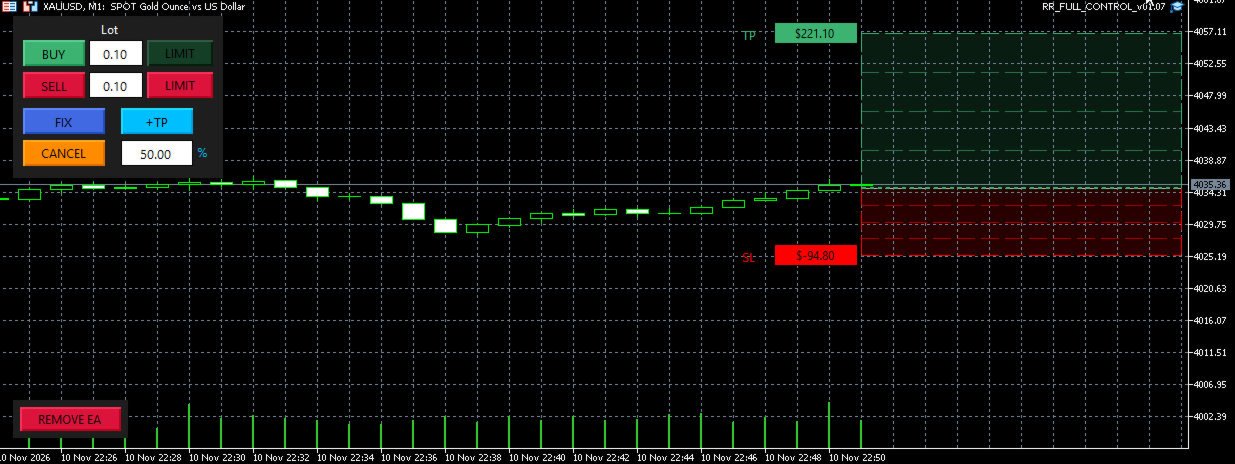
1. Interactive On-Chart Risk:Reward Box (Anchor-Free Dragging)
-
Custom Mouse Engine: Unlike standard MT5 objects that clutter your chart with white selection squares, R:R Full Controller uses a dedicated mouse-tracking engine.
-
Horizontal Edge Dragging: Grab the top (TP) or bottom (SL) border of the box at any time—whether the setup is still virtual or already live in the market—to adjust your target and stop-loss levels with instant broker synchronization.
-
Vertical Edge Dragging: Grab the left or right vertical borders to shift the entire Risk:Reward structure up or down while maintaining your exact point distances.
-
Candle-Anchored Geometry: Virtual setups spawn right at the current candle, automatically enabling chart shift for a clear workspace. Once fixed or executed, the left border locks onto the opening candle while the right border dynamically expands alongside new price action.
2. Real-Time Cash ($) & Volume Telemetry
-
Left-Side Cash Tags: Instant calculation of exact monetary profit and loss in account currency ($ ) displayed on the left corners of the TP, Partial TP, and SL levels.
-
Right-Side Price & Lot Breakdown: Displays the exact price level alongside the specific volume (in parentheses) scheduled to close at each target—automatically recalculating the remaining volume and cash value on the final Take-Profit whenever partial targets are added or modified.
3. Virtual Planning ( LIMIT ) & Instant Confirmation ( FIX )
-
Two-Step Precision Planning: Click LIMIT to project a dashed, translucent virtual setup onto the chart without committing capital. Adjust your Entry, SL, and TP freely while monitoring the exact dollar risk.
-
Smart FIX Execution: Clicking FIX converts the virtual setup into a live broker order, turning the box solid. If price has already crossed your planned limit level, the engine seamlessly executes at market while keeping your SL and TP levels intact.
-
One-Click CANCEL : Instantly discard any unconfirmed virtual setup or remove selected partial targets.
4. Multi-Entry Scaling-In & Dual-Side Hedging
-
Seamless Scaling-In: When a position or pending order is already active, clicking BUY/SELL or LIMIT again allows you to add new entries into the existing structure. Additional virtual limits appear as a movable dashed bar inside your active box, sharing the master Stop-Loss and Take-Profit while aggregating total cash risk and reward.
-
Independent Buy & Sell Engines: Manage simultaneous long and short structures independently, each with its own dedicated lot-size input, visual box, and partial-close hierarchy.
5. Dynamic Partial Take-Profits ( +TP ) with Live Editing
-
Multi-Stage Partials ( TP1 , TP2 , TP3 ): Click +TP on any active order to project a draggable partial Take-Profit line, then press FIX to arm it.
-
Percentage (%) or Fixed Lot Mode: Configure partial exits either as a percentage of the total operation volume or as a fixed lot size.
-
Double-Click Live Modification: Double-click any armed partial TP line on the chart to select it (highlighted in orange). Once selected, you can either type a new percentage/lot value in the HUD input box to resize the partial on the fly, or press CANCEL to delete it and automatically restore its volume to the final Take-Profit.
6. True Net-Zero Break-Even Engine ( BE = 0 )
-
Real Cost Accounting: Standard break-even tools simply move your Stop-Loss to the entry price, leaving you in a net loss due to trading costs. R:R Full Controller calculates the True Net-Zero Price by factoring in:
$$\text{Net Zero Price} = \text{Weighted Open Price} \pm (\text{Current Spread} + \text{Round-Turn Commissions} + \text{Accumulated Swap})$$ -
Flexible BE Triggers: Configure Break-Even in the F7 inputs to trigger either immediately as soon as price clears the Net-Zero level plus the broker's minimum stop distance (0 ), or automatically upon hitting TP1 , TP2 , or TP3 .
7. State Persistence & Strict Magic Number Isolation
-
Crash-Proof Hybrid Memory: All virtual boxes, armed partial TP levels, and HUD input values are continuously saved to both a binary file (.bin ) and MT5 Global Variables. Switching timeframes, changing profiles, or restarting MetaTrader 5 will never erase your active levels.
-
Strict Magic Number Isolation: The controller operates exclusively on orders matching its assigned Magic Number and symbol, ensuring zero interference with manual trades or other Expert Advisors running on the same account.
-
Clean Workspace & REMOVE EA : Automatically hides cluttered native MT5 trade lines while active (restoring them upon removal) and includes a dedicated Anti-Scroll Shield when hovering over the HUD. Clicking REMOVE EA cleanly deletes all pending orders belonging to the controller, wipes temporary memory files, and detaches the utility from the chart.
Input Parameters (F7)
-
TP (Points): Default Take-Profit distance in points (default: 1300 ).
-
SL (Points): Default Stop-Loss distance in points (default: 1300 ).
-
BE (Break-Even Mode): Select when to trigger True Net-Zero Break-Even (0 - Net Zero Level , tp1 , tp2 , tp3 ).
-
+TP (Mode): Calculation mode for partial closes (Percent or Lot ).
-
+TP Default Value: Initial value loaded into the HUD partial close box (default: 50.0 ).
-
Default Lot Buy / Default Lot Sell: Starting lot sizes for the independent Buy and Sell HUD inputs.
-
Magic Number: Unique identifier isolating the controller's operations.
-
Panel X / Panel Y: Screen coordinates for the On-Chart Control HUD.
Usage Notes for Strategy Tester
-
R:R Full Controller is a visual trade management utility. To test all interactive buttons, drag-and-drop boxes, and partial TP mechanics in the MetaTrader 5 Strategy Tester, please ensure "Visual mode with the display of charts, indicators and trade" is checked.