TempurPencopet
- Эксперты
- Версия: 1.34
- Обновлено: 22 октября 2026
- Активации: 5

Download Manual and Preset
=====================================================================
EA TEMPUR PENCOPET v1.34 — MQL5 MARKET DESCRIPTION
=====================================================================
---------------------------------------------------------------------
ENGLISH
---------------------------------------------------------------------
PRODUCT NAME
EA Tempur Pencopet
SHORT DESCRIPTION (one line)
Three trading tools on one dashboard: one-click manual layer baskets, two grid-averaging auto engines and a Telegram signal panel, for gold, forex, oil, crypto and indices.
FULL DESCRIPTION
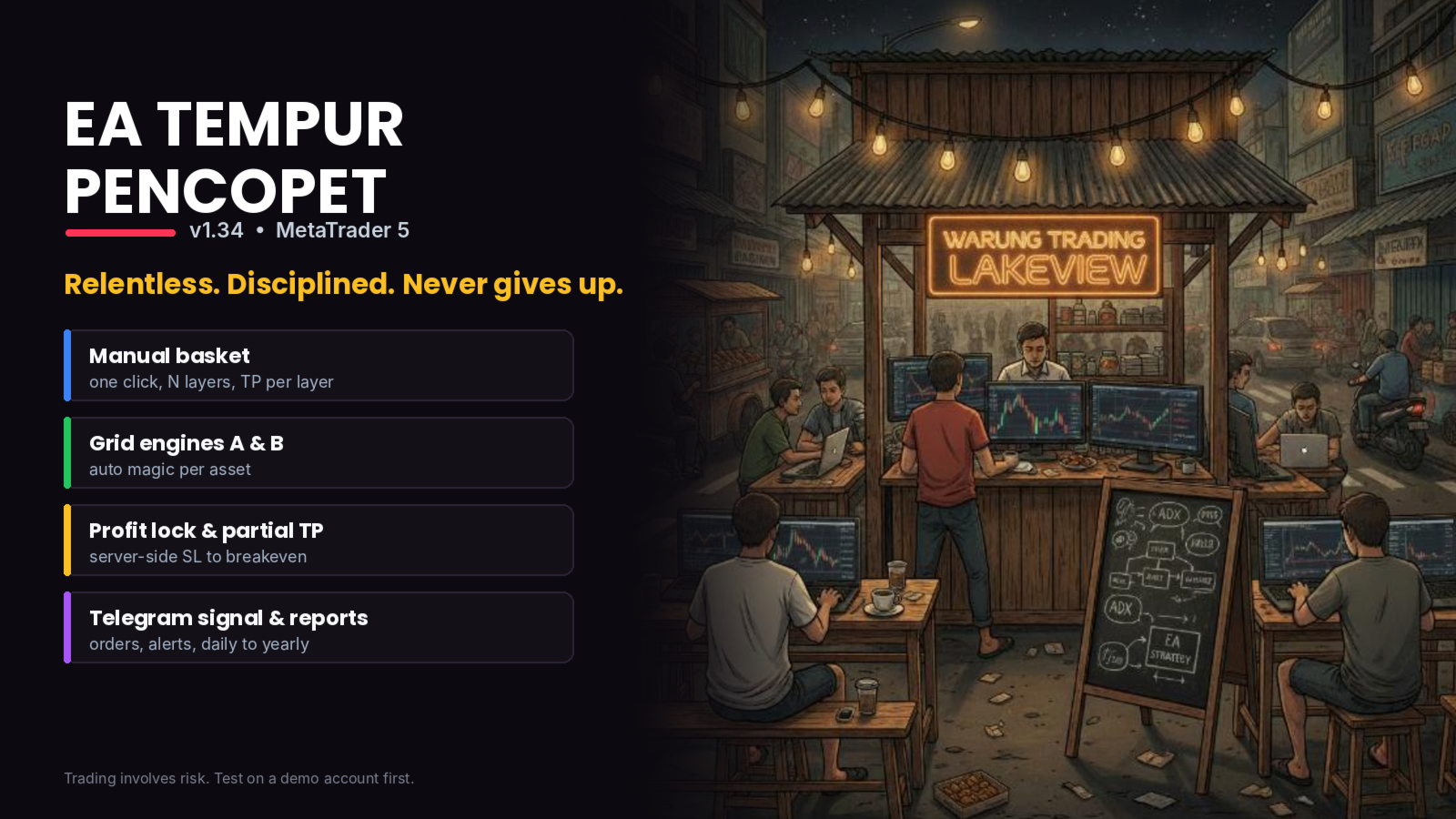
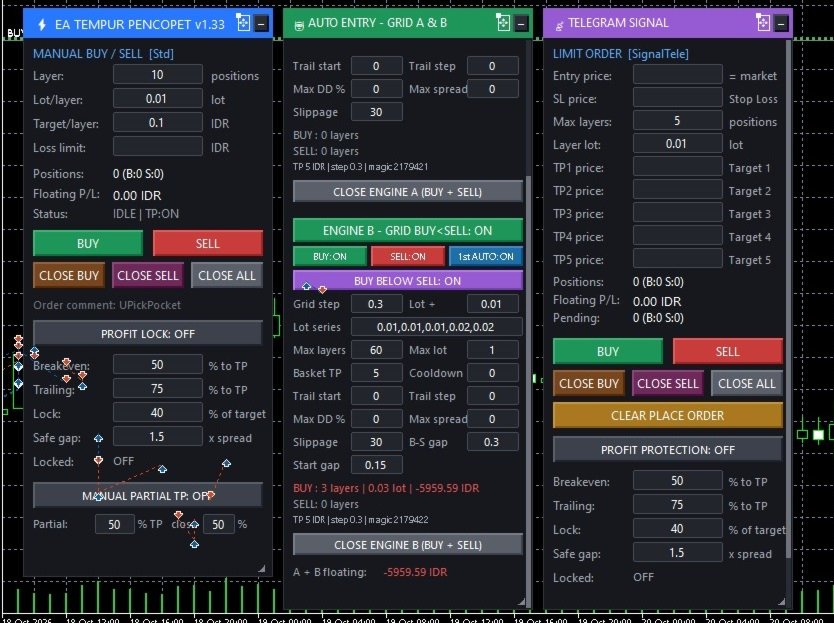
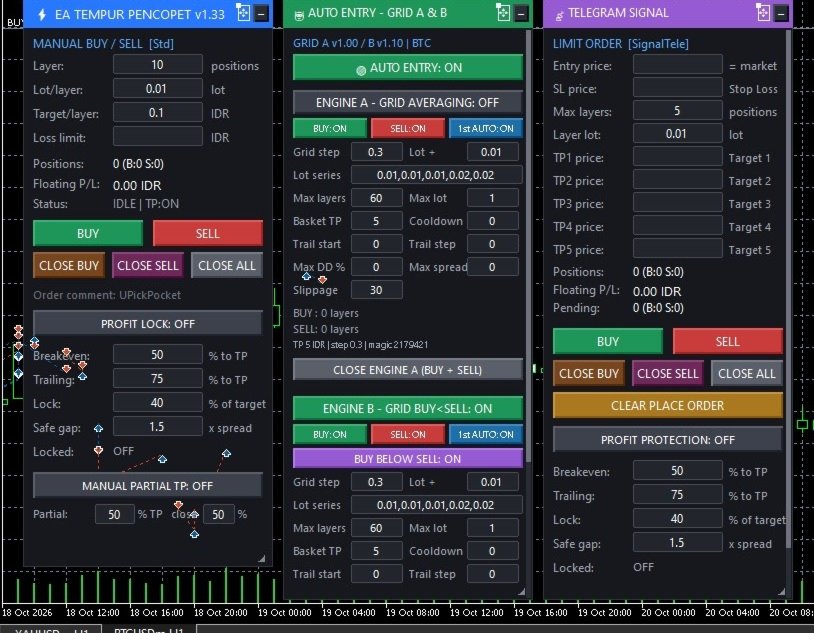
EA Tempur Pencopet works like a dedicated assistant who never leaves her desk. She opens your manual baskets in one click, runs two grid engines around the clock, places your Telegram signals and keeps you informed. Everything is controlled from one on-chart dashboard with three movable panels.
1) MANUAL — one-click layer basket
• BUY or SELL opens N layers at once (layer count and lot per layer are set on the dashboard).
• Every layer gets its own server-side TP, calculated so each layer earns an exact amount in your account currency (Target/layer).
• A TP guard keeps retrying if the broker temporarily rejects a TP.
• Optional basket loss limit: closes the whole basket when floating loss reaches your limit (empty = off).
• PROFIT LOCK: moves each layer's SL to breakeven and then locks profit as price approaches TP. The SL is held on the broker server.
• PARTIAL TP: closes a chosen % of the lot at a chosen % of the way to TP, then moves the rest to breakeven.
• CLOSE BUY / CLOSE SELL / CLOSE ALL buttons.
2) AUTO ENTRY — grid averaging engines A and B
Neither engine uses indicators. The BUY basket and the SELL basket are managed separately.
• The first position opens automatically. A new layer is added each time price moves one Grid step against the basket.
• The lot follows your Lot series (for example 0.01, 0.01, 0.01, 0.02, 0.02) and then grows by the Lot increment.
• Each basket closes as a whole when its total profit reaches Basket TP. Basket trailing (Trail start / Trail step) can be used instead.
• Max layers, Max lot, Max spread, Slippage and Cooldown limits.
• Max drawdown %: closes every position of the engine when its floating loss reaches the % of balance you set.
• Engine B adds a layout rule: every BUY stays below every SELL with a minimum gap, and both baskets start around an anchor price.
• Each engine has its own ON/OFF button, plus BUY / SELL / first-position switches. Every setting from the inputs can also be edited on the dashboard (type a value and press Enter; leave a field empty to return to the input).
• Magic numbers are assigned automatically per asset class and symbol (gold, silver, WTI oil, BTC, ETH, other metals, oil and energy, other crypto, forex majors, forex minors, indices, other assets). Several charts therefore never mix their baskets.
• A master AUTO ENTRY button. Auto entry is OFF when the EA is attached, for safety.
3) TELEGRAM SIGNAL — limit/stop order panel
• Enter the entry price, SL and TP1–TP5, then click BUY or SELL. The EA places LIMIT or STOP orders automatically according to price, or opens at market when entry is empty.
• Layers are spread across TP1–TP5.
• PROFIT PROTECTION and PARTIAL TP for signal layers.
• CLEAR PLACE ORDER removes unfilled signal orders.
DASHBOARD AND REPORTS
• Three panels (MANUAL | AUTO ENTRY | SIGNAL) that you can move, minimize, resize and scroll. They fit small laptop screens.
• Settings persist after timeframe changes and EA reloads.
• Optional Telegram notifications plus daily, weekly, monthly and yearly reports (net result, win/loss, best/worst trade, lots, commission and a per-symbol breakdown).
• Broker and symbol diagnostics are written to the Experts log at start.
SUPPORTED MARKETS
Works on gold (XAUUSD), silver, oil, forex majors and minors, crypto and indices. Broker suffixes such as XAUUSDm, XAUUSD.c and GOLD# are recognised. Works on Standard, Cent, Raw, Zero and Pro accounts. Runs on any timeframe.
REQUIREMENTS
• MetaTrader 5, with a HEDGING account for AUTO ENTRY (grid engines need separate BUY and SELL positions; AUTO is blocked on netting accounts).
• For Telegram: add https://api.telegram.org under Tools > Options > Expert Advisors > Allow WebRequest, then enter your Bot Token and Chat ID.
• A VPS is recommended for 24-hour operation.
HOW TO START
1. Attach the EA to one chart per symbol. Do not attach it twice to the same symbol.
2. Check the Experts log for the broker and symbol report.
3. Set the MANUAL panel values (layers, lot, target per layer).
4. For AUTO, check the engine A/B settings (Grid step is a PRICE distance: 0.30 = 30 cents on gold), then switch AUTO ENTRY on.
5. Start with the smallest lot on a demo account.
IMPORTANT — PLEASE READ
• Grid averaging adds positions while price moves against the basket. In a long one-directional move, floating loss and margin use grow quickly. Use Max layers, Max lot and Max drawdown % that fit your balance.
• Past results do not guarantee future results. No settings can remove market risk.
• Always test on a demo account first and only trade with money you can afford to lose.
---------------------------------------------------------------------
BAHASA INDONESIA
---------------------------------------------------------------------
NAMA PRODUK
EA Tempur Pencopet
DESKRIPSI SINGKAT (satu baris)
Tiga alat trading dalam satu dashboard: basket layer manual sekali klik, dua mesin grid averaging otomatis, dan panel sinyal Telegram, untuk emas, forex, minyak, kripto, dan indeks.
DESKRIPSI LENGKAP
EA Tempur Pencopet bekerja seperti asisten yang tidak pernah meninggalkan mejanya. Ia membuka basket manual Anda dengan sekali klik, menjalankan dua mesin grid sepanjang waktu, memasang sinyal Telegram Anda, dan selalu memberi kabar. Semuanya dikendalikan dari satu dashboard di chart dengan tiga panel yang bisa dipindah.
1) MANUAL — basket layer sekali klik
• BUY atau SELL membuka N layer sekaligus (jumlah layer dan lot per layer diatur di dashboard).
• Setiap layer mendapat TP sendiri di server, dihitung agar tiap layer menghasilkan nominal tepat dalam mata uang akun (Target/layer).
• Penjaga TP terus mencoba ulang jika broker sementara menolak TP.
• Batas loss basket opsional: seluruh basket ditutup saat floating loss mencapai batas (kosong = nonaktif).
• KUNCI PROFIT: SL tiap layer digeser ke impas, lalu mengunci profit saat harga mendekati TP. SL tersimpan di server broker.
• TP SEBAGIAN: menutup sebagian lot (persen pilihan) pada persen jarak ke TP yang dipilih, lalu sisanya digeser ke impas.
• Tombol CLOSE BUY / CLOSE SELL / CLOSE ALL.
2) AUTO ENTRY — mesin grid averaging A dan B
Kedua mesin tidak memakai indikator. Basket BUY dan basket SELL dikelola terpisah.
• Posisi pertama dibuka otomatis. Layer baru ditambah setiap kali harga bergerak melawan basket sejauh satu Grid step.
• Lot mengikuti Lot series (misalnya 0.01, 0.01, 0.01, 0.02, 0.02), lalu bertambah sebesar Lot increment.
• Setiap basket ditutup sekaligus saat total profitnya mencapai Basket TP. Bisa juga memakai trailing basket (Trail start / Trail step).
• Batas Max layers, Max lot, Max spread, Slippage, dan Cooldown.
• Max drawdown %: semua posisi mesin ditutup saat floating loss-nya mencapai persen saldo yang Anda tentukan.
• Mesin B menambah aturan susunan: semua BUY selalu di bawah semua SELL dengan jarak minimal, dan kedua basket dimulai di sekitar harga acuan (anchor).
• Setiap mesin punya tombol ON/OFF sendiri, ditambah saklar BUY / SELL / posisi pertama. Semua setting di input juga bisa diubah di dashboard (ketik nilai lalu Enter; kosongkan kolom untuk kembali ke nilai input).
• Magic number diberikan otomatis per kelas aset dan simbol (emas, perak, minyak WTI, BTC, ETH, logam lain, minyak dan energi, kripto lain, forex major, forex minor, indeks, aset lain). Karena itu basket dari beberapa chart tidak pernah tercampur.
• Tombol utama AUTO ENTRY. Demi keamanan, AUTO ENTRY dalam keadaan OFF saat EA dipasang.
3) SINYAL TELEGRAM — panel limit/stop order
• Isi harga entry, SL, dan TP1–TP5, lalu klik BUY atau SELL. EA memasang order LIMIT atau STOP otomatis sesuai posisi harga, atau membuka di harga pasar jika entry dikosongkan.
• Layer dibagi ke TP1–TP5.
• PROTEKSI PROFIT dan TP SEBAGIAN untuk layer sinyal.
• CLEAR PLACE ORDER menghapus order sinyal yang belum terisi.
DASHBOARD DAN LAPORAN
• Tiga panel (MANUAL | AUTO ENTRY | SIGNAL) yang bisa dipindah, diperkecil, diubah ukurannya, dan di-scroll. Pas di layar laptop kecil.
• Setting tetap tersimpan saat ganti timeframe atau EA dimuat ulang.
• Notifikasi Telegram opsional, ditambah laporan harian, mingguan, bulanan, dan tahunan (hasil bersih, menang/kalah, trade terbaik/terburuk, lot, komisi, dan rincian per simbol).
• Diagnosa broker dan simbol ditulis di log Experts saat EA mulai.
PASAR YANG DIDUKUNG
Bisa dipakai di emas (XAUUSD), perak, minyak, forex major dan minor, kripto, dan indeks. Akhiran simbol broker seperti XAUUSDm, XAUUSD.c, dan GOLD# dikenali. Bisa dipakai di akun Standard, Cent, Raw, Zero, dan Pro. Berjalan di timeframe apa pun.
PERSYARATAN
• MetaTrader 5, dengan akun HEDGING untuk AUTO ENTRY (mesin grid membutuhkan posisi BUY dan SELL terpisah; AUTO diblokir di akun netting).
• Untuk Telegram: tambahkan https://api.telegram.org di Tools > Options > Expert Advisors > Allow WebRequest, lalu isi Bot Token dan Chat ID.
• Disarankan memakai VPS agar berjalan 24 jam.
CARA MEMULAI
1. Pasang EA di satu chart per simbol. Jangan pasang dua kali di simbol yang sama.
2. Cek laporan broker dan simbol di log Experts.
3. Atur nilai di panel MANUAL (layer, lot, target per layer).
4. Untuk AUTO, periksa setting mesin A/B (Grid step adalah jarak HARGA: 0.30 = 30 sen di emas), lalu nyalakan AUTO ENTRY.
5. Mulai dengan lot terkecil di akun demo.
PENTING — MOHON DIBACA
• Grid averaging menambah posisi saat harga bergerak melawan basket. Pada pergerakan searah yang panjang, floating loss dan pemakaian margin naik dengan cepat. Gunakan Max layers, Max lot, dan Max drawdown % yang sesuai dengan saldo Anda.
• Hasil masa lalu tidak menjamin hasil di masa depan. Tidak ada setting yang bisa menghilangkan risiko pasar.
• Selalu uji di akun demo terlebih dahulu dan hanya trading dengan dana yang siap Anda tanggung risikonya.