Pentad Multi Strategy EA
- Эксперты
- Версия: 1.3
- Обновлено: 26 октября 2026
- Активации: 5

One chart. Many markets. 24 strategies.
Tests that charge you every cost, and a reason for every trade.
✅ Prop-firm ready ✅ No martingale ✅ No grid ✅ No averaging ✅ 100% native MQL5, no DLLs
| Early adopter price: 209 USD One-time purchase · All future updates included · No subscription This introductory price is temporary and will go up as the product develops. |
Why Pentad EA
Most trading robots look perfect in a backtest, until spread, swap and slippage arrive. Pentad EA works the other way around: it shows what a strategy really earns after all costs before you risk money, trades it with layered risk control, and explains every step. It is the tool from a multi-year research project into which public trading rules survive real costs. Most did not.
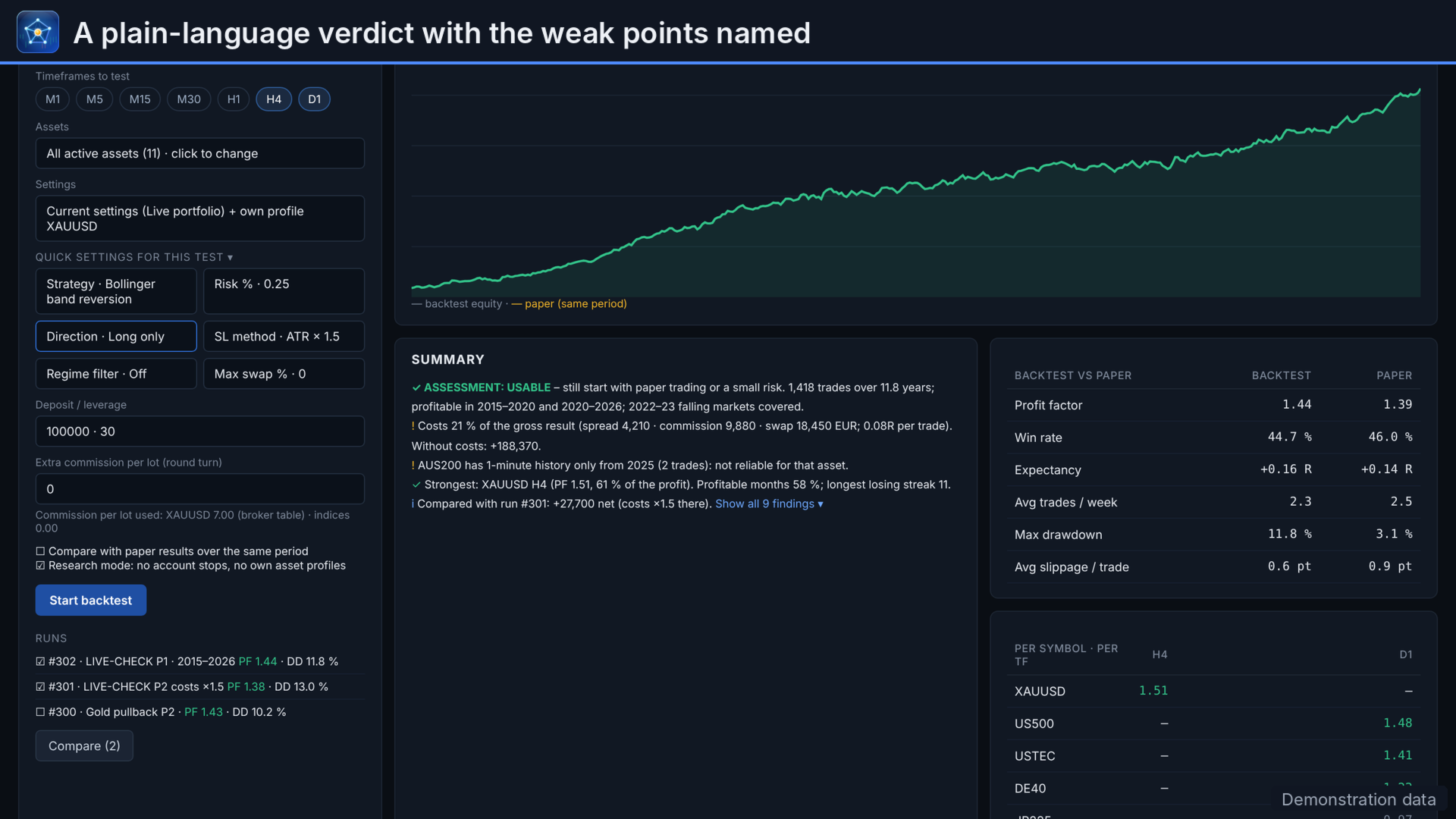
- Test honestly. Your broker's 1-minute history, every cost charged, and a plain verdict that names the weak points.
- Prop-firm ready. Before every trade, the worst case of all open trades plus the new one is checked against the firm's daily and total loss limits.
- Trade with control. No martingale, no grid, no averaging. Limits per trade, account, currency and strategy, plus an emergency brake.
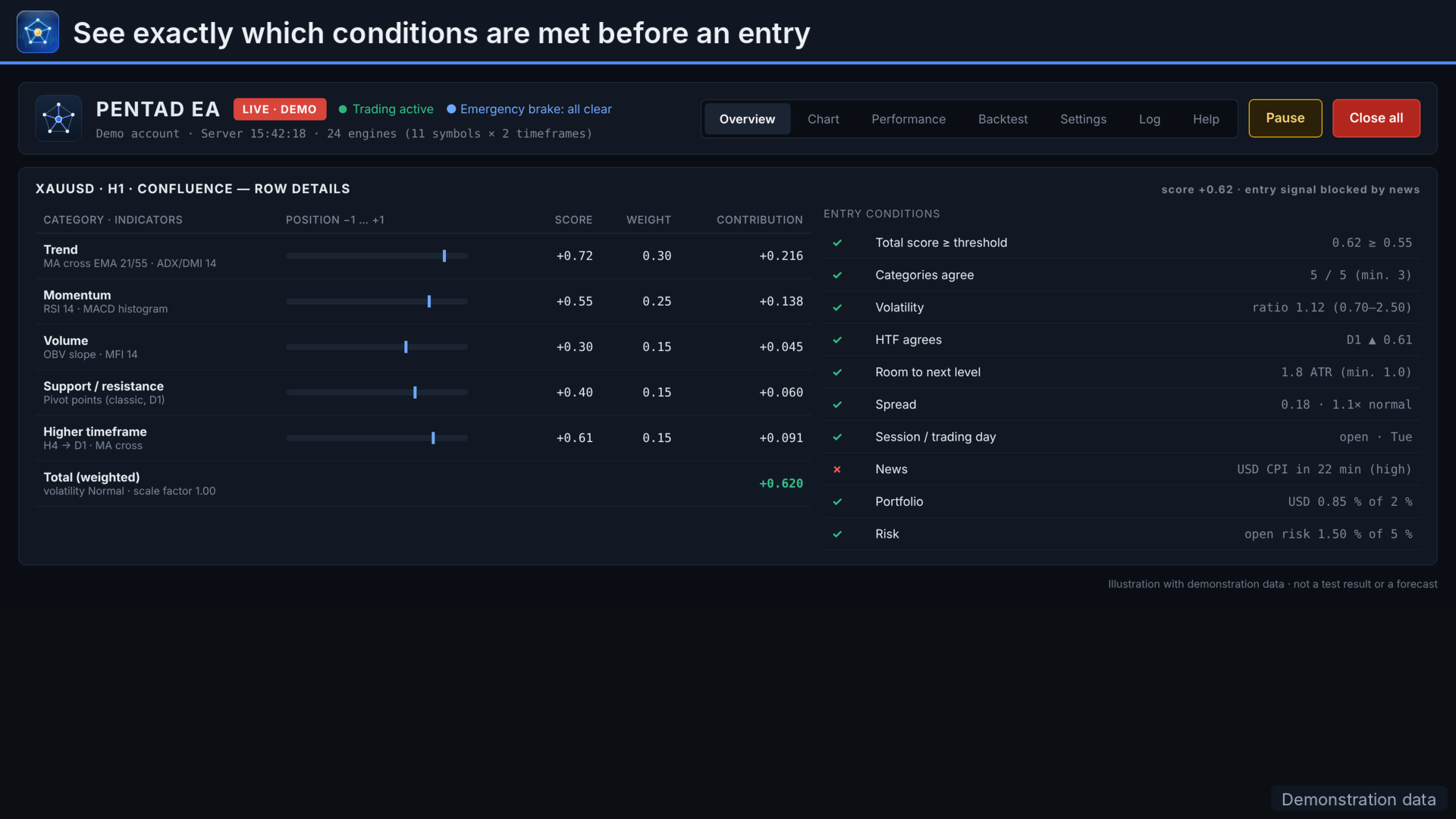
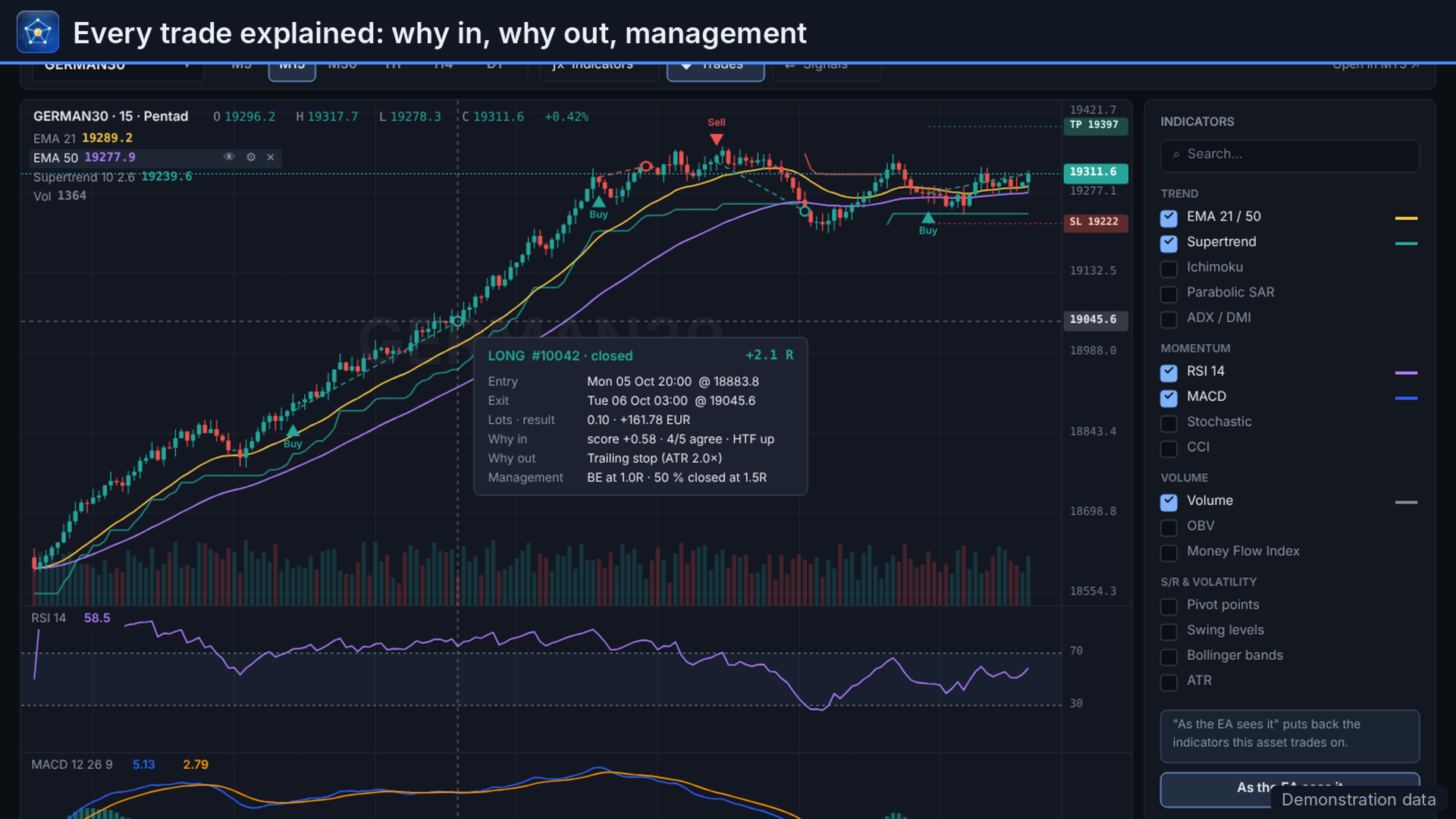
- Always see why. "Why this trade?" for every position, and a reason for every skipped signal.
- One workspace. Research, optimization, paper and live trading with exactly the same code.
1. One chart, every market
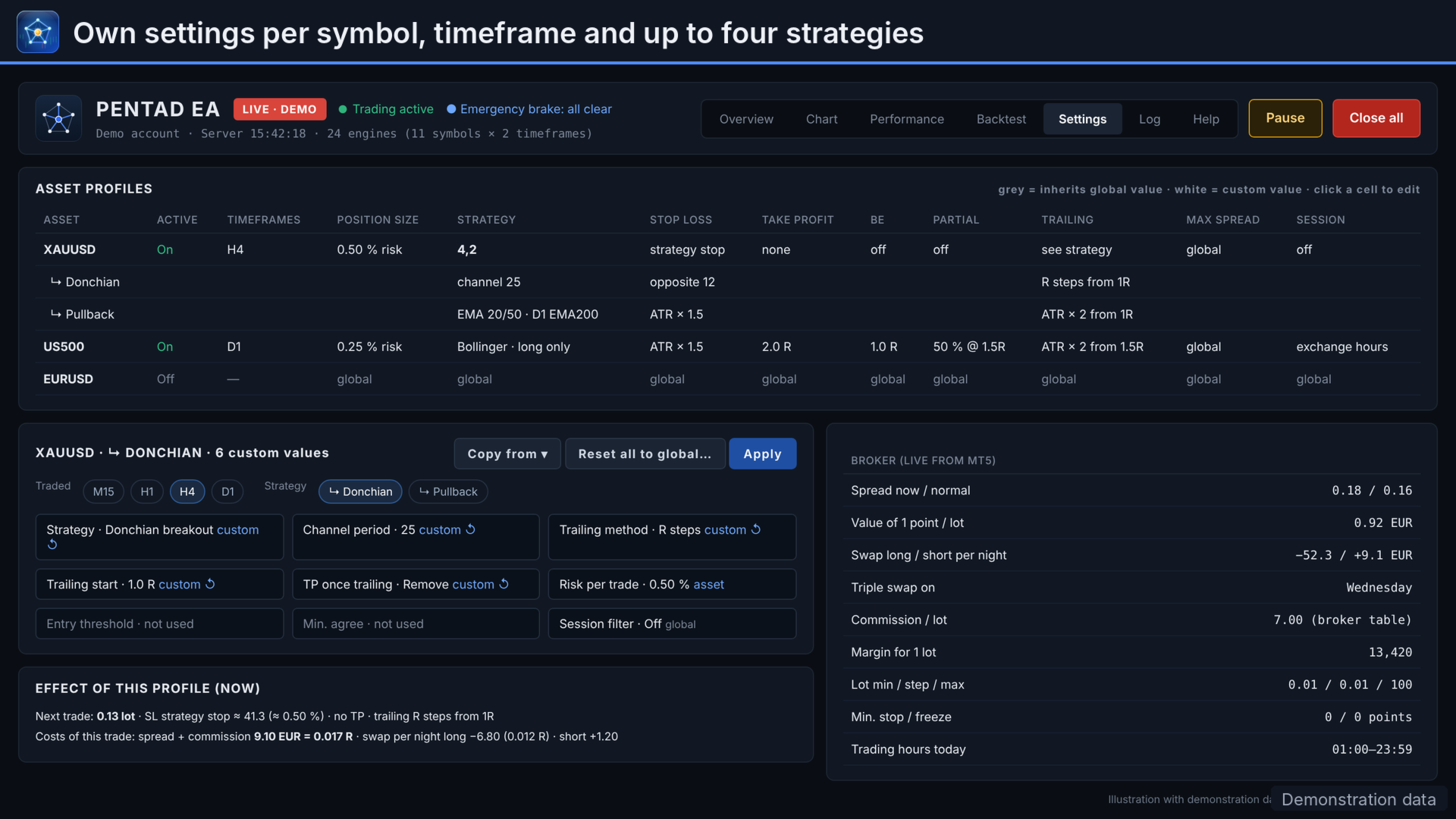
Attach Pentad EA to one chart and it watches a whole portfolio: 27 instruments by default (forex, metals, energy and indices), each with its own timeframes and settings. Broker names and suffixes are recognised automatically.
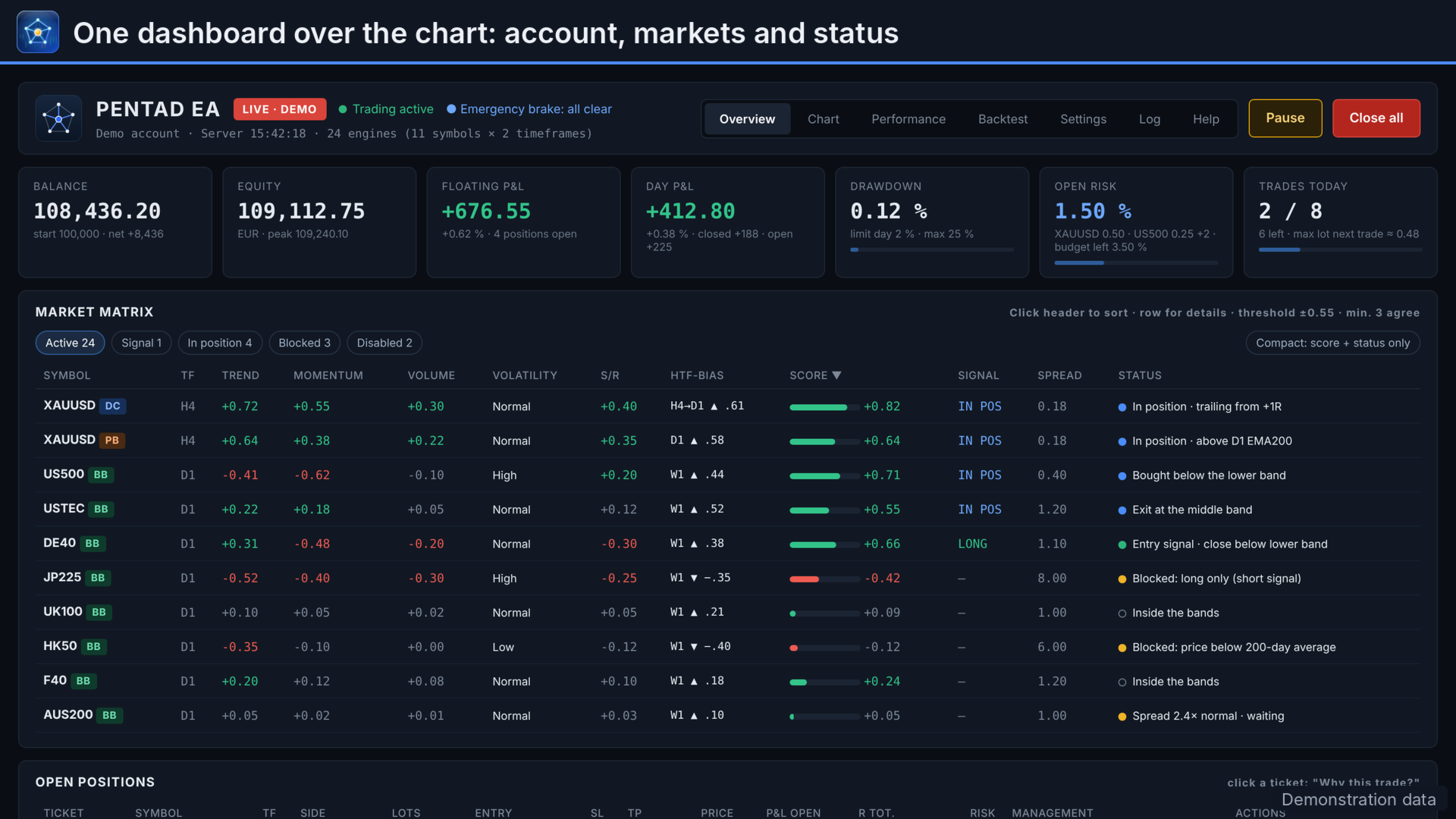
The market matrix shows every symbol and timeframe with its trend, momentum, volume, volatility and higher-timeframe scores, and a status in plain words such as "Entry signal" or "Spread 2.4x normal, waiting".
2. 24 strategies, up to four at once
One strategy per symbol, or up to four side by side, each with its own settings, statistics and emergency brake. All are well-known, transparent rules.
- Confluence: weighted score over trend, momentum, volume, support/resistance and the higher timeframe
- Breakouts: opening range, Donchian, new highs and lows, break and retest, S/R break, volatility squeeze
- Trend: pullback in trend, moving-average crossover, trendline setups
- Mean reversion: RSI(2), Bollinger bands, internal bar strength, range trading, oscillator extremes, reversal basket
- Levels and calendar: strong-level reactions, turn of the month, time windows, carry (interest-rate difference)
- Benchmark: random entry with real exits, to see whether a rule beats chance
Filters for direction, market regime, ADX, sessions, spread and news work with every strategy.
3. A backtester that charges you every cost
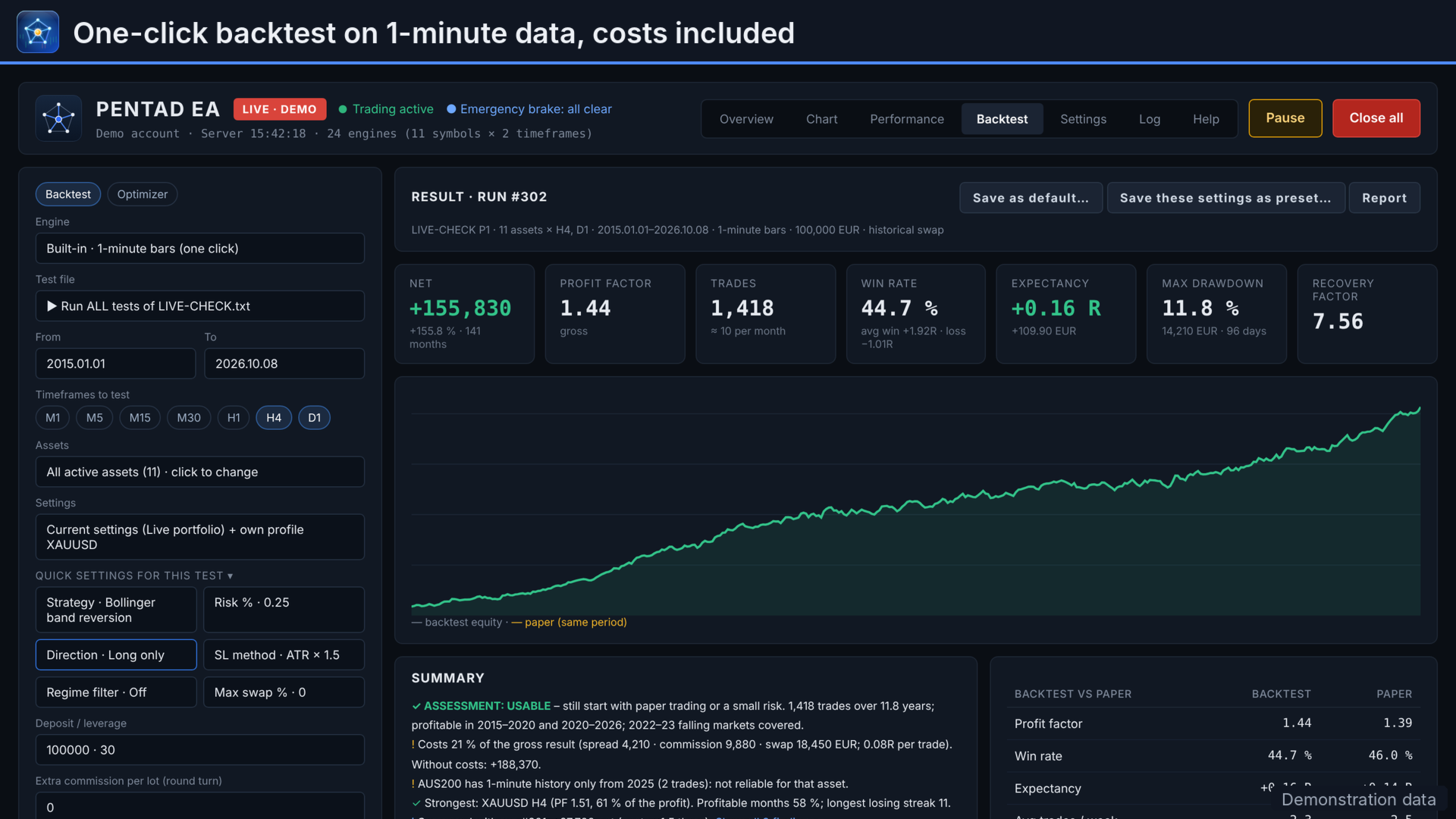
One click replays your broker's 1-minute history with the same code that trades live. Spread, commission, slippage and swap are charged as in a real account, and when stop and target fall in the same minute, the stop counts.
Every result ends with a verdict, No edge, Not reliable, Indicative or Usable, and says why. Compare runs side by side, run test series including cost stress tests, and save any run as an HTML report.
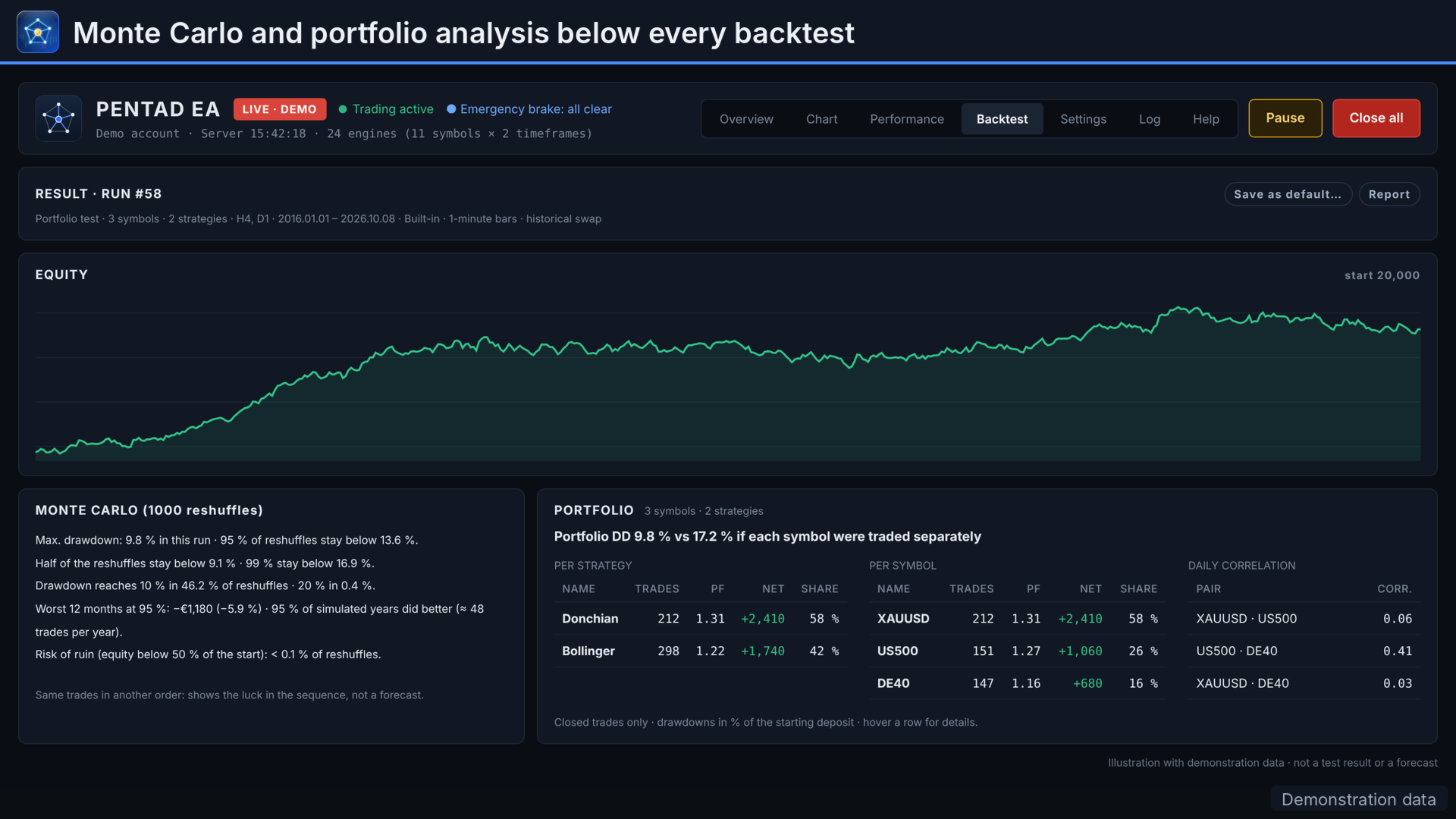
Below every result a Monte Carlo reshuffles the trades 1,000 times: the drawdown you should expect at 95 % and 99 %, the worst 12 months and the risk of ruin. Runs with several symbols or strategies add a portfolio analysis: contribution and drawdown per strategy and symbol, their daily correlation, and how much the mix spreads the risk.
4. An optimizer that does not trust itself
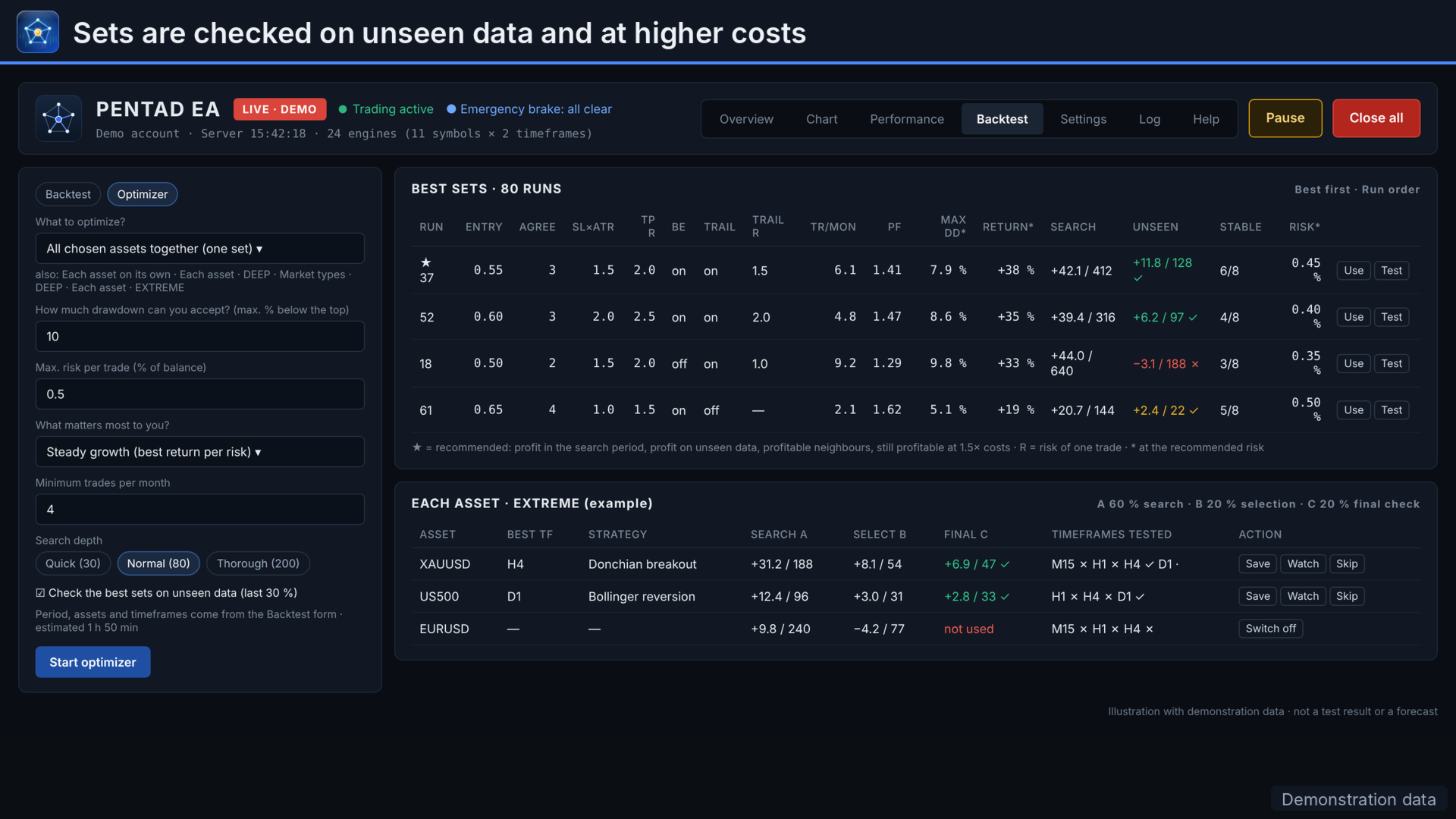
Answer a few plain questions about drawdown and risk. The optimizer searches on the first 70 % of the data, then checks the best sets on the unseen last 30 % and at 1.5 times the costs. A set is only recommended when its neighbouring settings are profitable too: a plateau, not a lucky peak.
5. Risk control in layers
The position size follows from the stop distance: a fixed lot, a percentage of balance or equity, or a fixed amount. On top of that:
- a maximum risk per trade and a maximum total open risk
- limits on positions and on trades per day
- a daily loss stop and a maximum drawdown stop
- a currency exposure limit and a correlation warning
- a statistical emergency brake per strategy and symbol
A risk calculator and a live-impact panel show the effect of a change before you apply it.
Once you trade live, Pentad checks its own execution: the real spread, slippage, commission and swap per symbol next to what the backtest assumed, with a notice when your broker is structurally more expensive.
6. Built for prop-firm challenges
Enter the firm's daily loss limit, maximum loss and your start balance. Before every trade Pentad adds up what all open positions would lose at their stops, plus the new trade, and skips the trade when that worst case could cross a limit, with a safety margin for spread and gaps. If equity still reaches the floor, for example through a gap, it closes all positions and stops for the firm's day.
- No martingale, no grid, no averaging into losses
- Paper mode on live prices for a dry run before the challenge
- Adjustable safety margin and firm-day offset
Firms differ: the guard covers the common static daily and total loss rules. Check your firm's rules on trailing drawdown, news and EAs.
7. Every position managed, every exit explained
- Stops: ATR, swing, fixed, support/resistance or the strategy's own level
- Targets: R multiple, ATR, levels, swings or Bollinger band
- Management: break-even, two partial closes and nine trailing methods, from ATR and Chandelier to Supertrend
- Exits: time, session end, swap before rollover, volatility spike, VWAP, reversed signal or Friday close
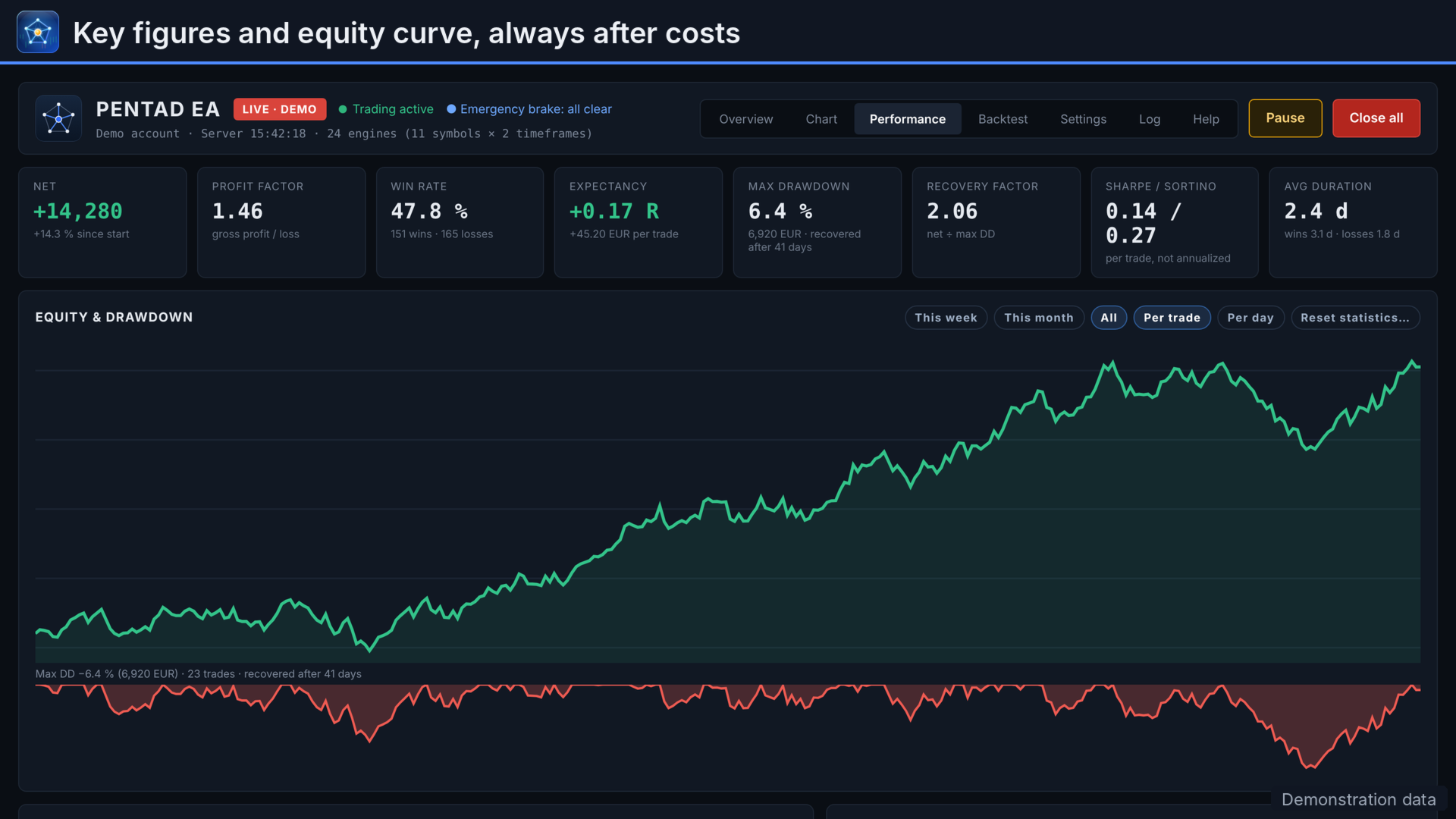
Move a stop to break-even, close half or close a position with one click. The Performance page breaks results down by symbol, timeframe, strategy and exit reason, costs included.
8. Alerts wherever you are
Entries, exits, risk stops and a daily summary through MetaTrader push, e-mail, Telegram, Slack, Discord, Microsoft Teams or a webhook. Through Telegram you can also check status and positions, and pause or resume trading.
Who it is for
For MetaTrader 5 traders, including prop-firm challenge and funded traders, who want to trade systematically, test before they risk money and understand what their robot does. It is not for anyone looking for fixed monthly returns: Pentad EA promises none.
Works well with Agora, Kairos Guard Pro, DayLock, EA Sentinel, Panoptic, ChronoReplay and Orama
Orama Market Map shows the whole market at once, every Market Watch symbol grouped by asset class in 2D, 2.5D and free 3D. Pentad tests and trades your rules. Its companion indicator Panoptic Market Dashboard shows the context of every market you follow in plain words, and which readings are unusual compared with six months of history. ChronoReplay lets you practise the same markets by hand, candle by candle on your broker's history, with prop-firm rules and a full journal. Kairos Guard Pro guards the whole terminal around news releases and spread spikes. DayLock guards the account against your daily and max loss. EA Sentinel Guard Pro scores every robot on the account. Pentad respects all three guards through RiskBus, their shared risk format: no new entries while a guard says so, smaller positions on caution, and the reason in the log. Pentad can also publish its own account limits on RiskBus, so the guards and your other robots see when its prop-firm, drawdown or daily-loss limit is reached. Separate products; each works on its own. Agora 3D Order Flow shows where the market traded, in 2D, 2.5D and free 3D.
Up and running in four steps
- Set the chart history once. Tools, Options, Charts: Max. bars in chart = 2000000, then restart MetaTrader. The backtester needs this 1-minute history.
- Attach the EA to one chart, for example EURUSD H1. Tick Allow Algo Trading, keep Trading mode on Paper and press OK. Use one instance per account.
- Choose markets and risk in the start assistant that opens the first time, or later under Settings (0.25 to 1 % per trade is a sensible start; the assistant checks the broker's minimum lot per symbol), then run a backtest over several years and read the verdict.
- Let Paper run for a few weeks before you switch to Live, first on a demo account. A red banner shows while Algo Trading is off in the toolbar or on the EA's Common tab.
The Help button in the dashboard explains every screen. The full user manual (PDF, version 1.03, 118 pages) is attached in the Comments tab.
Specifications
- Platform: MetaTrader 5 desktop; a VPS is recommended for trading around the clock
- Account: hedging recommended; netting supported with one position per symbol
- Markets: forex, metals, energy and index CFDs
- Timeframes: M5 to D1 (M1 possible, but memory-intensive)
- Modes: Paper (virtual orders on live prices), Live and Signals only, also per symbol
- Prop firms: built-in guard for static daily and total loss limits
- Technical: no martingale, no grid, no averaging; decisions on closed bars only; no DLLs; all data stays on your computer
- Start with: a low-spread account, Paper mode, one strategy and a small risk per trade
Good to know
- Free demo: in the Strategy Tester the dashboard does not run; choose the strategy, timeframes and direction in input group 19 (Strategy Tester demo).
- One terminal per account: if another terminal trades the same account with the same magic numbers, Pentad stops instead of fighting over the positions, and positions it did not open wait for your choice.
- F7 opens the inputs again; most settings are changed and saved in the dashboard itself.
- No trades? The status column of the market matrix names the reason: threshold, spread, news, session or a risk limit.
- "Lot size below broker minimum"? Indices and metals need a larger account than forex for the same risk per trade.
- Backtest stuck at "Loading price history"? Set Max. bars in chart to 2000000 and restart MetaTrader.
- Telegram, Slack, Discord, Teams or webhooks: allow the web address under Tools, Options, Expert Advisors, Allow WebRequest.
- The backtester uses 1-minute bars, not ticks, and does not model news or margin. Paper mode does not simulate swap or margin.
- MetaTrader 5 only; there is no MT4, cTrader or mobile version. No artificial intelligence and no secret edge: public rules and a systematic search.
Input parameters
The input window (F7) holds the starting values: trading mode, symbols and timeframes, magic number, sizing and risk limits, stops and targets, management, filters, portfolio limits, alerts and dashboard layout. Strategy choice, regime filter, emergency brake, prop-firm guard and per-symbol profiles are set in the dashboard.
Stay up to date
New versions, short tips and screenshots of all my tools are posted in my MQL5 channel Henk Bonekamp Trading Tools. Subscribe there to hear about updates; MetaTrader does not announce them by itself.
Important
No strategy is profitable in every market or with every broker. Spread, swap and server time differ per broker and change results. Past and simulated results do not guarantee future results. Test every setting on your own account before trading real money, and only risk what you can afford to lose. Questions are answered in the comments and private messages on this site.