Pentad Multi Strategy EA
- Experts
- Versione: 1.0
- Attivazioni: 5

One chart. Many markets. 23 strategies.
Tests that charge you every cost, and a reason for every trade.
| Early adopter price: 229 USD A one-time purchase, not a rental: no subscription and no expiry date, with all future updates included. This introductory price is temporary and will go up as the product develops. |
Most trading robots look perfect in a backtest. Then the spread, the overnight swap and the slippage arrive, and the edge is gone. Pentad EA is built the other way around. It shows you what a strategy really earns after all costs before you risk money. It then trades it with layered risk control, and it tells you why it acts at every step.
Pentad EA is the tool used in an extensive multi-year research project into which public trading rules survive real costs. Most did not. The same engine now lets you run the same honest tests on your own broker, before your account does it for you.
Why traders choose Pentad EA
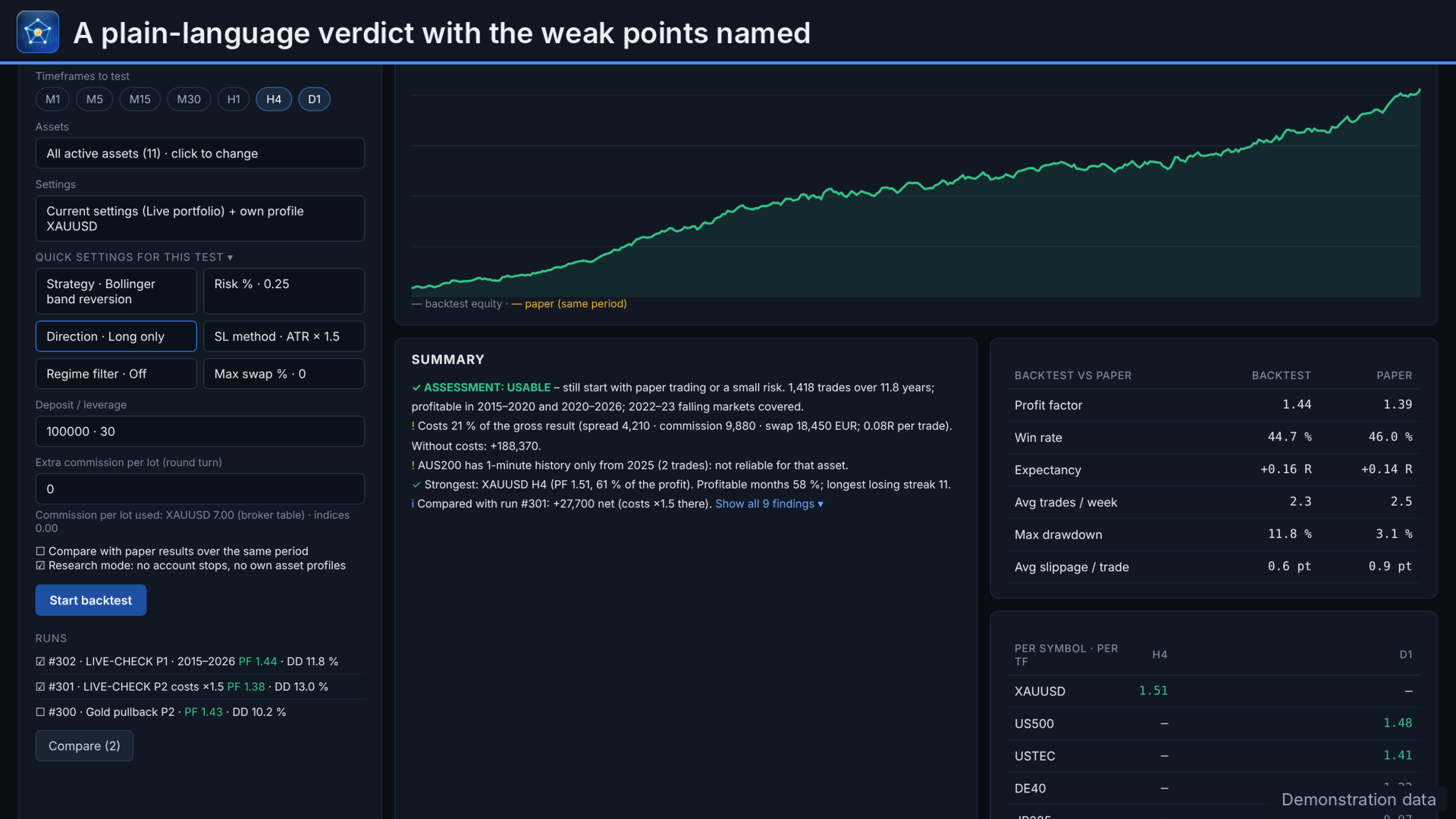
| Test honestly | Every backtest runs on your broker's 1-minute history and charges spread, commission, slippage and swap. Each result ends with a plain verdict that names its weak points. |
| Trade with control | Risk limits per trade, per account, per currency and per strategy. An emergency brake stops a strategy that falls structurally behind. |
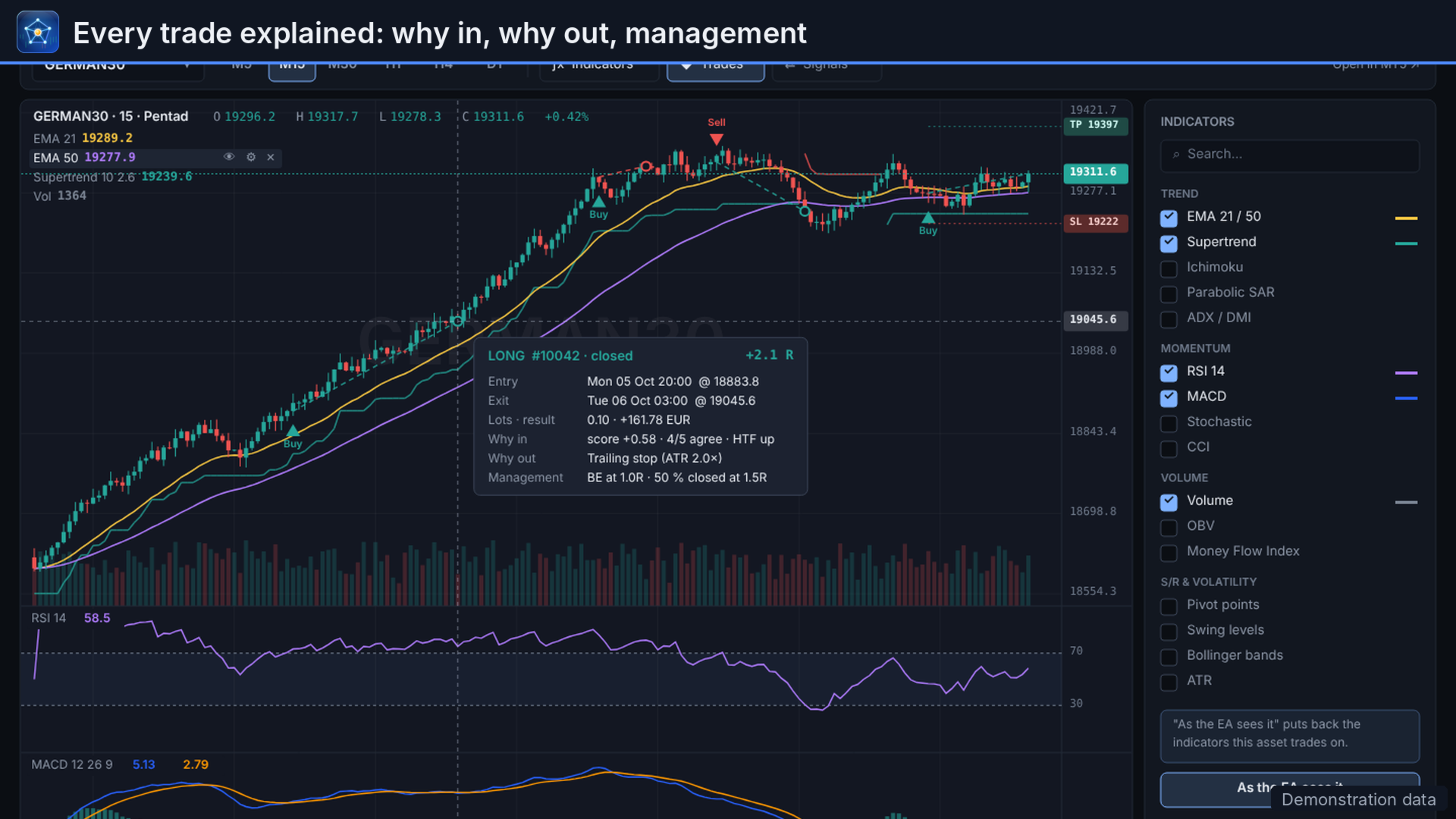
| Always see why | "Why this trade?" for every position. Every skipped signal shows its deciding reason, and the log records every management step. |
| One workspace | Research, optimization, paper trading and live trading in one dashboard, with exactly the same code from test to live. |
Quick start: up and running in 10 minutes
Do these steps once and most questions answer themselves.
- Set the chart history once. In MetaTrader: Tools, Options, Charts, Max. bars in chart = 2000000 (type the number), then restart MetaTrader. The built-in backtester needs this 1-minute history; a lower value cuts tests short, "Unlimited" can use a lot of memory.
- Show your symbols. Open Market Watch (Ctrl+M), right-click and choose Show all, or add the instruments you want to trade.
- Attach the EA to one chart. Drag Pentad EA from Navigator (Expert Advisors, Market) onto any chart, for example EURUSD H1. One chart is enough: the EA watches all your symbols from there. Use one instance per account.
- Check the inputs. In the window that opens: tab Common, tick Allow Algo Trading. Tab Inputs: keep Trading mode on Paper. Leave Symbols on the default list (27 instruments, broker names and suffixes are recognised) or type your own, for example EURUSD,XAUUSD,US500. Press OK.
- The dashboard appears over the chart. Nothing trades with real money in Paper mode: orders are virtual, on live prices.
- Choose your markets and risk. Settings, Markets: tick symbols and timeframes. Settings, Risk: a risk per trade of 0.25 to 1 %. Press Apply.
- Run a backtest. Tab Backtest: choose a period of several years and press Start backtest. Read the verdict and its weak points, not only the profit.
- Watch, then decide. Let Paper run for a few weeks and compare it with the backtest. Only then click the PAPER label at the top and choose Live, first on a demo account. Live needs the Algo Trading button in the MetaTrader toolbar switched on.
Good to know
- F7 on the chart opens the EA inputs again. Most settings are changed and saved in the dashboard itself; the inputs are the starting values.
- The Help button in the dashboard explains every screen, with a search field.
- The full user manual (PDF, 110 pages) is attached in the Comments tab of this page.
- Telegram, Slack, Discord, Teams and webhooks: add the web address once under Tools, Options, Expert Advisors, Allow WebRequest. Telegram uses https://api.telegram.org. Every channel has a Send test button.
- For trading around the clock, MetaTrader must stay online, for example on a VPS.
1. One chart, every market
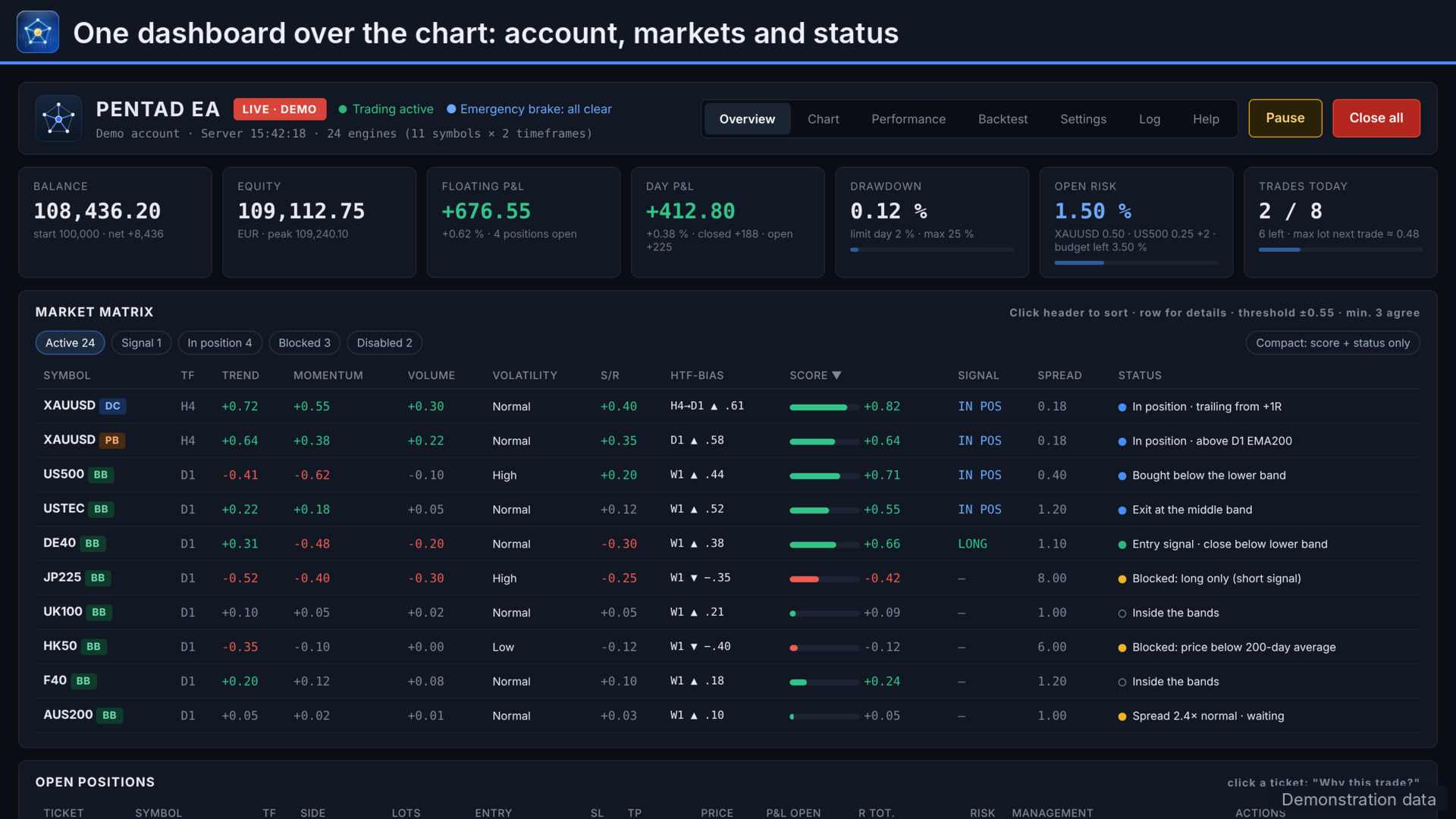
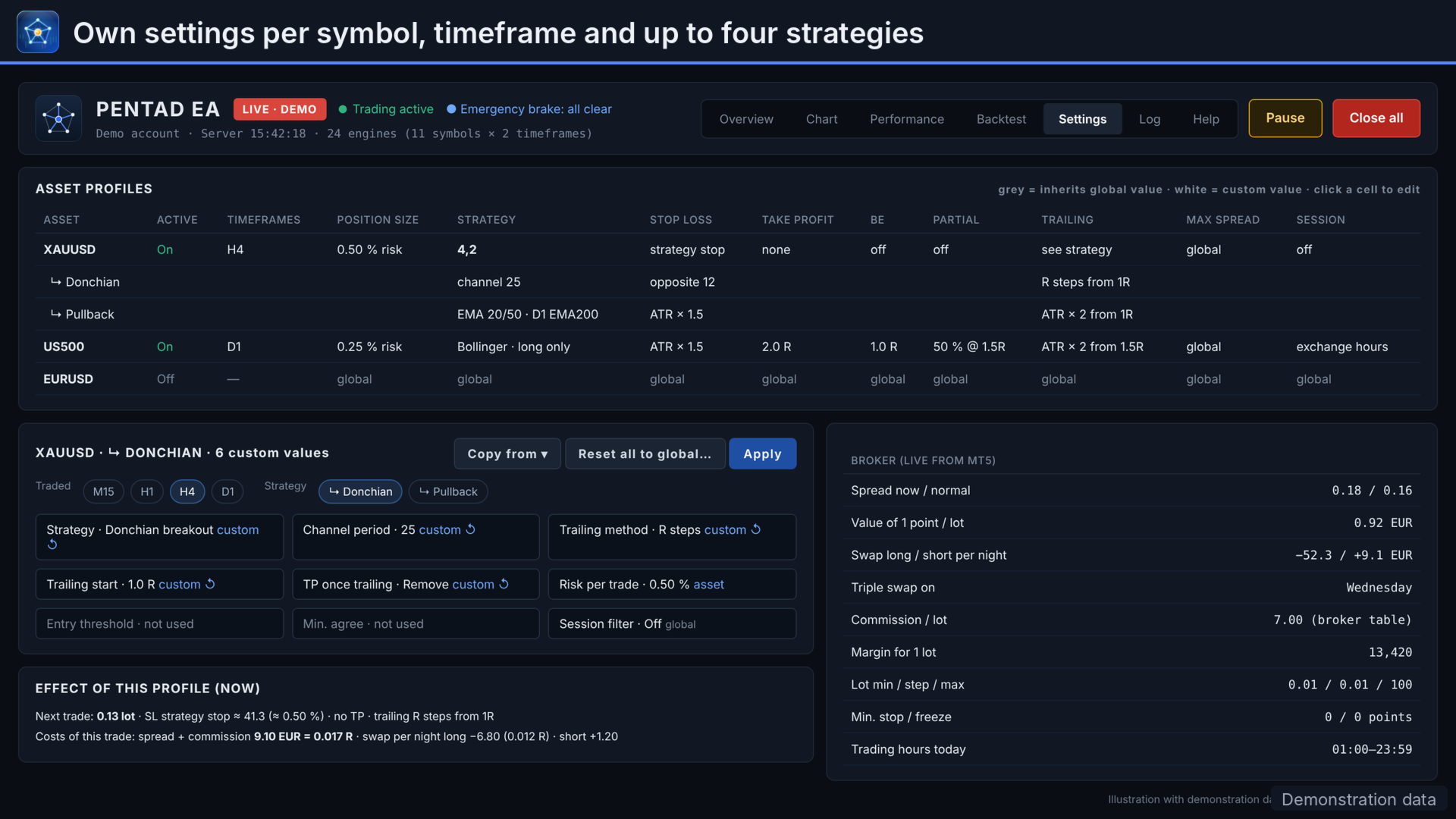
Attach Pentad EA to a single chart and it watches a whole portfolio. The default list holds 27 instruments: forex, metals, energy and indices. Each runs on its own timeframes with its own settings, and alternative broker names and suffixes are recognised automatically.
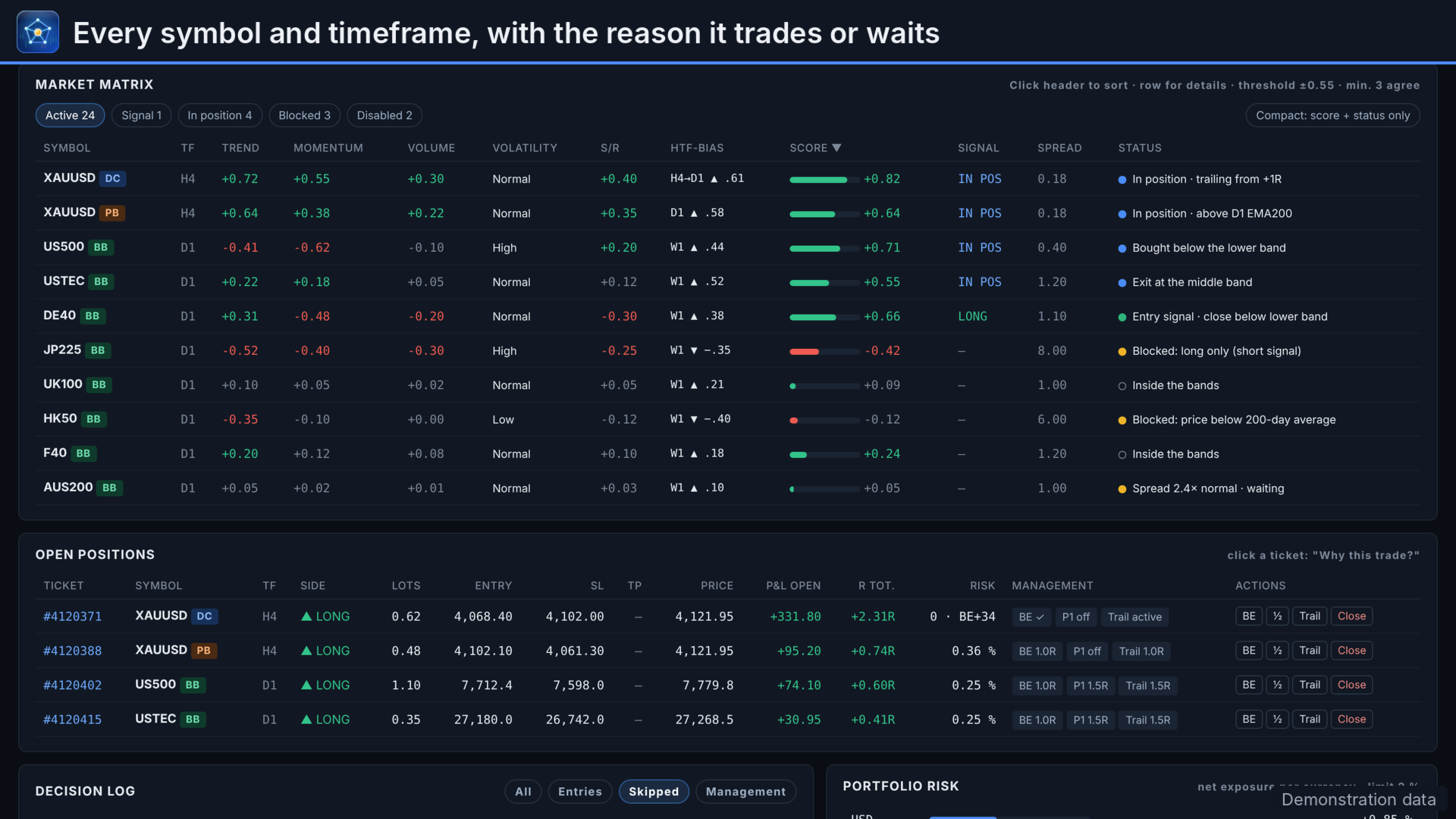
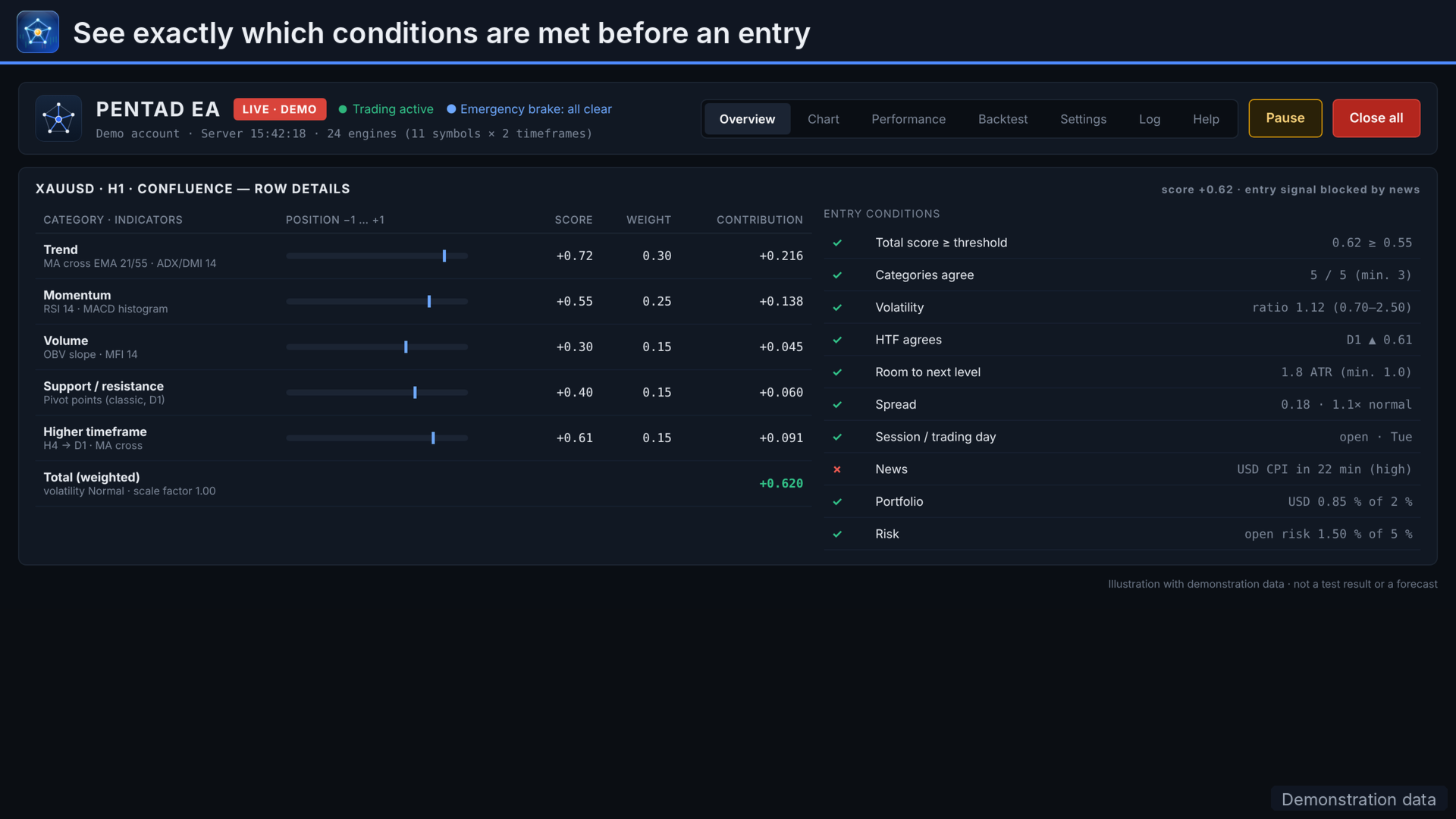
The market matrix shows every symbol and timeframe in one table. It lists the trend, momentum, volume, volatility and higher-timeframe scores and a status in plain words, such as "Entry signal", "Blocked: long only" or "Spread 2.4x normal, waiting". Click a row to see which entry conditions are met and which are not.
2. 23 strategies, up to four at once
Choose one strategy per symbol, or run up to four side by side on the same symbol and timeframe. Each has its own settings, magic number, statistics and emergency brake. All are well-known, transparent rules, not a black box.
| Family | Strategies |
|---|---|
| Confluence | Weighted score over trend, momentum, volume, support and resistance, and the higher timeframe |
| Breakouts | Opening range, Donchian channel, new highs and lows, break and retest, support and resistance break, volatility squeeze |
| Trend | Pullback in trend, moving-average crossover, trendline setups |
| Mean reversion | RSI(2), Bollinger bands, internal bar strength, range trading, oscillator extremes, reversal basket |
| Levels and calendar | Strong-level reactions, turn of the month, time windows |
| Benchmark | Random entry with real exits: shows whether a rule beats chance |
Direction, market regime, ADX, unusual conditions, sessions, spread and news filters work with every strategy.
3. A backtester that charges you every cost
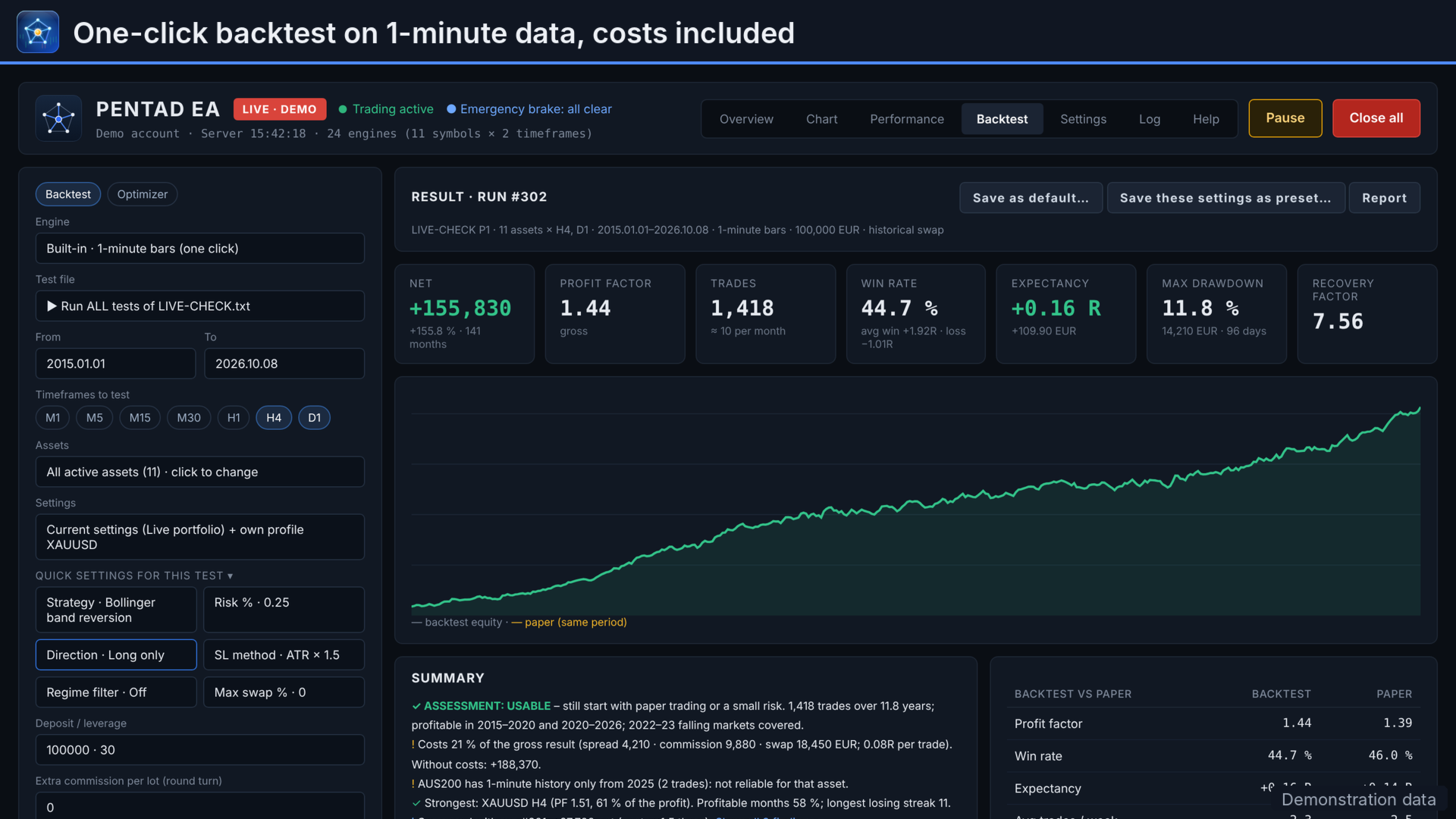
One click replays your broker's 1-minute history inside the EA, with the same code that trades live. Entries follow at the open of the next minute. When stop and target fall in the same minute, the stop counts. Spread, commission, slippage and swap are charged as they would be in a real account, with an optional historical swap model based on central-bank rates.
Every result ends with a verdict: No edge, Not reliable, Indicative or Usable. The verdict says why: too few trades, costs eating the profit, or profit from one symbol or one year. Compare runs side by side, run whole test series from a file (including cost stress tests), and save any run as an HTML report. A research mode tests the strategy itself, without account stops.
4. An optimizer that does not trust itself
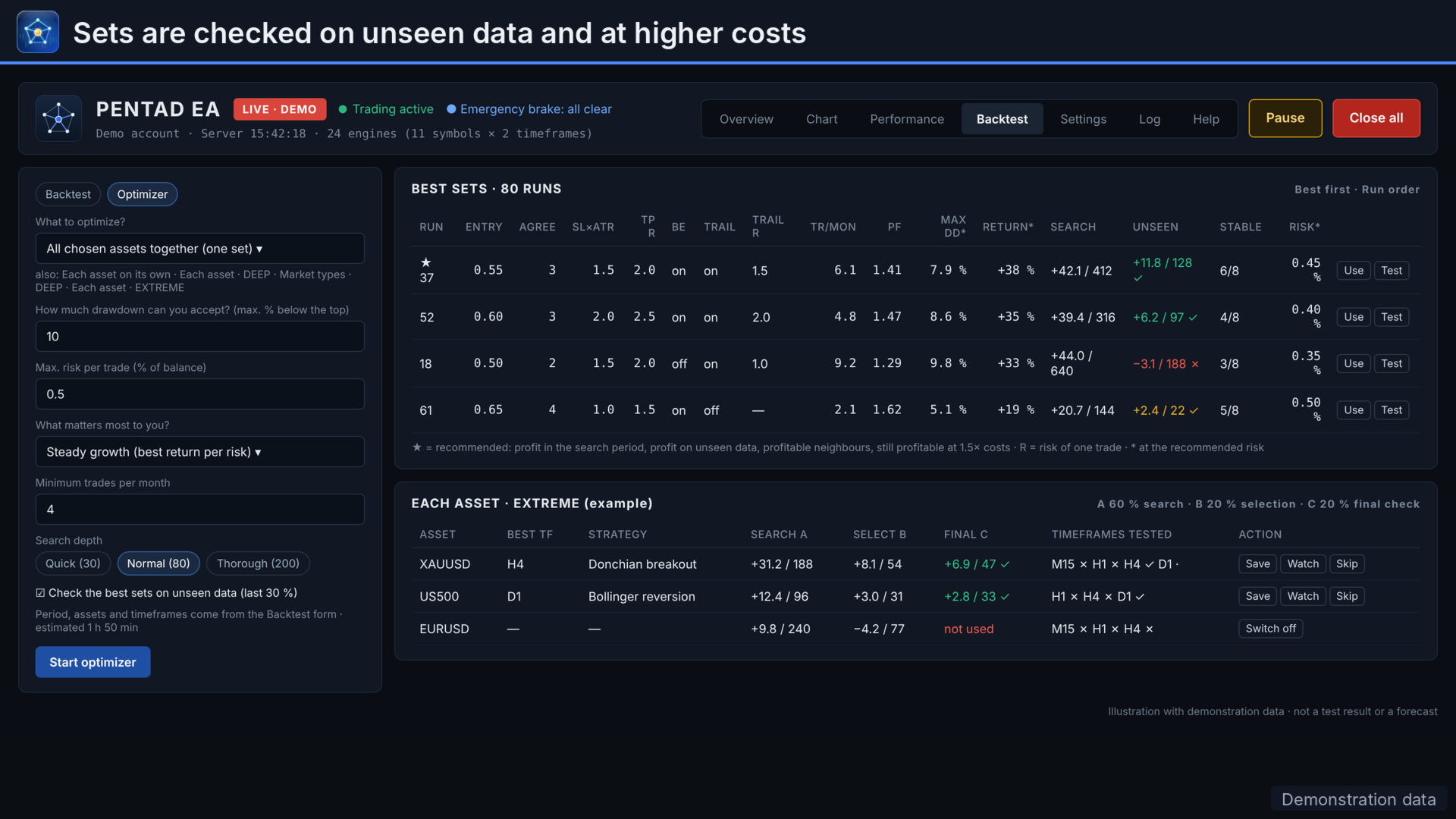
Answer a few plain questions: how much drawdown you accept, your maximum risk per trade and what matters most to you. The optimizer searches on the first 70 % of the period, then checks the best sets on the unseen last 30 % and at 1.5 times the costs. A set is only recommended when it holds up there and its neighbouring settings are profitable too: a plateau, not a lucky peak. Optimize one set for all symbols, each symbol on its own, or let the EXTREME mode try 17 strategies per symbol.
5. Risk control in layers
The position size follows from the stop distance, as a fixed lot, a percentage of balance or equity, or a fixed amount. On top of that come:
- a maximum risk per trade and a maximum total open risk;
- limits on positions and on trades per day;
- a daily loss stop and a maximum drawdown stop;
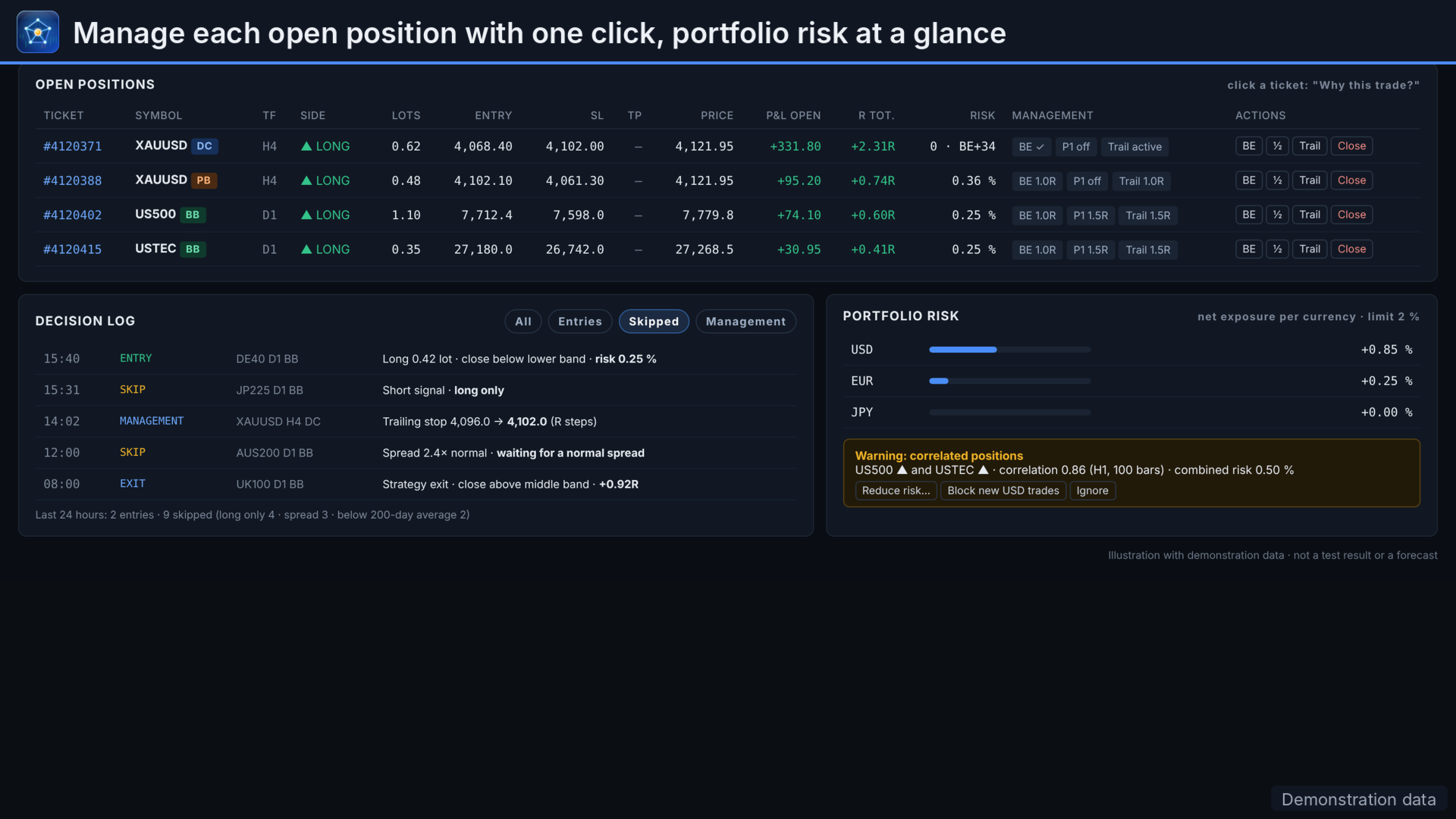
- a currency exposure limit and a correlation warning;
- an optional prop-firm guard that checks daily and total loss rules before every trade;
- an optional statistical emergency brake per strategy and symbol.
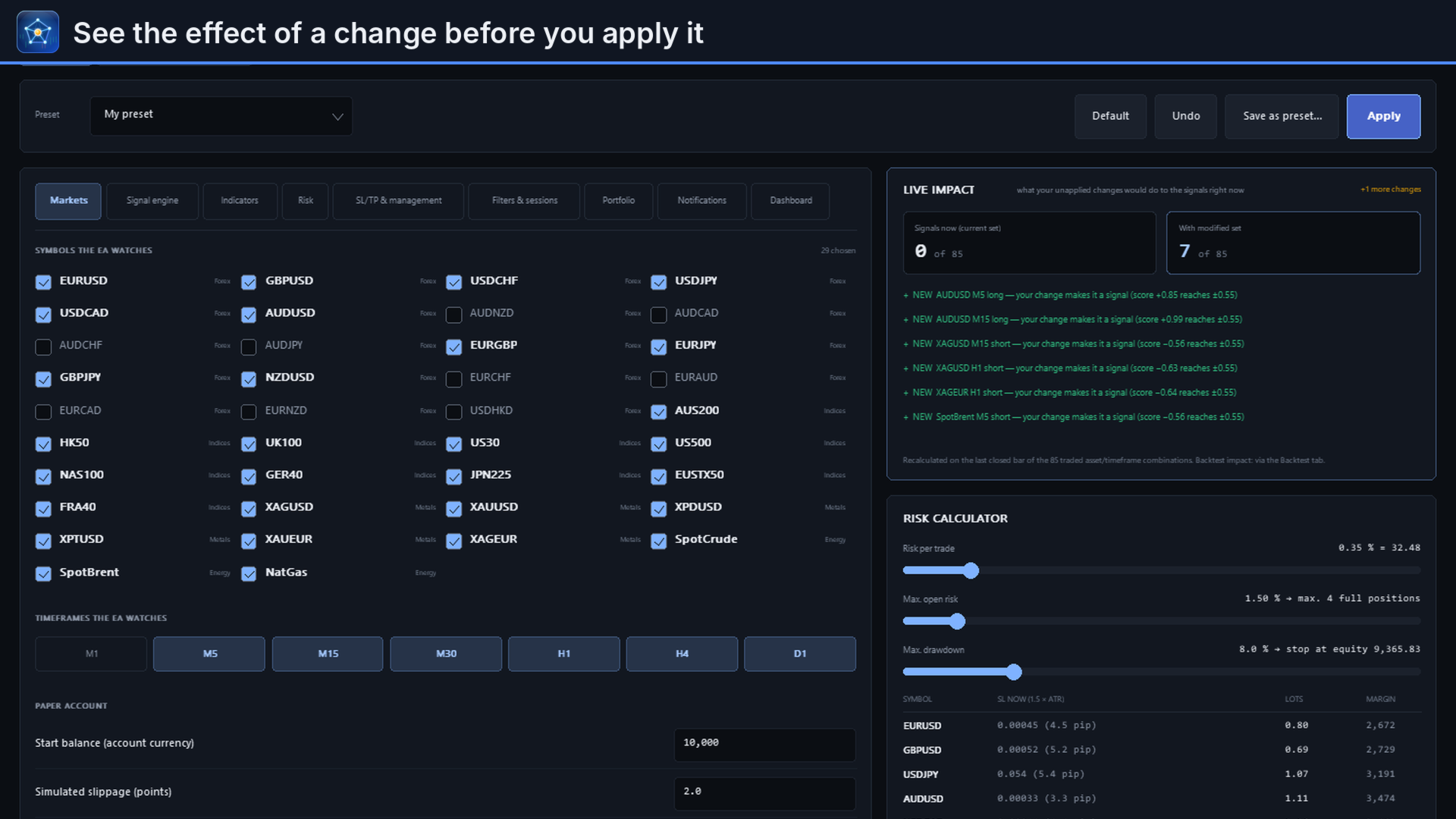
Risk stops block new entries, and open positions stay managed. A risk calculator and a live-impact panel show the effect of a change before you apply it.
6. Every position managed, every exit explained
| Stops | ATR, swing, fixed, support and resistance, or the strategy's own level |
| Targets | R multiple, ATR, levels, swings or Bollinger band |
| Management | Break-even, two partial closes and nine trailing methods, from ATR and Chandelier to Supertrend and Kijun-sen |
| Exits | By time, session end, swap before rollover, volatility spike, VWAP, a reversed signal or a Friday close |
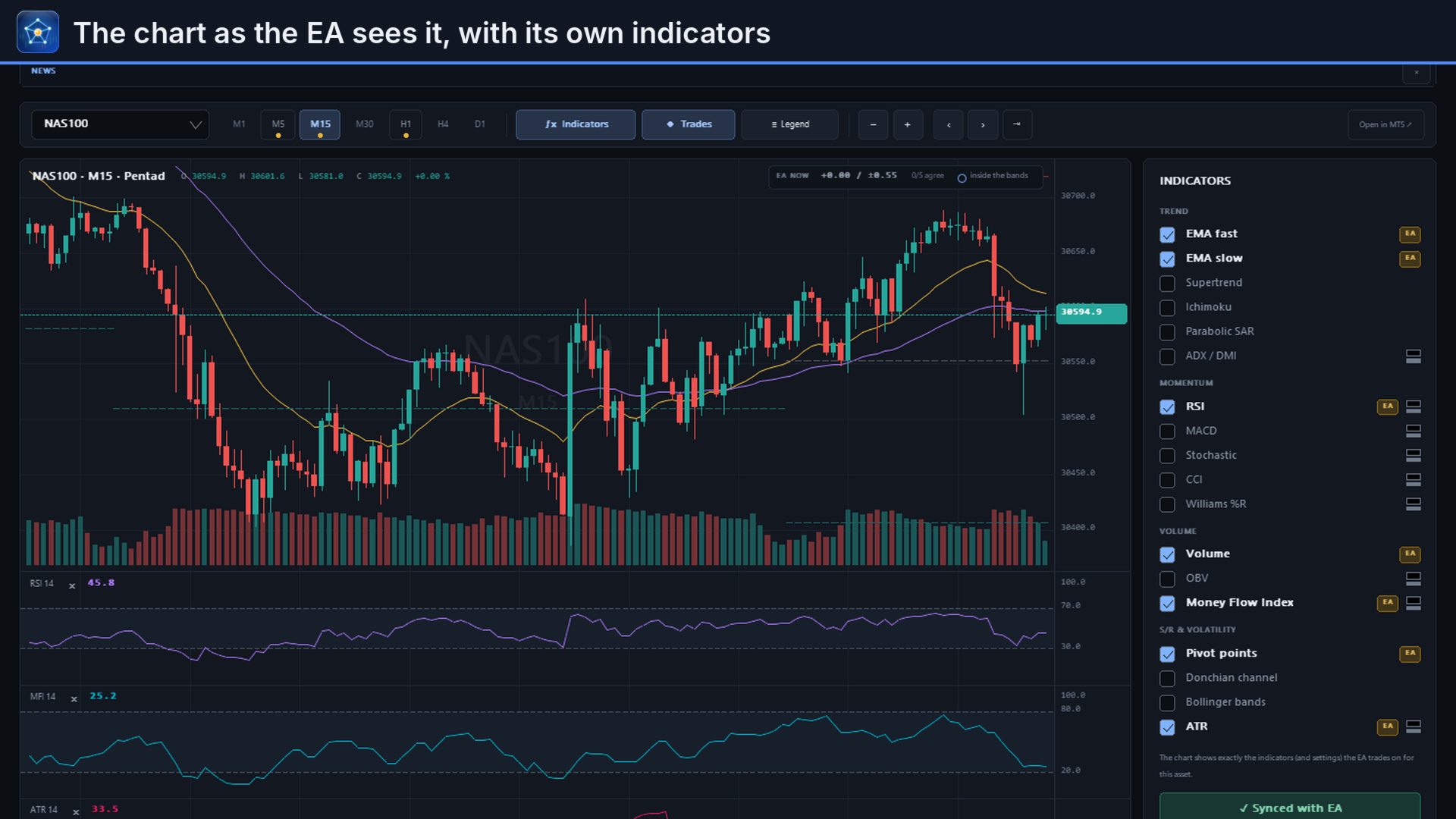
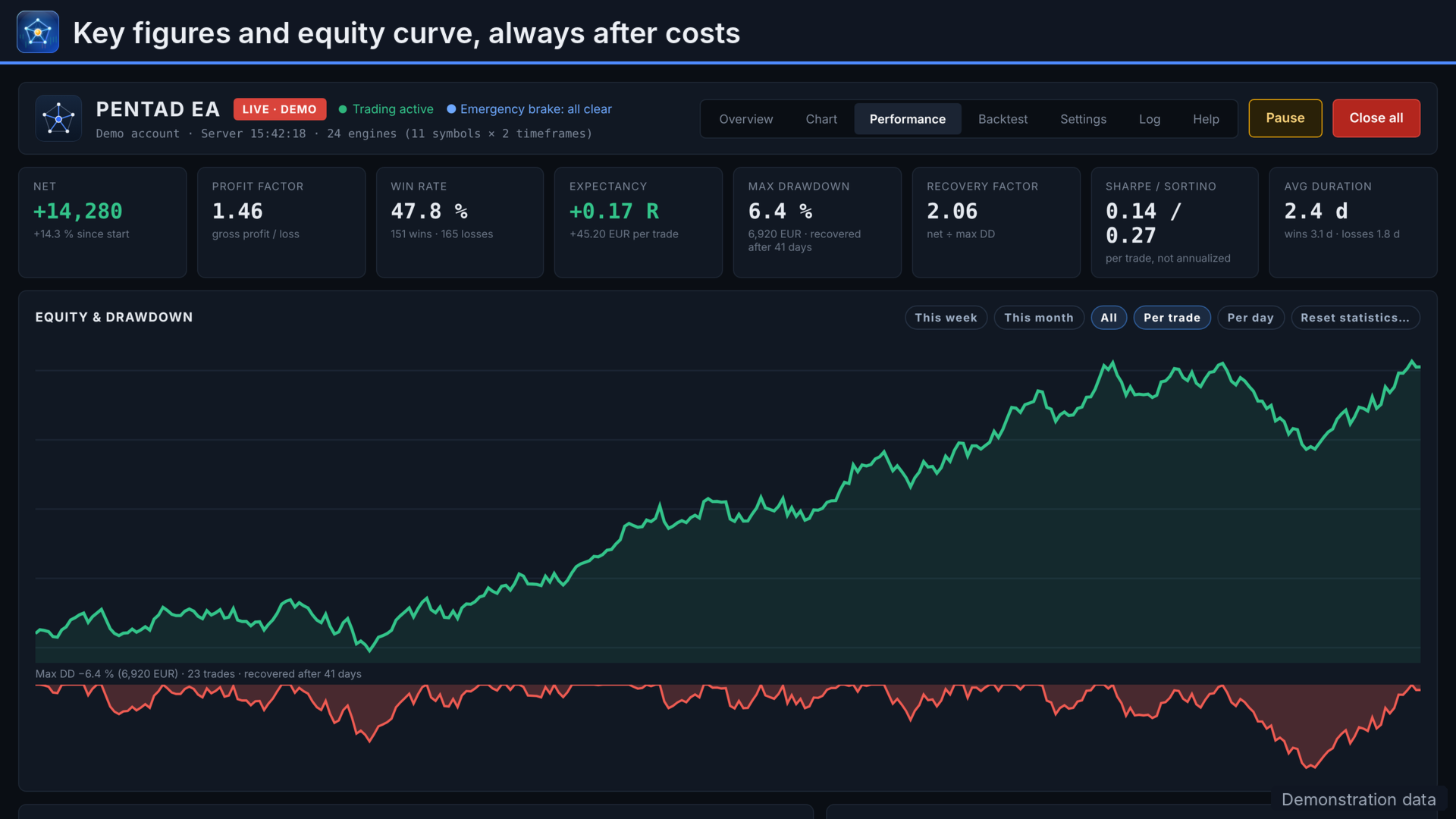
From the dashboard you can move a stop to break-even, close half, switch trailing or close a position with one click. The Performance page then breaks results down by symbol, timeframe, strategy and exit reason, costs included.
7. Alerts wherever you are
Entries, exits, risk stops and a daily summary through MetaTrader push, e-mail, Telegram, Slack, Discord, Microsoft Teams or a webhook. Through Telegram you can also check status and positions, and pause or resume trading. Tokens stay on your computer.
Who it is for
For MetaTrader 5 traders who want to trade systematically, test before they risk money, and understand what their robot does. It is not for anyone looking for a robot that promises fixed monthly returns. Pentad EA promises none.
Specifications
| Platform | MetaTrader 5 desktop; runs while the terminal is open, a VPS is recommended for 24/7 trading |
| Account | Hedging recommended; netting supported with one position per symbol |
| Markets | Forex, metals, energy and index CFDs |
| Timeframes | M5 to D1 (M1 possible, but memory-intensive) |
| Modes | Paper (virtual orders on live prices), Live and Signals only, also per symbol |
| Presets | Conservative, Normal and Aggressive, plus starting sets per market type |
| Technical | Decisions on closed bars only; no DLLs; all data stays on your computer |
Troubleshooting
| You see | What to do |
|---|---|
| No trades | Read the status column of the market matrix: it names the reason, for example below threshold, spread too high, news, session closed or a risk limit. |
| "Lot size below broker minimum" | The minimum lot risks more than your setting allows. Indices and metals need a larger account than forex for the same risk per trade. |
| Backtest stays at "Loading price history" or starts later | Set Max. bars in chart to 2000000 (quick start, step 1) and restart MetaTrader. |
| A symbol is missing | Show it in Market Watch, then tick it under Settings, Markets. |
| Telegram or webhook test fails | Allow the web address under Tools, Options, Expert Advisors. |
| "Stopped: max drawdown" | A risk limit was hit and new entries are blocked. Review the cause first; the Pause button lets you reset the stop after confirmation. |
| Dashboard too large or too small | Drag the grip in its bottom-right corner, or press F7 and change the dashboard size in the inputs. |
What it does not do
- It runs on MetaTrader 5 only; there is no MT4, cTrader or mobile version.
- It decides on closed bars only and never enters within a bar.
- It contains no artificial intelligence and no secret edge: the strategies are public rules and the optimizer is a systematic search.
- Paper trading on live prices does not simulate swap or margin requirements.
- The backtester uses 1-minute bars, not ticks, and does not model news, margin or historical exchange rates.
- The news filter blocks new entries but does not close positions; the correlation check warns but does not block.
- Automatic strategy rotation works in the backtester only.
Recommended trading conditions
| Account | MetaTrader 5, hedging account recommended; netting works with one position per symbol |
| Broker | A low-spread account. Results depend on the broker's spread, swap and server time, so test on your own broker first |
| Deposit | Depends on the instruments and the broker's minimum lot. The dashboard shows the lot size, risk and margin of the next trade before it is placed |
| Uptime | A VPS for trading around the clock |
| Start | Paper mode, one strategy, a small risk per trade |
Input parameters
Most settings are changed and saved in the dashboard; the input window (F7) holds the starting values.
| General | Trading mode (Paper, Live, Signals only), symbols, watched and traded timeframes, magic base number (unique per EA instance) |
| Risk | Sizing mode, risk per trade, maximum risk per trade, maximum open risk, daily loss stop, maximum drawdown stop, position and trade limits |
| Stops and targets | Method and distance |
| Management | Break-even, two partial closes, trailing method and start, take-profit while trailing, reversal exit |
| Filters | Sessions, trading days, spread limits, news, Friday rules |
| Portfolio | Currency exposure limit and correlation warning |
| Alerts | Push, e-mail, pop-up and webhook, notification level, daily summary |
| Dashboard | Position, scaling, colours, news ticker |
Strategy choice and parameters, regime filter, emergency brake, prop-firm guard and per-symbol profiles are set in the dashboard.
Important
No strategy is profitable in every market or with every broker. Spread, swap and server time differ per broker and change results. Past and simulated results do not guarantee future results. Test every setting on your own account before trading real money, and only risk what you can afford to lose. Questions are answered in the comments and private messages on this site.