AutoBalance Pro
- Эксперты
- Версия: 2.1
- Обновлено: 28 сентября 2026
- Активации: 10

its compensating openings.
# AutoBalance Pro v2.00
## Features / Funcionalidades
- **Compensate, never close:** balances the delta per symbol by opening the
opposite position. / Compensa el delta por símbolo abriendo la posición
contraria, sin cerrar operaciones.
- **Global % trailing stop** (0.1% – 10%), adjustable from the panel, with
anti-spam protection (cooldown + minimum improvement).
/ Trailing stop global % ajustable desde el panel, con anti-spam.
- **Auto-balance mode** per symbol or global (`AUTO ON`), with cool-down.
/ Modo auto-balance por símbolo o global, con enfriamiento.
- **Market filter (EMA + swing points)** only for auto-balance entries.
/ Filtro de mercado (EMA + techos/suelos) solo para entradas automáticas.
- **Optional stop loss %** on compensating entries.
/ Stop loss % opcional en entradas de compensación.
- **Trade protection:** respects broker stops/freeze levels, tick grid,
volume min/max/step and free margin. / Respeta niveles del bróker, grid de
ticks, límites de volumen y margen libre.
- **Exclusion list** (`InpExcludeSymbols`) for 100% manual symbols.
/ Lista de exclusión para símbolos 100% manuales.
---
## Installation / Instalación
1. Copy `AutoBalance.ex5` to:
`MQL5\Experts\AutoBalance.ex5` inside your terminal data folder.
/ Copia `AutoBalance.ex5` a `MQL5\Experts\`.
2. In MetaTrader 5, open a chart (any symbol/timeframe), drag the Expert
Advisor from the Navigator onto the chart.
/ Abre un gráfico y arrastra el Asesor Experto desde el Navegador.
3. Enable **Algo Trading** (Algorithms button) in the toolbar.
/ Activa **Algoritmos** en la barra de herramientas.
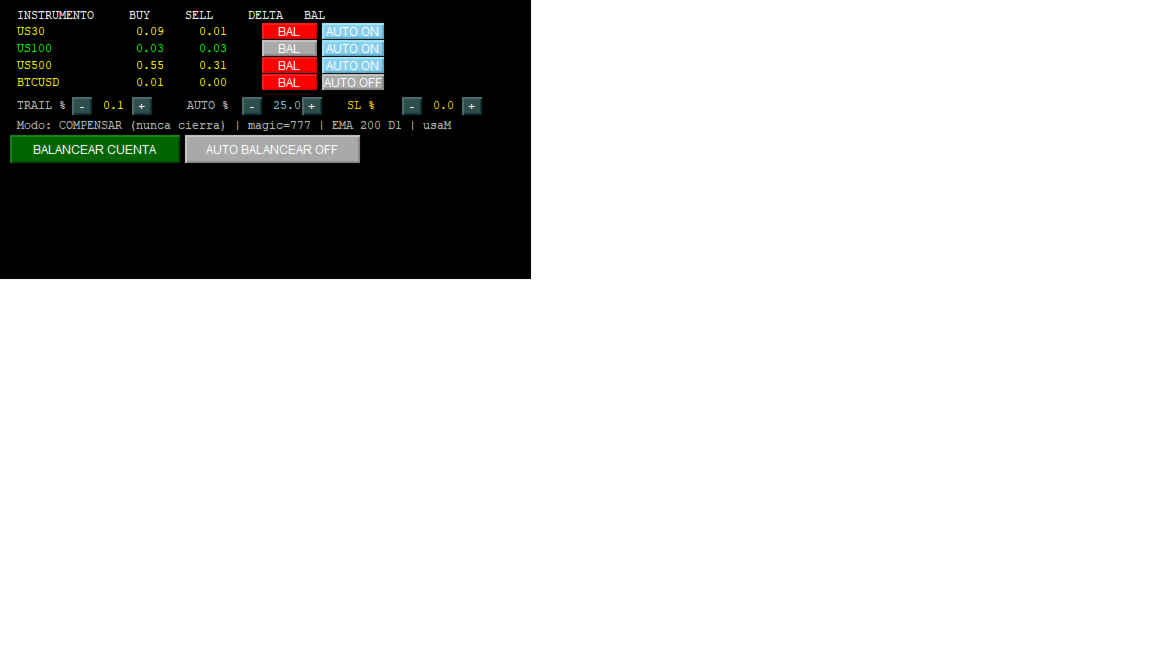
4. The panel shows each symbol with BUY/SELL/DELTA and the BAL button. Press
**BALANCE ACCOUNT** to balance the whole account manually.
/ El panel muestra cada símbolo y botones; usa **BALANCE ACCOUNT** para
balancear toda la cuenta.
---
## Inputs / Parámetros
| Input | Default | Description (EN) |
|---|---|---|
| `InpMagic` | 0 | Magic filter (0 = all) |
| `InpABAMagic` | 777 | Magic of ABA operations (for tracking) |
| `InpOnlySymbols` | "" | Symbols (comma separated, empty = all open) |
| `InpExcludeSymbols` | "" | EXCLUDE symbol names (comma, e.g. BTC,US500) -> 100% manual |
| `InpUseManual` | false | Do not include manual positions (no magic) in the balance |
| `InpTrailManual` | false | Apply trailing to manual positions (no magic) |
| `InpMinDelta` | 0.00 | Minimum delta (lots) to act |
| `InpMaxLot` | 100 | Maximum volume per operation |
| `InpSlippagePts` | 20 | Maximum slippage (points) |
| `InpTrailDef` | 0.1 | Initial trailing (%) |
| `InpTrailStep` | 0.1 | Button +/- step |
| `InpTrailMin` | 0.1 | Minimum trailing (%) |
| `InpTrailMax` | 10.0 | Maximum trailing (%) |
| `InpTrailStart` | 1.0 | Trailing from minimum profit in $ (0=from entry, disabled) |
| `InpTrailCD` | 30 | Anti-spam: cooldown (s) between SL modifies of the same position |
| `InpTrailMinPts` | 5 | Anti-spam: minimum SL improvement (points) to send a modify (0=1 tick) |
| `InpTrailOwn` | true | Trailing ONLY on positions with ABA own magic (true) / all (false) |
| `InpTF` | D1 | Market analysis timeframe |
| `InpEMA` | 200 | Trend EMA period |
| `InpInflBarras` | 50 | Bars for high/low (turning point) |
| `InpAutoPct` | 25.0 | % imbalance of the level for auto-balance |
| `InpAutoPctStep` | 5.0 | AUTO % button +/- step |
| `InpAutoPctMin` | 1.0 | Minimum AUTO % |
| `InpAutoPctMax` | 100.0 | Maximum AUTO % |
| `InpAutoCD` | 30 | Cooldown (s) between auto-compensations |
| `InpSLDef` | 0.0 | Stop loss % of ABA openings (0 = no stop) |
| `InpSLStep` | 0.5 | SL % button +/- step |
| `InpSLMin` | 0.0 | Minimum SL % (0 = no stop) |
| `InpSLMax` | 20.0 | Maximum SL % |
| `InpUseSL` | false | SL enabled / disabled (false = trailing only) |
| `InpPnlX` / `InpPnlY` | 15 / 15 | Panel X / Y position |
---
## Panel controls / Controles del panel
- Per symbol row: **BAL** → balance that symbol (manual one-off).
- **AUTO ON / OFF** → enable continuous auto-balance for that symbol.
- **TRAIL % − / +** → global trailing percentage.
- **AUTO % − / +** → auto-balance imbalance threshold.
- **SL % − / +** → stop loss percentage of ABA openings (requires `InpUseSL=true`).
- **BALANCE ACCOUNT** → balance all symbols now.
- **AUTO BALANCE ON/OFF** → continuous auto-balance for all symbols.
---
## Risk disclaimer / Aviso de riesgo
Trading involves substantial risk. Past performance does not guarantee future
results. AutoBalance Pro opens compensating positions (hedging) and can apply
trailing without a fixed stop loss; use conservative settings, test on a demo
account first and understand your broker's margin rules. The author is not
responsible for any financial loss.
El trading implica riesgo elevado. Los resultados pasados no garantizan
resultados futuros. AutoBalance Pro abre posiciones de compensación (cobertura)
y puede operar sin stop loss fijo; usa ajustes conservadores, prueba primero en
demo y conoce las reglas de margen de tu bróker.
---
## Version history
- **v2.00** — Commercial release: English UI/logs, anti-spam trailing
(cooldown 30 s, min improvement 5 pts), own-magic trailing by default,
stops/freeze level validation, tick-grid rounding, position refresh
before modify, versioned panel and settings.
- v1.13 — Exclude symbols list; auto-balance % panel.
- v1.11 — Trailing from minimum profit ($), auto-balance modes.