MT5 Backtesting Studio

Practise your trading process with recorded broker history inside MetaTrader 5.


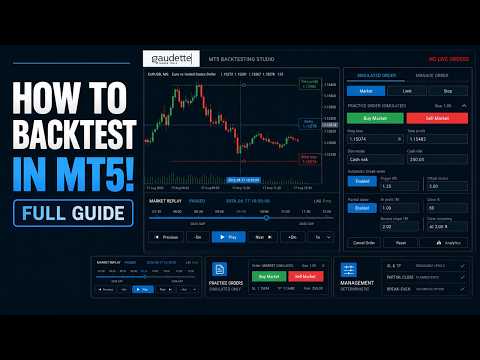
MT5 Backtesting Studio is a manual trading simulator for discretionary
traders. It combines historical chart replay, simulated orders, strategy notes,
session journaling, and detailed analytics without placing or modifying broker
orders.

Use it to test intraday or swing-trading ideas, repeat a structured practice
plan, and review what happened after each session.

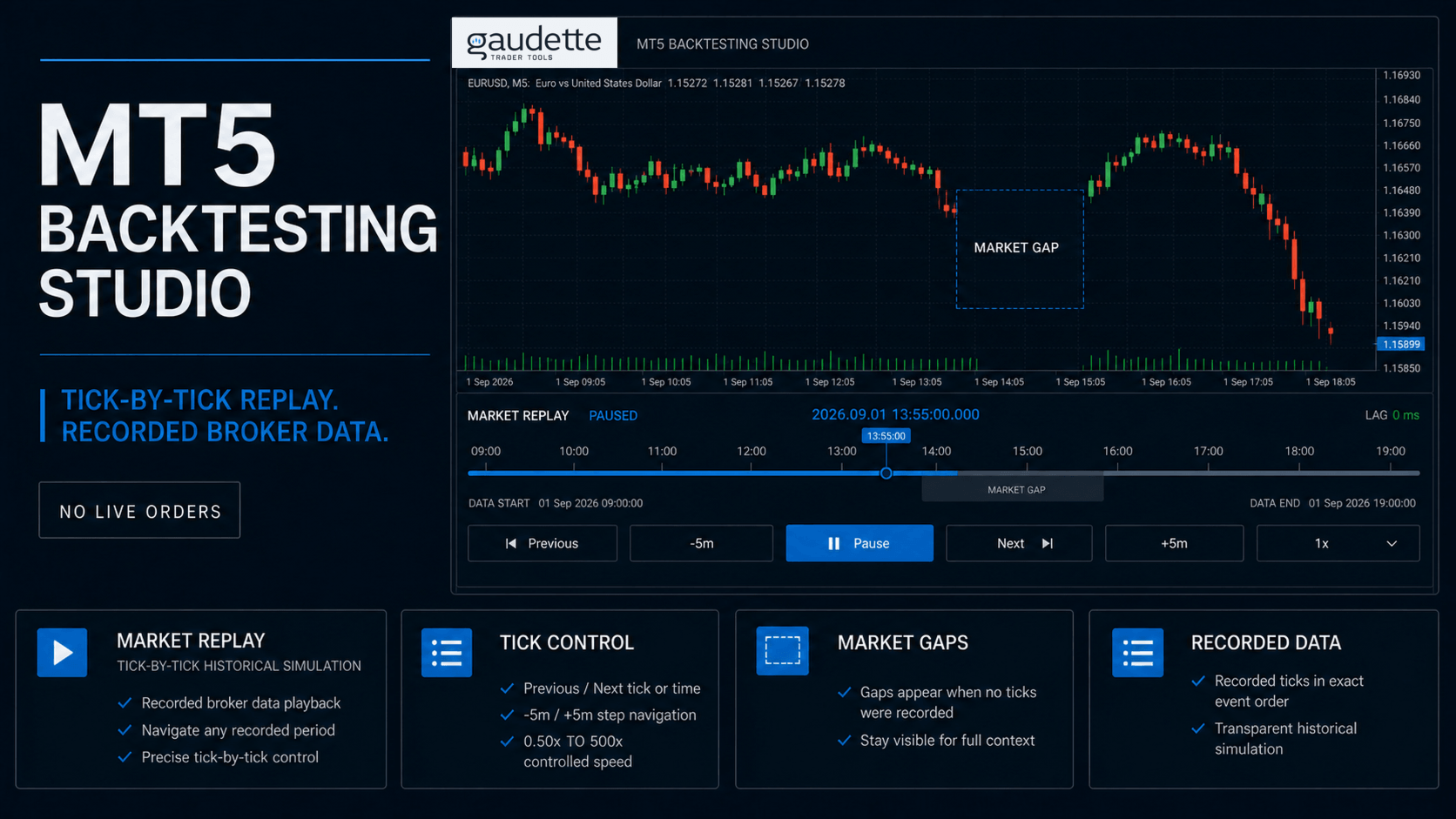
Replay recorded history from your broker


The EA uses the historical bars and ticks available for the selected symbol in
your MetaTrader 5 terminal. This lets you practise with your broker's symbol
names, recorded quotes, and contract metadata instead of relying on a separate
generic data source.

Replay remains a simulation. Available history, quote quality, trading hours,
and symbol metadata depend on the broker.

Choose the replay detail for your workflow

  • Ticks / Accurate replays the recorded broker tick sequence and is the default choice for detailed M1 and M5 practice.
  • Reduced ticks / Smooth keeps actual first, last, Bid, Ask, and Last extremes for each second. It is an approximate option for M15 and M30 work.
  • M1 OHLC / Swing keeps actual quote control points for each M1 bar. It is an approximate option for H1 and higher-timeframe review.

All modes preserve source-event order and do not create synthetic prices.
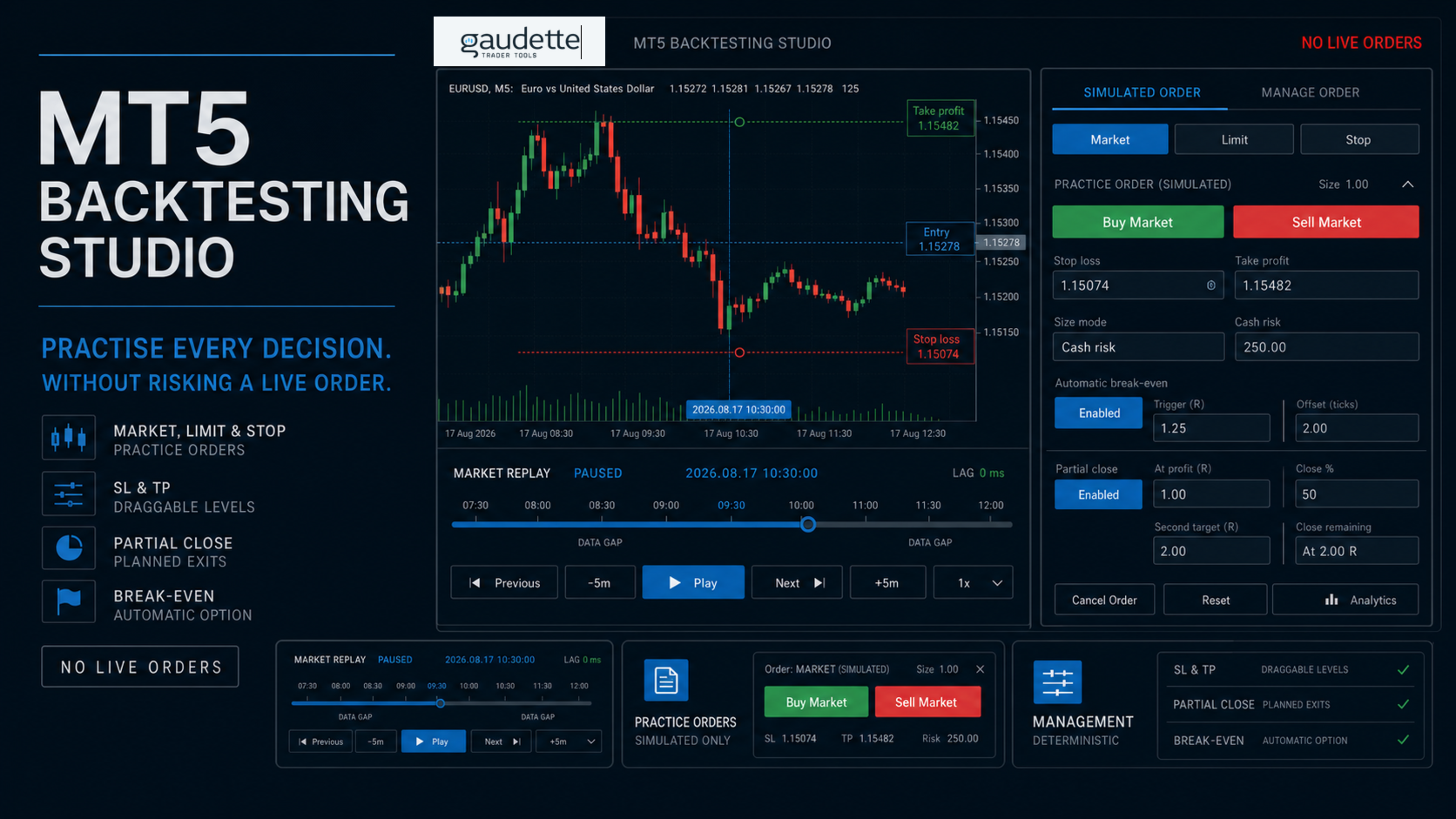
Replay speeds range from 0.50x to 500x, with Play, Pause, Previous, Next,
and five-minute navigation controls. Recorded market gaps remain visible
instead of being filled with artificial candles.

Reuse validated history with persistent caching


The product stores validated broker-history pages inside the MT5 file sandbox.

Compatible sessions reuse those pages and request only missing intervals. A
first load can take longer while MT5 and the broker provide the required
history; nearby dates and later sessions can reuse the local cache when its
feed, symbol contract, ownership, and coverage checks pass.

Simulate manual trade decisions


Place simulated Market, Limit, and Stop orders against the replay quote. Manage
one simulated net position with stop loss, take profit, partial close, and
optional automatic break-even. Entry, stop, and target lines remain
synchronized across the selected replay timeframes.

Cash valuation uses MetaTrader 5's OrderCalcProfit result for the active
source symbol. If the terminal cannot provide a valid valuation, the simulator
fails closed instead of guessing a contract or tick value.

Review sessions and trading decisions


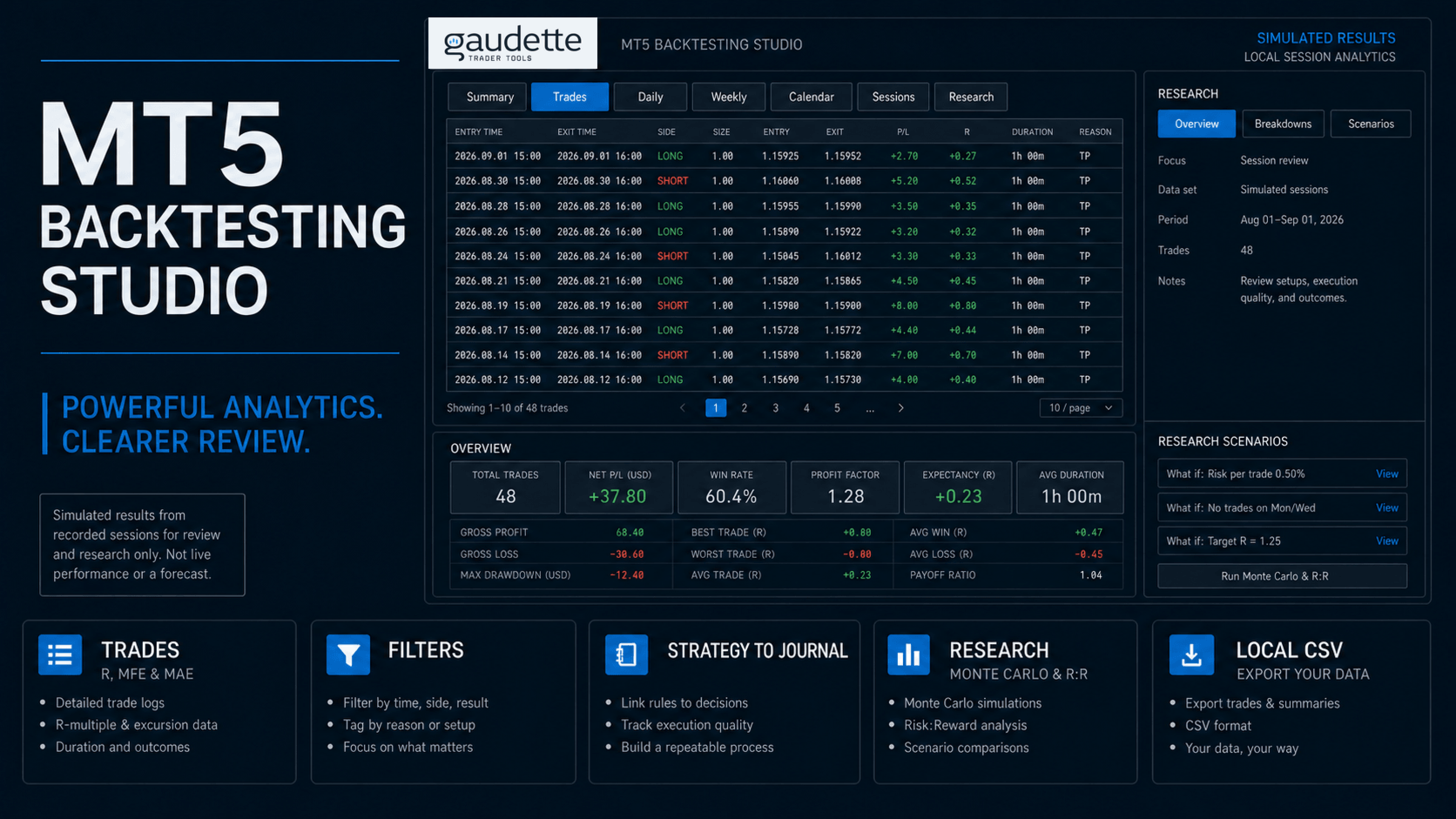
Analytics brings the local simulated ledger into one review workspace:

  • summary, trades, daily, weekly, calendar, and session views;
  • recorded costs, results in R multiples, trade duration, maximum favorable excursion (MFE), and maximum adverse excursion (MAE);
  • filters by strategy, symbol, direction, date, session, setup tag, weekday, hour, and journal dimensions;
  • descriptive Monte Carlo and path-limited risk-to-reward sensitivity with visible sample-size warnings;
  • local CSV exports for further review.

These analytics describe recorded simulated sessions. They are not forecasts
and do not represent live trading performance.

Build a repeatable research process


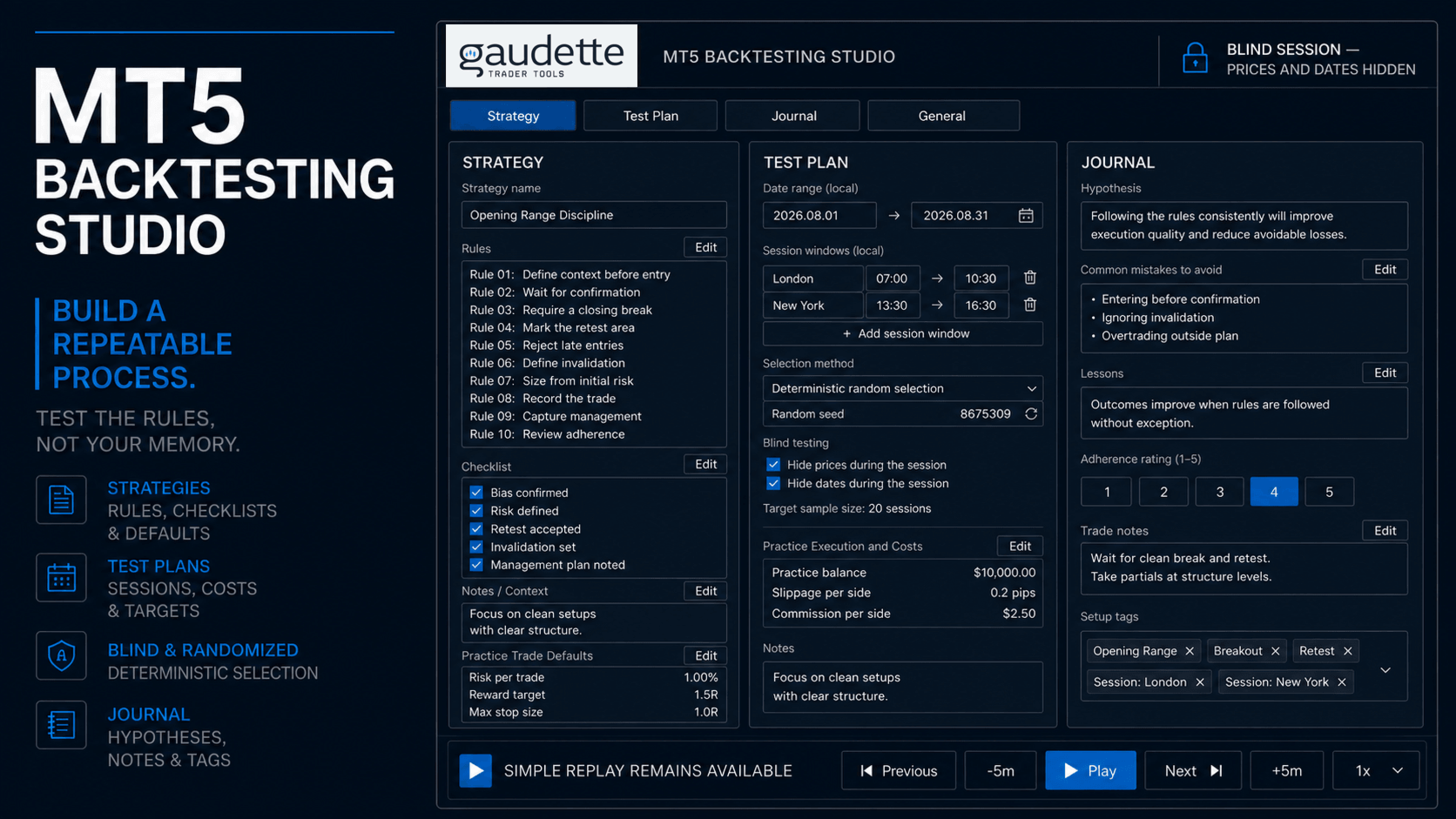
Create and save named strategies with rules, checklists, notes, and practice

trade defaults. Optional Test Plans add controlled dates, session windows,

costs, deterministic random selection, blind testing, and completion targets.


The optional Journal records session hypotheses, mistakes, lessons, adherence,

trade notes, and setup tags.


Simple Replay remains available without creating a Test Plan or Journal entry.

Keep compatible MT5 indicators in your replay


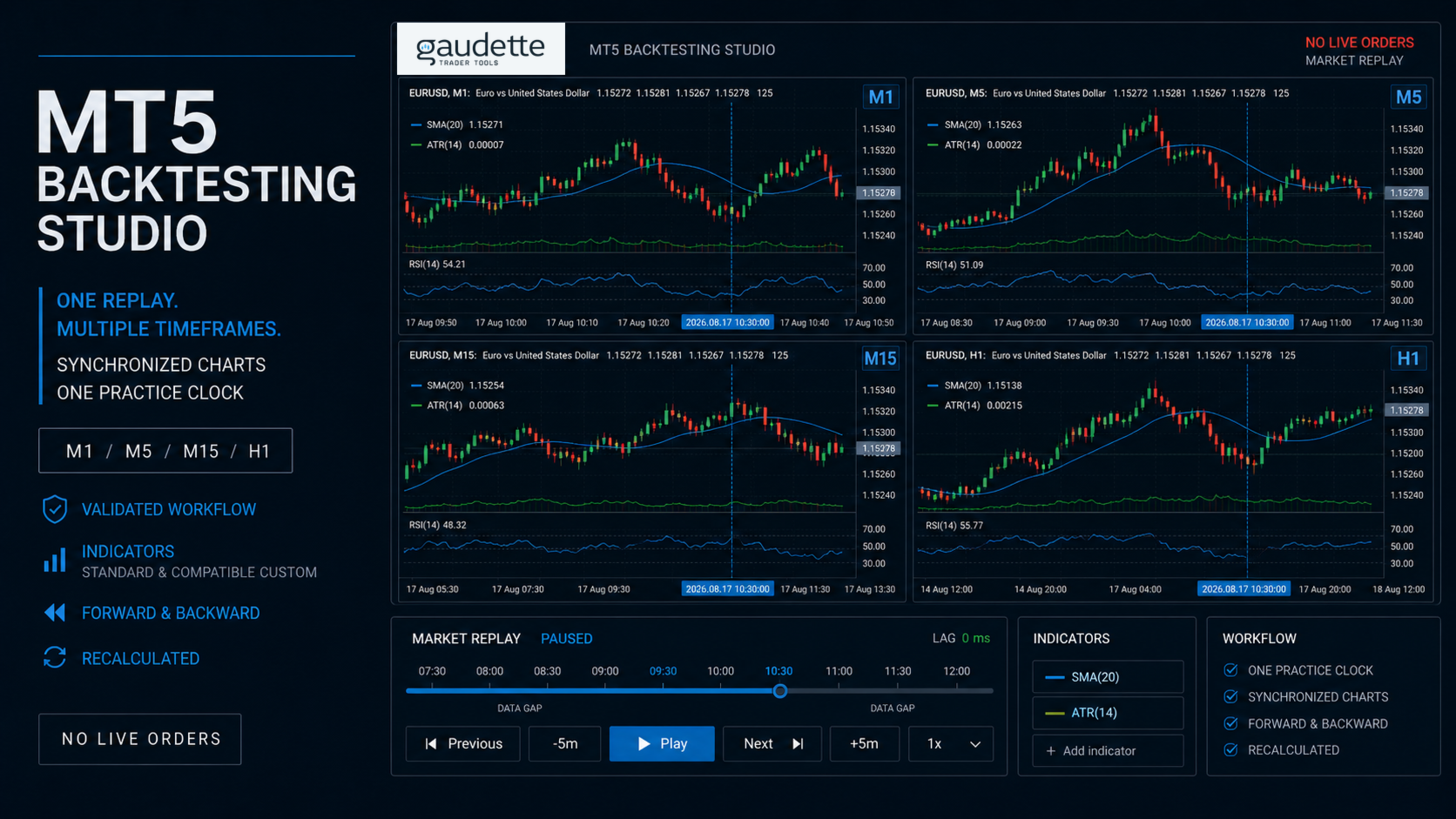
Use standard MT5 indicators and compatible custom indicators on the replay

charts, so an indicator-based strategy can be practised in the platform where

it is normally viewed. Compatible indicators that calculate from the active

chart symbol can recalculate as replay advances across synchronized

timeframes.


Current validation covers a standard moving average and two parameterized

custom indicators on M1, M5, M15, and H1 through Play, forward navigation,

backward rebuild, chart restoration, and cleanup. Indicators that hard-code a

different symbol, intentionally read unrevealed source history, depend on live

account state, or require unavailable market depth may not be replay-safe.

Fit the workspace to your chart setup


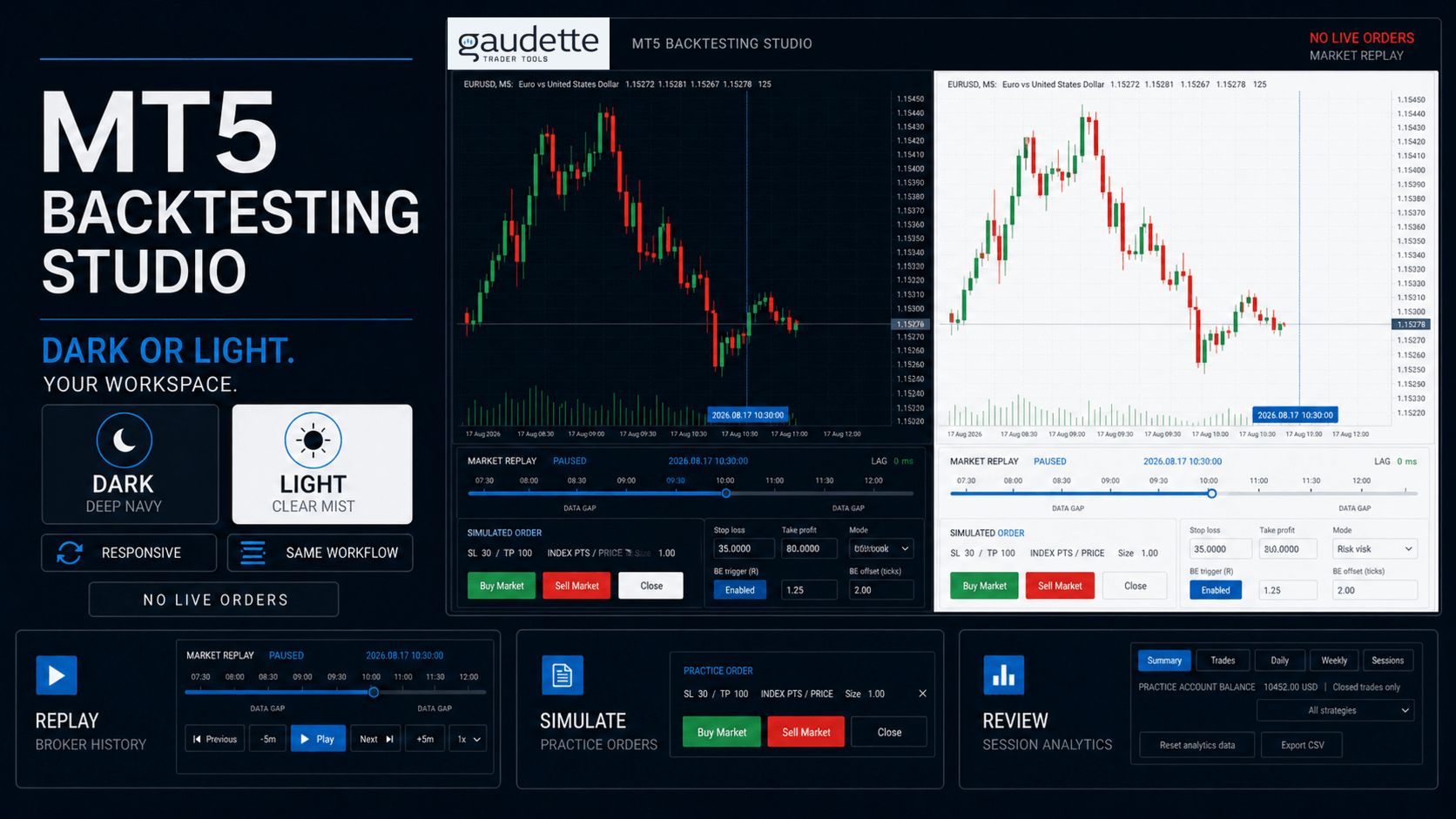
  • Explicit Dark and Light themes, with Dark as the clean-install default.
  • Optional Broker, UTC, New York, London, Tokyo, or Sydney display times.
  • Synchronized replay across selected chart timeframes.
  • Adjustable replay-pane height and five workspace text sizes.
  • Scrollable Settings and Analytics workspaces for shorter charts.
  • Local session recovery after an interruption when ownership and history checks pass.


The product does not recolor your chart. It manages only its prefixed objects,

owned replay symbols, and files inside the terminal sandbox.


Data and safety


MT5 Backtesting Studio does not place, modify, or close broker orders. It has no

DLL, network, telemetry, external licensing, or personal-data collection path.

Sessions, analytics, settings, exports, and history cache files remain inside

the MetaTrader 5 file sandbox.


Important limitations


- Results are simulated and are not live performance.

- Replay quality and available dates depend on broker-provided history.

- MetaTrader 5 does not identify a broker's historical daylight-saving-time

  policy. Leave timezone conversion Off when the broker's historical schedule

  is unknown.

- The simulator supports one net practice position. It does not provide

  hedging, arbitrary scaling, multiple concurrent parent orders, or

  programmable trailing stops.


Getting started


  1. Open a broker symbol with the recorded history you want to practise.
  2. Attach MT5 Backtesting Studio to the source chart.
  3. Choose a past date, strategy, and replay mode.
  4. Select **Start Replay** and use the lower control pane.

Support is provided through the MQL5 product comments and MQL5 messaging.


Launch price: USD 79 for the first 50 completed paid purchases
Рекомендуем также
Painel Profit — это торговая панель для MetaTrader 5, созданная для упрощения ручного исполнения сделок и визуального управления ордерами прямо на графике. Принцип работы прост: трейдер выбирает инструмент, таймфрейм, объем, тип входа и стратегию выхода. На основе этих команд панель отправляет или организует сделку через интерфейс, отображая на графике уровни входа, take profit и stop loss для визуального контроля. Этот продукт не является сигнальным роботом и не принимает торговые решения за по
This Volume Delta Profile is an advanced MetaTrader 5 indicator that visualizes   volume delta (order flow imbalance)   using a volume profile-style histogram. It shows the difference between buying and selling pressure at specific price levels, helping traders identify supply and demand zones. This indicator provides a unique perspective on market dynamics by visualizing the imbalance between buying and selling pressure, offering insights beyond traditional volume analysis. Core Concept Positiv
Trading Utility for Forex Currency Pairs Only not for Gold  Functions Auto Lot Calculation based on Risk Auto stoploss  Auto TakeProfit Breakeven Auto Close Half % Close in percentage with respect to the PIPs Pending Orders BuyLimit Sell Limit with distances BuyStop Sell Stop    with distances Trading Informations Risk in percentage For Multiple trades Combine Takeprofit and Combine Stoplosses

Trade Manger
Israr Hussain Shah
Here   our more valuable tools SMC Trend Trading   ,  Easy SMC Trading  ,  Institutional SMC Architect Volume Analysis Tools  ,  Volume flow Profile  ,  Market volume profile  , FVG with Volume  , Liquidity Heatmap Profile  ,  Volume Spread Analysis You Give an Instruction: When you run the script, a window pops up with a dropdown menu. You choose exactly what you want it to do from the list (e.g., "Close Profit Only" or "Delete Pending Orders"). It Scans Your Positions: The script then reads
Профиль Рынка (Market Profile) определяет ряд типов дней, которые помогают трейдеру распознать поведение рынка. Ключевая особенность - это область значений (Value Area), представляющая диапазон ценового действия, в котором произошло 70% торговли. Понимание области значений может помочь трейдерам вникнуть в направление рынка и установить торговлю с более высокими шансами на успех. Это отличное дополнение к любой системе, которую вы возможно используете. Blahtech Limited представляет сообществу Me
Индикатор "MR Volume Profile 5" — это графический инструмент, отображающий объем торгов на разных ценовых уровнях, а не во временных интервалах. Ключевым понятием в профиле объема является контрольная точка (POC) — ценовой уровень с наибольшим объемом торгов за сессию или временной диапазон. В то время как такие инструменты, как VWAP или OBV , показывают тренды объема, индикатор "MR Volume Profile 5" предоставляет подробную информацию о том, где происходит наибольшая рыночная активность на конкр
Master Edition — это профессиональный аналитический инструмент, предназначенный для визуализации структуры рынка через призму объема и денежного потока. В отличие от стандартных индикаторов объема, этот инструмент отображает Daily Volume Profile (Дневной Профиль Объема) прямо на вашем графике, позволяя видеть, где именно происходило открытие цены и где позиционируются «умные деньги». Эта версия Master Edition разработана для ясности и скорости, оснащенная уникальной системой Auto-Theme Sync, кот
Trading Assistent - это многофункциональная торговая панель, которая объединяет все необходимые инструменты для профессиональной торговли. Панель предоставляет полный контроль над позициями, углубленный анализ рисков и быстрое исполнение ордеров. ОСНОВНЫЕ ФУНКЦИОНАЛЬНЫЕ БЛОКИ Управление позициями: - Просмотр всех открытых позиций в реальном времени - Сортировка по символу, прибыли, объему и типу - Визуальная индикация прибыльных и убыточных позиций - Групповые операции закрытия - Функция Brea
Here   our more valuable tools SMC Trend Trading   ,  Easy SMC Trading  ,  Institutional SMC Architect Volume Analysis Tools  ,  Volume flow Profile  ,  Market volume profile  , FVG with Volume  , Liquidity Heatmap Profile  ,  Volume Spread Analysis Key Features 1.  Total Immersion UI (The "Blackout") Chart Masking:   Upon loading, the tool turns the background, grid, and candles pitch black. This hides the noise of the market ticks, allowing you to focus purely on your performance data withou

Техническое описание индикатора – Delta Profile для MetaTrader 5 Delta Profile – это индикатор, разработанный для MetaTrader 5, предназначенный для детального анализа потока объёмов в пределах заданного диапазона свечей. Он структурирует и отображает информацию о дисбалансе положительных объёмов (связанных с движением вверх) и отрицательных объёмов (связанных с движением вниз) на различных ценовых уровнях. В результате пользователь получает чёткое представление о тех участках графика, где сосред
Bastion is a monitor-and-close-only risk manager for prop-firm traders. It watches your account against your firm's daily-loss and maximum-drawdown limits in real time and force-closes your open positions BEFORE you cross a line. It never opens a trade of its own, so it stays fully within the tools allowed by FTMO, FundedNext, The5ers, FTUK and FXIFY. Why traders fail challenges A large share of failed evaluations end on a single daily-loss breach: a moment of inattention, a news spike, one tra
ClusterSecond
Rafil Nurmukhametov
4.78 (32)
Утилита позволяет строить различные виды графиков: Секундный график от 1 секунды до 86400 секунд Тиковый график от 1 тика и выше Объемный график Дельтовый график Ренко график Рендж график Демоверсия утилиты https://www.mql5.com/ru/channels/clustersecond Встроенные индикаторы для объемного анализа:  дневной профиль рынка и профиль рынка выбираемого таймфрейма, Cluster Search, Imbalance, VWAP, Dynamic POC, VAH, VAL профиль стакана цен вертикальный объем с различными вариантами отображения, дельта
Introducing PivotWave – your ultimate trading companion that redefines precision and market analysis. Designed with traders in mind, PivotWave is more than just an indicator; it’s a powerful tool that captures the pulse of the market, identifying key turning points and trends with pinpoint accuracy. PivotWave leverages advanced algorithms to provide clear visual signals for optimal entry and exit points, making it easier for traders to navigate volatile market conditions. Whether you are a begin
Overview Mirror Signals Service EA (Text only)   is a powerful monitoring Expert Advisor that automatically sends   real-time Telegram notifications   for all important trade events on your MetaTrader 5 account. It is engineered specifically for   signal providers ,   trade-copier operators ,   auditors ,   educators , and   professional trading services   that require immediate, detailed, and reliable reporting. Everything from   entries, exits, SL/TP changes, comment changes, trailing sto
Volume Profile Utility
AL MOOSAWI ABDULLAH JAFFER BAQER
Volume Profile Discover where the market really trades. Make decisions based on volume, not guesswork. Volume Profile is a professional MetaTrader utility that analyzes trading activity across different price levels, allowing traders to identify where the highest concentration of market participation has occurred. Instead of focusing only on price movement over time, Volume Profile reveals the price levels where buyers and sellers have been most active, providing valuable insight into market str
Этот продукт позволит Вам выгодно приобреcти и использовать два самых популярных продукта для анализа объемов заявок и сделок на биржевых рынках: Actual Depth of Market Chart Actual Tick Footprint Volume Chart Данный продукт вобрал в себя всю мощь каждого отдельного индикатора и оформлен в виде одного файла. Функционал продукта Actual COMBO Depth of Market AND Tick Volume Chart полностью идентичен оригинальным индикаторам. Вы оцените удобство объединения этих двух продуктов в один супер-индикато
This is visualization tool based on the Depth of Market. It works with the symbols that have the Depth of Market available. It's a visual indicator that shows the volume of each Bid/Ask price and ratio of total volume of Bids/Asks. Note: check if your broker supports DOM before purchasing. 。。。。。。。。。。。。。。。。。。。。。。。。。。。。。。。。。。。。。。。。。。。。。。。。。。。 。。。。。。。。。。。。。。。。。。。。。。。。。。。。。。。。。。。。。。。。。。。。。。。。。。。
RSI Currency Strength Meter is a powerful and elegant multi-currency indicator that measures the real-time relative strength of the 8 major currencies using RSI logic. By calculating the smoothed performance of each currency across its major pairs and applying the RSI formula, it delivers clean and responsive strength lines that make it easy to spot which currencies are truly strong or weak at any moment. This indicator is particularly useful for visualizing currency correlations and divergence
Pro Order Lot Size Calculator Pro Order Lot Size Calculator is a simple and practical tool designed to help you calculate the appropriate lot size based on the amount of risk you want to take . With this tool, you can easily calculate your trading risk directly from the panel according to the amount of money available in your account. Easy Risk & Lot Calculation The panel is designed to be very simple and easy to use. You can choose how you want to define your risk: Enter your desired risk amoun
Торговая консоль делает ваш опыт торговли комфортным! Это приложение нельзя протестировать в стратегическом тестере. Пожалуйста, получите демо-версию по следующей ссылке и протестируйте. Download DEMO ver. Это для демо-счета. 1. Функции, которые помогут вам во время торговли: (1) Отображение и уведомления о экономических индикаторах: Получайте предупреждения, уведомления и электронные письма за несколько минут до публикации экономических индикаторов. Экран мигает во время предупреждений, что об
ВАЖНОЕ УВЕДОМЛЕНИЕ – ТРЕБУЕТСЯ ЛИЦЕНЗИЯ И АКТИВАЦИЯ ==================================================== Инструкция по активации: После завершения покупки немедленно свяжитесь с нами, чтобы получить лицензионный ключ, пароль или данные для активации. Без них программное обеспечение не будет работать. Мы здесь, чтобы обеспечить бесперебойный процесс активации и ответить на любые ваши вопросы. --- Volume Delta Profile V2 Enhanced ================================ Профессиональный инструме
Expert TP SL v04 - Профессиональный торговый помощник с ИИ-системой мотивации Продвинутый инструмент для ручной торговли с автоматическим управлением рисками, защитой от переторговли и интеллектуальной психологической поддержкой для дисциплинированной торговли. ОБЗОР ПРОДУКТА Expert TP SL v04 - это комплексный торговый помощник, разработанный для трейдеров, которые предпочитают ручную торговлю, но хотят сохранить эмоциональную дисциплину и автоматизировать расчет рисков. Это не просто инструм
VibeFox Volume Profile — Volume Profile для MetaTrader 5 VibeFox Volume Profile — это полный набор инструментов Volume Profile для MetaTrader 5. Он строит горизонтальное распределение торгуемого объёма по цене, поэтому вы сразу видите, где рынок проявил наибольшую активность, где торговал слабо и какие ценовые уровни, вероятно, будут действовать как магниты или барьеры. Каждый профиль рисуется прямо на графике и управляется из современной панели с управлением мышью — никаких меню, в которых нужн
TradeControl Pro – Расширенный менеджер сделок для MetaTrader TradeControl Pro — это инструмент управления сделками для MetaTrader, обеспечивающий структурированное и эффективное управление торговыми позициями непосредственно на графике. Приложение сочетает в себе понятный интерфейс, автоматические расчёты и гибкие настройки для различных торговых подходов. Встроенная панель на графике имеет табличную структуру и разделена на три основных вкладки: Execution , Close и Info . Интерфейс ориентирова
Capital Management EA – Smart Risk Management & Profit Optimization for MT5 Take control of your trading capital with smart, automated strategies — fully optimized for MetaTrader 5 (MT5). Looking to protect your capital and maximize profits through automated money management strategies ? Capital Management EA is the all-in-one Expert Advisor for MetaTrader 5 (MT5) that helps you trade smarter, not harder. Core Features: 5-in-1 Capital Management Strategies – Built-in versatility Gr
Before installing the HeatMap indicator make sure you are using a broker that gives you access to the Depth of market (DOM) !! This indicator creates a heatmap on your chart allowing you to see the buy or sell limit orders easily and in real time. You have the possibility to change the setting and the colors of the HeatMap in order to adapt to all markets and all charts. Here is an example of a setting you can use with the NASDAQ100 on the AMPGlobal broker :  https://www.youtube.com/watch?v=x0Y
ВАЖНОЕ УВЕДОМЛЕНИЕ – ТРЕБУЕТСЯ ЛИЦЕНЗИЯ И АКТИВАЦИЯ Инструкции по активации: После завершения покупки свяжитесь с нами незамедлительно, чтобы получить лицензионный ключ, пароль или данные для активации. Без них программное обеспечение не будет функционировать. Мы здесь, чтобы обеспечить бесперебойный процесс активации и ответить на любые ваши вопросы. Многоязычная настройка Для улучшения вашего торгового опыта мы предлагаем полную кастомизацию программного обеспечения на нескольких языках.
Premium level - это уникальный индикатор с точностью правильных прогнозов  более 80%!  Данный индикатор тестировался более двух месяцев лучшими Специалистами в области Трейдинга!  Индикатор авторский такого вы больше не где не найдете!  По скриншотах можете сами увидеть точностью данного инструмента!  1 отлично подходит для торговли бинарными опционами со временем экспирации на 1 свечу. 2 работает на всех валютных парах, акциях, сырье, криптовалютах Инструкция: Как только появляется красная стре
The Multilevel PnL Calculator EA is an advanced trading tool designed for Forex and CFD traders who need precise position sizing and risk management calculations. This intuitive panel-based calculator allows you to simulate multiple entry positions with automatic profit and loss calculations in real-time USD values. Key Features Multi-Position Management Calculate Profit and Loss for up to 10 or more simultaneous positions (configurable) Support for both LONG and SHORT trading modes Real-time
Easy Trading Panel: Core Function Summary 1. Visual Trading This is the core selling point of the tool. It abandons the traditional way of placing orders by inputting prices and adopts an intuitive chart line drag-and-drop mode instead: • Drag Entry Line: Directly drag the line on the chart to set the pending order position. • One-click SL/TP Toggle: Quickly enable/disable stop loss and take profit lines via panel buttons. • Synchronous Calculation: When the lines are dragged, the panel will cal
С этим продуктом покупают
Trade Assistant MT5
Evgeniy Kravchenko
4.41 (216)
Помогает рассчитать риск на сделку, простая установка нового ордера с помощью линий, управление ордерами с функциями частичного закрытия, 7 типов трейлинг-стопа и другие полезные функции. Дополнительные материалы и инструкции Инструкция по установке - Инструкция к приложению - Пробная версия приложения для демо счета Функция Линии   - отображает на графике линию открытия, стоп-лосс, тейк-профит. С помощью этой функции легко установить новый ордер и увидеть его дополнительные характеристики пе
Добро пожаловать в Trade Manager EA — лучший инструмент для управления рисками, предназначенный для упрощения, точности и эффективности торговли. Это не просто инструмент для размещения ордеров; это комплексное решение для удобного планирования торгов, управления позициями и усиленного контроля над рисками. Независимо от того, начинающий вы трейдер, опытный специалист или скальпер, нуждающийся в быстром исполнении, Trade Manager EA адаптируется к вашим потребностям и работает с любыми активами:
================================================================================ POC BREAKOUT - V20.72. Full Professional Grade Toolkit ================================================================================ POC Breakout is a full MetaTrader 5 trading dashboard for discretionary traders who want breakout signals, Point of Control (POC) context, volume profiles, order flow, market structure, news, alerts, and advanced trade planning in one professional workspace. Attached directly to you
TradePanel MT5
Alfiya Fazylova
4.88 (167)
Trade Panel — это многофункциональный торговый помощник. Приложение содержит более 50 торговых функций для ручной торговли и позволяет автоматизировать большинство торговых операций. Инструкция к приложению + видео-инструкции: https://www.mql5.com/ru/blogs/post/756476 Пробная версия приложения для демо-счета: https://www.mql5.com/ru/blogs/post/750864 Как установить приложение: https://www.mql5.com/ru/blogs/post/750096 Как тестировать приложение в визуальном режиме: https://www.mql5.com/ru/blogs/
Бета-версия Telegram to MT5 Signal Trader почти готов к официальному альфа-релизу. Некоторые функции все еще находятся в разработке, и вы можете столкнуться с небольшими ошибками. Если вы заметите проблемы, пожалуйста, сообщите о них, ваша обратная связь помогает улучшать программное обеспечение для всех. Telegram to MT5 Signal Trader — мощный инструмент, который автоматически копирует торговые сигналы из каналов и групп Telegram прямо в ваш счёт MetaTrader 5 . Поддерживаются как публичные, так
Telegram to MT5 Multi-Channel Copier   automatically copies trading signals from your Telegram channels straight to MetaTrader 5. No bots, no browser extensions, no manual copying. A signal arrives in Telegram and the EA opens the trade in your terminal within seconds. The product has two components: a Windows application that listens to your Telegram channels, and this Expert Advisor that executes the signals in your MT5 terminal. An MT4 version is also available   here . Setup guide and appli
Premium Trade Manager - Торговая панель со встроенным коучем Premium Trade Manager помещает торгового коуча прямо в ваш график, а под ним работает полноценный движок исполнения. Настройте сделку так, как вы всегда это делаете, затем позвольте Max, вашему ИИ-наставнику по трейдингу, прочитать именно эту настройку с учётом вашего живого счёта и дать чёткое заключение до того, как вы входите: соответствует ли стоп дисциплинированному подходу, разумен ли риск, не выходит ли высоковолатильный релиз ч
Anchor Trade Manager
Kalinskie Gilliam
5 (8)
Anchor: The EA Manager Your EAs cannot see each other, but Anchor can. Anchor gives you one place to coordinate your EAs, manage risk, and decide when trading is allowed. It works alongside the trading bots you already use without any changes to them. The Problem One EA opens a trade. Then another starts trading. The next thing you know, you wake up to multiple grids built across your account. Each EA may be doing exactly what it was designed to do, but together they can place far more risk on y
Ultimate Extractor - Professional Trading Analytics for MT5 *****this is the local HTML version of Ultimate Extractor. !!!!!it is not compatible with Cloud!!!! For the online version please reach out to me directly****** Ultimate EA manager also now available when you use cloud pro and above for free!! Ultimate Extractor transforms your MetaTrader 5 trading history into actionable insights with comprehensive analytics, interactive charts, and real-time performance tracking. What It Does Automa
Timeless Charts
Samuel Manoel De Souza
5 (8)
Timeless Charts is an all-in-one trading utility for professional traders. It combines custom chart types such as Seconds Charts and Renko with advanced order flow analysis using Footprints , Clusters , Volume Profiles , VWAP studies, and anchored analysis tools for deeper market insight. Trading and position management are handled directly from the chart through an integrated trade management panel , while Market Replay and Virtual Accounts provide environments for practicing trading skills and
Farmed Hedge Yield Farming | All Markets (Manual - Hybrid - Semi/Automated EA) VERIFIED TRADING RESULTS - Farmed Hedge Yield Axi Copy:  https://www.mql5.com/en/signals/2356376 - Farmed Hedge Yield Exn Copy:   https://www.mql5.com/en/signals/2356404 - Farmed Hedge Yield V Copy:  https://www.mql5.com/en/signals/2357156 * Before purchasing, please feel free to send me a message if you have any questions about the product or setup. ** After purchase,  Contact me via private message to receive t
The product will copy all telegram signal to MT5 ( which you are member) , also it can work as remote copier.  Easy to set up, copy order instant, can work with almost signal formats, image signal,  s upport to translate other language to English Work with all type of channel or group, even channel have "Restrict Saving Content", work with  multi channel, multi MT5 Work as remote copier: with signal have ticket number, it will copy exactly via ticket number. Support to backtest signal. How to s
YuClusters
Yury Kulikov
4.93 (43)
Внимание: Ознакомиться с работой программы можно с помощью бесплатной версии  YuClusters DEMO . YuClusters это профессиональная система анализа рынка. Для трейдера открываются уникальные возможности анализа потока ордеров, объемов торговли, движения цены используя различные графики, профили, индикаторы, графические объекты. YuClusters оперирует данными на основе ленты сделок или тиковой информации, в зависимости от того, что доступно в котировках финансового инструмента.  YuClusters позволяет с
Power Candles Strategy Scanner — самооптимизирующийся инструмент для поиска настроек по нескольким инструментам Power Candles Strategy Scanner использует тот же самооптимизирующийся движок, что и индикатор Power Candles — для всех символов в вашем Market Watch, одновременно. На одной панели отображается информация о том, какие символы в данный момент являются статистически торгуемыми, какая стратегия выигрывает на каждом из них, оптимальная пара Stop Loss / Take Profit, а также отправляется увед
MT5 to Telegram Signal Provider — это простой в использовании полностью настраиваемый инструмент, который позволяет отправлять определённые сигналы в чат, канал или группу Telegram, превращая вашу учётную запись в провайдера сигналов . В отличие от большинства конкурирующих продуктов, он не использует импорт DLL. [ Демо ]   [ Руководство ] [ Версия MT4 ] [ Версия для Discord ] [ Канал в Telegram ]  New: [ Telegram To MT5 ] Настройка Доступно пошаговое руководство пользователя . Никаких знаний A
Бэктест выглядит отлично. Но будет ли советник зарабатывать завтра, через неделю, через месяц? EA Overfitter прогоняет вашего советника по 100 историям цены, которых он никогда не видел. Одна оценка показывает, реально ли преимущество. Бэктест показывает, что советник сделал на одной истории цены — на той, которая случайно произошла. Из него невозможно понять, какая часть результата была заслугой стратегии, а какая — конкретного пути цены. EA Overfitter отвечает на этот вопрос. Он строит до 10
Quant AI Agents
Ho Tuan Thang
5 (1)
Quant AI Agents are independent trading Expert Advisors. Instead of trading using a fixed strategy like other conventional EAs, Quant AI Agents   is a   multi-agent AI trading framework   that turns natural-language strategy prompts into live.  WANT THE SAME RESULTS AS MY LIVE SIGNAL?   Use the exact same brokers I do:   IC MARKETS , IC TRADING   .  Unlike the centralized stock market, Forex has no single, unified price feed.  Every broker sources liquidity from different providers, creating un
Footprint Chart Pro — Professional OrderFlow EA for MetaTrader 5 Version 6.34 | Professional tool for real traders | Institutional-Grade Visualization DEMO USERS - PLEASE SELECT EVERY TICK / REAL TICK WHEN TESTING AND YOU HAVE DOWNLOADED HISTORICAL DATA. IF YOU SEE A WAITING SCREEN AND IT IS NOT DOWNLOADING, IT MEANS YOU HAVE LOW HISTORICAL DATA. TRY 1 MIN AND 5 MIN FIRST ON 1 DAY DATA. ONE DAY DATA SHOULD BE THE NEWEST AND MOST CURRENT DATE. PLEASE WAIT UNTIL THE MARKET HAS ROLLED OVER PERIOD.
Bots Builder Pro MT5
Andrey Barinov
4.17 (6)
Это визуальный конструктор стратегий. Единственный в своем роде. Превратите свои торговые стратегии и идеи в советники, не написав ни одной строчки кода. Создавайте файлы исходного кода mql в несколько кликов и получайте полнофункциональных советников, готовых к реальной работе, тестеру стратегий и облачной оптимизации. Вариантов для тех, кто не имеет навыков программирования и не может создавать свои торговые решения на языке MQL, очень мало. Теперь с помощью Bots Builder Pro каждый может созд
Trade Manager DaneTrades
Levi Dane Benjamin
4.23 (30)
Trade Manager, который поможет вам быстро входить и выходить из сделок, автоматически рассчитывая риск. Включает функции, которые помогут предотвратить чрезмерную торговлю, торговлю из мести и эмоциональную торговлю. Сделками можно управлять автоматически, а показатели эффективности счета можно визуализировать в виде графика. Эти функции делают эту панель идеальной для всех трейдеров, занимающихся ручной торговлей, и помогают улучшить платформу MetaTrader 5. Многоязычная поддержка. Версия для МТ
Local Trade Copier EA — это решение для индивидуальных трейдеров или менеджеров по работе с клиентами, которым необходимо выполнять торговые сигналы из внешних источников или которым необходимо управлять несколькими счетами одновременно, без необходимости использования МАМ или ПАММ-счета. Он копирует до 8 основных учетных записей на неограниченное количество подчиненных учетных записей. [ Руководство по установке | Руководство по обновлению | Устранение неполадок | Часто задаваемые вопросы | Вс
The real‑time view of what is happening inside the market. Footprint Secrets brings detailed analysis directly into MetaTrader 5. It shows where volume is trading, how buyers and sellers are interacting, and how liquidity shifts as the market evolves. Designed for traders who want a precise, real‑time understanding of market behavior. Check out the free preview version here:  https://www.mql5.com/en/market/product/172398 Benefits for the Trader See the real activity behind price . Footprint ch
Grid Manual MT5
Alfiya Fazylova
4.73 (22)
Grid Manual — это торговая панель для работы с сеточными стратегиями. Утилита универсальная, имеет гибкие настройки и понятный интерфейс. Работает с сеткой ордеров не только в сторону усреднения убытков, но и в сторону наращивания прибыли. Трейдеру не нужно создавать и сопровождать сетку ордеров, это сделает утилита. Достаточно открыть ордер и Grid manual автоматически создаст ему сетку ордеров и будет сопровождать его до самого закрытия. Полная инструкция и демо-версия здесь . Основные особенно
The AZT Profit Locker is an advanced automated risk-management utility designed specifically for MetaTrader 5 (MT5) traders who want to remove emotional interference and protect their hard-earned profits. Traders aren't just fighting the Forex market, they're fighting their own biology. Fear, Greed and Anxiety lead to holding losers too long and cutting winners too early. The utility flips the script by removing emotion from risk management. Operating as a dedicated automated risk manager, this
AlgoRadar
Stephen J Martret
5 (4)
AlgoRadar is an on-chart analytics dashboard for MT5 that aggregates Expert Advisor performance across multiple accounts, brokers, and platforms, including both MT4 and MT5 data, into a single live view on your MT5 chart. All analysis runs from the chart interface, with no external applications or manual report processing required. EA Analysis and Ranking For traders running multiple Expert Advisors, AlgoRadar provides a consolidated view of each EA's performance across accounts. Active EAs a
Ultimate Trailing Stop EA MT5
BLAKE STEVEN RODGER
4.13 (8)
This EA Utility allows you to manage (with advanced filtering) unlimited open orders (manual or EA) with 16 trailing stop methods: fixed, percent, ATR Exit, Chandelier Exit, Moving Average, Candle High Low Exit, Bollinger Bands, Parabolic, Envelope, Fractal, Ichimoku Kijun-Sen, Alligator, Exit After X Minutes or Bars, RSI and Stochastic. The trailing stop can be either real or virtual, and you can exit fully or with a partial close percent on touch or bar close.  Moreover, you can add (override
Custom Alerts AIO: Универсальный сканер рынка — Без настройки Обзор Custom Alerts AIO — это самый быстрый и простой способ отслеживать рыночные сигналы в реальном времени на множестве инструментов без дополнительной настройки и без необходимости покупать другие продукты. В состав входят все необходимые индикаторы от Stein Investments, что делает этот инструмент идеальным решением «всё в одном» для трейдеров, ценящих простоту и эффективность. Просто установите на график и сразу получайте сигнал
MT5 was never built to draw a footprint chart. Orderflow Atlas replaces the chart entirely. It blanks the native price display and renders everything itself on a canvas, owning its own coordinate system. Two things follow from that: you can zoom far past MT5's six native scale steps — the per-candle magnification a footprint actually needs — and the whole view repaints in about 10 milliseconds , because the chart is pixels rather than thousands of graphical objects. The footprint Three cell styl
AI Agent Supervisor is NOT an Expert Advisor. AI Agent Supervisor   is a   multi-agent AI risk & portfolio supervisor   that watches every EA on your account and intervenes in real time.  WANT AN AI PORTFOLIO MANAGER WATCHING YOUR FLEET 24/7?   Run your fleet on the same brokers I do:   IC MARKETS , IC TRADING   .  Unlike the centralized stock market, Forex has no single, unified price feed.  Every broker sources liquidity from different providers, creating unique data streams. The Supervisor r
Welcome to ENTRY IN THE ZONE WITH SMC MULTI TIMEFRAME Entry In The Zone and SMC Multi Timeframe is a real-time market analysis tool based on Smart Money Concepts (SMC), designed to analyze market structure, price direction, and key trading zones. It supports both Single-Timeframe Analysis and Multi-Timeframe Analysis, providing a clearer view of the overall market structure across multiple timeframes, with real-time BUY / SELL signals that do not repaint. It is designed to help filter trading op
Фильтр:
Нет отзывов
Ответ на отзыв