MultiPeriod Sync Charts

MultiPeriod Sync Charts — Automatic Multi-Timeframe Alignment

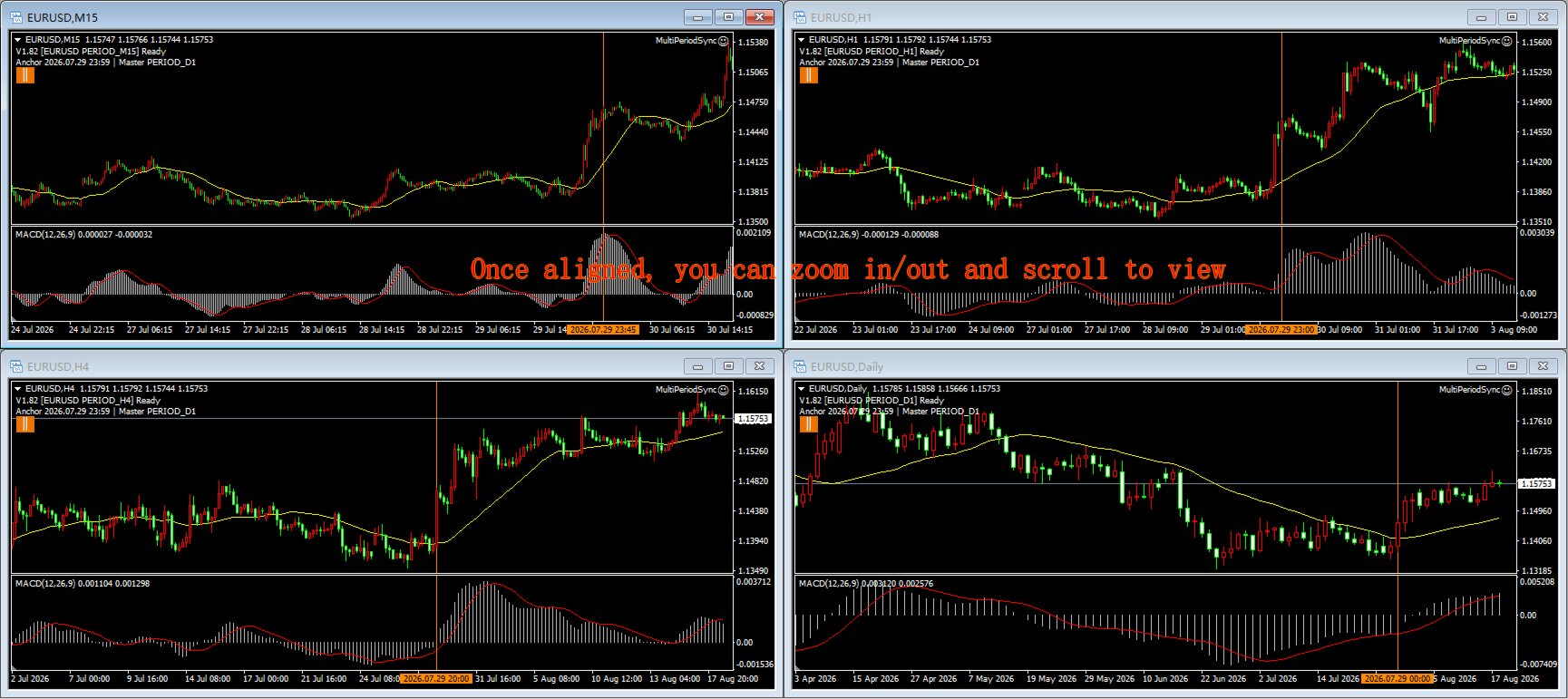
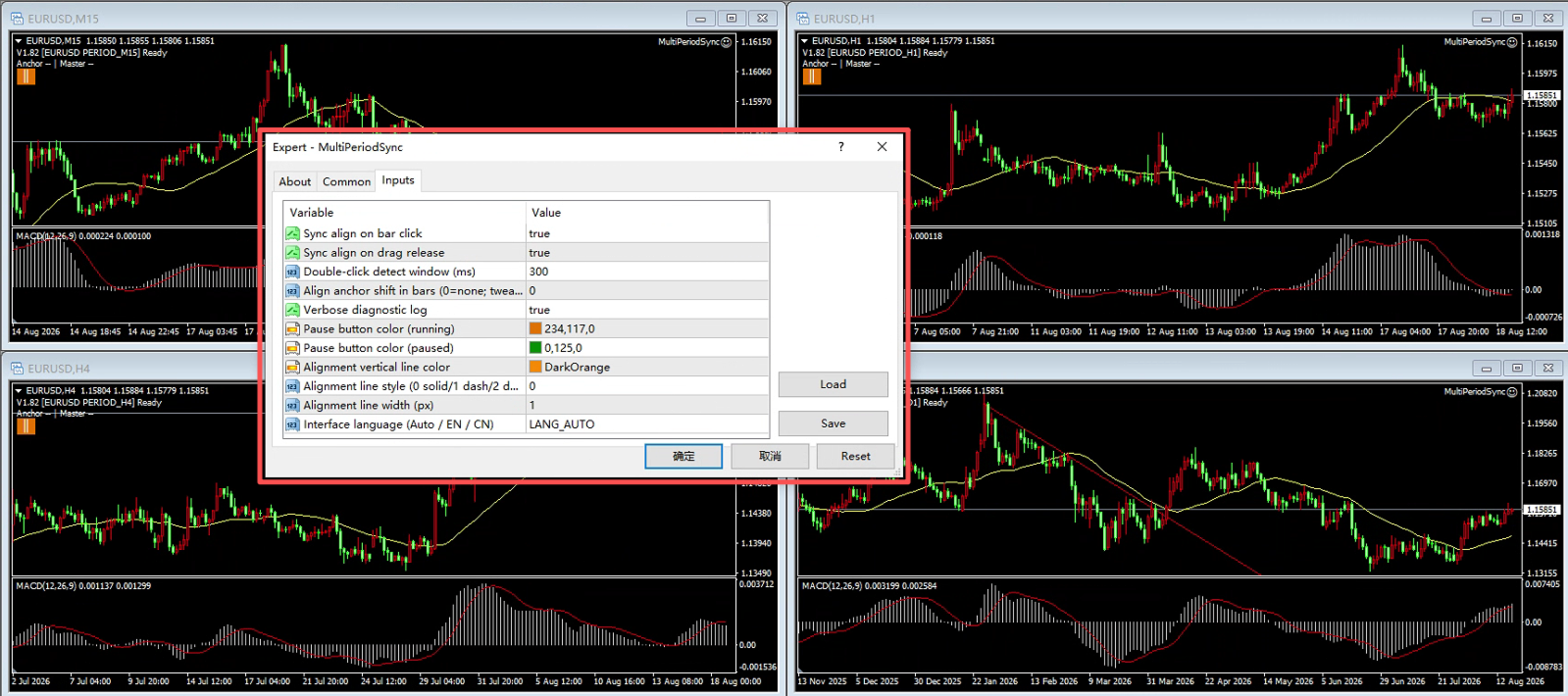
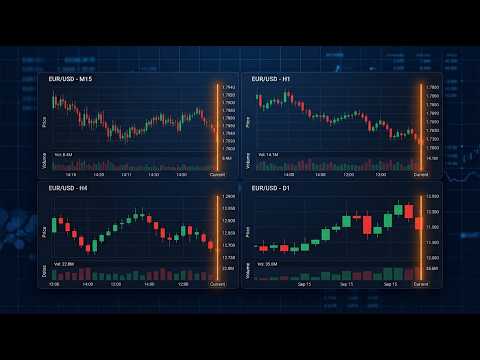
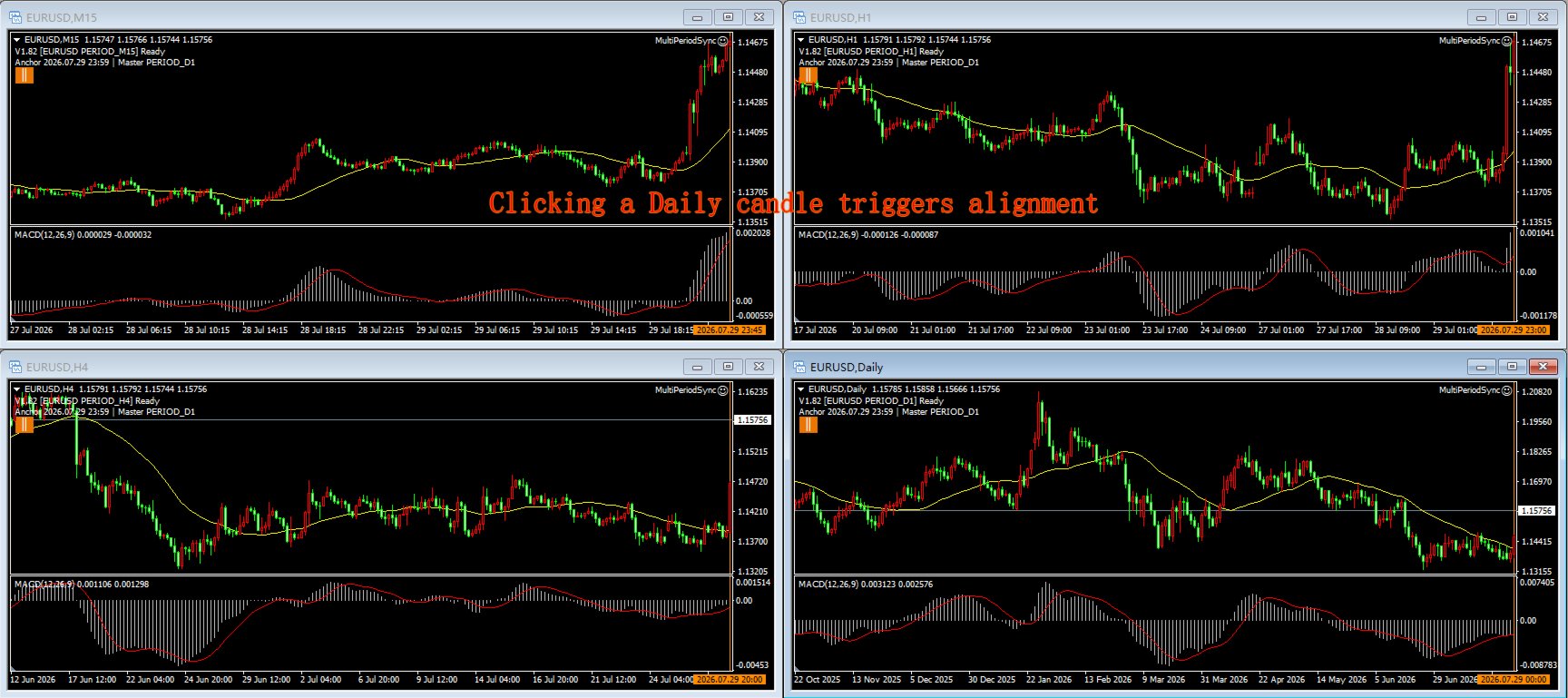
MultiPeriod Sync Charts is a non-trading utility that keeps four charts of the SAME symbol, on DIFFERENT timeframes (e.g. M15 / H1 / H4 / D1), perfectly aligned to the same point in time. Click or drag any one chart and the other three snap to the identical anchor moment — so you can read multi-timeframe confluence without manually scrolling each window. It is designed as a replay training aid: build multi-timeframe confluence intuition by reviewing how small and large timeframes line up at any moment, sharpening your K-line and indicator pattern recognition.

KEY FEATURES

  • One-click alignment: click a bar on the main chart; all four charts align so that bar's period-end time sits at the right edge of every chart.
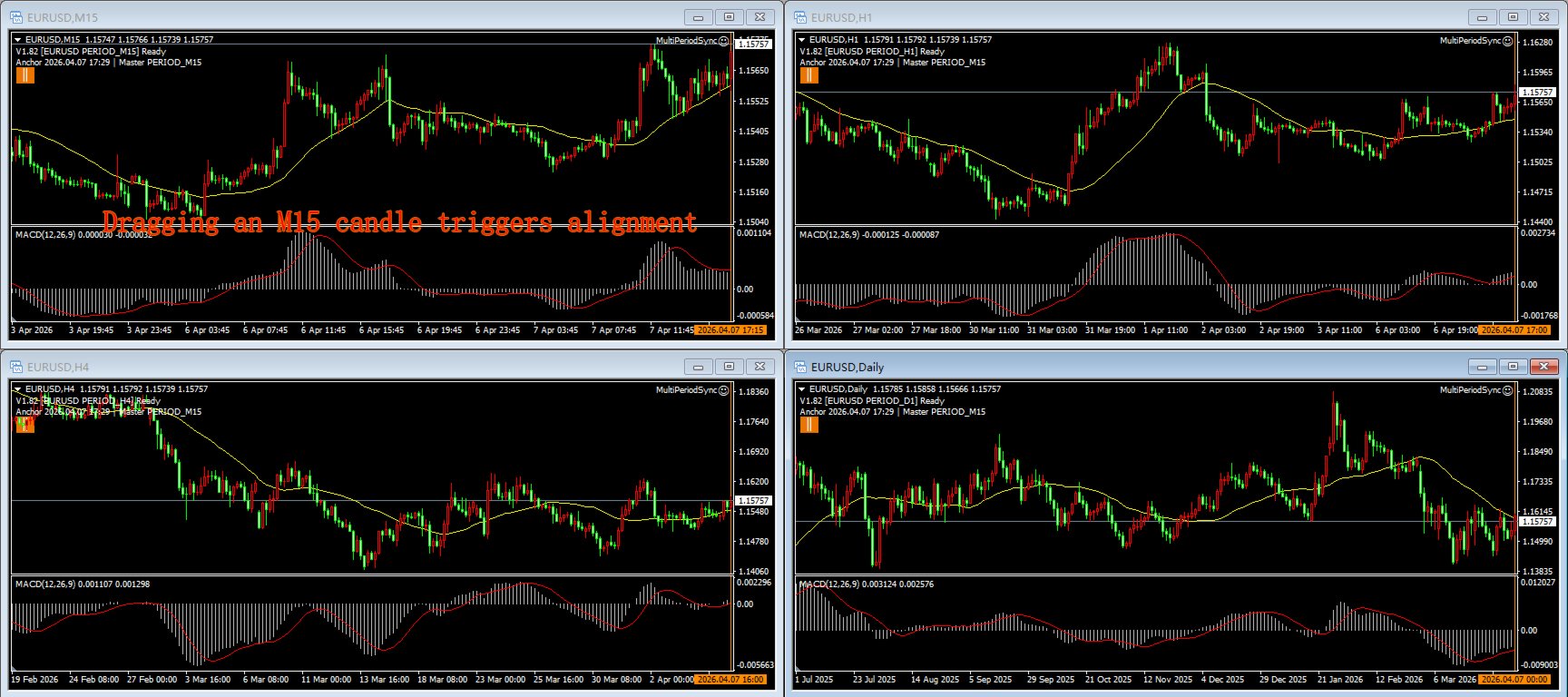
  • Drag alignment: drag on the main or sub-window; the other three charts freeze during the drag and snap into place the moment you release.
  • Independent browsing & zoom: each chart scrolls and zooms freely on its own — pure browsing never triggers sync, never snaps back, and alignment always stays anchored to the same moment.
  • Vertical anchor line: after each alignment a configurable vertical marker is drawn on every chart, so the shared time point is always visible.
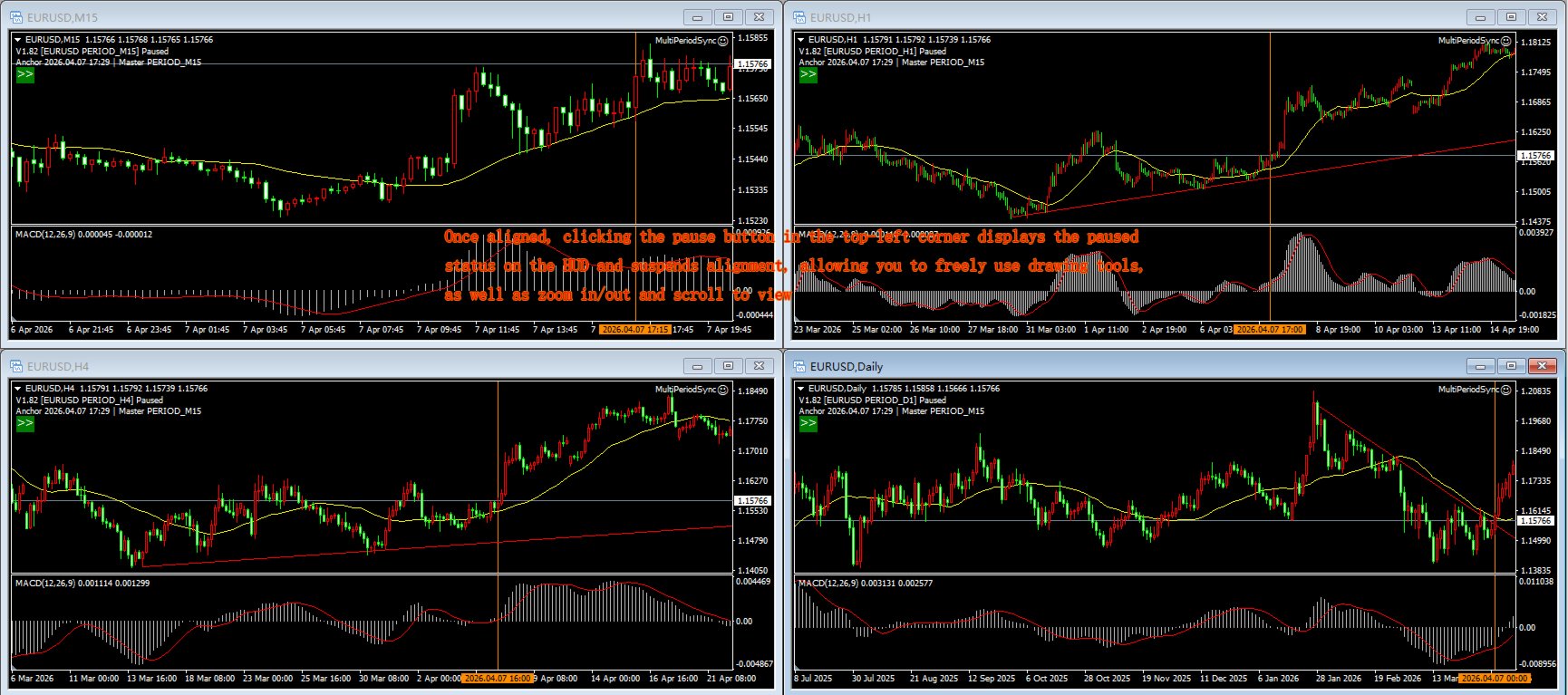
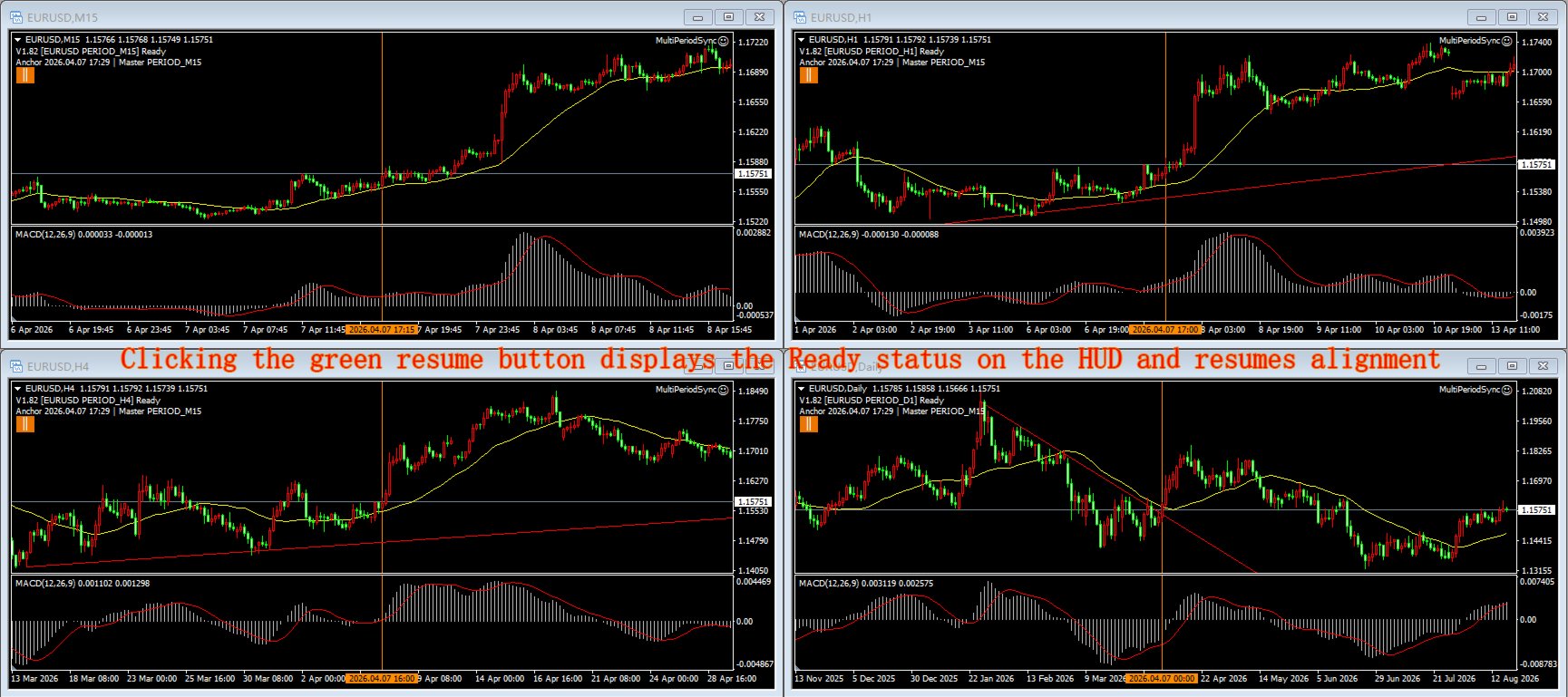
  • Global pause: one button pauses sync on all four charts at once (wheel browsing still works); resume from any chart. Button state is mirrored everywhere. The button area is exempt from alignment — clicking it never fires a sync.
  • Double-click filter: a short click is distinguished from a double-click, so you can still select objects / open the context menu without firing a sync.
  • Bilingual UI: auto-detects terminal language (Chinese / English), or force one.
  • 11 configurable inputs: click/drag sync toggle, UI language, debug logging, pause-button colors, marker color/style/width, double-click window, anchor offset.

HOW IT WORKS

Instances communicate through MT4 Global Variables — no DLL, no internet connection required. Attach one copy to each of your four charts (same symbol, any periods). Arrange windows with MT4's Tile Vertically (Alt+R) for a quick 2x2 grid, then reorder the timeframes to your preference.

REQUIREMENTS

  • MetaTrader 4 terminal.
  • The same trading symbol on all four charts.
  • AutoTrading must be enabled (the EA uses a timer; it NEVER places a trade).
  • Four chart windows arranged 2x2 (Alt+R tiles them automatically).

INPUT PARAMETERS

  • InpLanguage — UI language: Auto (detect) / English / Chinese
  • InpSyncOnClick — sync when you click a bar (true/false)
  • InpSyncOnDrag — sync when you drag (true/false)
  • InpDblClickMs — double-click filter window in ms (default 300); increase if you click slowly
  • InpAnchorOffset — shift the alignment anchor inward by N bars (default 0)
  • InpDebugLog — write diagnostic info to the Journal (true/false)
  • InpPauseClrRun — pause-button color while running
  • InpPauseClrPaused — pause-button color while paused
  • InpMarkColor — vertical anchor line color
  • InpMarkStyle — vertical anchor line style (solid/dash/dot…)
  • InpMarkWidth — vertical anchor line width (pixels)

NOTES / LIMITATIONS

  • This is an analysis aid, not a trading robot. It does not open, modify or close any position.
  • Alignment targets TIME, not zoom/bar count — each chart keeps its own zoom.
  • After updating the .ex4, simply restart MT4 (or reload the chart) — the EA picks up the new file automatically; no need to delete and re-attach it.
  • Rental expires automatically and the EA is removed from the chart — this tool never trades and holds no positions to manage, so removal is safe with no side effects.

FAQ

Q: Does it trade?
A: No. It only aligns charts.

Q: Why four copies?
A: Four different timeframes are the standard for multi-timeframe confluence — they capture both risk and opportunity more accurately.

Q: Can I use different symbols?
A: Keep the same symbol on all four charts.

Q: Is it a demo-only tool?
A: The Market free trial runs only in the Strategy Tester, which cannot show this tool's 4-chart, interactive features. Use the 1-month low-price rental to try it on live charts.

USER MANUAL

What it achieves

One click or drag aligns all four charts to the same moment in time, so you no longer have to hunt through each chart by hand — build clean standard charts with ease, use them for trading-system training, and sharpen your multi-timeframe intuition.

Important boundaries

  • It does NOT trade. It only aligns charts; never opens/modifies/closes a position. A "sad face" EA icon is normal (means "no trading").
  • All 4 charts must be the SAME symbol (e.g. EURUSD). Different symbols = alignment meaningless.
  • All 4 charts must be in the SAME MT4 terminal — instances communicate via MT4 Global Variables; cross-terminal/account doesn't work.
  • It does not arrange windows for you. Use MT4's Tile Vertically (Alt+R) to auto-arrange charts into a 2x2 grid, then adjust the timeframe order to your preference.
  • Alignment targets TIME, not zoom/bar count. Each chart keeps its own zoom and candle width; only the moment is aligned to the right edge.
  • AutoTrading must be enabled (button turns green) for the EA to run its timer. It still never places a trade.
  • Pause is global. Pause on any chart → all 4 stop syncing (wheel browsing still works); resume from any chart.
  • It only manages its own vertical marks. Alignment lines (prefix MPS_VL_) are auto-updated/deleted; your manually drawn lines are NEVER touched.
  • MT4 does NOT hot-reload EAs. After replacing the .ex4 or changing inputs, just restart MT4 (or reload the chart) — the chart's EA picks up the new file automatically. You do NOT need to delete and re-drag the EA; only restart/reload is required.
  • Independent zoom per chart. Each chart can zoom in/out independently; zoom changes the current chart's view only, never triggers alignment, and alignment always stays anchored to the same moment.
  • Crosshair / drawing tool cancellation. If the chart has a main window but no subwindow, clicking the left button in the (absent) subwindow cannot cancel the crosshair drawing state — right-click on the MAIN chart to cancel.

Preparation

MT4 (build 147631 or similar); a symbol with history downloaded (all periods); 4 chart windows, same symbol, different timeframes; MultiPeriodSync.ex4 deployed.

Install & attach

  • Copy MultiPeriodSync.ex4 to MQL4\Experts\.
  • Refresh Navigator (Ctrl+N → right-click Expert Advisors → Refresh) or restart MT4.
  • Open 4 charts: same symbol, 4 different timeframes.
  • Drag MultiPeriodSync onto all 4 charts (a settings dialog appears; OK = defaults).
  • Enable AutoTrading (turn green). A "sad face" icon is normal.
  • Arrange windows: use Tile Vertically (Alt+R) to auto-arrange a 2x2 grid, then reorder timeframes to taste.

Verification: a two-line HUD status text appears at the top-left of each chart, showing the version (should be V1.82 or newer).

Daily operations

Click-to-align (most used): Click a bar in the MAIN chart area (not subwindow / time axis) → all 4 charts align the bar's period-end time to their right edge.

Drag-to-align: Press and drag (main or subwindow) → the other 3 charts FREEZE during the drag → on release, all 4 align the right-edge bar's open time to their right edges.

Wheel browse / independent scroll (no alignment): Mouse wheel scroll = pure browsing. Each chart scrolls independently; scrolling never triggers alignment and never snaps the view back.

Double-click = select object (no alignment): A double-click (two clicks within InpDblClickMs at the same spot) selects an object for editing — it does NOT trigger alignment. If you click slowly and double-clicks keep being misread as single-click aligns, increase InpDblClickMs.

Pause / resume button (alignment-exempt area): A small button under the HUD (top-left). Orange || = running (click to pause globally); dark-green >> = paused (click to resume globally). The button area is exempt from alignment — clicking it never triggers a sync.

Vertical anchor line: After each successful alignment, one configurable vertical line is drawn on all 4 charts at the aligned moment. Old alignment lines are replaced automatically — never accumulate. Your manual lines are untouched.

Independent zoom (no alignment, keeps state): Zoom in/out on any chart — each chart keeps its own zoom state and candle width. Zoom never triggers alignment and is never pulled by other charts. After zooming, click/drag still aligns all 4 to the same moment.

Operation FAQ

Q: EA shows a sad face, is it broken?
A: No — sad face = no trading, which is normal for this tool.

Q: Clicking a chart doesn't move the others?
A: Check: ① AutoTrading green? ② All 4 charts same symbol? ③ HUD version correct? ④ Click on main price area (not subwindow/axis)?

Q: Charts misalign by 1 bar?
A: Rare; set InpAnchorOffset to 1.

Q: Journal too noisy?
A: Set InpDebugLog=false; HUD unaffected.

Q: Double-click keeps triggering alignment?
A: You are likely clicking slowly — increase InpDblClickMs (e.g. 400~500).

Q: No vertical line appears?
A: Confirm alignment actually fired (click the main chart). Lines appear only after a successful align, and only MPS_VL_ objects are touched.

Q: Crosshair can't be cancelled?
A: If there is no subwindow, right-click the MAIN chart to cancel the drawing state.

Reload after update (no need to re-attach)

MT4 does not hot-reload EAs. After replacing the .ex4 or changing inputs, restart MT4 (or reload the chart) — the chart's EA automatically loads the new file. You do NOT need to delete the EA instance and drag it again; a restart/reload is sufficient. If issues persist, check the HUD version and the Journal log (MQL4\Logs\<date>.log), optionally with InpDebugLog=true.
Рекомендуем также
This TraderMaster EA is super helpful for professional trader.  Input Parameter Section: 1) Allow trader to set different line style, such as color, width; 2) Apply our chart style, if set false, it will not change the chart style; 3) Select different panel mode 3.a) Simple Mode, for trader immediately place a market order, pending order, delete and close orders; 3.b) Draw Line Mode, for price action traders who want to trade for trend and reverse in his trading plan; 3.c) Advanced Mode, includ
The advantages of EA TWO CANDLE SMART are: It is equipped with various filters, including: maxspread, maxlot, takeprofit (4 step), stop loss (3 step), profit target per day, and many more. Open order BUY = If iClose[2] > iOpen[2] && iClose[1] > iOpen[1]. Open order SELL = If iClose[2] < iOpen[2] && iClose[1] < iOpen[1]. Target_profit_perday=50; ==> can work on forward test. lockprofit=2;//Minimal Profit in money Step_LockProfit_in_Money=25; Stoploss_in_Money=1000; Stoploss_in %=50;==> Stoploss
Lot Partial Close
Zdravko Petrov
5 (1)
Lot Partial Close Closes your trades automatically by a specific size and at a specific target defined by you. Description: The Lot Partial close is a MetaTrader 4 Expert Advisor designed to automate trading strategies with a focus on managing multiple open orders of different sizes. This EA is versatile, allowing users to customize key parameters to meet their specific trading preferences. Key Features: Partial Close Functionality: The EA incorporates a partial close mechanism for the first t
PerfectLine
Sergio D. Rocha
5 (2)
Трендовые линии и другие объектов, нанесенные на график, смещаются при переключении на более мелкие таймфреймы. PerfectLine - это инструмент, который решает данную проблему. Как только вы коснетесь нарисованной линии, Perfect Line найдет точное положение для нее на нижних таймфреймах и исправит ее положение при переключении. Perfect Line использует примагничивание на расстоянии 5 пикселей. Если расстояние между узлом объекта и ценой Open, High, Low или Close ближайшей свечи укладывается в это ра
FIBO Price Calculator  Brief Description 1. Automated Fibonacci Retracement Drawing This indicator automatically draws Fibonacci Retracement lines on the MT4 chart, assisting traders in quickly identifying potential support and resistance levels. 2. Customizable Fibonacci Sequence Users can customize the Fibonacci sequence values, and the indicator automatically converts them into corresponding price levels based on the current market price. 3. Adjustable Indicator Window Position The indicator
CandleStyx
Guillaume Xavier Andre Turlier
MT4 trading tool. Intuitive Dashboard that allows effortless automated trading, saving 99 Strategies , Advanced Money Management , Automatic group orders :  Global Take Profit / Stop Loss, Smart TP (Multi-Level, Position Recovery) and Smart SL (Breakeven, trailing Stop, Multi-Level), Exit Manager , Signals, Strength Indicator , ATR Graph, Price Alert, News Warning…  # If you have any other requirements or are interested in collaboration, please contact (info@styxia.com)   Get more information
Copiador MT4
Luciana Andrea Maggiori
Copiador – La Mejor Herramienta para Copiar Operaciones en MetaTrader 4 Este no es un simple copiador de operaciones que únicamente permite copiar transacciones de forma local entre diferentes cuentas de MetaTrader 4 en cualquier dirección y cantidad. ¡Por supuesto que lo hace! ¡Pero Copiador hace mucho más! Descubre sus características y beneficios a continuación FUNCIONALIDADES DESTACADAS: Copiado entre brokers diferentes : Puedes copiar operaciones desde una cuenta en un broker
Fibonacci Expansion and Retracement Analysis Fibonacci retracing and extended line tools for the MT4 platform, ideal for traders who use the DiNapoli point trading method and the Golden Section trading The main function: 1. You can draw multiple sets of Fibonacci retracements directly, and the relationship between important return points is clear at a glance. 2. Can draw Fibonacci extensions 3. The Fibonacci foldback and extension of the line can be moved left and right for easy observation
TSInfoKit
Salvatore Labriola
This Utility is a test for creating objects on the graph . Drag it on any graph and follow the instructions! Any questions about work program send me mail : info@tradingsolution.it In future I will add more information with new version for now it provides account information: AccountNumber AccountName AccountCurrency AccountCompany Server Account Leverage Stop Out level Balance Equity Margin Free Margin
Success comes from knowledge – this is true for most things in life and especially Forex trading. To become successful, a trader needs to learn technical analysis. Technical indicators are a big part of technical analysis. The problem is that, at first sight, names of technical indicators can sound unpleasantly complicated, for example, MACD, RSI or Stochastic. However, we recommend you not to judge a book by its cover. We will provide you with a fair and simple explanation of the most popular t
Septermber OFFER 85% OFF next price for unlimited version will be 2500$. This is the only time you can get this institutional and professional indicator at this price for unlimited version. Don't dare to miss this. The tool I am about to introduce to you you can't compare it with other tools due to its strategy and accuracy level in predicting the next price directional movement. This tool is designed for serious traders who have decided to make a difference through trading. Be the next person t
This EA is designed to transmit charts to Telegram, as illustrated in the example image. It provides the capability to send charts according to the selected timeframe directly to Telegram. A sample channel is included for demonstration purposes. After installation, please select your own channel or any other preferred option. Please note that this sample channel may be removed without prior notice. The indicator shown in the image is for demonstration purposes only.
ALPC forex Matrix produces signals based on five different strategies . ALPC forex Matrix copies itself to all charts. Quick and easy management is your responsibility. Forex trading is fast control. ALPC MATRIX FOREX SYSTEM DOCUMENTATION !Please open the scalp process according to the hourly trend direction. (does not work with strategy test) ALPC MATRIX 2015-2019 Supportive EA Tool for all Forex Pairs Producer: Mehmet Ozhan Hastaoglu ALPC MATRIX Forex System is actually a supportive tool wher
Trade Copier Global: The name speaks for itself. This copier allows you to copy orders between MT4 terminals even if they are not installed on the same computer. Features Copying trades between MT4 terminals around the world with a short delay. Automatically recognizes symbol prefixes. Can connect many Slaves to the same Master. Supports pending and market orders. Supports partial order close (with limitations, see below) Can send messages and notifications to the Slaves from the Master Several
Crypto Market Pro
Daniil Kurmyshev
5 (1)
Новые возможности для анализа криптовалют в привычном МetaТrader 4. Например: Выбираем символ криптовалюты и прикрепляем любые индикаторы, советники или скрипты (ниже представлена подробная инструкция). Режим запуска Просмотр криптовалют; Сбор данных. Возможности Работайте как со стандартным графиком; Автоматическое обновление открытых графиков; Выбор отдельных криптовалют для обновления; Выбор отдельных таймфреймов для обновления; Работайте на желаемом таймфрейме; Открытые графики никак не вл
Forbex Gann Legacy Fibonacci Confluence Tool One chart. One structure. One complete professional analysis workspace. Forbex Gann Legacy Fibonacci Confluence Tool is designed for traders who want more than another indicator displaying arrows or mechanical signals. It is a complete manual market-analysis and decision-support system for MetaTrader 4 , combining market structure, Gann projections, Fibonacci confluence, historical statistics, multi-timeframe context and practical chart-management too
Becktester Telegram Signals — превратите сигналы Telegram в настоящие бэктесты Автоматически считывайте сигналы с   реальных каналов Telegram   , анализируйте их (покупка/продажа/вход/стоп/тэйп) и проводите бэктест в   тестере стратегий MetaTrader 4.   Сначала проверьте парсинг в   режиме живого парсинга   .  Важная Информация После покупки продукта оставьте комментарий на странице продукта, и я вышлю вам файл для парсинга истории сигналов из Telegram. Этот файл не размещён публично и доступен т
Scalp Master is a very simple and smooth operation system that is designed to help traders facilitate trading and risk management. No Keyboard need to make, take profit or close orders. Every orders parameters are created automatically based on predefined risk and your strategy lines. Such parameters appear friendly on the screen and you just need 1 click to convert to order. The unique algorithm prevent common missed and hit taking profit strategy. Instead of very subjective partial closed by u
Рынок Форекс может пройти множество различных ценовых путей к достижению некоей точки в будущем. Будущее динамично. Поэтому, планирование торговли с возможным будущим сценарием является важным шагом для вашего успеха. Для этих целей представляем вашему вниманию Harmonic Pattern Scenario Planner, первый предиктивный инструмент для определения гармонических моделей в своем роде. Основные характеристики Прогнозирование будущих моделей для анализа сценариев 11 Определение гармонических моделей Авто
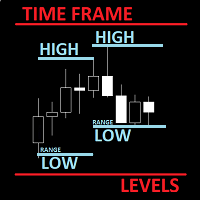
The utility helps to locate in the  lower time frames  the maximum and minimum of the upper  time frame.  The length of time frame level line  represents the temporal  length of the upper time frame. The indicator draws lines that delimit the upper time frames candle and highlights his high-low price, the pips candle range, the returns and the volatility. How it works: Firstly . Choose which time frames levels to represent in the lower ones : monthly, weekly, daily, H4, H1, M30, M15, M5. The
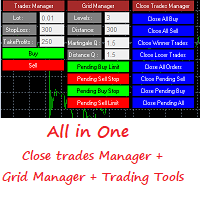
Grid Panel Allows you to :  Set the number of levels (trades). Lot size and you can do Martingale to raise the lot size for each level. Set distance between levels, and you can manage the distance for each level using   Distance Q. Static TP and SL for each level. You can open : BUY STOP / BUY LIMIT / SELL STOP / SELL LIMIT   (levels in one click). Close all buy orders. Close all sell orders. Close all winning orders. Close all losing orders. Close all orders. Close all Pending BUY orders. Clos
Reverse copier is a tool that will open opposite buy/sell orders from your master account. It will help you with low profit EA's that lose consistenly and turn it to wins. Feel free to ask for new functions/features and I will add it. Now it's a simple MT5 to MT4 bridge with straightforward logic of one position open/close.  How to install: https://www.mql5.com/en/market/product/141604
FREE
SNR LEVEL INDICATOR Accurate Snr level indicator will only display Fresh Levels that are close to the Current Market Price. This indicator is very accurate in mapping Support & resistance levels. there is an alert feature when the price TOUCHES the SNR LEVEL, WHEN CLOSE CANDLE BREAK/REJECT SNR LEVEL. INDICATOR MARKING : - SUPPORT LEVEL = V SHAPE - RESISTANCE LEVEL = APEX LEVEL - GAP RESISTANCE & GAP SUPPORT = OPEN CLOSE CANDLE - SUPPORT BECAME RESISTANCE & RESISTANCE BECAME SUPPORT INDICATOR C
MULTIPLE ORDERS With Symbol and Time Frame Changer Multiple Orders Utility is created to give easy profits-making trades with a little movements and without going long distance to get it all. This Utility opens multiple orders as many trades as the number specified by the User or as many as permitted by your Broker in the same direction on the same currency pair simultaneously. The idea behind it, is that instead of running after 100 - 200 pips which may not likely be attainable in the record
This program is created by algorithm which economy based logic in the trading market. 1. The program able to work with all of currency and trading items  2. Take profit and loss are basically handled by EA program Recommendation: EUR_USD is the most preferred. Please use this program only for MT4. LOT should be managed depends on own deposit. Otherwise, high risk will be driven(e.g 0.1~0.2 lot is recommended when the deposit is 10,000 dollar)
Hello Guys! I want to share with you a very useful tools. Anyone of us who has used MT4 for some time knows how impractical this platform can be for discretionary trading. That's why I created this graphical interface!  Interface is very simple, all the info that you need are in the video and in the screenshot. NB: Before to run the EA Interface, remember to copy the file in the comment in your MT4 folder "Controls". PATH: .../MQL4/INCLUDE/CONTROLS NB: unfortunately the interface can't be test
Блоги: https://www.mql5.com/en/blogs/post/769823 MT4: https://www.mql5.com/en/market/product/176181 MT5: https://www.mql5.com/en/market/product/176182 VOLUME BUBBLE [tambangEA] — это премиальный визуальный индикатор давления объема, разработанный для того, чтобы помочь трейдерам выявлять необычную рыночную активность непосредственно на графике. Индикатор обнаруживает аномальное поведение дельты/объема и отображает его в виде четких пузырьковых маркеров вокруг ценового движения. Каждый пузырек
Бот   Bot DataSource AC   — инструмент для автоматической торговли разработанный автором на основе индикатора DataSource AC. https://www.mql5.com/ru/market/product/108165  индикатор    DataSource AC. Бот надо запускать на временном периоде   EURUSD H1,   именно для данной среды он оптимизирован. Хотя если рассматривать бот как инструмент то вы можете отимизировать бот на любом другом тайм-фрейме и валютной паре. Принцип оптимизации при использовании на H1, следующий: оптимизируем на ценах откры
Session Overlays Pro от Forex Noob Tube Хватит загромождать графики статичными коробками и лишними линиями. Session Overlays Pro — это полностью интерактивный инструмент анализа рынка институционального уровня, созданный для внутридневных трейдеров, которые опираются на тайминги торговых сессий, уровни открытия дня и экстремальные ценовые значения. Индикатор построен на базе удобной кликабельной панели прямо на графике, позволяя мгновенно переключать сессии, отслеживать слияния (confluence) в ре
It's a variation of mid of HH and LL since it compares the higher of HH or LL against a period and twice the number of bars back to avoid whipsaws. I used to display this against lines on a chart, but made a histogram out of it and it looks interesting. It looks good at gauging trend strength and general turns (see image below). The name of the indicator is BAM, which is an acronym for "Below and Above Mid". Ways to use it: 1. To see general trend on longer TFs (more than 30 bars back).
С этим продуктом покупают
Добро пожаловать в Trade Manager EA — лучший инструмент для управления рисками, предназначенный для упрощения, точности и эффективности торговли. Это не просто инструмент для размещения ордеров; это комплексное решение для удобного планирования торгов, управления позициями и усиленного контроля над рисками. Независимо от того, начинающий вы трейдер, опытный специалист или скальпер, нуждающийся в быстром исполнении, Trade Manager EA адаптируется к вашим потребностям и работает с любыми активами:
Trade Indicator Assistant is a powerful MT4 utility designed to turn indicators into automated trading systems. Its main feature is the ability to automatically detect an indicator’s   BUY and SELL signal buffers , without requiring you to know the buffer numbers, search through indicator settings, or modify the indicator source code. Bonus Indicator: After purchasing Trade Indicator Assistant, contact me to receive Trade Signal Pro completely free as a bonus indicator. [Download Demo Version]
Exp COPYLOT CLIENT for MT4
Vladislav Andruschenko
4.69 (65)
Профессиональный копировщик сделок для MetaTrader 4 Быстрый, профессиональный и надежный копировщик сделок для MetaTrader 4 . COPYLOT позволяет копировать сделки Forex между терминалами MetaTrader 4 и MetaTrader 5 , обеспечивая гибкую синхронизацию для разных типов счетов и сценариев торговли. Версия COPYLOT MT4 поддерживает: MetaTrader 4 → MetaTrader 4 MetaTrader 5 Hedge → MetaTrader 4 MetaTrader 5 Netting → MetaTrader 4   Версия MT5 Полное описание + DEMO + PDF Как купить Как установить Как по
Take a Break
Eric Emmrich
5 (31)
Take a Break pauses your Expert Advisors when trading is a bad idea: before news, after a daily loss, outside your trading hours, or when a rule you wrote yourself says so. When the pause is over, your EAs simply continue. Account protection for all your EAs in one tool: news filter, drawdown and equity protection, time filter and custom rules. One EA on one chart protects the whole account, the free indicator gives every chart its own rules on top. Free demo | What is new in 26.09 | Support Ass

Trade Manager MT4 DaneTrades
Levi Dane Benjamin
4.09 (11)
Trade Manager, который поможет вам быстро входить и выходить из сделок, автоматически рассчитывая риск. Включает функции, которые помогут предотвратить чрезмерную торговлю, торговлю из мести и эмоциональную торговлю. Сделками можно управлять автоматически, а показатели эффективности счета можно визуализировать в виде графика. Эти функции делают эту панель идеальной для всех трейдеров, занимающихся ручной торговлей, и помогают улучшить платформу MetaTrader 4. Многоязычная поддержка. Версия MT5  |
Telegram to MT4 Multi-Channel Copier   автоматически копирует торговые сигналы из ваших Telegram-каналов прямо в MetaTrader 4. Без ботов, без браузерных расширений, без ручного копирования. Сигнал приходит в Telegram — и советник открывает сделку в вашем терминале за считанные секунды. А перед тем как копировать канал, встроенный бэктестер покажет, что этот канал сделал бы на вашем счёте. Продукт состоит из двух компонентов: приложения для Windows, которое слушает ваши Telegram-каналы, и этого с
MT4 к Telegram Signal Provider - это простой в использовании и полностью настраиваемый инструмент, который позволяет отправлять сигналы в Telegram, превращая ваш аккаунт в поставщика сигналов. Формат сообщений полностью настраиваем! Однако для простого использования вы также можете выбрать предопределенный шаблон и включать или отключать определенные части сообщения. [ Демо ]  [ Руководство ] [ Версия для MT5 ] [ Версия для Discord ] [ Телеграм-канал ]  New: [ Telegram To MT5 ] Настройка Шаг за
TradePanel MT4
Alfiya Fazylova
4.84 (95)
Trade Panel — это многофункциональный торговый помощник. Приложение содержит более 50 торговых функций для ручной торговли и позволяет автоматизировать большинство торговых операций. Инструкция к приложению: https://www.mql5.com/ru/blogs/post/756476 Пробная версия приложения для демо-счета: https://www.mql5.com/ru/blogs/post/750864 Как установить приложение: https://www.mql5.com/ru/blogs/post/750096 Как тестировать приложение в визуальном режиме: https://www.mql5.com/ru/blogs/post/770274 Как уст
VirtualTradePad mt4 Extra
Vladislav Andruschenko
4.85 (61)
Торговая Панель для торговли в 1 клик.  Работа с позициями и ордерами!  Торговля с  чарта  (график) или с  клавиатуры . С помощью нашей торговой панели Вы можете торговать   в один клик с графика   и совершать торговые операции в   30   раз быстрее стандартного управления в MetaTrader.  Автоматические расчеты параметров и функции, которые облегчают жизнь трейдеру и помогают трейдеру вести свою торговую деятельность в разы быстрее и удобнее. Графические подсказки и полная информация по торговым с
Копир->Удобное и быстрое взаимодействие с интерфейсом, пользователи могут использовать его сразу       ->>>> Рекомендуется использовать на компьютерах Windows или VPS Windows Функции: Разнообразные и персонализированные настройки копирования сделок: 1. Различные режимы лота могут быть установлены для различных источников сигналов. 2. Различные источники сигналов могут быть установлены для прямого и обратного копирования сделок. 3. Сигналы могут быть установлены с комментариями. 4. Следует ли ка
Риск менеджер Риск менеджер - упростит отслеживание просадки и оповестит при критическом достижении указанного риска, а также закроет ордера при достижении критического (указанного) уровня риска. При превышении указанной просадки, можно выбрать два варианта событий Все ордера закрываются и фиксируется убыток. Терминал также полностью закрывается Вместо фиксирования убытка открывается противоположный ордер - и происходит локирование. Ни один ордер не закрывается. Логику раскрытия локов можно п
Trade Dashboard MT4
Fatemeh Ameri
4.96 (54)
Trade Dashboard simplifies how you open, manage, and control your trades, with built-in lot size calculation. It allows you to execute trades, manage risk, and control positions directly on the chart, with tools such as partial close, breakeven, and trailing stop. Designed to reduce manual work and help you stay focused on your trading decisions. A demo version is available for testing. Detailed explanations of features are provided within the MQL5 platform. Installation instructions are include
The product will copy all telegram signal to MT4   ( which you are member  ) , also it can work as remote copier.  Easy to set up, copy order instant, can work with almost signal formats, image signal, s upport to translate other language to English Work with all type of channel or group, even channel have "Restrict Saving Content", work with  multi channel, multi MT5 Work as remote copier: with signal have ticket number, it will copy exactly via ticket number. Support to backtest signal. How to
News Filter EA: Advanced Algo Trading Assistant News Filter EA is an advanced algo trading assistant designed to enhance your trading experience. By using the   News Filter EA , you can integrate a Forex economic news filter into your existing expert advisor, even if you do not have access to its source code. In addition to the news filter, you can also specify   trading days   and   hours   for your expert. The News Filter EA also includes   risk management   and   equity protection   features
Unlimited Trade Copier Pro - это мощный инструмент для удаленного копирования сделок между несколькими счетами MetaTrader 4/MetaTrader 5, расположенными удаленно друг от друга, по сети интернет. Это идеальное решение для провайдеров сигналов, которые хотят поделиться своей торговлей с другими трейдерами по всему миру. Один поставщик может копировать сделки на неограниченное количество счетов-получателей, а один получатель также может копировать сделки неограниченного количества провайдеров. Пост
Strategy Builder offers an incredible amount of functionality. It combines a trade panel with configurable automation (covert indicators into an EA), real-time statistics (profit & draw down) plus automatic optimization of SL, TP/exit, trading hours, indicator inputs. Multiple indicators can be combined into an single alert/trade signal and can include custom indicators, even if just have ex4 file or purchased from Market. The system is easily configured via a CONFIG button and associated pop-up
Grid Manual MT4
Alfiya Fazylova
4.71 (17)
Grid Manual — это торговая панель для работы с сеточными стратегиями. Утилита универсальная, имеет гибкие настройки и понятный интерфейс. Работает с сеткой ордеров не только в сторону усреднения убытков, но и в сторону наращивания прибыли. Трейдеру не нужно создавать и сопровождать сетку ордеров, это сделает утилита. Достаточно открыть ордер и Grid manual автоматически создаст ему сетку ордеров и будет сопровождать его до самого закрытия. Полная инструкция и демо-версия здесь . Основные особенно
Автоматически торгуйте зонами поддержки и сопротивления или спроса и предложения, как только вы определите ключевые области, из которых хотите торговать. Этот советник позволяет вам рисовать зоны покупки и продажи одним щелчком мыши, а затем размещать их именно там, где вы ожидаете разворота цены. Затем советник отслеживает эти зоны и автоматически совершает сделки на основе ценового действия, которое вы указываете для зон. После совершения первоначальной сделки советник выйдет с прибылью в про
PZ Trade Pad Pro MT4
PZ TRADING SLU
3.67 (3)
Это визуальная торговая панель, которая помогает вам легко размещать сделки и управлять ими, избегая человеческих ошибок и повышая вашу торговую активность. Он сочетает в себе простой в использовании визуальный интерфейс с надежным подходом к управлению рисками и положением [ Руководство по установке | Руководство по обновлению | Устранение неполадок | FAQ | Все продукты ] Удивительно простой в использовании Торгуйте легко с графика Торгуйте с точным управлением рисками, без проблем Сохранение
TradeMirror - это советник-копировщик для платформы MT4/MT5. Руководство по использованию Нажмите на ссылку Руководство по Trademirror , чтобы посмотреть больше инструкций. Почему TradeMirror Мы понимаем важность безопасности, стабильности и конфиденциальности для финансового программного обеспечения, поэтому мы приложили максимум усилий для детального укрепления этих трех элементов: Предоставляет удобный графический интерфейс, которым легко управлять Фокус на конфиденциальности и безопасности,
Riskless Pyramid
Snapdragon Systems Ltd
5 (1)
Introduction This powerful MT4 trade mangement EA offers a way potentially to aggressively multiply trade profits in a riskfree manner. Once a trade has been entered with a defined stoploss and take profit target then the EA will add three pyramid add-on trades in order to increase the overall level of profit. The user sets the total combined profit target to be gained if everything works out. This can be specified either as a multiple of the original trade profit or as a total dollar amount. Fo
Candlestick Pattern Scanner is a multi-timeframe and multi-symbol dashboard and alert system that checks all timeframes and currency pairs for different candlestick patterns that are formed in them. Scanner is integrated with support and resistance zones so you can check the candlestick patterns in the most important areas of the chart to find breakout and reversal patterns in the price chart. Download demo version   (works on M30,D1,W1 timeframes and 20 symbols of Market Watch window) Read the
The News Filter
Leolouiski Gan
5 (25)
Этот продукт фильтрует всех экспертных советников и ручные графики во время новостей, так что вам не нужно беспокоиться о внезапных скачках цены, которые могут разрушить ваши ручные торговые настройки или сделки, введенные другими экспертными советниками. Этот продукт также поставляется с полной системой управления ордерами, которая может обрабатывать ваши открытые позиции и ордера на ожидание перед выпуском новостей. После покупки The News Filter вам больше не придется полагаться на встроенные
Мгновенно просматривайте историю закрытых сделок по дням и неделям, текущие открытые сделки и экспозицию форекс на одном графике! Используйте тепловую карту для определения прибыльных сделок и текущего проседания в вашем торговом портфеле. Кнопки быстрого закрытия Используйте кнопки быстрого закрытия, чтобы закрыть каждую сделку по одному символу, закрыть отдельные сделки полностью или зафиксировать частичную прибыль или убыток одним нажатием кнопки. Больше не нужно искать сделки в списке и ду
Простая в управлении Торговая панель обеспечит безопасную торговлю. Вычислит объём сделки от заданного уровня Stop Loss и величины убытка. Поможет рассчитать сейф, и в ноль закрыть неверную сделку. Интуитивно понятный интерфейс делает панель удобной в управлении, освобождая внимание трейдера для принятия решения о входе в сделку. Программа сделает все расчёты за вас. Поэтому работа с помощью панели Снайпер - оптимальное решение для торговли с соблюдением Мани-менеджмента. А это главный ключ к по
Prop Guardian Risk Manager MT4 – Drawdown, Risk & Hedge Protection for Prop Firm and Managed Accounts Prop Guardian Risk Manager is a professional risk-control utility for MetaTrader 4, designed for prop firm traders, money managers and anyone who wants strict account-level risk protection. It does not generate trading signals, strategy entries or trading decisions. Instead, it runs in the background, monitors your account risk and can automatically block new exposure, close managed trades or ac
Trader Evolution MT4
Siarhei Vashchylka
5 (2)
"Trader Evolution" - Утилита, предназначенная для трейдеров, которые используют в своей работе волновой и технический анализ. Одна вкладка утилиты способна управлять капиталом и открывать ордера, а другая - помогать в построении волн Эллиотта, уровней поддержки и сопротивления, а также линий тренда. Инструкция/Мануал ( Обязательно читайте перед приобретением ) | Версия для МТ5 Преимущества 1. Торговля в несколько кликов. В панели доступны немедленные и отложенные ордера 2. Управление капиталом
DrawDown Limiter MT4
Haidar Lionel Haj Ali
5 (8)
DrawDown Limiter v5.0 — Расширенный контроллер защиты торгового счёта DrawDown Limiter v5.0 — это клиентский контроллер защиты торгового счёта, предназначенный для мониторинга вашей торговли и автоматической реакции при достижении настроенных лимитов риска, прибыли, новостей, расписания, ролловера или количества позиций. Он может контролировать ручные сделки, автоматические стратегии, несколько советников, отложенные ордера и открытые позиции с одного отдельного графика. Он может защищать весь т
Auto Trade Copier
Vu Trung Kien
4.77 (86)
Auto Trade Copier предназначен для копирования сделок между несколькими счетами / терминалами MT4 / MT5 со 100% точностью. С помощью этого инструмента вы можете действовать как поставщик (источник) или получатель (пункт назначения). Все торговые действия будут скопированы от поставщика к получателю без задержки. Этот копир можно использовать только на счетах MT4. Для счетов MT5 вы должны использовать Auto Trade Copier для MT5 или Trade Receiver Free для MT5. Демо-версия : Демо-версию для тести
MACD Divergence Scanner is a multi-timeframe and multi-symbol dashboard and alert that checks all timeframes and symbols to find regular and hidden divergences between price chart and MACD indicator. This divergence scanner is integrated with support and resistance zones so you can check the MACD divergences in the most important areas of the chart to find trend reversals in the price chart. Download demo version   (works on M 1,M5,M30,W1   timeframes) Full description of scanner parameters ->  
Фильтр:
Нет отзывов
Ответ на отзыв