MultiPeriod Sync Charts

MultiPeriod Sync Charts — Automatic Multi-Timeframe Alignment

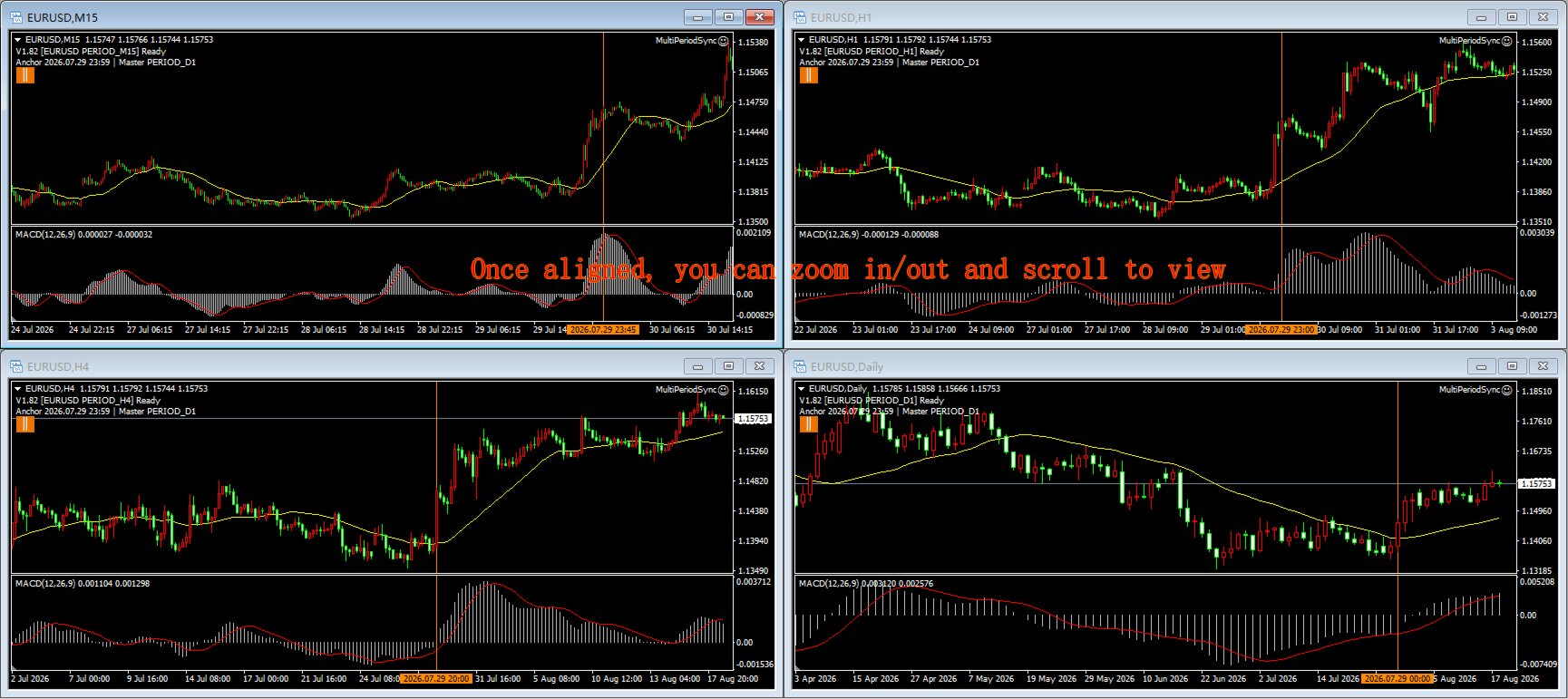
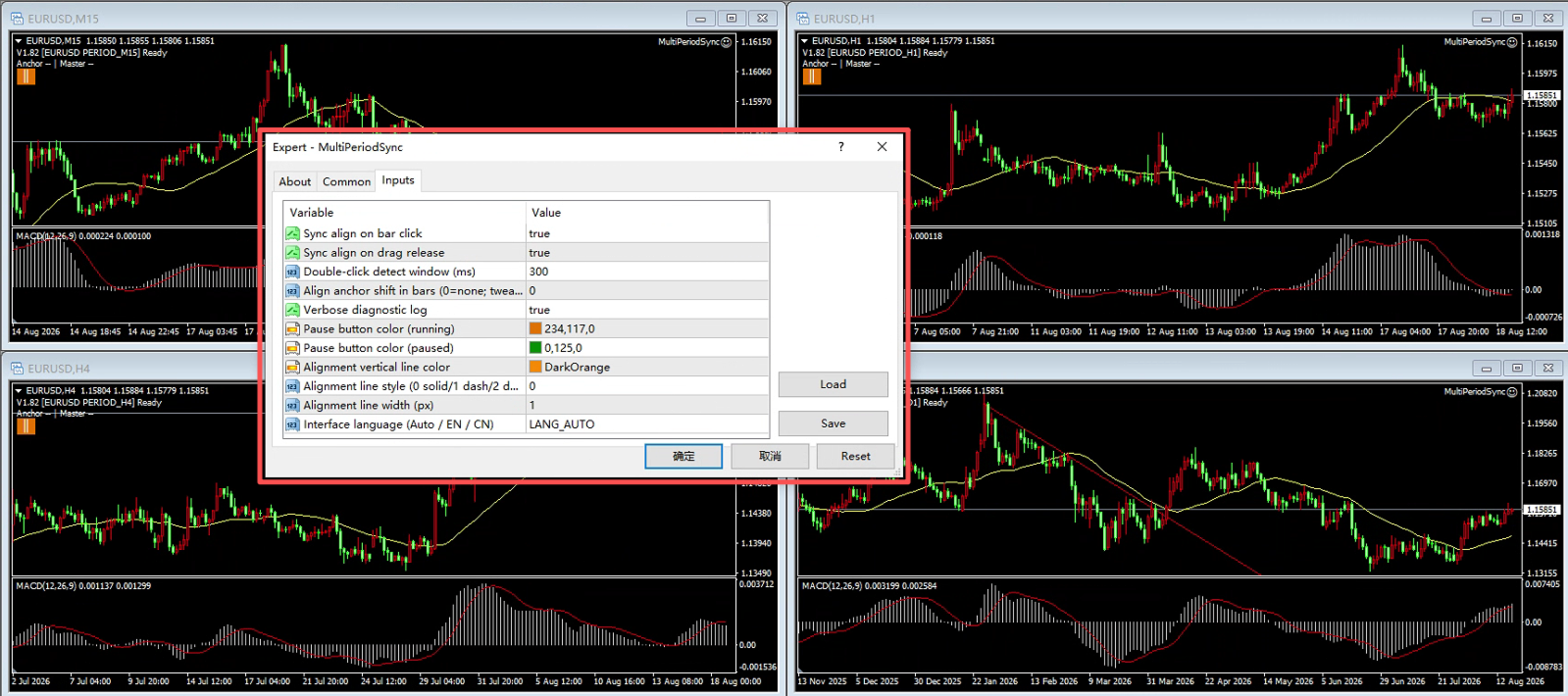
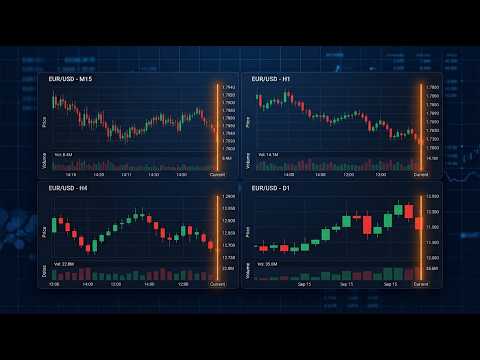
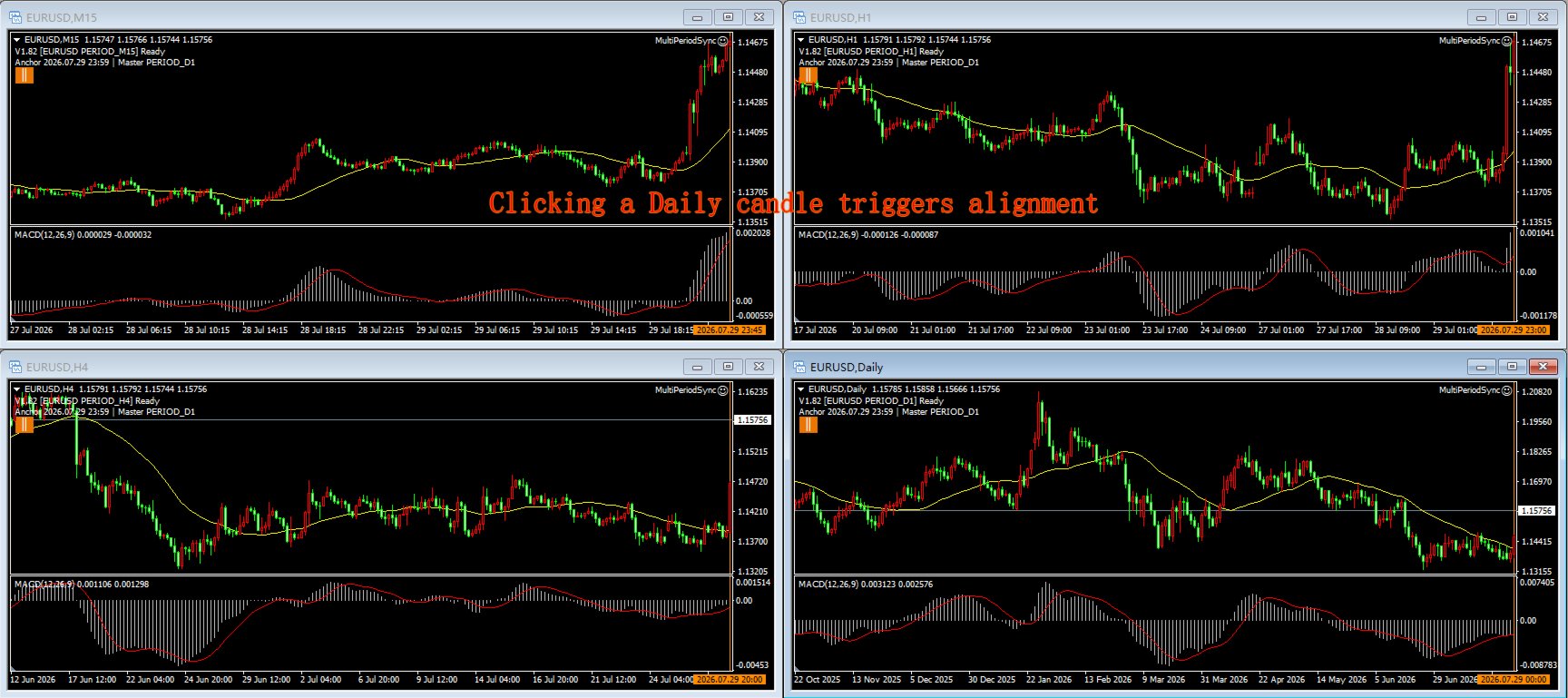
MultiPeriod Sync Charts is a non-trading utility that keeps four charts of the SAME symbol, on DIFFERENT timeframes (e.g. M15 / H1 / H4 / D1), perfectly aligned to the same point in time. Click or drag any one chart and the other three snap to the identical anchor moment — so you can read multi-timeframe confluence without manually scrolling each window. It is designed as a replay training aid: build multi-timeframe confluence intuition by reviewing how small and large timeframes line up at any moment, sharpening your K-line and indicator pattern recognition.

KEY FEATURES

  • One-click alignment: click a bar on the main chart; all four charts align so that bar's period-end time sits at the right edge of every chart.
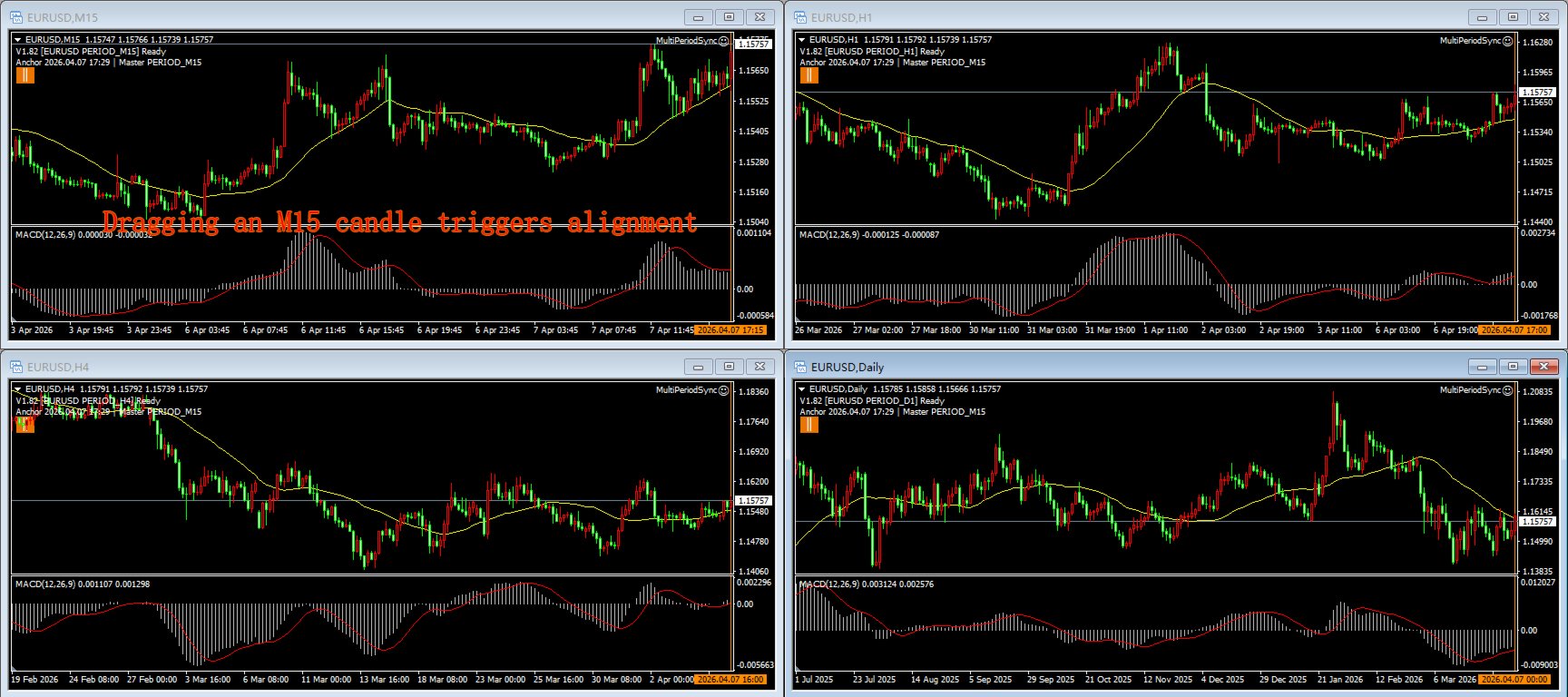
  • Drag alignment: drag on the main or sub-window; the other three charts freeze during the drag and snap into place the moment you release.
  • Independent browsing & zoom: each chart scrolls and zooms freely on its own — pure browsing never triggers sync, never snaps back, and alignment always stays anchored to the same moment.
  • Vertical anchor line: after each alignment a configurable vertical marker is drawn on every chart, so the shared time point is always visible.
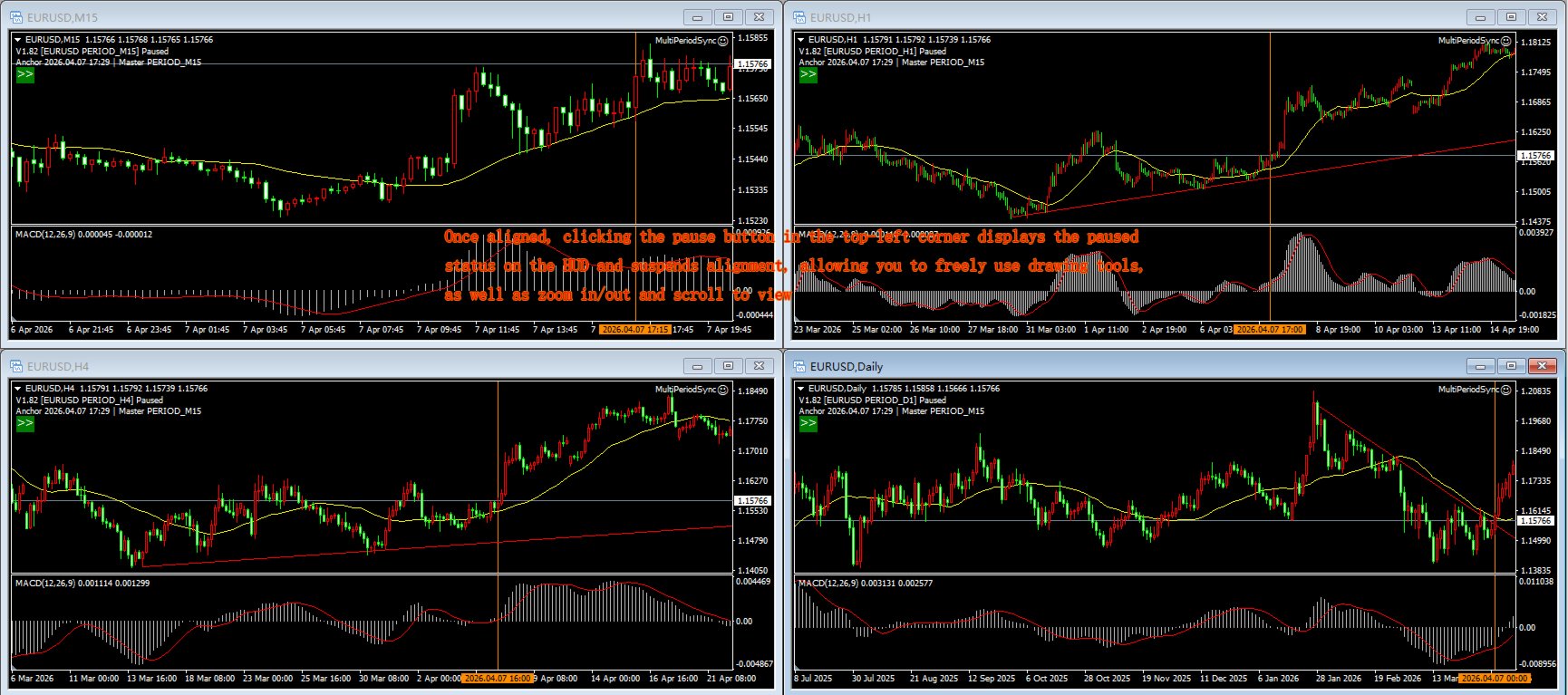
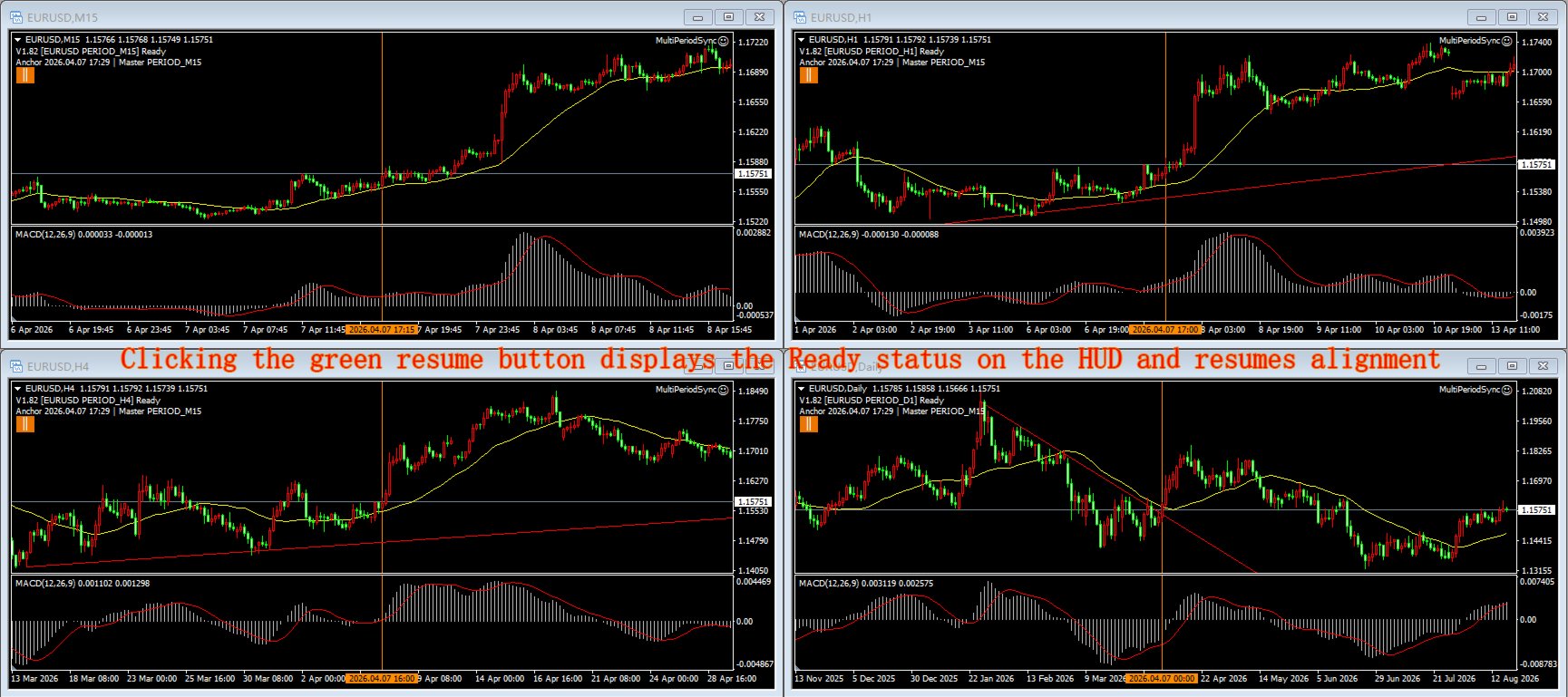
  • Global pause: one button pauses sync on all four charts at once (wheel browsing still works); resume from any chart. Button state is mirrored everywhere. The button area is exempt from alignment — clicking it never fires a sync.
  • Double-click filter: a short click is distinguished from a double-click, so you can still select objects / open the context menu without firing a sync.
  • Bilingual UI: auto-detects terminal language (Chinese / English), or force one.
  • 11 configurable inputs: click/drag sync toggle, UI language, debug logging, pause-button colors, marker color/style/width, double-click window, anchor offset.

HOW IT WORKS

Instances communicate through MT4 Global Variables — no DLL, no internet connection required. Attach one copy to each of your four charts (same symbol, any periods). Arrange windows with MT4's Tile Vertically (Alt+R) for a quick 2x2 grid, then reorder the timeframes to your preference.

REQUIREMENTS

  • MetaTrader 4 terminal.
  • The same trading symbol on all four charts.
  • AutoTrading must be enabled (the EA uses a timer; it NEVER places a trade).
  • Four chart windows arranged 2x2 (Alt+R tiles them automatically).

INPUT PARAMETERS

  • InpLanguage — UI language: Auto (detect) / English / Chinese
  • InpSyncOnClick — sync when you click a bar (true/false)
  • InpSyncOnDrag — sync when you drag (true/false)
  • InpDblClickMs — double-click filter window in ms (default 300); increase if you click slowly
  • InpAnchorOffset — shift the alignment anchor inward by N bars (default 0)
  • InpDebugLog — write diagnostic info to the Journal (true/false)
  • InpPauseClrRun — pause-button color while running
  • InpPauseClrPaused — pause-button color while paused
  • InpMarkColor — vertical anchor line color
  • InpMarkStyle — vertical anchor line style (solid/dash/dot…)
  • InpMarkWidth — vertical anchor line width (pixels)

NOTES / LIMITATIONS

  • This is an analysis aid, not a trading robot. It does not open, modify or close any position.
  • Alignment targets TIME, not zoom/bar count — each chart keeps its own zoom.
  • After updating the .ex4, simply restart MT4 (or reload the chart) — the EA picks up the new file automatically; no need to delete and re-attach it.
  • Rental expires automatically and the EA is removed from the chart — this tool never trades and holds no positions to manage, so removal is safe with no side effects.

FAQ

Q: Does it trade?
A: No. It only aligns charts.

Q: Why four copies?
A: Four different timeframes are the standard for multi-timeframe confluence — they capture both risk and opportunity more accurately.

Q: Can I use different symbols?
A: Keep the same symbol on all four charts.

Q: Is it a demo-only tool?
A: The Market free trial runs only in the Strategy Tester, which cannot show this tool's 4-chart, interactive features. Use the 1-month low-price rental to try it on live charts.

USER MANUAL

What it achieves

One click or drag aligns all four charts to the same moment in time, so you no longer have to hunt through each chart by hand — build clean standard charts with ease, use them for trading-system training, and sharpen your multi-timeframe intuition.

Important boundaries

  • It does NOT trade. It only aligns charts; never opens/modifies/closes a position. A "sad face" EA icon is normal (means "no trading").
  • All 4 charts must be the SAME symbol (e.g. EURUSD). Different symbols = alignment meaningless.
  • All 4 charts must be in the SAME MT4 terminal — instances communicate via MT4 Global Variables; cross-terminal/account doesn't work.
  • It does not arrange windows for you. Use MT4's Tile Vertically (Alt+R) to auto-arrange charts into a 2x2 grid, then adjust the timeframe order to your preference.
  • Alignment targets TIME, not zoom/bar count. Each chart keeps its own zoom and candle width; only the moment is aligned to the right edge.
  • AutoTrading must be enabled (button turns green) for the EA to run its timer. It still never places a trade.
  • Pause is global. Pause on any chart → all 4 stop syncing (wheel browsing still works); resume from any chart.
  • It only manages its own vertical marks. Alignment lines (prefix MPS_VL_) are auto-updated/deleted; your manually drawn lines are NEVER touched.
  • MT4 does NOT hot-reload EAs. After replacing the .ex4 or changing inputs, just restart MT4 (or reload the chart) — the chart's EA picks up the new file automatically. You do NOT need to delete and re-drag the EA; only restart/reload is required.
  • Independent zoom per chart. Each chart can zoom in/out independently; zoom changes the current chart's view only, never triggers alignment, and alignment always stays anchored to the same moment.
  • Crosshair / drawing tool cancellation. If the chart has a main window but no subwindow, clicking the left button in the (absent) subwindow cannot cancel the crosshair drawing state — right-click on the MAIN chart to cancel.

Preparation

MT4 (build 147631 or similar); a symbol with history downloaded (all periods); 4 chart windows, same symbol, different timeframes; MultiPeriodSync.ex4 deployed.

Install & attach

  • Copy MultiPeriodSync.ex4 to MQL4\Experts\.
  • Refresh Navigator (Ctrl+N → right-click Expert Advisors → Refresh) or restart MT4.
  • Open 4 charts: same symbol, 4 different timeframes.
  • Drag MultiPeriodSync onto all 4 charts (a settings dialog appears; OK = defaults).
  • Enable AutoTrading (turn green). A "sad face" icon is normal.
  • Arrange windows: use Tile Vertically (Alt+R) to auto-arrange a 2x2 grid, then reorder timeframes to taste.

Verification: a two-line HUD status text appears at the top-left of each chart, showing the version (should be V1.82 or newer).

Daily operations

Click-to-align (most used): Click a bar in the MAIN chart area (not subwindow / time axis) → all 4 charts align the bar's period-end time to their right edge.

Drag-to-align: Press and drag (main or subwindow) → the other 3 charts FREEZE during the drag → on release, all 4 align the right-edge bar's open time to their right edges.

Wheel browse / independent scroll (no alignment): Mouse wheel scroll = pure browsing. Each chart scrolls independently; scrolling never triggers alignment and never snaps the view back.

Double-click = select object (no alignment): A double-click (two clicks within InpDblClickMs at the same spot) selects an object for editing — it does NOT trigger alignment. If you click slowly and double-clicks keep being misread as single-click aligns, increase InpDblClickMs.

Pause / resume button (alignment-exempt area): A small button under the HUD (top-left). Orange || = running (click to pause globally); dark-green >> = paused (click to resume globally). The button area is exempt from alignment — clicking it never triggers a sync.

Vertical anchor line: After each successful alignment, one configurable vertical line is drawn on all 4 charts at the aligned moment. Old alignment lines are replaced automatically — never accumulate. Your manual lines are untouched.

Independent zoom (no alignment, keeps state): Zoom in/out on any chart — each chart keeps its own zoom state and candle width. Zoom never triggers alignment and is never pulled by other charts. After zooming, click/drag still aligns all 4 to the same moment.

Operation FAQ

Q: EA shows a sad face, is it broken?
A: No — sad face = no trading, which is normal for this tool.

Q: Clicking a chart doesn't move the others?
A: Check: ① AutoTrading green? ② All 4 charts same symbol? ③ HUD version correct? ④ Click on main price area (not subwindow/axis)?

Q: Charts misalign by 1 bar?
A: Rare; set InpAnchorOffset to 1.

Q: Journal too noisy?
A: Set InpDebugLog=false; HUD unaffected.

Q: Double-click keeps triggering alignment?
A: You are likely clicking slowly — increase InpDblClickMs (e.g. 400~500).

Q: No vertical line appears?
A: Confirm alignment actually fired (click the main chart). Lines appear only after a successful align, and only MPS_VL_ objects are touched.

Q: Crosshair can't be cancelled?
A: If there is no subwindow, right-click the MAIN chart to cancel the drawing state.

Reload after update (no need to re-attach)

MT4 does not hot-reload EAs. After replacing the .ex4 or changing inputs, restart MT4 (or reload the chart) — the chart's EA automatically loads the new file. You do NOT need to delete the EA instance and drag it again; a restart/reload is sufficient. If issues persist, check the HUD version and the Journal log (MQL4\Logs\<date>.log), optionally with InpDebugLog=true.
Produits recommandés
This TraderMaster EA is super helpful for professional trader.  Input Parameter Section: 1) Allow trader to set different line style, such as color, width; 2) Apply our chart style, if set false, it will not change the chart style; 3) Select different panel mode 3.a) Simple Mode, for trader immediately place a market order, pending order, delete and close orders; 3.b) Draw Line Mode, for price action traders who want to trade for trend and reverse in his trading plan; 3.c) Advanced Mode, includ
The advantages of EA TWO CANDLE SMART are: It is equipped with various filters, including: maxspread, maxlot, takeprofit (4 step), stop loss (3 step), profit target per day, and many more. Open order BUY = If iClose[2] > iOpen[2] && iClose[1] > iOpen[1]. Open order SELL = If iClose[2] < iOpen[2] && iClose[1] < iOpen[1]. Target_profit_perday=50; ==> can work on forward test. lockprofit=2;//Minimal Profit in money Step_LockProfit_in_Money=25; Stoploss_in_Money=1000; Stoploss_in %=50;==> Stoploss
Lot Partial Close
Zdravko Petrov
5 (1)
Lot Partial Close Closes your trades automatically by a specific size and at a specific target defined by you. Description: The Lot Partial close is a MetaTrader 4 Expert Advisor designed to automate trading strategies with a focus on managing multiple open orders of different sizes. This EA is versatile, allowing users to customize key parameters to meet their specific trading preferences. Key Features: Partial Close Functionality: The EA incorporates a partial close mechanism for the first t
PerfectLine
Sergio D. Rocha
5 (2)
When drawing a trend line or other objects, there is a natural deviation when you place the object from a higher time frame, and then go to watch it in a lower time frame. PerfectLine is a technical indicator that solves this problem. Once you touch a line after drawing it, Perfect Line will find the exact spot in the lower time frame available for it's position and then rectifies where it should be. Perfect Line uses a five pixels pre-established tolerance, if a difference between the line's no
FIBO Price Calculator  Brief Description 1. Automated Fibonacci Retracement Drawing This indicator automatically draws Fibonacci Retracement lines on the MT4 chart, assisting traders in quickly identifying potential support and resistance levels. 2. Customizable Fibonacci Sequence Users can customize the Fibonacci sequence values, and the indicator automatically converts them into corresponding price levels based on the current market price. 3. Adjustable Indicator Window Position The indicator
CandleStyx
Guillaume Xavier Andre Turlier
MT4 trading tool. Intuitive Dashboard that allows effortless automated trading, saving 99 Strategies , Advanced Money Management , Automatic group orders :  Global Take Profit / Stop Loss, Smart TP (Multi-Level, Position Recovery) and Smart SL (Breakeven, trailing Stop, Multi-Level), Exit Manager , Signals, Strength Indicator , ATR Graph, Price Alert, News Warning…  # If you have any other requirements or are interested in collaboration, please contact (info@styxia.com)   Get more information
Copiador MT4
Luciana Andrea Maggiori
Copiador – La Mejor Herramienta para Copiar Operaciones en MetaTrader 4 Este no es un simple copiador de operaciones que únicamente permite copiar transacciones de forma local entre diferentes cuentas de MetaTrader 4 en cualquier dirección y cantidad. ¡Por supuesto que lo hace! ¡Pero Copiador hace mucho más! Descubre sus características y beneficios a continuación FUNCIONALIDADES DESTACADAS: Copiado entre brokers diferentes : Puedes copiar operaciones desde una cuenta en un broker
Fibonacci Expansion and Retracement Analysis Fibonacci retracing and extended line tools for the MT4 platform, ideal for traders who use the DiNapoli point trading method and the Golden Section trading The main function: 1. You can draw multiple sets of Fibonacci retracements directly, and the relationship between important return points is clear at a glance. 2. Can draw Fibonacci extensions 3. The Fibonacci foldback and extension of the line can be moved left and right for easy observation
TSInfoKit
Salvatore Labriola
This Utility is a test for creating objects on the graph . Drag it on any graph and follow the instructions! Any questions about work program send me mail : info@tradingsolution.it In future I will add more information with new version for now it provides account information: AccountNumber AccountName AccountCurrency AccountCompany Server Account Leverage Stop Out level Balance Equity Margin Free Margin
Success comes from knowledge – this is true for most things in life and especially Forex trading. To become successful, a trader needs to learn technical analysis. Technical indicators are a big part of technical analysis. The problem is that, at first sight, names of technical indicators can sound unpleasantly complicated, for example, MACD, RSI or Stochastic. However, we recommend you not to judge a book by its cover. We will provide you with a fair and simple explanation of the most popular t
Septermber OFFER 85% OFF next price for unlimited version will be 2500$. This is the only time you can get this institutional and professional indicator at this price for unlimited version. Don't dare to miss this. The tool I am about to introduce to you you can't compare it with other tools due to its strategy and accuracy level in predicting the next price directional movement. This tool is designed for serious traders who have decided to make a difference through trading. Be the next person t
This EA is designed to transmit charts to Telegram, as illustrated in the example image. It provides the capability to send charts according to the selected timeframe directly to Telegram. A sample channel is included for demonstration purposes. After installation, please select your own channel or any other preferred option. Please note that this sample channel may be removed without prior notice. The indicator shown in the image is for demonstration purposes only.
ALPC forex Matrix produces signals based on five different strategies . ALPC forex Matrix copies itself to all charts. Quick and easy management is your responsibility. Forex trading is fast control. ALPC MATRIX FOREX SYSTEM DOCUMENTATION !Please open the scalp process according to the hourly trend direction. (does not work with strategy test) ALPC MATRIX 2015-2019 Supportive EA Tool for all Forex Pairs Producer: Mehmet Ozhan Hastaoglu ALPC MATRIX Forex System is actually a supportive tool wher
Trade Copier Global
Laszlo Tormasi
5 (15)
Trade Copier Global: The name speaks for itself. This copier allows you to copy orders between MT4 terminals even if they are not installed on the same computer. Features Copying trades between MT4 terminals around the world with a short delay. Automatically recognizes symbol prefixes. Can connect many Slaves to the same Master. Supports pending and market orders. Supports partial order close (with limitations, see below) Can send messages and notifications to the Slaves from the Master Several
Crypto Market Pro
Daniil Kurmyshev
5 (1)
New opportunities for analyzing cryptocurrency in the usual MetaTrader 4. For example : We select the symbol of the cryptocurrency and attach any indicators, Expert Advisors or scripts. Startup Mode View cryptocurrency; Data collection. Capabilities Work as with a standard currency chart; Automatic update of open charts; Selection of individual cryptocurrency for updating; Selection of individual timeframes for updating; Work on the desired timeframes; Open charts do not affect the work of Cry
Forbex Gann Legacy Fibonacci Confluence Tool One chart. One structure. One complete professional analysis workspace. Forbex Gann Legacy Fibonacci Confluence Tool is designed for traders who want more than another indicator displaying arrows or mechanical signals. It is a complete manual market-analysis and decision-support system for MetaTrader 4 , combining market structure, Gann projections, Fibonacci confluence, historical statistics, multi-timeframe context and practical chart-management too
Becktester Telegram Signals — Turn Telegram Signals into Real Backtests Automatically read signals from real Telegram channels , parse them (Buy/Sell/Entry/SL/TP), and backtest in MetaTrader 4 Strategy Tester . Verify parsing first with Live Parsing Test Mode . Important Information After purchasing the product, please leave a comment on the product page, and I will send you the Telegram Signal History Parser file. This file is not publicly available at the moment and is provided only to verifi
Scalp Master is a very simple and smooth operation system that is designed to help traders facilitate trading and risk management. No Keyboard need to make, take profit or close orders. Every orders parameters are created automatically based on predefined risk and your strategy lines. Such parameters appear friendly on the screen and you just need 1 click to convert to order. The unique algorithm prevent common missed and hit taking profit strategy. Instead of very subjective partial closed by u
Introduction to Harmonic Pattern Scenario Planner The present state of Forex market can go through many different possible price paths to reach its future destination. Future is dynamic. Therefore, planning your trade with possible future scenario is an important step for your success. To meet such a powerful concept, we introduce the Harmonic Pattern Scenario Planner, the first predictive Harmonic Pattern Tool in the world among its kind. Main Features Predicting future patterns for scenario
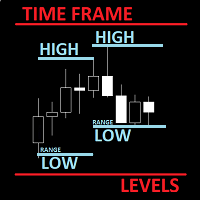
The utility helps to locate in the  lower time frames  the maximum and minimum of the upper  time frame.  The length of time frame level line  represents the temporal  length of the upper time frame. The indicator draws lines that delimit the upper time frames candle and highlights his high-low price, the pips candle range, the returns and the volatility. How it works: Firstly . Choose which time frames levels to represent in the lower ones : monthly, weekly, daily, H4, H1, M30, M15, M5. The
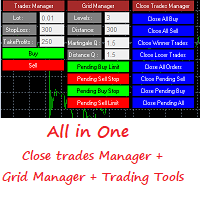
Grid Panel Allows you to :  Set the number of levels (trades). Lot size and you can do Martingale to raise the lot size for each level. Set distance between levels, and you can manage the distance for each level using   Distance Q. Static TP and SL for each level. You can open : BUY STOP / BUY LIMIT / SELL STOP / SELL LIMIT   (levels in one click). Close all buy orders. Close all sell orders. Close all winning orders. Close all losing orders. Close all orders. Close all Pending BUY orders. Clos
Reverse copier is a tool that will open opposite buy/sell orders from your master account. It will help you with low profit EA's that lose consistenly and turn it to wins. Feel free to ask for new functions/features and I will add it. Now it's a simple MT5 to MT4 bridge with straightforward logic of one position open/close.  How to install: https://www.mql5.com/en/market/product/141604
FREE
SNR LEVEL INDICATOR Accurate Snr level indicator will only display Fresh Levels that are close to the Current Market Price. This indicator is very accurate in mapping Support & resistance levels. there is an alert feature when the price TOUCHES the SNR LEVEL, WHEN CLOSE CANDLE BREAK/REJECT SNR LEVEL. INDICATOR MARKING : - SUPPORT LEVEL = V SHAPE - RESISTANCE LEVEL = APEX LEVEL - GAP RESISTANCE & GAP SUPPORT = OPEN CLOSE CANDLE - SUPPORT BECAME RESISTANCE & RESISTANCE BECAME SUPPORT INDICATOR C
Mutiple Orders with ChangernTFnMgt
Opengates Success International
MULTIPLE ORDERS With Symbol and Time Frame Changer Multiple Orders Utility is created to give easy profits-making trades with a little movements and without going long distance to get it all. This Utility opens multiple orders as many trades as the number specified by the User or as many as permitted by your Broker in the same direction on the same currency pair simultaneously. The idea behind it, is that instead of running after 100 - 200 pips which may not likely be attainable in the record
This program is created by algorithm which economy based logic in the trading market. 1. The program able to work with all of currency and trading items  2. Take profit and loss are basically handled by EA program Recommendation: EUR_USD is the most preferred. Please use this program only for MT4. LOT should be managed depends on own deposit. Otherwise, high risk will be driven(e.g 0.1~0.2 lot is recommended when the deposit is 10,000 dollar)
Hello Guys! I want to share with you a very useful tools. Anyone of us who has used MT4 for some time knows how impractical this platform can be for discretionary trading. That's why I created this graphical interface!  Interface is very simple, all the info that you need are in the video and in the screenshot. NB: Before to run the EA Interface, remember to copy the file in the comment in your MT4 folder "Controls". PATH: .../MQL4/INCLUDE/CONTROLS NB: unfortunately the interface can't be test
Blogs : https://www.mql5.com/en/blogs/post/769823 MT4 : https://www.mql5.com/en/market/product/176181 MT5 : https://www.mql5.com/en/market/product/176182 VOLUME BUBBLE [tambangEA] est un indicateur visuel premium de volume et de pression, conçu pour aider les traders à identifier les activités de marché inhabituelles directement sur le graphique. L'indicateur détecte les comportements anormaux du delta/volume et les affiche sous forme de bulles autour des cours. Chaque bulle représente un évé

Bot   DataSource AC   is an automatic trading tool developed by the author based on the DataSource AC indicator. https://www.mql5.com/en/market/product/108165   indicator DataSource AC. The bot must be launched on the   EURUSD H1   time period; it is optimized for this environment. Although if we consider the bot as a tool, then you can optimize the bot on any other time frame and currency pair. The principle of optimization when used on H1 is the following: we optimize at opening prices for 3
Session Overlays Pro par Forex Noob Tube Arrêtez d'encombrer vos graphiques avec des boîtes statiques et des lignes désordonnées. Session Overlays Pro est un outil de cartographie du marché de qualité institutionnelle et entièrement interactif, conçu pour les day traders qui s'appuient sur les horaires de session, les ouvertures quotidiennes et les niveaux de prix extrêmes. Construit autour d'un panneau élégant et cliquable directement sur le graphique, cet indicateur vous permet de basculer ent
Mongol Indicator2
Sumiyabazar Buyanjargal
It's a variation of mid of HH and LL since it compares the higher of HH or LL against a period and twice the number of bars back to avoid whipsaws. I used to display this against lines on a chart, but made a histogram out of it and it looks interesting. It looks good at gauging trend strength and general turns (see image below). The name of the indicator is BAM, which is an acronym for "Below and Above Mid". Ways to use it: 1. To see general trend on longer TFs (more than 30 bars back).
Les acheteurs de ce produit ont également acheté
Bienvenue sur Trade Manager EA, l’outil ultime de gestion des risques conçu pour rendre le trading plus intuitif, précis et efficace. Ce n’est pas seulement un outil d’exécution d’ordres ; c’est une solution complète pour la planification des trades, la gestion des positions et le contrôle des risques. Que vous soyez débutant, trader expérimenté ou scalpeur ayant besoin d’une exécution rapide, Trade Manager EA s’adapte à vos besoins, offrant une flexibilité sur tous les marchés, des devises et i
Trade Indicator Assistant is a powerful MT4 utility designed to turn indicators into automated trading systems. Its main feature is the ability to automatically detect an indicator’s   BUY and SELL signal buffers , without requiring you to know the buffer numbers, search through indicator settings, or modify the indicator source code. Bonus Indicator: After purchasing Trade Indicator Assistant, contact me to receive Trade Signal Pro completely free as a bonus indicator. [Download Demo Version]
Exp COPYLOT CLIENT for MT4
Vladislav Andruschenko
4.69 (65)
Copieur de trades professionnel pour MetaTrader 4 Un copieur de trades rapide, fiable et professionnel pour MetaTrader 4 . COPYLOT permet de copier des opérations Forex entre les terminaux MetaTrader 4 et MetaTrader 5 , avec une synchronisation flexible adaptée à différents types de comptes et styles de trading. La version COPYLOT MT4 prend en charge : MetaTrader 4 → MetaTrader 4 MetaTrader 5 Hedge → MetaTrader 4 MetaTrader 5 Netting → MetaTrader 4   Version MT5 Description complète + DEMO + PDF
Take a Break
Eric Emmrich
5 (31)
Take a Break pauses your Expert Advisors when trading is a bad idea: before news, after a daily loss, outside your trading hours, or when a rule you wrote yourself says so. When the pause is over, your EAs simply continue. Account protection for all your EAs in one tool: news filter, drawdown and equity protection, time filter and custom rules. One EA on one chart protects the whole account, the free indicator gives every chart its own rules on top. Free demo | What is new in 26.09 | Support Ass
Trade Manager MT4 DaneTrades
Levi Dane Benjamin
4.09 (11)
Trade Manager pour vous aider à entrer et sortir rapidement des transactions tout en calculant automatiquement votre risque. Y compris des fonctionnalités pour vous aider à éviter le sur-trading, le trading de vengeance et le trading émotionnel. Les transactions peuvent être gérées automatiquement et les mesures de performances du compte peuvent être visualisées dans un graphique. Ces fonctionnalités rendent ce panneau idéal pour tous les traders manuels et contribuent à améliorer la plateforme
Telegram to MT4 Multi-Channel Copier   copie automatiquement les signaux de trading de vos canaux Telegram directement vers MetaTrader 4. Pas de bots, pas d'extensions de navigateur, pas de copie manuelle. Un signal arrive sur Telegram et l'EA ouvre le trade dans votre terminal en quelques secondes. Et avant de copier un canal, le backtester intégré vous montre ce que ce canal aurait fait sur votre compte. Le produit comprend deux composants : une application Windows qui écoute vos canaux Telegr
FCK CurrencyStrength Pro
Patel Hitendrakumar Mahendrabhai
Hi Friends, " FCK Currency Strength Pro " is a auto & semi auto trading expert with direction of pair. Buy-Sell separate or multi currency in one click. The strategy of  FCK Currency Strength Pro  is a combination of custom indicator, Trendlines, Support & Resistance levels ( Price Action ) and most important secretive trading algorithm mentioned above. Download News Ex4 and csv file You need the following SDSnews.ex4 in MQL4/Libraries and the daylightsavings.csv in MQL4/Files. Only 4 of 5 copi
Le MT4 to Telegram Signal Provider est un outil facile à utiliser et entièrement personnalisable qui permet d'envoyer des signaux à Telegram, transformant ainsi votre compte en fournisseur de signaux. Le format des messages est entièrement personnalisable ! Cependant, pour une utilisation simple, vous pouvez également opter pour un modèle prédéfini et activer ou désactiver des parties spécifiques du message. [ Démonstration ]   [ Manuel ] [ Version MT5 ] [ Version Discord ] [ Canal Telegram ]  N
TradePanel MT4
Alfiya Fazylova
4.84 (95)
Trade Panel est un assistant commercial multifonction. L'application contient plus de 50 fonctions de trading pour le trading manuel et permet d'automatiser la plupart des tâches commerciales. Instructions d'utilisation : https://www.mql5.com/fr/blogs/post/762589 Version d'essai de l'application pour un compte démo : https://www.mql5.com/fr/blogs/post/762644 Comment installer l'application : https://www.mql5.com/fr/blogs/post/762645 Comment tester l'application en mode visuel : https://www.mql5.
VirtualTradePad mt4 Extra
Vladislav Andruschenko
4.85 (61)
Panneau de trading pour trader en 1 clic.   Travailler avec des positions et des commandes!   Trading à partir du graphique ou du clavier. En utilisant notre panel de trading, vous pouvez trader en un clic à partir du graphique et effectuer des opérations de trading 30 fois plus rapidement que le contrôle MetaTrader standard. Des calculs automatiques de paramètres et de fonctions qui facilitent la vie d'un trader et aident un trader à mener ses activités de trading beaucoup plus rapidement et pl
Copieur ->Interaction d'interface pratique et rapide, les utilisateurs peuvent l'utiliser immédiatement       ->>>> Recommandé pour une utilisation sur des ordinateurs Windows ou VPS Windows Caractéristiques: Paramètres de copy trading diversifiés et personnalisés : 1. Différents modes de lot peuvent être définis pour différentes sources de signaux 2. Différentes sources de signaux peuvent être définies pour le copy trading avant et arrière 3. Les signaux peuvent être définis avec des commentai
Risk manager Risk manager - it will simplify the tracking of drawdown and will notify you (alert) when the specified risk is reached, and close/lock orders when the critical DD risk level is reached. If the specified drawdown is exceeded, you can choose two options for actions: All orders will be closed that mean loss will be fixed on depo. The terminal also closes. Instead of fixing the loss on depo, the opposite order will be opened - orders locking will occure. Not a single order will be c
Trade Dashboard MT4
Fatemeh Ameri
4.96 (55)
Trade Dashboard simplifies how you open, manage, and control your trades, with built-in lot size calculation. It allows you to execute trades, manage risk, and control positions directly on the chart, with tools such as partial close, breakeven, and trailing stop. Designed to reduce manual work and help you stay focused on your trading decisions. A demo version is available for testing. Detailed explanations of features are provided within the MQL5 platform. Installation instructions are include
The product will copy all telegram signal to MT4   ( which you are member  ) , also it can work as remote copier.  Easy to set up, copy order instant, can work with almost signal formats, image signal, s upport to translate other language to English Work with all type of channel or group, even channel have "Restrict Saving Content", work with  multi channel, multi MT5 Work as remote copier: with signal have ticket number, it will copy exactly via ticket number. Support to backtest signal. How to
News Filter EA MT4
Rashed Samir
5 (10)
News Filter EA: Advanced Algo Trading Assistant News Filter EA is an advanced algo trading assistant designed to enhance your trading experience. By using the   News Filter EA , you can integrate a Forex economic news filter into your existing expert advisor, even if you do not have access to its source code. In addition to the news filter, you can also specify   trading days   and   hours   for your expert. The News Filter EA also includes   risk management   and   equity protection   features
Unlimited Trade Copier Pro is a tool to copy trade remotely to multiple MT4, MT5 and cTrader accounts at different computers/locations over internet. This is an ideal solution for you if you are a signal provider and want to copy your trades to other receivers globally on your own rules. One provider can copy trades to multiple receivers and one receiver can get trade from multiple providers as well. The provider can even set the subscription expiry for each receiver, so that receiver will not b
Strategy Builder offers an incredible amount of functionality. It combines a trade panel with configurable automation (covert indicators into an EA), real-time statistics (profit & draw down) plus automatic optimization of SL, TP/exit, trading hours, indicator inputs. Multiple indicators can be combined into an single alert/trade signal and can include custom indicators, even if just have ex4 file or purchased from Market. The system is easily configured via a CONFIG button and associated pop-up
Un panneau professionnel pour le trading manuel qui réunit tout le cycle d'une opération dans une seule fenêtre sur le graphique, de l'entrée précise à la protection du compte. Calibrez chaque position au plus près du risque que vous fixez, dessinez votre trade avec des lignes directement sur le graphique grâce au RR Tool, et passez des ordres au marché et en attente, des grilles et de l'OCO. Le panneau prend en charge le suivi de la position : clôture partielle jusqu'à cinq niveaux, six types d
Grid Manual MT4
Alfiya Fazylova
4.71 (17)
Grid Manual est un panneau de trading permettant de travailler avec une grille d'ordres. L'utilitaire est universel, possède des paramètres flexibles et une interface intuitive. Il fonctionne avec une grille d'ordres non seulement dans le sens des pertes, mais aussi dans le sens de l'augmentation des profits. Le commerçant n'a pas besoin de créer et de maintenir une grille d'ordres, l'utilitaire le fera. Il suffit d'ouvrir une ordre et "Grid Manual" créera automatiquement une grille de ordres po
Négociez automatiquement les zones de support et de résistance ou d'offre et de demande une fois que vous avez identifié les zones clés à partir desquelles vous souhaitez négocier. Cet EA vous permet de dessiner des zones d'achat et de vente en un seul clic, puis de les placer exactement là où vous vous attendez à ce que le prix change. L'EA surveille ensuite ces zones et effectuera automatiquement des transactions en fonction de l'action des prix que vous spécifiez pour les zones. Une fois la
PZ Trade Pad Pro MT4
PZ TRADING SLU
3.67 (3)
Effortlessly calculate lot sizes and manage trades to save time and avoid costly errors The Trade Pad Pro EA is a tool for the Metatrader Platform that aims to help traders manage their trades more efficiently and effectively. It has a user-friendly visual interface that allows users to easily place and manage an unlimited number of trades, helping to avoid human errors and enhance their trading activity. [ Installation Guide | Update Guide | Troubleshooting | FAQ | All Products ] One of the k
TradeMirror est un outil de copie d'ordres localisé, spécialement conçu pour les plateformes MT4/MT5, qui synchronise les opérations de trading en temps réel. Tutoriel Veuillez cliquer sur le lien Tutoriel Trademirror pour voir plus de tutoriels. Avantages du produit En se basant sur les normes élevées des logiciels financiers en matière de sécurité, de stabilité et de protection de la vie privée, nous avons procédé à des optimisations en profondeur sur trois dimensions principales : Une interfa
Riskless Pyramid
Snapdragon Systems Ltd
5 (1)
Introduction This powerful MT4 trade mangement EA offers a way potentially to aggressively multiply trade profits in a riskfree manner. Once a trade has been entered with a defined stoploss and take profit target then the EA will add three pyramid add-on trades in order to increase the overall level of profit. The user sets the total combined profit target to be gained if everything works out. This can be specified either as a multiple of the original trade profit or as a total dollar amount. Fo
The News Filter
Leolouiski Gan
5 (25)
Ce produit filtre tous les conseillers experts et les graphiques manuels pendant les heures de publication des actualités, de sorte que vous n'avez pas à vous soucier des pics de prix soudains qui pourraient détruire vos configurations de trading manuelles ou les transactions entrées par d'autres conseillers experts. Ce produit est également livré avec un système de gestion des ordres complet qui peut gérer vos positions ouvertes et vos ordres en attente avant la publication de toute actualité.
Consultez instantanément l'historique de vos transactions clôturées par jour et par semaine, vos transactions ouvertes actuelles et votre exposition au forex sur un seul graphique ! Utilisez la carte thermique pour identifier les transactions rentables et où se situe votre baisse actuelle au sein de votre portefeuille de trading. Boutons de fermeture rapide Utilisez les boutons de fermeture rapide pour clôturer chaque transaction sur un seul symbole, clôturer des transactions individuelles en
Trade panel Sniper
Andrey Kaunov
5 (4)
Простая в управлении Торговая панель обеспечит безопасную торговлю. Вычислит объём сделки от заданного уровня Stop Loss и величины убытка. Поможет рассчитать сейф, и в ноль закрыть неверную сделку. Интуитивно понятный интерфейс делает панель удобной в управлении, освобождая внимание трейдера для принятия решения о входе в сделку. Программа сделает все расчёты за вас. Поэтому работа с помощью панели Снайпер - оптимальное решение для торговли с соблюдением Мани-менеджмента. А это главный ключ к по
Prop Guardian Risk Manager MT4 – Drawdown, Risk & Hedge Protection for Prop Firm and Managed Accounts Prop Guardian Risk Manager is a professional risk-control utility for MetaTrader 4, designed for prop firm traders, money managers and anyone who wants strict account-level risk protection. It does not generate trading signals, strategy entries or trading decisions. Instead, it runs in the background, monitors your account risk and can automatically block new exposure, close managed trades or ac
Trader Evolution MT4
Siarhei Vashchylka
5 (2)
" Trader Evolution " - A utility designed for traders who use wave and technical analysis in their work. One tab of the utility is capable of money management and opening orders, and the other can help in making Elliott wave and technical analysis. Manual (Be sure to read before purchasing) | Version for MT5 Advantages 1. Trading in a few clicks. Immediate and pending orders are available in the panel 2. Money management. The program automatically selects the appropriate lot size 3. Simplifies
DrawDown Limiter MT4
Haidar Lionel Haj Ali
5 (8)
Expert Advisor "Drawdown Limiter"  Vous êtes au bon endroit si vous recherchez un contrôle de drawdown, un limiteur de drawdown, une protection du solde, une protection de l'équité ou une limite quotidienne de drawdown en rapport avec les entreprises de gestion de capitaux (Prop Firm), FTMO, My Forex Fund, ou si vous souhaitez protéger votre compte de trading. Avez-vous déjà eu du mal à contrôler votre drawdown en tradant sur des comptes financés ? Cet EA est fait pour vous. Les entreprises de
Auto Trade Copier
Vu Trung Kien
4.77 (86)
Auto Trade Copier is designed to copy trades to multiple MT4, MT5 and cTrader accounts/terminals with 100% accuracy. The provider and receiver accounts must be on the same PC/VPS. With this tool, you can copy trades to receiver accounts on the same PC/VPS. All trading actions will be copied from provider to receiver perfectly. This version can be used on MT4 accounts only. For MT5 accounts, you must use Auto Trade Copier for MT5 . Reference: - For MT4 receiver, please download Trade Receiver Fre
Filtrer:
Aucun avis
Répondre à l'avis