
NightRider
- Эксперты
- Версия: 1.43
- Обновлено: 11 ноября 2026
- Активации: 10

LAUNCH PRICE OFFER! ONLY 179$
Live Signal: View the live signal
NIGHT RIDER
Automated Night Trading
Developed by AlgoControl
Night Rider is a fully automated, multi-asset trading system for MetaTrader 5, designed to operate during a controlled nighttime session. It manages order placement, open positions, protective levels and position sizing within a single workflow. No grid and no martingale.
Development has included extensive backtesting and forward testing across different market conditions. Optimization is intentionally minimal and limited to a single indicator. Every new version and broker configuration should still be tested independently on a demo account.
One Chart Setup
The current version manages four supported currency pairs from one chart:
- EURAUD
- AUDCAD
- GBPAUD
- AUDUSD
Each pair can be enabled or disabled individually and monitored through the information panel. Broker symbol names can be adjusted to match prefixes and suffixes in Market Watch. These fields identify the corresponding supported pair; they are not additional slots for unrelated instruments.
Important for existing users: the current four-pair configuration replaces the older nine-pair setup. Review your inputs and saved settings after updating.
Trade Management
Night Rider manages pending orders and open positions automatically. Each new position is submitted with protective levels. Take-profit management preserves the existing stop loss; it does not move that stop loss as part of target updates. Open positions can remain active after the entry session has ended.
The system checks broker volume requirements, available margin and trading conditions before sending requests. A skipped or deferred request does not mean that the EA is inactive. Spreads, execution conditions, session restrictions and relevant news can prevent new entries.
Trade Settings
Magic Number
Identifies orders and positions managed by Night Rider. Use a different Magic Number for separate configurations on the same account.
Trade Comment
Defines the comment attached to new orders.
Slippage Points
Sets the requested execution deviation in broker points. Actual execution remains subject to broker rules, liquidity and market conditions.
Run One Chart Setup
When enabled, one EA instance manages all enabled supported pairs. When disabled, the EA manages the supported pair of the chart to which it is attached.
Trade Symbol 1-4
Enables or disables each pair. A disabled pair does not receive new orders from that configuration.
Broker Symbol Names
Identifies EURAUD, AUDCAD, GBPAUD and AUDUSD in the broker's Market Watch. Standard names can be resolved automatically to compatible broker names; an explicit broker name can also be entered for the same pair.
Position Sizing
Fixed Lot Size
Sets the base volume when Risk Level is set to Fixed lot size. Internal symbol-specific sizing adjustments and broker volume rules can affect the final submitted volume.
Risk Level
Selects the position-sizing profile:
- Very high risk
- High risk
- Medium risk
- Low risk
- Very low risk
- Fixed lot size
Automatic sizing uses the selected profile, the applicable account-capital reference and internal symbol-specific adjustments. Volumes are normalized to the broker's minimum, maximum and volume step. If a positive calculated volume is below the broker minimum, the minimum permitted lot is used only when the margin checks allow it. This can increase the effective exposure of small accounts.
Only Up
Optional and disabled by default. When enabled, the capital reference can remain based on the highest recorded balance after losses. This can increase effective risk relative to the current balance and should be evaluated carefully before use.
Risk profiles are not a guaranteed limit on losses. Several simultaneous positions can significantly increase total account exposure and drawdown. Gaps, slippage, commissions and swap can also affect the final result.
High-Impact News Filter
Enabled by default. The filter evaluates relevant scheduled high-impact events for the currencies associated with the traded pairs. It can block affected pairs without automatically blocking the entire portfolio. Existing positions remain managed.
Live operation uses the MetaTrader 5 economic calendar, with time conversion linked to the verified reference clock. Covered historical tests use an embedded calendar snapshot; historical coverage and future schedules are not unlimited.
A calendar error is reported through the panel, Journal and a notification. The error itself does not automatically disable every pair. Review and resolve any calendar warning rather than assuming that news protection is available.
Time Synchronization
Live session timing uses WorldTimeServer synchronization. In MetaTrader 5, open Tools > Options > Expert Advisors, enable Allow WebRequest for listed URL and add:
https://www.worldtimeserver.com
Review the EA's notifications and Journal if synchronization is unavailable. New entries require a valid operating-time check.
Broker GMT Offset - Winter / Summer
These dropdowns apply to backtests only. Select the historical winter and summer offsets used by the broker being tested. They do not replace live time synchronization.
Information Panel
Show Info Panel Live
Shows or hides the panel on live and demo charts.
Show Info Panel Backtest
Shows or hides the panel in visual testing. Disabling it can reduce testing overhead.
Panel Scale in Percent
100 is the standard size. Lower values reduce the panel; higher values enlarge it, including text and graphical elements.
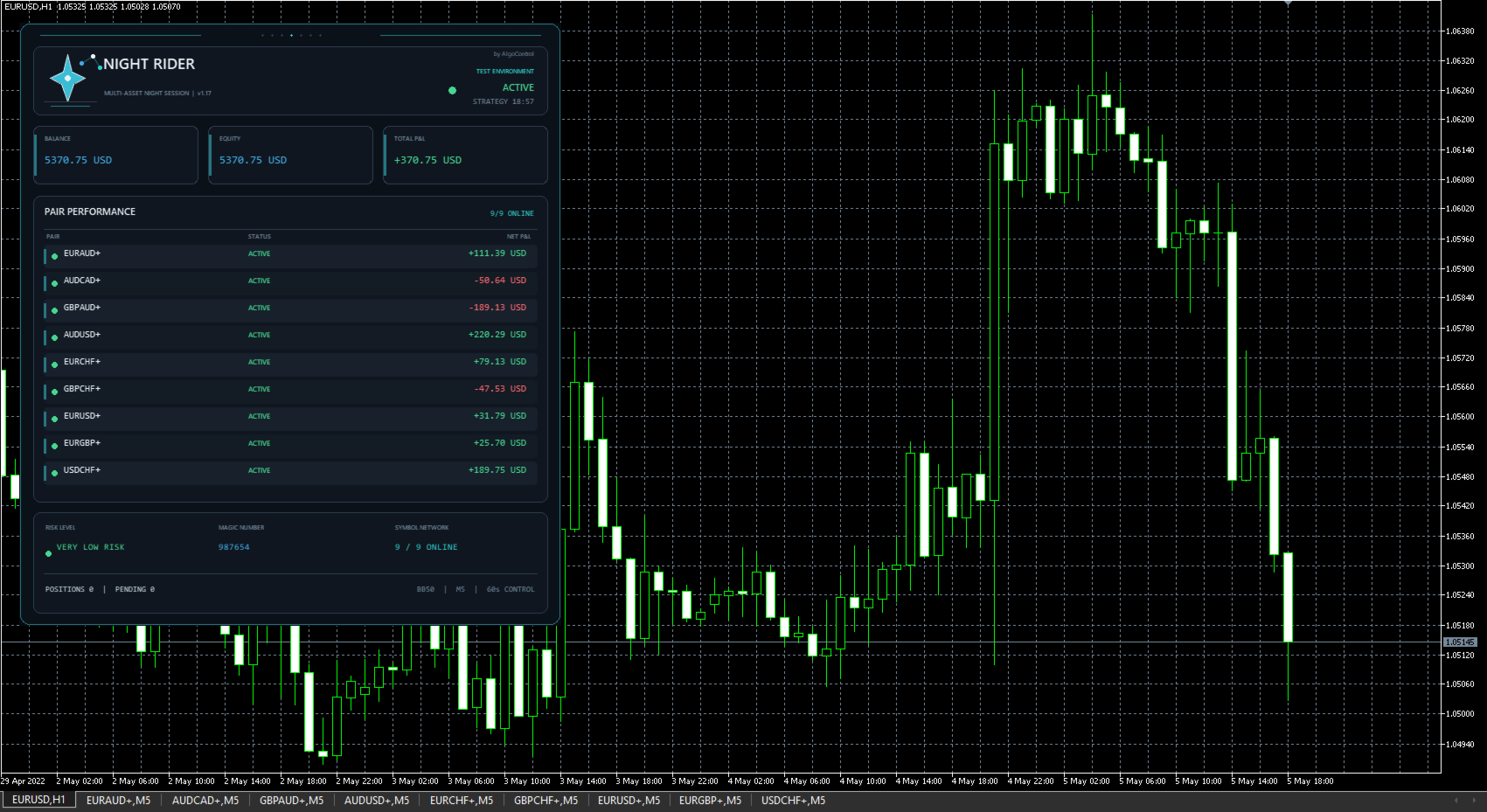
The panel provides account information, individual pair status and performance, the selected sizing mode and news-filter status.
Realistic Expectations and Transparency
Night Rider is a real trading system exposed to changing market conditions. Losing trades, drawdowns, periods of limited growth and periods of underperformance are normal possibilities. Performance is not expected to follow a perfectly linear path.
Transparency is essential in automated trading. A responsible evaluation should consider the complete testing period, account size, selected settings, costs, losing trades and maximum drawdown, not only selected profitable periods or screenshots. Drawdown must not be hidden or presented as an impossible event.
Broker pricing, spreads, commissions, liquidity, slippage, swaps and execution quality can produce materially different results. Backtests and forward tests do not guarantee future performance or identical results across brokers.
Always test the current version on a demo account with your intended broker before using it live. Use only capital you can afford to lose.




























I bought it some time ago, and so far I have had some positive results. The broker is important, as are the pairs you run. The support is great also. Looking forward to improving it even more.