 MetaTrader 5
 Эксперты
 Индикаторы
 Библиотеки
 Утилиты
 Виджеты
 Правила
Смотри обучающее видео по маркету на YouTube
Как купить торгового робота или индикатор
Запусти робота на
виртуальном хостинге
виртуальном хостинге
Протестируй индикатор/робота перед покупкой
Хочешь зарабатывать в Маркете?
Как подать продукт, чтобы его покупали
Торговые утилиты для MetaTrader 5 - 30
 Ниже представлены торговые программы, упрощающие трейдинг в MetaTrader 5. Наведите курсор на товар, чтобы прочесть описание товара и его предназначение.
Easy to use Trade Panel that I personally use for my personal trading and trade copying. For Trade copy: This is the Slave Script, you need the extra Master Panel. Search for "Trading Panel and Copier"
Functions of the Master Panel: Automatic Lotsize calculation via given risk in % Buy and Sell Mode Manage Core and Addon Positions Limit Order Function Stop Loss and Limit Lines Hotkeys Close last Trade Close all Trades Manual SL price Manual TP price Manual Limit price Trade Copy via slave scri
FREE

FOX CUSTOMER BENEFITS Verified customers with qualifying MQL5 Market purchases may be eligible for complimentary FOX commercial Expert Advisors. Learn more about the FOX Customer Benefits Program: https://www.mql5.com/en/blogs/post/774575
Dpi Trading Command Center is a read-only account monitoring and analysis utility for MetaTrader 5. It provides a unified dashboard for reviewing account status, open positions, pending orders, trading history, performance statistics and economic-calendar ev
FREE

FOX CUSTOMER BENEFITS Verified customers with qualifying MQL5 Market purchases may be eligible for complimentary FOX commercial Expert Advisors. Learn more about the FOX Customer Benefits Program: https://www.mql5.com/en/blogs/post/774575
ACCOUNT NUCLEAR One account. One control panel. Full manual authority when you need it. Account Nuclear is a free MetaTrader 5 utility built for traders who manage multiple positions, pending orders, manual trades or several Expert Advisors on the same account
FREE

Совершенствуйте свой анализ рынка с помощью Isheguve Trend Scout! Устали вручную рисовать линии тренда и упускать ключевые изменения рынка? Isheguve Trend Scout — это утилита для MQL5, созданная для того, чтобы дать вам преимущество за счет автоматического определения и построения линий тренда на вашем графике. Почему стоит выбрать Isheguve Trend Scout? Легкое обнаружение тренда: Хватит гадать, позвольте приложению сделать всю работу за вас. Trend Scout Pro интеллектуально анализи
FREE

Take control of your trading performance with the Pro Dashboard Screener Designed for serious traders, this utility provides a clean, professional, and real-time overview of your account's health directly on your chart. Stop switching between tabs to check your stats. With the Quant Pro Dashboard, your key metrics are always front and center, allowing you to focus on what matters most: your analysis. Key Features: Account Intelligence: Automatically detects your Account Number and Broker detail
FREE

Free for a limited time, grab it now! Please, if you like this utility, leave a review, it helps us build more tools like this.
Many retail traders fail because they enter trades when a market session is already "exhausted." Session Monitor gives you the context you need by comparing current price movement against historical session averages.
The utility calculates the absolute range (the distance between the highest and lowest price reached) during the session. It is a MT5 utility that trac
FREE

Название продукта: StopAndTake — установка Stop Loss и Take Profit для BUY и SELL StopAndTake — бесплатный скрипт для MetaTrader 5, который позволяет установить или перенести Stop Loss и Take Profit у нескольких открытых позиций за один запуск. Перетащите скрипт на нужную цену графика, выберите направление позиций и подтвердите действие. Скрипт обрабатывает все позиции выбранного направления по инструменту текущего графика, включая позиции, открытые вручную и советниками. Позиции других инструме
FREE

Ultimate MT5 to Telegram Public Channel sends controlled trades (via symbol, magic, comment) to a public telegram channel. It sends open and closed trades, including pending orders and TP/SL modifications, along with chart screenshots, to this public telegram channel. Additionally, you can send trade reports of open trades and summary profit/pip reports for day, week, or month. You can customize the design of the trade actions or reports with variables and emoticons.
A beautiful panel allows
FREE

Features The Expert Advisor (EA) is a semi-automated trading system that blends user-initiated entries with algorithmic trend management. Trade entries are triggered manually, while scaling, trailing stops, and risk control are handled automatically by the EA. Functional Specifications 1. Trading Modes Manual Execution Mode Trades initiated via on-chart control panel User selects Buy or Sell direction EA applies predefined Stop Loss and Take Profit values Trend management logic activates after
FREE

Tired of manually closing dozens of charts or managing multiple positions one by one?
With Close All Pro, you can clear your workspace in a flash—saving time, reducing clutter, and streamlining your trading workflow. Love it? Hate it? Let me know in a review! Feature requests and ideas for new tools are highly appreciated. :) Try "The AUDCAD Trader":
https://www.mql5.com/en/market/product/151841 ️ ALWAYS TEST THIS EA ON A DEMO ACCOUNT BEFORE USING IT LIVE! Description: Close All Pro is desi
FREE

Горячие клавиши плюс клик левой кнопки мыши на графике.
Советник открывает сделки, выставляет лимитные и стоповые ордера, удаляет ордера и закрывает позиции, также делает реверс открытых позиций, выставляет прописанные в настройках стоп лосс и тейк профит.
(реверс только на неттинговых счетах)
При запуске советника можно посмотреть подсказку как действует советник при нажатии клавиши + клик на графике.
Правее последнего бара, ниже цены Ctrl+ЛКМ - OpenSell
Правее последнего бара, выше
FREE

Graph the take profit and stop loss levels of closed and open trades. Green rectangles for the take profit zone and red rectangles for the stop loss zone. It updates automatically when opening a trade and extends the rectangle to the last open candle. Useful for analyzing whether the trade limits have been chosen correctly. Its only input parameter is the date from which you want to start graphing, in the format year-month-day.
FREE

Export Deals to CSV - Excell File location: HistoryDeals/<SERVER>/<LOGIN>.<DATETIME>.csv Works as an Script, reading all DEALS in history and exporting it as a plain text CSV file There's no option to change. There's no WebRequest. There's no DLL use. I need to write 300 characters to allow this product being exposed at MQL5 market place. It's simple to use, plug it in graph and wait completion.
FREE

简单交易面板。 //+-------------------------------------------------------------------------------------------+ 实现开平,全平简单功能。 参考系统自带面板样式设计。 //+-------------------------------------------------------------------------------------------+ 此为更新版。应部分使用者建议,对上一次有效使用的仓位作了保留,对价格数据显示作了部分放大修饰。 …… //+-------------------------------------------------------------------------------------------+ 喜欢的朋友欢迎下载使用。
FREE

TMU Copier – Copy Receiver Utility for MetaTrader 5 TMU Copier is a professional Copy Receiver Utility for MetaTrader 5 that works exclusively with Trade Manager Ultimate – Risk, Alarms & CopyTrade (Master Utility) . It receives and executes trades published by one or more Master Utilities running on the same Windows computer or VPS , providing fast local synchronization, flexible lot scaling, symbol mapping, and advanced copy controls. This is NOT a standalone utility. It does not generate tra
FREE

Скрипт для быстрого закрытия рыночных и отложенных ордеров. Этот зацикленный скрипт гарантированно закроет все выбранные ордера. Он будет работать, пока не закроет все выбранные позиции и удалится когда сделает свою работу. Если у Вас много открытых позиций этот скрипт поможет вам. Интуитивно понятный интерфейс 1) Просто бросьте его на график. 2) Выберите ордера, которые надо закрыть. По умолчанию выбраны все! 3) нажмите кнопку "Close". Если вы забыли включить Авто торговлю, будет выдано сообщен
FREE

Professional Manual Trading Assistant for MT5 BRIAN BREYLI VANA – Professional Trade Manager Dashboard & Market Intelligence EA for MetaTrader 5 Professional Manual Trading Assistant with Hybrid Position Management BRIAN BREYLI VANA is a professional manual trading assistant for MetaTrader 5 that combines one-click execution, intelligent position management, Market Intelligence, and Hybrid Position Management into a single trading dashboard.
Unlike conventional Expert Advisors, it never opens p
FREE

Утилита для непрерывной фоновой загрузки и синхронизации истории котировок по всем 21 таймфреймам MetaTrader 5. Данный инструмент необходим трейдерам и разработчикам, работающим со структурами рынка (Market Structure, Smart Money, Price Action). Утилита гарантирует отсутствие «дыр» и пропусков в истории, что критически важно для точного мультитаймфреймового анализа и корректной работы индикаторов. Входные параметры: Synchronization interval (in minutes) — частота (в минутах), с которой утилита п
FREE

MeeKiew Easy Order Manager (MT5) is a high-performance trading utility designed to streamline order execution and management on the MetaTrader 5 platform. Specifically optimized for use with the MeeKiew Dynamic MTF Pivot (MT5) indicator, this tool allows traders to react to market levels with speed and precision. While MT5 can sometimes feel slower in manual execution, this manager bridges the gap with a "One-Click" philosophy and advanced bulk management features. MeeKiew Dynamic MTF Pivo
FREE

Scalping Control Panel Scalping Control Panel is a simple and practical trading tool designed for scalpers and traders who use grid-style entries. The EA gives you direct control over your trading setup from a clean panel on the chart. Start a BUY or SELL grid with one click and customize the main parameters before entering the market. Main Features One-Click BUY & SELL
Start a BUY or SELL sequence directly from the chart. Adjustable Lot Size
Set the lot size you want to use before starting th
FREE

EA Manager RP is a simple yet powerful tool that can help protect your account from other EA's that don't have the features. This came about because I personally use a 3rd party EA for trading but it just doesn't have all the bells and whistles so this was my work around and it works great. I started off with a fully automated EA but unfortunately we can't have DLL imports here so this is the next best thing. What this EA does: Add a start and stop time Maximum open trades Days of the week you w
FREE

OrderBook Utilities - это скрипт, который выполняет несколько вспомогательных операций с hob-файлами истории стакана, сохраненными с помощью OrderBook Recorder . Скрипт обрабатывает файл для рабочего символа текущего графика. Конкретный файл определяется с помощью параметра CustomDate (если он заполнен) или по точке сброса скрипта на график. В зависимости от операции, результат обработки пишется только в лог, или в лог и выходной файл. Операция выбирается с помощью параметра Operation: проверка
FREE

Advanced Expert Advisor Monitor: Shows whether your Expert Advisor is still running, right on the chart. Keeps reporting its trades even after the Expert Advisor has stopped or was removed. Closed profit, win rate and floating profit for Today, 3 Days, Week or Month. A 365-day view: profit factor, drawdown, expectancy, streaks and more. Draws only your Expert Advisor's trades on the chart, by magic number. Popup and phone alerts when the Expert Advisor unexpectedly crashes.
Does this sound fa
FREE

*** Free Version: Maximum Lot 0.10 ***
CopyCopy: Smart Replication Manager for MT5 CopyCopy is the ultimate tool for those who want to replicate trades with complete autonomy. Many signals and EAs operate with minimum lots (0.01) that do not match your account size or your growth strategy. With CopyCopy, you turn this limitation into an opportunity, taking full control over volume and risk. The difference? You don't have to copy "all or nothing." You decide exactly where the orders come from.
FREE
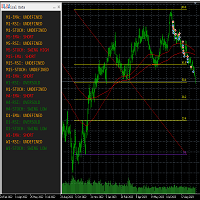
This tool helps to get a quick overview of a market. In one panel, indicators show trend, swing highs/lows and overbought/oversold information of various time frames (M1,M5,M15,H1,H4,D1,W1). Fibonacci can be used to identify different price levels. The input parameters of all indicators can be set by the user. The time frames can be changed as desired. The user can decide for himself which indicators he would like to see in the panel. Fibonacci appears on the chart at the next minute change at t
FREE

Clear All Stops and Takes — Простое решение для мгновенного удаления уровней SL/TP Удалите все уровни Stop Loss и Take Profit одним кликом! Clear All Stops and Takes — это удобный скрипт, созданный для трейдеров, которые хотят быстро и эффективно удалить уровни SL и TP на всех открытых позициях. Простое управление и мгновенное выполнение делают этот инструмент незаменимым для работы в динамичных условиях рынка. Основные преимущества: Экономия времени: Не нужно вручную редактировать каждую позици
FREE

opnMAX Ponos: Utility Overview opnMAX Ponos is a highly interactive, institutional-grade risk management and trade execution utility designed for MetaTrader 5. It acts as an on-chart graphical dashboard that allows for precise, mathematically validated position sizing and one-click order execution. Instead of manually calculating risk thresholds before taking a trade, Ponos uses a reactive, omni-directional calculation matrix to handle the math in real-time. Key Functional Features Omni-Directio
FREE

History On Chart is an indicator that shows the "trail" of all trades made in a specific period of time. It shows the entry and exit point with their respective dates and prices. It also shows the type of trades and the cash result. Open trades are also displayed, but only the entry point. The indicator is free and fully customizable. If you have any questions please contact us. Enjoy!
This is a free indicator, but it took hours to develop. If you want to pay me a coffee, I appreciate a lot <
FREE

TRAILING PRO
This is not the usual trailing stop.
I created it because, when using classic trailing stops on Gold and other markets, I always ended up in the same situation: • either I exited good trades too early • or I left too much profit on the table when price pulled back
What “If you find this tool useful, a positive review is always appreciated. Since it’s free, your feedback is the best way to support its development.” it does Trailing Pro manages positions in steps , not in a continu
FREE

The Problem Every Trader Faces Every serious trader knows the struggle: Wasted time scrolling through years of data to find specific dates Missed opportunities because you can't quickly jump to historical patterns Frustrating navigation with manual scrolling that never lands exactly where you need No quick way to mark important dates for future reference Inconsistent chart positioning when trying to compare different time periods These inefficiencies cost you valuable analysis time and
FREE
SEREDINA — это ваш универсальный инструмент для оценки и контроля позиций! Этот скрипт автоматически вычисляет среднюю цену открытых позиций на покупку (BUY) и продажу (SELL) для любого торгового инструмента на платформе MetaTrader 5, выводя на график не только точные данные, но и визуальные уровни, которые помогут вам мгновенно увидеть уровень среднего входа по вашим позициям. С помощью SEREDINA вы сможете: Определить точку «средней цены» для открытых ордеров BUY и SELL по текущему активу. Быст
FREE

Book Data Binance! Вы когда-нибудь мечтали получить доступ к ордеру на любимую криптовалюту, с подробной информацией о ценах, объемах и анализом несоответствий, даже если ваша биржа не предоставляет доступ к DOM? С Book Data Binance это теперь реальность! Этот скрипт на MQL5 был специально разработан для трейдеров криптовалют, стремящихся глубже понять динамику рынка. Основные функции: Прямой доступ к книге ордеров любой криптовалюты, доступной в меню скрипта. Обновление данных в
FREE

Anti Revenge Trading Police Bot v1.80 (Revenge Trading Protector) Разработано Mindfultradeness
Затягивает ли вас цикл реванш-трейдинга, где каждый убыток соблазняет снова войти в рынок? Представьте себе стража у вашего плеча — Anti-Revenge Police Bot, ваш главный инструмент для преодоления реванш-трейдинга! Эта инновационная утилита следит за каждым вашим шагом, обнаруживает закрытые убытки и активирует настраиваемый период охлаждения, чтобы остановить токсичные импульсы. С реальным вмешатель
FREE

Иногда хочется просто на минутку выдохнуть: пока график “дышит”, можно отвлечься и размять внимание — не уходя из терминала. ARKAVELLE рисуется прямо на чарте: это маленькая аркада для спокойного перерыва между идеями и сделками. Правила простые • Цель: отбивать мяч платформой и разбивать кирпичи. • Управление: стрелки ← / → или мышь (движение внутри панели). Ловите падающие бонусы — они меняют темп и добавляют веселья: • Expand — расширяет платформу на время. • Slow — замедляет мячи на время.
FREE

Утилита управляет любым параметром любого индикатора с помощью прокрутки колеса мышки. Вы можете установить данную утилиту и изменить интерфейс любого индикатора из стандартной поставки терминала . Для пользовательских индикаторов, а так-же купленных на "Market", есть утилита Universal Scroller . Принцип действия
Утилита управляет одним из параметров, который вы выберете, меняя его с помощью прокрутки колеса мышки. Активация режима прокрутки включается наведением курсора на кнопку, или нажатие
FREE

Автоматически копирует открытие buy/sell сделки с одного торгового счета (M aster ) на другой счет (S lave ) с автоматическим переносом общего Take Profit для своего направления. Предназначен для сеточной, усредняющей и мартингейл-торговли. Slave повторяет торговые действия Master и не принимает собственных решений. Терминалы не обязаны находиться на одном устройстве. Принцип работы:
Master-аккаунт открывает сетку BUY позиций по EURUSD и устанавливает единый Take Profit. Через пару секунд Slav
FREE

Binance - всемирно известная биржа криптовалют! Чтобы упростить анализ данных рынка зашифрованной цифровой валюты в реальном времени, программа может автоматически импортировать данные транзакций Binance Futures в реальном времени в MT5 для анализа.Основные функции:
1. Поддержите автоматическое создание торговых пар фьючерсов USD-M Министерством валютной безопасности, и базовую валюту также можно установить отдельно. Базовая валюта BaseCurrency пуста, чтобы указать все валюты, и любая криптова
FREE
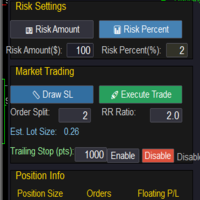
Market & Pending Risk Manager EA Operation Manual Market & Pending Risk Manager is a professional MT5 trading panel EA that integrates multiple functions such as market order trading, pending order trading, risk management, and trailing stop loss, providing traders with a comprehensive trading solution. Core Advantages Intelligent Dual-Mode Trading Market Order Mode: One-click buy/sell for fast execution Pending Order Mode: Precise entry to wait for the optimal timing Seamless Switching
FREE

Arixis Trade Broadcaster — MT5 Trade Notifications Turn your MetaTrader 5 trading activity into professional, automated notifications. Arixis Trade Broadcaster is a MetaTrader 5 Expert Advisor designed to monitor trading activity across your account and publish informative messages to external communication platforms. Whether you trade manually, use Expert Advisors, or manage several strategies, Trade Broadcaster helps you follow trading activity without continuously watching your terminal. Supp
FREE
Recovery MA Crossover Expert — The ultimate trading solution that combines precision with power. This expert advisor uses a sophisticated Moving Average crossover system to detect market trends and enter trades with accuracy. Designed for traders seeking consistent daily profits and a smart recovery mechanism to bounce back from losses. Features: Daily trade opportunity based on clear MA cross signals. Automatic recovery : Lot size doubles after a losing day to reclaim losses effectively.
FREE

Pivot points have been a trading strategy for a long time, originally used by floor traders. Using this method, you can understand where the market is going in a day through a few simple calculations.
The pivot point in the pivot point method is the turning point of the market direction during the day. A series of points can be obtained by simply calculating the high, low and closing price of the previous day. These points may form key support and resistance lines. The pivot point, support and
FREE

"Are you tired of losing money on unsuccessful trades? Look no further than EA Trailing Stop! Our program is designed to help you prevent losses and control your trades efficiently. With features such as adjustable stop loss and more, you can rest assured that your trades are in good hands. Don't wait any longer to start making successful trades. Try EA Trailing Stop today!"
You can use this as a starting point and tailor it to your audience and the platform you're using. This EA Trailing Stop
FREE

A manual trading tool that places buy, sell, stop, and limit orders. Easily configure your settings for risk, take profit, stop loss, break-even, and trailing stops. It works in any timeframe and serves as a highly reliable tool for manual trading. Settings can be changed easily right on the panel—no more clicking the small Expert Advisor icon in the corner of the screen.
FREE

A complete copy trading EA suite that automatically replicates trades across MT4 and MT5 platforms. Supports all four combinations — MT4→MT4, MT4→MT5, MT5→MT4, and MT5→MT5 — in a single package. Uses the FILE_COMMON shared folder method for fast, reliable signal delivery within the same PC or VPS.
Overview
CopyTrading EA Suite is a utility package that automatically replicates trades between MetaTrader 4 and MetaTrader 5 platforms. A single Sender EA can broadcast signals to multiple Receive
FREE

Main Features Automatically closes open positions at a specified time. Symbol filter: close positions only for a selected instrument (or leave blank to affect all). Magic number filter: close only positions with the specified magic number (or all, if set to -1). Displays operational status and parameters directly on the chart . ...and many other interesting features
FREE

The Expert Advisor "TimeLeft Display" shows the remaining time until the close of the current candle in a digital display. The time is displayed in days, hours, minutes, and seconds. Features: Time Calculation: Calculates the remaining time until the close of the current candle based on the current timeframe of the chart. Digital Display: Shows the remaining time in a digital format. Customizable Font and Size: Allows selection of the font (Arial, Arial Black, Aptos Display, Tahoma,
FREE

Manage Positions is an MT5 script designed with five distinct options for efficiently managing open positions. It offers versatile functionality, allowing for both global impact across all currency pairs and localized influence on specific pairs of interest. Additionally, users can target particular currency pairs to tailor their actions accordingly. For instance, leaving the "LEAVE BLANK to Manage Positions for ALL Symbols" field empty enables closing all positions universally, while specifyin
FREE
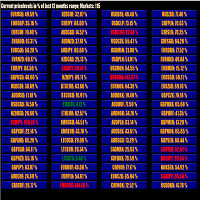
This tool scans up to 200 markets simultaneously and displays the current price level in a range specified by the user in a chart window.
By clicking on one of the buttons, a new chart window opens for the selected symbol. A template file can be specified as an input parameter, which is applied directly to the opened chart window.
The user can specify the font size of the buttons, the number of buttons per column and the level at which marking should take place in the input parameters. The upd
FREE

Торговый помощник NewsRForestExpert v4.01
1. Назначение и принцип работы
NewsRForestExpert — торговый помощник для MetaTrader 5, использующий встроенный экономический календарь и модель машинного обучения «Random Forest» библиотеки ALGLIB (далее «модель»).
Помощник: - работает на валютной паре EURUSD на таймфреймах M1 – M5; - загружает историю новостей за выбранный период и формирует обучающую и тестовую выборки; - обучает на полученных данных или загружает уже готовую обученную модель; - пр
FREE

Turn Economic Chaos into Consistent Opportunities
The financial markets move at the speed of news—miss a headline, and you miss a profit. Introducing the News Action AI Bot , a cutting-edge trading solution designed to capitalize on high-impact economic events with surgical precision. Built by traders, for traders, this bot combines real-time news analysis, AI-driven decision-making, and customizable risk management to transform volatility into your greatest advantage. Why This Bot Stands
FREE

Entry Cluster Indicator for MT5 Entry Cluster is a professional-grade trading system engineered to deliver precise, high-probability entries without repainting or hindsight bias. Designed for serious traders, it integrates momentum analysis with institutional price levels to identify only the most reliable setups. Signal Clarity : Dots mark potential buy/sell zones, allowing traders to prepare. Gems confirm execution points, triggered only when momentum aligns with key levels. Robust Framework
FREE

PFA Merger – Portfolio Position Merger Script
Introduction PFA Merger is an MQL5 script and an essential component of the Portfolio Analyzer (PFA) system, a portfolio analysis toolkit included with compatible Expert Advisors from this profile. The PFA system allows traders to build, merge, and simulate multi-asset, multi-strategy portfolios entirely within the MT5 Strategy Tester, with no external tools required.
The three-step PFA workflow The PFA Exporter, built into the EA, exports backtes
FREE

TradePulseMonitor for MetaTrader 4 & 5 Overview: TradePulseMonitor is a comprehensive, real-time dashboard indicator designed for MetaTrader 4 and MetaTrader 5. It provides traders with an at-a-glance overview of their account's financial health, risk exposure, position metrics, and historical performance. By consolidating critical data into a single, customizable on-chart dashboard, it eliminates the need to constantly check the Terminal window, allowing for faster and more informed trading de
FREE

EARLY ACCESS
The first users can download Riskonix for FREE.
This is a limited early release to gather feedback and improve the product.
Users who download now will get: • Free access before price increase • Priority updates • Direct support
️ Price will increase soon.
Riskonix is a professional trading panel for MetaTrader 5 designed to simplify execution, automate risk management and improve trading precision.
Built for serious traders, Riskonix combines smart automation with full m
FREE

The SmartTrader Panel is a powerful and intuitive trading panel designed to streamline trade execution and risk management in MetaTrader. With its sleek and user-friendly interface, traders can quickly manage their positions, calculate risk metrics, and execute trades with precision. Key Features: One-Click Trading: Easily place Buy or Sell orders with a single click.
Risk Management: Automatically calculates risk percentage, risk-reward ratio, and potential profit/loss.
Customizable Trad
FREE

After downloading, message me via MQL5 inbox to receive your FREE User Kit - setup guide, practical checklist, and workflow resources built specifically for XAUUSD traders. After years of trading Gold, one thing becomes clear fast: the P/L number alone does not tell you whether your position structure is clean or quietly building pressure. You can have a positive float while simultaneously carrying too many layered positions, a one-sided exposure that is not hedged, a margin level that is slowl
FREE

!!ご自身の戦略と合っているのか必ず確認してください!!
※勝率重視の戦略に適しています プロップファームを経験した人なら、
一度はこう思ったことがあるはずです。 最大損失率に合わせてロット計算するのが面倒 扱う通貨ペアが増えるほど計算するのが面倒 ルール違反で失格するのが怖い 口座を失うたびに心が折れる 僕自身、まさにこのループに苦しんでいました。 「勝てるかどうか」よりも先に、
“どうやって生き残るか” が最大の課題だったんです。 その結果、
自分のために作り始めたのがこの ポジションサイジングEA でした。 ↓複数口座管理したいならこっちがお勧め Prop Sizing and Simple Copy EA https://www.mql5.com/ja/market/product/161254
このEAでできること プロップ基準の自動ロット計算 初期残高・最大損失率・一日損失率・最大負け回数を入力するだけ BUY/SELLボタンでSL/TPを同時設定 同時エントリー数にも対応 CALCボタンで最終使用可能額を即表示 許容スプレッド超過時はエントリーしない安全
FREE

PrimeFlow Trade Manager turns your MetaTrader 5 chart into a precision trading cockpit. Instead of typing prices into order dialogs, you simply drag three lines — Entry, Stop Loss, and Take Profit — and the EA handles everything else: lot sizing, risk calculation, order placement, and live P&L tracking. All in real time, right on your chart. Why Traders Love It Most traders lose money not because of bad ideas — but because of poor execution. Wrong lot sizes, slippage from manual entry, fumbling
FREE

Find Your Fibonacci Entry Levels Automatically Fibonacci Entries is a FREE trading utility that automatically displays key Fibonacci entry levels from the selected candle—so you can quickly identify potential pullback areas without manually drawing Fibonacci levels. KEY FEATURES Automatic Fibonacci Entries
Automatically calculate and display Fibonacci levels from the selected candle. Key Entry Levels
Displays: 23.6% • 38.2% • 50.0% Last Candle Analysis
Use the previous can
FREE

Panel Tool – Button Click Trading (Replaces Default Trade Panel)
Features
1. Open or close Long positions with a button click.
2. Open or close Short positions with a button click.
3. Set lot sizes.
4. Set Stop-Loss (SL) or Take-Profit (TP) points (0 = not used).
5. Set order comments.
6. Display the Break-Even price .
7. Show total Long and Short lot sizes.
8. Display Profit or Loss in USD.
9. Show daily Profit or Loss in USD.
10. Set ID = 0 to manage manual orders together .
FREE

Assistant for Reopen - советник, помогающий переустанавливать отложенные ордера. Многие брокеры принудительно устанавливают дату и время экспирации ордера на конец торговой сессии или на конец торгового дня. Поэтому трейдеру приходится каждый раз в начале новой торговой сессии восстанавливать все отложенные ордера в ручную. Assistant _ for _ Reopen освобождает трейдера от этой рутинной работы. Он контролирует экспирацию по времени истечения ордера и переустанавливает его, если трейдер сделал о
FREE

Как запустить скрипт в MT5. Откройте MetaTrader 5. Нажмите Ctrl + N, чтобы открыть окно «Навигатор». Найдите папку Скрипты (Scripts). Перетащите мышкой RR Control Pro на график с открытой сделкой.
Как это работает.
Автоматический поиск: Как вы перетащите скрипт на график, скрипт сам найдет самую последнюю открытую позицию на вашем торговом счете. Определение направления: Скрипт проверяет, BUY это или SELL, чтобы правильно рассчитать расстояния. Формула: Соотношение считается как Прибыль / Рис
FREE
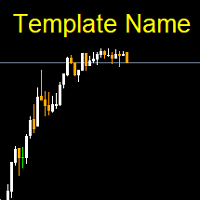
Template name allows you to write custom text that will show up on your charts. It allows you to position the text anywhere including selecting any color that you prefer. You can position the text at any of the 4 corners of your chart screen. This custom text can aid as a watermark for your screen shots. This text can act as a unique and true signature for your charts.
FREE

Msg2Slack — это инструмент, который отправляет сообщения из текстовых полей MT4/MT5 в Slack. Всего одним нажатием кнопки, расположенной справа от текстового поля, вы можете легко отправлять текст и изображения диаграмм на свой канал Slack. Даже если вы рисуете линии, метки, комментарии и т. д. на графике, изображение будет опубликовано.
Если вы хотите отправлять сообщения себе или группе, этот простой, но мощный инструмент позволяет невероятно легко захватывать изображения диаграмм и отправлять
FREE
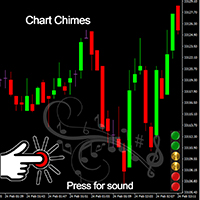
Представляем Chart Chimes — индикатор для MT4/MT5, превращающий торговлю в симфонию звуков! Устали целыми днями смотреть на графики? Вам нужно немного взбодриться, чтобы поддерживать хорошее настроение во время торговли? Что ж, Chart Chimes поможет вам!
С Chart Chimes каждый раз, когда вы нажимаете эту кнопку, вы будете слышать забавный звук, который вызовет улыбку на вашем лице и сделает шаг вперед. Представьте себе, что вы торгуете под звуки триумфальной трубы или нежной арфы на заднем плане
FREE

Советник UEX Reader Полностью автоматизированный торговый советник, работающий на основе индикатора UEX. https://www.mql5.com/en/market/product/152936
UEX Reader использует два гибких метода торговли: Обычный и усредняющий.
Торговые позиции могут исполняться индивидуально или одновременно в соответствии с направлением рынка, определенным индикатором UEX.
Несмотря на то, что UEX Reader работает с индикатором, его можно протестировать в тестере MT5.
- - -
Шаги по использованию советника UEX
FREE

Простой скрипт для открытия ордеров Buy по рынку на любом финансовом инструменте.
Входные параметры Volume - по умолчанию: 0.10 Deviation - по умолчанию: 10 пунктов Stoploss - по умолчанию: 50 пунктов Takeprofit - по умолчанию: 50 пунктов Comment - по умолчанию: Order by Market Confirm - по умолчанию: false
Описание входных параметров Тип ордера Доступны только ордера Buy. Deviation Максимальное отклонение от запрошенной цены (в пунктах). Stoploss и Takeprofit Стоп-лосс и тейк-профит в пунктах
FREE

Phone Notification
Send Information from VPS direct to Phone No TradingOperation only MessageNotification Send Information to your selected Time-Window Configure Time when want to receive the Message What will be send:-Bull/Bear Candle Bull: 0 Bear: 0 Level that get Touched by Price most Level: 00000.00 any Question or modification ex5 Code write me a Message
FREE

Утилита Teaching T-INN создана для обучения нейросетей ахитектуры (T-INN) Target-IntelNeuroNet адаптированных под рынок валют. Файл утилиты необходимо разместить в папке скриптов и запускать на том графике и таймфрейме на которых необходимо тренировать нейросеть. Результат тренировки будет зафиксирован в файле, а весь процесс тренировки отображается в консоли на чарте и дополнительном лог файле. Необходимо перед запуском скрипта загрузить всю историю и проверить на графике точно ли она загружен
FREE

Утилита Risk Optimizer предназначена для управления риском на счете. Плохое управление рисками является основной причиной потери денег. Risk Optimizer рассчитывает и предлагает оптимальный размер лота для каждой позиции в соответствии с вашими индивидуальными предпочтениями по уровню риска. Вы можете указать предпочитаемый уровень риска в виде % для каждой позиции либо довериться нашим алгоритмам для расчета и оптимизации в соответствии с выбранной вами категорией риска. Но это еще не всё! Выбер
FREE
MetaTrader Маркет позволяет максимально безопасно покупать программы для платформы MetaTrader. Вы можете скачать демо-версии понравившихся роботов и индикаторов прямо из терминала и проверить их в тестере стратегий.
Протестируйте программы в различных режимах перед покупкой для получения максимального представления о продукте и оплатите понравившийся продукт через платежную систему MQL5.community.
Платежная система MQL5.community обеспечивает оплату продавцам, а возможность тестирования программ в различных режимах позволяет покупателям получить максимальное представление о продукте.

Вы упускаете торговые возможности:
- Бесплатные приложения для трейдинга
- 8 000+ сигналов для копирования
- Экономические новости для анализа финансовых рынков
Регистрация
Вход
Вы принимаете политику сайта и условия использования
Если у вас нет учетной записи, зарегистрируйтесь