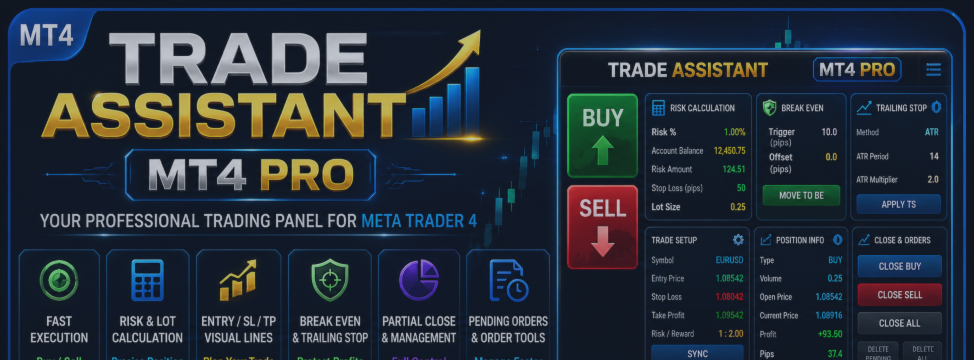

Trade Assistant MT4 PRO is a professional trading panel for MetaTrader 4, designed for manual traders who want faster execution, accurate risk calculation, and convenient trade management directly on the chart.
The panel helps reduce routine manual work, prepare trading setups faster, calculate position size based on risk, visualize Entry / Stop Loss / Take Profit levels, and manage open positions with Break Even, Trailing Stop, Partial Close, and pending order tools.
This is not a signal robot and not a fully automatic trading system. Trade Assistant MT4 PRO does not search for market entries instead of the trader. Its purpose is to help you execute and manage your own trading ideas with more speed, structure, and control.
Main Features
Fast Buy / Sell Execution
Trade Assistant MT4 PRO allows you to open Buy and Sell trades directly from the chart.
The panel supports:
- market orders;
- Stop orders;
- Limit orders;
- quick direction selection;
- large Buy and Sell execution buttons.
This is useful for manual traders who need fast and clear execution without opening multiple standard MT4 windows.
Risk Calculation
One of the main functions of the panel is trade risk calculation.
You can set your risk value and let the panel calculate position size automatically. Lot size is calculated based on:
- selected risk value;
- Stop Loss distance;
- symbol specification;
- minimum lot;
- maximum lot;
- volume step;
- trading conditions of the instrument.
Available risk modes may include:
- percent of Balance;
- percent of Equity;
- percent of Free Margin;
- fixed amount in deposit currency.
This helps maintain consistent risk management and avoid random position sizing.
Lot Calculation
The Lot calc button enables or disables automatic lot size calculation.
When Lot calc is enabled, the panel calculates position volume based on the selected risk and Stop Loss size.
When Lot calc is disabled, the manual value from the Lot field is used.
This gives flexibility: you can trade with strict risk-based sizing or use a fixed manual volume.
Entry / SL / TP Lines
The Lines function displays the key trade levels on the chart:
- Entry;
- Stop Loss;
- Take Profit.
These lines help you see the complete trade structure before opening a position. You can evaluate the Stop Loss distance, potential Take Profit, and overall reward-to-risk profile directly on the chart.
The panel can also display a visual trade map, showing risk and potential profit zones.
Risk / Reward Mode
The RR mode links Take Profit to Stop Loss using a selected ratio.
Examples:
- 1:1 — Take Profit equals Stop Loss;
- 2:1 — Take Profit is twice the Stop Loss;
- 3:1 — Take Profit is three times the Stop Loss.
This is useful for traders who use a fixed reward-to-risk model in their trading system.
Break Even
The Break Even function allows Stop Loss to be moved to the entry price.
The panel supports:
- manual Stop Loss move to entry price;
- automatic move after price passes a selected distance;
- Trigger setting;
- Offset setting.
This function helps reduce initial risk after price has already moved in the desired direction.
Trailing Stop
Trade Assistant MT4 PRO supports multiple trailing methods.
Available methods may include:
- standard trailing stop;
- ATR trailing;
- Moving Average trailing;
- Parabolic SAR trailing;
- Fractal trailing.
The panel can visualize MA, SAR, and Fractal trailing methods on the chart, so the trader can see which levels are used for trade management.
Trailing Stop helps manage an open position and protect part of the accumulated result as price moves.
Partial Close
The Partial Close function allows you to close part of an open position.
You can set the percentage of volume to close and reduce only part of the trade. This is useful for:
- scaling out of a position;
- locking in partial profit;
- reducing exposure;
- combining with Break Even and Trailing Stop.
Pending Order Management
The panel supports pending order workflows.
Available functions include:
- preparing Stop orders;
- preparing Limit orders;
- deleting pending orders;
- deleting specific pending order types;
- quickly deleting all pending orders within the current filter.
This is useful for breakout trading, pullback entries, support and resistance trading, and level-based setups.
Close Management
The Close tab provides quick exit and order deletion tools:
- Close Buy;
- Close Sell;
- Close All;
- Delete Buy Stop;
- Delete Buy Limit;
- Delete Sell Stop;
- Delete Sell Limit;
- Delete All Pending.
Filters by symbol and magic number may also be used when working with several instruments or multiple expert advisors.
Visual Trade Control
Trade Assistant MT4 PRO is designed as a visual trading tool.
On the chart, the trader can see:
- Entry / SL / TP levels;
- risk and potential profit zones;
- trade lines;
- visualization of selected trailing methods;
- key information about the current trading setup.
This makes trade preparation and management clearer and helps reduce operational mistakes.
Who Is This Product For?
Trade Assistant MT4 PRO is suitable for:
- manual traders;
- scalpers;
- intraday traders;
- level-based traders;
- breakout traders;
- traders who use Stop Loss and Take Profit;
- traders who want risk-based lot calculation;
- traders who want faster order management in MT4.
If you trade manually and want a more organized workflow inside MetaTrader 4, this panel can become a practical everyday tool.
Typical Workflow
A typical workflow:
- Select the symbol.
- Open the Trade tab.
- Set the risk value.
- Enable Lot calc if you want risk-based position sizing.
- Set Entry, Stop Loss, and Take Profit.
- Enable RR if you want a fixed reward-to-risk ratio.
- Press Sync to update chart levels.
- Open the trade using Buy or Sell.
- After entry, use Manage for Break Even and Trailing Stop.
- Use Close for partial or full position exit.
Important Notes
Trade Assistant MT4 PRO does not guarantee profit and does not replace a trading strategy. The user is responsible for all entry, exit, and management decisions.
Trading results depend on:
- the trader’s strategy;
- market conditions;
- broker parameters;
- instrument liquidity;
- order execution;
- user discipline.
Testing on a demo account is recommended before using the panel on a real account.
Summary
Trade Assistant MT4 PRO is a convenient trading panel for MetaTrader 4 that combines:
- Buy / Sell execution;
- risk calculation;
- lot calculation;
- Entry / SL / TP lines;
- Risk / Reward mode;
- Break Even;
- Trailing Stop;
- Partial Close;
- Pending Order Management;
- Close Management;
- visual trade control.
It is a practical tool for traders who want to open trades faster, calculate risk more accurately, and manage positions more conveniently directly on the MT4 chart.