Anchored VWAP Toolkit
- Indicadores
- Versão: 1.0
- Ativações: 20

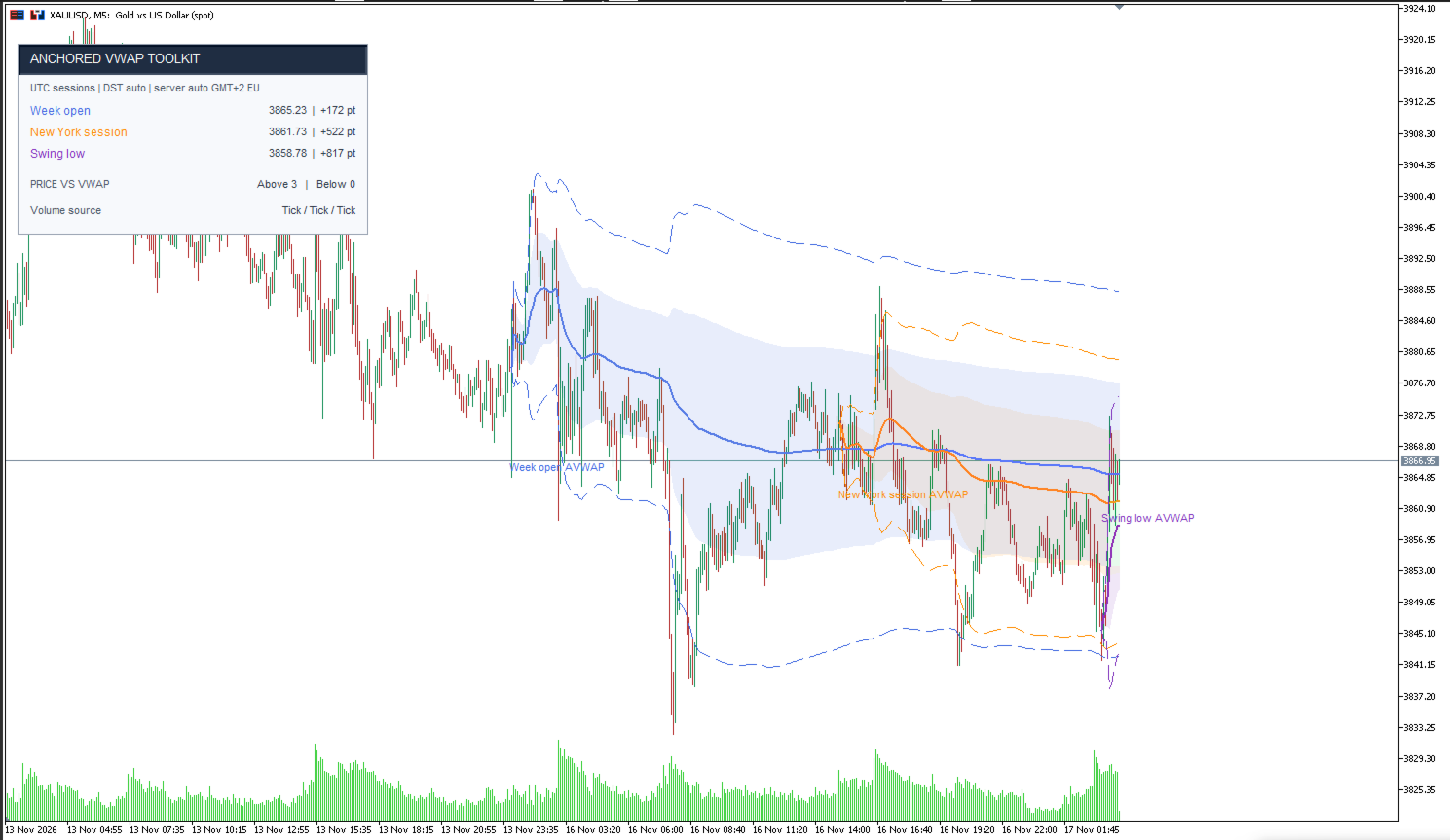
Analyze price in relation to volume-weighted average price from important market reference points. Anchored VWAP Toolkit lets you display and compare up to three independent VWAPs on one chart, each with its own anchor type, color, and settings.
FEATURES
• Three configurable VWAP anchors in one indicator instance
• Volume-weighted standard deviation bands
• Live dashboard showing VWAP values, price distance in points, and volume source
• Optional alerts when a closed candle crosses an active VWAP
• Optional chart styling with a light background, dark foreground, hidden grid, and configurable candle colors
• Designed to update as new price data arrives
ANCHOR OPTIONS
Configure each of the three anchors independently:
• Manual date and time
• Session start: Asia, London, or New York
• Day open
• Week open
• Month open
• Latest confirmed swing high
• Latest confirmed swing low
• Disabled
Swing anchors use confirmed pivots. The pivot is selected only after the configured number of bars has formed on both sides, which helps avoid using an unconfirmed swing.
VWAP DEVIATION BANDS
The indicator can display weighted deviation bands around each VWAP:
• One standard deviation, shown as a filled band
• Two standard deviations
• Three standard deviations
Each band level can be enabled or disabled in the indicator settings.
PRICE AND VOLUME SETTINGS
Choose the price calculation source:
• HLC3
• Close
• OHLC4
Choose the volume source:
• Automatic selection
• Broker tick volume
• Broker real volume
Automatic mode uses real volume when it is consistently available for the anchor’s calculation period; otherwise, it uses tick volume. Volume availability and meaning depend on the broker and symbol. The indicator does not provide consolidated exchange order flow.
UTC SESSION SETTINGS
Session anchors use configurable UTC start times for Asia, London, and New York. Session daylight-saving adjustments can be enabled, and the session hours can be shifted to suit your preferred schedule.
The indicator can detect the broker’s live UTC offset and can attempt to infer the historical server clock from available price history. If automatic historical detection is unavailable or unsuitable for a broker, configure the winter and summer server UTC offsets and the applicable daylight-saving rule in the inputs.
DASHBOARD AND CHART DISPLAY
The on-chart dashboard reports each enabled anchor’s VWAP and its distance from the current price in points. It also shows the selected volume source. Anchor lines and dashboard values use the colors assigned to their corresponding slots.
Chart styling is optional. When enabled, the indicator can hide the grid, apply a light chart background and dark foreground, and color bullish and bearish candles. The previous chart settings are restored when the indicator is removed.
USAGE NOTES
Use one instance of the indicator per chart and configure all three anchors within that instance. Manual anchor times use chart/server time.
Anchored VWAP Toolkit is an analytical indicator. It does not open, manage, or close trades. It is intended to support chart analysis and should be used with the trader’s own judgment and risk management.