Dashboard Basket
- Utilitários
- Versão: 2.20
- Ativações: 5

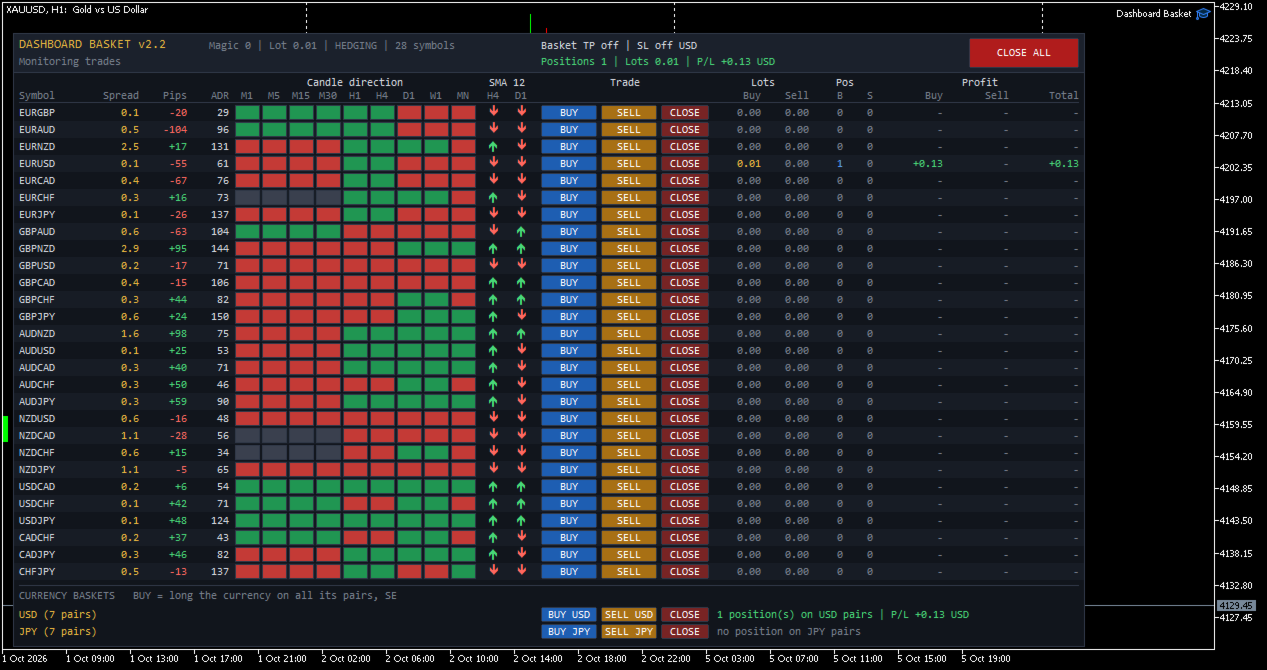
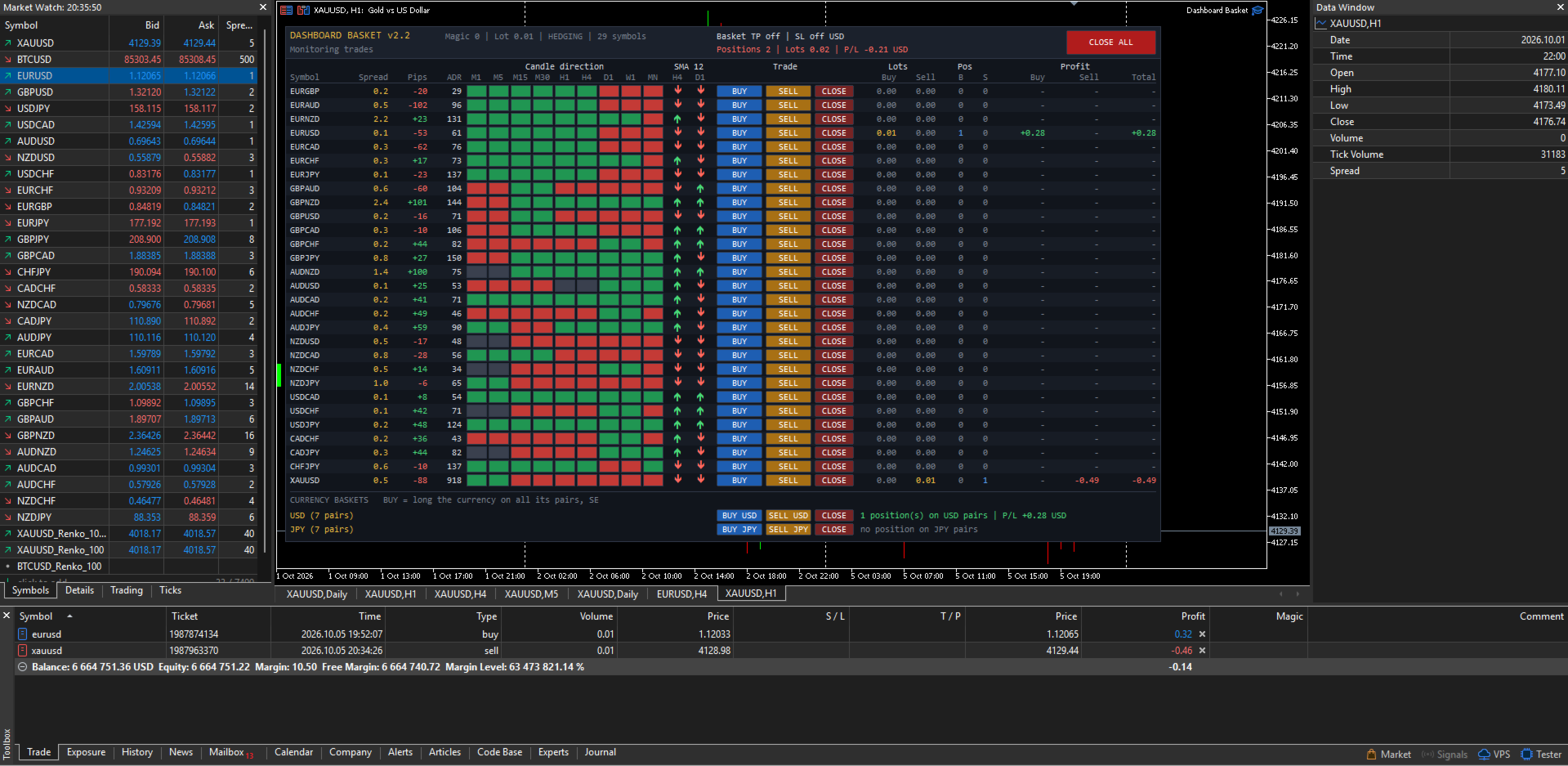
Dashboard Basket MT5 is a multi-symbol trading dashboard for manual traders. One panel shows the market state of up to 40 symbols at a glance (spread, daily move, average daily range, candle direction on 9 timeframes and position versus a moving average) and lets you open, close and manage trades on any of them with a single click, including whole currency baskets, with an automatic basket take profit and stop loss.
The EA does not trade by itself. Every position is opened by you. The dashboard gives you the overview, fast execution and the money management of the basket.
MAIN FEATURES
- Market overview of up to 40 symbols in one panel, refreshed every second
- One-click BUY, SELL and CLOSE buttons for every symbol
- Currency baskets: go long or short one currency against all of its pairs with one click (for example BUY USD, SELL JPY)
- CLOSE ALL button
- Basket take profit and basket stop loss in account currency, applied to all positions of the EA
- Four symbol sources: the 28 major and cross pairs, the 28 pairs plus your own symbols, all Market Watch symbols, or a custom list
- Configurable moving average filter (period, method, applied price and two timeframes)
- Works with any broker symbol naming (prefix and suffix supported)
- Manages only its own positions (magic number): manual trades and other EAs are never touched
- Clean dark interface that does not flicker and does not delete your own chart objects
WHAT THE DASHBOARD SHOWS
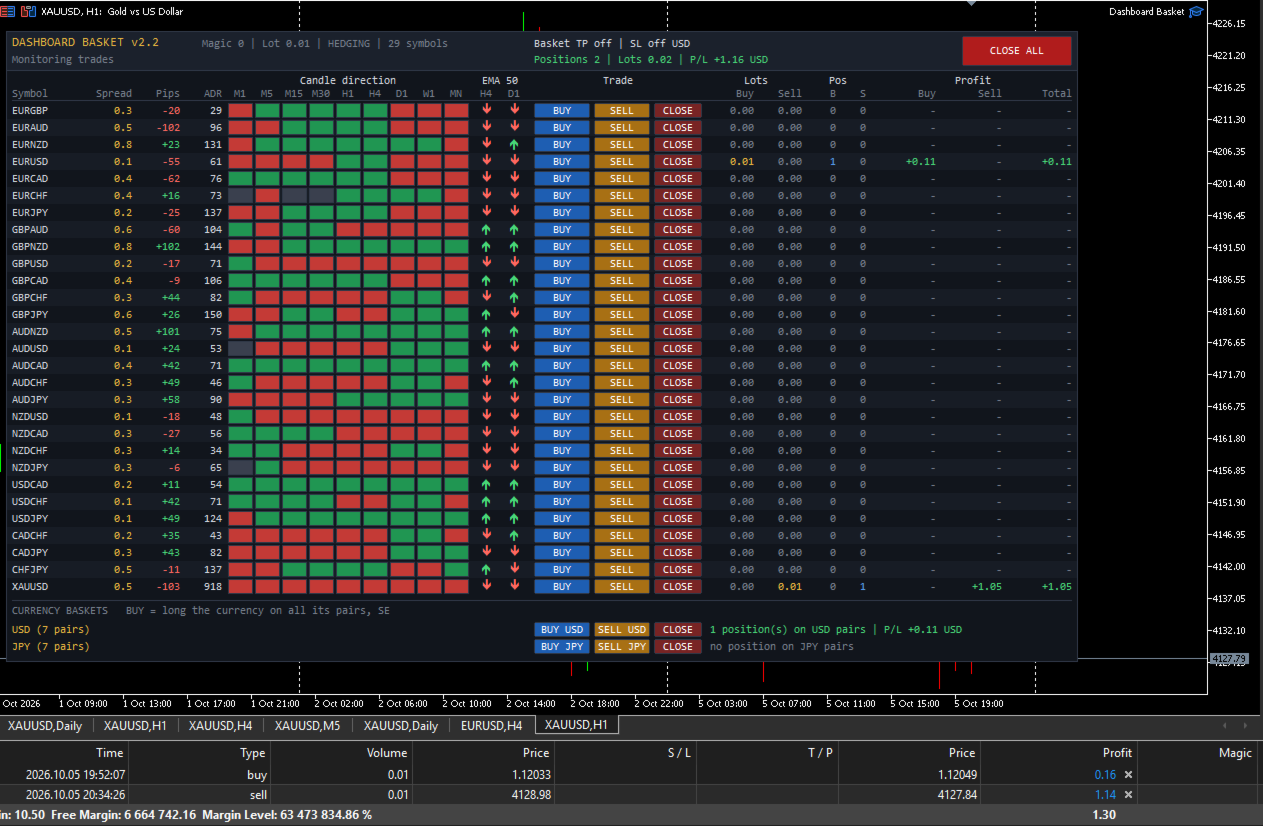
Each symbol has its own row with the following columns:
- Symbol: the broker symbol name
- Spread: current spread in pips
- Pips: today's movement (current price versus the daily open), with sign
- ADR: Average Daily Range in pips, the average of yesterday's range and the 5, 10 and 20 day averages
- Candle direction M1, M5, M15, M30, H1, H4, D1, W1, MN: green when the current candle is bullish, red when it is bearish, grey when flat
- MA: an up or down arrow showing whether the price is above or below the moving average on two timeframes of your choice (default SMA 12 on H4 and D1)
- Trade: BUY, SELL and CLOSE buttons
- Lots: open volume on the buy side and on the sell side
- Pos: number of buy and sell positions
- Profit: floating profit of the buy side, the sell side and the total, including swap and entry commission
The header shows the account type (hedging or netting), the basket take profit and stop loss settings, the number of positions, the total volume and the total floating profit of the EA, and a status line with the result of your last action (filled order, error message, basket closing in progress).
SYMBOL SOURCES
Choose what the dashboard displays with the "Symbol source" input:
- 28 major and cross pairs: all pairs built from EUR, GBP, AUD, NZD, USD, CAD, CHF and JPY. Pairs your broker does not offer are skipped automatically, and both quote directions are recognised.
- 28 pairs plus a custom list: the 28 pairs, plus any other symbols you add, such as XAUUSD, XAGUSD, US30 or BTCUSD.
- All symbols in Market Watch: every symbol visible in your Market Watch window when the EA starts, in the same order.
- Custom list only: only the symbols you type, separated by commas.
Symbol names are checked at startup. Each name is tried as typed, then with your prefix and suffix added, so with the suffix set to "m" you can simply type XAUUSD for XAUUSDm. Unknown names are skipped and reported in the Experts log.
Pips are calculated per symbol. Forex pairs use the standard pip (0.0001, or 0.01 for JPY pairs). For metals, indices, crypto and other instruments, you choose how many points make one pip (default 10).
CURRENCY BASKETS
A currency basket opens one order on every pair that contains a given currency, in the direction that makes you long or short that currency.
Example, BUY USD opens:
BUY USDJPY, BUY USDCHF, BUY USDCAD, SELL EURUSD, SELL GBPUSD, SELL AUDUSD, SELL NZDUSD
SELL USD does exactly the opposite. CLOSE closes every position of the EA on the pairs of that currency.
You choose which currencies get a basket row (default USD and JPY, any of the 8 major currencies can be used). Each basket row also shows the number of open positions and the floating profit on that currency's pairs. Only pairs made of two major currencies are included in a basket. Metals, indices and exotic pairs are never added to a basket.
BASKET TAKE PROFIT AND STOP LOSS
Set a target and a maximum loss in account currency. When the total floating profit of all positions of the EA reaches the target, or falls to the stop loss, every position of the EA is closed automatically.
If a close fails (requote, market closed, connection issue), the EA retries automatically until all of its positions are closed. New orders are blocked while a basket close is in progress. Set the values to 0 to disable them.
SAFETY
- Only positions with the EA magic number are counted, displayed and closed. Your manual trades and other EAs are never affected.
- Before every order the EA checks that trading is allowed (terminal, EA settings, account, symbol trade mode), normalizes the lot to the broker minimum, maximum and step, and verifies the free margin.
- Every trade result is checked and shown in the status line, and errors are written to the Experts log with the server return code.
- Optional confirmation dialogs before CLOSE ALL and before opening a currency basket.
- When the EA is removed, only its own chart objects are deleted.
- Changing the timeframe or the inputs rebuilds the dashboard cleanly, with no duplicated rows.
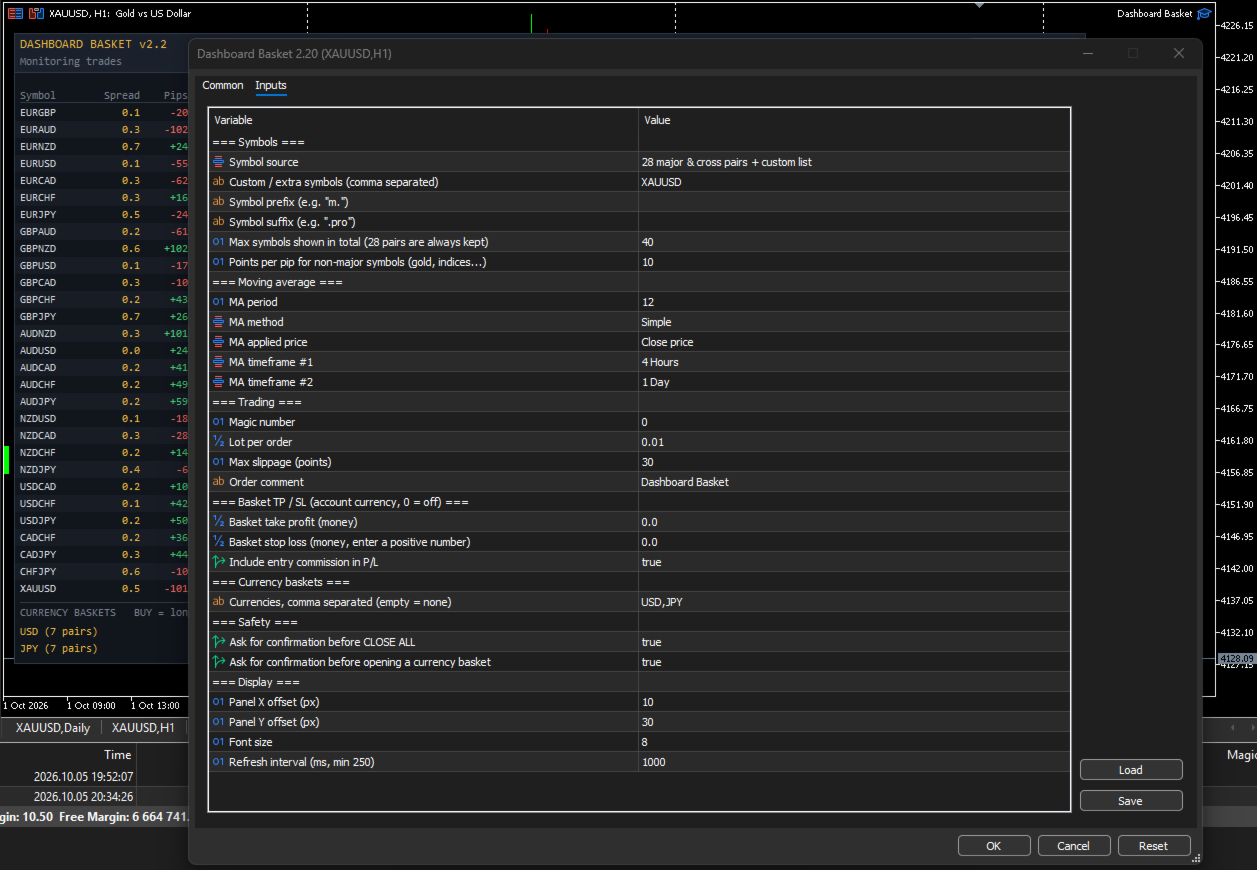
INPUT PARAMETERS
Symbols
- Symbol source: 28 major and cross pairs / 28 pairs plus custom list / all Market Watch symbols / custom list only
- Custom / extra symbols: comma-separated list, for example XAUUSD,XAGUSD,US30
- Symbol prefix and Symbol suffix: for brokers that add characters to symbol names
- Max symbols shown: total number of rows (default 40). The 28 major pairs are always kept.
- Points per pip for non-major symbols: default 10
Moving average
- MA period (default 12)
- MA method: Simple, Exponential, Smoothed, Linear Weighted
- MA applied price (default Close)
- MA timeframe 1 and MA timeframe 2 (default H4 and D1)
Trading
- Magic number
- Lot per order
- Maximum slippage in points
- Order comment
Basket take profit / stop loss
- Basket take profit in account currency (0 = off)
- Basket stop loss in account currency, entered as a positive number (0 = off)
- Include entry commission in profit
Currency baskets
- Currencies: comma-separated list, for example USD,JPY,EUR (empty = no basket rows)
Safety
- Confirm before CLOSE ALL
- Confirm before opening a currency basket
Display
- Panel X and Y position
- Font size
- Refresh interval in milliseconds (minimum 250)
HOW TO USE
- Attach the EA to any chart. An empty chart with enough width is recommended, because the panel is about 1070 pixels wide.
- Enable Algo Trading in the terminal and allow algorithmic trading in the EA settings.
- Choose the symbol source and, if needed, the symbol prefix or suffix of your broker.
- Set the lot size, and optionally the basket take profit and stop loss.
- Read the market from the dashboard and trade with the buttons.
The first time the EA loads, some ADR and MA cells may stay empty or grey for a few seconds while the terminal downloads the price history of every symbol. They fill in automatically.
IMPORTANT NOTES
- A hedging account is recommended. On a netting account each symbol can hold only one position, so a SELL click reduces or reverses an existing BUY instead of opening a separate trade, and two baskets that share a pair offset each other on that pair.
- Positions are opened without individual stop loss or take profit. Risk is managed at basket level with the basket take profit and stop loss, or manually with the CLOSE buttons.
- Floating profit includes swap and the commission charged at entry. A commission charged at exit by some brokers is only applied when the position closes.
- The more symbols you display, the more history the terminal must keep up to date. With many symbols, keep the refresh interval at 1000 ms or more.
- Trading involves risk. This product is a trade management and market overview tool. It does not predict the market and does not guarantee profits.