Silence Watch
- Utilitários
- Versão: 1.0
- Ativações: 10

EA Silence Watch is a read-only utility for traders who run several Expert Advisors. It does not place, modify or close any order. It learns the normal entry rhythm of every EA from the deal history of the account and tells you when one of them has been silent for longer than usual.
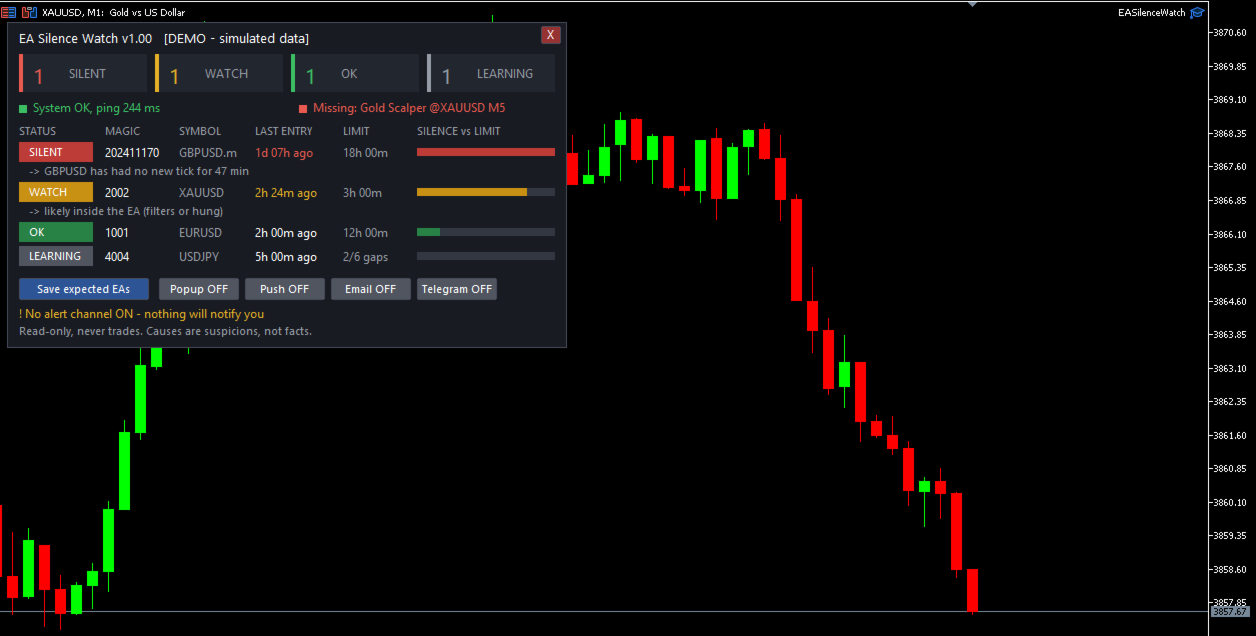
What you see on the chart
- Four counters at the top: SILENT, WATCH, OK and LEARNING.
- A status strip with the terminal state (connection, Algo Trading, ping) and the state of your expected EA list.
- One row per EA with its magic number, symbol, time since the last entry, the alert limit and a bar that shows how close the silence is to that limit.
- Under a WATCH or SILENT row, one short line with the possible cause.
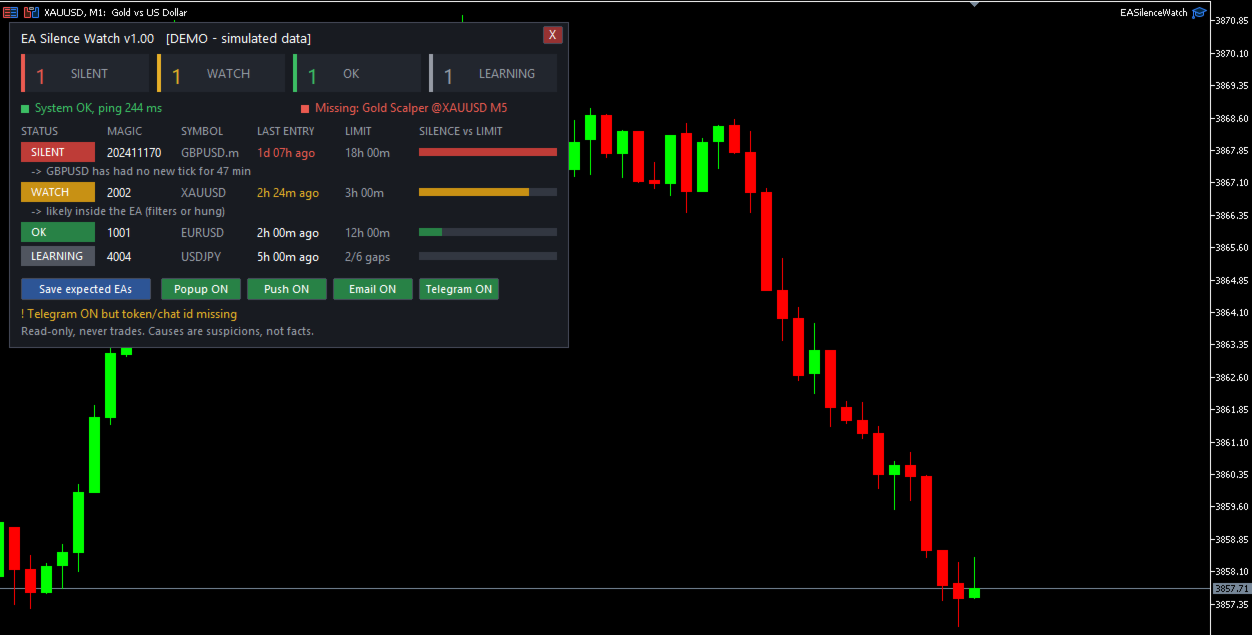
- Buttons to save the expected EA list, to switch each alert channel on or off, and a button to remove the utility from the chart.
How it works
- Entry deals are grouped by magic number. For each EA the utility measures how long the gaps between entries normally are.
- The alert limit is a multiple of the 95th percentile gap, never lower than a minimum number of minutes. Saturdays and Sundays are not counted as silence unless you turn that option off.
- WATCH means the silence has reached 70% of the limit. SILENT means the limit is exceeded.
- LEARNING means there is not enough history yet to trust a baseline. No alert is sent for an EA in this state, and the limit column shows what is still missing.
- Several positions opened within a few seconds by a grid or basket can be counted as one entry (input "Entries closer than this many seconds count as one entry").
- An EA that has been silent for a long time stays on the panel for the number of days you choose, so it does not disappear.
Possible causes
For every EA that is WATCH or SILENT, the utility lists the causes that the terminal can actually show: no connection to the broker, Algo Trading switched off, trading not allowed for the account or for Expert Advisors, high ping, low margin level, a symbol that is not fully tradable, outside its trading session or without new ticks, or an expected EA that is no longer on its chart. If none of these is found, it says the cause is probably inside the EA itself. Causes are suspicions, not facts.
Expected EA list
When all your EAs are running correctly, press the button "Save expected EAs". If an EA later disappears from its chart, for example after a terminal restart, the panel and the alerts report it.
Alerts
- Popup, push notification, email and Telegram. All of them are off by default. Switch them on in the inputs or with the buttons on the panel.
- The same alert is not repeated for a while, and the interval grows if the EA stays silent. This state survives an EA reload and a terminal restart.
- Remote messages start with the account number and the server, so you can tell several terminals apart.
How to start
- Attach EA Silence Watch to one chart. Any symbol and timeframe work. No other chart and no settings are needed to start.
- Wait for the baseline to be learned. Rows show LEARNING until enough entries exist.
- Press "Save expected EAs" when everything runs correctly.
- Optional: choose the alert channels. For Telegram, create a bot, enter its token and your chat id in the inputs, and add api.telegram.org to the list in Tools > Options > Expert Advisors > Allow WebRequest.
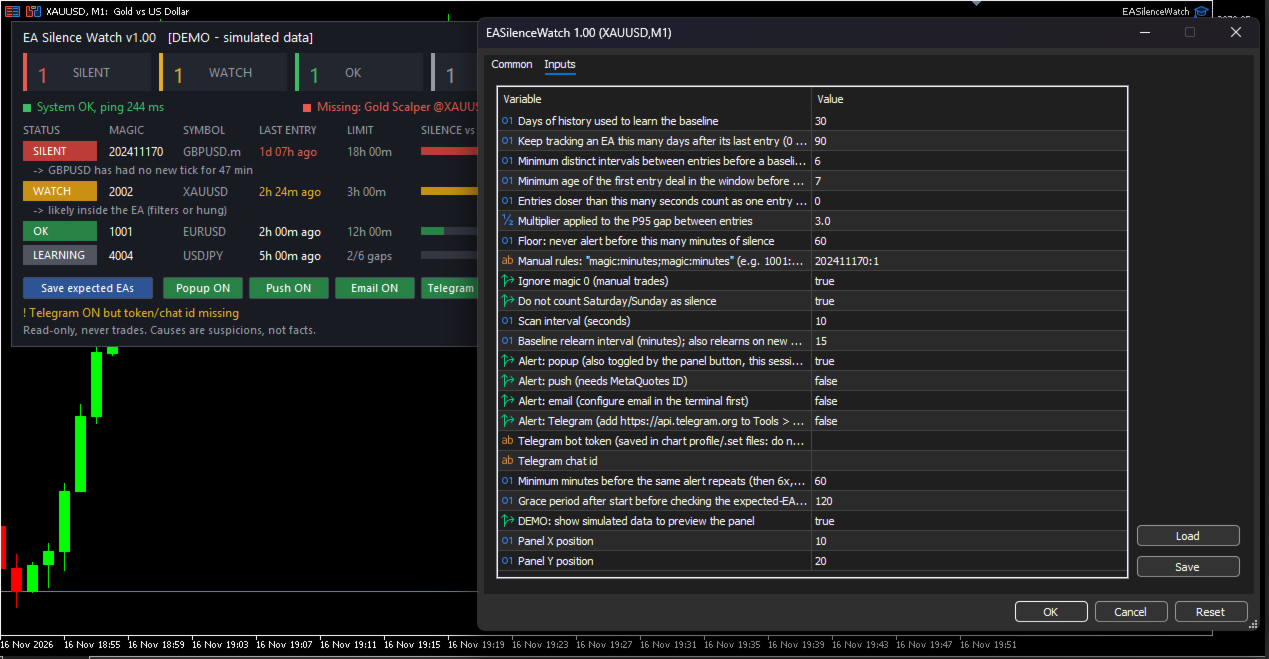
- For strategies that trade rarely, set a manual rule per magic number in the input "Manual rules", for example 1001:240 (magic 1001, 240 minutes).
Main inputs
- Days of history used to learn the baseline (default 30).
- Multiplier applied to the 95th percentile gap (default 3.0) and the minimum limit in minutes (default 60).
- Minimum number of distinct entry intervals (default 6) and minimum age of the first entry in days (default 7) before a baseline is trusted.
- Days an EA stays tracked after its last entry (default 90).
- Entries closer than this many seconds count as one entry (default 0, only identical timestamps are merged).
- Manual rules, magic 0 handling, weekend handling, scan interval, alert channels, repeat interval and panel position.
Strategy Tester
In the Strategy Tester in visual mode, the utility shows the panel with simulated example data so you can see the layout. It reads no history and sends no alerts there. On a real chart it uses the deal history of your own account.
Limits you should know
- It can only see what the terminal shows: deal history, connection state and the settings listed above. It cannot read the logs or error codes of other Expert Advisors, and it cannot tell whether an EA is frozen. It only sees that no trades arrived.
- EAs that share a magic number, or trade with magic number 0, cannot be told apart.
- Strategies with very few trades may give false alarms. Use manual rules for them.
- If the whole terminal or VPS stops, this utility stops as well.
- The Telegram option sends messages with WebRequest to api.telegram.org using your own bot token. The token is stored in the chart input settings, so do not share saved chart templates or preset files that contain it.
This product does not predict trades and does not change how your Expert Advisors trade.