Dashboard Basket

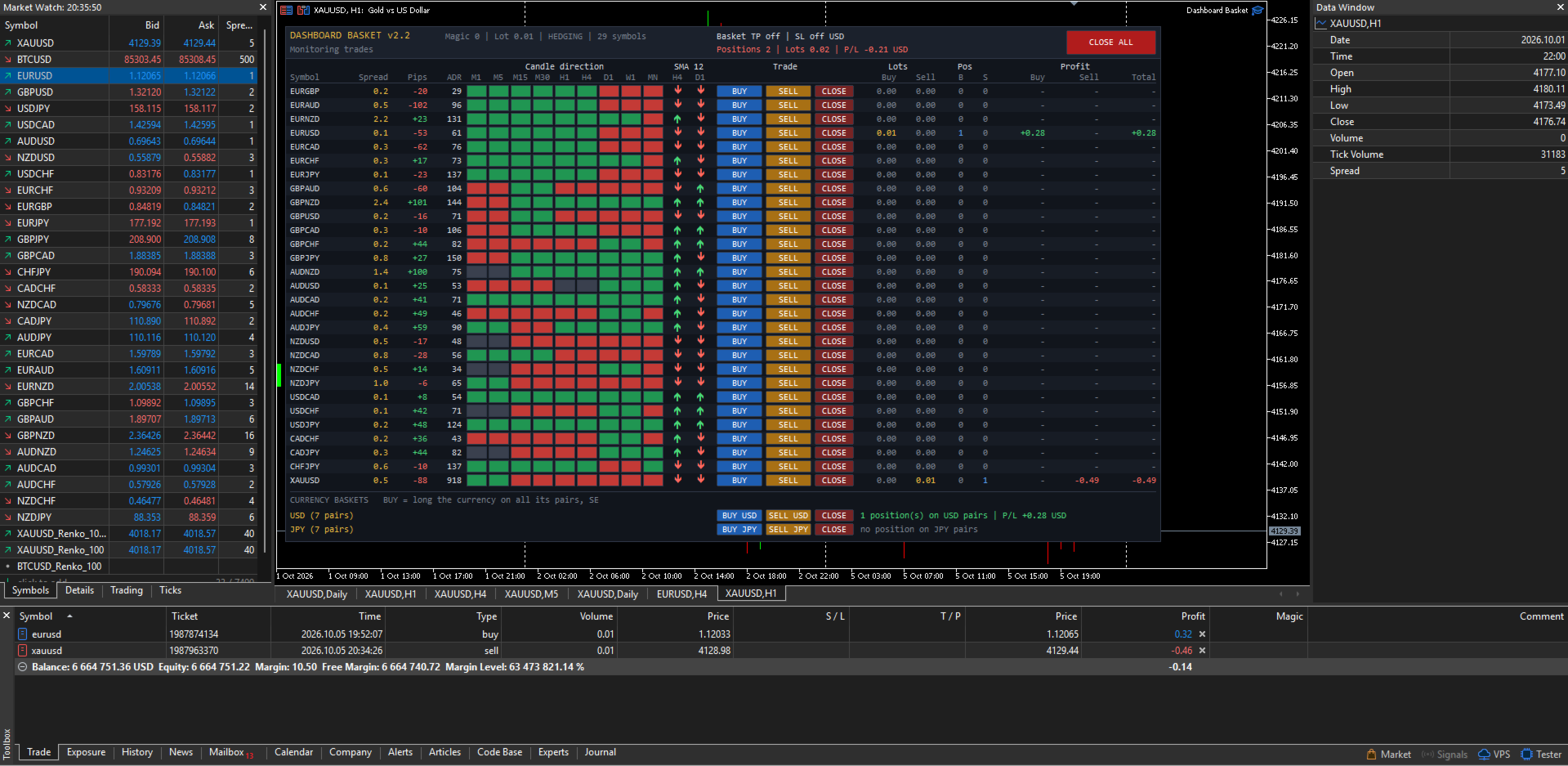
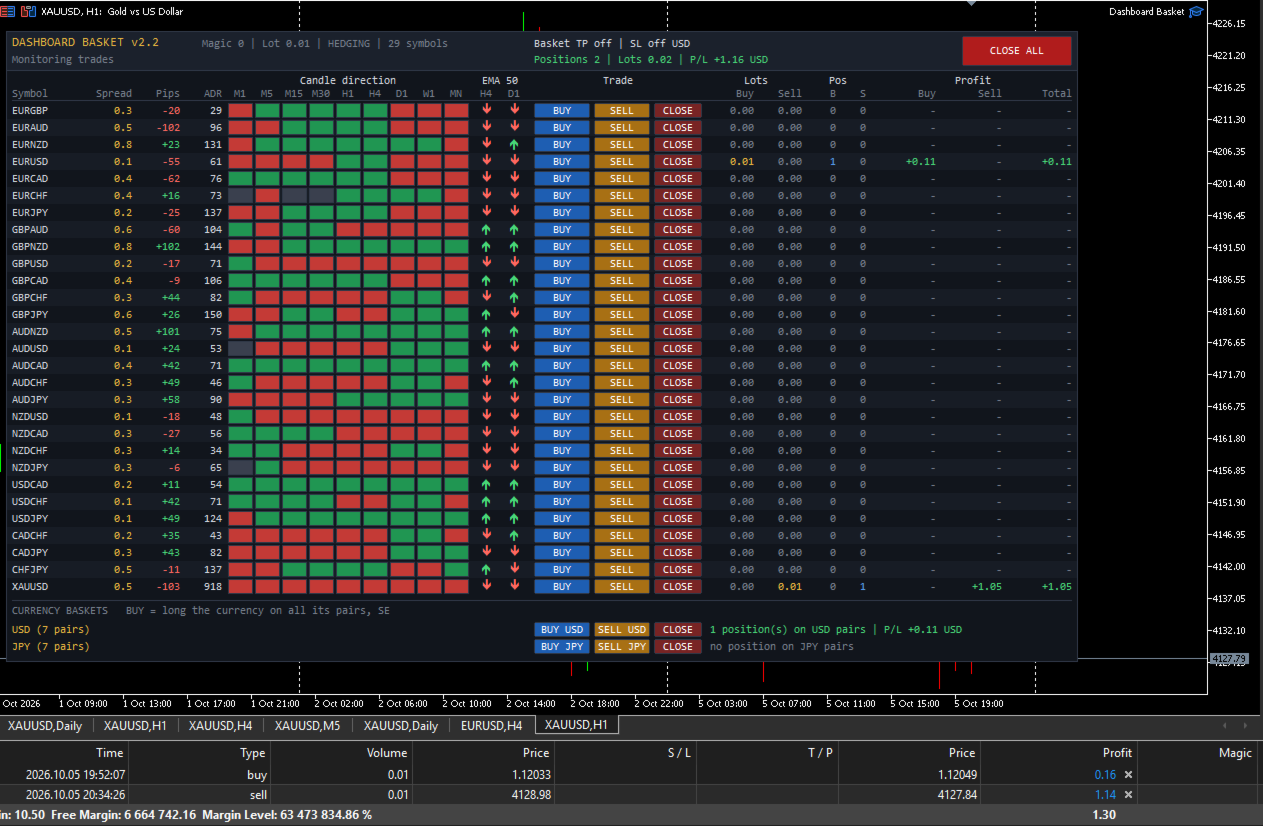
Dashboard Basket MT5 is a multi-symbol trading dashboard for manual traders. One panel shows the market state of up to 40 symbols at a glance (spread, daily move, average daily range, candle direction on 9 timeframes and position versus a moving average) and lets you open, close and manage trades on any of them with a single click, including whole currency baskets, with an automatic basket take profit and stop loss.

The EA does not trade by itself. Every position is opened by you. The dashboard gives you the overview, fast execution and the money management of the basket.


MAIN FEATURES

  • Market overview of up to 40 symbols in one panel, refreshed every second
  • One-click BUY, SELL and CLOSE buttons for every symbol
  • Currency baskets: go long or short one currency against all of its pairs with one click (for example BUY USD, SELL JPY)
  • CLOSE ALL button
  • Basket take profit and basket stop loss in account currency, applied to all positions of the EA
  • Four symbol sources: the 28 major and cross pairs, the 28 pairs plus your own symbols, all Market Watch symbols, or a custom list
  • Configurable moving average filter (period, method, applied price and two timeframes)
  • Works with any broker symbol naming (prefix and suffix supported)
  • Manages only its own positions (magic number): manual trades and other EAs are never touched
  • Clean dark interface that does not flicker and does not delete your own chart objects


WHAT THE DASHBOARD SHOWS

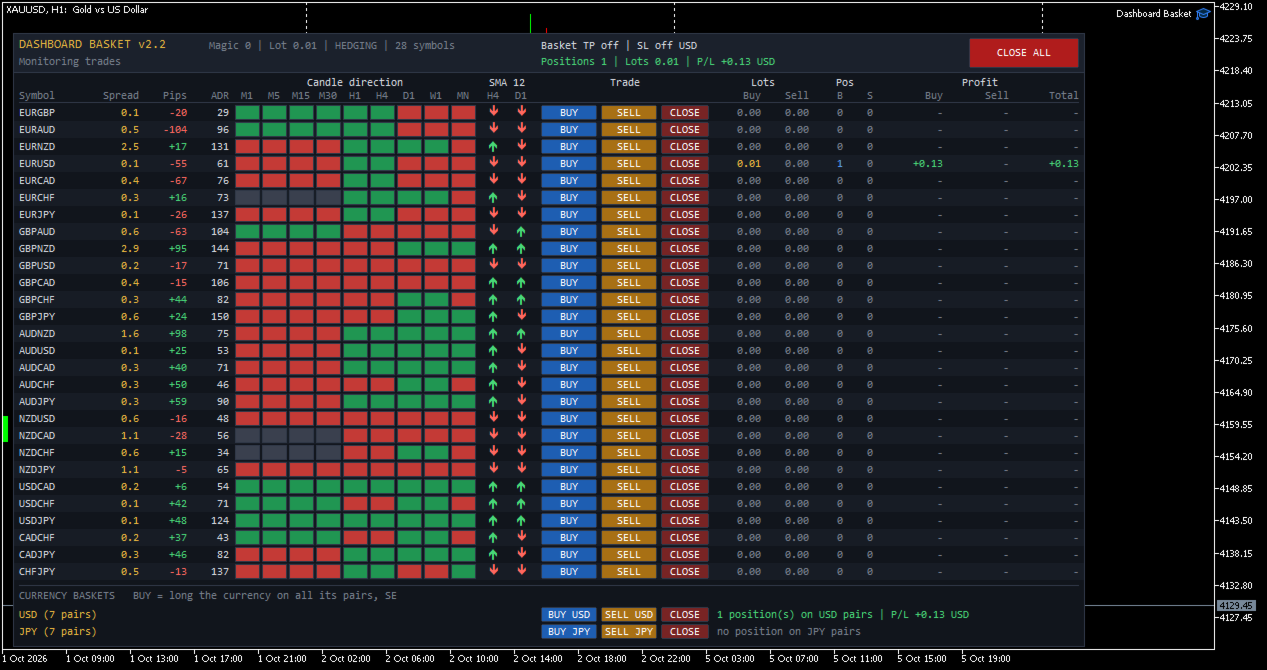
Each symbol has its own row with the following columns:

  • Symbol: the broker symbol name
  • Spread: current spread in pips
  • Pips: today's movement (current price versus the daily open), with sign
  • ADR: Average Daily Range in pips, the average of yesterday's range and the 5, 10 and 20 day averages
  • Candle direction M1, M5, M15, M30, H1, H4, D1, W1, MN: green when the current candle is bullish, red when it is bearish, grey when flat
  • MA: an up or down arrow showing whether the price is above or below the moving average on two timeframes of your choice (default SMA 12 on H4 and D1)
  • Trade: BUY, SELL and CLOSE buttons
  • Lots: open volume on the buy side and on the sell side
  • Pos: number of buy and sell positions
  • Profit: floating profit of the buy side, the sell side and the total, including swap and entry commission

The header shows the account type (hedging or netting), the basket take profit and stop loss settings, the number of positions, the total volume and the total floating profit of the EA, and a status line with the result of your last action (filled order, error message, basket closing in progress).


SYMBOL SOURCES

Choose what the dashboard displays with the "Symbol source" input:

  1. 28 major and cross pairs: all pairs built from EUR, GBP, AUD, NZD, USD, CAD, CHF and JPY. Pairs your broker does not offer are skipped automatically, and both quote directions are recognised.
  2. 28 pairs plus a custom list: the 28 pairs, plus any other symbols you add, such as XAUUSD, XAGUSD, US30 or BTCUSD.
  3. All symbols in Market Watch: every symbol visible in your Market Watch window when the EA starts, in the same order.
  4. Custom list only: only the symbols you type, separated by commas.

Symbol names are checked at startup. Each name is tried as typed, then with your prefix and suffix added, so with the suffix set to "m" you can simply type XAUUSD for XAUUSDm. Unknown names are skipped and reported in the Experts log.

Pips are calculated per symbol. Forex pairs use the standard pip (0.0001, or 0.01 for JPY pairs). For metals, indices, crypto and other instruments, you choose how many points make one pip (default 10).


CURRENCY BASKETS

A currency basket opens one order on every pair that contains a given currency, in the direction that makes you long or short that currency.

Example, BUY USD opens:
BUY USDJPY, BUY USDCHF, BUY USDCAD, SELL EURUSD, SELL GBPUSD, SELL AUDUSD, SELL NZDUSD

SELL USD does exactly the opposite. CLOSE closes every position of the EA on the pairs of that currency.

You choose which currencies get a basket row (default USD and JPY, any of the 8 major currencies can be used). Each basket row also shows the number of open positions and the floating profit on that currency's pairs. Only pairs made of two major currencies are included in a basket. Metals, indices and exotic pairs are never added to a basket.


BASKET TAKE PROFIT AND STOP LOSS

Set a target and a maximum loss in account currency. When the total floating profit of all positions of the EA reaches the target, or falls to the stop loss, every position of the EA is closed automatically.

If a close fails (requote, market closed, connection issue), the EA retries automatically until all of its positions are closed. New orders are blocked while a basket close is in progress. Set the values to 0 to disable them.


SAFETY

  • Only positions with the EA magic number are counted, displayed and closed. Your manual trades and other EAs are never affected.
  • Before every order the EA checks that trading is allowed (terminal, EA settings, account, symbol trade mode), normalizes the lot to the broker minimum, maximum and step, and verifies the free margin.
  • Every trade result is checked and shown in the status line, and errors are written to the Experts log with the server return code.
  • Optional confirmation dialogs before CLOSE ALL and before opening a currency basket.
  • When the EA is removed, only its own chart objects are deleted.
  • Changing the timeframe or the inputs rebuilds the dashboard cleanly, with no duplicated rows.


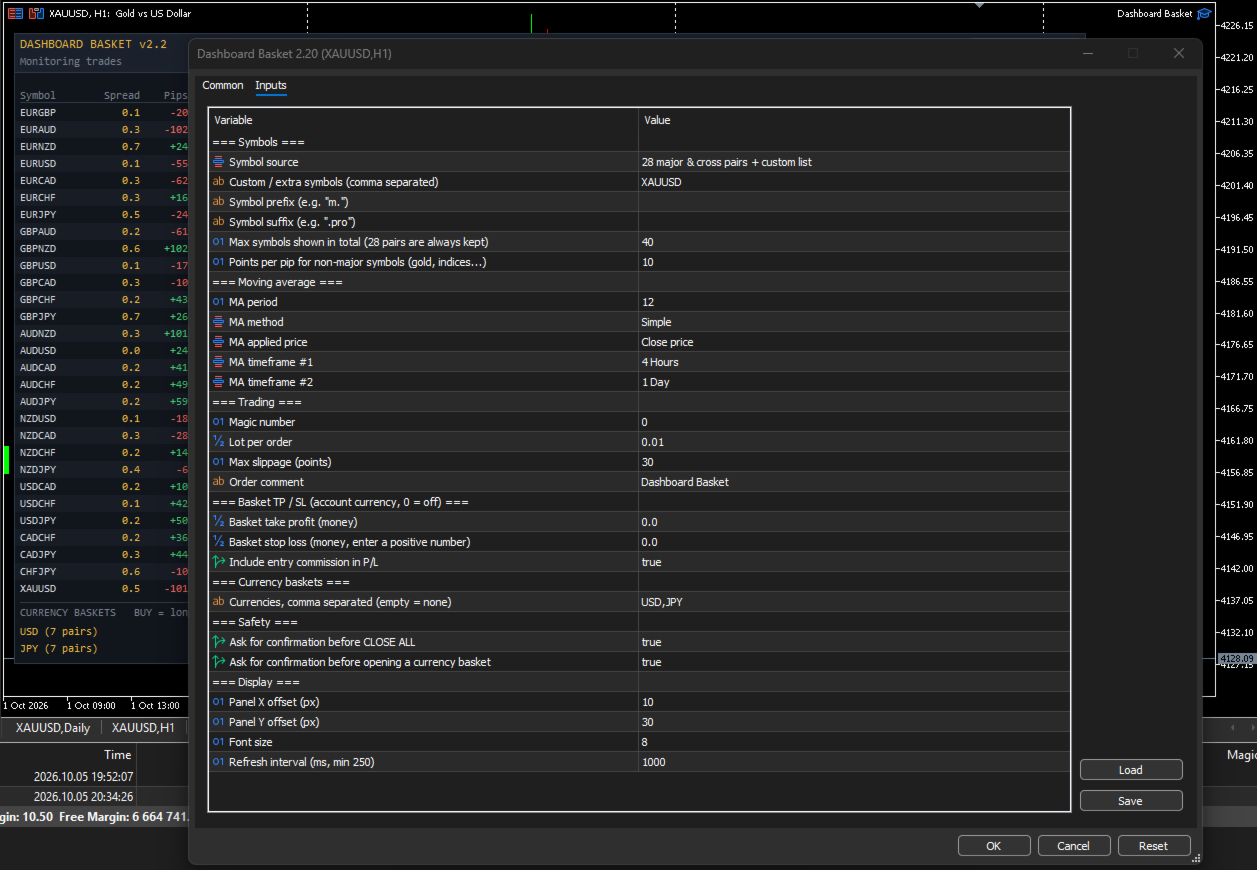
INPUT PARAMETERS

Symbols

  • Symbol source: 28 major and cross pairs / 28 pairs plus custom list / all Market Watch symbols / custom list only
  • Custom / extra symbols: comma-separated list, for example XAUUSD,XAGUSD,US30
  • Symbol prefix and Symbol suffix: for brokers that add characters to symbol names
  • Max symbols shown: total number of rows (default 40). The 28 major pairs are always kept.
  • Points per pip for non-major symbols: default 10

Moving average

  • MA period (default 12)
  • MA method: Simple, Exponential, Smoothed, Linear Weighted
  • MA applied price (default Close)
  • MA timeframe 1 and MA timeframe 2 (default H4 and D1)

Trading

  • Magic number
  • Lot per order
  • Maximum slippage in points
  • Order comment

Basket take profit / stop loss

  • Basket take profit in account currency (0 = off)
  • Basket stop loss in account currency, entered as a positive number (0 = off)
  • Include entry commission in profit

Currency baskets

  • Currencies: comma-separated list, for example USD,JPY,EUR (empty = no basket rows)

Safety

  • Confirm before CLOSE ALL
  • Confirm before opening a currency basket

Display

  • Panel X and Y position
  • Font size
  • Refresh interval in milliseconds (minimum 250)


HOW TO USE

  1. Attach the EA to any chart. An empty chart with enough width is recommended, because the panel is about 1070 pixels wide.
  2. Enable Algo Trading in the terminal and allow algorithmic trading in the EA settings.
  3. Choose the symbol source and, if needed, the symbol prefix or suffix of your broker.
  4. Set the lot size, and optionally the basket take profit and stop loss.
  5. Read the market from the dashboard and trade with the buttons.

The first time the EA loads, some ADR and MA cells may stay empty or grey for a few seconds while the terminal downloads the price history of every symbol. They fill in automatically.


IMPORTANT NOTES

  • A hedging account is recommended. On a netting account each symbol can hold only one position, so a SELL click reduces or reverses an existing BUY instead of opening a separate trade, and two baskets that share a pair offset each other on that pair.
  • Positions are opened without individual stop loss or take profit. Risk is managed at basket level with the basket take profit and stop loss, or manually with the CLOSE buttons.
  • Floating profit includes swap and the commission charged at entry. A commission charged at exit by some brokers is only applied when the position closes.
  • The more symbols you display, the more history the terminal must keep up to date. With many symbols, keep the refresh interval at 1000 ms or more.
  • Trading involves risk. This product is a trade management and market overview tool. It does not predict the market and does not guarantee profits.
Produits recommandés
Currency Strength Monitor is a professional multi-currency strength indicator for MetaTrader 5 that analyzes and displays the relative strength of 8 major currencies (USD, EUR, GBP, AUD, NZD, JPY, CHF, CAD) in real-time. The indicator calculates strength values by aggregating price movements across 28 currency pairs and normalizing them using ATR, providing traders with a clear visual representation of which currencies are strengthening or weakening. Key Features: Multi-Currency Analysis — Monit
CosmiCLab SMC FIBO CosmiCLab SMC FIBO is a professional trading indicator designed for traders who use Smart Money Concepts (SMC), market structure analysis and Fibonacci retracement levels. The indicator automatically detects market swings and builds Fibonacci levels based on the latest impulse movement. It also identifies market structure changes such as BOS (Break of Structure) and CHOCH (Change of Character), helping traders understand the current market direction. CosmiCLab SMC FIBO also pr
Object Synchronizer MT5 : Better focus/analysis of the price chart in many timeframes. Are you bored to save and load template many times for the same symbol for many chart timeframes? Here is the alternative. With this indicator, you enjoy creating objects across many charts, you can modify the same object in any chart, you can delete the same object in any chart. All objects you created/modified are always synchronized across all chart windows (with the same symbol). Save your time, you can fo
Just Copier MT5
Agung Imaduddin
4.75 (4)
"Just copier" is designed to copy trading without any complicated settings. The copy can be done in one PC. One EA can be set as master (provider) or slave (receiver). The receiver lot can be set to multiple providers lots. Please also check this product at fxina.hostingerapp.com.  Any type of copy is available. MT4 -> MT5 MT4 -> MT4 MT5 -> MT5 MT5 -> MT4 If you want to copy MT4 -> MT5 or MT5 -> MT4, please purchase "Just copier" for MT4 and "Just copier" for MT5 separately. Just Copier can copy
GDS Renko Pip ST Chart - Pip-Based Renko Chart Indicator for MetaTrader 5 GDS Renko Pip ST Chart is a pip-based Renko chart indicator for MetaTrader 5. It helps traders build and study cleaner Renko price movement using a practical fixed pip or point-based brick structure. This tool is designed as a Renko chart foundation for manual analysis. It does not predict the market, does not generate buy or sell signals and does not decide whether a trade should be opened. Renko EDGE EA Golden Delta | A
Inverted_Chart_EA Utility Expert Advisor Inverted_Chart_EA creates and maintains a mirror-inverted chart of any symbol and timeframe. It automatically generates a custom instrument (e.g. US30_INV ) and keeps its price history updated in real time, with bars mirrored around a chosen pivot. This utility gives traders a new way to analyze the market from a different perspective by flipping the chart upside down. Why use an inverted chart? Highlight hidden patterns – price formations that look ordin
Apex Zone Reversal
Joseph Muguai Nguru
Here is the MQL5-compliant product description translated into French, Italian, and Turkish: French (Français) Apex Zone Reversal Aperçu du produit Apex Zone Reversal est un indicateur d'analyse technique développé pour MetaTrader 5 (MT5). Il est conçu pour aider les traders à identifier les zones de support, de résistance et de retournement du marché sur la base du cadre ZORRO et des retours de la structure du marché. Caractéristiques principales Cartographie des zones : Identifie automatiqueme
Blogs MQL5 : https://www.mql5.com/en/blogs/post/761446 Version MT4 : https://www.mql5.com/en/market/product/136790 Version MT5 : https://www.mql5.com/en/market/product/136791 Time Wizard est un assistant de trading professionnel conçu pour les traders exigeants qui recherchent rapidité, timing et contrôle de l’exécution sur un tableau de bord intuitif. Ce conseiller expert est conçu pour le trading événementiel, l’exécution programmée et la gestion semi-automatique rapide des ordres. Il vou
Volatility Regime Monitor is a professional MetaTrader 5 dashboard for classifying current volatility with transparent, measurable context. It combines ATR, recent bar-range statistics and historical percentiles to show whether the market is compressed, normal or expanding without generating entry signals. MAIN FEATURES • ATR and recent range context • Historical volatility percentile state • Compression, normal and expansion classification • Historical regime table • Transparent thresholds and
Execution X PRO
Artur Jacek Domagala
EXECUTION X PRO Professional Manual Execution and Trade Management Panel for MetaTrader 5 Solution. Comfort. Experience. Easy to understand, develop for New traders Execution X PRO is an advanced manual trading panel created for traders who want to maintain full control over their market decisions while improving execution speed, position management and trading discipline. It does not generate random entries and it does not replace the trader’s strategy. Instead, it provides a structured executi
Indicateur Crypto_Forex « WPR avec 2 Moyennes Mobiles » pour MT5, sans repeint. - Le WPR est l'un des meilleurs oscillateurs pour le scalping. - L'indicateur « WPR et 2 Moyennes Mobiles » permet de visualiser les moyennes mobiles rapide et lente de l'oscillateur WPR. - Cet indicateur permet d'anticiper les corrections de prix. - Très facile à configurer via ses paramètres, il est utilisable sur toutes les unités de temps. - Les conditions d'entrée à l'achat et à la vente sont illustrées. - Ave
This is a multi-strategy Expert Advisor (EA) for MetaTrader 5 , integrating a visual control panel with buttons for manual trading, automatic position management based on ATR/Swing logic, session filtering by New York/London hours, and a daily profit/loss protection mechanism. Main Functional Blocks Mode Core logic Main filter Minimal EMA9/EMA21 crossover No additional filter BreakoutPullback Breakout of N-candle high/low or pullback to EMA20/50 SetupMode (Clean Breakout / Pullback) XAUSweepRete
A tool for creating Bill Williams indicators Our tool provides the ability to set Bill Williams indicators on a chart with a mouse click. - The Awesome Oscillator (AO) indicator helps to assess the driving force of the trend. - Alligator indicator — determines the current state of the trend and possible entry and exit points. - Fractals indicator — helps to identify significant levels  - Accelerator Oscillator (AC) indicator — shows the change in trend acceleration. - Market Facilitation Index
FREE
Rollback Renegade
Alex Amuyunzu Raymond
Rollback Renegade — Entry on a Rollback After a Breakout Rollback Renegade is a fully automated trend-following Expert Advisor built around one of the most reliable price-action patterns in trading: a structural breakout followed by a controlled retracement entry. Rather than chasing price the moment a breakout occurs — which exposes traders to poor fill prices and false breakouts — Rollback Renegade waits patiently for the market to pull back to a calculated level before committing capital. Thi
CorrelatePair
Vitaly Muzichenko
Advantage The analyzer provides an opportunity to examine correlation in history, for example, for the previous month excluding the current one, thus allowing you to evaluate symbol movement in history. It can be conveniently used in conjunction with the LineSyncMirrorCharts analyzer. Charts are synchronized by a market type: Forex, CFD, Futures, and Indices. The analyzer calculates the distance covered by the price on a specified period in points. The tool fits pairs and portfolio traders. Des
Session panel
Timo Mario Hoffmann
Session Panel for MT5 Session Panel is a free MT5 indicator that gives you a fast and convenient live overview of the major trading sessions directly from the chart. Monitor Tokyo, London, and New York session times, see which session is currently active, track countdowns to the next session, and view session overlap information in one compact dashboard. Built for traders who want better market timing, clearer session awareness, and a cleaner chart workflow in live market conditions. Session Pan
FREE
It mesures the lot size based on the points measured by clicking with the MIDDLE MOUSE BUTTON then CLICK and DRAG , previous that configure the indicator based on the risk you accept; The risk can be % based on fixed account, actual account size, and fix capital risk; If the INDICATOR DOESN'T WORK propperly try after configuring it CHANGE the TIMEFRAME and GET BACK to the PREVIOUS timeframe, SOMETIMES  this FIX IT
Cet EA est principalement utilisé pour le scalping du XAUUSD. Objectif   Élimine l’émotion dans la gestion des trades — protège automatiquement les positions et prend des profits afin que vous n’ayez pas à prendre de décisions difficiles sous pression. Ce qu’il fait   ️ Stop Loss automatique   Définit le SL sur la base des récents hauts/bas + buffer   Fini le stress de la pose manuelle   Prises de profits partielles automatiques   Deux modes :   Mouvement fixe : ferme 50 % après un mouve
Kronos is a multi-timer that displays local time, server time and the countdown of the current period. The programme is multilingual, with a choice of English, Italian and Spanish Language selectables in input. Available in four colours and with the choise of five types of font to be used. Like any other programme we have created, the graphic interface is developed to be non-invasive and intuitive. At start-up, the three windows that make up the graphic interface of Kronos are closed on the left
Session Trade Controller is a broker-time session and trade-permission controller. Key functions: - User-configured trading windows - Live countdown to the next session change - Weekday permission rules - Clear open, closed and transition states - Position and pending-order visibility - Explicit reasons when trading is outside the permitted schedule - Dashboard view based on broker server time The utility monitors and applies time permissions configured by the user. It does not generate entry
Currency Strength Panel
AL MOOSAWI ABDULLAH JAFFER BAQER
Currency Strength Trade the strongest currencies against the weakest with confidence. Currency Strength is a professional MetaTrader utility that measures and displays the real-time strength of major currencies, helping traders identify high-probability trading opportunities based on market momentum rather than guesswork. Instead of analyzing one currency pair at a time, Currency Strength evaluates multiple currency pairs simultaneously to determine which currencies are gaining strength and whic
Breakevan Utility
Jose Luis Thenier Villa
BreakEvan Utility  Is a simple tool in a panel with this utilities: This utility will draw a Golden Line in the chart applied showing the breakeven price, considering all the positions opened for that specific symbol. Also the information panel shows: Balance Breakeven Price for that chart Force Breakeven (for that symbol) as ON/OFF Force Breakeven Global (takes into account all trades opened) as ON/OFF Total Lots opened for Symbol Total Lots opened Global And two buttons: Force Breakeven: Whe
Сообщения в Telegram из MT5 о торговых событиях: Открытие/закрытие сделок; Выставление/удаление отложенных ордеров. Версия утилиты для MT4 здесь: https://mql5.com/8bjjy Настройки  Telegram: Создайте своего бота. Для этого напишите для пользователя  @BotFather команду  /newbot , и следуйте инструкциям. В результате вы получите Token бота, примерно такой:   1245680170:BBGuDFVkTYIPtjSaXMgQEhdfg7BOQ6rl8xI.  Узнайте свой ID в  Telegram, для этого напишите пользователю  @userinfobot любое сообщение.
Divergent Stochastic Filter II Catch Reversals Early, Filter Noise, Trade with Confidence The Edge: Why This Stochastic is Different  Every trader knows the Stochastic oscillator. But knowing when to trust its signals, that's the real challenge. The Divergent Stochastic Filter II transforms this classic indicator into a precision reversal detection system by adding critical elements: divergence intelligence, signal filtering and exhaustion detection.  While standard Stochastic oscillators fire s
Telegram to mt5 pro
Janet Abu Khalil
4 (4)
Telegram to MT5 Pro — Advanced Telegram Signal Copier with Auto-Fix, Multi-TP, Risk Control and Full Trade Management Telegram to MT5 Pro — Copieur de signaux Telegram professionnel Telegram to MT5 Pro est un copieur de trading haute performance qui exécute automatiquement les signaux de Telegram directement dans votre compte MetaTrader 5, avec un contrôle total du risque, de l’exécution et de la gestion des trades. Le système se compose de deux composants : • L’Expert Advisor (EA) exécuté dans
HAS RSI Signal — Indicateur de Tendance Professionnel avec Calcul SL/TP HAS RSI Signal est un outil de trading puissant combinant des classiques éprouvés et des algorithmes modernes de filtrage du bruit. L'indicateur analyse le marché à travers le prisme des bougies Heiken Ashi Smoothed (HAS) et de l'oscillateur RSI , offrant au trader des signaux d'entrée clairs lors des retournements de tendance ou des sorties de zones de surachat/survente. Principaux Avantages : Double Filtrage : L'utilisatio
You have 5 positions open on XAUUSD. Net floating is +$30 - looks fine. But look closer: 3 buys, 2 sells. The buys are carrying 0.60 lots, the sells only 0.20. One of those buys has been sitting underwater for 90 minutes. Margin level is at 390% and drifting down. Stress is building - quietly, invisibly - while the terminal just shows you a list of rows. Current price: $59 - increases by $10 after every 20 purchases until reaching the final price of $119 . Next price: $69 . Complete Buyer Kit: 4
Candle Timer Countdown (CTC) – Minuteur de bougie minimaliste et précis Candle Timer Countdown (CTC) est un indicateur MetaTrader léger et non intrusif qui affiche le temps restant de la bougie actuelle sur votre graphique. Conçu dans un souci de simplicité et de clarté, cet outil aide les traders à rester conscients de la clôture des bougies sans encombrer le graphique. Caractéristiques principales : Compte à rebours de bougie en temps réel : Sachez toujours combien de secondes il reste avant l
FREE
CloseByTimeEA
Aleksandr Vasiutin
CloseByTime Utility is a MetaTrader 5 service utility designed to automatically close open positions and delete pending orders at a specified time. It helps traders schedule the end of trading activity in advance, for example at the end of the day, before news releases, or before market close. The utility uses broker server time, supports weekday filtering, and can work with all symbols or only with a selected list of instruments. Features Automatically closes open positions at a specified time.
TradePilotmt5
Hossein Khalil Alishir
TradePilot Expert Advisor (EA) for MetaTrader 5 TradePilot is a professional and user-friendly Expert Advisor (EA) for MetaTrader 5 (MT5) . It simplifies automated trading , risk management , and trade execution with a smart trading panel . Perfect for beginners and experienced traders looking for a reliable trade manager EA with automated lot size calculation and smart position management. Key Advantages User-Friendly Trading Panel: Customizable panel with buttons and hotkeys for fast ex
Les acheteurs de ce produit ont également acheté
Trade Assistant MT5
Evgeniy Kravchenko
4.43 (216)
It helps to calculate the risk per trade, the easy installation of a new order, order management with partial closing functions, trailing stop of 7 types and other useful functions. Additional materials and instructions Installation instructions - Application instructions - Trial version of the application for a demo account Line function -   shows on the chart the Opening line, Stop Loss, Take Profit. With this function it is easy to set a new order and see its additional characteristics bef
Bienvenue sur Trade Manager EA, l’outil ultime de gestion des risques conçu pour rendre le trading plus intuitif, précis et efficace. Ce n’est pas seulement un outil d’exécution d’ordres ; c’est une solution complète pour la planification des trades, la gestion des positions et le contrôle des risques. Que vous soyez débutant, trader expérimenté ou scalpeur ayant besoin d’une exécution rapide, Trade Manager EA s’adapte à vos besoins, offrant une flexibilité sur tous les marchés, des devises et i
Local Trade Copier EA MT5
Juvenille Emperor Limited
4.94 (149)
Local Trade Copier EA MT5 est un copieur de trades rapide et flexible permettant de copier et de gérer des trades entre plusieurs comptes MetaTrader 5 sur le même ordinateur Windows ou Windows VPS. Il combine la synchronisation locale des trades avec des contrôles côté Receiver pour la taille des lots, la gestion du risque, le filtrage des trades, le mappage des symboles, la gestion des trades et la protection du compte. Configurez vos terminaux Transmitter et Receiver en environ 1 minute et co
================================================================================ POC BREAKOUT - V20.72. Full Professional Grade Toolkit ================================================================================ POC Breakout is a full MetaTrader 5 trading dashboard for discretionary traders who want breakout signals, Point of Control (POC) context, volume profiles, order flow, market structure, news, alerts, and advanced trade planning in one professional workspace. Attached directly to you
Telegram to MT5 Multi-Channel Copier   copie automatiquement les signaux de trading de vos canaux Telegram directement vers MetaTrader 5. Pas de bots, pas d'extensions de navigateur, pas de copie manuelle. Un signal arrive sur Telegram et l'EA ouvre le trade dans votre terminal en quelques secondes. Et avant de copier un canal, le backtester intégré vous montre ce que ce canal aurait fait sur votre compte. Le produit comprend deux composants : une application Windows qui écoute vos canaux Telegr
Strategy Ledger Pro
Abdullah Uygar Tuna
5 (7)
Désormais disponible en français. Strategy Ledger Pro est un panneau d'analyse de compte en lecture seule pour MetaTrader 5. Il sépare les résultats du compte par Expert Advisor, stratégie, symbole et numéro magic, pour que vous voyiez ce que chacun apporte réellement. Le panneau est disponible en 11 langues : English, Français, Deutsch, Español, Italiano, Português, Русский, Türkçe, 中文, 日本語 et 한국어. Avant de télécharger la démo. Le Market exécute la démo de tout produit payant uniquement dans l
TradePanel MT5
Alfiya Fazylova
4.88 (170)
Trade Panel est un assistant commercial multifonction. L'application contient plus de 50 fonctions de trading pour le trading manuel et permet d'automatiser la plupart des tâches commerciales. Instructions d'utilisation : https://www.mql5.com/fr/blogs/post/762589 Version d'essai de l'application pour un compte démo : https://www.mql5.com/fr/blogs/post/762644 Comment installer l'application : https://www.mql5.com/fr/blogs/post/762645 Comment tester l'application en mode visuel : https://www.mql5.
Copiez les signaux Telegram avec vos propres règles de trading Telegram to MT5 Signal Trader copie automatiquement les signaux de trading au format texte provenant de canaux et de groupes Telegram publics et privés vers MetaTrader 5. Gérez plusieurs fournisseurs et comptes MT5 depuis une seule application de bureau, avec des paramètres de risque et de trading propres à chaque fournisseur . Aucun bot Telegram ni configuration d'API n'est nécessaire pour copier les signaux. Connectez-vous simpleme
Grid Manual MT5
Alfiya Fazylova
4.73 (22)
Grid Manual est un panneau de trading permettant de travailler avec une grille d'ordres. L'utilitaire est universel, possède des paramètres flexibles et une interface intuitive. Il fonctionne avec une grille d'ordres non seulement dans le sens des pertes, mais aussi dans le sens de l'augmentation des profits. Le commerçant n'a pas besoin de créer et de maintenir une grille d'ordres, l'utilitaire le fera. Il suffit d'ouvrir une ordre et "Grid Manual" créera automatiquement une grille de ordres po
Power Candles Strategy Scanner - Outil de recherche de configurations multi-symboles à optimisation automatique Le Power Candles Strategy Scanner utilise le même moteur d'auto-optimisation que celui qui alimente l'indicateur Power Candles, pour chaque symbole de votre Market Watch, en parallèle. Un panneau vous indique quels symboles sont statistiquement négociables à l'instant, quelle stratégie est la plus performante pour chacun, la paire Stop Loss / Take Profit optimale, et vous alerte dès qu
Trade copier MT5
Alfiya Fazylova
4.61 (56)
Trade Copier est un utilitaire professionnel conçu pour copier et synchroniser les commandesentre les comptes de trading. Les commandes sont copiées du compte/terminal du fournisseur vers le compte/terminal du destinataire, qui sont installés sur le même ordinateur ou vps. Avant d'acheter, vous pouvez tester la version démo sur un compte démo. Version démo ici . Instructions complètes ici . Principales fonctionnalités et avantages: Prend en charge la copie des commandes MT5> MT5, MT4> MT5, MT5>
Footprint Chart Pro — Professional OrderFlow EA for MetaTrader 5 Version 6.34 | Professional tool for real traders | Institutional-Grade Visualization DEMO USERS - PLEASE SELECT EVERY TICK / REAL TICK WHEN TESTING AND YOU HAVE DOWNLOADED HISTORICAL DATA. IF YOU SEE A WAITING SCREEN AND IT IS NOT DOWNLOADING, IT MEANS YOU HAVE LOW HISTORICAL DATA. TRY 1 MIN AND 5 MIN FIRST ON 1 DAY DATA. ONE DAY DATA SHOULD BE THE NEWEST AND MOST CURRENT DATE. PLEASE WAIT UNTIL THE MARKET HAS ROLLED OVER PERIOD.
Exp COPYLOT CLIENT for MT5
Vladislav Andruschenko
3.97 (35)
Copieur professionnel de trades pour MetaTrader 5 Un copieur de trades rapide, professionnel et fiable pour MetaTrader . COPYLOT permet de copier des trades Forex entre les terminaux MT4 et MT5 avec prise en charge des comptes Hedge et Netting . La version MT5 de COPYLOT prend en charge : - MT5 Hedge → MT5 Hedge - MT5 Hedge → MT5 Netting - MT5 Netting → MT5 Hedge - MT5 Netting → MT5 Netting - MT4 → MT5 Hedge - MT4 → MT5 Netting Version MT4 Description complète + DEMO + PDF Comment acheter Comme
HINN MagicEntry Extra
ALGOFLOW OÜ
4.74 (19)
HINN MAGIC ENTRY – the ultimate tool for entry and position management! SIMPLE. FASTEST. INTUITIVE. MAX AUTOMATED. Place orders by selecting a level directly on the chart! full description   ::  demo-version  :: 60-sec-video-description Key features: - Market, limit, and pending orders - Automatic lot size calculation - Automatic spread and commission accounting - Unlimited partitial take-profits  - Breakeven and trailing stop-loss and take-profit  functions - Invalidation leves - Intuitive, a
Signal Trading View to MT5 Pro
Mirel Daniel Gheonu
4.5 (2)
Signal TradingView to MT5 Pro Automator Exécution professionnelle instantanée entre TradingView et MetaTrader 5 Automatisez votre stratégie de trading avec le pont de communication le plus robuste entre les alertes TradingView et l'exécution réelle sur MT5. Conçu pour les traders qui exigent vitesse, flexibilité et une gestion des risques impeccable, cet Expert Advisor transforme tout message d'alerte en un ordre au marché ou à cours limité précis. POINTS FORTS ET AVANTAGES Moteur d'analyse univ
MT5 to Telegram Signal Provider est un utilitaire facile à utiliser et entièrement personnalisable qui permet l'envoi de signaux spécifiés vers un chat, un canal ou un groupe Telegram, transformant ainsi votre compte en fournisseur de signaux. Contrairement à la plupart des produits concurrents, il n'utilise pas d'importations DLL. [ Démonstration ] [ Manuel ] [ Version MT4 ] [ Version Discord ] [ Canal Telegram ]  New: [ Telegram To MT5 ] Configuration Un guide utilisateur étape par étape est
Farmed Hedge Yield Farming | All Markets (Manual - Hybrid - Semi/Automated EA) VERIFIED TRADING RESULTS - Farmed Hedge Yield Axi Copy:  https://www.mql5.com/en/signals/2356376 - Farmed Hedge Yield Exn Copy:   https://www.mql5.com/en/signals/2356404 - Farmed Hedge Yield V Copy:  https://www.mql5.com/en/signals/2357156 IMPORTANT NOTICE: FarmedHedge is a MANUAL-FOCUSED TRADING UTILITY ,not a fully automated EA. Results shown on this Signal include manual trades and overall strategic management.
Telegram To MT5 Ultra
Mirel Daniel Gheonu
5 (5)
Telegram To MT5 — Copieur de signaux Transformez les appels de trading de vos canaux Telegram en véritables ordres MT5 — automatiquement, sur autant de comptes que vous le souhaitez, avec le risque et les règles entièrement sous votre contrôle. Telegram To MT5 relie les canaux VIP / de signaux que vous suivez déjà sur Telegram à votre terminal MetaTrader 5. Une application de bureau compagnon gratuite lit les messages (même des canaux qui bloquent les bots), et cet Expert Advisor les exécute sur
Copy your MT5 trades to Interactive Brokers You keep using MT5. Every order you open or close is sent to your IB account. In real time. No coding. No changes to your strategy or EA. Try it first Rent 1 month: $30. Test on a live or paper account. What it does Real-time copying: same direction, reverse, or one side only. Map any MT5 symbol to any IB symbol. Set a lot ratio for each. Forex, Futures, Stocks, CFDs, Metals and Crypto. Position sync: both accounts checked, any difference fixed. Optio
Trading Chaos Expert
Hennadii Stanilevych
5 (11)
This software has no equals in the world and represents a universal trade "console" covering trading signals, automated market entry, setting of Stop Loss and Take Profit, as well as Trailing Profit for multiple trades at the same time in a single open window. Intuitive control of the Expert Advisor in "three clicks" ensures a comprehensive use of all its functions on different computers, including tablets PCs. Interacting with additional signal indicators that mark the chart to give a real mark
Anchor Trade Manager
Kalinskie Gilliam
5 (9)
Your EAs cannot see each other, but Anchor can. Anchor gives you one place to coordinate your EAs, manage risk, and decide when trading is allowed. It works alongside the trading bots you already use without any changes to them. The Problem One EA opens a trade. Then another starts trading. The next thing you know, you wake up to multiple grids built across your account. Each EA may be doing exactly what it was designed to do, but together they can place far more risk on your account than you in
The News Filter MT5
Leolouiski Gan
4.78 (23)
Ce produit filtre tous les conseillers experts et les graphiques manuels pendant les heures de publication des actualités, de sorte que vous n'avez pas à vous soucier des pics de prix soudains qui pourraient détruire vos configurations de trading manuelles ou les transactions entrées par d'autres conseillers experts. Ce produit est également livré avec un système de gestion des ordres complet qui peut gérer vos positions ouvertes et vos ordres en attente avant la publication de toute actualité.

Gardez l'indicateur auquel vous faites confiance. Automatisez les tâches qui l'entourent. Vous disposez déjà d'un indicateur MT5 fiable, mais vous devez encore surveiller le graphique, attendre un signal, calculer le lot, passer l'ordre et gérer chaque position à la main ? Stratiora Signal Engine MT5 relie ces étapes. Il transforme les signaux Buy et Sell de buffers compatibles en un processus automatisé complet : entrée, calcul du volume, Stop Loss, Take Profit, filtres, gestion des positions
Trade Copier Ultimate
Janitha Sandaruwan Amaradasa Wickramasingha Arachchilage
5 (5)
Trade Copier Ultimate - Telegram to MT5 Signal Copier Trade Copier Ultimate automatically copies Telegram trading signals into MetaTrader 5. The EA can read signal messages, detect the symbol, order type, entry price, Stop Loss, Take Profit levels and selected update commands, then execute or manage the trade in MT5 using your lot and risk settings. It is more than a basic Telegram to MT5 copier. TCU also supports Bot API and user-account Bridge workflows, Discord signal routing, local MT5 to MT
EA Overfitter
Stephen J Martret
5 (1)
That backtest looks great. But will it still be making money tomorrow, next week, next month? EA Overfitter re-runs your EA on 100 price histories it has never seen. One score tells you if the edge is real. A backtest tells you what an EA did on one price history — the one that happened to occur. What you cannot tell from it is how much of that result was the strategy and how much was the particular path. EA Overfitter answers that. It builds up to 100 synthetic price histories your EA has n
Trade Indicator Assistant   is a powerful MT5 utility designed to turn indicators into automated trading systems. Its main feature is the ability to automatically detect an indicator’s   BUY and SELL signal buffers , without requiring you to know the buffer numbers, search through indicator settings, or modify the indicator source code. Bonus Indicator:   After purchasing Trade Indicator Assistant, contact me to receive   Trade Signal Pro   completely free as a bonus indicator. [Download Demo V
Welcome to ENTRY IN THE ZONE AND SMC MULTI TIMEFRAME  SPECIAL BENEFIT / FOR OUR MQL5 CUSTOMERS FREE ACCESS TO THE NEW TOOL  — COMING SOON — Learn more on our official website  : https://www.fableedge.net Entry In The Zone and SMC Multi Timeframe is a real-time market analysis tool based on Smart Money Concepts (SMC), designed to analyze market structure, price direction, and key trading zones. It supports both Single-Timeframe Analysis and Multi-Timeframe Analysis, providing a clearer view of th
Quant Panel
Kevin Craig E Gittins
QUANT PANEL Independent per-algo analytics, protected MT5 history and professional PDF reporting Quant Panel is built for traders who run several Expert Advisors or strategies on one MT5 account and need to know how each algo is actually performing. Instead of treating the terminal as one combined portfolio, Quant Panel groups closed positions by EA comment or magic number and calculates every strategy independently. It gives you one clear dashboard for comparing algos, finding weak systems and
Trade Manager Panel Pro MT5
VividMind Digital Solutions
5 (6)
Envoyez-moi un message après l’achat pour recevoir le kit complet du manuel + un essai de 3 jours de l’API OpenAI pour tester les fonctionnalités d’IA + un autre cadeau bonus Le prix actuel est un tarif promotionnel limité pour la mise à jour du relancement d’août — sécurisez votre édition maintenant avant l’augmentation du prix. Prochain prix : $340 C’est complètement différent de tous les panneaux de trading que vous avez pu essayer ou voir sur le marché. C’est l’un des panneaux de trading al
YuClusters
Yury Kulikov
4.93 (43)
Attention: You can view the program operation in the free version  YuClusters DEMO .  YuClusters is a professional market analysis system. The trader has unique opportunities to analyze the flow of orders, trade volumes, price movements using various charts, profiles, indicators, and graphical objects. YuClusters operates on data based on Time&Sales or ticks information, depending on what is available in the quotes of a financial instrument. YuClusters allows you to build graphs by combining da
Plus de l'auteur
** NOTE: This indicator uses realtime data. Thus DO NOT download Demo version. If you still need demo version, please refer to trial version . Version for MT4:  https://www.mql5.com/en/market/product/123597 Symbol Chart Changer is an indicator/utility that offers you the option to switch between symbols and timeframes. You can choose any symbol and timeframe on the same chart with just a few clicks.  In addition, this indicator also shows the profit of the symbol through the color of the butt
This indicator displays two important pieces of information on the MT5 chart: Current Spread - Trading cost measured in points, helping traders assess optimal entry timing when spread is low. Time Countdown - Remaining time (minutes:seconds) until the current candle closes and a new candle forms, supporting candle-based trading strategies. Information is displayed as compact text in a chart corner (default top-right), with customizable position, color, and font size. The indicator updates in rea
FREE
This indicator displays two important pieces of information on the MT4 chart: Current Spread - Trading cost measured in points, helping traders assess optimal entry timing when spread is low. Time Countdown - Remaining time (minutes:seconds) until the current candle closes and a new candle forms, supporting candle-based trading strategies. Information is displayed as compact text in a chart corner (default top-right), with customizable position, color, and font size. The indicator updates in rea
FREE
For MT5: TP SL Calculator This tool helps you to automatically calculate profit at Take - Profit price and loss at Stop - Loss price. Feature: - Calculate profit at TP price. Apply to all operators (BUY / BUY LIMIT / BUY STOP / SELL / SELL LIMIT / SELL STOP), with TP price is greater than 0. Profit is expressed in money and points. - Calculate loss at SL price. Apply to all operators (BUY / BUY LIMIT / BUY STOP / SELL / SELL LIMIT / SELL STOP), with SL price is greater than 0. Loss is express
** NOTE:   This indicator uses realtime data. Thus   DO NOT   download Demo version. If you still need demo version, please refer to   free version . Version for MT5:   https://www.mql5.com/en/market/product/115489 Symbol Chart Changer   is an indicator/utility that offers you the option to switch between symbols and timeframes. You can choose any symbol and timeframe on the same chart with just a few clicks.  In addition, this indicator also shows the profit of the symbol through the color o
For MT4: TP SL Calculator for MT4 This tool helps you to automatically calculate profit at Take - Profit price and loss at Stop - Loss price. Feature: - Calculate profit at TP price. Apply to all operators (BUY / BUY LIMIT / BUY STOP / SELL / SELL LIMIT / SELL STOP), with TP price is greater than 0. Profit is expressed in money and points. - Calculate loss at SL price. Apply to all operators (BUY / BUY LIMIT / BUY STOP / SELL / SELL LIMIT / SELL STOP), with SL price is greater than 0.   Loss is
TradePanel — All-in-One Trading Panel for MT5 TradePanel is a compact, draggable on-chart control panel for fast manual trading. Open and close positions, read live price and P&L, and switch symbols — all without leaving the chart or opening an order ticket. Built on CTrade with retry logic on every close, size-step/min/max-aware lot handling, and per-chart position memory, it is designed to be a safe, reliable daily driver — not just a demo panel. Full step-by-step guide (every button explai
FREE
Filtrer:
Aucun avis
Répondre à l'avis