SnR Pro High probability
- Indicadores
- Versão: 4.9
- Ativações: 5

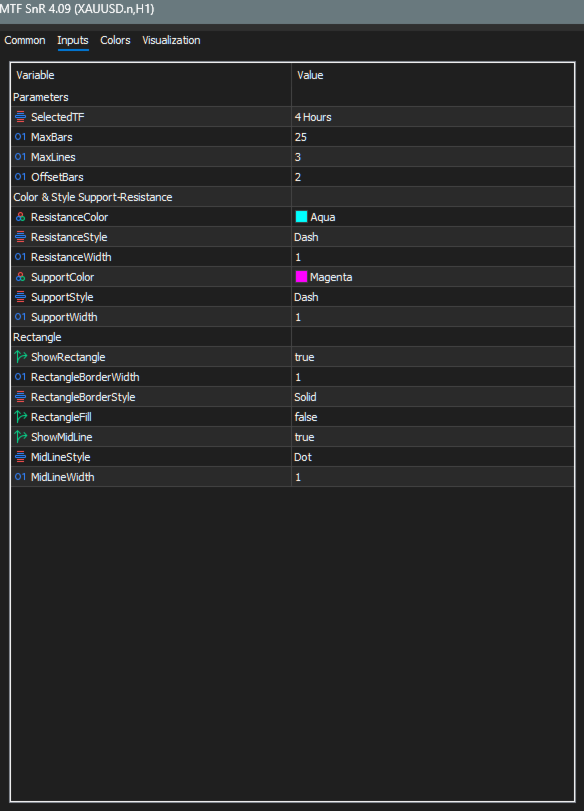
MTF SnR (v4.09) — Input Parameters Guide
This is a Multi-Timeframe Support & Resistance (MTF SnR) indicator for MT5. It scans swing highs and swing lows on a higher timeframe (your chosen SelectedTF) and projects those levels onto the current lower-timeframe chart as horizontal lines and rectangles. It is a visual analysis tool only — it does not trade.
Below is an explanation of only the inputs visible in the parameter dialog.
---
🟩 Group: Parameters
SelectedTF (default: PERIOD_H1)
· Function: The higher timeframe from which swing highs and swing lows are scanned.
· Use: Determines the "source" timeframe of the SnR levels. Example: chart on M15 with SelectedTF = H1 → shows H1 support/resistance on the M15 chart.
· Constraint: Must be higher than the current chart timeframe. If _Period >= SelectedTF, the indicator marks itself invalid and draws nothing (short name will show "Invalid TF - Use Lower TF").
MaxBars (default: 25)
· Function: Maximum number of higher-timeframe bars to look back when scanning for swings.
· Use: Controls how far into history the indicator searches. Higher = more historical swings considered (slower scan). Lower = only recent structure.
MaxLines (default: 3)
· Function: Maximum number of SnR lines drawn for each side (resistance and support).
· Use: Keep the chart clean. Example: MaxLines = 3 → only the 3 most recent resistance swings and 3 most recent support swings are drawn. Older ones are discarded even if detected.
OffsetBars (default: 2)
· Function: Number of current-chart bars the SnR lines, rectangles, and mid-lines are extended to the right of the current candle.
· Use: Keeps levels visible slightly ahead of price so you can plan entries. Capped by a server-time safety limit (server time + 14 days).
ConfirmCandles (constant: 0 — not user-editable)
· Function: Number of extra confirmation bars required after a swing before it is validated.
· Note: Fixed at 0 in code — not visible in the dialog. Mentioned only for completeness.
FractalBars (constant: 3 — not user-editable)
· Function: Number of bars on each side required to confirm a swing high/low (fractal detection).
· Note: Fixed at 3 in code — not visible in the dialog. Displayed in the indicator short name as F3.
---
🟩 Group: Color & Style Support-Resistance
ResistanceColor (default: clrAqua)
· Function: Color used for resistance lines, resistance rectangles, and resistance mid-lines.
· Use: Visual identification of supply/resistance zones.
ResistanceStyle (default: STYLE_DASH)
· Function: Line style for resistance horizontal lines.
· Use: Differentiate resistance from support visually (e.g., dashed vs. dotted).
ResistanceWidth (default: 1)
· Function: Thickness of resistance lines.
· Use: Increase to emphasize major resistance.
SupportColor (default: clrMagenta)
· Function: Color used for support lines, support rectangles, and support mid-lines.
· Use: Visual identification of demand/support zones.
SupportStyle (default: STYLE_DASH)
· Function: Line style for support horizontal lines.
· Use: Differentiate from resistance.
SupportWidth (default: 1)
· Function: Thickness of support lines.
· Use: Increase to emphasize major support.
---
🟩 Group: Rectangle
ShowRectangle (default: true)
· Function: Master toggle for drawing supply/demand rectangles around the newest non-dual swing on each side.
· How it works: Uses the swing high (or low) as one edge and the corresponding HTF candle's body (MathMax(open,close) for resistance; MathMin(open,close) for support) as the other edge.
· Use: Highlights the zone of the latest untouched level, not just a single line.
RectangleBorderWidth (default: 1)
· Function: Border thickness of the rectangle.
· Use: Increase to make the zone border more visible.
RectangleBorderStyle (default: STYLE_SOLID)
· Function: Border line style of the rectangle.
· Use: Solid is cleanest for zones; dotted/dashed for subtlety.
RectangleFill (default: false)
· Function: Whether the rectangle interior is filled with color.
· Use: true = clearer block zone (may obscure candles). false = outline-only zone (cleaner).
ShowMidLine (default: true)
· Function: Draw a horizontal mid-line through the center of each rectangle (50% of the zone).
· Use: Marks the "equilibrium" of the zone — useful as a partial entry or breakeven reference.
MidLineStyle (default: STYLE_DOT)
· Function: Line style for the mid-line inside each rectangle.
· Use: Differentiate visually from the zone borders.
MidLineWidth (default: 1)
· Function: Thickness of the mid-line.
· Use: Increase to emphasize midpoint.
💡 Practical Recommendations
· Scalping (M5 chart): SelectedTF = M30 or H1, MaxBars = 20–30, MaxLines = 2–3.
· Intraday (M15/H1 chart): SelectedTF = H4 or D1, MaxBars = 25–40, MaxLines = 3.
· Swing/positional (H4 chart): SelectedTF = D1 or W1, MaxBars = 30–50, MaxLines = 3–5.
· Clean chart look: RectangleFill = false, ShowMidLine = false, MaxLines = 2.
· Clear zone-based trading: RectangleFill = true, ShowMidLine = true, thicker borders.
· Invalid TF warning: If your chart is on H1 and you set SelectedTF = H1, nothing will draw. Always pick a higher TF than the chart.