Good Locking Panel

GoodLocking Panel — One-Click Ladder & Position Manager for MT5

Product type: Utility (manual trading assistant) Platform: MetaTrader 5 Version: 2.00

OVERVIEW

GoodLocking Panel is an on-chart control panel for traders who work with layered pending orders and multi-position baskets. Every action that normally takes dozens of clicks in the terminal — placing ten pending orders, closing one side of a hedge, applying stop loss and take profit to a hundred open positions — is reduced to a single button press.

This is a manual tool, not an automated strategy. It does not generate entry signals and it does not open trades on its own. You decide when and what to execute; the panel executes it instantly and consistently. The only automatic component is the optional basket exit, which closes the basket when floating P/L reaches a level you define.

All operations are filtered by symbol and magic number, so the panel only ever touches its own orders and positions. Trades you place manually or with other Expert Advisors on the same account are never affected.

WHAT IT DOES

Layered pending orders — one click per ladder

Press one button to place a full ladder of pending orders in one direction. The number of levels, the lot size, the distance of the first order from price, and the spacing between levels are all configurable. Four separate ladder buttons cover BUY STOP, SELL STOP, BUY LIMIT and SELL LIMIT.

The panel automatically respects the broker's minimum stop distance. If your configured first-order distance is closer than the broker allows, the distance is raised to a valid value and the adjustment is written to the log rather than letting the order fail silently.

Two-sided straddle in a single press

The BUY + SELL STOP button places both ladders at once — a complete straddle around current price without touching the chart twice. Price is re-read for each side, so the sell ladder is built from the current bid rather than a stale quote.

Stacked market execution

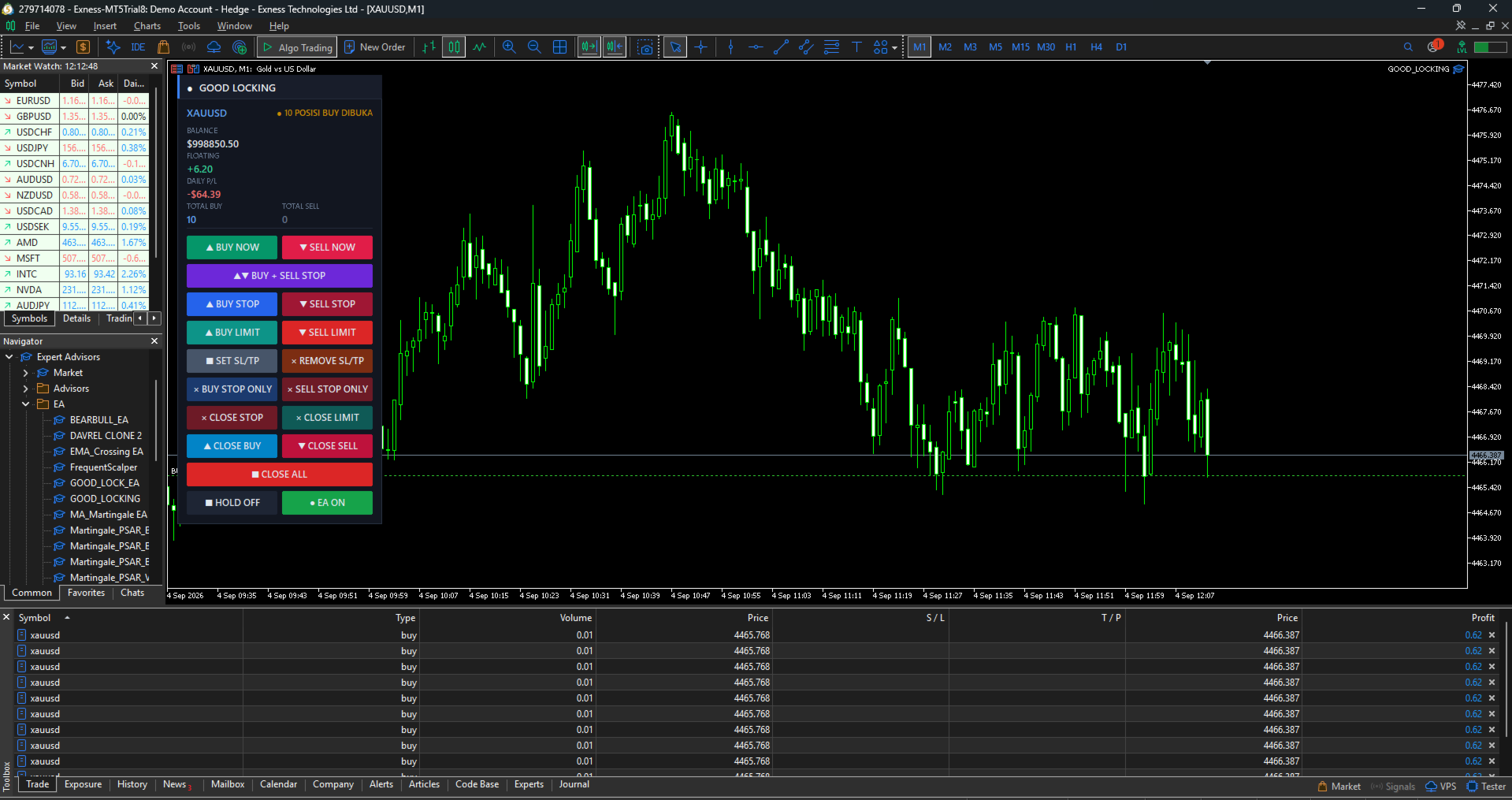
BUY NOW and SELL NOW open multiple market positions instantly. Set the number of positions and the lot per position in the inputs; ten or more positions can be opened with one press. Free margin is verified before every single order, so execution stops cleanly with a clear log entry when margin runs out instead of firing rejected orders at the server. An optional delay between orders is available for brokers that throttle rapid order flow.

Mass stop loss and take profit

SET SL/TP applies stop loss and take profit to every open position in one press, calculated in pips from either the position's own open price or from current market price. Whether you have five positions or a hundred, they are all protected in a single action.

Positions whose calculated levels would violate the broker's stop distance — or where price has already moved past the intended take profit — are skipped with the reason recorded in the log, rather than generating a wall of rejected requests. Positions that already carry the exact same levels are skipped too, so pressing the button twice costs nothing.

REMOVE SL/TP clears stop loss and take profit from all open positions instantly, for when levels were set at the wrong distance and you want to start clean.

Directional closing

Close exactly what you intend to close:

  • CLOSE BUY — closes open BUY positions only
  • CLOSE SELL — closes open SELL positions only
  • BUY STOP ONLY / SELL STOP ONLY — deletes pending stop orders on one side only
  • CLOSE STOP / CLOSE LIMIT — deletes all pending orders of that type
  • CLOSE ALL — deletes all pending orders, with an option to close open positions too

An optional setting makes the directional close buttons also remove the pending orders on the same side, clearing one direction completely in one press.

Live basket monitoring

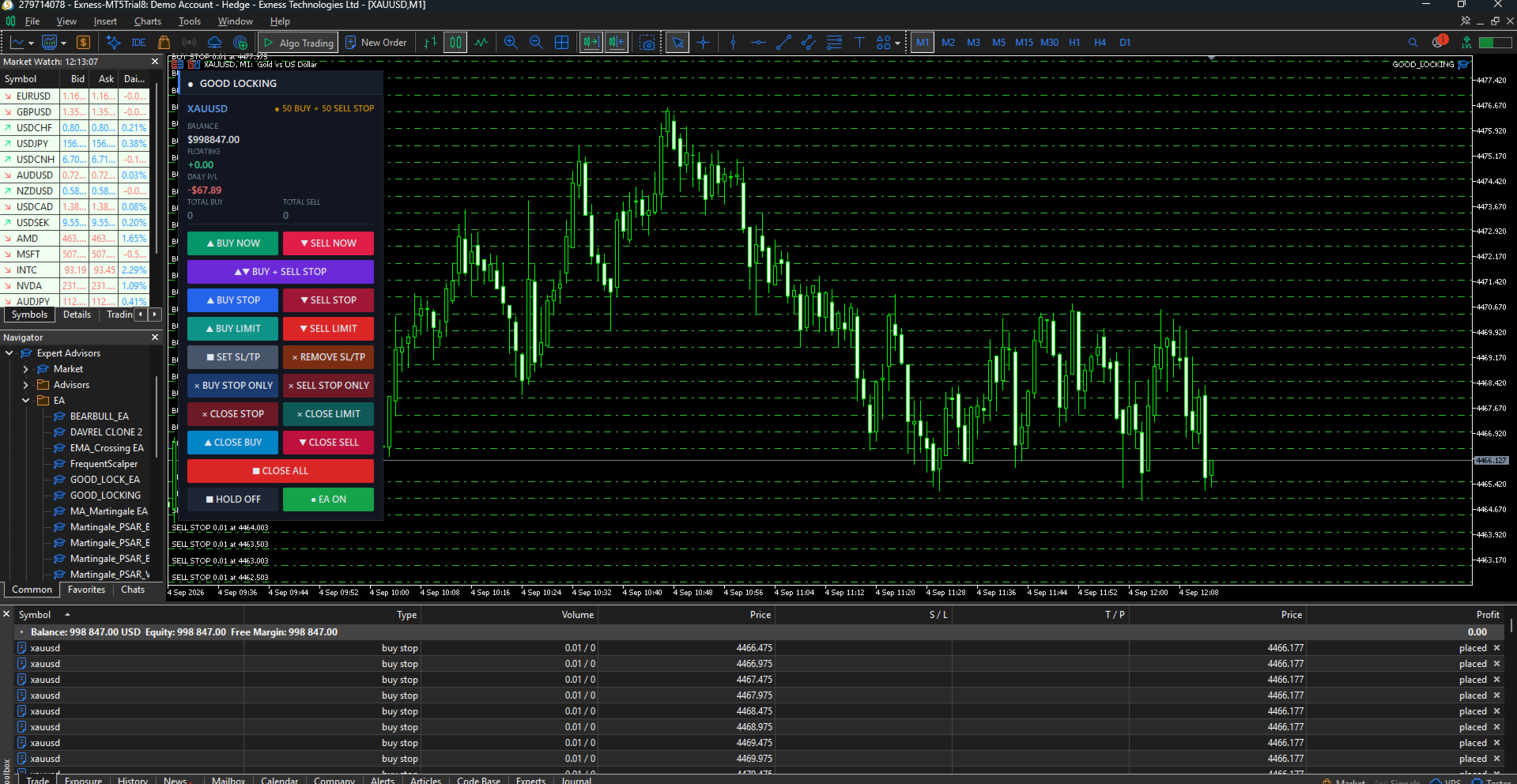
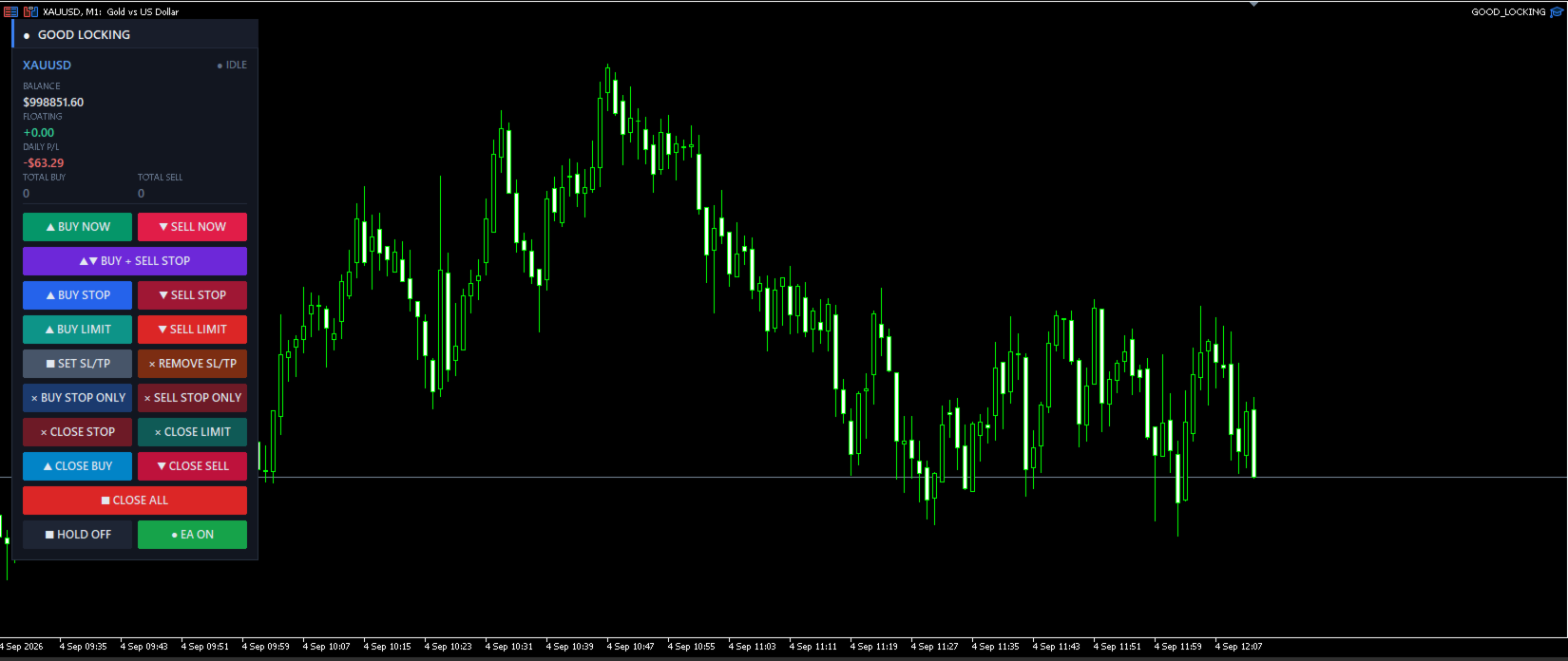
The panel header shows the symbol and a live status indicator (IDLE, PENDING, RUNNING, HOLD). Below it, four statistics update continuously:

  • BALANCE — account balance
  • FLOATING — floating P/L of this panel's basket, including swap
  • DAILY P/L — closed profit or loss today for this symbol and magic number, commission included
  • TOTAL BUY / TOTAL SELL — number of open positions per direction

Zero values in the direction counters are dimmed, so the side that is actually loaded is visible at a glance.

Basket exit

Optionally close the whole basket automatically when floating P/L reaches a target profit or a maximum loss, both defined in account currency. Basket take profit has its own on/off switch, so you can disable it entirely when you prefer to rely on per-position stop loss and take profit. Pending orders can be removed along with the positions when the basket closes.

HOLD and EA switches

HOLD freezes the automation and — optionally — locks the four entry buttons so a misclick cannot open new exposure. Locked buttons are visibly dimmed, so it is always obvious that the panel is intentionally frozen rather than unresponsive. The EA switch turns the automation off while leaving every manual button usable.

Close buttons always remain active in both states. You can always exit a position, whatever the panel is set to.

PANEL LAYOUT

Buttons are arranged top to bottom in the order you would normally use them:

Row Left Right
1 BUY NOW SELL NOW
2 BUY + SELL STOP (full width)
3 BUY STOP SELL STOP
4 BUY LIMIT SELL LIMIT
5 SET SL/TP REMOVE SL/TP
6 BUY STOP ONLY SELL STOP ONLY
7 CLOSE STOP CLOSE LIMIT
8 CLOSE BUY CLOSE SELL
9 CLOSE ALL (full width)
10 HOLD EA

Panel position, width, button height, font size and refresh rate are all configurable. The background card can be switched off for a transparent style.

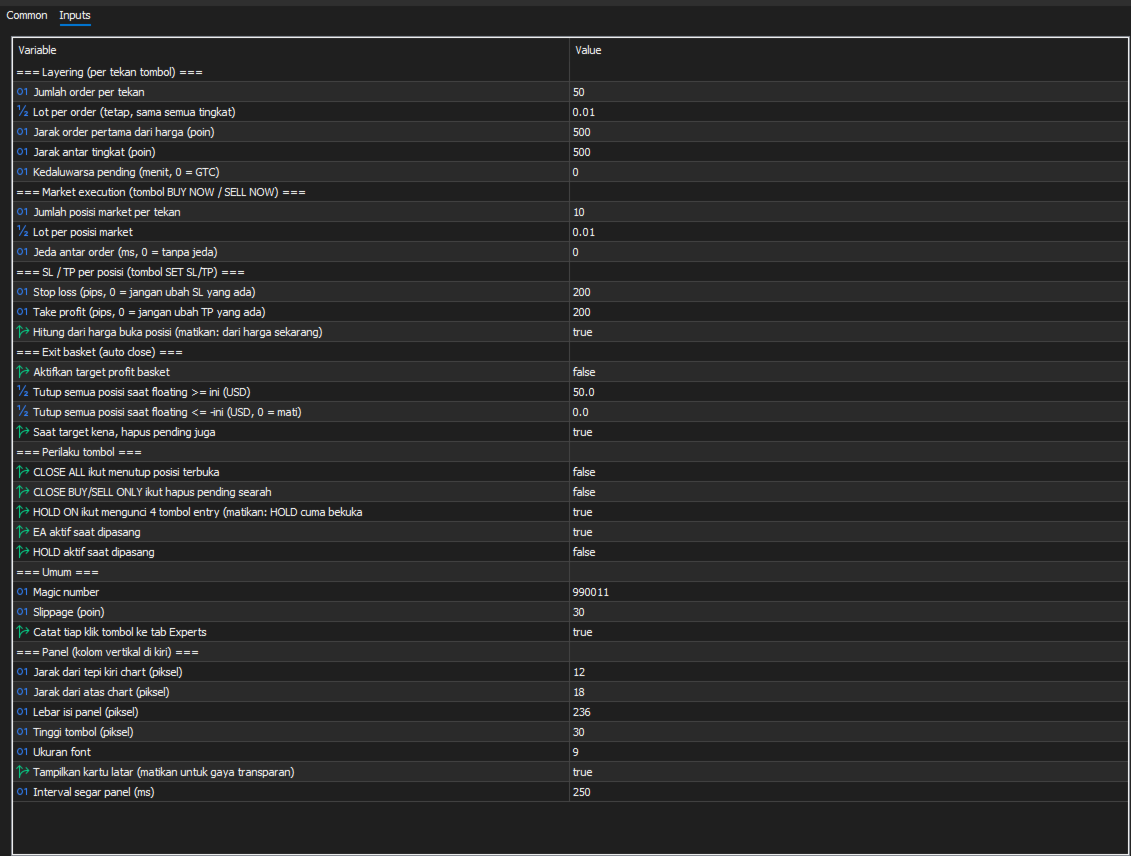
INPUT PARAMETERS

Layering (per button press)

Parameter Default Description
Layers 10 Number of pending orders placed per press
Lot 0.01 Lot per order, identical at every level
First distance 100 Distance of the first order from price, in points
Step points 100 Spacing between levels, in points
Expire minutes 0 Pending order expiry in minutes; 0 = good till cancelled

Market execution

Parameter Default Description
Market layers 10 Number of market positions opened per press
Market lot 0.01 Lot per market position
Delay ms 0 Pause between orders in milliseconds; raise it if your broker throttles rapid orders

Stop loss / take profit

Parameter Default Description
SL pips 200 Stop loss distance in pips; 0 leaves the existing stop loss untouched
TP pips 200 Take profit distance in pips; 0 leaves the existing take profit untouched
From open price true Calculate from each position's open price; disable to calculate from current market price

Basket exit

Parameter Default Description
Use basket TP true Enable or disable the basket take profit entirely
Target profit 50.0 Close all positions when floating P/L reaches this value, in account currency
Max loss 0.0 Close all positions when floating loss reaches this value; 0 = disabled
Delete pending on exit true Also remove pending orders when the basket closes

Button behaviour

Parameter Default Description
CLOSE ALL closes positions false Let CLOSE ALL close open positions in addition to pending orders
Directional close deletes pending false Let CLOSE BUY / CLOSE SELL also delete pending orders on the same side
HOLD locks entry true HOLD also disables the entry buttons
Start with EA on true Automation active on attach
Start with HOLD on false HOLD active on attach

General

Parameter Default Description
Magic number 990011 Identifies this panel's orders and positions
Slippage 30 Maximum deviation in points
Log clicks true Write every button press to the Experts tab

Panel appearance

Position (X, Y), content width, button height, font size, background card visibility and refresh interval are all adjustable.

HOW PIPS ARE CALCULATED

For symbols quoted with 3 or 5 decimal places, 1 pip = 10 points, following the standard convention. For all other symbols, 1 pip = 1 point. On a 2-digit gold symbol this means 1 pip = 0.01.

The exact pip value calculated for your symbol is printed to the Experts tab when the panel starts, so you can confirm your settings before using SET SL/TP.

TYPICAL WORKFLOWS

Breakout straddle. Set your layer count and spacing, press BUY + SELL STOP before a scheduled news release, then press CLOSE BUY STOP ONLY or CLOSE SELL STOP ONLY once direction resolves, leaving only the working side.

Layered accumulation. Press BUY LIMIT to stage a ladder below price. As levels fill, watch TOTAL BUY and FLOATING. Press SET SL/TP to protect the filled positions, or let the basket target profit close everything at once.

Fast manual scaling. Press BUY NOW to open your configured number of market positions immediately, apply protection with SET SL/TP, and close one direction at a time with CLOSE BUY or CLOSE SELL as the position develops.

REQUIREMENTS

  • MetaTrader 5, any broker
  • Algo Trading must be enabled in the terminal and in the panel's properties
  • A hedging account is required for full functionality. On netting accounts only one position per symbol can exist, so the directional close buttons and the TOTAL BUY / TOTAL SELL counters cannot show both sides at once.
  • Works on any symbol and any timeframe
  • No DLL, no external connections, no internet access required

IMPORTANT NOTES

This is a manual execution tool. It does not predict market direction, does not contain a trading strategy, and does not decide when to enter. Results depend entirely on how you use it.

Layering multiple orders means paying the spread on each one. Ten market positions of 0.01 lot carry the same exposure as one 0.10 lot position but cost ten times the spread. Use stacked execution when you genuinely need separate tickets — for partial exits or layered management — rather than simply to increase size.

Trading leveraged instruments carries substantial risk. Test the panel on a demo account until every button behaves the way you expect before using it with real funds. A free demo version is available on this page for testing in the strategy tester's visual mode.

SUPPORT

Questions, bug reports and feature requests are welcome through the comments section of this product page or by private message. Please include your broker, symbol, and the relevant lines from the Experts tab — every button press and every failed operation is logged with a retcode, which makes issues fast to diagnose.
Produtos recomendados
Apex StopLoss Manager
Muhammad Hassan Muhammad Ahmad Atiyah
Apex StopLoss Manager MT5 Script – Stop Loss Control Utility Overview Apex StopLoss Manager is a trade management script for MetaTrader 5 designed to provide precise, rule-based control over Stop Loss behavior on existing open positions . The script focuses on manual execution and accuracy. It does not use automated trading logic, does not open trades, and runs once per attachment . Core Functionality The script provides two independent Stop Loss control functions, both enabled only through exp
**Forex Trade Manager Pro MT5** **Trade Manager MT5** é um utilitário abrangente de gerenciamento de negociações para o MetaTrader 5 que oferece controle total sobre todos os aspectos da sua posição, desde o momento em que você planeja uma negociação até o momento em que a encerra. Ele foi desenvolvido para traders que levam o risco a sério, desde o iniciante construindo disciplina até o profissional scalper que precisa de execução instantânea em múltiplas posições. A ferramenta se anexa a qu
This Expert Advisor monitors all open positions across all symbols in MetaTrader 5. Whenever a Stop Loss (SL) or Take Profit (TP) is manually set or adjusted on any position, the EA automatically applies that value to all other open positions , regardless of symbol or order type (Buy/Sell). This ensures consistent and synchronized SL and TP levels across your account. Perfect for mobile trading via tablet or smartphone!
SwiftEdge Scalper EA Profissional de Scalping com Controle Manual Completo O scalping exige decisões em frações de segundo, gestão precisa de risco e execução perfeita de ordens. Gerenciar cálculos de breakeven, trailing stops e múltiplas posições enquanto observa a ação do preço é avassalador sem as ferramentas certas. SwiftEdge Scalper é seu assistente de trading profissional projetado para scalpers ativos e day traders. Execute operações com um clique ou atalho de teclado, enquanto o EA geren
Trade Manager DaneTrades
Levi Dane Benjamin
4.23 (30)
Trade Manager para ajudá-lo a entrar e sair rapidamente de negociações enquanto calcula automaticamente seu risco. Incluindo recursos para ajudar a evitar negociações excessivas, negociações de vingança e negociações emocionais. As negociações podem ser gerenciadas automaticamente e as métricas de desempenho da conta podem ser visualizadas em um gráfico. Esses recursos tornam este painel ideal para todos os traders manuais e ajudam a aprimorar a plataforma MetaTrader 5. Suporte multilíngue. Vers
Trade Dashboard MT5
Fatemeh Ameri
4.95 (132)
Trade Dashboard simplifies how you open, manage, and control your trades, with built-in lot size calculation. It allows you to execute trades, manage risk, and control positions directly on the chart, with tools such as partial close, breakeven, and trailing stop. Designed to reduce manual work and help you stay focused on your trading decisions. A demo version is available for testing. Detailed explanations of features are provided within the MQL5 platform. Installation instructions are include
DGem Trade Manager Panel
Damien Jean Michel Gremillet
Trade Manager Panel ## Short description  Manage your manual trades with one click: automatic break-even, trailing stop, two-level partial close and risk-based lot sizing — all from a single on-chart panel. --- ## Full description Trade Manager Panel is an on-chart utility that takes care of your open trades so you can focus on the market instead of the order ticket. Drop it on any chart and it manages every position on that symbol automatically, while an interactive panel lets you size new
Secura Trade Manager
KINGSLEY IFEANYI IWUFRED
Secura Trade Manager Risk Management, Position Sizing, All Markets, Trailing Stops, Break Even, Forex-Gold-Crypto-Indices Overview Secura Trade Manager  is the most complete risk management and trade execution panel available for MetaTrader 5. Designed for serious traders who refuse to leave money on the table, it transforms the way you plan, enter, manage, and close trades — across every asset class from Forex and Gold to Indices, Commodities, and Cryptocurrency. Stop guessing lot sizes. Stop m
Martingale panel MT5
Mohammadbagher Ramezan Akbari
In this article, we would like to introduce the trade panel product with the Martingale panel. This panel is made in such a way that it can meet the needs of traders to a great extent. This trade panel actually consists of two trade panels at the same time, with the first one you can take positions with certain profit and loss limits, and with the second one, you can have positions with profit limits but without loss limits. When positions lose, a new position will be added based on the settings
How to Use the  Features           MT4 VERSION   TRADE COPIER Select Role: On the account sending trades, choose Sender (Master Account) . On the account receiving trades, choose Copier (Receiver Account) . Lot Size Mode: Same Lot Size as Master: Ignores multipliers, copies exactly what the Master has. Multiply Master Lot Size: Uses the "Lot Multiplier" field (e.g., Master 0.10, Multiplier 2.0 = Copier 0.20). Use Fixed Lot Size: Ignores Master's volume entirely, uses the "Fixed Lot Size" field f
Manual trade and group management
Gayan Indika Honnanthara Acharige
GTM PANEL PRO is a manual trade-management control panel for MetaTrader 5. It does not open trades on its own and it does not predict anything. It gives you a cockpit: you decide, and the panel executes, protects and reports — in one click instead of ten. It was built for the trader who is already good at reading a chart but keeps losing money to the mechanics of trading: the stop that was never set, the basket that had to be closed one trade at a time, the pending order typed at the wrong price
MATTRIX Position Monitor An 8x8 currency matrix dashboard that gives you a live overview of all  your open positions across the 28 Forex majors in one compact panel.  Designed for traders who manage multiple currency exposures and want  to see direction, hedging, profit, and risk at a glance. WHAT YOU SEE: The 8x8 matrix is organized by the Big8 currency hierarchy: EUR, GBP, AUD, NZD, USD, CAD, CHF, JPY. - Lower triangle (28 cells): one cell per Forex major pair   Cell color = direction:    
Account Profit & Loss Killer Full Account-Level Intelligent Risk Management EA (MT5) ⸻ Product Introduction Account Profit & Loss Killer is a true "overall account control and risk management tool". It does not participate in any trading strategy; it focuses on only one thing: When the total floating profit or total floating loss of all positions in the account reaches your set amount, it immediately and within milliseconds forcibly closes all orders in the account. This is a true "
FREE
MT5 EezeOrder
Tawanda Tinarwo
3.75 (4)
Open Multiple Trades on MT5 in 1 click at one price. Enter the Symbol you want to trade Enter the Lot size Specify the number of trades you want to open Choose from a dropdown list whether you want to buy, sell, sell limit, sell stop, buy limit, buy stop If they are pending orders, state the number of pips away from the current price that you want to set  the trades.  Once you are done, click Ok and see the script open your trades in an instant What to Always Note Check the minimum stop levels f
Decision Guard Risk Panel MT5
Markus Lorenz Lothar Nendse
Decision Guard Risk Panel MT5 MT5 position-size calculator and pre-trade risk panel with draggable Entry, Stop Loss and Take Profit levels, automatic lot sizing and live R:R. PLAN RISK BEFORE EXECUTION Decision Guard Risk Panel MT5 is a chart-based position-size calculator and pre-trade risk planning tool for MetaTrader 5. It helps you define Entry, Stop Loss and Take Profit, calculate the matching lot size and review the complete risk structure before a trade begins. The product does not genera
Position Assistant
Evann Desiree Gouzouguen
Transform Your Trading with Advanced Automation Management EA TRADE NEXUS PRO is a sophisticated MetaTrader 5 Expert Advisor designed specifically for every trading pair. This EA combines intelligent position management with precise risk control. Key Features That Set Us Apart Position Orchestrator System Risk Calculation Based on Stop Loss in Pips/Points. Orders : You can set pending orders such as limit orders, market orders and stop orders Dynamic Risk Control : Customizable risk p
Um painel profissional para operação manual que reúne todo o ciclo do trade em uma única janela no gráfico, da entrada precisa à proteção da conta. Calcule o volume exato de cada posição para o risco definido, monte a operação traçando linhas no gráfico com o RR Tool e envie ordens a mercado e pendentes, grids e OCO. O painel assume o acompanhamento da posição: fechamento parcial em até cinco níveis, seis tipos de trailing stop, breakeven e Virtual SL/TP. Limites diários, semanais e mensais prot
Grid Trading EA is a semi-automated one-click trading EA for both Normal Trading and Grid/Martingale Trading . Normal Trading Simply click Buy or Sell directly from the chart. The EA will automatically manage trades by: Setting Stop Loss and Take Profit Managing Trailing Stop Grid / Martingale Trading (For Hedging Account Type Only) When Grid Trading mode is enabled, the EA will automatically open additional grid orders at specified distances while increasing the lot size based on your settings.
Introducing the Revolutionary   Trade Closing Assistant ! Are you tired of manually closing hundreds trades? Are you a   scalper ,   day trader ,   swing trader   and  you want to maximize your profits and minimize your losses by closing multiple positions at thesame time under different conditions? Are you a   Prop Firm Trader  who wishes to avoid hitting maximum daily drawdown? Search no further. This kit is the ultimate solution for all you. GUIDE TO USE THE KIT 1. Shows the total profit/los
Telegram To MT5 Receiver
Levi Dane Benjamin
4.53 (15)
Copie os sinais de qualquer canal do qual você seja membro (incluindo privados e restritos) diretamente para o seu MT5.  Esta ferramenta foi projetada com o usuário em mente, oferecendo muitos recursos que você precisa para gerenciar e monitorar as negociações. Este produto é apresentado em uma interface gráfica fácil de usar e visualmente atraente. Personalize suas configurações e comece a usar o produto em minutos! Guia do usuário + Demo  | Versão MT4 | Versão Discord Se deseja experimentar
Atlas Trade Desk
Bernhard Wurzlbauer
Atlas Trade Desk MT5 Atlas Trade Desk MT5 is a visual trade panel, risk manager and lot calculator for manual MetaTrader 5 traders. Plan market and pending orders directly on the chart, calculate position size from your selected risk, adjust Entry, Stop Loss and Take Profit visually, and manage open positions from one clean dashboard. The tool is built for discretionary traders who want faster order preparation, clearer risk control and safer position management without switching between multipl
AutoLot Trade Panel
Fabian Maurice Schwarz
AutoLot Trade Panel é um painel de trading para MT5 baseado no gráfico, criado para traders manuais que desejam execução de ordens mais rápida, cálculo automático de lote, exibição de risco em tempo real, planejamento visual de SL/TP e gerenciamento de posições diretamente no gráfico. Guia rápido: https://www.mql5.com/en/blogs/post/769949 ! Demo gratuita disponível ! Uma versão demo gratuita está disponível para que você possa testar o fluxo de trabalho do painel, o cálculo AutoLot e o Visual
User Manual Buy Trading Utility, Get 1 indicator FREE ! After purchase contact me for your " one indicator GIFT (Any one you want) ", adding you in group. Trading Utility MT5 The manual trader's cockpit. Size every trade by risk, place it from the chart, and manage it without ever opening the order dialog. Eight tabs, seven trailing engines, and every stop and target draggable with one click. One panel between you and the order window. Risk-sized entries, draggable stops, seven trailing modes,
This tool will perform Trailing stop loss and Break even management for orders. Helps you limit or reduce the time spend watching orders on the screen, especially when you need to go to sleep. Just add this EA to 1 chart, you can manage all pairs. You can filter orders by comment, magic number, symbol and order ticket number. When Breakeven it can add shift/offset pips (to cover the commission...). You can try in strategy tester before purchase. The EA will add Buy and Sell alternately, so you
Smart Risk Manager
Abderrahmane Benali
5 (1)
Smart Risk Manager – Master Your Trades with Precision and Confidence Take complete control of your manual trading with Smart Risk Manager , a professional all-in-one trade and risk management Expert Advisor for MetaTrader 5 . Designed for traders who value speed, precision, and capital protection, it simplifies every step of trade execution while ensuring your risk remains under control. Whether you trade Forex, Gold, Indices, or Cryptocurrencies , Smart Risk Manager helps you execute trades w
JMM Trade Panel MT5 JMM Trade Panel MT5 é uma ferramenta de execução e gerenciamento de operações para MetaTrader 5. Abra operações Buy e Sell diretamente no gráfico, ajuste rapidamente o volume, acompanhe o desempenho das cestas e gerencie operações através de Magic Number e filtros de símbolos configuráveis. Manual completo do usuário: DOWNLOAD Principais recursos Botões Buy, Sell e Close All no gráfico. Fechamento com um clique de todas as operações gerenciadas pelo EA. Opção para gerencia
Melhore sua negociação manual: gerenciamento de risco preciso, rápido e automatizado com o Trade Manager Assistant Obtenha instruções completas de configuração e explore os recursos do Trade Manager Assistant usando a versão demo gratuita fornecida. Você pode encontrar informações mais detalhadas em   https://www.mql5.com/blogs/post/758625       . A negociação manual exige análise cuidadosa e tomada de decisão rápida, mas o risco de erros de execução, inconsistências e confusão nos parâmetros d
Prop Firm Os
Gayathiri Gopalakrishnan
5 (1)
PROP FIRM OS Structured Trading Assistant for MetaTrader 5 PROP FIRM OS is a structured trading assistant designed for MetaTrader 5 users who prefer rule-based market analysis and organized trading workflows. The Expert Advisor combines market analysis tools, scanner functions, dashboard monitoring, alerts, risk-control settings, and trade management features inside one system. PROP FIRM OS is designed to help traders follow selected rules, filters, and monitoring conditions during trading activ
Automatic Trade Calculation Panel   One-Klick-Trading Automatic calculation of Lot sice Atuomatic calulation of Stop-Loss and TakeProfit Up to 3 partial closings Trailingstop (Stop-Loss moves automatically)   The lot size is calculated by the previously determined risk (e.g. 1.0% of the account size) and the distance of the Stop Loss from the entry point. The distance from the Stop Loss to the entry point results from the ATR indicator multiplied by a freely selectable factor. The Stop Loss and
GridZone Alpha: The Ultimate Semi-Automated Grid & Zone Manager GridZone Alpha is an advanced, interactive trading panel designed for the modern manual trader. Stop staring at the charts waiting for the perfect entry, and stop relying on rigid, fully automated bots that cannot read market context. With GridZone Alpha, you provide the human analysis by identifying your support, resistance, or supply/demand zones. Once confirmed, the Limit Order Engine takes over, instantly deploying a precision,
Os compradores deste produto também adquirem
Trade Assistant MT5
Evgeniy Kravchenko
4.41 (216)
Ajuda a calcular o risco por comércio, a fácil instalação de uma nova encomenda, gestão de encomendas com funções de fecho parcial, trailing stop de 7 tipos e outras funções úteis. Materiais e instruções adicionais Instruções de instalação   -   Instruções para a aplicação   -   Versão de teste da aplicação para uma conta de demonstração Função de linha Mostra no gráfico a linha de Abertura, Stop Loss, Take Profit. Com esta função é fácil definir uma nova ordem e ver as suas características ad
Bem-vindo ao Trade Manager EA—uma ferramenta de gestão de risco criada para tornar o trading mais intuitivo, preciso e eficiente. Não é apenas uma ferramenta para executar ordens, mas uma solução abrangente para planejamento de operações, gerenciamento de posições e controle de risco. Seja você um iniciante, trader avançado ou scalper que precisa de execução rápida, o Trade Manager EA adapta-se às suas necessidades, oferecendo flexibilidade em todos os mercados, desde forex e índices até commodi
TradePanel MT5
Alfiya Fazylova
4.88 (167)
Trade Panel é um assistente de negociação multifuncional. O aplicativo contém mais de 50 funções de negociação para trading manual e permite automatizar a maioria das tarefas de negociação. Instruções para o aplicativo + vídeo-instruções: https://www.mql5.com/pt/blogs/post/762435 Versão de teste do aplicativo para conta demo: https://www.mql5.com/pt/blogs/post/762547 Como instalar o aplicativo: https://www.mql5.com/pt/blogs/post/762548 Como testar o aplicativo no modo visual: https://www.mql5.co
================================================================================ POC BREAKOUT - V20.72. Full Professional Grade Toolkit ================================================================================ POC Breakout is a full MetaTrader 5 trading dashboard for discretionary traders who want breakout signals, Point of Control (POC) context, volume profiles, order flow, market structure, news, alerts, and advanced trade planning in one professional workspace. Attached directly to you
Versão Beta O Telegram to MT5 Signal Trader está quase no lançamento oficial da versão alfa. Alguns recursos ainda estão em desenvolvimento e você pode encontrar pequenos erros. Se tiver problemas, por favor reporte, seu feedback ajuda a melhorar o software para todos. Telegram to MT5 Signal Trader é uma ferramenta poderosa que copia automaticamente sinais de trading de canais ou grupos do Telegram diretamente para sua conta MetaTrader 5 . Suporta canais públicos e privados do Telegram, e você
Farmed Hedge Yield Farming | All Markets (Manual - Hybrid - Semi/Automated EA) VERIFIED TRADING RESULTS - Farmed Hedge Yield Axi Copy:  https://www.mql5.com/en/signals/2356376 - Farmed Hedge Yield Exn Copy:   https://www.mql5.com/en/signals/2356404 - Farmed Hedge Yield V Copy:  https://www.mql5.com/en/signals/2357156 * Before purchasing, please feel free to send me a message if you have any questions about the product or setup. - You can test the system using Strategy Tester: Visual Mode , a
EA Overfitter
Stephen J Martret
That backtest looks great. But will it still be making money tomorrow, next week, next month? EA Overfitter re-runs your EA on 100 price histories it has never seen. One score tells you if the edge is real. A backtest tells you what an EA did on one price history — the one that happened to occur. What you cannot tell from it is how much of that result was the strategy and how much was the particular path. EA Overfitter answers that. It builds up to 100 synthetic price histories your EA has n
O   Telegram to MT5 Multi-Channel Copier   copia automaticamente os sinais de trading dos seus canais de Telegram diretamente para o MetaTrader 5. Sem bots, sem extensões de navegador, sem copiar à mão. O sinal chega ao Telegram e o EA abre a operação no seu terminal em poucos segundos. O produto inclui dois componentes: um aplicativo de Windows que escuta os seus canais de Telegram, e este Expert Advisor que executa os sinais no seu terminal MT5. Também há uma versão para MT4 disponível   aqui
Astro Trade MT5
Indra Maulana
5 (5)
25% discount on the release of the tool: only for the next 3 buyers Send a message to receive a demo version. AstroTrade Trading Assistant AstroTrade is a comprehensive multi-functional trading utility developed for the MetaTrader 5 platform. It integrates essential tools for trade execution, risk management, and technical monitoring into a single unified interface. The application is designed to assist traders in managing their daily operations through a visual and structured environment. Vi
Exp COPYLOT CLIENT for MT5
Vladislav Andruschenko
3.97 (35)
Copiador profissional de operações para MetaTrader 5 Um copiador de operações rápido, profissional e confiável para MetaTrader . COPYLOT permite copiar operações de Forex entre terminais MT4 e MT5 com suporte para contas Hedge e Netting . A versão MT5 do COPYLOT oferece suporte a: - MT5 Hedge → MT5 Hedge - MT5 Hedge → MT5 Netting - MT5 Netting → MT5 Hedge - MT5 Netting → MT5 Netting - MT4 → MT5 Hedge - MT4 → MT5 Netting Versão MT4 Descrição completa + DEMO + PDF Como comprar Como instalar Como
HINN MagicEntry Extra
ALGOFLOW OÜ
4.74 (19)
HINN MAGIC ENTRY – the ultimate tool for entry and position management! SIMPLE. FASTEST. INTUITIVE. MAX AUTOMATED. Place orders by selecting a level directly on the chart! full description   ::  demo-version  :: 60-sec-video-description Key features: - Market, limit, and pending orders - Automatic lot size calculation - Automatic spread and commission accounting - Unlimited partitial take-profits  - Breakeven and trailing stop-loss and take-profit  functions - Invalidation leves - Intuitive, a
Premium Trade Manager - O Painel de Operações com um Coach Integrado Premium Trade Manager coloca um coach de trading dentro do seu gráfico, com um motor de execução completo por baixo. Configure a operação da forma que sempre faz e deixe o Max, seu coach de trading com IA, ler exatamente esse setup em relação à sua conta ao vivo e dar um veredicto direto antes de confirmar: se o stop é disciplinado, se o risco faz sentido, se há um evento de alto impacto a minutos de distância, se você está pró
Anchor Trade Manager
Kalinskie Gilliam
5 (8)
Anchor: The EA Manager Your EAs cannot see each other, but Anchor can. Anchor gives you one place to coordinate your EAs, manage risk, and decide when trading is allowed. It works alongside the trading bots you already use without any changes to them. The Problem One EA opens a trade. Then another starts trading. The next thing you know, you wake up to multiple grids built across your account. Each EA may be doing exactly what it was designed to do, but together they can place far more risk on y
Power Candles Strategy Scanner - Localizador de configurações multissímbolo com auto-otimização O Power Candles Strategy Scanner utiliza o mesmo motor de auto-otimização que alimenta o indicador Power Candles — em todos os símbolos da sua lista de observação, lado a lado. Um painel indica-lhe quais os símbolos que são estatisticamente negociáveis neste momento, qual a estratégia vencedora para cada um, o par ideal de Stop Loss / Take Profit, e avisa-o assim que um novo sinal é emitido. Esta ferr
Ultimate Extractor
Clifton Creath
5 (8)
Ultimate Extractor - Professional Trading Analytics for MT5 *****this is the local HTML version of Ultimate Extractor. !!!!!it is not compatible with Cloud!!!! For the online version please reach out to me directly****** Ultimate EA manager also now available when you use cloud pro and above for free!! Ultimate Extractor transforms your MetaTrader 5 trading history into actionable insights with comprehensive analytics, interactive charts, and real-time performance tracking. What It Does Automa
Grid Manual MT5
Alfiya Fazylova
4.73 (22)
"Grid Manual" é um painel comercial para trabalhar com uma grade de ordens. O utilitário é universal, possui configurações flexíveis e uma interface intuitiva. Ele trabalha com uma grade de ordens não apenas na direção da média das perdas, mas também na direção do aumento dos lucros. O trader não precisa criar e manter uma grade de ordens, tudo será feito pelo ""Grid Manual". Basta abrir um orden e o "Grid manual" criará automaticamente uma grade de ordens para ele e trabalhará com ele até que s
Signal TradingView to MT5 Pro Automator Execução profissional instantânea entre TradingView e MetaTrader 5 Automatize a sua estratégia de trading com a ponte de comunicação mais robusta entre os alertas do TradingView e a execução real no MT5. Concebido para traders que exigem velocidade, flexibilidade e uma gestão de risco impecável, este Expert Advisor transforma qualquer mensagem de alerta numa ordem de mercado ou de limite precisa. PONTOS FORTES E VANTAGENS Motor de Parsing Universal (Propri
The News Filter MT5
Leolouiski Gan
4.78 (23)
Este produto filtra todos os consultores especializados e gráficos manuais durante o horário das notícias, para que você não precise se preocupar com picos de preços repentinos que possam destruir suas configurações de negociação manuais ou negociações realizadas por outros consultores especializados. Este produto também vem com um sistema de gerenciamento de pedidos completo que pode lidar com suas posições abertas e ordens pendentes antes do lançamento de qualquer notícia. Depois de comprar o
FUTURES ORDERFLOW FOOTPRINT CHART Professional OrderFlow EA for MetaTrader 5 Version 1.01| Professional tool for real traders | Institutional-Grade Visualization STRATEGY TESTER USERS - PLEASE SELECT EVERY REAL TICK WHEN TESTING AND YOU HAVE DOWNLOADED HISTORICAL DATA. IF YOU SEE A WAITING SCREEN AND IT IS NOT DOWNLOADING, IT MEANS YOU HAVE LOW HISTORICAL DATA. TRY 1 MIN AND 5 MIN FIRST ON 1 DAY DATA. ONE DAY DATA SHOULD BE THE NEWEST AND MOST CURRENT DATE. PLEASE WAIT UNTIL THE MARKET HAS ROL
The product will copy all telegram signal to MT5 ( which you are member) , also it can work as remote copier.  Easy to set up, copy order instant, can work with almost signal formats, image signal,  s upport to translate other language to English Work with all type of channel or group, even channel have "Restrict Saving Content", work with  multi channel, multi MT5 Work as remote copier: with signal have ticket number, it will copy exactly via ticket number. Support to backtest signal. How to s
MT5 to Telegram Signal Provider é uma utilidade fácil de usar e totalmente personalizável que permite o envio de sinais especificados para o chat, canal ou grupo do Telegram, tornando sua conta um fornecedor de sinais . Ao contrário da maioria dos produtos concorrentes, ele não usa importações de DLL. [ Demonstração ] [ Manual ] [ Versão MT4 ] [ Versão Discord ] [ Canal do Telegram ]  New: [ Telegram To MT5 ] Configuração Um guia do usuário passo a passo está disponível. Não é necessário conhec
News Filter EA
Rashed Samir
5 (2)
News Filter EA: Advanced Algo Trading Assistant News Filter EA is an advanced algo trading assistant designed to enhance your trading experience. By using the News Filter EA , you can integrate a Forex economic news filter into your existing expert advisor, even if you do not have access to its source code. In addition to the news filter, you can also specify trading days and hours for your expert. The News Filter EA also includes risk management  and equity protection features. MT4 Version Ma
EA Auditor
Stephen J Martret
5 (5)
EA Auditor is an independent analysis tool for traders evaluating Expert Advisors and trading signals on MetaTrader 5. It audits backtest reports, reviews posted developer signals, and cross-verifies the two against each other to help traders assess strategies before committing capital. The MQL5 market offers a wide range of Expert Advisors from many developers, with varying approaches, quality, and transparency. EA Auditor provides a consistent, data-driven framework for reviewing them, answer
Quant AI Agents
Ho Tuan Thang
5 (1)
Quant AI Agents are independent trading Expert Advisors. Instead of trading using a fixed strategy like other conventional EAs, Quant AI Agents   is a   multi-agent AI trading framework   that turns natural-language strategy prompts into live.  WANT THE SAME RESULTS AS MY LIVE SIGNAL?   Use the exact same brokers I do:   IC MARKETS , IC TRADING   .  Unlike the centralized stock market, Forex has no single, unified price feed.  Every broker sources liquidity from different providers, creating un
Trade Copier Ultimate
Janitha Sandaruwan Amaradasa Wickramasingha Arachchilage
5 (5)
Trade Copier Ultimate - Telegram to MT5 Signal Copier Trade Copier Ultimate automatically copies Telegram trading signals into MetaTrader 5. The EA can read signal messages, detect the symbol, order type, entry price, Stop Loss, Take Profit levels and selected update commands, then execute or manage the trade in MT5 using your lot and risk settings. It is more than a basic Telegram to MT5 copier. TCU also supports Bot API and user-account Bridge workflows, Discord signal routing, local MT5 to MT
Timeless Charts
Samuel Manoel De Souza
5 (8)
Timeless Charts é um utilitário de trading tudo-em-um para traders profissionais. Ele combina tipos de gráficos personalizados, como Gráficos por Segundos e Renko , com análise avançada de fluxo de ordens utilizando Footprints , Clusters , Perfis de Volume , estudos VWAP e ferramentas de análise ancorada para uma visão mais profunda do mercado. O gerenciamento de ordens e posições é realizado diretamente no gráfico por meio de um painel integrado de gerenciamento de operações , enquanto o Market
Bots Builder Pro MT5
Andrey Barinov
4.17 (6)
This is exactly what the name says. Visual strategy builder . One of a kind. Turn your trading strategies and ideas into Expert Advisors without writing single line of code. Generate mql source code files with a few clicks and get your fully functional Expert Advisors, which are ready for live execution, strategy tester and cloud optimization. There are very few options for those who have no programming skills and can not create their trading solutions in the MQL language. Now, with Bots Builde
YuClusters
Yury Kulikov
4.93 (43)
Atenção: A versão demo para revisão e teste está aqui . YuClusters é um sistema profissional de análise de mercado. O trader tem oportunidades únicas para analisar o fluxo de pedidos, volumes de negociação, movimentos de preços usando vários gráficos, perfis, indicadores e objetos gráficos. O YuClusters opera com base em dados de Tempos e Negócios ou informações de ticks, dependendo do que está disponível nas cotações de um instrumento financeiro. O YuClusters permite que você crie gráficos com
Painel de Trading para MetaTrader 5 — controle profissional de trading em um clique a partir do gráfico e do teclado Um painel de trading avançado para traders ativos, criado para abrir, gerenciar e fechar operações muito mais rápido do que com a interface padrão do MetaTrader. Esta solução foi desenvolvida para quem deseja controlar posições, ordens pendentes, lucro total e execução em um único espaço de trabalho profissional. Não se trata apenas de mais um utilitário. É um verdadeiro cockpit
Footprint Chart Pro — Professional OrderFlow EA for MetaTrader 5 Version 6.34 | Professional tool for real traders | Institutional-Grade Visualization DEMO USERS - PLEASE SELECT EVERY TICK / REAL TICK WHEN TESTING AND YOU HAVE DOWNLOADED HISTORICAL DATA. IF YOU SEE A WAITING SCREEN AND IT IS NOT DOWNLOADING, IT MEANS YOU HAVE LOW HISTORICAL DATA. TRY 1 MIN AND 5 MIN FIRST ON 1 DAY DATA. ONE DAY DATA SHOULD BE THE NEWEST AND MOST CURRENT DATE. PLEASE WAIT UNTIL THE MARKET HAS ROLLED OVER PERIOD.
Mais do autor
SNR AURORA SNR AURORA is a MetaTrader 5 Expert Advisor based on higher-timeframe Support and Resistance structure, breakout confirmation, directional trade bias, and a controlled Stop Loss Recovery system. The Expert Advisor automatically analyzes swing structures, groups nearby price levels into Support and Resistance zones, evaluates the strength of each zone by the number of price interactions, and waits for a confirmed breakout before opening a position. The strategy can operate using either
Filtro:
Sem comentários
Responder ao comentário