Currency Strength Pullback Panel
- Indicadores
-
Yevgeniy Koshtenko
 Professional and qualified investor and trader operating in Kazakhstan and the Russian Federation.
Active in financial markets since 2016, algorithmic trading since 2019, and machine learning and software development since 2021. - Versão: 1.40
- Ativações: 15
Currency Strength & Pullback Panel — currency strength and pullback entry points
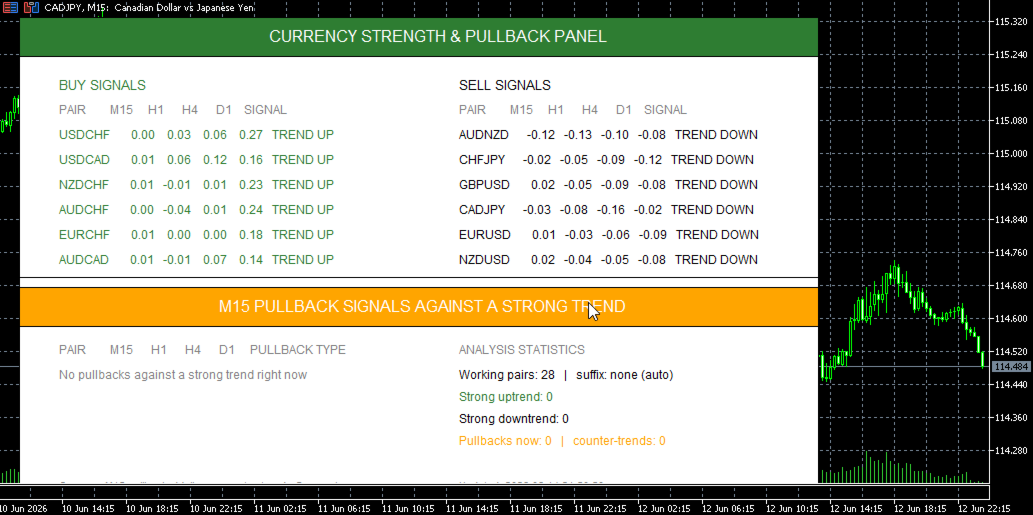
The Currency Strength & Pullback Panel is an analytical panel that solves two trader tasks at once: it shows which currency pairs are in a strong move right now, and it points out where an opportunity has opened to join that move at a favorable price on a pullback.
Unlike classic currency strength indicators that stop at a colored scale, this panel works across multiple timeframes. For each pair it computes the percentage change on four horizons at once — M15, H1, H4, and D1 — and the resulting trend strength is formed as a weighted sum in which the higher timeframes carry more weight than the lower ones. This approach filters out market noise and highlights exactly those pairs where the move is confirmed across several scales at once, rather than a random spike on a single candle.
The core idea of the panel is finding pullbacks against a strong trend. The logic is simple and proven in practice: when D1, H4, and H1 all show a strong move in the same direction while the lower M15 turns against it, the market is giving a correction within the trend — the very spot where experienced traders prefer to enter with the trend rather than chase price at its peak. The panel catches these moments automatically and brings them out into a separate section as "PULLBACK BUY (M15)" and "PULLBACK SELL (M15)" signals, highlighting them in a contrasting orange so they don't get lost among the other data.
The interface is built as a clean two-column panel. On the left are the strongest pairs to buy, on the right the strongest to sell, sorted by descending strength, with each row breaking down the changes across all four timeframes. The row color tells the situation at a glance: an ordinary trend, a yellow counter-trend, or an orange pullback. Below the separator sits a dedicated section devoted entirely to pullback signals, and to the right of it a statistics block that shows the total number of working pairs, how many pairs are in a strong uptrend and downtrend, and how many pullbacks and counter-trends are present on the market right now.
Particular attention has been paid to compatibility with any broker. The panel can work with arbitrary symbol suffixes: you can set the suffix manually in the settings — absolutely any format will do, be it ".ecn", "m", ".pro", or a non-standard ".stp" — or you can rely on auto-detection, which first runs through a list of common suffixes and, failing that, scans Market Watch and reads the actual symbol format of the server. The current suffix and the mode in which it was resolved are always shown in the statistics block, so you can see what the indicator is actually working with.
All the key thresholds are exposed as input parameters. The strong trend level, the depth of the M15 pullback, the counter-trend level, the panel update interval, and the color scheme are tuned to a specific trading style and to the character of the instruments. Counter-trend and pullback signals can be turned on and off independently.
The panel runs on a timer rather than on every tick, so it doesn't load the terminal and feels equally comfortable on a single chart or with many windows open. This is deliberately not a trading robot and not an arrow generator for entries — it is a situational awareness tool that gathers the scattered picture across dozens of pairs into one clear window and highlights the moments when a strong trend offers an entry on a correction. The trader makes the decision, relying on a clear and structured picture of the market.