FWS Currency Strength Meter Multi Timeframe
- Indicadores
-
Maya Roma Oberholzer
 A Senior Software Analyst Programmer with a strong software solutions architecture background and has 20+ years of experience in the IT Industry and technologies.
From 2003 to 2006 - contracting in the UK for four years to various well known corporate companies and the UK government. - Versão: 1.0
- Ativações: 5
🌡️ FWS Currency Strength - 8-Currency Multi-Timeframe Meter
See which currency is strongest - and which pair to trade right now.
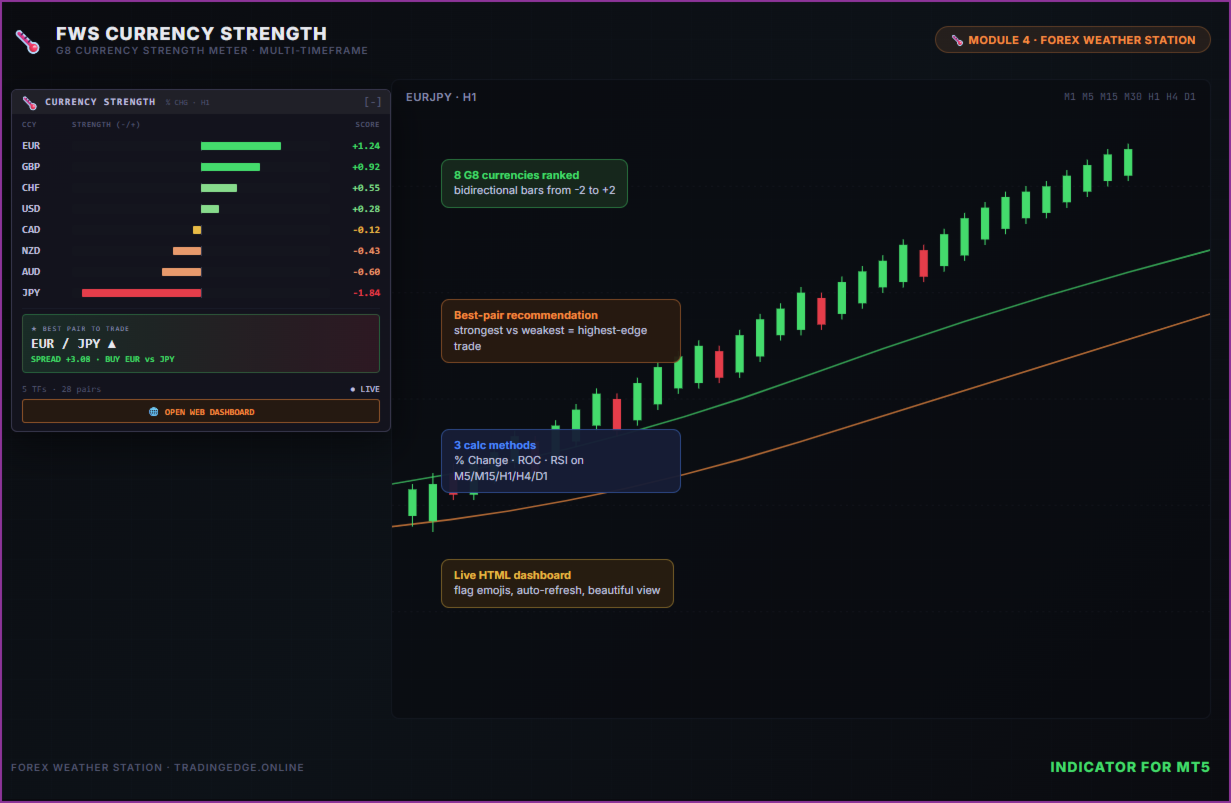
Currency Strength ranks all 8 G8 currencies (USD, EUR, GBP, JPY, AUD, CAD, NZD, CHF) from strongest to weakest using true cross-pair averaging across 5 timeframes (M5/M15/H1/H4/D1). It then auto-suggests the best pair to trade - the strongest currency vs the weakest. Compact on-chart panel plus a stunning browser dashboard.
Part of the Forex Weather Station suite.
📊 What It Shows
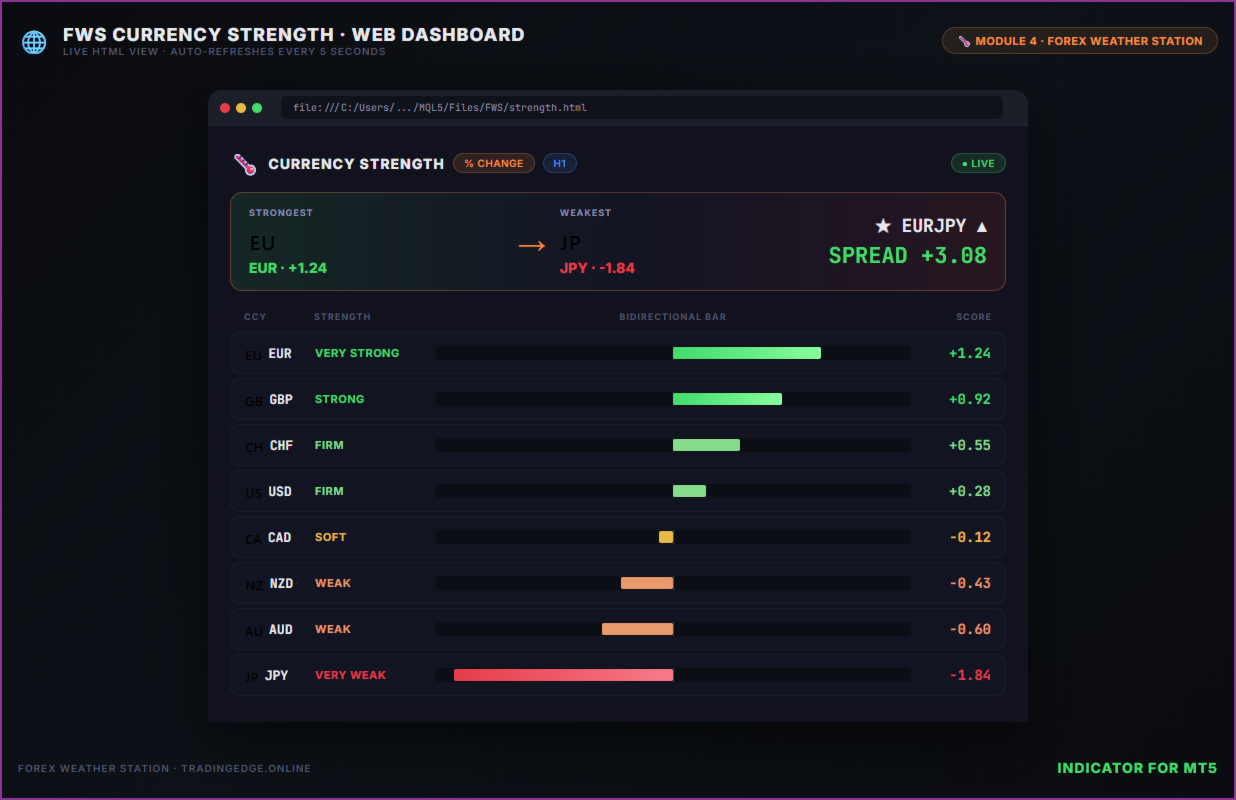
- 8 Currencies Ranked - Vertical bar-chart of relative strength, strongest at top
- Bidirectional Bars - Centered on a zero line; positive = strengthening, negative = weakening
- Numeric Strength - Exact strength value (e.g. +1.24, -0.78) for each currency
- 5 Timeframes Per Currency - M5 / M15 / H1 / H4 / D1 arrow pills on every row, perfect for scalpers and swing traders alike
- Auto Best-Pair Pick - Highlights the strongest vs weakest pair (e.g. "EURJPY +3.08")
- Color-coded - Green strengthening, amber neutral, red weakening
- Currency flag emojis in the web dashboard for instant recognition
🌐 Stunning HTML Web Dashboard
Click "Open Web View" to launch a beautiful browser dashboard featuring:
- Big animated bidirectional bar chart with smooth CSS transitions
- Best-pair hero card with currency symbol and spread
- Per-currency multi-timeframe arrow grid (instant scalper-to-swing visibility)
- Flag emojis (🇺🇸🇪🇺🇬🇧🇯🇵🇦🇺🇨🇦🇳🇿🇨🇭) plus 3-letter codes - no ambiguity
- Glassmorphism dark theme matching the Forex Weather Station design
- LIVE connection - updates every 5 seconds from MT5 data
- Bookmark the URL once, access with one click forever
🎯 Three Strength Methods (Switchable)
| Method | What It Measures | Best For |
|---|---|---|
| % Change (default) | % move on the chosen lookback bars | Daily / intraday momentum |
| ROC | Rate of Change over N bars | Smoother multi-bar trend |
| RSI-based | RSI(14) - 50 averaged across pairs | Mean-reversion / overbought-oversold |
Switch between them via a single input - no recompile needed.
🧮 How Strength Is Computed
For each currency, the indicator looks at every cross-pair containing that currency (up to 7 pairs per currency). For each pair, it computes the price move on the chosen timeframe and adds it to the base currency's score (and subtracts it from the quote currency's score). Averaging across all pairs gives a clean, comparable strength value for each of the 8 currencies. The sum is always near zero (zero-sum) - exactly how a true currency strength meter should behave.
✨ Key Features
- 8 G8 currencies - USD, EUR, GBP, JPY, AUD, CAD, NZD, CHF
- Multi-timeframe - M5, M15, H1, H4, D1 simultaneously
- Three calculation methods - % Change / ROC / RSI
- Configurable primary timeframe - drives the bar chart and best-pair pick
- Configurable lookback - 1 bar (today), 5 bars (week if D1), etc.
- Currency on/off toggles - drop currencies your broker doesn't have
- Symbol suffix support - works on brokers using ".raw", "m", etc.
- Auto best-pair detection - tries both BASE+QUOTE and QUOTE+BASE
- Cached pair handles - efficient, low-CPU multi-symbol scanning
- Draggable panel - click the border and drag anywhere on your chart
- Minimise button - collapse to a compact title bar with [-]
- Fully customisable colours
- JSON data bridge - integrates with EAs and other tools
- No DLL required - pure MQL5, marketplace-compliant
- No external API - all calculations from MT5 data
⚙️ Input Parameters
| Parameter | Description | Default |
|---|---|---|
| InpPanelX / Y | Panel position on chart (pixels) | 20, 50 |
| InpMethod | Strength method: % / ROC / RSI | % Change |
| InpPrimaryTF | Primary timeframe driving bar + best pair | D1 |
| InpLookbackBars | Bars back for % / ROC | 1 |
| InpRsiPeriod | RSI period (RSI method) | 14 |
| InpUseUSD..InpUseCHF | Toggle each currency on/off | All on |
| InpSymbolSuffix | Broker suffix (e.g. ".raw", "m") | (blank) |
| InpFont / InpFontSize | Font name and size | Consolas / 9pt |
| InpColor* | All panel colours customisable | Dark theme |
| InpWriteJSON | Enable JSON/HTML data output | true |
| InpEnableWebBtn | Show "Open Web View" button | true |
📦 What's Included
- MQL5 Indicator - Compact 380px on-chart panel with bar chart, MTF arrows, best-pair card
- HTML Web Dashboard - Auto-generated to MQL5/Files/FWS/strength.html
- JSON Data Bridge - Strength state written every 5 seconds for external integration
🔧 Quick Start
- Attach the indicator to any chart (any symbol, any timeframe)
- The panel appears showing all 8 currencies ranked, with bars and MTF arrows
- The "Best Pair" card shows the recommended trade (strongest vs weakest)
- Click "Open Web View" for the full browser dashboard
- Bookmark the URL for instant one-click access in the future
- If your broker uses a suffix (e.g. EURUSD.raw), set InpSymbolSuffix
🔌 Part of the Forex Weather Station Suite
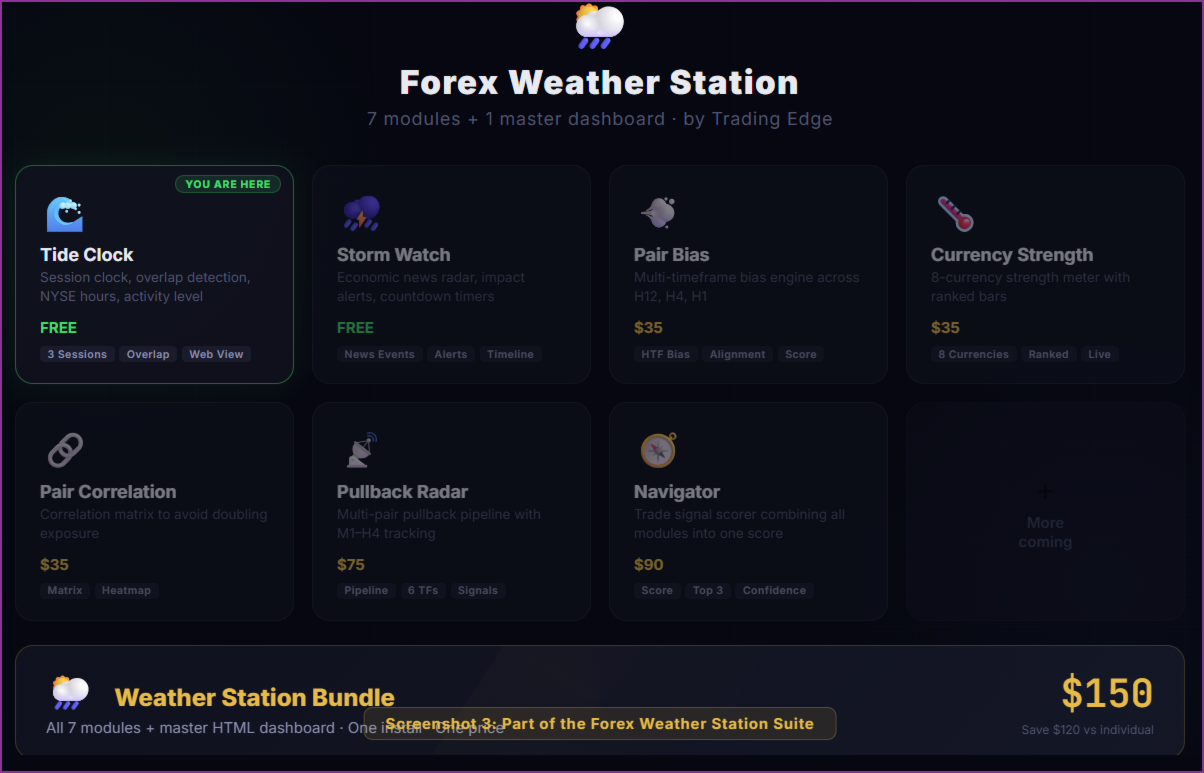
Module 4 of the Forex Weather Station - a suite of 7 specialised trading tools that each work standalone or combine into a unified premium dashboard:
| # | Module | What It Does | Price |
|---|---|---|---|
| 1 | 🌊 Tide Clock | Session clock & activity monitor | FREE |
| 2 | ⛈️ Storm Watch | Economic news radar & impact alerts | FREE |
| 3 | 💨 Pair Bias | Multi-timeframe directional bias | |
| 4 | 🌡️ Currency Strength (this) | 8-currency strength meter | |
| 5 | 🔗 Pair Correlation | Correlation matrix to avoid doubling | |
| 6 | 📡 Pullback Radar | Multi-pair pullback pipeline scanner | |
| 7 | 🧭 Navigator | Trade signal scorer combining all modules | |
| ★ | 🌦️ Weather Station | All 7 modules + master HTML dashboard |
Each module writes data to a shared JSON bridge. The premium Weather Station bundle combines everything into one stunning real-time dashboard.
⚠️ Requirements
- MetaTrader 5 (build 3000+)
- G8 cross-pairs available on your broker (use the toggles to disable currencies you don't have)
- Web dashboard requires a modern browser (Chrome, Edge, Firefox)
- No DLL imports required
- No external API or API key required
💡 Tips
- Use D1 for swing trading, H4/H1 for day trading, M15/M5 for scalping. Set InpPrimaryTF accordingly - the bar chart and best-pair pick follow it.
- Watch the MTF row - if a currency is strong on every timeframe (5 green arrows), that's a high-conviction trend.
- Best-pair pick auto-finds the strongest vs weakest currency. Combine with Pair Bias (free) for trend confirmation before entering.
- Set lookback = 1 for "today's strength", 5 for "this week's strength" (on D1).
- Try the RSI method if you prefer mean-reversion / overbought-oversold style.
- The JSON file at Files/FWS/strength.json can be read by EAs to auto-pick the best pair to trade.
By Trading Edge - tradingedge.online