Eldorium
- Experts
- Versão: 2.2
- Atualizado: 28 junho 2026
- Ativações: 10
An intelligent Expert Advisor for gold (XAU/USD), built specifically for traders who want stable trading without the risk of blowing the account.
Unlike most robots, Eldorium does not chase profit at any cost. It features a multi-level capital protection system that includes Equity Guard, loss streak protection, a sharp volatility spike filter (ATR Spike Filter), a directional impulse guard (Impulse Guard) and an automatic news filter.
- The advisor does not use the Martingale strategy.
- Safety: You won’t wake up to find your deposit wiped out by a black swan event.
- Slow but secure capital growth over the long term.
- The advisor may go weeks without making any trades or hover around zero while waiting for ideal conditions.
- Suitable for serious investors seeking diversification.
Thanks to adaptive ATR-based logic, separate parameter sets for bullish and bearish markets, and well-tuned filters, Eldorium performs confidently in any market conditions and is equally suited for regular accounts and prop firms.
Live signal / Risk 5
Live signal / Risk 2
Key advantages:
-
Multi-level risk management system:
- Auto Lot — automatic position size calculation based on account balance and the defined risk percentage.
- Adaptive risk via Bollinger Bands on equity (Equity BB Control) — the EA analyzes the balance curve over the last closed baskets and automatically adjusts risk in the "oversold"/"overbought" zones of its own equity curve.
- Equity Guard — drawdown monitoring. When the critical limit is reached, trading is forcefully paused for a set number of hours.
- Loss Streak Cooldown — a "cooldown" system. After a series of losses, the EA takes a break to wait out an unfavorable market phase.
- ATR Spike Filter — full blocking of market entries during abnormal volatility spikes.
- Impulse Guard — directional impulse protection based on higher timeframes (H1/H4): blocks entries and add-ons against a strong impulse move. -
Separate logic for bullish and bearish markets.
The EA determines the global market regime (bullish/bearish) using a trend moving average and applies completely independent sets of strategy and position-management parameters for each regime — indicators, filters, grid, take profits and stops are configured separately. -
Dynamic targets.
A unique take-profit time-decay system. If price takes too long to reach the target (the position hold time in bars is exceeded), the EA gradually reduces the Take Profit level to close a "stuck" basket faster at breakeven or a minimal profit, freeing up margin. -
Phased Evacuation.
Starting from a defined grid leg, the EA sets a tight common take profit on the two most recent orders and, as soon as they close, "takes with it" the very first (oldest) order of the basket — this helps to gently unload the grid and free up margin during prolonged moves. -
Powerful built-in market filters:
- MTF Guard — intelligent trade filtering by the global trend on a higher timeframe. Prohibits trading against a strong macro trend or limits the number of add-ons.
- Tick Volume Filter — a tick volume filter that blocks entries on an abnormally empty or overheated market.
- News Filter — a fully automatic news filter. It avoids important macroeconomic events by blocking trading before and after their release (in the tester it uses a built-in calendar for the period 01.01.2017–01.08.2026). -
Time management and optimization.
Deep optimization of the algorithm for working with the close of the one-minute candle allows fast and accurate testing in "OHLC on M1" mode. Built-in functions limit trading time by a list of excluded hours and force-close trades on Friday (with a prior move to breakeven) to protect against weekend gaps.
EA parameters:
Risk (Risk management)
- Risk per Trade (%) — risk percentage per series of trades.
- Enable BB Control on Equity — enable adaptive risk adjustment via Bollinger Bands built on the balance curve.
- BB Period (closed baskets) — BB period over the last closed baskets.
- BB Deviation — deviation for the Bollinger Bands on equity.
- Risk Multiplier if Balance < Lower Band — risk multiplier when balance is below the lower band ("oversold" zone).
- Risk Multiplier if Balance > Upper Band — risk multiplier when balance is above the upper band ("overbought" zone).
General Settings
- Working Timeframe — working timeframe (M15 recommended).
- Max Spread (in pips) — maximum allowed spread for opening positions.
- Max Slippage (in pips) — maximum slippage in pips.
- Sync to M1 bar — synchronize calculations with the M1 candle close (significantly speeds up and improves the accuracy of testing in OHLC M1 mode).
- Magic Number — unique identifier for the EA's trades.
- Trade Comment — comment attached to orders.
- Info Panel — enable/disable the on-chart information panel.
Prop Firm Mode
- Enable Prop Mode — enable prop firm mode. All related limits become active.
- Reset saved prop statistics on init — reset all stored prop-mode statistics (daily anchor, peak balance/equity) when the EA restarts.
- Risk per Trade in prop mode (%) — overrides the standard Risk per Trade when prop mode is active.
- Daily loss limit (%) — maximum allowed loss per trading day.
- Use equity for daily loss — when enabled, the daily loss is calculated from equity (includes floating profit/loss).
- Daily reset hour (server time) — the server-time hour at which the daily loss counter is reset.
- Close all positions when daily loss is hit — immediately close all open positions when the daily loss limit is reached.
- Maximum overall loss (%) — maximum overall account drawdown.
- Overall drawdown mode — overall drawdown calculation mode (static or trailing from the peak).
- Use equity for overall DD — when enabled, the overall drawdown is calculated from equity; when disabled, from balance.
- Close all positions when overall loss is hit — immediately close all positions when the maximum overall drawdown limit is reached.
- Maximum additional positions in prop mode — limits the number of grid add-ons in prop mode.
- Trend Alignment Timeframe — timeframe used to determine the global trend.
- Trend MA Period — SMA period used to classify the market as bullish or bearish.
- Enable Bullish trend — allow opening new baskets in the bullish regime.
- Enable Bearish trend — allow opening new baskets in the bearish regime.
Strategy Parameters (separate sets for bullish and bearish trend)
- Bollinger Bands Period / Deviation — period and deviation for the Bollinger Bands indicator (channel boundary detection).
- Bollinger Bands Min / Max Width (in ATR) — Bollinger Bands channel width filter in ATR units (protection against trading in an overly narrow flat or an overly wide chaos).
- ATR / ADX Period — periods of the ATR and ADX indicators.
- ADX Maximum Value — maximum ADX value (filters out an overly strong non-retracing trend).
- ADX Minimum Value — minimum ADX value (cuts off a completely "dead" market with no movement).
- RSI Period / Pattern & Extreme Levels — fine-tuning of the RSI period and levels (Buy / Sell, Max Buy / Min Sell, Extreme Buy / Extreme Sell) for detecting buy/sell entry patterns.
- Trend SMA Period — period of the trend moving average used to determine the local trend.
Position Management (separate sets for bullish and bearish trend)
- Maximum Additional Positions — maximum number of additional averaging legs (0 — no averaging).
- Add Step (in ATR) — base step between basket orders, calculated dynamically based on ATR.
- Add Step Multiplier — step expansion multiplier for each subsequent grid leg (helps to stretch the grid during a strong non-retracing move).
- Smart Add Leg — smart averaging. When enabled, the EA waits for a reversal candle to form before opening a new leg.
- Take Profit (Single / Grid) in ATR — take-profit size for a single trade and for a basket of orders (in ATR units).
- Individual Take Profit for all orders — individual take-profit mode for each grid order (0 = disabled, a common TP is used).
- Stop Loss (in ATR) — hard stop loss on the entire basket of trades.
- Max Bars to Hold Position — maximum position hold time (in bars of the working TF) before forced closing.
- Enable Take Profit Decay — enable dynamic moving (reduction) of the Take Profit toward the current price if a position is held for too long.
- TP Decay Start Bars / Duration — from which bar to start moving the TP and over how many bars to reduce it to the minimum.
- Minimum TP Decay Factor — minimum size of the remaining TP (e.g., 0.35 = 35% of the original TP size remains).
Phased Evacuation
- Enable Phased evacuation — enable the phased grid-unloading mechanism.
- Start from step — the grid leg from which evacuation is activated.
- TP for last two orders (in ATR) — tight common take profit for the two most recent orders (in ATR units).
- Close first order together with last two — close the very first (oldest) order of the basket together with the last two.
Trading Session
- Broker GMT Offset (Winter / Summer) — winter and summer offset of your broker's time relative to GMT. Required for correct testing of the news filter on history!
- Excluded Hours — list of hours (comma-separated) during which trading is prohibited.
- Close Positions on Friday — force-close all positions on Friday (protection against gaps).
- Friday Breakeven Start Hour — the Friday hour from which positions are moved to breakeven.
- Friday Hard Close Hour — the Friday hour at which positions are force-closed.
News Filter
- Enable News Filter — enable automatic news filtering (uses the built-in MT5 calendar on live accounts and its own database in the tester, loaded for the period 01.01.2017–01.08.2026).
- Block Before / After News (hours) — time to prohibit trading before and after a news release (in hours).
- Use High Importance Only — consider only high-importance (red) news.
Global Trend Filter / MTF Guard
- Enable Higher Timeframe Trend Filter — enable trade filtering by the trend on a higher timeframe.
- Trend Timeframe / SMA Period — timeframe and SMA period for the higher trend (e.g., H4 and period 300).
- Strict Mode — strict mode. If true , entries against the higher trend are completely prohibited.
- Maximum additional positions — when strict mode is off, limits the maximum number of add-ons against the higher trend (allows softly working out local pullbacks).
Impulse Guard
- Enable impulse protection — enable directional protection against strong impulse moves.
- Main / Second impulse timeframe — main and additional timeframes for impulse analysis (e.g., H1 and H4).
- Impulse MA / ATR / ADX Period — periods of the indicators used to evaluate impulse strength.
- ADX level / Distance from MA (ATR) / Consecutive bars / ATR spike — thresholds that form the resulting "impulse score" (trend strength by ADX, price distance from the MA in ATR, number of same-direction candles and the ATR spike).
- Score to activate guard — the resulting score (0..100) at which the guard triggers.
- Block new entries during impulse — block new entries during an impulse.
- Directional Guard: block only against impulse — block only trades against the impulse direction.
- Anti-Add Guard: block averaging against impulse — prohibit add-ons against the impulse.
Tick Volume Filter
- Enable Tick Volume Filter — enable tick volume analysis.
- Volume MA Period — period for calculating the average volume.
- Max / Min Volume Multiplier — blocking multipliers. The EA will not enter the market if the current volume is abnormally high (a spike) or abnormally low (a dead flat).
ATR Spike Filter
- Enable ATR Spike Filter — enable protection against abnormal volatility (e.g., sudden crisis moves).
- Long-term ATR Period / Multiplier — comparison of the current ATR with a long period. If the current one is X times larger than the average — trading is blocked.
Equity Guard
- Enable Equity Guard — enable funds protection.
- Maximum Equity Drawdown (%) — when this drawdown from the local maximum is reached, trading is paused.
- Pause After Equity Guard (hours) — pause duration after the protection triggers (in hours).
- Min Balance to activate — minimum account balance at which the filter is active.
Loss Streak Cooldown
- Enable Loss Streak Cooldown — enable algorithm cooldown after drawdowns.
- Maximum Consecutive Losses — how many baskets in a row must close at a loss to activate the protection.
- Cooldown Duration (hours) — for how many hours to completely freeze trading to wait out a market phase that is "wrong" for the EA.
Recommendations:
- !!! When testing, be sure to correctly specify the winter and summer offset of your broker's time relative to GMT. This is needed for the correct operation of the trading-hours and news filters.
- Any timeframe – the EA will determine it automatically.
- Symbol - gold (XAUUSD).
- Recommended broker/account - Hedging with a low spread.
- Recommended deposit - from $1000.
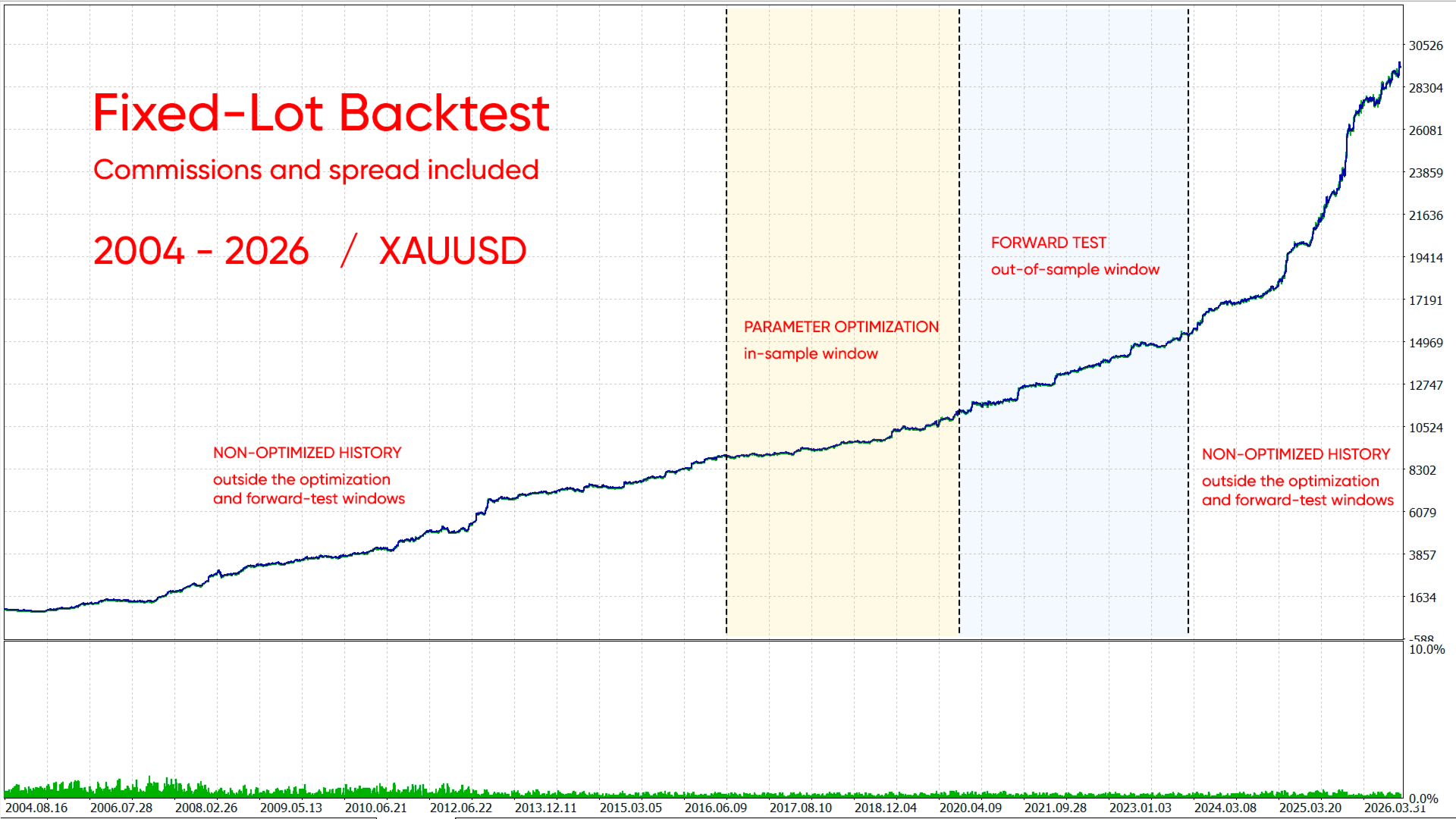
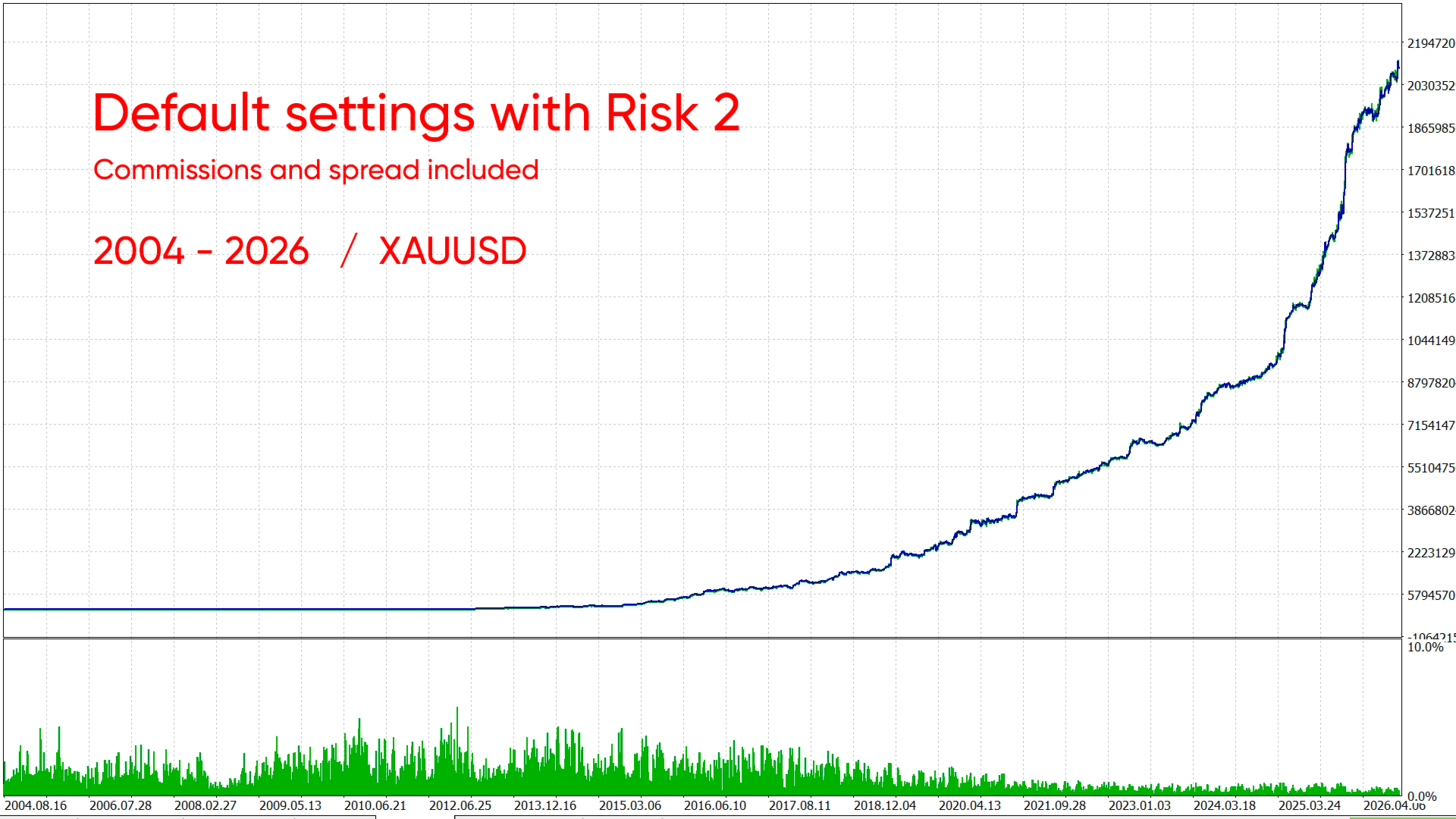
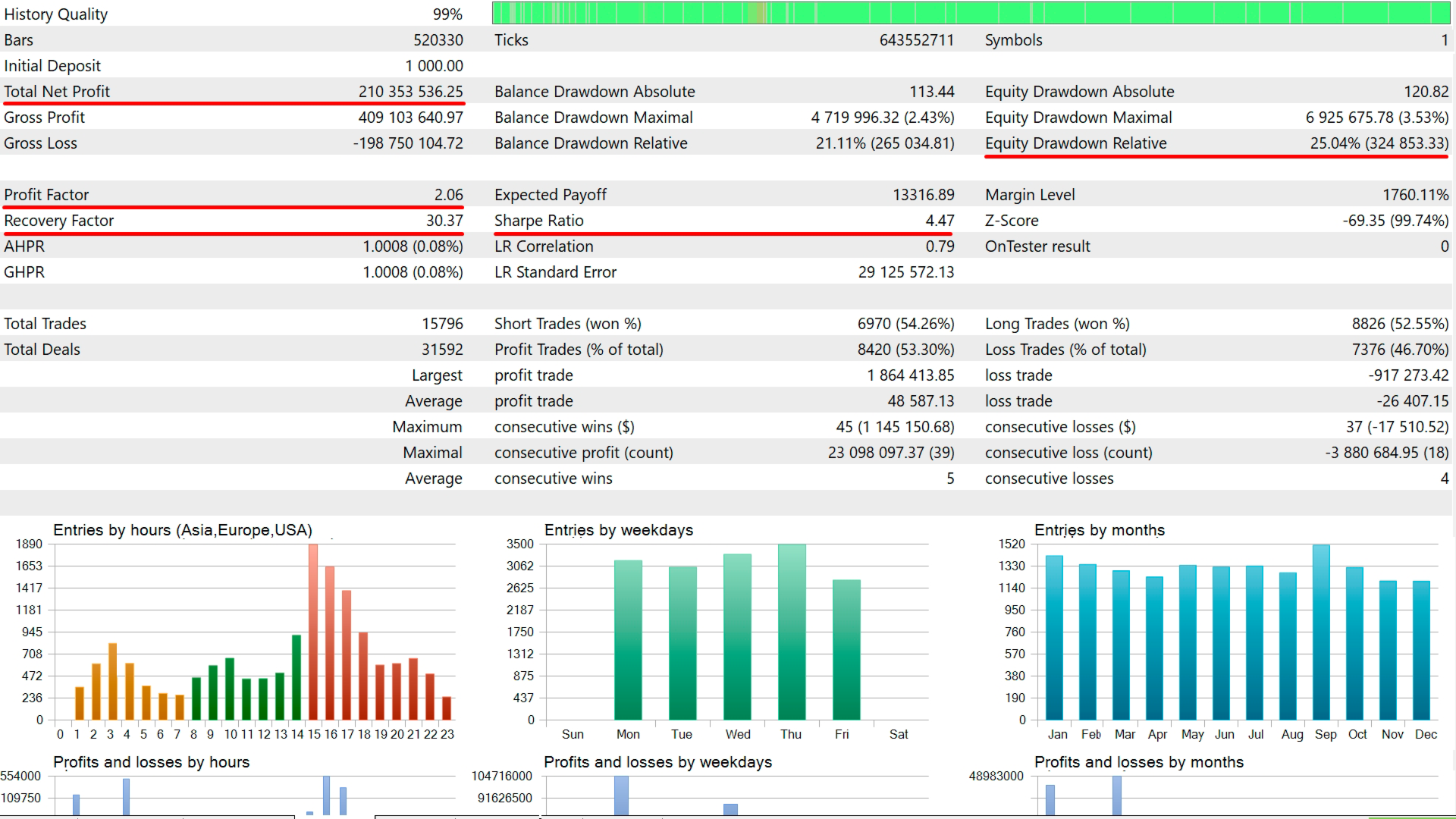
- The default settings (with risk 2) are reliable. For more aggressive operation, increase the risk.
- You can test and optimize in OHLC mode, since all position opens/closes are based on the close of the M1 bar (can be disabled in the settings).
- Before using on a real account, be sure to test the EA in the strategy tester. On the same account you will be trading with.