KS Multi TimeFrame Zigzag
- Indicadores
-
Kulvinder Singh
 KULVINDER SINGH
MQL5 Developer | Python Developer | Forex Trader | Software Product Creator
📞 +91-9996327555 | ✉ Kulvinder99@gmail.com | https://freesoftwaredownload.in/ - Versão: 2.1
- Ativações: 10
KS Multi TimeFrame Zigzag
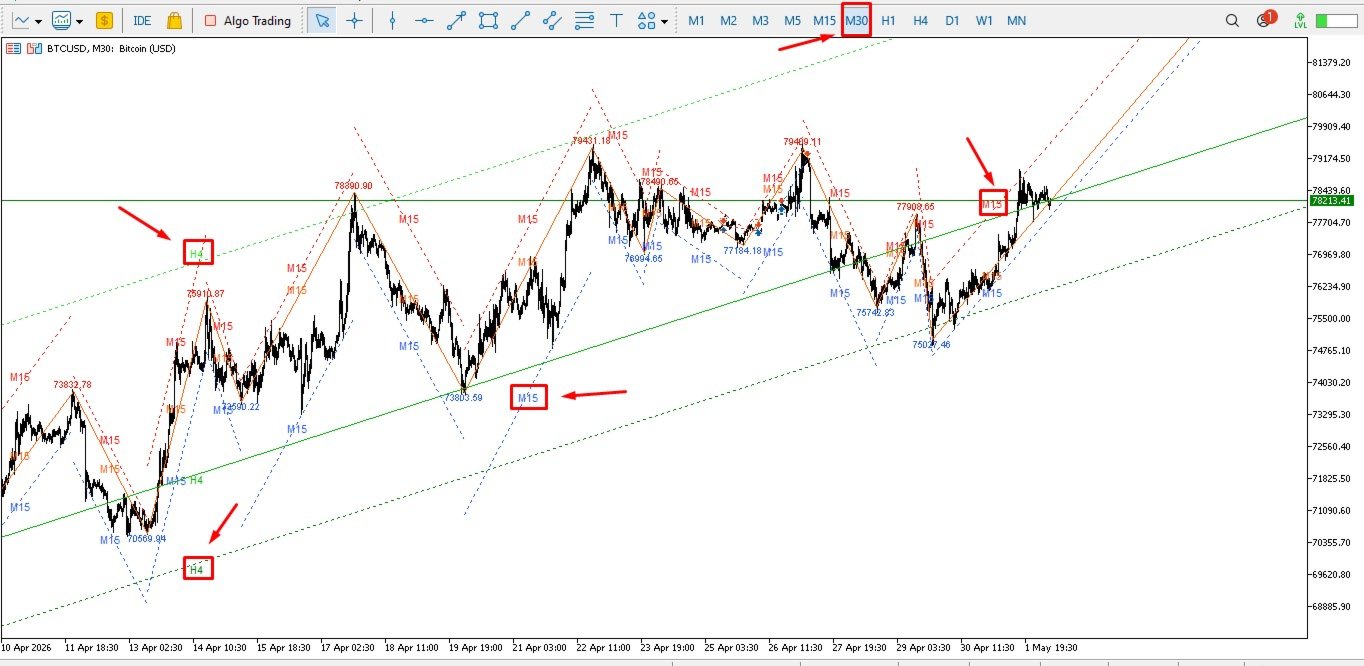
Este é um indicador de canal ZigZag multitimeframe. Traça pivôs ZigZag de até 4 timeframes diferentes simultaneamente no seu gráfico atual e, para cada ZigZag, desenha automaticamente canais (linhas superior, média e inferior) com base no desvio do preço em relação às pernas do ZigZag.
Combina o poder de:
ZigZag clássico (para encontrar máximos/mínimos de oscilação)
Canais de preço em torno destas oscilações
Análise multitimeframe
Funcionalidades principais
1. ZigZag multitimeframe
Pode ativar até 4 ZigZags independentes, cada um operando no seu próprio timeframe.
Configuração padrão:
ZZ1 → M15
ZZ2 → H1
ZZ3 → H4
ZZ4 → D1
2. Sistema ZigZag + Canal
Para cada oscilação do ZigZag (alta ou baixa), o indicador:
Deteta os pontos de pivot de máxima e mínima
Desenha uma Linha Média ligando os pontos de pivot
Calcula o desvio máximo (o quanto o preço se afastou da perna do ZigZag)
Desenha um Canal Superior e um Canal Inferior com base neste desvio
Isto cria um envelope/canal de preços dinâmico em torno de cada ZigZag.
3. Recursos Visuais
Setas coloridas no gráfico para os pontos de pivot (Azul Dodger, Magenta, Verde Limão, Dourado)
Linhas de tendência para os canais Médio, Superior e Inferior
Rótulos de preços nos pontos de pivot (opcional)
Rótulos de período nas linhas (ex.: "M15", "H4") — muito úteis para a identificação rápida
Extensão do último canal (incompleto) para a direita
Parâmetros de Entrada Principais (para cada ZigZag)
ParâmetroFinalidadeActivarAtivar/desativar este ZigZagPeríodoQual o período a utilizar para calcularComprimentoSensibilidade (quanto maior, menos oscilações e mais fortes)Estender o ÚltimoEstender o canal incompleto atual para a direitaMostrar CanalMostrar linhas de desvio Superior e InferiorMostrar EtiquetasMostrar preço nos pontos de pivotMostrar Etiqueta do PeríodoMostrar "M15", "H4" etc. nas linhasCor, Estilo e Largura dos canais Médio/Superior/InferiorPersonalização de cada linha
Como Funciona (Simplificado)
O indicador extrai os dados do período selecionado.
Executa um algoritmo ZigZag (semelhante ao integrado, mas personalizado).
Para cada oscilação confirmada:
Mede o quanto o preço se desviou da linha reta do ZigZag.
Cria canais paralelos (Superior e Inferior) utilizando este desvio máximo.
A linha central é o ZigZag propriamente dito.
Tudo é desenhado utilizando objetos (linhas de tendência + texto).
Melhores casos de utilização
Confluência de períodos múltiplos gráficos — visualize a estrutura de um período gráfico maior no gráfico de um período gráfico menor
Suporte/Resistência dinâmicos — os canais funcionam como zonas dinâmicas
Negociação de rutura — quando o preço rompe o canal superior/inferior
Identificação de tendências — alinhamento de múltiplos períodos gráficos
Swing trading — visualização clara dos pontos de oscilação em diferentes períodos gráficos
Vantagens
Muito limpo e organizado (código de cores por período gráfico)
Bom desempenho (utiliza limitação de taxa para evitar atrasos)
Altamente personalizável
Exibe claramente a estrutura real de múltiplos períodos gráficos
Este é um indicador de canal ZigZag multitimeframe. Traça pivôs ZigZag de até 4 timeframes diferentes simultaneamente no seu gráfico atual e, para cada ZigZag, desenha automaticamente canais (linhas superior, média e inferior) com base no desvio do preço em relação às pernas do ZigZag.
Combina o poder de:
ZigZag clássico (para encontrar máximos/mínimos de oscilação)
Canais de preço em torno destas oscilações
Análise multitimeframe
Funcionalidades principais
1. ZigZag multitimeframe
Pode ativar até 4 ZigZags independentes, cada um operando no seu próprio timeframe.
Configuração padrão:
ZZ1 → M15
ZZ2 → H1
ZZ3 → H4
ZZ4 → D1
2. Sistema ZigZag + Canal
Para cada oscilação do ZigZag (alta ou baixa), o indicador:
Deteta os pontos de pivot de máxima e mínima
Desenha uma Linha Média ligando os pontos de pivot
Calcula o desvio máximo (o quanto o preço se afastou da perna do ZigZag)
Desenha um Canal Superior e um Canal Inferior com base neste desvio
Isto cria um envelope/canal de preços dinâmico em torno de cada ZigZag.
3. Recursos Visuais
Setas coloridas no gráfico para os pontos de pivot (Azul Dodger, Magenta, Verde Limão, Dourado)
Linhas de tendência para os canais Médio, Superior e Inferior
Rótulos de preços nos pontos de pivot (opcional)
Rótulos de período nas linhas (ex.: "M15", "H4") — muito úteis para a identificação rápida
Extensão do último canal (incompleto) para a direita
Parâmetros de Entrada Principais (para cada ZigZag)
ParâmetroFinalidadeActivarAtivar/desativar este ZigZagPeríodoQual o período a utilizar para calcularComprimentoSensibilidade (quanto maior, menos oscilações e mais fortes)Estender o ÚltimoEstender o canal incompleto atual para a direitaMostrar CanalMostrar linhas de desvio Superior e InferiorMostrar EtiquetasMostrar preço nos pontos de pivotMostrar Etiqueta do PeríodoMostrar "M15", "H4" etc. nas linhasCor, Estilo e Largura dos canais Médio/Superior/InferiorPersonalização de cada linha
Como Funciona (Simplificado)
O indicador extrai os dados do período selecionado.
Executa um algoritmo ZigZag (semelhante ao integrado, mas personalizado).
Para cada oscilação confirmada:
Mede o quanto o preço se desviou da linha reta do ZigZag.
Cria canais paralelos (Superior e Inferior) utilizando este desvio máximo.
A linha central é o ZigZag propriamente dito.
Tudo é desenhado utilizando objetos (linhas de tendência + texto).
Melhores casos de utilização
Confluência de períodos múltiplos gráficos — visualize a estrutura de um período gráfico maior no gráfico de um período gráfico menor
Suporte/Resistência dinâmicos — os canais funcionam como zonas dinâmicas
Negociação de rutura — quando o preço rompe o canal superior/inferior
Identificação de tendências — alinhamento de múltiplos períodos gráficos
Swing trading — visualização clara dos pontos de oscilação em diferentes períodos gráficos
Vantagens
Muito limpo e organizado (código de cores por período gráfico)
Bom desempenho (utiliza limitação de taxa para evitar atrasos)
Altamente personalizável
Exibe claramente a estrutura real de múltiplos períodos gráficos