LumaForge Scalper
- Experts
- Versão: 8.0
- Atualizado: 21 agosto 2026
- Ativações: 10
LumaForge Beast Mode MT5
Automated SMC Gold Trading for MetaTrader 5
LumaForge Beast Mode is a fully automated MT5 Expert Advisor built primarily for Gold and designed for selective day trading and scalping. Rather than continuously entering the market, the EA waits for its required conditions and can remain inactive when no valid opportunity is detected.
Beast Mode combines Smart Money Concepts (SMC) with multi-timeframe analysis across M5, M15 and H1. Its trading activity is focused around the London and New York sessions, with broker-specific SAST Offset Hours used to synchronize the intended trading windows with the broker's server time.
The EA can trade both Buy and Sell opportunities and is limited to a maximum of 3 trading opportunities per day.
KEY CHARACTERISTICS
-
Fully automated MetaTrader 5 Expert Advisor
-
Primarily designed for Gold trading
-
Smart Money Concepts (SMC) methodology
-
Multi-timeframe analysis: M5, M15 and H1
-
London and New York session focus
-
Buy and Sell capability
-
Maximum 3 trading opportunities per day
-
Selective entry logic rather than continuous trading
-
Two-position execution for each opportunity
-
Automatic balance-based position sizing
-
Maximum 0.60 lots per position
-
Maximum 1.20 lots combined exposure per opportunity
-
Predefined Stop Loss and Take Profit
-
Time-based Emergency Close
-
Broker-specific session synchronization
-
Configurable InpAllowedSymbols
-
1.5× ATR Stop Loss buffer in Version 8
IMPORTANT SEASONAL TRADING RESTRICTION
LumaForge Beast Mode should not be used during January or the first week of February.
These periods are considered unsuitable for the market conditions targeted by this scalping and day-trading strategy. The recommendation applies to both live operation and historical evaluation.
For Strategy Tester analysis intended to represent the EA's recommended operating conditions, begin the test from the second week of February instead of including January and the first week of February.
This is a strategy-specific seasonal recommendation, not a prediction of future market performance. Markets can change, and profitable conditions are never guaranteed.
BROKER-SPECIFIC MINIMUM DEPOSITS
The recommended minimum starting balance is different for the broker configurations tested with Beast Mode. These minimums apply to both live trading and Strategy Tester testing.
XM Global
Minimum recommended deposit: $1,000 or equivalent in another currency
Gold symbol: GOLD
SAST Offset Hours: -2
Exness
Minimum recommended deposit: $1,000 or equivalent in another currency
Gold symbol: XAUUSDm
SAST Offset Hours: 0
IC Markets
Minimum recommended deposit: $1,500 or equivalent in another currency
Gold symbol: XAUUSD
SAST Offset Hours: -2
The deposit recommendations are based on the EA's balance-responsive position sizing and two-position trade structure. Using a materially smaller balance can produce position sizes, drawdowns and performance characteristics that are not representative of the recommended configuration.
These figures are recommendations rather than guarantees of safety, profitability or protection from loss.
TWO-POSITION EXECUTION
Each trading opportunity is divided into two separate positions. One position is larger and the other is more conservative. Both positions use the same programmed Stop Loss and Take Profit.
This structure gives the trader additional flexibility when price approaches the target. Depending on market behaviour, the trader may:
-
Close the larger position while keeping the smaller position open
-
Close both positions
-
Keep both positions running toward the programmed Take Profit
The two-position structure allows exposure to be reduced while retaining some market participation, but none of these choices guarantees a particular result. An unrealized profit can decline if price reverses.
DYNAMIC POSITION SIZING
Beast Mode automatically calculates position size according to the account balance. As the balance changes, the calculated exposure can adjust accordingly without requiring the trader to manually change the lot size after every balance change.
Each individual position is capped at 0.60 lots. With two positions per opportunity, the maximum combined exposure is therefore 1.20 lots.
Actual position sizes can vary according to account balance, EA inputs, broker specifications and prevailing trading conditions.
RISK AND TRADE MANAGEMENT
Every opportunity is assigned a programmed Stop Loss and Take Profit. In Version 8, the Stop Loss buffer was changed from 2.5× ATR to 1.5× ATR.
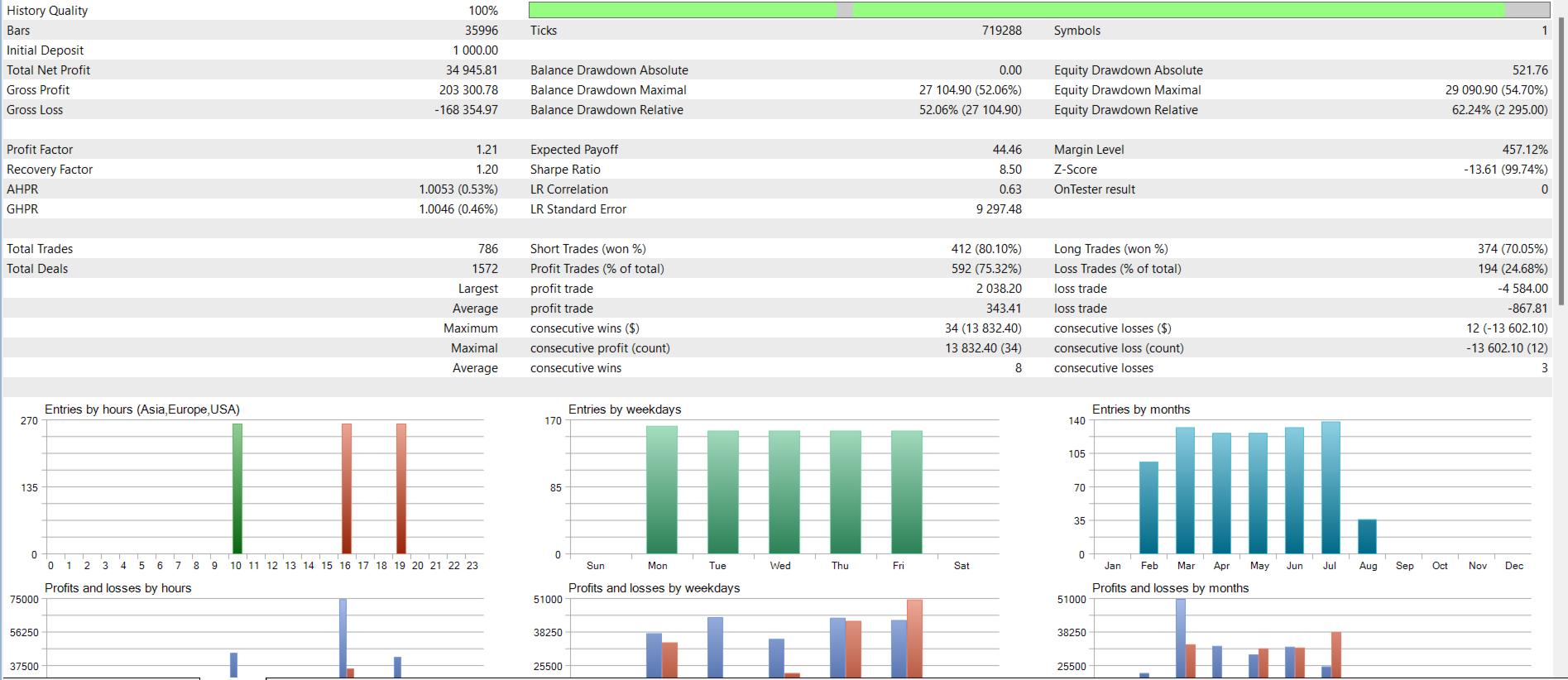
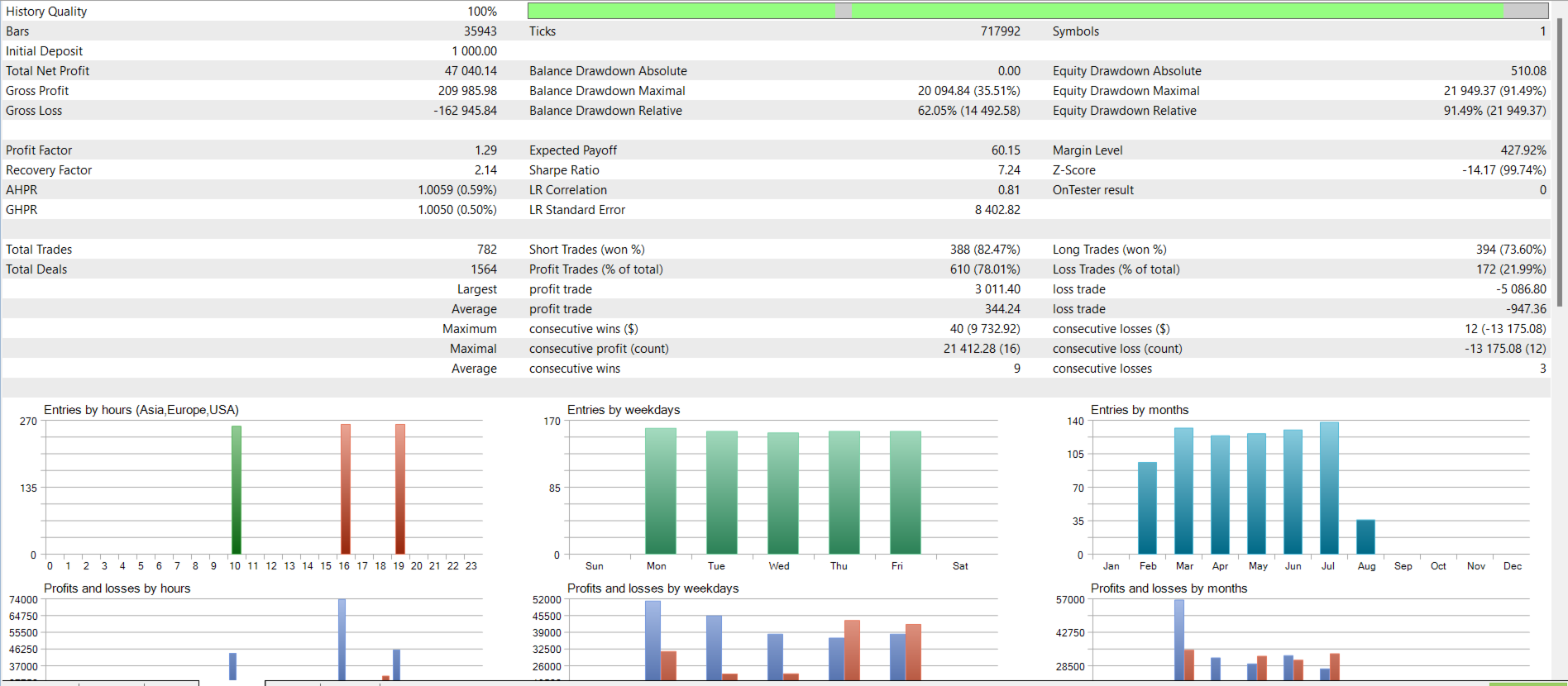
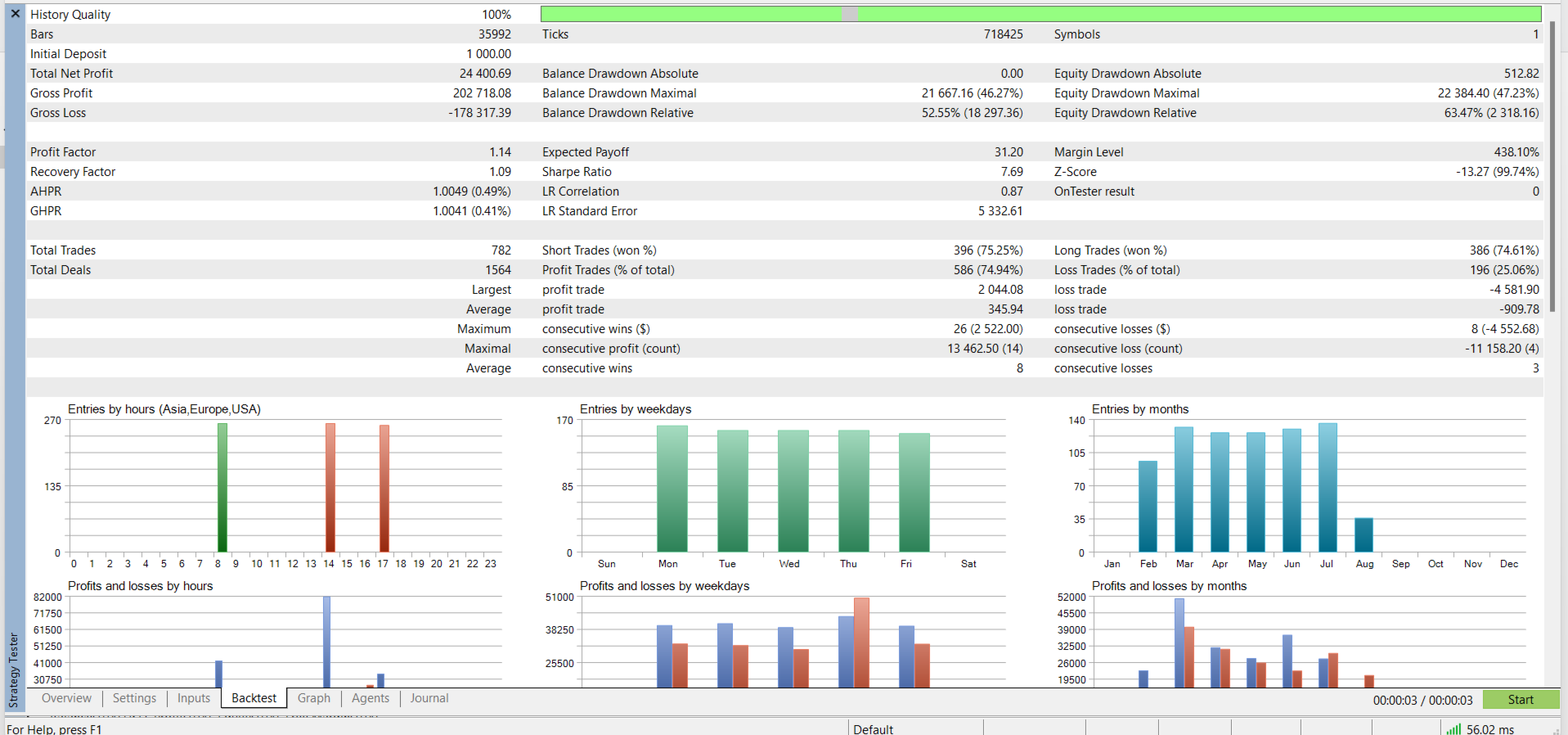
The tighter 1.5× ATR buffer is intended to reduce the amount exposed on individual trades and produce smaller individual losing trades. The trade-off is that the lower risk exposure can also result in a lower Total Net Profit compared with the previous wider Stop Loss configuration.
Beast Mode also includes a time-based Emergency Close. If a position remains open beyond the programmed period without achieving its intended objective, the EA can close it according to its programmed rules rather than leaving the trade exposed indefinitely.
Stop Loss, Take Profit and Emergency Close are risk-management mechanisms, not guarantees against losses.
DAILY TRADE LIMIT
The EA can execute up to 3 trading opportunities per day, with each opportunity consisting of two positions.
The EA does not attempt to force three trades every day. It may execute one, two or three opportunities, or it may take no trades at all when its required conditions are absent.
This selective behaviour is intended to avoid unnecessary market exposure when suitable conditions are not detected.
MARKET ANALYSIS
Beast Mode evaluates market conditions using three timeframes:
-
H1 — higher-timeframe market context
-
M15 — intermediate market structure
-
M5 — lower-timeframe opportunity analysis
The EA combines these levels of analysis before deciding whether a trading opportunity meets its requirements.
Trading is focused around the London and New York sessions. The SAST Offset Hours input adjusts the EA's session calculations to the broker's server time.
SAST OFFSET HOURS — CRITICAL SETTING
The EA's default SAST Offset Hours value is 0. This is only the default input and must not be assumed to be correct for every broker.
For the broker configurations specifically tested with Beast Mode, use:
-
XM Global: -2
-
IC Markets: -2
-
Exness: 0
The correct offset is required for both live trading and Strategy Tester testing.
An incorrect offset changes the periods during which the EA searches for opportunities and can therefore materially change historical test results as well as live trading behaviour.
STRATEGY TESTER CONFIGURATION
Before starting a Strategy Tester run, verify all of the following:
-
The correct Gold symbol is selected.
-
The symbol is included in InpAllowedSymbols.
-
The correct SAST Offset Hours value is entered.
-
The starting deposit meets the broker-specific recommended minimum.
-
The test begins from the second week of February onward when evaluating normal recommended operation.
Recommended Strategy Tester configurations:
XM Global
Symbol: GOLD
SAST Offset Hours: -2
Minimum recommended deposit: $1,000 or equivalent
IC Markets
Symbol: XAUUSD
SAST Offset Hours: -2
Minimum recommended deposit: $1,500 or equivalent
Exness
Symbol: XAUUSDm
SAST Offset Hours: 0
Minimum recommended deposit: $1,000 or equivalent
The Strategy Tester does not automatically determine the correct SAST Offset Hours setting from the broker's historical data. The user must configure it manually before testing.
Testing with an incorrect symbol, offset, deposit or non-recommended seasonal period can produce results that do not represent the intended operating configuration of Beast Mode.
SUPPORTED GOLD SYMBOLS
The exact Gold symbol depends on the broker:
-
Exness — XAUUSDm
-
IC Markets — XAUUSD
-
XM Global — GOLD
The symbol entered in InpAllowedSymbols must exactly match the symbol provided by the broker. A symbol mismatch can prevent the EA from trading the intended instrument.

Additional symbols may be entered where supported, but they should be properly tested before being considered for live use.
BROKER CONFIGURATION SUMMARY
| Broker | Gold Symbol | SAST Offset | Minimum Deposit |
|---|---|---|---|
| XM Global | GOLD | -2 | $1,000 |
| IC Markets | XAUUSD | -2 | $1,500 |
| Exness | XAUUSDm | 0 | $1,000 |
The minimum deposits shown above apply to both live accounts and Strategy Tester testing. Equivalent amounts in another account currency may be used.
Different brokers can have different server times, symbols, execution environments and trading conditions. Consequently, results may differ between brokers.
INSTALLATION
-
Place the EA in the MetaTrader 5 Experts directory.
-
Restart MT5 or refresh the Navigator.
-
Open the intended trading symbol.
-
Attach LumaForge Beast Mode to the chart.
-
Enable Algo Trading.
-
Open the EA Inputs.
-
Confirm the correct symbol is included in InpAllowedSymbols.
-
Enter the broker-specific SAST Offset Hours value.
-
Review the remaining inputs before activating automated trading.
A reliable VPS is recommended for uninterrupted operation.
Before live activation, confirm that the account meets the broker-specific recommended minimum deposit and that the current date falls within the recommended trading period.
IMPORTANT INPUTS
The EA provides a range of configurable settings, including:
-
InpAllowedSymbols — controls which instruments the EA may trade.
-
SAST Offset Hours — synchronizes the EA's trading periods with broker server time.
-
Position sizing and money-management settings — control the EA's exposure behaviour.
-
Trading behaviour settings — control operational characteristics.
-
Visual settings — control chart-related display options.
-
Other EA operating parameters.
RECOMMENDED OPERATING CHECKLIST
Before running Beast Mode, confirm:
-
Your account meets the broker-specific minimum deposit recommendation.
-
The correct Gold symbol is being used.
-
The symbol is present in InpAllowedSymbols.
-
The correct SAST Offset Hours value has been entered.
-
January and the first week of February are avoided.
-
Strategy Tester evaluations begin from the second week of February when assessing normal recommended operation.
-
The same broker-specific configuration is used for live trading.
-
Position sizing and other EA inputs have been reviewed.
-
A stable VPS is available for continuous operation where required.
-
Excessive leverage and unnecessarily large exposure are avoided.
RISK DISCLOSURE
Forex and CFD trading carries significant financial risk and may not be appropriate for every investor. LumaForge Beast Mode is an automated trading system and cannot guarantee profits or prevent losses.
The recommended minimum deposits are configuration guidelines, not guarantees of account protection. The tested recommendations are $1,000 for XM Global, $1,000 for Exness and $1,500 for IC Markets, or the equivalent in another currency. These same minimum recommendations apply when using the Strategy Tester under the intended account configuration.
Stop Loss, Take Profit, automatic position sizing and the Emergency Close are designed to manage exposure, but they cannot eliminate market risk or guarantee that losses will remain below a specific amount.
The Version 8 change from a 2.5× ATR to a 1.5× ATR Stop Loss buffer was made to reduce risk per opportunity and the size of individual losing trades. Lower exposure can also reduce Total Net Profit compared with a wider Stop Loss configuration.
Backtest results, optimization results and historical broker performance should not be interpreted as guarantees of future results. Live execution may differ because of market behaviour, liquidity, execution, broker conditions, server time, symbol specifications and other factors.
The January and first-week-of-February restriction is a strategy-specific recommendation and does not mean that every subsequent period will be profitable. Likewise, correct broker settings improve configuration accuracy but cannot guarantee trading performance.
The user is responsible for selecting the broker, account size, leverage, position sizing, symbols, settings and operating conditions appropriate for their circumstances.
FINAL OVERVIEW
LumaForge Beast Mode MT5 is designed for traders seeking automated, selective Gold day trading and scalping based on Smart Money Concepts and multi-timeframe market analysis.
The EA evaluates H1, M15 and M5 conditions around the London and New York sessions, uses broker-specific SAST Offset Hours for session alignment, and can execute up to three trading opportunities per day. Each opportunity is divided into a larger and a conservative position, with both positions using the same Stop Loss and Take Profit.
Balance-based position sizing allows exposure to adapt as the account balance changes, while each position remains capped at 0.60 lots and combined exposure is limited to 1.20 lots per opportunity. Version 8 also uses a tighter 1.5× ATR Stop Loss buffer and includes a time-based Emergency Close for positions that remain open beyond their programmed duration.
For the tested broker configurations, the recommended minimum deposit is $1,000 for XM Global, $1,000 for Exness and $1,500 for IC Markets, or the equivalent in another currency. These recommendations apply to both live trading and Strategy Tester testing.
The three tested configurations are:
XM Global: GOLD | SAST Offset -2 | Minimum Deposit $1,000
IC Markets: XAUUSD | SAST Offset -2 | Minimum Deposit $1,500
Exness: XAUUSDm | SAST Offset 0 | Minimum Deposit $1,000
Before starting either live trading or a Strategy Tester run, verify the symbol, InpAllowedSymbols, SAST Offset Hours and applicable minimum deposit. For normal evaluation of the strategy, begin testing from the second week of February onward and avoid live operation during January and the first week of February.
LumaForge Beast Mode is designed to remain selective rather than trade continuously. When the required market conditions are not present, the EA can simply remain inactive.

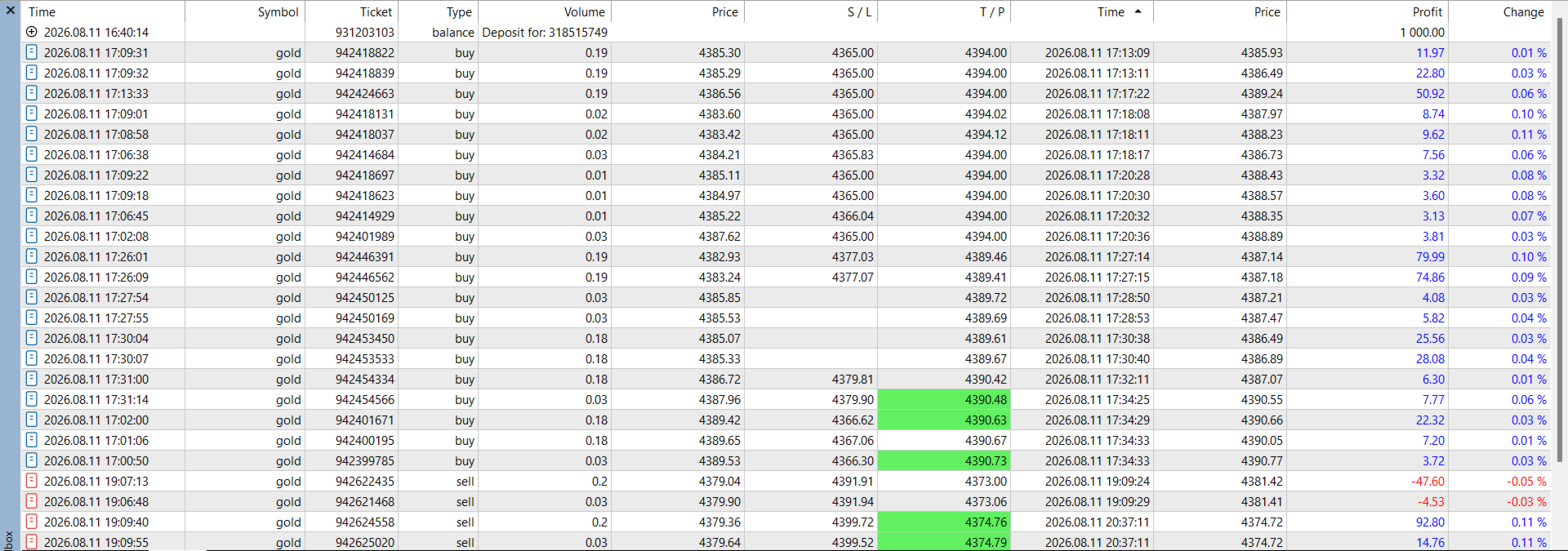
I honestly wasn't expecting LumaForge Beast Mode to perform this well for me. I rented it for a total of 6 months and started with a $1,000 account around 03 August 2026, and after roughly 3 weeks I am currently sitting at about $4,164. That's more than 4x the starting balance, which is honestly way beyond what I expected when I first started testing it. So far the EA has taken around 27 setups for me, with 21 winners and 6 losing trades. What I like is that it doesn't constantly fire trades just to stay active. It can sit there and wait for its conditions, which matches the description of the EA being selective and focused around the London and New York sessions. The M5/M15/H1 analysis and the two-position structure have worked very well in my experience. The backtests were already impressive, but seeing the same behaviour on a live account is what really surprised me. Of course, 3 weeks is still a short live track record, so I'm not going to pretend this proves anything about the future, but so far the performance has been excellent. One thing I personally started doing has made an already good result even better. When the positions move well into profit and get reasonably close to TP, I watch the price action. If I see signs that the move is starting to reverse, I sometimes close the positions manually rather than waiting for the exact TP. This has allowed me to lock in a lot of winning trades that might otherwise have given some profit back. I know this isn't the EA itself, so I'm separating my own trade management from the EA's performance, but the two-position setup makes this particularly convenient. The losses haven't bothered me too much either. There have been 6 so far, but what I've noticed is that the account has generally recovered those losses within the next 1–2 sessions or over the following day or two. That's probably one of the things that gave me the most confidence to keep running it instead of panicking after a losing trade. I also like that the developer is very clear about the intended use: Gold, session-based trading, the broker-specific SAST offset, the recommended balance, and even the warning about avoiding January and the first week of February. Those details matter with an EA like this because blindly changing settings or testing the wrong period can give completely different results. One thing I especially appreciated was the explanation of the SAST Offset alignment for the different brokers. A lot of EAs simply tell you to attach them to a chart and start trading, but Beast Mode clearly explains the recommended broker configurations and offset settings. I personally chose to run it on XM Global, and having those instructions available made the setup process much more straightforward and gave me confidence that I was testing and running the EA as intended. Overall, I'm extremely happy with Beast Mode so far. The backtest performance caught my attention, but the live results are what really convinced me. Turning $1,000 into approximately $4,164 in about three weeks with 21 wins and 6 losses is far beyond what I expected when I first rented it. Obviously, this is only my experience so far and nobody should expect these returns to continue indefinitely. Gold can change behavior very quickly and any EA can go through drawdown periods. However, based on what I've personally seen in both testing and live trading, I'm very impressed with Beast Mode and will definitely continue running it. The fact that losses have generally been recovered within a session or two, combined with the selective trading approach and strong live performance, has made this one of the most satisfying EA experiences I've had so far.