
Ginga 9AI Ensemble
- Experts
-
Shota Watanabe
 ■経歴
■経歴
トレード歴2000年頃から
EAは2005年から
AIは20024年から
現在は主にCatboostを用いたEAの開発がメイン - Versão: 1.3
- Atualizado: 29 maio 2026
- Ativações: 5
Overview
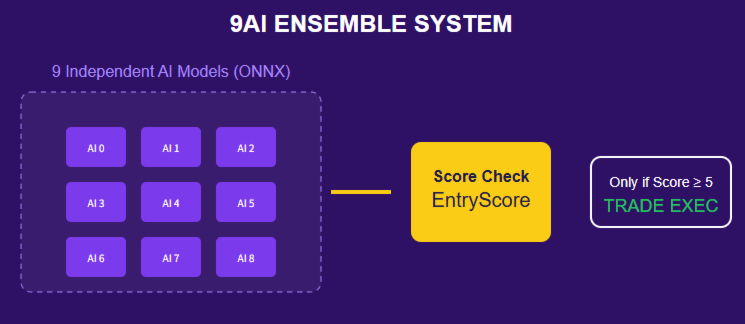
A next-generation ensemble EA that makes trading decisions through majority voting by 9 independent AI models.
- Training Period: 2003-2024 (22 years)
- Strict Selection: 9 elite models selected from over 100 candidates through 10 years of Walk-Forward Testing (WFT)
- Prop Firm Ready: Equipped with a daily stop loss feature
Main Features
1. Ensemble AI Strategy
Many AI EAs rely on a single model, making them vulnerable to overfitting and changing market conditions. Ginga combines 9 AI models trained with different approaches, allowing the weaknesses of one model to be compensated by the others.
- If one model underperforms in a specific market condition, the others can compensate
- Trade entries require agreement from multiple models (EntryScore can be adjusted)
- Greatly reduces false signals for more stable trading
- Each of the 9 models can be turned ON/OFF individually (single-model operation is also possible)
2. Prop Firm-Friendly Daily Risk Control
Most prop firms enforce daily loss limits. Ginga includes built-in control features designed for these requirements.
Daily Stop Loss
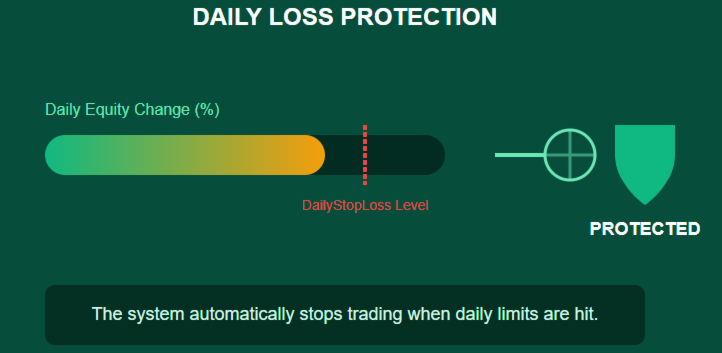
- When the daily loss reaches a set percentage of account balance (default 5%, including floating loss), positions are automatically closed
- New entries are stopped for the rest of the day
- Trading automatically resumes on the next trading day
Daily Take Profit (Optional)
- When the daily profit target is reached, positions are automatically closed
- New entries are stopped for the rest of the day
- Helps prevent giving back profits through overtrading
The daily thresholds can be adjusted to match the rules of each prop firm.
3. Advanced AI Architecture
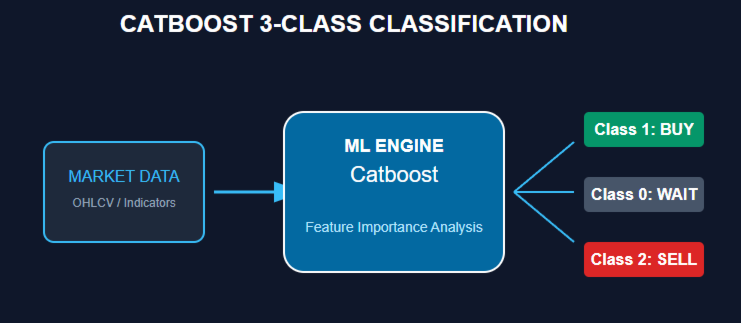
- CatBoost Machine Learning: A gradient boosting algorithm well-suited for financial time series forecasting
- 3-Class Classification: Predicts Buy / Sell / Hold to avoid low-probability trades
- 102-Dimensional Feature Space: Analyzes price action, volatility, technical indicators, time patterns, and market microstructure
- Strict Model Selection: Hundreds of models were tested through 10 years of WFT, and only the most stable ones were adopted
Technical Specifications
| Item | Specification |
|---|---|
| Symbol | XAUUSD (Gold) only |
| Timeframe | H1 (1-hour chart) only |
| AI Engine | CatBoost 3-class classification |
| Number of Models | 9 elite models (ensemble) |
| Training Period | 2003-2024 (22 years) |
| Feature Dimensions | 102 dimensions |
| Default Daily Stop Loss | 5% of account balance |
| Minimum Recommended Deposit | 1,000 USD |
| Recommended Deposit | 3,000 USD or more |
| Prop Firm Compatible | Yes |
| VPS | Recommended (not required) |
Entry Logic (Default Settings)
- Prediction Timing: AI models generate predictions once every hour
- Score Calculation:
- The prediction results of all AI models are aggregated
- Buy prediction = +1, Sell prediction = -1, Hold = 0
- The total score of 9 models is summed (range: -9 to +9)
- Entry Conditions:
- Score +5 or higher → Buy entry
- Score -5 or lower → Sell entry
- The threshold can be adjusted with the EntryScore parameter
- Exit Conditions:
- When the score becomes 0
- When an opposite signal appears
- Exit behavior can be selected by parameter (force close / close profit only / trailing / do nothing)
- Daily Function:
- If the daily loss reaches 5% of account balance (default, including floating loss), positions are closed and new entries are stopped until the next day
- Grid Trading (Optional):
- By default, the EA operates with a single position
- Can be switched to multiple-position operation using NanpinCount
- Hedging is not used
Parameter Description
| Category | Parameter | Description | Default |
|---|---|---|---|
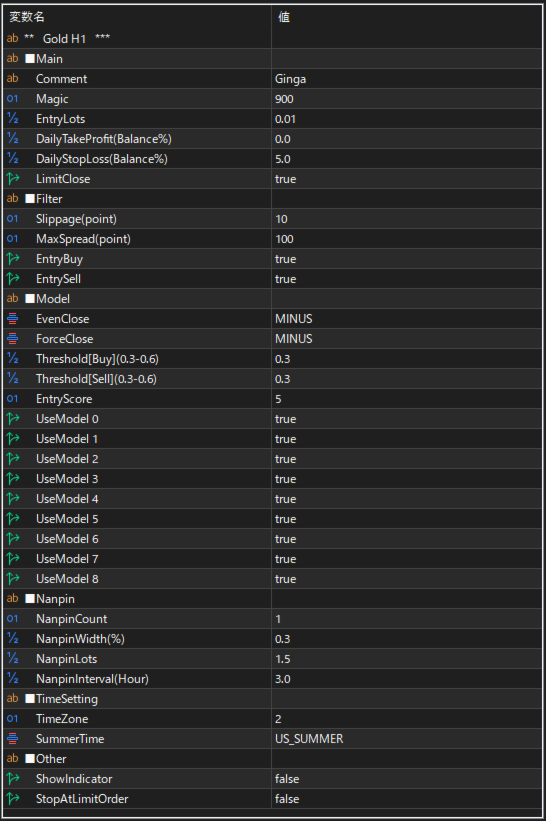
| Main | Comment | Order comment | Ginga |
| Main | Magic | Magic number (set it so it does not conflict with other EAs) | 900 |
| Main | EntryLots | Position size for new entries | 0.01 |
| Main | DailyTakeProfit | Daily profit target as a % of account balance (0 = disabled) | 0 |
| Main | DailyStopLoss | Daily loss limit as a % of account balance (0 = disabled) | 5 |
| Main | LimitClose | Whether daily-limit closing is performed using pending close levels | true |
| Filter | Slippage(point) | Allowed slippage (in points) | 10 |
| Filter | MaxSpread(point) | Maximum allowed spread (in points) | 100 |
| Filter | EntryBuy | Allow buy entries | true |
| Filter | EntrySell | Allow sell entries | true |
| Model | EvenClose | Action when AI prediction score becomes 0 (NOUSE / TRAIL / PLUS / MINUS) | MINUS |
| Model | ForceClose | Action when the AI prediction score turns into an opposite signal (NOUSE / TRAIL / PLUS / MINUS) | MINUS |
| Model | Threshold[Buy] | Probability threshold for buy predictions (0.3-0.6, higher = more selective) | 0.3 |
| Model | Threshold[Sell] | Probability threshold for sell predictions (0.3-0.6, higher = more selective) | 0.3 |
| Model | EntryScore | Minimum score required for entry | 5 |
| Model | UseModel0 ~ UseModel8 | Enable / disable each AI model individually | true |
| Nanpin | NanpinCount | Maximum number of positions (1 = no grid) | 1 |
| Nanpin | NanpinWidth | Price distance between positions (as % of current price) | 0.3 |
| Nanpin | NanpinLots | Lot multiplier for each additional position | 1.5 |
| Nanpin | NanpinInterval | Minimum time interval between additional entries | 3 hours |
| TimeSetting | TimeZone | Broker GMT time zone offset | 2 |
| TimeSetting | SummerTime | Daylight saving adjustment (None / US / UK) | - |
| Other | ShowIndicator | Whether to display information on the chart (total profit/loss, AI score, daily profit/loss, etc.) | false |
| Other | StopAtLimitOrder | Stop EA operation if pending orders exist in the same account | false |
- NOUSE: Do nothing
- TRAIL: Execute trailing stop
- PLUS: Close only if in profit
- MINUS: Force close
Important Warnings and Disclaimer
⚠️ Past performance does not guarantee future results
No matter how strong backtest or walk-forward results may be, future profitability is never guaranteed. Market conditions are always changing.
⚠️ For XAUUSD H1 only
This EA is specifically optimized for Gold on the 1-hour timeframe. Do not use it on other symbols or timeframes.
⚠️ Test on demo first
Please test on a demo account for at least 2 weeks before going live. Make sure you understand how the EA behaves and adjust parameters according to your risk tolerance and prop firm rules.
⚠️ How the daily functions work
The EA checks the daily limits on every tick. Once a limit is reached, no new positions will be opened until the next trading day (server time).
⚠️ This is not a holy grail
No EA can win 100% of the time. Ginga is an advanced tool, but proper money management and realistic expectations are essential.
Frequently Asked Questions (FAQ)
Q. Can I run it together with other EAs?
A. The daily take profit / daily stop loss functions calculate the total profit and loss of the entire account without considering magic numbers. Therefore, the performance of other EAs may affect how Ginga behaves. If possible, avoid running it together with other EAs on the same account.
Q. Should I add +1 to TimeZone during daylight saving time?
A. No. During daylight saving time, the EA automatically calculates TimeZone+1 internally. Just enter the GMT value for non-daylight-saving periods.
Q. Can I run it with the default settings?
A. In general, yes. However, please check the following:
- If multiple EAs are running on the same account, consider disabling the daily functions or stopping the other EAs
- Make sure the TimeZone setting matches your broker
Q. "TradeLimit" is displayed on the chart
A. This means the daily function has been triggered and new entries are temporarily stopped. Trading will automatically resume on the next day based on server time.
Q. It does not trade
A. Please check the following:
- Whether the daily function is active and trading has been stopped by the profit/loss of other EAs
- If using StopAtLimitOrder, make sure there are no pending orders in the same account
- Whether MaxSpread is set too tight
- Whether both EntryBuy and EntrySell are set to true
Support
After purchase, support is available via MQL5 messages or the product comments section. Feel free to contact us.
Legal Disclaimer
- This product is not investment advice
- Forex and CFD trading involve substantial risk of loss
- Past performance does not guarantee future results
- The developer assumes no responsibility for user losses
- Users are responsible for complying with the rules and regulations of their prop firm
- Use only funds you can afford to lose, at your own risk
- Always test thoroughly on demo before live trading
- Please confirm EA compatibility with your prop firm before use
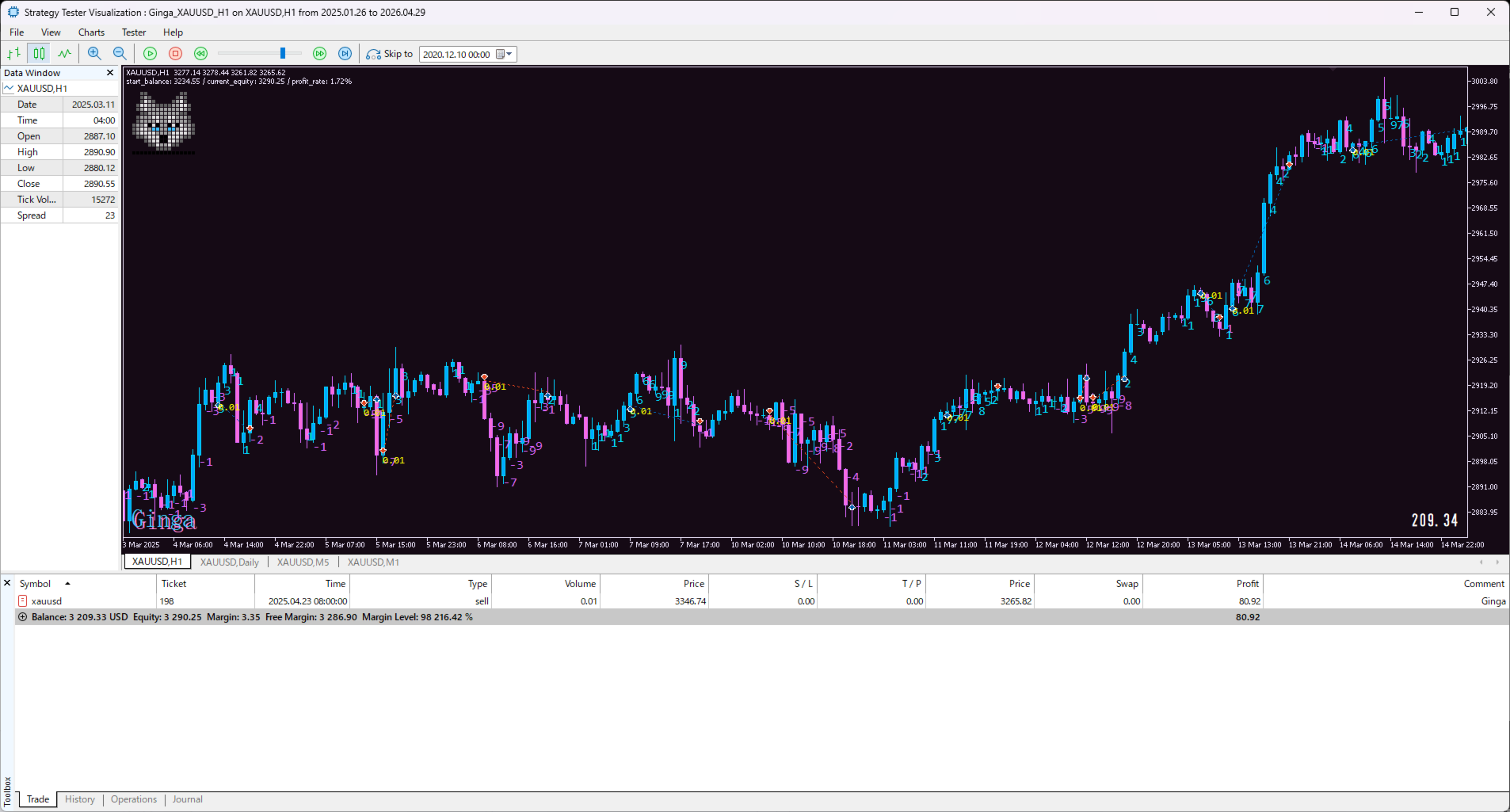
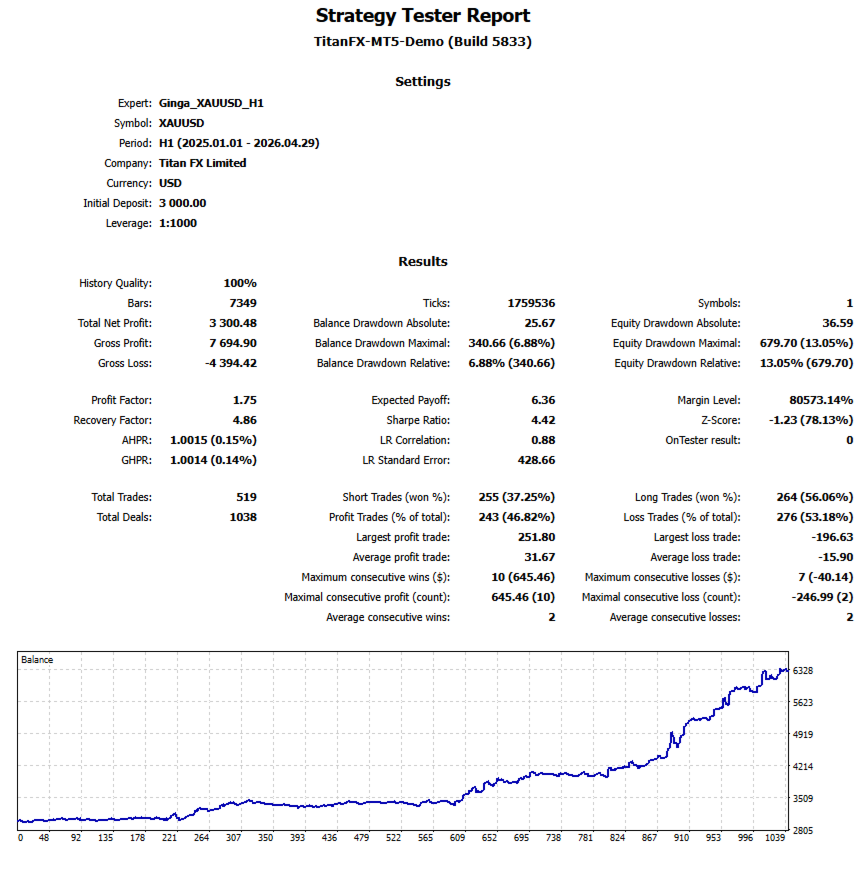
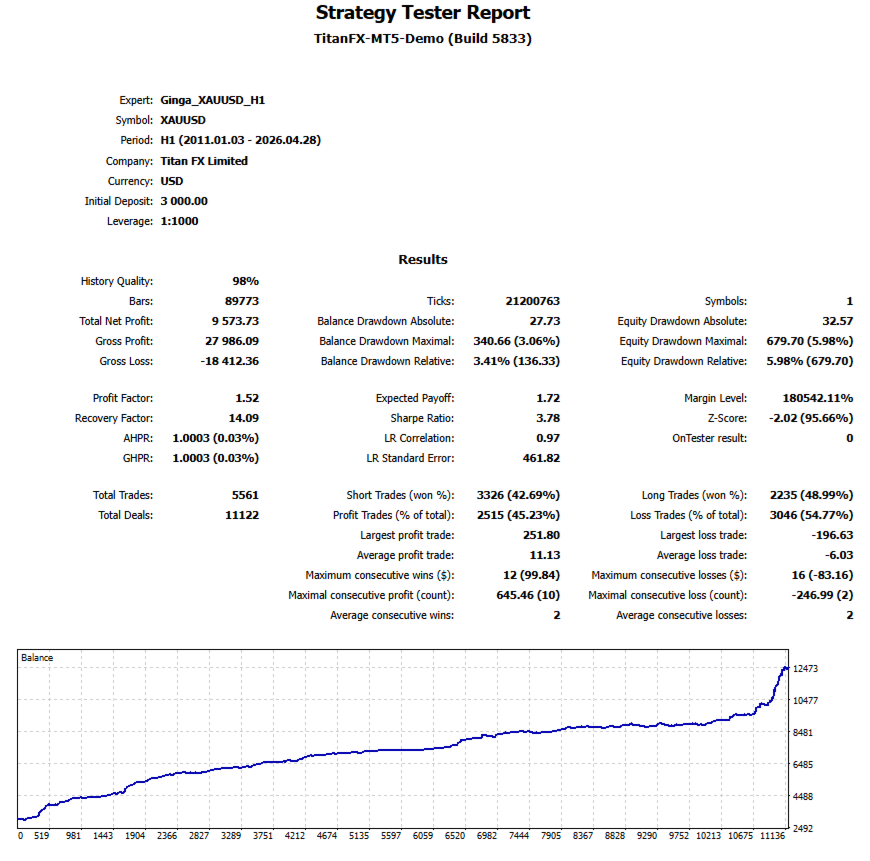
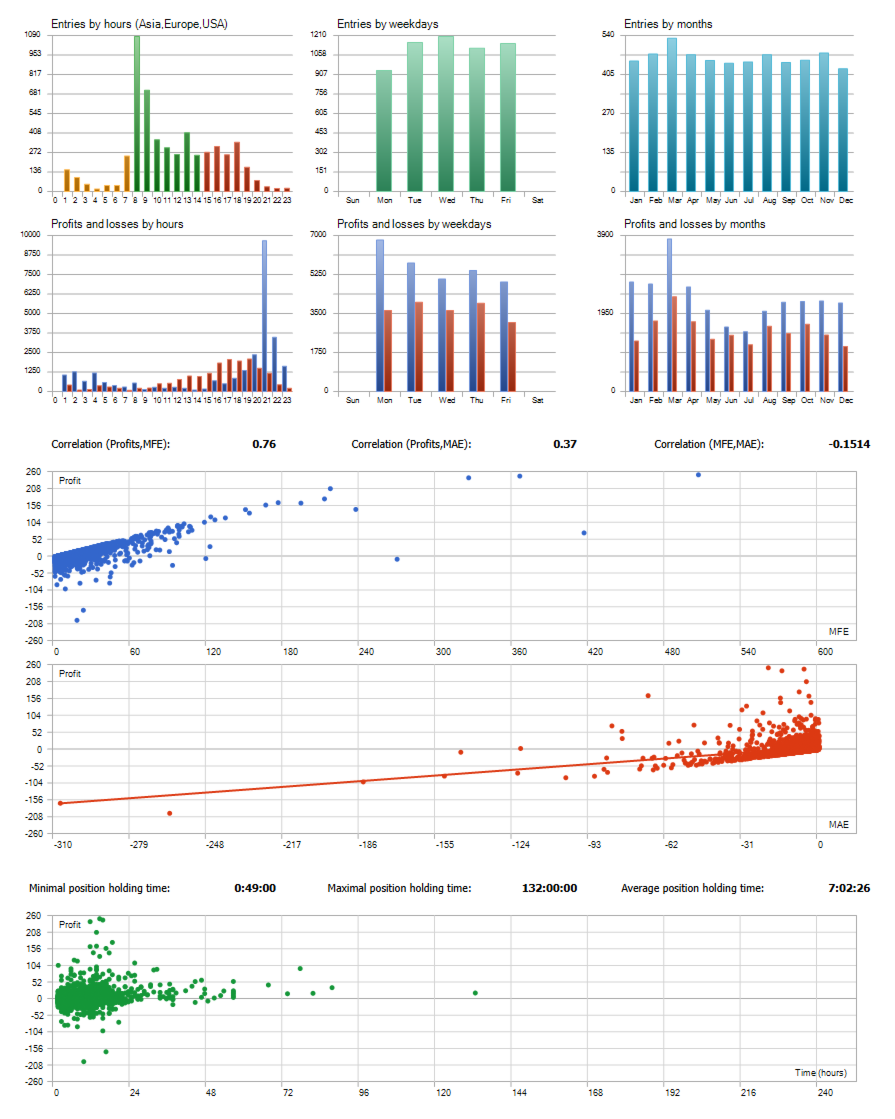































Ginga is not just another gold EA — it is a genuinely well-engineered nine-model committee that trades with the discipline of a general council rather than the impulsiveness of a single indicator. Based on the ETRT backtest results (2026.01 ~ 2026.06) with the broker I use (Axi Premium), I am using Ginga with a buy-only, 9-model true setting. Auto-lot is not yet implemented, so I hope it will be added in the future. So the test starts with $2,000 and uses a fixed lot size of 0.02. The statistical elements speak for themselves. A. Headline results: ・Net profit +114.9% on $2,000 starting capital ・Profit Factor 2.13 · Sharpe 8.69 · Recovery Factor 6.14 ・Balance drawdown only 9.87%, equity drawdown 10.75% ・LR Correlation 0.98 — an almost perfectly linear equity curve ・Z-Score 2.74 (99.39% confidence) — the results are statistically significant, not noise. B. What the correlation triad reveals about the underlying strategy: The three trade-quality correlations tell a story most sellers never expose: ・Corr(Profits, MFE) = 0.82 — winners are highly proportional to their maximum favorable excursion. The EA rides its winners rather than clipping them prematurely. ・Corr(Profits, MAE) = 0.57 — winning trades often endure meaningful adverse excursion first. This is a patient, mean-reversion posture, not a fragile momentum chaser. ・Corr(MFE, MAE) = 0.19 — the near-zero coupling between upside and downside excursion is the mathematical signature of genuine directional edge. If the EA were merely harvesting volatility, this number would be high. It is not. Together, these three coefficients prove Ginga has real predictive skill — not just favorable variance. C. Strategy structure I observed: ・Buy-only setting, and it still delivered every month in a broadly declining H1 2026 gold market. That is remarkable — most long-only EAs got crushed in the same window. ・Nine-model committee with EntryScore=5 majority vote — no single sub-model can force an entry. Overfitting risk is diluted by consensus. ・Sniper cadence, not scalper spam — 84 trades in six months, avg hold ~6h10m. Ginga waits. ・Adaptive silence — trade count halved from ~20/month (Jan–Feb) to ~8/month (Apr, Jun) as the trend deepened. The committee correctly stood down when conditions weren't there, instead of forcing trades. This is exactly the behavior you want in live trading. ・Non-symmetric risk control — DailyStopLoss + LimitClose cap the downside hard, while DailyTakeProfit is deliberately disabled to let winners run. ・Nanpin (averaging) parameters exist but I have it turned off — held in reserve as a sealed contingency, not abused as a core mechanic. I have deep respect for developers who resist the temptation to Martingale their equity curve. ・Only 6 of 84 exits were stop-loss hits (7%). The vast majority were clean, decision-based exits from the ensemble flipping its verdict. D. Why this matters: Most gold EAs that show +100% returns in half a year do so with Martingale, no stop loss, or a curve-fit window. Ginga does it with a sealed nanpin, hard daily loss caps, buy-only exposure through a bear leg, and a 0.98 LR correlation. That combination is genuinely rare. E. Minor notes (not deductions): Sell-side is intentionally disabled. A future symmetric build could open a second revenue stream, but in the current version, the performance of short trades is somewhat inferior. Backtest window (H1 2026) is one regime. Long-term forward validation across regimes will be the real test — but every published statistic here is already consistent with an edge that should survive. F. Verdict: Ginga behaves like a council of thoughtful analysts rather than a trigger-happy robot. Statistically rigorous, structurally disciplined, and — most importantly — honest about how it makes money. Highly recommended for traders who value robustness and evidence over marketing screenshots. I love these 9 dogs :D