Gold Quant Intelligence
- Experts
- Versão: 1.10
- Ativações: 5

Advanced Multi-Market Quantitative Intelligence for XAUUSD
Gold Quant Intelligence EA is a professional MetaTrader 5 Expert Advisor designed to analyze the gold market through a multi-market quantitative framework rather than relying on a single technical indicator.
The EA continuously evaluates XAUUSD together with Silver, EURUSD, GBPUSD, USDJPY, DXY and US10Y to identify relationships that may provide additional context for the current gold market environment.
Its quantitative engine combines:
- 📊 Return analysis
- Z-Score analysis
- Momentum
- Volatility
- Historical correlation
- Lead/Lag correlation
- Weighted directional scoring
- Multi-market signal fusion
- Market confidence estimation
The result is a unified Gold Directional Score that classifies the current environment as BULLISH, BEARISH or NEUTRAL.
🔹 How the Quantitative Engine Works
The EA analyzes recent price returns across multiple markets and compares their behavior with gold.
For each supporting market, the system calculates:
1. Current Return
Measures the latest price movement.
2. Z-Score
Measures how unusual the current movement is compared with its recent historical behavior.
3. Correlation
Measures the historical relationship between the market and gold.
4. Lead/Lag Relationship
The EA tests different lag periods to determine whether previous movements in another market have historically shown a relationship with subsequent gold movements.
5. Directional Score
The correlation, Z-Score and predefined market relationship are combined into a directional contribution. Each market can also have a different weighting according to its relative importance.
The individual market signals are then combined into a normalized Gold Score.
📈 Multi-Market AnalysisThe EA monitors:
| Market | Symbol | Role |
|---|---|---|
| Gold | XAUUSD | Primary instrument |
| Silver | XAGUSD | Precious-metals relationship |
| Euro | EURUSD | Currency environment |
| British Pound | GBPUSD | Currency environment |
| Japanese Yen | USDJPY | Currency relationship |
| Dollar Index | DXY | USD strength |
| US 10-Year | US10Y | Yield environment |
The default configuration gives different relative weights to these markets, allowing the final Gold Score to reflect their intended importance.
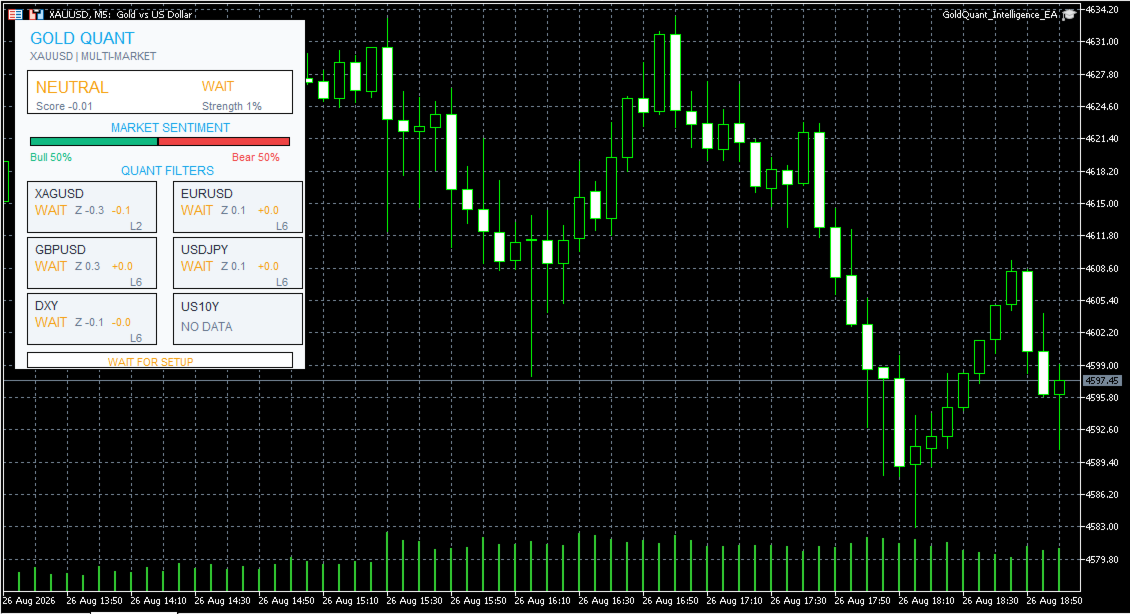
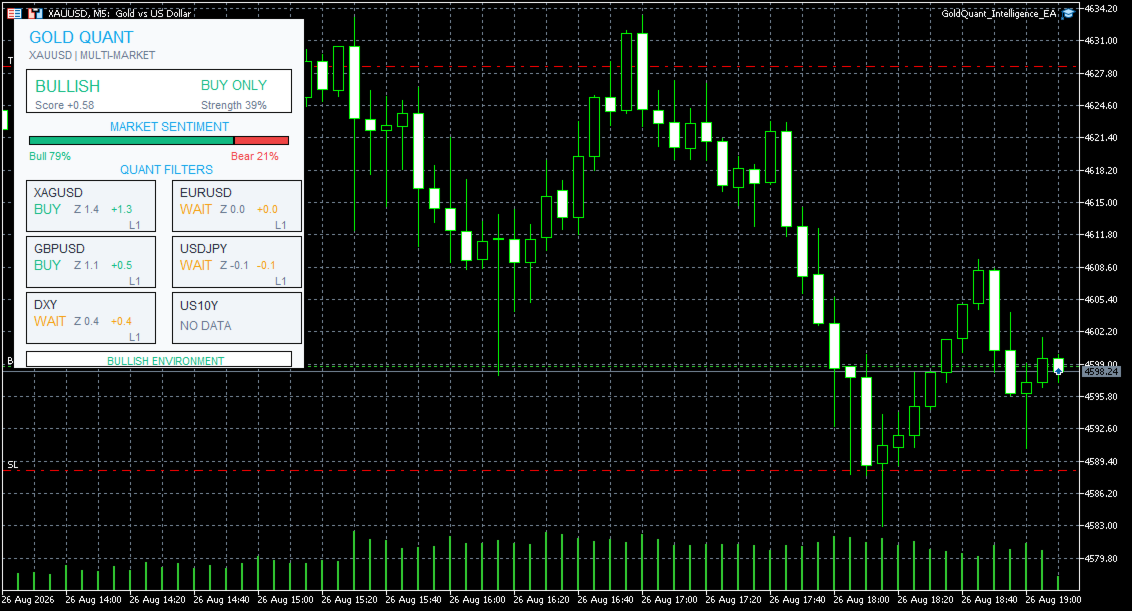
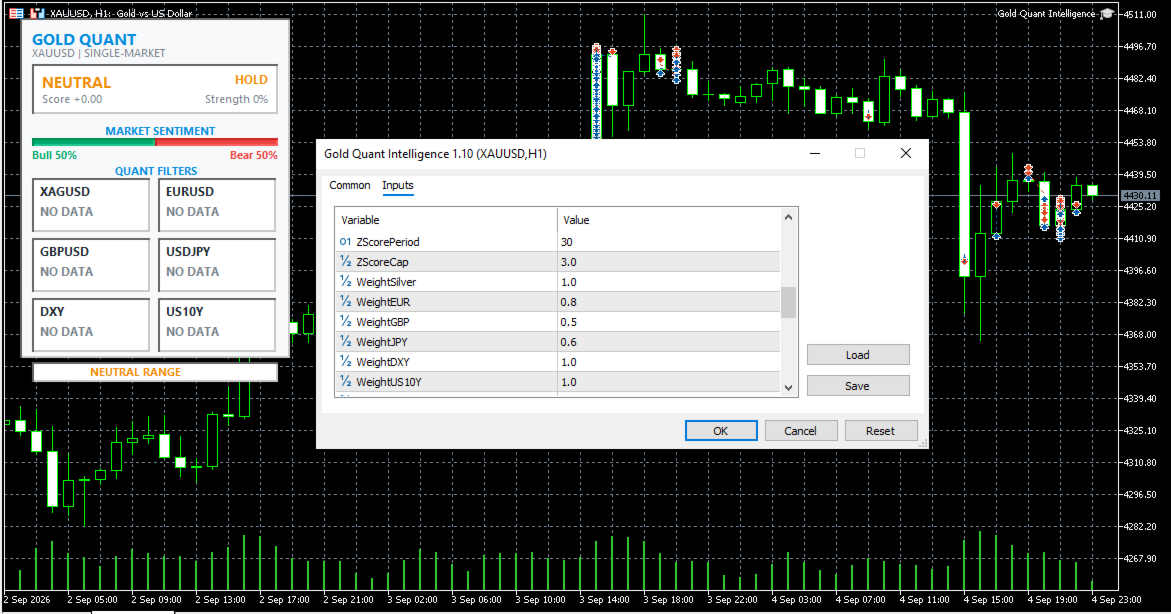
🖥️ Professional Quant DashboardThe EA includes a compact institutional-style dashboard designed to provide the most important information at a glance.
It displays:
- Current Gold bias
- BUY / SELL / WAIT status
- Gold Score
- Confidence level
- Market sentiment
- Individual market conditions
- Z-Score
- Correlation
- Lead/Lag information
- Directional contribution
- Overall market environment
The dashboard is designed to remain compact while still providing a detailed overview of the quantitative engine.
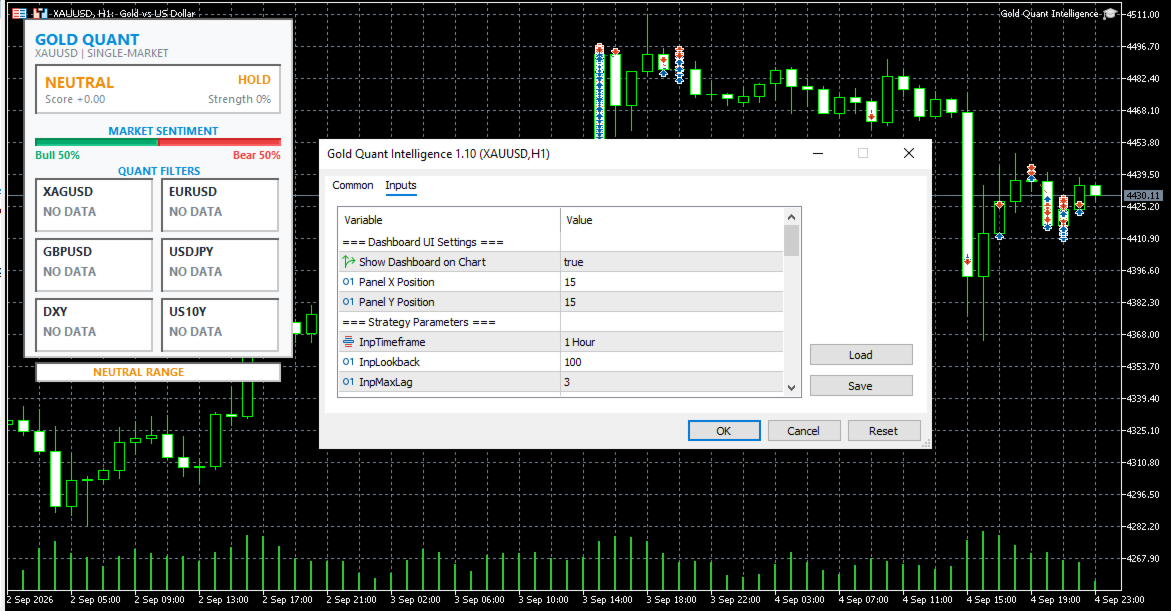
⚙️ Main SettingsGeneral Quantitative Settings
Timeframe
Default: 1H
Determines the timeframe used for the quantitative calculations.
Lookback Period
Default: 1H
Controls the amount of historical data used for correlation and quantitative analysis.
Maximum Lag
Default: 3
Defines the maximum number of bars tested when searching for the strongest lead/lag relationship.
Timer Interval
Default: 5 seconds
Controls how frequently the quantitative engine updates.
These settings are available directly from the EA Inputs section.
📊 Z-Score Settings
ZScorePeriod
Default: 30
Defines the historical period used to calculate the Z-Score.
ZScoreCap
Default: 3.0
Limits extreme Z-Score values to help prevent unusually large statistical values from dominating the calculation.
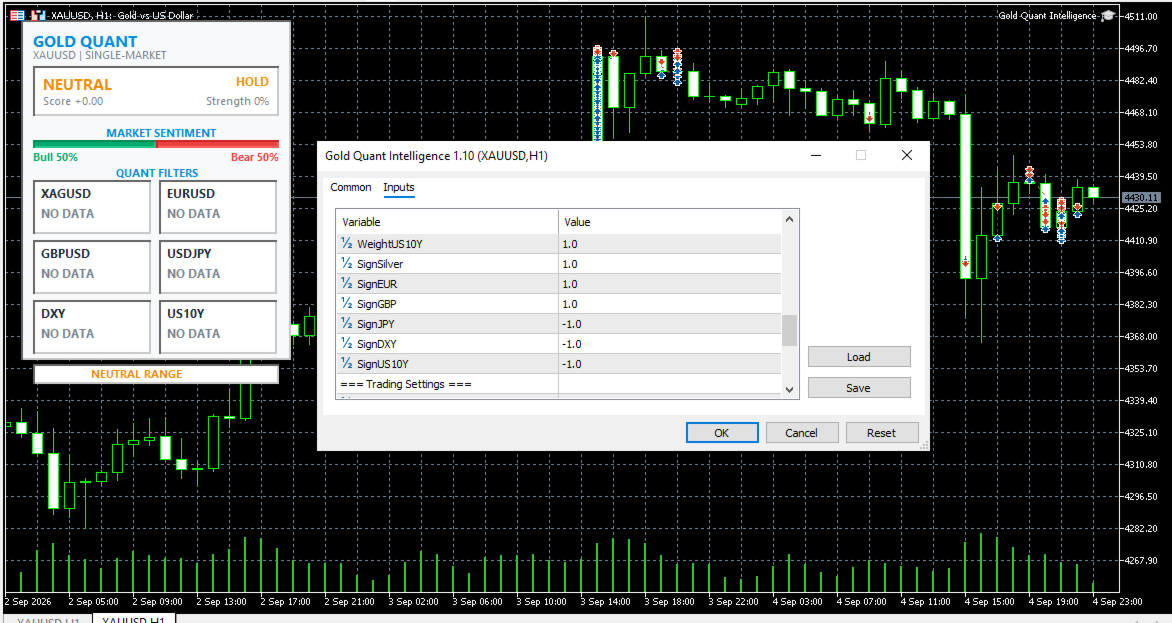
⚖️ Market Weights
The EA allows the user to control the relative importance of each market:
- Silver: 1.00
- EURUSD: 0.80
- GBPUSD: 0.50
- USDJPY: 0.60
- DXY: 1.00
- US10Y: 1.00
These values can be customized according to the user's preferred quantitative model.
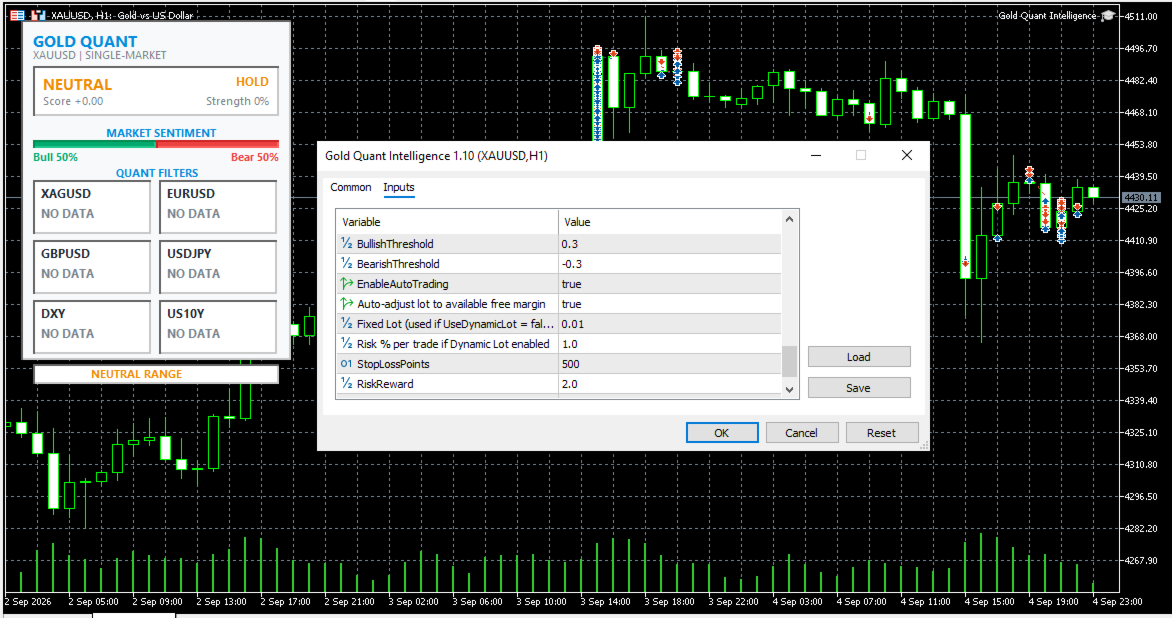
🎯 Signal ThresholdsBullish Threshold: 0.30
Bearish Threshold: -0.30
When the Gold Score reaches or exceeds the bullish threshold, the environment is classified as BULLISH.
When it reaches or falls below the bearish threshold, the environment is classified as BEARISH.
Values between the two thresholds are classified as NEUTRAL.
🤖 Automated TradingThe EA also contains an optional automated trading module.
EnableAutoTrading
- false = Analysis mode only
- true = Automated trading enabled
When automated trading is enabled, the EA can trade XAUUSD according to the calculated Gold Score.
The default configuration uses:
- Lot size: 0.01
- Stop Loss: 500 points
- Risk/Reward: 2.0
- Unique Magic Number: 26082026
BUY Logic
When the Gold Score reaches the bullish threshold, the EA can open a BUY position with a predefined Stop Loss and a Take Profit calculated from the selected Risk/Reward ratio.
SELL Logic
When the Gold Score reaches the bearish threshold, the EA can open a SELL position using the corresponding Stop Loss and Risk/Reward calculation.
The EA checks whether a position already exists before opening another position on the gold symbol.
🗂️ Quantitative Data ExportThe EA can optionally record its calculations into a CSV file.
EnableCSV: true / false
CSVFileName: GoldQuant_Data.csv
The exported dataset includes Gold statistics together with the return, Z-Score, correlation, lag and directional score of each supporting market, as well as the final Gold Score and confidence value.
This can be useful for:
- Historical research
- Quantitative analysis
- Strategy development
- Performance evaluation
- External statistical analysis
Analysis Mode
For users who want to use the EA primarily as a quantitative market intelligence tool:
- Attach the EA to an XAUUSD chart.
- Keep EnableAutoTrading = false .
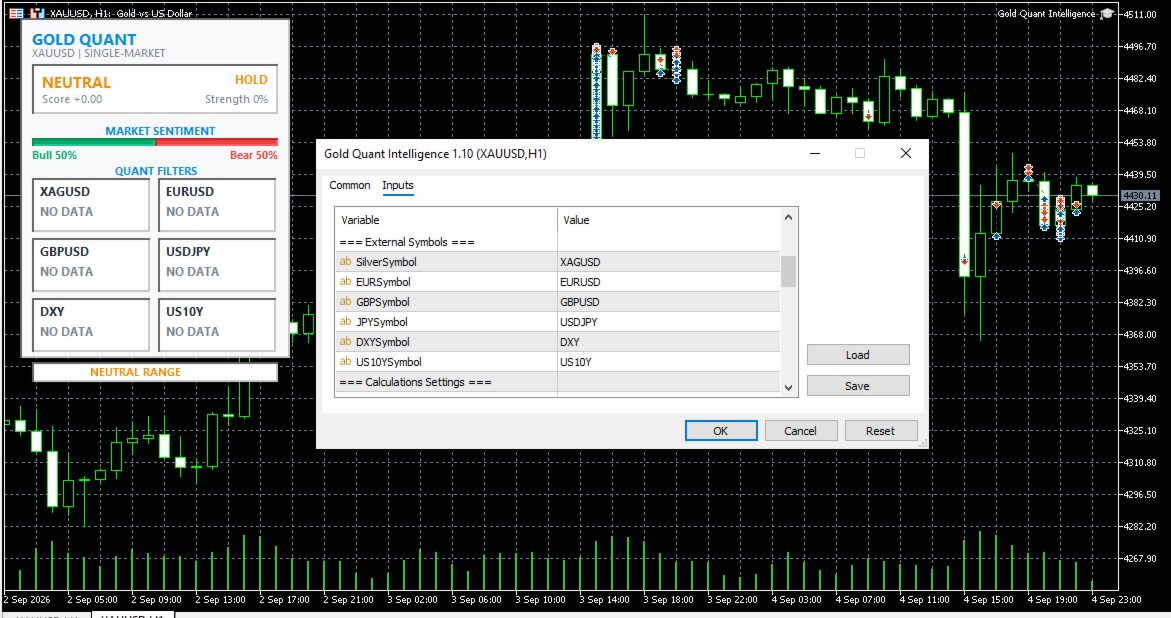
- Verify that all supporting symbols are available with your broker.
- Allow the EA to collect sufficient market data.
- Monitor the Gold Score and multi-market dashboard.
- Use the information as additional market context.
Automated Mode
For users who choose to activate automated execution:
- Attach the EA to the XAUUSD chart.
- Verify every symbol name used by your broker.
- Configure the desired lot size.
- Configure Stop Loss points.
- Configure the desired Risk/Reward ratio.
- Set EnableAutoTrading = true .
- Test the EA on a demo account first.
- Monitor execution, spreads, symbol specifications and broker conditions before considering live deployment.
Gold Quant Intelligence EA is a quantitative analysis and automated trading tool. It does not guarantee profits, winning trades, or future market performance.
The Gold Score and Confidence value are analytical model outputs, not guaranteed probabilities of future price movement. The EA's own code explicitly identifies the confidence figure as a normalized confidence score rather than a statistically calibrated probability.
Trading gold and other financial instruments involves substantial risk of loss, and automated trading can result in losses without human intervention.
Past performance, backtesting results, simulated results, or historical relationships between markets do not guarantee future results.
Users should independently evaluate the EA, conduct adequate backtesting and forward testing, use appropriate risk management, and understand their broker's trading conditions before enabling automated trading.
Use of this Expert Advisor is entirely at the user's own risk. The developer does not guarantee profitability and is not responsible for trading losses, execution differences, slippage, spreads, data-feed differences, broker conditions, or technical failures.
By purchasing or using this Expert Advisor, you acknowledge that automated trading carries financial risk and that you are solely responsible for your trading decisions and account.