SimpleKeys

SimpleKeys — Hotkey Trade Manager for MT5

Most trade managers give you a dashboard full of buttons you'll click once and forget. SimpleKeys does the opposite. Every action is a single keypress. Every level is a visual line you place exactly where you want it. No panels to navigate, no dropdowns to open mid-trade.

Place your stop, place your target, press Space. Done.

Who This Is For

SimpleKeys is built for traders who already know what they're doing and need execution to keep up with their thinking. If you're manually calculating lot sizes, moving stops to breakeven by hand, or fumbling through right-click menus while price is moving — this EA solves those problems directly.

It is not an automated strategy. It does not trade for you. It makes you faster and more precise at the trading decisions you're already making.

How It Works

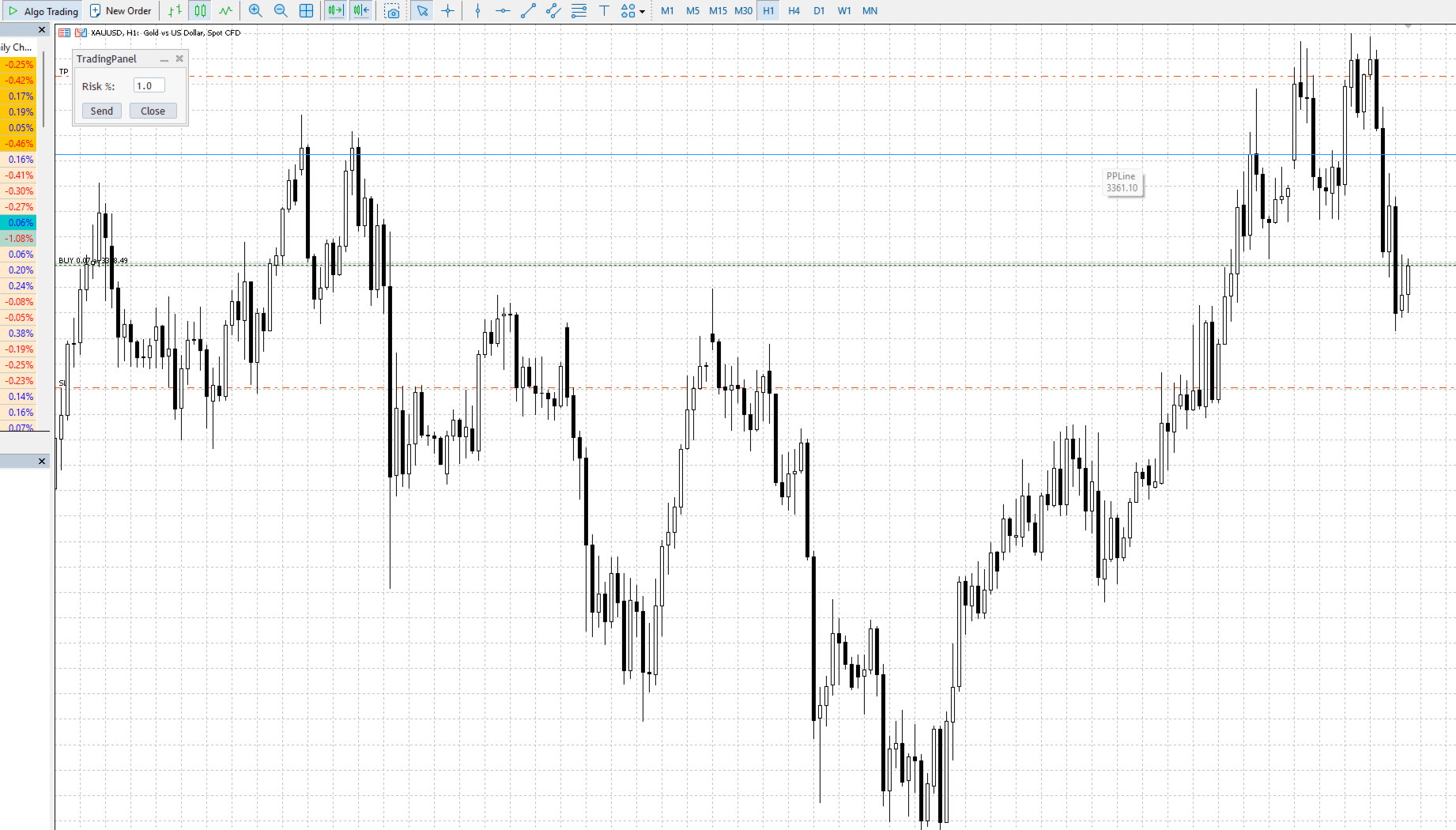
You control everything through horizontal lines on the chart and a set of hotkeys. Press a key, a line appears and follows your cursor. Click to lock it in place. Set your levels, press Space to execute. The EA handles lot sizing, order type detection, and optional confirmation automatically.

Default hotkeys (all customizable):

Key Action
S Stop Loss line
T Take Profit line
P Entry Price line (pending orders)
X Partial Profit trigger line
Space Send order
V Manual partial close
B Move stops to breakeven
C Close all positions

Press the same key again to cancel and remove the line. Every hotkey is remappable in the EA settings.

Order Execution

SimpleKeys detects the correct order type automatically based on where you place your lines relative to current price. You don't select BUY STOP or SELL LIMIT from a menu — you just place your levels and the EA figures it out.

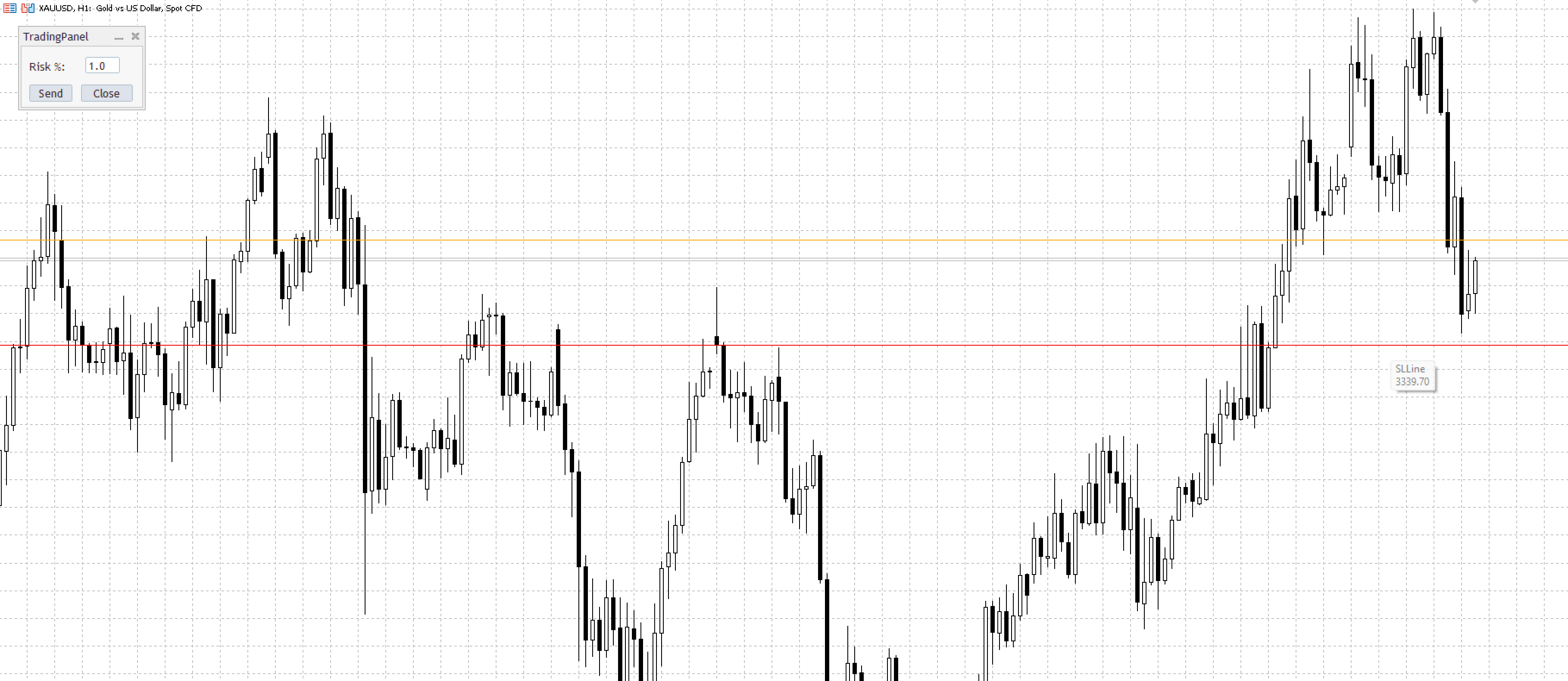
Market orders — place a Stop Loss line only, or a Stop Loss and Take Profit together, then press Space. Direction is determined by whether your stop is above or below current price.

Pending orders — add a Price line. The EA detects the order type from the relationship between your price line, stop line, and current market price:

Setup Order Type
Price above market, stop below price BUY STOP
Price below market, stop below price BUY LIMIT
Price below market, stop above price SELL STOP
Price above market, stop above price
SELL LIMIT


Risk Management

Three methods, selectable from the EA inputs. The trading panel adjusts its label automatically to show the correct input type.

Percentage of balance — enter your risk percentage in the panel and the EA calculates lot size from your stop distance in real time. Risk stays consistent regardless of where you place your stop.

Dollar amount — specify a fixed currency risk per trade. Lot size is calculated the same way, just from a dollar figure instead of a percentage.

Fixed lot size — bypass calculation entirely and trade a predetermined size.

All three methods respect broker volume limits and step sizes automatically.

Split Entry System

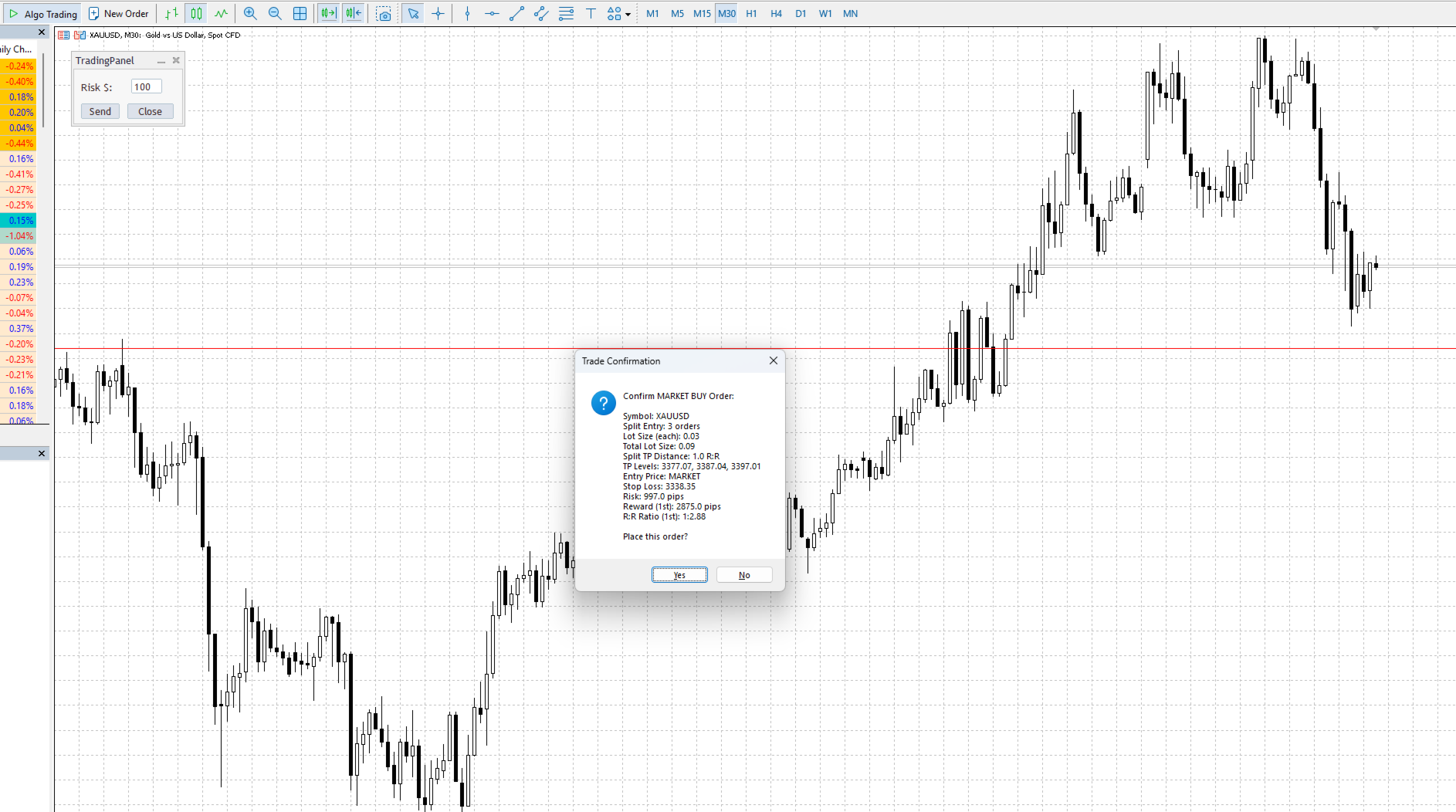
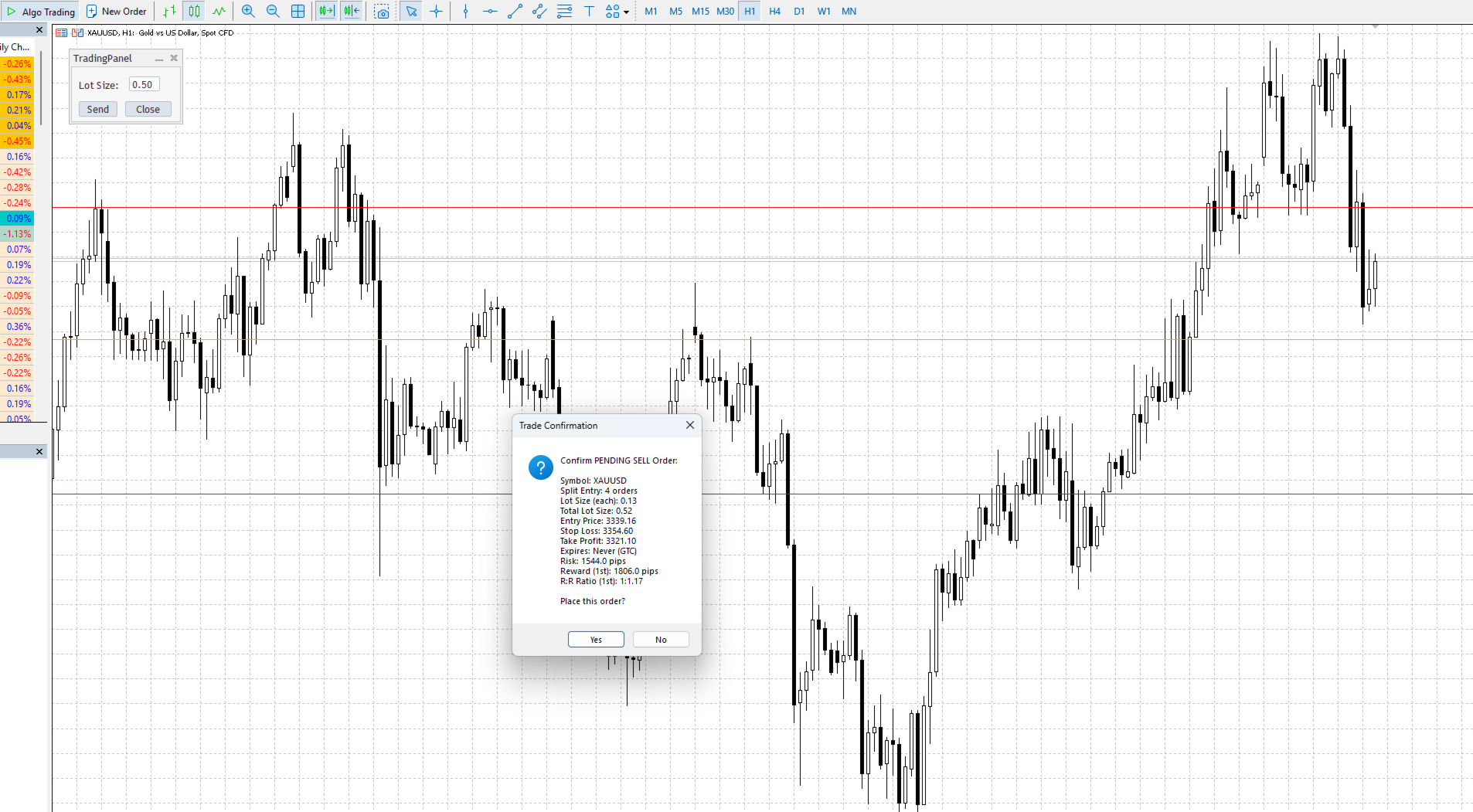
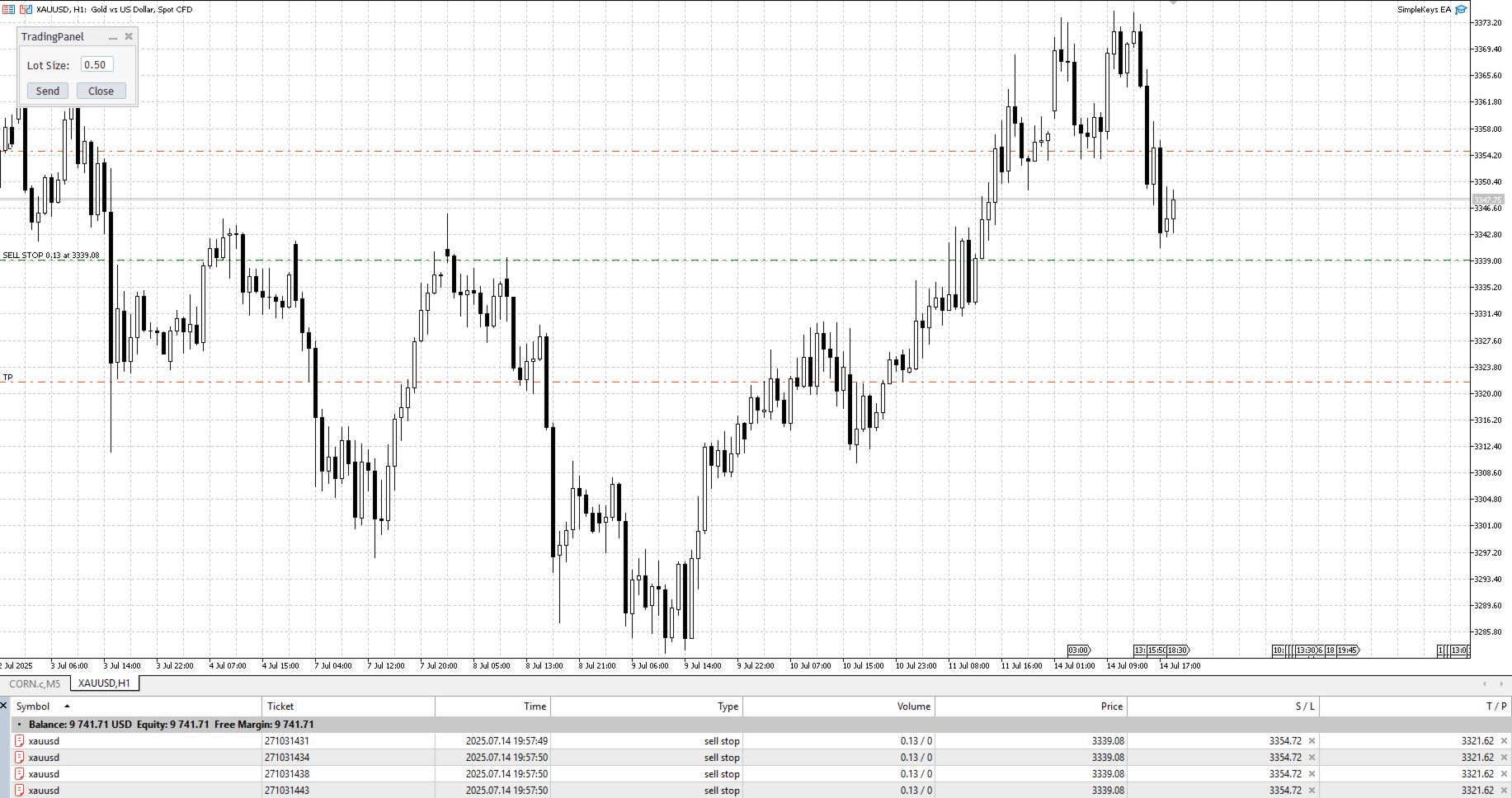
Set splitEntry to 2 or more and the EA divides your position across multiple orders at the same price level. Each order uses its own lot calculation so your total risk stays within your specified limit.

Combined with splitTpDistance , each order can target a progressively higher take profit level. Set the multiplier to 1.0 and each additional order's TP is spaced one full R away from the last. Use 0.5 for tighter spacing, 2.0 for wider.

Example with splitEntry = 3 and splitTpDistance = 1.0, a 1:2 base R:R setup:

  • Order 1: TP at 2R
  • Order 2: TP at 3R
  • Order 3: TP at 4R

Each order sized so the combined risk equals your specified risk amount.

Partial Profit System

Place the Partial Profit line (X key) anywhere on the chart after entering a position. When price touches that level, the EA automatically closes the percentage you've set in partialPercent (default 50%) and deletes the line.

The trigger is bidirectional — it fires whether price approaches from above or below, making it usable for both profit-taking and defensive scaling on retracements.

Optional: enable autoBreakevenAtPartial to have the EA move your stop to entry automatically at the same moment the partial executes.

For manual partial closes, press V at any time. If showPartialConfirmation is enabled, you'll see a breakdown of each position and the volume to be closed before anything executes.

Breakeven Management

Press B to move all stops on the current symbol to entry level. breakEvenOffset adds a small pip buffer above or below entry — set it positive to lock in a few pips of profit, negative to give the trade slight room.

The EA checks broker minimum stop distance requirements and adjusts automatically. It won't move a stop that's already in a better position.

Trade Confirmation

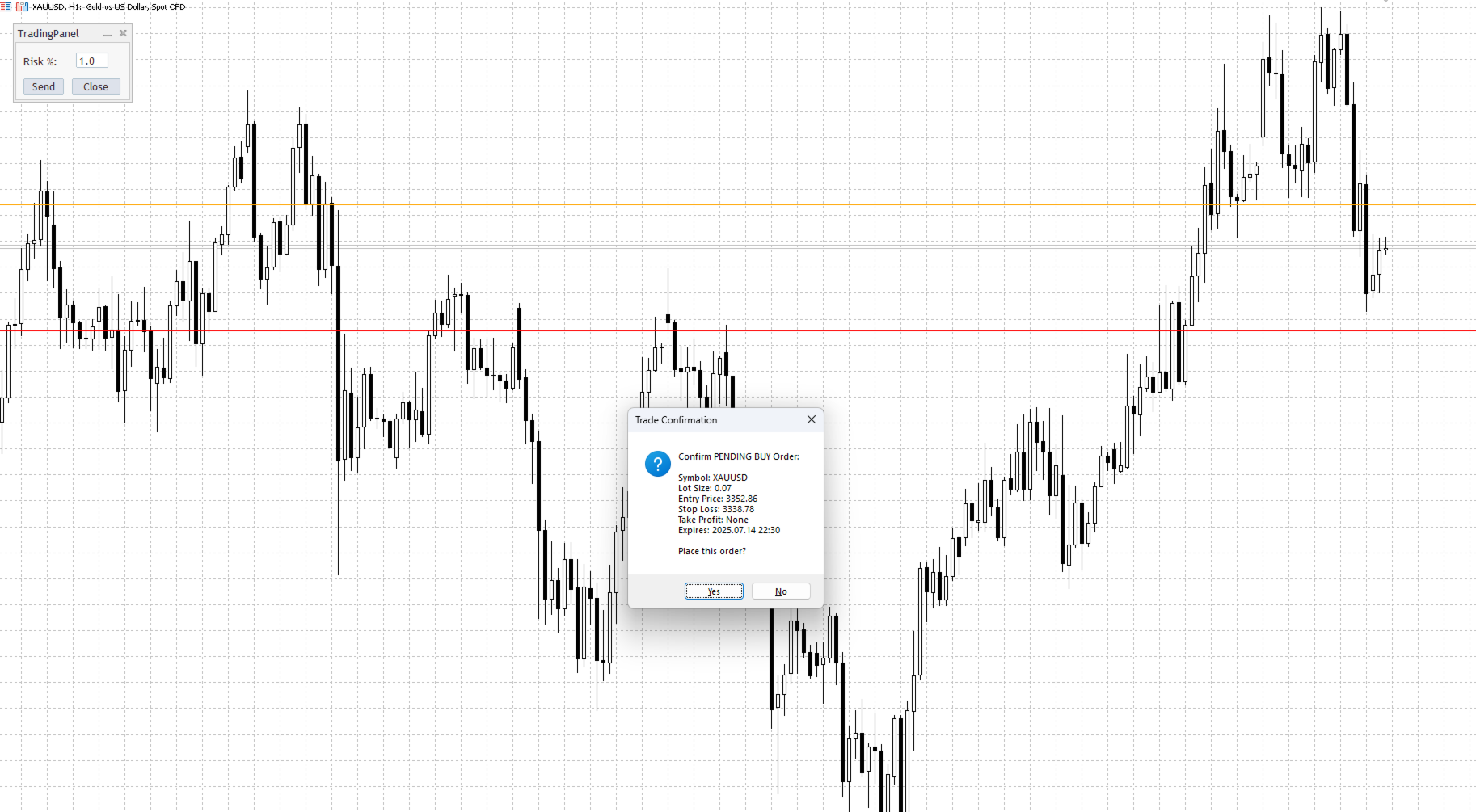
Enable showTradeConfirmation to see a full order summary before anything is sent — order type, lot size, entry, stop, target, R:R ratio, pip risk, and expiry time for pending orders. Split entry setups show all TP levels in the confirmation.

Disable it for immediate execution with no dialog.

Pending Order Expiry

Two methods for automatically cancelling unfilled pending orders:

Time-based ( pendingExpiryTime ): set a specific time in HH:MM format. Useful for closing all pending orders before market close or major news events.

Duration-based ( pendingExpiryMinutes ): cancel orders that have been sitting unfilled for longer than X minutes.

Both can run simultaneously. If both are set, the earlier of the two triggers first.

Technical Details

  • MetaTrader 5 only
  • Compatible with all symbols — forex, indices, commodities, crypto
  • All timeframes
  • No DLL files, no external dependencies
  • Magic number support for filtering trades placed by other EAs
  • Custom order comment support

Settings Reference

Input Description
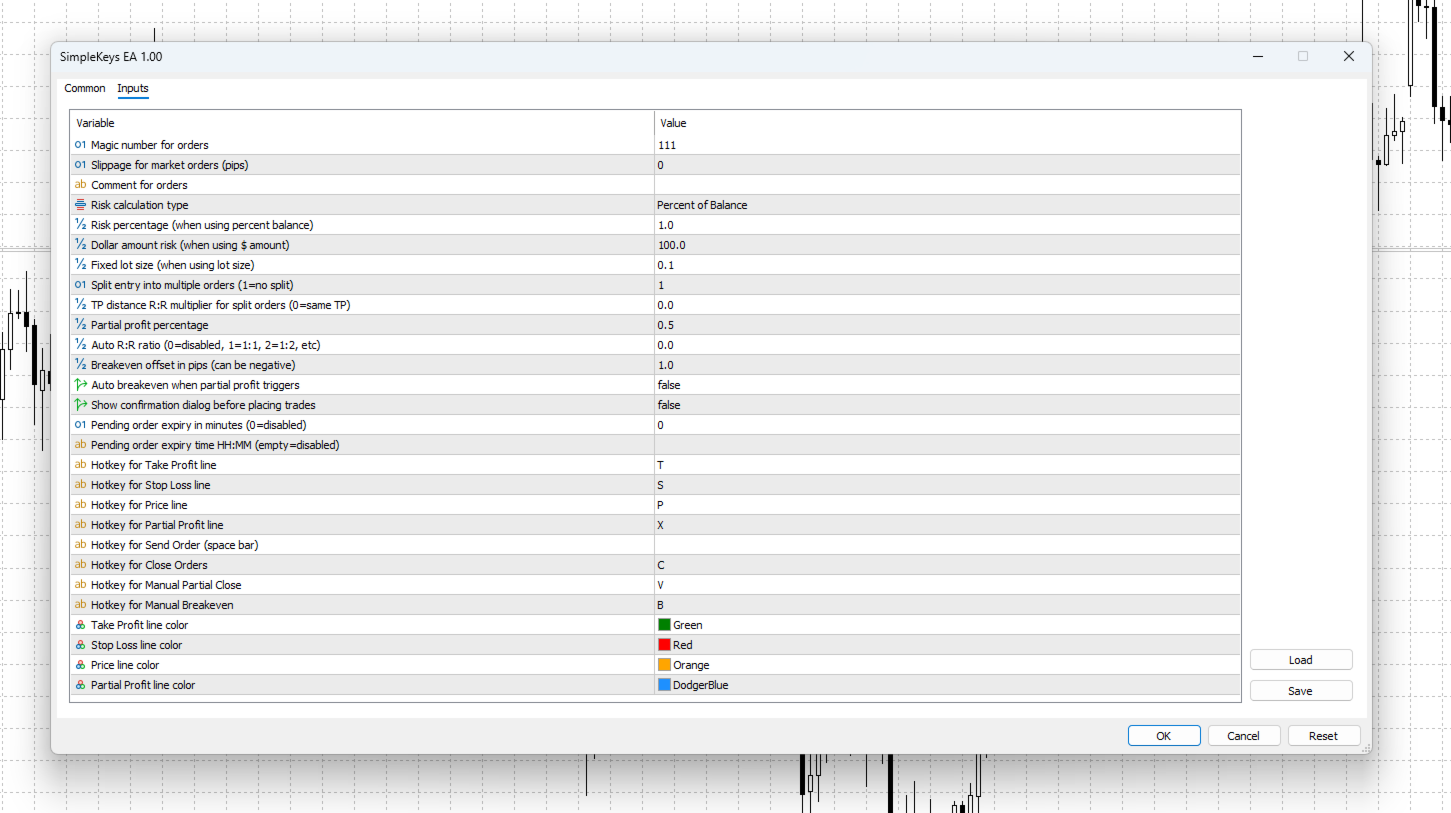
magic Magic number for order identification
slippage Maximum slippage for market orders (pips)
comment Comment attached to all orders
riskType RISK_PERCENT / RISK_DOLLAR / RISK_LOTSIZE
riskPercent Default risk percentage
dollarAmount Default dollar risk
lotSize Default fixed lot size
splitEntry Number of orders to split entry into (1 = no split)
splitTpDistance TP spacing multiplier for split orders (0 = same TP)
partialPercent Portion to close on partial profit trigger (0.5 = 50%)
autoRiskReward Auto-calculate TP from SL at this R:R (0 = disabled)
breakEvenOffset Pips above/below entry for breakeven (can be negative)
autoBreakevenAtPartial Move stop to BE when partial profit triggers
showTradeConfirmation Show order summary dialog before execution
showPartialConfirmation Show position summary before manual partial close
pendingExpiryMinutes Cancel pending orders after X minutes (0 = disabled)
pendingExpiryTime Cancel pending orders at HH:MM time (empty = disabled)

All hotkeys and line colours are customizable in the inputs.

Test on a demo account before using on live funds. Past performance of any trading tool does not guarantee future results.
Produtos recomendados
Slippage Auditor é uma ferramenta visual para a plataforma MetaTrader 5 que analisa a qualidade de execução das ordens e detecta problemas de slippage diretamente no gráfico. Slippage Auditor: User Guide Funcionalidade e características Slippage Auditor é uma ferramenta projetada para verificar a qualidade de execução de ordens fechadas no gráfico. Foi criada para traders e desenvolvedores que desejam monitorar valores de slippage e identificar problemas de execução. A ferramenta lê automaticame
EaInfoMaster
Dustin Ricardo Pierenz
EA Info Display Master Stop clicking through charts to find your EA configurations! Get a complete overview of all running Expert Advisors with their symbols and magic numbers in seconds. Managing multiple EAs across different symbols? Monitoring performance on FX Blue or other platforms? This tool instantly displays: All running EA names Their symbols and magic numbers Account details (number, broker, currency) Direct FX Blue statistics links (other provider will follow! Tell me what you need)
Quick Trade Panel Pro
Nicolas Olivier Menetrey
Painel de trading one-click com gestão automática de lote e risco Quick Trade Panel Pro é um painel de trading intuitivo projetado para traders que querem executar ordens rapidamente mantendo controle total sobre seu risco. Funcionalidades principais Cálculo automático do tamanho do lote baseado em uma porcentagem da sua margem disponível Stop Loss configurável em pontos, aplicado automaticamente a cada trade Tamanho do lote bloqueado durante uma série de trades para garantir tamanho de posição
Telegram Control Center (TCC) é um Expert Advisor utilitário para MetaTrader 5 que conecta sua conta de trading ao Telegram. Ele não abre nem gerencia negociações. Monitora sua conta, envia alertas em tempo real e permite controlar posições remotamente via comandos do Telegram. Funcionalidades principais - Monitoramento em tempo real de saldo, patrimônio, margem e todas as posições abertas - Alertas instantâneos no Telegram ao abrir, fechar ou modificar posições - Alertas de drawdown de patrim
FREE
TradingCoPilot
Viktor Mitrofanov
Trading Co-Pilot for MetaTrader 5 Advanced Position Management for Manual Traders Trading Co-Pilot is a professional trade management assistant designed for traders who open positions manually and want precise, automated control over risk and profit handling. It does not open trades. It manages them intelligently. You focus on entries. The Co-Pilot protects and optimizes the exit. How It Works Once you open a manual position, Trading Co-Pilot automatically: • Applies Stop Loss • Sets Take Profit
FREE
Smart Trade Manager Pro is the ultimate all-in-one trading panel designed to give you complete control over your manual trading. Built for both professional traders and prop-firm challenges (like FTMO), it brings TradingView-style visual planning directly into your MetaTrader 5 charts. KEY FEATURES: 1. Visual Chart Planning (TradingView Style) Plan your trades visually before execution! The EA draws interactive Profit/Loss boxes directly on the chart. Drag the edges of the boxes to seamlessly

The Expert Advisor performs closure of several positions. Positions are grouped by type. You can select the position of largest profit(losses). It is possible to form groups at random. Эксперт выполняет торговые операции группового закрытия позиций. Позиции группируются по типу. Можно выбрать один из трех параметров: filter Off. Buy only. Sell only. Можно отбирать позиции по величине прибыли(убыткам). filter Off. Wins only. Losses only. и/или задать порог по достигнутой прибыли(убыткам). Есть в

Script for deleting pending orders If you need to delete all pending orders you placed, this script will do it for you! Allow AutoTrading before running the script. Usage: Run the script on a chart. Input parameters: Language of messages displayed (EN, RU, DE, FR, ES) - language of messages displayed (English, Russian, German, French, Spanish). Use Magic: (0 - ignore Magic, else - only this Magic) - if set to zero, the magic number is not considered. Otherwise the script deletes only orders wit
Только сейчас вы можете приобрести  TradeOps Command Center с 10% скидкой всего за 630$. Акция действует до 01.04.2026 Для получение инструкции об использование утилиты обратитесь в личные сообщения! TradeOps Command Center — Профессиональный инструмент контроля риска и дисциплины в трейдинге TradeOps Command Center — это многофункциональная утилита для MetaTrader 5, разработанная для трейдеров, которые стремятся к системному и дисциплинированному подходу к торговле. Продукт объединяет в себе у
Níveis de breakeven: mova o SL com apenas 1 clique. Evite perder lucro existente Usando esta ferramenta, você pode proteger rapidamente seu lucro com apenas um clique. Especialmente importante para negociações de curto prazo. Opção de deslocamento também disponível. Utilitário multifuncional : 66+ recursos, incluindo esta ferramenta | Contate-me se tiver dúvidas | Versão MT4 Como mover os níveis SL: 1. Especifique um [Ativo] específico, ou selecione [TODOS] os ativos. 2. Selecione o tipo de neg
This tool will assist all those who trade the forex market manually. It will help them in a sense that it will calculate the required margin in order to initiate a trade. This calculator is so simple to use that a  that the user only inputs only 2 pieces of information. which are   Price   and   Lot size   the trader wishes to take. All other information needed to calculate the calculator will work it out by itself. It will run or calculate  on the current opened chart. As the name suggest it's
Click Trading
Jawad Tauheed
5 (2)
One Click Trading – Auto TP SL Developer TraderLinkz Version 1.00 Category Utility What it does Adds missing TP and SL to your manual trades and pending orders Sets them once per ticket Lets you move TP and SL afterward Works on hedging and netting accounts Scans on every tick and reacts on trade events Why you want it You place faster entries You get consistent risk and exit targets You reduce fat finger errors You keep full manual control Quick start Attach the EA to any chart Keep TP and SL e
FREE
VirtualStopsMT5
Viktor Shpakovskiy
A utility for managing open positions using virtual (invisible to the broker) stops. Virtual stop loss and virtual take profit can be freely moved around the chart. If the price touches the virtual stop line (TP, SL, TS), the EA will close all orders of the same direction on the current chart. Closing orders by virtual take profit is possible only if there is a profit. With the help of the built-in trading simulator, you can, in the strategy tester, see how the adviser works. Parameters Block
Risk Control Utility MT5 designed for manual trading. It helps to calculate and control your risks, transfer transactions to breakeven and accompany positions with trailing stop. Easy to set up and use. It can be used for calculating a trading lot, calculating stop loss and take profit levels. Works with currency pairs, CFDs, stocks, indices, futures, cryptocurrencies Displays   volume,   potential loss and profit before   placing an order Ability to set the expiration time of a pending order Tr
Partial
Pablo Filipe Soares De Almeida
Partial Close Manager – Ferramenta de Ajuste de Volume de Negociação Esta ferramenta permite ao usuário realizar fechamentos parciais em negociações abertas no MetaTrader 5. Funcionalidades Fechamento Parcial: Encerre parte das negociações abertas com uma única ação. Cálculo de Volume: Calcula automaticamente o volume a ser fechado, eliminando a necessidade de entrada manual. Suporte Multiordem: Aplica o fechamento parcial a todas as ordens abertas do mesmo símbolo simultaneamente. Tabela Móvel:
Executor Trader Panel (Sta) - Standard Version   is a multi-functional trading tool designed for traders. The trading panel integrates over 30 individual functions and more than 10 combined functions, providing traders with a highly flexible operational approach. Main Features of the Executor: Instant Connection Status:   Immediately know if the connection with the broker is lost. Time Synchronization:   Instantly know the current local time and the time of the trading server. Universal Compati
Algorithmic Trading Panel
Harifidy Razafindranaivo
A - Genesis: Redefining Trading Efficiency and Precision Genesis is a cutting-edge trading panel crafted to empower traders with unmatched precision and versatility. Featuring two graphical modes : the Main Window Graph offers a comprehensive view of the market's dynamics,  while the Sub Window Graph provides a focused analysis of specific indicators and patterns. This dual-mode visualization enables traders to switch seamlessly between a macro and micro perspective of the market, ensuring they
A simple script that closes all current orders. Terminate once close all positions, so no worries about constantly closing your order. How to use : Drag the script from the navigator to the chart, and it will be activated. Do remember to enable algo trading to use this script. There are different version of the script that can choose whether to close all buy/sell posiitons, if you need this, do contact me in MQL5.
Daily High Low Marker Analyzer MT5
AL MOOSAWI ABDULLAH JAFFER BAQER
Daily High Low Marker Analyzer – Master the Market's Extremes! Are you a serious trader who wants to track the daily high and low price levels with absolute precision? Do you need a powerful and reliable tool to analyze market structure, support & resistance, and price behavior? If so, the Daily High Low Marker Analyzer is the perfect tool for you! This cutting-edge MT5 utility helps you: Identify the highest and lowest price of the day in real time. Plot dynamic high & low price lines directly
Spread and Swap monitor
Gennadiy Stanilevych
5 (1)
O indicador tem o objetivo de determinar o tamanho do spread e swap, a distância para configurar ordens pendentes, stop loss permitido com o preço atual e o risco por 1 ponto na moeda de depósito. O indicador informa ao trader sobre possíveis despesas e os lucros adicionais relacionados com a transferência de uma posição para a próxima sessão de negociação do instrumento financeiro. Ele também informa sobre o tamanho do spread, a distância das ordens pendentes, stop loss e o trailing stop a part
One click to close all (OCCA) provides you posibility to close all open position with one click. Here is no any settings, just run the script and all your open positions will be closed and it will happen very fast ! Works with all types of accounts, with all currency pairs and any broker. The number of open positions is not limited. The script will be useful for trading strategies, in which you need to manage a large number of positions.
This EA is there to take your trade closing stress away. Quickly close as many trades as you have opened at the click of a button, INCLUDING PENDING ORDERS. This works on the MT5 platform whether it be currencies, Indices, stocks or Deriv synthetic indices. I have saved it under utilities as it is a utility, however, to install this, you have to save the file in you "EA" folder. That is; Go to "File", then "Open Data Folder", "MQL5" and then "Experts". Paste this file there. Restart MT5 and you'
Manual Trading Assistant Pro 【A Ferramenta Definitiva de "Sobrevivência" para Traders Manuais】 Você já se atrapalhou com cálculos de lote ou TP/SL durante movimentos rápidos do mercado? Este utilitário foi projetado para traders manuais que desejam focar 100% na "Entrada (Ataque)" e deixar a "Saída (Defesa)" para a máquina. 【Principais Recursos】 Diagnóstico de Configurações Integrado (Pips Check) Nunca mais tenha dúvidas sobre as configurações. O botão [Pips Check] verifica automaticamente se
CloseByLossOrProfit Expert Advisor closes all positions as their total profit or loss reaches a specified value (in deposit currency). In addition, it can delete pending orders. Allow AutoTrading before running the Expert Advisor. Usage: Run the Expert Advisor on a chart. Input Parameters:  Language of messages displayed (EN, RU, DE, FR, ES) - language of the output messages (English, Russian, German, French, Spanish); Profit in the currency  - profit in points; Loss in the currency  - loss in p
FREE
Orders Executor
Claudio Aguiar De Aragao
Apresentando       Orders Executor , seu companheiro de negociação poderoso e eficiente, projetado para executar ordens diretamente de um arquivo texto especificado pelo usuário. Esta ferramenta de negociação inovadora agiliza o seu processo de negociação, fornecendo uma solução conveniente e automatizada para executar negociações com precisão e velocidade. Características principais   : **Integração de arquivo de texto:** Orders Executor       foi projetado para ler e interpretar facilmente
Symbol Manager for MT5
Taras Slobodyanik
5 (3)
Symbol Manager or Grid Manager, designed to group orders into one position (by Symbol or by Magic Number). This utility will be useful to multi-currency traders (many EAs), who can have multiple orders on several pairs. You will be able to see the total number of lots, the total profit, and set virtual stop loss and virtual take profit. To set a real TP (or SL), you must first set the virtual value, and then enter the command in this cell: "set". If you want to set real TP/SL for all orders at
OCN Trade Manager Professional Trade Management for MetaTrader 5 Trading requires precision. A poorly placed Stop Loss, a missed Break Even, or incorrect Take Profit levels can quickly turn a well-planned trade into an avoidable mistake. OCN Trade Manager was designed to solve this problem. This utility helps you manage your trades automatically and with precision directly on MetaTrader 5. Once a trade is opened, the manager applies your predefined rules and helps you maintain a disciplined exec
Object Trader MT5 é um utilitário de negociação único que muda a abordagem para gerenciar ordens pendentes. Em vez de inserir preços manualmente, você simplesmente cria objetos gráficos no gráfico, e o utilitário coloca e atualiza automaticamente as ordens anexadas a esses objetos. Conceito de funcionamento O utilitário permite "anexar" ordens de negociação a três tipos de objetos gráficos: Retângulos — para colocar ordens emparelhadas (Buy Stop e Sell Stop) Linhas — para colocar ordens penden
SL TP Panel
Mikhail Ostashov
SL TP Panel — Visual Trading Panel for MT5 A convenient trading panel that lets you place pending orders by simply dragging lines on the chart. Stop Loss, Take Profit, order type, and lot size — everything is controlled with your mouse in seconds. Who is this for This panel is designed for manual traders who value speed of execution. Instead of opening the order window, filling in fields, and calculating levels — just drag a line to the desired price and click one button. Key Features Visua
This tool can help you close all open orders with one click, just click "Close all". If you only want to close profitable orders, click the "Close profitable" button. After clicking, all floating orders will be closed; If you only want to close the orders with floating losses, click the "Close losable" button. After clicking, all orders with floating losses will be closed. This tool has been tested for a year. The one-click position closing function is very complete, the position closing is time
Os compradores deste produto também adquirem
Trade Assistant MT5
Evgeniy Kravchenko
4.42 (208)
Ajuda a calcular o risco por comércio, a fácil instalação de uma nova encomenda, gestão de encomendas com funções de fecho parcial, trailing stop de 7 tipos e outras funções úteis. Materiais e instruções adicionais Instruções de instalação   -   Instruções para a aplicação   -   Versão de teste da aplicação para uma conta de demonstração Função de linha Mostra no gráfico a linha de Abertura, Stop Loss, Take Profit. Com esta função é fácil definir uma nova ordem e ver as suas características ad
Bem-vindo ao Trade Manager EA—uma ferramenta de gestão de risco criada para tornar o trading mais intuitivo, preciso e eficiente. Não é apenas uma ferramenta para executar ordens, mas uma solução abrangente para planejamento de operações, gerenciamento de posições e controle de risco. Seja você um iniciante, trader avançado ou scalper que precisa de execução rápida, o Trade Manager EA adapta-se às suas necessidades, oferecendo flexibilidade em todos os mercados, desde forex e índices até commodi
Local Trade Copier EA MT5
Juvenille Emperor Limited
4.96 (131)
Experimente uma cópia de negociação excepcionalmente rápida com o Local Trade Copier EA MT5 . Com sua fácil configuração de 1 minuto, este copiador de negociações permite que você copie negociações entre vários terminais MetaTrader no mesmo computador Windows ou em um Windows VPS com velocidades de cópia ultra rápidas de menos de 0.5 segundos. Seja você um trader iniciante ou profissional, o   Local Trade Copier EA MT5   oferece uma ampla gama de opções para personalizá-lo de acordo com suas ne
TradePanel MT5
Alfiya Fazylova
4.86 (148)
O Trade Panel é um assistente comercial multifuncional. A aplicação contém mais de 50 funções de negociação para negociação manual e permite automatizar a maioria das operações de negociação. Atenção, a aplicação não funciona no testador de estratégia. Antes de comprar, pode testar a versão de demonstração numa conta de demonstração. Versão de demonstração aqui . Instruções completas aqui . Comércio. Permite realizar operações de negociação com um clique: Abra as ordens e posições pendentes com
Versão Beta O Telegram to MT5 Signal Trader está quase no lançamento oficial da versão alfa. Alguns recursos ainda estão em desenvolvimento e você pode encontrar pequenos erros. Se tiver problemas, por favor reporte, seu feedback ajuda a melhorar o software para todos. Telegram to MT5 Signal Trader é uma ferramenta poderosa que copia automaticamente sinais de trading de canais ou grupos do Telegram diretamente para sua conta MetaTrader 5 . Suporta canais públicos e privados do Telegram, e você
VERIFIED TRADING RESULTS - Farmed Hedge Yield Axi Copy:  https://www.mql5.com/en/signals/2356376 - Farmed Hedge Yield Exn Copy:   https://www.mql5.com/en/signals/2356404 - Farmed Hedge Yield V Copy:  https://www.mql5.com/en/signals/2357156 Contact me via private message to receive the User Manual and Setup. * Thai Lauguage Support Available Farmed Hedge Yield Farming - Professional Pair Trading Dashboard (Manual - Hybrid - Semi/Automated EA) VERSION 3 - WILD HARVEST UPDATE Trading Approac
Trade Dashboard MT5
Fatemeh Ameri
4.94 (119)
Tired of complex order placement and manual calculations? Trade Dashboard is your solution. With its user-friendly interface, placing orders becomes effortless, by a single click, you can open trades, set stop loss and take profit levels, manage trade lot size, and calculate risk to reward ratios, allowing you to only focus on your strategy. Say goodbye to manual calculations and streamline your trading experience with Trade Dashboard. Download  Demo Version  right now. You can find  Details of
Copy Cat More Trade Copier MT5 (Gato Copiador MT5) é um copiador de negociações local e uma estrutura completa de gestão de riscos e execução projetada para os desafios comerciais de hoje. Desde desafios de prop firms até gestão de portfólio pessoal, ele se adapta a cada situação com uma combinação de execução robusta, proteção de capital, configuração flexível e manuseio avançado de negociações. O copiador funciona tanto no modo Master (remetente) quanto Slave (receptor), com sincronização em t
Smart Stop Manager – Execução automática de stop-loss com precisão profissional Visão geral O Smart Stop Manager é a camada de execução da linha Smart Stop, desenvolvido para traders que precisam de uma gestão de stop-loss estruturada, fiável e totalmente automatizada em múltiplas posições abertas. Ele monitora continuamente todas as operações ativas, calcula o nível ideal de stop usando a lógica de estrutura de mercado do Smart Stop e atualiza os stops automaticamente com regras claras e tran
Trade copier MT5
Alfiya Fazylova
4.63 (38)
Trade Copier é um utilitário profissional projetado para copiar e sincronizar negociações entre contas de negociação. A cópia ocorre da conta / terminal do fornecedor para a conta / terminal do destinatário, instalada no mesmo computador ou vps. Antes de comprar, você pode testar a versão demo em uma conta demo. Versão de demonstração aqui . Instruções completas aqui . Principais funcionalidades e benefícios: Suporta a cópia de MT5> MT5, MT4> MT5, MT5> MT4, incluindo contas "MT5 netting". Os mod
Telegram To MT5 Receiver
Levi Dane Benjamin
4.53 (15)
Copie os sinais de qualquer canal do qual você seja membro (incluindo privados e restritos) diretamente para o seu MT5.  Esta ferramenta foi projetada com o usuário em mente, oferecendo muitos recursos que você precisa para gerenciar e monitorar as negociações. Este produto é apresentado em uma interface gráfica fácil de usar e visualmente atraente. Personalize suas configurações e comece a usar o produto em minutos! Guia do usuário + Demo  | Versão MT4 | Versão Discord Se deseja experimentar
Trade Manager DashPlus
Henry Lyubomir Wallace
5 (13)
DashPlus é uma ferramenta avançada de gerenciamento de operações projetada para melhorar a eficiência e a eficácia das suas transações na plataforma MetaTrader 5. Ela oferece um conjunto completo de funcionalidades, incluindo cálculo de risco, gestão de ordens, sistemas de grade avançados, ferramentas baseadas em gráficos e análise de desempenho. Principais Funcionalidades 1. Grade de Recuperação Implementa um sistema de grade flexível e de média para gerenciar operações em condições adversas de
The News Filter MT5
Leolouiski Gan
4.74 (19)
Este produto filtra todos os consultores especializados e gráficos manuais durante o horário das notícias, para que você não precise se preocupar com picos de preços repentinos que possam destruir suas configurações de negociação manuais ou negociações realizadas por outros consultores especializados. Este produto também vem com um sistema de gerenciamento de pedidos completo que pode lidar com suas posições abertas e ordens pendentes antes do lançamento de qualquer notícia. Depois de comprar o
Exp COPYLOT CLIENT for MT5
Vladislav Andruschenko
3.82 (34)
Copiadora de comércio para MT5 é um  comércio   copiadora para a plataforma МetaТrader 5 . Ele copia negociações forex  entre   qualquer conta   MT5  - MT5, MT4  - MT5 para a versão COPYLOT MT5 (ou MT4  - MT4 MT5  - MT4 para a versão COPYLOT MT4) Copiadora confiável! Versão MT 4 Descrição completa +DEMO +PDF Como comprar Como instalar    Como obter arquivos de log    Como testar e otimizar    Todos os produtos da Expforex Você também pode copiar negociações no terminal МТ4 ( МТ4  - МТ4, МТ5  -
Seconds Chart MT5
Boris Sedov
4.59 (17)
Seconds Chart — uma ferramenta exclusiva para criar gráficos de segundos no MetaTrader 5 . Com o Seconds Chart , você pode criar gráficos com períodos definidos em segundos, proporcionando flexibilidade e precisão ideais para análise, indisponíveis em gráficos padrão de minutos ou horas. Por exemplo, o período S15 indica um gráfico com velas de 15 segundos. Você pode usar qualquer indicador ou Expert Advisor com suporte a símbolos personalizados. Trabalhar com eles é tão conveniente quanto negoc
HINN MagicEntry Extra
ALGOFLOW OÜ
4.71 (14)
HINN MAGIC ENTRY – the ultimate tool for entry and position management! Place orders by selecting a level directly on the chart! full description   ::  demo-version  :: 60-sec-video-description Key features: - Market, limit, and pending orders - Automatic lot size calculation - Automatic spread and commission accounting - Unlimited partitial take-profits  - Breakeven and trailing stop-loss and take-profit  functions - Invalidation leves - Intuitive, adaptive, and customizable interface - Works
Smart Stop Scanner – Sistema multiactivo de análise de stops baseado em estrutura de mercado Visão geral O Smart Stop Scanner oferece aos traders um monitoramento profissional de níveis de stop-loss em múltiplos mercados. O sistema identifica automaticamente as zonas de stop mais relevantes com base na estrutura real do mercado, rupturas significativas e lógica de price action — tudo apresentado em um painel unificado, claro e totalmente compatível com telas de alta resolução (DPI-aware). Func
Ultimate Extractor
Clifton Creath
5 (9)
Ultimate Extractor - Professional Trading Analytics for MT5 *****this is the local HTML version of Ultimate Extractor. Check out Ultimate Extractor Cloud on mql5 for the Cloud version****** Ultimate Extractor transforms your MetaTrader 5 trading history into actionable insights with comprehensive analytics, interactive charts, and real-time performance tracking. What It Does Automatically analyzes your MT5 trading history across all Expert Advisors and generates detailed HTML reports with inte
Timeless Charts
Samuel Manoel De Souza
5 (3)
Timeless Charts é uma solução avançada de gráficos desenvolvida para traders profissionais que buscam controle total sobre a construção e visualização de gráficos, além das limitações do sistema de gráficos nativo do MetaTrader 5. Diferente dos gráficos offline tradicionais ou indicadores personalizados simplistas, esta solução constrói barras totalmente personalizadas com precisão real de carimbo de tempo , até milissegundos, proporcionando uma experiência de trading poderosa e precisa. Este a
Telegram to MT5 Coppy
Sergey Batudayev
5 (8)
Telegram para MT5:   A solução definitiva para cópia de sinais Simplifique suas negociações com o Telegram para MT5, a ferramenta moderna que copia sinais de negociação diretamente dos canais e chats do Telegram para a sua plataforma MetaTrader 5, sem a necessidade de DLLs. Esta solução poderosa garante execução precisa dos sinais, amplas opções de personalização, economiza tempo e aumenta sua eficiência. [ Instructions and DEMO ] Principais características Integração direta da API do Telegram A
Risk Manager for MT5
Sergey Batudayev
4.35 (17)
O Expert Advisor Risk Manager para MT5 é um programa muito importante e, na minha opinião, necessário para todos os traders. Com este Expert Advisor você poderá controlar o risco em sua conta de negociação. O controle de risco e lucro pode ser realizado tanto em termos monetários quanto em termos percentuais. Para que o Expert Advisor funcione, basta anexá-lo ao gráfico de pares de moedas e definir os valores de risco aceitáveis ​​na moeda de depósito ou em % do saldo atual. [Instruction for
Equity Protect Pro: Seu Especialista em Proteção de Contas Abrangente para Negociação Tranquila Se você está procurando recursos como proteção de conta, proteção de patrimônio, proteção de portfólio, proteção de múltiplas estratégias, proteção de lucro, coleta de lucro, segurança de negociação, programas de controle de risco, controle automático de risco, liquidação automática, liquidação condicional, liquidação programada, liquidação dinâmica, trailing stop loss, fechamento com um clique, liqu
The product will copy all telegram signal to MT5 ( which you are member) , also it can work as remote copier.  Easy to set up, copy order instant, can work with almost signal formats, image signal,  s upport to translate other language to English Work with all type of channel or group, even channel have "Restrict Saving Content", work with  multi channel, multi MT5 Work as remote copier: with signal have ticket number, it will copy exactly via ticket number. Support to backtest signal. How to s
Guia de instalação:    Clique aqui! Analise vários consultores especialistas em conjunto. Comparar resultados de EA por número mágico Acompanhe a rentabilidade e os períodos de retração. Filtrar resultados por intervalo de datas Curva de Equidade Visual e Métricas Detalhadas Pronto para usar em menos de um minuto Analisador de Portfólio EA O EA Portfolio Analyzer é uma   ferramenta de análise profissional   projetada para monitorar o   desempenho em tempo real de múltiplos Expert Advisors   de
Unlimited Trade Copier Pro MT5 is a tool to copy trade remotely to multiple MT4, MT5 and cTrader accounts at different computers/locations over internet. This is an ideal solution for you if you are a signal provider and want to copy your trades to other receivers globally on your own rules. One provider can copy trades to multiple receivers and one receiver can get trade from multiple providers as well. The provider can even set the subscription expiry for each receiver, so that receiver will n
Painel de negociação para negociação em 1 clique. Trabalhando com posições e pedidos! Negociar a partir do gráfico ou do teclado. Com nosso painel de negociação, você pode executar negociações com um único clique diretamente no gráfico e realizar operações de negociação 30 vezes mais rápido do que com o controle MetaTrader padrão. Cálculos automáticos de parâmetros e funções tornam a negociação mais rápida e conveniente para os traders. Dicas gráficas, rótulos informativos e informações completa
MT5 to Telegram Signal Provider é uma utilidade fácil de usar e totalmente personalizável que permite o envio de sinais especificados para o chat, canal ou grupo do Telegram, tornando sua conta um fornecedor de sinais . Ao contrário da maioria dos produtos concorrentes, ele não usa importações de DLL. [ Demonstração ] [ Manual ] [ Versão MT4 ] [ Versão Discord ] [ Canal do Telegram ]  New: [ Telegram To MT5 ] Configuração Um guia do usuário passo a passo está disponível. Não é necessário conhec
Trade Manager DaneTrades
Levi Dane Benjamin
4.36 (28)
Trade Manager para ajudá-lo a entrar e sair rapidamente de negociações enquanto calcula automaticamente seu risco. Incluindo recursos para ajudar a evitar negociações excessivas, negociações de vingança e negociações emocionais. As negociações podem ser gerenciadas automaticamente e as métricas de desempenho da conta podem ser visualizadas em um gráfico. Esses recursos tornam este painel ideal para todos os traders manuais e ajudam a aprimorar a plataforma MetaTrader 5. Suporte multilíngue. Vers
Entry In The Zone with SMC Multi Timeframe is a real-time market analysis tool developed based on Smart Money Concepts (SMC). It is designed to analyze market structure, price direction, reversal points, and key zones across multiple timeframes in a systematic way. The system displays Points of Interest (POI) and real-time No Repaint signals, with instant alerts when price reaches key zones or when signals occur within those zones. It functions as both an Indicator and a Signal System (2-in-1),
Trade Assistant 38 in 1
Makarii Gubaydullin
4.91 (23)
Ferramenta Multifuncional: Calculadora de Lote, Ordens Grid, Proporção R/R, Gerenciador de Negociações, Zonas de Oferta e Demanda, Price Action e muito mais Versão Demo   |   Manual do Usuário O Assistente de Trading   não funciona no testador de estratégias : você pode baixar a   Versão Demo AQUI  para testar a utilidade . Entre em contato   para qualquer dúvida  / ideias de melhoria / caso encontre um erro Se precisar de uma versão MT4, ela está disponível aqui Simplifique, acelere e automati
Filtro:
Sem comentários
Responder ao comentário