TradeDeskEA

TradeDesk EA — Semi-Automatic Trading and Account Discipline Panel for MT5

English Description

Faster execution with rules that remain in force

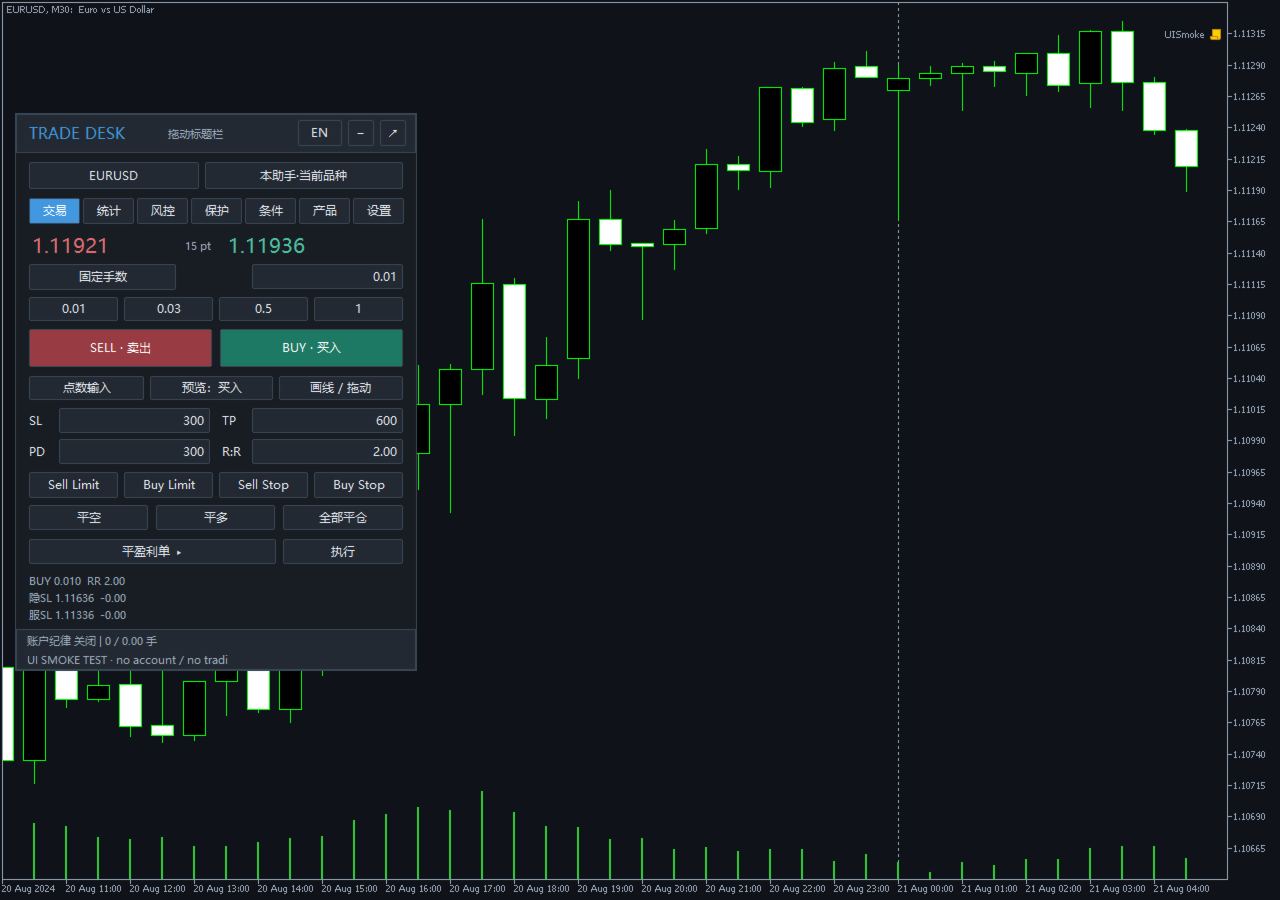
TradeDesk EA is a bilingual semi-automatic trading assistant for MetaTrader 5. It combines order execution, position sizing, trade management, conditional tasks, account statistics, and optional discipline controls in one compact panel. It can be used with Forex, metals, indices, energy products, stocks, and other CFD instruments made available by the connected broker.

TradeDesk EA does not generate trading signals or choose the market direction for you. It turns your own trading plan into clear operating rules: calculate exposure before entry, manage positions after execution, and stop additional account risk when a predefined discipline limit is reached.

Main Features

Fast Execution and Order Management

One-click market Buy and Sell execution.
Buy Limit, Sell Limit, Buy Stop, and Sell Stop orders.
Fixed lot, fixed cash risk, and equity percentage risk sizing.
Entry, Stop Loss, and Take Profit by price, point distance, or draggable chart lines.
Real-time estimates for volume, potential loss, target profit, risk/reward, and margin requirement.
Quick actions for closing Buy, Sell, all, profitable, losing, latest, or partial positions, plus reverse and double reverse operations.
Custom Magic ID, order comment, and four configurable quick-lot buttons.

Position Protection and Automated Management

Break-even management triggered by points or R-multiple, with an optional offset.
Fixed-distance, ATR-based, and closed-candle trailing stops.
TP1, TP2, and TP3 targets with independent partial-close percentages.
Hidden Stop Loss and Take Profit with an optional wider server-side backup stop.
Quick removal of position or pending-order protection levels.
Cash-profit targets, price-line alerts, line-based entries, and scheduled open, close, or cancel tasks.
Breakout and pullback OCO workflows; when one side is filled, the opposite side is cancelled.

Account, Position, and Trading Statistics

Balance, equity, floating P/L, used and free margin, margin level, and account leverage.
Position volume, weighted average price, and floating result grouped by symbol and direction.
Today, week, month, and custom server-date history with CSV export.
Automatic access to all instruments supplied by the connected broker, searchable by symbol, description, or category.
Contract size, minimum/maximum/step volume, trade status, margin data, long and short swaps, triple-swap day, and trading sessions. Data not supplied by the broker is clearly marked as unavailable.
Four management scopes: this assistant on the current symbol, all trades on the current symbol, a selected Magic ID across symbols, or the entire account.

Core Feature: Account Discipline Control — A Practical Brake on Overtrading

Many trading losses are caused by behavior rather than analysis: revenge trading after a loss, increasing size under pressure, entering too frequently, splitting a large order into smaller ones to bypass a rule, or changing limits during an emotional session.

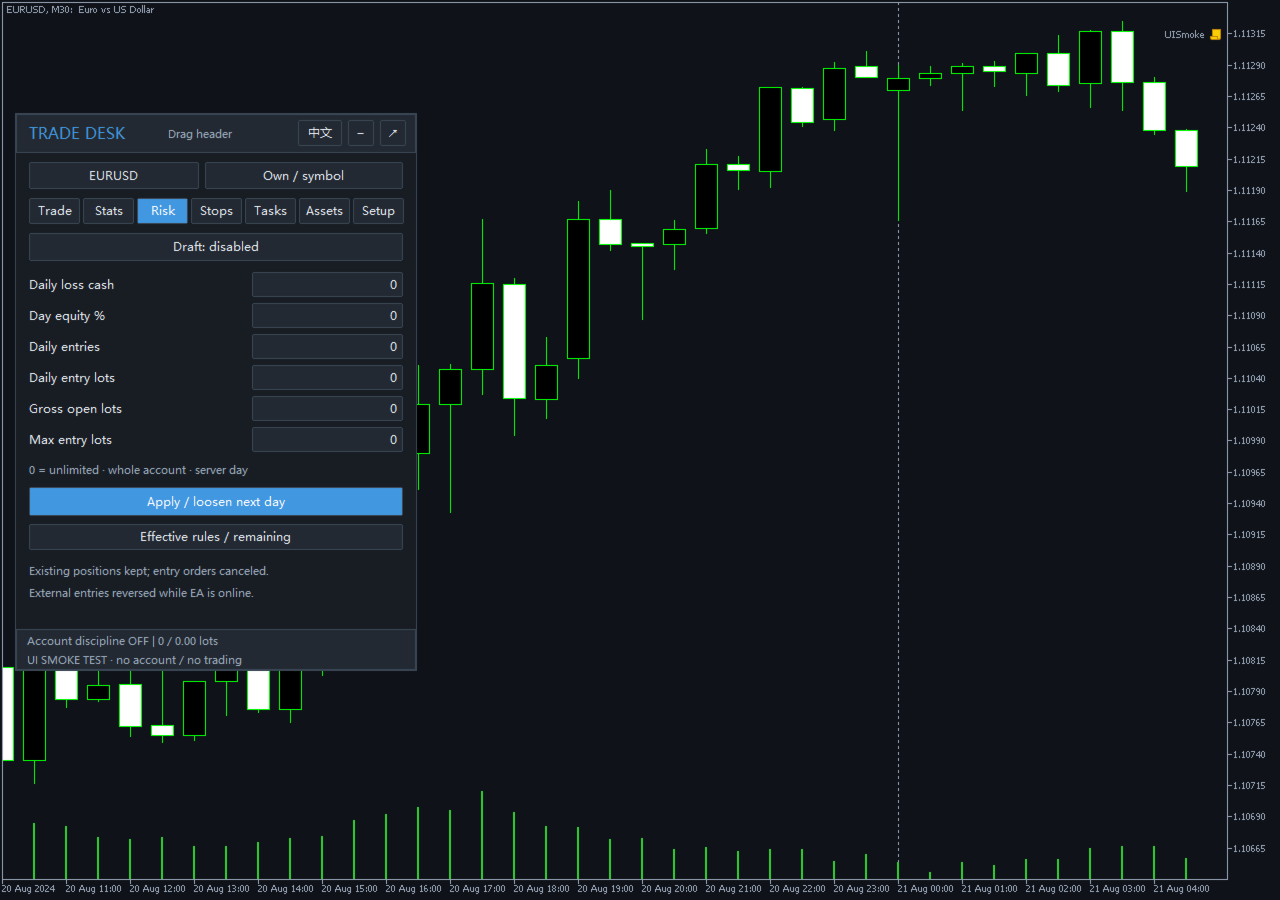
TradeDesk EA includes an optional discipline system that is disabled by default and activated by the trader. Once enabled, it monitors the entire account across all symbols using the broker's server time. The following limits can be configured independently:

Maximum daily equity loss in cash** — blocks additional risk after the daily loss reaches the selected amount.
Maximum daily equity loss in percent** — uses start-of-day equity as the reference for the daily percentage limit.
Maximum daily entry count** — limits the number of successful new entries and helps reduce impulsive re-entry.
Maximum cumulative daily entry volume** — adds all entry volume for the day, so splitting one large trade into several smaller orders does not bypass the rule.
Maximum current gross account volume** — adds long and short volume by absolute lots to limit total account exposure.
Maximum volume per entry** — prevents an oversized individual order or a sudden increase in size after a loss.

Pending orders reserve entry-count and volume capacity in advance. If any enabled limit is reached, or an entry is attempted in violation of a limit, the account enters a discipline lock until 00:00 on the next broker-server day.

While locked:

New entries and position increases from the panel are blocked.
Account-wide entry pending orders are cancelled.
If a manual trade, another chart, or another EA adds exposure, TradeDesk attempts to close only the newly added volume as soon as it is detected.
Existing positions are not force-closed. Their existing Stop Loss, Take Profit, break-even, trailing-stop, and partial-profit rules continue to operate.
Closing and reducing positions remain available, allowing risk to be lowered at any time.

To prevent emotional rule changes, tighter limits take effect immediately, while relaxed limits or disabling the discipline system take effect on the next server day. A lock is not cleared early by an equity recovery, a position reduction, or an MT5 restart.

Software cannot remove emotion, but it can enforce a boundary chosen while the trader is calm: stop after the planned loss, stop after the permitted number of entries, and stop when account exposure reaches its limit. This creates a mandatory cooling-off period and helps reduce revenge trading, overtrading, and uncontrolled position sizing.

Designed for Different Trading Styles

TradeDesk EA is suitable for manual and semi-automatic traders, including day traders, swing traders, breakout traders, and multi-instrument CFD traders. Its compact panel sits in the upper-left chart area while leaving space for MT5 controls. The interface supports English and Chinese, can be moved, scaled, or collapsed, and uses coordinated dark or light colors based on the chart background.

Important Information

TradeDesk EA is an execution and discipline tool, not an automated profit system, and it does not guarantee results. A daily loss limit is a trigger that stops additional risk; existing positions can continue to gain or lose. An external entry must be filled before the terminal can detect it and attempt to close the added volume, so spreads, commissions, slippage, and temporary market exposure may occur.

Hidden protection, trailing stops, OCO logic, line tasks, and account discipline controls require the MT5 terminal to remain running and connected, algorithmic trading permission to be enabled, and the broker to accept trade requests. Test the EA on a demo account first to confirm the broker's symbol suffixes, execution rules, minimum stop distance, netting or hedging mode, and cost calculations.
Produtos recomendados
Global Stop Loss and Take Profit Manager Drag Lines Auto Apply Already using my free Global Stop Loss and Take Profit Setter? This is the always on version. Instead of setting levels once, you drag two lines on the chart and every manual position on that symbol — plus every new one you open — instantly inherits the Stop Loss and Take Profit. No clicking into each order. No forgetting a stop. Global Stop Loss and Target Manager is a drag-and-drop risk tool for manual traders on MetaTrader 5. Pu
Grid Manager — Assistente Manual de Grid Multi-Cesta para MT5 O Grid Manager é um painel de controle para montar e gerenciar "cestas" de grid direto no gráfico. Você decide a direção e o momento; a ferramenta abre o grid, gerencia cada perna e protege a posição com controles de risco em dólar, linhas de breakeven/SL/TP no gráfico e ações de um clique. É um assistente de execução e gestão — rápido, visual e totalmente sob o seu comando. O que é — e o que não é O Grid Manager é um assistente manua
Pare de permitir que as corretoras cacem o seu Stop Loss! Você está cansado de ver o preço atingir o seu Stop Loss exatamente na ponta da sombra e, em seguida, reverter imediatamente a seu favor? Isso geralmente é causado pelo ruído do mercado ou pela chamada "Caça aos Stops" (Stop Hunting). TrailGuardian é um gerenciador de operações profissional "Stealth" (invisível) projetado para proteger seus lucros sem revelar seus níveis de saída ao mercado. Ele cria uma linha de stop-loss virtual inte
BulkOp Trade Manager
Ahmed Jumaa Saif Ali Almheiri
BulkOp Trade Manager Trade faster. Manage smarter. Close with confidence. BulkOp Trade Manager is a powerful MT5 utility EA built for traders who need speed, control, and clean execution directly from the chart. It is designed for active manual traders, scalpers, gold traders, and anyone who wants to manage multiple positions with less delay and fewer clicks. Why BulkOp? Ultra-fast Buy and Sell execution One-click Bulk Close Profit One-click Bulk Close Loss Keyboard trading control Bulk order e
This tool can help you close all open orders with one click, just click "Close all". If you only want to close profitable orders, click the "Close profitable" button. After clicking, all floating orders will be closed; If you only want to close the orders with floating losses, click the "Close losable" button. After clicking, all orders with floating losses will be closed. This tool has been tested for a year. The one-click position closing function is very complete, the position closing is time
This utility sends notification to trader’s MT5 (for MT4 version, checkout this link ) mobile app, to remind traders about their open positions. Super useful for part time traders to keep track and not forget any positions. To turn on notification, please visit   this link   (https://www.metatrader4.com/en/trading-platform/help/setup/settings_notifications) Features Keep track on open orders (pending orders, running orders) Customize time to send notification Customize notification interval (se
Every panel tells you how much you're risking. This one tells you how much you have left. You didn't lose the challenge because your strategy failed. You lost it because one more trade pushed you past the daily limit while you were chasing the target. PropDesk is the desk that helps stop that from happening. 1. Size against your ROOM, not your equity. Every order shows "risk $X = Y% of your daily room left". You always know if the next trade fits inside what the firm allows today - before you
Guardian Magic GT
Carlos Eduardo Rivas Istacuy
Guardian Magic GT - Risk Management Expert Advisor for MetaTrader 5 PROTECT YOUR TRADING CAPITAL WITH INTELLIGENT RISK MANAGEMENT Guardian Magic GT is a professional-grade Expert Advisor designed to safeguard your trading operations by implementing sophisticated risk control mechanisms. Whether you run a single bot or manage multiple automated trading systems simultaneously, Guardian Magic GT provides real-time monitoring and automatic position management to ensure your account stays within your
Este EA é usado principalmente para scalping de XAUUSD. Propósito   Remove a emoção da gestão de operações — protege automaticamente posições e realiza lucros para que você não precise tomar decisões difíceis sob pressão. O que faz   ️ Stop Loss automático   Define SL com base em máximos/mínimos recentes + buffer   Nada mais de estresse ao posicionar manualmente   Lucros parciais automáticos   Dois modos:   Movimento fixo: Fecha 50% após X de movimento de preço   R-Relação: Fecha 50% no
Position Prime
Mariana Cordeiro Neves Fernandes
Baixe a versão Demo gratuita agora mesmo e teste toda a gestão de risco dentro do seu Testador de Estratégias antes de comprar! O Position Prime é um assistente de execução visual e um gerenciador de risco de nível institucional para o MetaTrader 5. Desenvolvido para traders que exigem agilidade e precisão, ele elimina a necessidade de cálculos manuais de lote e transforma o seu gráfico em uma verdadeira mesa de operações. Planeje, execute e proteja os seus trades em frações de segundo. ️ G
EA Hedger MT5
Sergej Chukhista
3 (2)
Have you bought a trading advisor, subscribed to a signal, or are you trading manually ?! Don't forget about risk management. EA Hedger   is a professional trading utility with many settings that allows you to manage risks using hedging. Hedging is a trading technique that involves opening opposite positions to those already open positions. With the help of hedging, the position can be completely or partially blocked (locked). For example, you have three open positions on your account: EURUSD b
AW Metatrader to Telegram MT5
AW Trading Software Limited
5 (1)
Um sistema automatizado para enviar notificações para que nenhum de seus assinantes perca seus eventos de negociação do seu terminal de negociação. Um utilitário que envia notificações ao mensageiro do Telegram sobre quaisquer operações de negociação em sua conta. Instruções passo a passo para conectar o utilitário a um canal no Telegram ->   AQUI   / MT4 ->   AQUI Vantagens: Fácil configuração e instruções detalhadas, Possibilidade de enviar screenshots ajustáveis, Texto de notificação persona
Hisoka Trade Panel — v6.91 Description: Hisoka Trade Panel is a comprehensive on-chart trade management Expert Advisor for MetaTrader 5. It places a draggable, collapsible panel directly on your chart and lets you manage open positions — break-even locks, trailing stops, partial closes, and SL/TP modification — with one click. All risk math is dollar-based, so the same "BE 5$" button locks $5 of profit consistently across XAUUSD, BTCUSD, EURUSD or any other instrument, regardless of contract siz
Auto Stop Loss MT5
Nabil Oukhouma
5 (1)
O Gerenciador de Risco "Configure e Esqueça" para Trading Multiativos ️ Nunca deixe uma operação desprotegida. Auto Stop Loss (MT5 Manager) é a ferramenta de background definitiva para traders que priorizam a segurança. Diferente de painéis comuns, esta ferramenta trabalha incansavelmente nos bastidores para proteger instantaneamente cada trade que você abre. Seja operando manualmente ou via outro Robô (EA), este gerenciador garante que cada posição tenha Stop Loss, Take Profit e Trailing Stop
Instructions for Using Reverse Copier EA Attach EA to Charts Open MetaTrader and attach the EA to any chart on both accounts (master & slave). Make sure AutoTrading is enabled. Master Account (Signal Sender) Set Mode = Master in EA settings. This account will send trade signals. Slave Account (Signal Receiver) Set Mode = Slave in EA settings. This account will receive trades in reverse (opposite direction). Lot Multiplier In Slave EA settings, set Multiplier to control lot size. Example: 1.0
RealCost Auditor MT5 is an execution-cost monitor for MetaTrader 5. It does not open, close, or modify trades. It watches the chart symbol, samples live spread, records executed deals, estimates signed slippage when the terminal exposes the requested price, and saves a local CSV audit file. Many backtests use spread, slippage, commission, and swap assumptions that are cleaner than real trading conditions. This utility gives you broker and account data from your own terminal before you trust a s
MQT AutoClose Expert MT5
Josue Fernando Servellon Fuentes
MQT AutoClose Expert closes your orders automatically once they reach the profit target you set — in real pips (with a separate target for gold) or in account money. Open your trades as you always do; the EA watches every position on every symbol and locks the profit in for you. It never opens trades. How it works (logic summary): Every tick and every 500 ms it scans all open market orders. Pending orders are never touched. Pips mode: profit distance is computed from prices — Bid for buys, Ask f
Superior MT5 To Telegram Signals Notifier OVERVIEW Superior MT5 To Telegram Signals Notifier is a smart bridge tool for MetaTrader 5 that instantly sends your trading activity directly to your Telegram phone app, channels, or group chats. It tracks your account in real time and broadcasts trade openings, closures, modifications, pending orders, and clear chart screenshots automatically using a simple Telegram Bot. Whether you run a VIP signal channel and want to share trades automatically wit
Telegram Services
Ramesh Maharjan
5 (1)
O Telegram Services é uma aplicação de negociação que permite a comunicação entre este EA e o seu canal Telegram. Esta aplicação gera relatórios, alerta-o quando as negociações são abertas, fechadas e modificadas, abre novas negociações, fecha as negociações em aberto, modifica as negociações existentes, lista o histórico de negociações, obtém capturas de ecrã de gráficos, obtém valores de stop loss e take profit para serem utilizados, exibe as condições atuais do mercado, obtém notícias do mer
T Manager for Price action Traders
Haidar Lionel Haj Ali
4.5 (10)
T Manager, the ultimate trade management solution designed by traders for traders. If you are searching for a simple and efficient trade panel, trade manager, or trade assistant, you are at the right place.   The market contains a diverse number of those tools , but this one is designed by traders for traders . I designed this tool, and I am using it daily. Take my advice and stop buying tools blended with un-useful features that you will never use,   T Manager provides you with the essential y
SC Copier Starter
Nino Rosano Calabro'
SC-Copier Starter is the operational component of the SC-Copier system: it receives trading operations from the Master and replicates them on the Slave account. It is installed on a second MetaTrader 5 client running on the same computer or VPS as the Master account. Communication takes place locally between the two terminals, without web services, DLLs, or external infrastructure. The Receiver handles position openings, complete and partial closings, and Stop Loss or Take Profit modifications.

AutoCloseTimer allows you to close positions and delete pending orders at a specified time. Usage Download and drag and drop AutoCloseTimer onto the chart. Check Allow AutoTrading in Common tab. Set parameters in Inputs tab. Notice: The close time must be later than the current market time. Input Parameters CloseSymbol - there are 2 options SymBol Of Chart - just close the symbol of the current chart All Symbols - close all symbols CloseTimerDay - specify a day for AutoCloseTimer. The default
BerelzBridge
Barend Willem Van Den Berg
BerelzBridge Pro Ponte de dados MT5-para-JSON para todos os períodos com informação da conta. Visão Geral BerelzBridge Pro é um indicador MT5 que exporta dados de mercado em tempo real para um ficheiro JSON no disco. Escreve preços de compra e venda, spread, volume tick, estatísticas diárias, informação da conta e barras OHLCV para todos os 9 períodos. O ficheiro é atualizado num intervalo configurável com um padrão de 2 segundos. O indicador funciona juntamente com Expert Advisors no mesmo grá
One Click Trader  is a tool designed for MetaTrader 4 platform, which enables you to take your trading to the next level. It enables you to open, manage and close your trades in simple an efficient way by just one click of your mouse button. "-"   ,  "+"  change OCT window size  Up arrow minimizes the OCT panel Down arrow maximizes the OCT panel Right arrow displays the next panel with additional features Left arrow hides the panel with additional features Red  SELL  button enables you to open s
MA Flow No.2 See the Flow of Bulls & Bears at a Glance, and Keep the Rhythm of the Market in Your Hands Tired of staring at dozens of moving averages until your eyes blur? Unsure when to enter, or where to place your stop? MA Flow No.2 upgrades the humble moving average into a complete trend-trading system. No more scattered lines on your chart — instead, a living "river of bulls and bears". Up to 100 moving averages roll together in real time. On every single bar, you can see at a glance w
Black Volume By ZeeAM Khan a Multi-Engine EA Professional Multi-Timeframe Volume & Breakout Trading System Black Volume Multi-Engine EA is an advanced automated trading system that combines volume analysis, spread analysis, liquidity sweeps, support/resistance breakouts, and multi-basket trade management into one powerful Expert Advisor. The EA continuously scans higher-timeframe candles to identify significant market activity, automatically draws key support and resistance zones, and executes
FREE
VegaXLR Manual Backtest Helper
Anderson Luiz Toledo Dos Santos
VegaXLR Manual Backtest Helper para MetaTrader 5 é um assistente visual de backtesting desenvolvido para traders que desejam testar, revisar e organizar estratégias discricionárias diretamente no gráfico do MT5. Em vez de usar planilhas ou anotar resultados manualmente, você pode desenhar operações no histórico do preço, simular entradas e saídas, calcular métricas de desempenho e inspecionar cada operação em um painel limpo no próprio gráfico. A ferramenta ajuda a tornar seu processo de backtes
StopLoss and TakeProfit Utility MT5 for automatic setting of stop loss and take profit levels. Created by a professional trader for traders.   The utility   works with any market orders opened by a trader manually or using advisors. Can filter trades by magic number. The utility can work with any number of orders simultaneously. WHAT THE UTILITY CAN DO: Set virtual stop loss and take profit from 1 pip Real   stop loss and take profit W ork with each order separately (   stop loss and take prof
EA Risk Inspector is a professional MetaTrader 5 dashboard for reviewing the live risk created by Expert Advisors and open positions. It groups exposure by Magic Number and strategy context, highlights missing protection and presents account-level concentration in a transparent operational view. MAIN FEATURES • Position and EA grouping by Magic Number • Stop Loss validity and uncovered-exposure checks • Strategy-level risk and position summaries • Symbol and directional concentration analysis •
Product Title AP Manager – Auto SL, TP, Break Even & Trailing Stop for MT5 Product Description Take full control of your risk management with AP Manager , a powerful and flexible tool designed to automatically manage Stop Loss, Take Profit, Break Even, and Trailing Stop for all your trades. This utility is perfect for traders who want to protect profits, minimize losses, and trade with discipline — without constantly monitoring the charts. Key Features Automatic Stop Loss & Take Pr
Os compradores deste produto também adquirem
Trade Assistant MT5
Evgeniy Kravchenko
4.43 (216)
Ajuda a calcular o risco por comércio, a fácil instalação de uma nova encomenda, gestão de encomendas com funções de fecho parcial, trailing stop de 7 tipos e outras funções úteis. Materiais e instruções adicionais Instruções de instalação   -   Instruções para a aplicação   -   Versão de teste da aplicação para uma conta de demonstração Função de linha Mostra no gráfico a linha de Abertura, Stop Loss, Take Profit. Com esta função é fácil definir uma nova ordem e ver as suas características ad
Bem-vindo ao Trade Manager EA—uma ferramenta de gestão de risco criada para tornar o trading mais intuitivo, preciso e eficiente. Não é apenas uma ferramenta para executar ordens, mas uma solução abrangente para planejamento de operações, gerenciamento de posições e controle de risco. Seja você um iniciante, trader avançado ou scalper que precisa de execução rápida, o Trade Manager EA adapta-se às suas necessidades, oferecendo flexibilidade em todos os mercados, desde forex e índices até commodi
================================================================================ POC BREAKOUT - V20.72. Full Professional Grade Toolkit ================================================================================ POC Breakout is a full MetaTrader 5 trading dashboard for discretionary traders who want breakout signals, Point of Control (POC) context, volume profiles, order flow, market structure, news, alerts, and advanced trade planning in one professional workspace. Attached directly to you
Local Trade Copier EA MT5
Juvenille Emperor Limited
4.94 (149)
Local Trade Copier EA MT5 é um copiador de operações rápido e flexível para copiar e gerenciar operações entre várias contas MetaTrader 5 no mesmo computador Windows ou Windows VPS. Ele combina a sincronização local de operações com controles no lado do Receiver para tamanho de lote, gerenciamento de risco, filtragem de operações, mapeamento de símbolos, gerenciamento de operações e proteção da conta. Configure seus terminais Transmitter e Receiver em aproximadamente 1 minuto e copie operações
TradePanel MT5
Alfiya Fazylova
4.88 (168)
Trade Panel é um assistente de negociação multifuncional. O aplicativo contém mais de 50 funções de negociação para trading manual e permite automatizar a maioria das tarefas de negociação. Instruções para o aplicativo + vídeo-instruções: https://www.mql5.com/pt/blogs/post/772421 Versão de teste do aplicativo para conta demo: https://www.mql5.com/pt/blogs/post/762547 Como instalar o aplicativo: https://www.mql5.com/pt/blogs/post/762548 Como testar o aplicativo no modo visual: https://www.mql5.co
Copie sinais do Telegram com suas próprias regras de negociação Telegram to MT5 Signal Trader copia automaticamente sinais de negociação em texto de canais e grupos públicos e privados do Telegram para o MetaTrader 5. Gerencie vários provedores e contas MT5 em um único aplicativo para desktop, com configurações individuais de risco e de negociação para cada provedor . Você não precisa de um bot do Telegram nem configurar uma API para copiar sinais. Basta entrar com sua própria conta do Telegram
Strategy Ledger Pro
Abdullah Uygar Tuna
5 (2)
Strategy Ledger Pro é um painel de análise de conta apenas de leitura para o MetaTrader 5. Separa os resultados da conta por Expert Advisor, estratégia, símbolo e número mágico. Manual  detalhado com cada função explicada. O MetaTrader mostra um único saldo para toda a conta. Quando vários Expert Advisors operam em conjunto, esse saldo não mostra o que cada um contribuiu. O Strategy Ledger Pro lê o histórico da conta, reconstrói as posições fechadas, atribui-as a estratégias e apresenta os res
O Telegram to MT5 Multi-Channel Copier copia automaticamente os sinais de trading dos seus canais de Telegram diretamente para o MetaTrader 5. Sem bots, sem extensões de navegador, sem copiar à mão. O sinal chega ao Telegram e o EA abre a operação no seu terminal em poucos segundos. E antes de copiar um canal, o backtester integrado mostra o que esse canal teria feito na sua conta. O produto inclui dois componentes: um aplicativo de Windows que escuta os seus canais de Telegram, e este Expert Ad
Farmed Hedge Yield Farming | All Markets (Manual - Hybrid - Semi/Automated EA) VERIFIED TRADING RESULTS - Farmed Hedge Yield Axi Copy:  https://www.mql5.com/en/signals/2356376 - Farmed Hedge Yield Exn Copy:   https://www.mql5.com/en/signals/2356404 - Farmed Hedge Yield V Copy:  https://www.mql5.com/en/signals/2357156 IMPORTANT NOTICE: FarmedHedge is a MANUAL-FOCUSED TRADING UTILITY ,not a fully automated EA. Results shown on this Signal include manual trades and overall strategic management.
Premium Trade Manager - O Painel de Operações com um Coach Integrado Premium Trade Manager coloca um coach de trading dentro do seu gráfico, com um motor de execução completo por baixo. Configure a operação da forma que sempre faz e deixe o Max, seu coach de trading com IA, ler exatamente esse setup em relação à sua conta ao vivo e dar um veredicto direto antes de confirmar: se o stop é disciplinado, se o risco faz sentido, se há um evento de alto impacto a minutos de distância, se você está pró
Exp COPYLOT CLIENT for MT5
Vladislav Andruschenko
3.97 (35)
Copiador profissional de operações para MetaTrader 5 Um copiador de operações rápido, profissional e confiável para MetaTrader . COPYLOT permite copiar operações de Forex entre terminais MT4 e MT5 com suporte para contas Hedge e Netting . A versão MT5 do COPYLOT oferece suporte a: - MT5 Hedge → MT5 Hedge - MT5 Hedge → MT5 Netting - MT5 Netting → MT5 Hedge - MT5 Netting → MT5 Netting - MT4 → MT5 Hedge - MT4 → MT5 Netting Versão MT4 Descrição completa + DEMO + PDF Como comprar Como instalar Como
Telegram To MT5 Ultra
Mirel Daniel Gheonu
5 (5)
Telegram To MT5 — Copiador de sinais Transforme as chamadas de trading dos seus canais do Telegram em ordens reais no MT5 — automaticamente, em quantas contas quiser, com o risco e as regras totalmente sob o seu controlo. O Telegram To MT5 liga os canais VIP / de sinais que já segue no Telegram ao seu terminal MetaTrader 5. Um aplicativo de desktop complementar gratuito lê as mensagens (mesmo de canais que bloqueiam bots), e este Expert Advisor executa-as na sua conta — aplicando as suas própria
The product will copy all telegram signal to MT5 ( which you are member) , also it can work as remote copier.  Easy to set up, copy order instant, can work with almost signal formats, image signal,  s upport to translate other language to English Work with all type of channel or group, even channel have "Restrict Saving Content", work with  multi channel, multi MT5 Work as remote copier: with signal have ticket number, it will copy exactly via ticket number. Support to backtest signal. How to s
Trade Manager DashPlus
Henry Lyubomir Wallace
4.85 (13)
DashPlus é uma ferramenta avançada de gerenciamento de operações projetada para melhorar a eficiência e a eficácia das suas transações na plataforma MetaTrader 5. Ela oferece um conjunto completo de funcionalidades, incluindo cálculo de risco, gestão de ordens, sistemas de grade avançados, ferramentas baseadas em gráficos e análise de desempenho. Principais Funcionalidades 1. Grade de Recuperação Implementa um sistema de grade flexível e de média para gerenciar operações em condições adversas de
Astro Trade MT5
Indra Maulana
5 (7)
25% discount on the release of the tool: only for the next 3 buyers Send a message to receive a demo version. AstroTrade Trading Assistant AstroTrade is a comprehensive multi-functional trading utility developed for the MetaTrader 5 platform. It integrates essential tools for trade execution, risk management, and technical monitoring into a single unified interface. The application is designed to assist traders in managing their daily operations through a visual and structured environment. Vi
FUTURES ORDERFLOW FOOTPRINT CHART Professional OrderFlow EA for MetaTrader 5 Version 1.01| Professional tool for real traders | Institutional-Grade Visualization STRATEGY TESTER USERS - PLEASE SELECT EVERY REAL TICK WHEN TESTING AND YOU HAVE DOWNLOADED HISTORICAL DATA. IF YOU SEE A WAITING SCREEN AND IT IS NOT DOWNLOADING, IT MEANS YOU HAVE LOW HISTORICAL DATA. TRY 1 MIN AND 5 MIN FIRST ON 1 DAY DATA. ONE DAY DATA SHOULD BE THE NEWEST AND MOST CURRENT DATE. PLEASE WAIT UNTIL THE MARKET HAS ROL
Timeless Charts
Samuel Manoel De Souza
5 (8)
Timeless Charts é um utilitário de trading tudo-em-um para traders profissionais. Ele combina tipos de gráficos personalizados, como Gráficos por Segundos e Renko , com análise avançada de fluxo de ordens utilizando Footprints , Clusters , Perfis de Volume , estudos VWAP e ferramentas de análise ancorada para uma visão mais profunda do mercado. O gerenciamento de ordens e posições é realizado diretamente no gráfico por meio de um painel integrado de gerenciamento de operações , enquanto o Market
Trade Copier Ultimate
Janitha Sandaruwan Amaradasa Wickramasingha Arachchilage
5 (5)
Trade Copier Ultimate - Telegram to MT5 Signal Copier Trade Copier Ultimate automatically copies Telegram trading signals into MetaTrader 5. The EA can read signal messages, detect the symbol, order type, entry price, Stop Loss, Take Profit levels and selected update commands, then execute or manage the trade in MT5 using your lot and risk settings. It is more than a basic Telegram to MT5 copier. TCU also supports Bot API and user-account Bridge workflows, Discord signal routing, local MT5 to MT
Trade Dashboard MT5
Fatemeh Ameri
4.94 (133)
Trade Dashboard simplifies how you open, manage, and control your trades, with built-in lot size calculation. It allows you to execute trades, manage risk, and control positions directly on the chart, with tools such as partial close, breakeven, and trailing stop. Designed to reduce manual work and help you stay focused on your trading decisions. A demo version is available for testing. Detailed explanations of features are provided within the MQL5 platform. Installation instructions are include
EA Overfitter
Stephen J Martret
5 (1)
That backtest looks great. But will it still be making money tomorrow, next week, next month? EA Overfitter re-runs your EA on 100 price histories it has never seen. One score tells you if the edge is real. A backtest tells you what an EA did on one price history — the one that happened to occur. What you cannot tell from it is how much of that result was the strategy and how much was the particular path. EA Overfitter answers that. It builds up to 100 synthetic price histories your EA has n
Trade Indicator Assistant   is a powerful MT5 utility designed to turn indicators into automated trading systems. Its main feature is the ability to automatically detect an indicator’s   BUY and SELL signal buffers , without requiring you to know the buffer numbers, search through indicator settings, or modify the indicator source code. Bonus Indicator:   After purchasing Trade Indicator Assistant, contact me to receive   Trade Signal Pro   completely free as a bonus indicator. [Download Demo V
Envie-me uma mensagem após a compra para receber o kit completo do manual + teste de 3 dias da API da OpenAI para testar os recursos de IA + Outro presente bônus O preço atual é um desconto limitado para a atualização de relançamento de agosto — garanta sua edição agora antes que o preço aumente. Próximo preço: $340 Isso é completamente diferente de qualquer painel de trading que você já experimentou ou viu no mercado. É um dos painéis de trading com tecnologia de IA mais inovadores disponíveis
HINN MagicEntry Extra
ALGOFLOW OÜ
4.74 (19)
HINN MAGIC ENTRY – the ultimate tool for entry and position management! SIMPLE. FASTEST. INTUITIVE. MAX AUTOMATED. Place orders by selecting a level directly on the chart! full description   ::  demo-version  :: 60-sec-video-description Key features: - Market, limit, and pending orders - Automatic lot size calculation - Automatic spread and commission accounting - Unlimited partitial take-profits  - Breakeven and trailing stop-loss and take-profit  functions - Invalidation leves - Intuitive, a
Trade Assistant 38 in 1
Makarii Gubaydullin
4.91 (23)
Ferramenta Multifuncional: Calculadora de Lote, Ordens Grid, Proporção R/R, Gerenciador de Negociações, Zonas de Oferta e Demanda, Price Action e muito mais Versão Demo   |   Manual do Usuário O Assistente de Trading   não funciona no testador de estratégias : você pode baixar a   Versão Demo AQUI  para testar a utilidade . Entre em contato   para qualquer dúvida  / ideias de melhoria / caso encontre um erro Se precisar de uma versão MT4, ela está disponível aqui Simplifique, acelere e automati
Footprint Chart Pro — Professional OrderFlow EA for MetaTrader 5 Version 6.34 | Professional tool for real traders | Institutional-Grade Visualization DEMO USERS - PLEASE SELECT EVERY TICK / REAL TICK WHEN TESTING AND YOU HAVE DOWNLOADED HISTORICAL DATA. IF YOU SEE A WAITING SCREEN AND IT IS NOT DOWNLOADING, IT MEANS YOU HAVE LOW HISTORICAL DATA. TRY 1 MIN AND 5 MIN FIRST ON 1 DAY DATA. ONE DAY DATA SHOULD BE THE NEWEST AND MOST CURRENT DATE. PLEASE WAIT UNTIL THE MARKET HAS ROLLED OVER PERIOD.
Grid Manual MT5
Alfiya Fazylova
4.73 (22)
"Grid Manual" é um painel comercial para trabalhar com uma grade de ordens. O utilitário é universal, possui configurações flexíveis e uma interface intuitiva. Ele trabalha com uma grade de ordens não apenas na direção da média das perdas, mas também na direção do aumento dos lucros. O trader não precisa criar e manter uma grade de ordens, tudo será feito pelo ""Grid Manual". Basta abrir um orden e o "Grid manual" criará automaticamente uma grade de ordens para ele e trabalhará com ele até que s

Trade copier MT5
Alfiya Fazylova
4.6 (55)
Trade Copier é um utilitário profissional projetado para copiar e sincronizar negociações entre contas de negociação. A cópia ocorre da conta / terminal do fornecedor para a conta / terminal do destinatário, instalada no mesmo computador ou vps. PROMOÇÃO - Se você já adquiriu o "Trade copier MT5", pode receber o "Trade copier MT4" gratuitamente (para cópia MT4 > MT5 e MT4 < MT5). Para obter informações mais detalhadas sobre os termos, por favor, entre em contato conosco através de mensagens priv
Anchor Trade Manager
Kalinskie Gilliam
5 (9)
Your EAs cannot see each other, but Anchor can. Anchor gives you one place to coordinate your EAs, manage risk, and decide when trading is allowed. It works alongside the trading bots you already use without any changes to them. The Problem One EA opens a trade. Then another starts trading. The next thing you know, you wake up to multiple grids built across your account. Each EA may be doing exactly what it was designed to do, but together they can place far more risk on your account than you in
Seconds Chart MT5
Boris Sedov
4.61 (18)
Seconds Chart - uma ferramenta exclusiva para criar gráficos de segundos no MetaTrader 5 . Com o Seconds Chart , você pode criar gráficos com períodos definidos em segundos, proporcionando flexibilidade e precisão ideais para análise, indisponíveis em gráficos padrão de minutos ou horas. Por exemplo, o período S15 indica um gráfico com velas de 15 segundos. Você pode usar qualquer indicador ou Expert Advisor com suporte a símbolos personalizados. Trabalhar com eles é tão conveniente quanto negoc
Power Candles Strategy Scanner - Localizador de configurações multissímbolo com auto-otimização O Power Candles Strategy Scanner utiliza o mesmo motor de auto-otimização que alimenta o indicador Power Candles — em todos os símbolos da sua lista de observação, lado a lado. Um painel indica-lhe quais os símbolos que são estatisticamente negociáveis neste momento, qual a estratégia vencedora para cada um, o par ideal de Stop Loss / Take Profit, e avisa-o assim que um novo sinal é emitido. Esta ferr
Filtro:
Sem comentários
Responder ao comentário