Sandro Begashvili
Sandro Begashvili
5 (5)
  • 정보
3 년도
경험
6
제품
47
데모 버전
3
작업
0
거래 신호
0
구독자
Sandro Begashvili - MQL5, MQL4, Python, Pine Script 개발자

MetaTrader 4와 MetaTrader 5용 트레이딩 프로그램을 개발합니다. 전문가 어드바이저(EA), 사용자 지정 지표, 그래픽 거래 패널이 주요 분야입니다. 아이디어를 알려 주시면 동작하는 코드와 문서로 만들어 드립니다.


개발 분야

전문가 어드바이저(EA) - MT4와 MT5용 자동매매 전략
지표 - 알림과 멀티 타임프레임을 지원하는 맞춤 분석 도구
거래 패널(GUI) - 원클릭 주문과 리스크 관리 인터페이스
스크립트와 유틸리티 - 주문 처리, 리포트, 데이터 내보내기


사용하는 방법론

Smart Money Concept과 프라이스 액션
시장 데이터에 적용하는 머신러닝 알고리즘
파라미터 조정과 전략 설계를 위한 수학적 최적화


언어

MQL5, MQL4, Python, Pine Script


진행 방식

아이디어는 글, 스크린샷, 기존 스크립트 중 어떤 형태로 주셔도 됩니다. 작업을 시작하기 전에 범위, 기간, 비용을 먼저 알려 드립니다. 납품할 때는 핵심 로직 설명과 간단한 매뉴얼을 함께 드리므로, 이후 직접 유지보수하고 확장하실 수 있습니다.


의뢰하기

프리랜스 주문: https://www.mql5.com/en/job/new?prefered=sandrobegashvil


제품

📥 Rhino Drawing Tools MT5: https://www.mql5.com/en/market/product/191269
📥 Rhino Drawing Tools MT4: https://www.mql5.com/en/market/product/197413

📥 Trading Simulator in Strategy Tester for MT5: https://www.mql5.com/en/market/product/107411
📥 Trading Simulator in Strategy Tester for MT4: https://www.mql5.com/en/market/product/132410

📥 Rhino PDF Trade Report MT5: https://www.mql5.com/en/market/product/189458
📥 Rhino PDF Trade Report MT4: https://www.mql5.com/en/market/product/189468

MT5 무료 데모 버전: https://www.mql5.com/en/blogs/post/762473


연락처

Telegram: https://t.me/MrMQL5Developer
Sandro Begashvili
게재된 코드 Smart Money Concept Expert Advisor - Market Strucutre, FVG, Pullback
This Expert Advisor trades fair value gaps in the direction of market structure, the way Smart Money Concepts describes it. It is the third step of a series that has been built one piece at a time: In previous shared codes, the SMC Pullback Indicator decided which highs and lows matter, the SMC Market Structure indicator turned those swings into a trend with BoS, CHoCH, IDM and liquidity sweeps, and this EA trades the result.
Sandro Begashvili
Sandro Begashvili
.
🦏 Rhino Trade Manager v1.6: Free Demo (MT4 & MT5)

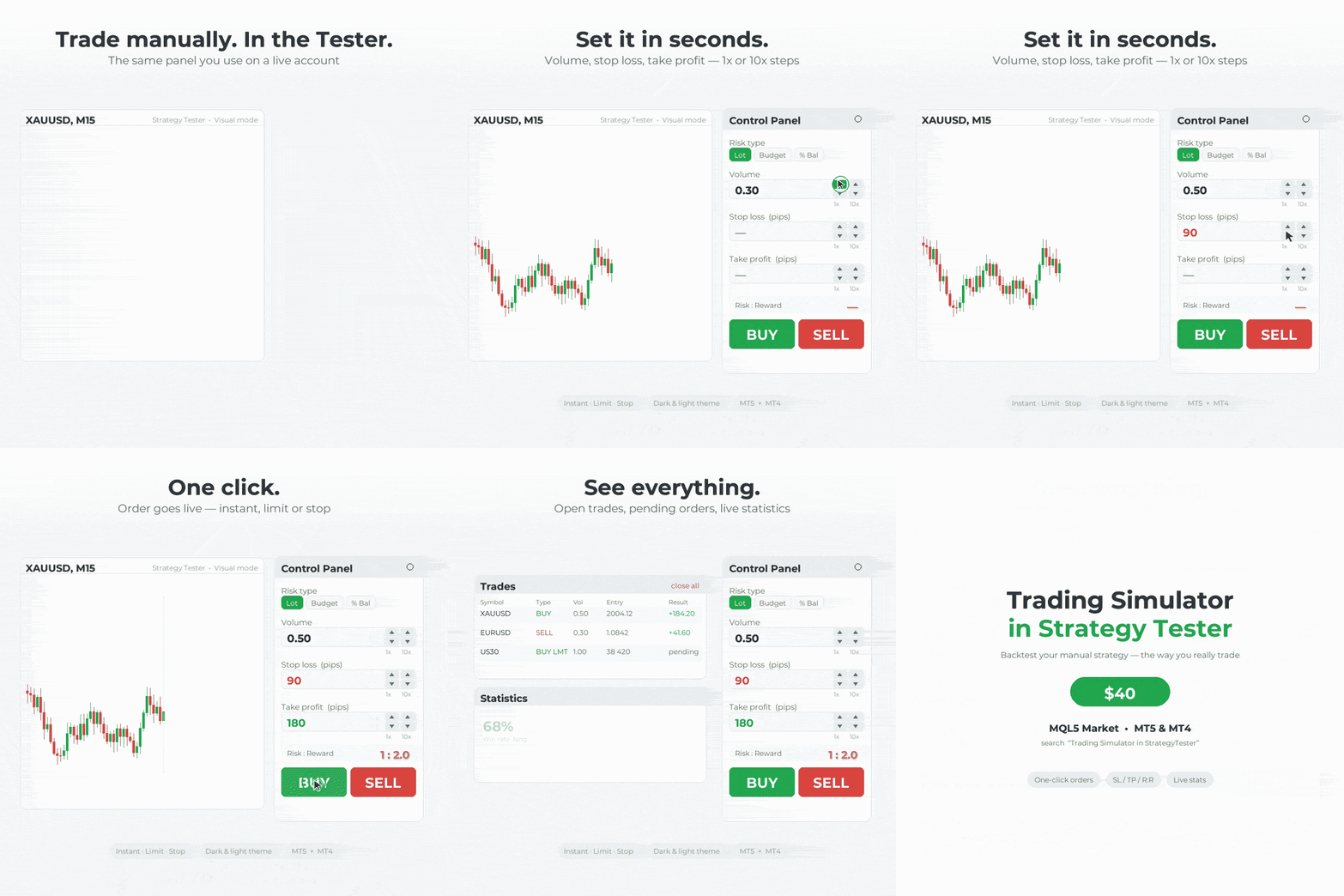
Practice trading in StrategyTester just like on a live chart! Rhino Trade Manager turns the MetaTrader Strategy Tester into a real trading simulator.

Get the demo in Telegram channel: https://t.me/rhinoquant/14

⏳ This demo works until 2026.10.21.

✨ What you get:

✅ One-click Buy/Sell and pending orders in the Strategy Tester
✅ Risk-based lot size (fixed lot, money or % of balance)
✅ Drag Entry/SL/TP on the chart
✅ Edit Mode: change SL/TP of open trades and move pending orders
✅ Trade tables, statistics and a P/L calendar
✅ Daily / Weekly / Monthly / Lifetime P/L box
✅ Light and dark themes with 5 accent colours

🛠 How to install:

1️⃣ In MetaTrader: File → Open Data Folder
2️⃣ Copy the file into MQL5/Experts (MT5) or MQL4/Experts (MT4)
3️⃣ Restart MetaTrader or refresh the Navigator
4️⃣ Open the Strategy Tester, select the EA, enable Visual mode and start

⚠️ This demo has a limited number of trades per test and stops working after 2026.10.21.

@rhinoquant
Sandro Begashvili
Sandro Begashvili
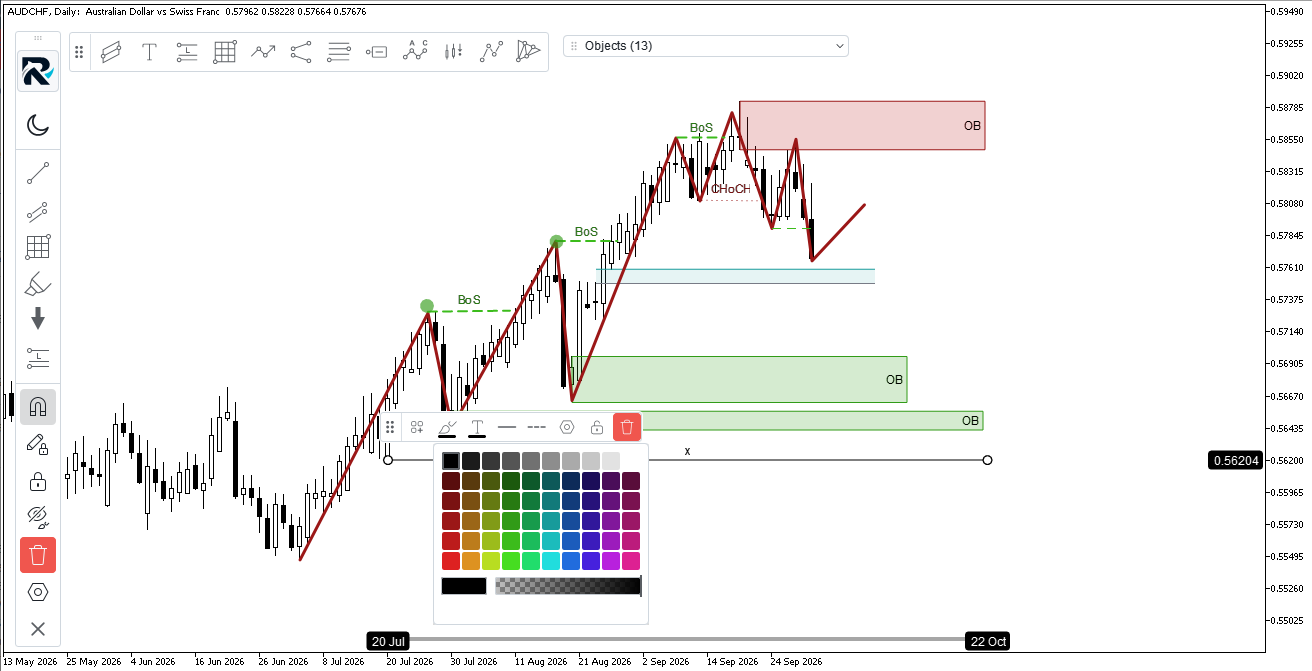
Experience TradingView-style drawing tools in the MetaTrader 5/4

Fast and Robust drawing tools.

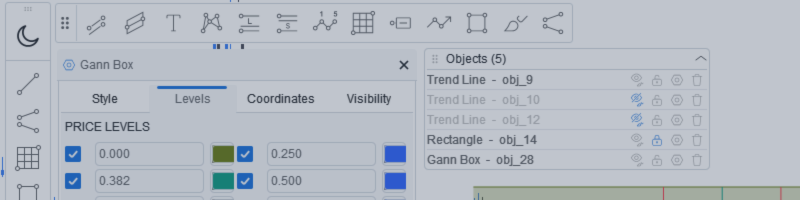
55 Items for drawing, Simple to Draw/Delete/Edit the different features.

No lag in drawing

Try for free:
MetaTrader 5 Demo: https://www.rhinoquant.com/en/free/rhino-drawing-tools-mt5-trial
MetaTrader 4 Demo: https://www.rhinoquant.com/en/free/rhino-drawing-tools-mt4-trial


Purchase Lifetime:
📥 Rhino Drawing Tools MT5: https://www.mql5.com/en/market/product/191269
📥 Rhino Drawing Tools MT4: https://www.mql5.com/en/market/product/197413
Sandro Begashvili
게재된 코드 Market Structure from Pullback Swings — BOS, CHoCH, IDM
Smart Money Concepts market structure on pullback swings: trend, BoS, CHoCH, IDM and liquidity sweeps. A level counts as taken only on a close — a wick through it is marked as a sweep (x) and relocates the swing. Self-contained, closed bars only.
Sandro Begashvili
Sandro Begashvili
Simply resize/drag the chart, scale it, choose the object you want, and draw it.

Open the Settings page, set your desired settings once, and save them as a Template.

After that, use the same settings anytime with just one click.

Try for free:
MetaTrader 5 Demo: https://www.rhinoquant.com/en/free/rhino-drawing-tools-mt5-trial
MetaTrader 4 Demo: https://www.rhinoquant.com/en/free/rhino-drawing-tools-mt4-trial


Purchase Lifetime:
📥 Rhino Drawing Tools MT5: https://www.mql5.com/en/market/product/191269
📥 Rhino Drawing Tools MT4: https://www.mql5.com/en/market/product/197413
Sandro Begashvili
Sandro Begashvili
Hi,

I hope you are doing well.

I recently published a new product called **Rhino Drawing Tools**, a chart-drawing tool for MetaTrader that provides a TradingView-style experience for creating and managing chart objects.

I would really appreciate it if you could try it. You can use the demo version **free for 10 days**:

MetaTrader 5 Demo: https://www.rhinoquant.com/en/free/rhino-drawing-tools-mt5-trial

MetaTrader 4 Demo: https://www.rhinoquant.com/en/free/rhino-drawing-tools-mt4-trial

If you find it useful and would like the lifetime version, you can purchase it here:

MT5: https://www.mql5.com/en/market/product/191269
MT4: https://www.mql5.com/en/market/product/197413

I would be very grateful if you could test it and let me know if you encounter any bugs or have any suggestions for improving the product.

Thank you for your time and feedback.

Best regards,
Sandro Begashvili
RhinoQuant
Sandro Begashvili
Sandro Begashvili
Rhino Drawing Tools for MT5 & MT4

A TradingView-style chart drawing solution for managing chart objects in MetaTrader.

• Fast and optimized drawing engine
• One-click object drawing
• User-friendly GUI for customizing designs
• Templates to save and switch between your preferred designs
• Favorite objects for quick access

📥 MT5: https://www.mql5.com/en/market/product/191269
📥 MT4: https://www.mql5.com/en/market/product/197413
Sergey Golubev
Sergey Golubev
Creating a Cairo-Inspired Graphics Library for MetaTrader 5 (Part 1): Why the terminal needs its own 2D-renderer Contents -
https://www.mql5.com/en/articles/23818Creating a Cairo-Inspired Graphics Library for MetaTrader 5 (Part 1): Why the terminal needs its own 2D-renderer Contents - 
https://www.mql5.com/en/articles/23818
1
Sandro Begashvili
Sandro Begashvili
Rhino Drawing Tools for MT5 & MT4

A TradingView-style chart drawing solution for managing chart objects in MetaTrader.

• Fast and optimized drawing engine
• One-click object drawing
• User-friendly GUI for customizing designs
• Templates to save and switch between your preferred designs
• Favorite objects for quick access

📥 **MT5:** https://www.mql5.com/en/market/product/191269
📥 **MT4:** https://www.mql5.com/en/market/product/197413
Sandro Begashvili
게재된 기고글 Creating a Cairo-Inspired Graphics Library for MetaTrader 5 (Part 5): Fill Rules, Holes and Borders
Creating a Cairo-Inspired Graphics Library for MetaTrader 5 (Part 5): Fill Rules, Holes and Borders

Part 5 adds a fill rule to the rasterizer and a stroke helper to the path. The engine now supports both non-zero and even-odd fills via a single enum parameter, enabling rings, true borders that do not repaint interiors, and glyph counters. AddThickLine() builds strokes from fills in one path and one pass, preserving uniform opacity at joints and showing why strokes require the non-zero rule.

1
Sandro Begashvili
게재된 기고글 Creating a Cairo-Inspired Graphics Library for MetaTrader 5 (Part 4): Anti-Aliasing, Coverage and Compositing
Creating a Cairo-Inspired Graphics Library for MetaTrader 5 (Part 4): Anti-Aliasing, Coverage and Compositing

The rasterizer now accumulates exact span coverage in X and sampled coverage in Y, and blends it via CairoBlendOver on straight ARGB. CairoAaSamples sets the number of vertical samples at runtime, making the cost nearly linear and localized to edges. Readers get smoother boundaries, correct compositing of translucent shapes, and controllable performance.

2
Sandro Begashvili
게재된 기고글 Creating a Cairo-Inspired Graphics Library for MetaTrader 5 (Part 3): Edges and the First Filled Shape
Creating a Cairo-Inspired Graphics Library for MetaTrader 5 (Part 3): Edges and the First Filled Shape

Part 3 implements a scanline rasterizer in pure MQL5. We convert path segments into top‑down edges, sweep each row, sort crossings, and apply the non‑zero winding rule to decide which pixels are inside. The result is a single Fill(path, color, buffer, w, h) routine that draws rectangles, stars, glyphs, or 2000‑edge shapes without per‑shape code, ready to integrate into your MQL5 projects.

2
Sandro Begashvili
Sandro Begashvili
.
🦏 Rhino Trade Manager v1.6: Free Demo (MT4 & MT5)

Practice trading on history just like on a live chart! Rhino Trade Manager turns the MetaTrader Strategy Tester into a real trading simulator.


⏳ This demo works until 2026.10.01.

✨ What you get:

✅ One-click Buy/Sell and pending orders in the Strategy Tester
✅ Risk-based lot size (fixed lot, money or % of balance)
✅ Drag Entry/SL/TP on the chart
✅ Edit Mode: change SL/TP of open trades and move pending orders
✅ Trade tables, statistics and a P/L calendar
✅ Daily / Weekly / Monthly / Lifetime P/L box
✅ Light and dark themes with 5 accent colours

🛠 How to install:

1️⃣ In MetaTrader: File → Open Data Folder
2️⃣ Copy the file into MQL5/Experts (MT5) or MQL4/Experts (MT4)
3️⃣ Restart MetaTrader or refresh the Navigator
4️⃣ Open the Strategy Tester, select the EA, enable Visual mode and start

⚠️ This demo has a limited number of trades per test and stops working after 2026.10.01.

@rhinoquant
Sandro Begashvili
게재된 기고글 Building a PDF Creation Library in MQL5 (Part1): Writing a PDF by Hand
Building a PDF Creation Library in MQL5 (Part1): Writing a PDF by Hand

This article shows how a PDF works as plain text by hand‑written two files: a 592‑byte page and an 885‑byte trade ticket. It explains the file structure (header, body, xref, trailer), the required page objects and resources, and the operators that draw text, then provides an MQL5 script to generate them. First part of a pure‑MQL5 PDF library series.

2
Sandro Begashvili
Try Drawing Tools free on MetaTrader 4 and MetaTrader 5 Drawing Tools brings TradingView-style chart drawing to MetaTrader: trend lines, channels, Fibonacci levels, patterns, shapes, measuring tools and text - all drawn in time and price and rendered with a vector engine, so they stay sharp at an...
Sandro Begashvili 출시돈 제품

Rhino Chart Drawing Tools 는 MetaTrader 4에서 TradingView 스타일 의 차트 드로잉 환경을 제공합니다. 54개의 드로잉 도구 , 사용자 지정 가능한 툴바, 즐겨찾기, 빠른 스타일 설정, 객체 설정, 템플릿 및 객체 관리자를 제공합니다. 사용자 매뉴얼: 제품 사용 방법 무료 데모 버전: 데모 다운로드 MetaTrader 5 버전: Rhino Drawing Tools for MT5 드로잉 도구 그룹 객체 목록 라인 추세선, 레이, 연장선, 수평선, 수직선, 수평 레이, 교차선, 추세 각도, 화살표, 경로, 폴리라인 및 정보선. 채널 평행 채널, 회귀 채널, 플랫 채널, 분리 채널 및 피치포크. 피보나치 되돌림, 확장, 채널, 속도 팬 및 시간대. 간 간 박스 및 간 팬. 도형 사각형, 회전 사각형, 타원, 원, 삼각형 및 폴리라인. 주석 텍스트, 메모, 콜아웃, 가격 라벨, 표지판, 플래그 및 화살표 마크. 패턴 XABCD, ABCD, Cypher

Sandro Begashvili
RhinoDraw brings TradingView-style drawing tools to MetaTrader 5 and MetaTrader 4 . You get the toolbar, the magnet, the quick styling bar and the smooth, clean lines you are used to, inside your MetaTrader chart. This post explains the main features and how to use them...
Sandro Begashvili
게재된 기고글 Creating a Cairo-Inspired Graphics Library for MetaTrader 5 (Part 2): Points, Contours and the Path
Creating a Cairo-Inspired Graphics Library for MetaTrader 5 (Part 2): Points, Contours and the Path

This second part adds the geometry layer to a Cairo‑inspired graphics library for MetaTrader 5. It defines a path of double‑precision points grouped into contours, records open/closed intent, and stores vertices in a flat array with start indices. We implement MoveTo, LineTo, Close, provide basic shape helpers, and include a demo that visualizes the built geometry for inspection and reuse.

1
Sandro Begashvili
게재된 기고글 Creating a Cairo-Inspired Graphics Library for MetaTrader 5 (Part 1): Why the terminal needs its own 2D-renderer Contents
Creating a Cairo-Inspired Graphics Library for MetaTrader 5 (Part 1): Why the terminal needs its own 2D-renderer Contents

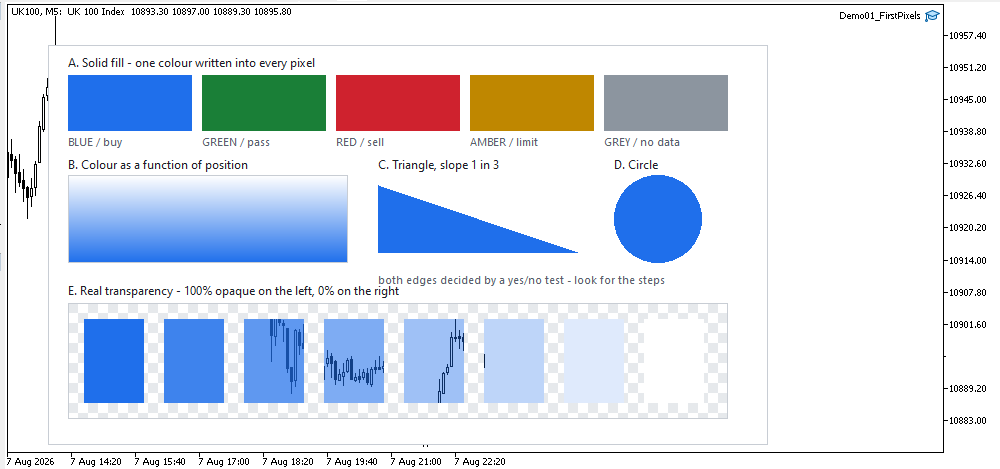
This article opens a step-by-step 2D graphics engine for MetaTrader. It standardizes ARGB colors and implements a reusable surface: a uint pixel buffer uploaded as a dynamic resource and shown via one OBJ_BITMAP_LABEL. You will draw rectangles and a vertical gradient, check real transparency, and learn an efficient update path with a single Flush call.

2
Sandro Begashvili
게재된 코드 Swing Detector by Pullback (Smart Money Concepts)
SMC 풀백은 일반적인 3봉 패턴 대신 풀백의 정의를 사용하여 스윙 고점과 저점을 표시합니다. 고점은 해당 캔들의 저점을 가격이 다시 하향 돌파했을 때만 확정됩니다. 따라서 표시된 모든 지점은 실제 반전 지점이며, 고점과 저점은 항상 번갈아 나타납니다. 이 지표는 종가 캔들만 평가하며, 일단 표시된 마커는 절대 이동하지 않으므로 재표시되지 않습니다. 두 개의 버퍼를 통해 iCustom을 이용해 EA에 확정된 스윙 가격을 제공합니다.
12