Trades Copier MT5

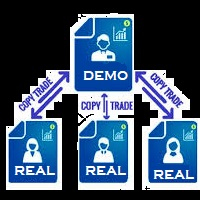
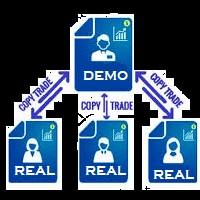
You Can  Copy All the Trades from one MT5 terminal to another MT5 terminal hosting two different accounts in the same computer or VPS.

It will work with same broker as well as different broker.

You can also use it to copy from MT5 to MT4, then you also need to download the MT4 version and set the SEND and RECEIVE accordingly.

MT4 version download- https://www.mql5.com/en/market/product/83400

Note: While Testing with demo version, do not use real account, as it will not copy.

If your trades are not getting copied after setting up the EA in both terminals due to different price of the same asset, increase the slippage pip in settings.

Why Use This Product ?

1. Its the cheapest and most simple to use. Similar products available are either costly or have lot of settings and still sometime misses the trades or make         multiple copies of same trade.

2. It can copy both Pending Orders and Market Execution Orders across multiple Accounts. 

3. If the Trade is modified or partially closed in the sending account, the receiving accounts also successfully modify tat particular Trade.

4. You can exponentially increase or decrease the trade lot size while coping into the destination account.

5. Sometime different broker  provide slightly different price, this tool will wait for the exact price or you could add some slippage pip to take trade with slightly different price.

6. It can copy and modify trades either opened by another robot  or manually opened by the trader.

7. Just applying it on one single chart will work for the entire account.


How To SET IT UP ?

1. You need two Mt5 terminal for the compete setup. So install second mt4 terminal in the same computer or vps.

2. In the first mt5 terminal, open your account which can run the test version of any ea. Start running your test version of any ea you want to copy from, on that terminal.

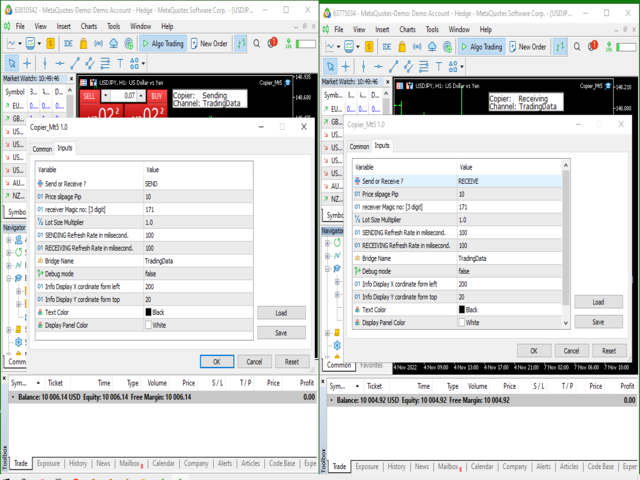
3. In the same terminal, on a different chart put this EA  and in the Ea settings, set it to SEND. This will send all open trades opened by the other EA running in the account to your second MT5account.

4.Now open the second MT5 terminal. Use your second account here. Again put this "Trades_Copier" Ea on this platform and set it to "RECEIVE".

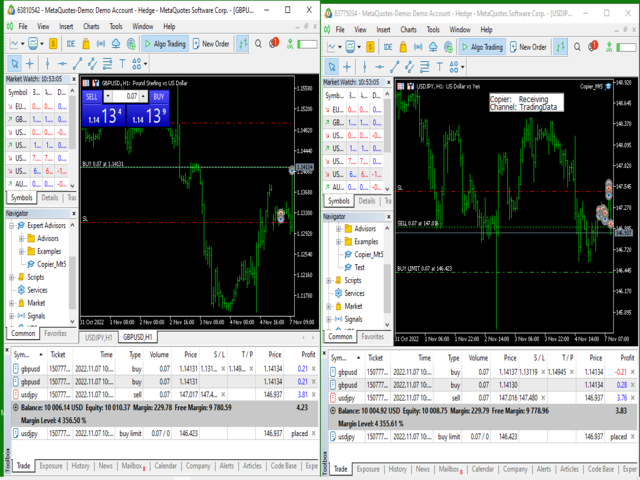
Any trade opened in your first MT5 platform by a different Ea will get copied to your second MT5 platform where the receiving account is running.


The sending account MT5 and the receiving account MT5, both should have the EA running on them.

The Upload Refresh Rate in millisecond is the delay at which data will be uploaded into the internal database. During the delay time, the sender will stop accessing the database, thus allowing the receiver to access it.

The Download Refresh Rate in millisecond is the delay at which data will be read from the the internal database. During the delay time, the receiver will stop accessing the database, thus allowing the sender to update the database with new data if required.
추천 제품
TerminalBridge Trade Copier TerminalBridge Trade Copier is a local MetaTrader 5 position copier designed to synchronize trading actions between two MT5 terminals running on the same Windows computer or VPS. One terminal operates as the MASTER and publishes position changes. The second terminal operates as the SLAVE and receives and processes these events through the shared MetaTrader Common Files folder. Both roles are included in the same EX5 file. Main Features Local MT5-to-MT5 position copyin
FREE
SaToEA Hybrid Engine Pro
Mr Nattapon Chanchanakan
HYBRID ENGINE PRO Intelligent Multi-Strategy Expert Advisor Hybrid Engine Pro is a professional automated trading system designed to adapt to changing market conditions using a smart multi-strategy architecture. The EA dynamically identifies market behavior and applies the most suitable trading logic to increase consistency and efficiency while maintaining controlled risk exposure. This system combines advanced trend logic, adaptive grid structure, momentum confirmation, and intelligent profit
MT5 to MT5 Trade Copier – Fast and Reliable Trade Copying Solution The MT5 Trade Copier is a powerful tool designed to copy trades seamlessly between MetaTrader 5 accounts with minimal latency and high accuracy. Built for speed, flexibility, and ease of use, the copier works across different brokers, even when symbols use different prefixes or suffixes. This Expert Advisor is suitable for professional traders, signal providers, fund managers, and traders who manage multiple accounts. Key Featur
CopyTrader Pro FAST MT5 — FREE Real-Time Trade Copier | MT4 ↔ MT5 Cross-Platform | 20ms Latency CopyTrader Pro FAST is a professional trade copier Expert Advisor that copies trades between MetaTrader terminals in real time using a high-speed file-based communication system. No VPS, no network setup, no DLL — just attach and copy. FREE VERSION : Copies up to 1 trade at a time. Upgrade to Full version for unlimited copying. Key Features 20ms refresh rate — independent of tick arrival, uses
FREE
The Superior Remote Trade Copier is a comprehensive MT5 utility that copies trades remotely and privately via Telegram, eliminating the need for external VPS bridges or third-party web servers. The ecosystem consists of a Master EA, a free Desktop App, and a Client EA. Master (Transmitter) Trade Broadcasting: Transmits market orders, pending orders, position modifications, and partial/full closures directly via Telegram. UI Dashboard: Interactive on-chart panel for quick bulk actions (Close All,
Copy your MT5 trades to accounts anywhere in the world with the   MetaToolsLab Master EA . Unlike local copiers that only work between terminals on the   same   PC or VPS, MetaToolsLab uses a secure cloud relay — so you can broadcast your trades to followers across   different computers, VPS providers, brokers, and continents , with   sub-second delivery   and   no broker passwords . Whether you're a signal provider, a multi-account trader, or an account manager, the Master EA installs in about
FREE
GBPCrasher
Marco Resseghini
GBPCrasher를 발견하세요: 주의와 전략으로 외환 시장 거래를 최적화하고자 하는 사람들을 위해 설계된 봇입니다! GBPCrasher는 M15 시간 프레임으로 GBP 시장에서 거래할 수 있도록 개발된 알고리즘 거래 봇입니다. 장기적으로 자동화된 솔루션을 찾는 사람들을 위해 설계되었으며, 신중한 접근 방식과 안정적인 자본 성장을 목표로 시장 변동성을 활용합니다. M15 시간 프레임에서 작동하는 고급 기술 분석에 기반한 전략. GBP 시장에 최적화되어 보다 집중적이고 목표 지향적인 거래 가능. 자동으로 작동하도록 설계되어 인간의 개입을 최소화하고 즉각적인 의사 결정에서 오는 스트레스를 줄입니다. Forex 거래에서 여러분을 지원할 도구를 찾고 있다면, GBPCrasher는 장기적인 금융 여정에 동반할 이상적인 솔루션입니다. GBPCrasher는 거래 운영 관리를 개선하기 위해 개발되었으며, 외환 시장에서 가장 변동성이 큰 도구 중 하나인 GBPUSD에 중점을 둡니다. M15 시간 프
Hedge and Position Commander
AL MOOSAWI ABDULLAH JAFFER BAQER
• Please test the product in the Strategy Tester before purchasing to understand how it works. • If you face any issues, contact me via private message—I’m always available to help. • After purchase, send me a screenshot of your order to receive a   FREE EA   as a gift. Hedge & Position Commander The Hedge & Position Commander is an advanced trading utility designed to give traders complete control over their positions with powerful hedging capabilities and comprehensive position management too
QuickCopy – Simple MT5 Local Trade Copier with Volume Factor QuickCopy is a lightweight and efficient MT5 local trade copier designed for traders who want to copy trades between accounts on the same computer quickly and reliably. With its simple setup and intuitive interface, QuickCopy makes managing multiple accounts easier than ever. Key Features: Local Account Copying: Instantly copies trades from your master account to one or more client accounts running on the same computer. Volume Factor A
Satoshi
Dragan Drenjanin
The Satoshi EA is a powerful and adaptable Expert Advisor (EA) for MetaTrader 5, crafted to deliver consistent and precise trading performance. Designed for seamless operation on a Virtual Private Server (VPS) , Satoshi EA ensures uninterrupted trading with minimal latency. Leveraging a robust combination of technical indicators—including Stochastic, ATR, and Envelopes for entry signals, and Force Index for exit signals—this EA offers traders a flexible platform to automate their strategies. Wi
• Please test the product in the Strategy Tester before purchasing to understand how it works. • If you face any issues, contact me via private message—I’m always available to help. • After purchase, send me a screenshot of your order to receive a   FREE EA   as a gift. Hedge Fragmentation Utility - Comprehensive Product Description Overview The Hedge Fragmentation Utility is a professional-grade MetaTrader 5 tool designed for forex traders who employ hedging strategies. This sophisticated util
https://www.mql5.com/tr/users/bilisimprofesoru/seller Flash Copy Pro MT5 - Professional & Ultra Fast Local Trade Copier Short Description:   A professional Trade Copier designed for Prop Firms and multi-account management. Features zero-lag copying, smart symbol matching, and advanced error protection. Full Description: Flash Copy Pro MT5   is a high-performance tool designed to copy trades from a single Master account to unlimited Slave accounts within milliseconds. It is specifically develope
Scalping Gold Pro
Antonio Simon Del Vecchio
Scalping Gold Pro — MetaTrader 5 전용 골드 멀티 전략 자동매매 시스템 다중 자동화 전략. 독립적인 바스켓 관리. 설정 가능한 자산(Equity) 보호. Scalping Gold Pro 는 골드(XAUUSD) 거래를 위해 특별히 개발된 완전 자동화된 익스퍼트 어드바이저(EA)입니다. 다양한 시장 세션 동안 작동하는 여러 전략을 결합하여 다양한 가격 조건에서 단기 매매 기회를 포착하고 관리합니다. 가격이 곧 인상됩니다. 현재 가격이 가장 낮은 가격입니다. 다음 가격 조정 시점이 다가오고 있습니다. Scalping Gold Pro를 최적화하고 싶으신가요? 이 간단한 단계별 가이드를 확인하세요. 주요 특징 골드(XAUUSD) 전용 개발 8개의 독립적인 트레이딩 전략 자동 매수 및 매도 주문 실행 시간 및 가격 거리 기반 진입 시스템 시장 변동성에 따른 설정 가능한 활성화 필터 각 전략 바스켓별 독립적인 수익 목표 전체 트레이딩 사이클을 종료하기 위한 옵션 글로
Broker Connection Monitor MT5
AL MOOSAWI ABDULLAH JAFFER BAQER
• Please test the product in the Strategy Tester before purchasing to understand how it works. • If you face any issues, contact me via private message—I’m always available to help. • After purchase, send me a screenshot of your order to receive a   FREE EA   as a gift. Broker Connection Monitor - Keep Your Trading Secure! Ensure Stable Trading with Real-time Broker Connection Monitoring! Are you tired of unexpected connection drops affecting your trades? Do you want to monitor your broker's co
Trading Motivation Display MT5
AL MOOSAWI ABDULLAH JAFFER BAQER
• Please test the product in the Strategy Tester before purchasing to understand how it works. • If you face any issues, contact me via private message—I’m always available to help. • After purchase, send me a screenshot of your order to receive a   FREE EA   as a gift. Trading Motivation Display – Stay Inspired, Stay Profitable! Trading is a game of patience, discipline, and resilience. Staying motivated is crucial for long-term success in the markets. That's where Trading Motivation Display c
Try turning dust to gold with Reverse copier! Unprofitable EA or strategy can become profitable with reversing the direction of it's trades. As of now only MT5 → MT4 bridge is available, new functions will be added accordingly. EA's that work best with Reverse trade system is single-shot or scalping EA's. How it works: When a trade is executed on Master account, Reverse copier sends special log to the common txt file with a command to "open/close, buy/sell, symbol, volume...etc".  Reverse slave
FREE
Local Trade Sync Copier is a local trade synchronization utility for copying trading activity between MetaTrader 5 accounts running on the same computer or VPS. It supports both one-to-one synchronization and one-to-many synchronization, allowing one Source account to distribute its trading activity to multiple independent Receiver accounts. This product does not generate trading signals or trading strategies. Account A acts as the Source, while one or more Account B terminals act as Receiver
Monitor Your EAs and Manual Trading From One MT5 Dashboard One account. Multiple strategies. One clear overview. Quantum Magic Monitor is a professional MT5 trading dashboard designed to help traders monitor multiple Expert Advisors and manual trading activity separately and in one place . Instead of analysing a mixed account history, Quantum Magic Monitor lets you organise trading activity by Magic Number / EA group and monitor the performance of different strategies independently. WHY QUANTUM
FREE
SonicTradeCopier: (Best for scalping) Easy Fast Reliable trade copier. Copy trades from one terminal to an other (internet copy feature coming soon.) MT4 to MT4. MT4 to MT5. MT5 to MT5. MT5 to MT4. MT4/MT5 to any other platform copy possibility for custom made solutions. Reverse trading. Advance filters for traders. Features: (Setting up copying policies) Sender only has to setup  signal name and start sending signals [ You must start signal sender first always ]. Receiver sets up  signal nam
Copy Trader for MT5   is a professional cross-terminal trade copier that instantly replicates every trade from a Master account to one or more Slave accounts running on the same PC. No third-party servers, no cloud subscriptions, no VPS required — it works entirely through MetaTrader 5's shared common folder, giving you near-zero latency copying between terminals.
Trade Copier and Telegram Signals MT5 Trade Copier and Telegram Signals 는 같은 컴퓨터 또는 같은 VPS 에서 실행되는 계좌 사이에서 거래를 복사하고, 사용자 본인의 텔레그램 봇으로 수신한 문자 신호를 실행하는 MetaTrader 5 유틸리티입니다. 하나의 도구가 세 가지 역할을 담당하며, 각 차트의 역할은 하나의 파라미터로 선택합니다. 로컬 복사는 MetaTrader 4 와 MetaTrader 5 사이에서 양방향으로 동작합니다. 두 터미널이 같은 공용 폴더를 사용하기 때문입니다 (MT4 버전은 별도 상품으로 게시됩니다). DLL, 외부 프로그램, 추가 서비스가 필요하지 않습니다. 세 가지 역할, 하나의 파라미터 Master : 이 계좌의 거래, 포지션, 대기 주문, 손절, 익절, 부분 청산을 전송합니다 Receiver : 200 밀리초 동기화 주기로 로컬 Master 를 복사합니다 Telegram Receiver : 사용자의
The program is use to copy trading from MT5 to MT4 and MT5 on local PC or copy  over the Internet .  Now you can easy copy trades to any where or share to friends. Only run one Flash Server on VPS, also need allow the apps if you turn on Windows Firewall. Can not add more than 20 account copier to server at same time,  include both  MT4 and MT5 Get free Copier EA  for MT4 and MT5 (only  receive signal), download here Instants copy, speed smaller 0.1 seconds, easy to setup How to setup and guide
Latency Hunting
Syamsurizal Dimjati
Latency and connection stability are truly the "lifeblood" of a trader, especially if you do scalping or news trading, where a difference of just a few milliseconds (ms) can determine whether your order experiences slippage or not. Let's break it down step by step so everything is clear, starting from the connection path to how we can implement this dashboard idea in MQL5. 1. Connection Path: What Does the Number in the Bottom-Right Corner Actually Mean? When you see the traffic bars and latenc
FREE
LT Trade Copy MT5 - 고성능 실시간 주문 복사 프로그램 LT Trade Copy MT5는 동일한 컴퓨터 또는 로컬 네트워크(LAN) 내의 MetaTrader 5(및 MetaTrader 4) 터미널 간에 최소한의 지연 시간(레이텐シー)과 절대적인 정확성으로 거래를 동기화/복사해야 하는 트레이더를 위해 개발된 고성능 툴입니다. 계좌 관리자(펀드 매니저), 시그널 제공자, 또는 여러 증권사 계좌를 동시에 운영하는 트레이더 등 누구에게나 완벽한 통제력을 제공합니다. 주요 핵심 기능 듀얼 모드 (Sender/Receiver): 하나의 Expert Advisor(EA)가 상황に 따라 송신자( SENDER - 시그널 전송) 또는 수신자( RECEIVER - 신호 수신 및 체결)로 변환되어 작동합니다. 완벽한 계좌 호환성: 헤지(Hedge) 계좌와 넷팅(Netting) 계좌 간의 상호 복사도 완벽하게 지원합니다. 다양한 진입 로트(Lot) 설정: 배율 방식 (Multipliers
거래 복사기 - 투자자 비밀번호 - 거래 복사 - MT4 x MT5 크로스 플랫폼 참고: 클라이언트 계정이 뒤따를 마스터 계정에 "Mirror Copier Master"가 필요하고 마스터 계정이 뒤따를 클라이언트 계정에 "Mirror Copier Client"가 모두 필요합니다. 블로그 : https://www.mql5.com/en/blogs/post/756897 작동 방식: https://www.youtube.com/watch?v=V7FNpuzrg5M MT4 버전 마스터 : https://www.mql5.com/en/market/product/114774 클라이언트: https://www.mql5.com/en/market/product/114843 MT5 버전 마스터 : https://www.mql5.com/en/market/product/114775 클라이언트 : https://www.mql5.com/en/market/product/114844 "
Professional Trade Panel — All-in-One Smart Trading Tool This is a professional visual trading panel designed for the MetaTrader platform. It consolidates the most frequently used trading operations into a single compact and draggable interface, significantly improving execution efficiency and reducing the risk of misoperations. Core Features One-Click Close All: Close all open positions on the current symbol with a single click. The button displays real-time total floating profit and loss s
거래 복사기 - 투자자 비밀번호 - 거래 복사 - MT4 x MT5 크로스 플랫폼 참고: 클라이언트 계정이 뒤따를 마스터 계정에 "Mirror Copier Master"가 필요하고 마스터 계정이 뒤따를 클라이언트 계정에 "Mirror Copier Client"가 모두 필요합니다. 블로그 : https://www.mql5.com/en/blogs/post/756897 작동 방식: https://www.youtube.com/watch?v=V7FNpuzrg5M MT4 버전 마스터 : https://www.mql5.com/en/market/product/114774 클라이언트: https://www.mql5.com/en/market/product/114843 MT5 버전 마스터 : https://www.mql5.com/en/market/product/114775 클라이언트 : https://www.mql5.com/en/market/product/114844 "
FREE
MWRecovery is a system designed to recover unprofitable positions.When the market moves by a certain amount against the direction of a trade and brings it to a loss, the system opens other trades in the same direction at specified intervals. Once these trades reach a certain profit, a magic trailing   stop is activated to maximize your profit. How it works : The utility resets StopLoss levels for all processed orders.  New trades will be placed if the conditions are met according to what you hav
TradePulse Commander Pannel
AL MOOSAWI ABDULLAH JAFFER BAQER
궁극의 **거래 관리 패널**을 소개합니다. 이 패널은 거래 작업을 간소화하고 효율성을 높이기 위해 설계되었습니다! 우리의 고급 패널은 강력한 기능을 갖추고 있어 거래 작업을 쉽게 관리하고 실시간 통찰력을 제공합니다: - **원클릭 TP 및 SL 관리**: 전체 계정 또는 특정 통화 쌍의 모든 Take Profit (TP) 및 Stop Loss (SL) 레벨을 버튼 하나로 쉽게 삭제할 수 있습니다. - **실시간 주문 추적**: 전체 계정과 개별 통화 쌍에 대한 총 주문 수, 매수/매도 수량, 및 수익/손실을 실시간으로 보여주는 업데이트로 거래 활동을 정확히 파악할 수 있습니다. - **수익 및 손실 최적화**: 전체 계정 또는 선택한 통화 쌍에서 모든 수익성 있는 또는 손실이 발생한 주문을 신속하게 종료하여 시장 변화에 빠르게 대응할 수 있습니다. - **자동 헤징**: 손실이 지정된 비율에 도달하면 자동 헤징을 설정할 수 있습니다. 패널은 SL 및 TP 삭제를 자동으로
Broker Analysis Utility MT5
AL MOOSAWI ABDULLAH JAFFER BAQER
• Please test the product in the Strategy Tester before purchasing to understand how it works. • If you face any issues, contact me via private message—I’m always available to help. • After purchase, send me a screenshot of your order to receive a   FREE EA   as a gift. Broker Analysis Utility – Your Ultimate Broker Performance Monitor! Get Full Transparency on Your Broker's Execution Quality! Are you a trader who values precision, transparency, and performance? Broker Analysis Utility is an es
이 제품의 구매자들이 또한 구매함
Trade Assistant MT5
Evgeniy Kravchenko
4.41 (216)
거래당 위험 계산, 라인을 사용한 손쉬운 신규 주문, 부분 청산 기능을 통한 주문 관리, 7가지 유형의 트레일링 스탑 및 기타 유용한 기능을 제공합니다. 추가 자료 및 지침 설치 지침   -   애플리케이션 지침   -   데모 계정용 애플리케이션 평가판 라인 기능       - 차트에 개시선, 손절매, 차익실현을 표시합니다. 이 기능을 사용하면 새로운 주문을 쉽게 하고 개봉 전에 추가 특성을 볼 수 있습니다. 위기 관리       -       위험 계산 기능은 설정된 위험과 손절매 주문의 크기를 고려하여 새 주문의 볼륨을 계산합니다. 이를 통해 손절매 크기를 설정하고 동시에 설정된 위험을 존중할 수 있습니다. 로트 계산 버튼 - 위험 계산을 활성화/비활성화합니다. 필요한 위험 값은 위험 필드에 0에서 100 사이의 백분율 또는 예금 통화로 설정됩니다. 설정 탭에서 위험 계산 옵션을 선택합니다. $ 통화, % 잔액, % 지분, % 자유 마진, % 사용자 정의, % AB 이전
Trade Manager EA에 오신 것을 환영합니다. 이 도구는 거래를 보다 직관적이고 정확하며 효율적으로 만들기 위해 설계된 궁극적인 리스크 관리 도구 입니다. 단순한 주문 실행 도구가 아닌, 원활한 거래 계획, 포지션 관리 및 리스크 제어를 위한 종합 솔루션입니다. 초보자부터 고급 트레이더, 빠른 실행이 필요한 스캘퍼에 이르기까지 Trade Manager EA는 외환, 지수, 상품, 암호화폐 등 다양한 시장에서 유연성을 제공합니다. Trade Manager EA를 사용하면 복잡한 계산은 이제 과거의 일이 됩니다. 시장을 분석하고 진입, 손절 및 익절 수준을 차트의 수평선으로 표시한 후 리스크를 설정하면, Trade Manager가 이상적인 포지션 크기를 즉시 계산하고 SL 및 TP 값을 실시간으로 표시합니다. 모든 거래가 간편하게 관리됩니다. 주요 기능: 포지션 크기 계산기 : 정의된 리스크에 따라 거래 크기를 즉시 결정합니다. 간단한 거래 계획 : 진입, 손절, 익절을 위한
Astro Trade MT5
Indra Maulana
5 (2)
AstroTrade Trading Assistant AstroTrade is a comprehensive multi-functional trading utility developed for the MetaTrader 5 platform. It integrates essential tools for trade execution, risk management, and technical monitoring into a single unified interface. The application is designed to assist traders in managing their daily operations through a visual and structured environment. Visual Trade Execution and Risk Management The application includes a specialized trading panel that assists in c
Local Trade Copier EA MT5
Juvenille Emperor Limited
4.97 (146)
Local Trade Copier EA MT5 를 사용하여 매우 빠른 거래 복사 경험을 해보세요. 1분 안에 간편하게 설정할 수 있으며, 이 거래 복사기를 사용하면 Windows 컴퓨터 또는 Windows VPS에서 여러 개의 MetaTrader 터미널 간에 거래를 0.5초 미만의 초고속 복사 속도로 복사할 수 있습니다. 초보자든 전문가든   Local Trade Copier EA MT5 는 다양한 옵션을 제공하여 사용자의 특정 요구에 맞게 맞춤 설정할 수 있습니다. 이는 수익 잠재력을 높이려는 모든 사람을 위한 최고의 솔루션입니다. 지금 사용해보시고 이것이 왜 시장에서 가장 빠르고 쉬운 무역용 복사기인지 알아보세요! 팁: 여기 에서 데모 계정에서 Local Trade Copier EA MT5 데모 버전을 다운로드하여 사용해 볼 수 있습니다. 다운로드한 무료 데모 파일을 MT5 >> File >> Open Data Folder >> MQL5 >> Experts 폴더에 붙여넣고 터
TradePanel MT5
Alfiya Fazylova
4.88 (167)
Trade Panel은 다기능 거래 도우미입니다. 이 애플리케이션에는 50개 이상의 수동 거래 기능이 포함되어 있으며 대부분의 거래 작업을 자동화할 수 있습니다. 구매하기 전에 데모 계정에서 데모 버전을 테스트할 수 있습니다. 데모 계정용 애플리케이션 체험판 다운로드: https://www.mql5.com/en/blogs/post/750865 . 전체 지침 여기 . 거래. 한 번의 클릭으로 거래를 수행할 수 있습니다: 리스크 자동 계산과 함께 예약 주문 및 포지션 열기. 한 번의 클릭으로 여러 주문 및 포지션 열기. 주문 그리드 열기. 예약 주문 및 포지션을 그룹별로 닫기. 포지션 방향 전환 (Buy 닫기 > Sell 열기, Sell 닫기 > Buy 열기). 포지션 잠금 (부족한 포지션을 열어 Buy와 Sell 포지션의 수량을 동일하게 만들기). 모든 포지션 한 번의 클릭으로 부분적으로 닫기. 모든 포지션의 테이크 프로핏과 스톱로스를 같은 가격 수준에 설정. 모든 포지션의 스톱로스를
================================================================================ POC BREAKOUT - V20.72. Full Professional Grade Toolkit ================================================================================ POC Breakout is a full MetaTrader 5 trading dashboard for discretionary traders who want breakout signals, Point of Control (POC) context, volume profiles, order flow, market structure, news, alerts, and advanced trade planning in one professional workspace. Attached directly to you
베타 출시 Telegram to MT5 Signal Trader 는 곧 공식 알파 버전을 출시할 예정입니다. 일부 기능은 아직 개발 중이며, 작은 버그가 발생할 수 있습니다. 문제가 있으면 꼭 보고해 주세요. 여러분의 피드백은 소프트웨어 개선에 도움이 됩니다. Telegram to MT5 Signal Trader 는 Telegram 채널 또는 그룹의 거래 신호를 자동으로 MetaTrader 5 계정으로 복사하는 강력한 도구입니다. 공개 및 비공개 채널을 모두 지원하며, 여러 신호 제공자를 여러 MT5 계정에 연결할 수 있습니다. 소프트웨어는 빠르고 안정적으로 동작하며, 복사된 거래를 완벽히 제어할 수 있습니다. 인터페이스는 깔끔하며 대시보드와 차트가 시각적으로 구성되어 있고, 직관적인 네비게이션이 가능합니다. 여러 Signal Account를 관리하고, 공급자별 설정을 세밀하게 조정하며, 모든 동작을 실시간으로 모니터링할 수 있습니다. 필수 조건 MQL의 제한으로 인해 EA는 Te
Telegram to MT5 Multi-Channel Copier 는 Telegram 채널의 트레이딩 신호를 자동으로 MetaTrader 5로 직접 복사합니다. 봇도, 브라우저 확장 프로그램도, 수동 복사도 필요 없습니다. Telegram에서 신호를 받으면 EA가 몇 초 안에 터미널에서 거래를 엽니다. 본 제품은 두 가지 구성 요소로 구성되어 있습니다: Telegram 채널을 감시하는 Windows 애플리케이션과 MT5 터미널에서 신호를 실행하는 이 Expert Advisor입니다. MT4 버전도 제공됩니다. 설정 가이드 및 애플리케이션 다운로드: https://www.mql5.com/en/blogs/post/768988 작동 방식 Windows 애플리케이션은 봇이 아닌 사용자 자신의 API 자격 증명을 사용하여 Telegram에 연결됩니다. 이는 프라이빗 및 VIP 채널을 포함하여 구독 중인 모든 채널, 그룹 또는 주제를 읽을 수 있음을 의미합니다. 신호를 감지하면 이를 파싱하여
HINN MagicEntry Extra
ALGOFLOW OÜ
4.71 (17)
HINN MAGIC ENTRY – the ultimate tool for entry and position management! SIMPLE. FASTEST. INTUITIVE. MAX AUTOMATED. Place orders by selecting a level directly on the chart! full description   ::  demo-version  :: 60-sec-video-description Key features: - Market, limit, and pending orders - Automatic lot size calculation - Automatic spread and commission accounting - Unlimited partitial take-profits  - Breakeven and trailing stop-loss and take-profit  functions - Invalidation leves - Intuitive, a
Grid Manual MT5
Alfiya Fazylova
4.73 (22)
"Grid Manual"은 주문 그리드 작업을 위한 거래 패널입니다. 이 유틸리티는 보편적이며 유연한 설정과 직관적인 인터페이스를 제공합니다. 그것은 손실을 평균화하는 방향뿐만 아니라 이익을 증가시키는 방향으로 주문 그리드와 함께 작동합니다. 거래자는 주문 그리드를 만들고 유지할 필요가 없으며 유틸리티에서 수행합니다. 거래자가 주문을 시작하는 것으로 충분하며 "Grid Manual"는 자동으로 그를 위한 주문 그리드를 생성하고 거래가 마감될 때까지 그와 동행할 것입니다. 전체 설명 및 데모 버전 여기 . 유틸리티의 주요 기능: 모바일 터미널을 포함하여 어떤 방식으로든 열린 주문과 함께 작동합니다. "제한" 및 "중지"의 두 가지 유형의 그리드와 함께 작동합니다. 고정 및 동적(ATR 표시기 기반)의 두 가지 유형의 그리드 간격 계산과 함께 작동합니다. 오픈 오더 그리드의 설정을 변경할 수 있습니다. 차트에서 각 주문 그리드의 손익분기점 수준을 표시합니다. 각 주문 그리드에 대한 이익
Trade copier MT5
Alfiya Fazylova
4.58 (52)
Trade Copier는 거래 계정 간의 거래를 복사하고 동기화하도록 설계된 전문 유틸리티입니다. 복사는 공급자의 계정/단말기에서 동일한 컴퓨터 또는 vps에 설치된 수신자의 계정/단말기로 발생합니다. 프로모션 - 이미 "Trade copier MT5"를 구매하셨다면, "Trade copier MT4"를 무료로 받으실 수 있습니다 (MT4 → MT5 및 MT4 ← MT5 복사용). 조건에 대한 자세한 정보를 원하시면, 개인 메시지를 통해 저희에게 문의해 주시기 바랍니다! 구매하기 전에 데모 계정에서 데모 버전을 테스트할 수 있습니다. 데모 버전 여기 . 전체 지침 여기 . 주요 기능 및 이점: 복사기는 "МТ5> МТ5", "МТ4> МТ5", "МТ5> МТ4" 복사를 지원합니다. 복사기는 데모 계정 > 실 계정, 실 계정 > 데모 계정, 데모 계정 > 데모 계정 및 실제 계정 > 실 계정 복사를 지원합니다. 복사기는 읽기 전용 암호가 적용된 투자자 계정에서 복사를 지원합니다. 하
Exp COPYLOT CLIENT for MT5
Vladislav Andruschenko
3.97 (35)
MetaTrader 5용 전문 트레이드 복사기 MetaTrader 용 빠르고 전문적이며 신뢰할 수 있는 트레이드 복사기 입니다. COPYLOT 은 MT4와 MT5 터미널 간의 Forex 거래 복사를 지원하며, Hedge 및 Netting 계좌를 모두 지원합니다. COPYLOT MT5 버전 지원 구성: - MT5 Hedge → MT5 Hedge - MT5 Hedge → MT5 Netting - MT5 Netting → MT5 Hedge - MT5 Netting → MT5 Netting - MT4 → MT5 Hedge - MT4 → MT5 Netting MT4 버전 전체 설명 + DEMO + PDF 구매 방법 설치 방법 로그 파일 확인 방법 테스트 및 최적화 방법 Expforex의 모든 제품 MT4 터미널로도 거래를 복사할 수 있습니다(MT4 → MT4, MT5 → MT4): COPYLOT CLIENT for MT4 COPYLOT은 2개, 3개, 심지어 10개의 터미널과 동시에 작동할
Signal TradingView to MT5 Pro Automator TradingView와 MetaTrader 5 간의 즉각적인 전문 실행 TradingView 알림과 MT5의 실제 실행을 연결하는 가장 강력한 커뮤니케이션 브리지로 거래 전략을 자동화하세요. 속도, 유연성 및 완벽한 위험 관리를 요구하는 트레이더를 위해 설계된 이 Expert Advisor는 모든 알림 메시지를 정확한 시장가 또는 지정가 주문으로 변환합니다. 강점 및 이점 범용 파싱 엔진(독점 기술): 모든 알림 형식에서 데이터를 자동으로 인식하고 추출할 수 있는 고급 기술입니다. 단일하고 엄격한 형식에 얽매일 필요가 없습니다. 시스템은 심볼, 액션, 가격, SL 및 TP를 자동으로 이해합니다. 실시간 실행: 지연 시간을 최소화하도록 최적화된 1초 미만의 초고속 폴링 기술. 신호 수신 후 몇 밀리초 내에 주문 실행이 이루어집니다. 기관 수준의 위험 관리: 다음 기준에 따른 자동적이고 정확한 로트(Lot) 크기 계
Trade Copier Ultimate
Janitha Sandaruwan Amaradasa Wickramasingha Arachchilage
5 (4)
Trade Copier Ultimate - Telegram to MT5 Signal Copier Trade Copier Ultimate automatically copies Telegram trading signals into MetaTrader 5. The EA can read signal messages, detect the symbol, order type, entry price, Stop Loss, Take Profit levels and selected update commands, then execute or manage the trade in MT5 using your lot and risk settings. It is more than a basic Telegram to MT5 copier. TCU also supports Bot API and user-account Bridge workflows, Discord signal routing, local MT5 to MT
Timeless Charts
Samuel Manoel De Souza
5 (8)
Timeless Charts is an all-in-one trading utility for professional traders. It combines custom chart types such as Seconds Charts and Renko with advanced order flow analysis using Footprints , Clusters , Volume Profiles , VWAP studies, and anchored analysis tools for deeper market insight. Trading and position management are handled directly from the chart through an integrated trade management panel , while Market Replay and Virtual Accounts provide environments for practicing trading skills and
Footprint Chart Pro — Professional OrderFlow EA for MetaTrader 5 Version 6.34 | Professional tool for real traders | Institutional-Grade Visualization DEMO USERS - PLEASE SELECT EVERY TICK / REAL TICK WHEN TESTING AND YOU HAVE DOWNLOADED HISTORICAL DATA. IF YOU SEE A WAITING SCREEN AND IT IS NOT DOWNLOADING, IT MEANS YOU HAVE LOW HISTORICAL DATA. TRY 1 MIN AND 5 MIN FIRST ON 1 DAY DATA. ONE DAY DATA SHOULD BE THE NEWEST AND MOST CURRENT DATE. PLEASE WAIT UNTIL THE MARKET HAS ROLLED OVER PERIOD.
Farmed Hedge Yield Farming | All Markets (Manual - Hybrid - Semi/Automated EA) VERIFIED TRADING RESULTS - Farmed Hedge Yield Axi Copy:  https://www.mql5.com/en/signals/2356376 - Farmed Hedge Yield Exn Copy:   https://www.mql5.com/en/signals/2356404 - Farmed Hedge Yield V Copy:  https://www.mql5.com/en/signals/2357156 * Before purchasing, please feel free to send me a message if you have any questions about the product or setup. ** After purchase,  Contact me via private message to receive t
Anchor Trade Manager
Kalinskie Gilliam
5 (7)
Anchor: The EA Manager Your EAs manage their own trades. Anchor manages the account around them. Anchor gives you one place to control your EAs, manage risk and decide when trading is allowed. Any EA, any vendor, any broker or symbol. No source-code changes required. The Problem Most EAs only know what they are doing. They cannot see when another EA is already trading, when several EAs open and are stacking risk or when the account has reached your loss limit. Even using just one EA, it may not
Global Investing FX Terminal
Santiago Nicolas Pla Casuriaga
Global Investing FX Terminal 은 MetaTrader 5용 올인원 FX 대시보드입니다 — 중앙은행 정책금리, CFTC COT 포지션, 캐리 순위, 경제 서프라이즈, 옵션 스큐, 소매 심리, 상관관계까지 총 열세 개의 분석 패널을 깜빡임 없는 단일 캔버스에 렌더링하며, 단일 EA에서 10초마다 갱신됩니다. 외부 소프트웨어가 필요 없습니다. 전문적인 FX 분석은 일반적으로 별도의 플랫폼에 분산된 데이터에 동시에 접근해야 합니다: 금리 파생상품, 정부 데이터 포털, 브로커 스왑 명세, 옵션 데스크. 이 EA는 이 모든 것을 거래 결정이 실행되는 거래 터미널 내 단일 화면에 통합합니다. 대시보드에서 보이는 것 시장 개요 FX 페어 테이블 — 28개 G10 통화쌍 전체에, 브로커의 Market Watch에 NOK/SEK 크로스가 있을 경우 이를 더한 최대 36개 통화쌍의 실시간 매수/매도 가격. 각 행은 스프레드, 일간·주간 변화, 핍 단위의 절대 범위, ADR% — 1
Premium Trade Manager - 코치가 내장된 트레이딩 패널 Premium Trade Manager 는 차트 안에 트레이딩 코치를 심어놓은 도구입니다. 주문을 확정하기 전에, AI 트레이딩 코치 Max가 설정된 거래를 직접 읽고 명확한 판단을 내려줍니다. 스톱이 규율 있는 접근 방식에 맞는지, 리스크 크기가 합리적인지, 고영향 뉴스 이벤트가 몇 분 후에 있는지, 프롭 펌 한도에 근접했는지. 그 아래에는 완전한 실행 엔진이 있습니다. 원클릭 리스크 기반 진입, 차트에서 드래그로 세우고 거래가 진행되는 동안에도 계속 움직일 수 있는 플랜, 최대 4단계 분할 익절, 7가지 트레일링 방식, 실시간 프롭 펌 컴플라이언스, 뉴스 가드, 그리고 자체 비용을 평가하는 스프레드까지. 결정은 당신이 내립니다. Max가 두 번째 시선으로 확인합니다. 패널이 그 이후의 모든 것을 처리합니다. 구매 전에 직접 체험해 보세요. 브라우저에서 라이브 패널을 직접 클릭해볼 수 있습니다. 구매 전에 실제
Trading Chaos Expert
Gennadiy Stanilevych
5 (11)
This software has no equals in the world and represents a universal trade "console" covering trading signals, automated market entry, setting of Stop Loss and Take Profit, as well as Trailing Profit for multiple trades at the same time in a single open window. Intuitive control of the Expert Advisor in "three clicks" ensures a comprehensive use of all its functions on different computers, including tablets PCs. Interacting with additional signal indicators that mark the chart to give a real mark
MT5 to Telegram Signal Provider 는 사용하기 쉽고 완전히 커스터마이즈 가능한 유틸리티로, 특정 신호를 Telegram의 채팅, 채널 또는 그룹으로 전송하고, 귀하의 계정을 신호 제공자 로 만듭니다. 경쟁 제품과 달리 DLL 임포트를 사용하지 않습니다. [ 데모 ] [ 매뉴얼 ] [ MT4 버전 ] [ 디스코드 버전 ] [ 텔레그램 채널 ]  New: [ Telegram To MT5 ] 설정 단계별 사용자 가이드 가 제공됩니다. 텔레그램 API에 대한 지식은 필요하지 않습니다; 개발자가 제공하는 모든 것이 필요합니다. 주요 특징 구독자에게 보낸 주문 상세 정보를 커스터마이즈할 수 있습니다. 예를 들어, 브론즈, 실버, 골드와 같은 계층 구독 모델을 만들 수 있습니다. 골드 구독에서는 모든 신호를 받습니다. id, 심볼, 또는 코멘트로 주문을 필터링할 수 있습니다. 주문이 실행된 차트의 스크린샷이 포함됩니다 보낸 스크린샷에 닫힌 주문을 그려 추가 검증을 합니다
파워 캔들 전략 스캐너 - 자체 최적화 다중 종목 설정 찾기 도구 파워 캔들 전략 스캐너는 마켓 워치에 등록된 모든 종목에 대해 파워 캔들 지표와 동일한 자체 최적화 엔진을 동시에 실행합니다. 하나의 패널에서 현재 통계적으로 거래 가능한 종목, 각 종목별 최적의 전략, 최적의 손절매/익절 조합을 알려주며, 새로운 신호가 발생하면 즉시 알림을 전송합니다. 이 도구는 Stein Investments 에코시스템의 일부입니다. 18개 이상의 도구와 함께 당신의 1대1 AI 트레이딩 멘토 Max.  항상 대기 중, 모든 인디케이터를 깊이 있게 이해, 무언가를 차근차근 생각해보고 싶은 순간에 도움을 줍니다.  https://stein.investments 에서 만나보세요 완벽한 시장 모니터링. 종목당 3,000건 이상의 자동 최적화. 2가지 알림 유형. 한 번의 클릭으로 차트를 전환하고 바로 거래하세요. 이 도구가 필요한 이유 대부분의 다중 종목 스캐너는 가격 변동만 보여줍니다. 티커별
Trade Dashboard MT5
Fatemeh Ameri
4.95 (132)
Trade Dashboard simplifies how you open, manage, and control your trades, with built-in lot size calculation. It allows you to execute trades, manage risk, and control positions directly on the chart, with tools such as partial close, breakeven, and trailing stop. Designed to reduce manual work and help you stay focused on your trading decisions. A demo version is available for testing. Detailed explanations of features are provided within the MQL5 platform. Installation instructions are include
Welcome to ENTRY IN THE ZONE WITH SMC MULTI TIMEFRAME Entry In The Zone and SMC Multi Timeframe is a real-time market analysis tool based on Smart Money Concepts (SMC), designed to analyze market structure, price direction, and key trading zones. It supports both Single-Timeframe Analysis and Multi-Timeframe Analysis, providing a clearer view of the overall market structure across multiple timeframes, with real-time BUY / SELL signals that do not repaint. It is designed to help filter trading op
작동 데모 다운로드 Copy Cat More (카피캣) MT5 트레이드 카피어 (Trade Copier) 는 로컬 트레이드 카피어이자, 오늘날의 트레이딩 과제를 위해 설계된 완전한 리스크 관리 및 실행 프레임워크입니다. 프롭 펌 (prop firm) 챌린지부터 개인 포트폴리오 관리까지, 견고한 실행, 자본 보호, 유연한 설정, 고급 트레이드 처리의 조합으로 모든 상황에 적응합니다. 이 카피어는 마스터 (Master, 송신측) 와 슬레이브 (Slave, 수신측) 두 모드 모두에서 작동하며, 시장가 주문과 대기 주문, 트레이드 수정, 부분 청산, 상호 청산 (Close By) 작업을 실시간으로 동기화합니다. 데모 및 실거래 계좌, 트레이딩 또는 인베스터 로그인 모두와 호환되며, EA·터미널·VPS가 재시작되더라도 영구 트레이드 메모리 (Persistent Trade Memory) 시스템을 통해 복구를 보장합니다. 고유 ID로 여러 마스터와 슬레이브를 동시에 관리할 수 있으며, 브로커
VirtualTradePad PRO SE MT5 — MetaTrader 5용 전문 트레이딩 컨트롤 센터 VirtualTradePad PRO SE 는 MetaTrader 5 용 프리미엄 차트 기반 트레이딩 패널이자 거래 관리 워크스페이스입니다. 더 빠른 주문 실행, 더 명확한 포지션 관리, 구조화된 거래 관리, 시각적인 레벨 계획, 그리고 차트에서 직접 작업하는 전문적인 워크플로를 원하는 트레이더를 위해 설계되었습니다. 이 제품은 단순한 BUY / SELL 패널이 아닙니다. PRO SE는 수동 트레이딩, 예약 주문, 포지션 관리, 부분 청산, 바스켓 손익 관리, 평균가 레벨, ATM 규칙, 신호 모니터링, 실시간 시장 정보, 전략 테스터 (Strategy Tester) 워크플로, VPS 중심 운용을 하나의 연결된 인터페이스로 통합합니다. MT4 버전 | 전체 설명 및 스크린샷 | 구입 방법 | 설치 방법 | 로그 파일을 얻는 방법 | 테스트 및 최적화 방법 | Expforex의 모든
Trade Manager DaneTrades
Levi Dane Benjamin
4.23 (30)
거래 관리자는 위험을 자동으로 계산하는 동시에 거래를 빠르게 시작하고 종료하는 데 도움을 줍니다. 과잉 거래, 복수 거래 및 감정 거래를 방지하는 데 도움이 되는 기능이 포함되어 있습니다. 거래를 자동으로 관리할 수 있으며 계정 성과 지표를 그래프로 시각화할 수 있습니다. 이러한 기능은 이 패널을 모든 수동 거래자에게 이상적으로 만들고 MetaTrader 5 플랫폼을 향상시키는 데 도움이 됩니다. 다중 언어 지원. MT4 버전  |  사용자 가이드 + 데모 트레이드 매니저는 전략 테스터에서 작동하지 않습니다. 데모를 보려면 사용자 가이드로 이동하세요. 위기 관리 % 또는 $를 기준으로 위험 자동 조정 고정 로트 크기 또는 거래량과 핍을 기반으로 한 자동 로트 크기 계산을 사용하는 옵션 RR, Pips 또는 Price를 사용한 손익분기점 손실 설정 추적 중지 손실 설정 목표 달성 시 모든 거래를 자동으로 마감하는 최대 일일 손실률(%)입니다. 과도한 손실로부터 계정을 보호하고 과도한
YuClusters
Yury Kulikov
4.93 (43)
Attention: You can view the program operation in the free version  YuClusters DEMO .  YuClusters is a professional market analysis system. The trader has unique opportunities to analyze the flow of orders, trade volumes, price movements using various charts, profiles, indicators, and graphical objects. YuClusters operates on data based on Time&Sales or ticks information, depending on what is available in the quotes of a financial instrument. YuClusters allows you to build graphs by combining da
Quant AI Agents
Ho Tuan Thang
5 (1)
Quant AI Agents are independent trading Expert Advisors. Instead of trading using a fixed strategy like other conventional EAs, Quant AI Agents   is a   multi-agent AI trading framework   that turns natural-language strategy prompts into live.  WANT THE SAME RESULTS AS MY LIVE SIGNAL?   Use the exact same brokers I do:   IC MARKETS , IC TRADING   .  Unlike the centralized stock market, Forex has no single, unified price feed.  Every broker sources liquidity from different providers, creating un
제작자의 제품 더 보기
This PRICE ACTION  trading EA is best for low risk steady growth. The EA has ability to smartly increase and decrease risk percent per trade  to maximize the gain. No INDICATORS are used of any kind. There is NO HEDGING or MARTINGALE. This Ea is fully set and forget based, but if you want you can also manually move your stop and profit target and can also close the trades whenever you want, it will not affect the EA algorithm. If You are new to robot trading, run with default settings. NOTE:
Multipair Analyzer  - An expert advisor which analyze market structure across multiple currency pairs. Its a tool which uses purely price action structure based trading strategy.  Based on the market structure, the EA finds the optimal place to enter and can either take trade or can alert the user to take a better look. Just by placing the EA one one chart, all the other currency pairs are automatically analyzed.  Based on its analysis it provide multiple messages . These messages can be easil
Trades copier
Debashish Sahu
5 (2)
You Can Instantly Copy All the Trades from one account to another account in MT4. It only copy inside the same computer or same VPS. You can also use it to copy from MT4 to MT5, then you also need to download the MT5 version and set the SEND and RECEIVE accordingly. MT5 Version download -  https://www.mql5.com/en/market/product/88791 Note: If you download the demo version, it will not copy the trade into the real account as demo version does not work on real account. Sometime you will find trad
Grid Trend Multiply is a non directional expert advisor which use Martingale to close trade in profit As a user, you need to set the direction in which the EA will take the trade. You can set to either BUY or SELL when you want it to trade in a trending market. In a ranging market, you can set the EA to take both BUY and SELL at the same time.  It is a delta neutral strategy which capitalize on the concept that market will visit the same price again and again thus allowing the EA to close the po
M K Ultra
Debashish Sahu
A loss Recovery Ea which use the Symmetric Triangle Price action Pattern to place recovery trades using Martingale. Benefit of this ea : Risk get reduced from normal recovery system as bigger lot size are placed near the triangle center and as soon as the triangle breaks, bigger lot size offsets the overall losses thus reaching profit target sooner. Ea also has default trend following capability by choosing the daily candle direction, and can put stop loss to breakeven thus protecting the trade
Fixed SL TP Simple EA use Breakout Strategy on Range  to enter into the trade. This is my first design for a fixed risk trading system. So profit gain will be not that great. Check out this new EA with better profit on fixed SL -  Trend Following Expert Advisor You will either make money on a trade or lose money on it. Be a man and simply move on to the nest trade setup. This EA DO NOT USE any kind of risky money management like (Martingale or Grid) system to recover your losses. The EA  us
Trend Following Expert advisor follows trend to take trade.              MT5 Version Click Here Only for Serious Traders who Understands that get rich quick Expert advisor does not exist. Growth without blowing the account is the right method to grow. NON MARTINGALE. FIXED STOPLOSS                                                  PAIRS FOR BETTER RESULT (USDJPY, GBPUSD, XAUUSD, etc) This EA do not have any kind of loss recovery logic in it so When you suffer a loss, just move on. This will happe
Power Ranger
Debashish Sahu
Power Ranger EA works on RANGING MARKET ONLY. You also need an ZERO SPREAD ACCOUNT (Max spread allowed is 2). Tested on CADCHF with spread of 2 with default settings. Fixed Stop loss In a trending market this EA will make loss. If you want another Ea which is good for trending market then check out this promotional EA- Trend Follower As a trader you can manually close all the trades if you think that enough profit is accumulated.   The development of the EA will go on in future and you may see
MACD Snipper
Debashish Sahu
MACD Spipper is a simple trend trading and swing entry EA. NO MARTINGLE ,  NO GRID FIXED STOPLOSS and TAKEPROFIT. User have the option to exit early in case the price is not moving well. Pros: The EA can be trade with a very small Account Balance. It will not blow your account by accumulating losses. On right market conditions, it can give a huge return with a very small initial risk. Cons: The Ea do not perform well on ranging pairs. You can have a lot of losing trades All types of broker can
필터:
리뷰 없음
리뷰 답변