Trades Copier MT5

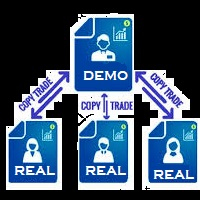
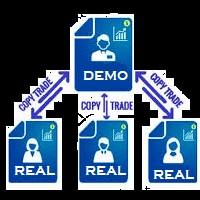
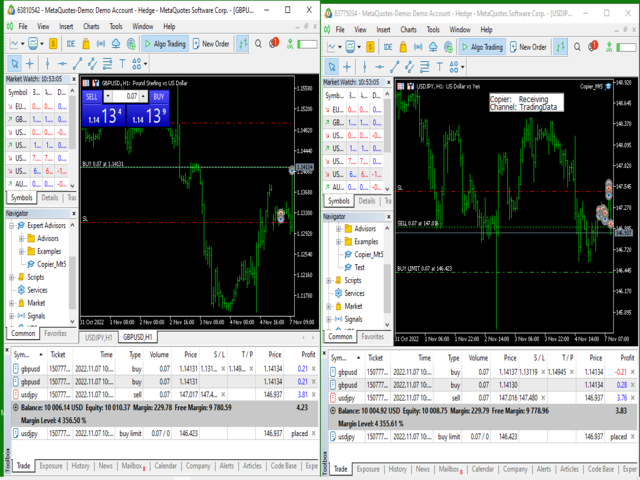
You Can  Copy All the Trades from one MT5 terminal to another MT5 terminal hosting two different accounts in the same computer or VPS.

It will work with same broker as well as different broker.

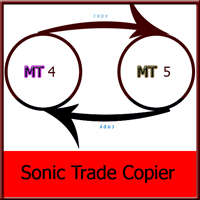
You can also use it to copy from MT5 to MT4, then you also need to download the MT4 version and set the SEND and RECEIVE accordingly.

MT4 version download- https://www.mql5.com/en/market/product/83400

Note: While Testing with demo version, do not use real account, as it will not copy.

If your trades are not getting copied after setting up the EA in both terminals due to different price of the same asset, increase the slippage pip in settings.

Why Use This Product ?

1. Its the cheapest and most simple to use. Similar products available are either costly or have lot of settings and still sometime misses the trades or make         multiple copies of same trade.

2. It can copy both Pending Orders and Market Execution Orders across multiple Accounts. 

3. If the Trade is modified or partially closed in the sending account, the receiving accounts also successfully modify tat particular Trade.

4. You can exponentially increase or decrease the trade lot size while coping into the destination account.

5. Sometime different broker  provide slightly different price, this tool will wait for the exact price or you could add some slippage pip to take trade with slightly different price.

6. It can copy and modify trades either opened by another robot  or manually opened by the trader.

7. Just applying it on one single chart will work for the entire account.


How To SET IT UP ?

1. You need two Mt5 terminal for the compete setup. So install second mt4 terminal in the same computer or vps.

2. In the first mt5 terminal, open your account which can run the test version of any ea. Start running your test version of any ea you want to copy from, on that terminal.

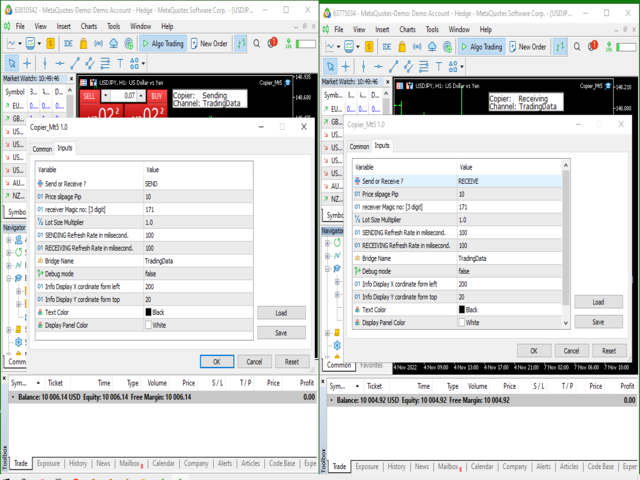
3. In the same terminal, on a different chart put this EA  and in the Ea settings, set it to SEND. This will send all open trades opened by the other EA running in the account to your second MT5account.

4.Now open the second MT5 terminal. Use your second account here. Again put this "Trades_Copier" Ea on this platform and set it to "RECEIVE".

Any trade opened in your first MT5 platform by a different Ea will get copied to your second MT5 platform where the receiving account is running.


The sending account MT5 and the receiving account MT5, both should have the EA running on them.

The Upload Refresh Rate in millisecond is the delay at which data will be uploaded into the internal database. During the delay time, the sender will stop accessing the database, thus allowing the receiver to access it.

The Download Refresh Rate in millisecond is the delay at which data will be read from the the internal database. During the delay time, the receiver will stop accessing the database, thus allowing the sender to update the database with new data if required.
おすすめのプロダクト
cTrader to MT5 Copier とは? cTrader to MT5 Copier は、cTrader から MetaTrader 5 へ取引をコピーするために設計された、リアルタイム高速コピー機能を備えたシステムです。高速な実行と柔軟なコントロールを提供します。 cTrader で行ったすべての取引は、リアルタイムで MT5 に直接コピーできます。システムは通常コピー、反転コピー、特定の利益または損失に達してからコピーする機能、部分決済の同期、決済済み取引の処理、その他多くの高度な機能をサポートしています。 このコピーシステムは、速度、柔軟性、そして cTrader から MT5 へどのように取引を転送するかについて強力なコントロールを必要とするトレーダー向けに作られています。 主な機能 設定可能な間隔によるリアルタイム同期。デフォルトは 500 ms 比例部分決済同期。Master が部分決済すると、Client はロット倍率に関係なくまったく同じ割合で決済します ライブ SL および TP 同期。取引開始後に Master で行われた Stop Loss と Take
MT5 to cTrader Copier とは? MT5 to cTrader Copier は、MetaTrader 5 から cTrader へ取引をコピーするために設計された、リアルタイム高速コピー機能を備えたシステムです。高速な実行と柔軟なコントロールを提供します。 MT5 で行ったすべての取引は、リアルタイムで cTrader に直接コピーできます。システムは通常コピー、反転コピー、特定の利益または損失に達してからコピーする機能、部分決済の同期、決済済み取引の処理、その他多くの高度な機能をサポートしています。 このコピーシステムは、速度、柔軟性、そして MT5 から cTrader へどのように取引を転送するかについて強力なコントロールを必要とするトレーダー向けに作られています。 主な機能 設定可能な間隔によるリアルタイム同期。デフォルトは 500 ms 比例部分決済同期。Master が部分決済すると、Client はロット倍率に関係なくまったく同じ割合で決済します ライブ SL および TP 同期。取引開始後に Master で行われた Stop Loss と Take
MT5 to MT5 Trade Copier – Fast and Reliable Trade Copying Solution The MT5 Trade Copier is a powerful tool designed to copy trades seamlessly between MetaTrader 5 accounts with minimal latency and high accuracy. Built for speed, flexibility, and ease of use, the copier works across different brokers, even when symbols use different prefixes or suffixes. This Expert Advisor is suitable for professional traders, signal providers, fund managers, and traders who manage multiple accounts. Key Featur
GBPCrasherを発見:注意と戦略でForex市場の取引を最適化したい方のために設計されたボット! GBPCrasherは、M15タイムフレームでGBP市場での取引を行うために開発されたアルゴリズムトレーディングボットです。長期的な自動化ソリューションを求める人々向けに設計され、市場の変動を慎重に利用し、資本の安定した成長を目指しています。 M15タイムフレームで動作する高度なテクニカル分析に基づく戦略。 GBP市場に最適化され、より焦点を絞った取引が可能。 自動的に動作するように設計されており、人間の介入や即時の決定によるストレスを最小限に抑えます。 あなたのForex取引をサポートするツールを探しているなら、GBPCrasherはあなたの財務的な旅を長期的にサポートする理想的なソリューションです。 GBPCrasherは、Forex市場で最も変動の激しいツールの1つであるGBPUSDに焦点を当てて取引操作の管理を改善することを目的として開発されました。M15タイムフレームでの操作により、ボットは小さな変動で市場機会を探し、長期的なビジョンを見失うことはありません。 GBP市場を
Satoshi
Dragan Drenjanin
The Satoshi EA is a powerful and adaptable Expert Advisor (EA) for MetaTrader 5, crafted to deliver consistent and precise trading performance. Designed for seamless operation on a Virtual Private Server (VPS) , Satoshi EA ensures uninterrupted trading with minimal latency. Leveraging a robust combination of technical indicators—including Stochastic, ATR, and Envelopes for entry signals, and Force Index for exit signals—this EA offers traders a flexible platform to automate their strategies. Wi
Try turning dust to gold with Reverse copier! Unprofitable EA or strategy can become profitable with reversing the direction of it's trades. As of now only MT5 → MT4 bridge is available, new functions will be added accordingly. EA's that work best with Reverse trade system is single-shot or scalping EA's. How it works: When a trade is executed on Master account, Reverse copier sends special log to the common txt file with a command to "open/close, buy/sell, symbol, volume...etc".  Reverse slave
FREE
Enthiran MT5 Copy Trader
Orifox Technologies Private Limited
Enthiran CopyTrader for MT5 – Master Trade Copier Mirror Trades Across Multiple Accounts with Precision and Speed Enthiran CopyTrader is a powerful MT5 Expert Advisor that allows you to replicate trades from one MetaTrader 5 account (Master) to one or multiple accounts (Slaves) with complete control over trade size, symbol mapping, and execution speed. Whether you manage investor accounts, signal services, or prop firm strategies, this tool helps you maintain synchronization across accounts w
SonicTradeCopier: (Best for scalping) Easy Fast Reliable trade copier. Copy trades from one terminal to an other (internet copy feature coming soon.) MT4 to MT4. MT4 to MT5. MT5 to MT5. MT5 to MT4. MT4/MT5 to any other platform copy possibility for custom made solutions. Reverse trading. Advance filters for traders. Features: (Setting up copying policies) Sender only has to setup  signal name and start sending signals [ You must start signal sender first always ]. Receiver sets up  signal nam
The program is use to copy trading from MT5 to MT4 and MT5 on local PC or copy  over the Internet .  Now you can easy copy trades to any where or share to friends. Only run one Flash Server on VPS, also need allow the apps if you turn on Windows Firewall. Can not add more than 20 account copier to server at same time,  include both  MT4 and MT5 Get free Copier EA  for MT4 and MT5 (only  receive signal), download here Instants copy, speed smaller 0.1 seconds, easy to setup How to setup and guide
Local Trad Copie5
Chukwuemeka Kingsley Anyanwu
Fe el free to contact me for any extra features :) [SEE MT4 VERSION  https://www.mql5.com/en/market/product/128848 ] The Local Copier EA is an Expert Advisor (EA) designed to synchronize trading positions between a master account and a slave account, operating in either Master or Slave mode. Key Features: Master Mode : In Master mode , the EA monitors open positions and stores relevant trade details. These details include symbol, volume, stop loss, take profit, and position type, which are used
トレードコピー - 投資家パスワード - コピートレード - MT4 x MT5 クロスプラットフォーム 注: クライアントアカウントがフォローするマスターアカウントに「ミラーコピーマスター」、マスターアカウントがフォローするクライアントアカウントに「ミラーコピークライアント」の両方が必要です ブログ: https://www.mql5.com/en/blogs/post/756897 仕組み: https://www.youtube.com/watch?v=V7FNpuzrg5M MT4 バージョン マスター: https://www.mql5.com/en/market/product/114774 クライアント: https://www.mql5.com/en/market/product/114843 MT5 バージョン マスター: https://www.mql5.com/en/market/product/114775 クライアント: https://www.mql5.com/en/market/product/114844 「ミラー コピー」エキス
FREE
MWRecovery is a system designed to recover unprofitable positions.When the market moves by a certain amount against the direction of a trade and brings it to a loss, the system opens other trades in the same direction at specified intervals. Once these trades reach a certain profit, a magic trailing   stop is activated to maximize your profit. How it works : The utility resets StopLoss levels for all processed orders.  New trades will be placed if the conditions are met according to what you hav
Hedging Pro Ultimate is an expert advisor designed to work fully automatically or semi-automatically. MT4 Version  |  Product Knowledge & Setfile Suggested pairs: EURUSD,  GBPUSD, XAUUSD Expert parameters: 1. Manage Open Positions + Open Position Mode: Select the open position method + Delete trendline after opening a position: set false for continuous pending orders. + Continue New Cycle: set false to stop a new cycle trade. 2. Manage pending orders + Pending Orders: Enable Virtual Pending O
TradePulse Commander Pannel
AL MOOSAWI ABDULLAH JAFFER BAQER
究極の **トレード管理パネル** をご紹介します。取引の運営を効率化し、パフォーマンスを向上させるために設計されています!私たちの先進的なパネルには、取引作業を簡素化し、リアルタイムでの洞察を提供する強力な機能が満載です: - **ワンクリックのTPとSL管理**:全アカウントまたは特定の通貨ペアに対して、Take Profit (TP) および Stop Loss (SL) レベルを簡単に削除できます。ボタンを一度押すだけで完了します。 - **リアルタイム注文追跡**:取引活動をリアルタイムで把握し、全アカウントおよび個別通貨ペアの注文総数、買い/売り数量、利益/損失を表示します。 - **利益と損失の最適化**:全アカウントまたは選択した通貨ペアで、すべての利益が出ているまたは損失が出ている注文を迅速にクローズし、市場の変化に素早く対応できます。 - **自動ヘッジ**:ドローダウンが指定されたパーセンテージに達した場合に自動ヘッジを設定します。パネルはSLおよびTPの削除を自動的に処理し、追加の確認なしで明確な通知を提供します。 - **ワンクリック手動ヘッジ*
FIRST, THIS EA IS A MULTIMARKET SCANNER AND ITS PERFORMANCE CAN ONLY EXAMINED USING VISUAL MODE (SET OPTIMIZATION TO DISABLED AND CHECK VISUAL MODE). THE EA LEVERAGE TAKE PROFITS FROM FLOATING POSITIONS IN DIFFERENT MARKETS, THIS ABILITY MAKES IT STANDOUT THIS EA IS FOR INDIVIDUALS HAVING ATLEAST $10000 IN THEIR ACCOUNT (EXPECT A DRAWDOWN OF ABOUT 10% IN WORST CASE SCENARIOS) THE EA IS GOOD FOR PROP FIRMS IF YOUR ACCOUNT IS ABOUT 1K, use this EA instead  https://www.mql5.com/en/market/product/14
Trade Copy is an EA-shaped tool that replicates the trades done on a Meta Trader 5 to all Meta Traders 5 opened on same computer. Is useful if you want to trade more than once account yours or if you want to work with third party account management. Demo version:  https://www.mql5.com/pt/market/product/40906 MT4 version:  https://www.mql5.com/pt/market/product/40902/ Configurations: MAIN OPTIONS Idiom - change to English or Portuguese. Copy trades from - specify if the trades will be copied fro
Trade Informer HVZ
Alexandr Gershkevich
5 (1)
Trade Informer HVZ   is a utility that allows you to display trading results (open and closed positions) using filters for trading instruments and Magic Numbers of Expert Advisors. The results are displayed as a horizontal or vertical table or as separate blocks. Full list of displayed parameters: List of analyzed instruments List of Magic Balance of open positions Result of closed positions for today The result of closed positions for the previous day The result of closed positions for the c
Super Hedge Fighter MT5
AL MOOSAWI ABDULLAH JAFFER BAQER
• Please test the product in the Strategy Tester before purchasing to understand how it works. • If you face any issues, contact me via private message—I’m always available to help. • After purchase, send me a screenshot of your order to receive a   FREE EA   as a gift. Important Note: Please Adjust the "Distance Between Orders" Setting. Reduce it to achieve optimal results, ideally between 2 and 10. Trading in Forex and volatile markets can be challenging and risky. No strategy will be effect
Trade copier MT5
Alfiya Fazylova
4.56 (39)
Trade Copierは、取引口座間の取引をコピーして同期するように設計された専門的なユーティリティです。 コピーは、同じコンピューターまたはvps にインストールされている、サプライヤーのアカウント/端末から受信者のアカウント/端末に行われます。 購入する前に、デモ アカウントでデモ バージョンをテストできます。 デモ版 こちら 。 詳細な説明は こちら 。 主な機能と利点: MT5ネッティングアカウントを含む、MT5> MT5、MT4> MT5、MT5> MT4のコピーをサポートします。 高いコピー速度(0.5秒未満)。 ベンダーモードと受信者モードは同じ製品内に実装されています。 チャートから直接リアルタイムでコピーを制御できる、簡単で直感的なインターフェイス。 接続が切断されたり、端末が再起動されたりしても、設定と位置が失われることはありません。 コピーするシンボルを選択できます。また、受信者のシンボルを置き換えることもできます(例:EURUSD> USDJPY)。 バックコピーをサポートします。 特定の注文のみのコピーを有効にする機能。 取引開始価格の最大差と最大遅延時間を
ライブシグナル - https://www.mql5.com/en/users/alex.fincone/seller アドバイザーの限定バージョン。 残り 7 部の価格は $240、次の価格は $499、アドバイザーの最終コストは $1490。 各購入者は完全な説明書 + 独自の設定 + ギフト =) を受け取ります。 スマート ニューラル ネットワークは、金融市場における取引業務を自動化するための革新的なソリューションです。これは、Python 言語を使用して開発された強力な機械学習モデルに基づいています。アドバイザーは過去のデータを分析し、価格変動の予測に役立つ複雑なパターンを特定します。ニューラル ネットワークを使用するスマート ニューラル ネットワーク EURUSD は、市場環境の変化に適応し、現在のトレンドやボラティリティに合わせて取引することができます。これにより、ユーザーは意思決定プロセスを自動化することで取引戦略を最適化し、リスクを最小限に抑えることができます。ユーザーフレンドリーなインターフェイスと高度なカスタマイズにより、初心者と経験豊富なトレーダーの両方がアク
Robot XAUUSD MT5 Gold Scalper EA355 EA355 は、ランダムなエントリーではなく「取引品質」を重視し、規律あるルールベースで XAUUSD(ゴールド)をスキャルピングしたいトレーダー向けに設計されています。市場に明確なモメンタムが出たときだけ取引し、その後は厳格なフィルターで不利な状況を回避しながらポジションを管理します。 EA355 が選ばれる理由 品質重視のエントリー モメンタム、ボラティリティ、トレンド強度、プライスアクション確認を組み合わせた多要素シグナルで、低確率の取引を減らします。 “悪い相場”を避けるスマート保護 高スプレッド、ボラティリティの不安定化、弱いトレンド局面、リスクの高いニュース時間帯(設定に基づく)でのエントリーを回避します。 モメンタム継続時の追加エントリー 条件が有効なままなら、勝ち方向にポジションを追加(ヘッジ口座対応)し、強い値動きを最大限に活かします。 リスク管理された実行 明確な SL/出口ロジックと取引制限(入力パラメータに基づく)により、安定した一貫性のある挙動を維持します。 XAUUSD M1
GoldBurst Pad Pro MT5 Entry Panel GoldBurst Pro is a professional manual trade panel (Expert Advisor) for MetaTrader 5, designed for traders who demand speed, control, and clean execution. This is NOT an auto-profit robot. It is a precision execution tool that helps you execute your trading plan faster and more consistently directly from the chart. Prepare your Lot size, SL/TP (points), and layer count in advance—then execute instantly with one click when your setup is ready. Ideal for scalpin
Slave Link >>  https://www.mql5.com/en/market/product/160092 CopyTrade Server is a lightweight, reliable local trade copier for MetaTrader 5 that mirrors positions from a Master account to one or more Slave accounts using a fast shared-file mechanism. It is designed for signal providers, account managers, and traders who need precise synchronization of trades with flexible delay and lot control. ​ Main concept Role: Works as the Slave side of a local copy trading setup and receives trades fro
FREE
Grid PriceBreak SmartSMA EA
AL MOOSAWI ABDULLAH JAFFER BAQER
• Please test the product in the Strategy Tester before purchasing to understand how it works. • If you face any issues, contact me via private message—I’m always available to help. • After purchase, send me a screenshot of your order to receive a   FREE EA   as a gift. Product Description for Grid PriceBreak SmartSMA EA Optimize for Your Needs This Expert Advisor (EA) is designed for traders who love control and customization. The Grid PriceBreak SmartSMA EA provides the foundation of a robus
The program is use to copy trading from MT5   to MT4 and MT5  on same   Windows   PC or   VPS .   Now you can easy copy trades to any MT4 account or MT5 account. Instants copy, speed smaller 0.1 seconds, easy to setup. Need run EA as Signal provider on one MT5 account, other MT4 / MT5 will run EA as Trade copier. You can download and try demo version on  demo account Copi Trade MT4 demo   version   here   Copi Trade MT5 demo   version  here
MP Close By Loss Or Profit for MT5 The Reason I made this Expert is because I want traders who already found out how to be profitable in the market use an easier tool throughout their trading days. This Expert will consider your exposure of trades and close them based on profit targets and losses you set for your own Risk Management. I want to thank my friend who helped me on this Expert, and his brilliant work is now shared here with you. A bit of advice after running the expert on your platfo
FREE
価格でTPとSLを設定 – MT5用自動オーダーモディファイア すべての取引で正確なTPおよびSL価格を自動設定 ️ すべての通貨ペアとEAに対応、シンボルまたはマジックナンバーでフィルタリング可能 このエキスパートアドバイザーは、直接の価格値(例:EURUSDの1.12345)を使用して、取引に正確なテイクプロフィット(TP)とストップロス(SL)レベルを設定および適用します。ポイントもピップスも不要。すべての注文またはシンボル・マジックナンバー別に、シンプルで正確なトレード管理を実現します。 主な機能: 価格を指定して即座にTPおよびSLを変更 すべての注文、現在のシンボル、または特定のマジックナンバーに適用 ️ 0を入力してTPまたはSLを削除 任意のチャートにアタッチすると完全自動で動作 すべての取引商品に対応 おすすめ対象: 素早くTP/SLをコントロールしたい手動トレーダー デフォルトの終了ロジックを上書きしたいEAユーザー 複数のポジションを管理するトレーダー 質問や機能のアイデアはありますか?
It adds the symbols listed on Binance Spot to the Metatrader5 market clock. With this free file you can list the entire list in seconds. You can easily upload it to your demo account. It is the first file uploaded for Binance Spot Tick and is available for free. Tools menu / Options / Expert Advisors / You need to select Use WebRequest for listed URL You can watch videos to add Metatrader.
FREE
It is is your personal risk guard. Drop it on any chart on your VPS or trading computer and it will guard your total risk in any pair or asset and make sure the sum of all stops is within your risk. If you happened to exceed the risk, in a split second this EA will calculate the exact position for the combined risk of all open positions and place all stops at the exact same spot. If you open a new position with another lot size . No problem, all stoplosses will automatically adjust. Tired of man
FREE
このプロダクトを購入した人は以下も購入しています
Trade Assistant MT5
Evgeniy Kravchenko
4.42 (207)
取引 ごとのリスクの 計算、新規注文 の 簡単 な 設置、部分的 な 決済機能 を 持 つ 注文管理、 7 種類 のトレーリングストップなど 、便利 な 機能 を 備 えています 。 追加の資料と説明書 インストール手順   -   アプリケーションの手順   -   デモアカウント用アプリケーションの試用版 ライン機能 チャート上にオープニングライン、ストップロス、テイクプロフィットを表示します。この機能により、新規注文を簡単に設定することができ、注文を出す前にその特徴を確認することができます。   リスク計算 リスク計算機能は、設定されたリスクとストップロス注文のサイズを考慮して、新規注文のボリュームを計算します。ストップロスの大きさを自由に設定できると同時に、設定したリスクを守ることができます。 Lot calc ボタン - リスク 計算 を 有効 / 無効 にします 。 Risk フィールドでは 、必要 なリスクの 値 を 0 から 100 までのパーセンテージまたは 預金通貨 で 設定 します 。 設定」 タブで 、 リスク 計算 の 種類 を 選択 します :「 $ 通
Trade Manager EAへようこそ。これは、取引をより直感的、正確、そして効率的にするために設計された究極の リスク管理ツール です。これは単なるオーダー実行ツールではなく、包括的な取引計画、ポジション管理、リスク管理のためのソリューションです。初心者から上級者、迅速な実行を必要とするスキャルパーまで、Trade Manager EAはあらゆるニーズに対応し、為替、指数、商品、暗号通貨などさまざまな市場で柔軟に対応します。 Trade Manager EAを使用すると、複雑な計算が過去のものになります。市場を分析し、エントリーポイント、ストップロス、テイクプロフィットのレベルをチャート上のラインでマークし、リスクを設定するだけで、Trade Managerが最適なポジションサイズを即座に計算し、SLとTPをピップ、ポイント、口座通貨でリアルタイムに表示します。すべての取引が簡単かつ効果的に管理されます。 主な機能: ポジションサイズ計算機 :定義されたリスクに基づいて取引サイズを瞬時に決定します。 簡単な取引計画 :エントリー、ストップロス、テイクプロフィットを設定するためのド
Local Trade Copier EA MT5
Juvenille Emperor Limited
4.96 (132)
Local Trade Copier EA MT5 による、驚くほど高速な取引コピーを体験してください。1分で簡単にセットアップできるこの取引コピー機は、同じWindowsコンピュータまたはWindows VPS上の複数のMetaTrader端末間で取引をコピーすることができ、0.5秒未満の高速コピースピードを実現します。 初心者であろうとプロのトレーダーであろうと、 Local Trade Copier EA MT5 には、あなたの特定のニーズに合わせてカスタマイズするための幅広いオプションが用意されています。これは、利益の可能性を高めたい人にとって究極のソリューションです。 今すぐ試してみて、これが市場で最も速くて簡単なトレードコピー機である理由を理解してください。 ヒント: デモアカウントで Local Trade Copier EA MT5 デモバージョンをダウンロードして試すことができます: ここ ダウンロードした無料のデモ ファイルを MT5 >> ファイル >> データ フォルダを開く >> MQL5 >> Experts フォルダに貼り付けて、ターミナルを再起動しま
TradePanel MT5
Alfiya Fazylova
4.87 (149)
Trade Panelは多機能なトレーディングアシスタントです。アプリには手動取引用の50以上のトレーディング機能が搭載されており、ほとんどの取引作業を自動化することができます。 購入前に、デモアカウントでアプリのデモ版をテストすることができます。デモアカウント用のアプリの試用版をダウンロードするには、次のリンクをご利用ください: https://www.mql5.com/en/blogs/post/750865 。 完全な手順 こちら 。 取引。 ワンクリックで取引操作を行うことができます: リスクを自動計算して指値注文やポジションを開く。 複数の注文やポジションをワンクリックで開く。 注文のグリッドを開く。 保留中の注文やポジションをグループごとに閉じる。 ポジションの方向を反転(Buyを閉じてSellを開く、またはSellを閉じてBuyを開く)。 ポジションをブロックする(不足している量のポジションを開くことでBuyとSellのポジション量を等しくする)。 すべてのポジションを部分的にワンクリックで閉じる。 すべてのポジションの利食い(Take Profit)および損切り(Sto
ベータリリース Telegram to MT5 Signal Trader はまもなく正式なアルファ版をリリースします。いくつかの機能はまだ開発中で、小さな不具合に遭遇する可能性があります。問題が発生した場合はぜひご報告ください。皆さまのフィードバックがソフトウェア改善に役立ちます。 Telegram to MT5 Signal Trader は、 Telegram のチャンネルやグループからの取引シグナルを自動的に MetaTrader 5 にコピーする強力なツールです。 パブリックおよびプライベートの両方のチャネルに対応し、複数のシグナル提供元を複数のMT5口座に接続可能です。ソフトウェアは高速で安定し、すべての取引を細かく制御できます。 インターフェースは直感的で、ダッシュボードとチャートは見やすく設計されており、リアルタイムで動作状況をモニターできます。 必要環境 MQL の制限により、EA は Telegram と通信するためのデスクトップアプリが必要です。 インストーラーは公式の インストールガイド にあります。 主な機能 マルチプロバイダー: 複数の Telegram
The core idea: using the user interface, you configure the parameters the chart must meet before entering a position (or positions), choose which entry models to use, and set the rules for when trading and planning should end. Lazy Trader  handles the rest: it  takes over all the routine chart watching and execution! full description  :: 3 key videos [1] ->  [2]   ->  [3] What can it do? - Understands Larry Williams market structure - Understands swing market structure by Michael Huddleston
Tired of complex order placement and manual calculations? Trade Dashboard is your solution. With its user-friendly interface, placing orders becomes effortless, by a single click, you can open trades, set stop loss and take profit levels, manage trade lot size, and calculate risk to reward ratios, allowing you to only focus on your strategy. Say goodbye to manual calculations and streamline your trading experience with Trade Dashboard. Download  Demo Version  right now. You can find  Details of
Exp COPYLOT CLIENT for MT5
Vladislav Andruschenko
3.82 (34)
MT5のトレードコピー機は、МetaТrader5プラットフォームのトレードコピー機です 。 それは間の 外国為替取引をコピーします   任意のは 、MT5 - MT5、MT4 - MT5   COPYLOT MT5版の アカウント (またはを MT4 - MT4   MT5 - MT4   COPYLOT MT4版用) 信頼できるコピー機! MT4のバージョン 完全な説明   +DEMO +PDF 購入する方法 インストールする方法     ログファイルの取得方法     テストと最適化の方法     Expforex のすべての製品 МТ4ターミナルでトレードをコピーすることもできます(   МТ4   -   МТ4、МТ5   -   МТ4   ):   MT4のCOPYLOT CLIENT このバージョンには、端末間 МТ5   -   МТ5、МТ4   -   МТ5が含まれ ます。 ディールコピー機は、2/3/10端末間でディール/ポジションをコピーするために作成されます。 デモ口座と投資口座からのコピーがサポートされています。 プログラムは、複数の端末バインデ
MT5 to Telegram Signal Provider は、Telegramのチャット、チャンネル、またはグループに 指定された シグナルを送信することができる、完全にカスタマイズ可能な簡単なユーティリティです。これにより、あなたのアカウントは シグナルプロバイダー になります。 競合する製品とは異なり、DLLのインポートは使用していません。 [ デモ ] [ マニュアル ] [ MT4版 ] [ Discord版 ] [ Telegramチャンネル ]  New: [ Telegram To MT5 ] セットアップ ステップバイステップの ユーザーガイド が利用可能です。 Telegram APIの知識は必要ありません。必要な全ては開発者から提供されます。 主な特長 購読者に送信する注文の詳細をカスタマイズする機能 例えば、Bronze、Silver、Goldといった階層型のサブスクリプションモデルを作成できます。Goldサブスクリプションでは、すべてのシグナルが提供されます。 id、シンボル、またはコメントによって注文をフィルターできます 注文が実行されたチャート
VERIFIED TRADING RESULTS - Farmed Hedge Yield Axi Copy:  https://www.mql5.com/en/signals/2356376 - Farmed Hedge Yield Exn Copy:   https://www.mql5.com/en/signals/2356404 - Farmed Hedge Yield V Copy:  https://www.mql5.com/en/signals/2357156 Contact me via private message to receive the User Manual and Setup. * Thai Lauguage Support Available Farmed Hedge Yield Farming - Professional Pair Trading Dashboard (Manual - Hybrid - Semi/Automated EA) VERSION 3 - WILD HARVEST UPDATE Trading Approac
Timeless Charts
Samuel Manoel De Souza
5 (3)
Timeless Charts is an advanced charting solution designed for professional traders seeking for custom charts / custom timeframes , including seconds charts / seconds timeframe, renko charts / renko bars, cluster charts / footprint charts and advanced tools present in most of the popular platforms. Unlike traditional offline charts or simplistic custom indicators, this solution constructs fully custom bars with true timestamp accuracy , down to miliseconds, allowing for a powerful and precise tr
Copy Cat More Trade Copier MT5 (コピーキャット MT5) は、今日の取引課題に対応して設計されたローカルトレードコピーシステムと完全なリスク管理・実行フレームワークです。プロップファームのチャレンジから個人ポートフォリオ管理まで、堅牢な実行、資本保護、柔軟な設定、高度な取引処理の組み合わせで、あらゆる状況に適応します。 コピーシステムはマスター(送信側)とスレーブ(受信側)の両方のモードで動作し、成行注文と指値注文、取引修正、部分決済、両建て決済操作のリアルタイム同期を行います。デモ口座とライブ口座、取引ログインまたは投資家ログインの両方に対応し、EA、ターミナル、またはVPSが再起動してもパーシスタント取引メモリシステムを通じて復旧を保証します。複数のマスターとスレーブをユニークIDで同時に管理でき、ブローカー間の違いはプレフィックス/サフィックス調整またはカスタムシンボルマッピングを通じて自動的に処理されます。 マニュアル/設定  | Copy Cat More MT4 | チャンネル  特別機能: 設定が簡単 — わずか30秒で完了(ビデオをご覧
The product will copy all telegram signal to MT5 ( which you are member) , also it can work as remote copier.  Easy to set up, copy order instant, can work with almost signal formats, image signal,  s upport to translate other language to English Work with all type of channel or group, even channel have "Restrict Saving Content", work with  multi channel, multi MT5 Work as remote copier: with signal have ticket number, it will copy exactly via ticket number. Support to backtest signal. How to s
HINN MAGIC ENTRY – the ultimate tool for entry and position management! Place orders by selecting a level directly on the chart! full description   ::  demo-version  :: 60-sec-video-description Key features: - Market, limit, and pending orders - Automatic lot size calculation - Automatic spread and commission accounting - Unlimited partitial take-profits  - Breakeven and trailing stop-loss and take-profit  functions - Invalidation leves - Intuitive, adaptive, and customizable interface - Works
ワンクリックで取引できるトレーディングパネル。ポジションと注文の操作!チャートまたはキーボードから取引。 当社の取引パネルを使用すると、チャートから直接シングルクリックで取引を実行でき、標準の MetaTrader コントロールよりも 30 倍高速に取引操作を実行できます。 パラメータと関数の自動計算により、トレーダーにとって取引がより速く、より便利になります。 グラフィックのヒント、情報ラベル、取引取引に関する完全な情報はチャート MetaTrader にあります。 MT4のバージョン 完全な説明   +DEMO +PDF 購入する方法 インストールする方法     ログファイルの取得方法     テストと最適化の方法     Expforex のすべての製品 手動取引用の取引パネル。チャート(チャートウィンドウ)またはキーボードから取引できます。  開閉、リバース、ロックポジションと注文を処理する МetaТrader5 のメインオーダーのトレーディングコントロールパネル:売買、売却、売却、売却、売却、閉じる、削除、修正、トレーリングストップ、ストップロス、takeproft
あなたがメンバーである任意のチャネルから(プライベートおよび制限されたものを含む)シグナルを直接あなたのMT5にコピーします。  このツールは、トレードを管理し監視するために必要な多くの機能を提供しながら、ユーザーを考慮して設計されています。 この製品は使いやすく、視覚的に魅力的なグラフィカルインターフェースで提供されています。設定をカスタマイズして、数分で製品を使用を開始できます! ユーザーガイド + デモ  | MT4版 | Discord版 デモを試してみたい場合は、ユーザーガイドにアクセスしてください。 Telegram To MT5 受信機は、ストラテジーテスターで動作しません! Telegram To MT5の特徴 複数のチャネルから一度にシグナルをコピー プライベートおよび制限されたチャネルからシグナルをコピー BotトークンまたはChat IDは必要ありません   (必要に応じて使用することができます) リスク%または固定ロットを使用して取引 特定のシンボルを除外 すべてのシグナルをコピーするか、コピーするシグナルをカスタマイズするかを選択 すべてのシグナルを認
Footprint Chart Pro — Professional OrderFlow EA for MetaTrader 5 Version 6.34 | Professional tool for real traders | Institutional-Grade Visualization DEMO USERS - PLEASE SELECT EVERY TICK / REAL TICK WHEN TESTING AND YOU HAVE DOWNLOADED HISTORICAL DATA. IF YOU SEE A WAITING SCREEN AND IT IS NOT DOWNLOADING, IT MEANS YOU HAVE LOW HISTORICAL DATA. TRY 1 MIN AND 5 MIN FIRST ON 1 DAY DATA. ONE DAY DATA SHOULD BE THE NEWEST AND MOST CURRENT DATE. PLEASE WAIT UNTIL THE MARKET HAS ROLLED OVER PERIOD.
Trade Manager は、リスクを自動的に計算しながら、取引を迅速に開始および終了するのに役立ちます。 過剰取引、復讐取引、感情的な取引を防止する機能が含まれています。 取引は自動的に管理され、アカウントのパフォーマンス指標はグラフで視覚化できます。 これらの機能により、このパネルはすべてのマニュアル トレーダーにとって理想的なものとなり、MetaTrader 5 プラットフォームの強化に役立ちます。多言語サポート。 MT4バージョン  |  ユーザーガイド + デモ Trade Manager はストラテジー テスターでは機能しません。 デモについてはユーザーガイドをご覧ください。 危機管理 % または $ に基づくリスクの自動調整 固定ロットサイズを使用するか、ボリュームとピップに基づいた自動ロットサイズ計算を使用するオプション RR、Pips、または価格を使用した損益分岐点ストップロス設定トレーリングストップロス設定 目標に達したときにすべての取引を自動的に終了するための 1 日あたりの最大損失 (%)。 過度のドローダウンからアカウントを保護し、オーバートレードを防ぎます
この製品は、ニュースタイム中にすべてのエキスパートアドバイザーと手動チャートをフィルタリングするため、急激な価格変動によるマニュアルトレードのセットアップの破壊や他のエキスパートアドバイザーによって入力された取引について心配する必要はありません。この製品には、ニュースのリリース前にオープンポジションとペンディングオーダーを処理できる完全な注文管理システムも付属しています。 The News Filter  を購入すると、将来のエキスパートアドバイザーのためにビルトインのニュースフィルターに頼る必要はなく、今後はすべてのエキスパートアドバイザーをここからフィルタリングできます。 ニュース選択 ニュースソースは、Forex Factoryの経済カレンダーから取得されます。 USD、EUR、GBP、JPY、AUD、CAD、CHF、NZD、CNYなど、任意の通貨数に基づいて選択できます。 Non-Farm(NFP)、FOMC、CPIなどのキーワード識別に基づいて選択することもできます。 影響レベルによってフィルタリングするニュースを選択することができ、低、中、高の影響範囲から選択できます。
あなたの資金を静かに奪っている Market の見えないミス(しかも多くの開発者自身も気づいていない) 見栄えの良いバックテストは、数百ドル、時には数千ドルの損失につながることがあります。 多くのトレーダーは、最初のリアルポジションを開く前にすでにお金を失っています。緑色のカーブだけを見てエキスパートアドバイザを買った、その瞬間に失っているのです。 公平に言えば、Market の多くの開発者は意図的にあなたを騙そうとしているわけではありません。何か月もかけてシステムを作り上げ、ストラテジーテスターで完璧な利益曲線を見て、本気で傑作を作ったと信じています。 しかし、彼らは自分自身のツールに騙されているのです。 実際に起きた唯一の過去にぴったり合うようにシステムを最適化すると、本人も気づかないうちに過剰最適化の罠に落ちます。従来のバックテストだけでは不十分です。それが見せるのは幻想です。そして EA の作者に悪意がなかったとしても、あなたの口座にとっての結果は同じになり得ます。つまり、 条件が変わったとたんにシステムが悪化する可能性がはるかに高い ということです。 これを自分で検証し
ManHedger MT5
Peter Mueller
4.83 (6)
THIS EA IS A SEMI-AUTO EA, IT NEEDS USER INPUT. Manual & Test Version Please TEST this product before BUYING  and watch my video about it. The price of the ManHedger will increase to 250$ after 20 copies sold. Contact me for user support or bug reports or if you want the MT4 version! MT4 Version  I do not guarantee any profits or financial success using this EA. With this Expert Advisor, you can: Implement your own Zone Recovery strategy to capitalize on trending markets. Create Grid trading s
Trade Manager DashPlus
Henry Lyubomir Wallace
5 (13)
DashPlus は、MetaTrader 5プラットフォーム上での取引効率と効果を向上させるために設計された高度なトレード管理ツールです。リスク計算、注文管理、高度なグリッドシステム、チャートベースのツール、パフォーマンス分析など、包括的な機能を提供します。 主な機能 1. リカバリーグリッド 逆境の市場環境下で取引を管理するための平均化および柔軟なグリッドシステムを実装します。 取引回復のための戦略的なエントリーおよびエグジットポイントを可能にします。 2. スタックグリッド 強い市場の動きの中でポジションを追加することで、有利な取引での潜在的なリターンを最大化するように設計されています。 トレンド市場で利益を得られるよう、勝ち取引を拡大します。 3. 損益(P&L)ライン チャート上に直接、潜在的な利益と損失のシナリオを視覚的に表示します。 設定を調整し、P&Lラインをドラッグして、実行前にさまざまな取引結果を評価します。 4. バスケットモード 同じシンボルでの複数ポジションの管理を簡素化し、それらを単一の集約ポジションにまとめます。 平均価格に基づいて、ストップロスやテイクプ
The Expert Advisor is a comprehensive risk manager helping users to control their trading activities. With this tool being a safeguard you can easily configure various risk parameters. When any limit is exceeded, the risk manager can force close opened positions, close other EAs, and even close the terminal to prevent emotional trading that doesn't correspond to your trading strategy. Risk Manager Settings Account Protection Check min equity limit to close all (account currency) - check the min
Ultimate Extractor - Professional Trading Analytics for MT5 *****this is the local HTML version of Ultimate Extractor. For the online version please reach out to me directly****** Ultimate Extractor transforms your MetaTrader 5 trading history into actionable insights with comprehensive analytics, interactive charts, and real-time performance tracking. What It Does Automatically analyzes your MT5 trading history across all Expert Advisors and generates detailed HTML reports with interactive vi
Anchor: The EA Manager A coordination system for traders running multiple EAs. Anchor ensures only one EA can trade at a time, preventing conflicting positions and keeping your portfolio safer. Attach Anchor to any chart. Configure your EAs and their magic numbers. Anchor handles the rest. Built for portfolios. Built for discipline. Built for prop firms. The Problem Running multiple EAs on the same account creates risk. Two gold EAs can open opposite positions on the same candle. Three EA
Pulsar Terminal は、 Astralys LLC の商標である Pulsar Technologies の製品です。 Pulsar TerminalはMetaTrader 5用のユーティリティアドオンです。 Expert Advisor を介してMetaTrader 5アカウントに接続される コンパニオンアプリケーション 内の実行ツールと組み合わされた ビジュアルインターフェース です。標準的なMT5パネルよりも高度なビジュアルインターフェースとワークフローを提供し、ツールの機能を最大化するためにコンパニオンアプリケーションを使用しています。Pulsar Terminalはスタンドアロンアプリケーションではなく、動作にはMetaTrader 5が必要です。EAはPulsar Terminalコンパニオンアプリケーションと localhost経由のみ で通信します。コンパニオンアプリケーションのインストーラーは、インストールガイド(MQL5ブログ記事)を通じて購入者に提供されます。 インターフェースでは注文の実行、リスク管理、取引統計の閲覧、そしてMetaTrader
YuClusters
Yury Kulikov
4.93 (43)
Attention: You can view the program operation in the free version  YuClusters DEMO .  YuClusters is a professional market analysis system. The trader has unique opportunities to analyze the flow of orders, trade volumes, price movements using various charts, profiles, indicators, and graphical objects. YuClusters operates on data based on Time&Sales or ticks information, depending on what is available in the quotes of a financial instrument. YuClusters allows you to build graphs by combining da
オーダーチケット, 取引パネル, リスク管理, 手動取引, トレーリングストップ, 注文管理, 高速約定 — JoOrderTrade Pro — MetaTrader 5 用実行パネル 概要 JoOrderTrade Pro は MetaTrader 5 向けのグラフィカルなオーダーチケット兼実行パネルです。マーケット注文・指値注文の発注、Stop Loss/Take Profit の設定、トレーリングストップやブレイクイーブン(保本)などのリスク管理機能、カスタマイズ可能なホットキー、リアルタイム統計を提供します。自動売買ロボットではありません。 動作環境 MetaTrader 5:ツールバーの Algotrading を有効にしてください。 口座タイプ(Netting / Hedge):一部機能は口座タイプにより挙動が異なります。 配布形式:コンパイル済み EX5 ファイル。 主な機能 マーケット注文・指値注文の高速発注。 トレーリングストップ(値またはポイントでの起動設定)。 ブレイクイーブン:指定利益到達で Stop Loss をエントリ価格(または指定オフセット)へ移動
Smart Stop Manager – プロレベルの精度でストップロスを自動実行 概要 Smart Stop Manager は Smart Stop ラインナップの「実行レイヤー」であり、複数ポジションを持つトレーダーのために構築された、構造化された信頼性の高い完全自動ストップロス管理システムです。すべての保有中ポジションを継続的に監視し、Smart Stop のマーケットストラクチャー・ロジックを用いて最適なストップレベルを計算し、明確で透明性のあるルールに従ってストップを自動更新します。 単一の銘柄から複数銘柄のポートフォリオ全体まで、Smart Stop Manager は各トレードに規律、安定性、そして完全なリスク可視化をもたらします。感情的判断を排除し、手作業を大幅に削減し、すべてのストップが常に市場構造に基づいた論理的なプロセスに従うことを保証します。 ハイライト マーケットストラクチャーに基づく自動ストップ配置 • Smart Stop ロジックに基づき、各オープンポジションへ最適なストップロスを自動適用します。 ポートフォリオ全体を一目で把握 • 銘柄、方向
作者のその他のプロダクト
This PRICE ACTION  trading EA is best for low risk steady growth. The EA has ability to smartly increase and decrease risk percent per trade  to maximize the gain. No INDICATORS are used of any kind. There is NO HEDGING or MARTINGALE. This Ea is fully set and forget based, but if you want you can also manually move your stop and profit target and can also close the trades whenever you want, it will not affect the EA algorithm. If You are new to robot trading, run with default settings. NOTE:
Multipair Analyzer  - An expert advisor which analyze market structure across multiple currency pairs. Its a tool which uses purely price action structure based trading strategy.  Based on the market structure, the EA finds the optimal place to enter and can either take trade or can alert the user to take a better look. Just by placing the EA one one chart, all the other currency pairs are automatically analyzed.  Based on its analysis it provide multiple messages . These messages can be easil
You Can Instantly Copy All the Trades from one account to another account in MT4. It only copy inside the same computer or same VPS. You can also use it to copy from MT4 to MT5, then you also need to download the MT5 version and set the SEND and RECEIVE accordingly. MT5 Version download -  https://www.mql5.com/en/market/product/88791 Note: If you download the demo version, it will not copy the trade into the real account as demo version does not work on real account. Sometime you will find trad
Grid Trend Multiply is a non directional expert advisor which use Martingale to close trade in profit As a user, you need to set the direction in which the EA will take the trade. You can set to either BUY or SELL when you want it to trade in a trending market. In a ranging market, you can set the EA to take both BUY and SELL at the same time.  It is a delta neutral strategy which capitalize on the concept that market will visit the same price again and again thus allowing the EA to close the po
A loss Recovery Ea which use the Symmetric Triangle Price action Pattern to place recovery trades using Martingale. Benefit of this ea : Risk get reduced from normal recovery system as bigger lot size are placed near the triangle center and as soon as the triangle breaks, bigger lot size offsets the overall losses thus reaching profit target sooner. Ea also has default trend following capability by choosing the daily candle direction, and can put stop loss to breakeven thus protecting the trade
Fixed SL TP Simple EA use Breakout Strategy on Range  to enter into the trade. This is my first design for a fixed risk trading system. So profit gain will be not that great. Check out this new EA with better profit on fixed SL -  Trend Following Expert Advisor You will either make money on a trade or lose money on it. Be a man and simply move on to the nest trade setup. This EA DO NOT USE any kind of risky money management like (Martingale or Grid) system to recover your losses. The EA  us
Trend Following Expert advisor follows trend to take trade.              MT5 Version Click Here Only for Serious Traders who Understands that get rich quick Expert advisor does not exist. Growth without blowing the account is the right method to grow. NON MARTINGALE. FIXED STOPLOSS                                                  PAIRS FOR BETTER RESULT (USDJPY, GBPUSD, XAUUSD, etc) This EA do not have any kind of loss recovery logic in it so When you suffer a loss, just move on. This will happe
Power Ranger EA works on RANGING MARKET ONLY. You also need an ZERO SPREAD ACCOUNT (Max spread allowed is 2). Tested on CADCHF with spread of 2 with default settings. Fixed Stop loss In a trending market this EA will make loss. If you want another Ea which is good for trending market then check out this promotional EA- Trend Follower As a trader you can manually close all the trades if you think that enough profit is accumulated.   The development of the EA will go on in future and you may see
MACD Spipper is a simple trend trading and swing entry EA. NO MARTINGLE ,  NO GRID FIXED STOPLOSS and TAKEPROFIT. User have the option to exit early in case the price is not moving well. Pros: The EA can be trade with a very small Account Balance. It will not blow your account by accumulating losses. On right market conditions, it can give a huge return with a very small initial risk. Cons: The Ea do not perform well on ranging pairs. You can have a lot of losing trades All types of broker can
フィルタ:
レビューなし
レビューに返信