AW Grids Maker MT5

4.33

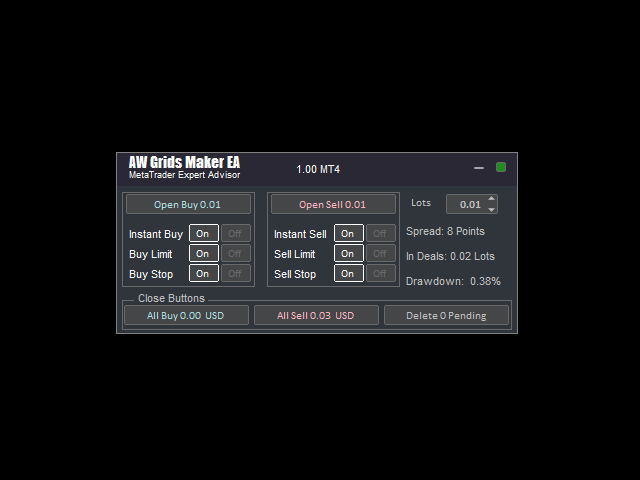
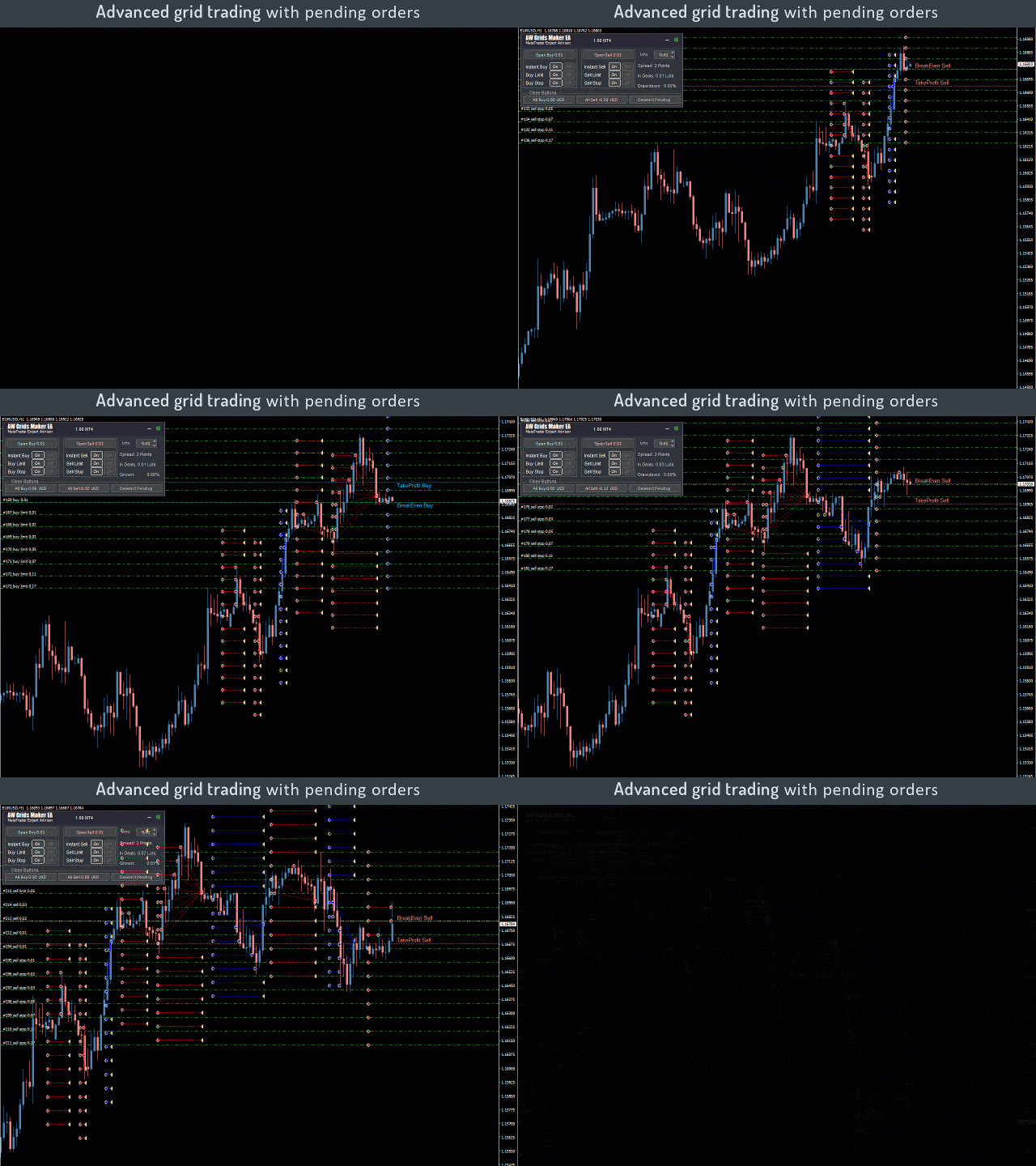
"AW_Grids_Maker"는 보류 중인 주문으로부터 그리드를 구축하는 데 사용됩니다. 이 유틸리티는 범용적이며, 유연한 설정과 직관적인 패널 인터페이스를 제공합니다. 이 프로그램은 필요한 단계를 거쳐 STOP 및 LIMIT 주문으로부터 네트워크를 구축하며, 포지션 볼륨 배수를 사용합니다.

MT4 버전 -> 여기 / 문제 해결 -> 여기

장점:

  • 모든 유형의 보류 주문을 사용합니다.
  • 간단하고 유연한 구성.
  • 잘 디자인되고 다기능적인 유틸리티 패널입니다.
  • 잘 고안된 정보 모듈
작업의 특징:

  • 피라미딩, 클래식 평균 또는 마팅게일에 적합합니다.
  • 그리드 개설, 주문 추적 및 마감을 자동화합니다.
  • 이는 거래 시스템의 필수적인 부분이 될 수도 있고 독립적인 전략이 될 수도 있습니다.
  • 조정 가능한 거리와 거래량을 통해 모든 유형의 주문 네트워크를 구축하면 계수가 증가합니다.

패널에 대한 자세한 설명:

  1. 트레이더는 "Open_Buy" 버튼을 사용하여 보류 중인 매수 지정가 주문과 매수 정지 주문을 열 수 있습니다.
  2. 보류 중인 매도 정지 및 매도 제한 주문을 열려면 "매도 열기" 버튼을 사용하세요.
    1. 매수 지정가 주문은 현재 가격보다 낮은 가격에, 매도 지정가 주문은 현재 시장 가격보다 높은 가격에 주문합니다. 이러한 주문은 트레이더가 특정 가격 수준에서 가격 반전을 예상할 때 사용됩니다. 지정된 지정가 주문에 도달하면, 요청된 가격보다 낮은 가격으로 거래가 체결됩니다.
    2. 매수 손절매 주문은 현재 가격보다 높은 가격에, 매도 손절매 주문은 현재 시장 가격보다 낮은 가격에 주문합니다. 이 주문은 브레이크아웃 매매 전략에서 가장 자주 사용됩니다. 가격이 특정 가격에 도달하면, 보류 중인 손절매 주문은 자동으로 시장가 주문으로 전환됩니다.
  3. ON/OFF 스위치를 사용하면 버튼을 누를 때 정지 또는 제한 주문의 자동 개설을 비활성화하거나 활성화할 수 있습니다. "Open_Buy"   또는   "오픈셀" .
  4. 보류 주문 조정 블록. 이 블록은 원하는 거래량이나 수량을 입력할 수 있는 입력 필드로 구성되어 있습니다. 증가 및 감소 버튼을 사용하여 데이터를 변경할 수도 있습니다.  
    1. "_Lots_" 입력 필드에서 거래량을 조정합니다.
    2. 마찬가지로, "배율" 입력 필드에서 보류 주문 간의 배수를 변경할 수 있습니다. 보류 주문 수가 1개보다 많을 때 주문 간의 배수가 적용됩니다.
    3. "_Step_" 입력 필드를 사용하여 동일한 유형의 보류 주문 간 간격을 조정하세요. 이 변수는 동일한 유형의 보류 주문이 두 개 이상 있는 경우에도 적용됩니다.
    4. 보류 중인 주문 바구니 하나에 있는 주문 수는 "_숫자_" 입력 필드에서 조정됩니다.
  5. 이 패널의 하단은 "Close_Buttons" 블록으로 표시됩니다. 이 블록에서 트레이더는 모든 보류 주문을 삭제하거나 "매수" 또는 "매도" 유형의 보류 주문을 개별적으로 삭제할 수 있습니다.

입력 매개변수:

Size_of_the_first_order – 동일 유형의 주문 바구니에서 첫 번째 주문의 크기입니다. "Multiplier_for_size_of_orders" 변수를 "1"로 설정하면 바구니에 있는 모든 주문의 크기가 지정된 값과 같아집니다.

Order_Magic_Number – 유틸리티의 기본 주문 식별자입니다. 주로 주문 식별에 사용됩니다.

EA의 주문에 대한 의견 - 유틸리티에서 개설한 주문에 대한 의견입니다.

Number_of_pending_orders_in_grids – 각 바구니에 대한 각 유형의 주문 수(매수 한도, 매수 정지, 매도 한도, 매도 정지)

Maximum_slippage_in_points - 주문 개시 및 마감에 허용되는 최대 슬리피지 포인트입니다.

Multiplier_for_size_of_orders - 보류 주문에 대한 볼륨 배수, 주문 그리드의 각 후속 미결 주문은 이 계수만큼 이전 주문보다 커집니다.

Step_for_grids – 그리드에서 순서 사이의 단계를 조절하는 변수로, 포인트 단위로 측정됩니다.

Virtual_TakeProfit_Size_(In_Points) – 손익분기점을 기준으로 현재 주문 그룹에 대해 계산된 이익실현 규모(포인트)입니다.

Font_size_in_panels - 패널의 글꼴 크기.

    리뷰 3
    Aristide
    173
    Aristide 2022.07.01 19:52 
     

    Another good product from the author, work well thx.

    ZERO9898.Tom KC Wang
    2190
    ZERO9898.Tom KC Wang 2023.04.18 05:31 
     

    A good and simple sub. EA, suggesting to add more functions to get higher performance.

    Eduardo Alvarado
    317
    Eduardo Alvarado 2020.06.09 19:49 
     

    This EA is a manual trade panel, it opens a grid of buy/sell trades, together with pending stop and limit orders, according to the settings you put on the trade panel. It closes the trades when the average profit is met, for all the buy/sell trades. I give it 4 starts because it only closes the current trades, but leaves open the pending orders, which could be dangerous if you forget to close them manually.

    추천 제품
    Short Description Swing Timing Breakout EA is a smart Expert Advisor for MetaTrader 5 that combines trend filtering, momentum timing, and dynamic risk management to capture high-probability swing and breakout opportunities. Full Description Swing Timing Breakout EA is a professional trading robot designed for MetaTrader 5, suitable for traders who want a balance between automation, control, and disciplined risk management. This EA uses a trend-following and momentum confirmation approach ,
    Position Sizer Trade Panel — Trade Like on TradingView The fastest way to place precise, risk-managed trades on MetaTrader 5. Drag your Entry, Stop Loss and Take Profit lines directly on the chart, type your risk amount, and execute with one click — exactly like TradingView. HOW IT WORKS Attach the EA to any chart Drag the blue Entry line to your desired entry price Drag the red SL line to your stop loss level Drag the green TP line to your take profit level Type your risk amount ($ or %) in the
    Rainbow EA MT5
    Jamal El Alama
    Description : Rainbow EA MT5 is a simple Expert advisor based on   Rainbow MT5 indicator witch is based on Moving average with period 34. The indicator is incorporated in the EA, therefore, it is not required for the EA to operate, but if you wish, you can download it from   my product page . The Expert Advisor settings are as follows : Suitable for Timeframes up to H1 The parameters below can be set according to your trading rules. StopLoss ( Stop Loss in pips) TakeProfit ( Take Profit in pips
    Net Z
    Sugianto
    5 (1)
    NET Z uses a very well-known trend reversal technique to determine position entry with slight modifications by using virtual trade techniques and virtual pending orders so that position entry is not too early or too late. Why NETZ? NET Z does not require complicated settings and is easy to use because user only need to upload a set file that is already available. Currently there are set files for 20 fx pairs. The best GRID EA with the ability to control risks. I will share my personal daily rou
    Alpha Bullish Engine MT5 Overview Alpha Bullish Engine(No Martingale, no Grid) is a professional Expert Advisor for MetaTrader 5 designed to identify and trade high-quality market bullish opportunities while maintaining a strong focus on risk management and capital preservation. Built with a combination of trend analysis, momentum assessment, and intelligent trade management, the EA is designed to operate in favorable market conditions while avoiding unnecessary exposure during less suitable env
    Imagine flying a real aircraft without ever stepping into a flight simulator. That's what trading is like. You have to simulate your strategy before you can take it to a live market. It is good if you can simulate things speedily before even stepping into any live market, or before coming up with an automated system.  People don't have all day to stare at a higher timeframe chart until the entry signal finally arrives. That's why I built this so that you can simulate your strategy with speed. Th
    FREE
    Advanced MT5 Indicator: Precision-Powered with Pivot Points, MAs & Multi-Timeframe Logic Unlock the full potential of your trading strategy with this precision-engineered MetaTrader 5 indicator —an advanced tool that intelligently blends Pivot Points , Adaptive Moving Averages , and Multi-Timeframe Analysis to generate real-time Buy and Sell signals with high accuracy.    If you want to test on Real Market, Let me know. I will give the Demo file to run on Real Account.    Whether you're a scal
    Grid Trading EA is a semi-automated one-click trading EA for both Normal Trading and Grid/Martingale Trading . Normal Trading Simply click Buy or Sell directly from the chart. The EA will automatically manage trades by: Setting Stop Loss and Take Profit Managing Trailing Stop Grid / Martingale Trading (For Hedging Account Type Only) When Grid Trading mode is enabled, the EA will automatically open additional grid orders at specified distances while increasing the lot size based on your settings.
    Side by Side Lines EA
    Suci Ridha Krismayanti
    Side-by-Side Lines EA Overview & Strategy Logic The Side-by-Side Lines EA is an automated continuation trading system designed to capture explosive market momentum using the 3-candle Side-by-Side Lines pattern (Bullish & Bearish). This pattern identifies rare market conditions where strong buying or selling pressure causes a price jump (gap) that refuses to pull back, signaling that the dominant trend is continuing with full force. Trading Logic Buy Entry (Bullish Side-by-Side Lines): The market
    Gold Liquidity Master Pro H4
    Oscar Dario Murillo Delgado
    Gold Liquidity Master Pro is a high-precision algorithmic trading system designed exclusively for Gold (XAUUSD). Unlike conventional bots that use lagging indicators, this Expert Advisor (EA) operates based on Price Action and Institutional Liquidity Taking, identifying false breakouts on 4-hour (H4) candles where large banks typically "clean up" weak hands before a major move. Recommendations Symbol: XAUUSD (Gold) Timeframe: H4 Minimum Deposit: $500  Account Type: ECN / Raw Spread with low
    Has rsi signal
    Evgenii Savinov
    HAS RSI Signal — SL/TP 자동 계산 기능이 포함된 전문 트렌드 지표 HAS RSI Signal 은 검증된 클래식 지표와 현대적인 노이즈 필터링 알고리즘을 결합한 강력한 트레이딩 도구입니다. 이 지표는 Heiken Ashi Smoothed (HAS) 캔들과 RSI 오실레이터를 통해 시장을 분석하며, 추세 반전이나 과매수/과매도 구간 이탈 시 트레이더에게 명확한 진입 신호를 제공합니다. 주요 장점: 이중 필터링: Heiken Ashi Smoothed를 사용하여 시장의 '노이즈'를 제거하고, RSI를 통해 모멘텀의 강도를 확인합니다. 자동 레벨 계산: 단순히 신호만 주는 것이 아니라, 변동성( ATR )을 기반으로 최적의 손절매(Stop Loss) 및 이익 실현(Take Profit) 레벨을 자동으로 계산합니다. 시각적 편의성: 신호가 차트 위에 컬러 캔들 형태로 직접 표시되어 복잡하지 않고 직관적으로 추세를 파악할 수 있습니다. 알림 시스템: 터미널 알람, 사운드, 스마
    TradePilotmt5
    Hossein Khalil Alishir
    TradePilot Expert Advisor (EA) for MetaTrader 5 TradePilot is a professional and user-friendly Expert Advisor (EA) for MetaTrader 5 (MT5) . It simplifies automated trading , risk management , and trade execution with a smart trading panel . Perfect for beginners and experienced traders looking for a reliable trade manager EA with automated lot size calculation and smart position management. Key Advantages User-Friendly Trading Panel: Customizable panel with buttons and hotkeys for fast ex
    Overview Harmonic Patterns MT5 is a technical analysis indicator designed for the MetaTrader 5 platform. It identifies and displays harmonic price patterns, such as Butterfly, Cypher, Crab, Bat, Shark, and Gartley, in both bullish and bearish directions. The indicator calculates key price levels, including entry, stop loss, and three take-profit levels, to assist traders in analyzing market movements. Visual elements and customizable alerts enhance usability on the chart. Features Detects six ha
    AIP – TradeManagement The main functions of Ea TradeManagement 1. GUI o      Interact with running EAs o      GUI for placing orders o      Closing orders by Ticket o      Closing orders by MagicNumber o      Closing all orders o      Delete Pending orders 2.  General management: o    Management based on Symbol, manually orders , orders from the EA, and orders from other EAs o    User-friendly trade interface with the ability to drag and drop SL,TP,Entry o      Support backtest 3.  Stoploss man
    HMA Trend Professional MT5
    Pavel Zamoshnikov
    4.25 (4)
    Improved version of the free HMA Trend indicator (for MetaTrader 4) with statistical analysis. HMA Trend is a trend indicator based on the Hull Moving Average (HMA) with two periods. HMA with a slow period identifies the trend, while HMA with a fast period determines the short-term movements and signals in the trend direction. The main differences from the free version: Ability to predict the probability of a trend reversal using analysis of history data. Plotting statistical charts for analyzi
    Bober Real MT5
    Arnold Bobrinskii
    4.88 (16)
    Bober Real MT5 is a fully automatic Forex trading Expert Advisor. This robot was made in 2014 year and did a lot of profitbale trades during this period. So far over 7000% growth on my personal account. There was many updates but 2019 update is the best one. The robot can run on any instrument, but the results are better with EURGBP, GBPUSD, on the M5 timeframe. Robot doesn't show good results in tester or live account if you run incorrect sets. Set files for Live accounts availible only for cu
    GOLD/USDT M15 Dynamic ATR Expert Advisor Designed specifically for GOLD/USDT on the M15 timeframe, this Expert Advisor adapts perfectly to non-standard price scales, digits, and tick structures typical of crypto and synthetic gold contracts. By replacing fixed points with dynamic ATR volatility metrics, it delivers robust risk control and precision execution. Key Features Dynamic ATR Risk Management: Stop Loss, Take Profit, and Trailing Stop are calculated using ATR multipliers based on real-tim
    DESCRIPTION Liquidity Counter Pro   is an advanced automated trading system for MetaTrader 5 that specializes in detecting and capitalizing on institutional liquidity sweeps and retail stop-hunting events. The EA uses pure price action and market structure analysis without relying on traditional lagging indicators. The system applies a   multi-layered scoring methodology   with a base threshold of   90 points , requiring strong confirmation from multiple market factors before any entry. It i
    Divergent Stochastic Filter II Catch Reversals Early, Filter Noise, Trade with Confidence The Edge: Why This Stochastic is Different  Every trader knows the Stochastic oscillator. But knowing when to trust its signals, that's the real challenge. The Divergent Stochastic Filter II transforms this classic indicator into a precision reversal detection system by adding critical elements: divergence intelligence, signal filtering and exhaustion detection.  While standard Stochastic oscillators fire s
    숫자 시퀀스 중 하나를 "산불 시퀀스"라고 합니다. 가장 아름다운 새로운 시퀀스 중 하나로 인식되었습니다. 주요 특징은 이 시퀀스가 ​​가장 짧은 경우에도 선형 추세를 피한다는 것입니다. 이 지표의 기초를 형성한 것은 이 속성입니다. 금융 시계열을 분석할 때 이 지표는 가능한 모든 추세 옵션을 거부하려고 합니다. 그리고 그가 실패하는 경우에만 그는 추세의 존재를 인식하고 적절한 신호를 제공합니다. 이 접근 방식을 통해 새로운 트렌드가 시작되는 순간을 정확하게 결정할 수 있습니다. 그러나 거짓 긍정도 가능합니다. 숫자를 줄이기 위해 이 표시기에 추가 필터가 추가되었습니다. 새 막대가 열리면 신호가 생성됩니다. 어떤 경우에도 다시 그리기가 발생하지 않습니다. 표시 매개변수: Applied Price   - 적용된 가격 상수. Period Main   - 표시기의 기본 기간, 유효한 값은 5 - 60 이내입니다. Period Additional   - 추가 기간, 이 매개변수의 유효한
    PipsPro Scalper Gold
    Mitra Emiten Digital
    3 (2)
    PipsPro Scalper Gold (MT5) is an Expert Advisor developed exclusively for XAUUSD trading. It is compatible with both 2-digit and 3-digit brokers for the XAUUSD symbol. Before opening any position, the EA applies multiple filters to identify high-quality trading conditions. Because of its strict entry requirements, it does not place trades every day. Under Strategy 1 , the EA usually opens only a few trades per week in order to maintain a high level of accuracy and precision. This makes it well s
    The purpose   of this utility is to manage one or more subwindow in the same chart by opening and closing them through a button or the keyboard keys How it works: If you want to handle more than one subwindow you need to reinstall the indicator . In this case some setups has to be customized onlu in the last subwindow installed and others setups in the installed subwindow during the first time installation. They are denoted in the input rispectively as ' LW ' and ' IW '. First of all install
    Unlock powerful breakout opportunities The 123 Pattern is one of the most popular, powerful and flexible chart patterns. The pattern is made up of three price points: a bottom, a peak or valley, and a Fibonacci retracement between 38.2% and 71.8%. A pattern is considered valid when the price breaks beyond the last peak or valley, moment at which the indicator plots an arrow, rises an alert, and the trade can be placed. [ Installation Guide | Update Guide | Troubleshooting | FAQ | All Products  ]
    Pro Gold System Indicator
    PEDRO JOAQUIM GONCALVES GOMES
    ADVANCED FUNCTIONALITIES: Trend Score (0-100) with visual bar Intelligent signals with adjustable strength (1-10) Risk management with automatic TP/SL Audible and visual alerts Price zones with smooth filling Multi-indicator analysis (RSI, ATR, BB, EMAs) DESIGN FEATURES Modern Visual: Smooth and well-spaced lines (EMA with 2-3px width) Vibrant and professional colors (Sky Blue, Orange, Gold) Modern arrows (code 233/234) for buy/sell signals Configurable dark/light theme Adjustable transparency f
    Introducing the  Precision Data Extractor: SMMA , an MQL5 utility crafted for traders, analysts and quants who need accurate historical data to build robust datasets. This tool lets you selectively pull historical price and indicator data—  Smoothed Moving Average  ( SMMA )—from  multiple applied prices, timeframes, and  periods , then stores it in a  CSV  format, making it easy to feed into  machine learning models, trading algorithms , or  in-depth market analyses . Compatible with  Forex ,  S
    NightRider
    Ivan Giovanni Rapisarda
    LAUNCH PRICE OFFER! ONLY 159$ PRICE INCREASES EVERY 10 SALES - GET IN EARLY Live Signal here!: https://www.mql5.com/en/signals/2389954?source=Site+Profile+Seller NIGHT RIDER Developed by AlgoControl Night Rider is a fully automated, multi-asset trading system designed to operate during controlled nighttime sessions. The system independently manages order placement, open positions, market conditions and account exposure. Night Rider has undergone extensive backtesting and forward testing a
    This indicator is used to compare the relative strength of the trade on the chart against the other several selected symbols. By comparing the price movement of each traded variety based on the same base day, several trend lines of different directions can be seen, reflecting the strong and weak relationship between the several different traded varieties, so that we can have a clearer understanding of the market trend. For example, you can apply this indicator on a EurUSD chart and compare it w
    GoldPro Max
    Taher Ahmed Mohamed Taha Elshafei
    GOLDPRO MAX Advanced Multi-Timeframe and Smart Money Market Analysis for MetaTrader 5 GoldPro Max is a professional market analysis indicator for MetaTrader 5 designed to help traders study market direction, price structure, liquidity, market imbalance and potential trading areas from multiple perspectives. The indicator combines Multi-Timeframe Analysis, Smart Money Concepts, Market Structure, Liquidity Analysis, Order Blocks, Fair Value Gaps, Premium and Discount analysis, Smart Analytical Eng
    Binary Options Assistant (BOA) Multi Currency Dashboard for Binary Options (MT5) . You can use any of the BOA Signals Indicators with the dashboard. Just change the BOA Signals Indicator Name in the dashboard settings to the indicator you want to get signals from. For example: CHILL. BLAZE:  BOA_BLAZE_Indicator_v1   Strategy :   BLW Online Trading Binary Options Strategy (3 Moving Average) LAVA:  BOA_LAVA_Indicator_v1   Strategy:   Lady Trader Binary Options Strategy (Bollinger Bands & Stochas
    Naturu
    Ivan Stefanov
    5 (1)
    “Naturu”는 자연의 대칭성을 알고리즘으로 활용하는 수동 인디케이터입니다. 간단한 전략과 숨겨진 지혜로 시장을 제패하세요! 인디케이터를 로드하면 위(Top)와 아래(Bottom) 두 개의 라인이 표시됩니다. 라인을 한 번 클릭해 활성화한 후, 이동하고 싶은 캔들 위를 클릭하면 그 위치로 이동합니다. 사용자가 고점과 저점을 지정하면, 인디케이터가 자동으로 계산합니다: 마젠타 색 영역: 상승(불) 세력과 하락(곰) 세력의 관심이 가장 가까워져서 지지/저항이 될 가능성이 큰 구간 회색 영역: 다음 관심 구간 아쿠아 색 실선: 상승 세력의 목표가 골드 색 실선: 하락 세력의 목표가 수동 인디케이터는 실시간 시장 상황과 개인의 직관에 따라 레벨을 자유롭게 조정할 수 있는 완전한 제어력과 유연성을 제공합니다. 직접 가격 움직임을 분석함으로써 지지·저항과 패턴 형성을 본질적으로 이해할 수 있습니다. 인간의 판단을 통해 자동 시스템이 놓치거나 오해하기 쉬운 ‘노이즈’를 걸러내어 잘못된 신호를
    이 제품의 구매자들이 또한 구매함
    Trade Assistant MT5
    Evgeniy Kravchenko
    4.41 (216)
    거래당 위험 계산, 라인을 사용한 손쉬운 신규 주문, 부분 청산 기능을 통한 주문 관리, 7가지 유형의 트레일링 스탑 및 기타 유용한 기능을 제공합니다. 추가 자료 및 지침 설치 지침   -   애플리케이션 지침   -   데모 계정용 애플리케이션 평가판 라인 기능       - 차트에 개시선, 손절매, 차익실현을 표시합니다. 이 기능을 사용하면 새로운 주문을 쉽게 하고 개봉 전에 추가 특성을 볼 수 있습니다. 위기 관리       -       위험 계산 기능은 설정된 위험과 손절매 주문의 크기를 고려하여 새 주문의 볼륨을 계산합니다. 이를 통해 손절매 크기를 설정하고 동시에 설정된 위험을 존중할 수 있습니다. 로트 계산 버튼 - 위험 계산을 활성화/비활성화합니다. 필요한 위험 값은 위험 필드에 0에서 100 사이의 백분율 또는 예금 통화로 설정됩니다. 설정 탭에서 위험 계산 옵션을 선택합니다. $ 통화, % 잔액, % 지분, % 자유 마진, % 사용자 정의, % AB 이전
    Trade Manager EA에 오신 것을 환영합니다. 이 도구는 거래를 보다 직관적이고 정확하며 효율적으로 만들기 위해 설계된 궁극적인 리스크 관리 도구 입니다. 단순한 주문 실행 도구가 아닌, 원활한 거래 계획, 포지션 관리 및 리스크 제어를 위한 종합 솔루션입니다. 초보자부터 고급 트레이더, 빠른 실행이 필요한 스캘퍼에 이르기까지 Trade Manager EA는 외환, 지수, 상품, 암호화폐 등 다양한 시장에서 유연성을 제공합니다. Trade Manager EA를 사용하면 복잡한 계산은 이제 과거의 일이 됩니다. 시장을 분석하고 진입, 손절 및 익절 수준을 차트의 수평선으로 표시한 후 리스크를 설정하면, Trade Manager가 이상적인 포지션 크기를 즉시 계산하고 SL 및 TP 값을 실시간으로 표시합니다. 모든 거래가 간편하게 관리됩니다. 주요 기능: 포지션 크기 계산기 : 정의된 리스크에 따라 거래 크기를 즉시 결정합니다. 간단한 거래 계획 : 진입, 손절, 익절을 위한
    ================================================================================ POC BREAKOUT - V20.72. Full Professional Grade Toolkit ================================================================================ POC Breakout is a full MetaTrader 5 trading dashboard for discretionary traders who want breakout signals, Point of Control (POC) context, volume profiles, order flow, market structure, news, alerts, and advanced trade planning in one professional workspace. Attached directly to you
    TradePanel MT5
    Alfiya Fazylova
    4.88 (167)
    Trade Panel은 다기능 거래 도우미입니다. 이 애플리케이션에는 50개 이상의 수동 거래 기능이 포함되어 있으며 대부분의 거래 작업을 자동화할 수 있습니다. 앱 사용 설명서 + 동영상 설명: https://www.mql5.com/en/blogs/post/756482 데모 계정용 앱 체험판: https://www.mql5.com/en/blogs/post/750865 앱 설치 방법: https://www.mql5.com/en/blogs/post/756239 시각 모드에서 앱 테스트 방법: https://www.mql5.com/en/blogs/post/770277 VPS MetaTrader에 앱 설치 방법: https://www.mql5.com/en/blogs/post/770190 거래. 한 번의 클릭으로 거래를 수행할 수 있습니다: 리스크 자동 계산과 함께 예약 주문 및 포지션 열기. 한 번의 클릭으로 여러 주문 및 포지션 열기. 주문 그리드 열기. 예약 주문 및 포지션을 그룹별로
    베타 출시 Telegram to MT5 Signal Trader 는 곧 공식 알파 버전을 출시할 예정입니다. 일부 기능은 아직 개발 중이며, 작은 버그가 발생할 수 있습니다. 문제가 있으면 꼭 보고해 주세요. 여러분의 피드백은 소프트웨어 개선에 도움이 됩니다. Telegram to MT5 Signal Trader 는 Telegram 채널 또는 그룹의 거래 신호를 자동으로 MetaTrader 5 계정으로 복사하는 강력한 도구입니다. 공개 및 비공개 채널을 모두 지원하며, 여러 신호 제공자를 여러 MT5 계정에 연결할 수 있습니다. 소프트웨어는 빠르고 안정적으로 동작하며, 복사된 거래를 완벽히 제어할 수 있습니다. 인터페이스는 깔끔하며 대시보드와 차트가 시각적으로 구성되어 있고, 직관적인 네비게이션이 가능합니다. 여러 Signal Account를 관리하고, 공급자별 설정을 세밀하게 조정하며, 모든 동작을 실시간으로 모니터링할 수 있습니다. 필수 조건 MQL의 제한으로 인해 EA는 Te
    Local Trade Copier EA MT5
    Juvenille Emperor Limited
    4.94 (148)
    Local Trade Copier EA MT5 를 사용하여 매우 빠른 거래 복사 경험을 해보세요. 1분 안에 간편하게 설정할 수 있으며, 이 거래 복사기를 사용하면 Windows 컴퓨터 또는 Windows VPS에서 여러 개의 MetaTrader 터미널 간에 거래를 0.5초 미만의 초고속 복사 속도로 복사할 수 있습니다. 초보자든 전문가든   Local Trade Copier EA MT5 는 다양한 옵션을 제공하여 사용자의 특정 요구에 맞게 맞춤 설정할 수 있습니다. 이는 수익 잠재력을 높이려는 모든 사람을 위한 최고의 솔루션입니다. 지금 사용해보시고 이것이 왜 시장에서 가장 빠르고 쉬운 무역용 복사기인지 알아보세요! 팁: 여기 에서 데모 계정에서 Local Trade Copier EA MT5 데모 버전을 다운로드하여 사용해 볼 수 있습니다. 다운로드한 무료 데모 파일을 MT5 >> File >> Open Data Folder >> MQL5 >> Experts 폴더에 붙여넣고 터
    EA Overfitter
    Stephen J Martret
    That backtest looks great. But will it still be making money tomorrow, next week, next month? EA Overfitter re-runs your EA on 100 price histories it has never seen. One score tells you if the edge is real. A backtest tells you what an EA did on one price history — the one that happened to occur. What you cannot tell from it is how much of that result was the strategy and how much was the particular path. EA Overfitter answers that. It builds up to 100 synthetic price histories your EA has n
    Telegram to MT5 Multi-Channel Copier 는 Telegram 채널의 트레이딩 시그널을 MetaTrader 5로 자동 복사합니다. 봇도, 브라우저 확장도, 수동 복사도 필요 없습니다. Telegram에 시그널이 도착하면 EA가 몇 초 안에 터미널에서 주문을 실행합니다. 제품은 두 가지 구성 요소로 이루어집니다: Telegram 채널을 수신하는 Windows 애플리케이션과, MT5 터미널에서 시그널을 실행하는 본 EA입니다. MT4 버전도 제공됩니다   여기 . 설정 가이드와 앱 다운로드:   https://www.mql5.com/en/blogs/post/768988 작동 방식 Windows 앱은 봇이 아닌 본인의 API 자격 증명으로 Telegram에 연결됩니다. 따라서 비공개·VIP 채널을 포함해 구독 중인 모든 채널, 그룹, 토픽을 읽을 수 있습니다. 직접 메시지를 보내는 시그널 봇, 개인 채팅, 심지어 나의 저장된 메시지도 소스로 사용할 수 있습니다. 시
    Farmed Hedge Yield Farming | All Markets (Manual - Hybrid - Semi/Automated EA) VERIFIED TRADING RESULTS - Farmed Hedge Yield Axi Copy:  https://www.mql5.com/en/signals/2356376 - Farmed Hedge Yield Exn Copy:   https://www.mql5.com/en/signals/2356404 - Farmed Hedge Yield V Copy:  https://www.mql5.com/en/signals/2357156 * Before purchasing, please feel free to send me a message if you have any questions about the product or setup. ** After purchase , access the Setup Guide and Advanced Setup G
    Astro Trade MT5
    Indra Maulana
    5 (4)
    25% discount on the release of the tool: only for the next 3 buyers Send a message to receive a demo version. AstroTrade Trading Assistant AstroTrade is a comprehensive multi-functional trading utility developed for the MetaTrader 5 platform. It integrates essential tools for trade execution, risk management, and technical monitoring into a single unified interface. The application is designed to assist traders in managing their daily operations through a visual and structured environment. Vi
    Telegram To MT5 Ultra
    Mirel Daniel Gheonu
    5 (5)
    Telegram To MT5 — 시그널 카피어 텔레그램 채널의 트레이딩 콜을 실제 MT5 주문으로 바꿔 드립니다 — 자동으로, 원하는 만큼의 계좌에서, 리스크와 규칙을 완전히 당신의 통제 아래 둡니다. Telegram To MT5는 이미 텔레그램에서 팔로우하고 있는 VIP / 시그널 채널을 당신의 MetaTrader 5 터미널에 연결합니다. 무료 동반 데스크톱 앱이 메시지를 읽고(봇을 차단하는 채널에서도 가능), 이 EA가 당신의 계좌에서 이를 실행합니다 — 당신만의 리스크 설정, 심볼 매핑, 익절(TP) 처리, 세션 및 뉴스 필터를 적용합니다. 이것은 블랙박스 전략이 아니라 시그널 카피어입니다. 어떤 채널을 신뢰할지, 각 거래의 수량과 관리 방식을 당신이 결정합니다. 단계별 설정 및 동반 앱 설치 가이드 작동 방식 [당신의 텔레그램 채널] -> [동반 데스크톱 앱] -> [MT5 + 이 EA] -> 주문 동반 데스크톱 앱(무료, 포함)은 당신의 텔레그램 계정으로 로그인하여 선택한
    Exp COPYLOT CLIENT for MT5
    Vladislav Andruschenko
    3.97 (35)
    MetaTrader 5용 전문 트레이드 복사기 MetaTrader 용 빠르고 전문적이며 신뢰할 수 있는 트레이드 복사기 입니다. COPYLOT 은 MT4와 MT5 터미널 간의 Forex 거래 복사를 지원하며, Hedge 및 Netting 계좌를 모두 지원합니다. COPYLOT MT5 버전 지원 구성: - MT5 Hedge → MT5 Hedge - MT5 Hedge → MT5 Netting - MT5 Netting → MT5 Hedge - MT5 Netting → MT5 Netting - MT4 → MT5 Hedge - MT4 → MT5 Netting MT4 버전 전체 설명 + DEMO + PDF 구매 방법 설치 방법 로그 파일 확인 방법 테스트 및 최적화 방법 Expforex의 모든 제품 MT4 터미널로도 거래를 복사할 수 있습니다(MT4 → MT4, MT5 → MT4): COPYLOT CLIENT for MT4 COPYLOT은 2개, 3개, 심지어 10개의 터미널과 동시에 작동할
    HINN MagicEntry Extra
    ALGOFLOW OÜ
    4.74 (19)
    HINN MAGIC ENTRY – the ultimate tool for entry and position management! SIMPLE. FASTEST. INTUITIVE. MAX AUTOMATED. Place orders by selecting a level directly on the chart! full description   ::  demo-version  :: 60-sec-video-description Key features: - Market, limit, and pending orders - Automatic lot size calculation - Automatic spread and commission accounting - Unlimited partitial take-profits  - Breakeven and trailing stop-loss and take-profit  functions - Invalidation leves - Intuitive, a
    Premium Trade Manager - 코치가 내장된 트레이딩 패널 Premium Trade Manager 는 차트 안에 트레이딩 코치를 심어놓은 도구입니다. 주문을 확정하기 전에, AI 트레이딩 코치 Max가 설정된 거래를 직접 읽고 명확한 판단을 내려줍니다. 스톱이 규율 있는 접근 방식에 맞는지, 리스크 크기가 합리적인지, 고영향 뉴스 이벤트가 몇 분 후에 있는지, 프롭 펌 한도에 근접했는지. 그 아래에는 완전한 실행 엔진이 있습니다. 원클릭 리스크 기반 진입, 차트에서 드래그로 세우고 거래가 진행되는 동안에도 계속 움직일 수 있는 플랜, 최대 4단계 분할 익절, 7가지 트레일링 방식, 실시간 프롭 펌 컴플라이언스, 뉴스 가드, 그리고 자체 비용을 평가하는 스프레드까지. 결정은 당신이 내립니다. Max가 두 번째 시선으로 확인합니다. 패널이 그 이후의 모든 것을 처리합니다. 구매 전에 직접 체험해 보세요. 브라우저에서 라이브 패널을 직접 클릭해볼 수 있습니다. 구매 전에 실제
    Trade Dashboard MT5
    Fatemeh Ameri
    4.95 (132)
    Trade Dashboard simplifies how you open, manage, and control your trades, with built-in lot size calculation. It allows you to execute trades, manage risk, and control positions directly on the chart, with tools such as partial close, breakeven, and trailing stop. Designed to reduce manual work and help you stay focused on your trading decisions. A demo version is available for testing. Detailed explanations of features are provided within the MQL5 platform. Installation instructions are include
    Anchor Trade Manager
    Kalinskie Gilliam
    5 (8)
    Anchor: The EA Manager Your EAs cannot see each other, but Anchor can. Anchor gives you one place to coordinate your EAs, manage risk, and decide when trading is allowed. It works alongside the trading bots you already use without any changes to them. The Problem One EA opens a trade. Then another starts trading. The next thing you know, you wake up to multiple grids built across your account. Each EA may be doing exactly what it was designed to do, but together they can place far more risk on y
    Ultimate Extractor
    Clifton Creath
    5 (8)
    Ultimate Extractor - Professional Trading Analytics for MT5 *****this is the local HTML version of Ultimate Extractor. !!!!!it is not compatible with Cloud!!!! For the online version please reach out to me directly****** Ultimate EA manager also now available when you use cloud pro and above for free!! Ultimate Extractor transforms your MetaTrader 5 trading history into actionable insights with comprehensive analytics, interactive charts, and real-time performance tracking. What It Does Automa
    X2 Copy MT5
    Liubov' Shkandrii
    빠르게. 정확하게. 혁신적으로. 기술 기반. 혁신적인 X2 Copy MT5로 즉각적인 거래 복사를 경험해 보세요. 단 10초의 간단한 설정만으로 단일 컴퓨터 또는 Windows VPS에서 MetaTrader 터미널 간의 거래를 전례 없는 속도로 동기화하는 강력한 도구를 얻을 수 있습니다. 여러 계정을 관리하든, 신호를 따라 거래하든, 전략을 확장하든, X2 Copy MT5는 비교할 수 없는 정밀도와 제어력으로 작업 흐름에 적응합니다. 가장 기술 중심적인 거래 복사 솔루션으로 더 빠르고 안정적으로 작업하세요. 무료 평가판을 사용해 보고 시스템에서 속도를 확인해 보십시오. *중요: MT4 터미널 작업에는 별도의 X2 Copy MT4 버전이 필요합니다 X2 Copy MT4/5 설정 및 기능 설명 | X2 Copy 체험판 설치 방법 주요 기능 고속 복사 — 0.1초 이내 거래 전송 모든 복사 유형에 대한 범용 지원: MT4>MT4, MT4>MT5, MT5>MT4, MT5>MT5 직관적인 인
    Trade copier MT5
    Alfiya Fazylova
    4.59 (54)
    Trade Copier는 거래 계정 간의 거래를 복사하고 동기화하도록 설계된 전문 유틸리티입니다. 복사는 공급자의 계정/단말기에서 동일한 컴퓨터 또는 vps에 설치된 수신자의 계정/단말기로 발생합니다. 프로모션 - 이미 "Trade copier MT5"를 구매하셨다면, "Trade copier MT4"를 무료로 받으실 수 있습니다 (MT4 → MT5 및 MT4 ← MT5 복사용). 조건에 대한 자세한 정보를 원하시면, 개인 메시지를 통해 저희에게 문의해 주시기 바랍니다! 구매하기 전에 데모 계정에서 데모 버전을 테스트할 수 있습니다. 데모 버전 여기 . 전체 지침 여기 . 주요 기능 및 이점: 복사기는 "МТ5> МТ5", "МТ4> МТ5", "МТ5> МТ4" 복사를 지원합니다. 복사기는 데모 계정 > 실 계정, 실 계정 > 데모 계정, 데모 계정 > 데모 계정 및 실제 계정 > 실 계정 복사를 지원합니다. 복사기는 읽기 전용 암호가 적용된 투자자 계정에서 복사를 지원합니다. 하
    Timeless Charts
    Samuel Manoel De Souza
    5 (8)
    Timeless Charts is an all-in-one trading utility for professional traders. It combines custom chart types such as Seconds Charts and Renko with advanced order flow analysis using Footprints , Clusters , Volume Profiles , VWAP studies, and anchored analysis tools for deeper market insight. Trading and position management are handled directly from the chart through an integrated trade management panel , while Market Replay and Virtual Accounts provide environments for practicing trading skills and
    FUTURES ORDERFLOW FOOTPRINT CHART Professional OrderFlow EA for MetaTrader 5 Version 1.01| Professional tool for real traders | Institutional-Grade Visualization STRATEGY TESTER USERS - PLEASE SELECT EVERY REAL TICK WHEN TESTING AND YOU HAVE DOWNLOADED HISTORICAL DATA. IF YOU SEE A WAITING SCREEN AND IT IS NOT DOWNLOADING, IT MEANS YOU HAVE LOW HISTORICAL DATA. TRY 1 MIN AND 5 MIN FIRST ON 1 DAY DATA. ONE DAY DATA SHOULD BE THE NEWEST AND MOST CURRENT DATE. PLEASE WAIT UNTIL THE MARKET HAS ROL
    The product will copy all telegram signal to MT5 ( which you are member) , also it can work as remote copier.  Easy to set up, copy order instant, can work with almost signal formats, image signal,  s upport to translate other language to English Work with all type of channel or group, even channel have "Restrict Saving Content", work with  multi channel, multi MT5 Work as remote copier: with signal have ticket number, it will copy exactly via ticket number. Support to backtest signal. How to s
    파워 캔들 전략 스캐너 - 자체 최적화 다중 종목 설정 찾기 도구 파워 캔들 전략 스캐너는 마켓 워치에 등록된 모든 종목에 대해 파워 캔들 지표와 동일한 자체 최적화 엔진을 동시에 실행합니다. 하나의 패널에서 현재 통계적으로 거래 가능한 종목, 각 종목별 최적의 전략, 최적의 손절매/익절 조합을 알려주며, 새로운 신호가 발생하면 즉시 알림을 전송합니다. 이 도구는 Stein Investments 에코시스템의 일부입니다. 18개 이상의 도구와 함께 당신의 1대1 AI 트레이딩 멘토 Max.  항상 대기 중, 모든 인디케이터를 깊이 있게 이해, 무언가를 차근차근 생각해보고 싶은 순간에 도움을 줍니다.  https://stein.investments 에서 만나보세요 완벽한 시장 모니터링. 종목당 3,000건 이상의 자동 최적화. 2가지 알림 유형. 한 번의 클릭으로 차트를 전환하고 바로 거래하세요. 이 도구가 필요한 이유 대부분의 다중 종목 스캐너는 가격 변동만 보여줍니다. 티커별
    MT5 to Telegram Signal Provider 는 사용하기 쉽고 완전히 커스터마이즈 가능한 유틸리티로, 특정 신호를 Telegram의 채팅, 채널 또는 그룹으로 전송하고, 귀하의 계정을 신호 제공자 로 만듭니다. 경쟁 제품과 달리 DLL 임포트를 사용하지 않습니다. [ 데모 ] [ 매뉴얼 ] [ MT4 버전 ] [ 디스코드 버전 ] [ 텔레그램 채널 ]  New: [ Telegram To MT5 ] 설정 단계별 사용자 가이드 가 제공됩니다. 텔레그램 API에 대한 지식은 필요하지 않습니다; 개발자가 제공하는 모든 것이 필요합니다. 주요 특징 구독자에게 보낸 주문 상세 정보를 커스터마이즈할 수 있습니다. 예를 들어, 브론즈, 실버, 골드와 같은 계층 구독 모델을 만들 수 있습니다. 골드 구독에서는 모든 신호를 받습니다. id, 심볼, 또는 코멘트로 주문을 필터링할 수 있습니다. 주문이 실행된 차트의 스크린샷이 포함됩니다 보낸 스크린샷에 닫힌 주문을 그려 추가 검증을 합니다
    YuClusters
    Yury Kulikov
    4.93 (43)
    Attention: You can view the program operation in the free version  YuClusters DEMO .  YuClusters is a professional market analysis system. The trader has unique opportunities to analyze the flow of orders, trade volumes, price movements using various charts, profiles, indicators, and graphical objects. YuClusters operates on data based on Time&Sales or ticks information, depending on what is available in the quotes of a financial instrument. YuClusters allows you to build graphs by combining da
    Prop Firm Os
    Gayathiri Gopalakrishnan
    5 (1)
    PROP FIRM OS Structured Trading Assistant for MetaTrader 5 PROP FIRM OS is a structured trading assistant designed for MetaTrader 5 users who prefer rule-based market analysis and organized trading workflows. The Expert Advisor combines market analysis tools, scanner functions, dashboard monitoring, alerts, risk-control settings, and trade management features inside one system. PROP FIRM OS is designed to help traders follow selected rules, filters, and monitoring conditions during trading activ
    News Filter EA
    Rashed Samir
    5 (2)
    News Filter EA: Advanced Algo Trading Assistant News Filter EA is an advanced algo trading assistant designed to enhance your trading experience. By using the News Filter EA , you can integrate a Forex economic news filter into your existing expert advisor, even if you do not have access to its source code. In addition to the news filter, you can also specify trading days and hours for your expert. The News Filter EA also includes risk management  and equity protection features. MT4 Version Ma
    EA Auditor
    Stephen J Martret
    5 (5)
    EA Auditor is an independent analysis tool for traders evaluating Expert Advisors and trading signals on MetaTrader 5. It audits backtest reports, reviews posted developer signals, and cross-verifies the two against each other to help traders assess strategies before committing capital. The MQL5 market offers a wide range of Expert Advisors from many developers, with varying approaches, quality, and transparency. EA Auditor provides a consistent, data-driven framework for reviewing them, answer
    Quant AI Agents
    Ho Tuan Thang
    5 (1)
    Quant AI Agents are independent trading Expert Advisors. Instead of trading using a fixed strategy like other conventional EAs, Quant AI Agents   is a   multi-agent AI trading framework   that turns natural-language strategy prompts into live.  WANT THE SAME RESULTS AS MY LIVE SIGNAL?   Use the exact same brokers I do:   IC MARKETS , IC TRADING   .  Unlike the centralized stock market, Forex has no single, unified price feed.  Every broker sources liquidity from different providers, creating un
    Trade Copier Ultimate
    Janitha Sandaruwan Amaradasa Wickramasingha Arachchilage
    5 (5)
    Trade Copier Ultimate - Telegram to MT5 Signal Copier Trade Copier Ultimate automatically copies Telegram trading signals into MetaTrader 5. The EA can read signal messages, detect the symbol, order type, entry price, Stop Loss, Take Profit levels and selected update commands, then execute or manage the trade in MT5 using your lot and risk settings. It is more than a basic Telegram to MT5 copier. TCU also supports Bot API and user-account Bridge workflows, Discord signal routing, local MT5 to MT
    제작자의 제품 더 보기
    AW Recovery EA MT5
    AW Trading Software Limited
    4.27 (41)
    Expert Advisor는 수익성이 없는 포지션을 회수하도록 설계된 시스템입니다.   작성자의 알고리즘은 손실 위치를 잠그고 여러 부분으로 분할하고 각 부분을 별도로 닫습니다. 손쉬운 설정, 하락 시 지연된 시작, 다른 Expert Advisors 잠금, 비활성화, 추세 필터링을 통한 평균화 및 손실 위치의 부분 마감이 하나의 도구에 내장되어 있습니다. 전체 그룹에서만 주문을 마감하는 그리드 전략과 달리 더 낮은 예금 부하로 손실을 줄일 수 있는 부분에서 마감 손실을 사용하여 손실과 함께 더 안전한 작업을 보장합니다. 주문이 복원되는 방법: 1 EA는 선택한 상품의 다른 창을 닫아 수익성이 없는 EA를 끕니다(선택 사항). 2 EA는 처리된 모든 주문에 대해 TakeProfit 및 StopLoss 수준을 재설정하고 해당 식별자가 있는 보류 주문을 삭제합니다. 3 EA는 수익성이 없는 주문의 일부를 충당하고 총 포지션 볼륨을 줄이기 위해 이익을 사용하기 위해 처리된 모든 수익성 있
    AW Scalping Dynamics MT5
    AW Trading Software Limited
    5 (1)
    추세 반전을 기반으로 작동하는 완전 자동 고급 거래 로봇입니다. 필요한 경우 그리드 전략을 사용할 수도 있습니다. 최대 카트 적재량에 도달하면 3가지 유형의 알림 및 위치 잠금 기능이 내장되어 있습니다. 기본 설정은 M15 시간대의 EURUSD에 권장됩니다. 기능 및 이점: 동시에 두 방향으로 작업할 수 있는 능력 여러 단계에서 정시에 작업하는 내장 기능 브로커가 볼 수 없는 가상 StopLoss를 사용합니다. 현재 추세의 활동을 기반으로 한 작업 알고리즘 자동 로트 계산 내장 모든 유형의 알림 사용 위치를 자동으로 잠그고 어드바이저를 비활성화하는 기능 장바구니의 후속 주문에 대한 TakeProfit 감소 현재 추세 또는 단계별로 개시 주문 조정 MT4 버전 ->       여기       / 문제 해결 ->       여기       입력 변수에 대한 자세한 설명 및 설명       ->   여기 고문이 거래하는 방법: - 우선 거래 시 현재 추세 활동을 고려합니다("주요 추세
    AW Recovery EA
    AW Trading Software Limited
    4.35 (84)
    Expert Advisor는 수익성이 없는 포지션을 회수하도록 설계된 시스템입니다.   작성자의 알고리즘은 손실 위치를 잠그고 여러 부분으로 분할하고 각 부분을 별도로 닫습니다. 손쉬운 설정, 하락 시 지연된 시작, 다른 Expert Advisors 잠금, 비활성화, 추세 필터링을 통한 평균화 및 손실 위치의 부분 마감이 하나의 도구에 내장되어 있습니다. 전체 그룹에서만 주문을 마감하는 그리드 전략과 달리 더 낮은 예금 부하로 손실을 줄일 수 있는 부분에서 마감 손실을 사용하여 손실과 함께 더 안전한 작업을 보장합니다. 주문이 복원되는 방법: 1 EA는 선택한 상품의 다른 창을 닫아 수익성이 없는 EA를 끕니다(선택 사항). 2 EA는 처리된 모든 주문에 대해 TakeProfit 및 StopLoss 수준을 재설정하고 해당 식별자가 있는 보류 주문을 삭제합니다. 3 EA는 수익성이 없는 주문의 일부를 충당하고 총 포지션 볼륨을 줄이기 위해 이익을 사용하기 위해 처리된 모든 수익성 있
    AW Trend Predictor MT5
    AW Trading Software Limited
    4.76 (55)
    하나의 시스템에서 추세와 고장 수준의 조합입니다. 고급 지표 알고리즘은 시장 노이즈를 필터링하고 추세, 진입점 및 가능한 출구 수준을 결정합니다. 표시기 신호는 통계 모듈에 기록되어 가장 적합한 도구를 선택하여 신호 기록의 효율성을 보여줍니다. 이 표시기는 이익 실현 및 손절매 표시를 계산합니다. 매뉴얼 및 지침 ->   HERE   / MT4 버전 ->   HERE 지표로 거래하는 방법: Trend Predictor로 거래하는 것은 3단계로 간단합니다. 1단계 - 포지션 열기 70% 이상의 성공률로 매수 신호를 받았습니다. 2단계 - StopLoss 결정 반대 신호로 트렁크 선택 3단계 - 이익 실현 전략 정의 전략 1: TP1 도달 시 전체 포지션 청산 전략 2: TP1 도달 시 포지션의 50% 청산 및 TP2 도달 시 나머지 50% 청산 전략 3: 추세 반전 시 전체 포지션 청산 이익: 결과를 다시 그리지 않음, 신호는 엄격하게 양초가 닫힐 때 어드바이저에서 사용할 수 있습니
    AW Double Grids MT5
    AW Trading Software Limited
    4.5 (10)
    Advisor AW Double Grids MT5   - 정보 거래 패널과 간단한 설정을 갖춘 공격적이고 완전 자동화된 그리드 어드바이저입니다. 이 전략은 한 방향의 볼륨을 곱하는 동시 양방향 작업으로 구성됩니다. 내장된 자동 로트 계산, 포지션 볼륨 증가의 다양한 변형 및 기타 기능이 구현됩니다. 지침 ->   여기   /   문제 해결 ->   여기   / MT4 버전 ->   여기 고문의 거래 방식: AW Double Grids는 반대 방향으로 진행되는 한 쌍의 주문을 통해 양방향 거래를 수행합니다. AW Double Grids는   반대 방향으로 두 개의 주문을 열어 거래를 시작합니다. 수익성 있는 주문을 마감한 후, 어드바이저는 다시 두 개의 주문을 열어 열린 방향의 볼륨을 곱합니다. 열린 주문이 있는 경우, 어드바이저는 설정에 따라 TakeProfit을 포인트로 변경할 수 있습니다. TakeProfit은 동적이거나 고정될 수 있습니다. 입력 매개변수: 주요 설정 Size
    AW Semi Sweet EA MT5
    AW Trading Software Limited
    The Expert Advisor trades where the signal for opening a new order or restoring order is an indicator strategy, which is defined by the user in the input settings. You can choose indicators, their timeframes and the number of signals sufficient to open an order. A total of 29 trading indicators are available, on the basis of which the user can form his own trading idea without using programming. Problem solving ->   HERE  / MT4 version ->   HERE Expert Advisor modes: Hedging Auto mode, Netting A
    AW Classic MACD EA mt5
    AW Trading Software Limited
    3.33 (3)
    완전 자동화된 거래 시스템. 신호로 사용되는 고전적인 표시기       MACD   는 진입점을 감지하기 위해 오실레이터와 추세 표시기를 결합합니다. 평균화, 첫 번째 및 마지막 바구니 주문을 마감하는 기능 및 자동 로트 계산 기능을 사용합니다. 고급 대시보드와 세 가지 유형의 알림이 있습니다. Problem solving ->  HERE  / MT4 version ->  HERE   / Instruction  ->   HERE   이익: 완전 자동화된 거래 시스템 쉬운 설정과 직관적인 패널 인터페이스 캔들당 하나의 주문만 열 수 있는 기능 내장 자동 로트 계산 첫 번째 및 마지막 장바구니 주문을 마감하는 내장 시스템 세 가지 유형의 알림: 푸시, 이메일, 알림 전략: EA는 표시기에서 신호를 수신할 때 위치를 엽니다. - 제로 레벨: "0" 표시의 빠른 선이 아래에서 위로 교차할 때 - 구매 신호, BUY 주문 시작. 위에서 아래로 "0" 표시를 넘을 때 - 매도 신호, 매도
    AW Trend Predictor EA MT5
    AW Trading Software Limited
    5 (2)
    AW Trend Predictor EA - 추세 표시기 신호 AW Trend Predictor를 사용하여 거래하는 Expert Advisor입니다. 지표 전략 TakeProfit 및 StopLoss를 사용합니다. 다중 시간 프레임 필터링을 사용할 수 있습니다. 표시기에 의해 계산된 고정 StopLoss 또는 StopLoss가 있습니다. 시간 기반 작업 및 평균화가 기능적으로 가능합니다. 지침 및 설명 ->   HERE   / MT4 버전 ->   HERE 이익: 현재 변동성을 기반으로 지표에 의해 계산된 고정 손절매 또는 동적 손절매를 사용합니다. 정시에 작동하여 미끄러짐과 최대 확산을 제한하는 기능이 있습니다. 모든 유형의 거래 수단에서 작동 수동으로 열린 위치 추적에 적합 모든 시간대에서 작동하며 M15보다 낮지 않은 시간대에서 작업하는 것이 좋습니다. 더 높은 기간 또는 긴 기간의 지표로 추세를 필터링하는 기능이 포함되어 있습니다. 선택적으로 평균화를 사용할 수 있습니다.
    AW Shepherd Safety MT5
    AW Trading Software Limited
    5 (4)
    The work of the utility is directed at opening new market orders, maintaining them, transferring the unprofitable orders into profit using an internal loss handling algorithm, trend filtering and various types of trailing stop and take profit. Suitable for any instruments and timeframes. The algorithm works separately for buys and sells, which allows simultaneously working in both directions as well. For the event when the additional orders opened by the utility do not become profitable, a StopO
    AW Trend Predictor
    AW Trading Software Limited
    4.62 (34)
    하나의 시스템에서 추세와 고장 수준의 조합입니다. 고급 지표 알고리즘은 시장 노이즈를 필터링하고 추세, 진입점 및 가능한 출구 수준을 결정합니다. 표시기 신호는 통계 모듈에 기록되어 가장 적합한 도구를 선택하여 신호 기록의 효율성을 보여줍니다. 이 표시기는 이익 실현 및 손절매 표시를 계산합니다. 매뉴얼 및 설명 ->   여기   / MT5 버전 ->   여기 지표로 거래하는 방법: Trend Predictor로 거래하는 것은 3단계로 간단합니다. 1단계 - 포지션 열기 70% 이상의 성공률로 매수 신호를 받았습니다. 2단계 - StopLoss 결정 반대 신호로 트렁크 선택 3단계 - 이익 실현 전략 정의 전략 1: TP1 도달 시 전체 포지션 청산 전략 2: TP1 도달 시 포지션의 50% 청산 및 TP2 도달 시 나머지 50% 청산 전략 3: 추세 반전 시 전체 포지션 청산 이익: 결과를 다시 그리지 않음, 신호는 엄격하게 양초가 닫힐 때 어드바이저에서 사용할 수 있습니다. 이
    AW Breakout Catcher EA MT5
    AW Trading Software Limited
    5 (1)
    지표 신호에 대한 고문 거래 AW Breakout Catcher는 동적 지원 및 저항 수준의 전략 돌파를 위해 노력하고 있습니다. 주문에는 StopLoss 및 TakeProfit이 고정되어 있습니다. 선택적으로 평균화를 사용할 수 있습니다. 선택한 기간에 작동하는 기능과 3가지 유형의 알림이 있습니다. 장점: 모든 유형의 거래 상품 및 모든 시간대에서 작동 그것은 제 시간에 작동하여 미끄러짐과 최대 확산을 제한하는 기능을 가지고 있습니다. 쉬운 설정과 직관적인 패널 인터페이스 수동으로 열린 위치 추적에 적합 다양한 사용자 정의 옵션 손절매 및 이익 실현 선택적으로 평균화를 사용할 수 있습니다. 사용법 및 설명 ->   여기   / MT4 버전 ->   여기 입력 설정: 주요 설정 성공률 - 주문을 여는 성공률입니다. 표시기가 지정한 것보다 작으면 고문이 주문을 열지 않습니다. 주문 로트 - 개설할 주문량 자동 로트 계산 활성화 - 자동 로트 계산을 사용합니다. 이 기능을 사용하면
    AW Classic MACD EA
    AW Trading Software Limited
    3.5 (4)
    완전 자동화된 거래 시스템. 신호로 사용되는 고전적인 표시기       MACD   는 진입점을 감지하기 위해 오실레이터와 추세 표시기를 결합합니다. 평균화, 첫 번째 및 마지막 바구니 주문을 마감하는 기능 및 자동 로트 계산 기능을 사용합니다. 고급 대시보드와 세 가지 유형의 알림이 있습니다. Problem solving ->   HERE  / MT5 version ->  HERE   /   Instruction  ->   HERE   이익: 완전 자동화된 거래 시스템 쉬운 설정과 직관적인 패널 인터페이스 캔들당 하나의 주문만 열 수 있는 기능 자동 로트 계산 내장 첫 번째 및 마지막 장바구니 주문을 마감하는 내장 시스템 세 가지 유형의 알림: 푸시, 이메일, 알림 전략: EA는 표시기에서 신호를 수신할 때 위치를 엽니다. - 제로 레벨: "0" 표시의 빠른 선이 아래에서 위로 교차할 때 - 구매 신호, BUY 주문 시작. 위에서 아래로 "0" 표시를 넘을 때 - 매도 신호, 매
    AW Double Grids EA
    AW Trading Software Limited
    4.5 (8)
    Advisor AW Double Grids MT4   - 정보 거래 패널과 간단한 설정을 갖춘 공격적이고 완전 자동화된 그리드 어드바이저입니다. 이 전략은 한 방향의 볼륨을 곱하는 동시 양방향 작업으로 구성됩니다. 내장된 자동 로트 계산, 포지션 볼륨 증가의 다양한 변형 및 기타 기능이 구현됩니다. 지침 ->   여기   /   문제 해결 ->   여기   / MT5 버전 ->   여기 고문의 거래 방식: AW Double Grids는 반대 방향으로 진행되는 한 쌍의 주문을 통해 양방향 거래를 수행합니다. AW Double Grids는   반대 방향으로 두 개의 주문을 열어 거래를 시작합니다. 수익성 있는 주문을 마감한 후, 어드바이저는 다시 두 개의 주문을 열어 열린 방향의 볼륨을 곱합니다. 열린 주문이 있는 경우, 어드바이저는 설정에 따라 TakeProfit을 포인트로 변경할 수 있습니다. TakeProfit은 동적이거나 고정될 수 있습니다. 입력 매개변수: 주요 설정 Siz
    AW Turtles Indicator MT5
    AW Trading Software Limited
    4.52 (29)
    이 지표는 Turtle 시스템에 따라 작동하며 일반적으로 20개와 55개 양초의 시간 간격을 가정합니다. 특정 시간 간격에 걸쳐 추세가 모니터링됩니다. 지지선이나 저항선이 무너지는 순간 진입이 이루어집니다. 출구 신호는 동일한 시간 간격의 추세와 반대 방향의 가격 돌파입니다. 장점: 상품: 통화쌍, 주식, 상품, 지수, 암호화폐 기간: 기본적으로 D1이며 모든 기간 작업에도 적합합니다. 거래시간 : 24시간 내내 자금 관리 전략: 거래당 위험은 1% 이하 추가 주문을 사용할 경우 각 추가 포지션에 대한 위험은 0.25%입니다. MT4 indicator version ->  HERE / AW Turtles EA MT5 ->  HERE  /  More products ->  HERE 참가 규칙: 1) 단기 입학: 진입 조건은 20일 최고가 또는 최저가를 돌파하는 것입니다. 이전 신호가 성공하면 거래를 건너뜁니다. 메모! 이전 거래가 수익으로 종료된 경우 해당 항목을 건너뜁니다. 갑
    FREE
    AW Classic MACD MT5
    AW Trading Software Limited
    4.7 (33)
    Modified oscillator MACD. A classic indicator that combines a trend indicator with an oscillator to detect entry points. Has a multi-timeframe panel and 3 types of notifications Benefits: Works on all instruments and timeseries Trend indicator with   oscillator for inputs Multi-period panel on all timeframes Pluggable arrows when signals appear Three types of notifications: push, email, alert MT4 version ->  HERE  / Our news ->  HERE     How the indicator works: AW Classic MACD - Indicator of
    FREE
    AW Three MA MT5
    AW Trading Software Limited
    4.5 (2)
    두 이동 평균의 교차점에서 거래하는 Expert Advisor는 세 번째 이동 평균을 사용하여 현재 추세 방향을 필터링합니다. 유연하지만 동시에 간단한 입력 설정이 있습니다. 문제 해결 ->   HERE   / MT4 버전 ->   HERE   / 지침   ->     여기     이익: 직관적인 쉬운 설정 모든 유형의 악기 및 모든 기간에 적합 세 가지 유형의 알림이 있습니다. 첫 번째 주문을 마지막 주문과 겹치는 플러그형 시스템 거래량을 자동으로 계산하는 기능 전문가 고문 전략. EA는 3개의 이동 평균을 사용하여 포지션을 엽니다. 주요한 것은 빠르고 느린 두 개의 움직이는 것입니다. 세 번째는 시장 소음을 걸러내는 슬라이드입니다. 빠르게 움직이는 것이 느린 것을 아래에서 위로 교차하면 이것은 매수 신호입니다. 빠르게 움직이는 것이 느린 것을 위에서 아래로 교차하면 이것은 매도 신호입니다. 세 번째 슬라이딩을 사용하는 경우: 빠르고 느린 이동 평균이 필터링된 이동 평균(하향 추세
    AW Super Trend MT5
    AW Trading Software Limited
    4.83 (6)
    AW Super Trend -가장 인기 있는 클래식 트렌드 지표 중 하나입니다. 그것은 간단한 설정을 가지고 있으며 추세로 작업할 수 있을 뿐만 아니라 이 표시기로 계산되는 손절매 수준도 표시합니다. 이익: 악기:       통화 쌍   , 주식, 상품, 지수, 암호 화폐. 기간: М15 이상. 거래 시간: 24시간 내내. 현재 추세의 방향을 보여줍니다. 손절매를 계산합니다. 거래를 할 때 사용할 수 있습니다. 세 가지 유형의 알림: 푸시, 이메일, 경고. MT4 버전 ->   여기   / 뉴스 -   여기     기능: 표시기는 해당 색상으로 현재 추세 방향을 표시합니다. - 파란색은 현재 기간에 사용된 기호의 상승 추세를 나타냅니다. - 선의 빨간색은 선택한 기호에서 사용된 기간의 하락 추세를 나타냅니다. 표시기를 사용하여 StopLoss를 설정할 수 있습니다. 표시선은 막대 위에 표시되지 않고 막대를 기준으로 약간 이동하여 표시됩니다. 추세선이 표시되는 이 곳은 트레이더가 손
    FREE
    Trend Predictor EA
    AW Trading Software Limited
    4.47 (15)
    AW Trend Predictor EA - 추세 표시기 신호 AW Trend Predictor를 사용하여 거래하는 Expert Advisor입니다. 지표 전략 TakeProfit 및 StopLoss를 사용합니다. 다중 시간 프레임 필터링을 사용할 수 있습니다. 표시기에 의해 계산된 고정 StopLoss 또는 StopLoss가 있습니다. 시간 기반 작업 및 평균화가 기능적으로 가능합니다. Instruction and description ->  HERE  / MT5 version ->  HERE   이익: 현재 변동성을 기반으로 지표에 의해 계산된 고정 손절매 또는 동적 손절매를 사용합니다. 정시에 작동하여 미끄러짐과 최대 확산을 제한하는 기능이 있습니다. 모든 유형의 거래 수단에서 작동 수동으로 열린 위치 추적에 적합 모든 시간대에서 작동하며 M15보다 낮지 않은 시간대에서 작업하는 것이 좋습니다. 더 높은 기간 또는 긴 기간의 지표로 추세를 필터링하는 기능이 포함되어 있습니다.
    AW Smart Grids MT5
    AW Trading Software Limited
    4.5 (2)
    시장의 급격한 변동 후 반전 전략을 실행하는 자동 거래 자문 시스템입니다. AW Smart Grids는 가격이 평균값에서 크게 벗어나고 충격파가 끝난 후 반등 움직임을 보이는 상황에서 거래를 자동화하도록 설계되었습니다. 해당 자문가는 시장의 흐름을 따르지 않으며, 시장 활동이 활발한 시기에 진입을 시도하지 않습니다. 거래 결정은 시장 모멘텀이 약화되고 수익 실현 조건이 형성된 후에 이루어집니다. 이 논리는 장기간 이동평균에 대한 가격 위치 분석에 기반하며, 이를 통해 무질서한 움직임을 제거하고 구조적인 시장 상황에 집중할 수 있습니다. 문제 해결 -> 여기 / MT4 버전 -> 여기 자문위원의 업무 논리: • 가격이 평균값에서 크게 벗어난 것으로 판단됩니다. • 충동의 상태와 완료 여부가 평가됩니다. • 거래는 반등 움직임 단계에서 시작됩니다. • 하나의 논리 내에서 여러 주문 그룹이 직책과 함께 주어질 수 있습니다. • 출구 관리는 전체 주문 그룹에 대해 계산된 목표 수준에 따라
    AW Turtles Indicator
    AW Trading Software Limited
    4.62 (13)
    이 지표는 Turtle 시스템에 따라 작동하며 일반적으로 20개와 55개 양초의 시간 간격을 가정합니다. 특정 시간 간격에 걸쳐 추세가 모니터링됩니다. 지지선이나 저항선이 무너지는 순간 진입이 이루어집니다. 출구 신호는 동일한 시간 간격의 추세와 반대 방향의 가격 돌파입니다. 장점: 상품: 통화쌍, 주식, 상품, 지수, 암호화폐 기간: 기본적으로 D1이며 모든 기간 작업에도 적합합니다. 거래시간 : 24시간 내내 자금 관리 전략: 거래당 위험은 1% 이하 추가 주문을 사용할 경우 각 추가 포지션에 대한 위험은 0.25%입니다. MT5 indicator version ->  HERE  /  AW Turtles EA MT4 ->  HERE  /  More products ->  HERE 참가 규칙: 1) 단기 입학: 진입 조건은 20일 최고가 또는 최저가를 돌파하는 것입니다. 이전 신호가 성공하면 거래를 건너뜁니다. 메모! 이전 거래가 수익으로 종료된 경우 해당 항목을 건너뜁니다
    FREE
    AW Three MA EA
    AW Trading Software Limited
    1.5 (2)
    두 이동 평균의 교차점에서 거래하는 Expert Advisor는 세 번째 이동 평균을 사용하여 현재 추세 방향을 필터링합니다. 유연하지만 동시에 간단한 입력 설정이 있습니다. 문제 해결 ->   HERE   / MT5 버전 ->   HERE   / 지침   ->       여기     이익: 직관적인 쉬운 설정 모든 유형의 악기 및 모든 기간에 적합 세 가지 유형의 알림이 있습니다. 첫 번째 주문을 마지막 주문과 겹치는 플러그형 시스템 거래량을 자동으로 계산하는 기능 전문가 고문 전략. EA는 3개의 이동 평균을 사용하여 포지션을 엽니다. 주요한 것은 빠르고 느린 두 개의 움직이는 것입니다. 세 번째는 시장 소음을 걸러내는 슬라이드입니다. 빠르게 움직이는 것이 느린 것을 아래에서 위로 교차하면 이것은 매수 신호입니다. 빠르게 움직이는 것이 느린 것을 위에서 아래로 교차하면 이것은 매도 신호입니다. 세 번째 슬라이딩을 사용하는 경우: 빠르고 느린 이동 평균이 필터링된 이동 평균(하향
    AW Envelopes EA MT5
    AW Trading Software Limited
    완전 자동화된 거래 로봇.       고문은 전략에 따라 일합니다       그는       동적 지원 및 저항 수준의 돌파   , 잘 알려진 Envelopes 표시기가 신호를 결정하는 데 사용됩니다   .       또한 EA는 평균 가능성, 첫 번째 및 마지막 바스켓 주문 마감 기능, 자동 로트 계산 기능, 세 가지 유형의 알림을 구현합니다. 문제 해결 ->   여기   /       MT4 버전 ->   여기       / 지시사항   ->       여기     이점: 모든 악기 및 기간에 사용할 수 있습니다. 내장 표시기의 구성 가능한 매개변수 쉬운 설정 및 직관적인 패널 인터페이스 내장된 자동 로트 계산 첫 번째 및 마지막 바구니 주문을 마감하기 위한 내장 시스템 세 가지 유형의 알림: 푸시, 이메일, 경고 전략 및 신호: 표시선은 가격이 변동하는 채널을 형성하고 이동 평균은 주요 이동 방향을 보여줍니다. 위쪽 선은 저항선이고 아래쪽 선은 지지선입니다. 지표를 사용하여
    AW RSI based EA MT5
    AW Trading Software Limited
    4 (1)
    EA는 과매도 또는 과매수 상태에서 발생하는 가격 수익에 대해 거래하고 RSI 오실레이터에서 신호를 받으면 포지션을 엽니다. 시스템에는 많은 시나리오와 유연한 구성이 있습니다. 평균화, 첫 번째 및 마지막 바스켓 주문 마감 기능 및 자동 로트 계산 기능을 사용합니다. 고급 대시보드와 세 가지 유형의 알림이 있습니다. 문제 해결 ->   HERE   / MT4 버전 ->   HERE   /   지침   ->       여기     이점: 쉬운 설정 및 직관적인 패널 인터페이스 구성 가능한 표시기 신호 모든 유형의 악기 및 모든 기간에 적합 필요한 경우 평균화 사용 내장된 자동 로트 계산 첫 번째 및 마지막 바구니 주문을 마감하기 위한 내장 시스템 세 가지 유형의 알림: 푸시, 이메일, 경고 전략: EA는 과매도 또는 과매수 상태에서 발생하는 가격 수익에 따라 거래하고 RSI 오실레이터에서 신호를 받으면 포지션을 엽니다. 거래 행동을 위한 다양한 옵션 구현: 오실레이터 라인이 아래에
    AW RSI based EA
    AW Trading Software Limited
    5 (4)
    EA는 과매도 또는 과매수 상태에서 발생하는 가격 수익에 대해 거래하고 RSI 오실레이터에서 신호를 받으면 포지션을 엽니다. 시스템에는 많은 시나리오와 유연한 구성이 있습니다. 평균화, 첫 번째 및 마지막 바스켓 주문 마감 기능 및 자동 로트 계산 기능을 사용합니다. 고급 대시보드와 세 가지 유형의 알림이 있습니다. Problem solving ->  HERE  /  MT5 version ->  HERE  /  Instruction  ->   HERE   이점: 쉬운 설정 및 직관적인 패널 인터페이스 구성 가능한 표시기 신호 모든 유형의 악기 및 모든 기간에 적합 필요한 경우 평균화 사용 내장된 자동 로트 계산 첫 번째 및 마지막 바구니 주문을 마감하기 위한 내장 시스템 세 가지 유형의 알림: 푸시, 이메일, 경고 전략: EA는 과매도 또는 과매수 상태에서 발생하는 가격 수익에 따라 거래하고 RSI 오실레이터에서 신호를 받으면 포지션을 엽니다. 거래 행동을 위한 다양한 옵션 구현
    AW Classic MACD
    AW Trading Software Limited
    4.8 (5)
    Modified oscillator MACD. A classic indicator that combines a trend indicator with an oscillator to detect entry points. Has a multi-timeframe panel and 3 types of notifications Benefits: Works on all instruments and timeseries Trend indicator with   oscillator for inputs Multi-period panel on all timeframes Pluggable arrows when signals appear Three types of notifications: push, email, alert MT5 version ->  HERE  / Our news ->  HERE   How the indicator works: AW Classic MACD - Indicator of
    FREE
    AW Grids Maker
    AW Trading Software Limited
    4.33 (3)
    "AW_Grids_Maker"는 보류 중인 주문으로부터 그리드를 구축하는 데 사용됩니다. 이 유틸리티는 범용적이며, 유연한 설정과 직관적인 패널 인터페이스를 제공합니다. 이 프로그램은 필요한 단계를 거쳐 STOP 및 LIMIT 주문으로부터 네트워크를 구축하며, 포지션 볼륨 배수를 사용합니다. MT5 버전 -> 여기 / 문제 해결 -> 여기 장점: 모든 유형의 보류 주문을 사용합니다. 간단하고 유연한 구성. 잘 디자인되고 다기능적인 유틸리티 패널입니다. 잘 고안된 정보 모듈 작업의 특징: 피라미딩, 클래식 평균 또는 마팅게일에 적합합니다. 그리드 개설, 주문 추적 및 마감을 자동화합니다. 이는 거래 시스템의 필수적인 부분이 될 수도 있고 독립적인 전략이 될 수도 있습니다. 조정 가능한 거리와 거래량을 통해 모든 유형의 주문 네트워크를 구축하면 계수가 증가합니다. 패널에 대한 자세한 설명: 트레이더는 "Open_Buy" 버튼을 사용하여 보류 중인 매수 지정가 주문과 매수 정지 주문을
    Shepherd Safety EA
    AW Trading Software Limited
    4.92 (13)
    The work of the utility is directed at opening new market orders, maintaining them, transferring the unprofitable orders into profit using an internal loss handling algorithm, trend filtering and various types of trailing stop and take profit. Suitable for any instruments and timeframes. The algorithm works separately for buys and sells, which allows simultaneously working in both directions as well. For the event when the additional orders opened by the utility do not become profitable, a StopO
    AW Super Trend
    AW Trading Software Limited
    3.67 (3)
    AW 슈퍼 트렌드 - 이것은 가장 인기 있는 클래식 트렌드 지표 중 하나입니다. 그것은 간단한 설정을 가지고 있으며 추세로 작업할 수 있을 뿐만 아니라 이 표시기로 계산되는 손절매 수준도 표시합니다. 이익: 악기:       통화 쌍   , 주식, 상품, 지수, 암호 화폐. 기간: М15 이상. 거래 시간: 24시간 내내. 현재 추세의 방향을 보여줍니다. 손절매를 계산합니다. 거래를 할 때 사용할 수 있습니다. 세 가지 유형의 알림: 푸시, 이메일, 경고. MT5 버전 ->   여기   / 뉴스       ->   여기 기능: - 표시기는 해당 색상으로 현재 추세 방향을 표시합니다. - 파란색은 현재 기간에 사용된 기호의 상승 추세를 나타냅니다. - 선의 빨간색은 선택한 기호에서 사용된 기간의 하락 추세를 나타냅니다. 표시기를 사용하여 StopLoss를 설정할 수 있습니다. 표시선은 막대 위에 표시되지 않고 막대를 기준으로 약간 이동하여 표시됩니다. 추세선이 표시되는 이 곳은 트
    FREE
    AW Breakout Catcher
    AW Trading Software Limited
    5 (14)
    가격 수준 분석, 고급 통계, TakeProfit 계산 및 3가지 유형의 알림. 이익: 결과를 다시 그리지 마십시오 촛불이 닫힐 때 엄격하게 신호를 보냅니다. 거짓 고장 필터링 알고리즘 어떤 트렌드 전략과도 잘 어울립니다. 모든 도구 및 시계열에서 작동 매뉴얼 및 지침 ->   HERE   / 문제 해결 ->   HERE   / MT5 버전 ->   HERE 지표로 거래하는 방법 AW Breakout Catcher와 거래하는 간단한 3단계: 1단계 - 포지션 열기 70% 이상의 성공률로 매수 신호를 받았습니다. 2단계 - StopLoss 결정 반대 신호로 트렁크 선택 3단계 - 이익 실현 전략 정의 전략 1: TP1 도달 시 전체 포지션 청산 전략 2: TP1 도달 시 포지션의 50% 청산 및 TP2 도달 시 나머지 50% 청산 전략 3: 반대 신호에서 전체 포지션 청산 통계 모듈 더 나은 쌍 선택을 위해 내장된 통계 계산을 사용하십시오. 거래 계산 - 통계가 제공되는 총 신호 수
    Semi Sweet
    AW Trading Software Limited
    4 (8)
    The Expert Advisor trades where the signal for opening a new order or restoring order is an indicator strategy, which is defined by the user in the input settings. You can choose indicators, their timeframes and the number of signals sufficient to open an order. A total of 29 trading indicators are available, on the basis of which the user can form his own trading idea without using programming. Problem solving ->   HERE   Expert Advisor modes: Hedging Auto mode, Netting Auto mode - Two modes of
    필터:
    ZERO9898.Tom KC Wang
    2190
    ZERO9898.Tom KC Wang 2023.04.18 05:31 
     

    A good and simple sub. EA, suggesting to add more functions to get higher performance.

    Aristide
    173
    Aristide 2022.07.01 19:52 
     

    Another good product from the author, work well thx.

    Eduardo Alvarado
    317
    Eduardo Alvarado 2020.06.09 19:49 
     

    This EA is a manual trade panel, it opens a grid of buy/sell trades, together with pending stop and limit orders, according to the settings you put on the trade panel. It closes the trades when the average profit is met, for all the buy/sell trades. I give it 4 starts because it only closes the current trades, but leaves open the pending orders, which could be dangerous if you forget to close them manually.

    리뷰 답변