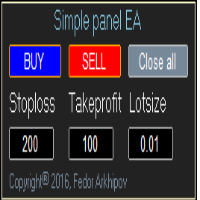
Simple panel EA plus MT5

5

Simple Panel EA Plus — The Ultimate One-Click Trading Assistant

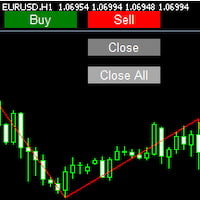
Simple Panel EA Plus is a professional trading utility designed for lightning-fast execution and surgical risk management. It transforms manual trading into a precise process by automating lot calculations and order management directly from your chart.

Demo version  |  User manual  |  Contact me for any questions / ideas for improvement / in case of a bug found

Core Features:

1. Professional Risk Management (Auto-Lot)

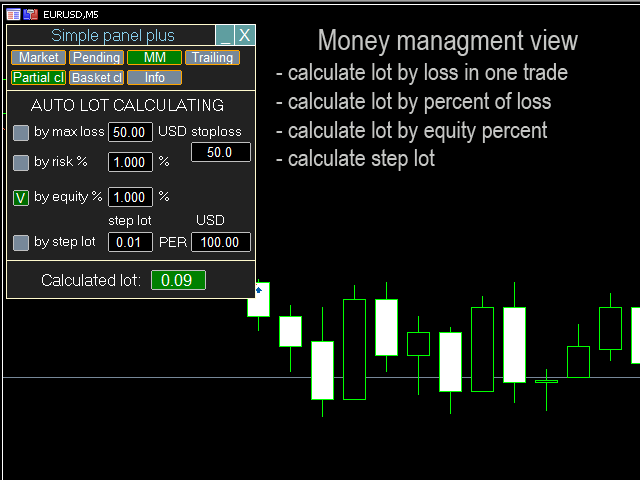
  • Flexible Risk Modes: Calculate lot size based on % of Balance, Equity, Free Margin, or a fixed Money amount ($).

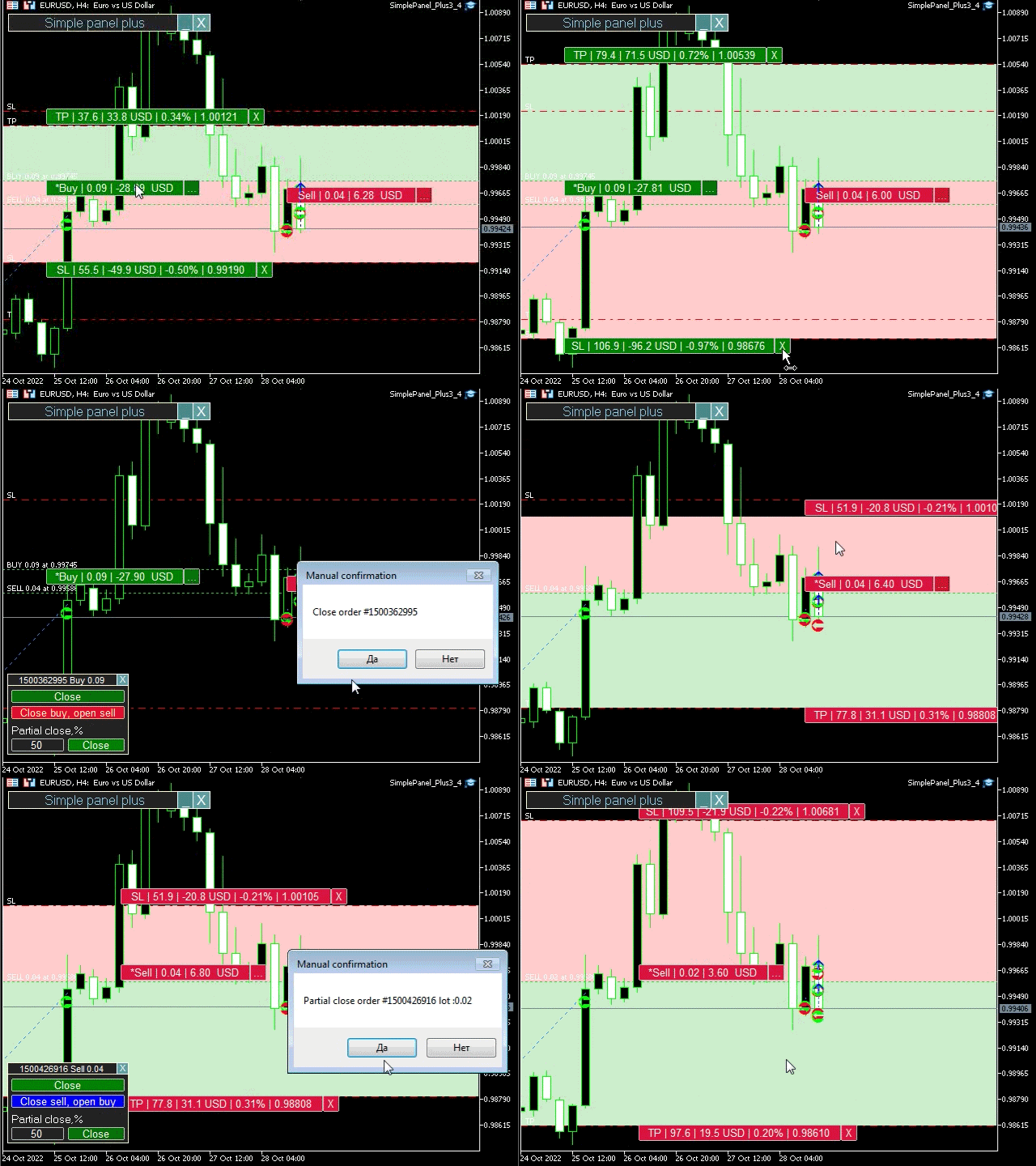
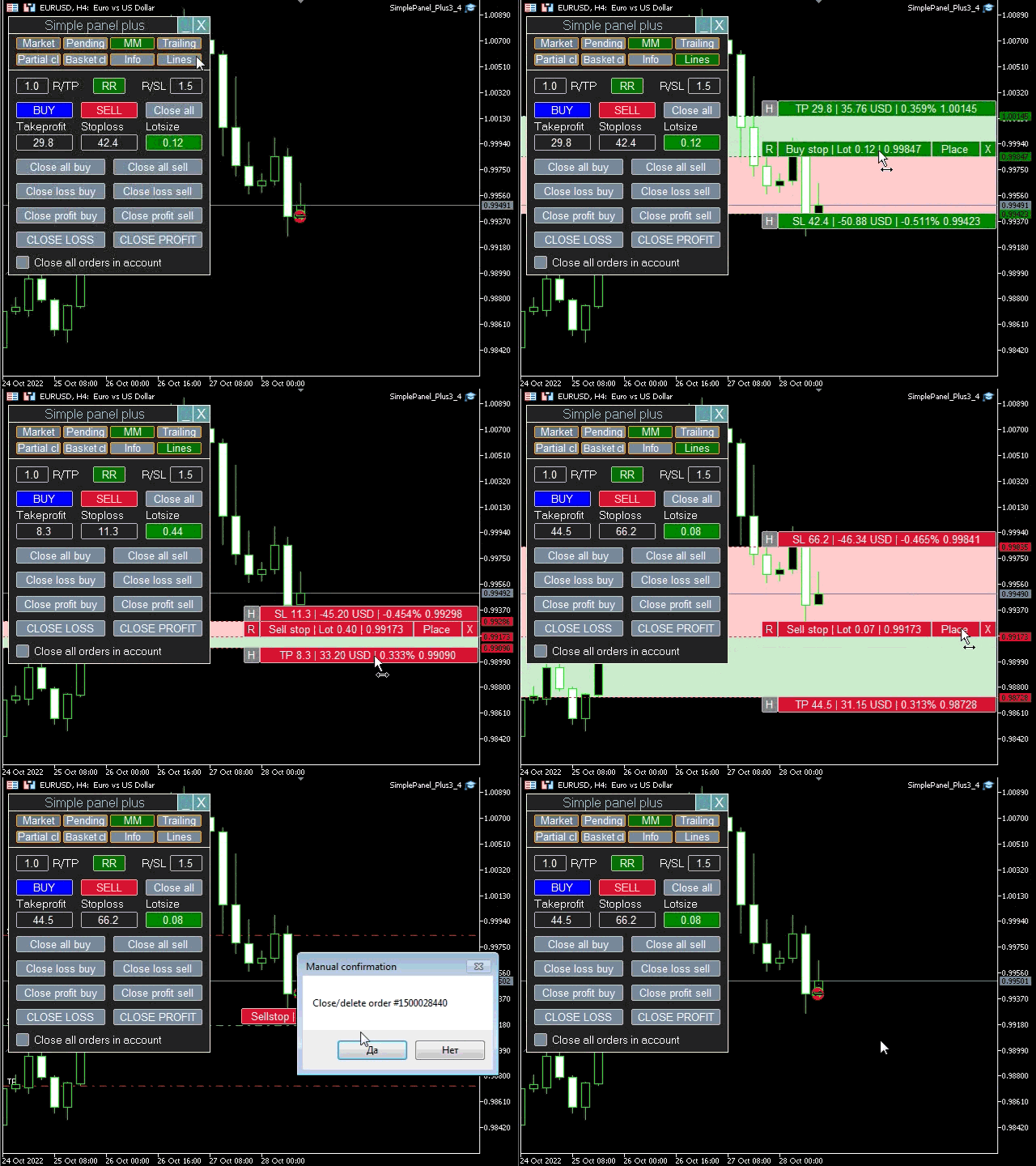
  • Visual SL/TP Planning: Drag the lines on the chart to see your exact risk/reward in account currency before you open the trade.

  • Dynamic Lot Adjustment: The panel instantly updates the volume as you move your Stop Loss line.

2. Advanced Trading Utilities & Deposit Protection

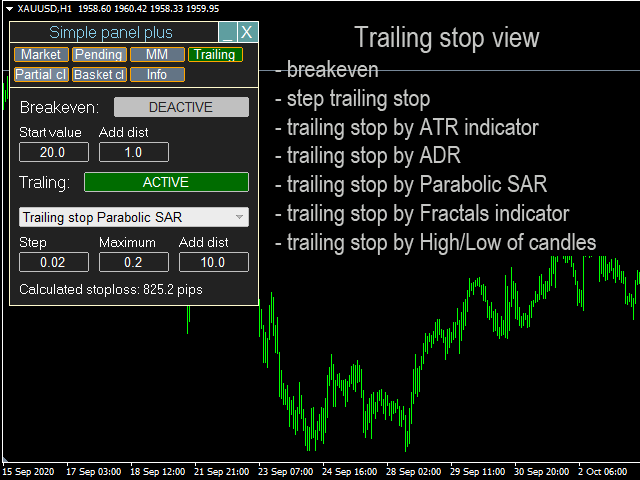
  • Smart Break-Even (BU): Automatically move your Stop Loss to the entry price once your profit target is reached.

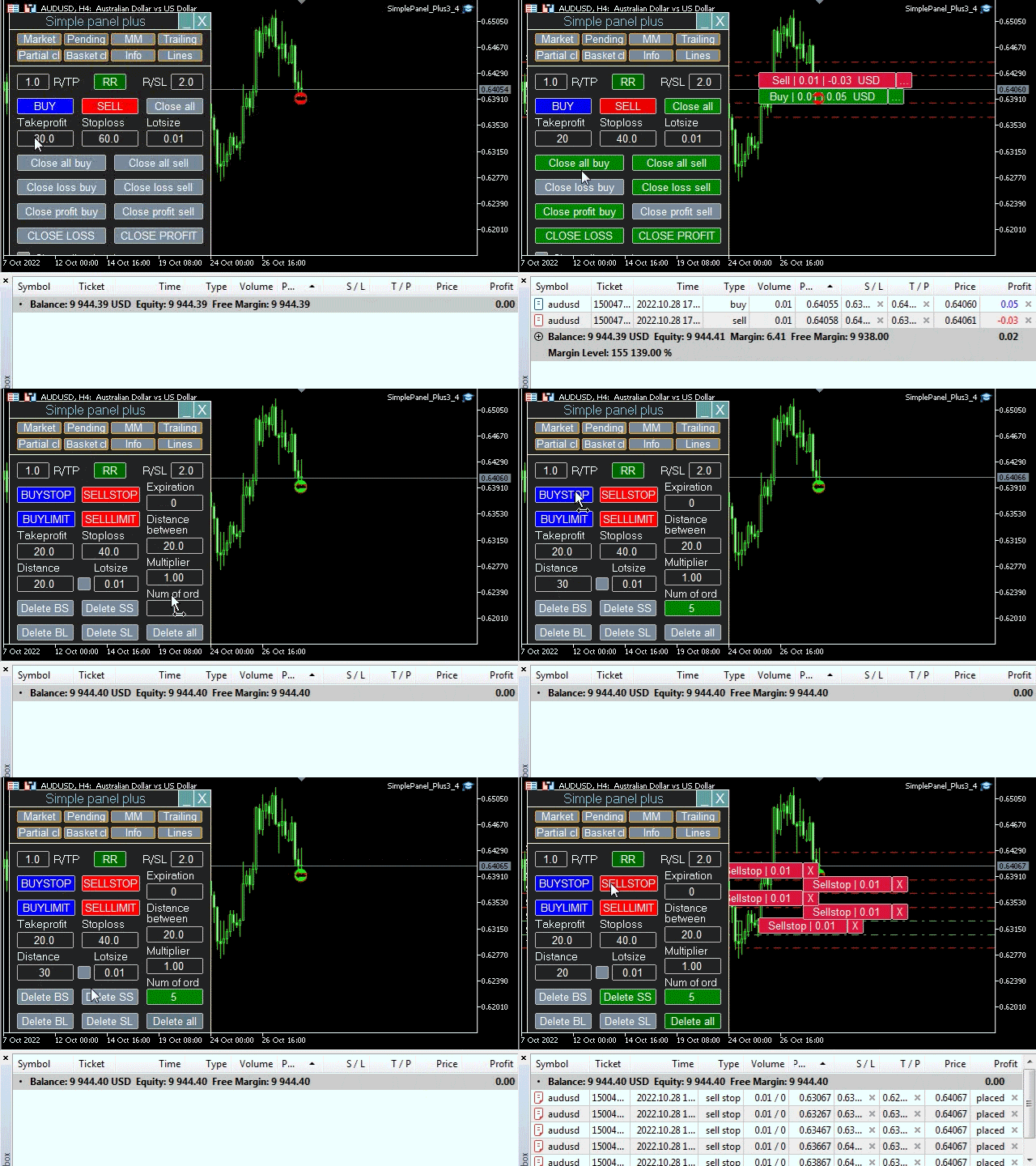
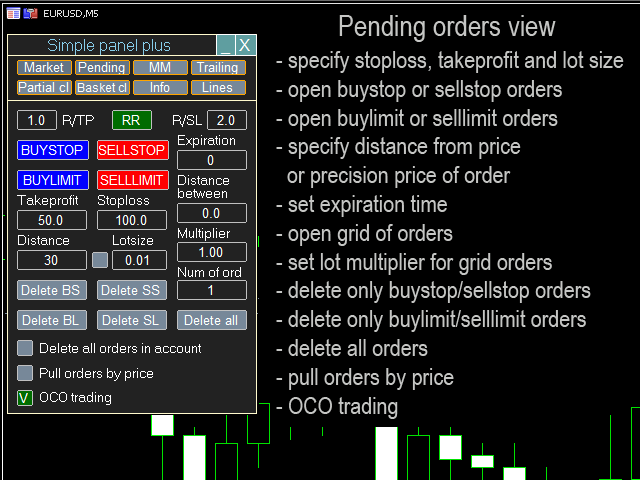
  • Pull Pending Orders: Automatically trails your pending orders following the price at a set distance.

  • OCO (One Cancels Other): If one pending order triggers, the opposite one is instantly deleted.

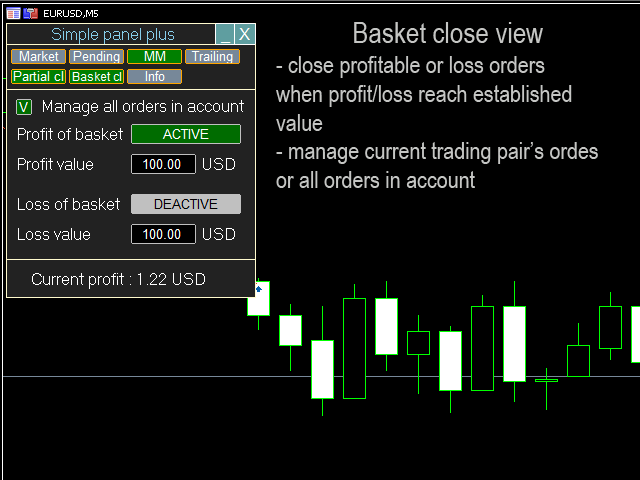
  • Emergency Exit (Basket Close): Close all trades instantly when a total profit or loss target is reached.

3. Trade Automation & Stealth Mode

  • Virtual (Stealth) Levels: Keep your SL/TP hidden from the broker’s server to avoid stop-hunting.

  • Trailing Stop: Multiple algorithms to lock in profits as the market moves in your favor.

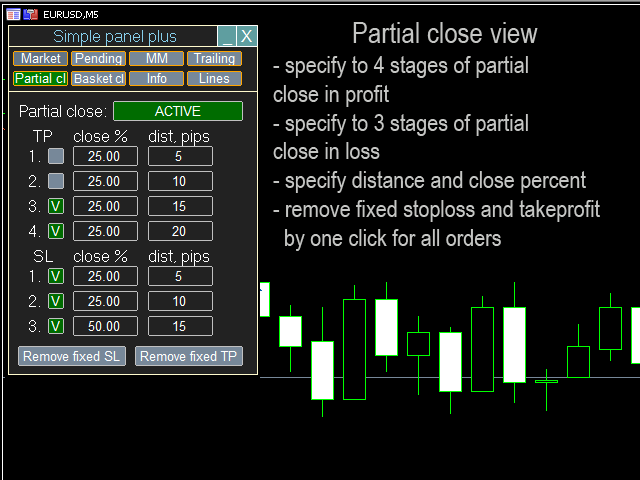
  • Partial Close: Bank profits in stages by closing a percentage of the position at different levels.

4. Analytics & Convenience

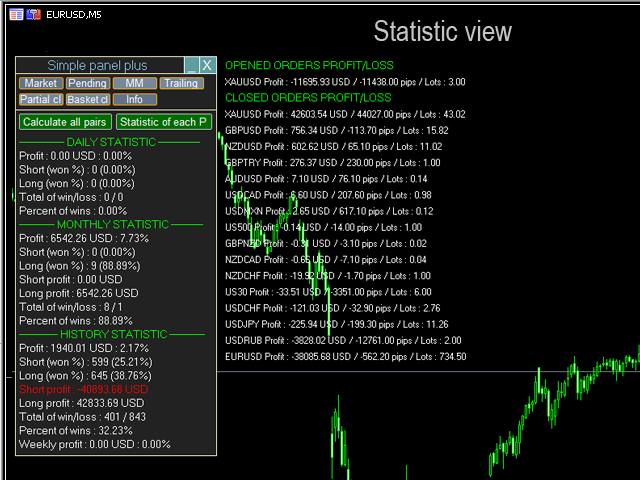
  • Real-time Statistics: Track your trading results and performance directly on the panel.

  • Smart Save System: Settings are saved for each chart individually—no re-configuration needed after a restart.

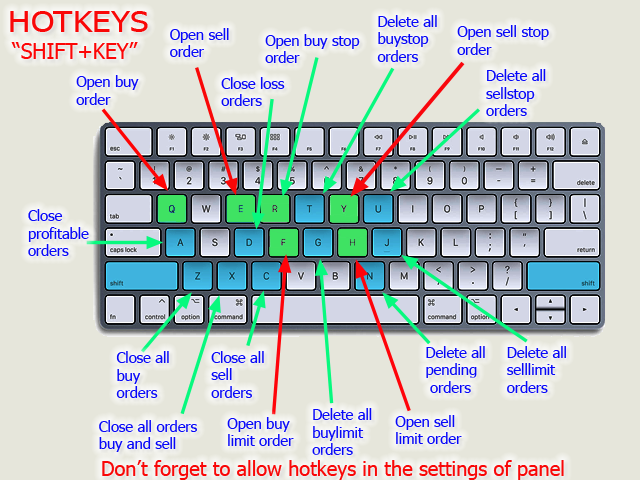
  • Hotkey Support: Fully customizable keyboard shortcuts for Buy, Sell, and Close actions.

Technical Specifications:

  • Clean UI: Draggable, collapsible, and minimalist design.

  • Zero-Lag Performance: Optimized for scalping and high-volatility markets.

  • Multi-Asset: Supports Forex, Gold (XAUUSD), and Indices.
리뷰 7
aqwed
34
aqwed 2022.12.10 08:02 

Great tool, sincere developer! And an essential tool and lifeline for scalpers!

jackfrostak
134
jackfrostak 2022.07.20 18:28 

I have been using this EA for about 6 months I have it for both MT4 and MT5 I love the hotkeys for opening and closing orders specially the close all hot key , for scalping it is really fast. The automatic TP and SL are an account saver and the author of the plugin is very fast in responding to questions or problems I have had

Zeitl
76
Zeitl 2021.09.30 09:37 

Absolutely outstanding panel for manual daytrading. The trailing stop loss and break even combinations alone make this tool a winner, in addtion with the automatic pull of pending orders by price. All the features combined allow a unique semi-automatic trading. Thanks to Fedor, he has done a great job!

추천 제품
Prop Firm Shield Full
Pablo Adolfo Cantos
Prop Firm Shield is a risk management panel for MetaTrader 5, built for prop firm traders who need control over their daily limits. You configure each limit and the tool watches the account around the clock, acting automatically when a limit is reached: closing positions, deleting pending orders and blocking new trading until the next day. Features: - Daily Take Profit - three modes: fixed USD, percent of the day-start balance, or target balance - Daily Stop Loss - three modes: fixed USD, percen
QuickTrade Panel — One-Click Buy/Sell with Live Risk & Reward Preview Trade faster and smarter, directly from the chart — no order window required. QuickTrade Panel is a lightweight, fully manual trading panel for MetaTrader 5. It sits on your chart as a draggable floating window, giving you instant Buy/Sell execution with full control over lot size, stop loss, take profit, and risk-to-reward — all visible before you click. Key Features One-click Buy / Sell execution Large, color-coded SELL and
25R - WASD Order is a visual risk management EA for MetaTrader 5 that combines gaming-style WASD keyboard controls with interactive chart drawing for precise order placement. Designed for active traders who value speed and accuracy, it lets you visually plan trades by dragging entry and stop-loss lines directly on the chart, while automatically calculating position size based on your risk percentage. The tool displays color-coded profit/loss zones with real-time risk metrics, supports automatic
Pattern Recognition EA
Claudiu-georgian Zavera
Pattern Recognition EA - From Learn to Earn. The market repeats itself. This EA finds every past repeat of the current candle sequence - and lets history vote the direction. ONE SHAPE. EVERY REPEAT IN HISTORY VOTES. The last N candles on your signal timeframe form a shape. The EA scans the history you choose - a fixed number of bars or everything your broker provides - for the SAME shape, and checks what happened next, every single time. Only when enough repeats exist AND a clear majority of t
TAM Premium – Ultimate Visual Trading Assistant & Risk Manager TAM Premium (Trading Assistant Manager) is a revolutionary trading panel for MetaTrader 5 that brings the smooth TradingView-style trading experience directly into your chart. Say goodbye to confusing manual lot calculations and slow order execution! With TAM Premium, simply define the maximum loss you are willing to take ( Risk % or Risk $ ), visually drag and drop your target levels on the chart, and let the Assistant calculate the
Risk Manager Best: The Benchmark for Professional Money Management Why do I consider this utility the best solution on the market? The answer is simple: it was created by a trader for traders who value their time and money. Unlike overloaded alternatives, it doesn't have a single unnecessary feature that could distract you from chart analysis. This is a tool that turns routine risk calculations into instant action. Here are the key advantages, broken down into sections: 1. Intuitive Interfac
Click Trading
Jawad Tauheed
5 (3)
One Click Trading – Auto TP SL Developer TraderLinkz Version 1.00 Category Utility What it does Adds missing TP and SL to your manual trades and pending orders Sets them once per ticket Lets you move TP and SL afterward Works on hedging and netting accounts Scans on every tick and reacts on trade events Why you want it You place faster entries You get consistent risk and exit targets You reduce fat finger errors You keep full manual control Quick start Attach the EA to any chart Keep TP and SL e
FREE
AutoLot Trade Panel
Fabian Maurice Schwarz
AutoLot Trade Panel은 차트 기반 MT5 트레이딩 패널로, 더 빠른 주문 실행, 자동 랏 계산, 실시간 리스크 표시, 시각적인 SL/TP 계획, 그리고 차트에서 직접 포지션 관리를 원하는 수동 트레이더를 위해 만들어졌습니다. 빠른 시작 가이드: https://www.mql5.com/en/blogs/post/769949 ! 무료 데모 사용 가능 ! 정식 버전을 구매하기 전에 패널 워크플로우, AutoLot 계산 및 Visual Tool을 테스트할 수 있는 무료 데모 버전이 제공됩니다. 데모 버전: https://www.mql5.com/en/market/product/176387 ====================================================================================================================================================================
Crash5 EA ,I s a automatic robot that has the level of professional decision when to take a trade without any emotion. The bot will help in your scalping decision making with its own TP (take profit) and SL (stop loss) with the trail stop when in profit. This is a trend based spike catching ,looking on whats happening in real time charts no repainting of any signals. The robot helps in making decisions on the candle stick pattern opened and closed lat price with the help of RSI ,MACD and the EMA
Grid Trading EA is a semi-automated one-click trading EA for both Normal Trading and Grid/Martingale Trading . Normal Trading Simply click Buy or Sell directly from the chart. The EA will automatically manage trades by: Setting Stop Loss and Take Profit Managing Trailing Stop Grid / Martingale Trading (For Hedging Account Type Only) When Grid Trading mode is enabled, the EA will automatically open additional grid orders at specified distances while increasing the lot size based on your settings.
Automated Timeframe cycling with Symbols centered.  Force every timeframe onto one clock window, so the story you see on Daily is the same story you are slicing on H4, H1, and M1.  Traders usually flip timeframes and lose the span. A Daily chart shows a few weeks, then M15 shows a few hours, and the eye treats them as different markets. This indicator locks the window to N bars of the highest enabled timeframe — default 10 Daily — and maps every lower timeframe to that same stretch. You stay ins
FREE
Product Name: Anchor auto TP and SL Trade Manager Pro MT5 The ultimate manual assistant. Turns trades into auto-grids with Hedging, Zero-Loss Breakeven & Spread Detection. Your manual trade will be managed automatically. Anchor Auto TP and SL Trade Manager MT5 Pro is the advanced edition of our popular trade assistant. It transforms simple manual trades into sophisticated, professional-grade recovery grids. Unlike the free version, this PRO edition fully supports Hedging (simultaneous Buy & Sell
SMC OTE Gold Pattern — OTE Zone Expert Advisor for MT5 SMC OTE Gold Pattern is an Expert Advisor for MetaTrader 5 designed to identify and trade Fibonacci Optimal Trade Entry (OTE) zones using market structure, trend, volatility and confirmation filters. The EA identifies completed swing movements and calculates the 61.8%–79% Fibonacci retracement area as a potential OTE zone. A 70.5% reference level is also displayed within the zone. OTE Zone Detection The EA monitors swing highs and swing lows
Imagine flying a real aircraft without ever stepping into a flight simulator. That's what trading is like. You have to simulate your strategy before you can take it to a live market. It is good if you can simulate things speedily before even stepping into any live market, or before coming up with an automated system.  People don't have all day to stare at a higher timeframe chart until the entry signal finally arrives. That's why I built this so that you can simulate your strategy with speed. Th
FREE
LotCalculatorPro
Reynaldo Jr Audencial Pascual
LotCalculatorPro + Smart Trading Panel LotCalculatorPro는 차트에서 직접 리스크 관리, 로트 크기 계산, 거래 실행을 간편하게 할 수 있도록 설계된 강력한 올인원 트레이딩 도우미 입니다. 이 도구는 트레이더가 리스크를 관리하고, 정확한 로트 크기를 계산하며, 손익분기점(Break-even), 부분 청산, 일일 수익/손실 보호와 같은 스마트 기능을 통해 거래를 자동으로 관리하도록 도와줍니다. 특히 MetaTrader 5 환경에서 깔끔하고 효율적인 트레이딩 워크플로우 를 원하는 Forex 트레이더, Prop Firm 트레이더, 리스크 관리 중심 트레이더 에게 이상적입니다. 기본 설정: 일일 목표 수익: 시작 잔액의 2% 일일 최대 손실: 시작 잔액의 1% 주요 기능 LotCalculatorPro 다음 정보를 기반으로 자동으로 정확한 로트 크기 를 계산합니다. 진입 가격 (Entry Price) 손절 가격 (Stop Loss) USD 기준
Key Benefits at a Glance: Lorentzian ML signal generation Majority voting across 3 timeframes Automatic market regime detection Smart equity recovery with group profit targets 1% risk‑based adaptive lot sizing ATR‑based dynamic SL/TP & trailing Emergency drawdown cut Live on‑chart info panel Hybrid Lorentzian Gold ML EA v2.0 – Intelligent Adaptive Trading for XAUUSD Next‑Gen Machine Learning Core A Lorentzian KNN classifier analyzes 5 normalized features (RSI, WaveTren
FREE
The Bitcoin Reaper
Profalgo Limited
3.67 (33)
출시 프로모션: 현재 가격으로는 매우 제한된 수의 사본만 구매 가능합니다! 최종 가격: 999달러 신규(349달러부터) --> 1개 무료 증정(거래 계좌 번호 2개에 한함). 최고의 콤보 상품     ->     여기를 클릭하세요 공개 그룹에 가입하세요:   여기를 클릭하세요   LIVE SIGNAL LIVE SIGNAL V2.0 UPDATE 2.0 INFO 비트코인 리퍼에 오신 것을 환영합니다!   골드리퍼의 엄청난 성공 이후, 저는 동일한 성공 원칙을 비트코인 ​​시장에도 적용할 때가 되었다고 생각했고, 와, 정말 유망해 보이네요!   저는 20년 넘게 거래 시스템을 개발해 왔으며, "단연" 제 전문 분야는 브레이크아웃 전략입니다. 이 간단하지만 효과적인 전략은 역대 최고의 트레이딩 전략 중 하나로 자리매김하며, 사실상 모든 시장에 적용할 수 있습니다.       특히 비트코인처럼 변동성이 큰 시장에서는 더욱 빛을 발합니다!   그렇다면 이 전략은 어떻게 작동할까요? 브레이크
Xelox
Yvans Tetua Li Cheng
XELOX — 금의 파수꾼 XAUUSD용 인트라데이 Expert Advisor · 구조 돌파 · 그리드·마틴게일 없음 현재 가격: $399. 10건 판매될 때마다 가격이 $50씩 오르며, 최종 가격 $999까지 상승합니다. 전설 어느 거대한 금고에서든, 정작 중요한 금은 진열된 금이 아니었다. 시장이 보지 않을 때, 시간과 시간 사이에서 소리 없이 움직이는 금이었다. XELOX는 그 움직임에서 이름을 얻었다. 전설은 결코 금을 한 명의 감시자에게만 맡기지 않는다. 거대한 경계 — 금이 한 달을 온전히 지켜낸 뒤 한 계절에 단 한 번만 넘는 그 경계 — 를 지키는 수호자에게, 또 다른 종류의 파수꾼이 화답한다. 수호자가 계절의 전환을 기다리는 동안, 파수꾼은 시간과 시간 사이의 회랑을 순찰한다. 그가 큰 움직임을 노리는 곳에서, 그녀는 하루 그 자체를 지켜본다. 그녀는 모든 인트라데이 트레이더가 결국 뼈아프게 배우는 것을 배웠다 — 금은 끊임없이 거짓말을 한다. 조급한 자들을 유인하려
Veltrion Trade Panel
Atha Ilham Pratama
Short Description Veltrion Trade Panel is a professional manual execution and risk control panel for MetaTrader 5. It helps traders calculate lot size, execute trades faster, and manage open positions with discipline. Full Description Veltrion Trade Panel is a clean and practical manual trading panel for MT5, designed for traders who want faster execution and better risk control directly from the chart. This Expert Advisor is not an automated trading strategy. It does not open trades by itself
Sonic R Pro Enhanced EA - 버전 2025 249달러 - 첫 5명만! 실시간 신호 Sonic R Pro Enhanced의 실시간 성과 확인하기: 거래 전략 Sonic R Pro Enhanced는 Dragon Band (EMA 34 및 EMA 89)를 기반으로 한 전통적인 Sonic R 전략의 업그레이드 버전으로, 자동화된 거래 시스템입니다. 타임프레임: M15, M30 지원 통화쌍: XAUUSD, BTCUSD, AUDJPY, USDJPY 거래 스타일: 스윙 트레이딩 - 풀백 및 반대 트렌드 최소 자본: 500 USD 레버리지: 1:200 이상 사용자 가이드 Sonic R Pro Enhanced는 단순함을 위해 최적화되었습니다. 사용자는 RiskAmount 하나의 파라미터만 설정하면 됩니다. RiskAmount < 0일 경우: 계좌 잔액의 백분율로 위험을 계산 RiskAmount > 0일 경우: 거래당 고정 USD 금액으로 위험을 설정 예제:
Recovery Manager Pro MT5
Ianina Nadirova
4.45 (11)
Recovery Manager Pro는 다른 조언자 또는 수동으로 개설된 주문에서 손실된 금액을 복구하기 위한 시스템입니다. RM Pro에는 자동으로 동적으로 조정하는 기능이 있습니다. 거래자는 위험 수준을 선택해야 하며 고문은 완전 자동 모드에서 작동합니다. 감소 복구 모드 및 대기 모드에서 작동 가능! 다른 자문가가 하락을 생성하는 경우 RM Pro는 이를 비활성화하고 포지션을 잠근 후 부분 청산을 사용하여 예치금을 복원하는 프로세스를 시작합니다. 거래에서 고문은 스마트 평균화, 잠금 및 부분 청산을 사용합니다. 고문은 모든 구매자가 선물로 받게 될 맞춤형 추세 지표를 연구합니다. Advisor의 주요 기능은 대기 모드에서 작동하는 기능입니다. 다른 자문가가 하락을 생성하는 즉시 RM Pro가 주문 관리를 인계받고 평균 주문을 공개한 후 부분적으로 마감합니다. 설정 지침:           링크 MT4 버전:           링크 조언자 기능: 수익성이 없는 포지션에서 손실
Gold Sovereign Strike AI Algorithmic Strike-Avoidance Protocol Gold Sovereign Strike AI represents a paradigm shift in automated Gold trading, built entirely upon the proprietary Algorithmic Strike-Avoidance Theory. Heavy drawdowns and extreme volatility spikes are treated as "Strikes" against your portfolio's longevity and platform compliance. This Expert Advisor is engineered for Monetization Safety (Prop-Firm and Funded Account friendly), prioritizing sustainable, compounded capital growth o
NebularManMT5
Viktor Shpakovskiy
하나의 로트에서 평균화하여 새 주문을 추가할 수 있는 수동 거래용 EA. 로트 수량, 주문 사이의 단계를 변경하고 오픈 포지션 수와 총 로트 수량을 제한하여 위험을 관리할 수 있습니다. 트레일링 스톱, 가상 손절매, 가상 테이크프로핏이 있으며 차트에서 자유롭게 이동할 수 있습니다. 내장된 거래 시뮬레이터의 도움으로 전략 테스터에서 EA가 어떻게 작동하는지 확인할 수 있습니다. MT5 테스터에서 차트에 따른 가상 SL 및 TP 라인의 수동 이동이 작동하지 않습니다! 장점: 초기 로트는 거래자 또는 기타 고문에 의해 열립니다. EA는 평균 1랏의 오픈 포지션에 새로운 주문을 추가합니다. 증가 로트는 고정되어 있으며 오픈 포지션의 크기에 의존하지 않습니다. 위험 관리(로트 수량, 주문 수 및 주문 간 단계) 예금 통화로 이익을 얻습니다. 가상 손절매 및 가상 이익실현; 후행 스톱 바이 포인트; 후행 중지를 시작하는 미니 이익; 빠른 주문 시작 및 종료를 위한 차트의 "핫 버튼"; 소수점
DGem Trade Manager Panel
Damien Jean Michel Gremillet
Trade Manager Panel ## Short description  Manage your manual trades with one click: automatic break-even, trailing stop, two-level partial close and risk-based lot sizing — all from a single on-chart panel. --- ## Full description Trade Manager Panel is an on-chart utility that takes care of your open trades so you can focus on the market instead of the order ticket. Drop it on any chart and it manages every position on that symbol automatically, while an interactive panel lets you size new
| Fully-automated Smart Money Concept (ICT) inspired trading solution with multi-strategy capabilities | Built by a grid trader >> for grid traders.  This is MT5 version, click  here  for  Blue CARA MT4  (settings and logics are same in both versions)     Real monitoring signal  -->  Cara Gold Intro Blue CARA EA   ('CARA') - short for  C omprehensive  A lgorithmic   R esponsive   A dvisor is a next-gen  multi-currency    multi-timeframe  EA base on the widely known (and perhaps the most popul
Prop Firm Guard
Cristian Bodisteanu
Most prop-firm accounts are not lost because of a bad strategy, but because of one bad day. Prop Firm Guard watches your account equity every second and enforces the rules of your challenge for you. What it does Daily loss limit : in percent of the account size or in money. Measured from the balance at the start of the day, or from the higher of balance/equity (as some firms do). Floating losses are included. Maximum drawdown : static (from the initial account size) or trailing (from the highest
Babel Assistant
Iurii Bazhanov
4.33 (9)
Babel assistant 1 MT5 넷팅(netting) 로봇 "Babel_assistant_1"은 ZigZag 지표를 사용하여 M1, M5, M15, H1, H4, D1 및 W1 타임프레임 전반에 걸쳐 피보나치 수준을 생성하고, 매수 및 매도 트렌드의 강도를 계산합니다. 지정된 트렌드 수준 4.925를 초과하면 "Lot for open a position" 설정을 사용하여 포지션을 엽니다. 그런 다음, Babel은 특정 피보나치 수준에 대기 주문(pending orders)을 배치하고 지정된 손절매(Stop Loss) 및 이익실현(Take Profit) 라인을 설정합니다. 화면에는 포지션, 거래 및 트렌드의 현재 결과가 표시됩니다. 0.02랏 이상의 수동 포지션 증가는 로봇에 의해 자체 대기 주문의 트리거로 인식됩니다. 0.01랏의 대기 주문 또는 시장가 주문은 체결 시 단순히 포지션 볼륨을 변경합니다. 면책 조항: 아래에 제시된 자료는 정보 제공 및 교육 목적으로만 제공됩니다
FREE
Divergent Stochastic Filter II Catch Reversals Early, Filter Noise, Trade with Confidence The Edge: Why This Stochastic is Different  Every trader knows the Stochastic oscillator. But knowing when to trust its signals, that's the real challenge. The Divergent Stochastic Filter II transforms this classic indicator into a precision reversal detection system by adding critical elements: divergence intelligence, signal filtering and exhaustion detection.  While standard Stochastic oscillators fire s
Click Risk
Evgenii Pchelintsev
리스크를 %로 설정하고 차트를 클릭하세요(Market 모드). 한 번 클릭하면 스톱, 한 번 더 클릭하면 테이크 프로핏이 설정됩니다. 랏 크기는 자동으로 계산됩니다. Click Risk는 MetaTrader 5 차트 위에 바로 표시되는 미니멀한 트레이딩 패널입니다. 리스크를 설정하고 세 개의 가격을 클릭(Limit 모드)하면 랏 크기가 자동으로 계산됩니다. 계산기도, 랏 직접 입력도, 주문 창도, 불필요한 단계도 없습니다. 주문 방법 1. - / + 버튼으로 리스크를 %로 설정합니다(기본 단계 0.5, 설정에서 변경 가능, 최소 0.1). 2. BUY 또는 SELL을 누릅니다. 3. 차트를 클릭합니다. 진입 가격(Limit 모드), 스톱로스, 테이크 프로핏 순서입니다. 랏 크기는 스톱까지의 거리와 설정한 리스크 %로 계산되고, 이어서 주문이 전송됩니다. Market 모드에서는 현재 가격이 진입가이므로 SL과 TP만 클릭하면 됩니다. 가격을 선택하는 동안 커서 옆 힌트에 포인트
FREE
DYJ MOBILE GAMING TRADING WINNER 는 귀하의 다양한 단말기(MOBILE PHONE, WEB, TRADINGVIEW, MT5)를 수동 거래에 사용할 수 있으며 EA에서 자동으로 처리됩니다. 모바일 거래는 EA의 다양한 그리드 모드, 두피 모드, 헤지 차익 거래 모드 및 독립 주문 모드를 사용하여 수동으로 포지션을 열 수 있으며, EA는 모바일 개통을 위한 손절매를 자동으로 설정할 수 있습니다. 그리고 휴대폰을 사용하여 그리드, 두피 및 헤지 주문을 열 수 있습니다. EA는 전자동 거래를 설정하거나, 자동 및 휴대전화 수동 혼합 거래를 설정하거나, 독립적인 휴대전화 수동 거래를 설정할 수 있습니다. 주문 방향이 맞으면 TP는 시장을 떠납니다. 주문 방향이 틀릴 경우 EA는 패배에서 승리로 전환할 수 있습니다. EA는 모든 외환 브로커 및 다양한 거래에 적합합니다. Deriv 중개인 Syntheic 계정 색인과 호환됩니다. EA는 입금액과 레버리지의
이 제품의 구매자들이 또한 구매함
Trade Assistant MT5
Evgeniy Kravchenko
4.43 (216)
거래당 위험 계산, 라인을 사용한 손쉬운 신규 주문, 부분 청산 기능을 통한 주문 관리, 7가지 유형의 트레일링 스탑 및 기타 유용한 기능을 제공합니다. 추가 자료 및 지침 설치 지침   -   애플리케이션 지침   라인 기능       - 차트에 개시선, 손절매, 차익실현을 표시합니다. 이 기능을 사용하면 새로운 주문을 쉽게 하고 개봉 전에 추가 특성을 볼 수 있습니다. 위기 관리       -       위험 계산 기능은 설정된 위험과 손절매 주문의 크기를 고려하여 새 주문의 볼륨을 계산합니다. 이를 통해 손절매 크기를 설정하고 동시에 설정된 위험을 존중할 수 있습니다. 로트 계산 버튼 - 위험 계산을 활성화/비활성화합니다. 필요한 위험 값은 위험 필드에 0에서 100 사이의 백분율 또는 예금 통화로 설정됩니다. 설정 탭에서 위험 계산 옵션을 선택합니다. $ 통화, % 잔액, % 지분, % 자유 마진, % 사용자 정의, % AB 이전 일, % AB 이전 주, % AB 이전
Trade Manager EA에 오신 것을 환영합니다. 이 도구는 거래를 보다 직관적이고 정확하며 효율적으로 만들기 위해 설계된 궁극적인 리스크 관리 도구 입니다. 단순한 주문 실행 도구가 아닌, 원활한 거래 계획, 포지션 관리 및 리스크 제어를 위한 종합 솔루션입니다. 초보자부터 고급 트레이더, 빠른 실행이 필요한 스캘퍼에 이르기까지 Trade Manager EA는 외환, 지수, 상품, 암호화폐 등 다양한 시장에서 유연성을 제공합니다. Trade Manager EA를 사용하면 복잡한 계산은 이제 과거의 일이 됩니다. 시장을 분석하고 진입, 손절 및 익절 수준을 차트의 수평선으로 표시한 후 리스크를 설정하면, Trade Manager가 이상적인 포지션 크기를 즉시 계산하고 SL 및 TP 값을 실시간으로 표시합니다. 모든 거래가 간편하게 관리됩니다. 주요 기능: 포지션 크기 계산기 : 정의된 리스크에 따라 거래 크기를 즉시 결정합니다. 간단한 거래 계획 : 진입, 손절, 익절을 위한
Farmed Hedge Yield Farming | All Markets (Manual - Hybrid - Semi/Automated EA) VERIFIED TRADING RESULTS - Farmed Hedge Yield Axi Copy:  https://www.mql5.com/en/signals/2356376 - Farmed Hedge Yield Exn Copy:   https://www.mql5.com/en/signals/2356404 - Farmed Hedge Yield V Copy:  https://www.mql5.com/en/signals/2357156 IMPORTANT NOTICE: FarmedHedge is a MANUAL-FOCUSED TRADING UTILITY ,not a fully automated EA. Results shown on this Signal include manual trades and overall strategic management.
Telegram to MT5 Multi-Channel Copier   는 Telegram 및 Discord 채널의 트레이딩 시그널을 MetaTrader 5로 자동 복사합니다. 봇도, 브라우저 확장도, 수동 복사도 필요 없습니다. Telegram이나 Discord에 시그널이 도착하면 EA가 몇 초 안에 터미널에서 주문을 실행합니다. 그리고 채널을 복사하기 전에, 내장 백테스터가 그 채널이 내 계좌에서 어떤 결과를 냈을지 보여줍니다. 제품은 두 가지 구성 요소로 이루어집니다: Telegram 채널을 수신하는 Windows 애플리케이션과, MT5 터미널에서 시그널을 실행하는 본 EA입니다. MT4 버전도 제공됩니다   여기 . 구매 전에 사용해 보세요:   애플리케이션은 무료로 다운로드할 수 있습니다. 본인의 채널을 연결하고 각 시그널이 어떻게 읽히는지 확인하세요. Backtest 탭과 실제 거래에는 구매하거나 임대한 EA가 필요합니다. 이 페이지의 무료 데모는 전략 테스터에서만 실행되며
Local Trade Copier EA MT5
Juvenille Emperor Limited
4.94 (150)
Local Trade Copier EA MT5는 동일한 Windows 컴퓨터 또는 Windows VPS에서 여러 MetaTrader 5 계정 간에 거래를 복사하고 관리할 수 있는 빠르고 유연한 거래 복사기입니다. 로컬 거래 동기화 기능과 함께 Receiver 측에서 로트 크기, 리스크 관리, 거래 필터링, 심볼 매핑, 거래 관리 및 계정 보호를 독립적으로 설정할 수 있습니다. Transmitter와 Receiver 터미널을 약 1분 안에 설정하고, 동일한 브로커 또는 서로 다른 브로커의 계정 간에 수동 거래 또는 EA 거래를 복사할 수 있습니다. 적절한 조건에서는 로컬 MetaTrader 터미널 간의 거래 정보가 0.5초 이내 에 동기화될 수 있습니다. 실제 체결 속도는 브로커 지연 시간, 네트워크 상태, 컴퓨터/VPS 성능 및 터미널 부하에 따라 달라집니다. 구매 전에 무료 데모를 사용해 보세요 MT5 데모 계정에서 Local Trade Copier EA MT5의 모든 기능을
TradePanel MT5
Alfiya Fazylova
4.88 (173)
Trade Panel은 다기능 거래 도우미입니다. 이 애플리케이션에는 50개 이상의 수동 거래 기능이 포함되어 있으며 대부분의 거래 작업을 자동화할 수 있습니다. 앱 사용 설명서: https://www.mql5.com/en/blogs/post/756482 데모 계정용 앱 체험판: https://www.mql5.com/en/blogs/post/750865 앱 설치 방법: https://www.mql5.com/en/blogs/post/756239 시각 모드에서 앱 테스트 방법: https://www.mql5.com/en/blogs/post/770277 VPS MetaTrader에 앱 설치 방법: https://www.mql5.com/en/blogs/post/770190 거래. 한 번의 클릭으로 거래를 수행할 수 있습니다: 리스크 자동 계산과 함께 예약 주문 및 포지션 열기. 한 번의 클릭으로 여러 주문 및 포지션 열기. 주문 그리드 열기. 예약 주문 및 포지션을 그룹별로 닫기. 포지션
내 거래 규칙에 맞춰 Telegram 신호 복사 Telegram to MT5 Signal Trader 는 공개 및 비공개 Telegram 채널과 그룹의 텍스트 기반 거래 신호를 MetaTrader 5로 자동 복사합니다. 하나의 데스크톱 앱에서 여러 신호 제공자와 MT5 계좌를 관리하고, 제공자마다 위험 관리 및 거래 설정을 개별적으로 지정 할 수 있습니다. 신호 복사에는 Telegram 봇이나 API 설정이 필요하지 않습니다. 전화번호 또는 QR 코드로 본인의 Telegram 계정에 로그인한 후, 이미 가입한 채널이나 그룹을 선택하면 됩니다. 봇을 만들거나 Telegram API 토큰, API ID 또는 API 해시를 입력할 필요가 없습니다. 포지션 크기를 선택하고, 여러 익절 목표에 청산 물량을 배분하며, 손익분기점 이동과 트레일링 스톱을 자동화하세요. 제공자의 신호를 따르면서도 실제 거래 방식은 직접 설정할 수 있습니다. 이 제품은 MT5 Expert Advisor와 필수 Win
EA Overfitter
Stephen J Martret
5 (4)
That backtest looks great. But will it still be making money tomorrow, next week, next month? EA Overfitter re-runs your EA on 100 price histories it has never seen. One score tells you if the edge is real. A backtest tells you what an EA did on one price history — the one that happened to occur. What you cannot tell from it is how much of that result was the strategy and how much was the particular path. EA Overfitter answers that. It builds up to 100 synthetic price histories your EA has n
Exp COPYLOT CLIENT for MT5
Vladislav Andruschenko
3.97 (35)
MetaTrader 5용 전문 트레이드 복사기 MetaTrader 용 빠르고 전문적이며 신뢰할 수 있는 트레이드 복사기 입니다. COPYLOT 은 MT4와 MT5 터미널 간의 Forex 거래 복사를 지원하며, Hedge 및 Netting 계좌를 모두 지원합니다. COPYLOT MT5 버전 지원 구성: - MT5 Hedge → MT5 Hedge - MT5 Hedge → MT5 Netting - MT5 Netting → MT5 Hedge - MT5 Netting → MT5 Netting - MT4 → MT5 Hedge - MT4 → MT5 Netting MT4 버전 전체 설명 + DEMO + PDF 구매 방법 설치 방법 로그 파일 확인 방법 테스트 및 최적화 방법 Expforex의 모든 제품 MT4 터미널로도 거래를 복사할 수 있습니다(MT4 → MT4, MT5 → MT4): COPYLOT CLIENT for MT4 COPYLOT은 2개, 3개, 심지어 10개의 터미널과 동시에 작동할
The product will copy all telegram signal to MT5 ( which you are member) , also it can work as remote copier.  Easy to set up, copy order instant, can work with almost signal formats, image signal,  s upport to translate other language to English Work with all type of channel or group, even channel have "Restrict Saving Content", work with  multi channel, multi MT5 Work as remote copier: with signal have ticket number, it will copy exactly via ticket number. Support to backtest signal. How to s
News Trade EA MT5
Konstantin Kulikov
4.55 (11)
제가 몇 년 동안 사용하고 있는 유용한 로봇을 소개드립니다. 반자동뿐만 아니라 자동 모드로도 사용할 수 있습니다. >>> Chat <<< 본 프로그램에는 경제 캘린더의 뉴스별로 유연한 거래 설정이 포함되어 있습니다. 전략 테스터에서 확인할 수 없습니다. 진짜 작업뿐입니다. 최신 설정 아카이브 다운로드: https://www.mql5.com/en/blogs/post/747929 신호 모니터링: https://www.mql5.com/en/signals/author/test-standart 이 전문가를 위해 고유 설정 세트를 만들 때 블로그의 모든 매개변수에 대한 설명을 참조하십시오: https://www.mql5.com/en/blogs/post/748545 . 기본 설정 설명 작업은 한 차트에서 GBP(GBPUSD, EURGBP, GBPJPY, GBPCAD, GBPAUD, GBPCHF)와 쌍으로 이루어집니다. GBP는 가장 변동성이 큰 통화로서 거래 수행 시 거래를 성공적으로
================================================================================ POC BREAKOUT - V20.72. Full Professional Grade Toolkit ================================================================================ POC Breakout is a full MetaTrader 5 trading dashboard for discretionary traders who want breakout signals, Point of Control (POC) context, volume profiles, order flow, market structure, news, alerts, and advanced trade planning in one professional workspace. Attached directly to you
다음 업데이트 — 버전 2.52 곧 출시! [신규] 시장 분석 및 트레이딩 워크플로를 향상시키기 위해 설계된 4가지 주요 신규 기능을 기대해 주세요. 트레이딩 요구 사항을 충족하도록 설계된 4가지 새로운 기능으로 시장 분석을 한 단계 더 발전시킵니다. 다음 기능을 소개합니다: 1. TRADE OVERVIEW DASHBOARD 2. CONFLUENCE AT ZONE 3. STRONG & WEAK HIGH/LOW 4. OTE 1. TRADE OVERVIEW DASHBOARD 시장 전체 상황을 더 쉽게 파악할 수 있도록 도와주는 대시보드입니다. 트레이딩 의사결정을 지원하는 가이드를 제공하며, 하나의 화면에서 시장을 분석하고 체계적으로 트레이딩을 계획할 수 있도록 도와줍니다. 멀티 타임프레임 시장 개요 (Multi-Timeframe Market Overview) 시장 방향과 가격 구조를 더욱 명확하게 파악 시장 상황을 빠르게 확인 체계적인 시장 분석 및 진입 계획을 위한 가이드 2. CO
EA Auditor
Stephen J Martret
5 (7)
EA Auditor is an independent analysis tool for traders evaluating Expert Advisors and trading signals on MetaTrader 5. It audits backtest reports, reviews posted developer signals, and cross-verifies the two against each other to help traders assess strategies before committing capital. The MQL5 market offers a wide range of Expert Advisors from many developers, with varying approaches, quality, and transparency. EA Auditor provides a consistent, data-driven framework for reviewing them, answer
Telegram to MT5 Coppy
Sergey Batudayev
5 (10)
Telegram에서 MT5로:   최고의 신호 복사 솔루션 DLL 없이도 Telegram 채널과 채팅에서 MetaTrader 5 플랫폼으로 거래 신호를 직접 복사하는 최신 도구인 Telegram to MT5를 사용하여 거래를 간소화하세요. 이 강력한 솔루션은 정밀한 신호 실행, 광범위한 사용자 정의 옵션을 제공하고 시간을 절약하며 효율성을 높여줍니다. [ Instructions and DEMO ] 주요 특징 직접 Telegram API 통합 전화번호와 보안 코드를 통해 인증하세요. 사용자 친화적인 EXE 브리지를 통해 채팅 ID를 쉽게 관리하세요. 여러 채널/채팅을 추가, 삭제, 새로 고침하여 동시에 신호를 복사합니다. 고급 필터를 사용한 신호 파싱 예외 단어(예: "보고서", "결과")가 포함된 원치 않는 신호를 건너뜁니다. 유연한 SL 및 TP 형식을 지원합니다: 가격, 핍 또는 포인트. 가격 대신 포인트를 지정하는 신호에 대한 진입 포인트를 자동으로 계산합니다. 주문 맞춤화 및
AW Shepherd Safety MT5
AW Trading Software Limited
5 (5)
AW Shepherd Safety EA는 열린 포지션을 관리하는 EA입니다. 첫 주문은 트레이더가 패널에서 열고, 이후에는 EA가 바스켓을 직접 관리합니다: 추세 필터를 거쳐 복구 주문을 추가하고, TakeProfit, 트레일링 또는 손절로 해당 측을 청산하며, 청산 수준을 차트에 표시합니다. 매수와 매도는 따로 관리되며 양 측을 동시에 열어 둘 수 있습니다. 복구 주문은 가격 간격만으로 열리지 않고, Parabolic SAR, 두 개의 MA 또는 캔들 색상 기준으로 포지션 방향으로의 반전이 확인된 뒤에 열립니다. Orders Magic number가 일치하면 수동으로 또는 다른 EA가 연 포지션도 EA가 넘겨받아 관리합니다. EA가 포지션을 관리하는 방식: 1 트레이더가 Open Buy 또는 Open Sell 버튼으로 Order Size 필드의 거래량만큼 첫 주문을 엽니다. 2 가격이 포지션에 불리한 방향으로 Minimal step between recovery orders만큼 움
News Filter EA
Rashed Samir
5 (2)
News Filter EA: Advanced Algo Trading Assistant News Filter EA is an advanced algo trading assistant designed to enhance your trading experience. By using the News Filter EA , you can integrate a Forex economic news filter into your existing expert advisor, even if you do not have access to its source code. In addition to the news filter, you can also specify trading days and hours for your expert. The News Filter EA also includes risk management  and equity protection features. MT4 Version Ma
MT5 to Telegram Signal Provider 는 사용하기 쉽고 완전히 커스터마이즈 가능한 유틸리티로, 특정 신호를 Telegram의 채팅, 채널 또는 그룹으로 전송하고, 귀하의 계정을 신호 제공자 로 만듭니다. 경쟁 제품과 달리 DLL 임포트를 사용하지 않습니다. [ 데모 ] [ 매뉴얼 ] [ MT4 버전 ] [ 디스코드 버전 ] [ 텔레그램 채널 ]  New: [ Telegram To MT5 ] 설정 단계별 사용자 가이드 가 제공됩니다. 텔레그램 API에 대한 지식은 필요하지 않습니다; 개발자가 제공하는 모든 것이 필요합니다. 주요 특징 구독자에게 보낸 주문 상세 정보를 커스터마이즈할 수 있습니다. 예를 들어, 브론즈, 실버, 골드와 같은 계층 구독 모델을 만들 수 있습니다. 골드 구독에서는 모든 신호를 받습니다. id, 심볼, 또는 코멘트로 주문을 필터링할 수 있습니다. 주문이 실행된 차트의 스크린샷이 포함됩니다 보낸 스크린샷에 닫힌 주문을 그려 추가 검증을 합니다
RETAILBERG FOOTPRINT CHART PRO — Order-Flow Workspace for MetaTrader 5 Version 7.00  |  Professional System  |  31 tools  |  One chart A full 150-page illustrated User Manual is included. Please read the full manual to understand this feature packed footprint chart elements and ui. https://www.mql5.com/en/blogs/post/777982 DEMO / STRATEGY TESTER — PLEASE READ FIRST
Timeless Charts
Samuel Manoel De Souza
5 (9)
Timeless Charts is an all-in-one trading utility for professional traders. It combines custom chart types such as Seconds Charts and Renko with advanced order flow analysis using Footprints , Clusters , Volume Profiles , VWAP studies, and anchored analysis tools for deeper market insight. Trading and position management are handled directly from the chart through an integrated trade management panel , while Market Replay and Virtual Accounts provide environments for practicing trading skills and
VirtualTradePad PRO SE MT5 — MetaTrader 5용 전문 트레이딩 컨트롤 센터 VirtualTradePad PRO SE 는 MetaTrader 5 용 프리미엄 차트 기반 트레이딩 패널이자 거래 관리 워크스페이스입니다. 더 빠른 주문 실행, 더 명확한 포지션 관리, 구조화된 거래 관리, 시각적인 레벨 계획, 그리고 차트에서 직접 작업하는 전문적인 워크플로를 원하는 트레이더를 위해 설계되었습니다. 이 제품은 단순한 BUY / SELL 패널이 아닙니다. PRO SE는 수동 트레이딩, 예약 주문, 포지션 관리, 부분 청산, 바스켓 손익 관리, 평균가 레벨, ATM 규칙, 신호 모니터링, 실시간 시장 정보, 전략 테스터 (Strategy Tester) 워크플로, VPS 중심 운용을 하나의 연결된 인터페이스로 통합합니다. MT4 버전 | 전체 설명 및 스크린샷 | 구입 방법 | 설치 방법 | 로그 파일을 얻는 방법 | 테스트 및 최적화 방법 | Expforex의 모든
Trader Evolution
Siarhei Vashchylka
5 (7)
" Trader Evolution " - A utility designed for traders who use wave and technical analysis in their work. One tab of the utility is capable of money management and opening orders, and the other can help in making Elliott wave and technical analysis. Manual (Be sure to read before purchasing) | Version for MT4 Advantages 1. Trading in a few clicks. Immediate and pending orders are available in the panel 2. Money management. The program automatically selects the appropriate lot size 3. Simplifies
AW Trade Manager
AW Trading Software Limited
AW Trade Manager는 차트에 손익비(리스크/리워드) 도구를 갖춘 MetaTrader 5용 거래 패널입니다. 거래는 마우스로 끌어 놓는 Entry, Stop Loss, Take Profit 선으로 계획합니다: 라벨에는 가격, 거리, 금액이 표시되고, 구역은 수익과 손실을 보여 주며, 거래량은 리스크를 기준으로 계산됩니다. 주문을 보내기 전에 확인 창에서 리스크, 증거금, 포지션 규칙을 포함한 거래 전체를 보여 줍니다. 매뉴얼과 사용 설명 -> 여기 / 무료 LIVE 데모 -> 여기 진입 후 포지션 관리를 위해 패널에는 손익분기 이동, 트레일링, 부분 청산, 시간 기준 청산, 숨김 레벨 기능이 있습니다. 이 기능들은 Rules 탭에서 모든 신규 거래에 켜거나, 포지션 창에서 개별 포지션에만 켤 수 있습니다. 개별 거래보다 상위 수준에서는 계좌 리스크 한도, 바스켓, 예약 작업, 알림, MT5 경제 캘린더가 작동합니다. 장점: 차트 위의 거래 계획: 라벨, 구역, R:R이 표시
MetaTrader 5용 트레이딩 패널 — 차트와 키보드에서 실행하는 프로페셔널 원클릭 트레이딩 활동적인 트레이더를 위해 설계된 고급 Trading Panel로, MetaTrader 기본 인터페이스보다 훨씬 빠르고 직관적으로 포지션과 주문을 열고, 관리하고, 종료할 수 있습니다. 이 패널은 포지션 관리, 대기 주문 제어, 총수익 관리, 체결 속도를 하나의 전문적인 작업 공간에 통합하고 싶은 트레이더를 위한 솔루션입니다. 이것은 단순한 보조 유틸리티가 아닙니다. MetaTrader 5를 위한 진정한 trading cockpit입니다. 차트에서 직접 거래하고, 키보드로 빠르게 명령을 실행하며, 자동 계산과 시각적 가이드를 통해 수동 트레이딩을 더 빠르고, 더 명확하고, 더 편리하게 만들어 줍니다.  이 패널을 사용하면 차트에서 단 한 번의 클릭으로 거래를 실행할 수 있으며, 표준 MetaTrader 컨트롤보다 최대 30배 빠르게 거래 작업을 수행할 수 있습니다. 새로운 프리미엄 버전
차트 기반 거래 어시스턴트 및 리스크 관리 패널 다양한 모드의 SL 및 TP(ATR, 손익비 R:R, 포인트, 계좌 통화), 실시간 분석 및 경제 캘린더를 탑재한 차트 기반 거래 종합 도구 Ergotick Trade Manager 는 주관 거래자, 프랍 챌린지 트레이더 및 스캘퍼를 위해 설계된 올인원 전문 거래 패널입니다. 이 도구는 즉각적인 자동 랏 크기 계산, 다중 모드 손절매(SL) 및 익절매(TP) 설정, 고급 바스켓(Basket) 주문 관리, 실시간 계좌 통계, 그리고 내장된 경제 뉴스 캘린더를 MetaTrader 5의 단일하고 깔끔한 인터페이스 하나로 결합했습니다. 수동으로 포지션 크기를 계산하던 번거로움에서 벗어나세요! 밀리초 단위로 랏 크기를 자동 계산하고, 리스크가 관리된 주문을 즉시 실행하며, 내장된 일일 손실 한도 보호 기능으로 소중한 자본을 지킬 수 있습니다. 주요 특징 1. 대화형 시각적 도구 및 자동 랏 크기 계산기 차트 상 드래그 앤 드롭(Drag & Dr
RS Trade Copier - 진짜 그래픽 인터페이스를 갖춘 초고속 로컬 트레이드 카피어입니다. 계좌번호를 일일이 입력하지 마세요. 200개가 넘는 복잡한 입력 파라미터 목록은 이제 끝입니다. 여러 MT5와 MT4 터미널 간 거래 작업을 복사하기 위한 안정적이고 유연한 도구입니다. 이 도구는 경험 많은 트레이더, 신호 서비스, 개인 투자자 모두에게 적합합니다. 하나 또는 여러 시그널 소스(Provider)에서 하나 또는 여러 리시버(Client)로 트레이딩을 동기화 하여 높은 정밀도와 최소 지연 시간을 제공합니다. 간단한 자동 설정부터 고급 수동 구성까지 지원합니다. 수동 또는 다른 EA로 열린 주문에 간섭하지 않습니다. 모든 작업이 MT5 내부에서 로컬로 처리 되며 외부 서버 의존성 없이 실행됩니다. RS Trade Copier와 다른 솔루션 비교 RS Trade Copier 다른 솔루션 설정 시각적 단계별 마법사. 설정에 약 1분 소요. 200개 이상의 불분명한 입력 매개변수.
Master Your Trading Discipline   Stop losing your hard-earned gains to overtrading and emotional decisions. The Discipline Tool is your ultimate trading assistant, ensuring strict risk management in real-time. Key Protection Features: Advanced Drawdown Defense : Automatically halts trading if your daily drawdown exceeds a preset threshold (percentage or dollar amount). Real-Time Equity Lock : Safeguard profits by referencing peak equity, ensuring drawdown stays within control. Hard Profit Target
Trade Dashboard MT5
Fatemeh Ameri
4.94 (135)
Trade Dashboard simplifies how you open, manage, and control your trades, with built-in lot size calculation. It allows you to execute trades, manage risk, and control positions directly on the chart, with tools such as partial close, breakeven, and trailing stop. Designed to reduce manual work and help you stay focused on your trading decisions. A demo version is available for testing. Detailed explanations of features are provided within the MQL5 platform. Installation instructions are include
Dealer's Panel No signal decides anything here — a hand does. One click, and the panel calculates what's underneath: lot size from risk, target from a 30-step balance ladder that remembers exactly how far an account has climbed. Toggle between market and pending without touching an input field. Set a stop, and the take-profit can write itself — a fixed share of the balance, translated into price with no arithmetic left for the trader to get wrong. One trade live at a time; it won't let a seco
Astro Trade MT5
Indra Maulana
5 (8)
25% discount on the release of the tool: only for the next 3 buyers Send a message to receive a demo version. AstroTrade Trading Assistant AstroTrade is a comprehensive multi-functional trading utility developed for the MetaTrader 5 platform. It integrates essential tools for trade execution, risk management, and technical monitoring into a single unified interface. The application is designed to assist traders in managing their daily operations through a visual and structured environment. Vi
제작자의 제품 더 보기
This indicator copies graphical objects (vertical lines, horizontal lines, text labels, fibo and etc.) from master chart to other charts.  For example, you can copy lines from the chart GBPUSD with period H1 to chart GBPUSD with period M15. It's makes technical analyses more simple. Show label - show label on the Master chart, where you draw graphical objects to copy; Font size - font size of label; Type of synchronisation - type of synchronisation Copy text - on/off copy of text objects Copy la
FREE
Simple panel EA
Fedor Arkhipov
4.94 (17)
This is a simple panel EA for one-click trading. Unlike the standard panel, it features the Close all button for closing all orders on the current symbol, as well as the ability to enter the stop loss and take profit values before opening an order. The EA distinguishes its orders from others, therefore, the magic number must be specified in the panel settings. The panel is able to take screenshots when opening and closing deals to allow further analysis of the signals for opening/closing orders.
FREE
This indicator copies graphical objects (vertical lines, horizontal lines, text labels, fibo and etc.) from master chart to other charts.  For example, you can copy lines from the chart GBPUSD with period H1 to chart GBPUSD with period M15. It's makes technical analyses more simple. Show label - show label on the Master chart, where you draw graphical objects to copy; Font size - font size of label; Type of synchronisation - type of synchronisation Copy text - on/off copy of text objects Copy la
FREE
Simple panel EA plus
Fedor Arkhipov
4.76 (17)
Simple Panel EA Plus — The Ultimate One-Click Trading Assistant Simple Panel EA Plus is a professional trading utility designed for lightning-fast execution and surgical risk management. It transforms manual trading into a precise process by automating lot calculations and order management directly from your chart. Demo version   |   User manual    |  Contact me for any questions  / ideas for improvement / in case of a bug found Core Features: 1. Professional Risk Management (Auto-Lot) Flexible
필터:
aqwed
34
aqwed 2022.12.10 08:02 

Great tool, sincere developer! And an essential tool and lifeline for scalpers!

Fedor Arkhipov
84765
개발자의 답변 Fedor Arkhipov 2022.12.11 07:03
Very thanks for feedback!
Robert Brown
841
Robert Brown 2022.10.17 16:31 

사용자가 평가에 대한 코멘트를 남기지 않았습니다

Fedor Arkhipov
84765
개발자의 답변 Fedor Arkhipov 2022.10.21 21:51
Very thanks for feedback!
jackfrostak
134
jackfrostak 2022.07.20 18:28 

I have been using this EA for about 6 months I have it for both MT4 and MT5 I love the hotkeys for opening and closing orders specially the close all hot key , for scalping it is really fast. The automatic TP and SL are an account saver and the author of the plugin is very fast in responding to questions or problems I have had

Fedor Arkhipov
84765
개발자의 답변 Fedor Arkhipov 2022.08.22 14:37
Very thanks for feedback!
Zeitl
76
Zeitl 2021.09.30 09:37 

Absolutely outstanding panel for manual daytrading. The trailing stop loss and break even combinations alone make this tool a winner, in addtion with the automatic pull of pending orders by price. All the features combined allow a unique semi-automatic trading. Thanks to Fedor, he has done a great job!

Fedor Arkhipov
84765
개발자의 답변 Fedor Arkhipov 2022.08.22 14:37
Very thanks for feedback!
Moh Lutfi Handayani Mba
658
Moh Lutfi Handayani Mba 2021.09.06 07:30 

Hi Fedor.. I already purchase Simple panel EA plus MT5. Could I execute buy & sell pending order, at the certain time hh:mm:ss. For example. I will set pending order, on one second before or after close market. Thanks lutfi

Fedor Arkhipov
84765
개발자의 답변 Fedor Arkhipov 2021.09.06 18:54
Hello! Please leave your question in "Comment" tab. Pending orders set an once after button click. I'm sorry, but not possible to set pending orders by time.
Dang Minh Tien
612
Dang Minh Tien 2021.08.26 12:49 

Really great tool for all traders. This panel has everything you could wish for that makes your trading faster and easier.

Fedor Arkhipov
84765
개발자의 답변 Fedor Arkhipov 2021.08.26 16:05
Very thanks for feedback!
Thomas Froeba
938
Thomas Froeba 2019.03.13 03:54 

Great EA: Break Even, Partial Close, Trailing Stop, Grid Pending Order mit Martingale, Close of all open trades at defined Loss or Profit in account currency, very good for daytrading, thank you Fedor.

Fedor Arkhipov
84765
개발자의 답변 Fedor Arkhipov 2021.08.12 17:57
Very thanks!
리뷰 답변