Support and Resistance Zone
- Experts
-
Volodymyr Hrybachov
 안녕하세요, 트레이더 여러분! 🚀
제 이름은 볼로디미르이며, 39세, 우크라이나 출신입니다 🇺🇦.
저는 11년 이상 MetaTrader 플랫폼에서 거래 시스템, 지표, 전문가 조언자(EA)를 개발해왔습니다. 제 접근 방식은 인공지능, 알고리즘 전략, 그리고 실제 시장 경험을 결합한 것입니다.
💡 저의 목표는 트레이더가 안정적인 수익을 달성하고 위험을 줄이며 자신 있게 거래할 수 있도록 돕는 도구를 만드는 것입니다.
📊 트레이더가 저를 신뢰하는 이유: - 버전: 1.1
- 업데이트됨: 4 3월 2022
- 활성화: 10
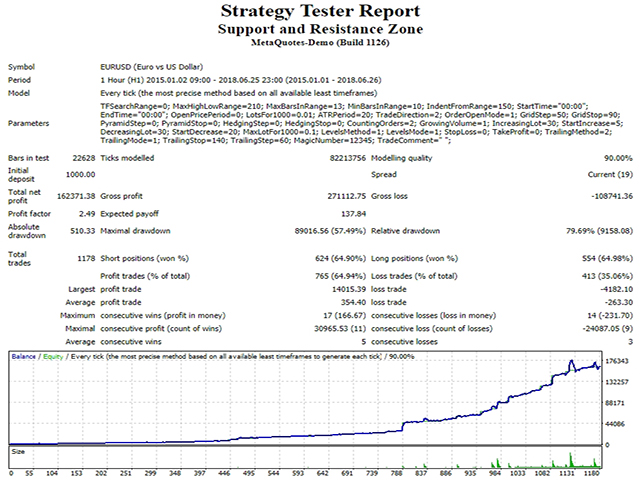
The Expert Advisor works using the opening prices of new bars. The strategy is based on the breakout/rebound from newly formed support and resistance levels. The support/resistance levels are identified using a narrow range of fluctuations in High/Low price of the bar for the period n. Entries are made in the direction of the initial movement from a level +/- n points.
The EA is designed for intraday trading with all major currency pairs on any timeframe. Any trading style can be used, which makes the EA not just a trading robot, but a multifunctional flexible designer. The EA applies dynamic levels for placing new orders, stop loss, take profit and trailing stop levels invisible for brokers. Their values can be calculated in pips, in money, in percents of the balance or based on volatility (ATR).
Each block responsible for management of a particular function can be customized separately and operate as a single unit. The EA is able to interact with and to positions opened in different directions (both single orders and order baskets), close interact with positions opened manually or by another expert (start managing deals, distinguished by magic number). Since the EA works on open prices of new bars, it can be optimized easily and quickly.
Recommendations
- Before using on a live account, test the EA with minimal risk on a cent account;
- Use VPS or hosting server with minimal network latency to the broker's server;
- Low spreads + low commission + high quality execution are important when choosing a broker to trade;
- Use the EA on high liquid pairs, such as EURUSD, GBPUSD, AUDUSD, USDJPY, USDCHF, USDCAD, NZDUSD;
- Minimum deposit - 1000 currency units per 0.01 lots;
- H1 timeframe.
Parameters
- MaxHighLowRange - the maximum range of the High/Low price fluctuation of a bar.
- MaxBarsInRange - maximum bars in the search range.
- MinBarsInRange - the minimum number of High/Low bar prices in the range.
- IndentFromRange - indent from the level for opening positions, not used if 0.
Most Relevant Parameters
- StartTime, EndTime - time for opening orders, not used if 00:00.
- LotsFor1000 - initial lot size per 1000 units of base currency.
- ATRPeriod - period for calculating the average daily volatility, in days.
- TradeDirection - trading method: trade in one or both directions simultaneously.
- OrderOpenMode - calculation of step for opening orders: in pips, in the deposit currency, as a percentage of the balance or as a percentage of ATR.
- GridStep, GridStop - step for averaging positions, not used if 0.
- PyramidStep, PyramidStop - step for increasing positions, not used if 0.
- HedgingStep, HedgingStop - step for hedging positions, not used if 0.
- CountingOrders - order counting: each series separately or the total number of orders in different directions.
- GrowingVolume - scale in to positions by the amount of orders or by lot increment.
- IncreasingLot, DecreasingLot - increase/decrease the lot by the specified percentage, not used if -0.
- StartIncrease, StartDecrease - the position to start increasing/decreasing the lot.
- MaxLotFor1000 - the maximum lot per 1000 units of base currency.
- LevelsMethod - setting take profit/stop loss: separately for short and long positions or for the entire basket of orders.
- LevelsMode - calculation of take profit/stop loss: in pips, in the deposit currency, as a percentage of the balance or as a percentage of ATR.
- StopLoss, TakeProfit - stop loss and take profit, not used if 0.
- TrailingMethod - trailing stop method: separately for short and long positions or for the entire basket of orders.
- TrailingMode - calculation of trailing stop: in pips, in the deposit currency, as a percentage of the balance or as a percentage of ATR.
- TrailingStop, TrailingStep - trailing stop and trailing step.
- MagicNumber - magic number, the EA manages all positions opened manually or by another expert if set to -1.
- TradeComment - trade comment.