Insider Trading
- Experts
-
Volodymyr Hrybachov
 안녕하세요, 트레이더 여러분! 🚀
제 이름은 볼로디미르이며, 39세, 우크라이나 출신입니다 🇺🇦.
저는 11년 이상 MetaTrader 플랫폼에서 거래 시스템, 지표, 전문가 조언자(EA)를 개발해왔습니다. 제 접근 방식은 인공지능, 알고리즘 전략, 그리고 실제 시장 경험을 결합한 것입니다.
💡 저의 목표는 트레이더가 안정적인 수익을 달성하고 위험을 줄이며 자신 있게 거래할 수 있도록 돕는 도구를 만드는 것입니다.
📊 트레이더가 저를 신뢰하는 이유: - 버전: 1.1
- 업데이트됨: 4 3월 2022
- 활성화: 10
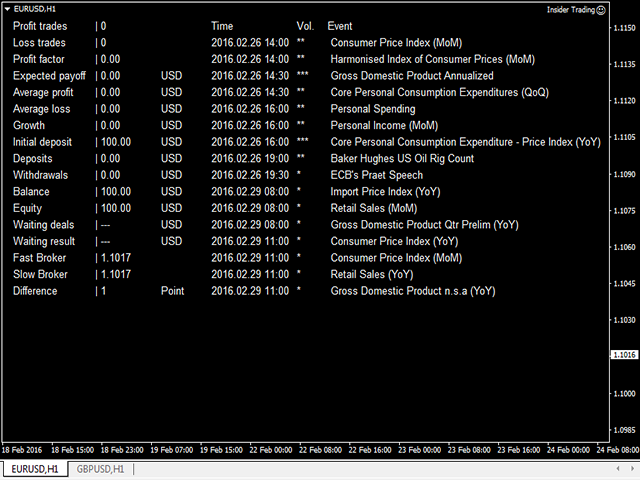
Arbitrage-news trading EA. Works at a user-defined deviation from the price during the news release (optional). The trade is opened when the fast broker gets ahead of the slow one by the specified amount of points. The trades are opened by the direction of the fast broker price movement, works both during the news release and without the news filter. The news filter automatically determines the time zone and the currency the news is released on.
To enable the news filter you need to do the following:
In the trading terminal of the Slow Broker (Priority = _SlowBroker) open "Tools" ---> "Options" ---> "Expert Advisors" ---> add "http://calendar.fxstreet.com" to the "Allow WebRequest for listed URL list" field.
Important! The EA cannot be tested in the Strategy Tester, therefore download the Demo version of the EA for testing.
Setup
The EA should be run on 2 trading terminals of different brokers. Choose the Priority in the EA settings – the EA priority, either fast broker (_FastBroker) or slow broker (_SlowBroker).
- _FastBroker – the EA stored the quotes in a file in the common folder for further analysis;
- _SlowBroker – the EA reads and analyzes the quotes received from the fast broker and opens trades.
The trading itself is performed on the terminal with the Priority = _SlowBroker (slow broker).
Parameters
- Priority – the EA priority, fast or slow broker;
- DifferencePrice – price deviation;
- NewsFilter – enable the news filter;
- MinutesNewsFilter – minutes after the news release to enable trading;
- NewsImpotance – news importance;
- Lot – traded lot if AutoLot = 0;
- AutoLot – automatic trading lot calculation depending on the balance. Not used if set to 0;
- TakeProfit – take profit in points;
- StopLoss – initial stop loss in points;
- TrailingStopLoss – enable trailing stop loss;
- Magic – magic number. If 0, it works with all orders;
- Comment – order comment;
- DrawInfo – display information on the chart;
- Language – select the language to display the information on the chart:
- _English – English;
- _Русский – Russian;
- TextColor – text color.