Scalping worm
- 지표
-
Andrey Kozak
 Laboratory of Automatic Systems (LAS) - more than 10 years, we have been developing, testing and programming automatic trading robots for the forex market.
 - 버전: 1.0
- 활성화: 20
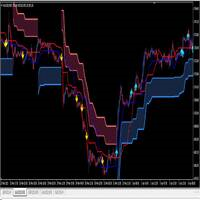
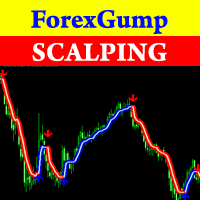
Scalping Worm is an essential tool for every trader aiming to improve the accuracy of their market entries and exits. With its advanced weighted moving average formula and adaptive smoothing logic, this indicator not only captures the current trend direction but also helps determine its strength and stability. The blue line signals an uptrend, while the red line indicates a downtrend, making analysis highly intuitive and visually straightforward.
The main advantage of this indicator is its ability to minimize market noise, which is especially important when trading on shorter timeframes. The period and smoothing factor settings allow traders to adjust the indicator to various trading styles, whether for scalping or long-term positions. Its support for all major timeframes and currency pairs makes this tool versatile and convenient for everyday use.
Why every trader needs this indicator:
-
Ease of Use and Versatility: The intuitive trend display with red and blue colors allows instant market direction identification and reduces the likelihood of errors when making trading decisions.
-
Flexible Settings: The indicator’s parameters can be tailored to individual trading strategies, making it relevant for both short-term and long-term strategies.
-
Noise Reduction: With built-in smoothing and advanced filtering, the indicator reduces market noise, helping avoid false signals and increasing the precision of entries and exits.
-
Optimized Performance: The indicator is designed for fast and efficient data processing, making it a reliable tool for active traders who need to respond quickly to market changes.
With this indicator, traders can make decisions based on objective data, not emotions. It is a proven path to increasing profitability and reducing risks, making it an indispensable assistant on the path to successful trading.
Example Trading Strategy:
Here’s an example of a scalping strategy using this indicator to trade on a 1-minute (M1) chart with the trend direction determined on the 30-minute (M30) chart. This strategy helps traders navigate short-term fluctuations by following the main trend direction set on a higher timeframe, minimizing false signals.
Scalping Trading Strategy Based on the Indicator
Strategy Parameters:
-
Timeframes:
- Main trading timeframe: M1 (1 minute).
- Trend identification timeframe: M30 (30 minutes).
-
Indicator Settings on M1:
- Period: 12 (can be adjusted for trend sensitivity).
- Smoothing Factor: 0.8.
-
Instruments: Trade trending pairs with high liquidity (e.g., EUR/USD, GBP/USD).
Strategy Steps
-
Trend Analysis on M30:
- Open the M30 chart and apply the indicator.
- Determine the trend:
- If the blue line dominates on M30, this indicates an uptrend.
- If the red line dominates, this indicates a downtrend.
- The M30 trend direction determines which trades can be opened on M1: only buy trades during an uptrend and only sell trades during a downtrend.
-
Trading on M1:
- Switch to the M1 chart with the same indicator.
- Wait for the following conditions:
- For buys: the blue line on M1 crosses above the red line.
- For sells: the red line on M1 crosses above the blue line.
-
Entering Positions:
- Open trades only in the main trend direction on M30:
- If the M30 trend is up, open buy trades upon signals on M1.
- If the M30 trend is down, open sell trades upon signals on M1.
- Ensure that the indicator on M1 confirms the trend shown on M30 before entering a trade.
- Open trades only in the main trend direction on M30:
-
Exiting Positions:
- Take-Profit: Use a fixed take-profit of 5-8 pips, or adapt it to the pair’s volatility.
- Stop-Loss: Set a stop-loss 3-5 pips below the last local low (for buys) or above the last local high (for sells).
- Alternative Exit: Close the position if an opposite signal appears on M1 or if the trend on M30 changes.
Additional Recommendations
- Avoid trading during periods of high volatility (e.g., 5 minutes before and after major news releases).
- Do not trade against the main trend on M30, even if there is a signal on M1, to avoid false breakouts.
- Adjust the indicator parameters (e.g., period and smoothing factor) for specific currency pairs or assets to achieve optimal results.
Example Trade (for Reference)
- Step 1: On the M30 chart, the indicator shows a dominant blue color, signaling an uptrend.
- Step 2: On the M1 chart, wait for the blue line to cross above the red line.
- Step 3: Open a buy position with a take-profit of 6 pips and a stop-loss 4 pips below the local low.
- Step 4: Close the trade upon reaching the take-profit or if the indicator signals a potential trend reversal.
This strategy combines high accuracy and ease of execution, as it is based on a combination of short-term and long-term analysis. It helps avoid false signals common in minute chart scalping and aligns with the main trend direction, increasing the probability of successful trades.
Indicator Settings:
-
Period:
- Value: Default is 12.
- Description: Determines the length of the period used to calculate the moving averages in the indicator. A higher period smooths the line and makes it less sensitive to minor market fluctuations, while a lower period increases sensitivity, which is beneficial for short-term strategies like scalping.
-
Method:
- Value: Default is 1 (usually refers to a simple or weighted moving average, depending on the platform).
- Description: Sets the type of moving average used in calculations. Different methods (e.g., simple, exponential, or weighted moving averages) affect the indicator’s reaction to price changes, allowing it to adapt to various market conditions and assets.
-
Price:
- Value: Default is 0.
- Description: Specifies which price data to use in the calculations. A value of 0 usually indicates closing prices. The indicator can also be set to use open prices, median prices, or other options, depending on the trader’s preference.
-
Smoothing Factor:
- Value: Default is 0.8.
- Description: Sets the smoothing degree of the indicator line, affecting its responsiveness to market changes. A higher value (close to 1) smooths the line, reducing noise. A lower value (closer to 0) increases sensitivity, which can be useful for short-term trades.