SQ Tactic Tracker

5

SQ TACTIC TRACKER — Multi-Bot Performance & Risk Dashboard for MT5


KNOW YOUR EDGE. DON'T GUESS IT.

Every bot, every symbol, every session, every open position — decoded on one chart.


Your equity curve tells you IF you're making money. It never tells you WHERE it comes

from, WHEN you actually win, WHICH bot is quietly bleeding the account, or WHAT you're

exposed to right now.


SQ Tactic Tracker puts your entire trading account on a single chart and answers those

questions at a glance — live. It reads every position on the account, groups it by magic

number, and turns it into a full analytics command center. One manual trade, one EA, or

fifty bots running at once — it all lands in one panel.


SIX TABS, ONE CHART


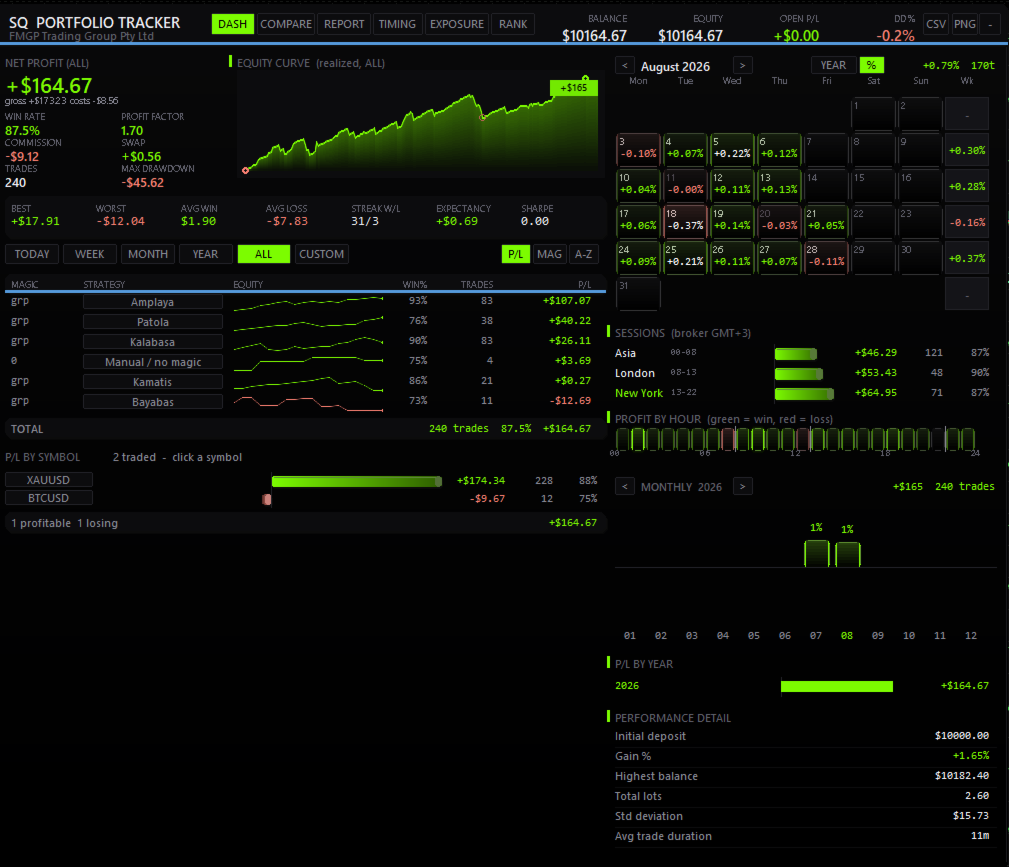
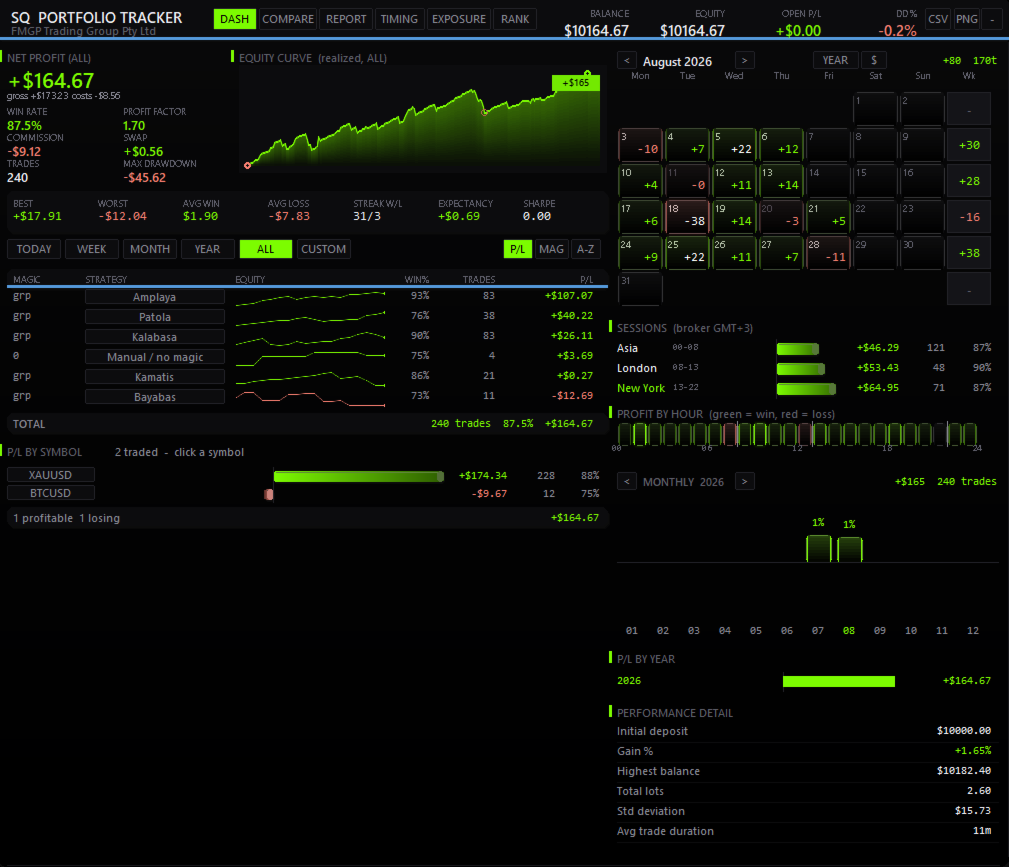
▪ DASHBOARD — THE FULL SCORECARD

Balance, equity, open P/L and drawdown up top. A realized equity curve with maximum

drawdown marked and a crosshair that names the trade under your cursor. Net profit, win

rate, profit factor, expectancy, recovery factor, Sharpe, Sortino, best and worst trade,

win/loss streaks — always in view. Each strategy row carries its own equity sparkline.


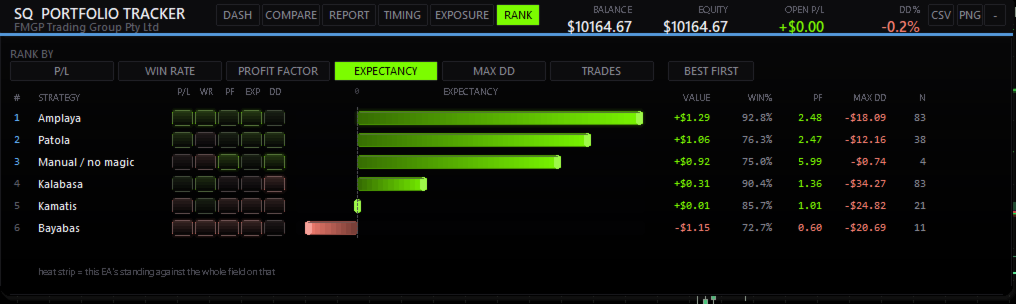
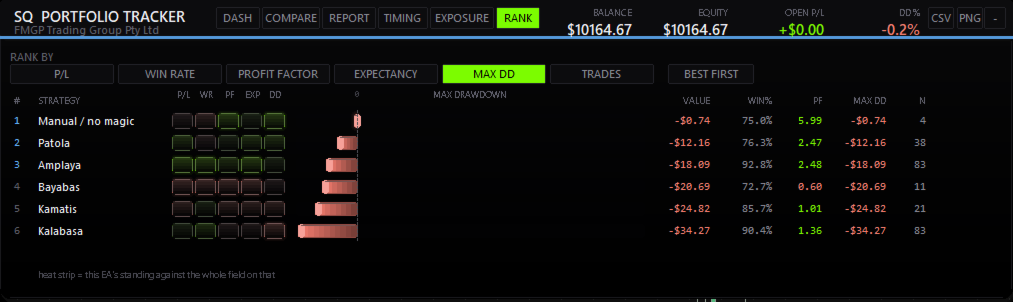
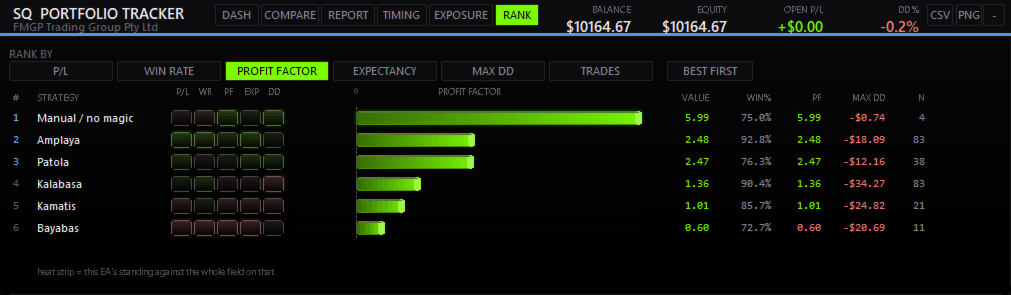
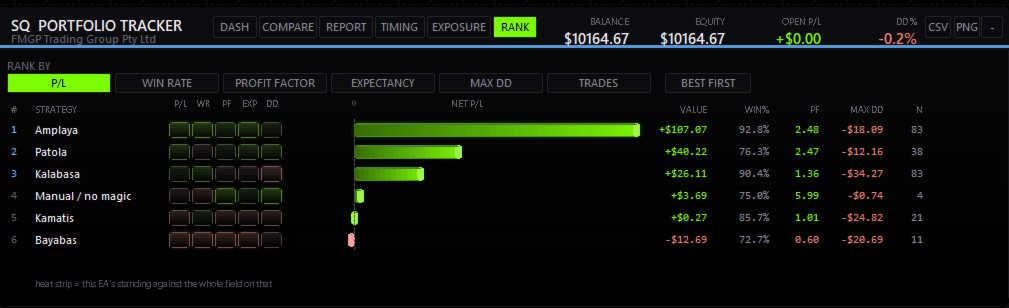
▪ RANK — EVERY EA, HEAD TO HEAD

The league table. Sort by net P/L, win rate, profit factor, expectancy, drawdown or trade

count with one click. A horizontal bar chart ranks them visually, and a five-cell heat

strip shows where each EA stands against the entire field on every metric at once — so a

bot that earns well but risks badly is obvious instantly.


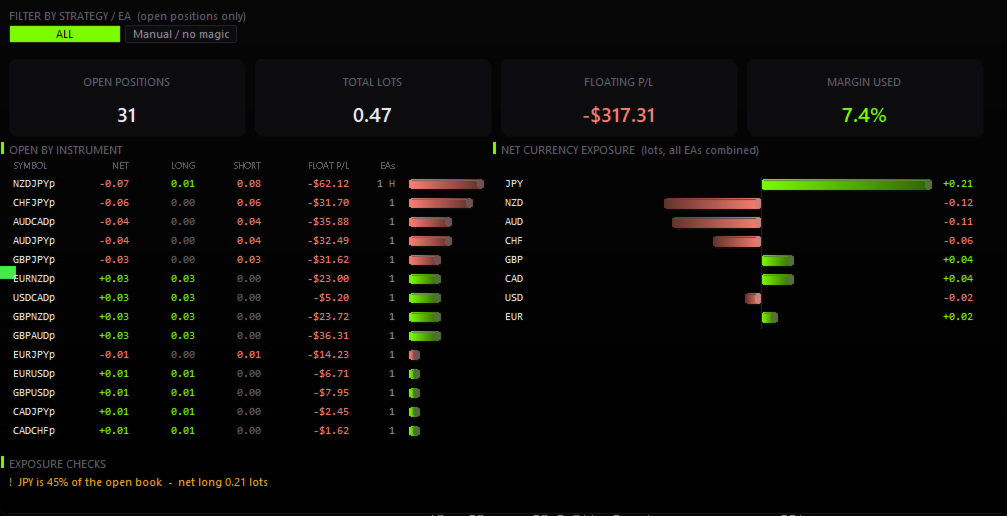
▪ EXPOSURE — LIVE RISK, RIGHT NOW

The tab most dashboards don't have. Open lots per instrument, floating P/L, margin used —

and net currency exposure aggregated across ALL your EAs. Five JPY crosses from four

different bots is one yen bet, and this shows you that number. Automatic warnings when two

EAs stack the same direction on one symbol, or when a single currency dominates your book.


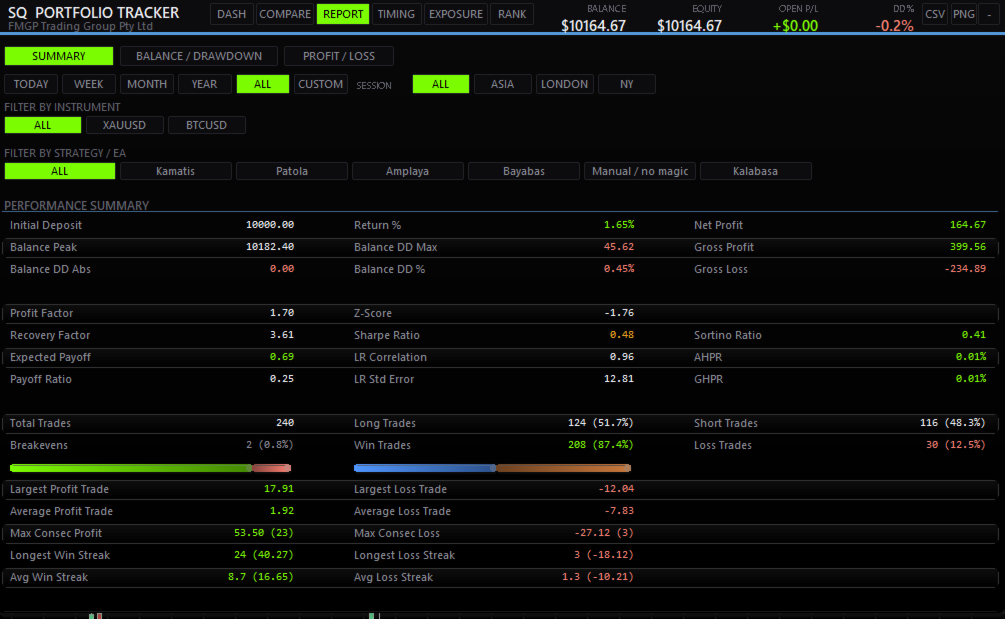
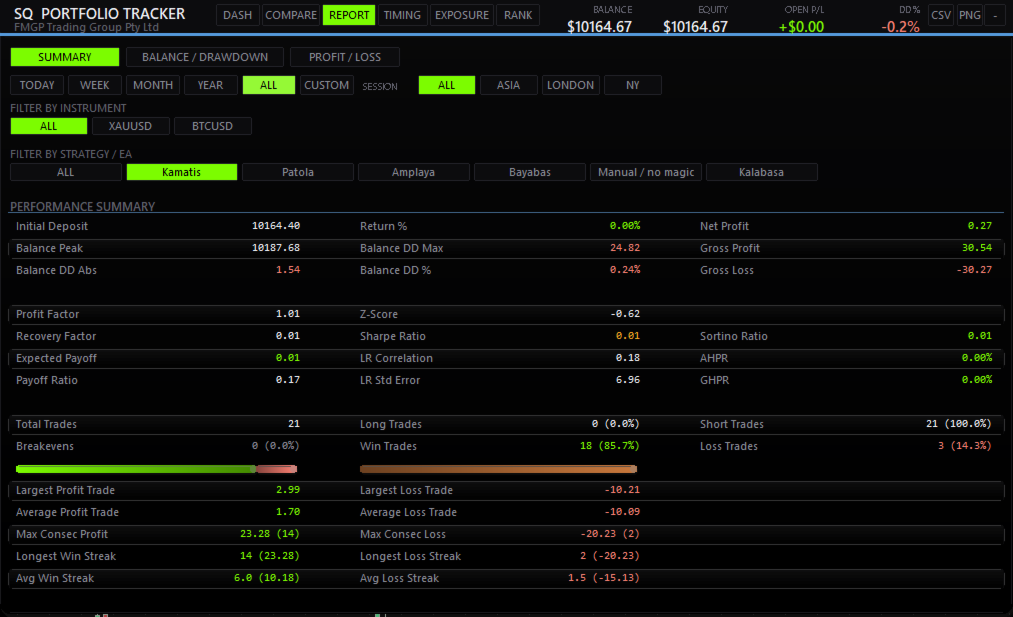
▪ REPORT — THE FULL STATEMENT

Performance summary, balance and drawdown curves with underwater shading, and a per-trade

P/L chart with MFE/MAE on hover. Every stat a prop firm would ask for, in one place.


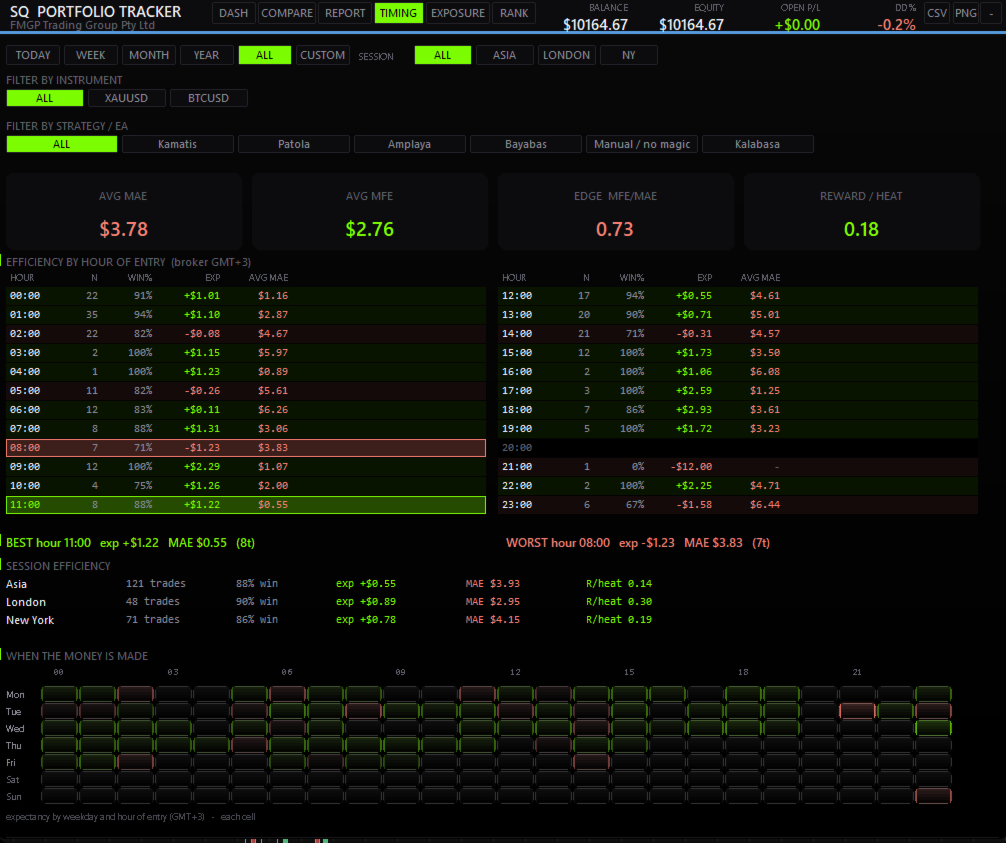
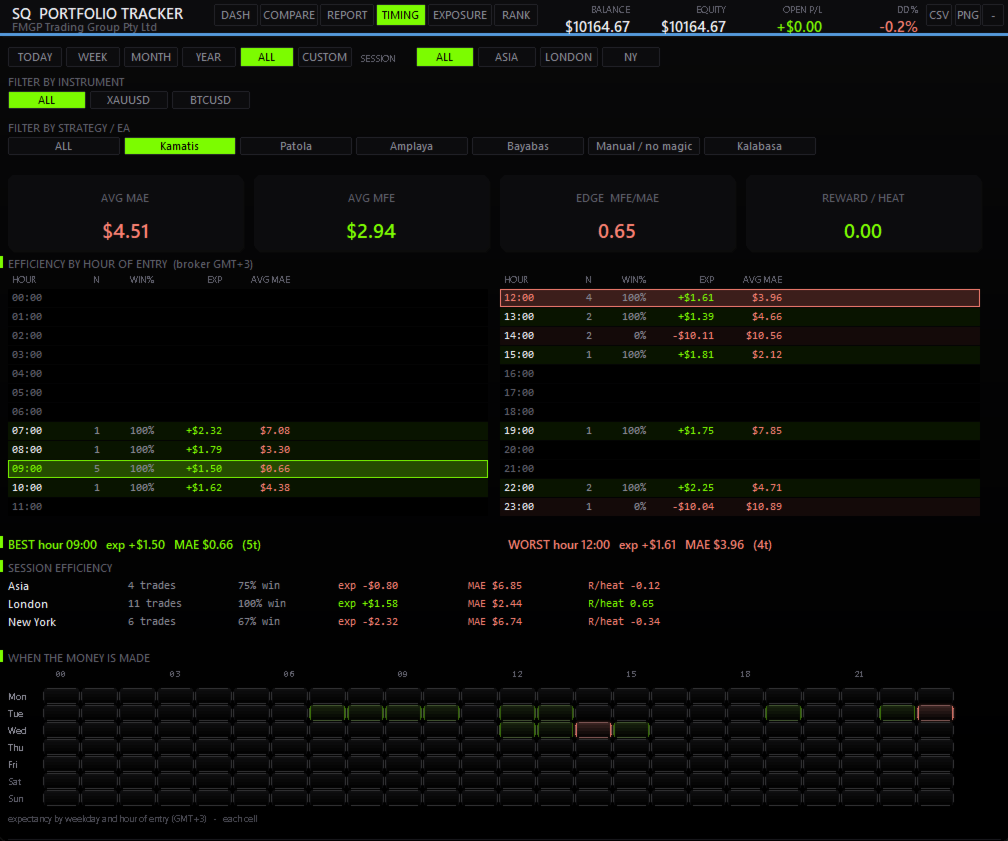
▪ TIMING — WHEN YOU ACTUALLY WIN

Efficiency by hour of entry with average MAE, session breakdown for Asia, London and New

York, best and worst hour called out, and a weekday × hour expectancy heatmap. See which

sessions pay you and which hours quietly cost you.


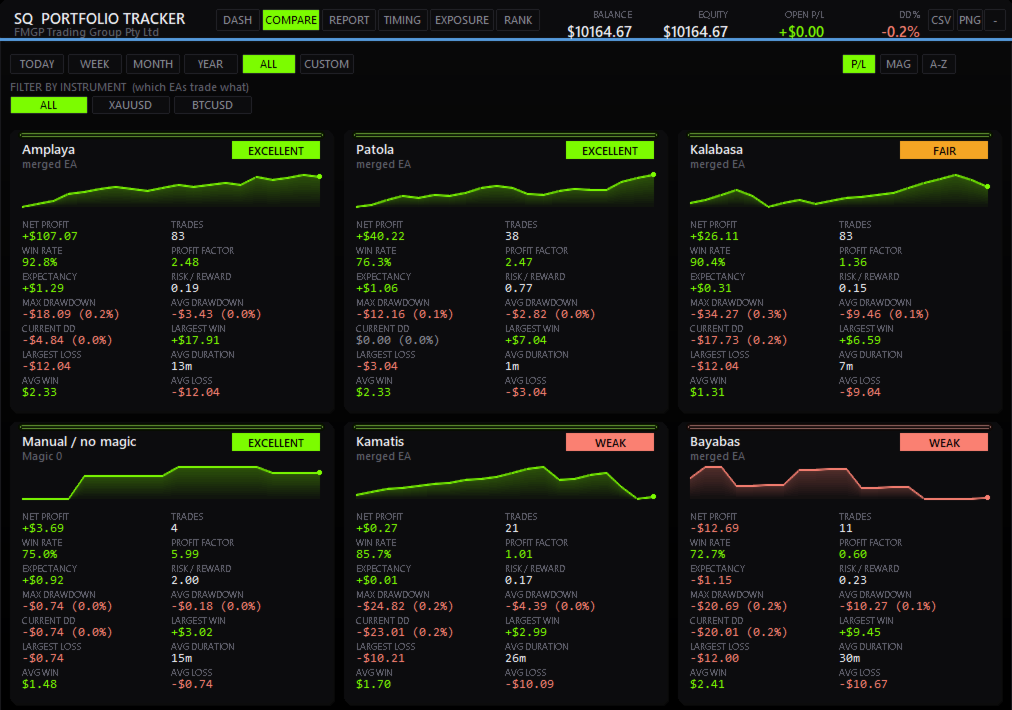
▪ COMPARE — SIDE BY SIDE

Every EA as its own card with an equity sparkline and a rating badge — net profit, win

rate, profit factor, risk/reward, drawdown, largest win and loss, average duration.


CLICK TO FOCUS — FULLY INTERACTIVE

Click any symbol or any EA and the ENTIRE dashboard re-scopes to it — equity curve,

calendar, sessions, monthly and yearly breakdowns, every metric. Want to know how XAUUSD

really behaves, or exactly when EA #3 makes its money? One click. Clear it and you're back

to the full account.


BUILT FOR REAL PORTFOLIOS

▪ Runs 50+ EAs comfortably. Every long list scrolls or pages — nothing is ever hidden

  from you silently.

▪ Group several magic numbers into one named EA. Bots that run multiple strategies on one

  chart show up as a single line, not scattered numbers.

▪ Name your EAs in the Settings, or in a simple text file with no length limit for

  accounts running dozens of them.

▪ Every list size is configurable, or set to show every magic found in your history.


CALENDAR, MONTH & YEAR

Day-by-day P/L calendar with weekly totals, switchable between money and % of balance with

one button. Monthly gain bars, P/L by year, total lots, highest balance, average trade

duration — your whole history, organized and readable.


P/L BY SYMBOL

Every instrument you trade, ranked winners-to-losers as clean diverging bars, each with its

own win rate and trade count.


ALERTS & EXPORT

Optional alerts for drawdown limits, daily loss limits, and EAs that have gone quiet — push

notifications supported. One-click CSV export of your filtered trades, and a PNG snapshot

of the panel for your records or your Discord.


BUILT FOR ANY ACCOUNT

Any broker. Any base currency, detected automatically. Broker symbol suffixes handled

correctly. Broker credit and bonus excluded from open P/L, so your floating number is

honest. Five themes including OLED black, a custom accent colour, adjustable UI scale and

automatic DPI scaling for 4K screens. Drag the panel anywhere — it remembers where you

put it. Collapse it to a single strip when you want the chart back.


WHO IT'S FOR

▪ Portfolio traders running multiple EAs who need one honest view.

▪ Prop-firm and funded traders who live and die by clean numbers.

▪ Manual traders who want to know their real session and symbol edge.

▪ Anyone tired of exporting to spreadsheets to understand their own trading.


HOW IT WORKS

SQ Tactic Tracker is an indicator — not an EA. It is display-only: it reads your account

history and shows it. It never opens, closes or modifies a single trade, and it needs no

AutoTrading. Drop it on one dedicated chart (any symbol, any timeframe — it reads the whole

account) and leave it running alongside your bots.


PERFORMANCE, NOT PROMISES.

This tool does not predict the market and it does not place trades. It gives you something

more useful: a clear, honest, live picture of how you and your bots are actually

performing — so every decision you make is backed by your own numbers.


See your whole account. Understand your real risk. Trade what works.

리뷰 3
Yppen
102
Yppen 2026.08.28 10:59 
 

This is a definitely the best analytics tool for your EAs portfolio and the UX/UI is excellent. Developer is very responsive and open to suggestions. Great communication and continuously adding useful features. So far, very happy with the EA.


Warith10
50
Warith10 2026.08.28 10:29 
 

The best detailed tool for analyzing EAs and performance , and developer very responsive to suggestions and adding features.

Gergo Giczy
380
Gergo Giczy 2026.08.24 15:05 
 

I believe, this is the best all-in-one statistics dashboard currently on the MQL5 Market and it has a very affordable price. It helps a lot to hardcore EA users like myself to check out the individual EAs' winning/losing performance out from the big mess on the account. I have over a hundred trades from 32 EAs on my account daily and if not with this dashboard, I needed to download the History every day to check the performance of the EAs, so it saves time for me every single day. The Developer is also very friendly and listening to the users. I already asked for some feature improvements to better scale to my needs, and he just promised to line up them for the next versions. I appreciate it very much. This dashboard worth every penny to save valuable time with its meaningful statistics.

추천 제품
Telegram to mt5 pro
Janet Abu Khalil
4 (4)
Telegram to MT5 Pro — Advanced Telegram Signal Copier with Auto-Fix, Multi-TP, Risk Control and Full Trade Management Telegram to MT5 Pro — 전문 텔레그램 신호 복사기 Telegram to MT5 Pro는 텔레그램 신호를 MetaTrader 5 계정으로 자동으로 직접 실행하는 고성능 트레이드 복사기로, 리스크, 실행, 트레이드 관리에 대한 완전한 제어를 제공합니다. 이 시스템은 두 가지 구성 요소로 이루어져 있습니다: • MetaTrader 5 내부에서 실행되는 Expert Advisor (EA) • 텔레그램에 연결되어 신호를 로컬로 EA에 전송하는 데스크톱 브리지 애플리케이션 두 구성 요소는 동일한 컴퓨터에서 실행되어야 합니다. MQL5 플랫폼 제한으로 인해 EA는 텔레그램에 직접 연결할 수 없습니다. 브리지는 텔레그램을 처리하고 EA는 거래를 실행합니다. 지원 및 설치
Aegis XAU Extreme Edition Overview Aegis XAU Extreme Edition is a trend-following Expert Advisor designed exclusively for XAUUSD M1 . Rather than trading throughout the entire day, it focuses only on carefully selected trading sessions identified through extensive historical testing. By avoiding statistically unfavorable hours, the EA aims to improve overall trading efficiency while maintaining consistent long-term performance. The strategy combines: EMA Trend Filter EMA Pullback Entry ADX Tr
Take control of your trading with OGL PositionSizer PRO , the ultimate trade management tool for MetaTrader 5. Designed for both professional and aspiring traders, this panel helps you manage your risk, positions, and profits efficiently. Key Features: Automatic Lot Calculation: Calculate lots based on risk % or fixed amount. Auto Breakeven all active positions on showing chart. Pending Protection - > If the prices comes stoploss before active position. The order will auto delete. Smart Partial
Multiple Positions
Emanuel Reynard Phillips
한 번에 여러 포지션/거래를 열어야 합니까? 우리는 귀하의 쉬운 솔루션을 만들었습니다. 이제 한 번에 여러 직위를 입력할 수 있습니다. 로트 크기, 포지션 수, 이익 실현 및 손실 중지를 설정할 수 있습니다. 예: 특정 로트 규모로 3, 5, 10 또는 원하는 수의 포지션을 구매하려고 합니다. 이제 "구매" 버튼을 탭하기만 하면 됩니다. 또는 예: 특정 로트 규모로 3, 5, 10 또는 원하는 수의 포지션을 판매하려고 합니다. 간단히 "판매" 버튼을 클릭하시면 됩니다. han beon-e yeoleo pojisyeon/geolaeleul yeol-eoya habnikka? ulineun gwihaui swiun sollusyeon-eul mandeul-eossseubnida. ije han beon-e yeoleo jig-wileul iblyeoghal su issseubnida. loteu keugi, pojisyeon su, iig silhyeon mich sonsil jung
DeepTrade SessionIntel
Yasir Mohammed Sachit Sachit
Most session tools try to cover everything. DeepTrade Session Intel does the opposite — it focuses on what actually moves the market: the London and New York sessions, tuned for Gold (XAUUSD) and US30. It maps the liquidity and the real activity window so you trade when the market is alive, not when it's dead.   WHAT IT SHOWS - London and New York session boxes drawn at their real server hours - Session HIGH and LOW lines — the liquidity that price hunts - Pre-session breakout range — the conso
Overview Breakout Meter is a price action tool that identifies key breakout zones based on recent daily price activity. It highlights areas where momentum is likely to trigger, helping traders anticipate breakouts or reversals with minimal configuration. How It Works The EA analyzes a user-defined number of recent daily candles and marks high and low zones where price has shown strong reactions. It automatically updates levels with new data and removes outdated zones to keep charts clear. Users
Advisor for hedging trading or pair trading. A convenient panel allows you to open positions on the necessary trading instruments and lots. Automatically determines the type of trading account - netting or hedging. Advisor can close all its positions upon reaching profit or loss (determined in the settings). A negative value is required to control losses (for example, -100, -500, etc.). If the corresponding fields are 0, the EA will not use this function.   Settings: Close profit (if 0 here
High Frequency Ct
Elidio Xavier Guimaraes
This utility copies Market orders, Limit orders, and Stop orders with a focus on high speed and easy setup. The utility works by setting up a Master and one or more Slaves. The setup is quite simple: you just need to define which account is the Master and which account is the Slave, and then set up the same Copy Trade Id for both. For the Slave to recognize the Master's orders, the Copy Trade Id parameter must be the same. Do not use numbers or special characters when setting the Copy Trade Id
Pattern Recognition EA
Claudiu-georgian Zavera
Pattern Recognition EA - From Learn to Earn. The market repeats itself. This EA finds every past repeat of the current candle sequence - and lets history vote the direction. ONE SHAPE. EVERY REPEAT IN HISTORY VOTES. The last N candles on your signal timeframe form a shape. The EA scans the history you choose - a fixed number of bars or everything your broker provides - for the SAME shape, and checks what happened next, every single time. Only when enough repeats exist AND a clear majority of t
Guardian Account Protector — the seatbelt for your trading account Your robots have no brakes. Guardian is the brakes. Guardian does not open trades. It has no grid, no martingale, and no entry logic of any kind. It does one job with complete discipline: it watches your ENTIRE account and enforces the risk limits you set, so that no robot, no strategy, and no bad day can destroy your balance. Think of it like a seatbelt for the driver. A seatbelt does not steer the car and does not make the d
Click Sent Order
Supanat Wiboonpanit
This program is a GUI for issuing orders that can be done more quickly. Faster TP SL setting This program is not an automated trading platform. Trading is risky, please manage your risk. We do not accept any responsibility. It should be tried with Demo before using it with Real. Normally, the setting sets the risk to 1:1 to shift manually or to enter the risk to x:1, where x can be entered and everything can move freely. Thank you to all customers who have purchased our products. We would like t
Custom Alerts: 여러 시장을 동시에 모니터링하고 중요한 기회를 놓치지 마세요 개요 Custom Alerts 는 여러 종목에 걸쳐 잠재적 트레이딩 기회를 한눈에 파악하고자 하는 트레이더를 위한 동적인 솔루션입니다. FX Power, FX Volume, FX Dynamic, FX Levels, IX Power와 같은 Stein Investments의 주요 도구들과 통합되어, 여러 차트를 오가거나 기회를 놓치는 일 없이 중요한 시장 변화를 자동으로 알림으로 제공합니다. 이제 브로커가 제공하는 모든 자산군을 지원하며, 기호를 입력할 필요 없이 자산 유형만 선택하면 설정이 완료됩니다. 1. Custom Alerts가 트레이더에게 매우 유용한 이유 올인원 시장 모니터링 • Custom Alerts 는 외환, 금속, 암호화폐, 지수, 주식(브로커가 지원하는 경우)까지 다양한 자산군의 신호를 수집하고 통합합니다. • 여러 차트를 전환할 필요 없이 하나의 창에서 명확한 알림을 받아보
이 어드바이저는 한 번의 클릭으로 여러 쌍을 거래할 수 있는 대시보드입니다. 딸깍 하는 소리       열려 있는       선택한 쌍에 대한 주문을 여는 버튼입니다. 딸깍 하는 소리       닫다       선택한 쌍의 주문을 마감하는 버튼입니다. 주문 로트는 사용자가 입력한 번호입니다. 양수는 매수 주문에 해당하고, 음수는 매도 주문에 해당합니다. 일부 주문이 아닌 전체 주문을 종료하려면   닫기 버튼을   클릭하세요. 최종 조치는 티켓 번호에 따라 달라지지 않습니다. 매직 입력을 0으로 설정하면 어드바이저가 수동 주문 마감을 동시에 도와줍니다. 다른 Advisor의 매직으로 Entry Magic을 구성함으로써 Advisor는 다른 Advisor가 개설한 주문을 동시에 마감할 수 있습니다. 삼각형 울타리       단 한 번의 클릭으로. 거래 기호는 사용자 정의 가능합니다. 시장 관찰에서 가져오거나 사용자가 입력합니다. 반: Magic – 조언자의 매직 넘버입니다. MaxLo
Capital Guard – Position Size & Risk Manager An Amazing Software For Risk Calulcation & Trading Management! Created by a Trader with over 27 years of Trading experience with the tools and functions traders need. Not filled with features and functions you just do not need. For The Lowest Price Possible. And It will never go up. I am a trader not a marketer. Here to help you get better in what you already do! 1st Class Support. You are never left alone. I am almost always online and will r
이 유틸리티는 양초가 수동으로 배치한 추세선에 닿을 때 마치 더 명확한 지정가 주문인 것처럼 주문을 개시합니다.  모든 자산에 사용할 수 있습니다. 주문을 열면 터치한 라인이 제거되고 화살표가 생성됩니다. 이 경우 가격 반전 작업에 사용되며 강세 양초가 상향식 선에 닿으면 매도 주문을 열고 약세 양초가 하향식 선에 닿으면 매수 주문을 엽니다.  손절매 및 이익실현을 조정할 수 있습니다. 이 유틸리티는 매우 유용합니다. 주문을 열고 화면에서 나가도록 프로그래밍할 수 있으며, 가격이 수평과 같은 상승 및 하강 지지선과 저항선에 도달할 때 차트 패턴에 매우 기능적입니다. 그리고 수직. 최신 업데이트에서는 여러 줄을 배치할 수 있습니다. 매우 중요: Meta trader 5에는 주문이 마감되고 선을 그릴 때 이 선이 로봇의 논리와 혼동되어 원치 않는 주문을 열 수 있는 거래 내역이 있습니다. 이 문제를 해결하려면 거래 내역이 표시되지 않도록 비활성화하세요. 인쇄물에서 확인하세요. 차
FREE
Trade Dashboard MT5
Fatemeh Ameri
4.95 (132)
Trade Dashboard simplifies how you open, manage, and control your trades, with built-in lot size calculation. It allows you to execute trades, manage risk, and control positions directly on the chart, with tools such as partial close, breakeven, and trailing stop. Designed to reduce manual work and help you stay focused on your trading decisions. A demo version is available for testing. Detailed explanations of features are provided within the MQL5 platform. Installation instructions are include
Is your trade at a loss? Does not matter ! You can use this Extra martingale tool.  In the set loss of your trade or your EA's trade , this tool will open another trade at a better price. It can also open multiple trades at different distances and with different lot sizes. Each trade will be assigned a TakeProfit. This tool has a lot of settings. You can set variable lot sizes, variable trade distances, variable TakeProfit sizes, maximum total profit or loss in money. You can also close trades
하나의 차트. 완벽한 통제. 각 차트의 개체, 색상 및 설정을 개별적으로 관리하는 데 시간을 낭비하지 마세요.       차트 동기화 관리자를   사용하면       모든 MetaTrader 차트를 동기화, 복사 및 제어하세요       단 하나의 패널과 몇 가지 단축키를 사용하여 즉시 작업할 수 있습니다. 한 번 그리면 어디서나 업데이트할 수 있습니다. 한 번의 클릭으로 차트를 열고 닫으세요. 작업 공간을 깔끔하게 유지하세요.       심볼 기반 객체 관리   . 중요한 세부 정보를 놓치지 마세요.       스프레드 디스플레이, 카운트다운 타이머, 캔들 마감 알림. 시간을 절약하고, 오류를 줄이고, 더욱 현명하게 거래하세요. Chart Sync Manager   설치 및 입력 가이드 EA에 대한 알림을 받으려면 URL을 추가하세요(   http://www.betasoft.dev   ) MT4/MT5 터미널(스크린샷 참조). MT4 버전   https://www.mql5.c
The professional browser of News and Trading Sessions is now available in MetaTrader 5. Now all the most important market information is collected on one dial! News located on the Time scale. Planning your working time has never been so easy and convenient ... The news scale can be switched a day, two, a week, a month forward or backward (see the details in the short video). All news updates in real time. Thanks to the built-in filters, you can configure the display of news by importance, cou
Signals for Telegram
Elidio Xavier Guimaraes
It is a utility that posts customized messages on Telegram based on account trading activity. Once the utility is on the chart, with each new position opened from the same chart symbol the utility is added, a customized message will be sent to the Telegram group defined in the input parameters. The utility will post to the Telegram group if a new position is opened and if it is the same symbol as the chart the utility is running on. If you are using an Expert Advisor for Buy and Sell and want to
AutoLot Trade Panel
Fabian Maurice Schwarz
AutoLot Trade Panel은 차트 기반 MT5 트레이딩 패널로, 더 빠른 주문 실행, 자동 랏 계산, 실시간 리스크 표시, 시각적인 SL/TP 계획, 그리고 차트에서 직접 포지션 관리를 원하는 수동 트레이더를 위해 만들어졌습니다. 빠른 시작 가이드: https://www.mql5.com/en/blogs/post/769949 ! 무료 데모 사용 가능 ! 정식 버전을 구매하기 전에 패널 워크플로우, AutoLot 계산 및 Visual Tool을 테스트할 수 있는 무료 데모 버전이 제공됩니다. 데모 버전: https://www.mql5.com/en/market/product/176387 ====================================================================================================================================================================
Hybrid Assisted Trading Engine Manual Trading. Machine Discipline. The Hybrid Assisted Trading Engine is an institutional-grade manual trade management system designed to protect traders from emotional mistakes — without taking control away from them. You decide when to enter . The engine decides how the trade is managed . What It Does This system continuously monitors your manual trades and enforces professional-level trade management rules in real time: Smart Breakeven logic R-based trai
Custom Alerts AIO: 다중 시장을 동시에 모니터링 – 설정 없이 즉시 사용 가능 개요 Custom Alerts AIO 는 복잡한 설정 없이 즉시 사용할 수 있는 통합 시장 모니터링 도구입니다. FX Power, FX Volume, FX Dynamic, FX Levels, IX Power 등 필요한 모든 지표가 내장되어 있어 별도의 설치나 구성 없이 알림 기능을 바로 사용할 수 있습니다. 차트 그래픽 없이 작동하며, Forex, 금속, 지수, 암호화폐 등 주요 자산군을 모두 지원합니다. 주식(Symbols)은 별도로 입력하여 추가할 수 있으나, MetaTrader에서는 일반적으로 제한적으로만 사용됩니다. 1. 왜 Custom Alerts AIO를 선택해야 하나요? 추가 라이선스가 필요 없습니다 • 모든 Stein Investments 지표가 내장되어 있어 별도 구매가 필요 없습니다. • 즉시 알림 기능을 시작할 수 있어 빠르고 간편합니다. 모든 시장을 하나의 도구로
Daily Telegram Market Briefing — Professional FX Session Briefing for MT5 Daily Telegram Market Briefing is a MetaTrader 5 Expert Advisor that compiles a clean, actionable morning brief for the instrument on your chart and delivers it to your Telegram group or channel at a time you choose. It combines previous day OHLC levels, an Asia session range computed in your local time, a directional bias and short outlook, and a curated list of today’s high-impact macro events (from the ForexFactory cal
CChart
Rong Bin Su
Overview In the fast-paced world of forex and financial markets, quick reactions and precise decision-making are crucial. However, the standard MetaTrader 5 terminal only supports a minimum of 1-minute charts, limiting traders' sensitivity to market fluctuations. To address this issue, we introduce the Second-Level Chart Candlestick Indicator , allowing you to effortlessly view and analyze market dynamics from 1 second to 30 seconds on a sub-chart. Key Features Support for Multiple Second-Level
The Simple Manual Trading Panel (v2.11) Is a professional trade management tool designed with a clean, movable UI to streamline manual execution and automated exit strategies. Core Features Dynamic Visual Interface: A movable GUI panel that provides real-time information including a bar countdown timer, live spread, and advanced volume analysis. Flexible Lot Size setting, with 2 decimals (If broker supports it). Multi-Stage Take Profit: Supports three distinct Take Profit (TP) levels in either
MOST IMPORTANT INFORMATION <1> Exactly this program was used to set World Record in Trading 2020 Account Equity was increased from $1,000,000 to $100,000,000 in 16 days Details => www.mql5.com/en/users/AIS <2> In the last days of this record the position was creating by 1000-2000 orders It was used the computer with 1 core Pentium 4 CPU at 2.8 GHz and 1 GB memory In the last two days the daily profit was $40,000,000 every day <3> It was 100% manual trading And this special program was used to s
️ 단 하루의 실수로 펀딩 계좌를 잃어서는 안 됩니다. Risk Manager FS Pro 는 계좌에 엄격한 일일 손실 한도를 강제합니다. 자산(Equity)이 한도에 도달하는 순간 모든 포지션을 시장가로 즉시 청산하고, 다음 거래일까지 거래를 잠급니다 — 더 이상 의지력에 기댈 필요가 없습니다 . 프랍펌(Prop Firm) 챌린지와 펀딩 계좌를 위해 특별히 설계되었습니다(1단계, 2단계, 인스턴트 펀딩). 챌린지에 실패하는 진짜 이유 전략 때문인 경우는 거의 없습니다. 단 한 번의 틸트(감정적 폭주) 때문입니다: 손실, 복수 매매, 두 배로 늘린 랏 — 그리고 일일 드로다운 규칙 위반. 이 유틸리티는 그런 시나리오를 기술적으로 불가능하게 만듭니다. 3중 독립 보호 레이어 자동 청산 — 자산이 일일 또는 전체 한도에 도달 → 모든 포지션 즉시 청산. 하드 락 — 서버 시간 자정까지 거래가 차단됩니다. 잠금 중에 열린 새 주문은 약 0.5초 안에 청
Ferramenta derivada do DR Assistant, a versão Lite conta com recursos semelhantes, mas sendo mais específica em sua aplicação, destina-se exclusivamente ao uso para gestão de ordens abertas a partir de suas funções. Deste modo, quaisquer outras negociações ou posições abertas por outras ferramentas ou manuais serão ignoradas pelo Assitant Lite. Os parâmetros e configurações disponíveis, bem como suas principais funções são: - Take Profit e Stop Loss: duas opções de Steps, em pontos, para ambas a
Account Informer MT5
Ismail Hakki Delibas
5 (2)
Utility Description This is a useful utility that can help traders to Stay in touch with their Accounts and hear about account critical conditions. With this utility, traders will receive notifications of broker server connectivity status. Different forms of notifications are supported such as Android or IOS phone notifications, Email messages or Popup Alerts. Also any changes on positions can be sent as a notification based on user settings. All above features can be customized using the EA inp
이 제품의 구매자들이 또한 구매함
Trade Assistant MT5
Evgeniy Kravchenko
4.41 (216)
거래당 위험 계산, 라인을 사용한 손쉬운 신규 주문, 부분 청산 기능을 통한 주문 관리, 7가지 유형의 트레일링 스탑 및 기타 유용한 기능을 제공합니다. 추가 자료 및 지침 설치 지침   -   애플리케이션 지침   -   데모 계정용 애플리케이션 평가판 라인 기능       - 차트에 개시선, 손절매, 차익실현을 표시합니다. 이 기능을 사용하면 새로운 주문을 쉽게 하고 개봉 전에 추가 특성을 볼 수 있습니다. 위기 관리       -       위험 계산 기능은 설정된 위험과 손절매 주문의 크기를 고려하여 새 주문의 볼륨을 계산합니다. 이를 통해 손절매 크기를 설정하고 동시에 설정된 위험을 존중할 수 있습니다. 로트 계산 버튼 - 위험 계산을 활성화/비활성화합니다. 필요한 위험 값은 위험 필드에 0에서 100 사이의 백분율 또는 예금 통화로 설정됩니다. 설정 탭에서 위험 계산 옵션을 선택합니다. $ 통화, % 잔액, % 지분, % 자유 마진, % 사용자 정의, % AB 이전
Trade Manager EA에 오신 것을 환영합니다. 이 도구는 거래를 보다 직관적이고 정확하며 효율적으로 만들기 위해 설계된 궁극적인 리스크 관리 도구 입니다. 단순한 주문 실행 도구가 아닌, 원활한 거래 계획, 포지션 관리 및 리스크 제어를 위한 종합 솔루션입니다. 초보자부터 고급 트레이더, 빠른 실행이 필요한 스캘퍼에 이르기까지 Trade Manager EA는 외환, 지수, 상품, 암호화폐 등 다양한 시장에서 유연성을 제공합니다. Trade Manager EA를 사용하면 복잡한 계산은 이제 과거의 일이 됩니다. 시장을 분석하고 진입, 손절 및 익절 수준을 차트의 수평선으로 표시한 후 리스크를 설정하면, Trade Manager가 이상적인 포지션 크기를 즉시 계산하고 SL 및 TP 값을 실시간으로 표시합니다. 모든 거래가 간편하게 관리됩니다. 주요 기능: 포지션 크기 계산기 : 정의된 리스크에 따라 거래 크기를 즉시 결정합니다. 간단한 거래 계획 : 진입, 손절, 익절을 위한
Farmed Hedge Yield Farming | All Markets (Manual - Hybrid - Semi/Automated EA) VERIFIED TRADING RESULTS - Farmed Hedge Yield Axi Copy:  https://www.mql5.com/en/signals/2356376 - Farmed Hedge Yield Exn Copy:   https://www.mql5.com/en/signals/2356404 - Farmed Hedge Yield V Copy:  https://www.mql5.com/en/signals/2357156 * Before purchasing, please feel free to send me a message if you have any questions about the product or setup. - You can test the system using Strategy Tester: Visual Mode , a
베타 출시 Telegram to MT5 Signal Trader 는 곧 공식 알파 버전을 출시할 예정입니다. 일부 기능은 아직 개발 중이며, 작은 버그가 발생할 수 있습니다. 문제가 있으면 꼭 보고해 주세요. 여러분의 피드백은 소프트웨어 개선에 도움이 됩니다. Telegram to MT5 Signal Trader 는 Telegram 채널 또는 그룹의 거래 신호를 자동으로 MetaTrader 5 계정으로 복사하는 강력한 도구입니다. 공개 및 비공개 채널을 모두 지원하며, 여러 신호 제공자를 여러 MT5 계정에 연결할 수 있습니다. 소프트웨어는 빠르고 안정적으로 동작하며, 복사된 거래를 완벽히 제어할 수 있습니다. 인터페이스는 깔끔하며 대시보드와 차트가 시각적으로 구성되어 있고, 직관적인 네비게이션이 가능합니다. 여러 Signal Account를 관리하고, 공급자별 설정을 세밀하게 조정하며, 모든 동작을 실시간으로 모니터링할 수 있습니다. 필수 조건 MQL의 제한으로 인해 EA는 Te
================================================================================ POC BREAKOUT - V20.72. Full Professional Grade Toolkit ================================================================================ POC Breakout is a full MetaTrader 5 trading dashboard for discretionary traders who want breakout signals, Point of Control (POC) context, volume profiles, order flow, market structure, news, alerts, and advanced trade planning in one professional workspace. Attached directly to you
TradePanel MT5
Alfiya Fazylova
4.88 (167)
Trade Panel은 다기능 거래 도우미입니다. 이 애플리케이션에는 50개 이상의 수동 거래 기능이 포함되어 있으며 대부분의 거래 작업을 자동화할 수 있습니다. 앱 사용 설명서 + 동영상 설명: https://www.mql5.com/en/blogs/post/772292 데모 계정용 앱 체험판: https://www.mql5.com/en/blogs/post/750865 앱 설치 방법: https://www.mql5.com/en/blogs/post/756239 시각 모드에서 앱 테스트 방법: https://www.mql5.com/en/blogs/post/770277 VPS MetaTrader에 앱 설치 방법: https://www.mql5.com/en/blogs/post/770190 거래. 한 번의 클릭으로 거래를 수행할 수 있습니다: 리스크 자동 계산과 함께 예약 주문 및 포지션 열기. 한 번의 클릭으로 여러 주문 및 포지션 열기. 주문 그리드 열기. 예약 주문 및 포지션을 그룹별로
EA Overfitter
Stephen J Martret
5 (1)
That backtest looks great. But will it still be making money tomorrow, next week, next month? EA Overfitter re-runs your EA on 100 price histories it has never seen. One score tells you if the edge is real. A backtest tells you what an EA did on one price history — the one that happened to occur. What you cannot tell from it is how much of that result was the strategy and how much was the particular path. EA Overfitter answers that. It builds up to 100 synthetic price histories your EA has n
Telegram to MT5 Multi-Channel Copier 는 Telegram 채널의 트레이딩 시그널을 MetaTrader 5로 자동 복사합니다. 봇도, 브라우저 확장도, 수동 복사도 필요 없습니다. Telegram에 시그널이 도착하면 EA가 몇 초 안에 터미널에서 주문을 실행합니다. 제품은 두 가지 구성 요소로 이루어집니다: Telegram 채널을 수신하는 Windows 애플리케이션과, MT5 터미널에서 시그널을 실행하는 본 EA입니다. MT4 버전도 제공됩니다   여기 . 설정 가이드와 앱 다운로드:   https://www.mql5.com/en/blogs/post/768988 작동 방식 Windows 앱은 봇이 아닌 본인의 API 자격 증명으로 Telegram에 연결됩니다. 따라서 비공개·VIP 채널을 포함해 구독 중인 모든 채널, 그룹, 토픽을 읽을 수 있습니다. 직접 메시지를 보내는 시그널 봇, 개인 채팅, 심지어 나의 저장된 메시지도 소스로 사용할 수 있습니다. 시
Astro Trade MT5
Indra Maulana
5 (6)
25% discount on the release of the tool: only for the next 3 buyers Send a message to receive a demo version. AstroTrade Trading Assistant AstroTrade is a comprehensive multi-functional trading utility developed for the MetaTrader 5 platform. It integrates essential tools for trade execution, risk management, and technical monitoring into a single unified interface. The application is designed to assist traders in managing their daily operations through a visual and structured environment. Vi
Exp COPYLOT CLIENT for MT5
Vladislav Andruschenko
3.97 (35)
MetaTrader 5용 전문 트레이드 복사기 MetaTrader 용 빠르고 전문적이며 신뢰할 수 있는 트레이드 복사기 입니다. COPYLOT 은 MT4와 MT5 터미널 간의 Forex 거래 복사를 지원하며, Hedge 및 Netting 계좌를 모두 지원합니다. COPYLOT MT5 버전 지원 구성: - MT5 Hedge → MT5 Hedge - MT5 Hedge → MT5 Netting - MT5 Netting → MT5 Hedge - MT5 Netting → MT5 Netting - MT4 → MT5 Hedge - MT4 → MT5 Netting MT4 버전 전체 설명 + DEMO + PDF 구매 방법 설치 방법 로그 파일 확인 방법 테스트 및 최적화 방법 Expforex의 모든 제품 MT4 터미널로도 거래를 복사할 수 있습니다(MT4 → MT4, MT5 → MT4): COPYLOT CLIENT for MT4 COPYLOT은 2개, 3개, 심지어 10개의 터미널과 동시에 작동할
Premium Trade Manager - 코치가 내장된 트레이딩 패널 Premium Trade Manager 는 차트 안에 트레이딩 코치를 심어놓은 도구입니다. 주문을 확정하기 전에, AI 트레이딩 코치 Max가 설정된 거래를 직접 읽고 명확한 판단을 내려줍니다. 스톱이 규율 있는 접근 방식에 맞는지, 리스크 크기가 합리적인지, 고영향 뉴스 이벤트가 몇 분 후에 있는지, 프롭 펌 한도에 근접했는지. 그 아래에는 완전한 실행 엔진이 있습니다. 원클릭 리스크 기반 진입, 차트에서 드래그로 세우고 거래가 진행되는 동안에도 계속 움직일 수 있는 플랜, 최대 4단계 분할 익절, 7가지 트레일링 방식, 실시간 프롭 펌 컴플라이언스, 뉴스 가드, 그리고 자체 비용을 평가하는 스프레드까지. 결정은 당신이 내립니다. Max가 두 번째 시선으로 확인합니다. 패널이 그 이후의 모든 것을 처리합니다. 구매 전에 직접 체험해 보세요. 브라우저에서 라이브 패널을 직접 클릭해볼 수 있습니다. 구매 전에 실제
Anchor Trade Manager
Kalinskie Gilliam
5 (9)
Your EAs cannot see each other, but Anchor can. Anchor gives you one place to coordinate your EAs, manage risk, and decide when trading is allowed. It works alongside the trading bots you already use without any changes to them. The Problem One EA opens a trade. Then another starts trading. The next thing you know, you wake up to multiple grids built across your account. Each EA may be doing exactly what it was designed to do, but together they can place far more risk on your account than you in
파워 캔들 전략 스캐너 - 자체 최적화 다중 종목 설정 찾기 도구 파워 캔들 전략 스캐너는 마켓 워치에 등록된 모든 종목에 대해 파워 캔들 지표와 동일한 자체 최적화 엔진을 동시에 실행합니다. 하나의 패널에서 현재 통계적으로 거래 가능한 종목, 각 종목별 최적의 전략, 최적의 손절매/익절 조합을 알려주며, 새로운 신호가 발생하면 즉시 알림을 전송합니다. 이 도구는 Stein Investments 에코시스템의 일부입니다. 18개 이상의 도구와 함께 당신의 1대1 AI 트레이딩 멘토 Max.  항상 대기 중, 모든 인디케이터를 깊이 있게 이해, 무언가를 차근차근 생각해보고 싶은 순간에 도움을 줍니다.  https://stein.investments 에서 만나보세요 완벽한 시장 모니터링. 종목당 3,000건 이상의 자동 최적화. 2가지 알림 유형. 한 번의 클릭으로 차트를 전환하고 바로 거래하세요. 이 도구가 필요한 이유 대부분의 다중 종목 스캐너는 가격 변동만 보여줍니다. 티커별
MT5 to Telegram Signal Provider 는 사용하기 쉽고 완전히 커스터마이즈 가능한 유틸리티로, 특정 신호를 Telegram의 채팅, 채널 또는 그룹으로 전송하고, 귀하의 계정을 신호 제공자 로 만듭니다. 경쟁 제품과 달리 DLL 임포트를 사용하지 않습니다. [ 데모 ] [ 매뉴얼 ] [ MT4 버전 ] [ 디스코드 버전 ] [ 텔레그램 채널 ]  New: [ Telegram To MT5 ] 설정 단계별 사용자 가이드 가 제공됩니다. 텔레그램 API에 대한 지식은 필요하지 않습니다; 개발자가 제공하는 모든 것이 필요합니다. 주요 특징 구독자에게 보낸 주문 상세 정보를 커스터마이즈할 수 있습니다. 예를 들어, 브론즈, 실버, 골드와 같은 계층 구독 모델을 만들 수 있습니다. 골드 구독에서는 모든 신호를 받습니다. id, 심볼, 또는 코멘트로 주문을 필터링할 수 있습니다. 주문이 실행된 차트의 스크린샷이 포함됩니다 보낸 스크린샷에 닫힌 주문을 그려 추가 검증을 합니다
Grid Manual MT5
Alfiya Fazylova
4.73 (22)
"Grid Manual"은 주문 그리드 작업을 위한 거래 패널입니다. 이 유틸리티는 보편적이며 유연한 설정과 직관적인 인터페이스를 제공합니다. 그것은 손실을 평균화하는 방향뿐만 아니라 이익을 증가시키는 방향으로 주문 그리드와 함께 작동합니다. 거래자는 주문 그리드를 만들고 유지할 필요가 없으며 유틸리티에서 수행합니다. 거래자가 주문을 시작하는 것으로 충분하며 "Grid Manual"는 자동으로 그를 위한 주문 그리드를 생성하고 거래가 마감될 때까지 그와 동행할 것입니다. 전체 설명 및 데모 버전 여기 . 유틸리티의 주요 기능: 모바일 터미널을 포함하여 어떤 방식으로든 열린 주문과 함께 작동합니다. "제한" 및 "중지"의 두 가지 유형의 그리드와 함께 작동합니다. 고정 및 동적(ATR 표시기 기반)의 두 가지 유형의 그리드 간격 계산과 함께 작동합니다. 오픈 오더 그리드의 설정을 변경할 수 있습니다. 차트에서 각 주문 그리드의 손익분기점 수준을 표시합니다. 각 주문 그리드에 대한 이익
The News Filter MT5
Leolouiski Gan
4.78 (23)
이 제품은 뉴스 시간 동안 모든 전문가 어드바이저 및 수동 차트를 필터링하여 수동 거래 설정이나 다른 전문가 어드바이저가 입력한 거래가 파괴될 수 있는 급격한 가격 상승으로부터 걱정하지 않아도 됩니다. 이 제품은 또한 뉴스 발표 전에 열린 포지션과 대기 주문을 처리할 수 있는 완전한 주문 관리 시스템이 함께 제공됩니다.   The News Filter  를 구매하면 더 이상 내장 뉴스 필터에 의존할 필요가 없으며 이제부터 모든 전문가 어드바이저를 여기서 필터링할 수 있습니다. 뉴스 선택 뉴스 소스는 Forex Factory의 경제 캘린더에서 얻어집니다. USD, EUR, GBP, JPY, AUD, CAD, CHF, NZD 및 CNY와 같은 어떤 통화 기준으로 선택할 수 있습니다. Non-Farm (NFP), FOMC, CPI 등과 같은 키워드 식별을 기준으로 선택할 수도 있습니다. 저, 중, 고 영향을 가지는 뉴스를 필터링할 수 있도록 선택할 수 있습니다. 차트와 관련된 뉴스만 선
Signal TradingView to MT5 Pro Automator TradingView와 MetaTrader 5 간의 즉각적인 전문 실행 TradingView 알림과 MT5의 실제 실행을 연결하는 가장 강력한 커뮤니케이션 브리지로 거래 전략을 자동화하세요. 속도, 유연성 및 완벽한 위험 관리를 요구하는 트레이더를 위해 설계된 이 Expert Advisor는 모든 알림 메시지를 정확한 시장가 또는 지정가 주문으로 변환합니다. 강점 및 이점 범용 파싱 엔진(독점 기술): 모든 알림 형식에서 데이터를 자동으로 인식하고 추출할 수 있는 고급 기술입니다. 단일하고 엄격한 형식에 얽매일 필요가 없습니다. 시스템은 심볼, 액션, 가격, SL 및 TP를 자동으로 이해합니다. 실시간 실행: 지연 시간을 최소화하도록 최적화된 1초 미만의 초고속 폴링 기술. 신호 수신 후 몇 밀리초 내에 주문 실행이 이루어집니다. 기관 수준의 위험 관리: 다음 기준에 따른 자동적이고 정확한 로트(Lot) 크기 계
Footprint Chart Pro — Professional OrderFlow EA for MetaTrader 5 Version 6.34 | Professional tool for real traders | Institutional-Grade Visualization DEMO USERS - PLEASE SELECT EVERY TICK / REAL TICK WHEN TESTING AND YOU HAVE DOWNLOADED HISTORICAL DATA. IF YOU SEE A WAITING SCREEN AND IT IS NOT DOWNLOADING, IT MEANS YOU HAVE LOW HISTORICAL DATA. TRY 1 MIN AND 5 MIN FIRST ON 1 DAY DATA. ONE DAY DATA SHOULD BE THE NEWEST AND MOST CURRENT DATE. PLEASE WAIT UNTIL THE MARKET HAS ROLLED OVER PERIOD.
FUTURES ORDERFLOW FOOTPRINT CHART Professional OrderFlow EA for MetaTrader 5 Version 1.01| Professional tool for real traders | Institutional-Grade Visualization STRATEGY TESTER USERS - PLEASE SELECT EVERY REAL TICK WHEN TESTING AND YOU HAVE DOWNLOADED HISTORICAL DATA. IF YOU SEE A WAITING SCREEN AND IT IS NOT DOWNLOADING, IT MEANS YOU HAVE LOW HISTORICAL DATA. TRY 1 MIN AND 5 MIN FIRST ON 1 DAY DATA. ONE DAY DATA SHOULD BE THE NEWEST AND MOST CURRENT DATE. PLEASE WAIT UNTIL THE MARKET HAS ROL
Ultimate Extractor
Clifton Creath
5 (8)
Ultimate Extractor - Professional Trading Analytics for MT5 *****this is the local HTML version of Ultimate Extractor. !!!!!it is not compatible with Cloud!!!! For the online version please reach out to me directly****** Ultimate EA manager also now available when you use cloud pro and above for free!! Ultimate Extractor transforms your MetaTrader 5 trading history into actionable insights with comprehensive analytics, interactive charts, and real-time performance tracking. What It Does Automa
Telegram To MT5 Receiver
Levi Dane Benjamin
4.53 (15)
가입한 모든 채널에서 (개인 및 제한된 채널 포함) 시그널을 바로 MT5로 복사합니다.   이 도구는 사용자를 고려하여 설계되었으며 거래를 관리하고 모니터하는 데 필요한 많은 기능을 제공합니다. 이 제품은 사용하기 쉽고 시각적으로 매력적인 그래픽 인터페이스로 제공됩니다. 설정을 사용자 정의하고 제품을 몇 분 안에 사용할 수 있습니다! 사용자 가이드 + 데모  | MT4 버전 | 디스코드 버전 데모를 시도하려면 사용자 가이드로 이동하십시오. Telegram To MT5 수신기는 전략 테스터에서 작동하지 않습니다! Telegram To MT5 특징 여러 채널에서 동시에 신호를 복사합니다. 개인 및 제한된 채널에서 신호를 복사합니다. Bot 토큰이나 채팅 ID가 필요하지 않습니다.   (원하는 경우에는 사용할 수 있습니다) 위험 % 또는 고정된 로트로 거래합니다. 특정 심볼을 제외합니다. 모든 신호를 복사할지 또는 복사할 신호를 사용자 정의할지 선택할 수 있습니다. 모든 신호를 인
Welcome to ENTRY IN THE ZONE WITH SMC MULTI TIMEFRAME Entry In The Zone and SMC Multi Timeframe is a real-time market analysis tool based on Smart Money Concepts (SMC), designed to analyze market structure, price direction, and key trading zones. It supports both Single-Timeframe Analysis and Multi-Timeframe Analysis, providing a clearer view of the overall market structure across multiple timeframes, with real-time BUY / SELL signals that do not repaint. It is designed to help filter trading op
Trade Copier Ultimate
Janitha Sandaruwan Amaradasa Wickramasingha Arachchilage
5 (5)
Trade Copier Ultimate - Telegram to MT5 Signal Copier Trade Copier Ultimate automatically copies Telegram trading signals into MetaTrader 5. The EA can read signal messages, detect the symbol, order type, entry price, Stop Loss, Take Profit levels and selected update commands, then execute or manage the trade in MT5 using your lot and risk settings. It is more than a basic Telegram to MT5 copier. TCU also supports Bot API and user-account Bridge workflows, Discord signal routing, local MT5 to MT
The product will copy all telegram signal to MT5 ( which you are member) , also it can work as remote copier.  Easy to set up, copy order instant, can work with almost signal formats, image signal,  s upport to translate other language to English Work with all type of channel or group, even channel have "Restrict Saving Content", work with  multi channel, multi MT5 Work as remote copier: with signal have ticket number, it will copy exactly via ticket number. Support to backtest signal. How to s
Prop Firm Os
Gayathiri Gopalakrishnan
5 (1)
PROP FIRM OS Structured Trading Assistant for MetaTrader 5 PROP FIRM OS is a structured trading assistant designed for MetaTrader 5 users who prefer rule-based market analysis and organized trading workflows. The Expert Advisor combines market analysis tools, scanner functions, dashboard monitoring, alerts, risk-control settings, and trade management features inside one system. PROP FIRM OS is designed to help traders follow selected rules, filters, and monitoring conditions during trading activ
MetaTrader 5용 트레이딩 패널 — 차트와 키보드에서 실행하는 프로페셔널 원클릭 트레이딩 활동적인 트레이더를 위해 설계된 고급 Trading Panel로, MetaTrader 기본 인터페이스보다 훨씬 빠르고 직관적으로 포지션과 주문을 열고, 관리하고, 종료할 수 있습니다. 이 패널은 포지션 관리, 대기 주문 제어, 총수익 관리, 체결 속도를 하나의 전문적인 작업 공간에 통합하고 싶은 트레이더를 위한 솔루션입니다. 이것은 단순한 보조 유틸리티가 아닙니다. MetaTrader 5를 위한 진정한 trading cockpit입니다. 차트에서 직접 거래하고, 키보드로 빠르게 명령을 실행하며, 자동 계산과 시각적 가이드를 통해 수동 트레이딩을 더 빠르고, 더 명확하고, 더 편리하게 만들어 줍니다.  이 패널을 사용하면 차트에서 단 한 번의 클릭으로 거래를 실행할 수 있으며, 표준 MetaTrader 컨트롤보다 최대 30배 빠르게 거래 작업을 수행할 수 있습니다. 새로운 프리미엄 버전
Trade Manager DashPlus
Henry Lyubomir Wallace
4.85 (13)
DashPlus 는 MetaTrader 5 플랫폼에서 거래 효율성과 효과를 향상시키기 위해 설계된 고급 거래 관리 도구입니다. 리스크 계산, 주문 관리, 고급 그리드 시스템, 차트 기반 도구 및 성과 분석 등 포괄적인 기능을 제공합니다. 주요 기능 1. 리커버리 그리드 불리한 시장 상황에서 거래를 관리하기 위한 평균화 및 유연한 그리드 시스템을 구현합니다. 거래 회복을 최적화할 수 있도록 전략적인 진입 및 종료 포인트를 제공합니다. 2. 스택 그리드 강한 시장 움직임 동안 포지션을 추가하여 유리한 거래에서 잠재적 수익을 극대화하도록 설계되었습니다. 유리한 시장 트렌드에서 승률을 높이며 거래를 확장할 수 있도록 합니다. 3. 손익(P&L) 라인 차트에서 잠재적인 수익 및 손실 시나리오를 시각적으로 표현합니다. 설정을 조정하고 P&L 라인을 드래그하여 실행 전에 다양한 거래 결과를 평가할 수 있습니다. 4. 바스켓 모드 동일한 심볼에 여러 포지션을 단일 집계 포지션으로 결합하여 관리합니
EA Auditor
Stephen J Martret
5 (5)
EA Auditor is an independent analysis tool for traders evaluating Expert Advisors and trading signals on MetaTrader 5. It audits backtest reports, reviews posted developer signals, and cross-verifies the two against each other to help traders assess strategies before committing capital. The MQL5 market offers a wide range of Expert Advisors from many developers, with varying approaches, quality, and transparency. EA Auditor provides a consistent, data-driven framework for reviewing them, answer
YuClusters
Yury Kulikov
4.93 (43)
Attention: You can view the program operation in the free version  YuClusters DEMO .  YuClusters is a professional market analysis system. The trader has unique opportunities to analyze the flow of orders, trade volumes, price movements using various charts, profiles, indicators, and graphical objects. YuClusters operates on data based on Time&Sales or ticks information, depending on what is available in the quotes of a financial instrument. YuClusters allows you to build graphs by combining da
Timeless Charts
Samuel Manoel De Souza
5 (8)
Timeless Charts is an all-in-one trading utility for professional traders. It combines custom chart types such as Seconds Charts and Renko with advanced order flow analysis using Footprints , Clusters , Volume Profiles , VWAP studies, and anchored analysis tools for deeper market insight. Trading and position management are handled directly from the chart through an integrated trade management panel , while Market Replay and Virtual Accounts provide environments for practicing trading skills and
필터:
Yppen
102
Yppen 2026.08.28 10:59 
 

This is a definitely the best analytics tool for your EAs portfolio and the UX/UI is excellent. Developer is very responsive and open to suggestions. Great communication and continuously adding useful features. So far, very happy with the EA.

Devie Arevalo Montemayor
281
개발자의 답변 Devie Arevalo Montemayor 2026.08.28 13:23
Thank you. I hope the added features will help you on your trading journey.
Warith10
50
Warith10 2026.08.28 10:29 
 

The best detailed tool for analyzing EAs and performance , and developer very responsive to suggestions and adding features.

Devie Arevalo Montemayor
281
개발자의 답변 Devie Arevalo Montemayor 2026.08.28 13:32
Thank you so much for rating the product. Hope the enhancements provide substantial value to the analysis of your EAs and your trading career.
Gergo Giczy
380
Gergo Giczy 2026.08.24 15:05 
 

I believe, this is the best all-in-one statistics dashboard currently on the MQL5 Market and it has a very affordable price. It helps a lot to hardcore EA users like myself to check out the individual EAs' winning/losing performance out from the big mess on the account. I have over a hundred trades from 32 EAs on my account daily and if not with this dashboard, I needed to download the History every day to check the performance of the EAs, so it saves time for me every single day. The Developer is also very friendly and listening to the users. I already asked for some feature improvements to better scale to my needs, and he just promised to line up them for the next versions. I appreciate it very much. This dashboard worth every penny to save valuable time with its meaningful statistics.

Devie Arevalo Montemayor
281
개발자의 답변 Devie Arevalo Montemayor 2026.08.24 15:16
Thank you so much for the kind feedback, it's genuinely appreciated. I'll get to work on this straight away, and you can expect a substantial update to the indicator in the next release.
리뷰 답변