
Trade Sentinel MT5
- 유틸리티
- 버전: 2.5
- 업데이트됨: 12 10월 2026
- 활성화: 5

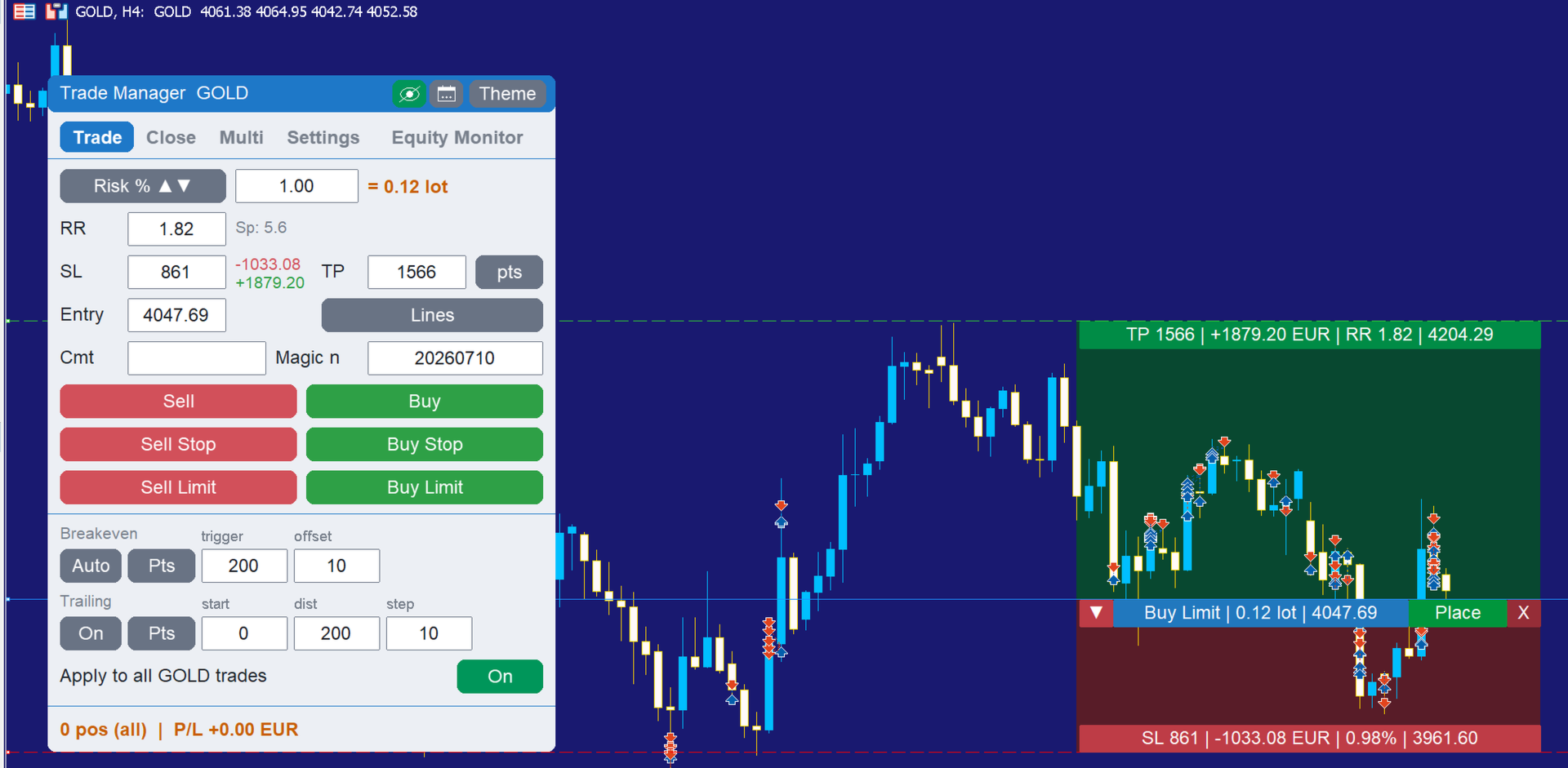
Trade Sentinel MT5 is a manual trading panel for MetaTrader 5. It combines the usual trade manager functions (one-click orders, lot size from risk, draggable Entry, SL and TP lines, breakeven, trailing, partial closes) with a basket manager that handles several positions as one trade, and an equity monitor with daily and total loss limits.
The user guide is published on the MQL5 blog: https://www.mql5.com/en/blogs/post/773646. Support is available through the product comments or the mql5.com messaging system.
Order entry
Market and pending orders are placed from the panel. The lot size is calculated from a percentage of the balance or equity, from a fixed amount of money at risk, or entered as a fixed lot. Stop loss and take profit can be set in points or price, and the take profit can follow a risk to reward ratio. Before the order is sent, the panel shows the money at risk, the potential profit and the current spread. Comment, magic number, spread limit and maximum slippage are configurable.
Chart lines
Entry, SL and TP levels are drawn as lines that can be dragged on the chart; the lot size and the risk figures are recalculated while dragging. The SL and TP of open positions and pending orders can also be moved directly on the chart. A virtual mode keeps SL and TP hidden from the broker, and one button hides all trade levels.
Basket manager
Positions can be grouped by symbol, by magic number or by selected tickets and managed as one trade. The basket has its own take profit and stop loss expressed in account currency, points or percent of balance, a breakeven level, and a trailing stop that locks a percentage of the peak profit. A negative basket TP can be used to close a group when a drawdown shrinks back to a chosen level. Optionally a real stop loss is placed on every member at the basket average price. The whole group can be closed with one click.
Position automation
Automatic breakeven with trigger and offset, and a trailing stop with start, distance and step. Both accept the distance in points, in risk to reward units, in percent of balance or in percent of the TP distance. The panel can also manage positions opened manually or by other programs on the same symbol.
Close operations and multiple take profits
Close all positions, only the profitable or the losing ones, only buys or sells, or delete the pending orders. Every position can be partially closed, with an optional automatic breakeven after the partial close. A trade can be split into several take profit levels with a percentage of the volume assigned to each level.
Equity monitor
Daily and total loss limits, each in percent or in account currency. When a limit is reached the panel can send an alert, close all positions, lock trading until the next broker day, or close the terminal. A warning is issued at 80 percent of each limit, once per day. A midnight guard closes floating losses shortly before the broker daily reset. Balance, equity, daily profit and the countdown to broker midnight are shown in the panel.
Other functions
Economic calendar events for the chart currencies are drawn as vertical lines with an importance filter. The panel has a light and a dark theme, adapts to high resolution monitors, and saves its settings per symbol across restarts.
Input parameters
Trade: distance unit (points or pips), default line direction, magic number, order comment, manage all symbol positions, maximum slippage, sizing mode (risk percent, risk money, fixed lot), risk percent, risk money, fixed lot, risk to reward, default SL in points.
Breakeven: automatic breakeven on or off, trigger unit, trigger value, offset in points.
Trailing: trailing on or off, trailing unit, start, distance, minimum step.
Basket: basket active at start, scope (all trades, magic numbers, pairs, tickets), remove members' SL and TP, magic list, pair list, unit (money, points, percent of balance), basket TP, basket SL, breakeven trigger and offset, real SL at average price, trailing trigger, trailing lock percent, lock reset mode, disarm when all trades are closed.
Settings: risk base (balance or equity), spread limit, hidden SL and TP, trades shown on the chart, calendar news on or off, news importance level.
Trade colors: colors of the entry, SL and TP lines and bars, pending order bar, basket bar, multiple TP lines and bars, zone opacity, menu colors, news line colors.
Panel: UI size (automatic or fixed percentage), theme, panel position.
Notes
The panel is a manual trading utility and does not run in the Strategy Tester. It works on any symbol available in the terminal. Please test it on a demo account first. Other tools by the same author are listed on the seller page: https://www.mql5.com/en/users/edl2/seller.



















































Great add-on to MT5. It is a genius idea. The developer is easy to work with and respects all comments, evaluating and incorporating them into the "Theme". I strongly recommend his product.