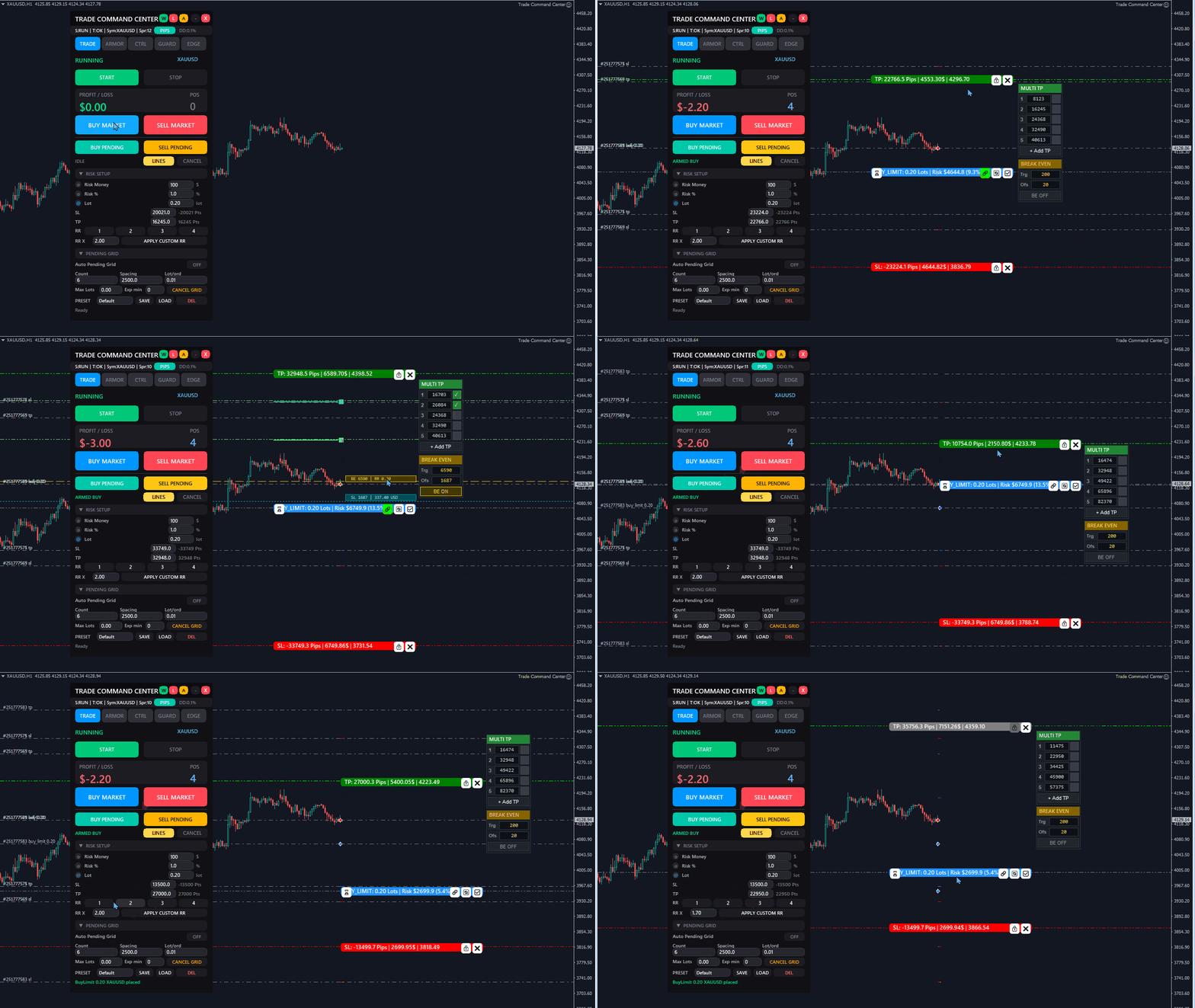
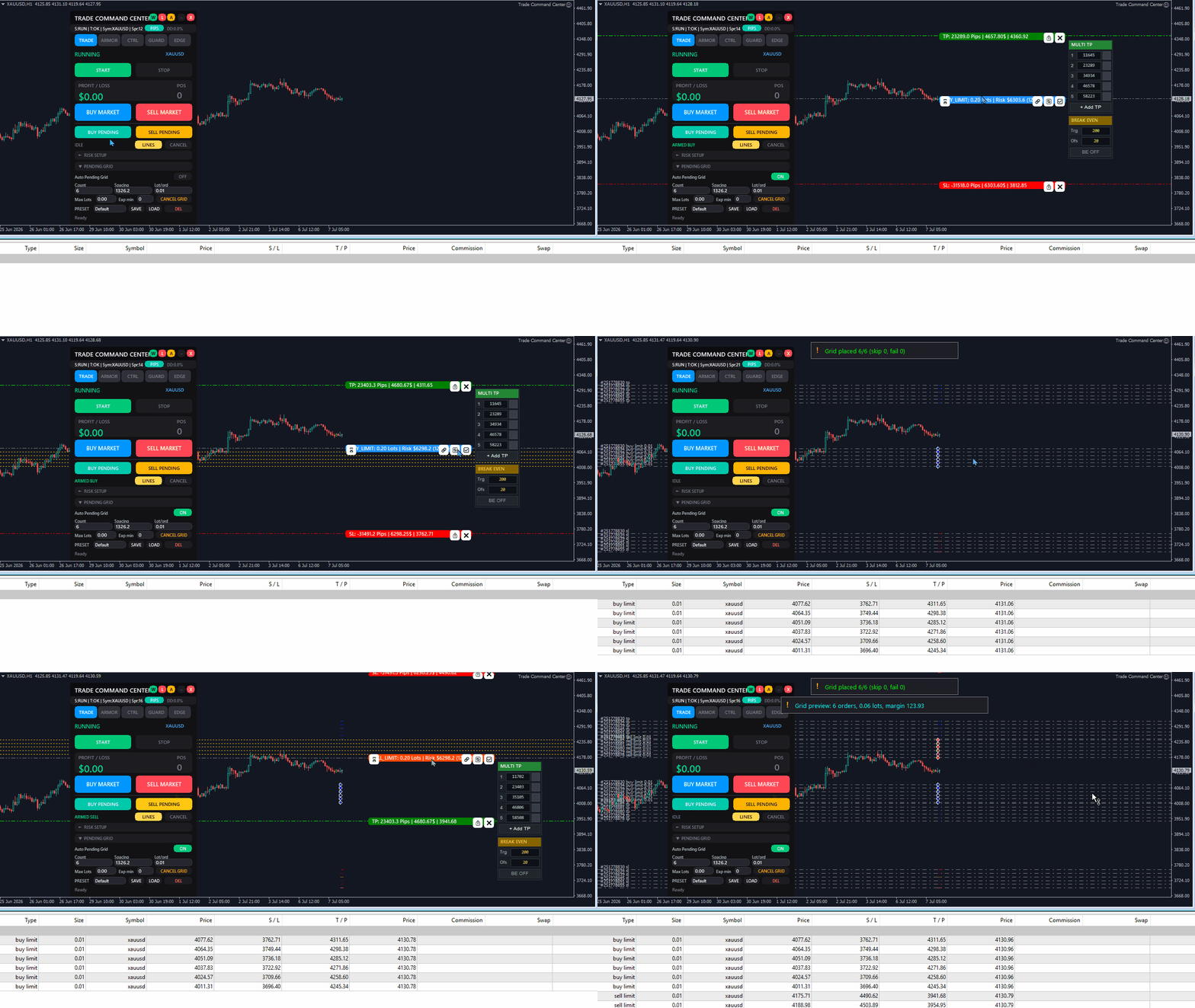
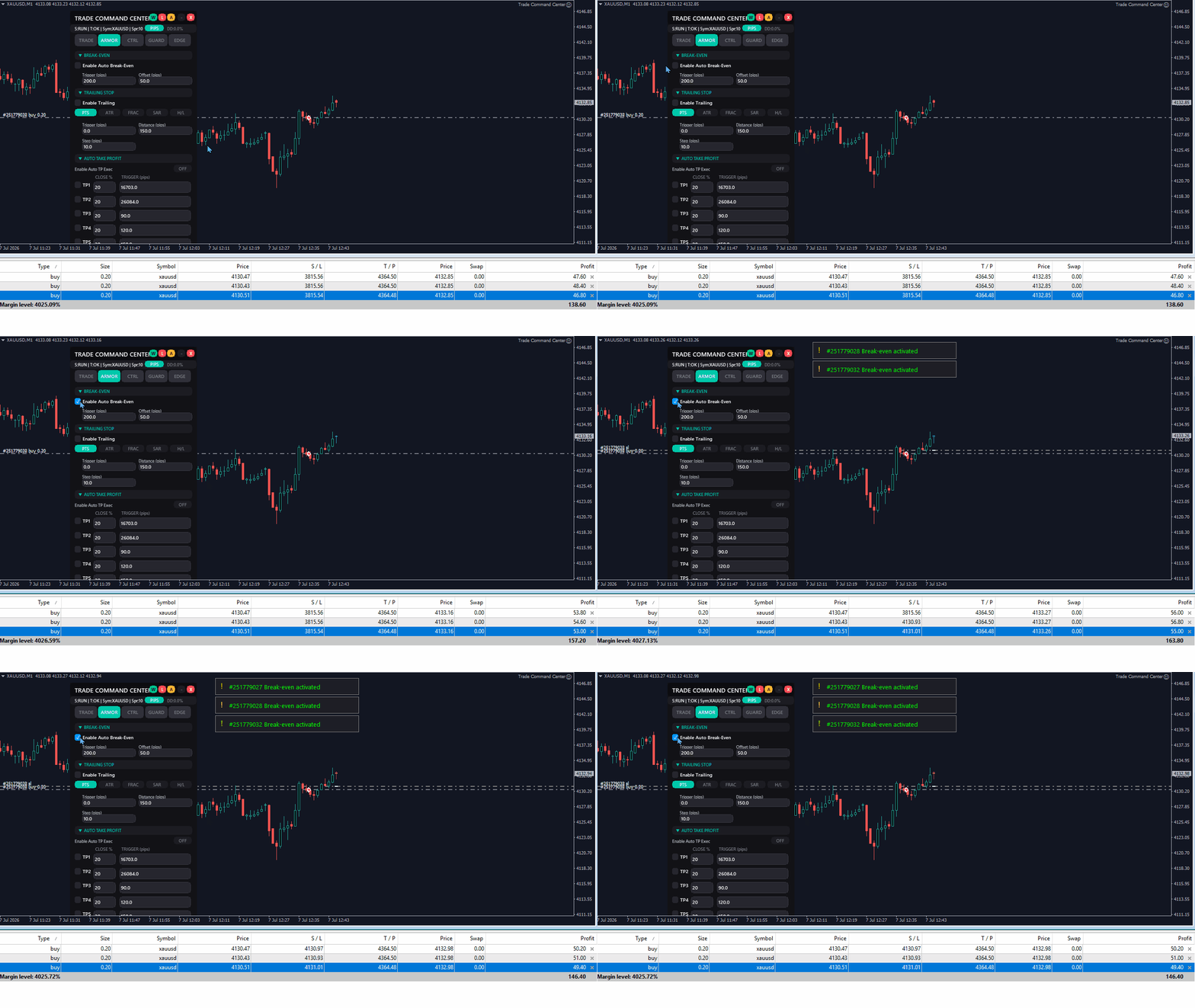
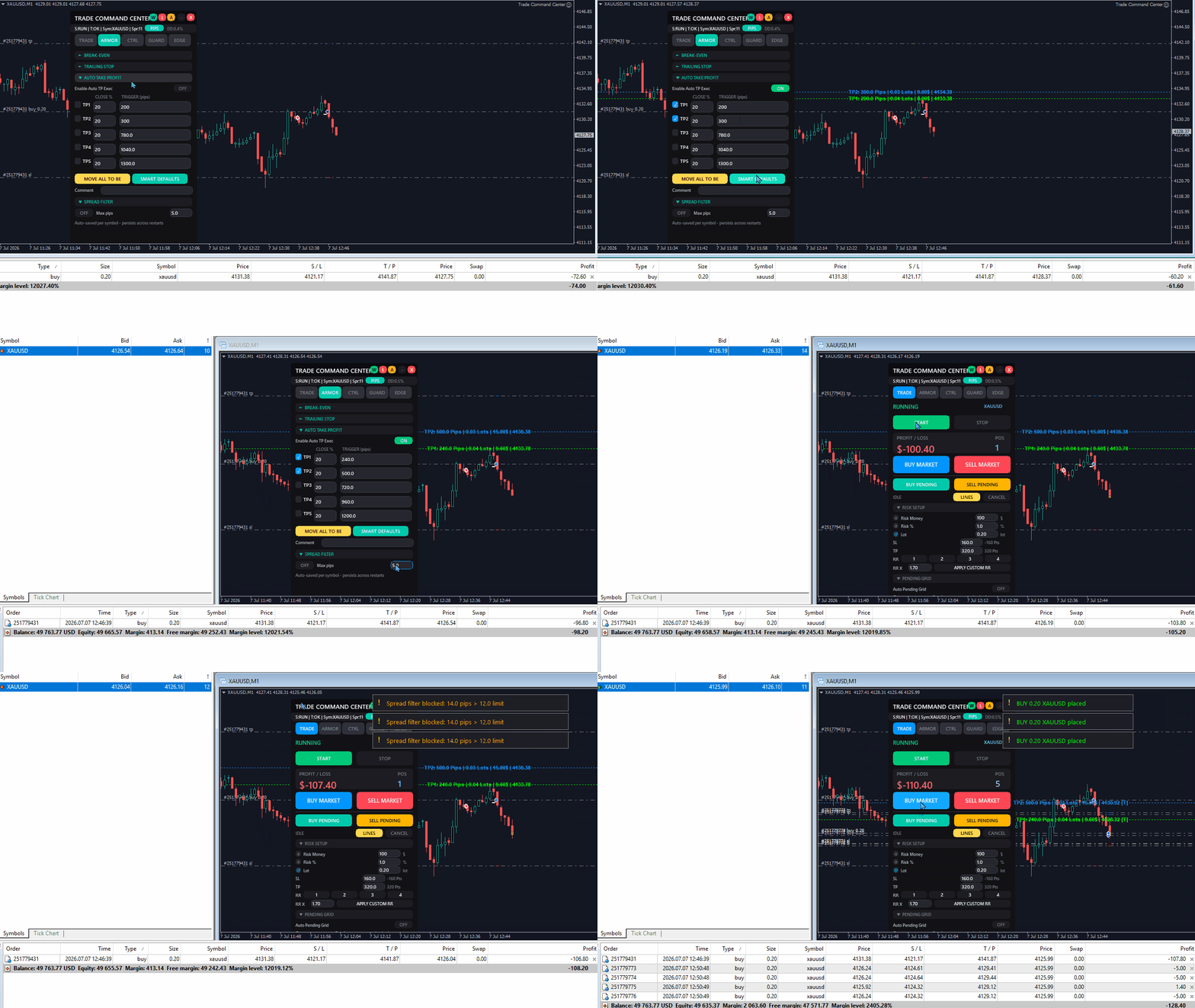
Trade Command Center MT4


펀딩 계좌. 로트 계산 한 번의 실수. 드로다운 한도 초과. 계좌 폐쇄.
전략이 잘못된 게 아니었다. 실행 순간에 리스크가 통제되지 않았기 때문이다.

Trade Command Center는 시각적 매매 실행 및 리스크 관리 패널입니다.

SL 거리에서 로트 계산. 포지션 자동 관리. 드로다운 한도 실시간 모니터링.
5개 탭. 차트 패널 하나. DLL 없음. 외부 연결 없음.

정확한 실행과 프롭 펌 준수가 필요한 수동 트레이더를 위해 설계.
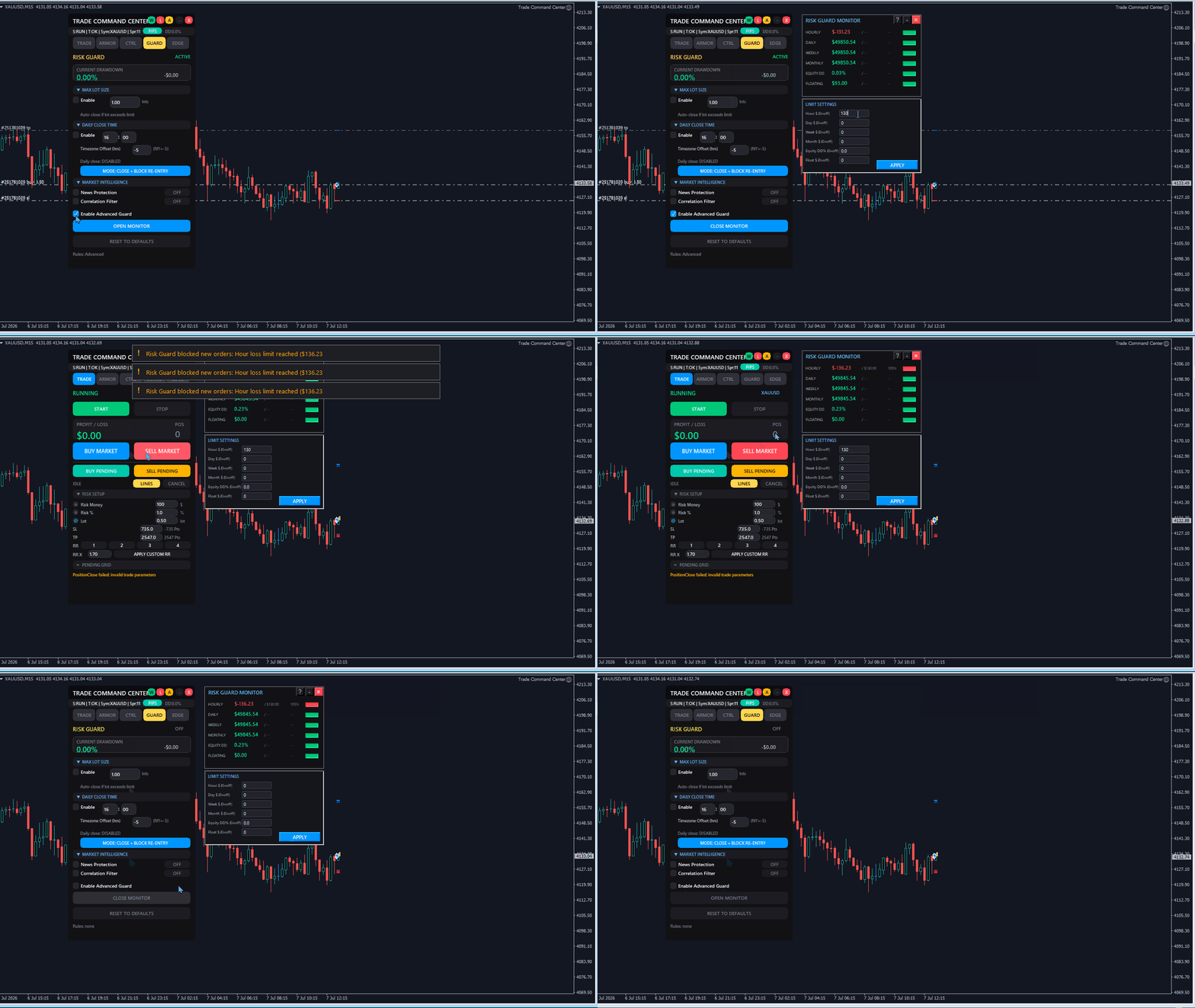
프롭 펌 스타일 규칙에 맞춘 유연한 Risk Guard 설정. 일일 손실, 주간 손실, 에퀴티 드로다운, 부동 손실 지원.

핵심 기능

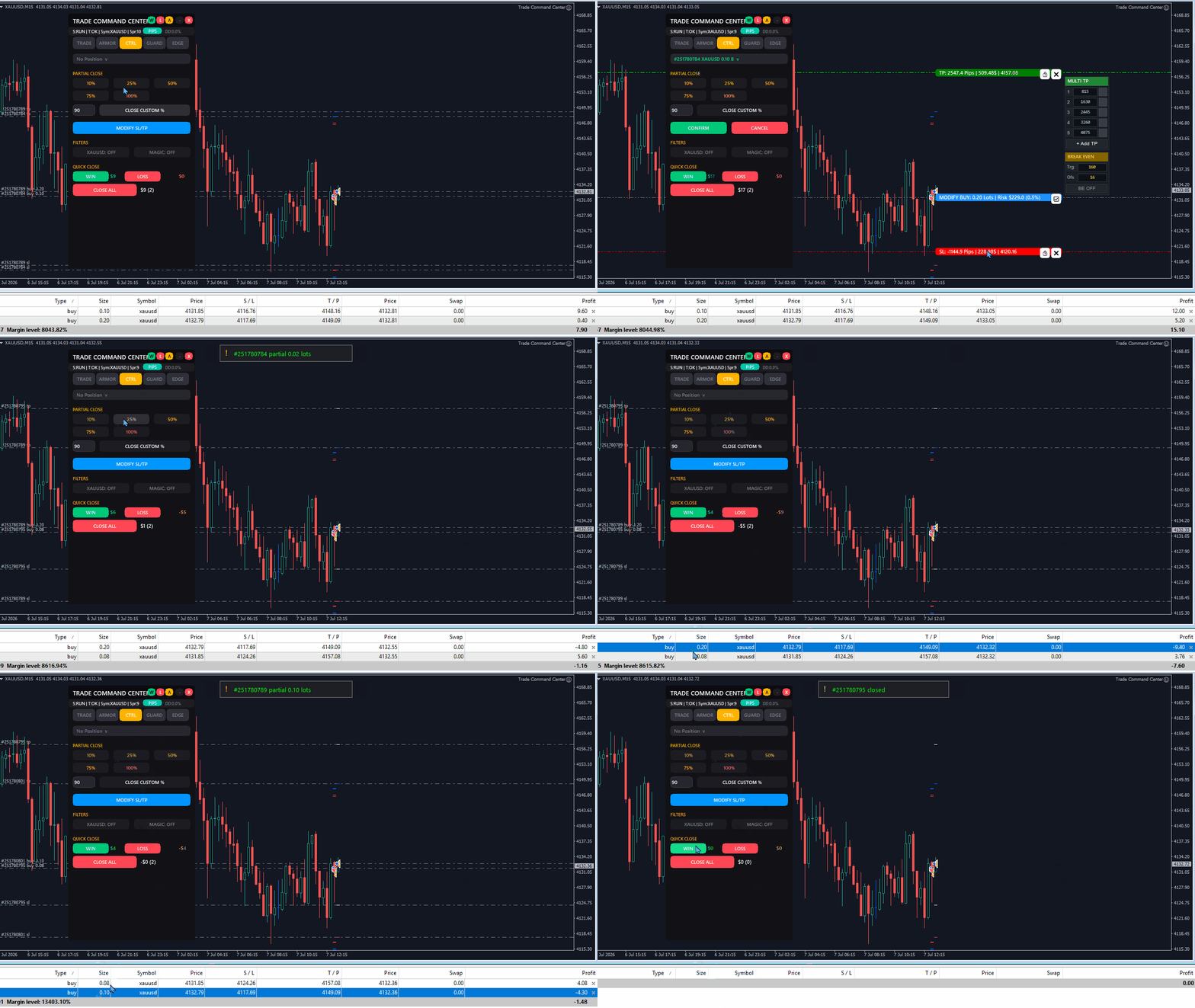
  • 시각적 매매 계획: 차트에서 Entry, SL, TP 박스를 드래그. 로트, 핍 거리, 달러 금액, R:R을 실시간 확인. 원클릭 실행.
  • 리스크 계산기: 리스크 모드 선택 — 잔고 비율, 고정 금액, 고정 로트. 패널이 포지션 크기 자동 계산.
  • 맞춤 R:R 제어: 빠른 RR 버튼을 사용하거나 직접 reward:risk 목표를 입력해 더 빠르게 계획.
  • 멀티 레벨 테이크 프로핏: 최대 5개 부분 청산 레벨. 각 레벨에 독립적인 트리거 거리와 청산 비율.
  • 오버라이드 지원 브레이크이븐: 글로벌 BE 설정을 모든 포지션에 적용. 개별 거래는 커스텀 트리거와 오프셋으로 덮어쓰기 가능.
  • 트레일링 스톱: SL이 정의된 거리에서 가격 추적. 스텝 크기로 업데이트 빈도 제어.
  • 포지션 관리: 프리셋 비율로 부분 청산. 손익 상태별 빠른 청산. 심볼 및 매직 필터.
  • Pending Grid: 개수, 간격, 주문별 로트, 만료, 최대 총 노출 제어로 여러 pending order를 계획.
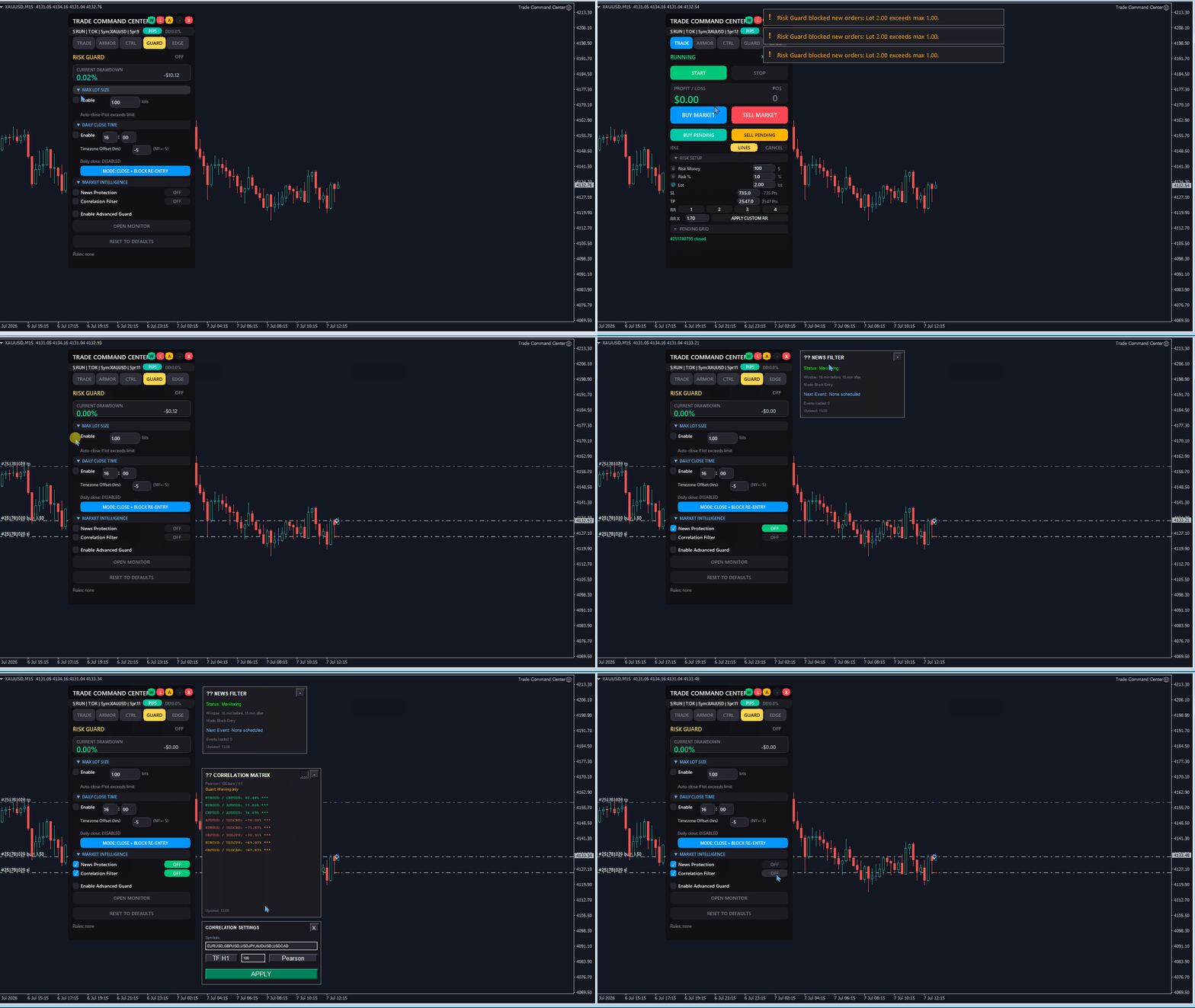
  • 뉴스 보호: 중요한 경제지표 전후에 새 진입을 차단하며, 전/후 시간(분)을 직접 설정할 수 있습니다.

  • 상관관계 분석: 심볼 간 상관관계를 모니터링하고, 높은 상관 포지션 진입 전에 경고를 제공합니다.
  • 플로팅 Market Intel 패널: 뉴스/상관관계 패널을 드래그, 최소화, 재오픈할 수 있고 위치는 차트별로 저장됩니다.
  • 프리셋 프로필: 시장이나 거래 스타일별로 선호 설정을 저장하고 다시 불러오기.

Risk Guard (프롭 펌 대응)

두 단계의 보호가 계좌를 지속적으로 모니터링합니다.

기본 보호:

  • 최대 로트: 지정된 로트 한도를 초과하는 포지션 자동 청산
  • 최대 드로다운: 일일 드로다운이 임계값을 초과하면 모든 포지션 청산
  • 일일 자동 청산: 지정된 시간에 모든 포지션 청산 (시간대 오프셋 설정 가능)

고급 모니터 (6가지 지표):

  • 시간 손실 — 최근 1시간 청산 P/L 한도
  • 일일 손실 — 당일 시작 이후 청산 P/L
  • 주간 손실 — 이번 주 시작 이후 청산 P/L
  • 월간 손실 — 이번 달 시작 이후 청산 P/L
  • 에퀴티 드로다운 — 세션 고점 대비 비율
  • 부동 손실 — 미실현 P/L 한도

각 지표에 색상 진행 바 (초록, 주황, 빨강).
어떤 한도에 도달하면 모든 포지션 즉시 청산.
Risk Guard는 완전 커스터마이즈 가능하며, 거래 전 활성 규칙을 명확히 확인할 수 있습니다.
GUARD 탭은 거래 전 활성화된 규칙도 요약합니다.

Pending Grid 안전

  • 다중 주문 설정이 과도해지지 않도록 최대 총 grid 로트 설정
  • Pending grid 주문의 만료 시간 설정
  • 패널에서 pending grid 주문을 직접 취소
  • 배치 전 grid 개수, 총 로트, 예상 마진 미리보기

세션 분석 (EDGE 탭)

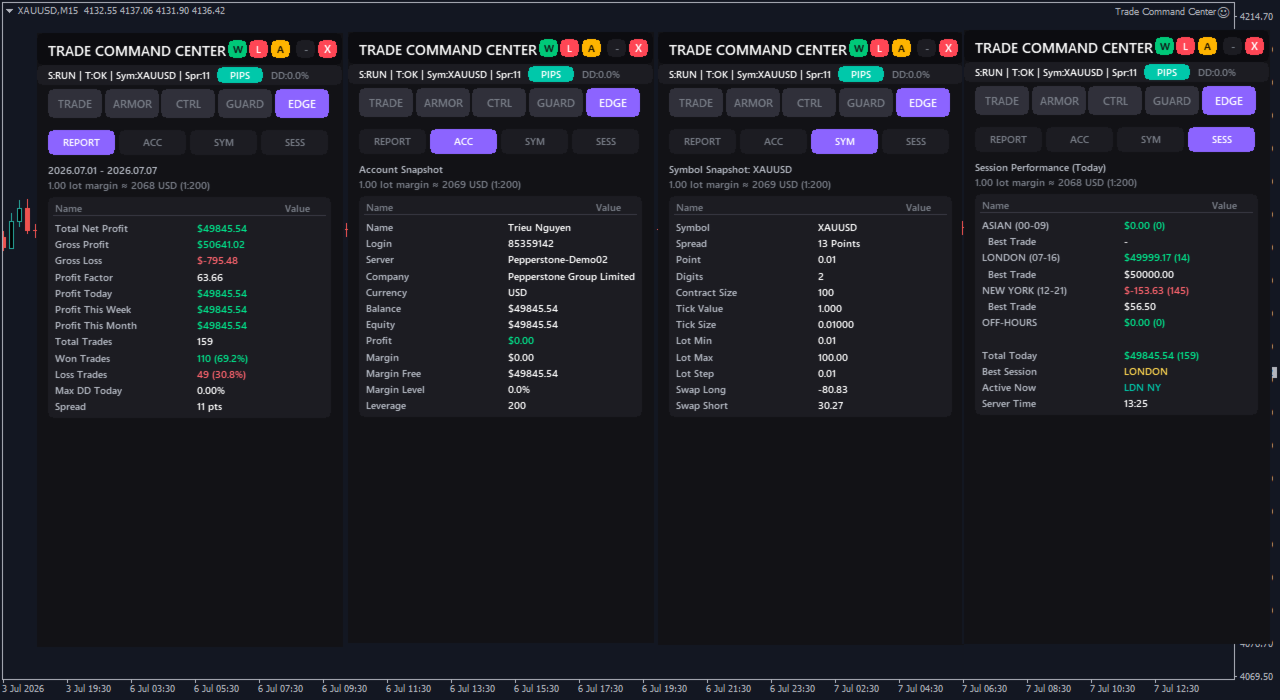
  • 성과 보고서: 프로핏 팩터, 승률, 총 이익/손실, 오늘/이번 주/이번 달 P/L, 최대 일중 드로다운. 모든 수치에 스왑과 수수료 포함.
  • 계좌 스냅샷: 잔고, 에퀴티, 마진 레벨, 레버리지 — 실시간 업데이트.
  • 심볼 정보: 스프레드, 틱 가치, 계약 규모, 스왑 요율, 볼륨 한도.
  • 세션 보기: 아시아, 런던, 뉴욕 및 비활성 시간대별 거래 성과 확인.

차별화 포인트

  • 거래별 BE 오버라이드: 개별 거래는 글로벌 설정과 다른 트리거와 오프셋 사용 가능. 값은 주문 코멘트에 저장. EA 재시작 후에도 유지.
  • 6가지 지표 리스크 대시보드: 시간, 일일, 주간, 월간 손실, 에퀴티 드로다운, 부동 손실을 동시 모니터링. 단일 지표가 아님.
  • 시각적 실행: 가격 입력 대신 박스 드래그. 실행 전 R:R 확인. 입력 오류 감소.
  • 명확한 거래 피드백: 주문이 차단되거나 실패하면 패널이 즉시 이유를 알려줍니다.
  • 심볼별 메모리: XAUUSD, EURUSD, 지수 및 기타 심볼은 각자의 선호 설정을 유지할 수 있습니다.

패널 구조

TRADE — 비주얼 모드, 리스크 계산기, 원클릭 실행
ARMOR — 브레이크이븐, 트레일링 스톱, 멀티 레벨 TP, 스프레드 필터
CTRL — 포지션 탐색기, 부분 청산, SL/TP 수정
GUARD — 리스크 한도, 드로다운 표시, 프롭 펌 프리셋
EDGE — 세션 성과, 품질 지표

헤더 바는 활성 탭에 관계없이 실시간 드로다운 비율 표시.
모든 설정은 세션 간에 유지. 더 빠른 설정을 위해 프리셋을 저장하고 불러올 수 있습니다.

Trade Command Center가 하지 않는 것

진입 신호나 매매 추천을 생성하지 않습니다.
가격 방향을 예측하지 않습니다.
시장 상황에 따라 자동으로 매매하지 않습니다.
프롭 펌 챌린지 통과나 손실 회피를 보장하지 않습니다.

실행 도구, 자동 포지션 관리, 리스크 한도 집행을 제공합니다.
전략과 타이밍은 전적으로 본인의 결정입니다.
당신이 정의한 한도만 집행합니다.

빠른 시작

하나의 차트에 부착. 비주얼 모드 클릭. Entry, SL, TP를 위치에 드래그. 리스크 비율 설정. BUY 또는 SELL 클릭.
GUARD 탭 한도 설정. 프리셋 저장. 패널이 사용자가 정의한 규칙을 관리하게 합니다.

기술 참고

포지션 관리는 200ms마다 업데이트.
헤지 계좌 지원.
DLL 불필요. 외부 연결 없음. 설정과 프리셋은 터미널에 로컬로 저장됩니다.

리스크 고지

매매에는 상당한 손실 위험이 수반됩니다.
Trade Command Center는 리스크 관리 도구를 제공하며, 매매 결과를 보장하지 않습니다.
실제 자금을 사용하기 전에 데모 계좌에서 모든 기능을 테스트하십시오.

Trade Command Center
사용자 가이드: https://www.mql5.com/en/blogs/post/767906
질문이나 제안: 아래 댓글 섹션 또는 프로필을 방문해 주세요.


추천 제품
Quantized Trend
Oleg Pechenezhskiy
This utility automatically draws the trend channel on the price chart. For the time interval from the specified date to the current bar, the drawn channel is almost optimal. Placing the beginning of the channel at a more distant historical price extremum, you get a visualization of a longer-term trend. Channel slope is not a continuous value, but takes one of discrete values (in AxB format, where A is the number of price points (points), and B is the number of timeframes). This program works ONL
A script that brings the cryptocurrency market to the MetaTrader platform. Make sure you have added the API address https://min-api.cryptocompare.com in the list of allowed URLs on tab 'Tools' → 'Options' → 'Expert Advisors'. After the script has successfully finished, go to menu and select 'File' → 'Open Offline', choose one of the generated timeframes (for example: BTCUSDBitst5 ) and click 'Open'. Now you can add your indicators or templates to customize the chart as you want. Inputs Logging
FREE
================================ ENGLISH MANUAL ================================ Product Name: One-Click Close Utility v9.4 Developer: Gemini Partner Version: 9.40 Platform: MetaTrader 4 Type: Expert Advisor I. PRODUCT OVERVIEW --------------- One-Click Close is a professional order management utility designed for  MetaTrader 4 platform. It provides rapid batch closing operations through  intuitive button interface, integrated with intelligent risk management  system. Suitable for both manual
Current price is an introductory launch price for early users. The price may be adjusted in future versions as the product receives updates and improvements. Fibo Expansion Auto Redraw Trade Assistant  is a MetaTrader 4 Expert Advisor designed to help traders manage trades and alerts around manually drawn Fibonacci Expansion objects. The EA works with a user-defined Fibonacci Expansion setup. It can send alerts or open trades at predefined FE levels, using risk percent position sizing , a maxim
This product (later referred to as "script") is intended for qualitative analysis of raw data and statistics when choosing trading signals for subscription. The script also performs calculations regarding compatibility of quotes data between signal provider's trading server and subscriber's trading server. Possible discrepancies in values of quotes are determined through retroactive analysis of transactions carried out by the signal provider. If said compatibility percentage is less than 90%, th
Every trader is watching over his account over and over.... trying to anlayse every system he or she has. With this tool you are able to  export your complete history of every account export withdrawls / deposits / rebates to a separate file export account status with balance / equity / current drawdown recalculate micro to standard lots / profits ...  export decimal by "." or ","  combine a series of Magic Numbers to one unique Magic Number   filter to ignore OrderComments.
TSInfoKit
Salvatore Labriola
This Utility is a test for creating objects on the graph . Drag it on any graph and follow the instructions! Any questions about work program send me mail : info@tradingsolution.it In future I will add more information with new version for now it provides account information: AccountNumber AccountName AccountCurrency AccountCompany Server Account Leverage Stop Out level Balance Equity Margin Free Margin
Product Description Trades Closer EA for MetaTrader 4 — the fastest and simplest way to close all your open or pending trades instantly with a single click. This tool is designed for traders who value speed, precision, and full control over their trading positions. With an intuitive and customizable interface, Trades Closer EA helps you manage orders efficiently, saving time and minimizing human error.  Key Features Close open trades , pending orders , or both on any selected symbol instantly.
FREE
Fox Scalper
Yaseen Al Hashem
5 (1)
This is a scalper EA based on ZigZag and Moving Average indicators that used martingale strategy for trading. You have full risk management This EA does many trades per day as its method is clear The EA can work with any brokers: STP/ECN The EA can work with any pairs (recommended GBPUSD) The EA can work with any timeframes Inputs Risk – choose your risk between high and low Pip set – d istance between two orders Take Profits - m odify take profit as pips Stop loss - m odify stop loss as pips M
Simply clock. Local time as default. There are possible to Select: Local Time /Server Time /GMT Time as input. Please take into account that the local time is the most accurate. However ,this clock always uses local time seconds, even If GMT / Server Time Is selected.  I solved it this way to get more accuracy. Delays can occur when changing minutes or hours, if local time is not selected.
FREE
The Arrow Scalper
Fawwaz Abdulmantaser Salim Albaker
1 (2)
Dear Friend..  I share with you this simple Expert Adviser .. it is full automatic  this Expert Adviser following the trend of the pair you install on or any stocks or indices , it is works like that: - when the trend on H4 chart show a start of up trend the expert will wait till the 15M & 1H charts show an up trend the EA will open a buy order directly , and do the same for down trend and open a sell order the buy or sell  order lot size and take profit and stop loss will measured manually  by
FREE
IndiSig by Buffer Detect Signals from a Custom Indicator by Buffer & Send notifications to Telegram Channel or Open orders * Buy/Sell Buffer: You may get this info on MT4/5 Data Window (CTRL + D) * MT5 version: Add the indicator first, then the EA * MT4 version: Only works properly with default settings of the indicator Join https://t.me/fxassistant_vn for more useful EAs!
FREE
Prop-Firm Guardian. 실시간 드로우다운 보호 ️ 규칙을 위반하기 전에 계좌를 멈춥니다 Prop-Firm Guardian 은 매 틱마다 자기자본을 감시하고, 일일 또는 총 드로우다운 한도에 도달하는 즉시 모든 포지션을 강제 청산하는 방어형 전문가 고문 입니다. 이후 새로운 거래는 다음 브로커 자정까지 자동으로 차단되므로, FTMO, MyForexFunds, FundedNext, The5ers 또는 다른 모든 프롭 펌 챌린지가 메인 전략이 잘못 작동해도 계속 살아남습니다. Guardian 한 개로 모든 심볼과 모든 Magic Number에 걸쳐 전체 계좌가 보호됩니다. ️ 데모, 실제, 펀딩 계좌에서 작동합니다. 외부 종속성 없음, DLL 없음. Guardian 은 OnTick() 내부와 1초 타이머를 통해 잔액과 자기자본을 실시간으로 모니터링합니다. 설정된 드로우다운 임계값을 초과하는 순간, 모든 시장 포지션을 청산하고 미체결 주문을 삭제(선택 사항)하며, 터
Export Order History Free ! Meta Trader 4 script Please leave a review about this product to help other users benefit from it. Export trades history into a CSV file ( Excel sheet ) The summary is saved into a file in MQL4\Files folder. Choose  /  A ccount history  /  C ustom   period from your MT4  Select period Click OK to Export file directory  Open MT4 data folder CSV file ( Excel sheet ) Order  >  Open time  >  Close time  >  Type  >  Symbol  >  Size  >  Entry price  >  Exit price  >  T/P  >
FREE
This indicator allows you to monitor the vitals of your account and notifies of some events, in accordance with user settings. Keep your finger on the pulse of trading. Control elements Main panel of the indicator shows the following values: chart symbol, bid/ask prices, spread, free margin, equity, total number of orders and total profit/loss. There are also two buttons: "Alarm" and "Mute". "Alarm" button starts up a timer, which will notify user in a period of time, defined in the settings. I
FREE
️ UMNi-CMND  UMNi-Cmnd — MT4 Remote Trade Command and Control UMNi-Cmnd turns Telegram into a full remote control panel for your MetaTrader 4 terminal. Send commands from your phone to open trades, manage positions, query account status, and receive complete trade telemetry — all without touching the platform. KEY FEATURES • Full remote trade execution via Telegram • Open, close, and manage positions by command • Move SL/TP, set breakeven • Live status, account, and posit
Taiji
Shun Qing Qian
The EA does not use Dangerous Methods: No mesh Without averaging No martingale No doubling Minimum deposit for trading 100$ Use accounts with a minimum spread The best timeframe to trade is H1,H4 Best trading pairs: XAUUSD,GBPUSD, EURUSD,USDCAD,NZDUSD,AUDUSD  Suggest Move_ Set Sl to: true , Other settings: default Activity price: 299, final price: 1500 Time options.  EA trades 24/7 by default. User may futher define which days of week and hours of day are tradable (" Nontradable hours, space-sep
Program for automatic placement of stop loss and take profit orders. Values are calculated as points distance from open price. BreakEven option is also included. all options could be applied to BUY, SELL separately or together. Enter values ​​in points in the fields on the right side of the menu and press dedicated button to aplly your settings. If in doubt, The instruction is displayed in the tooltip.
FREE
RiskManager
Roman Zhitnik
5 (4)
The Expert Advisor is a risk manager helping users to control their trading. In the settings, it is possible to specify the parameters at which the risk manager force closes the opened trades and closes the terminal as well, if it is needed to prevent opening trades on emotions, which do not correspond to the trading strategy. Risk Manager settings Check limit to close - check the equity limit Limit to close (account currency)   - equity limit that is checked when  Check limit to close is activ
DepoControl – Full Control Over the Deposit Closers   Expert Advisor controls the overall account status and closes ALL market orders on the account when certain conditions occur. The trading robot closes ALL orders on the account in the following cases (by profit): Close ALL orders by a total profit on the account   in monetary terms . For example, suppose that the settings specify that   positions should be closed when profit of 100 is reached. In this case, the Expert Advisor closes all mark
Metrics Pro for Discord - MT4 Metrics Pro for Discord is a reporting utility for MetaTrader 4 that automatically sends your account performance data to a Discord server via a Webhook. It is designed for signal providers, prop firm traders, and community managers who want to share structured trading results without manual effort. The utility runs in the background on a chart and posts formatted reports at a scheduled server time. Reports include account-level data as well as a breakdown per strat
Market Monitor
Rodrigo Rethka Goncalves
Market Monitor – Smart Asset Performance Dashboard for MT4 Turn your MetaTrader 4 into a professional trading intelligence center! Market Monitor is a powerful monitoring tool that displays, in real time, the most relevant performance metrics of each symbol being traded — helping you make faster, smarter, and more strategic decisions. What Does This Indicator Do? Market Monitor scans all open and historical orders, consolidates the data by symbol, and displays everything in visual pa
InfinityBreak v3.0 – 더 똑똑하게 거래하세요! 자동화된 거래의 최신 혁신으로 시장을 제어하세요. InfinityBreak v3.0은 주요 브레이크아웃을 자동으로 감지하고, TP, SL, 부분 TP 및 로트 크기를 관리하여 XAU/USD를 전문가처럼 거래할 수 있도록 도와줍니다. M1 타임프레임 최적화 – 빠르고 정확하며 신뢰할 수 있음. 스마트 리스크 관리 – 마틴게일 없음, 위험 전략 없음. 초보자~중급자 친화적 – 완전 자동, 간단하면서도 강력함. 스트레스 없이, 지속적으로 모니터링하지 않고 시장 브레이크아웃을 거래 기회로 바꾸세요.   MT5 Version:  Infinity Gold Break 3 | Buy Trading Robot (Expert Advisor) for MetaTrader 5     Infinity EAs Channel:  Private Messages - Evan Pierre Clement - KurukoPro
Telegram Sender Osw MT4
William Oswaldo Mayorga Urduy
사용자 설명서: Telegram Sender Osw Telegram Sender Osw는 MetaTrader에서 Telegram으로 거래 신호를 자동으로 전송하도록 설계된 Expert Assistant(EA)입니다. 신호 제공자 및 계정 관리자에게 이상적이며, 가격, 손절매, 이익실현, 거래량과 같은 주요 데이터를 즉시 전문적으로 전송합니다. 1. 매개변수 설정 일반 및 연결 EA 활성화: 시스템을 활성화(true)하거나 비활성화(false)합니다. 봇 토큰: @BotFather에서 발급받은 영숫자 코드입니다. 채팅 ID: 대상 채널, 그룹 또는 개인 채팅의 식별자입니다. 하위 그룹/스레드 ID 전송: Telegram 그룹에서 "주제" 기능을 사용하는 경우에만 이 옵션을 활성화하십시오. 전송 로직(전송 유형) 자동: 새로운 포지션 또는 명령이 감지되는 즉시 전송합니다. 버튼: 차트에서 "Telegram 전송" 버튼을 수동으로 눌렀을 때만 전송합니다. 사용자 지정 (텔레
Metrics Pro for Telegram - MT4 Metrics Pro for Telegram is a reporting utility for MetaTrader 4 that automatically sends your account performance data to a Telegram chat or channel via the Telegram Bot API. It is designed for algo-traders, signal providers, and fund managers who need scheduled performance summaries delivered directly to their phone without checking the terminal manually. The utility runs in the background on a chart and posts formatted reports at a scheduled server time. Reports
MT4 To Telegram Sender
Levi Dane Benjamin
3.5 (4)
MT4에서 Telegram으로 완전히 사용자 정의 가능한 신호를 보내고 신호 제공자가 되세요! 이 제품은 사용하기 쉽고 시각적으로 매력적인 그래픽 인터페이스로 제공됩니다. 설정을 사용자 정의하고 제품을 몇 분 안에 사용 시작하세요! 사용자 가이드 + 데모  | MT5 버전  | 디스코드 버전 데모를 시도하려면 사용자 가이드로 이동하십시오. MT4에서 Telegram으로 보내는 것은 전략 테스터에서 작동하지 않습니다. MT4에서   Telegram 기능 많은 옵션으로 신호를 완전히 사용자 정의하세요 신호 전후에 사용자 정의 메시지를 추가하세요. 태그, 링크, 채널 또는 기타 모든 것이 될 수 있습니다. 신호에 이모티콘을 추가, 제거 또는 사용자 정의하세요. 또는 모두 제거할 수도 있습니다. 실행될 거래를 심볼 또는 매직 넘버로 필터링하세요 특정 심볼의 전송을 제외하세요 특정 매직 넘버의 전송을 제외하세요 신호와 함께 전송될 거래 세부 정보를 사용자 정의하세요 스크린샷을 함께 신호
Comprehensive on chart trade panel with the unique ability to be controllable from mobile as well. Plus has a library of downloadable configuration, e.g. exit rules, extra panel buttons, pending order setup and more. Please see our product video. Works with all symbols not just currency pairs. Features On chart panel plus controllable from free app for Windows, iPhone and Android Built-in script engine with library of downloadable configuration, e.g. add 'Close All Trades in Profit' button, exit
Aegis Capital Protector MT4 Institutional-Grade Equity Protection & Risk Control System Protect capital. Control exposure. Preserve trading survival. Overview Aegis Capital Protector MT4 is a professional-grade capital protection and risk management system designed for MetaTrader 4 traders who prioritize account survival over speculation. Unlike trading Expert Advisors, Aegis does not generate buy or sell signals. Instead, it functions as a real-time risk control layer that continuously mo
Telegram Alerts
Gad Benisty
4.74 (19)
This application is now replaced by Ofir Notify Light Edition (Free) or Ofir Notify (paid). Thank all for your positive feedbacks. Ofir Notify is a tool which send alerts on trades to Telegram Alert on any event concerning a position : Opening, Closing, modification (SL, TP) Send alerts to Chats, Groups and Channel Alert on Equity change Display Risk, Reward and progress of profit/lost for each position Customization of alerts ( only in full edition ) Sending charts screenshots with alerts   
FREE
GridFury
Nelson Indriatno
The EA utilizes 3 levels grid to capture any direction be it bullish up or bearish down, either way, the EA will end in profit. The EA is called fury as it cuts a very tight loss and immediately compensates the loss into new lot size calculation on the remaining positions. If the initial lot size of level 1 is 0.2 and the EA cuts it at loss at 10 pips, the next lot size will be 0.24 lot (depending on multiplier setting). There will be 3 Buy Stop orders above mid-level, and 3 Sell Stop orders bel
이 제품의 구매자들이 또한 구매함
Trade Manager EA에 오신 것을 환영합니다. 이 도구는 거래를 보다 직관적이고 정확하며 효율적으로 만들기 위해 설계된 궁극적인 리스크 관리 도구 입니다. 단순한 주문 실행 도구가 아닌, 원활한 거래 계획, 포지션 관리 및 리스크 제어를 위한 종합 솔루션입니다. 초보자부터 고급 트레이더, 빠른 실행이 필요한 스캘퍼에 이르기까지 Trade Manager EA는 외환, 지수, 상품, 암호화폐 등 다양한 시장에서 유연성을 제공합니다. Trade Manager EA를 사용하면 복잡한 계산은 이제 과거의 일이 됩니다. 시장을 분석하고 진입, 손절 및 익절 수준을 차트의 수평선으로 표시한 후 리스크를 설정하면, Trade Manager가 이상적인 포지션 크기를 즉시 계산하고 SL 및 TP 값을 실시간으로 표시합니다. 모든 거래가 간편하게 관리됩니다. 주요 기능: 포지션 크기 계산기 : 정의된 리스크에 따라 거래 크기를 즉시 결정합니다. 간단한 거래 계획 : 진입, 손절, 익절을 위한
TradePanel MT4
Alfiya Fazylova
4.84 (95)
Trade Panel은 다기능 거래 도우미입니다. 이 애플리케이션에는 50개 이상의 수동 거래 기능이 포함되어 있으며 대부분의 거래 작업을 자동화할 수 있습니다. 구매하기 전에 데모 계정에서 데모 버전을 테스트할 수 있습니다. 데모 계정용 애플리케이션 체험판 다운로드: https://www.mql5.com/en/blogs/post/750865 . 전체 지침 여기 . 거래. 한 번의 클릭으로 거래를 수행할 수 있습니다: 리스크 자동 계산과 함께 예약 주문 및 포지션 열기. 한 번의 클릭으로 여러 주문 및 포지션 열기. 주문 그리드 열기. 예약 주문 및 포지션을 그룹별로 닫기. 포지션 방향 전환 (Buy 닫기 > Sell 열기, Sell 닫기 > Buy 열기). 포지션 잠금 (부족한 포지션을 열어 Buy와 Sell 포지션의 수량을 동일하게 만들기). 모든 포지션 한 번의 클릭으로 부분적으로 닫기. 모든 포지션의 테이크 프로핏과 스톱로스를 같은 가격 수준에 설정. 모든 포지션의 스톱로스를
TradeMirror 은 MT4/MT5 플랫폼을 위해 특별히 설계된 현지화된 주문 복사 도구로, 실시간 거래 작업을 동기화합니다. 튜토리얼 더 많은 튜토리얼을 보려면 Trademirror 튜토리얼 링크를 클릭하세요. 제품 장점 금융 소프트웨어의 보안성, 안정성 및 개인정보 보호에 대한 높은 표준 요구사항을 기반으로, 우리는 세 가지 핵심 차원에서 심층 최적화를 수행했습니다: 직관적이고 간결한 그래픽 인터페이스로 누구나 쉽게 조작 가능 강화된 개인정보 보호 메커니즘으로 금융 환경의 민감한 데이터 격리 요구 충족 밀리초 단위의 주문 동기화로 신호 분배의 정확성과 지연 없음 보장 MT4/MT5 양 플랫폼과 완전히 호환되어 다양한 거래 환경에 원활하게 적용 지능형 시스템 모니터링과 이메일 알림을 결합하여 거래 안정성을 실시간으로 보장 핵심 기능 특성 제품은 다음과 같은 전문적인 복사 기능을 탑재하고 있습니다: 다중 계정 병렬 연결 이메일 실시간 푸시 맞춤형 로트 크기 조정 신호 필터링 메커
Простая в управлении Торговая панель обеспечит безопасную торговлю. Вычислит объём сделки от заданного уровня Stop Loss и величины убытка. Поможет рассчитать сейф, и в ноль закрыть неверную сделку. Интуитивно понятный интерфейс делает панель удобной в управлении, освобождая внимание трейдера для принятия решения о входе в сделку. Программа сделает все расчёты за вас. Поэтому работа с помощью панели Снайпер - оптимальное решение для торговли с соблюдением Мани-менеджмента. А это главный ключ к по
Trader Evolution MT4
Siarhei Vashchylka
5 (2)
" Trader Evolution " - A utility designed for traders who use wave and technical analysis in their work. One tab of the utility is capable of money management and opening orders, and the other can help in making Elliott wave and technical analysis. Manual (Be sure to read before purchasing) | Version for MT5 Advantages 1. Trading in a few clicks. Immediate and pending orders are available in the panel 2. Money management. The program automatically selects the appropriate lot size 3. Simplifies
MT4 to Telegram Signal Provider 는 사용하기 쉽고 완전히 사용자 정의가 가능한 도구로, 텔레그램으로 신호를 보내어 계정을 신호 제공자로 변환할 수 있습니다. 메시지 형식은 완전히 사용자 정의가 가능합니다! 그러나 간단한 사용을 위해 미리 정의된 템플릿을 선택하고 메시지의 특정 부분을 활성화하거나 비활성화할 수도 있습니다. [ 데모 ]  [ 매뉴얼 ] [ MT5 버전 ] [ 디스코드 버전 ] [ 텔레그램 채널 ]  New: [ Telegram To MT5 ] 설정 단계별 사용자 가이드 가 제공됩니다. 텔레그램 API에 대한 지식이 필요 없으며, 개발자가 필요한 모든 것을 제공합니다. 주요 기능 구독자에게 보낸 주문 세부 정보를 사용자 정의할 수 있는 기능 예를 들어 브론즈, 실버, 골드와 같은 계층 구독 모델을 만들 수 있습니다. 골드 구독은 모든 신호 등을 받게 됩니다. ID, 심볼 또는 코멘트별 주문 필터링 주문이 실행된 차트의 스크린샷을 포함 보낸
The product will copy all telegram signal to MT4   ( which you are member  ) , also it can work as remote copier.  Easy to set up, copy order instant, can work with almost signal formats, image signal, s upport to translate other language to English Work with all type of channel or group, even channel have "Restrict Saving Content", work with  multi channel, multi MT5 Work as remote copier: with signal have ticket number, it will copy exactly via ticket number. Support to backtest signal. How to
EasyInsight AIO MT4
Alain Verleyen
4 (2)
EASY Insight AIO – 스마트하고 손쉬운 트레이딩을 위한 올인원 솔루션 개요 외환, 금, 암호화폐, 지수, 심지어 주식까지 — 전 시장을 몇 초 만에, 수동 차트 확인이나 복잡한 설치, 인디케이터 설정 없이 스캔할 수 있다고 상상해 보세요. EASY Insight AIO 는 AI 기반 트레이딩을 위한 궁극의 플러그 앤 플레이(Plug & Play) 데이터 내보내기 도구입니다. 단 하나의 깔끔한 CSV 파일로 전체 시장 스냅샷을 제공하며, ChatGPT, Claude, Gemini, Perplexity 등 다양한 AI 플랫폼에서 즉시 분석할 수 있습니다. 창 전환, 복잡함, 차트 오버레이는 더 이상 필요 없습니다. 자동으로 내보내지는 순수하고 구조화된 데이터 인사이트만으로, 반복적인 차트 감시 대신 데이터 기반의 스마트한 의사결정에 집중할 수 있습니다. 왜 EASY Insight AIO인가요? 진정한 올인원 • 별도의 설정, 인디케이터 설치, 차트 오버레이가 필요 없습
PZ Trade Pad Pro MT4
PZ TRADING SLU
3.67 (3)
Effortlessly calculate lot sizes and manage trades to save time and avoid costly errors The Trade Pad Pro EA is a tool for the Metatrader Platform that aims to help traders manage their trades more efficiently and effectively. It has a user-friendly visual interface that allows users to easily place and manage an unlimited number of trades, helping to avoid human errors and enhance their trading activity. [ Installation Guide | Update Guide | Troubleshooting | FAQ | All Products ] One of the k
Custom Alerts AIO: 다중 시장을 동시에 모니터링 – 설정 없이 즉시 사용 가능 개요 Custom Alerts AIO 는 복잡한 설정 없이 즉시 사용할 수 있는 통합 시장 모니터링 도구입니다. FX Power, FX Volume, FX Dynamic, FX Levels, IX Power 등 필요한 모든 지표가 내장되어 있어 별도의 설치나 구성 없이 알림 기능을 바로 사용할 수 있습니다. 차트 그래픽 없이 작동하며, Forex, 금속, 지수, 암호화폐 등 주요 자산군을 모두 지원합니다. 주식(Symbols)은 별도로 입력하여 추가할 수 있으나, MetaTrader에서는 일반적으로 제한적으로만 사용됩니다. 1. 왜 Custom Alerts AIO를 선택해야 하나요? 추가 라이선스가 필요 없습니다 • 모든 Stein Investments 지표가 내장되어 있어 별도 구매가 필요 없습니다. • 즉시 알림 기능을 시작할 수 있어 빠르고 간편합니다. 모든 시장을 하나의 도구로
Trade Manager MT4 DaneTrades
Levi Dane Benjamin
4.09 (11)
거래 관리자는 위험을 자동으로 계산하는 동시에 거래를 빠르게 시작하고 종료하는 데 도움을 줍니다. 과잉 거래, 복수 거래 및 감정 거래를 방지하는 데 도움이 되는 기능이 포함되어 있습니다. 거래를 자동으로 관리할 수 있으며 계정 성과 지표를 그래프로 시각화할 수 있습니다. 이러한 기능은 이 패널을 모든 수동 거래자에게 이상적으로 만들고 MetaTrader 4 플랫폼을 향상시키는 데 도움이 됩니다. 다중 언어 지원. MT5 버전  |  사용자 가이드 + 데모 트레이드 매니저는 전략 테스터에서 작동하지 않습니다. 데모를 보려면 사용자 가이드로 이동하세요. 위기 관리 % 또는 $를 기준으로 위험 자동 조정 고정 로트 크기 또는 거래량과 핍을 기반으로 한 자동 로트 크기 계산을 사용하는 옵션 RR, Pips 또는 Price를 사용한 손익분기점 손실 설정 추적 중지 손실 설정 목표 달성 시 모든 거래를 자동으로 마감하는 최대 일일 손실률(%)입니다. 과도한 손실로부터 계정을 보호하고 과도한
Unlimited Trade Copier Pro is a tool to copy trade remotely to multiple MT4, MT5 and cTrader accounts at different computers/locations over internet. This is an ideal solution for you if you are a signal provider and want to copy your trades to other receivers globally on your own rules. One provider can copy trades to multiple receivers and one receiver can get trade from multiple providers as well. The provider can even set the subscription expiry for each receiver, so that receiver will not b
In the current version this filter will only work with my   night scalpers and the EA Profitection Filter  or with other EAs that utilize the global variables set by this EA.  An MT5 version is availalble   here .  Many scalpers these days have a "normal" news filter, which filters calendar news such as interest rate decisions or CPI releases.  However, this breaking news filter is able to filter non-standard breaking news. It will check every minute for news and if it finds a news event, it w
MT4 to Discord Signal Provider 는 Discord로 직접 거래 신호를 보내는 데에 설계된 사용자 친화적이고 완전히 맞춤화할 수 있는 유틸리티입니다. 이 도구는 귀하의 거래 계좌를 효율적인 신호 제공자로 변환합니다. 귀하의 스타일에 맞게 메시지 형식을 사용자 정의하세요! 사용 편의성을 위해 사전에 디자인된 템플릿을 선택하고 포함하거나 제외할 메시지 요소를 선택할 수 있습니다. [ 데모 ] [ 매뉴얼 ] [ MT5 버전 ] [ Telegram 버전 ]  New: [ Telegram To MT5 ] 설정 간편한 설정을 위해 저희의 상세한 사용자 가이드 를 따르세요. Discord API에 대한 사전 지식이 필요 없습니다; 필요한 모든 도구를 제공합니다. 주요 기능 구독자 업데이트를 위한 주문 세부 정보를 사용자 정의합니다. 각 계층이 다른 수준의 신호 접근을 제공하는 브론즈, 실버, 골드와 같은 계층적 구독 모델을 구현합니다. 주문이 실행된 차트의 스크린샷을 첨
EchoTrade Telegram to MT4 Copier
Perpetual Chinemerem Vincent
5 (2)
EchoTrade Telegram to MT5 Copier Seamless, Instant, and Reliable Signal Copying - Direct from Telegram to MetaTrader 4! The product does not run in the strategy tester but you can get free trial version   here  for testing before purchase. Tired of manually executing trades from Telegram signals? EchoTrade automates the process, instantly copying trades from any Telegram channel or group directly into your MT5 account—accurately, efficiently, and without delay. Key Features: Universal Compatib
Riskless Pyramid
Snapdragon Systems Ltd
5 (1)
Introduction This powerful MT4 trade mangement EA offers a way potentially to aggressively multiply trade profits in a riskfree manner. Once a trade has been entered with a defined stoploss and take profit target then the EA will add three pyramid add-on trades in order to increase the overall level of profit. The user sets the total combined profit target to be gained if everything works out. This can be specified either as a multiple of the original trade profit or as a total dollar amount. Fo
ManHedger MT4
Peter Mueller
5 (2)
THIS EA IS A SEMI-AUTO EA, IT NEEDS USER INPUT. Manual & Test Version Please TEST this product before   BUYING  and watch my video about it. Contact me for user support or bug reports, or if you want the MT5 version! MT5 Version I do not guarantee any profits or financial success using this EA. With this Expert Advisor, you can: Implement your own   Zone Recovery   strategy to capitalize on trending markets. Create   Grid   trading strategies, to profit from ranging markets. Place orders easil
VirtualTradePad PRO SE MT4 — MetaTrader 4용 고급 트레이딩 패널 및 차트 워크스페이스 VirtualTradePad PRO SE 는 MetaTrader 4 용 전문 트레이딩 패널이자 거래 관리 워크스페이스입니다. 하나의 차트 기반 인터페이스에서 거래를 더 빠르게 열고, 관리하고, 보호하고, 닫고, 분석할 수 있도록 도와줍니다. 이 제품은 단순한 버튼 모음 이상의 기능이 필요한 적극적인 수동 트레이더를 위해 만들어졌습니다. PRO SE는 원클릭 실행, 예약 주문, 포지션 제어, 부분 청산, 바스켓 손익 로직, 평균가 레벨, ATM 규칙, 신호 모니터링, 시장 정보, 전략 테스터 워크플로, VPS 중심 준비를 하나의 구조화된 워크스페이스로 통합합니다. MT5 버전 | 전체 설명 및 스크린샷 | 구입 방법 | 설치 방법 | 로그 파일을 얻는 방법 | 테스트 및 최적화 방법 | Expforex의 모든 제품 일반 수동 트레이딩 대비 장점 여러 창 대신 하나의 워
RedFox Copier Pro
Rui Manh Tien
4.7 (10)
Time saving and fast execution Whether you’re traveling or sleeping, always know that Telegram To Mt4 performs the trades for you. In other words, Our   Telegram MT4 Signal Trader  will analyze the trading signals you receive on your selected Telegram channels and execute them to your Telegram to MT4 account. Reduce The Risk Telegram To Mt4   defines the whole experience of copying signals from   Telegram signal copier to mt4 platforms. Users not only can follow all instructions from the signa
Ultimate Trailing Stop EA
BLAKE STEVEN RODGER
4.33 (15)
This EA Utility allows you to manage (with advanced filtering) unlimited open orders (manual or EA) with 16 trailing stop methods: fixed, percent, ATR Exit, Chandelier Exit, Moving Average, Candle High Low Exit, Bollinger Bands, Parabolic, Envelope, Fractal, Ichimoku Kijun-Sen, Alligator, Exit After X Minutes or Bars, RSI and Stochastic. The trailing stop can be either real or virtual, and you can exit fully or with a partial close percent on touch or bar close.  Moreover, you can add (overrid
MT4 Professional Copy Trading System (MT4 버전) 산업급 초고속 LOCAL 트레이드 코피어 . 프로 트레이더/시그널 제공자/멀티계정 운영용. 산업급 LOCAL 아키텍처 동일 Windows 환경(같은 PC/같은 Windows VPS)에서 동작. 저지연, 높은 동기화, 24/7 무감시 운용. Master / Slave / Self + Cross Copy (MT4 ↔ MT5) Master/Slave/Self-Copier 지원. MT4→MT4, MT4→MT5, MT5→MT4, MT5→MT5. 중요: MT4↔MT5 크로스 카피는 MT4+MT5 두 버전 필요. 동작 방식 Master의 오픈/수정(SL/TP)/청산을 실시간 복제. 브로커 접두/접미 심볼 차이 자동 매핑. 핵심 판매 포인트 초고속 복제, 유연한 로트(고정/배수/Balance·Equity 비율), 심볼 매핑, 선택형 리스크 보호, 장기 안정(로그/정합성 체크).
Smart Channel M4
Vahidreza Heidar Gholami
The trend in the market can be predicted using trend lines but the problem is you don’t know where exactly the price is going to touch the trend line where you can put your pending orders on. Smart Channel Expert Advisor makes it possible to put an advanced channel around the price data, which can be configured to handle placing orders, opening and closing positions, managing risk per trade, spread, slippage, and trailing stop-loss and take-profit automatically. Features Money Management (Calcul
Local Trade Copier EA 는 외부 소스에서 거래 신호를 실행해야 하거나 MAM 또는 PAMM 계정 없이 동시에 여러 계정을 관리해야 하는 개인 거래자 또는 계정 관리자를 위한 솔루션입니다. 최대 8개의 마스터 계정에서 무제한 슬레이브 계정으로 복사합니다. [ 설치 가이드 | 업데이트 가이드 | 문제 해결 | 자주하는 질문 | 모든 제품 ] 100% 자체 호스팅 설치 및 사용이 간편함 설치 프로그램, 구성 파일, 서버, 메모리 파이프 또는 DLL이 사용되지 않음 EA를 영원히 사용하기 위한 1000번의 활성화 로컬 실행, 네트워크 대기 시간 없음 필요한 모든 기능을 구현합니다. 최대 8개의 마스터 계정 및 무제한 슬레이브 계정 모든 브로커 및 DD/NDD/ECN/STP 실행과 함께 작동 다른 계정 통화를 사용하는 계정에서 작동 라이브 계정과 데모 계정 간에 구분 없이 작동 마스터 및 슬레이브 계정에서 기호 이름의 접미사 지원 매직 넘버 및 주문 댓글로 필터링 다른 거래
MultiOrder Assistent V3.0   - Your professional trading assistant for MetaTrader 4 The  MultiOrder Manager  is a powerful trading tool designed to optimize your trading while managing risk efficiently. With intuitive features and a user-friendly interface, this Tool is ideal for traders who want to manage multiple orders simultaneously without losing track.   Symbols: FX pairs, gold and cryptocurrencies Here you get a detailed description of the parameters and functions Manual     Features and
Length Movement
Pavel Verveyko
5 (1)
Measures the length of the selected movement in points, shows the duration of the movement, as well as the speed of movement.   Outputs the average value of each dimension. It is designed to calculate the expected target based on typical market movements. The intended goal will provide information about the ratio of the stop size to the possible profit and will allow you not to open positions with a small expected profit. It will also help you determine the point at which it is more logical to c
Ultimate Trade Copier
BLAKE STEVEN RODGER
5 (2)
This trade copy utility allows you to instantly and seamlessly replicate and synchronize unlimited orders from multiple master accounts to multiple slave accounts on your local machine. You can create custom channels (or portfolios) with advanced filtering capabilities to copy from multiple master accounts to multiple slave accounts. Moreover, you can tailor these channels with a range of lot sizing and trade condition options to ensure that copied trades outperform the original source. You can
The Expert Advisor will help you forward all pop-up alert with screenshot from  MetaTrader 4 to Telegram channel/ group, also forward all notifications to Telegram. Parameters  -  Telegram Bot Token - create bot on Telegram and get token.  -  Telegram Chat ID  - input your Telegram user ID,  group / channel ID  -  Forward Alert - default true, to forward alert.  -  Send message as caption of Screenshot - default false, set true to send message below Screenshot  How to setup and guide  - Telegram
Automate Risk Management with Smart Trailing Stop Manager for MetaTrader 4 Looking for MetaTrader 5 version? I t is available separately in the Market:   Smart Trailing Stop Manager MT5 Full User Guide    –  Public channel:   CLICK HERE Struggling with manually adjusting stops and securing profits? Smart Trailing Stop Manager MT4 is an intelligent utility for MetaTrader 4 that automates trailing stops, break-even management, partial closes, and auto SL. Optimized specifically for MT4 users, it e
Crystal Trade Manager PRO – MT4 고급 리스크 및 트레이드 관리 시스템 무료 버전: https://www.mql5.com/en/market/product/150632 개요 Crystal Trade Manager PRO(CTM)는 MetaTrader 4를 위한 전문급 거래 실행 및 리스크 관리 유틸리티입니다. 엄격한 실행, 견고한 자본 보호, 그리고 똑똑한 자동화를 필요로 하는 트레이더를 위해 설계되었습니다. 본 시스템은 계좌 리스크를 관리하고, 자본(EQ)을 보호하며, 일일 제한을 적용하고, SL/TP를 자동으로 설정하며, 전문급 기능을 갖춘 초고속 원클릭 트레이딩 패널을 제공합니다. Prop Firm 챌린지, 데이트레이딩, 스캘핑, 포트폴리오 매니저에게 최적화되어 있습니다. MT5 버전도 제공됩니다. 주요 기능 1. 고급 리스크 및 드로우다운 보호 기능 하루 드로우다운을 1%~70% 범위에서 설정 가능 설정한 한도를 초과할 경우 모든 포지션 즉시 종료 조건
If you need an advisor on any arrow indicator signals - this utility will definitely help you.  You will be able, with the help of this utility to form an unlimited number of EAs on YOUR signals , with your set of settings, with your copyright and complete source code . You will be able to use the resulting EAs unlimitedly , including adding them to the Market and other resources. Free simple version of the generation script to help you understand how it works - here What does the utility do? 
제작자의 제품 더 보기
Manual position management. Missing SL. Price moves against you. No protection. Trade Manager Lite automates Stop Loss, Take Profit, Trailing Stop, and Break-Even for your open positions. Attach to one chart. Configure your default SL/TP distance. Let it manage your positions automatically. What's Included (FREE Version) Auto SL/TP: Applies missing Stop Loss and Take Profit to positions based on your configured distance in points Trailing Stop: Adjusts SL dynamically as price moves in your favor
FREE
Trade Command Center
Nguyen Thanh Trieu
5 (2)
추가 자료 및 지침 설치 지침 - 애플리케이션 지침 - 데모 계정용 애플리케이션의 평가판 펀딩 계좌. 로트 계산 한 번의 실수. 드로다운 한도 초과. 계좌 폐쇄. 전략이 잘못된 게 아니었다. 실행 순간에 리스크가 통제되지 않았기 때문이다. Trade Command Center 는 시각적 매매 실행 및 리스크 관리 패널입니다. SL 거리에서 로트 계산. 포지션 자동 관리. 드로다운 한도 실시간 모니터링. 5개 탭. 차트 패널 하나. DLL 없음. 외부 연결 없음. 정확한 실행과 프롭 펌 준수가 필요한 수동 트레이더를 위해 설계. 프롭 펌 스타일 규칙에 맞춘 유연한 Risk Guard 설정. 일일 손실, 주간 손실, 에퀴티 드로다운, 부동 손실 지원. 핵심 기능 시각적 매매 계획: 차트에서 Entry, SL, TP 박스를 드래그. 로트, 핍 거리, 달러 금액, R:R을 실시간 확인. 원클릭 실행. 리스크 계산기: 리스크 모드 선택 — 잔고 비율, 고정 금액, 고정 로트. 패널이 포
SMC Liquidity Channel Guard
Nguyen Thanh Trieu
4.67 (3)
SMC Liquidity Channel Guard Prices reverse just as your breakout trade triggers. Account suffers unexpected drawdown. Because standard channels ignore institutional liquidity sweeps and trap retail stop-loss orders. This utility automatically monitors highest buy-side and lowest sell-side liquidity pools to flag false breakouts. Key Features: Dynamic Liquidity Tracking: Maps Buy-Side (BSL) and Sell-Side (SSL) boundaries without lagging moving averages. Sweep Identification: Prints precise direct
FREE
Prop Firm Risk Guard
Nguyen Thanh Trieu
5 (1)
NFP 발표 중 가격 급등. 일일 손실 한도가 수 초 만에 초과됨. 계정 제한됨. 이는 고변동성 이벤트 중에 자본이 수동 반응보다 빠르게 떨어질 때 발생합니다. PropFirm Risk Guard는 실시간으로 자본을 모니터링하고 정의한 한도에 접근하면 자동으로 반응합니다. 엄격한 위험 규칙을 가진 프롭 펌 챌린지를 위해 설계됨: FTMO, The5ers, Funded Trading Plus, MFF. 백분율 기반(일일 5%, 최대 10%) 및 미국 달러 기반 드로다운 계산을 모두 지원하여 다양한 회사 요구 사항을 충족합니다. 고변동성 시나리오에 최적화: 금(XAUUSD) 거래, 주요 지수, 뉴스 이벤트, 오버나이트 갭. 주요 기능: 실시간 자본 모니터링: 일일 및 계정 드로다운을 100밀리초마다 추적합니다. 한도에 접근하면 반응하여 추가 손실을 방지합니다. 소프트/하드 보호 모드: 소프트 모드는 포지션을 닫기 전에 카운트다운 타이머가 있는 경고를 제공합니다. 하드 모드는 즉시 실행합
Morvan
Nguyen Thanh Trieu
MORVAN 나는 Morvan입니다. 방향을 읽습니다. 구조를 기다립니다. 가격이 움직임이 전개될 가능성이 가장 높은 레벨에 도달했을 때만 진입합니다. 추측 없음. 보복 거래 없음. 노이즈 속에서 캔들을 쫓지 않음. 구조가 정렬될 때만 실행하며, 진입부터 청산까지 모든 포지션을 규율 있게 관리합니다. 대부분의 트레이더는 차트를 읽지 못해서 잃는 것이 아닙니다. 너무 늦게 진입하고, 포지션 사이징이 느슨하고, 유동성이 노리는 곳에 스탑을 놓고, 감정이 청산 판단을 덮어쓰기 때문에 잃습니다. 나는 그 약점을 제거하기 위해 설계되었습니다. 나는 시장을 예측하지 않습니다. 그럴 필요가 없습니다. 바이어스를 읽고, 구조가 형성되기를 기다리고, 연속 또는 돌파가 더 높은 확률의 결과가 되는 구간에서만 배치합니다. 운영 방식 나의 실행 프레임워크는 세 가지 원칙에 기반합니다: 트렌드가 먼저. 구조가 두 번째. 리스크는 항상. 먼저, 상위 타임프레임 구조에서 지배적인 시장 방향을 읽습니다. 방향이
Volume Pressure Meter breakdown tick volume to reveal the buying and selling pressure inside every candle. Unlike standard volume which only shows total activity, this indicator splits volume to show who is actually in control of the market. It helps you identify trend strength and spot potential reversals through volume divergence. Key Features: Pressure Gauge: Visual bar showing real-time Buy vs Sell percentages. Trend Bias: Automatically identifies if the market is dominated by Buyers or Sell
FREE
Smart Session Box MT5
Nguyen Thanh Trieu
Smart Session Box Displays Asia, London, and New York trading sessions with automatic timezone adjustment and session overlap highlighting. Main Features Complete session analysis with no limitations. Key Features The indicator draws session boxes with high and low lines for each trading session. Session overlaps are highlighted with distinct colors to identify high liquidity periods. Breakout alerts notify when price crosses previous session levels. A control panel provides quick toggles for al
FREE
Volatility Helix Engine
Nguyen Thanh Trieu
4 (1)
기술적 분석에서 변동성이 수축하는 시점과 추세로 확장하는 시점을 구분하는 것은 핵심적인 과제입니다. 명확한 시각화가 없다면 트레이더는 너무 늦게 진입하거나 변동성이 낮은 횡보 시장에서 불필요하게 거래하는 리스크를 감수해야 합니다. Volatility Helix Engine은 적응형 밴드를 사용하여 변동성 주기를 매핑하고 차트 상에서 시장 단계를 직접 분류하여 보여주는 기술적 보조지표입니다. 표시 정보: Helix Upper/Lower Bands (헬릭스 상하단 밴드) = 변동성 주기를 투영하기 위해 너비가 주기적으로 진동하는 적응형 다이내믹 엔벨로프. 청록색 밴드 및 마커 = 추세 단계 (높은 변동성을 동반한 강한 방향성 가격 움직임). 보라색 밴드 및 마커 = 횡보 단계 (평균 또는 낮은 변동성의 횡보 조정). 황색 밴드 및 마커 = 수축 단계 (변동성 스퀴즈, 에너지 축적 상태를 나타냄). 산호색 밴드 및 마커 = 전환 단계 (수축 직후에 나타나는 브레이크아웃 분출). 점선 수
FREE
Impulse Momentum Shift
Nguyen Thanh Trieu
5 (1)
큰 몸통을 가진 캔들이 마감됩니다. 돌파처럼 보입니다. 진입합니다. 다음 봉이 반전되어 스톱을 건드립니다. 거래량은 평균 수준이었고, 모멘텀은 이미 약해지고 있었습니다. Impulse Momentum Shift는 진정한 임펄스를 가진 봉을 식별하고, 그 임펄스가 반전되는 순간을 표시합니다. 대부분의 트레이더는 캔들 크기만 봅니다. 진정한 임펄스는 세 가지 요소의 결합입니다: 몸통 지배성, 최근 평균을 초과하는 거래량 급등, ATR로 정규화된 방향성 모멘텀. 이 지표는 세 가지 차원 모두에서 각 봉을 채점하고, 5색 임펄스 스케일로 차트를 채색하며, 강한 임펄스 국면이 방향을 반전시키는 순간 시프트 화살표를 배치합니다 — 확정된 봉에서만. 표시 내용: 5색 임펄스 캔들: 강한 강세 임펄스는 밝은 파란색, 중간은 하늘색, 중립은 회색, 중간 약세는 코랄색, 강한 약세는 크림슨. 각 봉은 실시간으로 0–100 점수 부여 Impulse Trail 라인: ATR 기반 동적 라인으로 지배적인
FREE
Confluence Bias Map
Nguyen Thanh Trieu
Confluence Bias Map 은 주요 시장 지표를 하나의 실시간 점수로 통합하여 트레이딩 분석을 지원합니다. 차트를 분석할 때 이동평균선, MACD, ADX, RSI, Stochastic, Bollinger Bands, MFI, ATR 등 여러 개의 개별 지표를 각각 확인하는 것은 종종 신호의 충돌과 분석 마비를 유발합니다. 구조화된 방법론 없이 여러 시간 프레임에 걸쳐 추세, 모멘텀, 변동성, 거래량을 비교하는 것은 실제 시장 편향을 정의하기 어렵게 만듭니다. Confluence Bias Map은 3개의 시간 프레임에 걸쳐 이 4가지 핵심 시장 차원을 하나의 실시간 점수로 통합하여 이 문제를 해결합니다. 주요 표시 기능: 도넛 게이지 (Donut Gauge): 대시보드 중앙에 0부터 100까지의 종합 컨플루언스 점수 (Confluence Score)를 표시합니다. 카테고리별 세부 정보: 추세(EMA, MACD, ADX 기반), 모멘텀(RSI, Stochastic 기반), 변
FREE
Session Box And Timer
Nguyen Thanh Trieu
Session Box And Timer 일중 거래(Intraday trading)는 주요 시장 세션 간의 전환을 모니터링해야 하지만, 일정을 수동으로 중첩하면 계산 오류가 발생하기 쉽습니다. 명확한 표시가 없으면 이전 세션의 주요 가격 수준과 유동성 영역을 쉽게 간과할 수 있습니다. Session Box And Timer는 거래 세션, 변동성 추세 및 카운트다운 타이머를 차트에 직접 시각화합니다. 표시 내용: - 세션 박스 (Session Boxes): 아시아, 런던, 뉴욕 세션을 나타내는 시각적인 색상 사각형으로, 라벨에 자동 계산된 핍 범위(pip range)가 표시됩니다. - 아시아 범위 수준: 아시아 세션의 고가 및 저가 투영을 오른쪽으로 수평선으로 연장하여 일중 돌파 기준으로 사용합니다. - 전일 고가/저가 (PDH/PDL): 전일의 고가 및 저가 경계를 표시하는 점선 수평선. - 사이클 라인 및 카운트다운 라벨: 예정된 세션 오픈 시점에 수직선을 그려 다음 세션이 시작될
FREE
Murrey Math Channels
Nguyen Thanh Trieu
Murrey Math Channels Identifying key market reversal points and core trading ranges can be challenging. Traditional analysis often lacks clear mathematical structure, leading to inconsistent entries. Murrey Math Channels provides a mathematically grounded price framework based on the Law of Octaves to help traders define precise support, resistance, and reversal zones. How to Read the Chart: The indicator divides the price action into 8 main octaves (levels), each representing a different marke
FREE
Pullback Execution Map
Nguyen Thanh Trieu
4.5 (2)
Price breaks out. You want the continuation, but the entry usually comes too early, too late, or directly into a weak pullback. Without structure, most traders can see the move but still cannot define where the retracement remains healthy and where the setup starts to fail. Pullback Execution Map turns the current swing into a visual execution plan on the chart and a pullback meter below price. What it shows: Fibonacci execution pocket: Maps the active swing with a clear pullback pocket from the
FREE
Volume Pressure Meter MT5 캔들은 강해 보였습니다. 거래량은 높아 보였습니다. 당신은 돌파에서 진입했습니다. 가격은 몇 분 만에 반전되었습니다. 그 움직임에는 실제 참여가 없었습니다. Volume Pressure Meter는 기관이 보는 것을 보여줍니다: 가격 움직임 뒤에 실제 매수 또는 매도 압력이 존재하는지, 아니면 빈 거래량에 대해 거래하고 있는지. M5에서 H4 시간프레임에 걸쳐 금(XAUUSD), 지수 및 주요 외환 쌍을 분석하는 일중 및 스윙 트레이더를 위해 설계되었습니다. AI 패턴 인식 및 실시간 확률 계산을 갖춘 하나의 통합 시스템에 8개의 기관급 거래량 분석 도구를 결합합니다. 표시 내용 HUD(헤드업 디스플레이) 인터페이스: 시그널 상태: 현재 시장 권장 사항(BUY, SELL, WAIT, AVOID)을 실시간으로 업데이트 압력 균형 게이지: 색상으로 구분된 강도로 매수자 대 매도자 참여도의 시각적 표현 시그널 점수: 여러 거래량 확인 요소를
Smart Confluence Radar
Nguyen Thanh Trieu
Smart Confluence Radar 세 개의 지표를 따로 확인하며 합류 지점을 찾는 것은 시간이 걸립니다. 신호가 명확해질 때쯤이면 이미 움직임이 시작된 경우가 많습니다. Smart Confluence Radar는 ATR 확장, 거래량 모멘텀, 변화율을 단일 시각 레이어로 캔들 위에 직접 표시합니다. 핵심 기능을 갖춘 무료 버전입니다. 멀티 타임프레임 오버레이, 알림, 세션 필터링이 필요하다면 Smart Confluence Radar Advanced 를 확인하세요. 표시 내용: 색상 캔들: 밝은 색상은 높은 합류 바(점수 ≥70)를 표시합니다. 흐린 색상은 중간 합류, 회색은 낮은 모멘텀을 나타냅니다. 모멘텀 라인: 차트에 직접 그려지는 방향성 압력 라인. 매수 압력 우세 시 파란색, 매도 압력 상승 시 빨간색, 플랫 시 회색. 바 레이블(+/-): 마감된 높은 합류 바에만 표시. 강세 바 아래 "+", 약세 바 위 "-". 바 카운트다운 타이머: 현재 타임프레임 및 열린 바의
FREE
Smart Entry Levels - Fractal and ATR Based Indicator Smart Entry Levels identifies key support and resistance zones using classical fractal detection and ATR-based volatility measurement. The indicator is designed for clarity, stability, and compliance with MQL5 Market rules. Features Upper Zone - Resistance area based on recent fractal highs Lower Zone - Support area based on recent fractal lows ATR-based sizing - Zones adapt dynamically to market volatility with selectable timeframe Non-repain
FREE
Keltner Breakout MT5
Nguyen Thanh Trieu
Keltner Breakout Caught in market chop. Fake breakouts trigger unwanted trades. Because standard indicators lack dynamic volatility context. This utility automatically combines a Dynamic Volatility Channel, Dual MA trend detection, and RSI momentum filtering into one visual system. Key Features: Trend Cloud: Visually fills the trend zone with a dynamic Keltner-style volatility channel. Multi-Factor Breakout: Only issues a signal when price breaks the volatility channel AND trend/momentum confirm
FREE
Parabolic Trend Corridor Identifying trend direction and volatility boundaries is a common challenge for day traders. Standard indicators often lack a holistic view of both trend structure and market noise. Parabolic Trend Corridor solves this by combining the adaptive nature of Parabolic SAR with dynamic ATR volatility bands. Key Features: Adaptive Trend Core: Uses Parabolic SAR as the foundation to follow price movement and volatility changes without lag. Dual-Color Cloud: Dynamic visual feedb
FREE
터미널을 엽니다. 3개의 포지션이 진행 중입니다. 차트가 움직이고 있습니다. 하지만 런던이 지금 정말 활성화되어 있나요, 아니면 뉴욕 개장 전 노이즈인가요? Session Pulse Monitor는 거래 세션의 실시간 상태, 변동성 컨텍스트, 각 포지션의 진입 세션을 차트에 직접 표시합니다. 여러 세션에 걸쳐 포지션을 관리하며 시장에 기관 참여가 있는지 알아야 하는 트레이더를 위해 설계되었습니다. 모든 심볼에서 작동 — 금(XAUUSD), 주요 Forex 통화쌍 및 지수에 최적화. 표시 내용: 실시간 세션 상태: 아시아, 런던, 뉴욕 세션의 LIVE / 카운트다운 표시. 변동성 컨텍스트: 각 세션의 과거 변동성 상태(HIGH / MED / LOW) 표시. 거래 태깅: 각 오픈 포지션에 진입 세션 표시 — 아시아, 런던, 뉴욕 또는 중첩. 세션 카운트다운: 활성 세션 종료까지 남은 시간과 다음 세션 개시 시간. 이 도구가 하지 않는 것: 거래를 열거나 수정하거나 종료하지 않습니다. 리
FREE
Gold Structure Pro
Nguyen Thanh Trieu
You read the breakout correctly. Price pushed through the level. You entered. Then it reversed — and stopped you out before the real move happened. GoldStructure Pro identifies that pattern before you enter, not after. Gold fakes breakouts constantly. A candle closes above resistance, volume looks right, structure seems clear — then price snaps back and hunts your stop. Most indicators cannot separate a confirmed expansion from a liquidity sweep. GoldStructure Pro classifies every breakout in re
좋은 셋업. 잘못된 시장 상태. 거래는 실행되기 전에 무효화된다. 넓은 스프레드, 거래 시간 외 시간대, 변동성 급등, 그리고 고영향 뉴스와의 근접성은 실행 전에 우위를 파괴한다. Market Bias Monitor는 실시간 환경을 분류하고, 실행 품질을 0에서 100까지 평가하고, 조건이 변할 때 즉시 알려줍니다. 금(XAUUSD), Forex 통화 쌍, 그리고 지수를 M5에서 W1 타임 프레임에서 분석하는 재량 및 반자동 트레이더를 위해 설계되었습니다. 레짐, 세션, 스프레드, 뉴스 위험, 그리고 다중시간 프레임워크 편향 정렬을 실시간으로 모니터링합니다. 무엇을 보여주는가: 시장 레짐 분류: ATR 변동성과 이동 평균에서의 가격 편차를 사용하여 TREND, RANGE, TRANSITION 또는 HIGH RISK를 식별 — 불안정한 레짐 중 실행을 피할 수 있도록. Market Quality Score (0-100): 레짐, 스프레드, 변동성, 세션, 편향 명확성, 뉴스 근접성에서
SMC Liquidity Channel Guard Premium 저항선 위로 돌파. 스톱로스는 바로 아래에 배치. 가격이 즉시 반전 — 실제 움직임이 시작되기 전에 소매 진입을 함정에 빠뜨리는 유동성 스윕. SMC Liquidity Channel Guard Premium은 기관 유동성 풀을 실시간으로 매핑하고, 방향성 추세 로직으로 스윕을 필터링하며, 다중 타임프레임 맥락으로 확인된 셋업을 제공합니다. M5에서 D1 타임프레임에서 골드(XAUUSD), 지수 및 주요 외환 쌍을 분석하는 Smart Money Concept 트레이더를 위해 설계되었습니다. 구조적 유동성 경계에서의 기관 스톱헌팅 행동 식별에 최적화되었습니다. 표시 내용: 동적 유동성 채널: 매수측(BSL) 및 매도측(SSL) 경계 매핑 — 스톱로스 클러스터가 형성되는 위치 확인 기관 스윕 감지: 가격이 유동성 풀을 관통하지만 채널 내에서 마감하는 경우 식별 — 스톱헌팅 반전 발견 높은 확신 신호: 스윕이 추세 필터와 일치
활발해 보이는 시장에서 거래를 시작합니다. 하지만 세션 마감까지 12분 남았습니다. 유동성이 감소하고 스프레드가 확대됩니다. 포지션은 방향 없이 표류합니다. Session Pulse Monitor Advanced는 실시간 세션 분석을 제공합니다 — 라이브 상태, 과거 성과 통계, 차트 비주얼 존, ATR 예측, 세션 전환 알림 — 항상 어떤 세션에서 거래하고 있는지 파악할 수 있습니다. 아시아, 런던, 뉴욕 세션 전반에서 포지션을 관리하는 트레이더를 위해 설계되었으며, 단순한 시계 이상의 기능을 제공합니다. 모든 심볼에서 작동 — 세션 전환 시 가장 큰 가격 변동이 발생하는 금(XAUUSD), 주요 외환 쌍 및 지수에 최적화. 주요 기능: 실시간 세션 패널: 아시아, 런던, 뉴욕 세션의 LIVE / 카운트다운 표시. 매 틱마다 업데이트. 세션별 성과 통계: 세션별 승률, 평균 손익, 총 거래 수 — 30일간의 계좌 히스토리에서 계산. 어떤 세션이 실제로 전략에 맞는지 파악. 세션 하
구조가 확인됐다. 오더블록도 맞았다. 브레이크아웃에 진입했다. 가격이 40핍 반전했다. 프리미엄 존을 놓쳤고, FVG 지지가 없었으며, 킬존 시간대 밖이었기 때문이다. 세 가지 요소가 "아니오"라고 했다. 당신은 하나만 확인했다. SMC Confluence Score MT5 는 8개의 기관 분석 레이어를 동시에 스캔하고 실시간으로 단일 매수/매도 컨플루언스 점수(0-10)를 출력합니다. 지표와 타임프레임을 전환하는 대신, 트레이드 전에 모든 SMC 요소를 하나의 패널에서 확인할 수 있습니다. 표시 내용: 컨플루언스 점수 (0-10): OB, FVG, 구조, 존, 세션, 유동성, HTF 방향을 하나의 숫자로 통합. 셋업 품질을 한눈에 파악. 시장 구조 (BOS + CHoCH): 스윙 및 내부 레벨 감지. 진입 전 추세 전환 확인. 강도 등급이 있는 오더블록: 미해소 OB의 거래량 기반 강도 지표. 기관이 포지션을 잡은 구역 우선순위 설정. 공정가치 갭 (FVG): ATR 필터된 불균형
Many pullbacks look tradable for a moment, but the expensive mistake comes from treating every retracement as equal. The real workflow problem is deciding whether the pullback is still worth your attention, whether it is only building, or whether it should be ignored completely. Pullback Execution Map Confluence is built as a decision-first pullback engine: it separates WAIT, BUILD, READY and AVOID conditions before it draws a full execution plan. What this version adds: Decision states instead
Liquidity Trap Confirmation 활발한 데이트레이딩 시간대에는 가격이 먼저 뚜렷한 유동성 구간을 쓸어낸 뒤, 실제로 셋업이 준비되기 전에 반전할 수 있습니다. Liquidity Trap Confirmation은 더 많은 신호보다 약한 진입을 줄이고 싶은 재량 트레이더를 위한 종가 기준 확인 도구입니다. 이 도구는 유동성 상호작용, 구조, 디스플레이스먼트, 변동성, 시장 컨텍스트를 평가하여 현재 셋업이 관찰 대상인지, 준비 단계인지, 확인되었는지, 무효인지, 아니면 무시해야 하는지를 보여줍니다. 표시 내용 차트에 활성 유동성 존과 그 라이프사이클을 표시합니다. NO TRADE, WATCH, ARMED, CONFIRMED, INVALID 상태를 표시합니다. 구조, 디스플레이스먼트, 변동성, 컨텍스트를 조합한 확인 로직을 제공합니다. 신뢰도, 무효 가격, 활성 프로파일, 리스크 게이트, 다음 행동을 보여주는 결정 패널을 제공합니다. CONFIRMED와 INVALID에 대
Ultimate Trader Suite
Nguyen Thanh Trieu
Ultimate Trader Suite is a professional all-in-one indicator for MetaTrader 5, combining five independent analytical modules into a single clean chart interface. Designed for traders who follow institutional price action methodology, it eliminates the need to stack multiple separate indicators. Key features Trend Engine Dual EMA system (fast/slow) combined with an ATR-based Supertrend band. Color-coded direction lines and automatic crossover arrows mark confirmed trend shifts on closed bars only
여러 시간대를 분석할 때 트레이더는 종종 충돌하는 신호에 직면하여 진입을 망설이거나 실행 오류를 범하게 됩니다. 구조화된 합산 도구가 없다면 여러 기간의 추세, 모멘텀, 변동성 및 거래량 데이터를 수집하는 과정이 느려지고 수동 계산 오류가 발생하기 쉽습니다. Confluence Bias Map Multi TF는 최대 6개 시간대의 이러한 기술적 카테고리들을 실시간 시각적 대시보드로 통합합니다. 표시 내용: - Confluence Score (컨플루언스 스코어): 종합적인 기술적 편향(매수, 매도 또는 중립)을 나타내는 0에서 100 사이의 가중 점수. - 카테고리별 요약: 활성화된 모든 시간대 전반에 걸친 추세, 모멘텀, 변동성 및 거래량 카테고리의 평균 점수. - 시간대 스캔: 설정된 각 시간대의 개별 점수를 보여주는 대화형 진행 표시줄. - 역사적 검증 (승률): 과거 신호(75 이상 또는 25 이하)를 기준으로 10개 캔들 내에 1.0 ATR 타겟에 도달했는지 여부를 자동으로
Volatility Helix Engine Advanced 는 시장 상태를 분류하고 차트 상에 직접 변동성 확장 목표를 예측하는 다요인 변동성 분석 도구입니다. 시장이 불규칙하게 움직일 때 트레이더는 종종 시장 노이즈, 활성 트렌드 및 임박한 돌파를 구별하는 데 어려움을 겪습니다. 표준 도구는 반응이 너무 느려 변동성이 낮은 극점에서 비효율적인 진입으로 이어지기 쉽습니다. 이 지표는 변동성 백분위수 순위와 방향성 일관성을 계산하여 현재 시장 구조를 정밀하게 매핑함으로써 이 문제를 해결합니다. 표시 내용: - 단계별 Helix 밴드(상단 및 하단): 변동성 범위를 매핑하기 위해 현재 시장 단계 및 변동성 밀도에 따라 동적으로 조정되는 고해상도 봉투 라인. - Phase Aura(단계별 아우라): Helix 밴드 사이의 반투명 배경 채우기로, 변동성의 강도에 따라 확장 및 축소됩니다. - Phase Midline(단계별 중심선): EMA, SMMA 또는 LWMA 중 선택 가능한 이평선
Session And Kill Zone Mapper 일중 거래(Intraday trading)는 주요 시장 세션 간의 전환을 모니터링해야 하지만, 겹치는 일정을 수동으로 추적하고 이전 세션의 주요 수준을 계산하는 것은 오류가 발생하기 쉽습니다. 자동화된 시각적 도구가 없으면 중요한 유동성 영역, 세션별 거래량 가중 수준 및 주요 구조적 경계를 쉽게 간과할 수 있습니다. Session And Kill Zone Mapper는 거래 세션, 킬 존(Kill Zones), 거래량 가중 평균 가격(VWAP) 영역, 스마트 머니(Smart Money) 영역 및 통계적 변동성 지표를 차트에 직접 시각화합니다. 표시 내용: - 세션 박스 (Session Boxes): 아시아, 런던, 뉴욕 세션과 최대 2개의 사용자 정의 세션(예: 시드니, 중첩)을 나타내는 시각적인 색상 사각형으로, 라벨에 자동 계산된 핍 범위(pip range)가 표시됩니다. - 킬 존 (Kill Zones): 런던 오픈(Lon
필터:
리뷰 없음
리뷰 답변