Session And Kill Zone Mapper
- 지표
-
Nguyen Thanh Trieu
 I am a software developer and trader focused on building practical trading tools for MetaTrader 5.
My work is centered on:
- Market structure analysis
- Price action logic
- Risk visualization
- Custom indicators and utilities - 버전: 1.0
- 활성화: 10
Session And Kill Zone Mapper
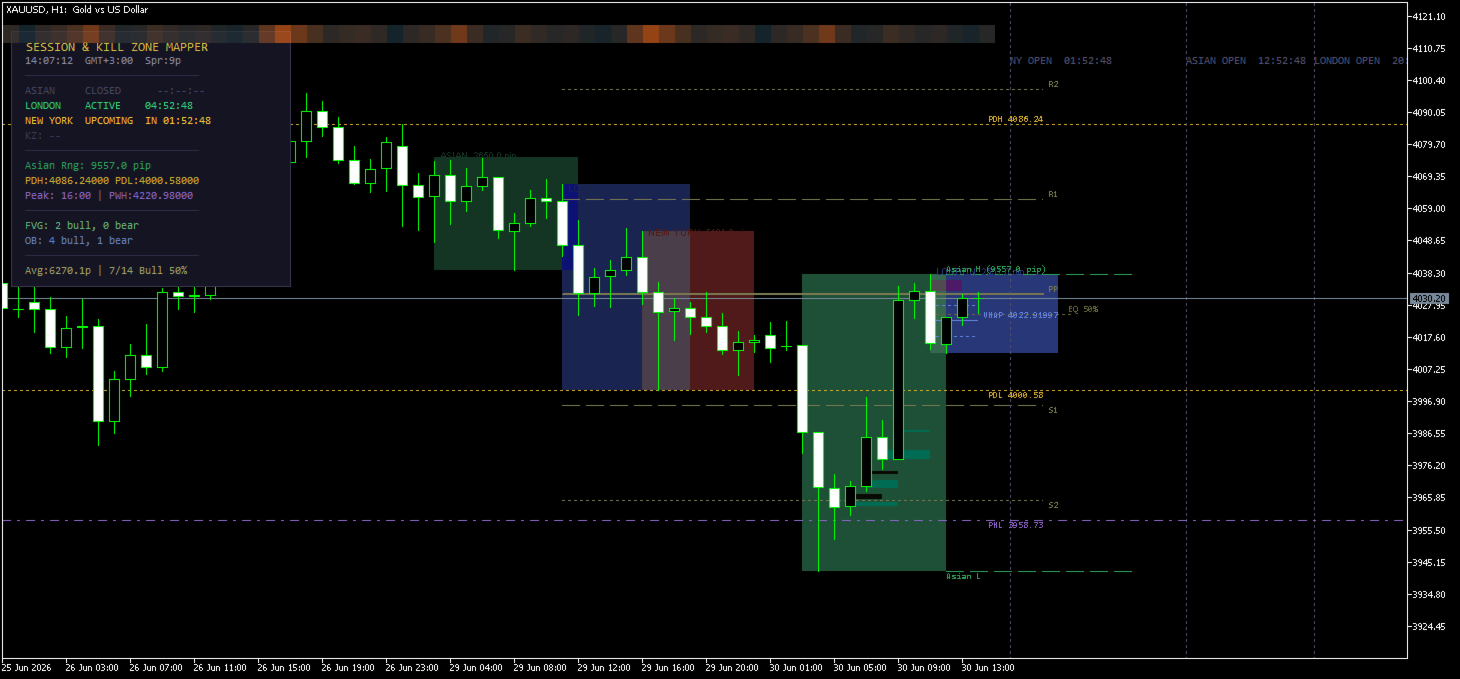
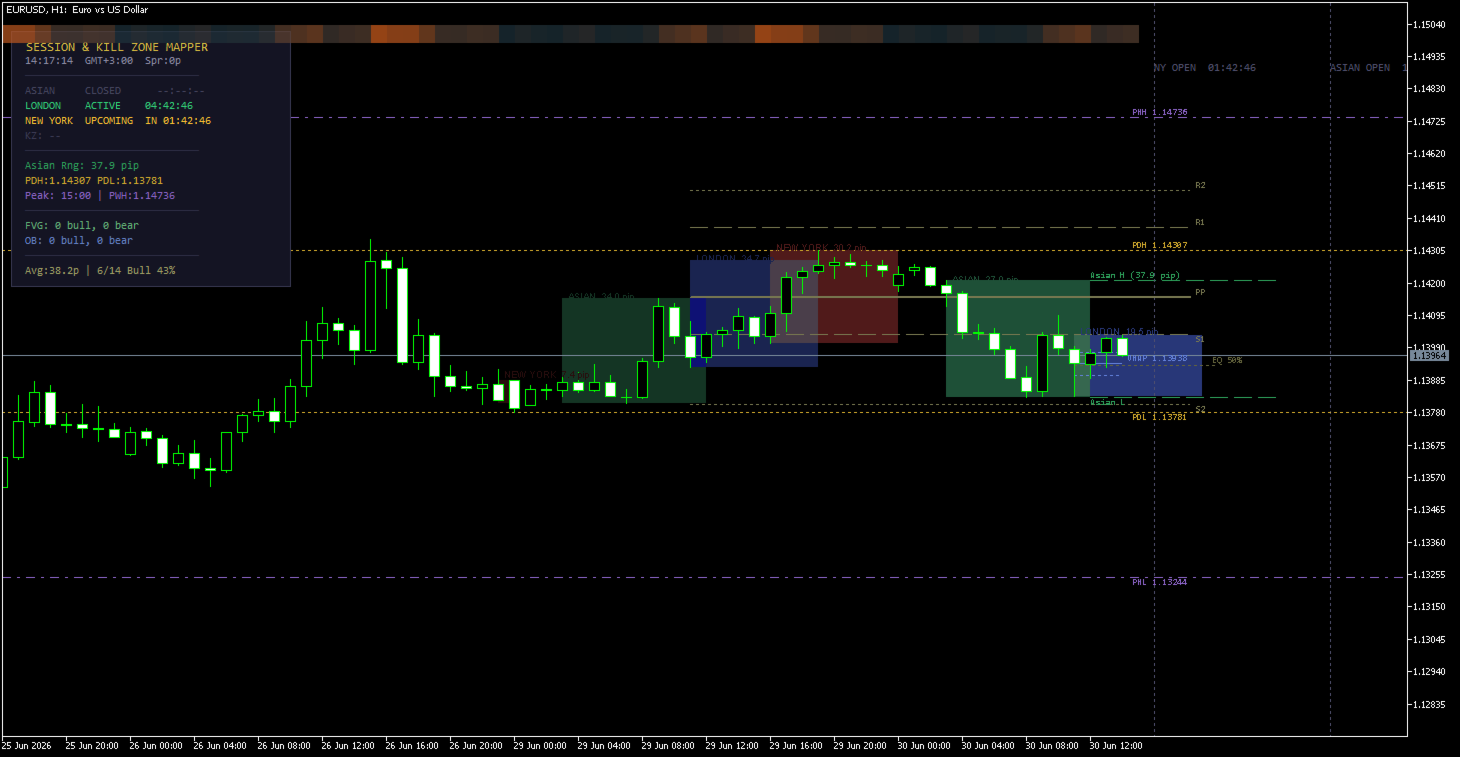
Session And Kill Zone Mapper is a session indicator for MetaTrader 5 built around the session-based framework that many intraday traders follow. It draws colored session boxes for the Asian, London, and New York sessions, each displaying its pip range and countdown timer. It marks the Asian session range and tracks price breakouts beyond it. It plots previous day, week, and month high and low levels. It calculates per-session VWAP with standard deviation bands. It identifies Fair Value Gaps and Order Blocks using Smart Money logic. It draws session pivots and premium/discount zones. It displays a 24-hour volatility heatmap across the chart background. And it presents all of this on a real-time dashboard panel with session statistics, spread, and zone status — on a single chart, without switching timeframes or opening external tools.
Session Boxes with Multi-Day History
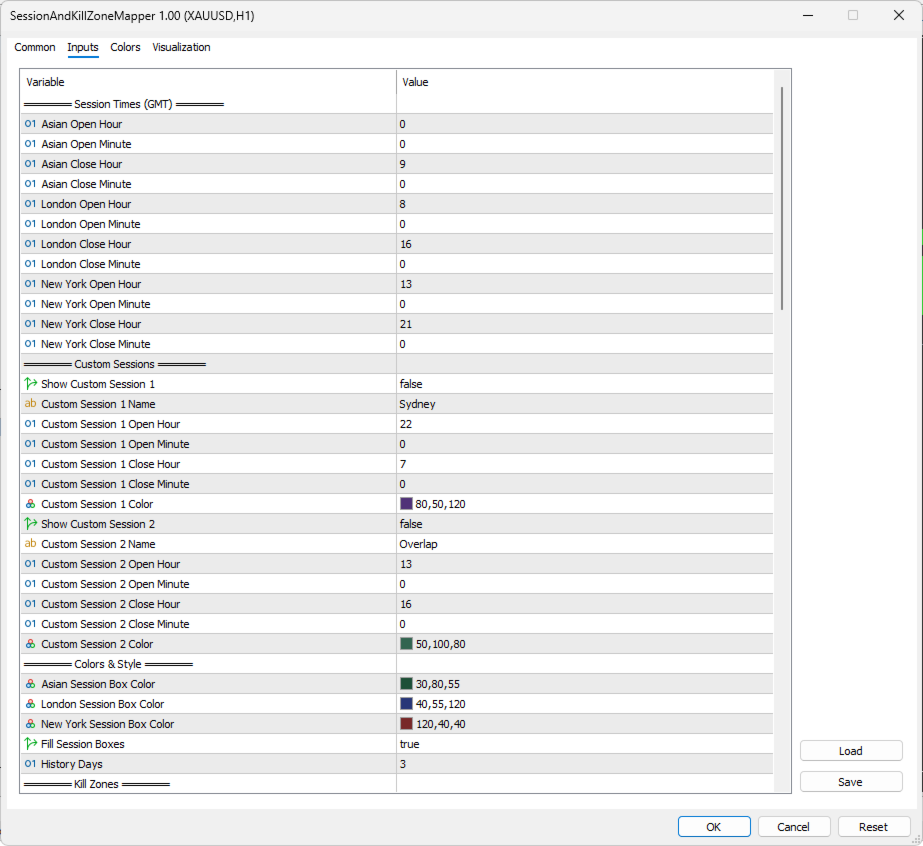
Three session boxes are drawn for the Asian, London, and New York sessions, each displaying its high, low, and total pip range as a label inside the box. Session times are configured in GMT and automatically converted to your broker's server time. The Pro edition supports multi-day session history with configurable depth — previous days' session boxes appear with gradually fading colors so that older sessions are visually receded behind the current day. Two additional custom session slots are available for sessions such as Sydney or the London-New York overlap, each with its own name, time window, and color.
Kill Zones
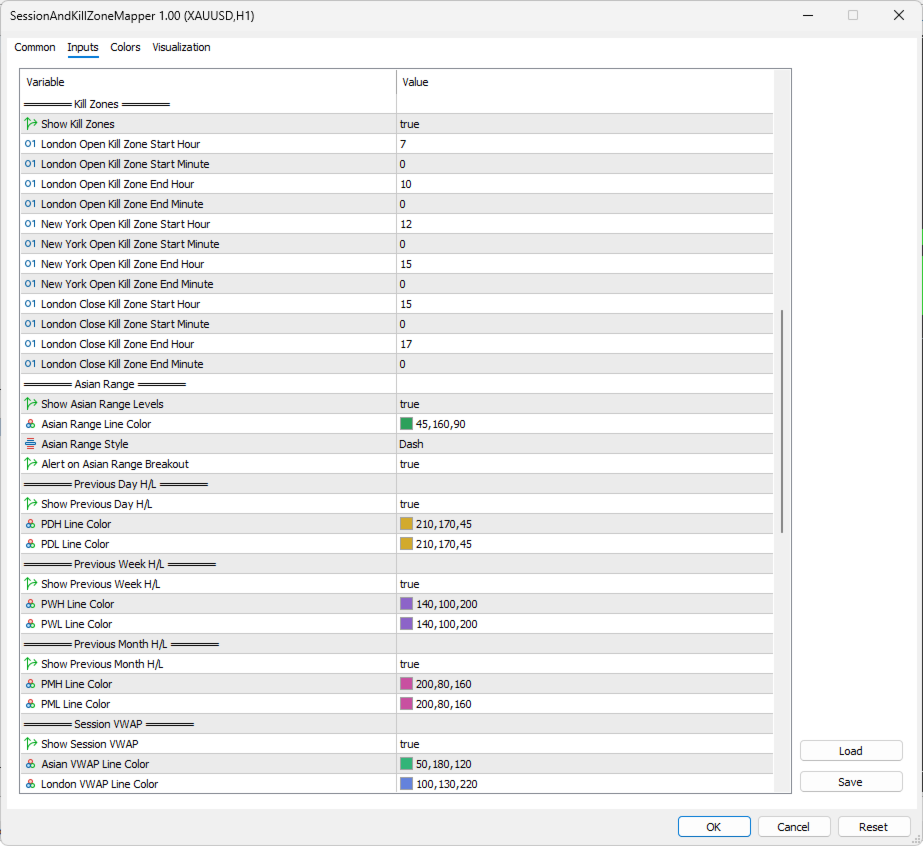
Three Kill Zones are drawn as shaded vertical bands on the chart: the London Open Kill Zone, the New York Open Kill Zone, and the London Close Kill Zone. Each Kill Zone has configurable start and end times (GMT) and its own background and border color. When a Kill Zone is currently active, its border is highlighted with a thicker line. Yesterday's Kill Zones are also drawn with faded colors and a dotted border, so you can see how they related to the current day's price structure. The dashboard panel displays which Kill Zone is active at any given moment.
Asian Range with Breakout Detection
After the Asian session closes, the Asian high and low are extended forward as horizontal dashed lines. The total pip width of the Asian range is labeled on the chart. The indicator monitors subsequent price action for breakouts: when a candle closes above the Asian high, a green arrow is placed at the breakout point. When a candle closes below the Asian low, a red arrow is placed. The first breakout of each day can trigger a sound alert or popup alert, including the breakout price level in the message. Breakout detection uses the M5 close price, so only sustained moves beyond the range are flagged — not momentary wicks.
Previous Day, Week, and Month High/Low
High and low levels from three timeframes are plotted on the chart: the previous day (PDH/PDL) as dotted lines, the previous week (PWH/PWL) as dash-dot lines, and the previous month (PMH/PML) as dash-dot-dot lines. Each level pair uses a distinct line style and its own color for quick visual identification. All levels include price labels and are updated automatically at the start of each new period. The dashboard panel displays the current PDH, PDL, PWH, and PWL values alongside other session data.
Session VWAP with Standard Deviation Bands
A VWAP line is calculated for each session using tick volume and the typical price formula. Each VWAP line includes upper and lower bands based on one standard deviation of the typical price distribution around the VWAP. The VWAP updates in real time during an active session. Three separate VWAP lines are maintained simultaneously — one each for the Asian, London, and New York sessions — drawn in distinct colors so you can see how the current price relates to each session's volume-weighted average. The VWAP remains visible after a session closes.
Session Pivots and Premium/Discount
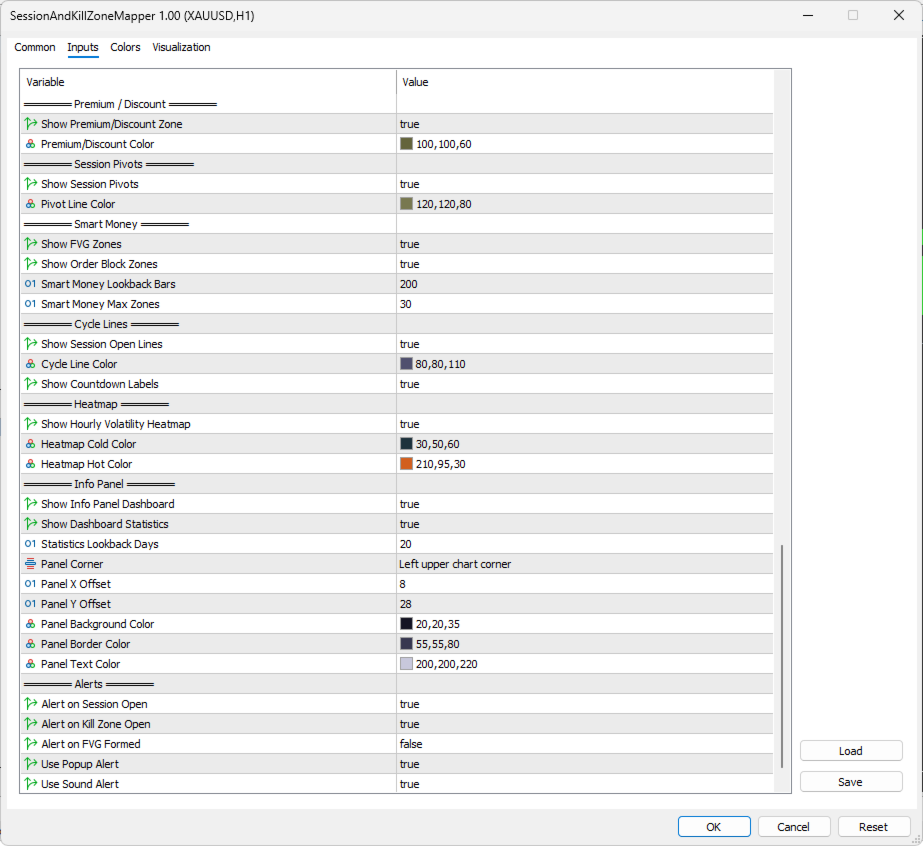
Pivot point levels (PP, R1, R2, S1, S2) are calculated from the previous day's London session high, low, and close. These levels are drawn on the chart with PP as a solid line, R1/S1 as dashed lines, and R2/S2 as dotted lines — each labeled with its level name. A 50% equilibrium line is drawn across the range of the current active major session (London or New York), dividing the range into premium territory above and discount territory below. The equilibrium level is labeled "EQ 50%" on the chart.
Fair Value Gaps and Order Blocks
The indicator scans recent M5 price data to identify Fair Value Gaps and Order Blocks. A bullish FVG is detected when the low of a candle is higher than the high of the candle two bars earlier, leaving an unfilled gap. A bearish FVG is detected in the opposite condition. Bullish Order Blocks are identified when a bearish candle is followed by a candle that closes above the bearish candle's high. Bearish Order Blocks form when a bullish candle is followed by a close below its low. Each detected zone is checked for mitigation — whether price has subsequently traded back through the zone. Unmitigated zones are drawn as colored rectangles extending forward on the chart. Mitigated zones are not drawn but are still counted. The dashboard panel displays the count of unmitigated bullish and bearish FVGs and Order Blocks separately. The lookback period and maximum number of zones are configurable.
24-Hour Volatility Heatmap
A color-coded heatmap strip is drawn across the top of the chart using the Canvas API. Each segment corresponds to an hour of the day and is colored based on the average hourly price range over the past 20 days. Cooler tones represent hours with smaller average ranges. Warmer tones highlight hours when the market historically produces more movement. The color mapping uses a power curve to increase contrast between quiet and active hours. The dashboard panel displays the peak volatility hour — the hour with the highest average range — so you can see at a glance when the market typically moves most.
Dashboard Panel
A 16-row information panel in the corner of the chart displays real-time data. The rows show the session status (Active, Upcoming, or Closed) and countdown timers for all three sessions, the currently active Kill Zone, the Asian range width in pips, PDH and PDL price levels, PWH and PWL price levels alongside the peak volatility hour, FVG counts (bullish and bearish), Order Block counts (bullish and bearish), the current spread, GMT offset, and session statistics including average pip range and directional bias. The panel updates every second and can be toggled on or off through the input settings.
Cycle Lines with Countdown
Vertical dotted lines are drawn at the next upcoming open times for each session. A countdown label is placed at the top of each line showing the session name and the remaining time until that session opens. These cycle lines update every second so the countdown is always current.
Session Statistics
The indicator calculates session statistics over a configurable number of days. For the London session, it computes the average pip range, the number of days that closed higher than they opened (up days), the number that closed lower (down days), and a directional bias expressed as a percentage. This lets you compare today's session development against recent norms — whether the current range is typical for this time of day, and whether recent sessions have tended to close in one direction.
Alerts
Five alert conditions are available and each can be enabled or disabled independently. Session open alerts trigger at the start of the Asian, London, and New York sessions. The Kill Zone alert triggers when any Kill Zone becomes active. The Asian breakout alert triggers on the first close beyond the Asian high or low for the day, including the breakout price in the message. An FVG alert triggers when a new Fair Value Gap is detected. Alert delivery methods include popup alerts and sound alerts.
Getting Started
Attach the indicator to any chart and any timeframe. Session times are configured in GMT and automatically adjusted to your broker's server time through built-in GMT offset detection. All visual elements are organized into labeled input groups: session times, colors and style, Kill Zones, Asian range settings, PDH/PDL, PWH/PWL, PMH/PML, VWAP, premium/discount, pivots, Smart Money parameters, cycle lines, heatmap colors, dashboard panel options, and alert settings. The indicator works with any symbol including forex pairs, indices, and commodities.
| Feature | Details |
|---|---|
| Platform | MetaTrader 5 |
| Type | Chart indicator (overlay, no separate window) |
| Symbols | Any — forex, indices, commodities, crypto |
| Timeframes | Any (Smart Money scans M5 internally) |
| Sessions | Asian, London, New York + 2 custom sessions |
| Kill Zones | London Open, NY Open, London Close — today + yesterday faded |
| Asian Range | Extended levels with breakout arrows (close-based) |
| Key Levels | PDH/PDL, PWH/PWL, PMH/PML, Session Pivots (PP, R1, R2, S1, S2) |
| VWAP | Per-session VWAP with 1-SD upper/lower bands |
| Premium/Discount | 50% equilibrium line on current major session |
| Smart Money | FVG (bullish/bearish) + Order Blocks (bullish/bearish) with mitigation tracking |
| Heatmap | 24-hour average hourly volatility — Canvas-rendered, cold-to-warm color scale |
| Statistics | Avg pip range, up/down days, directional bias — configurable period |
| Dashboard | 16-row real-time panel with session status, KZ, levels, FVG/OB counts, stats |
| Cycle Lines | Session open lines with live countdown labels |
| Alerts | Session Open, Kill Zone, Asian Breakout, FVG (Popup + Sound) |
| Multi-Day History | Configurable depth with automatic color fading for older sessions |
| GMT Detection | Automatic broker offset detection with fallback logic |
| Activations | 10 |
For questions, feedback, or feature requests, please use the Comments section on this product page.