Mattrix Position Monitor
- 유틸리티
-
MATTRIX 8x
 Developer of the MATTRIX 8x Currency Strength System — a multi-timeframe framework analyzing all 28 major forex pairs across 8 currencies.
 - 버전: 1.0
MATTRIX Position Monitor
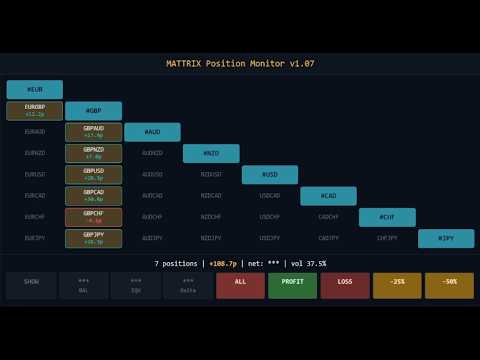
An 8x8 currency matrix dashboard that gives you a live overview of all
your open positions across the 28 Forex majors in one compact panel.
Designed for traders who manage multiple currency exposures and want
to see direction, hedging, profit, and risk at a glance.
WHAT YOU SEE:
The 8x8 matrix is organized by the Big8 currency hierarchy:
EUR, GBP, AUD, NZD, USD, CAD, CHF, JPY.
- Lower triangle (28 cells): one cell per Forex major pair
Cell color = direction:
Green = net long
Red = net short
Orange = hedged (both directions open)
Dark grey = no position
Cell text:
White = currently in profit
Black = currently in loss
Values = net pips and net USD per pair
- Upper triangle (mirror): position-count overview
"B:3 S:2" = 3 buys and 2 sells on the underlying pair (hedge)
"B:2" = 2 longs only
"S:3" = 3 shorts only
- Diagonal (8 cells): currency-level anchors (#EUR, #GBP, ..., #JPY)
Click to open the corresponding basket chart (see Optional companion below).
WARNING MARKERS:
- "!" top-right corner: at least one position on this pair has no stop-loss
- "P" top-left corner: pending order(s) on this pair
- Blue border: BUY pending order
- Magenta border: SELL pending order
- Purple border: both directions pending
LIVE STATUS STRIP:
Compact one-line summary below the matrix:
N positions | N no SL | N pending | Net: +X.Xp | +X.XX
Counters appear only when relevant — clean default view.
PORTFOLIO ACTIONS:
Three action buttons in the footer:
- CLOSE ALL : closes every position (any direction)
- CLOSE PROFIT: closes only positions currently in profit
- CLOSE LOSS : closes only positions currently in loss
Each action requires a two-click confirmation within 3 seconds to
prevent accidental triggers. Closes are executed in async mode
for fast bulk handling.
PRIVACY TOGGLE:
Click the HIDE button to mask all monetary values (BAL, EQU, Delta,
USD column) as "***" for screen-sharing or streaming. Pip values
remain visible. Session-only — resets on EA restart.
CLICK-TO-CHART NAVIGATION:
- Click any pair cell (lower or upper triangle): opens that pair's chart
- Click any diagonal cell (#EUR..#JPY): opens that currency basket chart
- Newly opened charts apply the default template
USAGE:
1. Attach the EA to any active chart (e.g. BTCUSD as a 24/7 host)
2. The EA scans all 28 Forex majors and 8 basket symbols at start
3. Panel updates live every 500ms
4. Click cells to navigate, use footer for portfolio actions
INPUT PARAMETERS:
- Magic number filter (default 0 = all positions universal)
- Cell dimensions (width, height)
- Panel position on chart (X, Y)
OPTIONAL COMPANION:
The diagonal cells (#EUR, #GBP, #AUD, #NZD, #USD, #CAD, #CHF, #JPY)
are clickable to open synthetic basket charts. This requires the
free MATTRIX Synthetic Chart EA which creates the custom symbols.
Without it, the diagonal cells still display currency-level aggregates
but cannot be opened as charts.
Free download: https://www.mql5.com/en/market/product/177905
About Free Demo: Due to MetaTrader 5 platform restrictions, the demo version runs only in the Strategy Tester, where this utility cannot fully demonstrate its live-account features. For a real-world impression, please refer to the screenshots above or ask any question in the Comments section.
REQUIREMENTS:
- MetaTrader 5 build 3000+
- 28 Forex major pairs available on broker
- Automatic broker suffix detection (handles m, .raw, .ecn, etc.)
Position Monitor works standalone on any broker.
To click through to basket charts, add the free Synthetic Chart.
Part of the MATTRIX 8x family:
### THE MATTRIX 8x FAMILY ON MQL5
FOUNDATION (free):
- Synthetic Chart - creates the 11 custom symbols every basket tool needs
- Auto Refresh - keeps custom symbol charts up to date
- Day Levels - Yesterday H/L, Today H/L and ADR% on any chart
ANALYSIS:
- Basket Viewer - live 8-currency strength dashboard
- Basket Strength - on-chart strength breakdown per basket
- Risk Meter - Risk-On / Risk-Off sentiment indicator
EXECUTION:
- One Click Basket Trade - one-click basket entry & management
Full ecosystem: mattrix8x.com
(c) 2026 Matthias Scholz | mattrix8x.com