Mattrix Position Monitor

MATTRIX Position Monitor

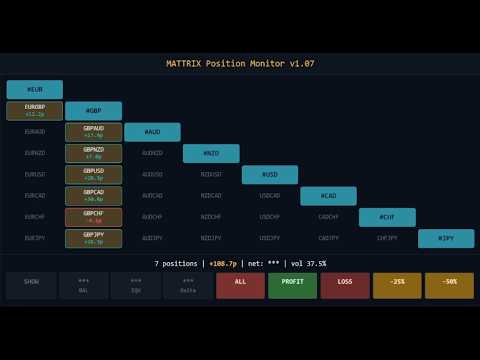
An 8x8 currency matrix dashboard that gives you a live overview of all 
your open positions across the 28 Forex majors in one compact panel. 
Designed for traders who manage multiple currency exposures and want 
to see direction, hedging, profit, and risk at a glance.

WHAT YOU SEE:

The 8x8 matrix is organized by the Big8 currency hierarchy:
EUR, GBP, AUD, NZD, USD, CAD, CHF, JPY.

- Lower triangle (28 cells): one cell per Forex major pair
  Cell color = direction:
    Green = net long
    Red   = net short
    Orange = hedged (both directions open)
    Dark grey = no position
  
 
Cell text:
    White = currently in profit
    Black = currently in loss
    Values = net pips and net USD per pair

- Upper triangle (mirror): position-count overview
    "B:3 S:2" = 3 buys and 2 sells on the underlying pair (hedge)
    "B:2"     = 2 longs only
    "S:3"     = 3 shorts only

- Diagonal (8 cells): currency-level anchors (#EUR, #GBP, ..., #JPY)
  Click to open the corresponding basket chart (see Optional companion below).

WARNING MARKERS:


- "!" top-right corner: at least one position on this pair has no stop-loss
- "P" top-left corner: pending order(s) on this pair
- Blue border: BUY pending order
- Magenta border: SELL pending order
- Purple border: both directions pending

LIVE STATUS STRIP:

Compact one-line summary below the matrix:
  N positions | N no SL | N pending | Net: +X.Xp | +X.XX

Counters appear only when relevant — clean default view.

PORTFOLIO ACTIONS:

Three action buttons in the footer:
- CLOSE ALL   : closes every position (any direction)
- CLOSE PROFIT: closes only positions currently in profit
- CLOSE LOSS  : closes only positions currently in loss

Each action requires a two-click confirmation within 3 seconds to 
prevent accidental triggers. Closes are executed in async mode 
for fast bulk handling.

PRIVACY TOGGLE:

Click the HIDE button to mask all monetary values (BAL, EQU, Delta, 
USD column) as "***" for screen-sharing or streaming. Pip values 
remain visible. Session-only — resets on EA restart.

CLICK-TO-CHART NAVIGATION:

- Click any pair cell (lower or upper triangle): opens that pair's chart
- Click any diagonal cell (#EUR..#JPY): opens that currency basket chart
- Newly opened charts apply the default template

USAGE:

1. Attach the EA to any active chart (e.g. BTCUSD as a 24/7 host)
2. The EA scans all 28 Forex majors and 8 basket symbols at start
3. Panel updates live every 500ms
4. Click cells to navigate, use footer for portfolio actions

INPUT PARAMETERS:

- Magic number filter (default 0 = all positions universal)
- Cell dimensions (width, height)
- Panel position on chart (X, Y)

OPTIONAL COMPANION:

The diagonal cells (#EUR, #GBP, #AUD, #NZD, #USD, #CAD, #CHF, #JPY) 
are clickable to open synthetic basket charts. This requires the 
free MATTRIX Synthetic Chart EA which creates the custom symbols.
Without it, the diagonal cells still display currency-level aggregates 
but cannot be opened as charts.


About Free Demo: Due to MetaTrader 5 platform restrictions, the demo version runs only in the Strategy Tester, where this utility cannot fully demonstrate its live-account features. For a real-world impression, please refer to the screenshots above or ask any question in the Comments section.

REQUIREMENTS:

- MetaTrader 5 build 3000+
- 28 Forex major pairs available on broker
- Automatic broker suffix detection (handles m, .raw, .ecn, etc.)

Position Monitor works standalone on any broker.
To click through to basket charts, add the free Synthetic Chart.
Part of the MATTRIX 8x family:

### THE MATTRIX 8x FAMILY ON MQL5


FOUNDATION (free):
- Synthetic Chart - creates the 11 custom symbols every basket tool needs
- Auto Refresh - keeps custom symbol charts up to date
- Day Levels - Yesterday H/L, Today H/L and ADR% on any chart

ANALYSIS:
- Basket Viewer - live 8-currency strength dashboard
- Basket Strength - on-chart strength breakdown per basket
- Risk Meter - Risk-On / Risk-Off sentiment indicator

EXECUTION:
- One Click Basket Trade - one-click basket entry & management

Full ecosystem: mattrix8x.com

(c) 2026 Matthias Scholz | mattrix8x.com
Produits recommandés
Smart Risk Manager
Abderrahmane Benali
5 (1)
Smart Risk Manager – Master Your Trades with Precision and Confidence Take complete control of your manual trading with Smart Risk Manager , a professional all-in-one trade and risk management Expert Advisor for MetaTrader 5 . Designed for traders who value speed, precision, and capital protection, it simplifies every step of trade execution while ensuring your risk remains under control. Whether you trade Forex, Gold, Indices, or Cryptocurrencies , Smart Risk Manager helps you execute trades w
ZenTrade Manager MT5
Ian Paolo Lumba Castro
ZenTrade Manager MT5 Stop Computing. Start Trading. Are you tired of missing perfect entries because you were busy calculating pip distances, lot sizes, or monetary risk? Do you overthink your Stop Loss and Take Profit levels, only to watch the market reverse while you're adjusting lines? ZenTrade Manager MT5 removes the mental load of order management, allowing you to focus 100% on what matters: Reading the Market. You handle the high-level analysis and decide when to enter; ZenTrade handles t
Spread Candle Clock Pro
Federico Ruben Vissio
5 (1)
Spread Candle Clock is a clock that displays the remaining time of the current candle along with the spread in real time directly on the chart. Features: Real-time candle countdown. Live spread (SP) display. Adjustable size. Customizable colors. Configurable position in all four corners. Compatible with all symbols and timeframes. Includes a button to minimize to a small panel.
FREE
Size Calculator allow you to calculate the size you need for your position giving two parametres: the number of pips risked and the money risked, for example if you want to risk 20 USD on 200 pips, then you will need to input 200 in the case reserved for pips and 20 in the case reserved for risk, the size will appear in left top carner of the chart in your metatrader 4 platform,    Size Calculator  support the following symbols : EURUSD GBPUSD AUDUSD NZDUSD  GOLD WTI  EURJPY GBPJPY USDJPY AUDJP
Core function Intelligent transaction management one-click opening and closing operation, which supports user-defined lots to set multiple closing modes: all closing, closing by direction and closing by profit and loss status. Professional risk control, real-time risk monitoring and spread control to avoid high-cost trading environment. Visual control panel has an intuitive graphical interface, and all functions can be operated with one button to display position information, profit and loss sta
FREE
Badokers Pro EA
Ilham Hijrah Saputra
Badokers Pro EA is an automated trading solution designed to capture market movements across multiple trading conditions. Built with a focus on precision, robust risk control, and structured trade management, this EA offers a complete, systematic trading approach suitable for both novice and experienced traders. === KEY ADVANTAGES & FEATURES === • Flexible Trading Modes: Executes trades based on Market Momentum (Breakout), Trend Continuity (Pullback), or Market Exhaustion (Reversal). • Multi-
FREE
Protect your funded accounts and personal capital with military-grade precision. This utility continuously monitors your floating equity against your daily starting balance. The moment your custom drawdown threshold is breached, it instantly liquidates all open positions, deletes pending orders, and completely unloads from the chart. Stop revenge trading and never fail a prop firm evaluation due to a margin breach again.

FREE
Vous placez le stop, le panneau calcule la taille. Risk Lock Trade Panel est un panneau de trading manuel pour MetaTrader 5 qui dimensionne chaque ordre à partir du risque choisi, l'envoie avec le stop déjà attaché, et gère la position depuis la même fenêtre. Il n'ouvre aucun trade de lui-même, ne donne pas de conseil et n'envoie aucun signal. Le risque se saisit en pourcentage du solde ou des fonds propres, ou en montant fixe ; la distance du stop se règle en points - ou on appuie sur Show lin
Breakeven Manager
Ibrahim Olalekan Ganiu
Bonjour à tous les traders ! J'espère que vous vous en sortez bien. Avez-vous déjà pris une position où le marché évoluait initialement en votre faveur ou approchait votre takeprofit, puis s'est soudainement inversé ? Cela m'est arrivé à maintes reprises et aujourd'hui, je décide de riposter. Je vous présente un gestionnaire de trading qui vous aide à protéger vos positions. Ce projet vous permet de définir le seuil de rentabilité de vos positions, soit lorsqu'un certain nombre de pips spécifi
FREE
EasyTradePad for MT5
Sergey Batudayev
5 (5)
EasyTradePad – Panneau de trading pour MetaTrader 5 EasyTradePad   est un outil de trading manuel et semi-automatisé. Son interface permet une gestion rapide des ordres et des positions, ainsi que des calculs de gestion des risques en un clic. Caractéristiques du panneau : Ouvrir et fermer des transactions avec un risque prédéfini (% ou devise de dépôt) Définissez SL et TP en points, en pourcentages ou en valeurs monétaires Calculer automatiquement le ratio risque/récompense Déplacez le stop lo
MT5 History Checker Can you trust the historical data behind your MT5 backtest? MT5 History Checker is a diagnostic utility designed to identify missing periods and coverage problems in the historical data supplied by your MetaTrader 5 broker. Select the symbol and date range you want to examine and run the checker. The utility analyses the available history and provides a clear PASS, WARNING or FAIL result. What it checks Historical tick-hour coverage M1 historical-data coverage Missing periods
FREE
EA Health Monitor
Allan Aparece Ninal
EA Health Monitor is a free indicator for MetaTrader 5 that shows how each Expert Advisor on your account is doing. It groups the account history by magic number. Every EA gets its own row. Manual trades have a row of their own, and a total sits at the bottom. It only reads the account history and open positions. It never opens, changes or closes a trade. Standalone: Everything is built in. You do not need to buy or install any other product named on this page. Quick start Attach EA Health Monit
FREE
no Trade operation, Robot Set auto SL to every manually Trade from a Phone Automatic Phone TradeManager Need just Set on 1 Symbol Auto BE Trigger is added that immediately sets a stop-loss for every () But does NOT calculate position size based on risk, allows the fixed  SL to   adjusted dynamically drag on Chart or Menu. It protects capital around the clock, reduces emotional mistakes, and ensures consistent risk management.
FREE
Short description Position sizing and margin calculator for MetaTrader 5 with separate BUY and SELL calculations. Full description QRM Risk Calculator is a position sizing and margin calculation utility for MetaTrader 5. It calculates BUY and SELL volume separately according to the selected percentage risk, stop-loss distance, account data, symbol specifications, and current Bid and Ask prices. The calculator displays the estimated monetary loss at the stop loss, theoretical reward at the take p
FREE
Free. Set your risk, click Buy or Sell, done. TrueRisk Trade Panel works out the lot size for you. Type how much of your account you want to risk (for example 1%), set the stop loss in points or drag it on the chart, and the BUY and SELL buttons already show the right lot. No lot calculator, no guessing, no trade that risks ten times more than you meant. MT4 version (free) | TrueRisk Trade Manager (auto break-even, partial close, trailing, account guard) | Free 14-day trials of the paid tools |
FREE
Quick Trade Panel Pro
Nicolas Olivier Menetrey
5 (1)
Panel de trading one-click avec gestion automatique du lot et du risque Quick Trade Panel Pro est un panneau de trading intuitif conçu pour les traders qui veulent exécuter leurs ordres rapidement tout en gardant un contrôle total sur leur risque. Fonctionnalités principales Calcul automatique de la taille du lot en fonction d'un pourcentage de votre marge disponible Stop Loss configurable en points, appliqué automatiquement à chaque trade Lot verrouillé pendant une série de trades pour garanti
FREE
EasyClose MT5
Nina Yermolenko
5 (1)
A simple and convenient utility for closing orders. It can close both all orders together as well as buy, sell or pending orders separately. Has an intuitive graphical interface. MT4 version of the utility -  https://www.mql5.com/en/market/product/78601 If you like this utility, take a look at my other products -   https://www.mql5.com/en/users/nina_yermolenko/seller
FREE
PositionMap Pro — Account Overview Panel for MT5 A real-time panel that groups all open positions by symbol and shows Buy lots, Sell lots and net profit/loss directly on your chart — the whole account at a glance. Instead of counting lots symbol by symbol in the Terminal tab, PositionMap Pro groups everything automatically. You instantly see how much exposure you have on each symbol, split by direction. Panel example Symbol Buy Lot Sell Lot Net P/L EURUSD 0.50 — +12.30 XAUUSD — 1.00 −45.00 GBPUS
FREE
Quick Scale Trading Panel FREE Quick Scale Trading Panel FREE is a manual trading utility for MetaTrader 5 designed to simplify order execution and position sizing directly from the chart. The panel allows traders to open and manage trades using predefined lot multipliers, reducing the need for manual calculations during fast market conditions. Users can define a base lot size and execute trades using multiplier buttons (1x, 2x, 4x, 8x). This helps maintain consistent position sizing and improv
FREE
Grid Trading EA is a semi-automated one-click trading EA for both Normal Trading and Grid/Martingale Trading . Normal Trading Simply click Buy or Sell directly from the chart. The EA will automatically manage trades by: Setting Stop Loss and Take Profit Managing Trailing Stop Grid / Martingale Trading (For Hedging Account Type Only) When Grid Trading mode is enabled, the EA will automatically open additional grid orders at specified distances while increasing the lot size based on your settings.
Voici NAS100 Auto SL and TP Maker pour MT5 : Ne manquez plus jamais le réglage du StopLoss et du TakeProfit avec notre NAS100 Auto SL and TP Maker, un assistant indispensable pour les traders qui naviguent sur le marché du Nasdaq 100 sur MetaTrader 5. Cet outil est conçu pour ceux qui recherchent une solution transparente pour automatiser la gestion des niveaux de StopLoss et TakeProfit. Caractéristiques principales : Automatisation sans effort : Surveille automatiquement les transactions sur
FREE
批量止損止盈同步管理器 這是一款專為 MT5 多持倉交易者 設計的持倉管理工具。 當同一個商品、同一個方向同時有多張持倉時,只需要手動修改其中一張持倉的 Stop Loss(SL)或 Take Profit(TP) ,工具就會自動把該持倉目前完整的 SL / TP,同步到其他相同商品、相同方向的持倉。 例如: XAUUSD BUY #1 XAUUSD BUY #2 XAUUSD BUY #3 如果將 #1 修改為: SL = 3300 TP = 3500 其他 XAUUSD BUY 持倉會自動同步成相同設定。 主要功能 批量同步 Stop Loss 批量同步 Take Profit 可同時同步 SL + TP 支援將 SL 或 TP 設為 0,批量移除 BUY 與 SELL 分開管理 不同商品分開管理 新開持倉不會立即觸發整批同步 啟動時只記錄現有持倉,不會自動修改 平倉後自動移除內部紀錄 一個圖表即可管理帳戶中的多個商品 分組方式 工具以: 商品 + 交易方向 作為同步群組。 例如: XAUUSD BUY XAUUSD SELL EURUSD BUY EURUSD SELL 全部視
FREE
THE TRADER LOT & MARGIN CALCULATOR THE TRADER Lot & Margin Calculator is a free MetaTrader 5 utility designed to help traders calculate position size, manage risk, and monitor margin requirements directly on the chart. It is suitable for manual trading across forex pairs, gold, and other broker-supported instruments. Key Features Position Size Calculation — calculate lot size based on your selected risk percentage and stop-loss distance. Margin Control — limit the amount of free margin allocated
FREE
THIS RISK MANAGER WILL HELP YOU IN YOUR DAILLY TRADING, BY CALCULATING THE RISK AND THE LOTS, AND SET STOPLOSS, AND TAKE PROFIT, AND CAN CLOSE TRADES FOR YOU. RISK PERCENTAGE CASHRISK LOTS STOPLOSS TAKE PROFIT SELL AND BUY BUTTONS LOSE IN PROFIT BUTTON WICH WILL CLOSE ALL TRADES IN PROFIT SET BY THE USER CLOSE ON PROFIT BUTTON WICH WILL CLOSE ALL TRADES WHEN THE EQUALITY IS IN PROFIT SET BY THE USER AS WELL CLOSE TRADES BUTTON
Wallstreet Pro EA
Leonit Ajvazi
3 (2)
Symbol                                       XAUUSD, AUDUSD Period                                        H1 timeframe Retail support                            YES Minimum deposit                       1000 USD (or the equivalent amount in another currency) Compatible with all brokers      YES (supports any account currency) Works without preset                YES Symbol XAUUSD, AUDUSD Period (Timeframe) H1 timeframe Retail support YES Minimum deposit 1000 USD (or the equivalent amount in ano
FREE
XBOOT BOLETA PRO Professional Manual Trading Panel for MetaTrader 5 XBOOT Boleta Pro is a complete trading panel designed for traders who execute manual trades and want greater speed, organization, and control during every trading session. More than a standard Buy and Sell panel, XBOOT Boleta Pro combines powerful trading tools into a single interface, helping traders analyze the market, manage risk, execute orders, and monitor trading performance without leaving the chart. Its purpose is to sim
ConsistencyGuard
Vanessa Cristina Ribeiro Dos Anjos
Version 7.04 Mise à jour majeure axée sur le renforcement de la discipline en day trading et la protection du compte. • Mode Post-Session Review avec une durée configurable de 0 à 60 minutes. • Après avoir effectué le nombre d'opérations autorisé, le trader peut laisser MetaTrader 5 ouvert afin d'analyser les graphiques, prendre des captures d'écran et compléter son journal de trading. • Toute tentative d'effectuer une nouvelle opération après avoir atteint la limite quotidienne déclenche la pro
FREE
Trade Assistant JJC Academy
Jhonathan Alexis Jaramillo Cortez
JJC Academy Trade Assistant — Calculateur de Risque et Panneau de Gestion de Position Arrêtez de calculer votre taille de lot à la main. Arrêtez de dépasser votre drawdown à cause d'une erreur de calcul. JJC Academy Trade Assistant est le panneau de trading que j'ai développé et que j'utilise moi-même pour gérer un portefeuille de comptes financés (funded accounts) — conçu pour que chaque entrée respecte exactement le risque que vous avez défini, quel que soit l'instrument, le broker, ou la prop
FREE
Multi-Timeframe S&R Multi-Timeframe S&R is a technical analysis indicator that detects pivot points across multiple timeframes and displays price levels where these points cluster on the chart. It integrates data from M15 up to Monthly timeframes for its analysis. Functional Overview Multi-Timeframe Clustering Aggregates pivot points from specified timeframes and merges them into a single level if they fall within a defined tolerance range. Magnet Function Automatically adjusts detected price l
FREE
Order Management Script MT5
Christianiel Robles Faustino
Stop Guessing Your Lot Size. Trade With Defined Risk. Order Management Script  is a FREE risk-management utility that automatically calculates your lot size, Entry, Stop Loss, and Take Profit based on your predefined trading rules. No manual position-size calculations. No repeated SL/TP calculations. Just define your risk and trading setup. KEY FEATURES Automatic Lot Size Calculation Calculate the correct position size using: • Fixed monetary risk • Percentage of account equity Multip
FREE
Les acheteurs de ce produit ont également acheté
Trade Assistant MT5
Evgeniy Kravchenko
4.43 (216)
It helps to calculate the risk per trade, the easy installation of a new order, order management with partial closing functions, trailing stop of 7 types and other useful functions. Additional materials and instructions Installation instructions - Application instructions Line function -   shows on the chart the Opening line, Stop Loss, Take Profit. With this function it is easy to set a new order and see its additional characteristics before opening.   Risk management  - The risk calculation
Bienvenue sur Trade Manager EA, l’outil ultime de gestion des risques conçu pour rendre le trading plus intuitif, précis et efficace. Ce n’est pas seulement un outil d’exécution d’ordres ; c’est une solution complète pour la planification des trades, la gestion des positions et le contrôle des risques. Que vous soyez débutant, trader expérimenté ou scalpeur ayant besoin d’une exécution rapide, Trade Manager EA s’adapte à vos besoins, offrant une flexibilité sur tous les marchés, des devises et i
Local Trade Copier EA MT5
Juvenille Emperor Limited
4.94 (149)
Local Trade Copier EA MT5 est un copieur de trades rapide et flexible permettant de copier et de gérer des trades entre plusieurs comptes MetaTrader 5 sur le même ordinateur Windows ou Windows VPS. Il combine la synchronisation locale des trades avec des contrôles côté Receiver pour la taille des lots, la gestion du risque, le filtrage des trades, le mappage des symboles, la gestion des trades et la protection du compte. Configurez vos terminaux Transmitter et Receiver en environ 1 minute et co
Telegram to MT5 Multi-Channel Copier   copie automatiquement les signaux de trading de vos canaux Telegram et Discord directement vers MetaTrader 5. Pas de bots, pas d'extensions de navigateur, pas de copie manuelle. Un signal arrive sur Telegram ou Discord et l'EA ouvre le trade dans votre terminal en quelques secondes. Et avant de copier un canal, le backtester intégré vous montre ce que ce canal aurait fait sur votre compte. Le produit comprend deux composants : une application Windows qui éc
Farmed Hedge Yield Farming | All Markets (Manual - Hybrid - Semi/Automated EA) VERIFIED TRADING RESULTS - Farmed Hedge Yield Axi Copy:  https://www.mql5.com/en/signals/2356376 - Farmed Hedge Yield Exn Copy:   https://www.mql5.com/en/signals/2356404 - Farmed Hedge Yield V Copy:  https://www.mql5.com/en/signals/2357156 IMPORTANT NOTICE: FarmedHedge is a MANUAL-FOCUSED TRADING UTILITY ,not a fully automated EA. Results shown on this Signal include manual trades and overall strategic management.
Copiez les signaux Telegram avec vos propres règles de trading Telegram to MT5 Signal Trader copie automatiquement les signaux de trading au format texte provenant de canaux et de groupes Telegram publics et privés vers MetaTrader 5. Gérez plusieurs fournisseurs et comptes MT5 depuis une seule application de bureau, avec des paramètres de risque et de trading propres à chaque fournisseur . Aucun bot Telegram ni configuration d'API n'est nécessaire pour copier les signaux. Connectez-vous simpleme
TradePanel MT5
Alfiya Fazylova
4.88 (170)
Trade Panel est un assistant commercial multifonction. L'application contient plus de 50 fonctions de trading pour le trading manuel et permet d'automatiser la plupart des tâches commerciales. Instructions d'utilisation : https://www.mql5.com/fr/blogs/post/762589 Version d'essai de l'application pour un compte démo : https://www.mql5.com/fr/blogs/post/762644 Comment installer l'application : https://www.mql5.com/fr/blogs/post/762645 Comment tester l'application en mode visuel : https://www.mql5.
================================================================================ POC BREAKOUT - V20.72. Full Professional Grade Toolkit ================================================================================ POC Breakout is a full MetaTrader 5 trading dashboard for discretionary traders who want breakout signals, Point of Control (POC) context, volume profiles, order flow, market structure, news, alerts, and advanced trade planning in one professional workspace. Attached directly to you
Strategy Ledger Pro
Abdullah Uygar Tuna
5 (11)
Désormais disponible en français. Strategy Ledger Pro est un panneau d'analyse de compte en lecture seule pour MetaTrader 5. Il sépare les résultats du compte par Expert Advisor, stratégie, symbole et numéro magic, pour que vous voyiez ce que chacun apporte réellement. Le panneau est disponible en 11 langues : English, Français, Deutsch, Español, Italiano, Português, Русский, Türkçe, 中文, 日本語 et 한국어. Avant de télécharger la démo. Le Market exécute la démo de tout produit payant uniquement dans l
News Trade EA MT5
Konstantin Kulikov
4.55 (11)
Je voudrais vous présenter un robot efficace que j'utilise depuis plusieurs années. Il peut être utilisé en mode semi-automatique, comme en mode totalement automatique. >>> Chat <<< Le programme comporte des paramètres souples pour le commerce sur les nouvelles du calendrier économique. Il est impossible de le vérifier dans le testeur des stratégies. Ce qu’il faut, c’est le travail réel. Il faut ajouter à la liste des URL autorisées, dans les paramètres du terminal, un site d'actualités. Cliqu
Master Your Trading Discipline   Stop losing your hard-earned gains to overtrading and emotional decisions. The Discipline Tool is your ultimate trading assistant, ensuring strict risk management in real-time. Key Protection Features: Advanced Drawdown Defense : Automatically halts trading if your daily drawdown exceeds a preset threshold (percentage or dollar amount). Real-Time Equity Lock : Safeguard profits by referencing peak equity, ensuring drawdown stays within control. Hard Profit Target
Entry In The Zone with SMC Multi Timeframe is a real-time market analysis tool based on Smart Money Concepts (SMC), designed to analyze market structure, price direction, and key trading zones. It supports both Single-Timeframe and Multi-Timeframe Analysis, providing a clearer view of overall market structure across multiple timeframes, with real-time BUY / SELL signals designed with a strict focus on No-Repaint principles.   The signals are designed to help filter unclear setups and evaluate tr
The product will copy all telegram signal to MT5 ( which you are member) , also it can work as remote copier.  Easy to set up, copy order instant, can work with almost signal formats, image signal,  s upport to translate other language to English Work with all type of channel or group, even channel have "Restrict Saving Content", work with  multi channel, multi MT5 Work as remote copier: with signal have ticket number, it will copy exactly via ticket number. Support to backtest signal. How to s
Exp COPYLOT CLIENT for MT5
Vladislav Andruschenko
3.97 (35)
Copieur professionnel de trades pour MetaTrader 5 Un copieur de trades rapide, professionnel et fiable pour MetaTrader . COPYLOT permet de copier des trades Forex entre les terminaux MT4 et MT5 avec prise en charge des comptes Hedge et Netting . La version MT5 de COPYLOT prend en charge : - MT5 Hedge → MT5 Hedge - MT5 Hedge → MT5 Netting - MT5 Netting → MT5 Hedge - MT5 Netting → MT5 Netting - MT4 → MT5 Hedge - MT4 → MT5 Netting Version MT4 Description complète + DEMO + PDF Comment acheter Comme
HINN MagicEntry Extra
ALGOFLOW OÜ
4.74 (19)
HINN MAGIC ENTRY – the ultimate tool for entry and position management! SIMPLE. FASTEST. INTUITIVE. MAX AUTOMATED. Place orders by selecting a level directly on the chart! full description   ::  demo-version  :: 60-sec-video-description Key features: - Market, limit, and pending orders - Automatic lot size calculation - Automatic spread and commission accounting - Unlimited partitial take-profits  - Breakeven and trailing stop-loss and take-profit  functions - Invalidation leves - Intuitive, a
EasyInsight AIO MT5
Alain Verleyen
4.92 (12)
EASY Insight AIO – La solution tout-en-un pour un trading intelligent et sans effort Présentation Imaginez pouvoir analyser l’ensemble du marché — Forex, Or, Crypto, Indices et même Actions — en quelques secondes, sans aucune analyse manuelle de graphiques, sans installation complexe ni configuration d’indicateurs. EASY Insight AIO est votre outil d’exportation ultime, prêt à l’emploi, pour un trading alimenté par l’IA. Il fournit une vue d’ensemble du marché dans un fichier CSV propre — prêt
Besoin d'aide ? Comment le configurer ? Des questions ? Demandez ici dans votre langue, réponse rapide : https://www.mql5.com/en/market/product/139088/comments Télécharger la démo fonctionnelle Copy Cat More (Chat Copieur) — Copieur de Trades (Trade Copier) MT5 est un copieur de trades local et un cadre complet de gestion du risque et d'exécution, conçu pour les défis du trading d'aujourd'hui. Des challenges de prop firm à la gestion de portefeuille personnel, il s'adapte à chaque situation gr
MT5 to Telegram Signal Provider est un utilitaire facile à utiliser et entièrement personnalisable qui permet l'envoi de signaux spécifiés vers un chat, un canal ou un groupe Telegram, transformant ainsi votre compte en fournisseur de signaux. Contrairement à la plupart des produits concurrents, il n'utilise pas d'importations DLL. [ Démonstration ] [ Manuel ] [ Version MT4 ] [ Version Discord ] [ Canal Telegram ]  New: [ Telegram To MT5 ] Configuration Un guide utilisateur étape par étape est
Telegram To MT5 Ultra
Mirel Daniel Gheonu
5 (5)
Telegram To MT5 — Copieur de signaux Transformez les appels de trading de vos canaux Telegram en véritables ordres MT5 — automatiquement, sur autant de comptes que vous le souhaitez, avec le risque et les règles entièrement sous votre contrôle. Telegram To MT5 relie les canaux VIP / de signaux que vous suivez déjà sur Telegram à votre terminal MetaTrader 5. Une application de bureau compagnon gratuite lit les messages (même des canaux qui bloquent les bots), et cet Expert Advisor les exécute sur
Signal Trading View to MT5 Pro
Mirel Daniel Gheonu
4.5 (2)
Signal TradingView to MT5 Pro Automator Exécution professionnelle instantanée entre TradingView et MetaTrader 5 Automatisez votre stratégie de trading avec le pont de communication le plus robuste entre les alertes TradingView et l'exécution réelle sur MT5. Conçu pour les traders qui exigent vitesse, flexibilité et une gestion des risques impeccable, cet Expert Advisor transforme tout message d'alerte en un ordre au marché ou à cours limité précis. POINTS FORTS ET AVANTAGES Moteur d'analyse univ
Power Candles Strategy Scanner - Outil de recherche de configurations multi-symboles à optimisation automatique Le Power Candles Strategy Scanner utilise le même moteur d'auto-optimisation que celui qui alimente l'indicateur Power Candles, pour chaque symbole de votre Market Watch, en parallèle. Un panneau vous indique quels symboles sont statistiquement négociables à l'instant, quelle stratégie est la plus performante pour chacun, la paire Stop Loss / Take Profit optimale, et vous alerte dès qu
Trade copier MT5
Alfiya Fazylova
4.61 (57)
Trade Copier est un utilitaire professionnel conçu pour copier et synchroniser les commandesentre les comptes de trading. Les commandes sont copiées du compte/terminal du fournisseur vers le compte/terminal du destinataire, qui sont installés sur le même ordinateur ou vps. Avant d'acheter, vous pouvez tester la version démo sur un compte démo. Version démo ici . Instructions complètes ici . Principales fonctionnalités et avantages: Prend en charge la copie des commandes MT5> MT5, MT4> MT5, MT5>
The Patch
Mian Rameez Ali
The Patch It never opens a trade. It walks behind the ones that did. Every open position, every pending order — checked twice a second for the one thing that's easy to forget: a stop, a target. Found bare, it doesn't ask. It writes the missing number in, measured in points from wherever the position began, and moves on to the next. No strategy, no opinion on direction. Just the quiet assumption that nothing should ever sit on the market unprotected — not because someone decided it shouldn't,
Panneau de trading pour MetaTrader 5 — contrôle professionnel du trading en un clic depuis le graphique et le clavier Un panneau de trading avancé conçu pour les traders actifs, afin d’ouvrir, gérer et clôturer des positions bien plus rapidement qu’avec l’interface standard de MetaTrader. Cette solution s’adresse à ceux qui veulent contrôler positions, ordres en attente, profit global et exécution depuis un seul espace de travail professionnel. Il ne s’agit pas d’un simple utilitaire. C’est un
Grid Manual MT5
Alfiya Fazylova
4.73 (22)
Grid Manual est un panneau de trading permettant de travailler avec une grille d'ordres. L'utilitaire est universel, possède des paramètres flexibles et une interface intuitive. Il fonctionne avec une grille d'ordres non seulement dans le sens des pertes, mais aussi dans le sens de l'augmentation des profits. Le commerçant n'a pas besoin de créer et de maintenir une grille d'ordres, l'utilitaire le fera. Il suffit d'ouvrir une ordre et "Grid Manual" créera automatiquement une grille de ordres po
Anchor Trade Manager
Kalinskie Gilliam
5 (9)
Your EAs cannot see each other, but Anchor can. Anchor gives you one place to coordinate your EAs, manage risk, and decide when trading is allowed. It works alongside the trading bots you already use without any changes to them. The Problem One EA opens a trade. Then another starts trading. The next thing you know, you wake up to multiple grids built across your account. Each EA may be doing exactly what it was designed to do, but together they can place far more risk on your account than you in
RETAILBERG FOOTPRINT CHART PRO — Order-Flow Workspace for MetaTrader 5 Version 7.00  |  Professional System  |  31 tools  |  One chart A full 150-page illustrated User Manual is included. Please read the full manual to understand this feature packed footprint chart elements and ui. https://www.mql5.com/en/blogs/post/777982 DEMO / STRATEGY TESTER — PLEASE READ FIRST
Telegram to MT5 Coppy
Sergey Batudayev
5 (10)
Télégramme vers MT5 :   la solution ultime pour copier des signaux Simplifiez votre trading avec Telegram vers MT5, l'outil moderne qui copie les signaux de trading directement des canaux et chats Telegram vers votre plateforme MetaTrader 5, sans DLL. Cette solution puissante garantit une exécution précise des signaux, de nombreuses options de personnalisation, un gain de temps et une efficacité accrue. [ Instructions and DEMO ] Caractéristiques principales Intégration directe de l'API Telegram
The News Filter MT5
Leolouiski Gan
4.79 (24)
Ce produit filtre tous les conseillers experts et les graphiques manuels pendant les heures de publication des actualités, de sorte que vous n'avez pas à vous soucier des pics de prix soudains qui pourraient détruire vos configurations de trading manuelles ou les transactions entrées par d'autres conseillers experts. Ce produit est également livré avec un système de gestion des ordres complet qui peut gérer vos positions ouvertes et vos ordres en attente avant la publication de toute actualité.
Trade Indicator Assistant   is a powerful MT5 utility designed to turn indicators into automated trading systems. Its main feature is the ability to automatically detect an indicator’s   BUY and SELL signal buffers , without requiring you to know the buffer numbers, search through indicator settings, or modify the indicator source code. Bonus Indicator:   After purchasing Trade Indicator Assistant, contact me to receive   Trade Signal Pro   completely free as a bonus indicator. [Download Demo V
Plus de l'auteur
Mattrix Auto Refresh   Short Description Keeps custom symbol charts up to date. Forces periodic candle recalculation without Journal spam. Essential for any synthetic or custom symbol chart in MT5. Full Description Custom symbols in MetaTrader 5 do not receive broker ticks. Their charts often show outdated or incomplete candles, especially on lower timeframes. This lightweight indicator solves the problem. Drop it on any custom symbol chart. It forces a periodic full bar recalculation by re
FREE
Short Description Yesterday H/L, Today H/L and ADR% on any chart. Color-coded gradient signals overextension at a glance. Full Description Mattrix Day Levels is a clean, lightweight indicator that displays the four key reference levels every day trader needs: Yesterday High and Low (YH, YL) Today High and Low (TH, TL) Average Daily Range percentage (ADR%) Drawn directly on the chart, the indicator marks the current trading day's progression against its historical range. The today range is shown
FREE
Mattrix Cockpit — read market structure at a glance A multi-timeframe navigation panel for one chart and any symbol. It shows where price sits inside its range, the risk-reward of trading either direction, the trend on every timeframe, and a single weighted directional bias — so you can read the situation in seconds and make your own call. What it shows Range box over the last N candles, drawn from candle bodies so wicks stand out as rejections Upper and lower
Short Description On-chart strength analysis for currency and custom baskets: leg breakdown, coherence, pip sum, volatility-scaled state and activity. Full Description manual ->  https://mattrix8x.com/BasketStrength Mattrix Basket Strength is an on-chart panel for synthetic basket charts and FX pairs. It breaks a basket into its legs, sorts them strongest first and shows how broad the current move is - whether a currency is moving across the board or a single pair is doing the work. WHERE IT
FREE
Mattrix Basket Viewer Mattrix Basket Viewer creates 8 synthetic currency index charts directly in MetaTrader 5 using geometric mean calculation. It analyzes all 28 major forex pairs and groups them into 8 currency baskets, one for each major currency. Instead of watching 28 individual pairs, you see 8 basket charts that show the strength of each currency. A compact dashboard ranks the baskets by pip sum and coherence - per day, week, month, year or trading session. Click any basket name to open
FREE
MATTRIX Synthetic Charts creates 11 fully functional Custom Symbols from the 28 Forex major pairs available on any standard MT5 broker. CREATED SYMBOLS: Currency Indices (geometric mean of 7 pairs each):   #EUR  #GBP  #AUD  #NZD  #USD  #CAD  #CHF  #JPY Risk Baskets (geometric mean of 8 pairs each):   #RON    "Risk-On"  basket   #ROFF   "Risk-Off" basket (visually flipped) Diversification Basket:   #FIX   Combined long-bias index of all 28 majors USAGE: 1. Attach the EA to any active major pai
FREE
Mattrix Risk Meter A risk sentiment indicator that visualizes the Risk-On / Risk-Off sentiment in the Forex market by comparing two synthetic currency baskets. Designed for traders who want to understand the broader market mood beyond individual pair movements. WHAT IT SHOWS: The indicator plots two normalized lines in a separate window:   RON  (white line)  — Risk-On basket of 8 high-beta currency pairs   ROFF (red line)    — Risk-Off basket of 8 safe-haven pairs (inverted) When the lines mov
Mattrix One Click Basket Trade A one-click trade panel for Forex basket trading on MetaTrader 5. Open, manage, and close baskets of currency pairs with a single click — built for traders who manage multiple currency exposures at once instead of single pairs. WHAT MAKES IT DIFFERENT: Standard one-click panels trade only the current chart symbol. This panel extends one-click execution to four basket modes: - PAIR mode: trade the chart symbol (any of 28 Forex majors) - BIG8 mode: trade 7 pairs o
Filtrer:
Aucun avis
Répondre à l'avis











