Alerts to Telegram

5

Alerts to Telegram


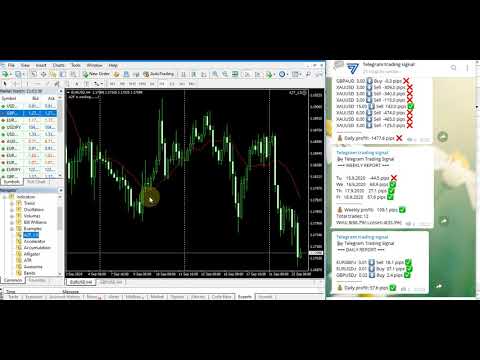
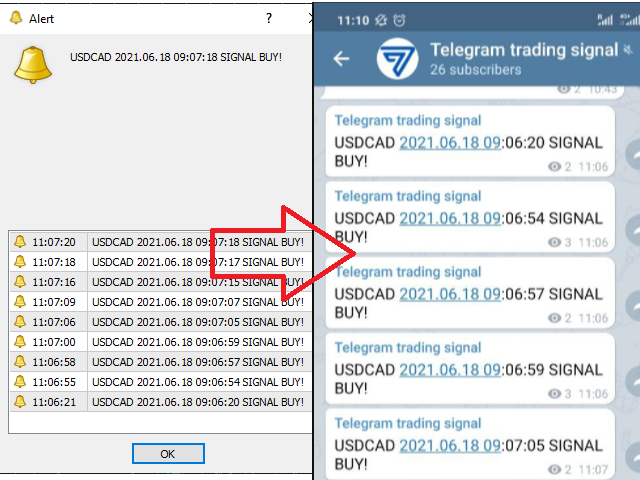
The utility sends Alerts of all your indicators or advisers to a telegram channel (group or personal message).

Benefits:

1. There is no need to be at the terminal waiting for an alert from your indicator or advisor;

2. Simple setup.


Currently works with terminal languages:

1.Russian;

2.English.

If it is necessary to add your language please let me know.

The utility works together with the AlertToFile indicator (put the indicator in the Indicators folder)

Indicator: AlertToFile

!!! The indicator and advisor need to be installed only on one chart !!!


Fast start

By default, everything is already configured and you can see your Alerts in the test channel t.me/tts_test

STEP # 1: MT4 Settings

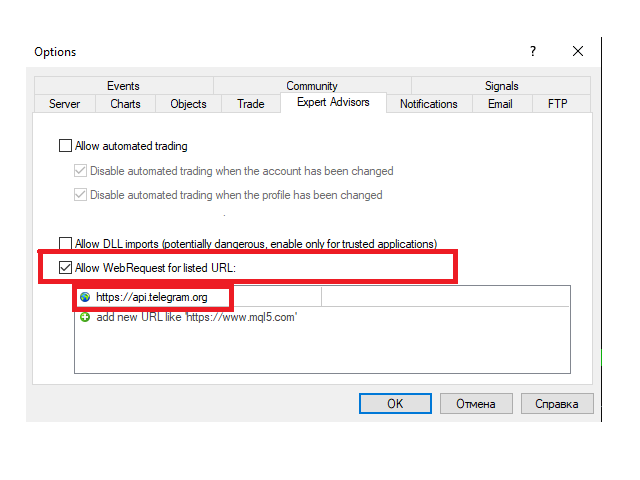
  1. Service-Settings-Expert Advisors-Allow WebRequest for the following URLs (Add URL: https://api.telegram.org);
  2. In the EA settings, fill in the Telegram ID (User, Group or Channel) field (Example: -1001491620283 <- channel ID for the test);
  3. Leave Telegram Bot Token blank;
  4. Find out the chat (channel) ID using the bot in telegrams @getmyid_bot.

STEP # 2: Settings in Telegram:

  1. Find and run the bot @TlgrmTSbot;
  2. If necessary: add the bot to a group or channel (with administrator rights).

DONE!

-------------------------------------------------- -------------------------------------------------- -----------

Professional customization   Alert2Telegram  


Before launching Alert2Telegram EA, you need to create your own telegram bot, which will be the sender of messages created by this EA.

Instructions:

  • Find the main bot @BotFather in the Telegram;
  • Enter / newbot and follow the prompts to give it a name and username;
  • Copy API marker;
  • If you don't have one yet, create a channel or group;
  • Open the Info channel / group, then Manage, Add Administrators, enter the bot username and click Save;
  • Send any message to the channel / group, for example, "Hello!";
  • Open the following URL in a browser: https://api.telegram.org/bot [api token] / getUpdates (don't forget to add the bot token to the URL);
  • Search for the string "chat": {"id": to find a large negative number. This is your group or channel ID.
  • Copy the chat ID (or Find the ID using the bot in telegrams @getmyid_bot);
  • Test the bot in the browser (add the token and chat ID first): https://api.telegram.org/bot [api token] / sendMessage? Chat_id = [ChatID] & text = Hello !;
  • In MT4 Service-> Settings-> Expert Advisors-> Allow WebRequest for the following URLs (Add URL: https://api.telegram.org);
  • In A2T EA settings, fill in the Telegram ID and Telegram Bot Token fields.
DONE!

-------------------------------------------------- -------------------------------------------------- -----------

Input parameters:

  • Heading -   Title
  • Telegram ID (User, Group or Channel) - Chat ID
  • Telegram Bot Token -   Bot token API


レビュー 18
Waldmann110
119
Waldmann110 2025.07.25 14:05 
 

ich brauche dringend Hilfe, ich verzweifle langsam. I urgently need help, I'm slowly becoming desperate.

Master
101
Master 2025.06.25 10:24 
 

Thank you, the software developer is very helpful. It works very well.

Chua Wee Kiat
2911
Chua Wee Kiat 2023.01.30 14:01 
 

Brilliant!! Nice Utility!

おすすめのプロダクト
Exp Swing
Vladislav Andruschenko
4.49 (57)
これは、Swinger(Pendulum、Cheburashka)と呼ばれる有名な戦略のモデルを使用しています。 戦略は、2つの反対の保留中の注文を出すことにあります。価格が特定の方向に移動すると、一方の保留中の注文がトリガーされ、もう一方の注文のロットサイズが増加します。 EAは3種類のオープン保留中の注文を提供します(TypeofTrade) 配置後の自動オープン(インスタントオープンAutoTrade) 手動開封後の開封と管理(手動開封ManualTrade) 高/低レベルで開く(過去のバーTFTradeの高低) OCO(One-Cancels-the-Other)注文は、2つの注文で構成される条件付き注文の一種です。2つ目の注文が約定すると、1つ目の注文は自動的にキャンセルされます。 スイング-完全な説明 MT5 version 購入する方法 インストールする方法     ログファイルの取得方法     テストと最適化の方法     Expforex のすべての製品 使い方? 開始時に、エキスパートアドバイザーは2つの注文を出します-現在の価格から StopOrderDe
FREE
Rosy Pro Panel MT4
Theresia Yovitha Herwanda
5 (1)
Download DEMO here:  https://www.mql5.com/en/blogs/post/759769   An ultimate panel you've never seen before.  Compact and nice Trade panel with large Total P/L and it's percentage display. Groups for trades summary available: Ticket, Symbol, Type, Category, and Magic. Average price field helps you know your trading average price and direction. Set magic and comment of your trading in a very easy way. Group closing by symbol, type, category or magic - only by one click. Close All button for a qu
Trade with Confidence Using the Trendline Trading ATM (Advanced Trade Management)! Master entries, exits, and risk management with the powerful tools of the MetaTrader Trendline Trading ATM. This expert advisor equips you with a comprehensive suite of tools to trade consistently smarter, not harder.  Take control of your trading risk and drawdown, capture profitable entries, and let your winners run. This innovative Trade Entry/Exit and Risk Management utility empowers you to:   Precision Entry
アクティブ注文と保留中の注文の管理:自動ブレイクイーブン、TP/SL変更、部分/完全決済、チャート上のレベルの視覚的表示 私の #1  Utility :66以上の機能、PROトレード管理を含む   |    ご質問はこちら  まで 1) メインウィンドウ:注文を管理するには、特定のシンボル [Symbol] を設定するか、すべてのシンボル [ALL] を選択できます すべてのアクティブポジションを閉じる [ALL] すべての利益のあるトレードを閉じる [profits] すべての損失のあるトレードを閉じる [losses] すべての買いトレードを閉じる [longs] すべての売りトレードを閉じる [shorts] すべての指値注文を削除 [Delete limit orders] すべての逆指値注文を削除 [Delete stop order] 右側には、各注文カテゴリの現在のフローティング損益(口座通貨および現在の残高のパーセンテージ)が表示され、各カテゴリの注文数が計算されます。 2) 手動でトレードをブレイクイーブンに変更 [- Move SL to BE now -]:SL
DepoControl – Full Control Over the Deposit Closers   Expert Advisor controls the overall account status and closes ALL market orders on the account when certain conditions occur. The trading robot closes ALL orders on the account in the following cases (by profit): Close ALL orders by a total profit on the account   in monetary terms . For example, suppose that the settings specify that   positions should be closed when profit of 100 is reached. In this case, the Expert Advisor closes all mark
Overview The script displays information about the trade account and the current financial instrument. Information about the trade account: Account - account number and type (Real or Demo); Name - name of the account owner; Company - name of a company that provide the access to trading; Server - trade server name; Connection State - connection state; Trade Allowed - shows whether trading is allowed on the account at the moment; Balance - account balance; Equity - account equity; Credit - amount
King Scalper EA  is an automatic trading robot to trade  USACAD . Using advanced calculations it opens and manages trading for you automatically. Its a strategy based on a series of indicators that measure the strength of the market to enter trades, when market conditions allow it. No experience is required and it’s easy to set up.  Using King Scalper is a way to improve your trading result instantly. With an Expert Advisor like King Scalper you can instantly start trading, a working system re
このソフトウェアは、どんな機器にも対応したライブデータエクスポーターであり、データをCSVファイルにエクスポートします。 手順: 任意の機器に展開し、指示が表示されたら、インターバル変数を好みの期間に変更してください(デフォルト設定は30秒です)。インターバルは、エクスポーターがデータをスナップショットし、エクスポートするまでの秒数を設定します(最小秒数は1秒ですが、これにより大きなファイルが生成され、Pythonや他のソフトウェアで処理する際に問題が発生する可能性があります)。最小推奨インターバル時間は15秒です。 MQL4データフォルダからエクスポートされたファイルを見つけてください(ターミナルで[ファイル]→[データフォルダを開く]をクリックします)。このデータフォルダ内のFILESフォルダを見つけ、そこにエクスポートされたCSVファイルがあるはずです。 特徴と機能: 以下のデータがエクスポートされます:日付、時間、始値、高値、安値、終値、出来高。 エクスポーターは、エクスポートされたファイル内のすべての利用可能なデータを自動的に含めます。 データは常に最新のキャンドルデータが最
MT4 Local Trade Copier A file-based trade copying system for MetaTrader 4 that synchronizes trades between Master and Client terminals on the same computer or network. Key Features Master/Client Architecture : One Master terminal broadcasts trades, multiple Client terminals can receive and replicate them File-Based Communication : Uses shared folder system for reliable inter-terminal communication Flexible Lot Management : Copy exact lot sizes or use fixed lot sizes on client accounts Customizab
TradeWise EA is a compact yet powerful tool loaded with robust features. It offers a 30-trades compounding challenge , Risk-Management, Performance Tracking, Break-Even Calculation, Automated SR Zones, Trailing Stop-loss by ATR or PIPS, Automatic Risk-to Reward Ratio based on Stop-loss, Easy Order Adjustments, Calculates Total Stop Loss and Take Profit, Automatic buy and sell orders on manually placed SR Zones, and more. These features are designed to cater to both scalpers and long-term traders
If you wish to draw Support and Resistance lines, view: daily market opening, classical pivot levels, Fibonacci pivot levels, trend lines, Fibonacci levels, the remaining time to candle closing, and current spread. If you seek to place your orders with the exact lot that meets your desired stop loss risk. If you wish to do all this and more with just one click, then this is the perfect tool to use. This tool will allow you to feel more relaxed when deciding to open orders, as well as predicting
NAM Chart Info New
NAM TECH GROUP, CORP.
4 (1)
この素晴らしいツールを使用すると、各操作のリスクを簡単かつ迅速に管理できます。その革新的なインターフェースにより、ロット数とリスクと利益の比率を秒単位で計算し、操作を必要なリスク範囲内に保ち、取引の悪い時期を回避することができます。 操作を開くと、パネルに各操作の詳細と関連性の高いデータを指定するすべての概要が記載されたセクションが表示されます。多くのウィンドウを開いて複雑にならないでください。パネルには、必要なシンボルにアクセスし、パラメーターでそれらを構成するだけで、エクスペリエンスを楽しむことができるクイックナビゲーションボタンがあります。 この便利なツールを使用すると、次の情報を一目で視覚化できます。 シンボル情報 - 展開する -ロットあたりのピップ値 -長く交換する -ショートスワップ リスク計算機 -基本金額 - 危険 -ロット(自動計算) -比率(自動計算) 注文情報 -オープンオーダーポジション(1、2、3 ...) -注文タイプ(購入|販売) -注文サイズ(ロット) -利益/損失(アカウント通貨で表示) -距離(始値と現在の
Close All Selected Chart Overview: This is one of the smart choices to help you make your trading management a lot easier. Especially when you have to manage a large number of orders. This utility will work like a helping hand to close all the unrelated order windows in less than no time, plus without making any kind of unwanted effects. :: 3 simple steps to use :: 1. Select your chart window.  2. Click "Close All" 3. Click "OK" Note: For the better understanding on how this utility works, plea
M5 タイムフレームのロボット スカルパー。 GBPUSD 通貨ペアでの取引。このロボットは、英ポンドの取引のためにプロのトレーダーの会社によって特別に開発されました。ロボットは、毎日約 5 ~ 15 の取引を開始します。 GBPUSD のスプレッドが最大 10 ピップスまでの低いブローカーと取引するのが最善です。開始するための推奨最低入金額は $500 以上です。 利点: マーチンゲールは使いません。 ネットではありません。 すべての取引にはストップロスがあります。 GBPUSDペア専用のプロボット。 ロボットスキャルパー、M5 期間の日中取引。 このロボットはどのように取引しますか? 市場を分析するために、ロボットは 2 つの指標の価格モデルと戦略的な市場パターンを使用します: パラボリック ストップとリバース システムとボリンジャー バンド。ロボットは最初に、価格エントラポレーション統計を使用して価格の動きについて市場を分析します。次に、ロボットはこれらの指標を読み取り、現在と過去の動きの傾向を比較します。市場の反転またはロールバックを示すパターンが一致した場合、ロボットは取
Introducing the OrderManager: A Revolutionary Utility for MT4 Manage your trades like a pro with the all-new Order Manager utility for MetaTrader 4. Designed with simplicity and ease-of-use in mind, the Order Manager allows you to effortlessly define and visualize the risk associated with each trade, enabling you to make informed decisions and optimize your trading strategy.  Key Features: Risk Management: Define the risk of your trades quickly and easily, allowing you to make better decisio
このツールは、ワンクリックですべてのオープン注文を閉じるのに役立ちます。「すべて閉じる」をクリックするだけです。収益性の高い注文のみをクローズしたい場合は、「収益性をクローズする」ボタンをクリックします。クリックすると、すべての変動注文がクローズされます。すべて変動損失のある注文のみを決済したい場合は、「損失可能注文を決済する」ボタンをクリックすると、変動損失のあるすべての注文が決済されます。 このツールは1年間テストされています. ワンクリックポジションクローズ機能は非常に完成しています. ポジションクローズはタイムリーであり、遅延範囲は小さいです. もちろん、遅延はあなたの地域やネットワーク環境にも関係します.ご注意ください。 履歴データのバックテスト プロセス中、このツールのパフォーマンスはさらに完璧になり、100 件の注文すべてを閉じるのに最長 0.495 秒しかかかりませんでした。 実際の取引プロセス中、私のポジション注文の最大数はわずか 26 で、すべてのポジションが決済されるまでにかかった時間は 1.28 秒でした。
これは、買い注文と売り注文のネットワークを配置する通常のパネルです。 このExpert Advisorは、設定で定義された利益注文を閉じます。 次に、ラダーと呼ばれるパラメータがあり、ラダーパラメータで示されたポイントだけ注文間の距離が増加し始めることを含みます(ここでは、メイン設定では10ポイントです)。これは、2次が10ポイント、3次が20ポイント、4次が40ポイントなどを意味します。 次に、これは設定にないため、このアドバイザーに何があるかを知る必要がありますが、このアドバイザーが提案した戦略のロジックに影響します。. アドバイザーが5つの注文を開くのは、ここの設定であるとしましょう。.. または購入のために。.. または販売のため。.. よかった.. ただし、注文を開くと、次のオープン注文のロットが以前にオープンした注文の半分だけ増加します。 つまり、設定で0.1ロットを設定すると、スキームに従って5つの注文が開き、現在の価格に近い最初の注文は0.1ロットの価格で開かれます。 第二に、与えられたステップのために、ここで50ポイントのステップは0.15ロットの価格で開きます。
デイリートレード結果を追跡するためのインフォーマー 私の  #1 トレードアシスタント をチェック: 66+ 機能、このツールを含む  |   質問があれば連絡  してください パネルの上部で、デイリー利益目標(ピップ単位)を設定します: 手動で値を入力; [+] と [-] ボタンを使用(変更ステップは設定で調整可能); ダッシュボードは取引を2つのカテゴリに分類します: 現在のフローティング結果; クローズドトレードの合計; 最終結果は下部に表示されます:デイリー目標の達成または未達成、および超過または不足ピップ数。 インターフェースの折りたたみ 機能(左上隅):折りたたまれたパネルは不要時にワークスペースを占有しません。 設定可能(3スクリーンショット): 1) デフォルトの デイリー目標  (後でインターフェースから迅速に変更可能); 2) 通知設定: デイリー目標達成時の通知を有効/無効; デイリー目標未達成時の通知を有効/無効; 目標チェック時間(デフォルトは23:50); ターミナル通知を有効/無効; メール通知を有効/無効; モバイルデバイス通知を有効/無効;
Send periodic (Health Check) notification from your MT4 terminal to your mobile phone to be sure that your MT4 terminal is still running. When you did not receive the notification, it means that your terminal is unavailable. Optional information like Account Equity and Trading Pairs are also available. Notification Period - 1 Hour, 2 Hours, 4 Hours, 8 Hours, 12 Hours, 24 Hours Attach EA to any H1 chart
「一目均衡表」の専門的な使い方は、一目均衡表を正しく解釈してグラフを分析することです! はトレーダーが価格グラフ上の指定された点間の比率を素早く簡 単に測定できるようにするグラフィックプログラムです。この時間と価格の指標は、MT4 プラットフォームの一目の戦略に従って図表を分析するための基本的なツールです。この ツールを使用すると、 非常に短期間での価格波だけでなく、時間波の洞察に満ちた完全な 分析も可能になります。分析の実行に費やされる労力は、エクセルを使用して実行される 同様の測定および計算と比較して、何度も最小限に抑えられます。指標は、一目均衡表戦 略を使用するトレーダーの知識と経験、およびそれらの期待を考慮して設計されています。 提示されたツールは私たちの仕事の結果です。 指標のモジュール構造により、論理的な順序で分析を実行できます。このプロセスは過去 の波に関するデータを収集することから始まり、それが将来の市場の動きを計算するため の基礎となります。 計算で考慮されるデータは、予測の正確さにとって非常に重要です。 この操作は最小限に抑えられ、即座に測定値が得られます。 この測
Trade Copier Global: The name speaks for itself. This copier allows you to copy orders between MT4 terminals even if they are not installed on the same computer. Features Copying trades between MT4 terminals around the world with a short delay. Automatically recognizes symbol prefixes. Can connect many Slaves to the same Master. Supports pending and market orders. Supports partial order close (with limitations, see below) Can send messages and notifications to the Slaves from the Master Several
OrderManager をご紹介:MT4用の革新的なユーティリティ 新しく設計されたOrder Managerユーティリティを使用して、MetaTrader 4での取引をプロフェッショナルなものにしましょう。シンプルさと使いやすさに焦点を当てたこのユーティリティは、各取引に関連するリスクを簡単に定義し、視覚化できます。これにより、情報に基づいた意思決定が可能になり、取引戦略を最適化できます。OrderManagerに関する詳細は、マニュアルをご参照ください。 [ マニュアル ] [ MT5 バージョン ] [ Telegram チャンネル ]  New: [ Telegram To MT5 ] 主な特長: リスク管理:取引のリスクを素早く簡単に定義し、より良い意思決定を行い、取引パフォーマンスを向上させます。 視覚表現:オープンなポジションとそれに関連するリスクをグラフィカルに表示し、明瞭かつ簡潔な理解が可能です。 注文変更:数回のクリックで注文を簡単に変更またはクローズし、取引プロセスを効率化し、貴重な時間を節約します。 手のひらの上の最新ニュース:ボタン一つで最新の市場ニュース
HFT FAST SCALPING EA the High Frequency Trading which use stop orders to enter the trades when market is trending. best use for 1- Low slippage brokers for us30 and DE40 . 2- LOW OR ZERO COMMISSION BROKERS FOR EUR AND GOLD. 3-Prop firms like ftmo ,tff,.......etc This EA UNLIKE Other HFT EAs , You can see that in the parameters ,, CHOOSE LOT SIZE , MAX LOT , CHOOSE TIME , COMMENT AND OTHERS . IT STOPS 3 MINUTES AUTOMATICALLY EVERY 15 MINUTES TO PROTECT THE EQUITY FROM A BIG UNWANTED SLIPPAGE .
The product has a great combination of pending orders and trends to help investors manage capital effectively. The bot does not have a martingale, so it is always safe of capital. Run the D1 timeframe pairs. The main parameters can be installed: Lot -  Startot . Auto-Grid   -    ON/OFF AutoLot  - ON/OFF TP - Takeprofit   -pips. SL - StopLoss  - Pips. Magic -  Number magic. TralllingStop  - ON/OFF Comment  - KING Tralling - pips
Trendline Trading
Victor Christiaanse
3 (1)
If you use Resistance and Support Trendlines in your trading, this tool will be very useful for you!  The Trendline Trading EA is a smart and easy tool to helps you in your trading using trendlines on your chart. Just create a trendline for the Resistance and Support, and the EA will create pending orders when the price touch the trendline. The following orders will be created when the price touch the trendline: Pending order in case the price breaks the trendline Pending order in case the price
Welcome guys !  I offer to you this MT4 project I've been working on for the last 2 years ( roughly over 900h of work.. ).  This is a complete tool that will change the way you see MT4, because I almost recoded it entirely ! It will provides you a solid base for risk management, order positionning, hedging, account preservation and journaling. I wanted an all-in-one panel that covers both scalping and swing trading and that suits every type of trader.       Main goal was : NO INPUTS. Never
Trendline EA
Carlos Oliveira
4.5 (10)
The FXTT Trendline EA for MT4 is a trading robot designed to automate trades based on trendlines drawn on your charts. This EA improves MetaTrader's standard capabilities by allowing you to set pending orders directly from your trendlines, enhancing your trading strategy with precision and automation. Key Features: Automated Trading: Automates trades based on trendlines you draw, enhancing precision and reducing manual effort. Customizable Actions and Alerts: Assign specific Buy/Sell actions to
Close Partial (MT4 Manager) automatically adds two buttons to the chart: - Close Partial Button: This button allows you to close a partial position. By default, it is set to close 50% of the position, but you can adjust it to any percentage you prefer (e.g., 10%, 20%, 60%, etc.).    - Close All Button:   This button allows you to close all open trades at once for the specific currency pair to which the manager is assigned. Key Features: Close Partial  Close Half Close All MT5 Version: https:
Discover our all-in-one monitoring and notifications EA for MetaTrader. Designed to ensure traders’ security and peace of mind, this unique EA offers a full range of advanced features that will allow you to stay informed and control your account activity, anytime and anywhere.       Key Features : Continuous server monitoring: real-time notification on server availability and performance (Cpu, Ram, disk), connectivity, latency and more Advanced account management: live tracking of margin calls,
FREE
This simple utility EA designed for managing the open trades. For all open trades when the certain amount of profit is reached it closes a part of the position and moves the Stop Loss to breakeven level. EA has following entry parameters:  - Scale-out lots: defines the size of the position that we want to close when profit is reached  - Scale-out profit: defines the profit in points when we want to scale out  - Breakeven profit: defines how many points above/below breakeven value we want to put
このプロダクトを購入した人は以下も購入しています
Local Trade Copier EA MT4
Juvenille Emperor Limited
4.96 (104)
Local Trade Copier EA MT4 による、驚くほど高速な取引コピーを体験してください。1分で簡単にセットアップできるこの取引コピー機は、同じWindowsコンピュータまたはWindows VPS上の複数のMetaTrader端末間で取引をコピーすることができ、0.5秒未満の高速コピースピードを実現します。 初心者であろうとプロのトレーダーであろうと、 Local Trade Copier EA MT4 には、あなたの特定のニーズに合わせてカスタマイズするための幅広いオプションが用意されています。これは、利益の可能性を高めたい人にとって究極のソリューションです。 今すぐ試してみて、これが市場で最も速くて簡単なトレードコピー機である理由を理解してください。 ヒント: デモアカウントで Local Trade Copier EA MT4 デモバージョンをダウンロードして試すことができます: ここ ダウンロードした無料のデモ ファイルを MT4 >> ファイル >> データ フォルダを開く >> MQL4 >> Experts フォルダに貼り付けて、ターミナルを再起動しま
Trade Assistant MT4
Evgeniy Kravchenko
4.42 (192)
取引 ごとのリスクの 計算、新規注文 の 簡単 な 設置、部分的 な 決済機能 を 持 つ 注文管理、 7 種類 のトレーリングストップなど 、便利 な 機能 を 備 えています 。 追加の資料と説明書 インストール手順 - アプリケーションの手順 - デモアカウント用アプリケーションの試用版 ライン機能 チャート上にオープニングライン、ストップロス、テイクプロフィットを表示します。この機能により、新規注文を簡単に設定することができ、注文を出す前にその特徴を確認することができます。   リスク計算 リスク計算機能は、設定されたリスクとストップロス注文のサイズを考慮して、新規注文のボリュームを計算します。ストップロスの大きさを自由に設定できると同時に、設定したリスクを守ることができます。 Lot calc ボタン - リスク 計算 を 有効 / 無効 にします 。 Risk フィールドでは 、必要 なリスクの 値 を 0 から 100 までのパーセンテージまたは 預金通貨 で 設定 します 。 設定」 タブで 、 リスク 計算 の 種類 を 選択 します :「 $ 通貨」、「 % 残
Trade Manager EAへようこそ。これは、取引をより直感的、正確、そして効率的にするために設計された究極の リスク管理ツール です。これは単なるオーダー実行ツールではなく、包括的な取引計画、ポジション管理、リスク管理のためのソリューションです。初心者から上級者、迅速な実行を必要とするスキャルパーまで、Trade Manager EAはあらゆるニーズに対応し、為替、指数、商品、暗号通貨などさまざまな市場で柔軟に対応します。 Trade Manager EAを使用すると、複雑な計算が過去のものになります。市場を分析し、エントリーポイント、ストップロス、テイクプロフィットのレベルをチャート上のラインでマークし、リスクを設定するだけで、Trade Managerが最適なポジションサイズを即座に計算し、SLとTPをピップ、ポイント、口座通貨でリアルタイムに表示します。すべての取引が簡単かつ効果的に管理されます。 主な機能: ポジションサイズ計算機 :定義されたリスクに基づいて取引サイズを瞬時に決定します。 簡単な取引計画 :エントリー、ストップロス、テイクプロフィットを設定するためのド
Copy Cat More Trade Copier MT4 (コピー猫MT4) は単なるローカル取引コピーツールではなく、現代の取引課題に対応するために設計された完全なリスク管理と実行フレームワークです。Propファームのチャレンジから個人の資産管理まで、強力な実行力、資金保護、柔軟な設定、高度な取引処理を組み合わせ、あらゆる状況に適応します。 このコピーツールは Master(送信側) と Slave(受信側) の両モードで動作し、成行注文や指値注文のリアルタイム同期、取引修正、部分決済、Close By 操作をサポートします。デモ口座・リアル口座の両方に対応し、取引用パスワードまたは投資家パスワードでも利用可能です。Persistent Trade Memory 技術により、EA・ターミナル・VPS が再起動しても復元可能です。複数の Master と Slave を同時に管理でき、ブローカー間の違いはプレフィックス/サフィックスの自動調整やシンボルマッピングで処理されます。 マニュアル/設定: Copy Cat Trading Copier マニュアル Copy Cat Mo
With this Expert Advisor, you can seamlessly integrate various channel, arrow, and reversal indicators. It offers the flexibility to use all popular channel trading strategies, while also providing powerful tools to customize your trading conditions and risk management system.   The Expert Advisor opens orders when the price crosses the channel boundaries. Multiple crossing conditions are available for customization: Price touches boundary on re-entry into the channel Price touches boundary on
TradePanel MT4
Alfiya Fazylova
4.84 (89)
Trade Panel は、多機能の取引アシスタントです。このアプリケーションには手動取引用の 50 を超える取引機能が含まれており、ほとんどの取引操作を自動化できます。 注意、アプリケーションはストラテジー テスターでは動作しません。購入する前に、デモアカウントでデモ版をテストできます。デモ版 ここ 。 完全な手順 こちら 。 取引。 ワンクリックで取引操作を実行できます: 自動リスク計算を使用して未決の注文とポジションをオープンします。 ワンクリックで複数の注文とポジションをオープンします。 注文グリッドを開きます。 未決の注文とポジションをグループごとにクローズします。 ポジション反転 (買いを閉じて売りを開く、または売りを閉じて買いを開く)。 ポジションをロックします(買いポジションと売りポジションの量を均等にする追加のポジションをオープンします)。 ワンクリックですべてのポジションを部分的にクローズします。 すべてのポジションのテイクプロフィットとストップロスを同じ価格レベルに設定します。 すべてのポジションのストップロスをポジションの損益分岐点レベルに設定します。 注文とポ
VirtualTradePad mt4 Extra
Vladislav Andruschenko
4.86 (58)
ワンクリックで取引できるトレーディングパネル。ポジションと注文の操作!チャートまたはキーボードから取引。 手動取引用の取引パネル。チャート(チャートウィンドウ)またはキーボードから取引できます。開閉、リバース、ロックポジションと注文を処理する МetaТrader4のメインオーダーのトレーディングコントロールパネル:売買、売却、売却、売却、売却、閉じる、削除、修正、トレーリングストップ、ストップロス、takeproft MT5のバージョン 完全な説明   +DEMO +PDF 購入する方法 インストールする方法     ログファイルの取得方法     テストと最適化の方法     Expforex のすべての製品 シンボルウィンドウからの取引とキーボードからの取引! あなたはMetaTrader 4ターミナル - バーチャルコントロールパネルVirtualTradePadのためのユニークなプラグインを持っています。 Description on English 注意!  ストラテジーテスターの 取引方法を学びたい場合は、無料の TesterPad ユーティリティをチェックしてくだ
The product will copy all telegram signal to MT4   ( which you are member  ) , also it can work as remote copier.  Easy to set up, copy order instant, can work with almost signal formats, image signal, s upport to translate other language to English Work with all type of channel or group, even channel have "Restrict Saving Content", work with  multi channel, multi MT5 Work as remote copier: with signal have ticket number, it will copy exactly via ticket number. Support to backtest signal. How to
コピー機->便利で高速なインターフェースインタラクション、ユーザーはすぐに使用できます     ->>>> WindowsコンピュータまたはVPS Windowsでの使用を推奨 特徴: 多様でパーソナライズされたコピー取引設定:1. 異なるシグナルソースに異なるロットモードを設定できます。2. フォワードコピー取引とリバースコピー取引に異なるシグナルソースを設定できます。3. シグナルはコメントで設定できます。4. 契約ロットに応じてロットを調整するかどうか 多様でパーソナライズされたコピー注文設定2:1.品種ごとに異なるロットモードを設定できます2.順方向コピー注文と逆方向コピー注文に異なる品種を設定できます3.コメントでシグナルを設定できます4.契約ロットに応じてロットを調整するかどうか コメントフィルタリング、MAGICフィルタリング、シグナルロットフィルタリング、ローカル製品フィルタリング 勤務時間設定 逆同期SLAVE終了 注文バインド機能: 任意の注文を設定されたシグナルソース注文にバインドできます (テーブルをダブルクリックして編集します) アカウントリスク管理 基本
MT4 to Telegram Signal Provider は使いやすく、完全にカスタマイズ可能なツールで、Telegramに信号を送信し、あなたのアカウントを信号提供者に変えることができます。 メッセージのフォーマットは 完全にカスタマイズ可能です! しかし、簡単な使用のために、あらかじめ定義されたテンプレートを選択し、メッセージの特定の部分を有効または無効にすることもできます。 [ デモ ]   [ マニュアル ] [ MT5バージョン ] [ Discordバージョン ] [ Telegramチャンネル ]  New: [ Telegram To MT5 ] セットアップ ステップバイステップの ユーザーガイド が利用可能です。 Telegram APIの知識は必要ありません。開発者が必要なものをすべて提供します。 主要機能 購読者に送信される注文の詳細をカスタマイズする機能 例えばブロンズ、シルバー、ゴールドなど、階層型のサブスクリプションモデルを作成できます。ゴールドサブスクリプションでは、すべての信号が得られますなど。 ID、シンボル、またはコメントによる注文のフ
Risk/Reward Toolは、MetaTrader 4でのトレード計画、可視化、執行の方法を革新するために設計されたプロフェッショナルグレードのエキスパートアドバイザーです。精密なリスク管理を重視する裁量トレーダーでも、トレード設定を視覚的にテストする必要のある戦略開発者でも、このツールはエレガントで直感的なインターフェースで必要なすべてを提供します。 基本的なポジション計算機とは異なり、Risk/Reward Toolは視覚的なトレード計画を即時執行機能、リアルタイムの損益モニタリング、包括的なトレード管理機能と組み合わせています。このツールはMT4ストラテジーテスターと完全に互換性があり、実際の資金をリスクにさらすことなくトレード戦略を練習し、アプローチを改善することができます。 ツールの完全なマニュアルはこちら: https://www.mql5.com/en/blogs/post/766244 主な機能 視覚的なトレード計画 ドラッグ&ドロップ操作可能なエントリー、ストップロス、テイクプロフィットライン トレードパラメータを調整するとリアルタイムで更新されるカラーコード化
Exp COPYLOT CLIENT for MT4
Vladislav Andruschenko
4.69 (65)
MetaTrader4のコピー機を取引します。     それは任意の口座からの外国為替取引、ポジション、注文をコピーします。 それは最高の貿易コピー機の1つです     MT4 - MT4、MT5 - MT4     のために     COPYLOT MT4     バージョン(または     MT4 - MT5  MT5 - MT5     のために     COPYLOT MT5     バージョン)。 MT5のバージョン 完全な説明   +DEMO +PDF 購入する方法 インストールする方法     ログファイルの取得方法     テストと最適化の方法     Expforex のすべての製品 のコピー機 バージョン       MetaTrader 5 ターミナル(   МТ5 - МТ5、МТ4 - МТ5   )-   コピーロットクライアントMT5 独自のコピーアルゴリズムにより、すべての取引がマスターアカウントからクライアントアカウントに正確にコピーされます。 また、動作速度が速いことでも知られています。タフなエラー処理。 強力な機能セット。 プログラムは、複数
革新的な X2 Copy MT4 で瞬時のトレードコピーを発見しましょう。わずか10秒のセットアップで、単一のWindowsコンピューターまたはVPS上のMetaTrader端末間でのトレード同期を、前例のない速度(0.1秒未満)で行う強力なツールを手に入れられます。 複数の口座を管理していても、シグナルをフォローしていても、戦略を拡大していても、X2 Copy MT4 は比類のない精度とコントロールであなたのワークフローに適応します。待つのはやめてください — 市場をリードする速度と信頼性でコピーを開始しましょう。今すぐ トライアル版 をダウンロードしてください。 *重要:MT5端末での作業には、別途 X2 Copy MT5 バージョンが必要です X2 Copy MT4/5 の設定と機能の説明 | X2 Copy トライアル版のインストール方法 特徴 高速コピー — 0.1秒未満でのトレード転送 すべてのコピータイプのユニバーサルサポート:MT4>MT4, MT4>MT5, MT5>MT4, MT5>MT5 直感的なインターフェースで10秒で即時セットアップ 24時間年中無休の安定動
Ultimate Extractor - Professional Trading Analytics for MT4 Ultimate Extractor transforms your MetaTrader 4 trading history into actionable insights with comprehensive analytics, interactive charts, and real-time performance tracking. Ability to combine multiple accounts and MT4 and MT5 into a single dashboard. What It Does Automatically analyzes your MT4 trading history across all Expert Advisors and generates detailed HTML reports with interactive visualizations. Tracks live performance metric
Tired of complex order placement and manual calculations? Trade Dashboard is your solution. With its user-friendly interface, placing orders becomes effortless, by a single click, you can open trades, set stop loss and take profit levels, manage trade lot size, and calculate risk to reward ratios, allowing you to only focus on your strategy. Say goodbye to manual calculations and streamline your trading experience with Trade Dashboard. Download  Demo Version  right now. You can find  Details of
THIS EA IS A SEMI-AUTO EA, IT NEEDS USER INPUT. Manual & Test Version Please   DON'T BUY   this product before   TESTING  and watching my video about it. Contact me for user support or bug reports, or if you want the MT5 version! MT5 Version I do not guarantee any profits or financial success using this EA. With this Expert Advisor, you can: Implement your own   Zone Recovery   strategy to capitalize on trending markets. Create   Grid   trading strategies, to profit from ranging markets. Place
News Filter EA: Advanced Algo Trading Assistant News Filter EA is an advanced algo trading assistant designed to enhance your trading experience. By using the   News Filter EA , you can integrate a Forex economic news filter into your existing expert advisor, even if you do not have access to its source code. In addition to the news filter, you can also specify   trading days   and   hours   for your expert. The News Filter EA also includes   risk management   and   equity protection   features
The Ultimate Drawdown Recovery & Trade Protection EA for MT4! Your Trades Deserve a Second Chance. Give Them This Soldier. Struggling with floating losses or sudden drawdowns that threaten your account? Stop watching your trades drown in red and let the Ultimate Drawdown Recovery EA (UDR) recover, protect, and empower your trading strategy automatically. What Is UDR? UDR is an ultra-smart, lightning-fast MT4 Expert Advisor designed to recover drawdowns, secure break-even exits, manage trades wi
Candlestick Pattern Scanner is a multi-timeframe and multi-symbol dashboard and alert system that checks all timeframes and currency pairs for different candlestick patterns that are formed in them. Scanner is integrated with support and resistance zones so you can check the candlestick patterns in the most important areas of the chart to find breakout and reversal patterns in the price chart. Download demo version   (works on M30,D1,W1 timeframes and 20 symbols of Market Watch window) Read the
あなたがメンバーである任意のチャンネル(プライベートおよび制限されたチャンネルを含む)からのシグナルを、直接あなたのMT4にコピーします。 このツールは、ユーザーを念頭に置いて設計されており、取引を管理および監視するために必要な多くの機能を提供しています。 この製品は、使いやすく視覚的に魅力的なグラフィカルインターフェースで提供されています。設定をカスタマイズして、数分で製品を使用開始できます! ユーザーガイド + デモ  | MT5版 | Discord版 デモを試したい場合は、ユーザーガイドを参照してください。 Telegram To MT5レシーバーは、ストラテジーテスターでは機能しません! Telegram To MT4の特長 一度に複数のチャンネルからシグナルをコピー プライベートおよび制限されたチャンネルからシグナルをコピー BotトークンやチャットIDは不要です(必要な場合は引き続き使用できます) リスク%または固定ロットを使用して取引 特定のシンボルを除外 すべてのシグナルをコピーするか、コピーするシグナルをカスタマイズするかを選択 すべてのシグナルを認識するため
取引したい主要エリアを特定したら、サポートとレジスタンス、または供給と需要のゾーンを自動的に取引します。この EA を使用すると、1 回のクリックで買いゾーンと売りゾーンを描画し、価格が反転すると予想される場所に正確に配置できます。EA はそれらのゾーンを監視し、ゾーンに指定した価格アクションに基づいて自動的に取引を行います。最初の取引が行われると、EA は、ターゲット エリアとなる、配置した反対のゾーンで利益を出して終了します。その後、2 つの選択肢があります。取引を終了して新しいゾーンを描画してエントリーするか、利益を出して終了し、すぐに反対方向に取引を反転して、「常に市場に参加する」スタイルの戦略を作成します。 入力と戦略を含む完全なマニュアルはこちら: https://www.mql5.com/en/blogs/post/760256 この EA は、市場で固定またはハード ストップ ロスを使用しないポジション トレーダーまたはドル コスト平均法の取引戦略向けに設計されています。代わりに、次の利用可能なサポートまたはレジスタンス ゾーンで同じ方向に新しい取引を行うことで、
The most advanced news filter on MQL market - free demo available Take a Break has transformed from a basic news filter into a comprehensive account protection solution. It seamlessly pauses any other Expert Advisors during news events or based on your custom filters, all while safeguarding your EA settings - restoring them automatically when trading resumes for complete peace of mind. Typical use cases: A single news filter for all your EAs. Stop trading during news/high volatility (+ close all
TelegramからMT4へ: 究極のシグナルコピーソリューション Telegram to MT4 は、DLLを必要とせず、TelegramのチャンネルやチャットからMetaTrader 4プラットフォームに取引シグナルを直接コピーできる最先端のユーティリティです。この堅牢なソリューションは、比類のない精度とカスタマイズオプションにより、シグナルのシームレスな実行を保証し、時間を節約し、効率性を向上させます。 [ Instructions and DEMO ] 主な特徴 直接的なTelegram API統合 電話番号とセキュアコードで認証します。 ユーザーフレンドリーな EXE ブリッジを使用して、チャット ID を簡単に取得および管理します。 複数のチャネル/チャットを追加、削除、更新して、同時に信号をコピーします。 高度なフィルターによる信号解析 カスタム例外語 (例: 「レポート」、「概要」) を含む不要な信号をスキップします。 柔軟な SL および TP 形式 (価格、ピップ、ポイント) をサポートします。 シグナルが価格ではなくポイントを指定する場合、エントリ ポイントを自動
Seconds Chart — MetaTrader 4で秒足チャートを作成するユニークなツールです。 Seconds Chart を使用すると、秒単位のタイムフレームでチャートを構築でき、標準的な分足や時間足チャートでは得られない柔軟性と分析精度を実現します。例えば、 S15 は15秒足を表します。あらゆるインジケーター、エキスパートアドバイザー、スクリプトを利用可能で、標準的なチャートと同様に便利に操作できます。 標準的なツールとは異なり、 Seconds Chart は超短期のタイムフレームでも高い精度と遅延なく作業できるように設計されています。 Seconds Chartの利点 1秒から900秒 までのタイムフレームをサポート。 瞬時の読み込み MT5ターミナルからのティックデータベースのインポートにより、過去データを即時利用可能。 MT5ターミナルで「 Tick Database 」ユーティリティを最初に起動する必要があります。 リアルタイムでデータが更新され、 遅延やラグなし 。 複数の秒足チャートを同時に作成可能。 Seconds Chartが最適な用途 スキャルピング
The product will copy all  Discord  signal   to MT4   ( which you are member  ) , also it can work as remote copier.  Easy to set up. Work with almost signal formats, support to translate other language to English Work with multi channel, multi MT4. Work with Image signal. Copy order instant, auto detect symbol. Work as remote copier: with signal have ticket number, it will copy exactly via ticket number. How to setup and guide: Let read all details about setup and download Discord To MetaTrader
Trade Manager は、リスクを自動的に計算しながら、取引を迅速に開始および終了するのに役立ちます。 過剰取引、復讐取引、感情的な取引を防止する機能が含まれています。 取引は自動的に管理され、アカウントのパフォーマンス指標はグラフで視覚化できます。 これらの機能により、このパネルはすべてのマニュアル トレーダーにとって理想的なものとなり、MetaTrader 4 プラットフォームの強化に役立ちます。多言語サポート。 MT5バージョン  |  ユーザーガイド + デモ Trade Manager はストラテジー テスターでは機能しません。 デモについてはユーザーガイドをご覧ください。 危機管理 % または $ に基づくリスクの自動調整 固定ロットサイズを使用するか、ボリュームとピップに基づいた自動ロットサイズ計算を使用するオプション RR、Pips、または価格を使用した損益分岐点ストップロス設定 トレーリングストップロス設定 目標に達したときにすべての取引を自動的に終了するための 1 日あたりの最大損失 (%)。 過度のドローダウンからアカウントを保護し、オーバートレードを防ぎま
The Expert Advisor will help you forward all pop-up alert with screenshot from  MetaTrader 4 to Telegram channel/ group, also forward all notifications to Telegram. Parameters  -  Telegram Bot Token - create bot on Telegram and get token.  -  Telegram Chat ID  - input your Telegram user ID,  group / channel ID  -  Forward Alert - default true, to forward alert.  -  Send message as caption of Screenshot - default false, set true to send message below Screenshot  How to setup and guide  - Telegram
EchoTrade Telegram to MT5 Copier Seamless, Instant, and Reliable Signal Copying - Direct from Telegram to MetaTrader 4! The product does not run in the strategy tester but you can get free trial version   here  for testing before purchase. Tired of manually executing trades from Telegram signals? EchoTrade automates the process, instantly copying trades from any Telegram channel or group directly into your MT5 account—accurately, efficiently, and without delay. Key Features: Universal Compatib
EASY Insight AIO – スマートで手間いらずな取引のオールインワンソリューション 概要 数秒で市場全体——FX、ゴールド、暗号資産、指数、さらには株式まで——を、手作業のチャート確認や複雑なセットアップ・インジケーター導入なしにスキャンできたらどうでしょうか? EASY Insight AIO はAIトレードのための究極のプラグ&プレイ型エクスポートツールです。市場全体のスナップショットを、クリーンなCSVファイルで一括出力。ChatGPT、Claude、Gemini、Perplexityなど、さまざまなAIプラットフォームで即座に解析できます。 ウィンドウの切り替えやグラフのごちゃごちゃしたオーバーレイはもう不要。自動エクスポートされる純粋で構造化されたインサイトだけで、無駄なチャート監視に悩まされず、スマートなデータ主導の判断に集中できます。 なぜEASY Insight AIOなのか? 本当のオールインワン • セットアップ不要、インジケーターのインストール不要、チャートへのオーバーレイ不要。インストールして起動し、エクスポートするだけです。 マルチアセット対
この製品は、ニュースタイム中にすべてのエキスパートアドバイザーと手動チャートをフィルタリングするため、急激な価格変動によるマニュアルトレードのセットアップの破壊や他のエキスパートアドバイザーによって入力された取引について心配する必要はありません。この製品には、ニュースのリリース前にオープンポジションとペンディングオーダーを処理できる完全な注文管理システムも付属しています。 The News Filter  を購入すると、将来のエキスパートアドバイザーのためにビルトインのニュースフィルターに頼る必要はなく、今後はすべてのエキスパートアドバイザーをここからフィルタリングできます。 ニュース選択 ニュースソースは、Forex Factoryの経済カレンダーから取得されます。 USD、EUR、GBP、JPY、AUD、CAD、CHF、NZD、CNYなど、任意の通貨数に基づいて選択できます。 Non-Farm(NFP)、FOMC、CPIなどのキーワード識別に基づいて選択することもできます。 影響レベルによってフィルタリングするニュースを選択することができ、低、中、高の影響範囲から選択できます。
作者のその他のプロダクト
MTF Alligator
Alexander Pekhterev
4.75 (8)
This is an indicator detecting trend direction. It uses the popular Bill Williams Alligator. It shows market state on all timeframes on one chart. As is well known, traders gain the main profit on the Forex market trading by trend, and losses usually occur when the market is flat. So, in order to gain profit a trader should learn to detect trend market and direction of a current trend in a rapid manner. This indicator has been developed for this purpose. MTF Alligator helps to: Profitably trade
FREE
Breakeven Level
Alexander Pekhterev
5 (1)
Breakeven Level indicator shows the breakeven level of your buy and sell orders. Useful if you have several open positions. Apart from demonstrating breakeven level, the indicator displays additional information concerning your trading instrument in the upper right corner (balance, equity, number of buy orders, sum of buy orders, number of sell positions and sum of sell orders). Breakeven level for sell orders has red color, buy - blue color. Indicator Parameters Color of the text on the chart:
FibonacciCL
Alexander Pekhterev
The Expert Advisor implements the Fibonacci level trading. Pending orders (Buy Limit, Sell Limit) are placed at levels ~38.2,~50.0 and ~61.8. The grid of pending orders is built following the trend . Orders are closed by the total take profit or stop loss. Settings and Inputs Risk: Risk - risk (<0.01 - low, >0.01 - high); Levels for placing pending orders: Level1 (0 - don't set) - level 1 (~38.2%) 0 - do not place a pending order Level2 (0 - don't set) - level 2 (~50.0%) 0 - do not place a pend
The Expert Advisor uses a trading strategy based on Fibonacci levels. On the levels of ~38.2,~50.0 and ~61.8, it sets virtual pending orders (Buy Limit, Sell Limit). A grid of virtual pending orders is built in trend direction. Trend is determined using the ZigZag indicator. Orders are closed at a total virtual take profit or a total virtual stop loss. The EA makes a decision at the opening of a new candlestick, so optimization can be performed using open prices. Settings and Input Parameters R
The Complex Fibonacci indicator automatically plots Fibonacci levels on all timeframes. When new extremes appear on the chart, Fibonacci lines are automatically updated in real time. Indicator parameters Period for H1 - specify period for H1; Period for H4 - specify period for H4; Period for D1 - specify period for D1; Period for W1 - specify period for W1; Period for MN - specify period for MN; Lines name - enter the names for the lines here; Lines color - the color of the lines.
Box Breakout is an Expert Advisor for level trading. When a flat range is broken, the EA places pending limit buy and sell orders. Recommendations Currency pair: Any Timeframe: M30,H1 Recommended leverage: 1:10 and higher Minimum deposit: $500 for dollar accounts and $50 (5000 Cent) for cent accounts Before using on a real account, check it in the strategy tester and optimize the parameters for your broker Set the desired risk per trade Settings and Inputs Risk - risk per trade (as a percentag
Needle
Alexander Pekhterev
Needle is an adviser who trades on the breakout of support and resistance levels. Trading is pending orders. To support the position, a trailing stop is used. Recommendations Currency pair: EURUSD; Accuracy : 5 signs; Timeframe: M5, M15, M30, H1; Recommended leverage: from 1:100 and above; Minimum deposit: $ 100; Before installing on a live account, test with minimal risk; Brokers with low spreads and low commission. Settings and Input Parameters Risk - Risk per trade (as a percentage of th
Divergent Divergent - divergence is the most reliable trading signal in the financial market. Advisor finds classic divergences and enters the market. Backtesting and optimization were carried out on real ticks with a history quality of 99.9%. Basic principles of trading in more detail: The robot monitors the quotes and indicators indicating divergence; For the price variance filter and the MACD indicator, additional filters are built into the robot code; When divergence increases, the robot add
(MT4 to Telegram) -   Fast and instant publication of your trade in the telegram channel (chat or personal message).  F rom version 1.77 it sends Alerts of any indicators in telegram! !!!Attention!!! If you want to test all the functions of this utility please contact me and get this advisor for 1 month for FREE! TTS   can send the following messages in   all   languages: Opening a new position; Placing a pending order; Pending order activation; SL and TP modification; Pending order price modif
True Pattern - индикатор автоматически ищет и анализирует фигуры технического анализа на графике такие как Флаг, Вымпел, Клин, Двойная вершина/дно. Отображает фигуру паттерном 1-2-3 и показывает потенциальные цели. Данный индикатор является хорошим помощником для торговли как новичку так и профессионалу.  Помогает анализировать рынок, благодаря данному индикатору проще находить фигуры на графике. Определение момента входа и выхода производится самим трейдером, индикатор в данном вопросе может пр
Easy Orders
Alexander Pekhterev
5 (1)
Открытие сделок с нужными вам параметрами занимает считанные секунды. Простая и удобная утилита для создания новых ордеров . С легкостью создавайте рыночные  и отложенные ордера с автоматическими уровнями стоплосс, тейкпрофит. Автоматический расчет размера лота с заданным риском на сделку. Просто переместите уровнь стоплосс и тейкпрофит на графике на нужные ценовые уровни. Внимание!  Если вы хотите протестировать все функции данной утилиты пожалуйста свяжитесь со мной и получите этого советника
Divergent Divergent - дивергенция является самым надежным торговым сигналом на финансовом рынке. Советник находит классические дивергенции и входит в рынок. Версия для Metatrader 4 Divergent MT4 Бэктестирование и оптимизация проводились на реальных тиках с качеством истории 99,9%. Основные принципы торговли подробнее: Робот следит за котировками и индикаторами указывающими на дивергенции; Для фильтра расхождения цены и индикатора MACD в код робота встроены дополнительные фильтры; При усилении ди
フィルタ:
Waldmann110
119
Waldmann110 2025.07.25 14:05 
 

ich brauche dringend Hilfe, ich verzweifle langsam. I urgently need help, I'm slowly becoming desperate.

Master
101
Master 2025.06.25 10:24 
 

Thank you, the software developer is very helpful. It works very well.

Chua Wee Kiat
2911
Chua Wee Kiat 2023.01.30 14:01 
 

Brilliant!! Nice Utility!

Daniel Polo Pradanos
226
Daniel Polo Pradanos 2023.01.06 17:11 
 

Gran utilidad! Funcionamiento sencillo pero efectivo. Gracias por esta aplicación y por su precio contenido.

Russell Javier Rennalds
217
Russell Javier Rennalds 2022.12.22 19:18 
 

Very good EA and indicator combo. Gets the job done and support is available on telegram also. Just send him a message on MQL5 first 💯

CliffXL
29
CliffXL 2022.09.27 08:56 
 

Very good support!

Richard Lim
28
Richard Lim 2022.09.01 10:47 
 

ユーザーは評価に対して何もコメントを残しませんでした

hanuvemula
380
hanuvemula 2022.07.13 12:21 
 

ユーザーは評価に対して何もコメントを残しませんでした

Chawanwit Wongchai
23
Chawanwit Wongchai 2022.07.01 16:39 
 

GOOD EA AND GOOD SUPPORT

yukari0724
25
yukari0724 2022.01.18 08:21 
 

Very good product. Excellent & nice support. thank you very much ☺️

Michael Möhs
270
Michael Möhs 2022.01.16 02:54 
 

Ich hatte am Anfang auch Schwierigkeiten beim Konfigurieren, aber läuft jetzt und macht was es soll

Claudio Rocchi
252
Claudio Rocchi 2022.01.09 23:24 
 

ich habe bei aleksander den indikator "alert to telegram" gekauft. hatte leider bei der installation etwas probleme, aleksander war sehr hilfsbereit und konnte das problem schnell lösen, er war sehr kompetent und half sehr freundlich! daher kann ich diesen verkäufer sehr empfehlen! herzlichen dank nochmals für deine hilfe! gruss

削除済み 2021.12.25 19:20 
 

ユーザーは評価に対して何もコメントを残しませんでした

rOk777
20
rOk777 2021.06.22 08:57 
 

Really good utiliy. Works fine! Alexander (the creator) is always ready to help you and solve any problems in the shortest possible time. Very professional 10+.

alem maxx
24
alem maxx 2021.06.09 13:29 
 

Very good product. Excellent!!!!!!!. All mt4 indicator can use to alert on telegram. Recommended!!!!

alago_tv
207
alago_tv 2021.01.24 13:03 
 

Works very good! Mr Alexander is very helpful and serious developer!!! He replied to all my questions! Recommended!!!!

Gianluca Musso
173
Gianluca Musso 2020.10.10 11:24 
 

this alert on telegram works perfectly. and then the owner is a serious and helpful person. so I recommend you

jonathas421
77
jonathas421 2020.10.06 02:28 
 

produto muito bom. vendedor de proto tirou todas as minha duvidas..recomendo

レビューに返信