Sentinel Master

PROFESSIONAL MULTI-ACCOUNT TRADE COPYING FOR METATRADER 5

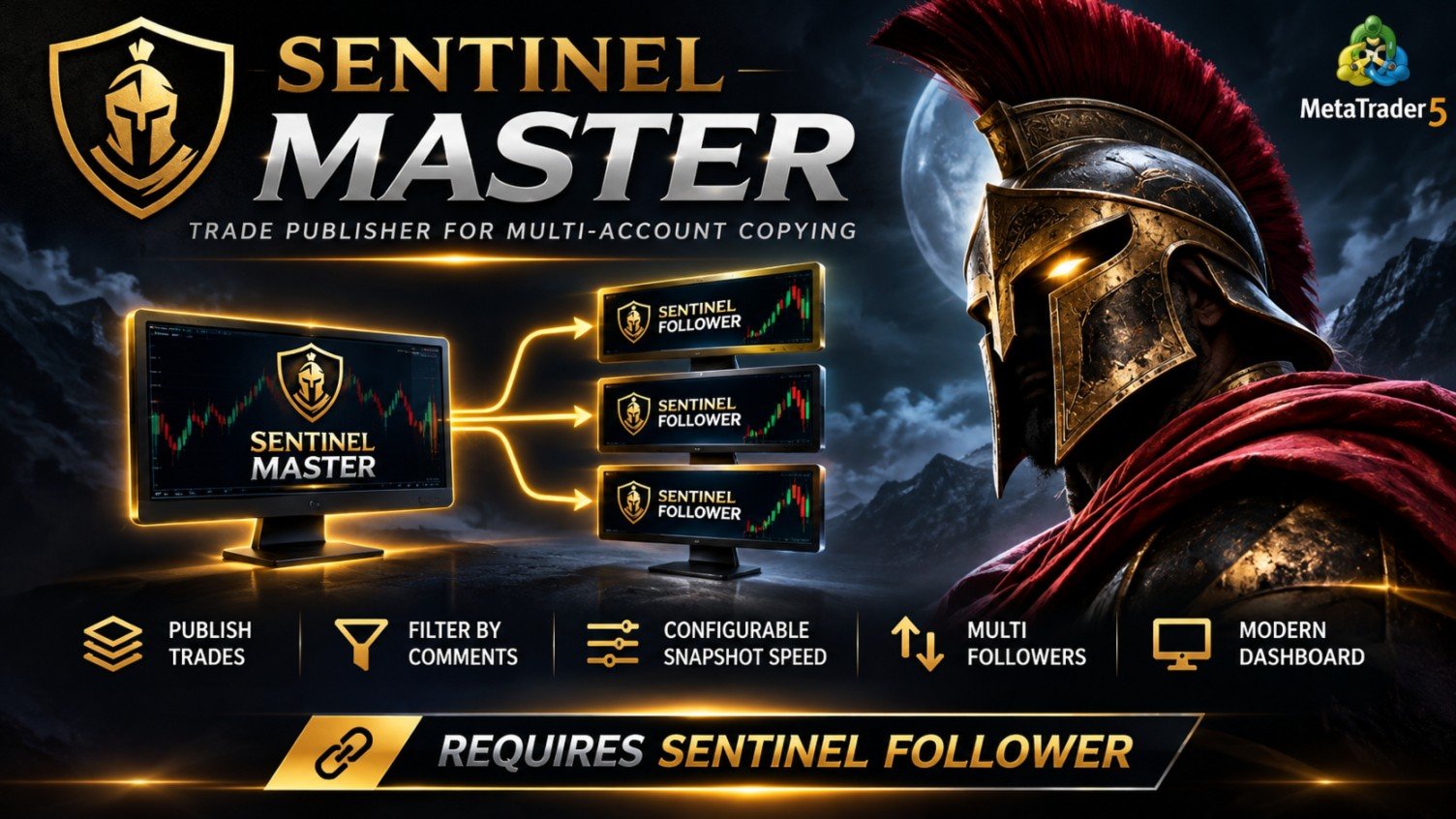
Sentinel Master is a trade-publishing Expert Advisor designed to work together with Sentinel Follower, providing a reliable and configurable solution for copying trades between MetaTrader 5 accounts.

The system is designed for traders who manage multiple accounts and want to replicate their trading activity without manually opening and closing positions on every account.

Sentinel Master continuously monitors the source account and publishes information about its open positions, including trading symbols, position volumes, trade direction, and optional Stop Loss and Take Profit levels.

The Master does not open trades or generate trading signals. Its purpose is to transmit trading activity to connected Sentinel Follower instances.

IMPORTANT — SENTINEL FOLLOWER REQUIRED

Sentinel Master cannot copy trades on its own.

The system consists of two separate Expert Advisors:

  • Sentinel Master: Installed on the source account to monitor and publish trading positions.

  • Sentinel Follower: Installed on each receiving account to replicate and manage the published trades.

Both components are required for the complete copying system to operate.

Sentinel Follower must be obtained and configured separately.

KEY FEATURES

  • Multi-Symbol Support: Publish positions across multiple Forex pairs, metals, indices, and other instruments supported by your broker.

  • Automatic Trade Monitoring: Continuously monitors open Master positions.

  • Selective Trade Copying: Choose between publishing all positions or only positions matching up to 10 predefined comments.

  • SL/TP Transmission: Optionally include Stop Loss and Take Profit information.

  • Fast Snapshot Updates: Configurable publishing intervals, with a default of 250 milliseconds.

  • Reliable File Publishing: Built-in retry mechanisms help handle temporary file-access conflicts.

  • Multiple Follower Support: Multiple compatible Sentinel Follower instances can use the same published data.

  • Customizable Dashboard: Monitor account information, publishing configuration, and exported positions directly on the chart.

DASHBOARD

Sentinel Master includes a modern on-chart monitoring panel designed to provide clear information about the source account and its publishing activity.

Users can choose between the classic minimal dashboard and a premium interface featuring:

  • Three visual themes: Slate, Neon, and Royal.

  • Adjustable dashboard size.

  • Account Balance, Equity, and Floating P/L.

  • Published position statistics.

  • Trade information and publishing status.

The dashboard is intended for monitoring and does not interfere with trading decisions.

RECOMMENDATIONS

  • Platform: MetaTrader 5.

  • Account: Any supported MT5 trading account.

  • Symbols: Multi-symbol support.

  • Timeframe: Any timeframe.

  • Chart: Only one chart is required for the Master.

  • Update Interval: 250 milliseconds by default.

  • Execution Environment: A Windows VPS is recommended for continuous operation.

  • Required Companion: Sentinel Follower on each receiving account.

Important: Sentinel Master uses MetaTrader's shared Common Files directory for communication. Master and Follower terminals must have access to the same snapshot files. Communication between separate computers or VPS servers is not provided automatically.

SETUP

  1. Install Sentinel Master on the source MetaTrader 5 account.

  2. Attach the Expert Advisor to any chart.

  3. Configure the Master Channel name.

  4. Choose whether to publish all positions or only selected trading comments.

  5. Enable or disable Stop Loss and Take Profit transmission.

  6. Install Sentinel Follower on the receiving MetaTrader 5 account.

  7. Configure Sentinel Follower with the same Channel name and ensure both terminals can access the shared snapshot files.

  8. Verify communication and test the complete setup on demo accounts before live trading.

Once configured, Sentinel Master publishes the source account's trading information, while Sentinel Follower handles the corresponding trade execution and management.

DISCLAIMER

Trading financial instruments involves significant risk and may result in the loss of capital.

Sentinel Master is a trade-publishing utility, not an automated trading strategy or profit-generating system.

Copied trades may differ from Master positions due to broker execution conditions, spreads, slippage, latency, symbol specifications, available margin, and account configuration.

The software does not guarantee identical execution prices, trading performance, or protection against financial losses.

Always test the complete Master/Follower setup on demo accounts before using real funds.

おすすめのプロダクト
MAFX Trading Manager
Mark Anthony Noblefranca Nazarrea
MAFX TRADING MANAGER 6 MetaTrader 5向け取引管理・トレード日誌・分析ツール MAFX Trading Manager 6は、MetaTrader 5用の統合型取引ワークスペースです。手動・半自動の取引管理に、視覚的な注文計画、リスク管理ツール、内蔵トレード日誌、詳細な取引分析を組み合わせています。 自分で取引を判断しながら、専用ツールを使って注文の計画、ポジション管理、履歴の確認、所見の記録、パフォーマンス分析をMetaTrader 5内で行いたいトレーダー向けに設計されています。 MAFX Trading Manager 6は取引シグナルを生成せず、市場に参入するタイミングを自動決定しません。市場分析、売買方向、エントリー、リスクに関する判断はトレーダー自身が行います。 バージョン6は、従来のMAFX Trading Managerを大幅に拡張したものです。再設計されたワークスペースと、取引計画、ポジション管理、日誌、分析、パフォーマンスの振り返りに役立つ追加ツールを提供します。 統合トレード日誌 内蔵トレード日誌では、MetaTrader 5を離
AdaptiveStats  is a comprehensive and visually stunning performance analysis tool for the MetaTrader 5 (MQL5) platform, featuring a professional "Fintech Dark" (JARVIS-inspired) aesthetic. It is engineered to provide traders with real-time, actionable insights into their trading performance directly on the chart interface. Key features and capabilities include: Multi-Timeframe Performance Tracking : Automatically calculates and aggregates Net Profit, Win Rate, and Total Trades for three critical
FREE
Atlas Trade Desk MT5 Atlas Trade Desk MT5 is a visual trade panel, risk manager and lot calculator for manual MetaTrader 5 traders. Plan market and pending orders directly on the chart, calculate position size from your selected risk, adjust Entry, Stop Loss and Take Profit visually, and manage open positions from one clean dashboard. The tool is built for discretionary traders who want faster order preparation, clearer risk control and safer position management without switching between multipl
Prop Firm Shield is a risk management panel for MetaTrader 5, built for prop firm traders who need control over their daily limits. You configure each limit and the tool watches the account around the clock, acting automatically when a limit is reached: closing positions, deleting pending orders and blocking new trading until the next day. Features: - Daily Take Profit - three modes: fixed USD, percent of the day-start balance, or target balance - Daily Stop Loss - three modes: fixed USD, percen
[b]Titan Pro V7 Institutional Dashboard[/b] is an advanced quantitative HUD terminal engineered for MetaTrader 5, designed for institutional market analysis, quantitative prop-firm verification, and disciplined intraday execution. Unlike conventional single-formula indicators that suffer from lag and market regime shifts, Titan Pro V7 synthesizes a multi-strategy quantitative consensus model combining Trend Momentum, Volatility Breakout, Intraday VWAP, and Smart Money Concepts (SMC) into a sin
Trade Panel HotKey – MT5 Scalping Utility Fast Trade Panel HotKey is a lightweight MT5 trading utility designed for traders who need to open, manage, and close positions as quickly as possible . The main purpose of this tool is to reduce the time between a trading decision and execution. Instead of moving the mouse, opening order windows, or manually modifying multiple positions, most important actions can be performed instantly through customizable keyboard hotkeys or directly from the compact
Welcome to Smart Algo Trade Panel Manager MT5 - the ultimate   risk management tool designed to make trading more effective based on user needs.  It is a comprehensive solution for seamless trade planning, position management, and enhanced control over risk. It does not matter weather you a beginner or an advanced trader, or a scalper needing rapid executions, SmartAlgo Trade Panel  adapts to your needs offering flexibility across all markets of your choice. You can put SL, Lot and TP of choice
This script is designed to download a long history of cryptocurrency quotes from the Binance exchange. You will find it perfectly suitable if you want once to download the history of cryptocurrencies for charts analyzing, collecting statistics or testing trading robots in the MetaTrader 5 strategy tester, or if you need to update the history not very frequently (for example, once a day or once a week). After running the script, you will have fully featured (but not automatically updated) cryptoc
Trade Stats (Expert Advisor for MetaTrader 5) — Detailed Description 1. Overview Trade Stats is a non-trading analytics Expert Advisor for MetaTrader 5. It reads the account's closed-deal history, groups every trade by its Magic Number , and renders a compact live statistics table directly on the chart. Its purpose is to answer one question: which Expert Advisor on this account is actually making money, and how much each one costs to run? It places no orders, modifies nothing, and never touches
Local Account Monitor MT5 is a read-only local monitoring utility for traders who run multiple MetaTrader terminals on the same PC or the same Windows VPS . It combines Agent mode and Dashboard mode so you can monitor local accounts from one place, spot stale terminals quickly, review account health states, and inspect risk details without switching between many terminals. Public channel:   CLICK HERE What it is for Monitoring multiple local MT5 terminals from one dashboard Quickly identifying
FREE
BeansAssist
Ivanvielle Bonifacio Dupaya
BeansAssist *Major update 3.00 released. Kindly update your copy of BeansAssist Gives you fruitful information of the price of the symbol that you are trading. Improve your trades simply by following the suggestion that it gives you. Tracks deal stats daily so you keep track of your performance. Don't let emotions take control, be a better and profitable trader with BeansAssist to guide you. *Note: This utility is not for free 
Trading Calendar — あなたの最も利益の出た取引日を可視化 Trading Calendar   を使って、取引履歴をわかりやすい日別パフォーマンス分析に変換しましょう。 Trading Calendar   は、MT5向けに設計された強力な分析ツールで、インタラクティブな損益カレンダー(P&Lヒートマップ)を通じて、日々の利益と損失を視覚的に確認できます。長い取引履歴を一つずつ確認する必要なく、最も良い日、最も悪い日、連勝や連敗パターンを瞬時に把握できます。 日別・週別・月別でパフォーマンスを分析し、あなたの戦略が最も効果を発揮するタイミングを正確に見つけ出せます。 主な機能 •   日別収益ヒートマップ 利益日と損失日を色分け表示し、すぐに状況を把握できます。 •   勝率トラッキング 取引の精度と安定性を継続的に確認できます。 •   プロフィットファクター分析 戦略の質を収益効率で評価します。 •   平均利益・平均損失の分析 リスクリワード比率を明確に理解できます。 •   ベスト・ワースト取引日の検出 最も良い日と悪い日を即座に特定します。 •  
革新的な Trades Time Manager を使用して、取引ルーチンを簡単に管理できます。この強力なツールは、指定された時間に注文執行を自動化し、取引アプローチを変革します。 購入から注文の設定まで、すべて手動介入なしで、さまざまな取引アクションのためのパーソナライズされたタスク リストを作成します。 Trades Time Manager のインストールと入力ガイド EA に関する通知を受け取りたい場合は、MT4/MT5 ターミナルに URL を追加してください (スクリーンショットを参照)。 MT4のバージョン     https://www.mql5.com/en/market/product/103716 MT5のバージョン     https://www.mql5.com/en/market/product/103715 手動監視に別れを告げ、合理化された効率を採用します。直感的なインターフェイスにより、シンボル、約定時間、価格、ストップロス (SL)、テイクプロフィット (TP) ポイント、ロットサイズなどの正確なパラメーターを設定できます。 このツールの柔軟性は、市
Product Name: Smart Switch Dashboard STOP WASTING SECONDS. SECONDS COST MONEY. Are you losing trades because you're fumbling through the Market Watch? Is your workspace messy and slowing you down? In trading, Speed is everything. If you aren't organized, you are losing money to traders who are. Smart Switch Dashboard is not just a tool—it is your COMMAND CENTER . Designed for serious Scalpers and Day Traders who demand Speed, Precision, and Zero Lag. DOMINATE YOUR WORKFLOW 1. ULTRA-FAST SY
Phantom Currency Heatmap Pro Real-Time Currency Heatmap & Trade Recommender for MetaTrader 5 Stop guessing which pairs to trade! The Phantom Currency Heatmap Pro- is an essential visual tool for manual traders. It analyzes the 8 major currencies (USD, EUR, GBP, JPY, AUD, CAD, CHF, NZD) across all 28 major pairs to calculate their true underlying strength in real-time. By pairing the strongest currency against the weakest currency, you give yourself the highest probability of catching a stron
Advanced Trade Mirror   is a powerful Forex tool designed for traders who need instant, seamless trade replication across multiple terminals on the same machine. With lightning-fast execution, it ensures zero lag in copying trades, maintaining precision and efficiency in high-speed trading environments. Get the Trade Mirror Master here:  https://www.mql5.com/en/market/product/133891 Specification: Master ID: Identity value of master terminal, please use a unique value to prevent duplicated mas
FREE
Advanced Trade Mirror   is a powerful Forex tool designed for traders who need instant, seamless trade replication across multiple terminals on the same machine. With lightning-fast execution, it ensures zero lag in copying trades, maintaining precision and efficiency in high-speed trading environments. Get the Trade Mirror Follower here:  https://www.mql5.com/en/market/product/133890 Specification: Master ID: Identity value of master terminal, please use a unique value to prevent duplicated mas
FREE
トレンドに乗りましょう。はい、買いでも売りでも、15分枠でエントリーシグナルを待ち、30分枠でシグナルが現れたらシグナルを確認します(シグナルが現れるまでに1時間以上かかる場合もあります。戻ることができます) 15分足に戻り、30分足に戻り、メインシグナルが現れるまでこれを繰り返し、30分足にシグナルが出たら価格でエントリーし、描画ラインが変化した時点で利益確定となります。 、利益が確定したとき、または反対のシグナルが現れたとき これは非常にシンプルで、すべての主要通貨で機能します。  メタル、インジケーター、すべてのフレームですが、最も良い結果は 30 分フレームです。 ストップロスは常にローソク足の底値よりも下に設定し、資本管理を超えてはなりません 資本金の10%
A powerful oscillator that provide Buy and Sell signals by calculating the investor liquidity. The more liquidity the more buy possibilities. The less liquidity the more sell possibilities. Please download the demo and run a backtest! HOW IT WORKS: The oscillator will put buy and sell arrow on the chart in runtime only . Top value is 95 to 100 -> Investors are ready to buy and you should follow. Bottom value is 5 to 0 -> Investors are ready to sell and you should follow. Alert + sound will appe
COMPLETE USER MANUAL Apex Trade Terminal is a professional visual order entry and dynamic risk management suite engineered for MetaTrader 5. Designed for prop-firm traders, scalpers, and day traders, Apex combines manual visual control with algorithmic capital protection directly on your charts. ________________________________________ 5 KEY STRENGTHS THAT DISTINGUISH APEX FROM THE COMPETITION 1. ️‍️ Proprietary Stealth V-Orders (Trigger+Stop) Never reveal your breakout levels to broker o
FREE
Northvale Prop Guard watches every trade on your account, from any EA or done by hand, and steps in before you break a prop firm rule. Protection Daily loss limit, measured from your challenge size (FTMO style) or the day’s starting balance Maximum loss, static or trailing Profit target lock: closes everything when your target is reached, so a good day can’t turn into a failed challenge Safety buffer: acts before the firm’s limit, not after When a limit is reached , Prop Guard closes all positio
FREE
Tiger Lite recreate the history of entry and exit orders. The goal is that you can grasp their strategy how to play. CSV format support for WEB, MT4 and MT5 platforms. The sequence of steps is described in the photo. Note: Please choose the existing date and symbol on the CSV file. For MT4/5, export historical data and copy the records to excel, save it with the extension CSV. For MT4/MT5/WEB, save the name with format mt4.csv/mt5.csv/web.csv If you get the history from another source and your
FREE
Gold Quantam 1.0 — Intelligent Gold Trading, Simplified Precision. Discipline. Smarter Trade Management. Meet Gold Quantam 1.0 , an automated trading solution designed for traders who want a more structured approach to trading the gold market (XAUUSD). Built for MetaTrader 5, Gold Quantam 1.0 combines automated trade execution with disciplined risk management and a systematic approach to trade opportunities. Its goal is to help traders reduce the need for constant manual monitoring while allowin
Trading Calendar — あなたの最も利益の出た取引日を可視化 Trading Calendar を使って、取引履歴をわかりやすい日別パフォーマンス分析に変換しましょう。 Trading Calendar は、MT5向けに設計された強力な分析ツールで、インタラクティブな損益カレンダー(P&Lヒートマップ)を通じて、日々の利益と損失を視覚的に確認できます。長い取引履歴を一つずつ確認する必要なく、最も良い日、最も悪い日、連勝や連敗パターンを瞬時に把握できます。 日別・週別・月別でパフォーマンスを分析し、あなたの戦略が最も効果を発揮するタイミングを正確に見つけ出せます。 主な機能 • 日別収益ヒートマップ 利益日と損失日を色分け表示し、すぐに状況を把握できます。 • 勝率トラッキング 取引の精度と安定性を継続的に確認できます。 • プロフィットファクター分析 戦略の質を収益効率で評価します。 • 平均利益・平均損失の分析 リスクリワード比率を明確に理解できます。 • ベスト・ワースト取引日の検出 最も良い日と悪い日を即座に特定します。 • 週間パフォーマンス概要 週ご
FREE
Binary Options Assistant (BOA) BOIL Signals Indicator provides signals based on Ana Trader Binary Options Strategy. Indicators: Stochastic Stop missing trades, stop jumping from chart to chart looking for trade set-ups and get all the signals on 1 chart! U se any of the BOA Signals Indicator with the  Binary Options Assistant (BOA) Multi Currency Dashboard .  All BOA Signal Indicator settings are adjustable to give you more strategy combinations. The signals can be seen visually and heard audi
Neuron Trade Copier Universal MT5 MetaTrader 5向けユニバーサル・マルチアセット取引コピーシステム Neuron Trade Copier Universal MT5 は、 MetaTrader 5 向けに開発されたプロフェッショナルな取引コピーソリューションです。 異なるMT5口座間で取引をコピーすることができ、同じソフトウェアを Sender(Master) または Receiver(Slave) として使用できます。 主な機能 Sender / Master Senderは取引元となる口座です。 Master口座でポジションや保留注文が新規作成、変更、決済された場合、その情報をReceiverへ送信できます。 対応内容: 成行注文 保留注文 Stop Loss Take Profit Stop Lossの変更 Take Profitの変更 ポジション決済 保留注文のキャンセル Normal / Reverse方向 複数銘柄・複数資産クラス Receiver / Slave ReceiverはSenderから送信された情報を受信し、設定に
FREE
Currency Strength Panel
AL MOOSAWI ABDULLAH JAFFER BAQER
Currency Strength Trade the strongest currencies against the weakest with confidence. Currency Strength is a professional MetaTrader utility that measures and displays the real-time strength of major currencies, helping traders identify high-probability trading opportunities based on market momentum rather than guesswork. Instead of analyzing one currency pair at a time, Currency Strength evaluates multiple currency pairs simultaneously to determine which currencies are gaining strength and whic
Binary Options Assistant (BOA) BURN Signals Indicator provides signals based on Ana Trader Binary Options Strategy. Indicators: MACD & Stochastic Stop missing trades, stop jumping from chart to chart looking for trade set-ups and get all the signals on 1 chart! U se any of the BOA Signals Indicator with the  Binary Options Assistant (BOA) Multi Currency Dashboard .  All BOA Signal Indicator settings are adjustable to give you more strategy combinations. The signals can be seen visually and hear
Strong Liquidity Zones A professional non-repainting liquidity mapping indicator that detects and scores high-probability imbalance zones and stop-pool zones on the chart. The indicator identifies two core types of liquidity areas: • Imbalance Zones – price gaps (similar to Fair Value Gaps) that act as magnets • Stop-Pool Zones – areas around confirmed swing highs/lows where stop orders typically cluster Each zone receives a dynamic 0–10 score based on volume pressure, zone size, number of tests
FREE
Master Trade Manager & Lot Calculator MT5 is an advanced, all-in-one trading utility designed for professional traders, prop firm participants, and manual or algorithmic scalpers. It combines accurate risk-based lot sizing, automated Stop Loss & Take Profit assignment, intelligent Breakeven protection, and a smooth Trailing Stop mechanism into a clean, user-friendly chart panel. Whether you are trading XAUUSD (Gold) or major Forex currency pairs, this tool ensures precise risk management and fla
このプロダクトを購入した人は以下も購入しています
Trade Assistant MT5
Evgeniy Kravchenko
4.43 (216)
取引 ごとのリスクの 計算、新規注文 の 簡単 な 設置、部分的 な 決済機能 を 持 つ 注文管理、 7 種類 のトレーリングストップなど 、便利 な 機能 を 備 えています 。 追加の資料と説明書 インストール手順   -   アプリケーションの手順   ライン機能 チャート上にオープニングライン、ストップロス、テイクプロフィットを表示します。この機能により、新規注文を簡単に設定することができ、注文を出す前にその特徴を確認することができます。   リスク計算 リスク計算機能は、設定されたリスクとストップロス注文のサイズを考慮して、新規注文のボリュームを計算します。ストップロスの大きさを自由に設定できると同時に、設定したリスクを守ることができます。 Lot calc ボタン - リスク 計算 を 有効 / 無効 にします 。 Risk フィールドでは 、必要 なリスクの 値 を 0 から 100 までのパーセンテージまたは 預金通貨 で 設定 します 。 設定」 タブで 、 リスク 計算 の 種類 を 選択 します :「 $ 通貨」、「 % 残高」、「 % エクイティ 」、「
Trade Manager EAへようこそ。これは、取引をより直感的、正確、そして効率的にするために設計された究極の リスク管理ツール です。これは単なるオーダー実行ツールではなく、包括的な取引計画、ポジション管理、リスク管理のためのソリューションです。初心者から上級者、迅速な実行を必要とするスキャルパーまで、Trade Manager EAはあらゆるニーズに対応し、為替、指数、商品、暗号通貨などさまざまな市場で柔軟に対応します。 Trade Manager EAを使用すると、複雑な計算が過去のものになります。市場を分析し、エントリーポイント、ストップロス、テイクプロフィットのレベルをチャート上のラインでマークし、リスクを設定するだけで、Trade Managerが最適なポジションサイズを即座に計算し、SLとTPをピップ、ポイント、口座通貨でリアルタイムに表示します。すべての取引が簡単かつ効果的に管理されます。 主な機能: ポジションサイズ計算機 :定義されたリスクに基づいて取引サイズを瞬時に決定します。 簡単な取引計画 :エントリー、ストップロス、テイクプロフィットを設定するためのド
Farmed Hedge Yield Farming | All Markets (Manual - Hybrid - Semi/Automated EA) VERIFIED TRADING RESULTS - Farmed Hedge Yield Axi Copy:  https://www.mql5.com/en/signals/2356376 - Farmed Hedge Yield Exn Copy:   https://www.mql5.com/en/signals/2356404 - Farmed Hedge Yield V Copy:  https://www.mql5.com/en/signals/2357156 IMPORTANT NOTICE: FarmedHedge is a MANUAL-FOCUSED TRADING UTILITY ,not a fully automated EA. Results shown on this Signal include manual trades and overall strategic management.
Telegram to MT5 Multi-Channel Copier   は、 Telegram と Discord チャンネルのトレードシグナルを MetaTrader 5 へ自動コピーします。ボット不要、ブラウザ拡張不要、手動コピー不要。Telegram や Discord にシグナルが届くと、EA が数秒であなたのターミナルに注文を出します。 さらに、チャンネルをコピーする前に、内蔵バックテスターでそのチャンネルがあなたの口座でどう動いたかを確認できます。 製品は 2 つのコンポーネントで構成されます:Telegram チャンネルを監視する Windows アプリと、MT5 ターミナルでシグナルを執行する本 EA です。MT4 版もあります   こちら . 購入前にお試しください:   アプリは無料でダウンロードできます。ご自身のチャンネルを接続し、各シグナルがどのように読み取られるかをご確認ください。Backtest タブと実際の取引には、購入またはレンタルした EA が必要です。このページの無料デモはストラテジーテスターでのみ動作し、テスターでは Telegram と D
自分の取引ルールで Telegram のシグナルをコピー Telegram to MT5 Signal Trader は、Telegram の公開・非公開チャンネルやグループから、テキスト形式の取引シグナルを MetaTrader 5 へ自動でコピーします。1つのデスクトップアプリで複数の配信者と MT5 口座を管理し、 配信者ごとにリスクと取引設定を個別に指定 できます。 シグナルのコピーに Telegram ボットや API 設定は必要ありません。 電話番号または QR コードでご自身の Telegram アカウントにログインし、すでに参加しているチャンネルやグループを選ぶだけです。ボットの作成や、Telegram API トークン、API ID、API hash の入力は不要です。 ポジションサイズを選び、複数の利確水準に分けて決済し、建値へのストップ移動やトレーリングストップを自動化できます。配信者のシグナルを受け取りながら、実際の取引方法は自分で管理できます。 本製品は、この MT5 エキスパートアドバイザ(EA)と、必須の Windows 連携アプリで構成されます。 インス
TradePanel MT5
Alfiya Fazylova
4.88 (170)
Trade Panelは多機能なトレーディングアシスタントです。アプリには手動取引用の50以上のトレーディング機能が搭載されており、ほとんどの取引作業を自動化することができます。 アプリの説明書: https://www.mql5.com/en/blogs/post/756482 デモ口座用アプリの試用版: https://www.mql5.com/en/blogs/post/750865 アプリのインストール方法: https://www.mql5.com/en/blogs/post/756239 アプリをビジュアルモードでテストする方法: https://www.mql5.com/en/blogs/post/770277 VPSのMetaTraderにアプリをインストールする方法: https://www.mql5.com/en/blogs/post/770190 取引。 ワンクリックで取引操作を行うことができます: リスクを自動計算して指値注文やポジションを開く。 複数の注文やポジションをワンクリックで開く。 注文のグリッドを開く。 保留中の注文やポジションをグループごとに閉じる
================================================================================ POC BREAKOUT - V20.72. Full Professional Grade Toolkit ================================================================================ POC Breakout is a full MetaTrader 5 trading dashboard for discretionary traders who want breakout signals, Point of Control (POC) context, volume profiles, order flow, market structure, news, alerts, and advanced trade planning in one professional workspace. Attached directly to you
REVDEN AI Desk:あなた自身の AI との一つの会話で、REVDEN のマーケットコンテキストをもとにトレードを運営する トレードのすべてを一つの会話で運営する姿を想像してみてください。 REVDEN AI Desk はそれを MetaTrader 5 にもたらします。あなた自身の AI に相場をどう読んでいるかを尋ねると、AI はあなたが取引する銘柄について REVDEN の完全なコンテキストをもとに答えます。銘柄の状態、リスク像、今後の指標発表まで含めてです。AI の提案はエントリー、ストップ、ターゲット、リスクとともに届き、合うものをあなたが承認します。ルールの変更も同じ方法です。変えたい点を書けば、AI が新しいルールブックの草案を作り、採用するかどうかはあなたが決めます。会話の周りには、マーケット全体が一つの画面にまとまっています。 デスクとセットアップガイドをご覧ください。 すべての画面、すべての設定、そしてあなた自身の AI との最初のステップ: stein.investments/products/revden-ai-desk AI との一つの会話、マーケッ
MT5 to Telegram Signal Provider は、Telegramのチャット、チャンネル、またはグループに 指定された シグナルを送信することができる、完全にカスタマイズ可能な簡単なユーティリティです。これにより、あなたのアカウントは シグナルプロバイダー になります。 競合する製品とは異なり、DLLのインポートは使用していません。 [ デモ ] [ マニュアル ] [ MT4版 ] [ Discord版 ] [ Telegramチャンネル ]  New: [ Telegram To MT5 ] セットアップ ステップバイステップの ユーザーガイド が利用可能です。 Telegram APIの知識は必要ありません。必要な全ては開発者から提供されます。 主な特長 購読者に送信する注文の詳細をカスタマイズする機能 例えば、Bronze、Silver、Goldといった階層型のサブスクリプションモデルを作成できます。Goldサブスクリプションでは、すべてのシグナルが提供されます。 id、シンボル、またはコメントによって注文をフィルターできます 注文が実行されたチャート
News Trade EA MT5
Konstantin Kulikov
4.55 (11)
僕自身が数年間使っている便利なロボットをご紹介します。半自動モードでも完全自動モードでもお使いいただけます。 >>> Chat <<< 当プログラムは経済指標カレンダーで発表されるニュースをもとにした取引の柔軟な設定が可能です。戦略テスターでは確認不可です。実際の取引のみです。 最新の設定アーカイブをダウンロードしてください: https://www.mql5.com/en/blogs/post/747929 シグナルモニタリング: https://www.mql5.com/en/signals/author/test-standart 当該エキスパート・アドバイザーのためのカスタマイズ設定セットを作る場合は、ブログの全パラメータの説明を参照してください :   https://www.mql5.com/en/blogs/post/748545 。 基本的なデフォルト設定について 一つのチャートからGBPとの通貨ペア(GBPUSD、EURGBP、GBPJPY、GBPCAD、GBPAUD、GBPCHF)で取引をします。GBPは最もボラティリティの高い通貨のため、取引が成功するチ
The Patch It never opens a trade. It walks behind the ones that did. Every open position, every pending order — checked twice a second for the one thing that's easy to forget: a stop, a target. Found bare, it doesn't ask. It writes the missing number in, measured in points from wherever the position began, and moves on to the next. No strategy, no opinion on direction. Just the quiet assumption that nothing should ever sit on the market unprotected — not because someone decided it shouldn't,
EA Overfitter
Stephen J Martret
5 (2)
That backtest looks great. But will it still be making money tomorrow, next week, next month? EA Overfitter re-runs your EA on 100 price histories it has never seen. One score tells you if the edge is real. A backtest tells you what an EA did on one price history — the one that happened to occur. What you cannot tell from it is how much of that result was the strategy and how much was the particular path. EA Overfitter answers that. It builds up to 100 synthetic price histories your EA has n
次回アップデート — バージョン 2.52 近日公開!【新機能】 市場分析とトレードワークフローを強化する、4つの主要な新機能にご期待ください 皆様のトレードニーズに応える4つの新機能により、市場分析を次のレベルへと引き上げます。新機能をご紹介します: 1. TRADE OVERVIEW DASHBOARD 2. CONFLUENCE AT ZONE 3. STRONG & WEAK HIGH/LOW 4. OTE 1. TRADE OVERVIEW DASHBOARD 市場全体の状況をより簡単に把握できるダッシュボードです。トレード判断をサポートするガイダンスを提供し、市場分析とトレード計画を体系的に行えるよう支援します。すべてを1つの画面で確認できます。 マルチタイムフレーム市場概要(Multi-Timeframe Market Overview) 市場の方向性と価格構造をより明確に把握 市場状況をすばやく確認 体系的な市場分析とエントリー計画のためのガイダンス 2. CONFLUENCE AT ZONE 価格が重要なゾーンに入るとき…いくつのサポート要因が一致しているかを確認で
The product will copy all telegram signal to MT5 ( which you are member) , also it can work as remote copier.  Easy to set up, copy order instant, can work with almost signal formats, image signal,  s upport to translate other language to English Work with all type of channel or group, even channel have "Restrict Saving Content", work with  multi channel, multi MT5 Work as remote copier: with signal have ticket number, it will copy exactly via ticket number. Support to backtest signal. How to s
RETAILBERG FOOTPRINT CHART PRO — Order-Flow Workspace for MetaTrader 5 Version 7.00  |  Professional System  |  31 tools  |  One chart A full 150-page illustrated User Manual is included. Please read the full manual to understand this feature packed footprint chart elements and ui. https://www.mql5.com/en/blogs/post/777982 DEMO / STRATEGY TESTER — PLEASE READ FIRST
Floor Watch
Syed Tauqeer Hussain Shah
Floor Watch One number, watched every thirty seconds: how far equity has fallen since the day began — or since its highest point, if it's told to trail the peak instead of the open. Cross the line and it doesn't argue. Every open position closes, every pending order vanishes, and anything that slips through afterward gets shut the moment it appears. Not asked. Removed. The floor holds until the clock turns 5 AM Pakistan time — then, and only then, does the day start over. One rule. No except
Power Candles Strategy Scanner - 自動最適化型マルチシンボル設定ファインダー パワーキャンドル・ストラテジー・スキャナーは 、パワーキャンドル・インジケーターを駆動するのと全く同じ自己最適化エンジンを、マーケットウォッチに登録されているすべての銘柄に対して並行して実行します。1つのパネルで、現在統計的に取引可能な銘柄、各銘柄で勝率の高い戦略、最適なストップロス/テイクプロフィットの組み合わせが表示され、新たなシグナルが発生した瞬間に通知が届きます。 このツールは、Stein Investmentsのエコシステムの一部です。  18種類以上のツールをすべて閲覧し、AIを活用したセットアップの推奨を受け取り、  https://stein.investments でコミュニティに参加しましょう 市場動向を網羅。銘柄ごとに3,000件以上の自動最適化。2種類のアラート。ワンクリックでチャートを切り替えて即座にアクション。 なぜこれが必要なのか 多くのマルチ銘柄スキャナーは、 価格の動き (ボラティリティ、変動率、銘柄ごとのRSI)を表示するだけです。それ
Trader Evolution
Siarhei Vashchylka
5 (7)
" Trader Evolution " - A utility designed for traders who use wave and technical analysis in their work. One tab of the utility is capable of money management and opening orders, and the other can help in making Elliott wave and technical analysis. Manual (Be sure to read before purchasing) | Version for MT4 Advantages 1. Trading in a few clicks. Immediate and pending orders are available in the panel 2. Money management. The program automatically selects the appropriate lot size 3. Simplifies
MT5 Professional Copy Trading System(MT5版) MT5 Professional Copy Trading System は、工業レベルの超高速 LOCAL トレードコピア であり、プロトレーダー、シグナル提供者、機関レベルのマルチアカウント運用のために設計されています。一般的なクラウド型やリテール向けコピーシステムとは異なり、本システムは同一 Windows 環境で動作することを前提とした LOCAL アーキテクチャに基づいて構築されています。 工業級 LOCAL アーキテクチャ LOCAL 設計により、同一 PC または同一 Windows VPS 上で稼働する複数のターミナル間で、低遅延かつ高い安定性を実現します。不要なネットワーク依存を減らすことで、より高速な同期、正確な約定、Master と Receiver 間の高い一貫性を確保できます。これは高頻度取引や 24/7 無人運用に適した環境を提供します。 Master / Slave / Self-Copier + Cross Copy(MT4 ↔ MT5) MT5 版は Master
YuClusters
Yury Kulikov
4.93 (43)
Attention: You can view the program operation in the free version  YuClusters DEMO .  YuClusters is a professional market analysis system. The trader has unique opportunities to analyze the flow of orders, trade volumes, price movements using various charts, profiles, indicators, and graphical objects. YuClusters operates on data based on Time&Sales or ticks information, depending on what is available in the quotes of a financial instrument. YuClusters allows you to build graphs by combining da
DrawDown Limiter
Haidar Lionel Haj Ali
5 (23)
DrawDown Limiter v5.0 — 高度な口座保護コントローラー DrawDown Limiter v5.0 は、取引口座を監視し、設定されたリスク、利益、ニュース、スケジュール、ロールオーバー、またはポジション数の制限に達した際に自動的に対応する、クライアント側で動作する口座保護コントローラーです。 1つの専用チャートから、 手動取引、自動売買戦略、複数のExpert Advisor、指値・逆指値注文、保有ポジション を監視できます。口座全体を保護することも、Magic Numberを使用して特定のEAまたは複数のEAのみを監視することもできます。 DrawDown Limiter の目的は、単にドローダウンを表示することではありません。 設定した取引ルールを積極的に適用し 、保護条件が有効である限り、そのルールを継続的に実行することを目的としています。 DrawDown Limiter v5.0 は、損失額だけを監視するのではなく、戦略がいつ取引を継続できるのか、どのエクスポージャーを維持できるのか、いつ取引を停止すべきか、そして自動売買環境をいつ安全に再開できるのかま
Your EAs cannot see each other, but Anchor can. Anchor gives you one place to coordinate your EAs, manage risk, and decide when trading is allowed. It works alongside the trading bots you already use without any changes to them. The Problem One EA opens a trade. Then another starts trading. The next thing you know, you wake up to multiple grids built across your account. Each EA may be doing exactly what it was designed to do, but together they can place far more risk on your account than you in
Master Your Trading Discipline   Stop losing your hard-earned gains to overtrading and emotional decisions. The Discipline Tool is your ultimate trading assistant, ensuring strict risk management in real-time. Key Protection Features: Advanced Drawdown Defense : Automatically halts trading if your daily drawdown exceeds a preset threshold (percentage or dollar amount). Real-Time Equity Lock : Safeguard profits by referencing peak equity, ensuring drawdown stays within control. Hard Profit Target
Grid Manual MT5
Alfiya Fazylova
4.7 (23)
「Grid Manual」は、注文のグリッドを操作するための取引パネルです。 ユーティリティはユニバーサルで、柔軟な設定と直感的なインターフェイスを備えています。 それは、損失を平均化する方向だけでなく、利益を増やす方向でも注文のグリッドで機能します。 トレーダーは注文のグリッドを作成して維持する必要はありません。 すべてが「Grid Manual」によって行われます。 注文を開くだけで十分であり、「Grid Manual」は注文のグリッドを自動的に作成し、非常に閉じるまでそれに付随します。 完全な説明とデモバージョン ここ。 ユーティリティの主な機能と機能 ユーティリティは、モバイル端末から開かれた注文を含め、あらゆる方法で開かれた注文を処理します。 「制限」と「停止」の2種類のグリッドで機能します。 グリッド間隔の計算には、固定と動的(ATRインジケーターに基づく)の2つの方法で機能します。 オープンオーダーグリッドの設定を変更できます。 チャート上の各注文グリッドの損益分岐点を表示します。 各注文グリッドの利益率を表示します。 ワンクリックでグリッドから収益性の高い注文を閉じるこ
Dealer's Panel No signal decides anything here — a hand does. One click, and the panel calculates what's underneath: lot size from risk, target from a 30-step balance ladder that remembers exactly how far an account has climbed. Toggle between market and pending without touching an input field. Set a stop, and the take-profit can write itself — a fixed share of the balance, translated into price with no arithmetic left for the trader to get wrong. One trade live at a time; it won't let a seco
My Chart Generator
Trade The Volume Waves Single Member P.C.
5 (1)
What if your chart adapted to the market instead of the clock?   THE PROBLEM IT SOLVES   Instead of trying to find the best indicator that fits your timeframe chart, build a chart and find the most appropriate indicator.   My Chart Generator is a MetaTrader 5 background service that builds  live, fully historical three types of custom charts :1. Range/Volume Balanced chart, 2.  Range/Volume Absorption chart and 3. Constant Volume chart from any symbol — Forex pairs, crypto, indices, commodities,
Auto DCA EA
Truong Giang Hoang
5 (1)
All new interface and function Add telegram notify (you have to get Telegram bot API and chat ID). With this ea, you can earn 10-40% even more profit/month! 1. This EA is used to automatically take profit or DCA your orders on MT5 according to the parameters you set. You can enter first order on your phone or MT5 terminal on your computer and it automatically take profit or DCA your orders. 2. Enter buy/sell limit-stop price * Buy limit price/ Sell limit price/ Buy stop price/ Sell stop price:
Trade Manager は、リスクを自動的に計算しながら、取引を迅速に開始および終了するのに役立ちます。 過剰取引、復讐取引、感情的な取引を防止する機能が含まれています。 取引は自動的に管理され、アカウントのパフォーマンス指標はグラフで視覚化できます。 これらの機能により、このパネルはすべてのマニュアル トレーダーにとって理想的なものとなり、MetaTrader 5 プラットフォームの強化に役立ちます。多言語サポート。 MT4バージョン  |  ユーザーガイド + デモ Trade Manager はストラテジー テスターでは機能しません。 デモについてはユーザーガイドをご覧ください。 危機管理 % または $ に基づくリスクの自動調整 固定ロットサイズを使用するか、ボリュームとピップに基づいた自動ロットサイズ計算を使用するオプション RR、Pips、または価格を使用した損益分岐点ストップロス設定トレーリングストップロス設定 目標に達したときにすべての取引を自動的に終了するための 1 日あたりの最大損失 (%)。 過度のドローダウンからアカウントを保護し、オーバートレードを防ぎます
EA Portfolio Control & Cloud Monitoring for MetaTrader 5 Your EAs manage trades. KONTROL_01 manages your EAs. A control system for traders running multiple Expert Advisors on the same account. Coordinate EA activity, manage trading risks and monitor your setup remotely. A detailed User Manual is available via DM after purchase. IN PRACTICE Multiple EAs. No coordination. Your EAs trade independently, unaware of each other's activity. KONTROL_01 coordinates them, limits simultaneous activity a
サポートが必要ですか?設定方法は?ご質問は?こちらでお客様の言語でどうぞ、迅速に返信します: https://www.mql5.com/en/market/product/139088/comments 動作デモ版ダウンロード Copy Cat More (コピーキャット・モア) MT5 トレードコピー (Trade Copier) は、ローカルのトレードコピーであり、今日のトレード課題のために設計された完全なリスク管理・執行フレームワークです。プロップファーム (prop firm) のチャレンジから個人のポートフォリオ管理まで、堅牢な執行、資金保護、柔軟な設定、高度なトレード処理の組み合わせによって、あらゆる状況に適応します。 このコピーは、マスター (Master、送信側) とスレーブ (Slave、受信側) の両モードで動作し、成行注文・指値注文、トレードの変更、部分決済、両建て決済 (Close By) 操作をリアルタイムで同期します。デモ口座と実口座、トレード用ログインと投資家ログインの両方に対応し、永続的トレードメモリ (Persistent Trade Memory
作者のその他のプロダクト
Sentinel MT5
Luca Barone
4.95 (39)
Sentinel MT5 is an automated Expert Advisor designed with a strong focus on risk control, capital preservation, and stable execution. The EA operates with discipline and consistency, avoiding aggressive exposure and adapting its behavior during unfavorable market conditions . Sentinel MT5 prioritizes account stability over high-frequency or high-risk trading and does not force entries when market conditions are not suitable. It features automated position management, built-in margin and drawdown
Sentinel SSL   is an automated Expert Advisor designed with a strong focus on risk control, capital preservation, and stable execution. The EA operates with discipline and consistency, avoiding aggressive exposure and adapting its behavior during unfavorable market conditions. Sentinel SSL prioritizes account stability over high-frequency or high-risk trading and does not force entries when market conditions are not suitable. It features automated position management, built-in margin and drawdow
Sentinel SWP is an automated multi-pair Expert Advisor designed around positive swap accumulation, controlled exposure, and long-term position management. The main objective of Sentinel SWP is simple: keep positions exposed to positive swap for as long as possible while maintaining controlled drawdown and avoiding unnecessary risk. Unlike traditional short-term trading systems, Sentinel SWP is not designed to constantly enter and exit the market. Its objective is to identify suitable opportuniti
MULTI-ACCOUNT TRADE COPYING WITH ADVANCED RISK MANAGEMENT Sentinel Follower is an automated trade-copying Expert Advisor for MetaTrader 5, designed to receive and execute trading positions published by Sentinel Master . The system allows traders to replicate trading activity across multiple accounts while maintaining independent control over position sizing, risk exposure, basket management, and trade execution. Unlike traditional trade copiers, Sentinel Follower includes additional risk-managem
フィルタ:
レビューなし
レビューに返信