Signals Executor for Telegram

Signals Executor for Telegram is a Utility that allows you to execute and manage positions from messages sent in Telegram Chats.

Chat messages are processed to check for the existence of commands, and the command will be executed if its parameters are valid.

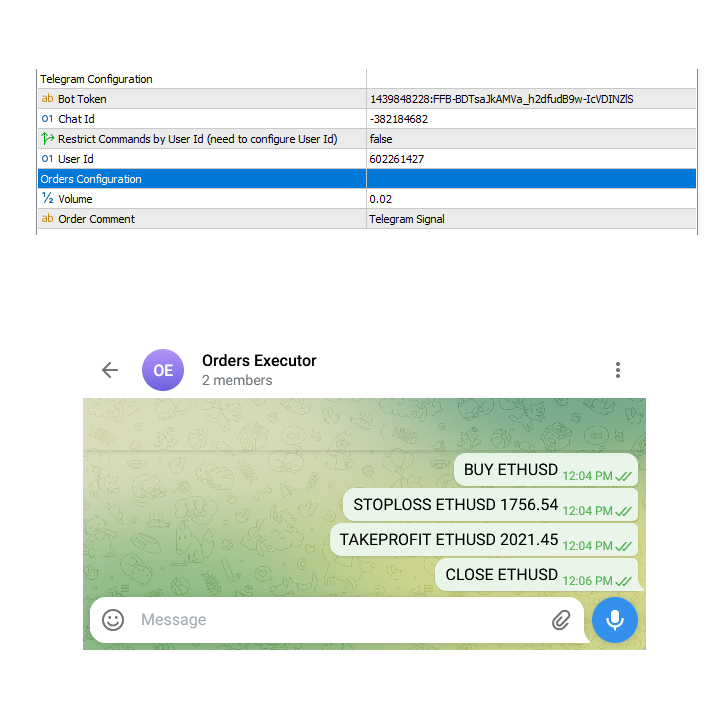
You need the Telegram Bot Token and Chat Id to configure the input parameters. It is possible to restrict the sending of commands through the User Id, which must be configured in the input parameters.

Valid Commands:

  • Buy and Sell: Market orders. Parameter: Symbol
  • LimitBuy and LimitSell: Limit Orders. Parameters: Symbol, Price
  • StopBuy and StopSell. Stop Orders. Parameters: Symbol, Price
  • Close: Close Position. Parameter: Position Ticket
  • StopLoss: Change Stop Loss of an open position. Parameters: Symbol, Price
  • TakeProfit: Change Take Profit of an open position . Parameters: Symbol, Price
  • Cancel: Cancel order. Parameter: Ticket
  • GetVolume: Get the Volume configured for orders.
  • SetVolume: Configure the Volume for new orders. Parameter: Volume
  • GetOrders: Get all orders description
  • GetPositions: Get all positions description

For security reasons, Metatrader blocks data requests from external links. You must add permission for the EA to read the data. Add the link https://api.telegram.org in Tools->Options->Expert Advisors.


It is possible to receive the value of the Chat Id and User Id through the link below (replace TOKEN with the Bot Token):

https://api.telegram.org/botTOKEN/getUpdates


Input Parameters:


Token:

This represents the Bot Token created on Telegram through BotFather. The value of this Token is generated at the time of the Bot creation.

Chat Id:

The Bot created in Telegram must be added in some Chat to be able to receive commands. Signals Executor for Telegram executes commands that were sent after this tool were initialized on the Metatrader chart.
The messages that the Bot can receive from Chat are deleted after 24 hours by Telegram. The limit of messages that this tool can read is 300, after this value messages may be ignored.

User Restriction:

If this parameter is True, the user must set a User Id that will have uniqueness in sending the commands in Telegram Chat.

User Id:

To define a user who will have exclusivity in sending commands through Telegram Chat, you must select True in the User Restriction parameter, and select a valid User Id (a user who is in Chat specified on Chat Id parameter).

Volume:

The Volume of Buy and Sell Orders that will be sent through the BUY and SELL commands in Telegram Chat.

Confirmation Messages:

If this input parameter is True, then a message of "Succeed" or "Failed" will be sent to Telegram Chat for each command.

Order Comment:

This parameter defines the comments of the orders sent by this tool.


Commands

Commands are messages sent in Telegram Chat that contain keywords that can represent opening new orders, closing positions, or changes in Stop Loss and Take Profit. For the Signals Executor for Telegram to receive and execute the commands, the Bot must be added in a Chat, and the input parameters set correctly. If the User Restriction parameter is true, only the user of the User Id parameter can send commands, and the commands coming from other users are ignored. To execute a command, you must place the text that represents the command and the symbol in the sequence separated by a space. In the case of the STOPLOSS and TAKEPROFIT commands, you must also put the value of the new Stop or Take.


The commands are indifferent to the Symbol and Timeframe that is placed on the chart, the commands will be executed according to the message sent (command + symbol).


Command Buy Market:

Buy Market command.

BUY EURUSD

Command Sell Market:

Sell Market command.

SELL EURUSD

Command Close Position:

Closes positions of the Symbol specified in the command. This command is ignored if it has no open position of the specified Symbol.

CLOSE 8245687

Command Stop Loss:

This command modifies the Stop Loss of the open position of the specified symbol. If no position of the Symbol is not found, this command is ignored.

STOPLOSS EURUSD 1.02

Command Take Profit:

This command modifies the Take Profit of the open position of the specified symbol. If no position of the Symbol is not found, this command is ignored.

TAKEPROFIT EURUSD 1.18


The STOPLOSS and TAKEPROFIT commands will be executed on the first position selected by Metatrader. For Hedge accounts, only the first selected position will be modified.


おすすめのプロダクト
自動ロット・リスク管理付きワンクリック取引パネル Quick Trade Panel Pro は、リスクを完全にコントロールしながら素早く注文を執行したいトレーダーのために設計された直感的な取引パネルです。 主な機能 利用可能証拠金の割合に基づいてロットサイズを自動計算 ポイント単位で設定可能なストップロス、各取引に自動適用 一連の取引中はロットサイズをロックし、一貫したポジションサイズを確保 スマートヘッジシステム ヘッジモードで既存取引と反対方向のポジションを開くことが可能 独立したヘッジ割合(50%、100%、200%以上) 方向ごとの取引制限で精密なコントロール 自動利益保護 Auto Secure :一定の利益に達するとストップロスを損益分岐点に移動 Trailing Stop :価格を追従して利益を保護しながら、勝ちトレードを伸ばす 両システムを併用して最適な保護が可能 モダンでシンプル、プロフェッショナルなインターフェース リアルタイム表示:最大ロット、最終ロット、ヘッジロット 制限に達するとBUY/SELLボタンが自動的に無効化 シンボルとマジックナンバーごとに
FREE
It is a utility that posts customized messages on Telegram based on account trading activity. Once the utility is on the chart, with each new position opened from the same chart symbol the utility is added, a customized message will be sent to the Telegram group defined in the input parameters. The utility will post to the Telegram group if a new position is opened and if it is the same symbol as the chart the utility is running on. If you are using an Expert Advisor for Buy and Sell and want to
Pro Trader Assistant 1.1 - The Ultimate Trading Companion NB: DOES NOT WORK ON STRATEGY TESTER. FOR TESTING, DM ME   Trade Simple, Smarter, Safer, and More Efficiently Are you ready to transform your trading with institutional-grade risk management? Pro Trader Assistant 1.1  is your complete solution for mastering trading psychology, risk control, and execution efficiency. Built for both prop firm challenges and retail trading. Why Choose Pro Trader Assistant 1.1 Perfect for retail trading
Boleta de negociação, adiciona automáticamente as ordens Take Profit e Stop Loss quando excutada uma ordem de compra ou venda. Ao apertar as teclas de atalho (A, D, ou TAB), serão inseridas duas linhas de pre-visualização, representando as futuras ordens de take profit (azul) e stop loss (vermelho), as quais irão manter o distanciamento especificado pelo usuário. Ditas ordens só serão adicionadas ao ser executada a ordem inicial. Ao operar a mercado, as ordens pendentes de take profit, e stop lo
Core function Intelligent transaction management one-click opening and closing operation, which supports user-defined lots to set multiple closing modes: all closing, closing by direction and closing by profit and loss status. Professional risk control, real-time risk monitoring and spread control to avoid high-cost trading environment. Visual control panel has an intuitive graphical interface, and all functions can be operated with one button to display position information, profit and loss sta
FREE
One Click Trading – Auto TP SL Developer TraderLinkz Version 1.00 Category Utility What it does Adds missing TP and SL to your manual trades and pending orders Sets them once per ticket Lets you move TP and SL afterward Works on hedging and netting accounts Scans on every tick and reacts on trade events Why you want it You place faster entries You get consistent risk and exit targets You reduce fat finger errors You keep full manual control Quick start Attach the EA to any chart Keep TP and SL e
FREE
Support & Setup | MetaTrader Trade Journal Support & Resources Everything you need to get your MetaTrader Trade Journal running perfectly. https://mt-trade-journal.com/free/download/install.mp4     Full Install Video here Official Support Page Documentation and free resources Visit Page Direct Contact Message Jack Ryland on Telegram Message Now Step 1 — Configure MetaTrader WebRequests To allow the EA to sync your data, you must authorize these URLs. In your MT4/MT5 terminal, go to Tools → Opt
FREE
One Click Close All Pro is a premium fast-close utility for MetaTrader 5 designed to help traders exit positions quickly, manage basket exposure, and apply advanced risk protection from a professional on-chart dashboard. This tool is built for traders who need more than a basic close-all button. In addition to one-click closing, the Pro version includes advanced filtering, basket control, equity protection, daily lock protection, and partial close features for more precise position management. W
「セットして忘れるだけ」の多通貨対応リスク管理マネージャー ️ トレードを無防備なままにしないでください。 Auto Stop Loss (MT5 Manager) は、安全性を最優先するトレーダーのための究極のバックグラウンド・ユーティリティです。通常のパネルとは異なり、このツールは舞台裏で絶え間なく動作し、エントリーしたすべてのトレードを即座に保護します。裁量トレードでも、他のEAによるトレードでも、このマネージャーはすべてのポジションに即座にハードストップロス (Stop Loss)、テイクプロフィット (Take Profit)、および動的トレーリングストップ (Trailing Stop) を適用します。 ゲームチェンジャー: たった 1つのチャート からポートフォリオ全体を管理します。10個ものウィンドウを開いてPCを重くする必要はありません。お気に入りの通貨ペアをリストアップするだけで、このマネージャーがそれらすべてを同時に監視します。 [   Get the MT4 Version Here   ] 主な機能 マルチシンボル管理 (CPU節約) : EURU
FREE FREE FREE Trade Assistant MT5 – Professional Trading & Risk Management Panel Trade Assistant MT5 is an advanced trading panel designed to help traders execute orders faster, safer, and more professionally . It simplifies manual trading by combining smart order management , precise risk control , and one-click execution , making it ideal for both beginners and advanced traders. This tool does not trade automatically . Instead, it empowers you with full control while applying professional-gra
FREE
Are you the type that likes to protect your trades by moving the stop loss to the entry point and also using trail stop? Cool! This EA will help you with that. What's more, it also partially closes the trade when the trail stop is activated. That's it! Beyond all this it shows the stop loss projection (which you can move)   and notify you when it is activated. EA can be used by configuring the default window or by using a custom window , which makes it easy to change settings. You can test
MT5のエキスパートアドバイザーリスクマネージャーは非常に重要であり、私の意見ではすべてのトレーダーにとって必要なプログラムです。 このエキスパートアドバイザーを使用すると、取引口座のリスクを管理することができます。リスクと利益の管理は、金銭的およびパーセンテージの両方で実行できます。 エキスパートアドバイザーが機能するには、それを通貨ペアチャートに添付し、許容可能なリスク値を預金通貨または現在の残高の%で設定するだけです。 [Instruction for Risk Manager parameters] アドバイザ機能 このリスクマネージャーは、リスクの管理を支援します。 -取引のために -1日あたり - 1週間 - ひと月ほど 制御することもできます 1)取引時の最大許容ロット 2)1日あたりの最大注文数 3)1日あたりの最大利益 4)エクイティを引き受ける利益を設定する それだけではありません。設定で自動設定を指定した場合、アドバイザーはデフォルトのSLとTPを設定することもできます。 アドバイザーは各イベントにアラートを添えて、注文を削除する理由を説明し
**Forex Trade Manager Pro MT5** **Trade Manager MT5** は、MetaTrader 5向けの包括的なトレード管理ユーティリティです。トレードを計画する瞬間から決済する瞬間まで、ポジションのあらゆる側面を完全にコントロールできます。リスクを真剣に考えるトレーダー、つまり規律を築き始めた初心者から、複数のポジションにわたって瞬時の実行を必要とするプロのスキャルパーまで、幅広く対応できるように設計されています。 このツールは任意のチャートに装着でき、クリーンでコンパクトなパネルを表示します。チャート上に直接、ドラッグ可能な水平線を使用して、意図するエントリー、ストップロス、テイクプロフィットの各レベルをマークします。Trade Managerは、定義されたリスクに基づいて正しいポジションサイズを即座に計算し、ストップロスとテイクプロフィットの値をpipsと口座通貨でリアルタイムに表示し、計画中のトレードのリスク・リワード比率を表示します。手動計算は一切必要ありません。リスクを一度定義すれば、ツールが残りのすべてを処理します。 **ポジ
Tiger Lite recreate the history of entry and exit orders. The goal is that you can grasp their strategy how to play. CSV format support for WEB, MT4 and MT5 platforms. The sequence of steps is described in the photo. Note: Please choose the existing date and symbol on the CSV file. For MT4/5, export historical data and copy the records to excel, save it with the extension CSV. For MT4/MT5/WEB, save the name with format mt4.csv/mt5.csv/web.csv If you get the history from another source and your
FREE
Trading panel for manual trading. Has a fairly wide functionality. Allows you to automatically calculate the order size, open both market and pending orders. It has a wide range of options for closing orders, it is possible to partially close orders, close orders after reaching a certain profit or loss, separately close profitable and unprofitable, buy and sell, as well as pending orders. The panel also contains a simple implementation of a grid of pending orders, reverse and lock functions, tr
Equity Tracker MT5 Equity Tracker MT5 は、MetaTrader 5 用のモニタリング型エキスパートアドバイザーで、取引活動、口座状況、および技術的な状態を通知メッセージとして報告します。 このエキスパートアドバイザーは取引ロジックとは独立して動作し、注文の執行や取引管理には一切影響しません。 本製品は取引の新規発注、変更、決済を行いません。 監視および通知機能のみを提供します。 目的 Equity Tracker MT5 は、取引ターミナルを常に監視することなく、取引口座の状況を把握したいトレーダー向けに設計されています。あらゆる取引戦略や他のエキスパートアドバイザーと併用できます。 口座レベルのモニタリング 取引活動の通知 技術的状態の把握 口座およびリスク状況のモニタリング エキスパートアドバイザーは口座パラメータを継続的に評価し、事前に定義された条件が満たされた場合に変更を通知します。 有効証拠金(Equity)およびドローダウン水準の通知 証拠金維持率のモニタリング ユーザー定義のアラート閾値 ハートビート機能とターミナルの状態 ハートビー
This EA help traders close their open positions at a specific MT5 server time before news or before ending of H4 timeframe of the morning New York session to protect their profit or prevent from unexpected loss. The default setting is 19:30 (HH:MM) and you can adjust as require to fit trading strategies. It very user friendly where contain only single input parameter to specify a time that position will be closed.  
Risk Manager – Account Protection Tool Risk Manager is an Expert Advisor for MetaTrader 5 designed to protect your trading account by applying automatic risk management rules. This tool does not open trades . It continuously monitors your account and enforces predefined limits to help prevent excessive losses and maintain disciplined trading. Risk Manager works in the background and can manage positions opened by manual trading or other Expert Advisors. It is particularly useful for: • Manual tr
FREE
目的: マーケットウォッチ の全シンボルを、現在の時間軸(TF)で default.tpl テンプレートを使用して自動的に開き、現在アクティブなチャート以外をすべて閉じます。手動操作不要で複数銘柄の分析に最適! 特徴: 自動化: 数十のチャートを1クリックで開く。 安全性: 不要なチャートを閉じ、現在のチャートを維持。 柔軟性: カスタム default.tpl テンプレートを使用(事前に設定が必要!)。 現在の時間軸: アクティブなチャートのTFと同じ時間軸で開く。 インストール: OpenAllSymbolsSafe.mq5 をMetaTrader 5の MQL5/Scripts フォルダにコピー。 ターミナルを再起動するか、スクリプトリストを更新(右クリック→ 更新 )。 ️ 重要: default.tpl が MQL5/Profiles/Template/ にあることを確認。 現在のチャート以外はすべて閉じるため、作業に支障がないか確認。 現在のTFがサポートされていない場合、最寄りのTFで開く。
FREE
Introduction Welcome to the world of Forex trading, where every tick of the market can be influenced by news events. Introducing our expert advisor for MetaTrader, your ultimate tool for navigating the complexities of news trading. This innovative advisor is specifically designed to automate your trading strategy during key macroeconomic releases, ensuring you never miss an opportunity.  When important indicators are announced, volatility often spikes, creating potential for profit. Our expert
FREE
MT5用NAS100 Auto SL and TP Makerをご紹介します: MetaTrader5でナスダック100市場をナビゲートするトレーダーにとって不可欠なアシスタントであるNAS100オートSLおよびTPメーカーで、ストップロスおよびテイクプロフィットの設定をもう見逃すことはありません。このツールは、ストップロスとテイクプロフィットのレベル管理を自動化するシームレスなソリューションを求める方々のために設計されています。 主な特徴 簡単な自動化: ストップロスやテイクプロフィットのないナスダック100取引を自動的に監視します。 ユーザーが構成した設定に基づいてレベルを動的に調整します。 注文タイプの多様性: Nasdaq100の成行注文と未決済注文の両方に対応。 MetaTrader 5で利用可能なさまざまな注文タイプをサポートします。 カスタマイズされた設定: ユーザーフレンドリーなパラメータ設定により、トラッキング設定とストップロス/テイクプロフィットレベルのカスタマイズが可能です。 柔軟な範囲: 実行する特定のNAS100商品または取引されるすべての商品に対してスト
FREE
Why execution quality matters more than you think You can have the best trading strategy, perfect entry points, and proper risk management. But if your broker consistently executes orders at worse prices, you lose money before the market even moves. A slippage of 0.01% seems insignificant. But over 100 trades per month, it becomes a noticeable amount. Over 1000 trades, it becomes a serious problem. Scalpers and algorithmic traders understand this well: execution quality directly affects your bot
UFT Grid Button
Umarzuki Bin Mochlis Moktar
This EA provides: Grid buy button and grid sell button When pressed, it enters market then subsequent layers as pending order separated by pips value for each layer. Close all button When pressed it closes all running positions and pending orders. This expert advisor does not provides means to automatically add take profits and stop losses. User must specify it manually.
FREE
EA Dashboard MT5
Teerathad Booranawisedkul
FREE 7-DAY TRIAL After your trial ends, continue using this essential trading tool for only $30 one-time payment. This utility is designed to assist traders in monitoring account status, open positions, and trading performance in real time. It provides consolidated information related to account metrics, risk exposure, and statistical performance to support trading analysis and decision-making. The product does not execute trades automatically and does not provide trading signals. It is intend
Budget Golden Scalper M1 — Trial Edition Built for traders who are tired of hype and ready for transparency Let’s be honest. If you have explored automated trading before, you have probably seen systems that looked perfect in backtests but behaved very differently in live markets. Many traders today are understandably cautious — and rightly so. Budget Golden Scalper M1 was created with this reality in mind. This is not marketed as a “holy grail” or a get-rich-quick robot. Instead, it is a str
FREE
Trade Control Panel Function Normal One Click Function Close All Close All Profit Close All Loss Close All Pending Order Close All Sell Close All Buy Advance One Click Function 1.  Close Partial Lot Sell by Percent It will help you partial close for all open position by desire percent you wanted. No longer partial close one by one for every open position Manual input for desire percent 2. Close Partial Lot Buy by Percent It will help you partial close for all open position by desire percent
Ind5 Extra Report Pad
Vladislav Andruschenko
4.76 (34)
これはMetaTrader 5のためのあなたの取引口座の分析を提供する統計パネルです。 分析結果はリアルタイムでチャートに表示されます。 多通貨取引は非常に人気があります。 MT4のバージョン 完全な説明 購入する方法 インストールする方法     ログファイルの取得方法     テストと最適化の方法     Expforex のすべての製品 しかし、取引量が多ければ多いほど、それぞれの取引の収益性を分析するのは難しくなる。 月ごとに取引を分析し、各取引ごとに統計を計算することは、さらに困難な作業です。 取引システムのパフォーマンスを包括的に理解したい場合、この目標を達成するのに役立つツールが複数あります。 これらのツールには、レポート、統計、myfxbook、取引ジャーナル、口座分析、パフォーマンス統計、分析、革新的なダッシュボードなどがあります。 これらのツールを活用することで、取引システムのパフォーマンスを詳細に分析し、得意分野や潜在的な弱点に関する貴重な洞察を得ることができます。 パフォーマンス向上を目指す新規トレーダーであれ、取引戦略の最適化を目指す経験豊富なトレーダ
FREE
A powerful and intuitive trade management tool designed for scalpers and intraday traders. Created to complement the Nampim Samba Scalper strategy , it allows traders to open, manage, and close positions quickly without leaving the chart.  Key Features: Customizable trading panel – choose position (left, right, center, top, bottom). One-click trading buttons – instantly open Buy/Sell trades with pre-set lot sizes. Close management – close last 1/2/3 trades or all Buy/Sell positions with one clic
FREE
One click to close all (OCCA) provides you posibility to close all open position with one click. Here is no any settings, just run the script and all your open positions will be closed and it will happen very fast ! Works with all types of accounts, with all currency pairs and any broker. The number of open positions is not limited. The script will be useful for trading strategies, in which you need to manage a large number of positions.
"Hukan" is a Japanese word meaning hawk's eye, and this system is software that allows you to monitor the entire MT5 with a hawk's eye. You can check the real-time chart of the system by clicking the link.  (Forex, commodities, Bitcoin, stock CFDs, etc.) Short period Long period Stock CFD This product enables all the functions that I felt necessary while trading in one system. If you attach it to a single chart with a tool based on the Dow theory, it will calculate the Dow theory of the chart
このプロダクトを購入した人は以下も購入しています
Trade Assistant MT5
Evgeniy Kravchenko
4.42 (208)
取引 ごとのリスクの 計算、新規注文 の 簡単 な 設置、部分的 な 決済機能 を 持 つ 注文管理、 7 種類 のトレーリングストップなど 、便利 な 機能 を 備 えています 。 追加の資料と説明書 インストール手順   -   アプリケーションの手順   -   デモアカウント用アプリケーションの試用版 ライン機能 チャート上にオープニングライン、ストップロス、テイクプロフィットを表示します。この機能により、新規注文を簡単に設定することができ、注文を出す前にその特徴を確認することができます。   リスク計算 リスク計算機能は、設定されたリスクとストップロス注文のサイズを考慮して、新規注文のボリュームを計算します。ストップロスの大きさを自由に設定できると同時に、設定したリスクを守ることができます。 Lot calc ボタン - リスク 計算 を 有効 / 無効 にします 。 Risk フィールドでは 、必要 なリスクの 値 を 0 から 100 までのパーセンテージまたは 預金通貨 で 設定 します 。 設定」 タブで 、 リスク 計算 の 種類 を 選択 します :「 $ 通
Trade Manager EAへようこそ。これは、取引をより直感的、正確、そして効率的にするために設計された究極の リスク管理ツール です。これは単なるオーダー実行ツールではなく、包括的な取引計画、ポジション管理、リスク管理のためのソリューションです。初心者から上級者、迅速な実行を必要とするスキャルパーまで、Trade Manager EAはあらゆるニーズに対応し、為替、指数、商品、暗号通貨などさまざまな市場で柔軟に対応します。 Trade Manager EAを使用すると、複雑な計算が過去のものになります。市場を分析し、エントリーポイント、ストップロス、テイクプロフィットのレベルをチャート上のラインでマークし、リスクを設定するだけで、Trade Managerが最適なポジションサイズを即座に計算し、SLとTPをピップ、ポイント、口座通貨でリアルタイムに表示します。すべての取引が簡単かつ効果的に管理されます。 主な機能: ポジションサイズ計算機 :定義されたリスクに基づいて取引サイズを瞬時に決定します。 簡単な取引計画 :エントリー、ストップロス、テイクプロフィットを設定するためのド
TradePanel MT5
Alfiya Fazylova
4.87 (149)
Trade Panelは多機能なトレーディングアシスタントです。アプリには手動取引用の50以上のトレーディング機能が搭載されており、ほとんどの取引作業を自動化することができます。 購入前に、デモアカウントでアプリのデモ版をテストすることができます。デモアカウント用のアプリの試用版をダウンロードするには、次のリンクをご利用ください: https://www.mql5.com/en/blogs/post/750865 。 完全な手順 こちら 。 取引。 ワンクリックで取引操作を行うことができます: リスクを自動計算して指値注文やポジションを開く。 複数の注文やポジションをワンクリックで開く。 注文のグリッドを開く。 保留中の注文やポジションをグループごとに閉じる。 ポジションの方向を反転(Buyを閉じてSellを開く、またはSellを閉じてBuyを開く)。 ポジションをブロックする(不足している量のポジションを開くことでBuyとSellのポジション量を等しくする)。 すべてのポジションを部分的にワンクリックで閉じる。 すべてのポジションの利食い(Take Profit)および損切り(Sto
ベータリリース Telegram to MT5 Signal Trader はまもなく正式なアルファ版をリリースします。いくつかの機能はまだ開発中で、小さな不具合に遭遇する可能性があります。問題が発生した場合はぜひご報告ください。皆さまのフィードバックがソフトウェア改善に役立ちます。 Telegram to MT5 Signal Trader は、 Telegram のチャンネルやグループからの取引シグナルを自動的に MetaTrader 5 にコピーする強力なツールです。 パブリックおよびプライベートの両方のチャネルに対応し、複数のシグナル提供元を複数のMT5口座に接続可能です。ソフトウェアは高速で安定し、すべての取引を細かく制御できます。 インターフェースは直感的で、ダッシュボードとチャートは見やすく設計されており、リアルタイムで動作状況をモニターできます。 必要環境 MQL の制限により、EA は Telegram と通信するためのデスクトップアプリが必要です。 インストーラーは公式の インストールガイド にあります。 主な機能 マルチプロバイダー: 複数の Telegram
VERIFIED TRADING RESULTS - Farmed Hedge Yield Axi Copy:  https://www.mql5.com/en/signals/2356376 - Farmed Hedge Yield Exn Copy:   https://www.mql5.com/en/signals/2356404 - Farmed Hedge Yield V Copy:  https://www.mql5.com/en/signals/2357156 Contact me via private message to receive the User Manual and Setup. * Thai Lauguage Support Available Farmed Hedge Yield Farming - Professional Pair Trading Dashboard (Manual - Hybrid - Semi/Automated EA) VERSION 3 - WILD HARVEST UPDATE Trading Approac
この製品は、ニュースタイム中にすべてのエキスパートアドバイザーと手動チャートをフィルタリングするため、急激な価格変動によるマニュアルトレードのセットアップの破壊や他のエキスパートアドバイザーによって入力された取引について心配する必要はありません。この製品には、ニュースのリリース前にオープンポジションとペンディングオーダーを処理できる完全な注文管理システムも付属しています。 The News Filter  を購入すると、将来のエキスパートアドバイザーのためにビルトインのニュースフィルターに頼る必要はなく、今後はすべてのエキスパートアドバイザーをここからフィルタリングできます。 ニュース選択 ニュースソースは、Forex Factoryの経済カレンダーから取得されます。 USD、EUR、GBP、JPY、AUD、CAD、CHF、NZD、CNYなど、任意の通貨数に基づいて選択できます。 Non-Farm(NFP)、FOMC、CPIなどのキーワード識別に基づいて選択することもできます。 影響レベルによってフィルタリングするニュースを選択することができ、低、中、高の影響範囲から選択できます。
Copy Cat More Trade Copier MT5 (コピーキャット MT5) は、今日の取引課題に対応して設計されたローカルトレードコピーシステムと完全なリスク管理・実行フレームワークです。プロップファームのチャレンジから個人ポートフォリオ管理まで、堅牢な実行、資本保護、柔軟な設定、高度な取引処理の組み合わせで、あらゆる状況に適応します。 コピーシステムはマスター(送信側)とスレーブ(受信側)の両方のモードで動作し、成行注文と指値注文、取引修正、部分決済、両建て決済操作のリアルタイム同期を行います。デモ口座とライブ口座、取引ログインまたは投資家ログインの両方に対応し、EA、ターミナル、またはVPSが再起動してもパーシスタント取引メモリシステムを通じて復旧を保証します。複数のマスターとスレーブをユニークIDで同時に管理でき、ブローカー間の違いはプレフィックス/サフィックス調整またはカスタムシンボルマッピングを通じて自動的に処理されます。 マニュアル/設定  | Copy Cat More MT4 | チャンネル  特別機能: 設定が簡単 — わずか30秒で完了(ビデオをご覧
The core idea: using the user interface, you configure the parameters the chart must meet before entering a position (or positions), choose which entry models to use, and set the rules for when trading and planning should end. Lazy Trader takes over all the routine chart watching and execution.  Lazy Trader  handles the rest. full description  :: 3 key videos [1] ->  [2]   ->  [3] What can it do? - Understands Larry Williams market structure - Understands swing market structure by Michael Hu
Exp COPYLOT CLIENT for MT5
Vladislav Andruschenko
3.82 (34)
MT5のトレードコピー機は、МetaТrader5プラットフォームのトレードコピー機です 。 それは間の 外国為替取引をコピーします   任意のは 、MT5 - MT5、MT4 - MT5   COPYLOT MT5版の アカウント (またはを MT4 - MT4   MT5 - MT4   COPYLOT MT4版用) 信頼できるコピー機! MT4のバージョン 完全な説明   +DEMO +PDF 購入する方法 インストールする方法     ログファイルの取得方法     テストと最適化の方法     Expforex のすべての製品 МТ4ターミナルでトレードをコピーすることもできます(   МТ4   -   МТ4、МТ5   -   МТ4   ):   MT4のCOPYLOT CLIENT このバージョンには、端末間 МТ5   -   МТ5、МТ4   -   МТ5が含まれ ます。 ディールコピー機は、2/3/10端末間でディール/ポジションをコピーするために作成されます。 デモ口座と投資口座からのコピーがサポートされています。 プログラムは、複数の端末バインデ
Smart Stop Scanner – マルチアセット対応の市場構造型ストップロス分析システム 概要 Smart Stop Scanner は、複数の市場にわたるストップロス構造をプロフェッショナル品質で監視するために設計されたツールです。 実際の市場構造、重要なブレイクアウト、価格アクションロジックに基づいて最も意味のあるストップゾーンを自動的に検出し、 高精細(DPI対応)で見やすい統一パネルに表示します。 Forex、ゴールド、インデックス、メタル、暗号資産など幅広い市場に対応しています。 ストップレベルの算出方法 従来型のインジケーターや任意の計算式は使用していません。 代わりに、 ブレイクアウト、より高い高値、より低い安値 といった実際の市場構造イベントを検出します。 ストップレベルはこれらの構造ポイントから直接生成されるため、より自然で信頼性が高く、 実際の市場動向に即したストップ設定が可能になります。 主なハイライト • 高精度のマルチアセット対応 Forex、メタル、ゴールド、インデックス、暗号資産など、幅広い銘柄をサポートし、桁数やティックサイズを自動処
Smart Stop Manager – プロレベルの精度でストップロスを自動実行 概要 Smart Stop Manager は Smart Stop ラインナップの「実行レイヤー」であり、複数ポジションを持つトレーダーのために構築された、構造化された信頼性の高い完全自動ストップロス管理システムです。すべての保有中ポジションを継続的に監視し、Smart Stop のマーケットストラクチャー・ロジックを用いて最適なストップレベルを計算し、明確で透明性のあるルールに従ってストップを自動更新します。 単一の銘柄から複数銘柄のポートフォリオ全体まで、Smart Stop Manager は各トレードに規律、安定性、そして完全なリスク可視化をもたらします。感情的判断を排除し、手作業を大幅に削減し、すべてのストップが常に市場構造に基づいた論理的なプロセスに従うことを保証します。 ハイライト マーケットストラクチャーに基づく自動ストップ配置 • Smart Stop ロジックに基づき、各オープンポジションへ最適なストップロスを自動適用します。 ポートフォリオ全体を一目で把握 • 銘柄、方向
Ultimate Extractor - Professional Trading Analytics for MT5 *****this is the local HTML version of Ultimate Extractor. For the online version please reach out to me directly****** Ultimate Extractor transforms your MetaTrader 5 trading history into actionable insights with comprehensive analytics, interactive charts, and real-time performance tracking. What It Does Automatically analyzes your MT5 trading history across all Expert Advisors and generates detailed HTML reports with interactive vi
あなたの資金を静かに奪っている Market の見えないミス(しかも多くの開発者自身も気づいていない) 見栄えの良いバックテストは、数百ドル、時には数千ドルの損失につながることがあります。 多くのトレーダーは、最初のリアルポジションを開く前にすでにお金を失っています。緑色のカーブだけを見てエキスパートアドバイザを買った、その瞬間に失っているのです。 公平に言えば、Market の多くの開発者は意図的にあなたを騙そうとしているわけではありません。何か月もかけてシステムを作り上げ、ストラテジーテスターで完璧な利益曲線を見て、本気で傑作を作ったと信じています。 しかし、彼らは自分自身のツールに騙されているのです。 実際に起きた唯一の過去にぴったり合うようにシステムを最適化すると、本人も気づかないうちに過剰最適化の罠に落ちます。従来のバックテストだけでは不十分です。それが見せるのは幻想です。そして EA の作者に悪意がなかったとしても、あなたの口座にとっての結果は同じになり得ます。つまり、 条件が変わったとたんにシステムが悪化する可能性がはるかに高い ということです。 これを自分で検証し
MT5 to Telegram Signal Provider は、Telegramのチャット、チャンネル、またはグループに 指定された シグナルを送信することができる、完全にカスタマイズ可能な簡単なユーティリティです。これにより、あなたのアカウントは シグナルプロバイダー になります。 競合する製品とは異なり、DLLのインポートは使用していません。 [ デモ ] [ マニュアル ] [ MT4版 ] [ Discord版 ] [ Telegramチャンネル ]  New: [ Telegram To MT5 ] セットアップ ステップバイステップの ユーザーガイド が利用可能です。 Telegram APIの知識は必要ありません。必要な全ては開発者から提供されます。 主な特長 購読者に送信する注文の詳細をカスタマイズする機能 例えば、Bronze、Silver、Goldといった階層型のサブスクリプションモデルを作成できます。Goldサブスクリプションでは、すべてのシグナルが提供されます。 id、シンボル、またはコメントによって注文をフィルターできます 注文が実行されたチャート
Pulsar Terminal は、 Astralys LLC の商標である Pulsar Technologies の製品です。 Pulsar TerminalはMetaTrader 5用のユーティリティアドオンです。 Expert Advisor を介してMetaTrader 5アカウントに接続される コンパニオンアプリケーション 内の実行ツールと組み合わされた ビジュアルインターフェース です。標準的なMT5パネルよりも高度なビジュアルインターフェースとワークフローを提供し、ツールの機能を最大化するためにコンパニオンアプリケーションを使用しています。Pulsar Terminalはスタンドアロンアプリケーションではなく、動作にはMetaTrader 5が必要です。EAはPulsar Terminalコンパニオンアプリケーションと localhost経由のみ で通信します。コンパニオンアプリケーションのインストーラーは、インストールガイド(MQL5ブログ記事)を通じて購入者に提供されます。 インターフェースでは注文の実行、リスク管理、取引統計の閲覧、そしてMetaTrader
The product will copy all telegram signal to MT5 ( which you are member) , also it can work as remote copier.  Easy to set up, copy order instant, can work with almost signal formats, image signal,  s upport to translate other language to English Work with all type of channel or group, even channel have "Restrict Saving Content", work with  multi channel, multi MT5 Work as remote copier: with signal have ticket number, it will copy exactly via ticket number. Support to backtest signal. How to s
News filter, equity guard & session control for all your EAs — one tool, full protection Take a Break has evolved from a basic news filter into a comprehensive account protection solution . It pauses your other Expert Advisors during news events or based on custom filters. When trading resumes, it automatically restores your entire chart setup , including all EA settings. Why traders choose Take a Break One news filter for all your EAs — no more relying on individual built-in filters that may o
Comprehensive on chart trade panel with the unique ability to be controllable from mobile as well. Plus has a library of downloadable configuration, e.g. exit rules, extra panel buttons, pending order setup and more. Please see our product video. Works with all symbols not just currency pairs. Features On chart panel plus controllable from free app for Windows, iPhone and Android Built-in script engine with library of downloadable configuration, e.g. add 'Close All Trades in Profit' button, exit
Trade Manager DashPlus
Henry Lyubomir Wallace
5 (13)
DashPlus は、MetaTrader 5プラットフォーム上での取引効率と効果を向上させるために設計された高度なトレード管理ツールです。リスク計算、注文管理、高度なグリッドシステム、チャートベースのツール、パフォーマンス分析など、包括的な機能を提供します。 主な機能 1. リカバリーグリッド 逆境の市場環境下で取引を管理するための平均化および柔軟なグリッドシステムを実装します。 取引回復のための戦略的なエントリーおよびエグジットポイントを可能にします。 2. スタックグリッド 強い市場の動きの中でポジションを追加することで、有利な取引での潜在的なリターンを最大化するように設計されています。 トレンド市場で利益を得られるよう、勝ち取引を拡大します。 3. 損益(P&L)ライン チャート上に直接、潜在的な利益と損失のシナリオを視覚的に表示します。 設定を調整し、P&Lラインをドラッグして、実行前にさまざまな取引結果を評価します。 4. バスケットモード 同じシンボルでの複数ポジションの管理を簡素化し、それらを単一の集約ポジションにまとめます。 平均価格に基づいて、ストップロスやテイクプ
Anchor: The EA Manager A coordination system for traders running multiple EAs. Anchor ensures only one EA can trade at a time, preventing conflicting positions and keeping your portfolio safer. Attach Anchor to any chart. Configure your EAs and their magic numbers. Anchor handles the rest. Built for portfolios. Built for discipline. Built for prop firms. The Problem Running multiple EAs on the same account creates risk. Two gold EAs can open opposite positions on the same candle. Three EA
DrawDown Limiter
Haidar Lionel Haj Ali
5 (20)
Drawdown Limiter EA You are in the right place if you were searching for Drawdown control, Drawdown limiter, Balance protection, Equity Protection or Daily Drawdown Limit related to Prop Firm, FTMO, or Funded account trading, or if you want to protect your trading account. Have you suffered from controlling your drawdown when trading funded accounts? This EA is meant for you. Prop firms usually set a rule called “Trader Daily Drawdown”, and if it is not respected, you are disqualified.  I am an
Trade Manager は、リスクを自動的に計算しながら、取引を迅速に開始および終了するのに役立ちます。 過剰取引、復讐取引、感情的な取引を防止する機能が含まれています。 取引は自動的に管理され、アカウントのパフォーマンス指標はグラフで視覚化できます。 これらの機能により、このパネルはすべてのマニュアル トレーダーにとって理想的なものとなり、MetaTrader 5 プラットフォームの強化に役立ちます。多言語サポート。 MT4バージョン  |  ユーザーガイド + デモ Trade Manager はストラテジー テスターでは機能しません。 デモについてはユーザーガイドをご覧ください。 危機管理 % または $ に基づくリスクの自動調整 固定ロットサイズを使用するか、ボリュームとピップに基づいた自動ロットサイズ計算を使用するオプション RR、Pips、または価格を使用した損益分岐点ストップロス設定トレーリングストップロス設定 目標に達したときにすべての取引を自動的に終了するための 1 日あたりの最大損失 (%)。 過度のドローダウンからアカウントを保護し、オーバートレードを防ぎます
あなたがメンバーである任意のチャネルから(プライベートおよび制限されたものを含む)シグナルを直接あなたのMT5にコピーします。  このツールは、トレードを管理し監視するために必要な多くの機能を提供しながら、ユーザーを考慮して設計されています。 この製品は使いやすく、視覚的に魅力的なグラフィカルインターフェースで提供されています。設定をカスタマイズして、数分で製品を使用を開始できます! ユーザーガイド + デモ  | MT4版 | Discord版 デモを試してみたい場合は、ユーザーガイドにアクセスしてください。 Telegram To MT5 受信機は、ストラテジーテスターで動作しません! Telegram To MT5の特徴 複数のチャネルから一度にシグナルをコピー プライベートおよび制限されたチャネルからシグナルをコピー BotトークンまたはChat IDは必要ありません   (必要に応じて使用することができます) リスク%または固定ロットを使用して取引 特定のシンボルを除外 すべてのシグナルをコピーするか、コピーするシグナルをカスタマイズするかを選択 すべてのシグナルを認
ワンクリックで取引できるトレーディングパネル。ポジションと注文の操作!チャートまたはキーボードから取引。 当社の取引パネルを使用すると、チャートから直接シングルクリックで取引を実行でき、標準の MetaTrader コントロールよりも 30 倍高速に取引操作を実行できます。 パラメータと関数の自動計算により、トレーダーにとって取引がより速く、より便利になります。 グラフィックのヒント、情報ラベル、取引取引に関する完全な情報はチャート MetaTrader にあります。 MT4のバージョン 完全な説明   +DEMO +PDF 購入する方法 インストールする方法     ログファイルの取得方法     テストと最適化の方法     Expforex のすべての製品 手動取引用の取引パネル。チャート(チャートウィンドウ)またはキーボードから取引できます。  開閉、リバース、ロックポジションと注文を処理する МetaТrader5 のメインオーダーのトレーディングコントロールパネル:売買、売却、売却、売却、売却、閉じる、削除、修正、トレーリングストップ、ストップロス、takeproft
The Expert Advisor is a comprehensive risk manager helping users to control their trading activities. With this tool being a safeguard you can easily configure various risk parameters. When any limit is exceeded, the risk manager can force close opened positions, close other EAs, and even close the terminal to prevent emotional trading that doesn't correspond to your trading strategy. Risk Manager Settings Account Protection Check min equity limit to close all (account currency) - check the min
TelegramからMT5へ: 究極のシグナルコピーソリューション Telegram to MT5 を使えば、取引がシンプルになります。DLL を必要とせず、Telegram のチャンネルやチャットから MetaTrader 5 プラットフォームに取引シグナルを直接コピーできる最新ツールです。この強力なソリューションは、正確なシグナル実行、豊富なカスタマイズオプション、時間の節約、そして効率性の向上を実現します。 [ Instructions and DEMO ] 主な特徴 直接的なTelegram API統合 電話番号とセキュアコードで認証します。 ユーザーフレンドリーな EXE ブリッジを通じてチャット ID を簡単に管理できます。 複数のチャネル/チャットを追加、削除、更新して、同時に信号をコピーします。 高度なフィルターによる信号解析 例外的な単語 (例: 「レポート」、「結果」) を含む不要な信号をスキップします。 柔軟な SL および TP 形式 (価格、ピップ、ポイント) をサポートします。 価格ではなくポイントを指定するシグナルのエントリ ポイントを自動的に計算します。
Custom Alerts AIO:マルチマーケット監視を一括で実現 — 設定不要ですぐに使えるインテリジェントツール 概要 Custom Alerts AIO は、追加のインジケーター設定が不要で、インストール後すぐに利用できる高機能マーケットスキャナーです。FX Power、FX Volume、FX Dynamic、FX Levels、IX Power を内部にすべて統合し、主要なすべての資産クラス(為替、金属、指数、暗号資産)を一括監視できます。MetaTrader の仕様により、株式は個別のシンボルとして追加可能ですが、一般的には利用頻度は低めです。 1. なぜ Custom Alerts AIO を選ぶべきか 追加ライセンス不要 • 必要なすべての Stein Investments インジケーターが内蔵されており、すぐに使用可能です。 • チャートに表示されるグラフィックは省略されており、アラート生成に特化した構成です。 市場を広範囲にカバー • 為替、金属、暗号資産、株価指数に対応(株式は手動追加可能)。 • シンボル名を入力する必要はなく、プロパティで資産クラス
YuClusters
Yury Kulikov
4.93 (43)
Attention: You can view the program operation in the free version  YuClusters DEMO .  YuClusters is a professional market analysis system. The trader has unique opportunities to analyze the flow of orders, trade volumes, price movements using various charts, profiles, indicators, and graphical objects. YuClusters operates on data based on Time&Sales or ticks information, depending on what is available in the quotes of a financial instrument. YuClusters allows you to build graphs by combining da
Auto Trade Copier is designed to copy trades to multiple MT4, MT5 and cTrader accounts/terminals with 100% accuracy. The provider and receiver accounts must be on the same PC/VPS. With this tool, you can copy trades to receiver accounts on the same PC/VPS. All trading actions will be copied from provider to receiver perfectly. This version can be used on MT5 accounts only. For MT4 accounts, you must use Auto Trade Copier (for MT4). Reference: - For MT4 receiver, please download Trade Receiver Fr
MT5 Professional Copy Trading System(MT5版) MT5 Professional Copy Trading System は、工業レベルの超高速 LOCAL トレードコピア であり、プロトレーダー、シグナル提供者、機関レベルのマルチアカウント運用のために設計されています。一般的なクラウド型やリテール向けコピーシステムとは異なり、本システムは同一 Windows 環境で動作することを前提とした LOCAL アーキテクチャに基づいて構築されています。 工業級 LOCAL アーキテクチャ LOCAL 設計により、同一 PC または同一 Windows VPS 上で稼働する複数のターミナル間で、低遅延かつ高い安定性を実現します。不要なネットワーク依存を減らすことで、より高速な同期、正確な約定、Master と Receiver 間の高い一貫性を確保できます。これは高頻度取引や 24/7 無人運用に適した環境を提供します。 Master / Slave / Self-Copier + Cross Copy(MT4 ↔ MT5) MT5 版は Master
作者のその他のプロダクト
Introducing the Turnaround Signalizer: Your Competitive Edge in Trend Reversals. Developed for the MetaTrader 4 platform, this trend reversal indicator is a robust tool for traders who aim to identify market inflection points with high probability. Its proprietary algorithm continuously analyzes price behavior, filtering out market noise to highlight the most significant shifts in direction. Versatility for All Trading Styles     Perfect for Scalping: The Turnaround Signalizer has been optimi
Weekday Stats Overview: A Price Analysis Indicator by weekday. A quantitative technical analysis indicator developed for statistical analysis of price variations, with data classified by weekday. This indicator processes candle data and displays statistical results based on user input parameters. The input parameters allow defining the type and frequency of the statistics to be calculated. This indicator provides a quantitative basis for identifying market patterns. Output Data: The indicator c
Month Stats Overview: A Price Analysis Indicator by month. A quantitative technical analysis indicator developed for statistical analysis of price variations, with data classified by calendar month. This indicator processes candle data and displays statistical results based on user input parameters. The input parameters allow defining the type and frequency of the statistics to be calculated. This indicator provides a quantitative basis for identifying market patterns. Output Data: The indicator
The CSV File Reader Utility executes commands received by text files of type "csv" (Comma Separated Values). This type of utility is ideal for those who process signals in other applications, and want to manage signals and positions based on text files . To read signal commands from the text file, the file must contain a header with column names and the column names must match the input parameter settings . The utility also has some extra functions, such as the possibility of filtering commands
It is a utility that posts customized messages on Telegram based on account trading activity. Once the utility is on the chart, with each new position opened from the same chart symbol the utility is added, a customized message will be sent to the Telegram group defined in the input parameters. The utility will post to the Telegram group if a new position is opened and if it is the same symbol as the chart the utility is running on. If you are using an Expert Advisor for Buy and Sell and want to
This utility copies Market orders, Limit orders, and Stop orders with a focus on high speed and easy setup. The utility works by setting up a Master and one or more Slaves. The setup is quite simple: you just need to define which account is the Master and which account is the Slave, and then set up the same Copy Trade Id for both. For the Slave to recognize the Master's orders, the Copy Trade Id parameter must be the same. Do not use numbers or special characters when setting the Copy Trade Id
The Dual Trend Analyzer: An MQL5 Tool for Statistical Correlation Analysis The Dual Trend Analyzer is a powerful MQL5 tool developed to analyze and visualize the statistical correlation between two distinct financial symbols (assets). This tool allows you to choose from three of the most widely recognized correlation methods: Pearson, Spearman, or Kendall-Tau . Identify Correlation Patterns with the Dual Trend Analyzer This indicator is designed to unveil the statistical correlation between two
Introducing Trend Pulse Insights: Your Intelligent Guide to Market Volatility Developed for traders seeking precision and clarity, Trend Pulse Insights offers an in-depth view of market dynamics, helping you identify opportunities and manage risks with confidence. How Trend Pulse Insights Works Our indicator uses algorithms to calculate volatility levels based on two recognized methods:     ATR (Average True Range): For measuring average volatility over a period.     Standard Deviation: To
Weekday Stats
Elidio Xavier Guimaraes
Weekday Stats Overview: A Price Analysis Indicator by weekday. A quantitative technical analysis indicator developed for statistical analysis of price variations, with data classified by weekday. This indicator processes candle data and displays statistical results based on user input parameters. The input parameters allow defining the type and frequency of the statistics to be calculated. This indicator provides a quantitative basis for identifying market patterns. Output Data: The indicator c
Month Stats
Elidio Xavier Guimaraes
Month Stats Overview: A Price Analysis Indicator by month. A quantitative technical analysis indicator developed for statistical analysis of price variations, with data classified by calendar month. This indicator processes candle data and displays statistical results based on user input parameters. The input parameters allow defining the type and frequency of the statistics to be calculated. This indicator provides a quantitative basis for identifying market patterns. Output Data: The indicator
Stats Summary
Elidio Xavier Guimaraes
Enhance Your Technical Analysis with Stats Summary . The Stats Summary is a robust analytical tool developed for MetaTrader 5 (MT5), providing a detailed statistical overview of price behavior. Unlike traditional indicators, it uses descriptive statistics to map the distribution of prices over a customizable sample period. By defining the sample size, the indicator calculates and displays the following values on the chart: Minimum and Maximum (Min/Max): The complete price range of the selected i
フィルタ:
レビューなし
レビューに返信