The Wizard Trader for MT5
- ユーティリティ
- バージョン: 3.8
- アクティベーション: 7

The Wizard Trader - a Manual Trade Assistant Utility
The Wizard Trader (TWT) is a trade assistant for the MetaTrader 5 platform. It is not an indicator and not an Expert Advisor: it never opens a trade by itself. Every order begins with your click or your hotkey, and TWT takes care of the maths, the order sending and the protection around your decision. Think of it as a cockpit for your chart.
This version covers the following features:
— Placing trades —
- Market, Limit and Stop orders from one panel.
- Four ways to choose your risk: percentage of balance, of equity, of free margin, or a fixed amount. You choose the risk and the stop, TWT calculates the lot size.
- Up to three take-profit targets (TP1, TP2 and TP3) that split your volume. In case you’re wondering: each TPn is a separate exit, so you can bank part of the move and let the rest run. Distances are shown in the units that suit each market (pips, points or ticks).
- Entry, stop and target lines drawn on the chart, which you can drag to adjust. They sit behind the window and the candles so they never get in the way.
- Works on hedging and netting accounts.
— Managing open trades —
- A live list of your positions with risk, margin, break-even, partial close and close.
- Seven types of trailing stop, automatic break-even and automatic partial close. Break-even means moving your stop to your entry price so the trade can no longer lose. A partial close takes a slice of the profit and leaves the rest open.
- Stops only ever move toward profit, never backward.
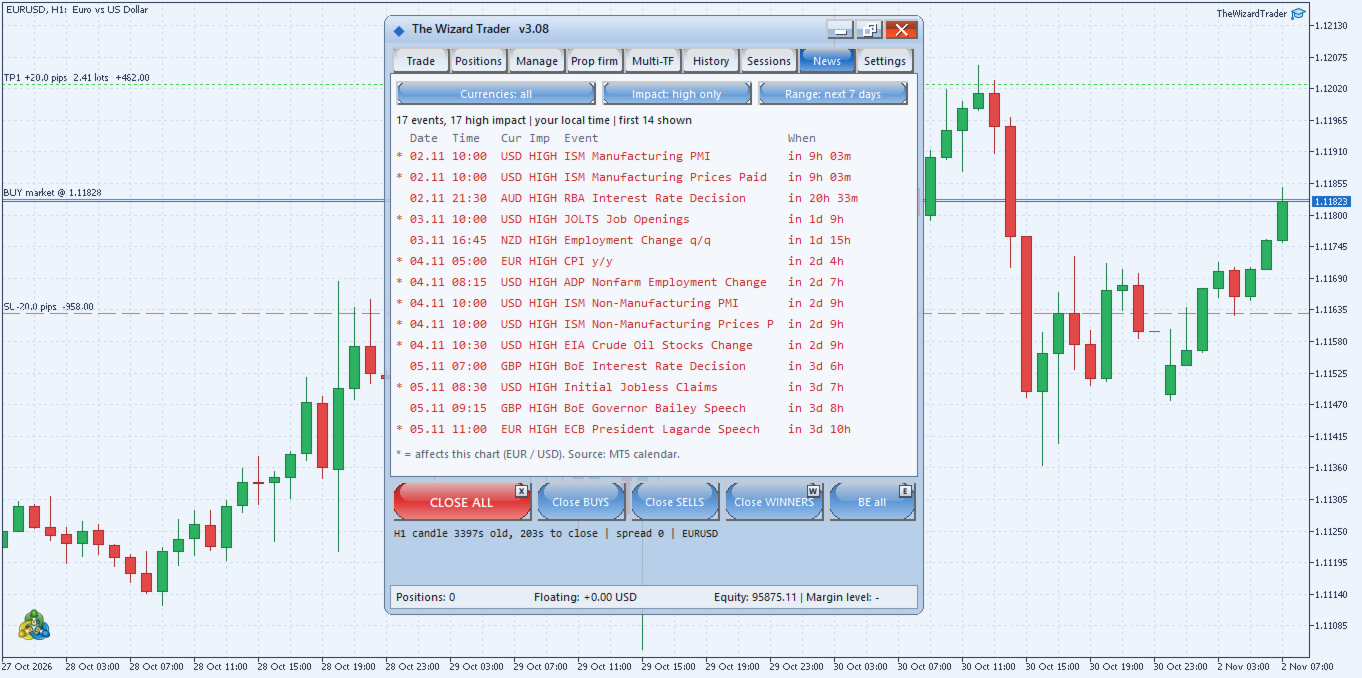
- One-click CLOSE ALL, buys only, sells only, or winners only.
— Protecting your account —
- Prop-firm guard: daily loss limit, total loss limit and profit target, each with a progress bar.
- It warns you as you approach a limit. If a limit is breached, it can close everything and lock the panel.
- Daily trade-count limit.
— Keeping an eye on the market —
- Multi-timeframe trend tiles that show whether each timeframe is rising, falling or ranging.
- Sessions tab: Sydney, Tokyo, London and New York, with daylight saving, in your local time or your broker’s time.
- News tab: high-impact news, its schedule and the currency affected, read from MetaTrader’s own economic calendar.
- Candle timer (how old the candle is and how long until it closes), spread and trade history statistics.
— Visually —
- Glossy Frutiger Aero themes, each with its own matching chart palette. Your chart colours are restored when you remove the tool.
- Rounded corners, glass effects, adjustable opacity, and a window you can move, minimise or pop out.
- Hotkey icons on the important buttons, which adapt to your system (Ctrl on Windows, Cmd on a Mac).
- A short start-up guide, with our wizard, every time you add it to a chart.
— Setting it up —
- Attach it to any chart.
- Switch on the Algo Trading button in the termina
- l toolbar. It is needed to send orders and to trail stops.
- Open the Settings tab to adjust your defaults.
Please note that the News tab needs the terminal’s economic calendar, which is not available in the Strategy Tester. And, as always, trading involves risk: TWT helps you manage it, it does not remove it. We recommend trying it first on a demo account.
So, this is it for now. We have a few more ideas on the way, so this version shouldn’t be taken as definitive. If you have any doubts regarding the functioning of The Wizard Trader v3.08, please feel free to reach us in chat.