TX Journal Sync MT5

Stop exporting CSV files by hand. TX Journal Sync keeps your TX Journal trading diary up to date automatically: it reads your account history and open positions and securely pushes them to your journal at the interval you choose.

Security first

  • 100% read-only: this utility never opens, modifies or closes trades.
  • Every upload is signed with HMAC-SHA256. Your Secret never leaves your terminal.
  • Only trade data is sent: symbol, direction, volume, prices, times, profit, commission and swap. Nothing else.

Setup in 3 steps

  1. In your TX Journal account, create an EA key and copy the Key ID and Secret.
  2. In MetaTrader go to Tools > Options > Expert Advisors, enable "Allow WebRequest for listed URL" and add the exact URL you see in the ApiUrl input of this utility.
  3. Attach the utility to any single chart, paste your Key ID and Secret, enable Algo Trading. The chart comment shows the live sync status.

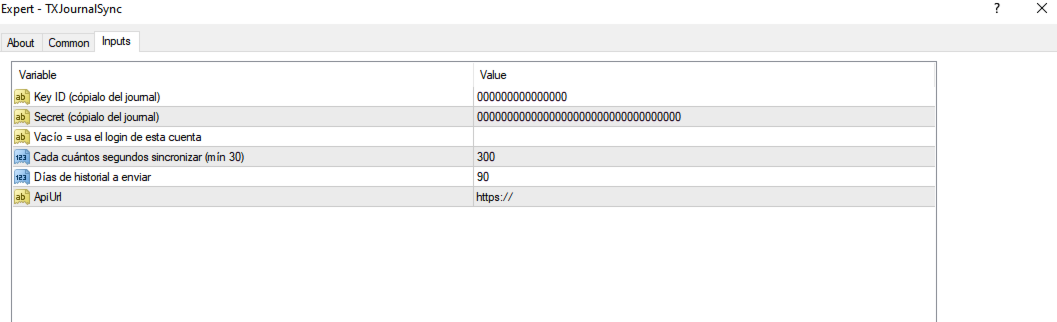
Inputs

  • Key ID / Secret — your personal EA key from TX Journal.
  • AccountLogin — leave empty to use the current account login.
  • SyncSeconds — how often to sync (default 300, minimum 30).
  • HistoryDays — how many days of history to send (default 90).
  • ApiUrl — the endpoint to authorize in WebRequest settings.

Notes

  • Works with any broker, any account type (hedging and netting), any symbol. One chart is enough for the whole account.
  • Closed trades are rebuilt from the deal history so open/close pairs are accurate.
  • Does nothing in the Strategy Tester (WebRequest is not available there).
  • If the status shows a WebRequest error, the URL was not added to the allowed list (step 2).
作者のその他のプロダクト
MQT Lot Size Calculator MT5
Josue Fernando Servellon Fuentes
MQT Lot Size Calculator は、選択したリスク(有効証拠金に対する割合または 固定金額)に対して正確なロットサイズを計算します。チャート上の3本の ドラッグ可能なライン(エントリー、ストップロス、テイクプロフィット)を 使用します。無料・軽量で、計算のみを行います。注文の発注・変更・決済は 一切行いません。 動作の仕組み(ロジックの概要): 方向はストップロスの位置から判断します(エントリーより下=買い、上= 売り)。 リスク金額 = 有効証拠金 × リスク割合(または固定金額)。 1ロットあたりの損失 = ストップロスまでの距離 ÷ ティックサイズ × ティックバリュー。 ロット = リスク ÷ 1ロットあたりの損失。常にブローカーの数量ステップへ 切り捨てるため、設定した以上のリスクを取ることはありません。 パネルの表示:方向、エントリー/SL/TP の価格とポイント距離、口座通貨での リスク、計算されたロット、丸め後の実際のリスク、リワード:リスク比、TP での 潜在利益、必要証拠金(余剰証拠金を超える場合は警告)。 注意: これは計算機のみです。取引の発注・
FREE
MQT Prop Guard DD MT4
Josue Fernando Servellon Fuentes
MQT Prop Guard DD は、プロップファーム口座を1日の損失上限および合計 ドローダウンの超過から保護します。有効証拠金を毎秒監視し、チャレンジの 1日上限に達する前にすべてを決済し、その後、次回の日次リセットまで取引を ロックします。FTMO、The5ers、FundedNext などのプロップファームのルールに 対応しています(各社の正確なリセット時刻と上限を必ず確認してください)。 動作の仕組み(ロジックの概要): 設定したリセット時刻(サーバー時間)に当日の基準値を記録します:残高、 有効証拠金、またはその大きい方(既定は保守的な値)。 毎秒、現在の有効証拠金(含み損を含む)を基準値から1日上限(%または 固定金額)を引いた値と比較します。 設定可能な警告水準(既定は上限の80%)で1日1回警告します:ポップアップ、 ジャーナル、任意のプッシュ通知。 上限を超えると、全銘柄の全ポジションを決済し、待機注文を削除し、次回 リセットまで取引をロックします。ロック中に開いたものは即座に決済されます。 任意の合計ドローダウン上限(初期残高基準)が2つ目の安全網になります。
FREE
MQT Lot Size Calculator MT4
Josue Fernando Servellon Fuentes
MQT Lot Size Calculator は、選択したリスク(有効証拠金に対する割合または 固定金額)に対して正確なロットサイズを計算します。チャート上の3本の ドラッグ可能なライン(エントリー、ストップロス、テイクプロフィット)を 使用します。無料・軽量で、計算のみを行います。注文の発注・変更・決済は 一切行いません。 動作の仕組み(ロジックの概要): 方向はストップロスの位置から判断します(エントリーより下=買い、上= 売り)。 リスク金額 = 有効証拠金 × リスク割合(または固定金額)。 1ロットあたりの損失 = ストップロスまでの距離 ÷ ティックサイズ × ティックバリュー。 ロット = リスク ÷ 1ロットあたりの損失。常にブローカーの数量ステップへ 切り捨てるため、設定した以上のリスクを取ることはありません。 パネルの表示:方向、エントリー/SL/TP の価格とポイント距離、口座通貨での リスク、計算されたロット、丸め後の実際のリスク、リワード:リスク比、TP での 潜在利益、必要証拠金(余剰証拠金を超える場合は警告)。 注意: これは計算機のみです。取引の発注・
FREE
MQT Prop Guard DD MT5
Josue Fernando Servellon Fuentes
MQT Prop Guard DD は、プロップファーム口座を1日の損失上限および合計 ドローダウンの超過から保護します。有効証拠金を毎秒監視し、チャレンジの 1日上限に達する前にすべてを決済し、その後、次回の日次リセットまで取引を ロックします。FTMO、The5ers、FundedNext などのプロップファームのルールに 対応しています(各社の正確なリセット時刻と上限を必ず確認してください)。 動作の仕組み(ロジックの概要): 設定したリセット時刻(サーバー時間)に当日の基準値を記録します:残高、 有効証拠金、またはその大きい方(既定は保守的な値)。 毎秒、現在の有効証拠金(含み損を含む)を基準値から1日上限(%または 固定金額)を引いた値と比較します。 設定可能な警告水準(既定は上限の80%)で1日1回警告します:ポップアップ、 ジャーナル、任意のプッシュ通知。 上限を超えると、全銘柄の全ポジションを決済し、待機注文を削除し、次回 リセットまで取引をロックします。ロック中に開いたものは即座に決済されます。 任意の合計ドローダウン上限(初期残高基準)が2つ目の安全網になります。
FREE
AutoClose Expert
Josue Fernando Servellon Fuentes
MQT AutoClose Expert closes your orders automatically once they reach the profit target you set — in real pips (with a separate target for gold) or in account money. Open your trades as you always do; the EA watches every position on every symbol and locks the profit in for you. It never opens trades. How it works (logic summary): Every tick and every 500 ms it scans all open market orders. Pending orders are never touched. Pips mode: profit distance is computed from prices — Bid for buys, Ask f
TX Journal Sync MT4
Josue Fernando Servellon Fuentes
Stop exporting CSV files by hand. TX Journal Sync keeps your TX Journal trading diary up to date automatically: it reads your account history and open positions and securely pushes them to your journal at the interval you choose. Security first 100% read-only: this utility never opens, modifies or closes trades. Every upload is signed with HMAC-SHA256. Your Secret never leaves your terminal. Only trade data is sent: symbol, direction, volume, prices, times, profit, commission and swap. Nothing e
FREE
MQT AutoClose Expert MT5
Josue Fernando Servellon Fuentes
MQT AutoClose Expert closes your orders automatically once they reach the profit target you set — in real pips (with a separate target for gold) or in account money. Open your trades as you always do; the EA watches every position on every symbol and locks the profit in for you. It never opens trades. How it works (logic summary): Every tick and every 500 ms it scans all open market orders. Pending orders are never touched. Pips mode: profit distance is computed from prices — Bid for buys, Ask f
フィルタ:
レビューなし
レビューに返信